


 Скачать презентацию Introduction Framework Chapter 1 Panko Corporate Computer
c26b96e9297f93a4f8873db667bde7ac.ppt
- Количество слайдов: 54
 Introduction & Framework Chapter 1 Panko, Corporate Computer and Network Security Copyright 2004 Prentice-Hall Revised by Huei Lee
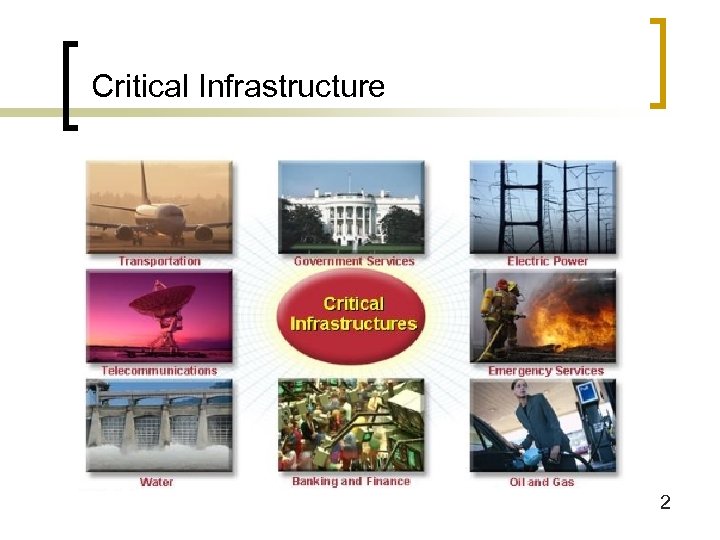 Critical Infrastructure 2
 Figure 1 -1: CSI/FBI Computer Crime and Security Survey n Survey conducted by the Computer Security Institute (http: //www. gocsi. com). n Based on replies from 503 U. S. Computer Security Professionals. 3
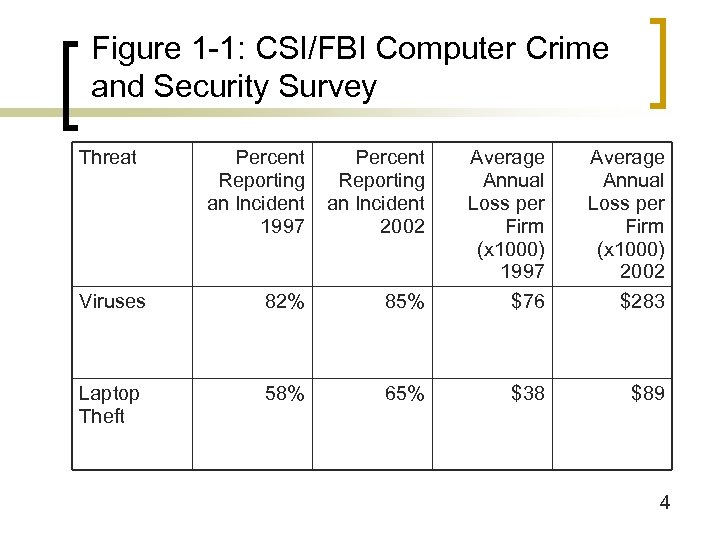 Figure 1 -1: CSI/FBI Computer Crime and Security Survey Threat Percent Reporting an Incident 1997 Percent Reporting an Incident 2002 Average Annual Loss per Firm (x 1000) 1997 Average Annual Loss per Firm (x 1000) 2002 Viruses 82% 85% $76 $283 Laptop Theft 58% 65% $38 $89 4
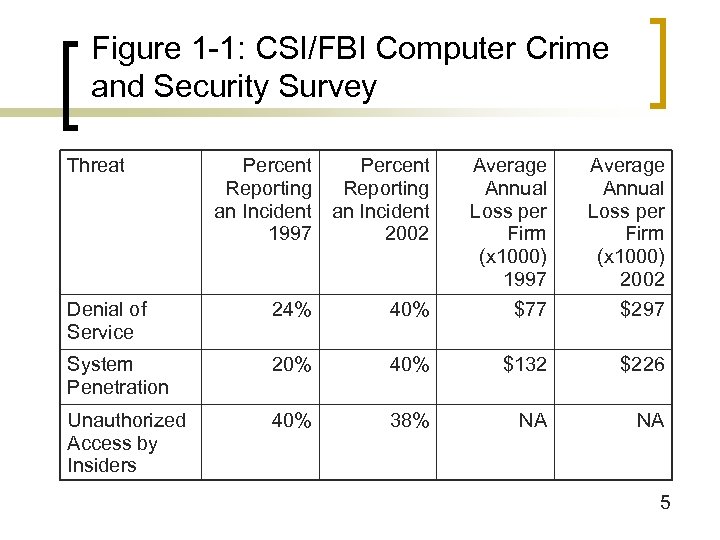 Figure 1 -1: CSI/FBI Computer Crime and Security Survey Threat Percent Reporting an Incident 1997 2002 Average Annual Loss per Firm (x 1000) 1997 Average Annual Loss per Firm (x 1000) 2002 Denial of Service 24% 40% $77 $297 System Penetration 20% 40% $132 $226 Unauthorized Access by Insiders 40% 38% NA NA 5
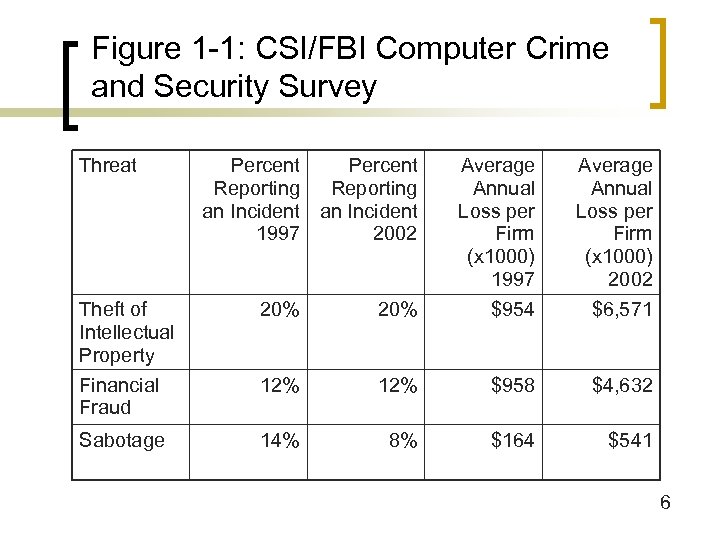 Figure 1 -1: CSI/FBI Computer Crime and Security Survey Threat Percent Reporting an Incident 1997 2002 Average Annual Loss per Firm (x 1000) 1997 Average Annual Loss per Firm (x 1000) 2002 Theft of Intellectual Property 20% $954 $6, 571 Financial Fraud 12% $958 $4, 632 Sabotage 14% 8% $164 $541 6
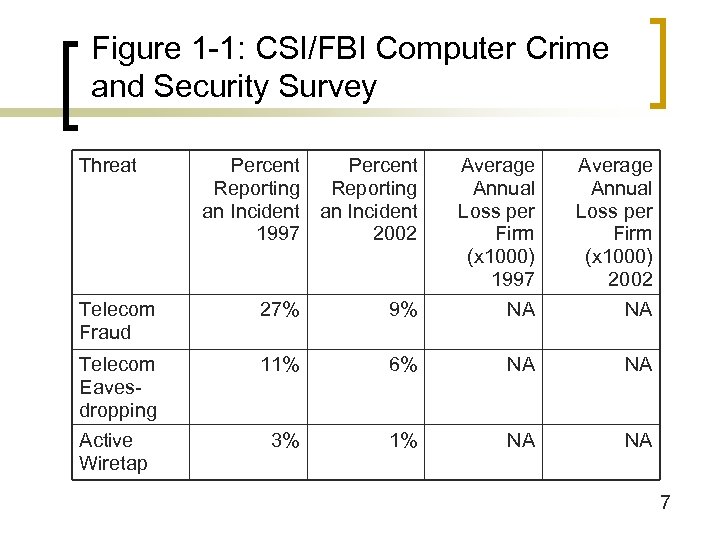 Figure 1 -1: CSI/FBI Computer Crime and Security Survey Threat Percent Reporting an Incident 1997 2002 Average Annual Loss per Firm (x 1000) 1997 Average Annual Loss per Firm (x 1000) 2002 Telecom Fraud 27% 9% NA NA Telecom Eavesdropping 11% 6% NA NA Active Wiretap 3% 1% NA NA 7
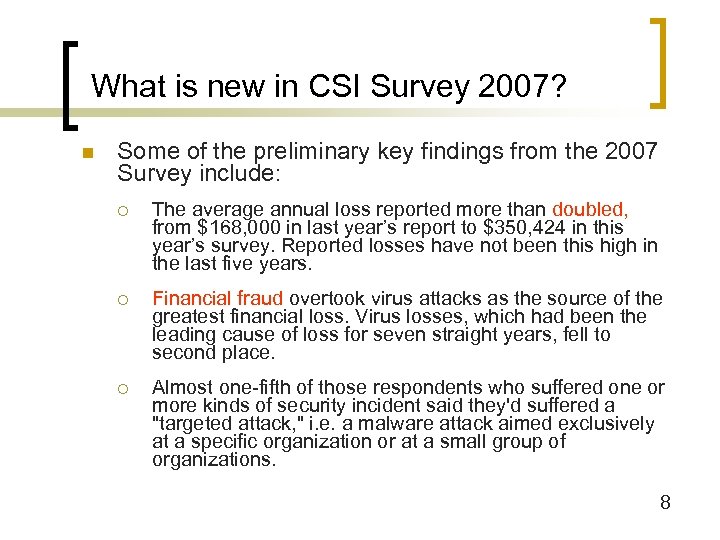 What is new in CSI Survey 2007? n Some of the preliminary key findings from the 2007 Survey include: ¡ The average annual loss reported more than doubled, from $168, 000 in last year’s report to $350, 424 in this year’s survey. Reported losses have not been this high in the last five years. ¡ Financial fraud overtook virus attacks as the source of the greatest financial loss. Virus losses, which had been the leading cause of loss for seven straight years, fell to second place. ¡ Almost one-fifth of those respondents who suffered one or more kinds of security incident said they'd suffered a "targeted attack, " i. e. a malware attack aimed exclusively at a specific organization or at a small group of organizations. 8
 Identity Theft n The stealing of another person’s information for financial gain. n See the video n http: //abcnews. go. com/Video/player. Index? id=5523911 n 9
 Software that covertly gathers information about a user is called ______. n Adware n Malware n Spyware n Shareware Spyware is sometimes hidden within freeware or n Freeware shareware programs. In other instances, it is embedded within a Web site and is downloaded to the user’s computer, without the user’s knowledge, in order to track data about the user for marketing and advertisement purposes 10
 When receiving warnings of viruses, or requests to donate money to victims of some disaster, you should always check if it is a ____ before reacting to it. n Trick n Hoax n Prank n Joke Some spam e-mails are hoaxes, asking you to donate money to n Spam nonexistent causes or warning you of viruses and other Internet dangers that do not exist. You should always check before forwarding such messages to your friends 11
 Figure 1 -2: Other Empirical Attack Data n Riptech ¡ Analyzed 5. 5 billion firewall log entries in 300 firms in five-month period ¡ Detected 128, 678 attacks—an annual rate of 1, 000 per firm ¡ Only 39% of attacks after viruses were removed were directed at individual firms 12
 Figure 1 -2: Other Empirical Attack Data n Security. Focus ¡ Data from 10, 000 firms in 2001 ¡ Attack Frequency n 129 million network scanning probes (13, 000 per firm) n 29 million website attacks (3, 000 per firm) n 6 million denial-of-service attacks (600 per firm) 13
 Figure 1 -2: Other Empirical Attack Data n Security. Focus ¡ Attack Targets n 31 million Windows-specific attacks n 22 million UNIX/LINUX attacks n 7 million Cisco IOS attacks n All operating systems are attacked! 14
 Figure 1 -3: Attack Trends n Growing Incident Frequency ¡ Incidents reported to the Computer Emergency Response Team/Coordination Center ¡ 1997: 2, 134 ¡ 1998: 3, 474 (75% growth from previous year) ¡ 1999: 9, 859 (164% growth) ¡ 2000: 21, 756 (121% growth) ¡ 2001: 52, 658 (142% growth) ¡ Tomorrow? 15
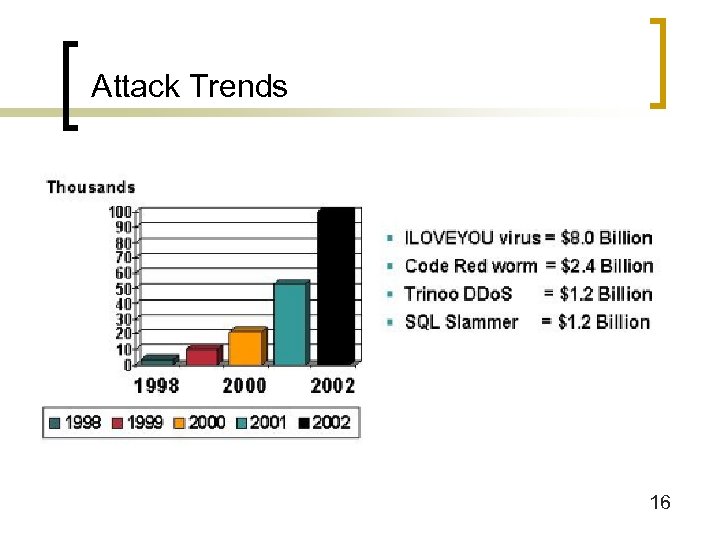 Attack Trends 16
 Figure 1 -3: Attack Trends n Growing Randomness in Victim Selection ¡ In the past, large firms were targeted ¡ Now, targeting is increasingly random ¡ No more security through obscurity for small firms and individuals 17
 Figure 1 -3: Attack Trends n Growing Malevolence ¡ Most early attacks were not malicious ¡ Malicious attacks are becoming the norm 18
 Figure 1 -3: Attack Trends n Growing Attack Automation ¡ Attacks are automated, rather than humanlydirected ¡ Essentially, viruses and worms are attack robots that travel among computers ¡ Attack many computers in minutes or hours 19
 Why You need to take this course? n Most network software is designed for security. n This course teaches you fundamental concepts of security and infrastructure. n Some governmental IT jobs requires that you have security training. 20
 Figure 1 -4: Framework for Attackers n Elite Hackers ¡ Hacking: intentional access without authorization or in excess of authorization ¡ Some call this cracking, not hacking, which they equate to any skilled computer use ¡ Characterized by technical expertise and dogged persistence, not just a bag of tools n Use attack scripts to automate actions, but this is not the essence of what they do ¡ Deviants and often part of hacker groups that reinforce deviant behavior 21
 Figure 1 -4: Framework for Attackers n You may hear the terms “white hat” (good guys) and “black hat” bad guys n Black hat hackers break in for their own purposes n “White hat” can mean multiple things ¡ Strictest: Hack only by invitation as part of vulnerability testing ¡ Some who hack without permission but report vulnerabilities (not for pay) also call themselves white hat hackers 22
 Figure 1 -4: Framework for Attackers n You will also hear the term “ethical hacker” ¡ Some hack only by invitation as part of vulnerability testing ¡ Others hack without invitation but have a “code of ethics” n Do no damage or limited damage n Some “hacker codes” allow considerable victimization 23
 Figure 1 -4: Framework for Attackers n Hats, Ethical Codes of Conduct, and Criminality ¡ If hack without explicit authorization, it is criminal ¡ Motive for hacking is not part of the law—only intentionally accessing without authorization or in excess of authorization 24
 Figure 1 -4: Framework for Attackers n Virus Writers and Releasers ¡ Virus writers versus virus releasers ¡ Only releasing viruses is punishable 25
 Figure 1 -4: Framework for Attackers n Script Kiddies ¡ Use pre-written attack scripts (kiddie scripts) ¡ Viewed as lamers and script kiddies ¡ Large numbers make dangerous ¡ Noise of kiddie script attacks masks more sophisticated attacks 26
 Figure 1 -4: Framework for Attackers n Criminals ¡ Many attackers are ordinary garden-variety criminals ¡ Credit card and identity theft ¡ Stealing trade secrets (intellectual property) ¡ Extortion 27
 Figure 1 -4: Framework for Attackers n Employees, Consultants, and Contractors ¡ Have access and knowledge ¡ Financial theft ¡ Theft of trade secrets (intellectual property) ¡ Sabotage ¡ IT and security staff ¡ Consultants 28
 Figure 1 -4: Framework for Attackers n Cyberterrorism and Cyberwar ¡ New level of danger ¡ Infrastructure destruction n IT Infrastructure n Use IT to damage physical infrastructure ¡ Cyberterrorists versus cyberwar by national governments ¡ Amateur information warfare is also a danger 29
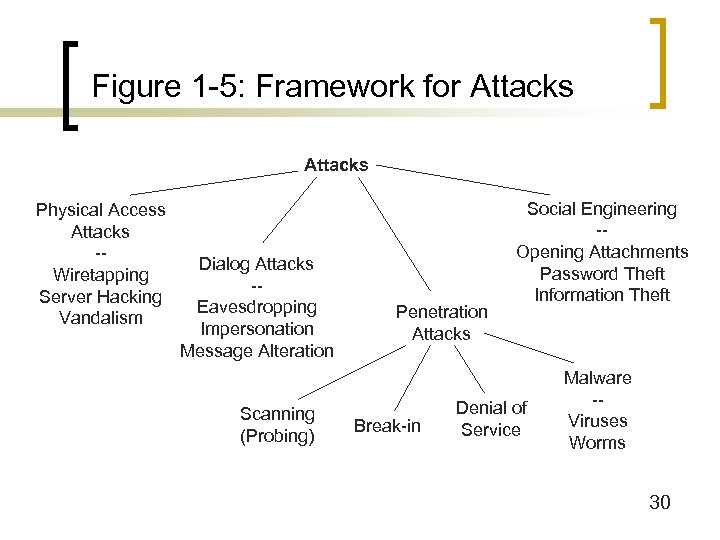 Figure 1 -5: Framework for Attacks Physical Access Attacks -Wiretapping Server Hacking Vandalism Dialog Attacks -Eavesdropping Impersonation Message Alteration Scanning (Probing) Penetration Attacks Break-in Social Engineering -Opening Attachments Password Theft Information Theft Denial of Service Malware -Viruses Worms 30
 Figure 1 -6: Social Engineering Attacks and Defenses n Social Engineering ¡ Tricking an employee into giving out information or taking an action that reduces security or harms a system ¡ Opening an e-mail attachment that may contain a virus ¡ Asking for a password claiming to be someone with rights to know it ¡ Asking for a file to be sent to you 31
 Figure 1 -6: Social Engineering Attacks and Defenses n Social Engineering Defenses ¡ Training ¡ Enforcement through sanctions (punishment) 32
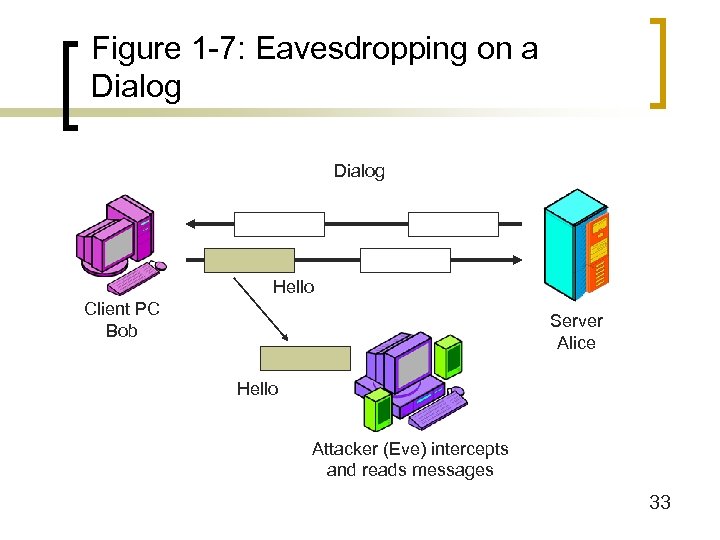 Figure 1 -7: Eavesdropping on a Dialog Hello Client PC Bob Server Alice Hello Attacker (Eve) intercepts and reads messages 33
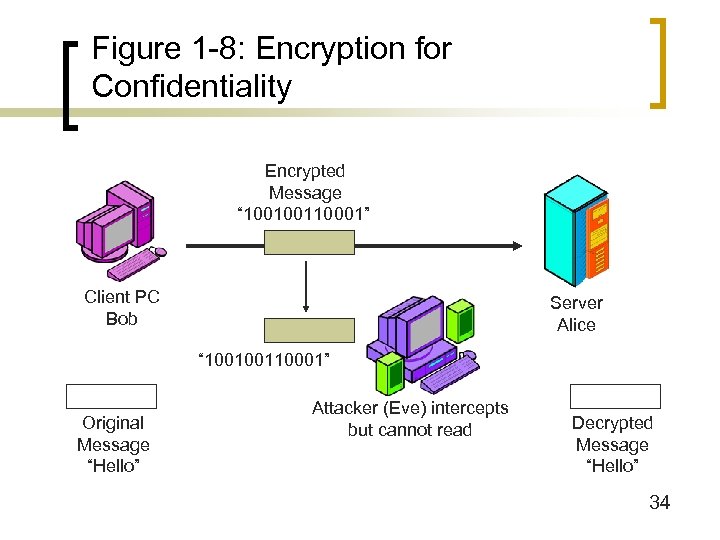 Figure 1 -8: Encryption for Confidentiality Encrypted Message “ 100100110001” Client PC Bob Server Alice “ 100100110001” Original Message “Hello” Attacker (Eve) intercepts but cannot read Decrypted Message “Hello” 34
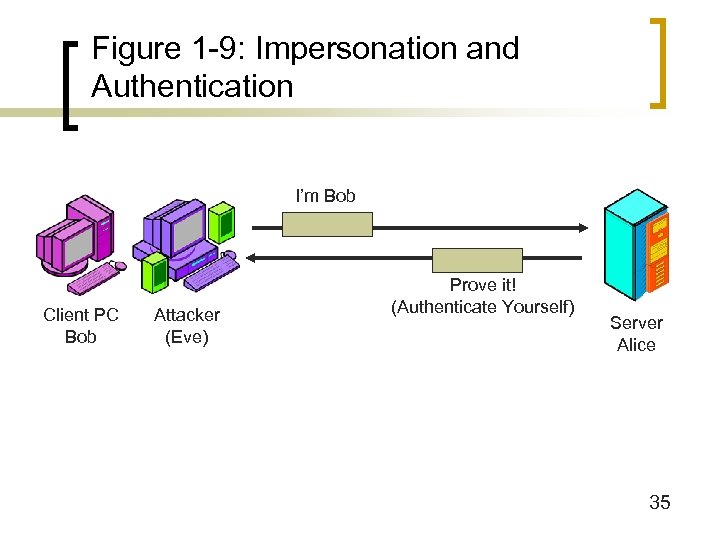 Figure 1 -9: Impersonation and Authentication I’m Bob Client PC Bob Attacker (Eve) Prove it! (Authenticate Yourself) Server Alice 35
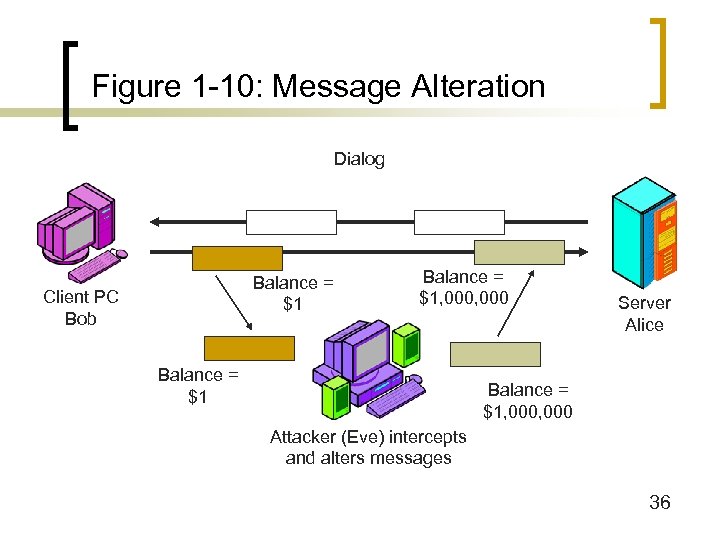 Figure 1 -10: Message Alteration Dialog Balance = $1 Client PC Bob Balance = $1, 000 Balance = $1 Server Alice Balance = $1, 000 Attacker (Eve) intercepts and alters messages 36
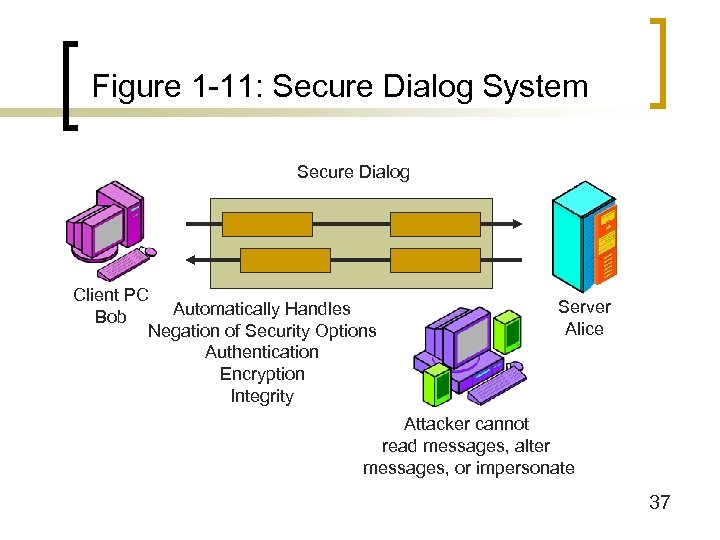 Figure 1 -11: Secure Dialog System Secure Dialog Client PC Automatically Handles Bob Negation of Security Options Authentication Encryption Integrity Server Alice Attacker cannot read messages, alter messages, or impersonate 37
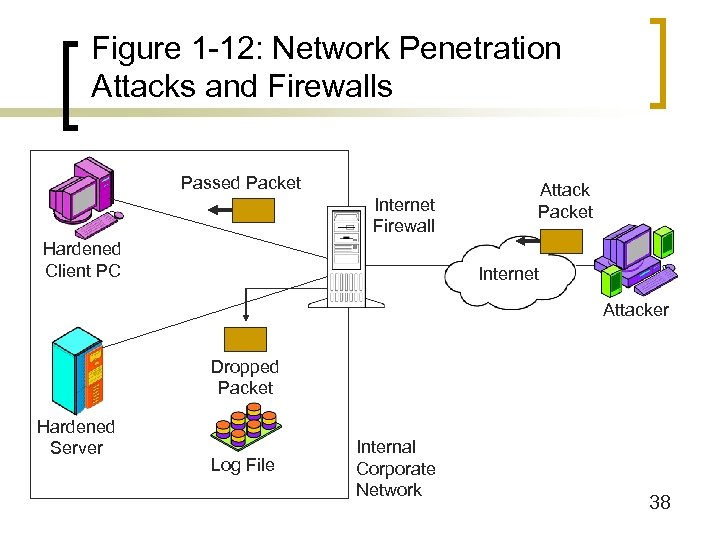 Figure 1 -12: Network Penetration Attacks and Firewalls Passed Packet Internet Firewall Hardened Client PC Attack Packet Internet Attacker Dropped Packet Hardened Server Log File Internal Corporate Network 38
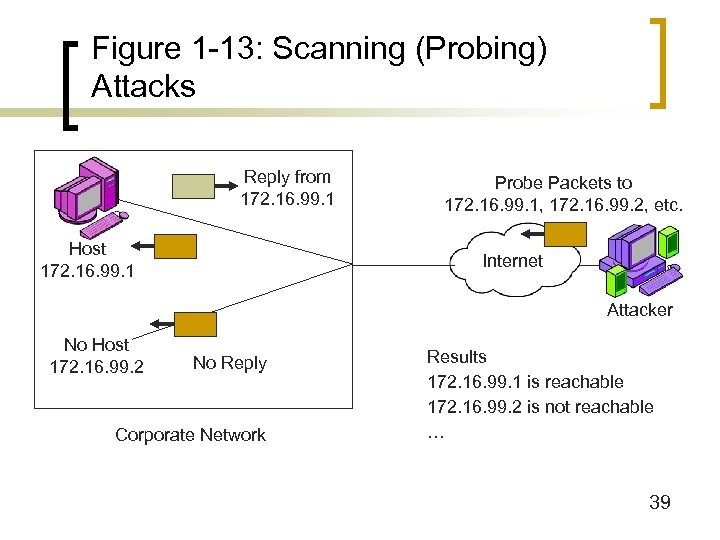 Figure 1 -13: Scanning (Probing) Attacks Reply from 172. 16. 99. 1 Host 172. 16. 99. 1 Probe Packets to 172. 16. 99. 1, 172. 16. 99. 2, etc. Internet Attacker No Host 172. 16. 99. 2 No Reply Corporate Network Results 172. 16. 99. 1 is reachable 172. 16. 99. 2 is not reachable … 39
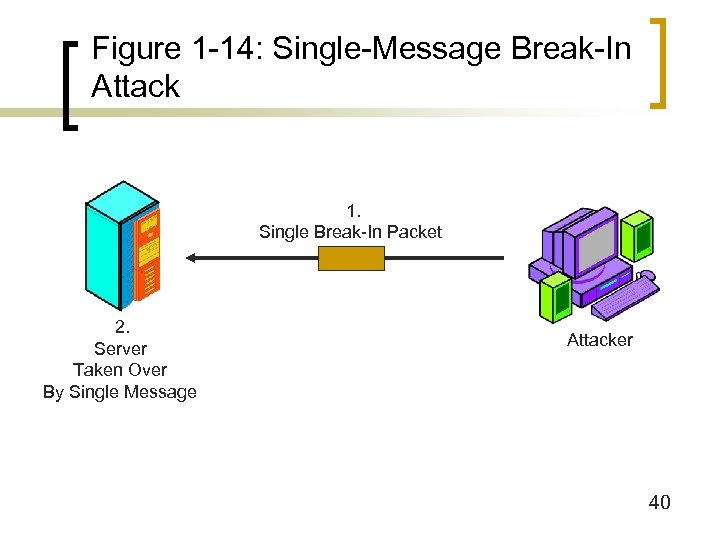 Figure 1 -14: Single-Message Break-In Attack 1. Single Break-In Packet 2. Server Taken Over By Single Message Attacker 40
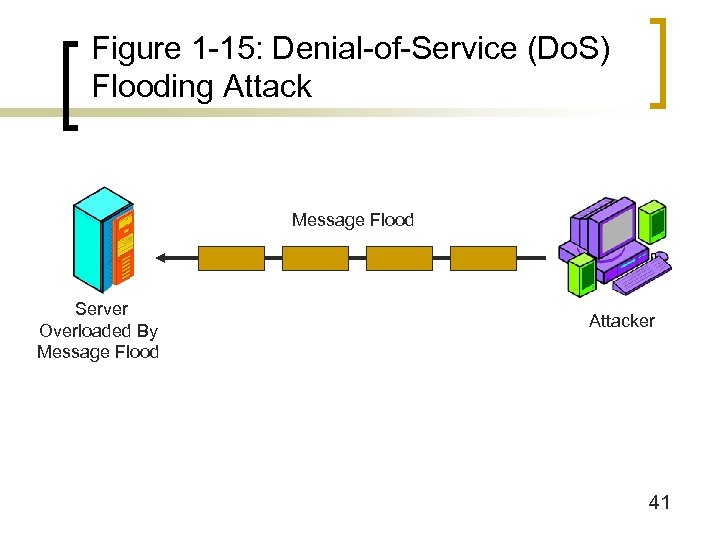 Figure 1 -15: Denial-of-Service (Do. S) Flooding Attack Message Flood Server Overloaded By Message Flood Attacker 41
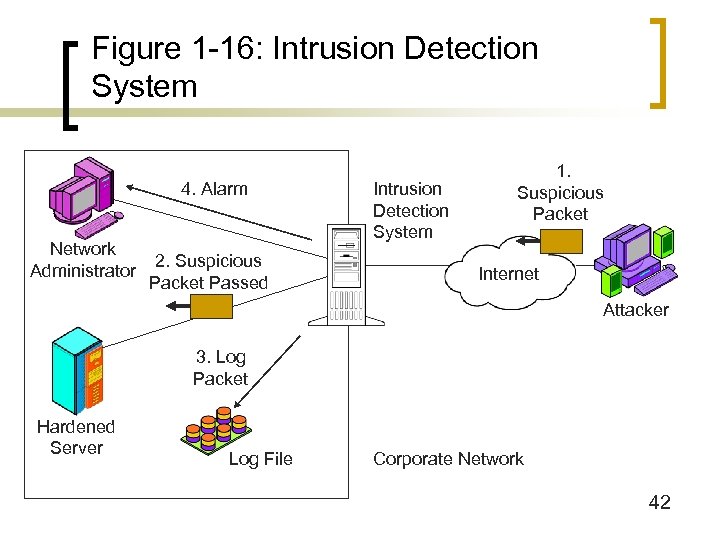 Figure 1 -16: Intrusion Detection System 4. Alarm Network Administrator 2. Suspicious Packet Passed Intrusion Detection System 1. Suspicious Packet Internet Attacker 3. Log Packet Hardened Server Log File Corporate Network 42
 Figure 1 -17: Security Management n Security is a Primarily a Management Issue, not a Technology Issue n Top-to-Bottom Commitment ¡ Top-management commitment ¡ Operational execution ¡ Enforcement 43
 Figure 1 -17: Security Management n Comprehensive Security ¡ Closing all avenues of attack ¡ Asymmetrical warfare n Attacker only has to find one opening ¡ Defense in depth n Attacker must get past several defenses to succeed ¡ Security audits n Run attacks against your own network 44
 Figure 1 -17: Security Management n General Security Goals (CIA) ¡ Confidentiality n Attackers cannot read messages if they intercept them ¡ Integrity n If attackers change messages, this will be detected ¡ Availability n System is able to server users 45
 Figure 1 -18: The Plan—Protect— Respond Cycle n Planning ¡ Need for comprehensive security (no gaps) ¡ Risk analysis n Enumerating threats n Threat severity = estimated cost of attack X probability of attack n Value of protection = threat severity – cost of countermeasure n Prioritize countermeasures by value of prioritization 46
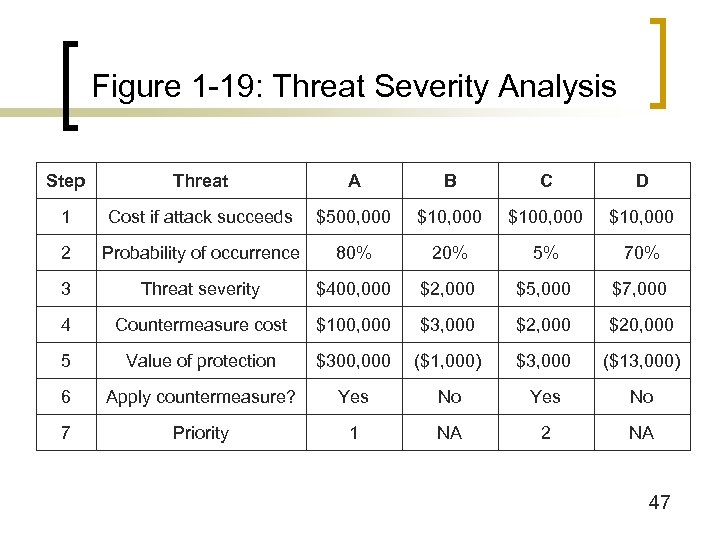 Figure 1 -19: Threat Severity Analysis Step Threat A B C D 1 Cost if attack succeeds $500, 000 $100, 000 $10, 000 2 Probability of occurrence 80% 20% 5% 70% 3 Threat severity $400, 000 $2, 000 $5, 000 $7, 000 4 Countermeasure cost $100, 000 $3, 000 $20, 000 5 Value of protection $300, 000 ($1, 000) $3, 000 ($13, 000) 6 Apply countermeasure? Yes No 7 Priority 1 NA 2 NA 47
 Figure 1 -18: The Plan—Protect— Respond Cycle n Planning ¡ Security policies drive subsequent specific actions ¡ Access control ¡ Technical security architectures n Tools for comprehensive security (firewalls, etc. ) n Central management ¡ Awareness and procedure training ¡ Punishment 48
 Figure 1 -18: The Plan—Protect— Respond Cycle n Protecting ¡ Installing protections: firewalls, IDSs, host hardening, etc. ¡ Updating protections as the threat environment changes ¡ Testing protections: security audits 49
 Figure 1 -18: The Plan—Protect— Respond Cycle n Responding ¡ Planning for response (Computer Emergency Response Team) ¡ Incident detection and determination n Procedures for reporting suspicious situations n Determination that an attack really is occurring n Description of the attack 50
 Figure 1 -18: The Plan—Protect— Respond Cycle n Responding ¡ Recovery n The first priority n Stop the attack n Repair the damage ¡ Punishment n Forensics n Prosecution n Employee Punishment ¡ Fixing the vulnerability that allowed the attack 51
 Security Certification n The most widely recognized security certification: CISSP and SSCP ¡ ¡ SSCP: System Security Certified Practitioners. ¡ n CISSP of the International Information Systems Security Certification Consortium (ISC 2) Problems: need working experience CISCO Certificated Security Professional (CCSP) 52
 CCNA n Prerequisites ¡ n No prerequisites Content: ¡ http: //www. cisco. com/en/US/learning/le 3/current_ exams/640 -801. html 53
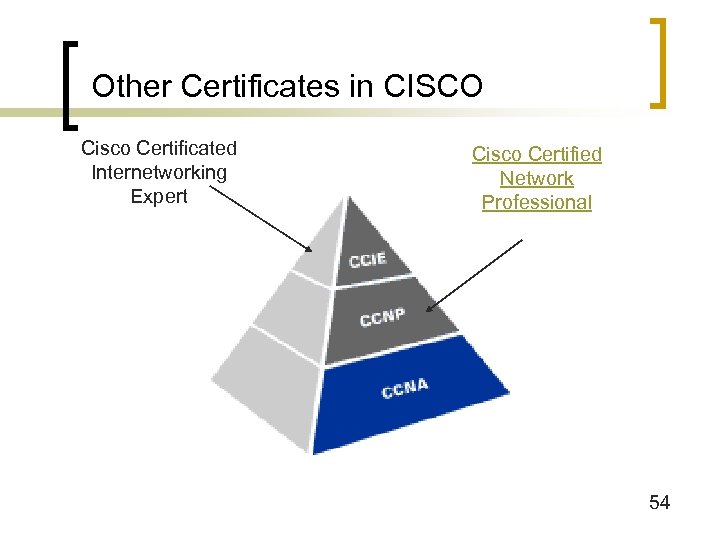 Other Certificates in CISCO Cisco Certificated Internetworking Expert Cisco Certified Network Professional 54