


 Скачать презентацию Introducing The 2007 Microsoft Office System All information
8d532368f954cc616fc71bca0c134da1.ppt
- Количество слайдов: 18
 Introducing The 2007 Microsoft Office System All information in this presentation remains under NDA
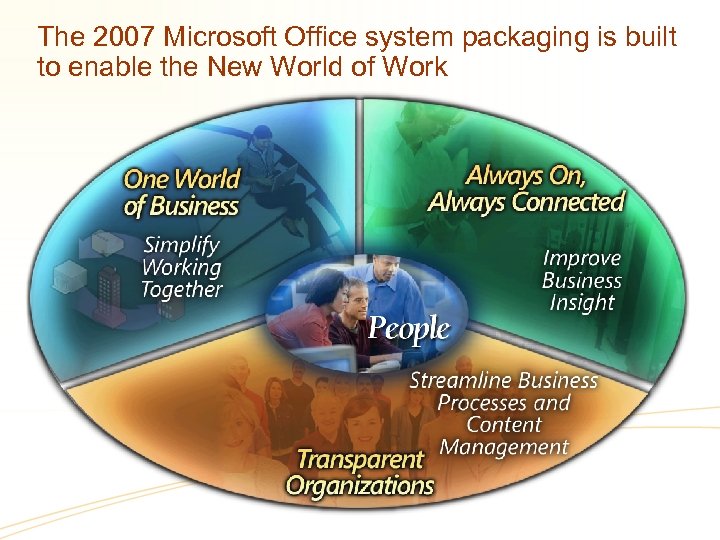 The 2007 Microsoft Office system packaging is built to enable the New World of Work
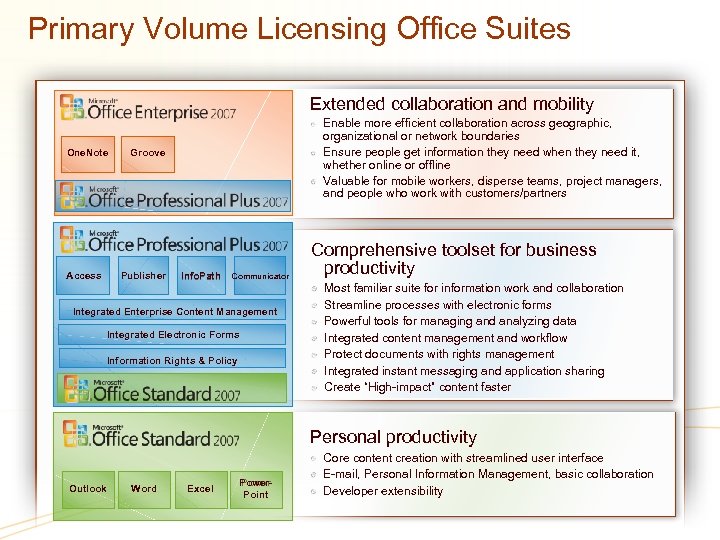 Primary Volume Licensing Office Suites Extended collaboration and mobility One. Note Access Enable more efficient collaboration across geographic, organizational or network boundaries Ensure people get information they need when they need it, whether online or offline Valuable for mobile workers, disperse teams, project managers, and people who work with customers/partners Groove Publisher Info. Path Communicator Integrated Enterprise Content Management Integrated Electronic Forms Information Rights & Policy Comprehensive toolset for business productivity Most familiar suite for information work and collaboration Streamline processes with electronic forms Powerful tools for managing and analyzing data Integrated content management and workflow Protect documents with rights management Integrated instant messaging and application sharing Create “High-impact” content faster Personal productivity Outlook Word Excel Power Point Core content creation with streamlined user interface E-mail, Personal Information Management, basic collaboration Developer extensibility
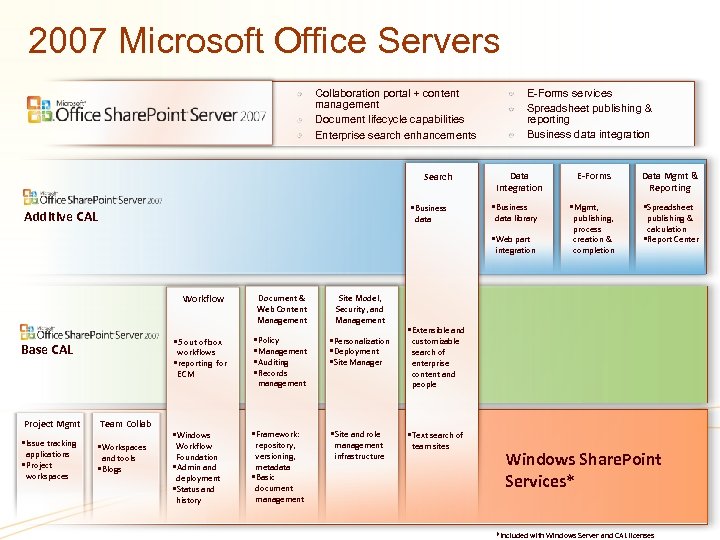 2007 Microsoft Office Servers Collaboration portal + content management Document lifecycle capabilities Enterprise search enhancements Search • Business Additive CAL data E-Forms services Spreadsheet publishing & reporting Business data integration Data Integration • Business data library • Web part integration Workflow • Issue tracking applications • Project workspaces Site Model, Security, and Management workflows • reporting for ECM • Policy • Management • Auditing • Records • Personalization • Deployment • Site Manager • Windows • Framework: • Site and role • 5 out of box Base CAL Project Mgmt Document & Web Content Management Team Collab • Workspaces and tools • Blogs Workflow Foundation • Admin and deployment • Status and history management repository, versioning, metadata • Basic document management infrastructure E-Forms • Mgmt, publishing, process creation & completion Data Mgmt & Reporting • Spreadsheet publishing & calculation • Report Center • Extensible and customizable search of enterprise content and people • Text search of team sites Windows Share. Point Services* *Included with Windows Server and CAL licenses
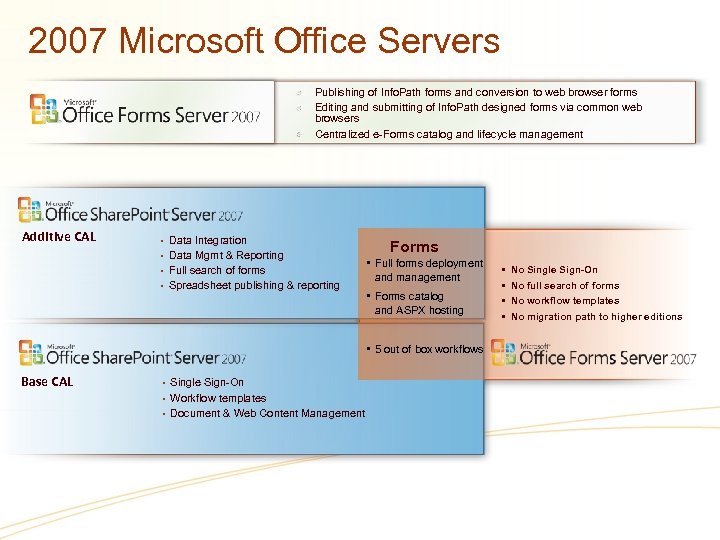 2007 Microsoft Office Servers Publishing of Info. Path forms and conversion to web browser forms Editing and submitting of Info. Path designed forms via common web browsers Centralized e-Forms catalog and lifecycle management Additive CAL • Data Integration • Data Mgmt & Reporting • Full search of forms • Spreadsheet publishing & reporting Forms • Full forms deployment and management • Forms catalog and ASPX hosting • 5 out of box workflows Base CAL • Single Sign-On • Workflow templates • Document & Web Content Management • • No Single Sign-On No full search of forms No workflow templates No migration path to higher editions
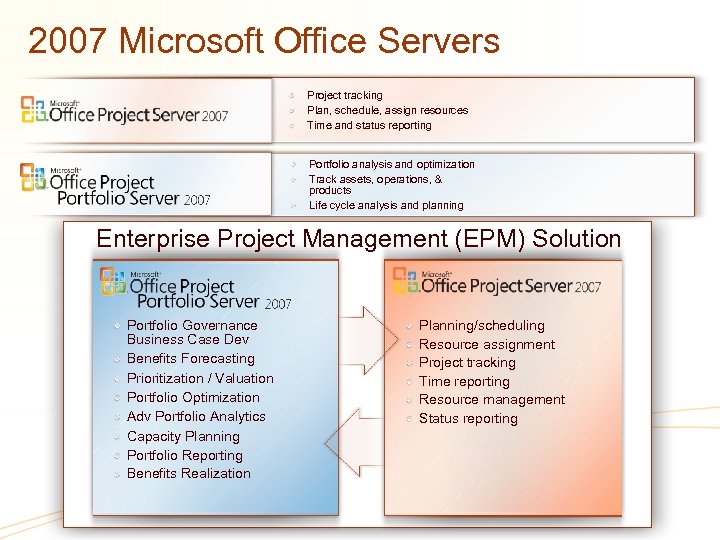 2007 Microsoft Office Servers Project tracking Plan, schedule, assign resources Time and status reporting Portfolio analysis and optimization Track assets, operations, & products Life cycle analysis and planning Enterprise Project Management (EPM) Solution Portfolio Governance Business Case Dev Benefits Forecasting Prioritization / Valuation Portfolio Optimization Adv Portfolio Analytics Capacity Planning Portfolio Reporting Benefits Realization Planning/scheduling Resource assignment Project tracking Time reporting Resource management Status reporting
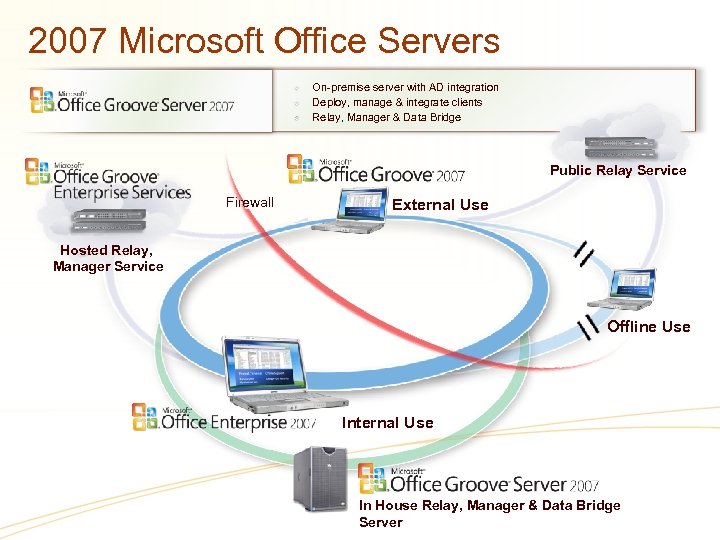 2007 Microsoft Office Servers On-premise server with AD integration Deploy, manage & integrate clients Relay, Manager & Data Bridge Public Relay Service Firewall External Use Hosted Relay, Manager Service Offline Use Internal Use In House Relay, Manager & Data Bridge Server
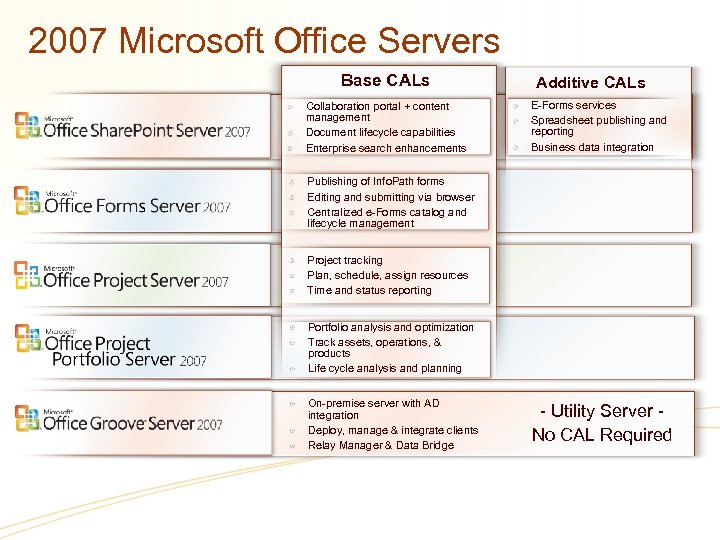 2007 Microsoft Office Servers Base CALs Collaboration portal + content management Document lifecycle capabilities Enterprise search enhancements Additive CALs E-Forms services Spreadsheet publishing and reporting Business data integration Publishing of Info. Path forms Editing and submitting via browser Centralized e-Forms catalog and lifecycle management Project tracking Plan, schedule, assign resources Time and status reporting Portfolio analysis and optimization Track assets, operations, & products Life cycle analysis and planning On-premise server with AD integration Deploy, manage & integrate clients Relay Manager & Data Bridge - Utility Server No CAL Required
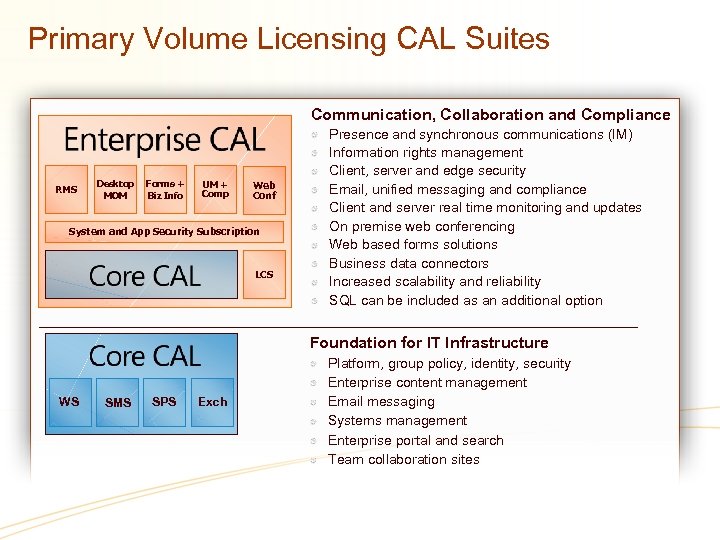 Primary Volume Licensing CAL Suites Communication, Collaboration and Compliance RMS Desktop MOM Forms + Biz Info UM + Comp Web Conf System and App Security Subscription LCS Presence and synchronous communications (IM) Information rights management Client, server and edge security Email, unified messaging and compliance Client and server real time monitoring and updates On premise web conferencing Web based forms solutions Business data connectors Increased scalability and reliability SQL can be included as an additional option Foundation for IT Infrastructure WS SMS SPS Exch Platform, group policy, identity, security Enterprise content management Email messaging Systems management Enterprise portal and search Team collaboration sites
 Changes in how to buy in volume licensing
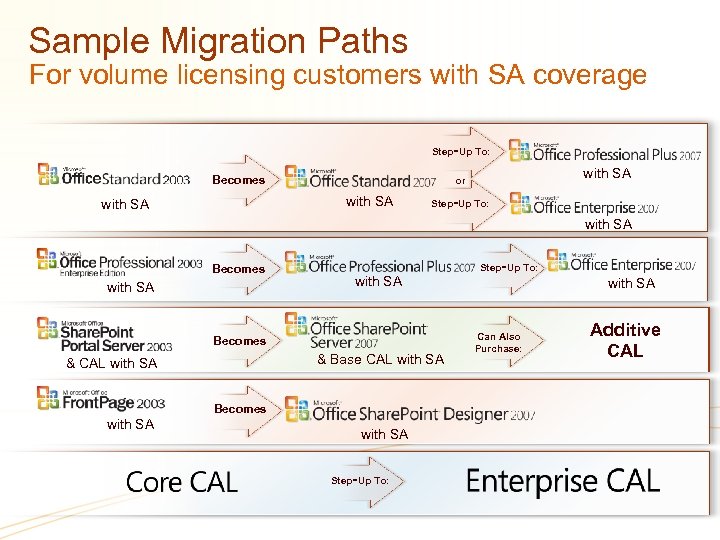 Sample Migration Paths For volume licensing customers with SA coverage - Step Up To: Becomes with SA or - Step Up To: with SA Becomes & Base CAL with SA & CAL with SA - Step Up To: Becomes with SA - Step Up To: with SA Can Also Purchase: Additive CAL
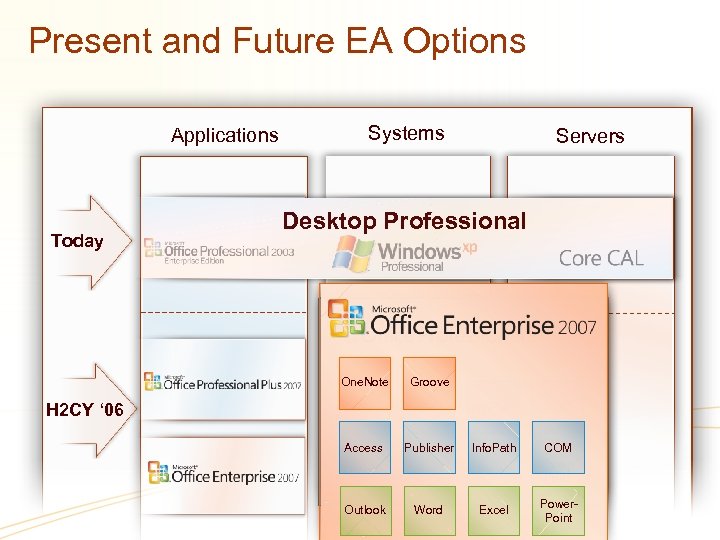 Present and Future EA Options Applications Today Systems Servers Desktop Professional One. Note H 2 CY ‘ 06 Groove Access Publisher Info. Path COM Access Publisher Info. Path Outlook Word Excel COM Power Point Outlook Word Excel Power. Point
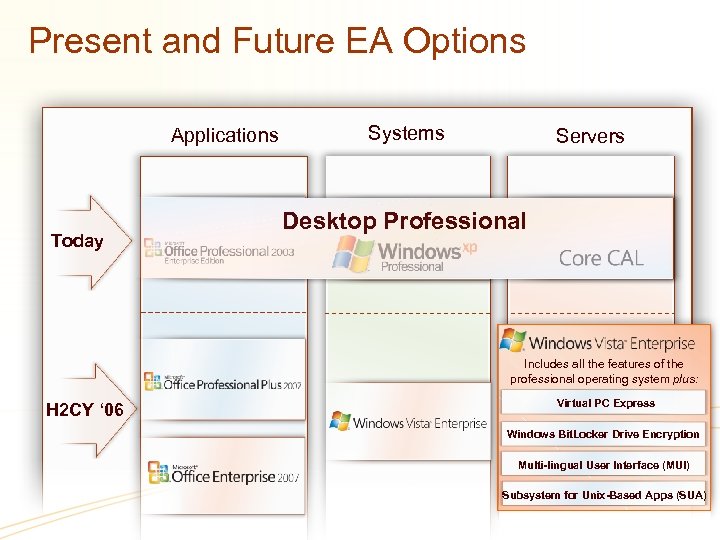 Present and Future EA Options Applications Today Systems Servers Desktop Professional Core CAL Includes all the features of the professional operating system plus: H 2 CY ‘ 06 Virtual PC Express Windows Bit. Locker Drive Encryption Multi-lingual User Interface (MUI) Subsystem for Unix-Based Apps (SUA)
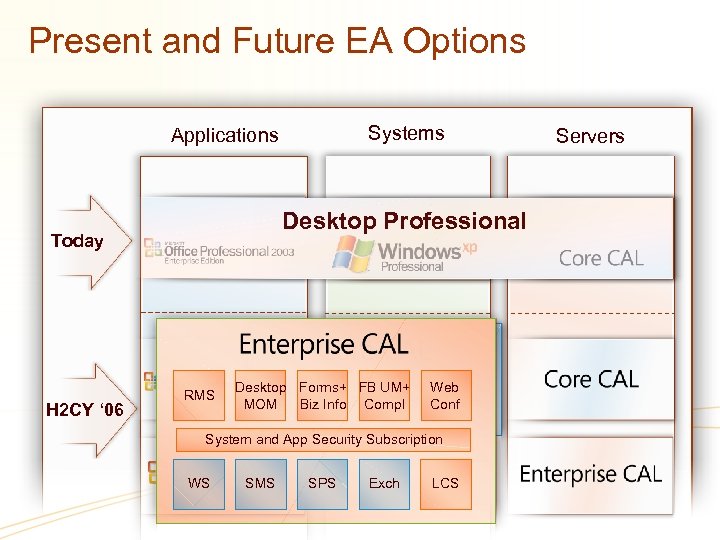 Present and Future EA Options Systems Applications Desktop Professional Today H 2 CY ‘ 06 RMS Desktop Forms+ FB UM+ Web WS Biz Info Compl SMS Exch SPS Conf MOM System and App Security Subscription WS SMS SPS Exch LCS Servers Core CAL
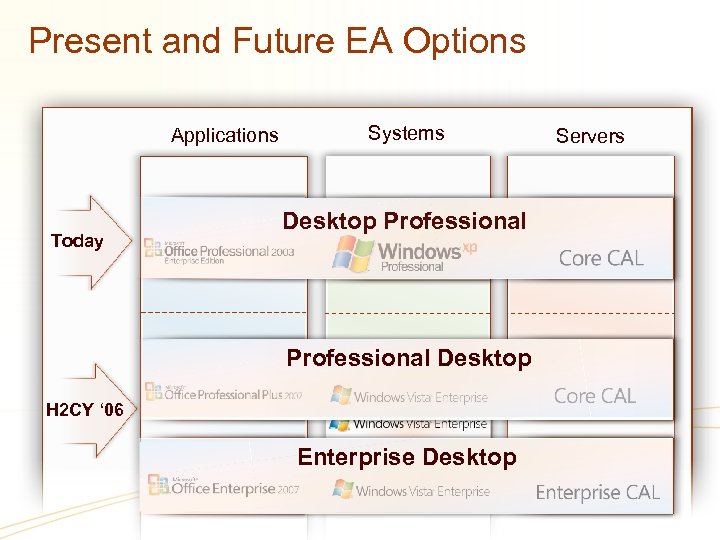 Present and Future EA Options Applications Today Systems Desktop Professional Desktop H 2 CY ‘ 06 Enterprise Desktop Servers Core CAL
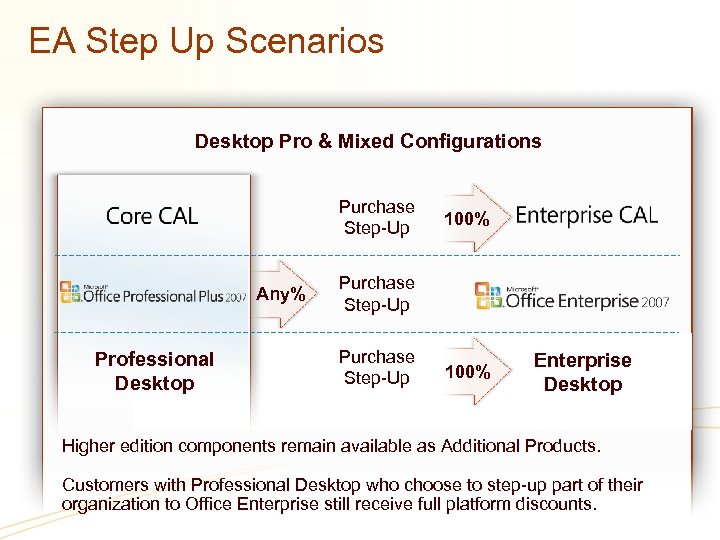 EA Step Up Scenarios Desktop Pro & Mixed Configurations Purchase Step-Up Any% Professional Desktop 100% Purchase Step-Up Purchase Professional Desktop Enterprise 100% Step-Up Desktop Higher edition components remain available as Additional Products. Customers with Professional Desktop who choose to step-up part of their organization to Office Enterprise still receive full platform discounts.
 Positioning your customer for the 2007 Office system Help customers understand the value of Software Assurance and highlight new & improved offerings available March 2006 Advise customers of advantages of renewing EA & SA coverage, or purchasing new licenses with SA Step-up and migration options only available with active Software Assurance More information: http: //www. microsoft. com/office/preview/default. mspx www. microsoft. com/licensing
 © 2006 Microsoft Corporation. All rights reserved. This presentation is for informational purposes only. MICROSOFT MAKES NO WARRANTIES, EXPRESS OR IMPLIED, IN THIS SUMMARY.