


 Скачать презентацию Intro to SAP Enterprise Systems Configuration EGS 5622
8ecdc67b5c094a072ece85ca7ae24de7.ppt
- Количество слайдов: 40
 Intro to SAP Enterprise Systems Configuration EGS 5622 Enterprise Systems Integration Spring, 2018
 Intro to SAP Enterprise Systems
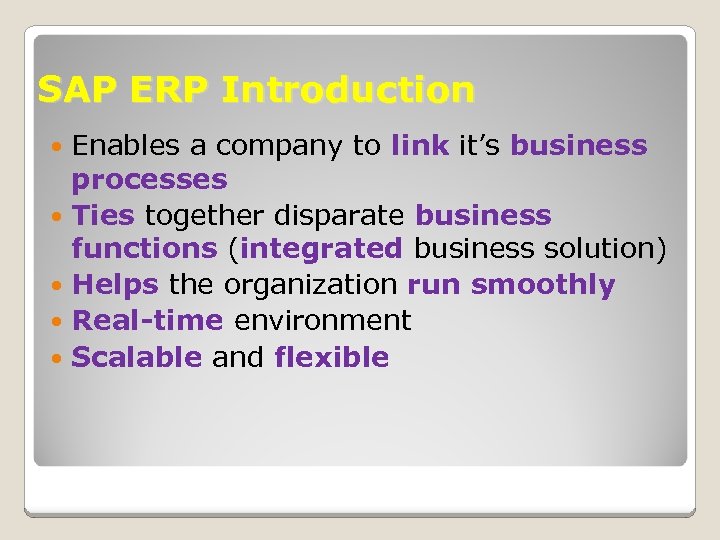 SAP ERP Introduction Enables a company to link it’s business processes Ties together disparate business functions (integrated business solution) Helps the organization run smoothly Real-time environment Scalable and flexible
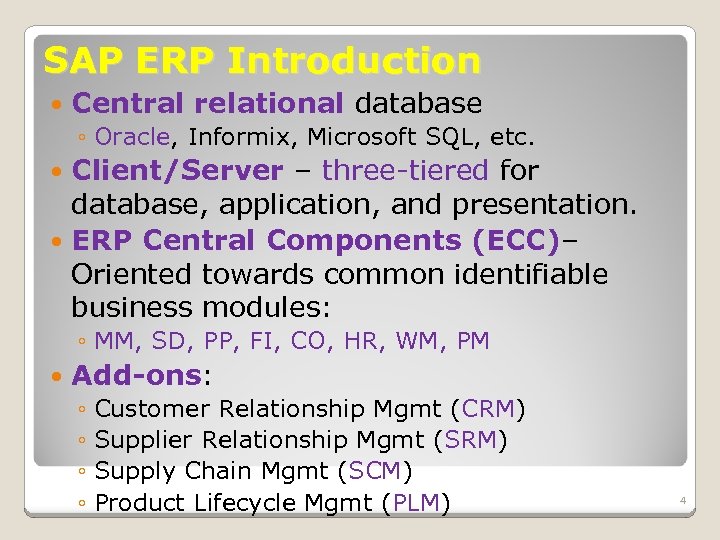 SAP ERP Introduction Central relational database ◦ Oracle, Informix, Microsoft SQL, etc. Client/Server – three-tiered for database, application, and presentation. ERP Central Components (ECC)– Oriented towards common identifiable business modules: ◦ MM, SD, PP, FI, CO, HR, WM, PM Add-ons: ◦ Customer Relationship Mgmt (CRM) ◦ Supplier Relationship Mgmt (SRM) ◦ Supply Chain Mgmt (SCM) ◦ Product Lifecycle Mgmt (PLM) 4
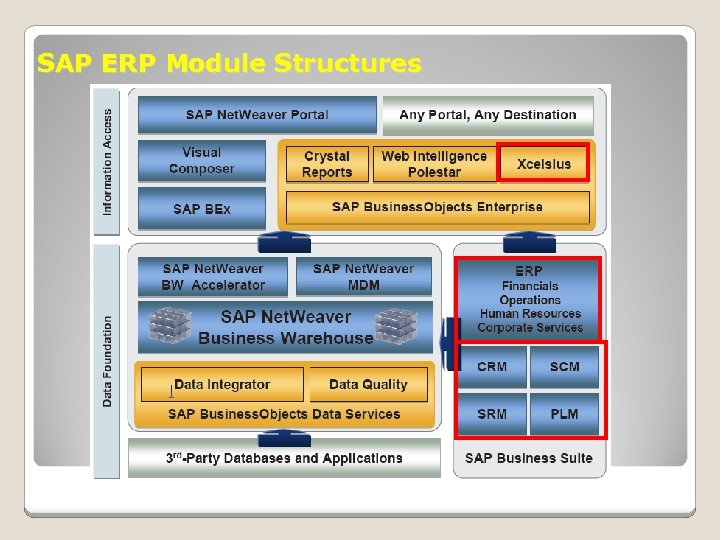 SAP ERP Module Structures
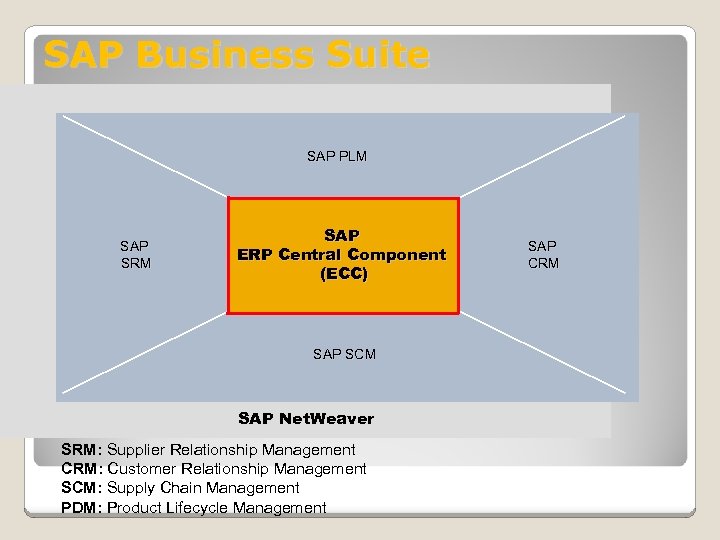 SAP Business Suite SAP PLM SAP SRM SAP ERP Central Component (ECC) SAP SCM SAP Net. Weaver SRM: Supplier Relationship Management CRM: Customer Relationship Management SCM: Supply Chain Management PDM: Product Lifecycle Management SAP CRM
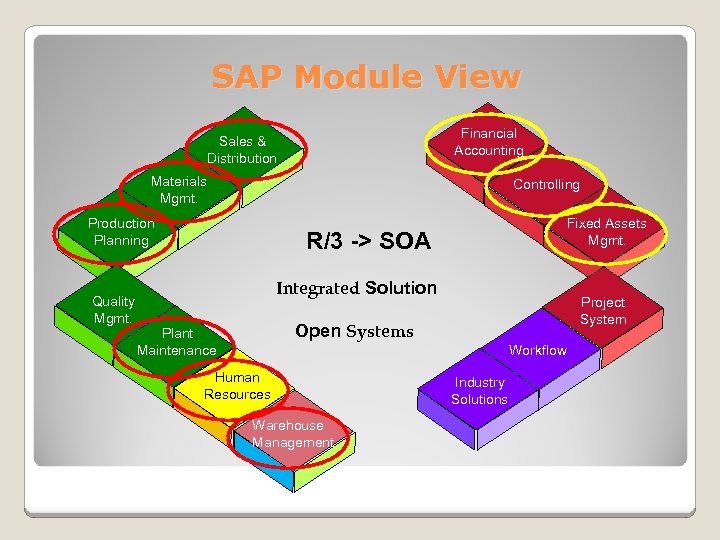 SAP Module View Financial Accounting Sales & Distribution Materials Mgmt. Controlling Production Planning Quality Mgmt. Fixed Assets Mgmt. R/3 -> SOA Integrated Solution Project System Open Systems Plant Maintenance Workflow Human Resources Warehouse Management Industry Solutions
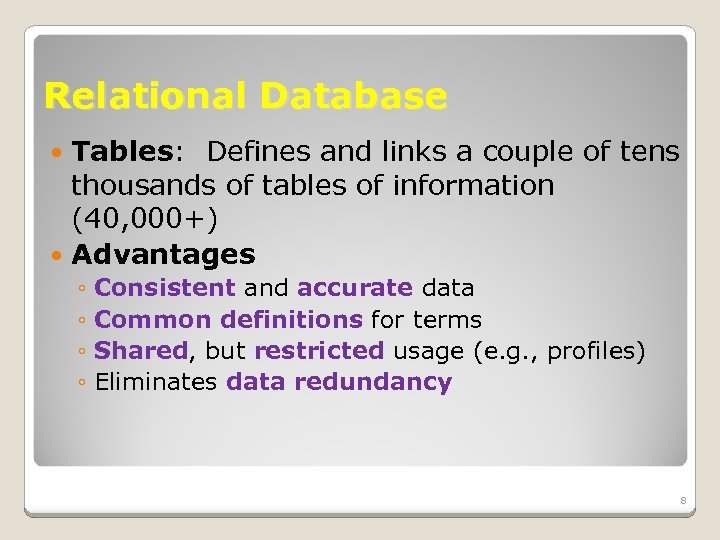 Relational Database Tables: Defines and links a couple of tens thousands of tables of information (40, 000+) Advantages ◦ Consistent and accurate data ◦ Common definitions for terms ◦ Shared, but restricted usage (e. g. , profiles) ◦ Eliminates data redundancy 8
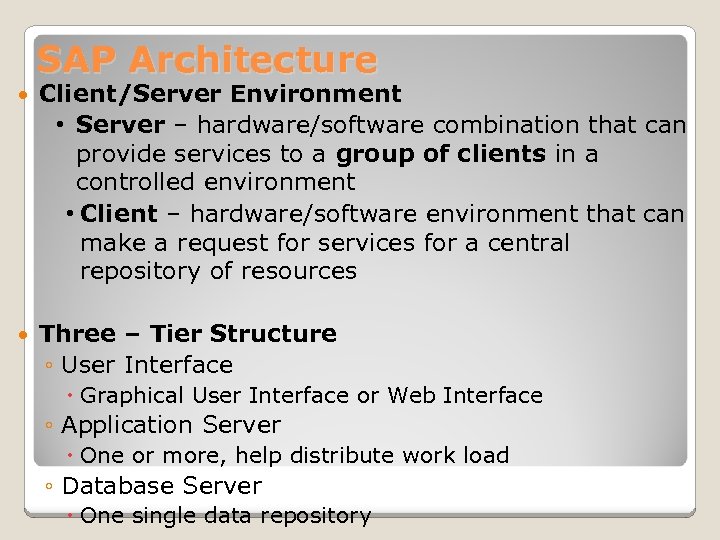 SAP Architecture Client/Server Environment • Server – hardware/software combination that can provide services to a group of clients in a controlled environment • Client – hardware/software environment that can make a request for services for a central repository of resources Three – Tier Structure ◦ User Interface Graphical User Interface or Web Interface ◦ Application Server One or more, help distribute work load ◦ Database Server One single data repository
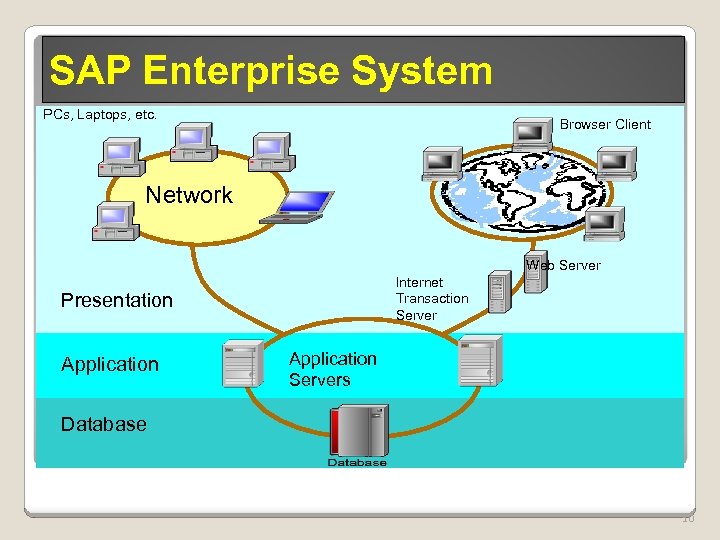 SAP Enterprise System PCs, Laptops, etc. Browser Client Network Web Server Internet Transaction Server Presentation Application Servers Database 10
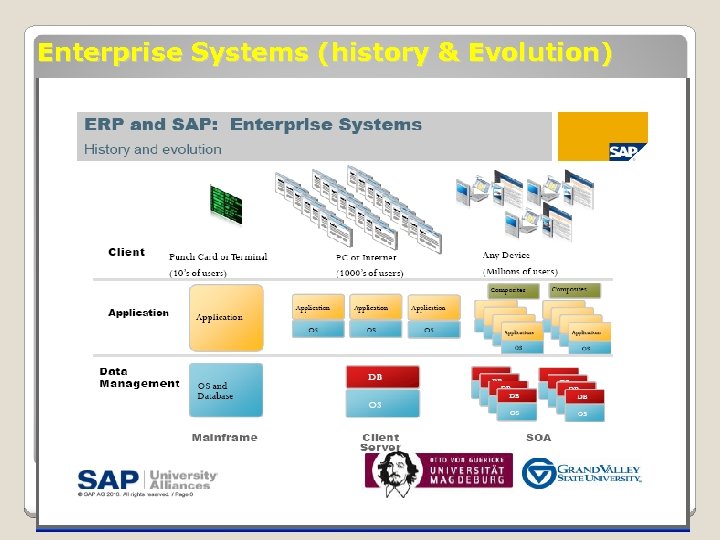 Enterprise Systems (history & Evolution)
 SAP ERP Introduction Instance – each install of the SAP ERP software on an individual application server Configurable – each instance can be distinctively configured to fit the needs and desires of the customer (within limits) Most of the infrastructure decisions, including configuration decisions, occur during project implementation
 SAP Configuration The process of tailoring SAP software by selecting specific functionality from a list of those supported by the software, very much like setting defaults (e. g. , Word, Access) DOES NOT involve changes to the underlying software code
 Programming Code Modifications Changes to the delivered code ABAP/4 – Advanced Business Application Programming (ABAP) This should be done carefully as it can make migration to new versions of the software much more difficult
 SAP Data Types Required data types: Organizational levels (data, elements) Master data Transactional data (e. g. , documents)
 Data Type 1: Organizational Levels Defines the enterprise structure in terms of legal or business purposes, including legal entities, plants, storage areas, sales organizations, profit centers: Client (e. g. , 435) ◦ Highest organizational level ◦ Represents the enterprise consisting of many companies Business area (e. g. , BI##) ◦ An organizational unit within financial accounting. It corresponds to a defined business segment or area of responsibility, to which you can assign value movements recorded in Financial Accounting. Company Code (e. g. , US##) ◦ Identifies legal entities in an enterprise ◦ Central organizational element in financial accounting.
 Data Type 1: Organizational Levels Organizational levels in Logistics ◦ Plants (e. g. DL##, MI##, SD##) Represents factory, warehouse, office, distribution center, etc. ◦ Storage locations A location within a plant where materials are stored At plant DL##: FG##, SF##, RM##, MI## At MI##: FG##, MI##, TG## At SD##: FG##, MI##, TG##
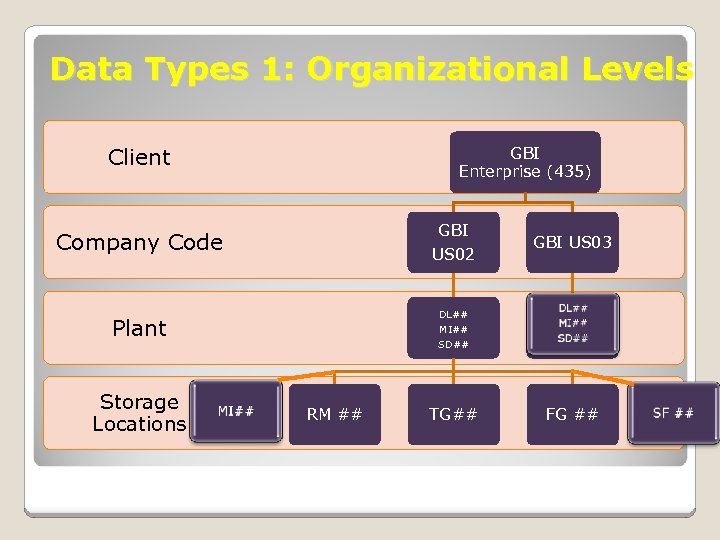 Data Types 1: Organizational Levels Client GBI Enterprise (435) Company Code GBI US 02 Plant DL## MI## SD## Storage Locations RM ## TG## GBI US 03 FG ##
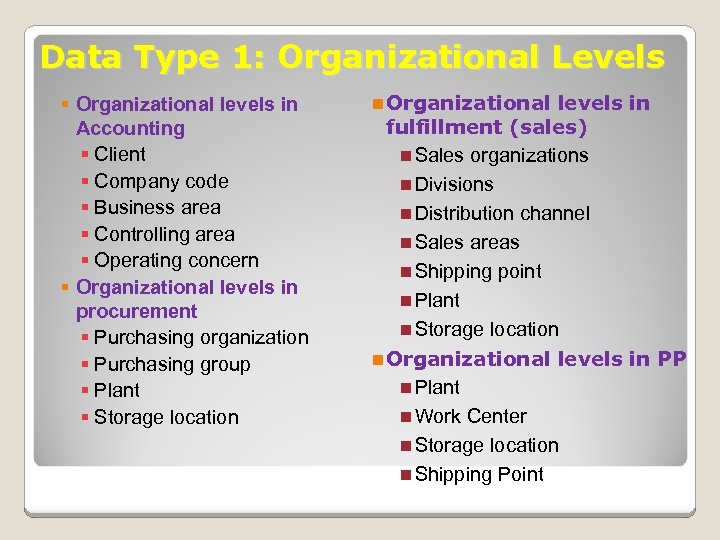 Data Type 1: Organizational Levels § Organizational levels in Accounting § Client § Company code § Business area § Controlling area § Operating concern § Organizational levels in procurement § Purchasing organization § Purchasing group § Plant § Storage location n Organizational levels in fulfillment (sales) n Sales organizations n Divisions n Distribution channel n Sales areas n Shipping point n Plant n Storage location n Organizational levels in PP n Plant n Work Center n Storage location n Shipping Point
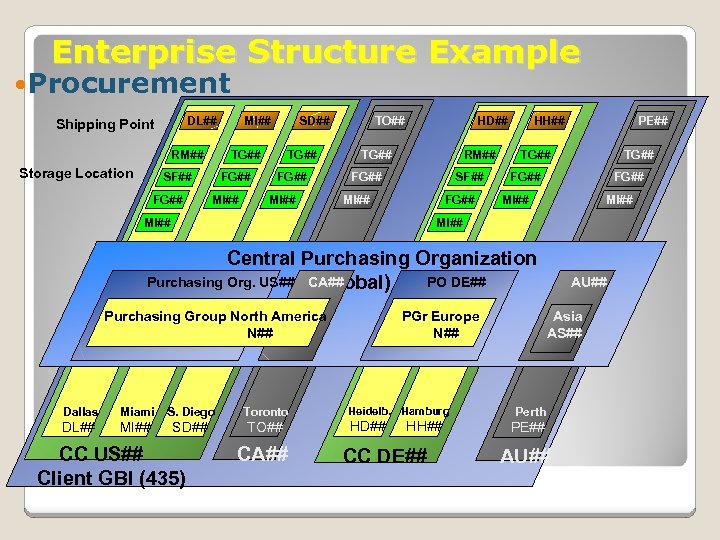 Enterprise Structure Example Procurement DL## Shipping Point RM## Storage Location SD## TG## SF## FG## MI## TO## HD## RM## TG## FG## SF## MI## FG## HH## PE## TG## FG## MI## Central Purchasing Organization Purchasing Org. US## CA## PO (global) GL## DE## Purchasing Group North America N## Dallas Miami S. Diego Toronto DL## MI## SD## TO## CC US## Client GBI (435) CA## PGr Europe N## Heidelb. Hamburg HD## HH## CC DE## AU## Asia AS## Perth PE## AU##
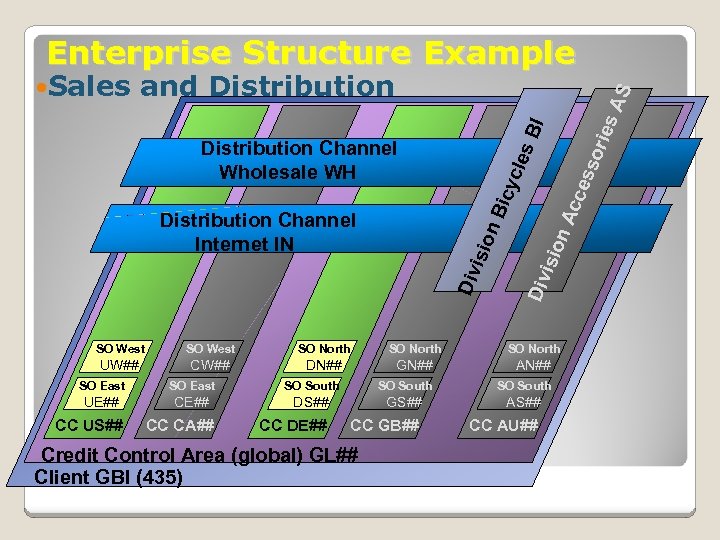 Enterprise Structure Example BI isio Div n. A n. B icy c les Distribution Channel Wholesale WH Distribution Channel Internet IN cce sso ries AS and Distribution Div Sales SO West SO North UW## CW## DN## GN## AN## SO East SO South UE## CE## DS## GS## AS## CC DE## CC GB## CC AU## CC US## CC CA## Credit Control Area (global) GL## Client GBI (435)
 Data Type 2: Master Data ◦ Long term data that represent entities of: Procurement ◦ Vendor ◦ Material ◦ Info records, source list Fulfillment (Sales & Distribution) ◦ Customer ◦ Material ◦ Conditions (pricing, output) Production ◦ Bills of material ◦ Work centers ◦ Product routings
 Types of Data 3: Transaction Data ◦ Data generated during executing process (steps) combining: Organizational levels Master data Situational data (who, what, when, and where) ◦ Example: sales order Organizational levels: customer, company code, sales area Master data: customer master, material master Situational data: date, time, person, quantities
 Types of Data 3: Transaction Data • Document concept ◦ An electronic record of transactions ◦ Each transaction creates document(s) • Document types ◦ ◦ Financial accounting documents (FI) Management accounting documents (CO) Material documents (goods movement, MM) Others
 SAP ERP Document Principle Each business transaction that writes data to the database creates a uniquely numbered electronic document Each document contains information such as ◦ Responsible person ◦ Date and time of the transaction ◦ Commercial content Once created, a document can not be deleted from the database
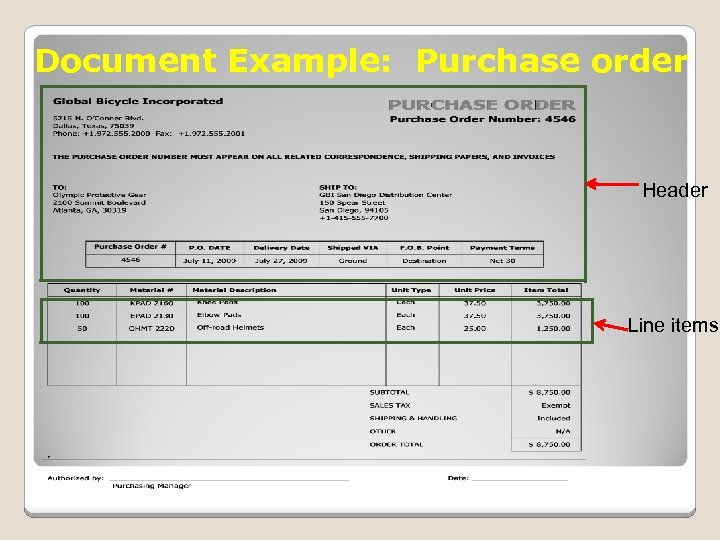 Document Example: Purchase order Header Line items
 Global Bike, Inc. (GBI) System Configuration Introduction
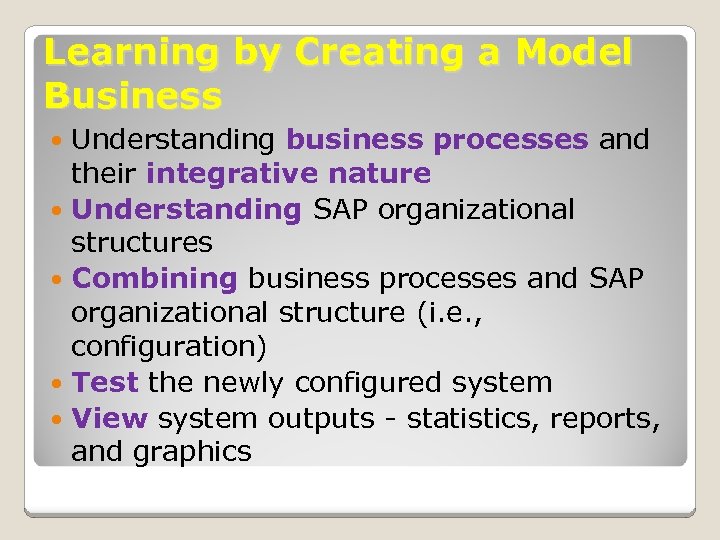 Learning by Creating a Model Business Understanding business processes and their integrative nature Understanding SAP organizational structures Combining business processes and SAP organizational structure (i. e. , configuration) Test the newly configured system View system outputs - statistics, reports, and graphics
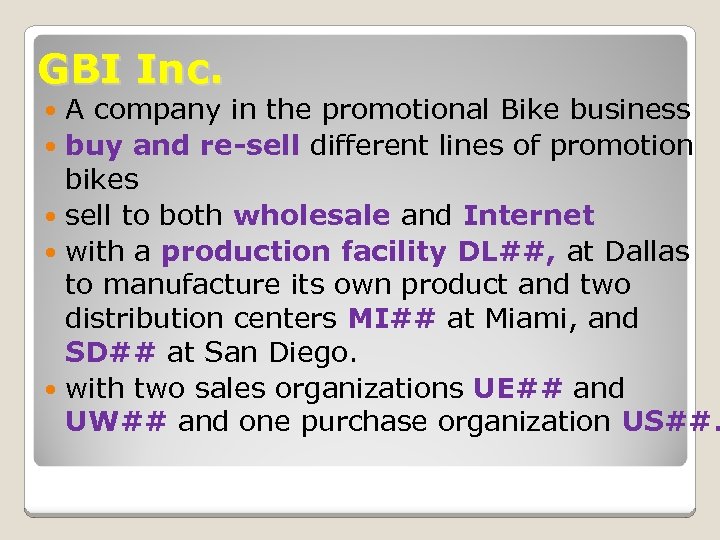 GBI Inc. A company in the promotional Bike business buy and re-sell different lines of promotion bikes sell to both wholesale and Internet with a production facility DL##, at Dallas to manufacture its own product and two distribution centers MI## at Miami, and SD## at San Diego. with two sales organizations UE## and UW## and one purchase organization US##.
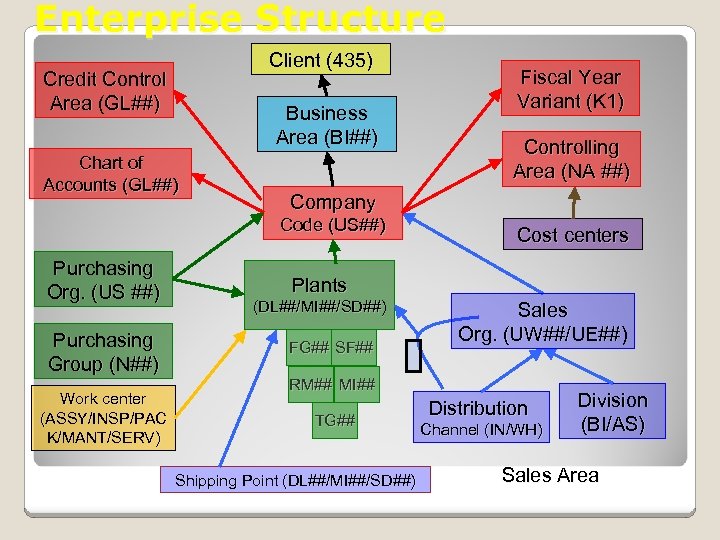 Enterprise Structure Client (435) Credit Control Area (GL##) Business Area (BI##) Chart of Accounts (GL##) Purchasing Group (N##) Work center (ASSY/INSP/PAC K/MANT/SERV) Controlling Area (NA ##) Company Code (US##) Purchasing Org. (US ##) Fiscal Year Variant (K 1) Cost centers Plants (DL##/MI##/SD##) FG## SF## Sales Org. (UW##/UE##) RM## MI## TG## Shipping Point (DL##/MI##/SD##) Distribution Channel (IN/WH) Division (BI/AS) Sales Area
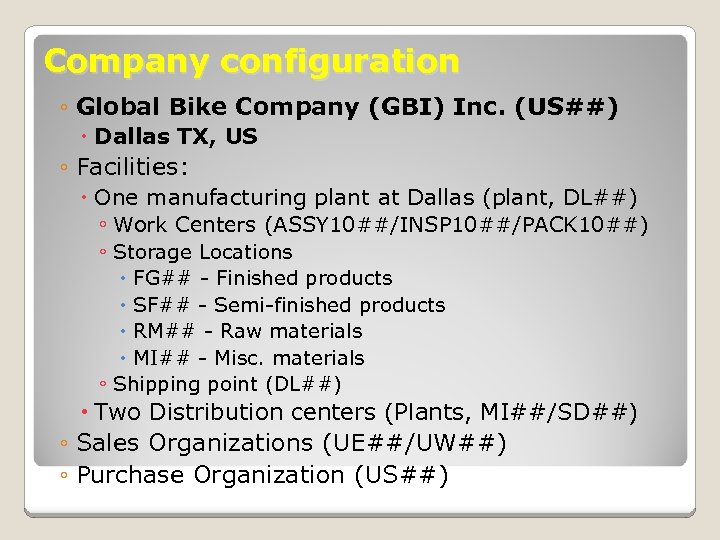 Company configuration ◦ Global Bike Company (GBI) Inc. (US##) Dallas TX, US ◦ Facilities: One manufacturing plant at Dallas (plant, DL##) ◦ Work Centers (ASSY 10##/INSP 10##/PACK 10##) ◦ Storage Locations FG## - Finished products SF## - Semi-finished products RM## - Raw materials MI## - Misc. materials ◦ Shipping point (DL##) Two Distribution centers (Plants, MI##/SD##) ◦ Sales Organizations (UE##/UW##) ◦ Purchase Organization (US##)
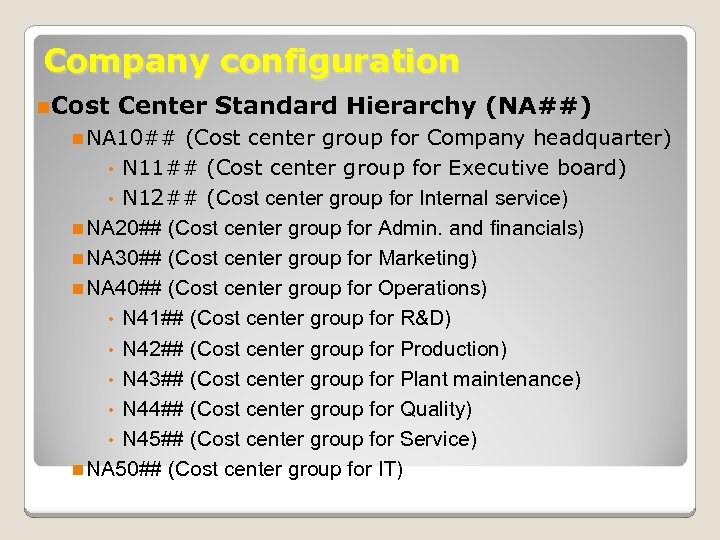 Company configuration n. Cost Center Standard Hierarchy (NA##) n NA 10## (Cost center group for Company headquarter) • N 11## (Cost center group for Executive board) • N 12## (Cost center group for Internal service) n NA 20## (Cost center group for Admin. and financials) n NA 30## (Cost center group for Marketing) n NA 40## (Cost center group for Operations) • N 41## (Cost center group for R&D) • N 42## (Cost center group for Production) • N 43## (Cost center group for Plant maintenance) • N 44## (Cost center group for Quality) • N 45## (Cost center group for Service) n NA 50## (Cost center group for IT)
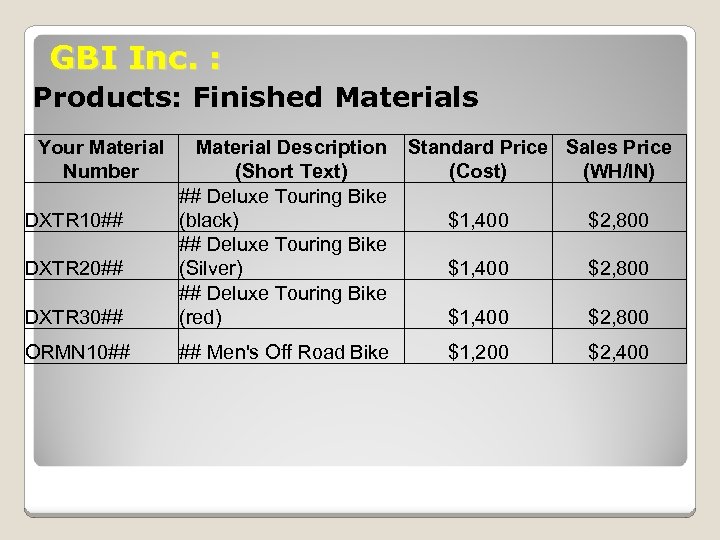 GBI Inc. : Products: Finished Materials Your Material Number DXTR 30## Material Description (Short Text) ## Deluxe Touring Bike (black) ## Deluxe Touring Bike (Silver) ## Deluxe Touring Bike (red) ORMN 10## ## Men's Off Road Bike DXTR 10## DXTR 20## Standard Price Sales Price (Cost) (WH/IN) $1, 400 $2, 800 $1, 200 $2, 400
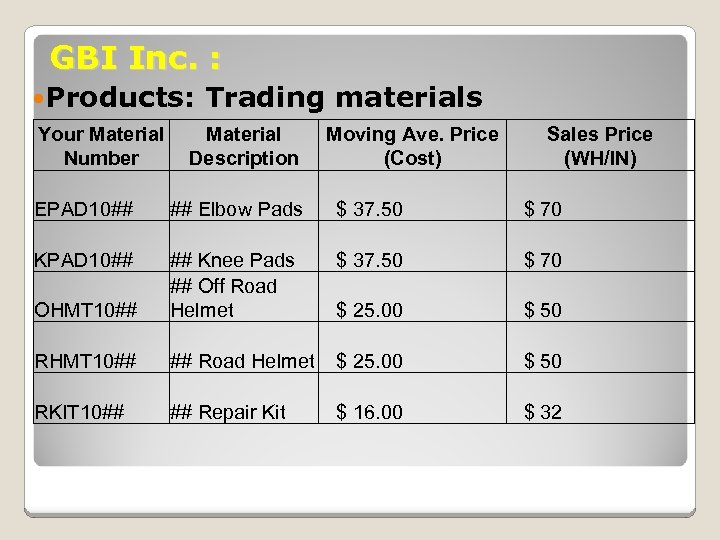 GBI Inc. : Products: Your Material Number Trading materials Material Description Moving Ave. Price (Cost) Sales Price (WH/IN) EPAD 10## ## Elbow Pads $ 37. 50 $ 70 KPAD 10## $ 37. 50 $ 70 OHMT 10## ## Knee Pads ## Off Road Helmet $ 25. 00 $ 50 RHMT 10## ## Road Helmet $ 25. 00 $ 50 RKIT 10## ## Repair Kit $ 16. 00 $ 32
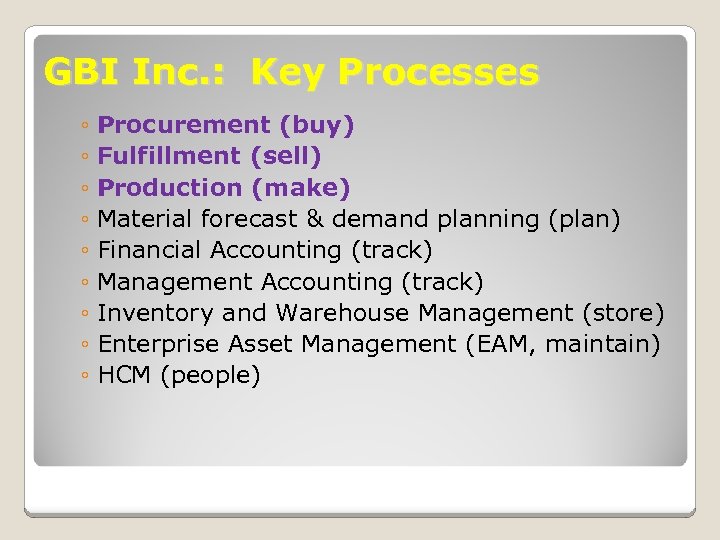 GBI Inc. : Key Processes ◦ Procurement (buy) ◦ Fulfillment (sell) ◦ Production (make) ◦ Material forecast & demand planning (plan) ◦ Financial Accounting (track) ◦ Management Accounting (track) ◦ Inventory and Warehouse Management (store) ◦ Enterprise Asset Management (EAM, maintain) ◦ HCM (people)
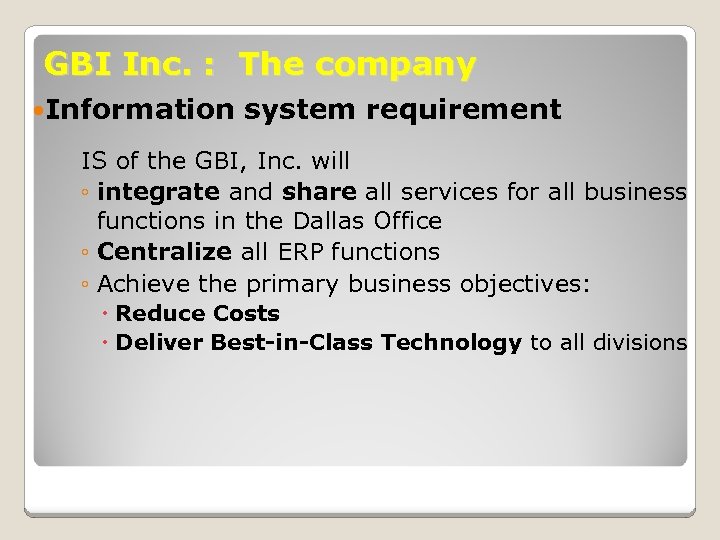 GBI Inc. : The company Information system requirement IS of the GBI, Inc. will ◦ integrate and share all services for all business functions in the Dallas Office ◦ Centralize all ERP functions ◦ Achieve the primary business objectives: Reduce Costs Deliver Best-in-Class Technology to all divisions
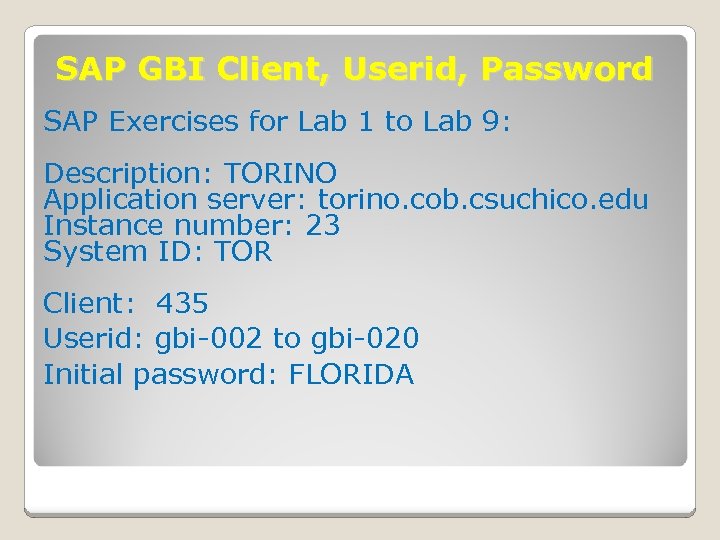 SAP GBI Client, Userid, Password SAP Exercises for Lab 1 to Lab 9: Description: TORINO Application server: torino. cob. csuchico. edu Instance number: 23 System ID: TOR Client: 435 Userid: gbi-002 to gbi-020 Initial password: FLORIDA
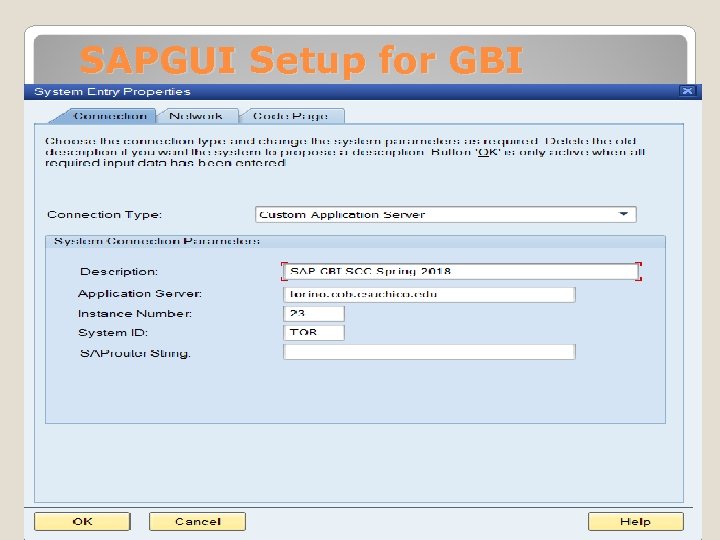 SAPGUI Setup for GBI
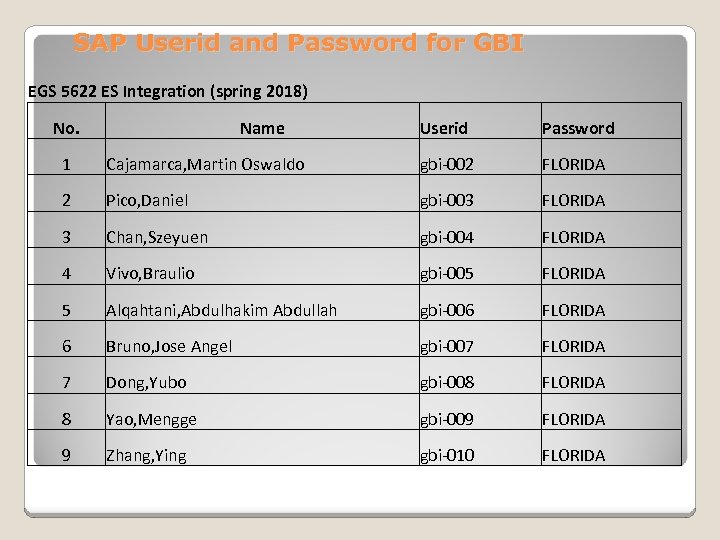 SAP Userid and Password for GBI EGS 5622 ES Integration (spring 2018) No. Name Userid Password 1 Cajamarca, Martin Oswaldo gbi-002 FLORIDA 2 Pico, Daniel gbi-003 FLORIDA 3 Chan, Szeyuen gbi-004 FLORIDA 4 Vivo, Braulio gbi-005 FLORIDA 5 Alqahtani, Abdulhakim Abdullah gbi-006 FLORIDA 6 Bruno, Jose Angel gbi-007 FLORIDA 7 Dong, Yubo gbi-008 FLORIDA 8 Yao, Mengge gbi-009 FLORIDA 9 Zhang, Ying gbi-010 FLORIDA
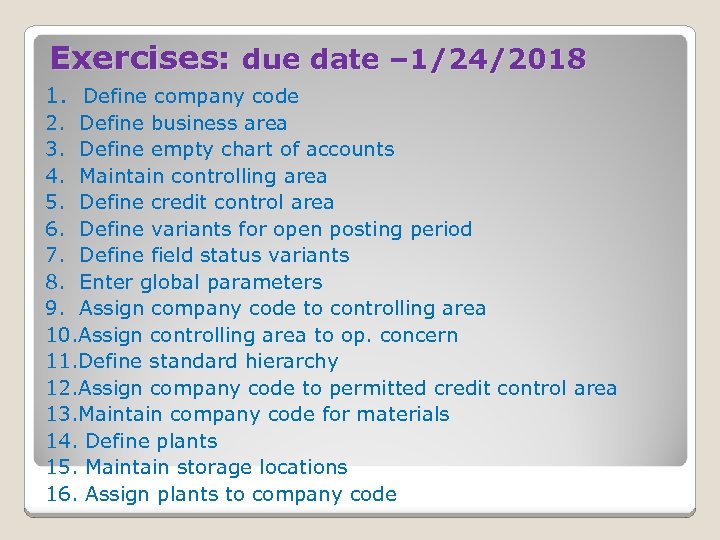 Exercises: due date – 1/24/2018 1. Define company code 2. Define business area 3. Define empty chart of accounts 4. Maintain controlling area 5. Define credit control area 6. Define variants for open posting period 7. Define field status variants 8. Enter global parameters 9. Assign company code to controlling area 10. Assign controlling area to op. concern 11. Define standard hierarchy 12. Assign company code to permitted credit control area 13. Maintain company code for materials 14. Define plants 15. Maintain storage locations 16. Assign plants to company code