


 Скачать презентацию Intro To PHP David Lash Getting Started With
93f3469e8c6fcea4dac78098a6c57f13.ppt
- Количество слайдов: 54
 Intro To PHP David Lash Getting Started With PHP 1
 Objectives l To understand what PHP is » What is HTML » How PHP compares with CGI l Getting Started with PHP » Your first script » PHP syntax and embedding in HTML » Finding out about your PHP configuration l Using PHP variables » Numerical variables and operators » String variables, operators and a few functions l Separating PHP from HTML using
 Competencies l At end of unit be able to » Understand how PHP compares with other dynamic technologies » Create a Web Page with PHP embedded » Receive input into PHP script with variables Competency Alert: You need to ! know this Common Problem Area! People seem to forget this 3
 Ummm, What is HTML used for? l HTML primarily. . . » Provides instructions to browser on how file should display. – Has a set of markup language commands – Can include graphical image files l HTML documents are Static. » For example, cannot use HTML alone to: – have a document display current time – receive results of a form, query a database, and display the results – Open an input file and based on its contents, display different document content 4
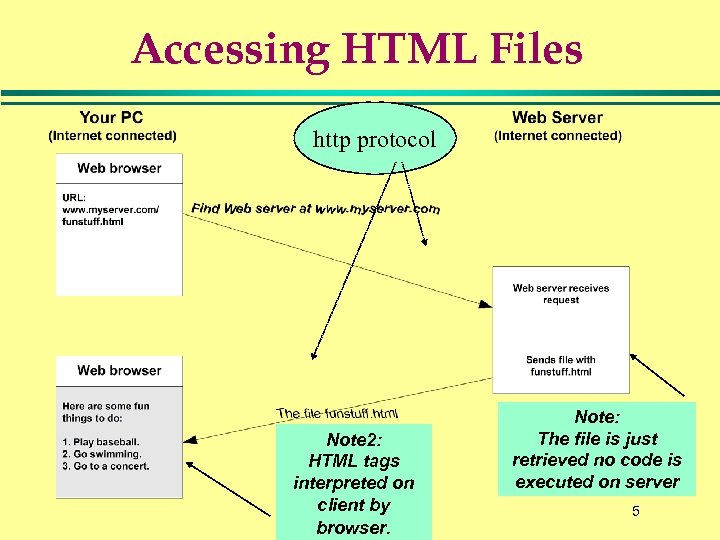 Accessing HTML Files http protocol Note 2: HTML tags interpreted on client by browser. Note: The file is just retrieved no code is executed on server 5
 HTML? l The Hypertext Markup Language (HTML) » used coded HTML tags » provide Web browsers display instructions. l HTML is » » It is simple to use and understand It provides ways to include things like text, graphics, sounds, links. It is STANDARD Its creation (and use) is one of the big reasons the WWW became popular 6
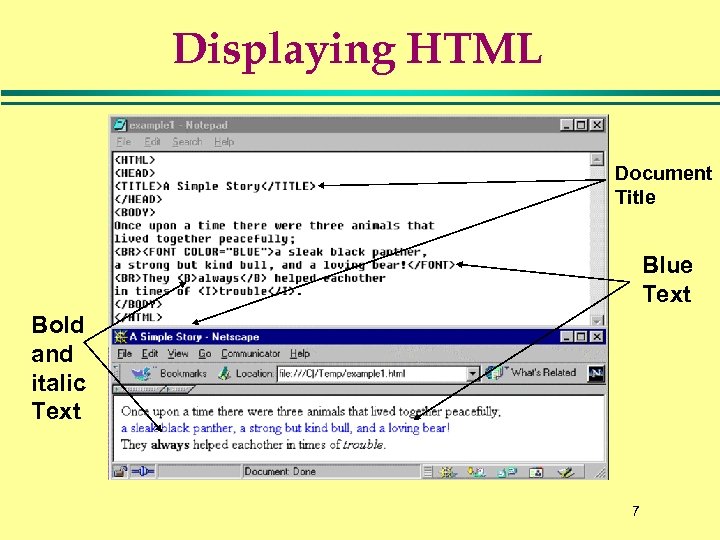 Displaying HTML Document Title Blue Text Bold and italic Text 7
 Major Server-Side Web Technologies l CGI - Computer Gateway Interface » Web Servers enable computer variety of computer languages to dynamically generate HTML » E. g. Perl, C, Unix Shell, C++ l Web Server add-on » Builds on to existing web servers – E. g. , Cold Fusion l Embedded Web server » Web server has scripting language built into it. » Comprises most modern scripting technologies – ASP, JSP, PHP Competency Alert: You need to ! know this 8
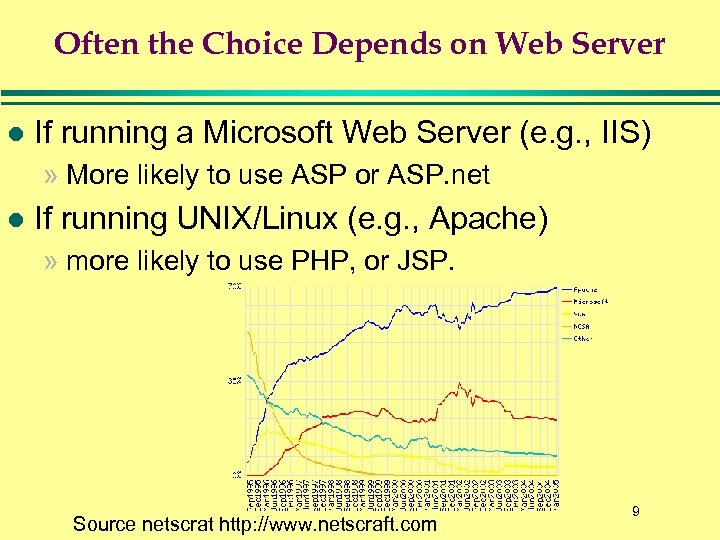 Often the Choice Depends on Web Server l If running a Microsoft Web Server (e. g. , IIS) » More likely to use ASP or ASP. net l If running UNIX/Linux (e. g. , Apache) » more likely to use PHP, or JSP. Source netscrat http: //www. netscraft. com 9
 What Is PHP? Advantages of Using PHP to enhance Web pages: » Easy to use. » Open source. » Multiple platform. l Started around 1996 when » Rasmus Lerdorf (a consultant) wanted to know number of people viewing his online resume. » Developed a CGI/Perl script that counted visitors and logged some visitor information. » He received many inquires for his CGI/Perl toolset so started giving it away for free (and called it Personal Home Page). » Got so many requests for additions, developed a next release of toolset (called PHP 2. 0) » PHP 2. 0 became popular and PHP moved to open source model. 10
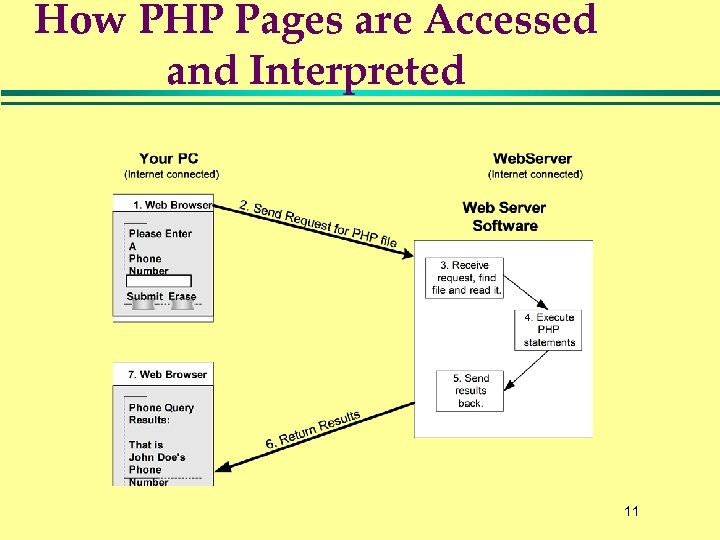 How PHP Pages are Accessed and Interpreted 11
 Objectives l To understand what PHP is » What is HTML » How PHP compares with CGI l Getting Started with PHP » Your first script » PHP syntax and embedding in HTML » Finding out about your PHP configuration l Using PHP variables » Numerical variables and operators » String variables, operators and a few functions l Separating PHP from HTML using
 Getting Started with PHP To develop and publish PHP scripts you need: » A Web server with PHP built into it » A client machine with a basic text editor and Internet connection » FTP or Telnet software Its worth noting: There a couple good IDEs for PHP. They basically allow you create PHP scripts on PC, syntax check them, see output, and then copy to Web server 13
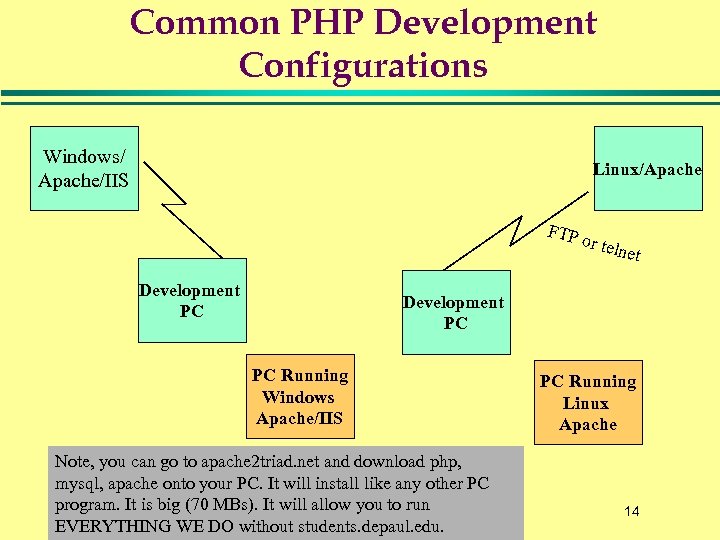 Common PHP Development Configurations Windows/ Apache/IIS Linux/Apache FTP Development PC or tel net Development PC PC Running Windows Apache/IIS Note, you can go to apache 2 triad. net and download php, mysql, apache onto your PC. It will install like any other PC program. It is big (70 MBs). It will allow you to run EVERYTHING WE DO without students. depaul. edu. PC Running Linux Apache 14
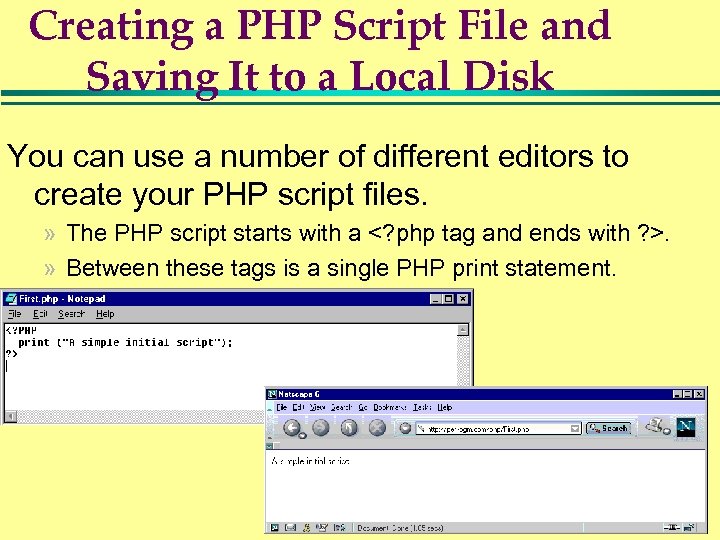 Creating a PHP Script File and Saving It to a Local Disk You can use a number of different editors to create your PHP script files. » The PHP script starts with a . » Between these tags is a single PHP print statement. 15
 On a Linux/Apache Web Server Typically you: 1. Save files with a. php suffix (myfile. php). 2. Place files under public_html (e. g. , /home/dlash/public_html/ Save in public_html like any html file but use php suffix 16
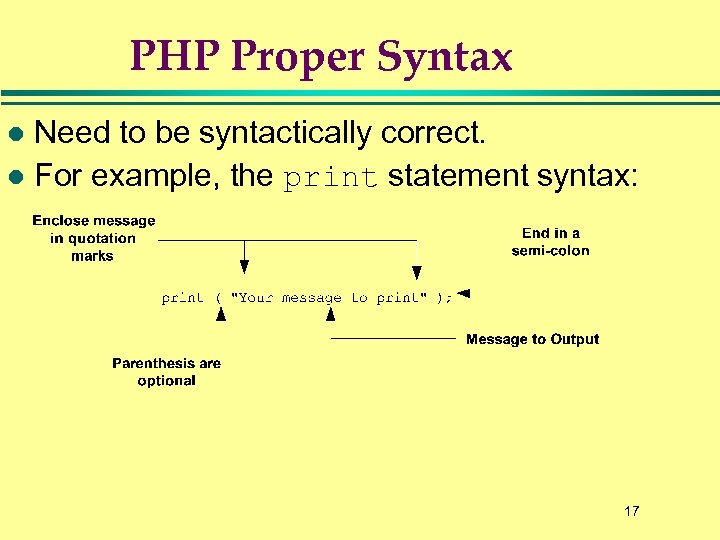 PHP Proper Syntax Need to be syntactically correct. l For example, the print statement syntax: l 17
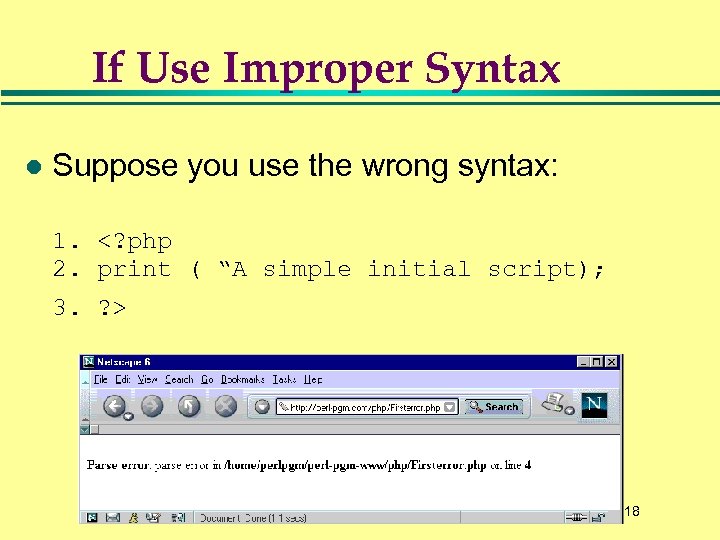 If Use Improper Syntax l Suppose you use the wrong syntax: 1. 18
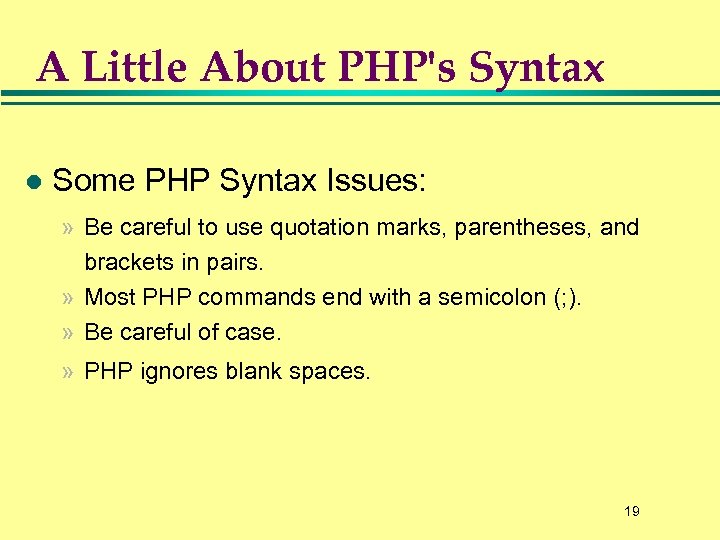 A Little About PHP's Syntax l Some PHP Syntax Issues: » Be careful to use quotation marks, parentheses, and brackets in pairs. » Most PHP commands end with a semicolon (; ). » Be careful of case. » PHP ignores blank spaces. 19
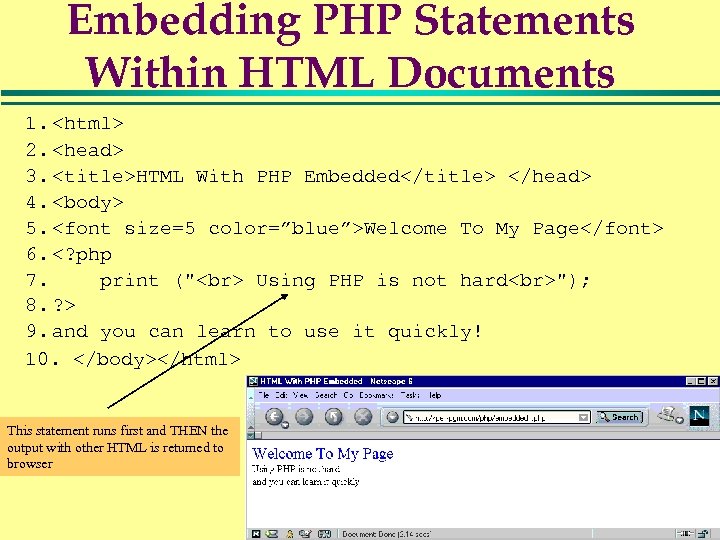 Embedding PHP Statements Within HTML Documents 1. 2.
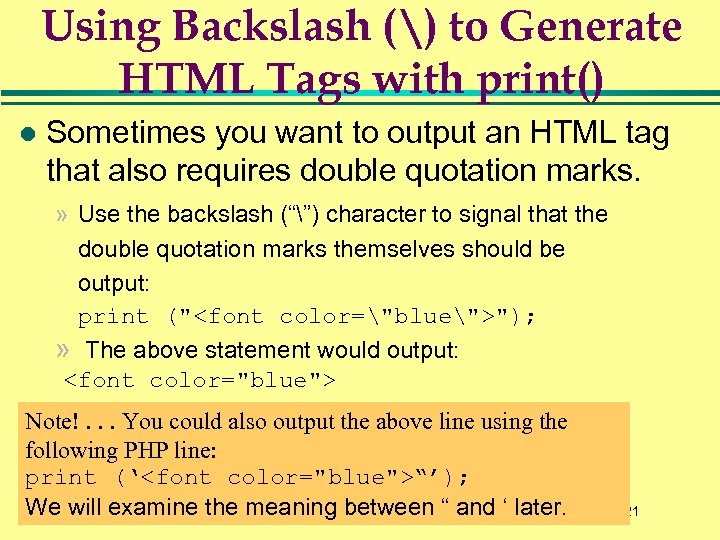 Using Backslash () to Generate HTML Tags with print() l Sometimes you want to output an HTML tag that also requires double quotation marks. » Use the backslash (“”) character to signal that the double quotation marks themselves should be output: print (""); » The above statement would output: Note!. . . You could also output the above line using the following PHP line: print (‘“’); We will examine the meaning between “ and ‘ later. 21
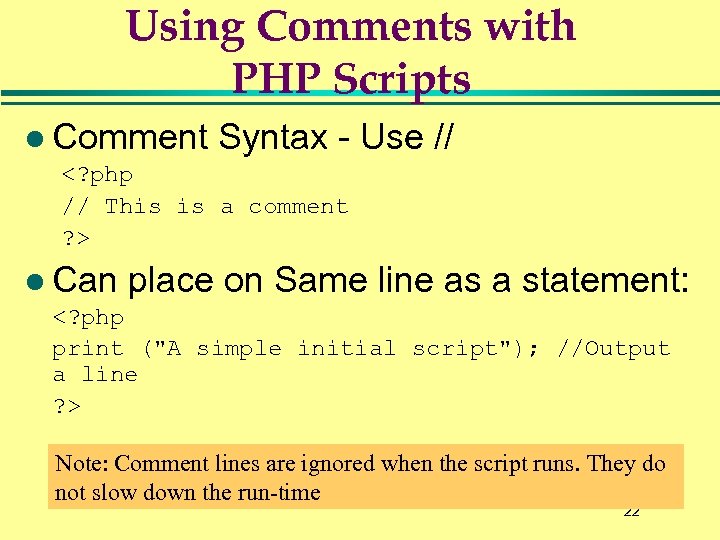 Using Comments with PHP Scripts l Comment Syntax - Use // l Can place on Same line as a statement: Note: Comment lines are ignored when the script runs. They do not slow down the run-time 22
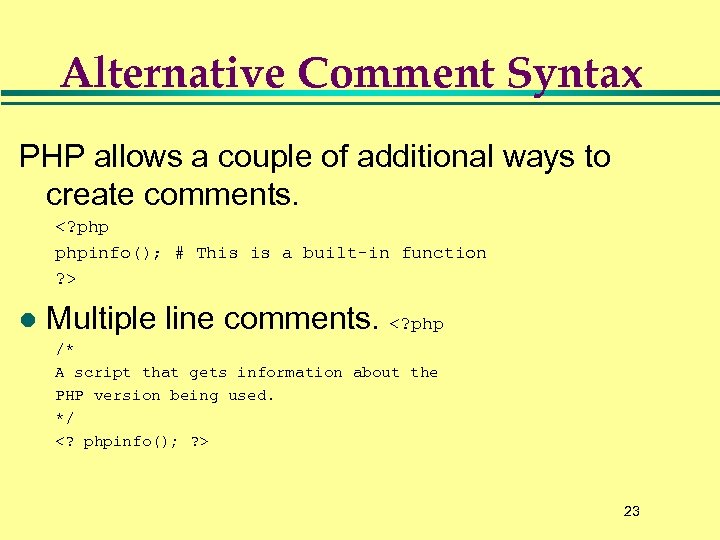 Alternative Comment Syntax PHP allows a couple of additional ways to create comments. l Multiple line comments. 23
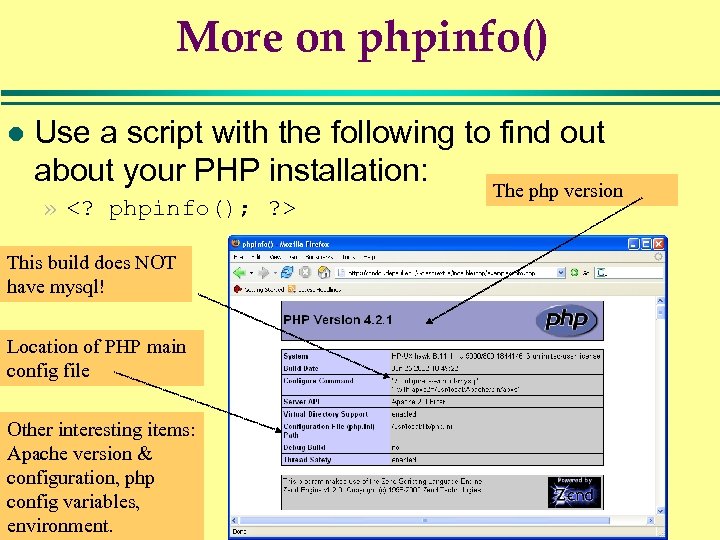 More on phpinfo() l Use a script with the following to find out about your PHP installation: The php version » This build does NOT have mysql! Location of PHP main config file Other interesting items: Apache version & configuration, php config variables, environment. 24
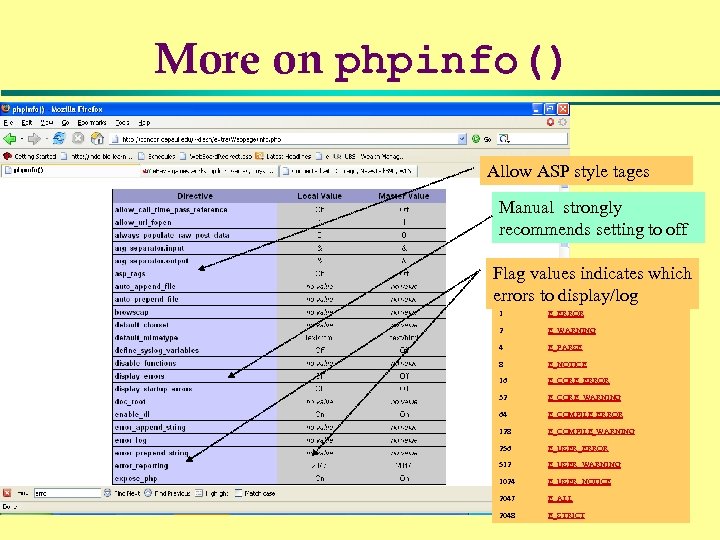 More on phpinfo() Allow ASP style tages Manual strongly recommends setting to off Flag values indicates which Value constant errors to display/log 1 E_ERROR 2 E_WARNING 4 E_PARSE 8 E_NOTICE 16 E_CORE_ERROR 32 E_CORE_WARNING 64 E_COMPILE_ERROR 128 E_COMPILE_WARNING 256 E_USER_ERROR 512 E_USER_WARNING 1024 E_USER_NOTICE 2047 E_ALL 2048 E_STRICT 25
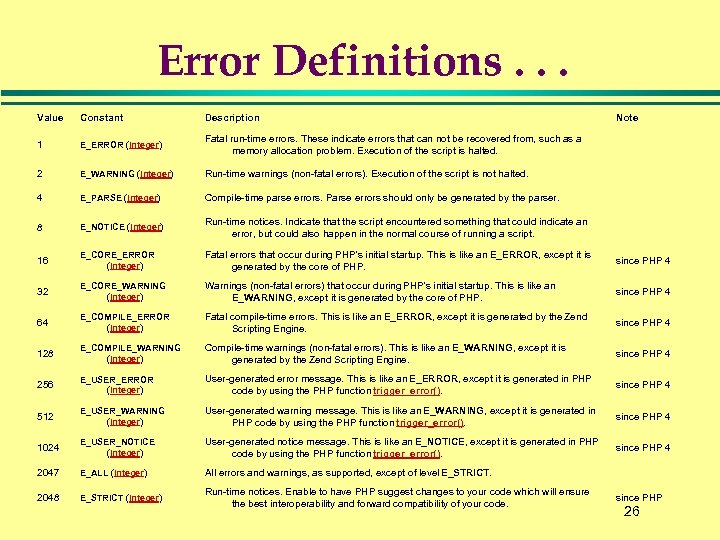 Error Definitions. . . Value Constant Description Note 1 E_ERROR (integer) Fatal run-time errors. These indicate errors that can not be recovered from, such as a memory allocation problem. Execution of the script is halted. 2 E_WARNING (integer) Run-time warnings (non-fatal errors). Execution of the script is not halted. 4 E_PARSE (integer) Compile-time parse errors. Parse errors should only be generated by the parser. 8 E_NOTICE (integer) Run-time notices. Indicate that the script encountered something that could indicate an error, but could also happen in the normal course of running a script. 16 E_CORE_ERROR (integer) Fatal errors that occur during PHP's initial startup. This is like an E_ERROR, except it is generated by the core of PHP. since PHP 4 32 E_CORE_WARNING (integer) Warnings (non-fatal errors) that occur during PHP's initial startup. This is like an E_WARNING, except it is generated by the core of PHP. since PHP 4 64 E_COMPILE_ERROR (integer) Fatal compile-time errors. This is like an E_ERROR, except it is generated by the Zend Scripting Engine. since PHP 4 128 E_COMPILE_WARNING (integer) Compile-time warnings (non-fatal errors). This is like an E_WARNING, except it is generated by the Zend Scripting Engine. since PHP 4 256 E_USER_ERROR (integer) User-generated error message. This is like an E_ERROR, except it is generated in PHP code by using the PHP function trigger_error(). since PHP 4 512 E_USER_WARNING (integer) User-generated warning message. This is like an E_WARNING, except it is generated in PHP code by using the PHP function trigger_error(). since PHP 4 1024 E_USER_NOTICE (integer) User-generated notice message. This is like an E_NOTICE, except it is generated in PHP code by using the PHP function trigger_error(). since PHP 4 2047 E_ALL (integer) All errors and warnings, as supported, except of level E_STRICT. 2048 E_STRICT (integer) Run-time notices. Enable to have PHP suggest changes to your code which will ensure the best interoperability and forward compatibility of your code. since PHP 26
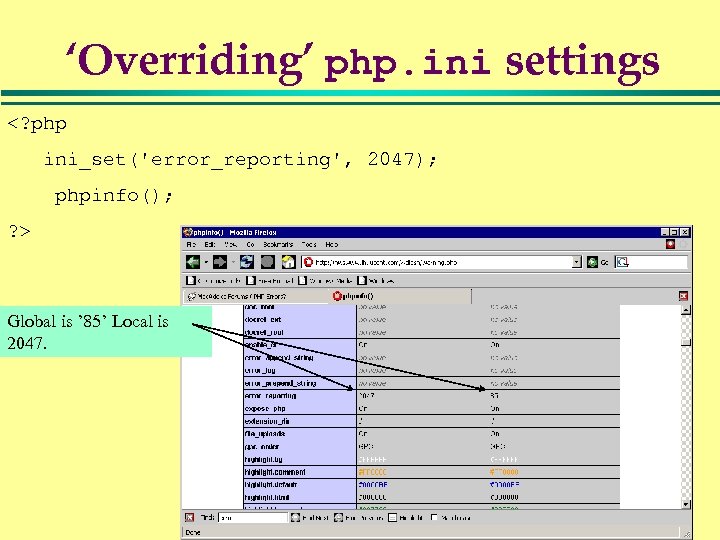 ‘Overriding’ php. ini settings Global is ’ 85’ Local is 2047. 27
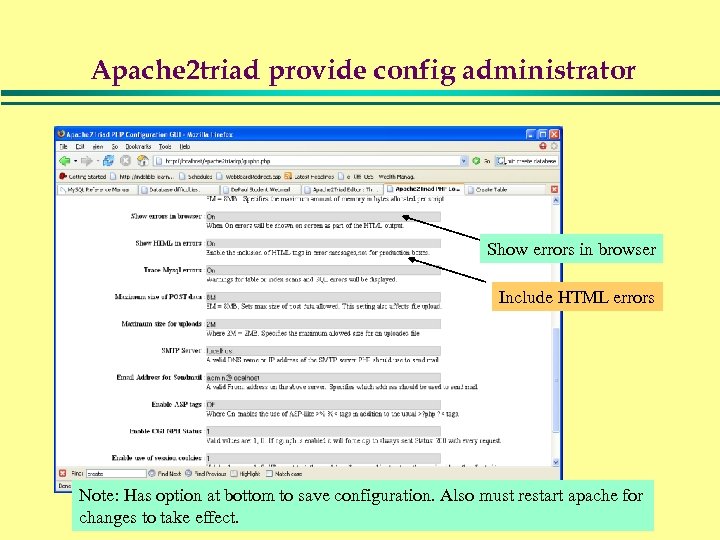 Apache 2 triad provide config administrator Show errors in browser Include HTML errors Note: Has option at bottom to save configuration. Also must restart apache for 28 changes to take effect.
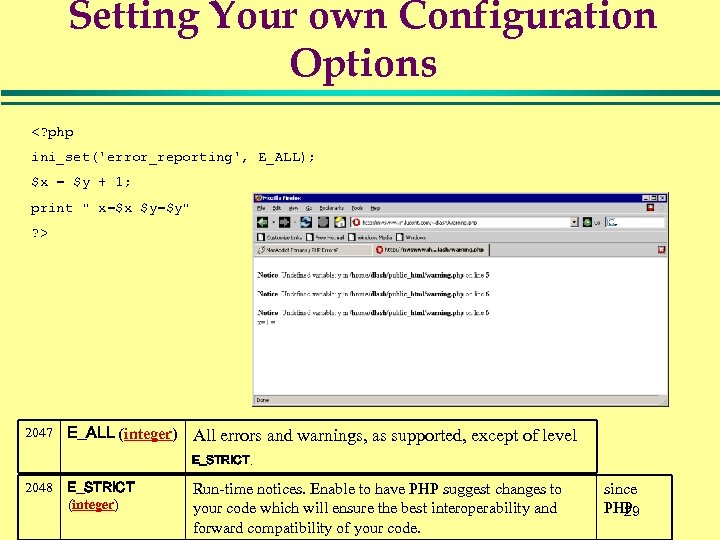 Setting Your own Configuration Options 2047 E_ALL (integer) All errors and warnings, as supported, except of level E_STRICT. 2048 E_STRICT (integer) Run-time notices. Enable to have PHP suggest changes to your code which will ensure the best interoperability and forward compatibility of your code. since PHP 29
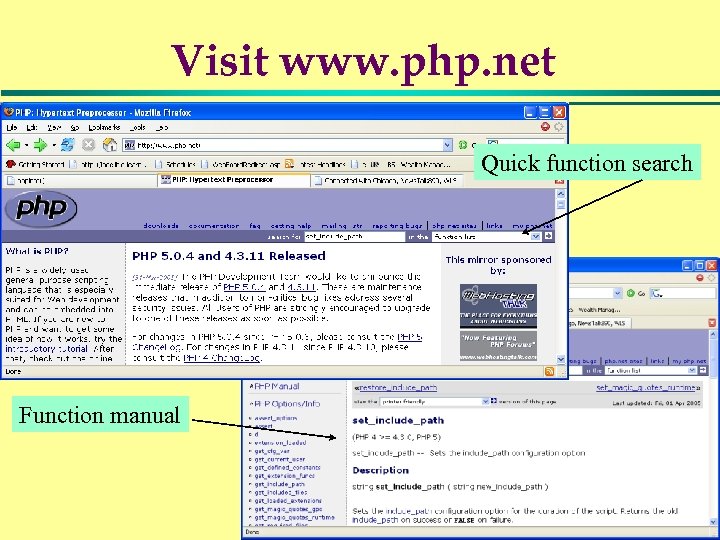 Visit www. php. net Quick function search Function manual 30
 Objectives l To understand what PHP is » What is HTML » How PHP compares with CGI l Getting Started with PHP » Your first script » PHP syntax and embedding in HTML » Finding out about your PHP configuration l Using PHP variables » Numerical variables and operators » String variables, operators and a few functions l Separating PHP from HTML using
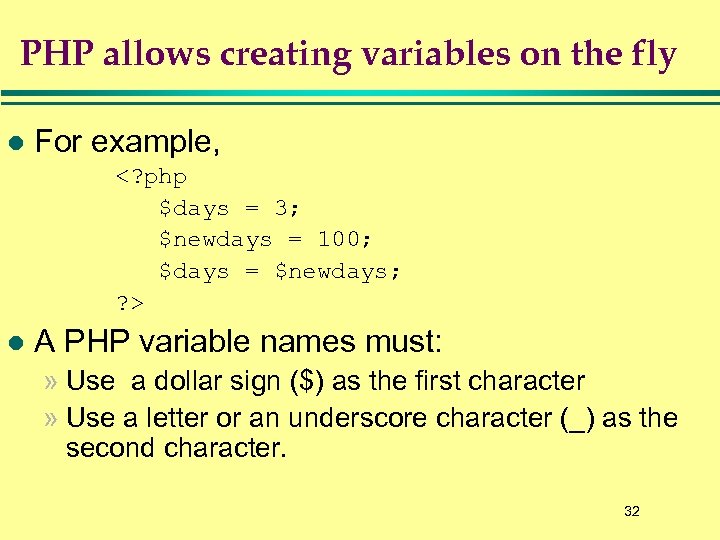 PHP allows creating variables on the fly l For example, l A PHP variable names must: » Use a dollar sign ($) as the first character » Use a letter or an underscore character (_) as the second character. 32
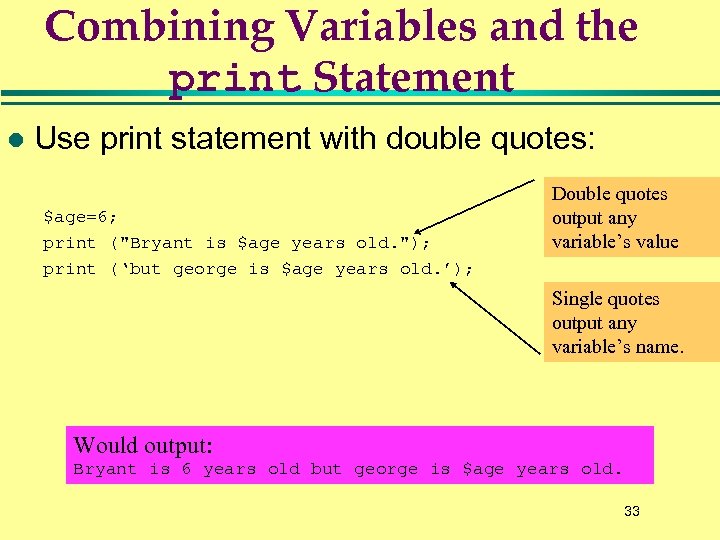 Combining Variables and the print Statement l Use print statement with double quotes: $age=6; print ("Bryant is $age years old. "); print (‘but george is $age years old. ’); Double quotes output any variable’s value Single quotes output any variable’s name. Would output: Bryant is 6 years old but george is $age years old. 33
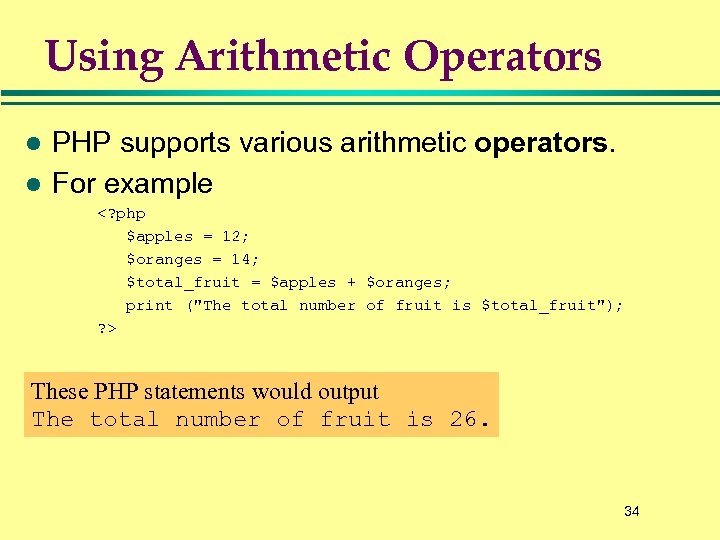 Using Arithmetic Operators l l PHP supports various arithmetic operators. For example These PHP statements would output The total number of fruit is 26. 34
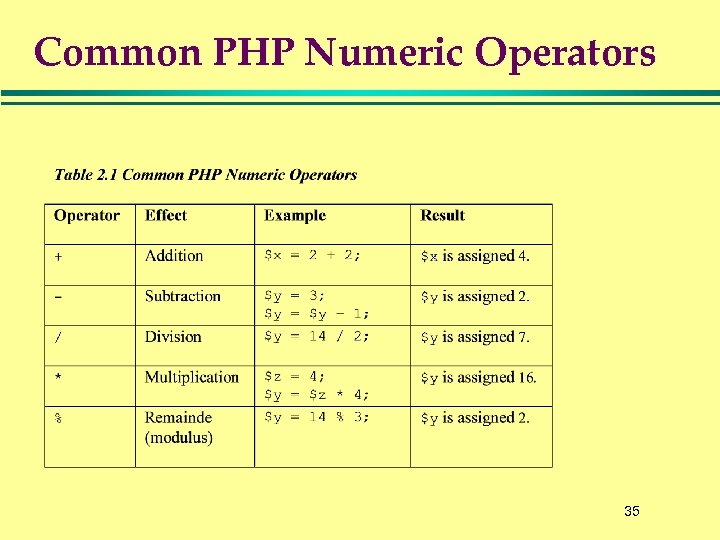 Common PHP Numeric Operators 35
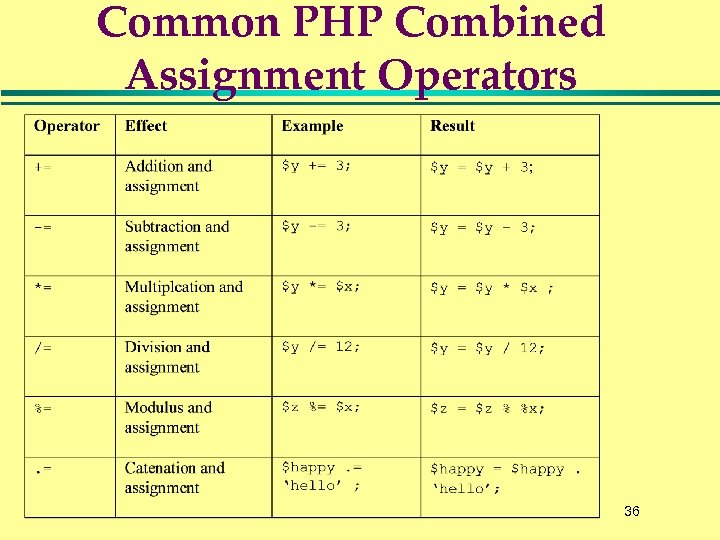 Common PHP Combined Assignment Operators 36
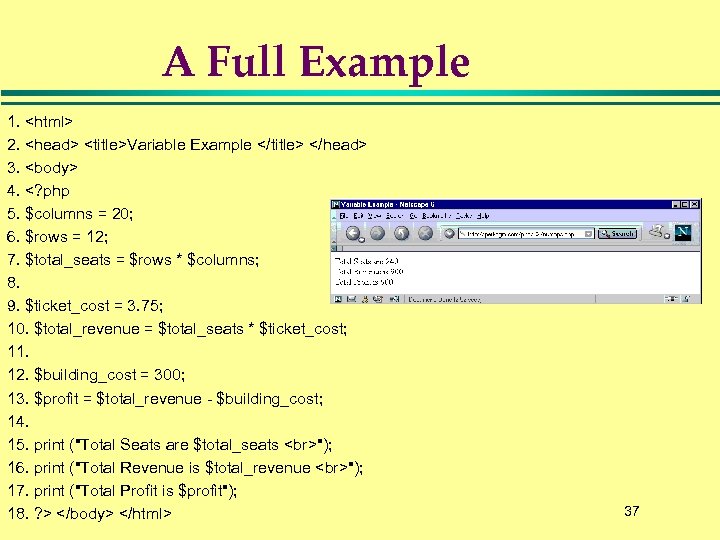 A Full Example 1. 2.
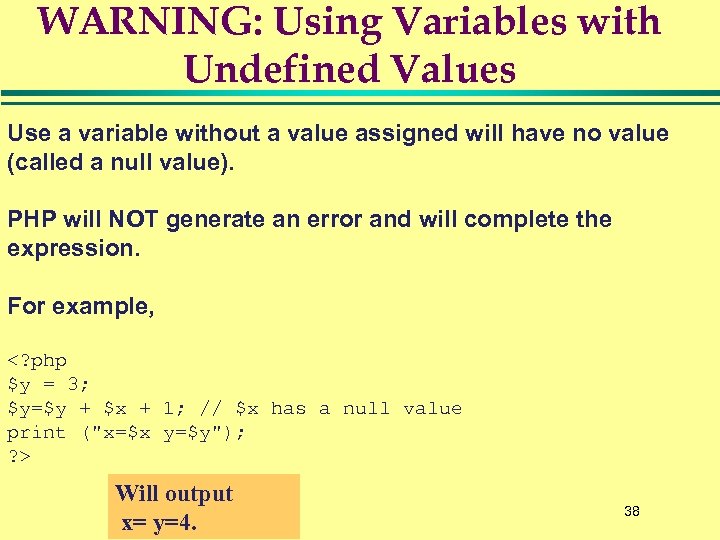 WARNING: Using Variables with Undefined Values Use a variable without a value assigned will have no value (called a null value). PHP will NOT generate an error and will complete the expression. For example, Will output x= y=4. 38
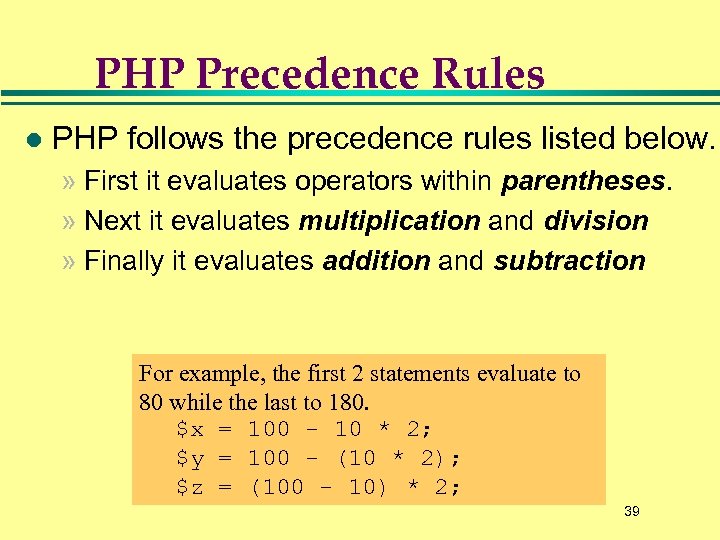 PHP Precedence Rules l PHP follows the precedence rules listed below. » First it evaluates operators within parentheses. » Next it evaluates multiplication and division » Finally it evaluates addition and subtraction For example, the first 2 statements evaluate to 80 while the last to 180. $x = 100 - 10 * 2; $y = 100 - (10 * 2); $z = (100 - 10) * 2; 39
 Objectives l To understand what PHP is » What is HTML » How PHP compares with CGI l Getting Started with PHP » Your first script » PHP syntax and embedding in HTML » Finding out about your PHP configuration l Using PHP variables » Numerical variables and operators » String variables, operators and a few functions l Separating PHP from HTML using
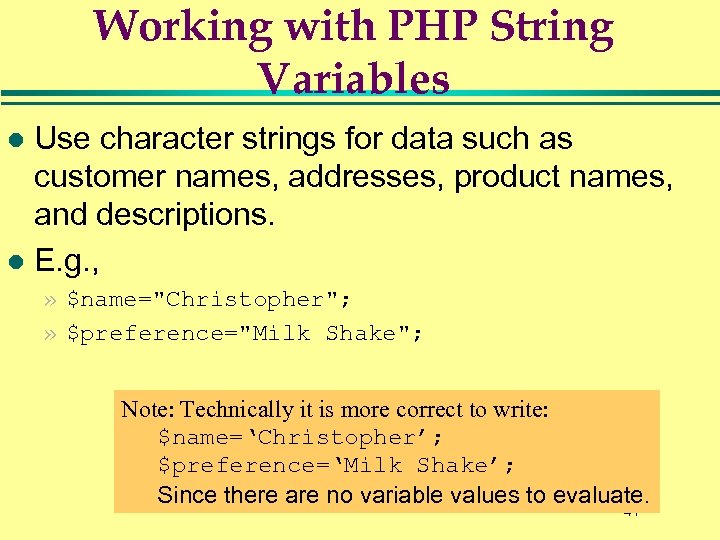 Working with PHP String Variables Use character strings for data such as customer names, addresses, product names, and descriptions. l E. g. , l » $name="Christopher"; » $preference="Milk Shake"; Note: Technically it is more correct to write: $name=‘Christopher’; $preference=‘Milk Shake’; Since there are no variable values to evaluate. 41
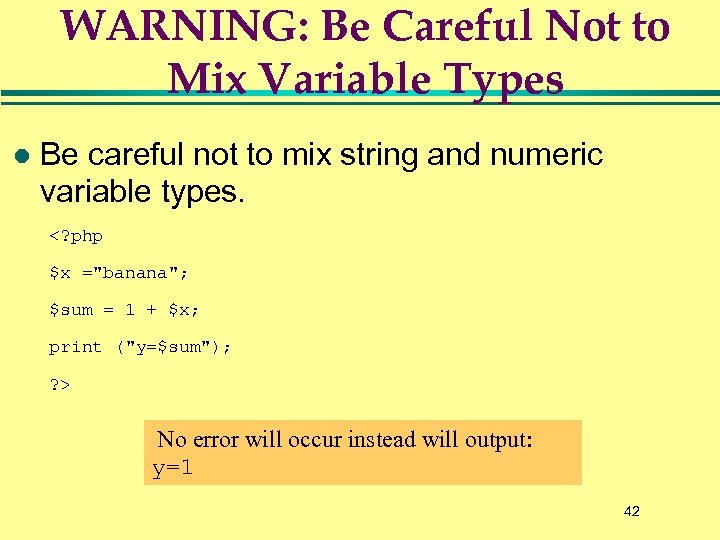 WARNING: Be Careful Not to Mix Variable Types l Be careful not to mix string and numeric variable types. No error will occur instead will output: y=1 42
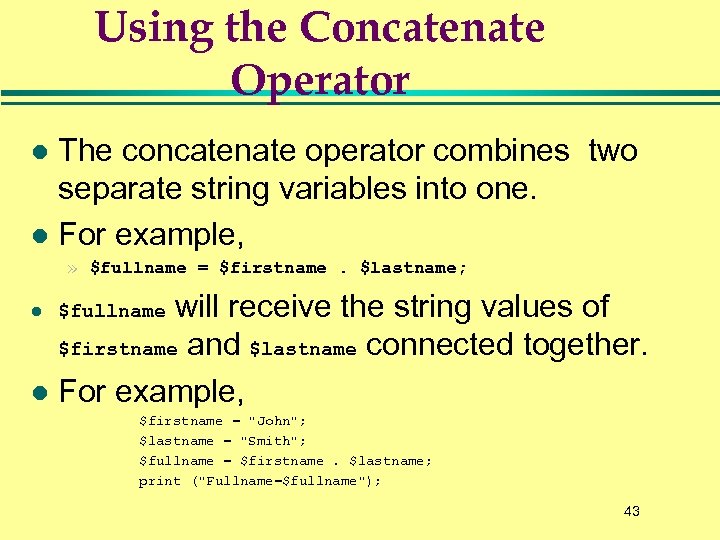 Using the Concatenate Operator The concatenate operator combines two separate string variables into one. l For example, l » $fullname = $firstname. $lastname; will receive the string values of $firstname and $lastname connected together. l For example, l $fullname $firstname = "John"; $lastname = "Smith"; $fullname = $firstname. $lastname; print ("Fullname=$fullname"); 43
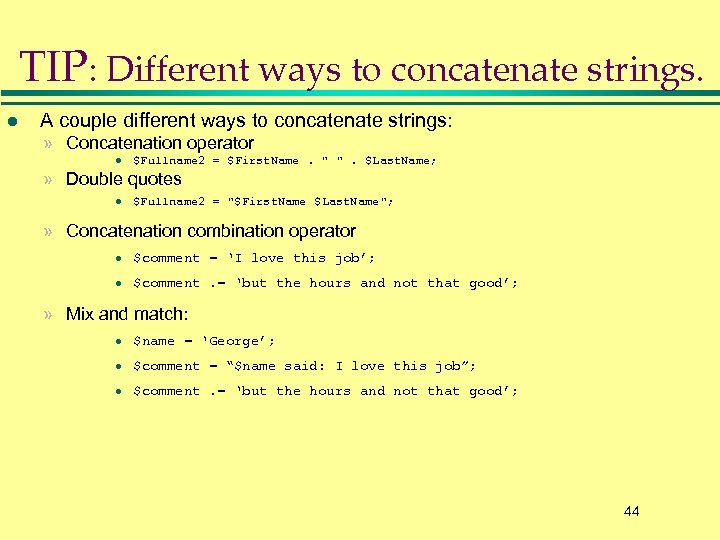 TIP: Different ways to concatenate strings. l A couple different ways to concatenate strings: » Concatenation operator l $Fullname 2 = $First. Name. " ". $Last. Name; » Double quotes l $Fullname 2 = "$First. Name $Last. Name"; » Concatenation combination operator l $comment = ‘I love this job’; l $comment. = ‘but the hours and not that good’; » Mix and match: l $name = ‘George’; l $comment = “$name said: I love this job”; l $comment. = ‘but the hours and not that good’; 44
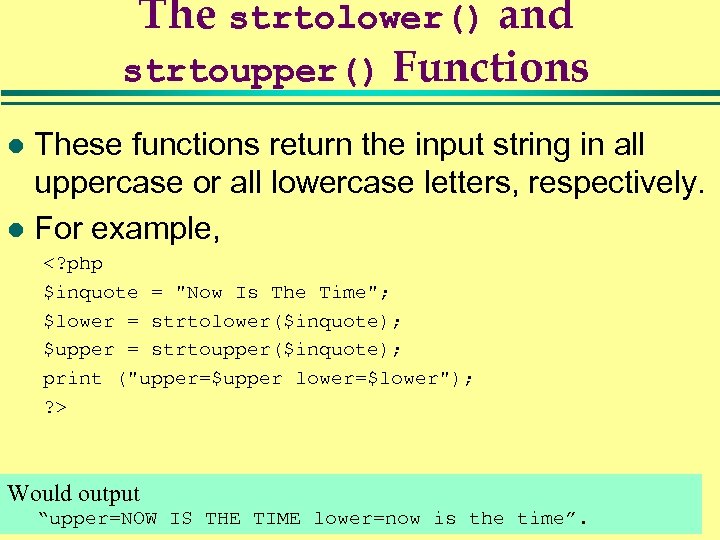 The strtolower() and strtoupper() Functions These functions return the input string in all uppercase or all lowercase letters, respectively. l For example, l Would output “upper=NOW IS THE TIME lower=now is the time”. 45
 Objectives l To understand what PHP is » What is HTML » How PHP compares with CGI l Getting Started with PHP » Your first script » PHP syntax and embedding in HTML » Finding out about your PHP configuration l Using PHP variables » Numerical variables and operators » String variables, operators and a few functions l Separating PHP from HTML using
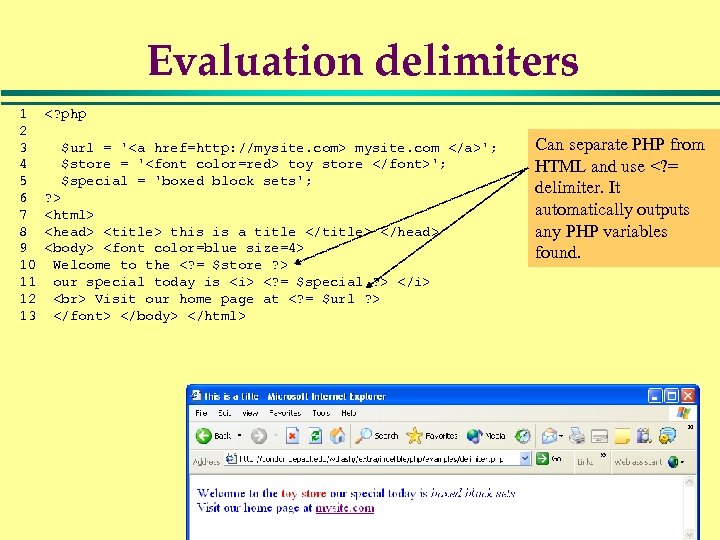 Evaluation delimiters 1 2 3 4 5 6 7 8 9 10 11 12 13 mysite. com '; $store = ' toy store '; $special = 'boxed block sets'; ? >
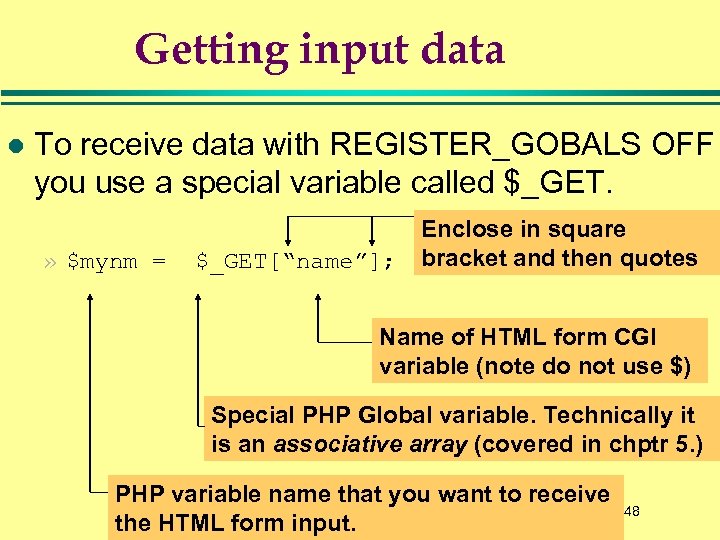 Getting input data l To receive data with REGISTER_GOBALS OFF you use a special variable called $_GET. » $mynm = $_GET[“name”]; Enclose in square bracket and then quotes Name of HTML form CGI variable (note do not use $) Special PHP Global variable. Technically it is an associative array (covered in chptr 5. ) PHP variable name that you want to receive the HTML form input. 48
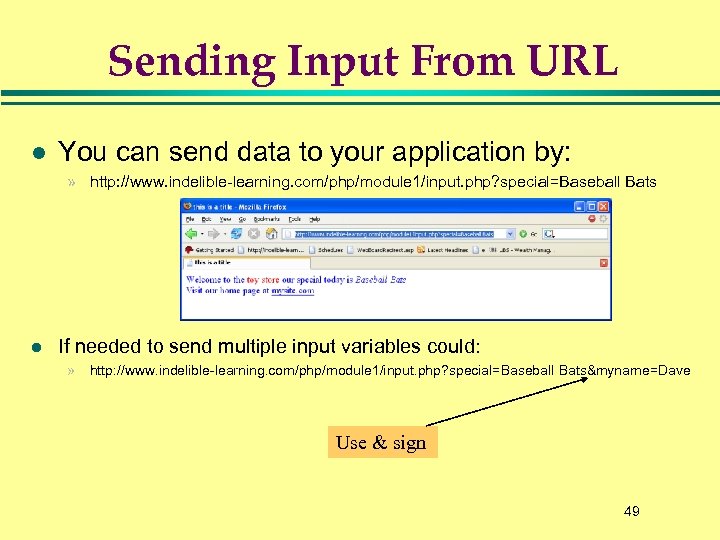 Sending Input From URL l You can send data to your application by: » http: //www. indelible-learning. com/php/module 1/input. php? special=Baseball Bats l If needed to send multiple input variables could: » http: //www. indelible-learning. com/php/module 1/input. php? special=Baseball Bats&myname=Dave Use & sign 49
 Objectives l To understand what PHP is » What is HTML » How PHP compares with CGI l Getting Started with PHP » Your first script » PHP syntax and embedding in HTML » Finding out about your PHP configuration l Using PHP variables » Numerical variables and operators » String variables, operators and a few functions l Separating PHP from HTML using
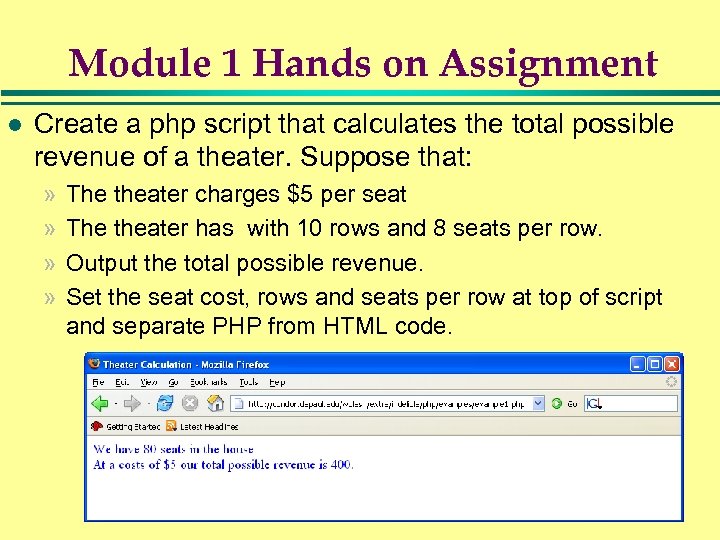 Module 1 Hands on Assignment l Create a php script that calculates the total possible revenue of a theater. Suppose that: » » The theater charges $5 per seat The theater has with 10 rows and 8 seats per row. Output the total possible revenue. Set the seat cost, rows and seats per row at top of script and separate PHP from HTML code. 51
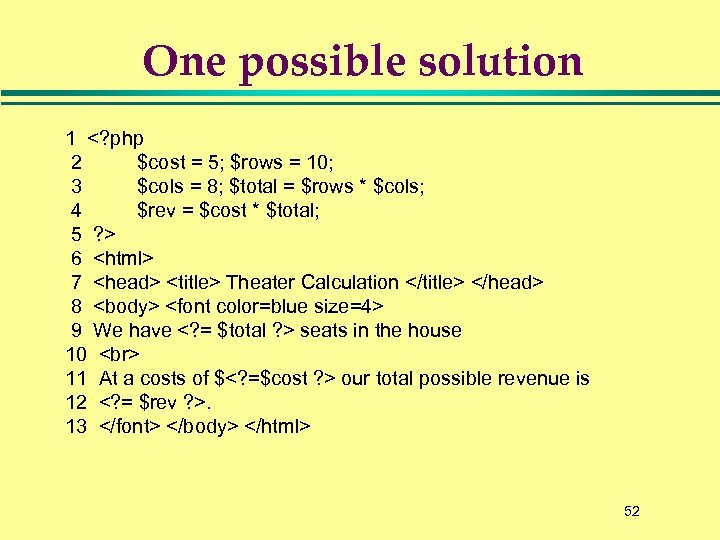 One possible solution 1 6 7
 Lab 1 Extension Exercise l Modify that same script to receive the values of $rows and $cols from the Web URL. » Send different input values from the web 53
![One Possible Solution <? php $cost = 5; $rows = $_GET[rows]; $cols = $_GET[cols];](https://present5.com/presentation/93f3469e8c6fcea4dac78098a6c57f13/image-54.jpg "One Possible Solution <? php $cost = 5; $rows = $_GET[rows]; $cols = $_GET[cols];") One Possible Solution
One Possible Solution