 Скачать презентацию Internet Web Security Institute for Visualization and
324a3942f6e2ead025ce56a8a9bde151.ppt
- Количество слайдов: 134



Internet & Web Security Institute for Visualization and Perception Research © Copyright 1998 Haim Levkowitz 1
References & Resources • Lincoln Stein, Web Security: A Step-by -Step Reference Guide • Larry J. Hughes, Jr. , Internet Security Techniques Institute for Visualization and Perception Research © Copyright 1998 Haim Levkowitz 2
What is web security? • Three parts of web security • Three points of view • Risks Institute for Visualization and Perception Research © Copyright 1998 Haim Levkowitz 3
Three components of web security • Browser • Server • Connection between the two (I. e. , the Internet!) Institute for Visualization and Perception Research © Copyright 1998 Haim Levkowitz 4
Three points of view • User’s • Webmaster’s • Both parties’ Institute for Visualization and Perception Research © Copyright 1998 Haim Levkowitz 5
User’s point of view • Remote server’s ownership known and true • No viruses or other damaging documents / sw • Remote server respects user’s privacy • Doesn’t obtain / record / distribute private info Institute for Visualization and Perception Research © Copyright 1998 Haim Levkowitz 6
Webmaster’s point of view • User won’t try to break in / alter contents • User won’t try to gain access to documents s/he’s not privy to • User won’t try to crash the server • User’s ID (if provided!) is true Institute for Visualization and Perception Research © Copyright 1998 Haim Levkowitz 7
Both parties’ point of view • Network connection free of eavesdropping • Info between browser and server delivered intact, free from tampering Institute for Visualization and Perception Research © Copyright 1998 Haim Levkowitz 8
Three (interdependent) parts • Document confidentiality • Client-side security • Server-side security Institute for Visualization and Perception Research © Copyright 1998 Haim Levkowitz 9
Document confidentiality • Protect private information from • Eavesdropping • Fraudulent identities • Mostly via cryptography Institute for Visualization and Perception Research © Copyright 1998 Haim Levkowitz 10
Client-side security • Protect user’s privacy and system’s integrity • Virus protection • Limit amount of info browser transmits (without user’s consent) • Protect organizations confidential information / network integrity • From Web browsing activities Institute for Visualization and Perception Research © Copyright 1998 Haim Levkowitz 11
Server-side security • Protect server from • Break-ins • Site vandalism • Denial-of-service attacks • Mostly firewalls and OS security measures Institute for Visualization and Perception Research © Copyright 1998 Haim Levkowitz 12
Risks • Risks that affect both client and server • Risks to the end user • Risks to the web site Institute for Visualization and Perception Research © Copyright 1998 Haim Levkowitz 13
Risks that affect both client and server • Eavesdropping • “Packet sniffers” (more …) • Fraud Institute for Visualization and Perception Research © Copyright 1998 Haim Levkowitz 14
Network snooping (sniffing). . . • Abuse of network debugging tools. . . • Network interface into promiscuous mode. . . • Solution: encrypt Institute for Visualization and Perception Research © Copyright 1998 Haim Levkowitz 15
Abuse of network debugging tools. . . • • E. g. , Network General's Expert Sniffer etherfind (Sun. OS) tcpdump (free on Internet) Sniffer FAQ • comp. security, news. answers • ftp: //ftp. iss. net/pub/faq/sniff • http: //www. iss. net/iss/sniff. html Institute for Visualization and Perception Research © Copyright 1998 Haim Levkowitz 16
Network interface into promiscuous mode. . . • Report all packets to sniffer • Display / record • Analyze • Remote also possible Institute for Visualization and Perception Research © Copyright 1998 Haim Levkowitz 17
Fraud • Authenticate • Individuals, organizations • Transactions • Documents • Solution: digital signatures, certification authorities Institute for Visualization and Perception Research © Copyright 1998 Haim Levkowitz 18
Risks to the end user • Active content • Privacy infringement Institute for Visualization and Perception Research © Copyright 1998 Haim Levkowitz 19
Active content • Browsers download and run SW without notice • Java applets • Active. X controls • Plug-ins • Helper app’s • Java. Script • Malicious (not many) / buggy (? ? ? ) Institute for Visualization and Perception Research © Copyright 1998 Haim Levkowitz 20
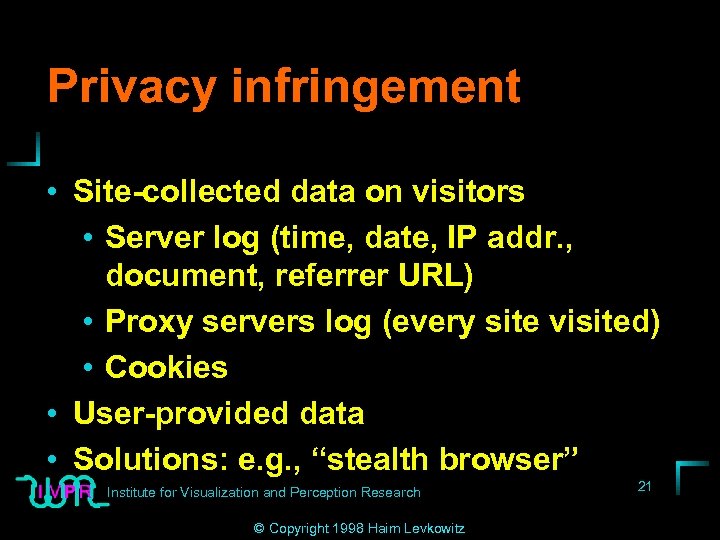
Privacy infringement • Site-collected data on visitors • Server log (time, date, IP addr. , document, referrer URL) • Proxy servers log (every site visited) • Cookies • User-provided data • Solutions: e. g. , “stealth browser” Institute for Visualization and Perception Research © Copyright 1998 Haim Levkowitz 21
Risks to the web site • Webjacking • Server and LAN break-ins • Denial-of-service attacks Institute for Visualization and Perception Research © Copyright 1998 Haim Levkowitz 22
Webjacking • Break in & modify contents • Happens(ed) a lot • How? • Exploit holes in • OS, Web server, buggy SW • CGI scripts Institute for Visualization and Perception Research © Copyright 1998 Haim Levkowitz 23
Server and LAN break-ins • Various attacks at different protocol layers (OSI, more …) • Defense: firewall Institute for Visualization and Perception Research © Copyright 1998 Haim Levkowitz 24
Denial-of-service attacks • Cause server to crash / hang / “crawl” • OS, server, CGI scripts, Web site services • No real defenses • Place limits on resources used by server / other sw • Close known holes Institute for Visualization and Perception Research © Copyright 1998 Haim Levkowitz 25
Part I: Document confidentiality • Basic cryptography • SSL, SET, and Digital Payment Systems Institute for Visualization and Perception Research © Copyright 1998 Haim Levkowitz 26
Basic cryptography • • • How cryptography works Symmetric cryptography Public key cryptography Online Resources Printed Resources Institute for Visualization and Perception Research © Copyright 1998 Haim Levkowitz 27
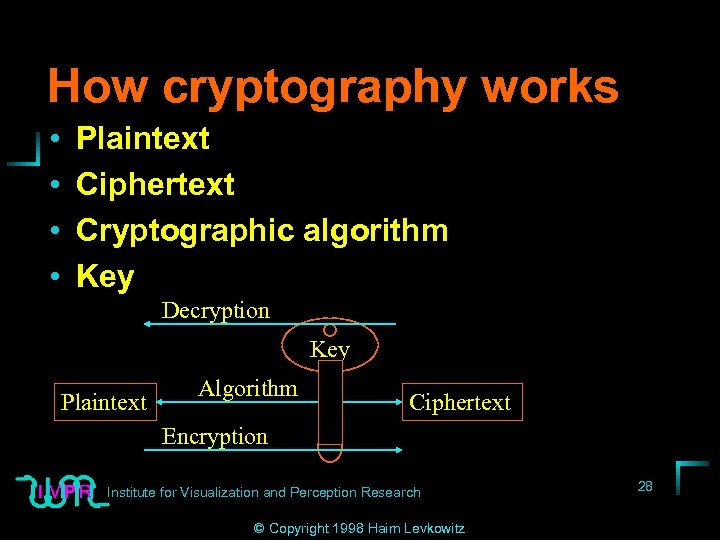
How cryptography works • • Plaintext Ciphertext Cryptographic algorithm Key Decryption Key Plaintext Algorithm Ciphertext Encryption Institute for Visualization and Perception Research © Copyright 1998 Haim Levkowitz 28
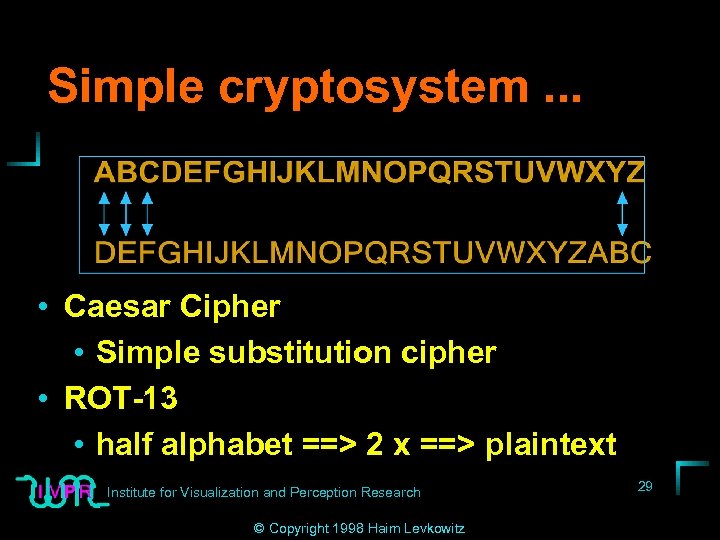
Simple cryptosystem. . . • Caesar Cipher • Simple substitution cipher • ROT-13 • half alphabet ==> 2 x ==> plaintext Institute for Visualization and Perception Research © Copyright 1998 Haim Levkowitz 29
Keys cryptosystems … • • keys and keyspace. . . secret-key and public-key. . . key management. . . strength of key systems. . . Institute for Visualization and Perception Research © Copyright 1998 Haim Levkowitz 30
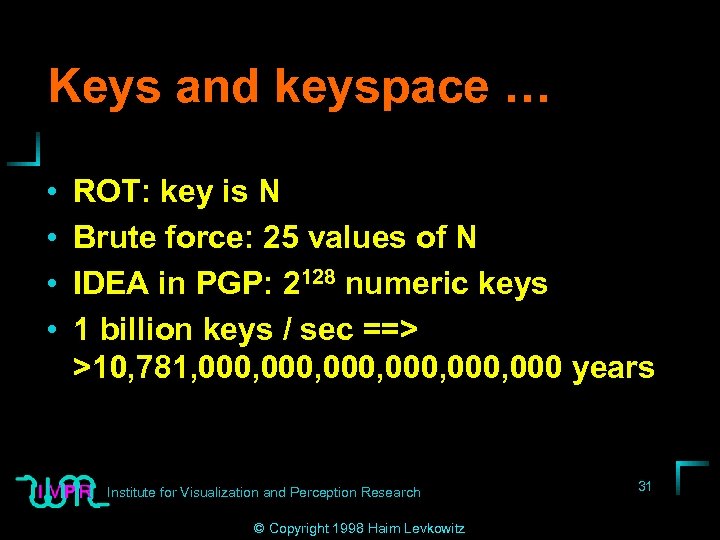
Keys and keyspace … • • ROT: key is N Brute force: 25 values of N IDEA in PGP: 2128 numeric keys 1 billion keys / sec ==> >10, 781, 000, 000 years Institute for Visualization and Perception Research © Copyright 1998 Haim Levkowitz 31
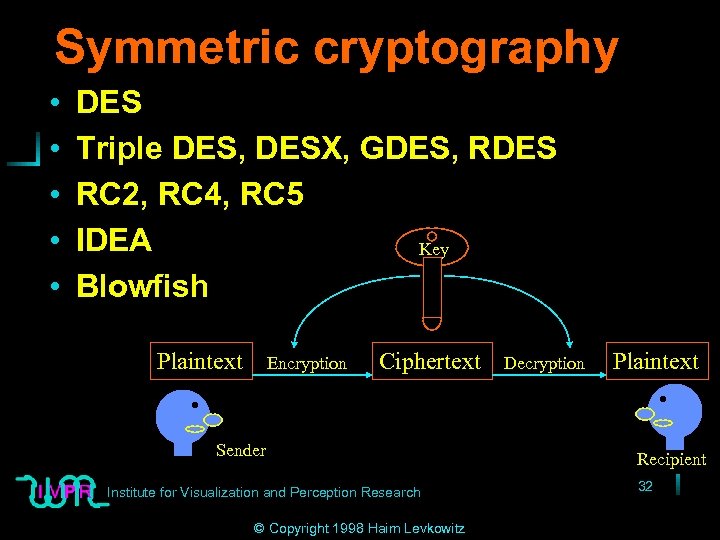
Symmetric cryptography • • • DES Triple DES, DESX, GDES, RDES RC 2, RC 4, RC 5 IDEA Key Blowfish Plaintext Encryption Ciphertext Sender Institute for Visualization and Perception Research © Copyright 1998 Haim Levkowitz Decryption Plaintext Recipient 32
DES • Data Encryption Standard • US NIST (‘ 70 s) • 56 -bit key • Good then • Not enough now (cracked June 1997) • Discrete blocks of 64 bits • Often w/ CBC (cipherblock chaining) • Each blocks encr. depends on contents of previous Institute for Visualization and Perception Research © Copyright 1998 Haim Levkowitz 33
Triple DES, DESX, GDES, RDES • Variants on DES: decrease risk of brute-force guessing • Triple-DES • 1. W/ Key 1 • 2. W/ Key 2 • 3. W/ Key 1 • ==> Effective key length ~168 bits Institute for Visualization and Perception Research © Copyright 1998 Haim Levkowitz 34
RC 2, RC 4, RC 5 • Proprietary (RSA Data Security, Inc. ) • Variable length keys(up to 2, 048 bits) • Outside US: 40 -bit versions of RC 2 & RC 4 • ==> Web browsers & servers Institute for Visualization and Perception Research © Copyright 1998 Haim Levkowitz 35
IDEA • • • Int’l Data Encryption Algorithm Patented (Ascom. Tech AG) Popular in Europe 128 -bit key ==> more secure than DES (One of) at heart of PGP (Other is RSA) Institute for Visualization and Perception Research © Copyright 1998 Haim Levkowitz 36
Blowfish • Unpatented (Bruce Schneier) • In many commercial & freeware • Var-length key (up to 448 bits) Institute for Visualization and Perception Research © Copyright 1998 Haim Levkowitz 37
Symmetric not fit for Internet • Spontaneous comm ==> can’t exchange keys • Multiway comm ==> key secrecy compromised Institute for Visualization and Perception Research © Copyright 1998 Haim Levkowitz 38
Public key cryptography • Two-in-one • Cryptography • Digital signatures Institute for Visualization and Perception Research © Copyright 1998 Haim Levkowitz 39
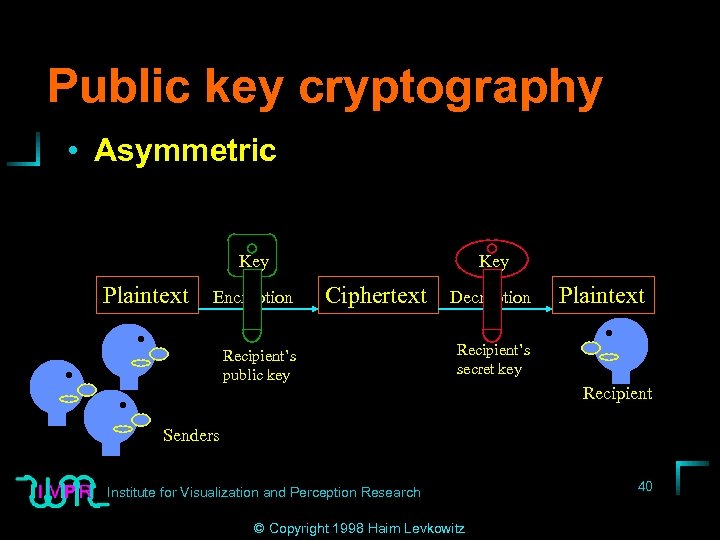
Public key cryptography • Asymmetric Key Plaintext Encryption Key Ciphertext Recipient’s public key Decryption Plaintext Recipient’s secret key Recipient Senders Institute for Visualization and Perception Research © Copyright 1998 Haim Levkowitz 40
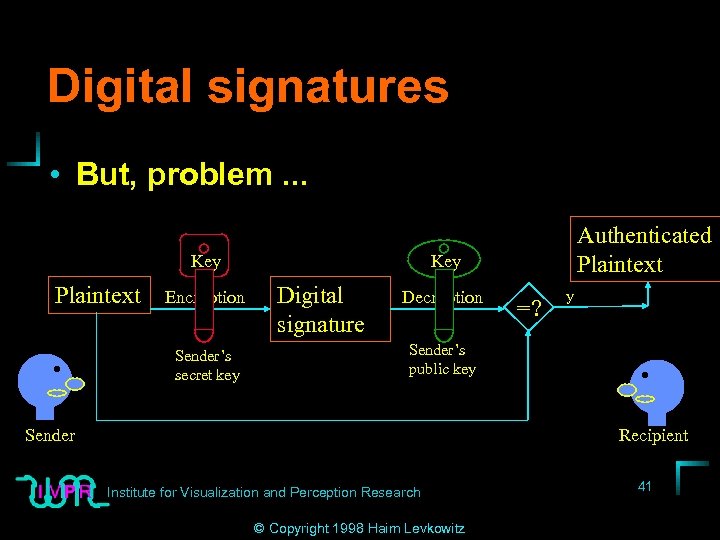
Digital signatures • But, problem. . . Key Plaintext Encryption Sender’s secret key Authenticated Plaintext Key Digital signature Decryption =? y Sender’s public key Sender Recipient Institute for Visualization and Perception Research © Copyright 1998 Haim Levkowitz 41
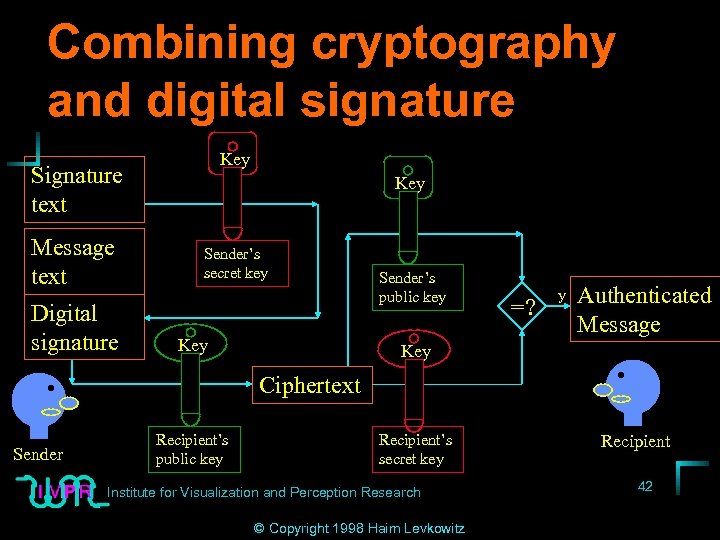
Combining cryptography and digital signature Key Signature text Message text Digital signature Key Sender’s secret key Key Sender’s public key =? y Authenticated Message Key Ciphertext Sender Recipient’s public key Recipient’s secret key Institute for Visualization and Perception Research © Copyright 1998 Haim Levkowitz Recipient 42
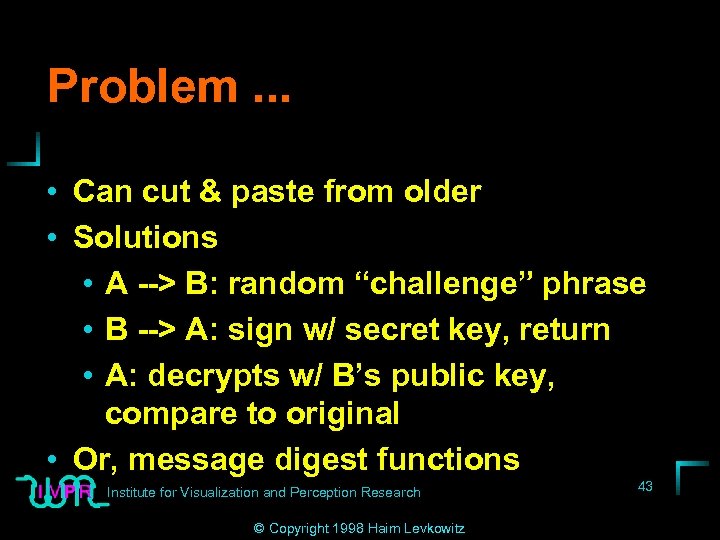
Problem. . . • Can cut & paste from older • Solutions • A --> B: random “challenge” phrase • B --> A: sign w/ secret key, return • A: decrypts w/ B’s public key, compare to original • Or, message digest functions Institute for Visualization and Perception Research © Copyright 1998 Haim Levkowitz 43
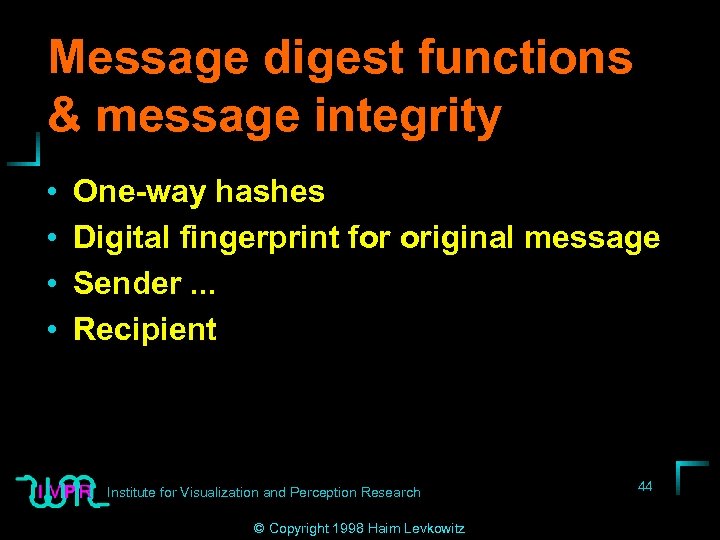
Message digest functions & message integrity • • One-way hashes Digital fingerprint for original message Sender. . . Recipient Institute for Visualization and Perception Research © Copyright 1998 Haim Levkowitz 44
Sender • 1. Run message through digest function • 2. Sign hash with secret key • 3. Send signed hash & original message to recipient Institute for Visualization and Perception Research © Copyright 1998 Haim Levkowitz 45
Recipient • Decrypt hash w/ sender’s public key • Compare with result of running message through digest function • Match ==> verified integrity • In SSL (later): Message Authenticity Check (MAC) • MAC = digest(secret + digest(secret message)) Institute for Visualization and Perception Research © Copyright 1998 Haim Levkowitz 46
Message digest functions • MD 4 (Rivest, MIT) • 128 -bit hashes • Weaknesses ==> • MD 5 (Rivest) • Most widely used • SHA: Secure Hash Algorithm (NIST) • 160 -bit hash Institute for Visualization and Perception Research © Copyright 1998 Haim Levkowitz 47
Digital envelopes • Public key encryption SLOWER than symmetric ==> Hybrid • 1. Random secret key (“session key”; discard when done) • 2. Encrypt message w/ session key & symmetric alg. • Encrypt session key w/ recipient’s public key (==> “digital envelope”) • Send encrypted message + digital envelope Institute for Visualization and Perception Research © Copyright 1998 Haim Levkowitz 48
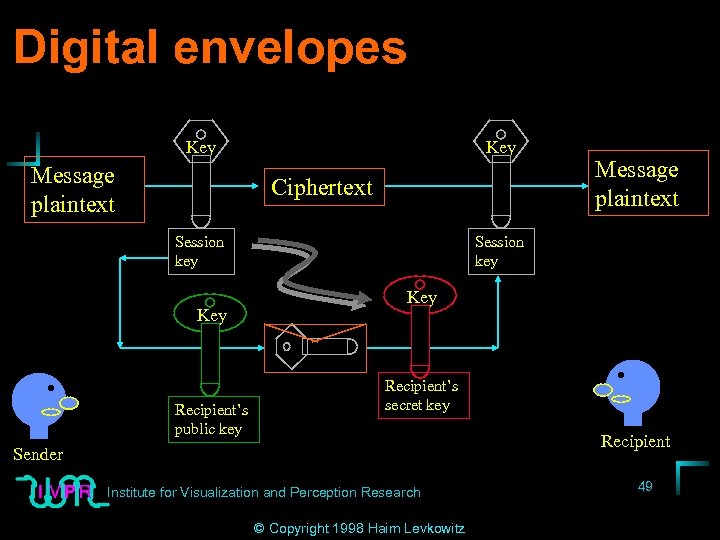
Digital envelopes Key Message plaintext Key Ciphertext Session key Key Recipient’s public key Message plaintext Session key Key Recipient’s secret key Recipient Sender Institute for Visualization and Perception Research © Copyright 1998 Haim Levkowitz 49
Certifying authorities & public key infrastructure • Large public-key database • ==> management? Trusted third party • Certifying authorities (CA) Institute for Visualization and Perception Research © Copyright 1998 Haim Levkowitz 50
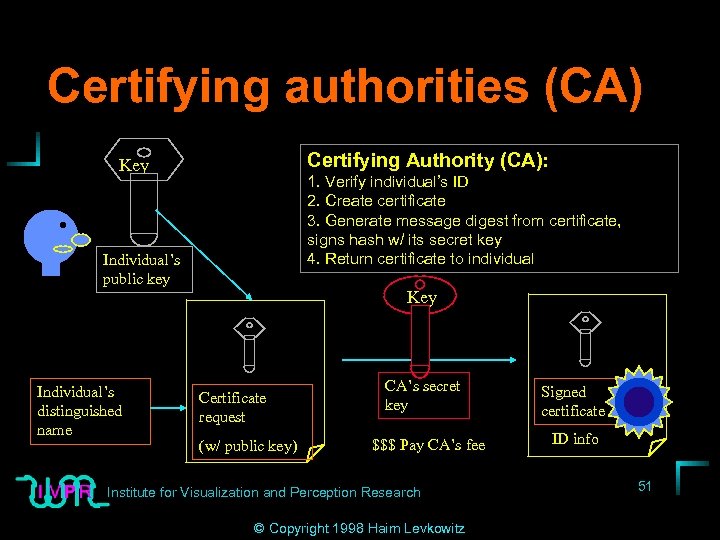
Certifying authorities (CA) Certifying Authority (CA): Key 1. Verify individual’s ID 2. Create certificate 3. Generate message digest from certificate, signs hash w/ its secret key 4. Return certificate to individual Individual’s public key Individual’s distinguished name Key Certificate request (w/ public key) CA’s secret key $$$ Pay CA’s fee Institute for Visualization and Perception Research © Copyright 1998 Haim Levkowitz Signed certificate ID info 51
Public key infrastructure • Site certificates: authenticate Web servers • Personal certificate: individuals • SW publisher certificates: executables • Certifying authority certificates • Common format: X. 509 v 3 • CPS: certification practice statement Institute for Visualization and Perception Research © Copyright 1998 Haim Levkowitz 52
Root CAs & certificate chains • Browsers delivered w/ signed certificates of well-known CAs (root) • Root CAs can sign • End user’s public key • Another (secondary) CA’s public key • ==> Signing authority • ==> Certificate chain • ==> “Hierarchy. Research of trust” 53 Institute for Visualization and Perception © Copyright 1998 Haim Levkowitz
Certificate expiration and revocation list • Invalidate public/secret key pair • Loss/corruption/theft of secret key • Change in ID info in certificate • Compromise of CA’s secret key • CRL: Certificate Revocation List • Certificate expiration date (1 year) Institute for Visualization and Perception Research © Copyright 1998 Haim Levkowitz 54
Diffie-Helman: encrypton without authentication • Encryption + authentication usually together • At least one party produces signed certificate ==> no anonymous comm. • Diffie-Helman key exchange: negotiate session key wo sending key • Each party picks partial key independently 55 Institute for Visualization and Perception Research © Copyright 1998 Haim Levkowitz
Diffie-Helman (cont. ) • Send part of key info • Other side calculates common key value • Eavesdropper can’t reconstruct key • Use symmetric algorithm • Discard session key at end • No authentication ==> “man-in-themiddle” attack Institute for Visualization and Perception Research © Copyright 1998 Haim Levkowitz 56
Man-in-the-middle attack • A, B want to communicate • C imposes in network between two wo arousing suspicions • A negotiates w/ C thinking it’s B • B negotiates w/ C thinking it’s A • A & B sending messages, C relaying • A & B think comm is secure; C reads & can modify 57 Institute for Visualization and Perception Research • Hard to accomplish © Copyright 1998 Haim Levkowitz
Securing private (secret) keys • Stored on hard disk encrypted • When first invoked, prompt for pass phrase to unlock • Key read into memory • Problem: virus/other sw looking for private keys • Solution: on ROM on smart card (take away) 58 Institute for Visualization and Perception Research © Copyright 1998 Haim Levkowitz
Key length and security • Longer key ==> more secure message • How long? How secure? • Good alg. + implementation + key management ==> brute-force only • Cost to crack vs. cost of normal use • Estimated cracking cost. . . Institute for Visualization and Perception Research © Copyright 1998 Haim Levkowitz 59
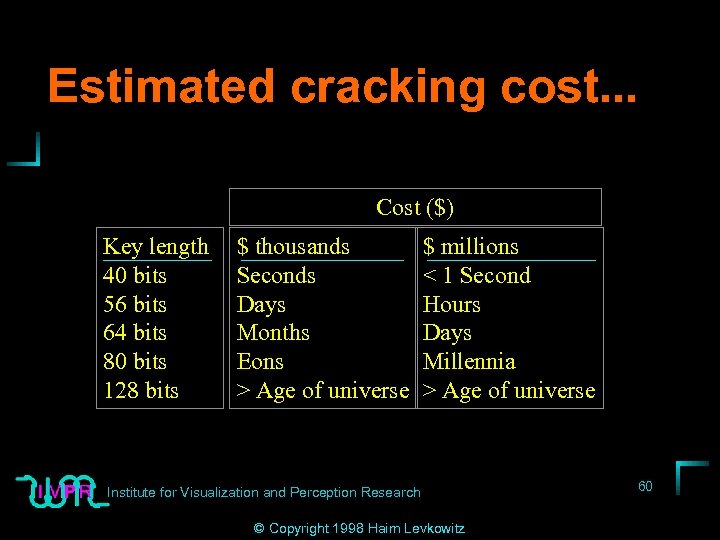
Estimated cracking cost. . . Cost ($) Key length 40 bits 56 bits 64 bits 80 bits 128 bits $ thousands Seconds Days Months Eons > Age of universe $ millions < 1 Second Hours Days Millennia > Age of universe Institute for Visualization and Perception Research © Copyright 1998 Haim Levkowitz 60
Key length & US encryption policy • Strong encryption classified as munition • SW must get export license • RC 2, RC 4 w/ 40 -bit keys (or less) • RSA w/ 512 -bit keys • Digital signature but no encryption • Financial app’s (e. g. , Quicken) Institute for Visualization and Perception Research © Copyright 1998 Haim Levkowitz 61
US policy continued • • • Slowing effect on SW dev Online products limited to export version ==> Most browsers crippled Servers overseas crippled Must have both side for secure transaction Versions of Netscape + IE exempt ==>128 bit keys Institute for Visualization and Perception Research © Copyright 1998 Haim Levkowitz 62
Resources • Stein’s on-line resource • B. Schneier: Practical Cryptography, 2 nd Edition (Wiley, 1995) • R. E. Smith: Internet Cryptography (Addison-Wesley, 1997) Institute for Visualization and Perception Research © Copyright 1998 Haim Levkowitz 63
SSL, SET, and Digital Payment Systems • • Internet cryptographic protocols SSL: Secure Sockets Layer SET: Secure Electronic Transactions Other Digital Payment Systems Institute for Visualization and Perception Research © Copyright 1998 Haim Levkowitz 64
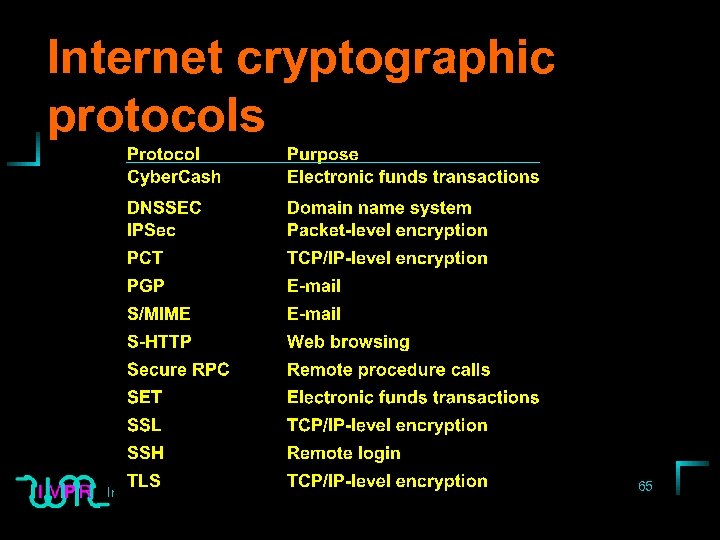
Internet cryptographic protocols Institute for Visualization and Perception Research © Copyright 1998 Haim Levkowitz 65
SSL: Secure Sockets Layer • History • Characteristics • SSL Transaction Institute for Visualization and Perception Research © Copyright 1998 Haim Levkowitz 66
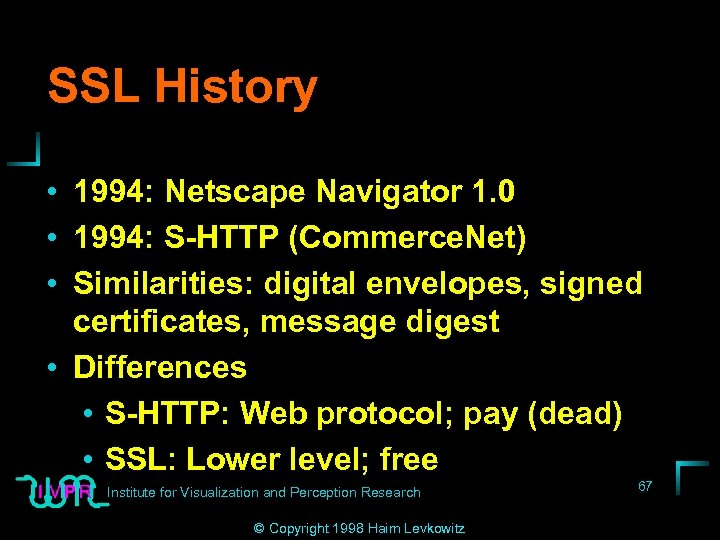
SSL History • 1994: Netscape Navigator 1. 0 • 1994: S-HTTP (Commerce. Net) • Similarities: digital envelopes, signed certificates, message digest • Differences • S-HTTP: Web protocol; pay (dead) • SSL: Lower level; free Institute for Visualization and Perception Research © Copyright 1998 Haim Levkowitz 67
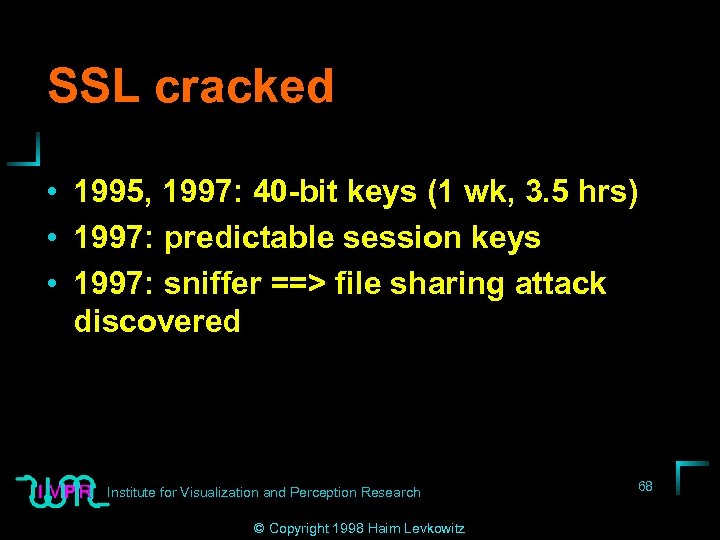
SSL cracked • 1995, 1997: 40 -bit keys (1 wk, 3. 5 hrs) • 1997: predictable session keys • 1997: sniffer ==> file sharing attack discovered Institute for Visualization and Perception Research © Copyright 1998 Haim Levkowitz 68
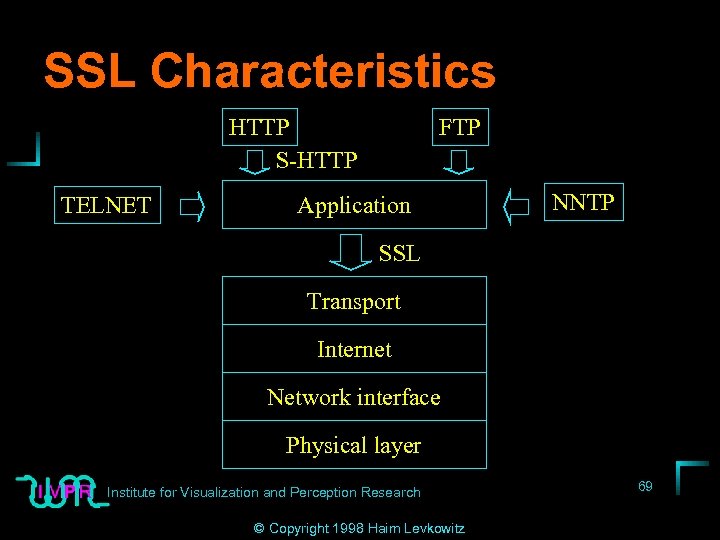
SSL Characteristics HTTP S-HTTP TELNET FTP Application NNTP SSL Transport Internet Network interface Physical layer Institute for Visualization and Perception Research © Copyright 1998 Haim Levkowitz 69
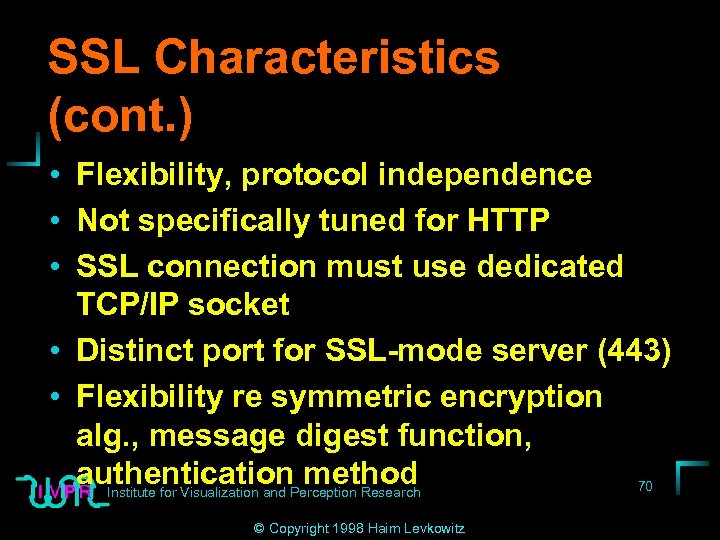
SSL Characteristics (cont. ) • Flexibility, protocol independence • Not specifically tuned for HTTP • SSL connection must use dedicated TCP/IP socket • Distinct port for SSL-mode server (443) • Flexibility re symmetric encryption alg. , message digest function, authentication. Perception Research method 70 Institute for Visualization and © Copyright 1998 Haim Levkowitz
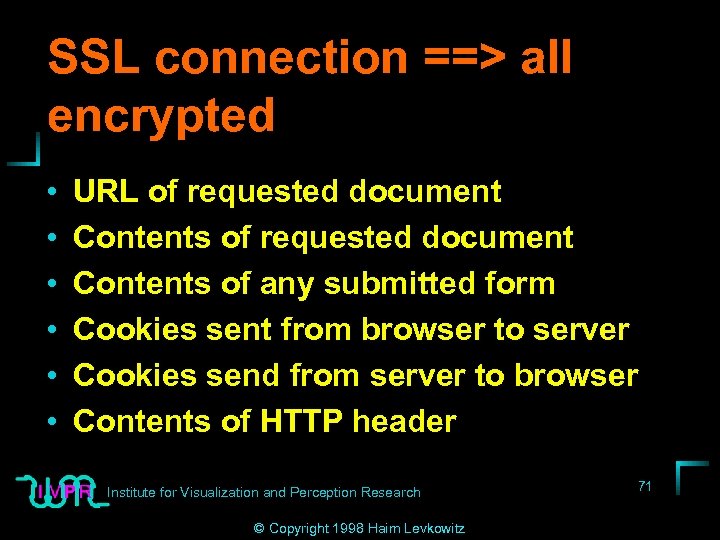
SSL connection ==> all encrypted • • • URL of requested document Contents of any submitted form Cookies sent from browser to server Cookies send from server to browser Contents of HTTP header Institute for Visualization and Perception Research © Copyright 1998 Haim Levkowitz 71
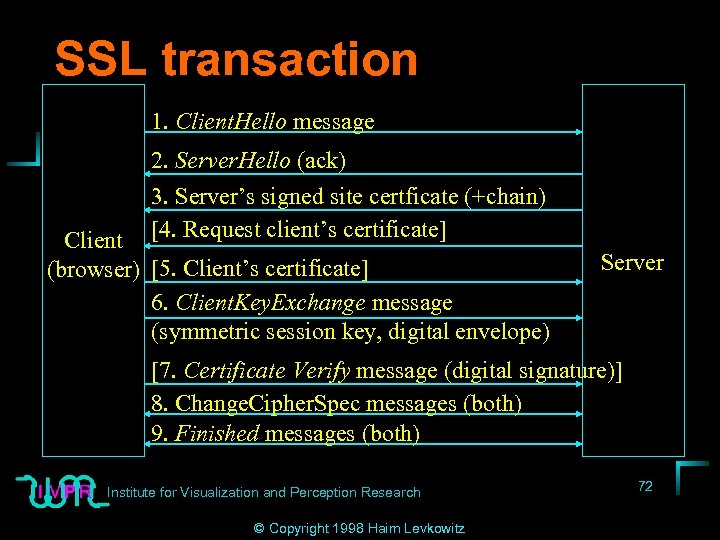
SSL transaction 1. Client. Hello message 2. Server. Hello (ack) 3. Server’s signed site certficate (+chain) [4. Request client’s certificate] Client (browser) [5. Client’s certificate] 6. Client. Key. Exchange message (symmetric session key, digital envelope) Server [7. Certificate Verify message (digital signature)] 8. Change. Cipher. Spec messages (both) 9. Finished messages (both) Institute for Visualization and Perception Research © Copyright 1998 Haim Levkowitz 72
SET: Secure Electronic Transactions • • What is SET? Why not just use SSL? SET in a Nutshell SET user interface Institute for Visualization and Perception Research © Copyright 1998 Haim Levkowitz 73
What is SET (Secure Electronic Transactions)? • Cryptogrqphic protocol • Visa, Mastercard, Netscape, Microsoft • Only for credit- and debit-card transactions • SET low-level services. . . • SET high-level features. . . Institute for Visualization and Perception Research © Copyright 1998 Haim Levkowitz 74
SET low-level services. . . • Authentication • Confidentiality • Linkage Institute for Visualization and Perception Research © Copyright 1998 Haim Levkowitz 75
SET high-level features. . . • • • Cardholder registration Merchant registration Purchase requests Payment authorization Payment capture (funds transfer) Chargebacks (refunds) Credits Credit reversals Debit card transactions Institute for Visualization and Perception Research © Copyright 1998 Haim Levkowitz 76
Why not just use SSL? • SSL: no support for high-level features • Server-side security • Avoid misuse of credit card number guessers • Avoid general-purpose U. S. export restrictions • Financial transactions excluded Institute for Visualization and Perception Research © Copyright 1998 Haim Levkowitz 77
SET in a nutshell • • • 1. Customer initiates purchase 2. Client’s SW send order & payment info 3. Merchant passes payment info to bank 4. Bank checks validity of card 5. Card issuer authorizes & signs charge slip 6. Merchant’s bank authorizes transaction 7. Merchant’s Web server completes transaction 8. Merchant “captures” transaction 9. Card issuer sends bill to customer Institute for Visualization and Perception Research © Copyright 1998 Haim Levkowitz 78
SET notes (functional) • Authentication in every phase • ==> Certificates for card issuer, merchant’s bank • All must register • ==> SW generates public & secret keys • Two key pairs for certain parts of protocol Institute for Visualization and Perception Research © Copyright 1998 Haim Levkowitz 79
SET notes (technical) • Secure Hash Algorithms (SHA) • ==> 160 -bit hash • Public/secret key pair: RSA, 1, 024 bit • Symmetric encryption: DES • 56 -bit key • ==> Cost of cracking assumed higher than value of single credit card transaction 80 Institute for Visualization and Perception Research © Copyright 1998 Haim Levkowitz
Other digital payment systems • • • Why need other payment systems? First Virtual Cyber. Cash Digi. Cash Millicent Institute for Visualization and Perception Research © Copyright 1998 Haim Levkowitz 81
Why need other payment systems? • SET: credit/debit cards • ==> Transaction fees • ==> Not economical for low-cost • ==> Not good for impulse buying • Not anonymous • ==> E-money • Cryptography ==> complex systems 82 Institute for Visualization and Perception Research © Copyright 1998 Haim Levkowitz
First Virtual • For intangibles (SW, web pages, games) • No encryption, all secret info previously by phone • Only PIN # • Merchant has CGI script to validate PIN • E-mail to customer w/ details of purchase to be approved Institute for Visualization and Perception Research © Copyright 1998 Haim Levkowitz 83
Cyber. Cash • User: Cyber. Cash Wallet SW on PC • Credit card / bank account info encrypted there • Merchant: Electronic Cash Register SW on server • Strong encryption • High transaction overhead • Cyber. Coin for small payments Institute for Visualization and Perception Research © Copyright 1998 Haim Levkowitz 84
Digi. Cash • • Like phone cards/subway tokens Cyber. Bucks: electronic voucher User mints, banks signs Cost of signing = face value Digitally signed w/ public key encryption Can’t trace, unless try to use twice Transmit money safely between peers wo bank 85 Institute for Visualization and Perception Research © Copyright 1998 Haim Levkowitz
Millicent • • • DEC, late 1996 Low overhead, up to $5 Brokers & scrips (like gift certificate) Merchant produces & validates Broker sells at markup ==> No centralized server for validation (bottleneck) • No strong cryptography (small amounts) Institute for Visualization and Perception Research © Copyright 1998 Haim Levkowitz 86
Part II: Client-side security • Using SSL • Active content • Web privacy Institute for Visualization and Perception Research © Copyright 1998 Haim Levkowitz 87
Using SSL • • • SSL at work Personal certificates Checklist Online Resources Printed Resources Institute for Visualization and Perception Research © Copyright 1998 Haim Levkowitz 88
SSL at work • Establishing an SSL connection • Things to watch for Institute for Visualization and Perception Research © Copyright 1998 Haim Levkowitz 89
Personal certificates • Veri. Sign personal certificates • Obtaining a Veri. Sign personal certificate • Browser SSL settings Institute for Visualization and Perception Research © Copyright 1998 Haim Levkowitz 90
Checklist • Always use SSL browser for confidential info • Never use crippled export-grade cryptography browser for confidential documents • Password-protect personal certificate • Never accept CA certificate from unknown Web site • Back up personal certificates 91 Institute for Visualization and Perception Research © Copyright 1998 Haim Levkowitz
Online Resources • • Veri. Sign: http: //www. verisign. com Sage passage: http: //www. c 2. net PGP: www. pgp. com RSA Data Security (S/MIME): http: //www. rsa. com/rsa/S-MIME • Simple Perl-based packet sniffer: http: //www. genome. wi. mit. edu/~lstein/t alks/WWW 6/sniffer • Tcpdump & libpcap (required for sniffer): Visualization and Perception Research 92 Institute for ftp: //ftp. ee. lbl. gov/tcpdump. tar. Z, © Copyright 1998 Haim Levkowitz
Printed Resources • Grafinkel, Simson: Pretty Good Privacy, O’Reilly & Assoc. 1995 Institute for Visualization and Perception Research © Copyright 1998 Haim Levkowitz 93
Active content • • • Bad by design or bad by accident? Traditional threats Helper applications and plug-ins Java Active. X Java. Script and VBScript Exotic technologies What can you do Changing active content settings Checklist Institute for Visualization and Perception Research Resources © Copyright 1998 Haim Levkowitz 94
Bad by design or bad by accident? • E. g. , the Moldovan scam • Pornography site • Download viewer • Viewer disconnect user, turn off speakers, reconnect to ISP in Moldova (“ 900”) • Even when leave site, still connected Institute for Visualization and Perception Research © Copyright 1998 Haim Levkowitz 95
Traditional threats • Trojan horses • Pretend; introduce viruses, etc. • Viruses • Macro viruses • Across OSs • Rabbits: many copies • Worms: like rabbits, but spread across Net 96 Institute for Visualization and Perception Research © Copyright 1998 Haim Levkowitz
Helper applications and plug-ins • Keep to bare minimum • Only from trusted sources • Check vendor’s support pages for discovered security holes Institute for Visualization and Perception Research © Copyright 1998 Haim Levkowitz 97
Java • • Applet security restrictions Hostile applets Annoying applets Inadequate applets Institute for Visualization and Perception Research © Copyright 1998 Haim Levkowitz 98
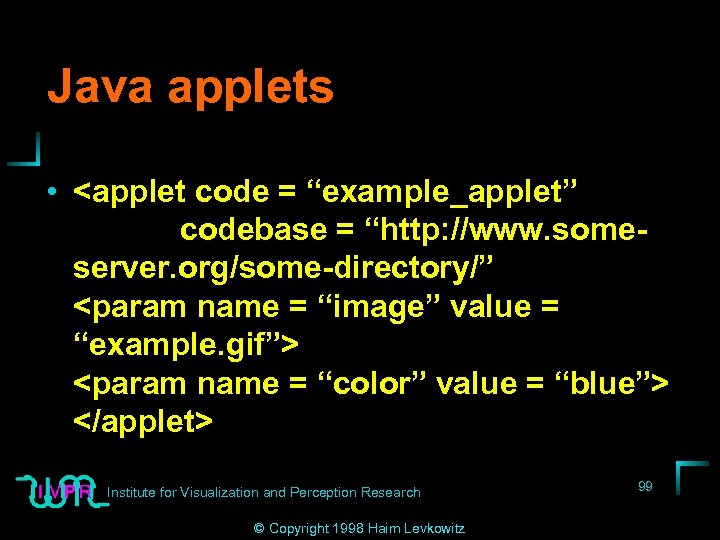
Java applets • <applet code = “example_applet” codebase = “http: //www. someserver. org/some-directory/” <param name = “image” value = “example. gif”> <param name = “color” value = “blue”> </applet> Institute for Visualization and Perception Research © Copyright 1998 Haim Levkowitz 99
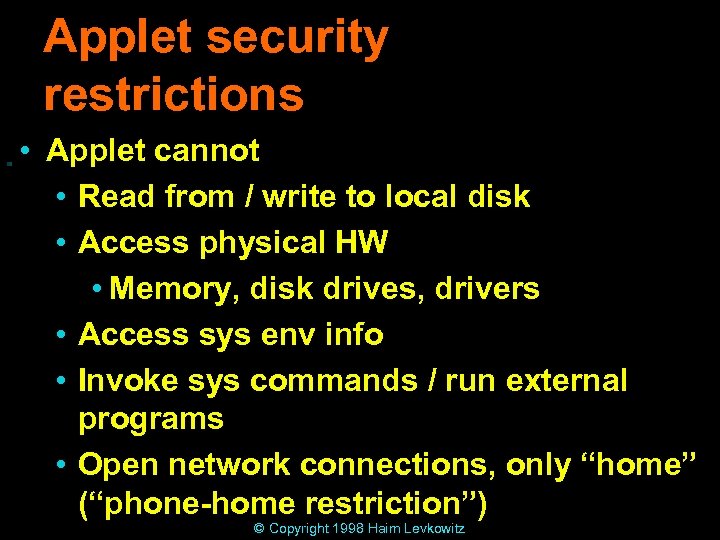
Applet security restrictions • Applet cannot • Read from / write to local disk • Access physical HW • Memory, disk drives, drivers • Access sys env info • Invoke sys commands / run external programs • Open network connections, only “home” 100 Institute for Visualization and Perception Research (“phone-home restriction”) © Copyright 1998 Haim Levkowitz
Hostile applets • Failure of phone-home restriction • Execute arbitrary machine instructions • Bypass Java security manager with hand-crafted bytecode Institute for Visualization and Perception Research © Copyright 1998 Haim Levkowitz 101
Failure of phone-home restriction • 1996, Steve Gibbons, Edward Felten (independetly) • Temporary subvert domain-name system • ==> Circumvent net connection restriction • Send out hostile applet • Contact any machine on Net • Including on user’s side of firewall 102 Institute for Visualization and Perception Research • Navigator 2. 0; fixed (? ) 2. 01 © Copyright 1998 Haim Levkowitz
Execute arbitrary machine instructions • Bug in Java interpreter loading of libraries • ==> Remote users can circumvent • Trick browser to download code library • Disguise as “broken” inline image • ==> Place in browser cache • Send applet that loads code • Library not restricted by security manager • ==> Applet “broken out of sandbox” 103 • ==> Canfor Visualization and Perception Research Institute do whatever it wishes © Copyright 1998 Haim Levkowitz • Navigtor 2. 0, 2. 01; fixed 2. 02
Bypass Java security manager with handcrafted bytecode • • • Sun, March 1997 Bug in Java bytecode verifier Hand-craft bytecode ==> Bypass Java security manager ==> Execute forbidden commands IE 3. 01, NN 3. 01; fixed later Institute for Visualization and Perception Research © Copyright 1998 Haim Levkowitz 104
Another phone-home restriction bug • Applets make network connections to machines behind corporate firewall • NN 3. 02, 4. 01; IE not known • No known fix Institute for Visualization and Perception Research © Copyright 1998 Haim Levkowitz 105
Summary: No known attacks • • • Any of bugs Theoretical Most closed Holes may exist Security model sound Institute for Visualization and Perception Research © Copyright 1998 Haim Levkowitz 106
Annoying applets • • Infinite loop; slow machine Allocate large memory structures Make multiple copies of self in memory Open window larger than desktop, prevent from getting to other windows • Open new windows faster than user can close • Windowing op’s that crash browser Institute for Visualization and Perception Research © Copyright 1998 Haim Levkowitz 107
Inadequate applets • Sandbox prevent bad and good • Future: control stepping out • Grant rights to read, write, print, make net connections • Selected files, dirs. , locations • Code signing: authenticate ==> privileges • For now: run or not Institute for Visualization and Perception Research © Copyright 1998 Haim Levkowitz 108
Active. X • Active. X vs. Java • Authenticode system • Is Active. X safe? Institute for Visualization and Perception Research © Copyright 1998 Haim Levkowitz 109
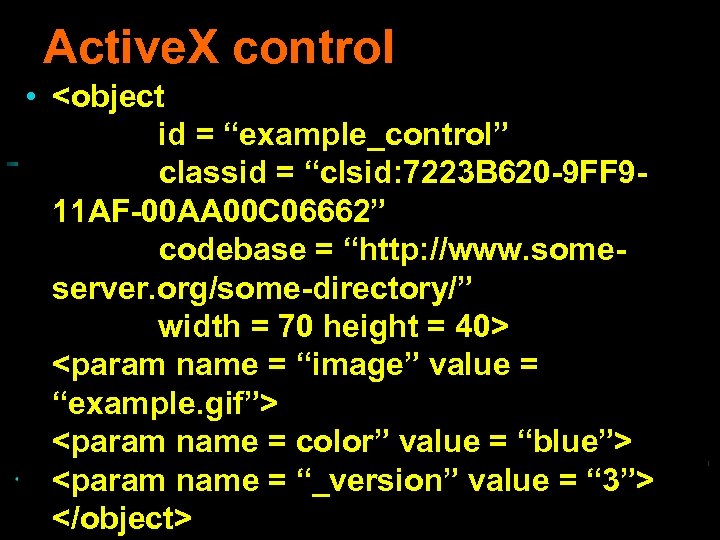
Active. X control • <object id = “example_control” classid = “clsid: 7223 B 620 -9 FF 911 AF-00 AA 00 C 06662” codebase = “http: //www. someserver. org/some-directory/” width = 70 height = 40> <param name = “image” value = “example. gif”> <param name = color” value = “blue”> <param name and Perception Research value = “ 3”> 110 Institute for Visualization = “_version” </object> © Copyright 1998 Haim Levkowitz
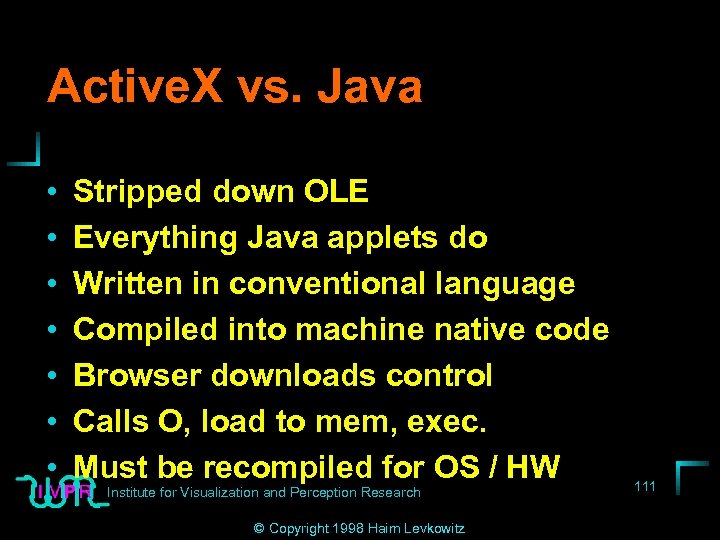
Active. X vs. Java • • Stripped down OLE Everything Java applets do Written in conventional language Compiled into machine native code Browser downloads control Calls O, load to mem, exec. Must be recompiled for OS / HW Institute for Visualization and Perception Research © Copyright 1998 Haim Levkowitz 111
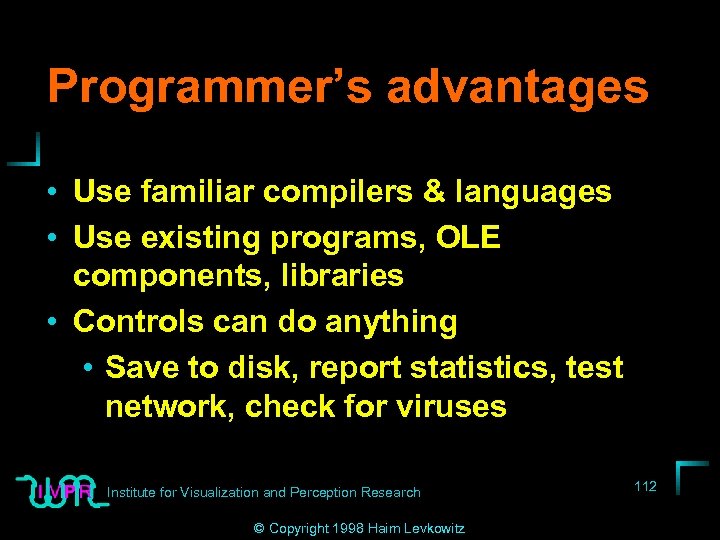
Programmer’s advantages • Use familiar compilers & languages • Use existing programs, OLE components, libraries • Controls can do anything • Save to disk, report statistics, test network, check for viruses Institute for Visualization and Perception Research © Copyright 1998 Haim Levkowitz 112
Authenticode system Institute for Visualization and Perception Research © Copyright 1998 Haim Levkowitz 113
Is Active. X safe? Institute for Visualization and Perception Research © Copyright 1998 Haim Levkowitz 114
Java. Script and VBScript • Java. Script security problems • VBScript security problems Institute for Visualization and Perception Research © Copyright 1998 Haim Levkowitz 115
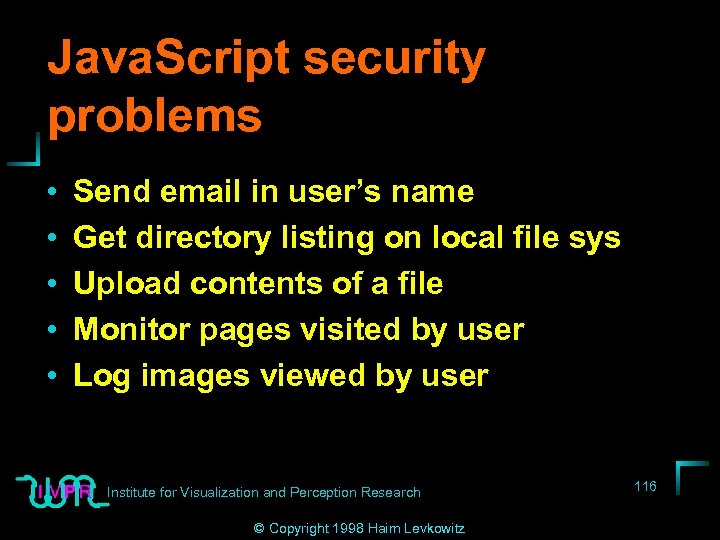
Java. Script security problems • • • Send email in user’s name Get directory listing on local file sys Upload contents of a file Monitor pages visited by user Log images viewed by user Institute for Visualization and Perception Research © Copyright 1998 Haim Levkowitz 116
VBScript security problems Institute for Visualization and Perception Research © Copyright 1998 Haim Levkowitz 117
Browser as security hole Institute for Visualization and Perception Research © Copyright 1998 Haim Levkowitz 118
Exotic technologies Institute for Visualization and Perception Research © Copyright 1998 Haim Levkowitz 119
What can you do • General precautions • User privileges • Virus checkers • Verify integrity of downloaded SW • Backups • Barring the gates Institute for Visualization and Perception Research © Copyright 1998 Haim Levkowitz 120
Changing active content settings • Internet Explorer • Netscape Navigator Institute for Visualization and Perception Research © Copyright 1998 Haim Levkowitz 121
Checklist Institute for Visualization and Perception Research © Copyright 1998 Haim Levkowitz 122
Resources Institute for Visualization and Perception Research © Copyright 1998 Haim Levkowitz 123
Web privacy • • What Web Surfing Reveals Server Logs Cookies PICS Advice for Users Advice for Webmasters Policy Initiatives Institute for Visualization and Perception Research Checklist © Copyright 1998 Haim Levkowitz 124
Part III: Server-Side Security • • • Server Security UNIX Web Servers Windows NT Web Servers Access Control Encryption and Certificate-Based Access Control • Safe CGI Scripting 125 Institute for Visualization and Perception Research • Remote Authoring and Administration © Copyright 1998 Haim Levkowitz
Server security • Why Are Web Sites Vulnerable? • Frequently Asked Questions About Web Server Security • Overview: Steps to Securing a Web Site • Online Resources Institute for Visualization and Perception Research © Copyright 1998 Haim Levkowitz 126
UNIX Web servers • • Hardening a UNIX Web Server Configuring the Web Server Monitoring Logs Monitor the Integrity of System Files and Binaries • Back Up Your System • Checklist 127 Institute for Visualization and Perception Research • Online Resources © Copyright 1998 Haim Levkowitz
Windows NT Web servers • • NT Security Concepts Windows NT Security Risks Securing a Windows NT Web Server Configuring the Web Server Checklist Online Resources Printed Resources Institute for Visualization and Perception Research © Copyright 1998 Haim Levkowitz 128
Access control • Types of Access Control • Access Control Based on IP Address or Host Name • Access Control Based on User Name and Password • Other Types of Access Control • Access Control and CGI Scripts 129 Institute for Visualization and Perception Research • Checklist © Copyright 1998 Haim Levkowitz
Encryption and Certificate -Based Access Control • SSL-Enabled Web Servers • Using Client Certificates for Access Control • Using Client Certificates for Web Server Access Control • Becoming Your Own Certifying Authority Institute for Visualization • Final Words and Perception Research © Copyright 1998 Haim Levkowitz 130
Safe CGI Scripting • Introduction to CGI Scripts and Server Modules • Common Failure Modes • Other Advice • Safe Scripting in Perl • CGI Wrappers • Checklist 131 Institute for Visualization and Perception Research • Online Resources © Copyright 1998 Haim Levkowitz
Remote Authoring and Administration • Degrees of Trust • Controlling Access to the Web Server Host • Remote Authoring Via FTP • Microsoft Front. Page • The HTTP PUT Protocol • An Upload Staging Area 132 Institute for Visualization and Perception Research • Administering the Web Server © Copyright 1998 Haim Levkowitz
Web Servers and Firewalls • • What Is a Firewall? Selecting a Firewall System Configuring a Firewall Automatic Proxy Configuration for Browsers • Examining Firewall Logs for Signs of Server Compromise 133 Institute for Visualization and Perception Research • Checklist © Copyright 1998 Haim Levkowitz
Bibliography/references Institute for Visualization and Perception Research © Copyright 1998 Haim Levkowitz 134
Скачать презентацию Internet Web Security Institute for Visualization and
324a3942f6e2ead025ce56a8a9bde151.ppt