


 Скачать презентацию Internet Security Copyright 2005 John Wiley Sons
7cdb28dd74a3a8514f4ce76751721758.ppt
- Количество слайдов: 37
 Internet Security Copyright 2005 John Wiley & Sons, Inc 1
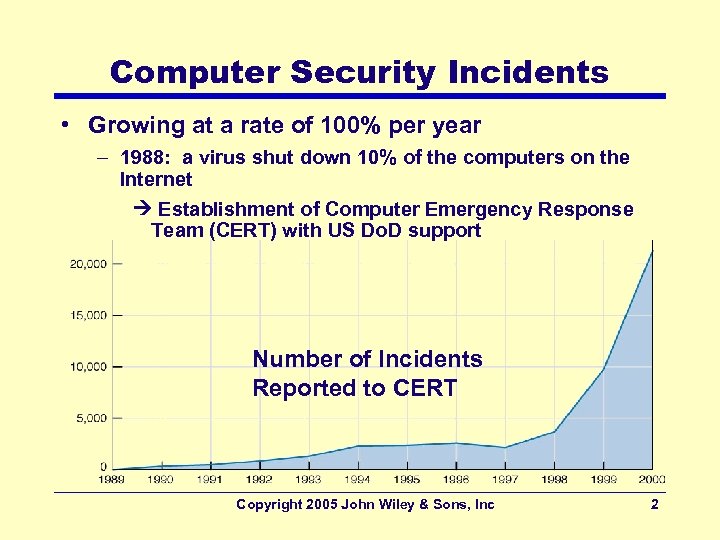 Computer Security Incidents • Growing at a rate of 100% per year – 1988: a virus shut down 10% of the computers on the Internet Establishment of Computer Emergency Response Team (CERT) with US Do. D support Number of Incidents Reported to CERT Copyright 2005 John Wiley & Sons, Inc 2
 Financial Impact of Security • 2003 Computer Security Institute/FBI Computer Crime and Security Survey – 90% of the respondents reported security breaches in the last 12 months – 75% reported a financial loss due to security breaches – Average loss: $2 million • Worldwide total annual cost of security losses – Exceeds $2 trillion • Reason for the increase in security problems – Availability of sophisticated tools to break into networks Copyright 2005 John Wiley & Sons, Inc 3
 Why Networks Need Security • Organizations becoming vulnerable – Becoming increasingly dependent on computers, networks – Becoming increasingly vulnerable to due widely available Internet access to its computers and networks • Huge losses due to security breaches – $2 M average loss + losses related to less consumer confidence as a result of publicity of breaches – Potential losses from disruption of applications (Bank of America estimates $50 M per day) • Protecting consumer privacy – Strong laws against unauthorized disclosures (California: $250 K for each such incident) • Protecting organizations’ data and application sw – Value of data and applications >> network cost Copyright 2005 John Wiley & Sons, Inc 4
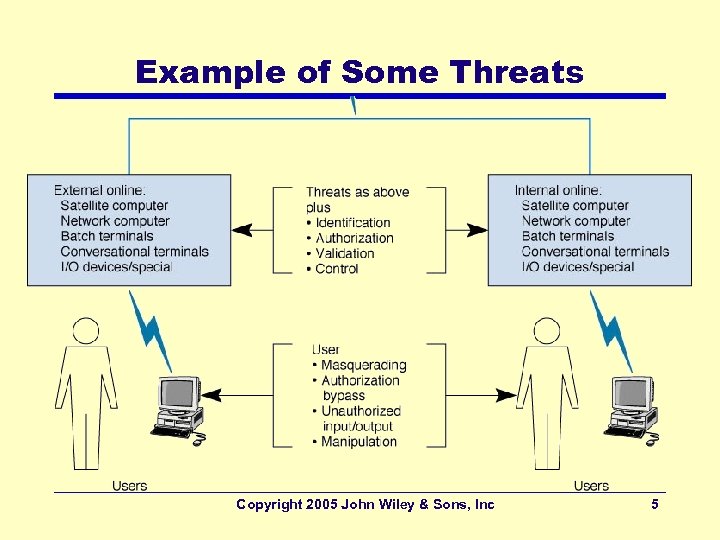 Example of Some Threats Copyright 2005 John Wiley & Sons, Inc 5
 Common Security Threats • Virus infection – most likely event • Unauthorized access – By internal and external hackers – High cost to recover (both in $ and publicity) • Device failure (not necessarily by a malicious act) • Device theft, Natural Disaster • Denial of Service attacks – External attacks blocking access to the network • Big picture messages: – Viruses: most common threat with a fairly high cost – Unauthorized access by employees: greater threat Copyright 2005 John Wiley & Sons, Inc 6
 Preventing Computer Viruses • Viruses (Macro viruses) – Attach themselves to other programs (documents) and spread when the programs are executed (the files are opened) • Worms – Special type of virus that spread itself without human intervention (copies itself from computer to computer) • Anti-virus software packages – Check disks and files to ensure that they are virus-free • Incoming e-mail messages – Most common source of viruses – Attachments to e-mails to be checked for viruses – Use of filtering programs that ‘clean’ incoming e-mail Copyright 2005 John Wiley & Sons, Inc 7
 Preventing Denial of Service Attacks • Do. S attacks – Network disrupted by a flood of messages (prevents messages from normal users) • Flooding web servers, email servers • Distributed Do. S (DDo. S) – Places DDo. S agents into many computers – Controls them by DDo. S handler • Example: Issues instructions to computers to send simultaneous messages to a target computer • Difficult to prevent Do. S and DDo. S attacks – Setup many servers around the world – Use Intrusion Detection Systems – Require ISPs to verify that all incoming messages have valid IP addresses Copyright 2005 John Wiley & Sons, Inc 8
 Detecting Disruption, Destruction, Disaster • Recognize major problems quickly • Involves alerting network managers to problems for corrective actions – Requires clear procedures describing how to report problems quickly • Detecting minor disruptions – More difficult • Bad spots on a drive remaining unnoticed until it is checked – Requires ongoing monitoring – Requires fault information be routinely logged Copyright 2005 John Wiley & Sons, Inc 9
 Controlling Unauthorized Access • Types of intruders – Casual intruders • With Limited knowledge (“trying doorknobs”) • Script kiddies: Novice attackers using hacking tools – Security experts (hackers) • Motivation: the thrill of the hunt; show off • Crackers: hackers who cause damage – Professional hackers (espionage, fraud, etc) • Breaking into computers for specific purposes – Organization employees • With legitimate access to the network • Gain access to information not authorized to use Copyright 2005 John Wiley & Sons, Inc 10
 Preventing Unauthorized Access • Requires a proactive approach that includes routinely testing the security systems • Best rule for high security – Do not keep extremely sensitive data online – Store them in computers isolated from the network • Security Policy – Critical to controlling risk due to access – Should define clearly • Important assets to be safeguarded and Controls needed • What employees should do • Plan for routinely training employees and testing security controls in place Copyright 2005 John Wiley & Sons, Inc 11
 Securing Network Perimeter • Basic access points into a network – LANs inside the organization – Dial-up access through a modem – Internet (most attacks come in this way) • Basic elements in preventing access – – Physical Security Dial-in security Firewalls and Network Address Translation (NAT) Proxy servers Copyright 2005 John Wiley & Sons, Inc 12
 Securing Network Devices • Should be secured in locked wiring closets – More vulnerable: LAN devices (controllers, hubs, bridges, routers, etc. , ) • A sniffer (LAN listening device) can be easily hooked up to these devices Use secure hubs: requires special code before a new computers are connected Copyright 2005 John Wiley & Sons, Inc 13
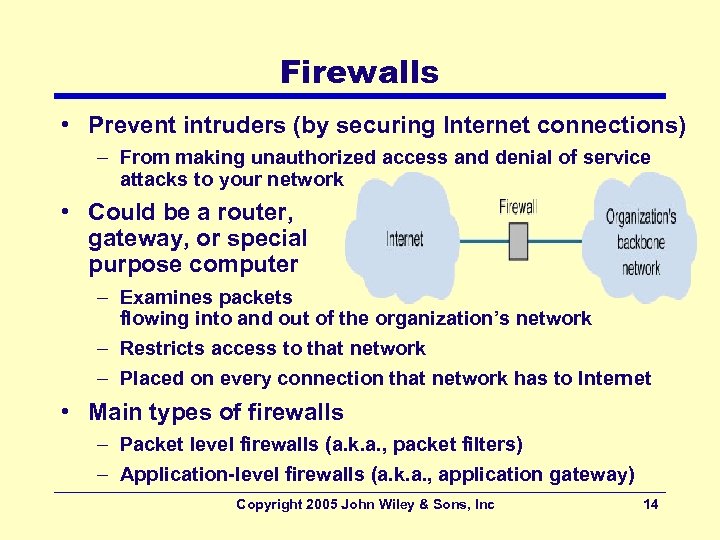 Firewalls • Prevent intruders (by securing Internet connections) – From making unauthorized access and denial of service attacks to your network • Could be a router, gateway, or special purpose computer – Examines packets flowing into and out of the organization’s network – Restricts access to that network – Placed on every connection that network has to Internet • Main types of firewalls – Packet level firewalls (a. k. a. , packet filters) – Application-level firewalls (a. k. a. , application gateway) Copyright 2005 John Wiley & Sons, Inc 14
 Packet Filters • Examines the source and destination address of packets passing through – Allows only packets that have acceptable addresses to pass – Examines IP Addresses and TCP ports only • Firewall is unaware of applications and what the intruder is trying to do • IP spoofing remains a problem – Done by simply changing the source address of incoming packets from their real address to an address inside the organization’s network • Firewall will pass this packet Copyright 2005 John Wiley & Sons, Inc 15
 Application-Level Firewalls • Acts as an intermediate host computer (between outside clients and internal servers) – Forces anyone to login to this firewall and allows access only to authorized applications (e. g. , Web site access) – Separates a private network from the rest of the Internet • Hides individual computers on the network behind the firewall • Some prohibits external users downloading executable files – Software modifications done via physical access • Requires more processing power than packet filters which can impact network performance – Because of the increased complexity of what they do Copyright 2005 John Wiley & Sons, Inc 16
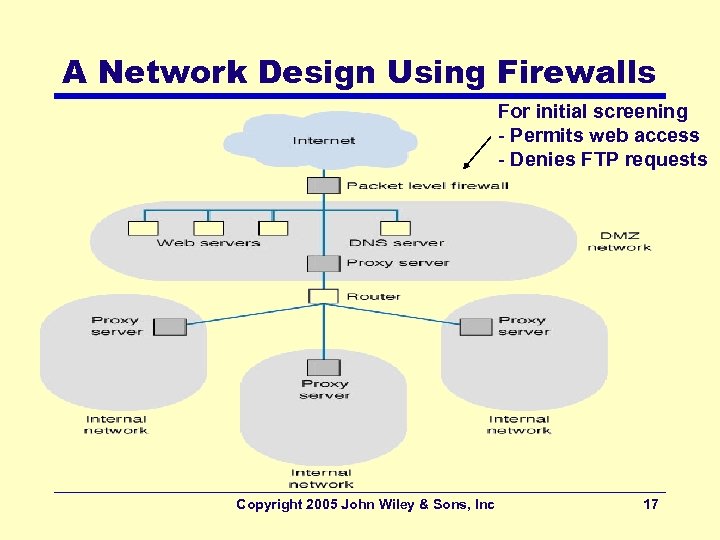 A Network Design Using Firewalls For initial screening - Permits web access - Denies FTP requests Copyright 2005 John Wiley & Sons, Inc 17
 Security Holes • Made by flaws in network software that permit unintended access to the network – A bug that permits unauthorized access – Operating systems often contain security holes – Details can be highly technical • Once discovered, knowledge about the security hole quickly circulated on the Internet – A race can then begin between • Hackers attempting to break into networks through the security hole and • Security teams working to produce a patch to eliminate the security hole – CERT: major clearing house for Internet related holes Copyright 2005 John Wiley & Sons, Inc 18
 Other Security Holes • Flawed policies adopted by vendors – New computers come with preinstalled user accounts with well known passwords • Managers forgetting to change these passwords • American government's OS security levels – Minimum level (C 2): provided by most OSs – Medium Level (B 2): provided by some – Highest level (A 1 and A 2): provided by few Copyright 2005 John Wiley & Sons, Inc 19
 OS Security: Windows vs. Linux • Windows – Originally written for one user one computer • User with full control • Applications making changes to critical parts of the system – Advantages: More powerful applications (without needing user to understand internals feature rich, easy to use applications – Disadvantages: Hostile applications taking over the system • Linux – Multi-users with various access wrights – Few system administrators with full control Copyright 2005 John Wiley & Sons, Inc 20
 Trojan Horses • Remote access management consoles that enable users to access a computer and manage it from afar • More often concealed in another software that is downloaded over Internet – Common carriers: Music and video files shared on Internet sites • Undetected by antivirus software • Major Trojans – Back Office: attacked Windows servers • Gives the attacker the same right as the administrator – Morphed into tools such as Mo. Sucker and Optix Pro • Powerful and easy to use Copyright 2005 John Wiley & Sons, Inc 21
 Encryption • One of the best way to prevent unauthorized access (more formally, cryptography) • Process of disguising info by mathematical rules • Main components of encryption systems – Plaintext: Unencrypted message – Encryption algorithm: Works like the locking mechanism to a safe – Key: Works like the safe’s combination – Cipher text: Produced from the plaintext message by the encryption function • Decryption - the same process in reverse – Doesn’t always use the same key or algorithm. – Plaintext results from decryption Copyright 2005 John Wiley & Sons, Inc 22
 Digital Signatures • Provide secure and authenticated message transmission (enabled by PKE) • Provides a proof identifying the sender – Important for certain (legal) transactions • Digital Signature: – Includes the name of the sender and other key contents (e. g. , date, time, etc. , ) • Use of PKE in reverse (applied to Digital Signature part of the message only) – Outgoing: Encrypted using the sender’s private key – Incoming: Decrypted using the sender’s public key • Providing evidence who the message originated from Copyright 2005 John Wiley & Sons, Inc 23
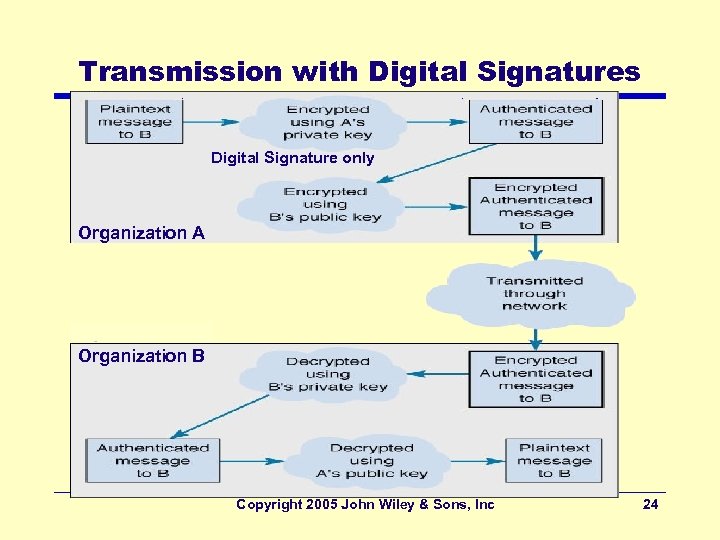 Transmission with Digital Signatures Digital Signature only Organization A Organization B Copyright 2005 John Wiley & Sons, Inc 24
 Public Key Infrastructure (PKI) • Set of hardware, software, organizations, and policies to make PKE work on Internet – Solves the problem with digital signatures • How to verify that the person sending the message • Elements of PKI – Certificate Authority (CA) • A trusted organization that can vouch for the authenticity of the person of organization – Certificate • A digital document verifying the identity of a digital signature’s source – Fingerprint • A unique key issued by the CA for every message sent by the user (for higher security certification) Copyright 2005 John Wiley & Sons, Inc 25
 Process with Certificate Authority • User registers with a CA (e. g. , Veri. Sign) – Must provide some proof of Identity – Levels of certification: Examples: • Simple confirmation of an email address • Complete police style background check • CA issues a digital certificate • User attaches the certificate to transactions (email, web, etc) • Receiver authenticates transaction with CA’s public key – Contact CA to ensure the certificate is not revoked or expired Copyright 2005 John Wiley & Sons, Inc 26
 Pretty Good Privacy (PGP) • A PKE freeware package – Often used to encrypt e-mail • Users make their public keys available – Example: Posting them on Web pages • Anyone wishing to send an encrypted message to that person – Copies the public key from the Web page into the PGP software – Encrypts (via PGP software) and sends the message using that key Copyright 2005 John Wiley & Sons, Inc 27
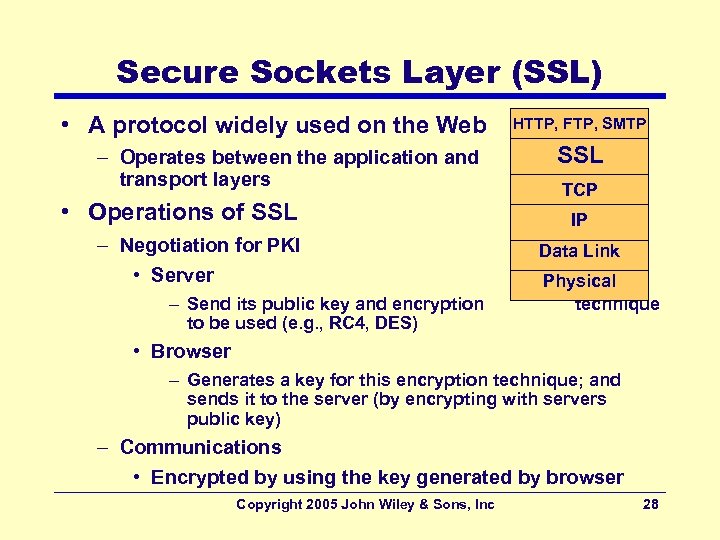 Secure Sockets Layer (SSL) • A protocol widely used on the Web – Operates between the application and transport layers • Operations of SSL – Negotiation for PKI • Server – Send its public key and encryption to be used (e. g. , RC 4, DES) HTTP, FTP, SMTP SSL TCP IP Data Link Physical technique • Browser – Generates a key for this encryption technique; and sends it to the server (by encrypting with servers public key) – Communications • Encrypted by using the key generated by browser Copyright 2005 John Wiley & Sons, Inc 28
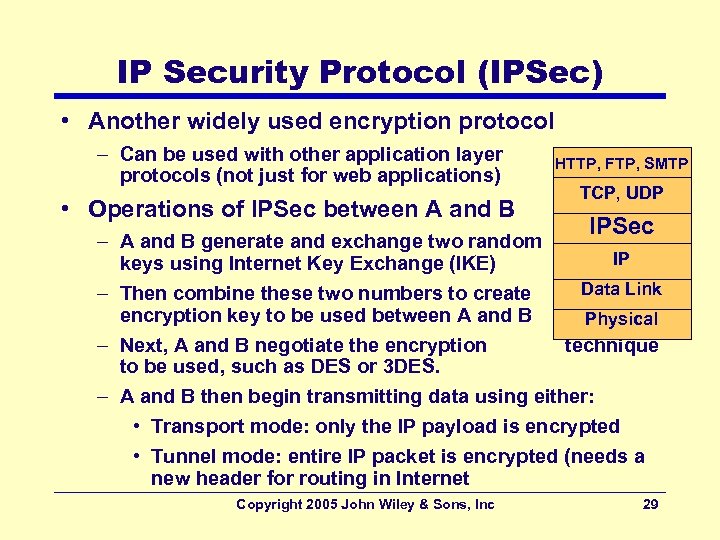 IP Security Protocol (IPSec) • Another widely used encryption protocol – Can be used with other application layer protocols (not just for web applications) • Operations of IPSec between A and B HTTP, FTP, SMTP TCP, UDP IPSec – A and B generate and exchange two random IP keys using Internet Key Exchange (IKE) Data Link – Then combine these two numbers to create encryption key to be used between A and B Physical – Next, A and B negotiate the encryption technique to be used, such as DES or 3 DES. – A and B then begin transmitting data using either: • Transport mode: only the IP payload is encrypted • Tunnel mode: entire IP packet is encrypted (needs a new header for routing in Internet Copyright 2005 John Wiley & Sons, Inc 29
 Authenticating Users • Done to ensure that only the authorized users are permitted into network – and into the specific resources inside the network • Basis of user authentication – – – User profile User accounts Passwords Biometric Network authentication Copyright 2005 John Wiley & Sons, Inc 30
 User Profile • Assigned to each user account by the manager • Determines the limits of what users have access to on a network – Allowable log-in day and time of day – Allowable physical locations – Allowable number of incorrect log-in attempts • Specifies access details such as – Data and network resources a user can access – Type of access (e. g. , read, write, create, delete) Copyright 2005 John Wiley & Sons, Inc 31
 Forms of Access • Password based – Users gain access based on something they know – Not very secure due to poor choice of passwords • Card based – Users gain access based on something they have • Smart cards, ATM cards – Typically used in conjunction with a password • One-time passwords – Users connected to network obtains a password via: • A pager • A token system (a separate handheld device) – A network provided number is entered to device which generates the password • Time-based tokens (password changes every 60 s) – Generated by a device synchronized with server Copyright 2005 John Wiley & Sons, Inc 32
 Biometric based Forms of Access • Users gain access based on something they are – Finger, hand, or retina scanning by a biometric system – Convenient; no need to remember passwords • Used in high-security applications; expensive • Low cost versions becoming available – Fingerprint scanners with less than $100 Copyright 2005 John Wiley & Sons, Inc 33
 Detecting Unauthorized Access • Intrusion Detection Systems (IDSs): – Network-based IDSs • Install IDS sensors on network circuits and monitor packets • Reports intrusions to IDS Management Console – Host-based IDSs • Monitor all activity on the server as well as incoming server traffic – Application-based IDSs • Special form of host-based IDSs • Monitor just one application, such as a Web server Copyright 2005 John Wiley & Sons, Inc 34
 Techniques Used by IDSs • Misuse detection – Compares monitored activities with signatures of known attacks – If an attack is recognized the IDS issues an alert and discards the packet – Challenge: keep database current • Anomaly detection – Operates in stable computing environments – Looks for major deviations from the “normal” parameters of network operation • e. g. , a large number of failed logins – When detected, an alert is issued, packets discarded – Problem: false alarms (valid traffic different from normal) Copyright 2005 John Wiley & Sons, Inc 35
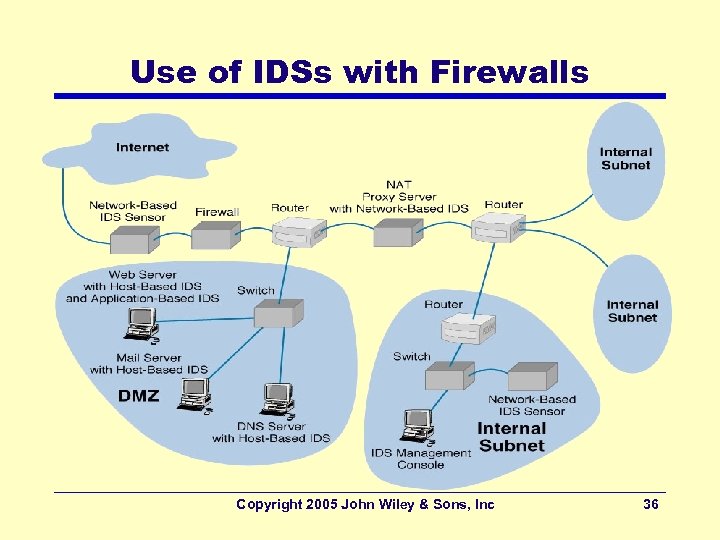 Use of IDSs with Firewalls Copyright 2005 John Wiley & Sons, Inc 36
 Correcting Unauthorized Access • Must have a clear plan to respond to breaches – Have an emergency response team (CERT for Internet) • Steps to take once intrusion detected: – Identify where the security breach occurred and how it happened • Helps to prevents other doing it the same way • May report the problem to police – Use Computer Forensics area techniques • Use of computer analysis techniques to gather evidence for trials • Entrapments – Use of honey pots – Divert attackers to a fake server (with interesting, but fake data used as bait) – Monitor access to this server; use it as a proof Copyright 2005 John Wiley & Sons, Inc 37