


 Скачать презентацию INTERNET PROTOCOL IPv 6 NEXT GENERATION CHARACTERISTICS MODELING
f91bce4e3fdf82e7b5277986abb50d98.ppt
- Количество слайдов: 52
 INTERNET PROTOCOL IPv 6 NEXT GENERATION CHARACTERISTICS, MODELING AND TRANSITION The architectural simplicity by Antoine de Saint-Exupery In each thing, you reach the perfection, not when there is nothing left to add, but when there is nothing left to take off.
 WHY IPV 6? “The Internet is becoming a victim of its own success. ” IP protocol by RFC (Request For Comments) 7911 in 1981 IP allows to use different technologies in different parts of the network: LANs (Ethernet, Token Ring, FDDI), electronic mail, navigation on www servers enriched with Java applets, FTP or Telnet, frame relay or ATM public services IPv 4 achieves this result by providing a service with the following main characteristics: – Universal addressing: Each IP network interface has a unique worldwide address with 32 bits. – Best effort: IP performs its best effort to deliver packets, but it doesn’t guarantee anything at the upper layer, neither in terms of percentage of delivered packets nor in terms of time used to execute the delivery. In short, IPv 4 doesn’t have a built-in concept of Quality of Service (Qo. S). Overview of IPv 6 Why a new ip scheme? IPv 4 vs IPv 6 solutions Ipv 6 addressing IPv 6 Autoconfiguration IPv 6 over Ethernet IPv 6 Security and Qo. S Routing protocols Transition strategies Tunnels for IPv 6 Address Translation How to connect to IPv 6 deployment IPv 6 Adoption IPv 6 evaluation Still a lot to do Applications Data exchange tech. Jini connection Jini programming model Jini applications VIR approaches VIR systems Semantics in VIR Proposed VIR method CORPAI algorithm IRONS System GUI of IRONS
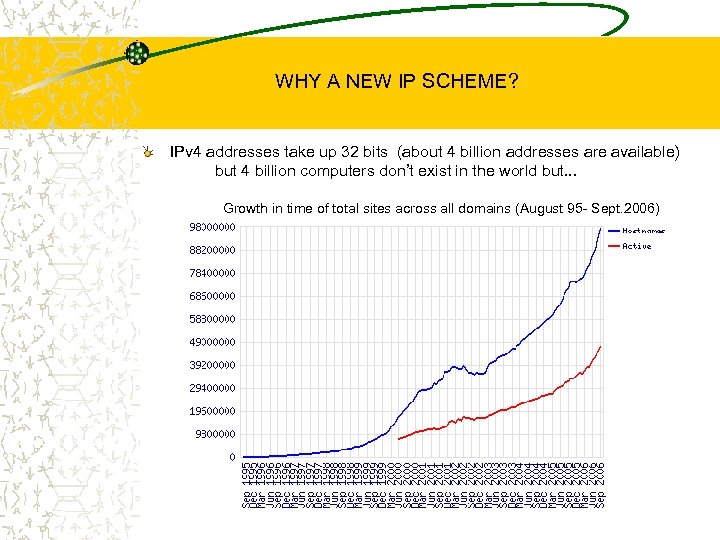 WHY A NEW IP SCHEME? IPv 4 addresses take up 32 bits (about 4 billion addresses are available) but 4 billion computers don’t exist in the world but. . . Growth in time of total sites across all domains (August 95 - Sept. 2006)
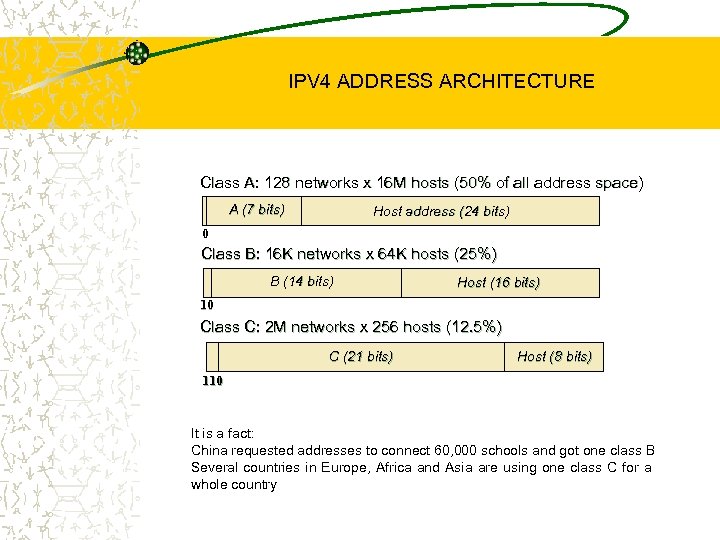 IPV 4 ADDRESS ARCHITECTURE Class A: 128 networks x 16 M hosts (50% of all address space) A (7 bits) Host address (24 bits) 0 Class B: 16 K networks x 64 K hosts (25%) B (14 bits) Host (16 bits) 10 Class C: 2 M networks x 256 hosts (12. 5%) C (21 bits) Host (8 bits) 110 It is a fact: China requested addresses to connect 60, 000 schools and got one class B Several countries in Europe, Africa and Asia are using one class C for a whole country
 IPV 6 ADDRESS SPACE REQUIREMENTS IPv 6 needs a new addressing scheme with the following characteristics: – A higher number of bits without further exhaustion – A more flexible hierarchical organization of addresses (Aggregationbased address hierarchy) that doesn’t use the concept of classes, but the CIDR (Classless Inter Domain Routing) mechanism – A scheme for address assignment aimed to minimize the size of routing tables on routers and to increase the CIDR performance – Global addresses for the Internet and local addresses for Intranets All software vendors officially support IPv 6 in their latest O. S. releases Apple MAC OS X, HP (HP-UX, Tru 64 & Open. VMS), IBM z. Series & AIX, Microsoft Windows XP, . NET, CE; Sun Solaris, …*BSD, Linux, …
 SHORT HISTORY REMARKS TUBA (1992) – TCP and UDP over Bigger Addresses – Uses ISO CLNP (Connection-Less Network Protocol) – Dropped SIPP (1993) – Simple IP Plus – Merge of Sip and Pip – 64 bits addresses IPng (next generation) or IPv 6 developed by IETF (Internet Engineering Task Force) and adopted as SIPP in 1994 – – – – – Changed address size to 128 bits Changed to Number of addresses Efficiency in routers low and very high Bandwidth (100 G/bytes++) Security Mobility Autoconfiguration Seamless transition Don’t require a day X for switching to IPv 6 No need to change hardware
 NEW REQUIREMENTS FOR IPV 6 IPv 6 addresses provides the addressing each atom in the universe (one atom needs for computer) Unify Intranets and the Internet global addresses Using LANs Better simplifying the relationship between an IPv 4 address and a MAC address by using a “neighbor discovery” method on LAN more efficient than ARP (Address Resolution Protocol) Security is defined by series of encryption and authentication procedures for IPv 6 Routing minimizes tables on routers, autoconfiguration mechanisms, networks dynamically assign addresses to stations, provide good support for mobility Improve the support of ATM (Non-Broadcast Multiple Access protocol) in IPv 6. (virtual circuits vs datagram) Priorities will be introduced in the IPv 6 header (4 -bit “priority” field) to differentiate 16 potential traffic priorities. Plug and Play on DHCPv 6 (Dynamic Host Configuration Protocol) protocol: automatic configuration of hosts and subnetworks, the learning of default routers through the DNS, also a automatic configuration of host names. Support for mobility: use two addresses - the first “permanent” on organization’s network and the second “dynamic” depending on the point from which they are Transition from IPv 4 to IPv 6, migration strategy based on a “dualstack”, implemented through a series of tunnels called 6 -Bone.
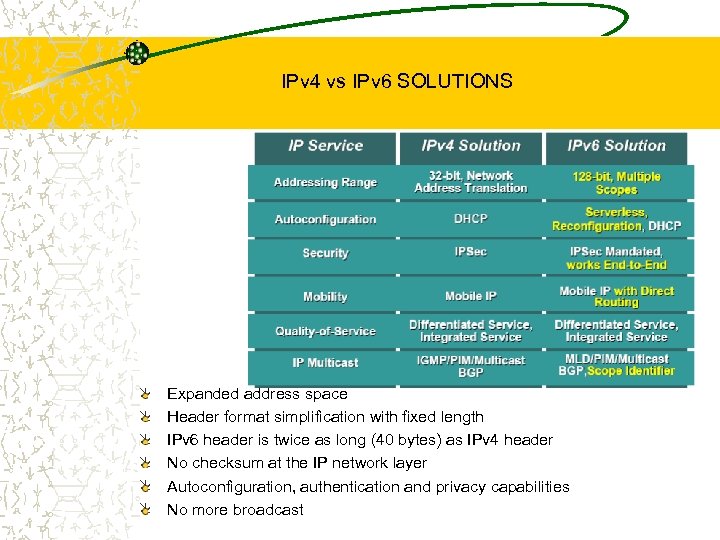 IPv 4 vs IPv 6 SOLUTIONS Expanded address space Header format simplification with fixed length IPv 6 header is twice as long (40 bytes) as IPv 4 header No checksum at the IP network layer Autoconfiguration, authentication and privacy capabilities No more broadcast
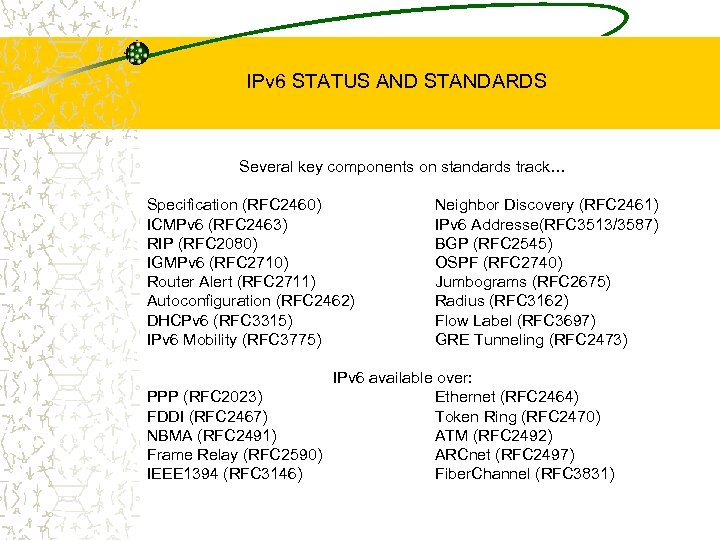 IPv 6 STATUS AND STANDARDS Several key components on standards track… Specification (RFC 2460) ICMPv 6 (RFC 2463) RIP (RFC 2080) IGMPv 6 (RFC 2710) Router Alert (RFC 2711) Autoconfiguration (RFC 2462) DHCPv 6 (RFC 3315) IPv 6 Mobility (RFC 3775) Neighbor Discovery (RFC 2461) IPv 6 Addresse(RFC 3513/3587) BGP (RFC 2545) OSPF (RFC 2740) Jumbograms (RFC 2675) Radius (RFC 3162) Flow Label (RFC 3697) GRE Tunneling (RFC 2473) IPv 6 available over: PPP (RFC 2023) Ethernet (RFC 2464) FDDI (RFC 2467) Token Ring (RFC 2470) NBMA (RFC 2491) ATM (RFC 2492) Frame Relay (RFC 2590) ARCnet (RFC 2497) IEEE 1394 (RFC 3146) Fiber. Channel (RFC 3831)
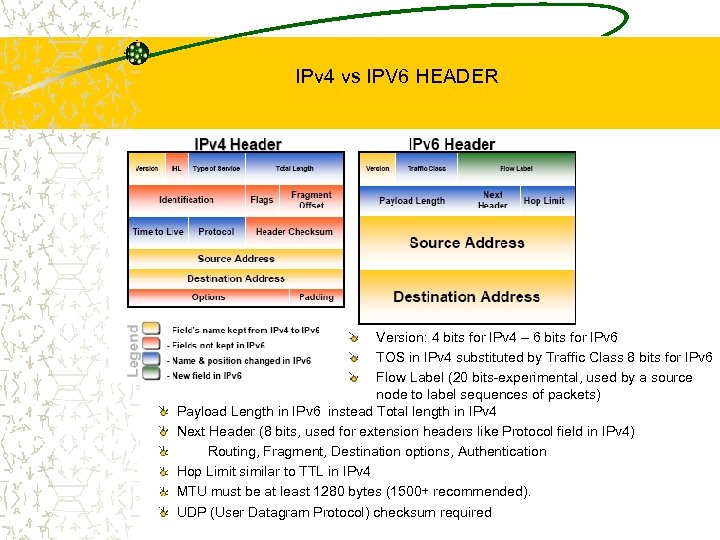 IPv 4 vs IPV 6 HEADER Version: 4 bits for IPv 4 – 6 bits for IPv 6 TOS in IPv 4 substituted by Traffic Class 8 bits for IPv 6 Flow Label (20 bits-experimental, used by a source node to label sequences of packets) Payload Length in IPv 6 instead Total length in IPv 4 Next Header (8 bits, used for extension headers like Protocol field in IPv 4) Routing, Fragment, Destination options, Authentication Hop Limit similar to TTL in IPv 4 MTU must be at least 1280 bytes (1500+ recommended). UDP (User Datagram Protocol) checksum required
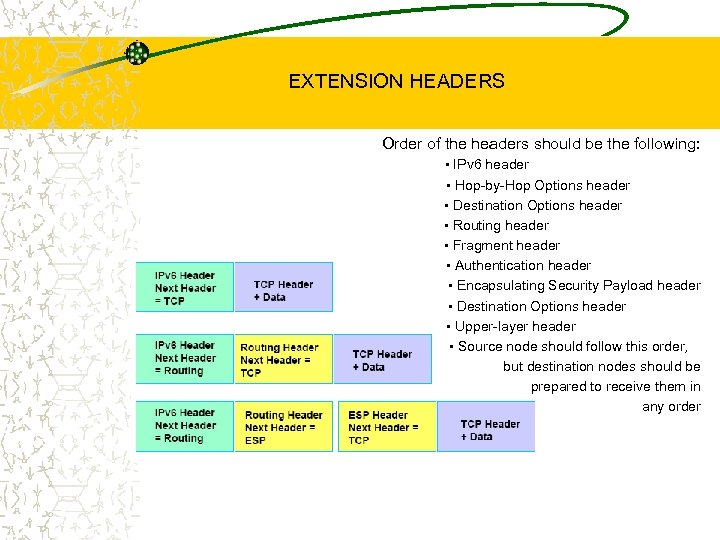 EXTENSION HEADERS Order of the headers should be the following: • IPv 6 header • Hop-by-Hop Options header • Destination Options header • Routing header • Fragment header • Authentication header • Encapsulating Security Payload header • Destination Options header • Upper-layer header • Source node should follow this order, but destination nodes should be prepared to receive them in any order
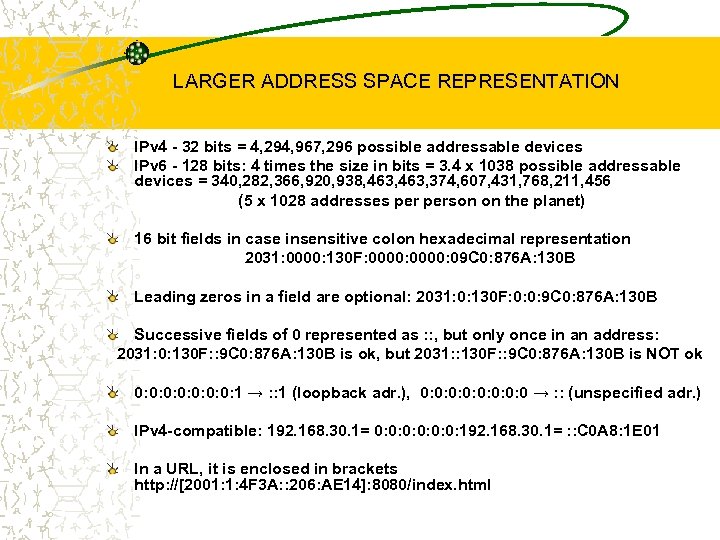 LARGER ADDRESS SPACE REPRESENTATION IPv 4 - 32 bits = 4, 294, 967, 296 possible addressable devices IPv 6 - 128 bits: 4 times the size in bits = 3. 4 x 1038 possible addressable devices = 340, 282, 366, 920, 938, 463, 374, 607, 431, 768, 211, 456 (5 x 1028 addresses person on the planet) 16 bit fields in case insensitive colon hexadecimal representation 2031: 0000: 130 F: 0000: 09 C 0: 876 A: 130 B Leading zeros in a field are optional: 2031: 0: 130 F: 0: 0: 9 C 0: 876 A: 130 B Successive fields of 0 represented as : : , but only once in an address: 2031: 0: 130 F: : 9 C 0: 876 A: 130 B is ok, but 2031: : 130 F: : 9 C 0: 876 A: 130 B is NOT ok 0: 0: 1 → : : 1 (loopback adr. ), 0: 0: 0 → : : (unspecified adr. ) IPv 4 -compatible: 192. 168. 30. 1= 0: 0: 0: 192. 168. 30. 1= : : C 0 A 8: 1 E 01 In a URL, it is enclosed in brackets http: //[2001: 1: 4 F 3 A: : 206: AE 14]: 8080/index. html
 ADDRESS TYPES Unicast : One to One (Global, Link local) Unicast is a communication between a single host and a single receiver Anycast : One to Nearest (Allocated from Unicast) Anycast is a communication between a single sender and a list of addresses Multicast : One to Many Multicast is communication between a single host and multiple receivers. Broadcasts in IPv 4 interrupts all devices on the LAN even if the intent of the request was for a subset. Can completely swamp the network (“broadcast storm”) Broadcasts in IPv 6 are not used and replaced by multicast
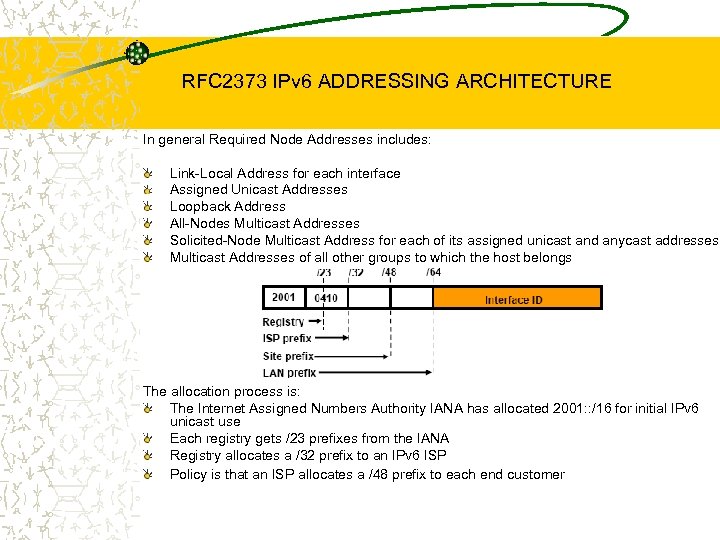 RFC 2373 IPv 6 ADDRESSING ARCHITECTURE In general Required Node Addresses includes: Link-Local Address for each interface Assigned Unicast Addresses Loopback Address All-Nodes Multicast Addresses Solicited-Node Multicast Address for each of its assigned unicast and anycast addresses Multicast Addresses of all other groups to which the host belongs The allocation process is: The Internet Assigned Numbers Authority IANA has allocated 2001: : /16 for initial IPv 6 unicast use Each registry gets /23 prefixes from the IANA Registry allocates a /32 prefix to an IPv 6 ISP Policy is that an ISP allocates a /48 prefix to each end customer
 UNICAST ADDRESSES Unspecified example - in IPv 4 like 0. 0, in IPv 6: 0: 0: 0: 0 or : : Used as a placeholder when no address available, for Initial DHCP request and Duplicate Address Detection (DAD) Loopback example - in IPv 4 like 127. 0. 0. 1, in IPv 6: 0: 0: 1 or : : 1 Identifies self, detect Local host, to find if your IPv 6 stack works Scoped addresses new in IPv 6 (Link-local and Site-local) Link-local, Scope = local link (scope limited to local network) Can only be used between nodes of the same link, cannot be routed Automatically configured on all nodes using the interface identifier (based on MAC address), gives every node an IPv 6 address to start communications Format: FE 80: 0:
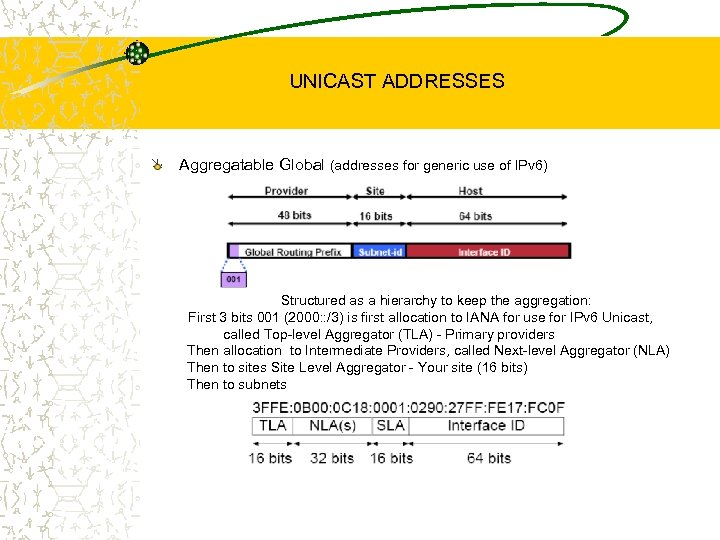 UNICAST ADDRESSES Aggregatable Global (addresses for generic use of IPv 6) Structured as a hierarchy to keep the aggregation: First 3 bits 001 (2000: : /3) is first allocation to IANA for use for IPv 6 Unicast, called Top-level Aggregator (TLA) - Primary providers Then allocation to Intermediate Providers, called Next-level Aggregator (NLA) Then to sites Site Level Aggregator - Your site (16 bits) Then to subnets
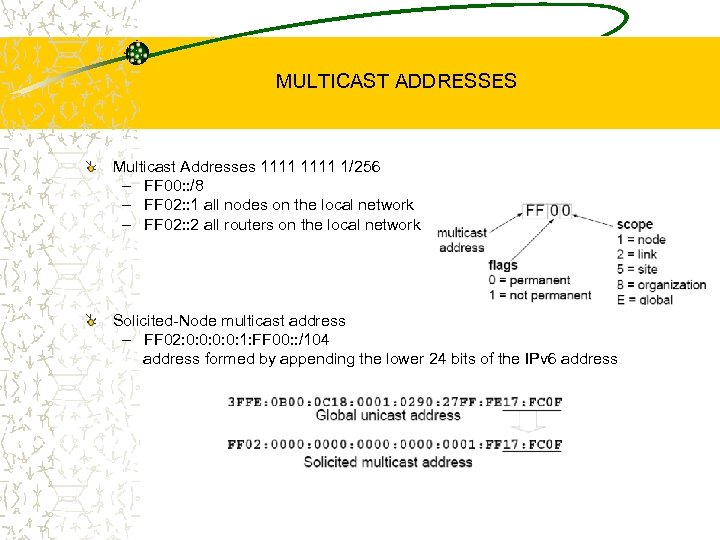 MULTICAST ADDRESSES Multicast Addresses 1111 1/256 – FF 00: : /8 – FF 02: : 1 all nodes on the local network – FF 02: : 2 all routers on the local network Solicited-Node multicast address – FF 02: 0: 0: 1: FF 00: : /104 address formed by appending the lower 24 bits of the IPv 6 address
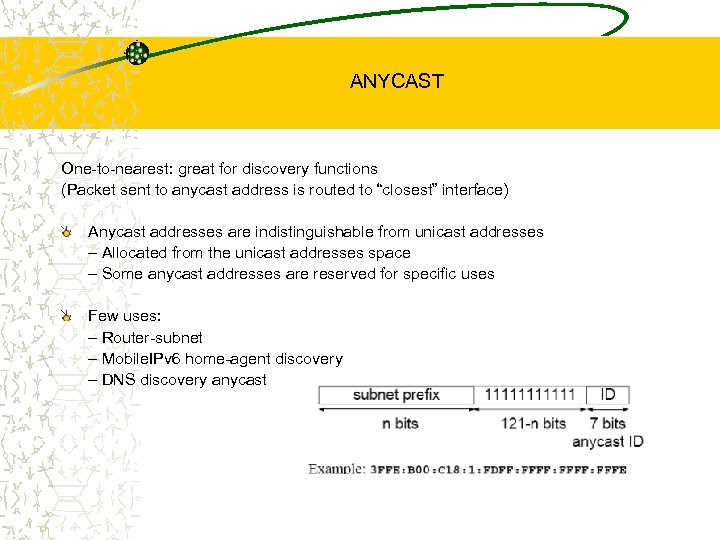 ANYCAST One-to-nearest: great for discovery functions (Packet sent to anycast address is routed to “closest” interface) Anycast addresses are indistinguishable from unicast addresses – Allocated from the unicast addresses space – Some anycast addresses are reserved for specific uses Few uses: – Router-subnet – Mobile. IPv 6 home-agent discovery – DNS discovery anycast
 AUTOCONFIGURATION PROCESS Host configured for autoconfiguration • Host boots. Sends a Router Solicitation • Host receives the Router Advertisement RA, specifying subnet prefix, lifetimes, default router … • Host generates its IP address by appending: Received subnet prefix (64 bits) Interface address modified for Extended Unique Identifier EUI-64 format • Host verifies usability of the address by doing the Duplicate Address Detection process Stateless autoconfiguration (RFC 2462) Stateful autoconfiguration – Manual IP configuration – DHCP (Dynamic Host Configuration Protocol) configuration Renumbering (RFC 2894) – Domain-interior routers learn of prefix introduction / withdrawal
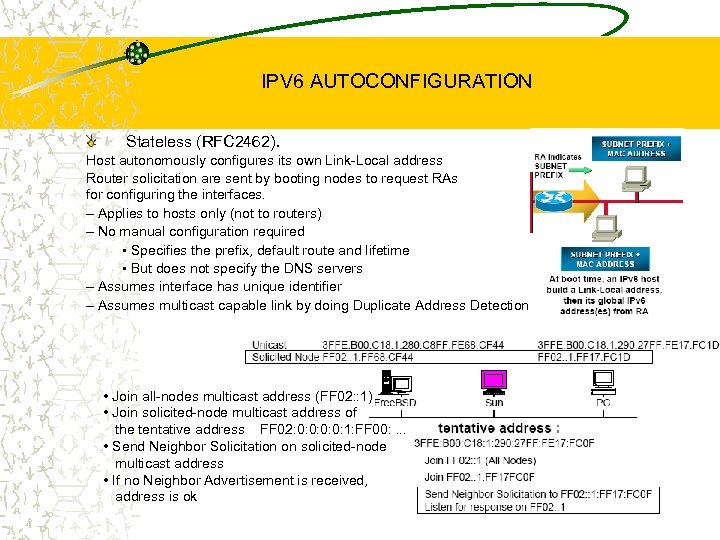 IPV 6 AUTOCONFIGURATION Stateless (RFC 2462). Host autonomously configures its own Link-Local address Router solicitation are sent by booting nodes to request RAs for configuring the interfaces. – Applies to hosts only (not to routers) – No manual configuration required • Specifies the prefix, default route and lifetime • But does not specify the DNS servers – Assumes interface has unique identifier – Assumes multicast capable link by doing Duplicate Address Detection • Join all-nodes multicast address (FF 02: : 1) • Join solicited-node multicast address of the tentative address FF 02: 0: 0: 1: FF 00: . . . • Send Neighbor Solicitation on solicited-node multicast address • If no Neighbor Advertisement is received, address is ok
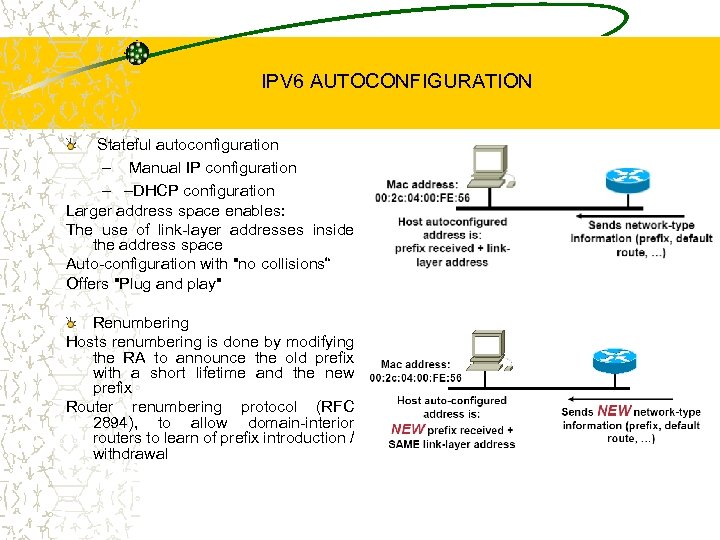 IPV 6 AUTOCONFIGURATION Stateful autoconfiguration – Manual IP configuration – –DHCP configuration Larger address space enables: The use of link-layer addresses inside the address space Auto-configuration with "no collisions“ Offers "Plug and play" Renumbering Hosts renumbering is done by modifying the RA to announce the old prefix with a short lifetime and the new prefix Router renumbering protocol (RFC 2894), to allow domain-interior routers to learn of prefix introduction / withdrawal
 HOW TO GET AN IPv 6 ADDRESS? IPv 6 address space is allocated by the 4 Regional Internet Registries RIPs: – APNIC (Asia Pacific Network Information Centre) – ARIN (American Registry for Internet Numbers) – LACNIC (Latin American and Caribbean Internet Addresses Registry) – RIPE NCC (Réseaux IP Européens Network Coordination Centre) – Internet Service Providers ISPs get address space from the RIRs – Enterprises get their IPv 6 address space from their ISP 6 to 4 tunnels 2002: : /16 6 Bone – IPv 6 experimental network, now being actively retired, with end of service on 6 th June 2006 (RFC 3701)
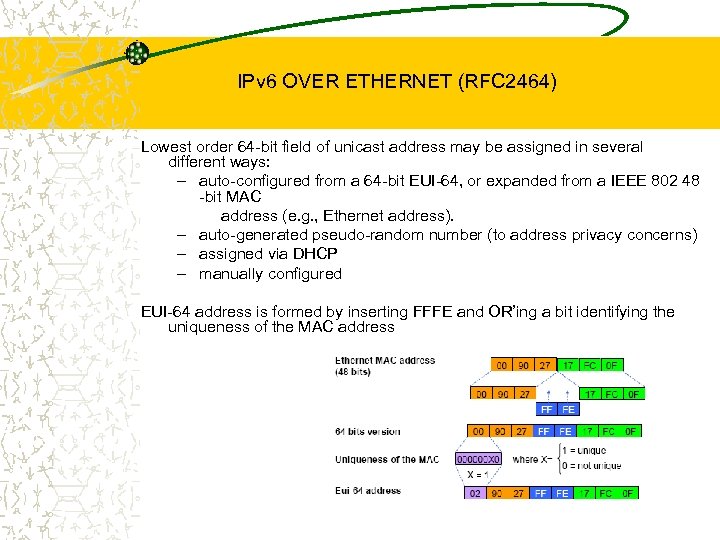 IPv 6 OVER ETHERNET (RFC 2464) Lowest order 64 -bit field of unicast address may be assigned in several different ways: – auto-configured from a 64 -bit EUI-64, or expanded from a IEEE 802 48 -bit MAC address (e. g. , Ethernet address). – auto-generated pseudo-random number (to address privacy concerns) – assigned via DHCP – manually configured EUI-64 address is formed by inserting FFFE and OR’ing a bit identifying the uniqueness of the MAC address
 WHAT DOES IPv 6 DO FOR SECURITY? Nothing IPv 4 doesn’t do – standardized framework for securing Internet Protocol IPSec runs in both but IPv 6 mandates IPSec IPv 6 Security IPsec standards apply to both IPv 4 and IPv 6 All implementations required to support authentication and encryption headers Authentication separate from encryption for use in situations where encryption is prohibited or prohibitively expensive Key distribution protocols are not yet defined (independent of IP v 4/v 6) Support for manual key configuration required
 WHAT DOES IPv 6 DO FOR IP QUALITY OF SERVICE? Nothing IPv 4 doesn’t do – Differentiated and Integrated Services run in both Two basic approaches developed by IETF for IPv 6: “Integrated Service” (int-serv) – fine-grain (per-flow), quantitative promises (e. g. , x bits per second), uses Resource Reservation Protocol RSVP signaling – IPv 6 supports Int-Serv by 20 -bit Flow Label field to identify specific flows needing special Qo. S “Differentiated Service” (diff-serv) – coarse-grain (per-class), qualitative promises (e. g. , higher priority), no explicit signaling – IPv 6 supports Diff-Serv by 8 -bit Traffic Class field to identify specific classes of packets needing special Qo. S Signaled diff-serv (RFC 2998) – uses RSVP for signaling allows for policy control without requiring per-router state overhead
 ROUTING IN IPv 6 Routing in IPv 6 is unchanged from IPv 4 and still uses the longest-prefix match routing algorithm IPv 6 has 2 types of routing protocols: IGP and EGP Interior Gateway Protocol IGP – Routing Information Protocol RIPng (RFC 2080) – Cisco Enhanced Interior Gateway Routing Protocol EIGRP for IPv 6 – Open Shortest Path First version 3 OSPFv 3 (RFC 2740) – Integrated Intermediate System-to-Intermediate System IS-ISv 6 Exterior Gateway Protocol EGP : – Multi Protocol - Border Gateway Protocol MP-BGP 4 (RFC 2858 and RFC 2545)
 IPv 6 ROUTING PROTOCOL RIP in IPv 6 – Based on RIP-2: same design, distance-vector, 15 hops diameter… – IPv 6 prefix, next-hop IPv 6 address – Uses multicast (FF 02: : 9 = all-rip-routers as the destination address for RIP updates) – Uses IPv 6 for transport – Most (if not all) IPv 6 router implementations support RIP IPv 6 – Implementations: Gate. D, Mrtd, Kame route 6 d, Zebra, Cisco, etc. EIGRP for IPv 6 – Cisco EIGRP has had IPv 6 protocol support added – Uses similar command-line interface (CLI) to change the IP address in IPv 4 protocol support – Easy deployment path for existing IPv 4 EIGRP users – In Emotional Freedom Techniques EFT images, coming soon to 12. 3 T OSPF (Open Shortest Path First) for IPv 6 Also known as OSPFv 3 – Important rewrite to remove IPv 4 dependencies – Link-local addresses are used – Uses IPv 6 for transport – Implementations: Telebit, IBM*, Zebra*, Gated*, MRTd*, Cisco*
 IPv 6 ROUTING PROTOCOL IS-IS is the OSI IGP protocol – IETF ISIS for Internets Working Group – Compared to OSPF, IS-IS for IPv 6 is easier to implement and modify – 2 new type-length-values (TLV) were defined: • IPv 6 Reachability (with 128 bits prefix) • IPv 6 Interface Address (with 128 bits) – As result, new TLVs attributes for Multi-Topology extensions BGP 4 – Includes multiprotocol extensions for BGP, for new address families (IPv 6, Virtual Private Networks VPN, …) – IPv 6 address family: – Use scoped addresses in the NEXT_HOP – NEXT_HOP and Network Layer Reachability Information NLRI are expressed as IPv 6 addresses and prefix – Most IPv 6 router vendors support IPv 6 BGP. It used on the 6 Bone since 1996 – Implementations: Gate. D, Mrtd, Kame BGPd, Zebra, Cisco, etc.
 IPv 6 INTEGRATION & TRANSITION IPV 6 Integration & Transition Strategies For end-systems, there is: – Dual stack approach For network integration, there is: – Tunnels – IPv 6 -only to IPv 4 -only: some sort of translation Transition Recommendations Define the processes by which networks can be transitioned from IPv 4 to IPv 6 Define and specify the mandatory and optional mechanism that vendors are to implement in Hosts, Routers and other components of the Internet in order for the Transition IPv 4 -IPv 6 Co-existence/Transition A wide range of techniques have been identified and implemented of three categories: – Dual-stack techniques, to allow IPv 4 and IPv 6 to co-exist in the same devices and networks – Tunneling techniques, to avoid order dependencies when upgrading hosts, routers, or regions – Translation techniques, to allow IPv 6 -only devices to communicate with IPv 4 -only devices Expect all of these to be used, in combination
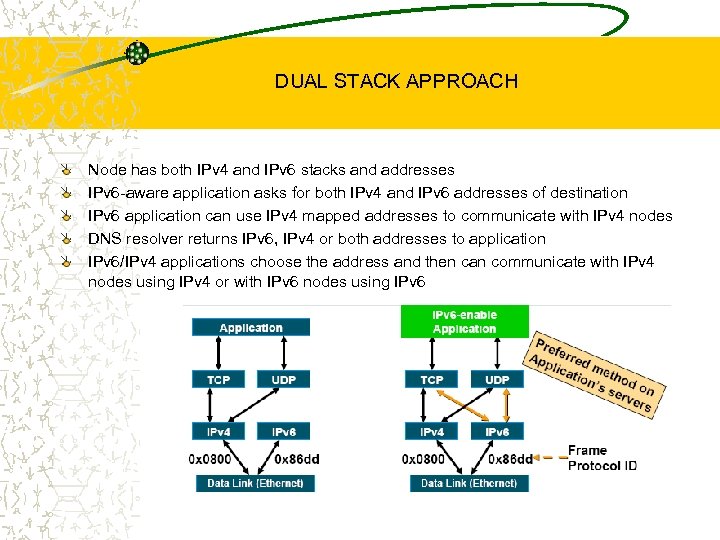 DUAL STACK APPROACH Node has both IPv 4 and IPv 6 stacks and addresses IPv 6 -aware application asks for both IPv 4 and IPv 6 addresses of destination IPv 6 application can use IPv 4 mapped addresses to communicate with IPv 4 nodes DNS resolver returns IPv 6, IPv 4 or both addresses to application IPv 6/IPv 4 applications choose the address and then can communicate with IPv 4 nodes using IPv 4 or with IPv 6 nodes using IPv 6
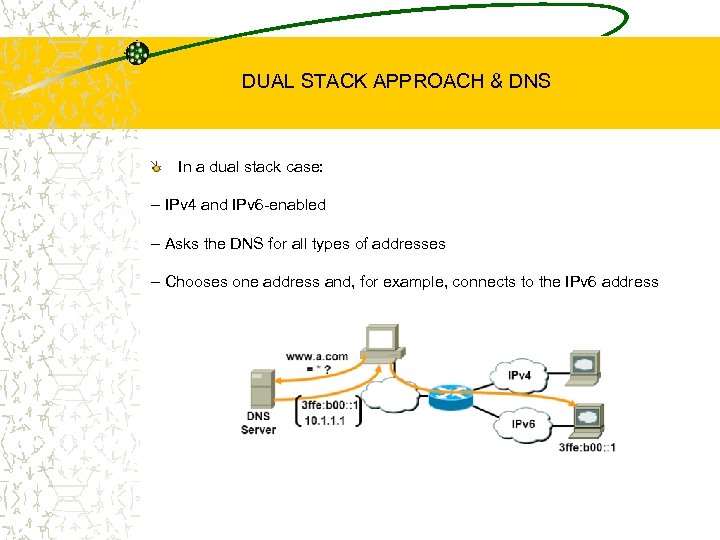 DUAL STACK APPROACH & DNS In a dual stack case: – IPv 4 and IPv 6 -enabled – Asks the DNS for all types of addresses – Chooses one address and, for example, connects to the IPv 6 address
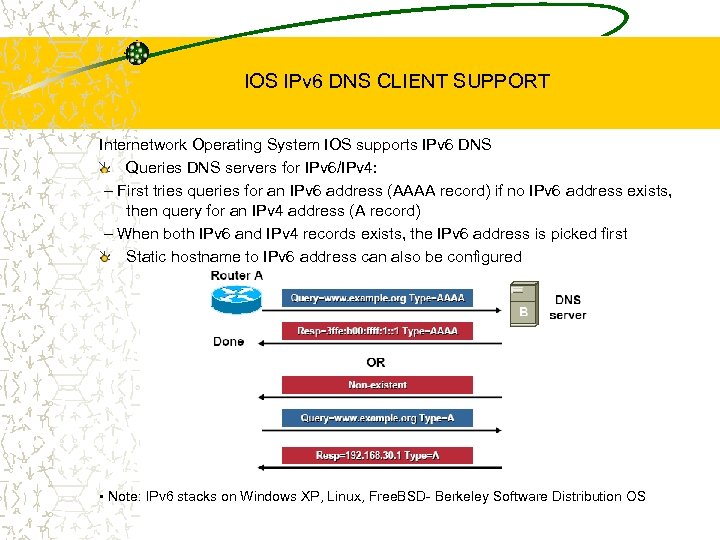 IOS IPv 6 DNS CLIENT SUPPORT Internetwork Operating System IOS supports IPv 6 DNS Queries DNS servers for IPv 6/IPv 4: – First tries queries for an IPv 6 address (AAAA record) if no IPv 6 address exists, then query for an IPv 4 address (A record) – When both IPv 6 and IPv 4 records exists, the IPv 6 address is picked first Static hostname to IPv 6 address can also be configured • Note: IPv 6 stacks on Windows XP, Linux, Free. BSD- Berkeley Software Distribution OS
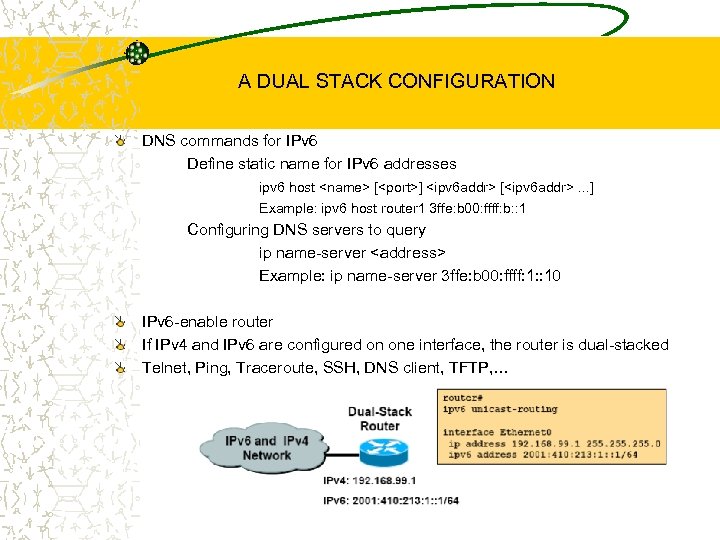 A DUAL STACK CONFIGURATION DNS commands for IPv 6 Define static name for IPv 6 addresses ipv 6 host
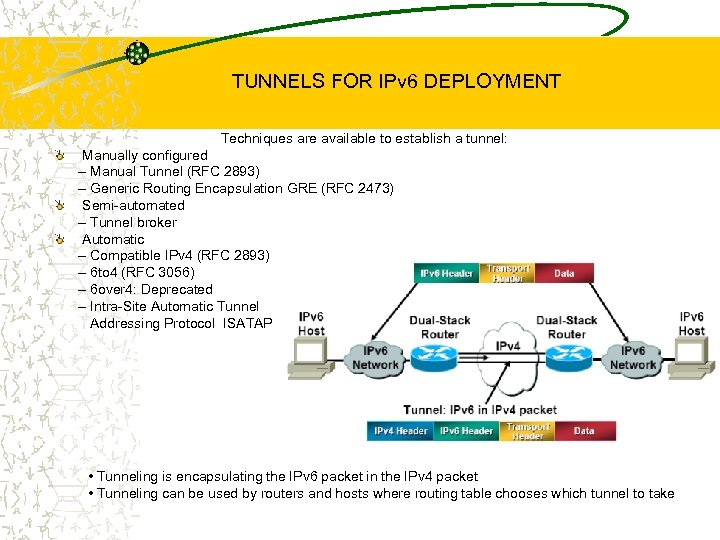 TUNNELS FOR IPv 6 DEPLOYMENT Techniques are available to establish a tunnel: Manually configured – Manual Tunnel (RFC 2893) – Generic Routing Encapsulation GRE (RFC 2473) Semi-automated – Tunnel broker Automatic – Compatible IPv 4 (RFC 2893) – 6 to 4 (RFC 3056) – 6 over 4: Deprecated – Intra-Site Automatic Tunnel Addressing Protocol ISATAP • Tunneling is encapsulating the IPv 6 packet in the IPv 4 packet • Tunneling can be used by routers and hosts where routing table chooses which tunnel to take
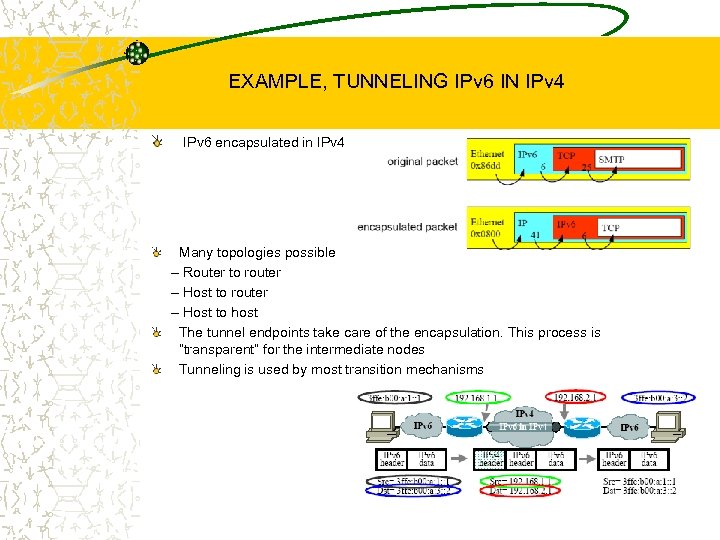 EXAMPLE, TUNNELING IPv 6 IN IPv 4 IPv 6 encapsulated in IPv 4 Many topologies possible – Router to router – Host to host The tunnel endpoints take care of the encapsulation. This process is “transparent” for the intermediate nodes Tunneling is used by most transition mechanisms
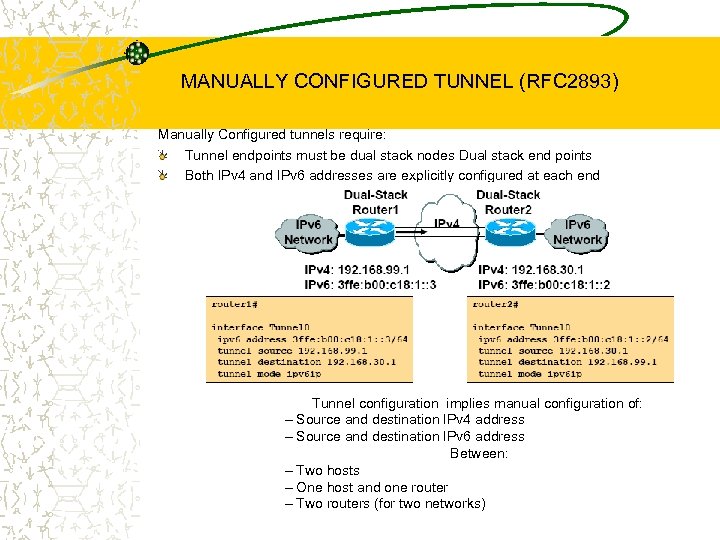 MANUALLY CONFIGURED TUNNEL (RFC 2893) Manually Configured tunnels require: Tunnel endpoints must be dual stack nodes Dual stack end points Both IPv 4 and IPv 6 addresses are explicitly configured at each end Tunnel configuration implies manual configuration of: – Source and destination IPv 4 address – Source and destination IPv 6 address Between: – Two hosts – One host and one router – Two routers (for two networks)
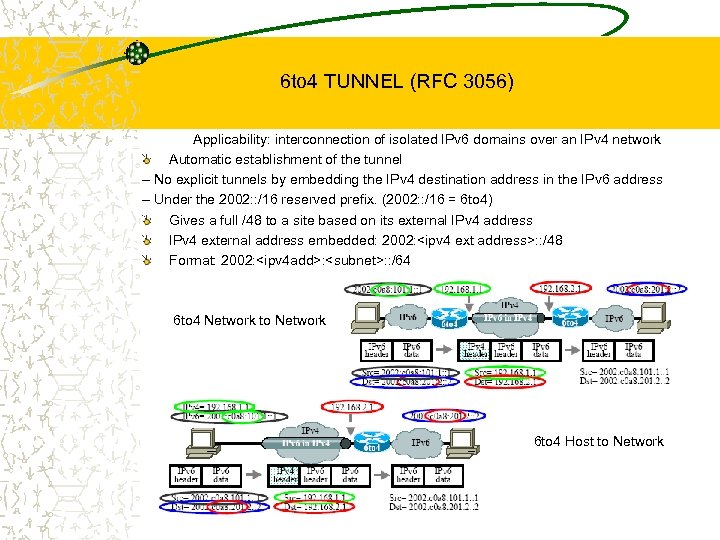 6 to 4 TUNNEL (RFC 3056) Applicability: interconnection of isolated IPv 6 domains over an IPv 4 network Automatic establishment of the tunnel – No explicit tunnels by embedding the IPv 4 destination address in the IPv 6 address – Under the 2002: : /16 reserved prefix. (2002: : /16 = 6 to 4) Gives a full /48 to a site based on its external IPv 4 address IPv 4 external address embedded: 2002:
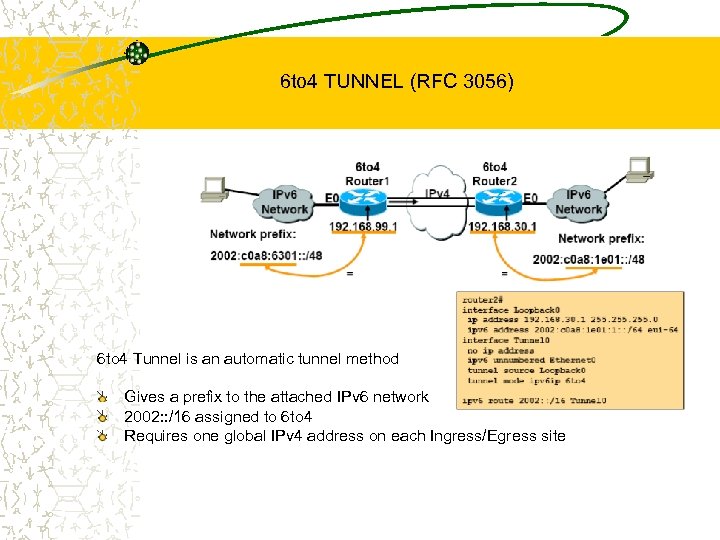 6 to 4 TUNNEL (RFC 3056) 6 to 4 Tunnel is an automatic tunnel method Gives a prefix to the attached IPv 6 network 2002: : /16 assigned to 6 to 4 Requires one global IPv 4 address on each Ingress/Egress site
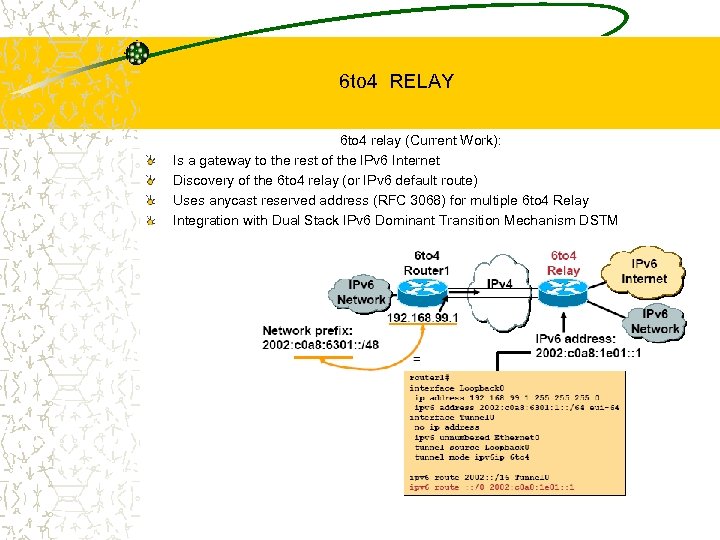 6 to 4 RELAY 6 to 4 relay (Current Work): Is a gateway to the rest of the IPv 6 Internet Discovery of the 6 to 4 relay (or IPv 6 default route) Uses anycast reserved address (RFC 3068) for multiple 6 to 4 Relay Integration with Dual Stack IPv 6 Dominant Transition Mechanism DSTM
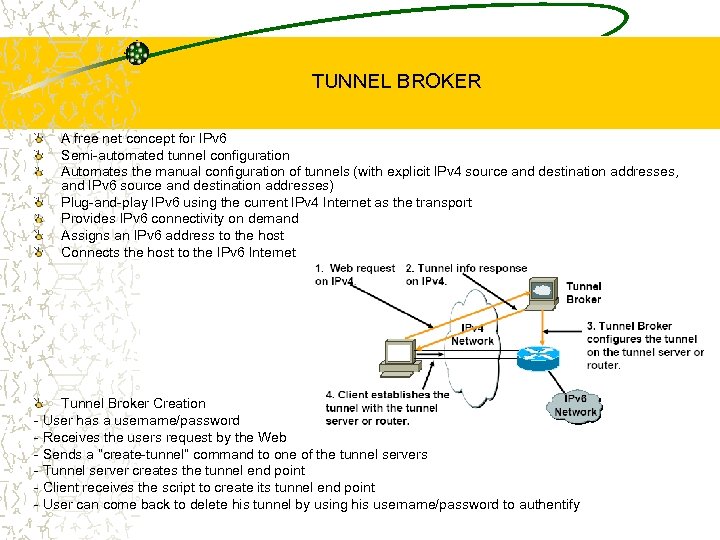 TUNNEL BROKER A free net concept for IPv 6 Semi-automated tunnel configuration Automates the manual configuration of tunnels (with explicit IPv 4 source and destination addresses, and IPv 6 source and destination addresses) Plug-and-play IPv 6 using the current IPv 4 Internet as the transport Provides IPv 6 connectivity on demand Assigns an IPv 6 address to the host Connects the host to the IPv 6 Internet Tunnel Broker Creation - User has a username/password - Receives the users request by the Web - Sends a “create-tunnel” command to one of the tunnel servers - Tunnel server creates the tunnel end point - Client receives the script to create its tunnel end point - User can come back to delete his tunnel by using his username/password to authentify
 TUNNEL SERVER: NEW GENERATION Currently supported clients: NT, Free. BSD/Kame, Free. BSD/Inria, Cisco, Linux, Solaris 8 Very easy to add new clients Add support for more host implementations Add support for IPv 6 routers Tunnel Broker idea by Alain Durand IPv 6 Tunnel Broker: Installation instructions User interface Fill-out a Web form - Choose your OS - Verify your IPv 4 address - Enter a nickname and your country (for DNS) Server creates its tunnel end point Client receives a script that should be executed: This script creates the tunnel on the client side You are connected
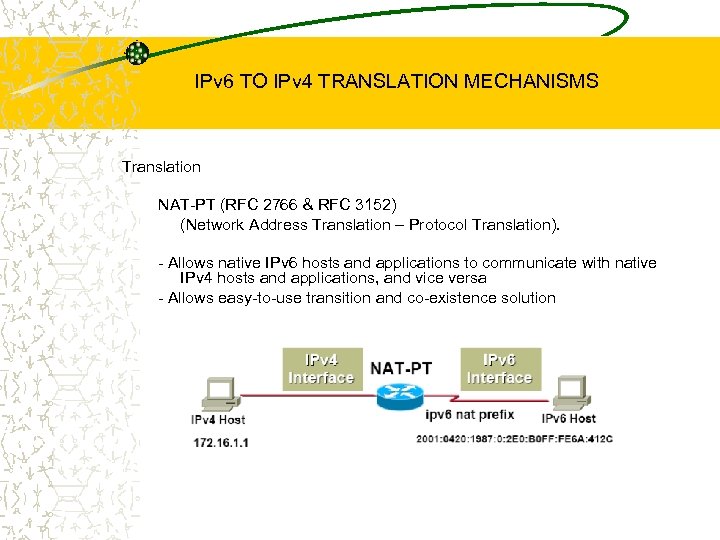 IPv 6 TO IPv 4 TRANSLATION MECHANISMS Translation NAT-PT (RFC 2766 & RFC 3152) (Network Address Translation – Protocol Translation). - Allows native IPv 6 hosts and applications to communicate with native IPv 4 hosts and applications, and vice versa - Allows easy-to-use transition and co-existence solution
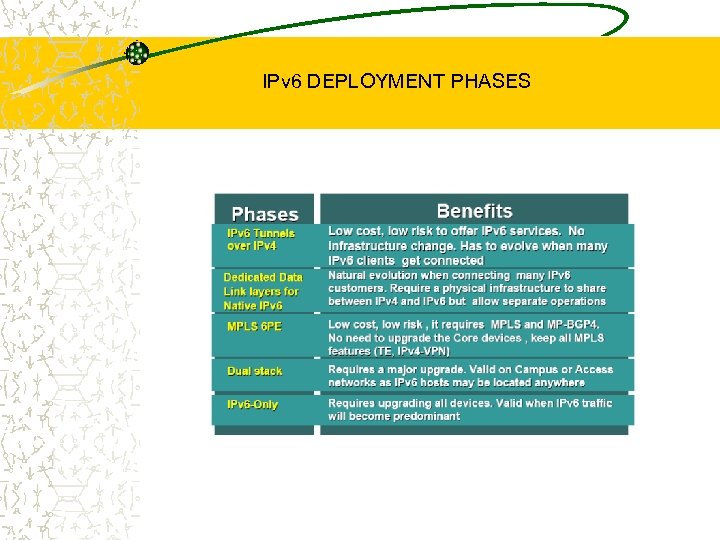
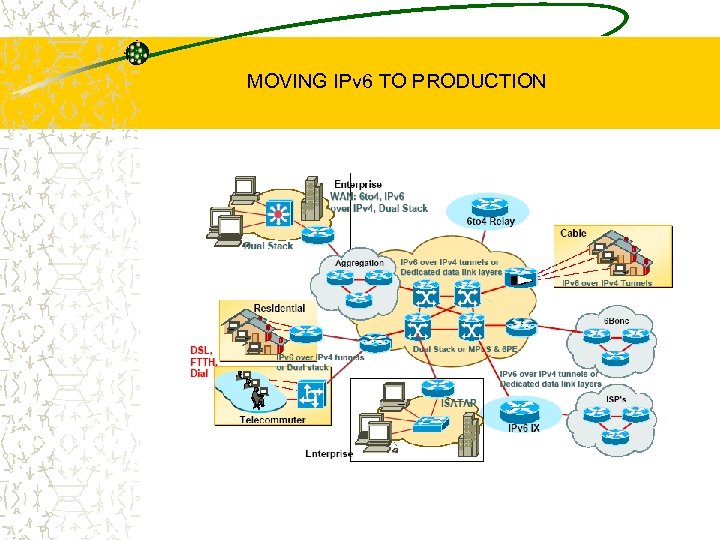
 IPv 6 DEPLOYMENT SCENARIOS Many ways to deliver IPv 6 services to End Users • End-to-end IPv 6 traffic forwarding is the Key feature • Minimize operational upgrade costs Incremental Upgrade/Deployment ISP’s differentiate Core and Edge infrastructures upgrade Service Providers and Enterprises may have different deployment needs • Incremental Upgrade/Deployment • ISP’s differentiate Core and Edge infrastructures upgrade • Enterprise Campus and WAN may have separate upgrade paths IPv 6 over IPv 4 tunnels Dedicated Data Link layers for native IPv 6 Dual stack Networks • IPv 6 over Multiprotocol Label Switching MPLS or IPv 4 -IPv 6 Dual Stack Routers
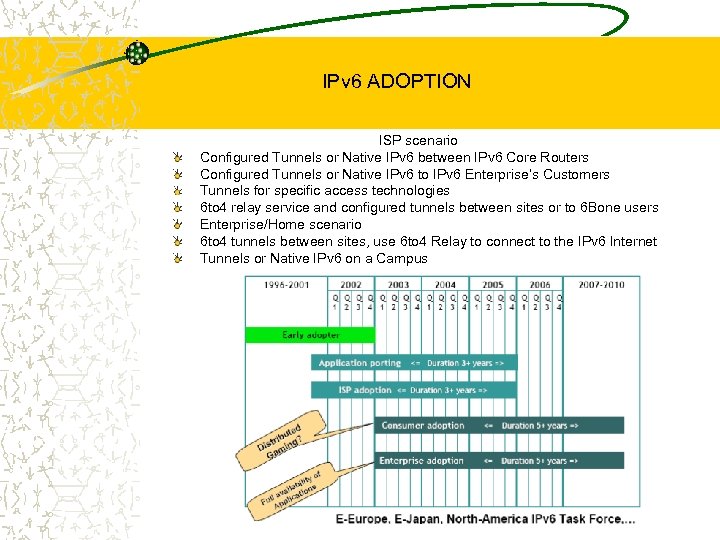 IPv 6 ADOPTION ISP scenario Configured Tunnels or Native IPv 6 between IPv 6 Core Routers Configured Tunnels or Native IPv 6 to IPv 6 Enterprise’s Customers Tunnels for specific access technologies 6 to 4 relay service and configured tunnels between sites or to 6 Bone users Enterprise/Home scenario 6 to 4 tunnels between sites, use 6 to 4 Relay to connect to the IPv 6 Internet Tunnels or Native IPv 6 on a Campus
 IPv 6 DEPLOYMENT PHASES
 MOVING IPv 6 TO PRODUCTION
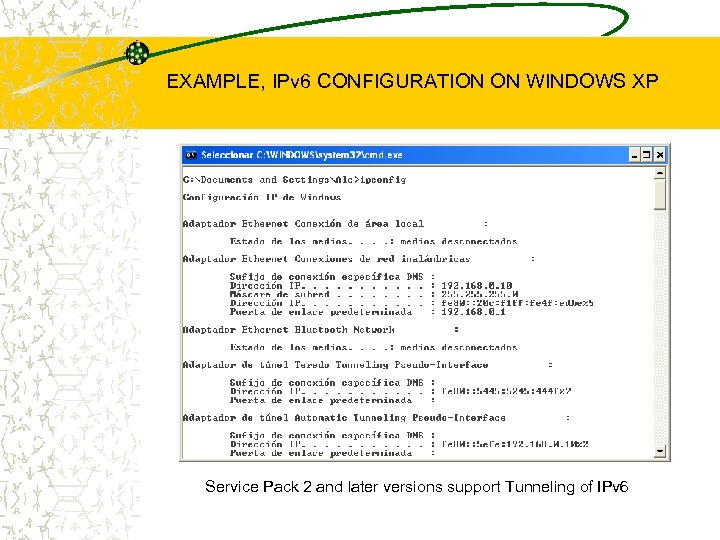 EXAMPLE, IPv 6 CONFIGURATION ON WINDOWS XP Service Pack 2 and later versions support Tunneling of IPv 6
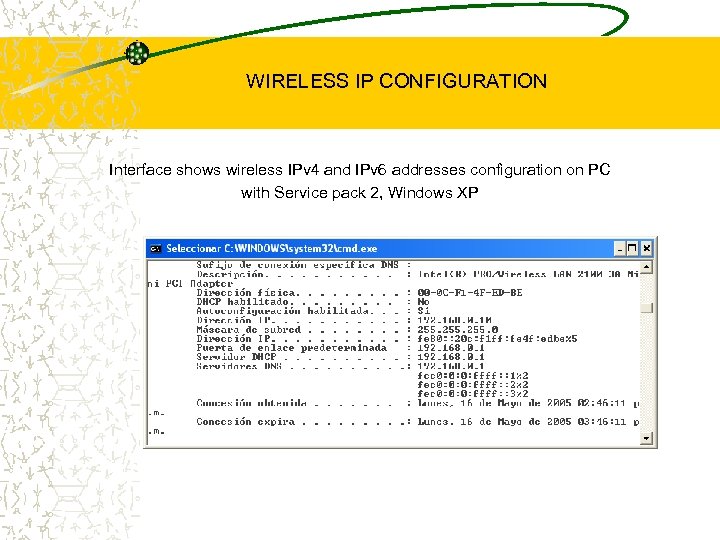 WIRELESS IP CONFIGURATION Interface shows wireless IPv 4 and IPv 6 addresses configuration on PC with Service pack 2, Windows XP
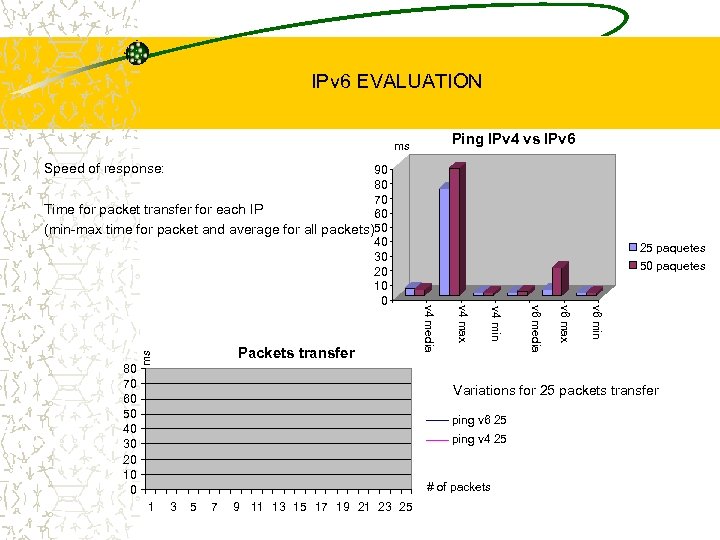 IPv 6 EVALUATION Ping IPv 4 vs IPv 6 ms Speed of response: ms v 6 min v 6 max v 6 media v 4 min v 4 max 80 70 60 50 40 30 20 10 0 Packets transfer 25 paquetes 50 paquetes v 4 media 90 80 70 Time for packet transfer for each IP 60 (min-max time for packet and average for all packets)50 40 30 20 10 0 Variations for 25 packets transfer ping v 6 25 ping v 4 25 # of packets 1 3 5 7 9 11 13 15 17 19 21 23 25
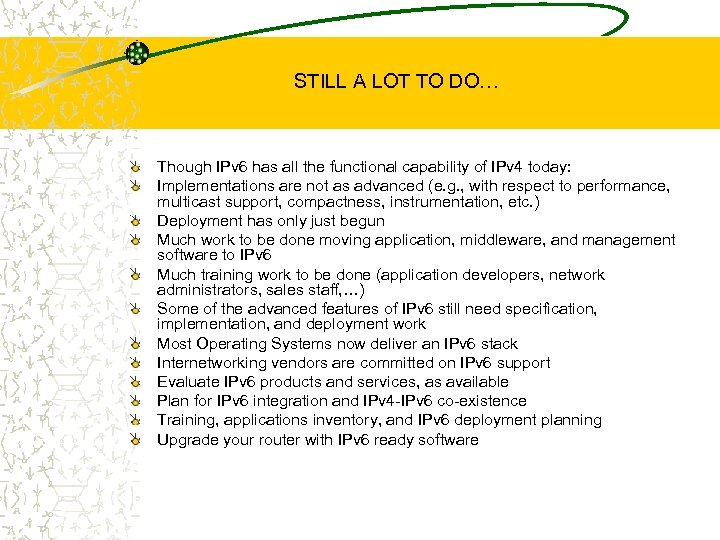 STILL A LOT TO DO… Though IPv 6 has all the functional capability of IPv 4 today: Implementations are not as advanced (e. g. , with respect to performance, multicast support, compactness, instrumentation, etc. ) Deployment has only just begun Much work to be done moving application, middleware, and management software to IPv 6 Much training work to be done (application developers, network administrators, sales staff, …) Some of the advanced features of IPv 6 still need specification, implementation, and deployment work Most Operating Systems now deliver an IPv 6 stack Internetworking vendors are committed on IPv 6 support Evaluate IPv 6 products and services, as available Plan for IPv 6 integration and IPv 4 -IPv 6 co-existence Training, applications inventory, and IPv 6 deployment planning Upgrade your router with IPv 6 ready software
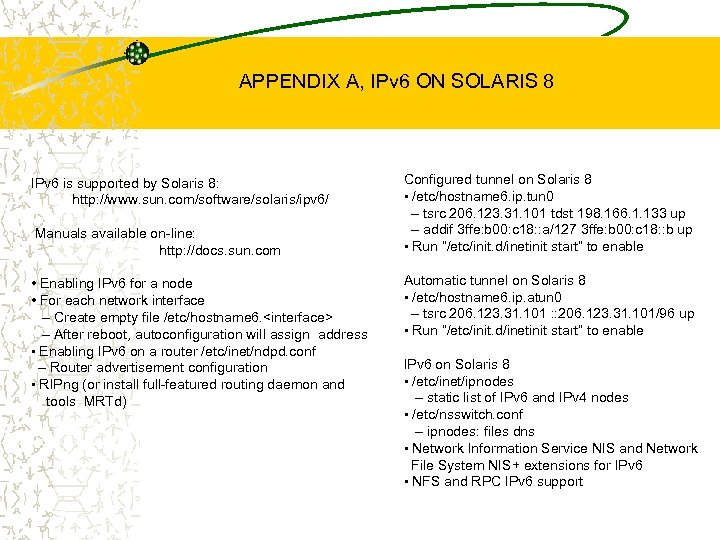 APPENDIX A, IPv 6 ON SOLARIS 8 IPv 6 is supported by Solaris 8: http: //www. sun. com/software/solaris/ipv 6/ Manuals available on-line: http: //docs. sun. com • Enabling IPv 6 for a node • For each network interface – Create empty file /etc/hostname 6.
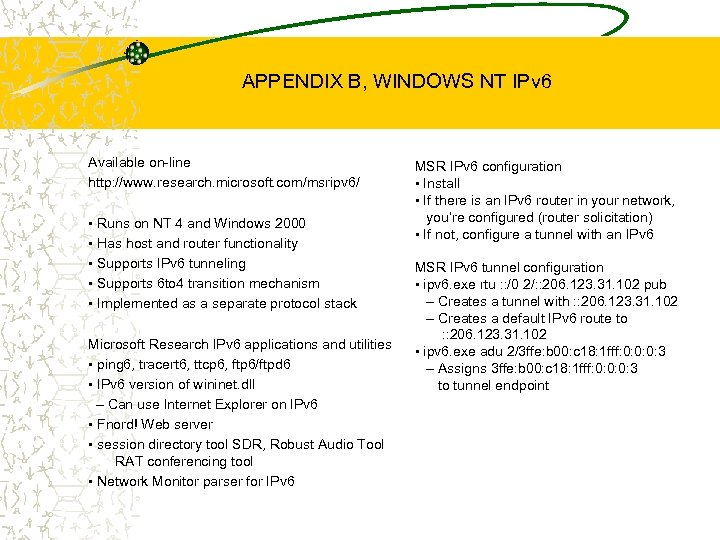 APPENDIX B, WINDOWS NT IPv 6 Available on-line http: //www. research. microsoft. com/msripv 6/ • Runs on NT 4 and Windows 2000 • Has host and router functionality • Supports IPv 6 tunneling • Supports 6 to 4 transition mechanism • Implemented as a separate protocol stack Microsoft Research IPv 6 applications and utilities • ping 6, tracert 6, ttcp 6, ftp 6/ftpd 6 • IPv 6 version of wininet. dll – Can use Internet Explorer on IPv 6 • Fnord! Web server • session directory tool SDR, Robust Audio Tool RAT conferencing tool • Network Monitor parser for IPv 6 MSR IPv 6 configuration • Install • If there is an IPv 6 router in your network, you’re configured (router solicitation) • If not, configure a tunnel with an IPv 6 MSR IPv 6 tunnel configuration • ipv 6. exe rtu : : /0 2/: : 206. 123. 31. 102 pub – Creates a tunnel with : : 206. 123. 31. 102 – Creates a default IPv 6 route to : : 206. 123. 31. 102 • ipv 6. exe adu 2/3 ffe: b 00: c 18: 1 fff: 0: 0: 0: 3 – Assigns 3 ffe: b 00: c 18: 1 fff: 0: 0: 0: 3 to tunnel endpoint