


 Скачать презентацию Internet Information Server 4 0 and 5 0
2dbd5f758a018a4c3d6bb090ff1f1142.ppt
- Количество слайдов: 35
 Internet Information Server 4. 0 (and 5. 0) By Nicolas PAOUR 12 January 2004 12/02/2004 Nicolas Paour 1
 Contents • Introduction • Security within IIS • Required configuration to setup IIS • What are Front. Page extensions • IIS Setup (How. To) • Using Front. Page with IIS • Web Setup • FTP Setup • SMTP Setup 12/02/2004 • Frequent Trouble. Shooting Nicolas Paour 2
 Overview • What is IIS – Questions/Answers • Aim – – Product overview Getting information Understanding security Managing IIS & Front. Page 12/02/2004 Nicolas Paour 3
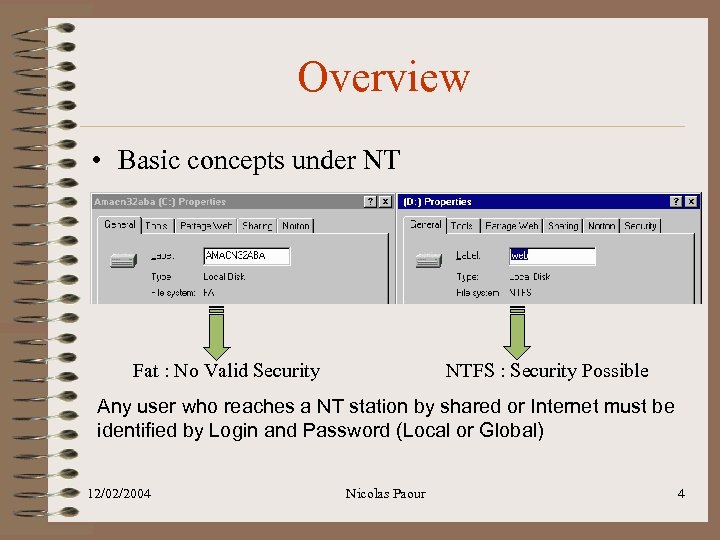 Overview • Basic concepts under NT Fat : No Valid Security NTFS : Security Possible Any user who reaches a NT station by shared or Internet must be identified by Login and Password (Local or Global) 12/02/2004 Nicolas Paour 4
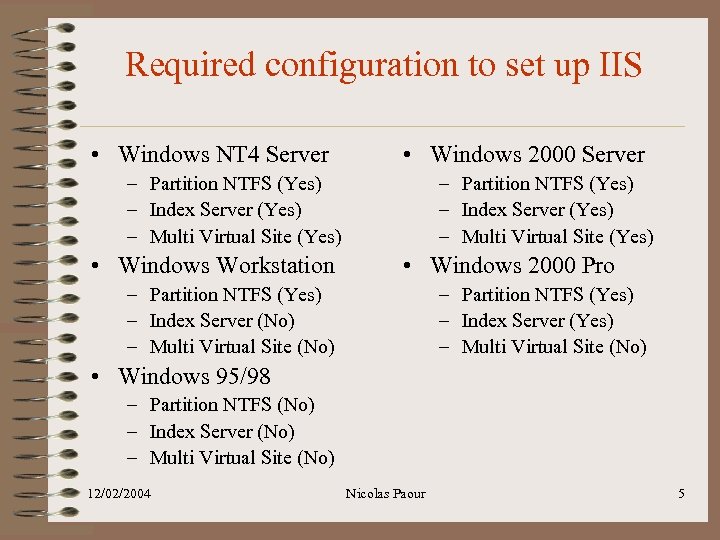 Required configuration to set up IIS • Windows NT 4 Server • Windows 2000 Server – Partition NTFS (Yes) – Index Server (Yes) – Multi Virtual Site (Yes) • Windows Workstation – Partition NTFS (Yes) – Index Server (Yes) – Multi Virtual Site (Yes) • Windows 2000 Pro – Partition NTFS (Yes) – Index Server (No) – Multi Virtual Site (No) – Partition NTFS (Yes) – Index Server (Yes) – Multi Virtual Site (No) • Windows 95/98 – Partition NTFS (No) – Index Server (No) – Multi Virtual Site (No) 12/02/2004 Nicolas Paour 5
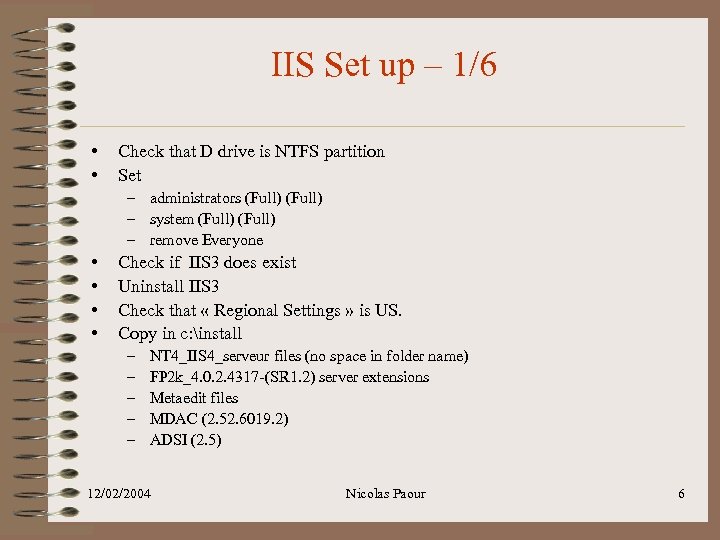 IIS Set up – 1/6 • • Check that D drive is NTFS partition Set – administrators (Full) – system (Full) – remove Everyone • • Check if IIS 3 does exist Uninstall IIS 3 Check that « Regional Settings » is US. Copy in c: install – – – NT 4_IIS 4_serveur files (no space in folder name) FP 2 k_4. 0. 2. 4317 -(SR 1. 2) server extensions Metaedit files MDAC (2. 52. 6019. 2) ADSI (2. 5) 12/02/2004 Nicolas Paour 6
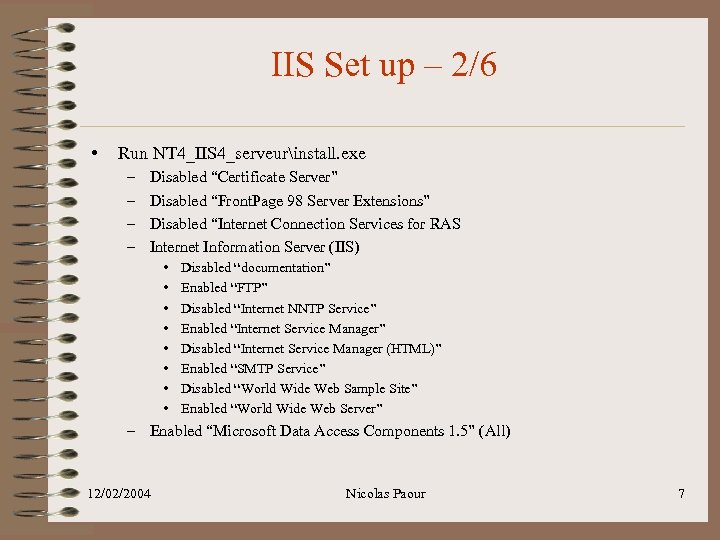 IIS Set up – 2/6 • Run NT 4_IIS 4_serveurinstall. exe – – Disabled “Certificate Server” Disabled “Front. Page 98 Server Extensions” Disabled “Internet Connection Services for RAS Internet Information Server (IIS) • • Disabled “documentation” Enabled “FTP” Disabled “Internet NNTP Service” Enabled “Internet Service Manager” Disabled “Internet Service Manager (HTML)” Enabled “SMTP Service” Disabled “World Wide Web Sample Site” Enabled “World Wide Web Server” – Enabled “Microsoft Data Access Components 1. 5” (All) 12/02/2004 Nicolas Paour 7
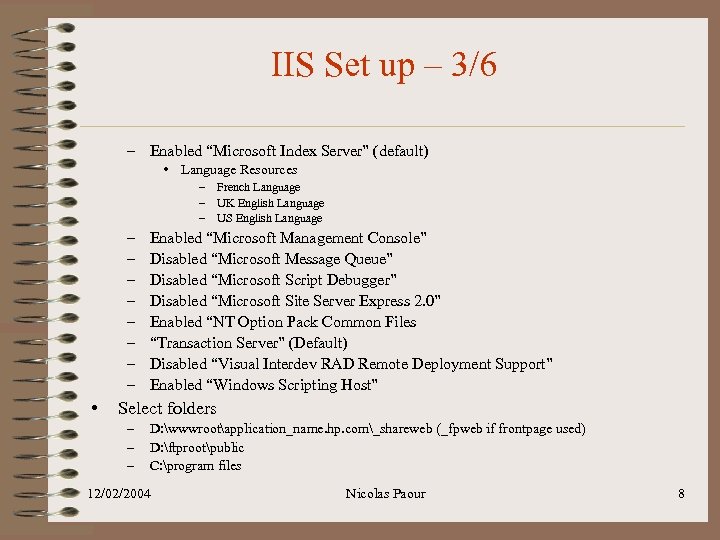 IIS Set up – 3/6 – Enabled “Microsoft Index Server” (default) • Language Resources – French Language – UK English Language – US English Language – – – – • Enabled “Microsoft Management Console” Disabled “Microsoft Message Queue” Disabled “Microsoft Script Debugger” Disabled “Microsoft Site Server Express 2. 0” Enabled “NT Option Pack Common Files “Transaction Server” (Default) Disabled “Visual Interdev RAD Remote Deployment Support” Enabled “Windows Scripting Host” Select folders – – – D: wwwrootapplication_name. hp. com_shareweb (_fpweb if frontpage used) D: ftprootpublic C: program files 12/02/2004 Nicolas Paour 8
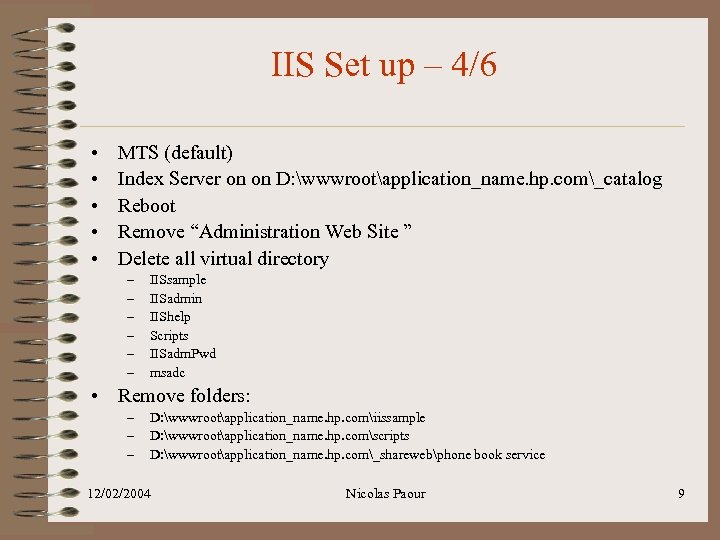 IIS Set up – 4/6 • • • MTS (default) Index Server on on D: wwwrootapplication_name. hp. com_catalog Reboot Remove “Administration Web Site ” Delete all virtual directory – – – IISsample IISadmin IIShelp Scripts IISadm. Pwd msadc • Remove folders: – – – D: wwwrootapplication_name. hp. comiissample D: wwwrootapplication_name. hp. comscripts D: wwwrootapplication_name. hp. com_sharewebphone book service 12/02/2004 Nicolas Paour 9
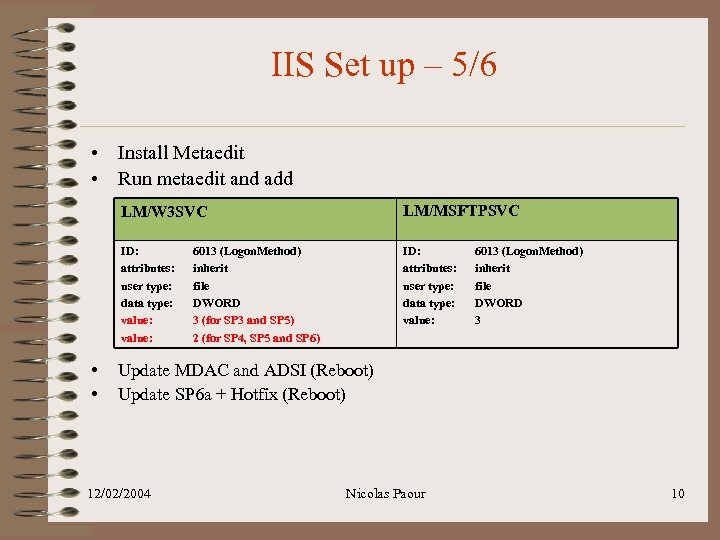 IIS Set up – 5/6 • Install Metaedit • Run metaedit and add LM/W 3 SVC ID: attributes: user type: data type: value: • • LM/MSFTPSVC ID: attributes: user type: data type: value: 6013 (Logon. Method) inherit file DWORD 3 (for SP 3 and SP 5) 2 (for SP 4, SP 5 and SP 6) 6013 (Logon. Method) inherit file DWORD 3 Update MDAC and ADSI (Reboot) Update SP 6 a + Hotfix (Reboot) 12/02/2004 Nicolas Paour 10
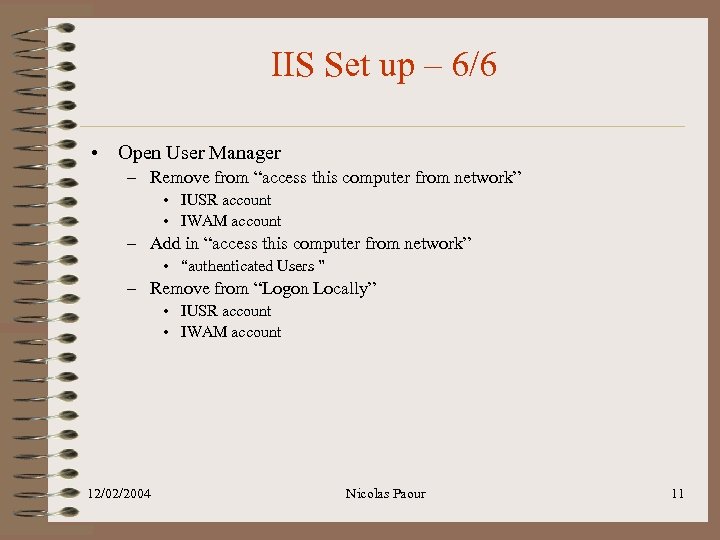 IIS Set up – 6/6 • Open User Manager – Remove from “access this computer from network” • IUSR account • IWAM account – Add in “access this computer from network” • “authenticated Users ” – Remove from “Logon Locally” • IUSR account • IWAM account 12/02/2004 Nicolas Paour 11
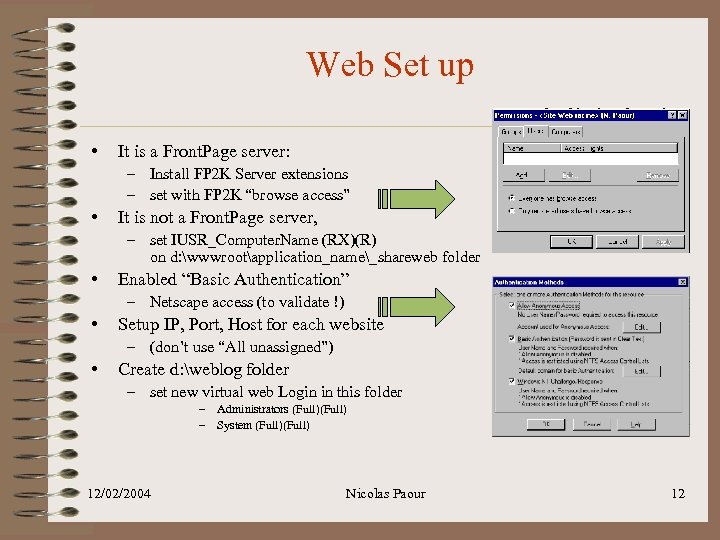 Web Set up • It is a Front. Page server: – Install FP 2 K Server extensions – set with FP 2 K “browse access” • It is not a Front. Page server, – set IUSR_Computer. Name (RX)(R) on d: wwwrootapplication_name_shareweb folder • Enabled “Basic Authentication” – Netscape access (to validate !) • Setup IP, Port, Host for each website – (don’t use “All unassigned”) • Create d: weblog folder – set new virtual web Login in this folder – Administrators (Full) – System (Full) 12/02/2004 Nicolas Paour 12
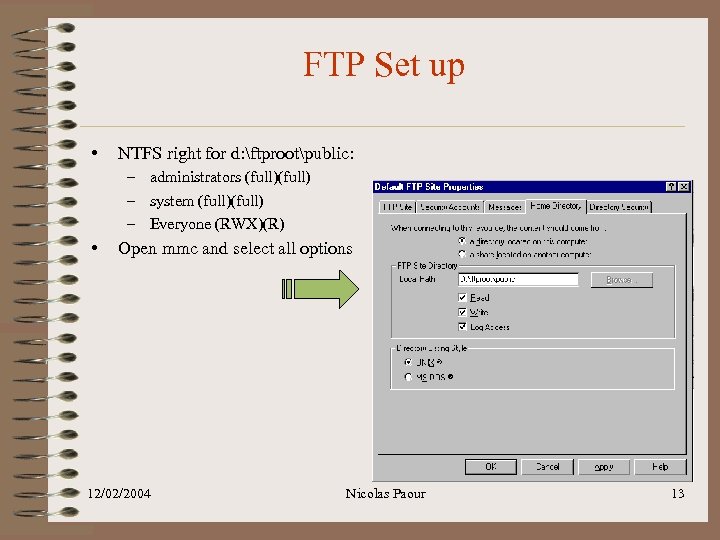 FTP Set up • NTFS right for d: ftprootpublic: – administrators (full) – system (full) – Everyone (RWX)(R) • Open mmc and select all options 12/02/2004 Nicolas Paour 13
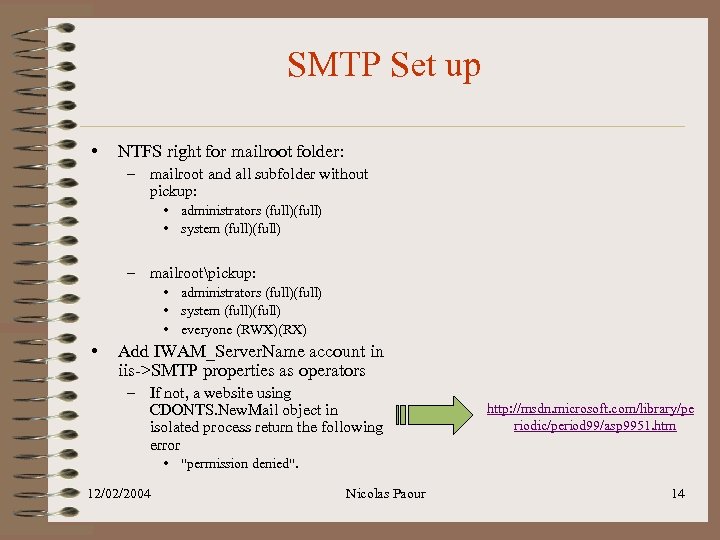 SMTP Set up • NTFS right for mailroot folder: – mailroot and all subfolder without pickup: • administrators (full) • system (full) – mailrootpickup: • administrators (full) • system (full) • everyone (RWX)(RX) • Add IWAM_Server. Name account in iis->SMTP properties as operators – If not, a website using CDONTS. New. Mail object in isolated process return the following error http: //msdn. microsoft. com/library/pe riodic/period 99/asp 9951. htm • "permission denied". 12/02/2004 Nicolas Paour 14
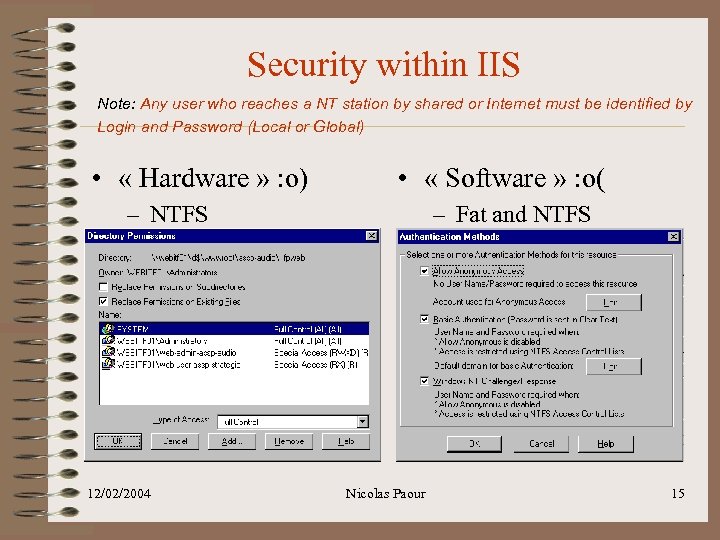 Security within IIS Note: Any user who reaches a NT station by shared or Internet must be identified by Login and Password (Local or Global) • « Hardware » : o) • « Software » : o( – NTFS 12/02/2004 – Fat and NTFS Nicolas Paour 15
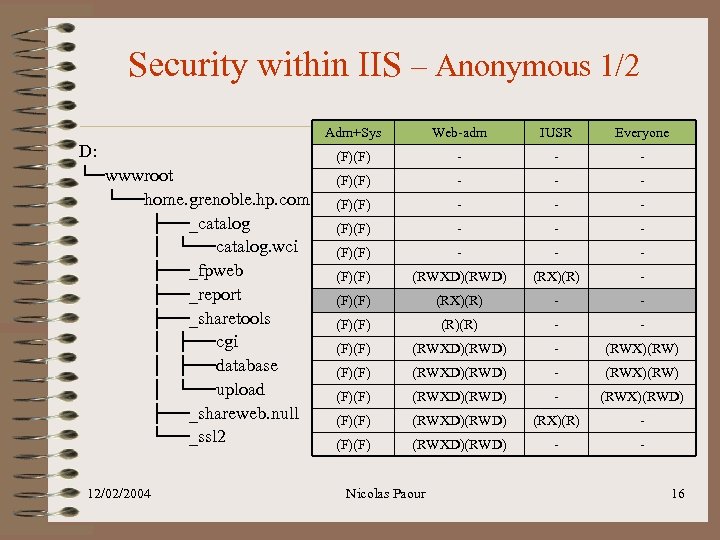 Security within IIS – Anonymous 1/2 Adm+Sys D: └─wwwroot └──home. grenoble. hp. com ├──_catalog │ └──catalog. wci ├──_fpweb ├──_report ├──_sharetools │ ├──cgi │ ├──database │ └──upload ├──_shareweb. null └──_ssl 2 12/02/2004 Web-adm IUSR Everyone (F)(F) - - - (F)(F) - - - (F)(F) (RWXD)(RWD) (RX)(R) - (F)(F) (RX)(R) - - (F)(F) (RWXD)(RWD) - (RWX)(RW) (F)(F) (RWXD)(RWD) - (RWX)(RWD) (F)(F) (RWXD)(RWD) (RX)(R) - (F)(F) (RWXD)(RWD) - - Nicolas Paour 16
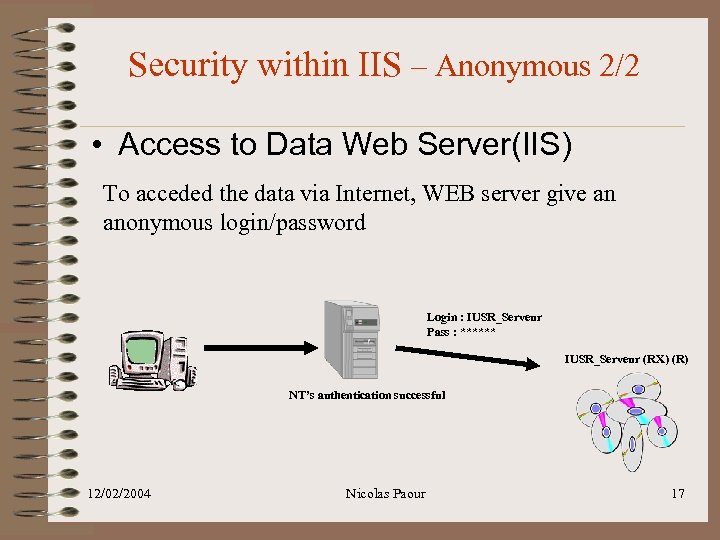 Security within IIS – Anonymous 2/2 • Access to Data Web Server(IIS) To acceded the data via Internet, WEB server give an anonymous login/password Login : IUSR_Serveur Pass : ****** IUSR_Serveur (RX) (R) NT’s authentication successful 12/02/2004 Nicolas Paour 17
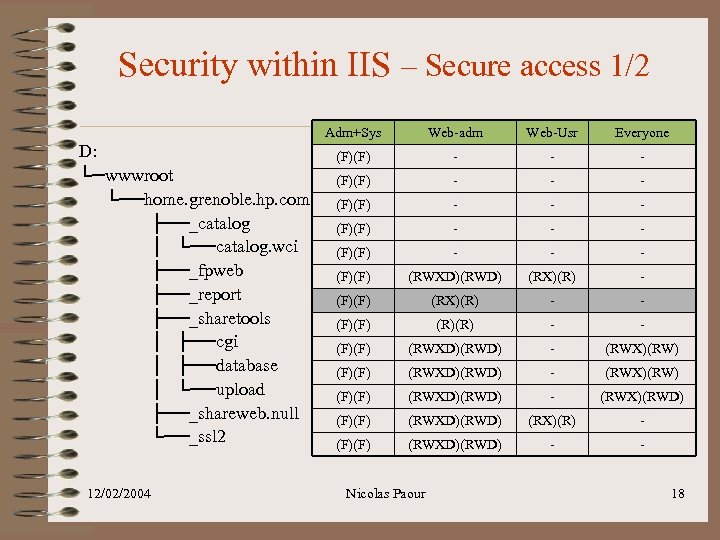 Security within IIS – Secure access 1/2 Adm+Sys D: └─wwwroot └──home. grenoble. hp. com ├──_catalog │ └──catalog. wci ├──_fpweb ├──_report ├──_sharetools │ ├──cgi │ ├──database │ └──upload ├──_shareweb. null └──_ssl 2 12/02/2004 Web-adm Web-Usr Everyone (F)(F) - - - (F)(F) - - - (F)(F) (RWXD)(RWD) (RX)(R) - (F)(F) (RX)(R) - - (F)(F) (RWXD)(RWD) - (RWX)(RW) (F)(F) (RWXD)(RWD) - (RWX)(RWD) (F)(F) (RWXD)(RWD) (RX)(R) - (F)(F) (RWXD)(RWD) - - Nicolas Paour 18
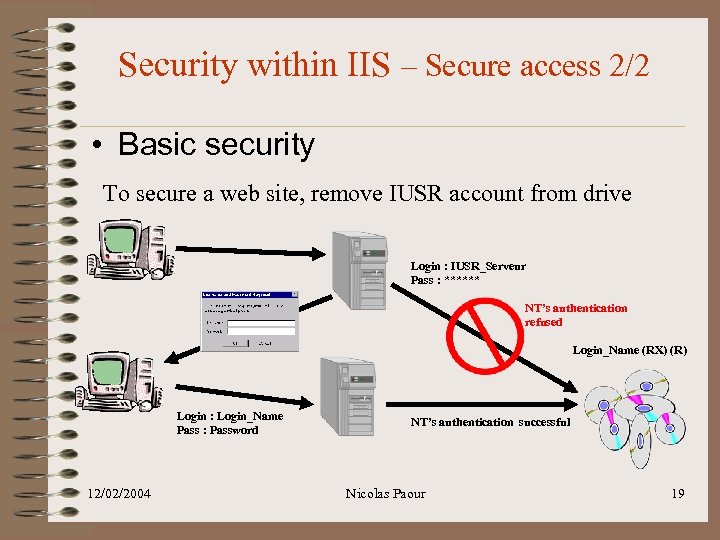 Security within IIS – Secure access 2/2 • Basic security To secure a web site, remove IUSR account from drive Login : IUSR_Serveur Pass : ****** NT’s authentication refused Login_Name (RX) (R) Login : Login_Name Pass : Password 12/02/2004 NT’s authentication successful Nicolas Paour 19
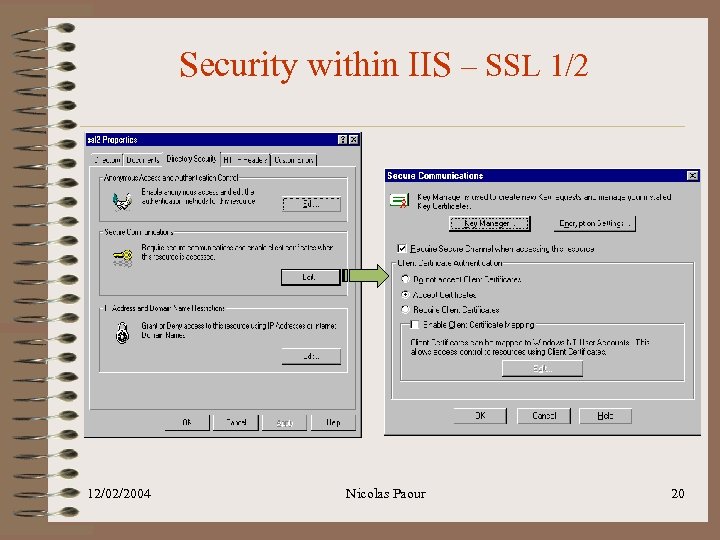 Security within IIS – SSL 1/2 12/02/2004 Nicolas Paour 20
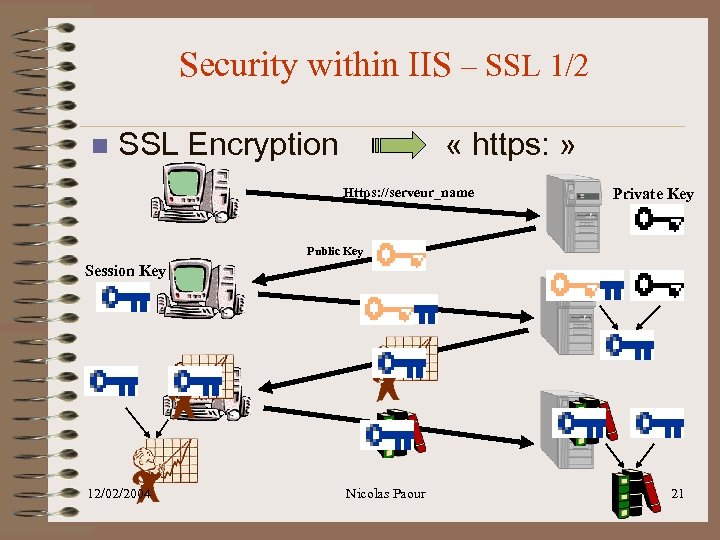 Security within IIS – SSL 1/2 n SSL Encryption « https: » Https: //serveur_name Private Key Public Key Session Key 12/02/2004 Nicolas Paour 21
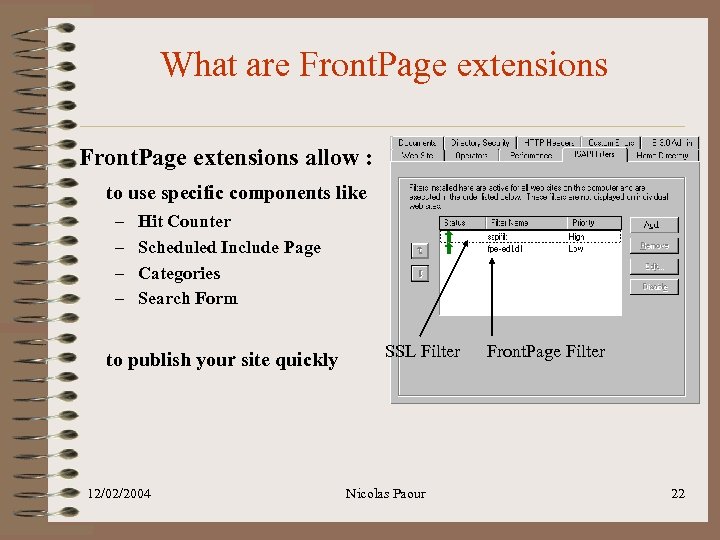 What are Front. Page extensions allow : to use specific components like – – Hit Counter Scheduled Include Page Categories Search Form to publish your site quickly 12/02/2004 SSL Filter Nicolas Paour Front. Page Filter 22
 Using Front. Page with IIS Frontpage interface is required for : • • • Web site creation Site management (child site, move folder, …) Security setting Site Publishing Site deletion 12/02/2004 Nicolas Paour 23
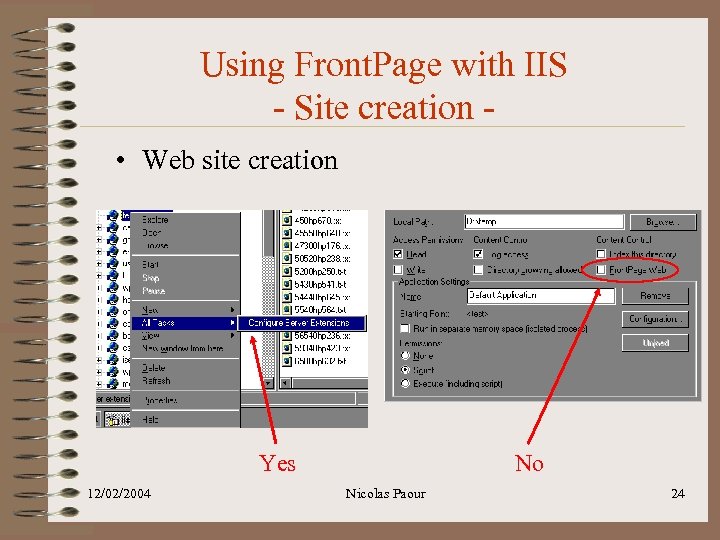 Using Front. Page with IIS - Site creation • Web site creation Yes 12/02/2004 No Nicolas Paour 24
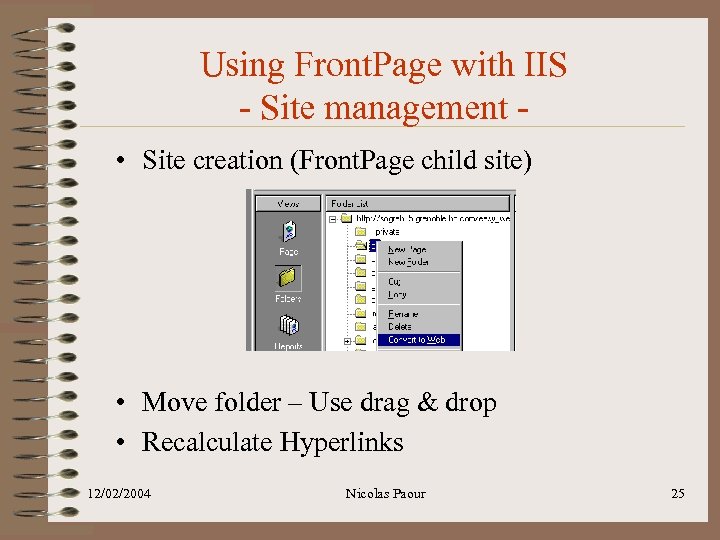 Using Front. Page with IIS - Site management • Site creation (Front. Page child site) • Move folder – Use drag & drop • Recalculate Hyperlinks 12/02/2004 Nicolas Paour 25
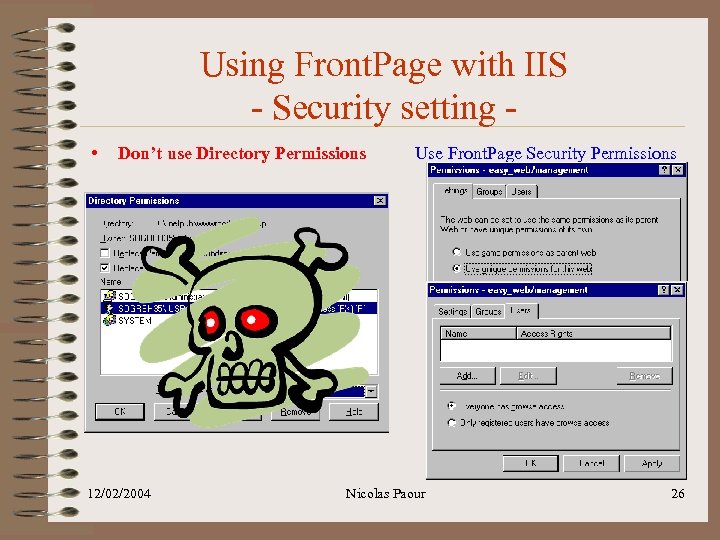 Using Front. Page with IIS - Security setting • Don’t use Directory Permissions 12/02/2004 Use Front. Page Security Permissions Nicolas Paour 26
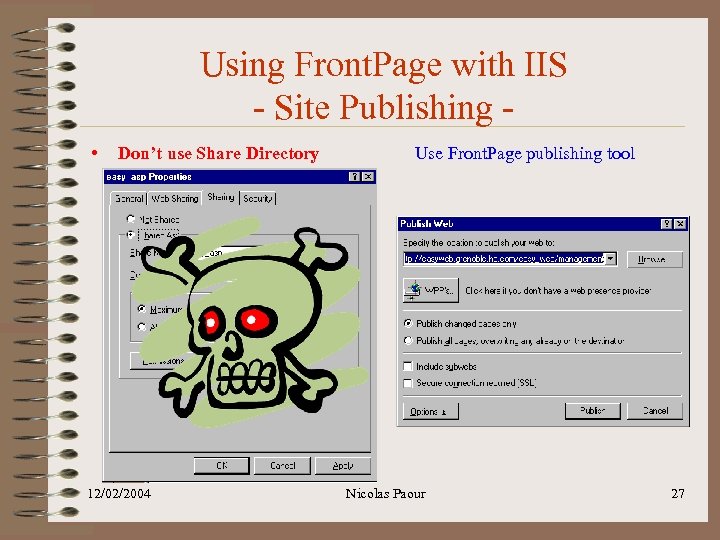 Using Front. Page with IIS - Site Publishing • Don’t use Share Directory 12/02/2004 Use Front. Page publishing tool Nicolas Paour 27
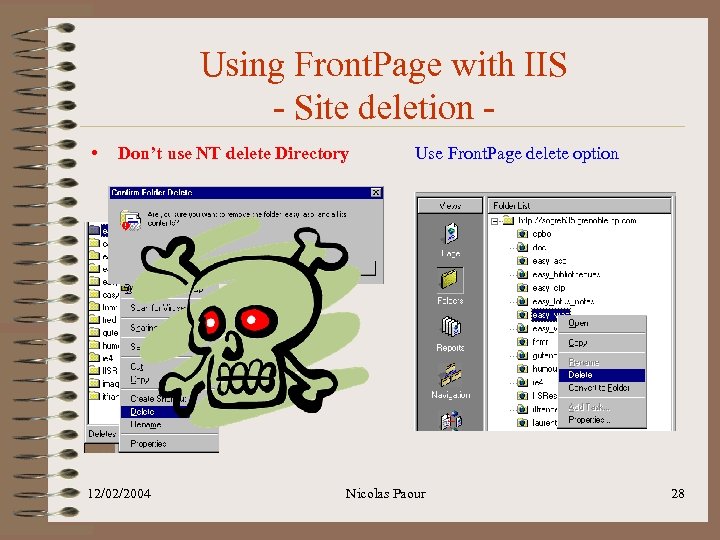 Using Front. Page with IIS - Site deletion • Don’t use NT delete Directory 12/02/2004 Use Front. Page delete option Nicolas Paour 28
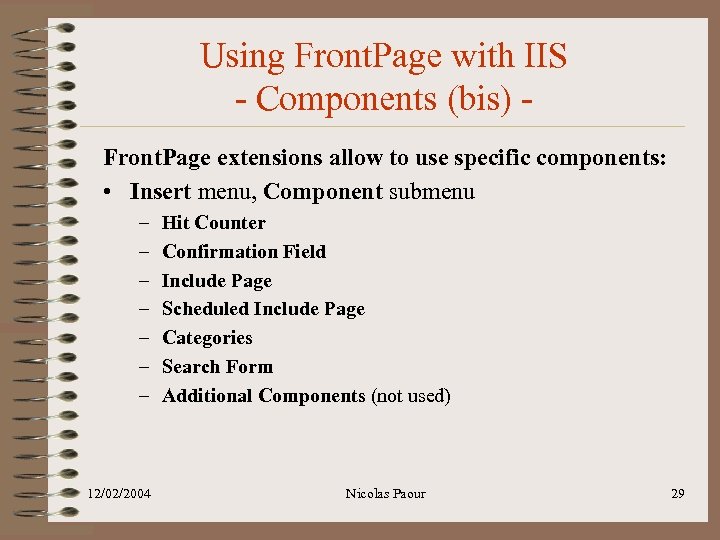 Using Front. Page with IIS - Components (bis) Front. Page extensions allow to use specific components: • Insert menu, Component submenu – – – – 12/02/2004 Hit Counter Confirmation Field Include Page Scheduled Include Page Categories Search Form Additional Components (not used) Nicolas Paour 29
 Frequent Trouble. Shooting http: //membres. lycos. fr/paour/easy_doc/index. html 12/02/2004 Nicolas Paour 30
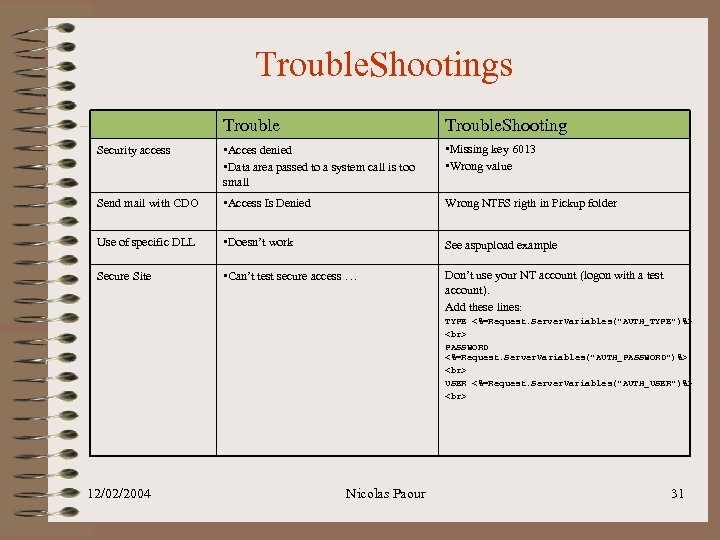 Trouble. Shootings Trouble. Shooting Security access • Acces denied • Data area passed to a system call is too small • Missing key 6013 • Wrong value Send mail with CDO • Access Is Denied Wrong NTFS rigth in Pickup folder Use of specific DLL • Doesn’t work See aspupload example Secure Site • Can’t test secure access … Don’t use your NT account (logon with a test account). Add these lines: TYPE <%=Request. Server. Variables("AUTH_TYPE")%> PASSWORD <%=Request. Server. Variables("AUTH_PASSWORD")%> USER <%=Request. Server. Variables("AUTH_USER")%> 12/02/2004 Nicolas Paour 31
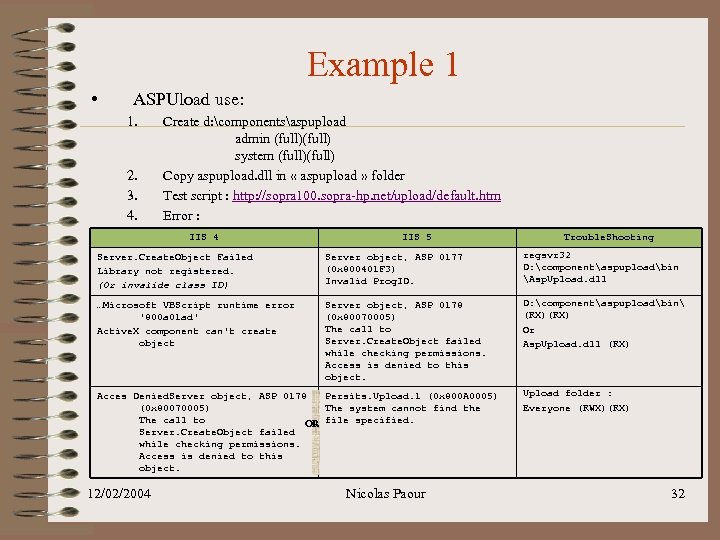 Example 1 • ASPUload use: 1. 2. 3. 4. Create d: componentsaspupload admin (full) system (full) Copy aspupload. dll in « aspupload » folder Test script : http: //sopra 100. sopra-hp. net/upload/default. htm Error : IIS 4 IIS 5 Trouble. Shooting Server. Create. Object Failed Library not registered. (Or invalide class ID) Server object, ASP 0177 (0 x 800401 F 3) Invalid Prog. ID. regsvr 32 D: componentaspuploadbin Asp. Upload. dll …Microsoft VBScript runtime error '800 a 01 ad' Active. X component can't create object Server object, ASP 0178 (0 x 80070005) The call to Server. Create. Object failed while checking permissions. Access is denied to this object. D: componentaspuploadbin (RX) Or Asp. Upload. dll (RX) Acces Denied. Server object, ASP 0178 Persits. Upload. 1 (0 x 800 A 0005) (0 x 80070005) The system cannot find the The call to OR file specified. Server. Create. Object failed while checking permissions. Access is denied to this object. 12/02/2004 Nicolas Paour Upload folder : Everyone (RWX)(RX) 32
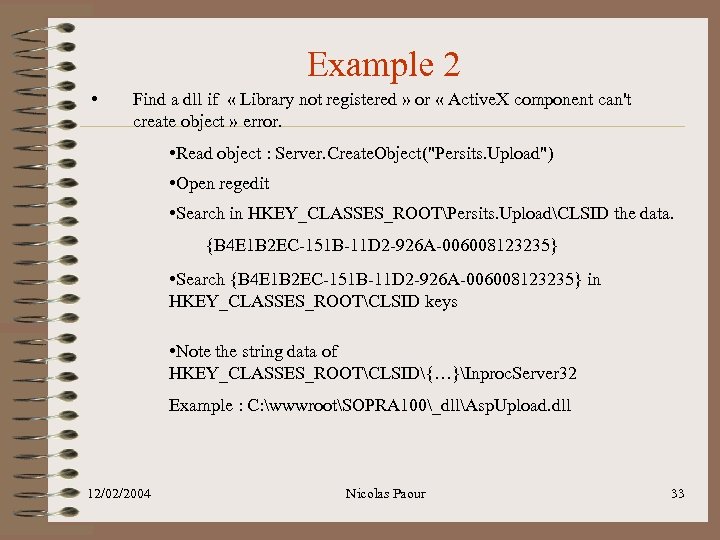 Example 2 • Find a dll if « Library not registered » or « Active. X component can't create object » error. • Read object : Server. Create. Object("Persits. Upload") • Open regedit • Search in HKEY_CLASSES_ROOTPersits. UploadCLSID the data. {B 4 E 1 B 2 EC-151 B-11 D 2 -926 A-006008123235} • Search {B 4 E 1 B 2 EC-151 B-11 D 2 -926 A-006008123235} in HKEY_CLASSES_ROOTCLSID keys • Note the string data of HKEY_CLASSES_ROOTCLSID{…}Inproc. Server 32 Example : C: wwwrootSOPRA 100_dllAsp. Upload. dll 12/02/2004 Nicolas Paour 33
PASSWORD" src="https://present5.com/presentation/2dbd5f758a018a4c3d6bb090ff1f1142/image-34.jpg" alt=" • Secure access Example 3 Add these lines: TYPE <%=Request. Server. Variables("AUTH_TYPE")%> PASSWORD" />
• Secure access Example 3 Add these lines: TYPE <%=Request. Server. Variables("AUTH_TYPE")%> PASSWORD <%=Request. Server. Variables("AUTH_PASSWORD")%> USER <%=Request. Server. Variables("AUTH_USER")%> • Anonymous access : . . Secure | IUSR_Computername (RX)(R) • Challenge/Response (remove IUSR account): . . Secure | training (RX)(R) TYPE PASSWORD USER TYPE NTLM or Negotiate PASSWORD USER SOPRA-HPtraining Or for IIS 5 Digest (NT 2000) – Integrated • Basic (remove IUSR account): . . Secure | training (RX)(R) 12/02/2004 Nicolas Paour TYPE Basic PASSWORD trai 123 ning USER SOPRA-HPtraining 34
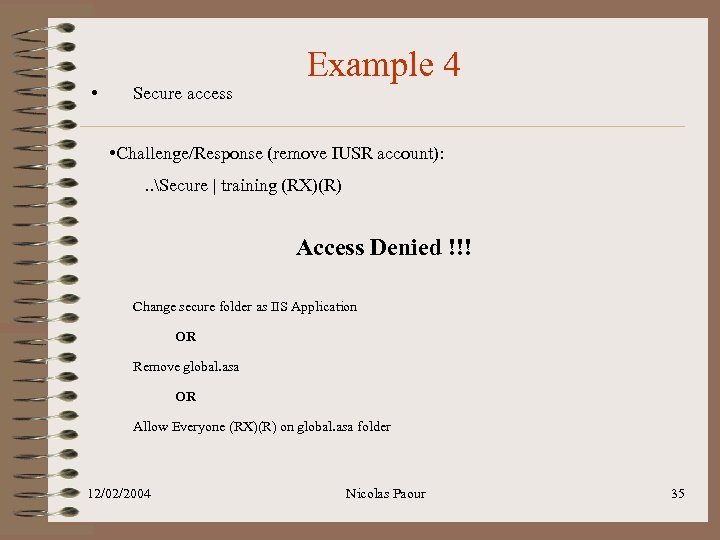 • Secure access Example 4 • Challenge/Response (remove IUSR account): . . Secure | training (RX)(R) Access Denied !!! Change secure folder as IIS Application OR Remove global. asa OR Allow Everyone (RX)(R) on global. asa folder 12/02/2004 Nicolas Paour 35