


 Скачать презентацию Internet Communications Networking Computer Security Sanjay Goel
3f03816a3f59562ee3593c022f9ef010.ppt
- Количество слайдов: 127
 Internet Communications, Networking & Computer Security Sanjay Goel University at Albany 1 *
 Outline • • • What is Internet? Internet Protocols Protocol hierarchies The OSI reference model Services in the OSI model 3/16/2018 2
 Internet What is it? • • It is a network of networks Any network connected to the internet – – – • Conform to certain naming conventions Must run the IP protocol is also called Internet dial tone Internet has a hierarchical topology – – End Systems connected to local ISPs through access networks Access Network examples – LAN, telephone line with a modem, high speed cable networks Local ISPs connected to regional ISPs, regional ISPs connected to national & international ISPs Construction analogous with Lego construction 3 *
 Internet Role • Allows distributed applications to exchange data with each other • Applications include: FTP, Telnet, Mail, WWW, distributed games, video conferencing • Provides two kinds of services – – Connection Oriented Service (TCP): Establish connection prior to data exchange, coupled with reliable data transfer, flow control, congestion control etc. Connectionless Service (UDP): No handshake prior to data exchange, No acknowledgement of data received, no flow/congestion control 4 *
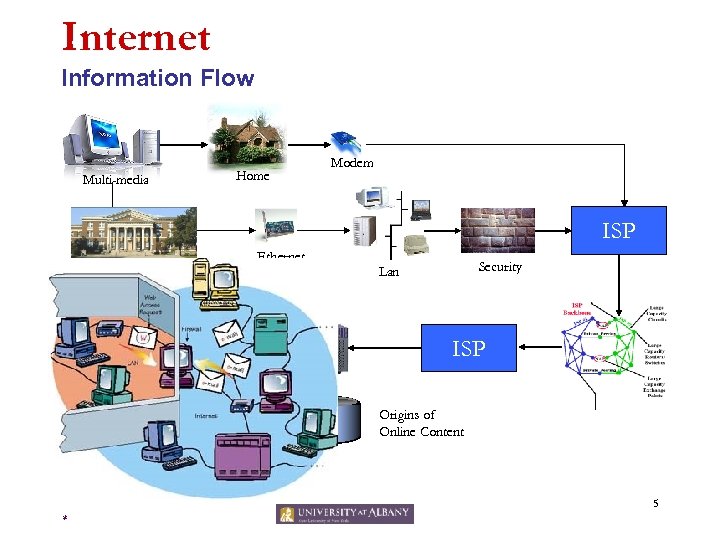 Internet Information Flow Multi-media Home Modem ISP University Ethernet Hosting Platform Security Lan ISP Origins of Online Content 5 *
 Internet Protocol Hierarchies • • Internet is a very complex system Set of layers and protocols represents the Network Architecture. Protocols are stacked vertically as series of ‘layers’. Each layer has a well defined interface. – Allows for easy replacement of layer • • Each layer offers Services to layer above, shielding implementation details. Each layer on one machine communicates with corresponding layer on another machine using Protocol for the Layer. 6 *
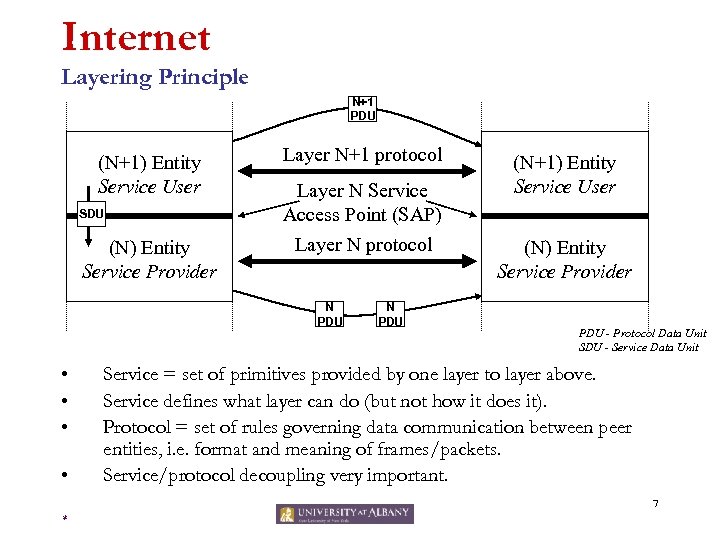 Internet Layering Principle N+1 PDU (N+1) Entity Service User SDU (N) Entity Service Provider Layer N+1 protocol Layer N Service Access Point (SAP) Layer N protocol N PDU • • N PDU (N+1) Entity Service User (N) Entity Service Provider PDU - Protocol Data Unit SDU - Service Data Unit Service = set of primitives provided by one layer to layer above. Service defines what layer can do (but not how it does it). Protocol = set of rules governing data communication between peer entities, i. e. format and meaning of frames/packets. Service/protocol decoupling very important. 7 *
 Internet Connections & Reliability • Connections – – • Layers can offer connection-oriented or connectionless services. Connection-oriented like telephone system. Connectionless like postal system. Each service has an associated Quality-of-service (e. g. reliable or unreliable). Reliability – – – Reliable services never lose/corrupt data. Reliable service costs more. Typical application for reliable service is file transfer. Typical application not needing reliable service is voice. Not all applications need connections. 8 *
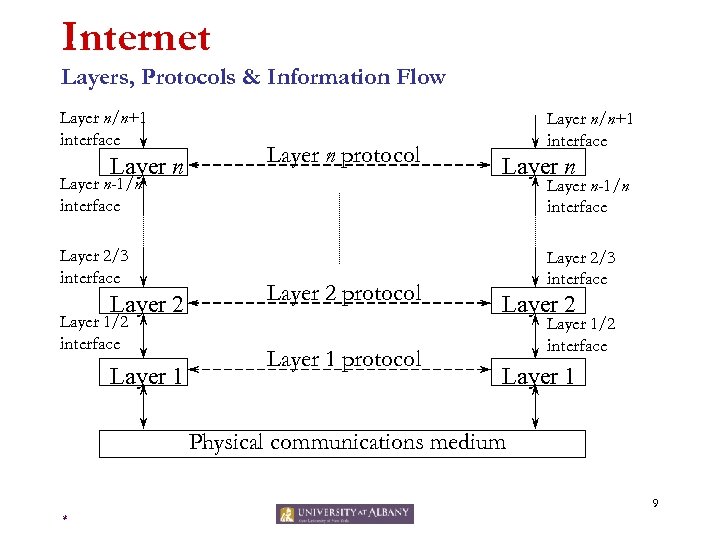 Internet Layers, Protocols & Information Flow Layer n/n+1 interface Layer n protocol Layer n-1/n interface Layer 2/3 interface Layer 2 Layer 1/2 interface Layer 1 Layer n/n+1 interface Layer n-1/n interface Layer 2 protocol Layer 1 protocol Layer 2/3 interface Layer 2 Layer 1/2 interface Layer 1 Physical communications medium 9 *
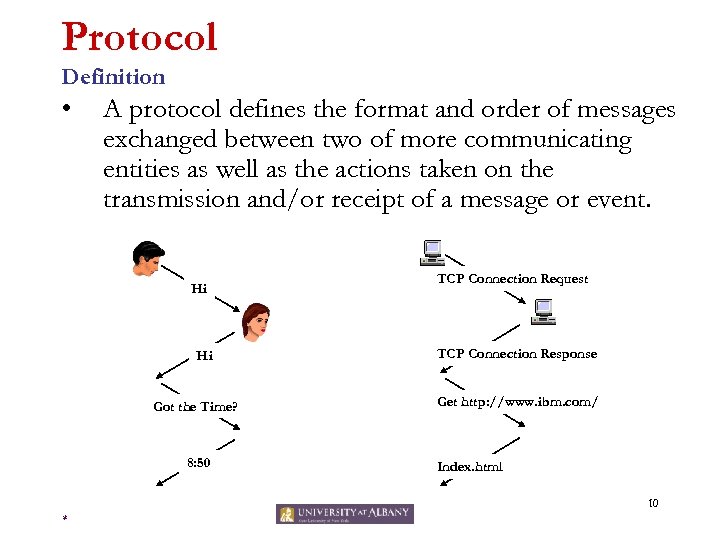 Protocol Definition • A protocol defines the format and order of messages exchanged between two of more communicating entities as well as the actions taken on the transmission and/or receipt of a message or event. Hi Hi Got the Time? 8: 50 TCP Connection Request TCP Connection Response Get http: //www. ibm. com/ Index. html 10 *
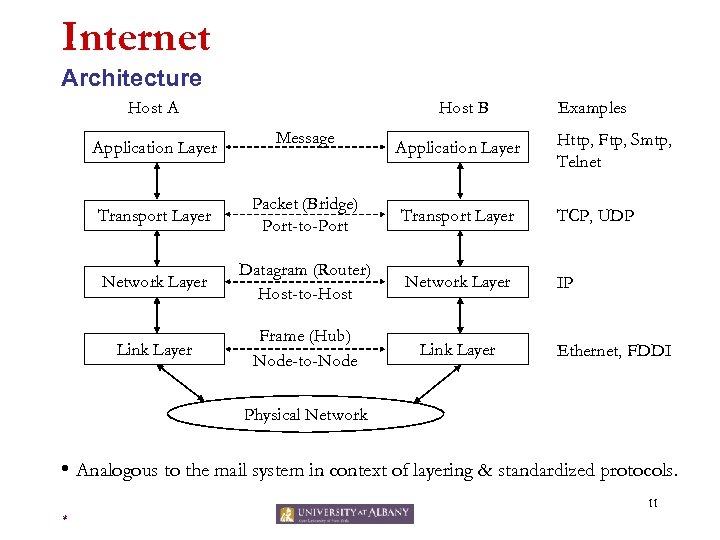 Internet Architecture Host A Application Layer Host B Message Application Layer Examples Http, Ftp, Smtp, Telnet Transport Layer Packet (Bridge) Port-to-Port Transport Layer TCP, UDP Network Layer Datagram (Router) Host-to-Host Network Layer IP Link Layer Frame (Hub) Node-to-Node Link Layer Ethernet, FDDI Physical Network • Analogous to the mail system in context of layering & standardized protocols. 11 *
 Application Layer Function • Implements application protocol – Users invoke applications using this protocol • Application Layer Protocol defines – Types of messages exchanged e. g. request or response – Syntax of the various message types, such as, fields in the messages and how they are delineated – Semantics of the fields i. e. meaning of information in each field – Rules for determining when and how a process sends messages and responds to messages 12 *
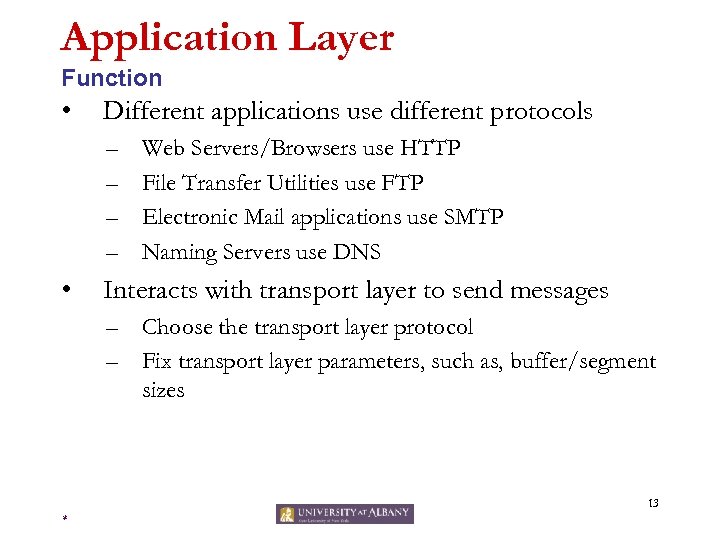 Application Layer Function • Different applications use different protocols – – • Web Servers/Browsers use HTTP File Transfer Utilities use FTP Electronic Mail applications use SMTP Naming Servers use DNS Interacts with transport layer to send messages – Choose the transport layer protocol – Fix transport layer parameters, such as, buffer/segment sizes 13 *
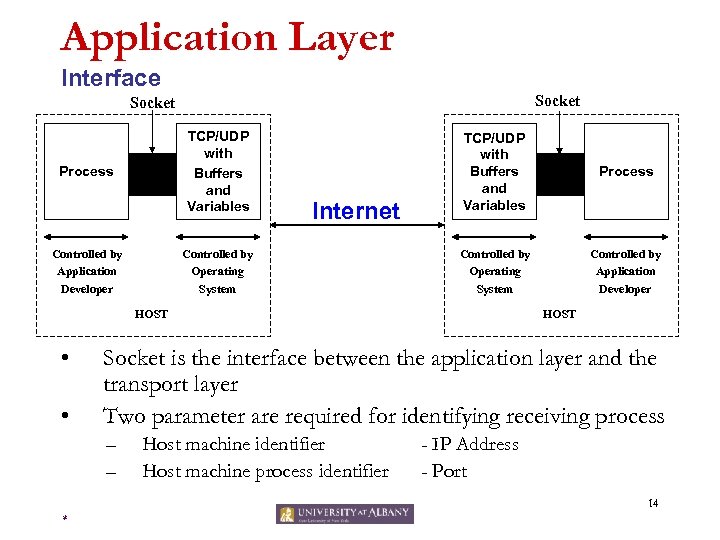 Application Layer Interface Socket TCP/UDP with Buffers and Variables Process Controlled by Application Developer Internet Controlled by Operating System TCP/UDP with Buffers and Variables Process Controlled by Operating System Controlled by Application Developer HOST • • HOST Socket is the interface between the application layer and the transport layer Two parameter are required for identifying receiving process – – Host machine identifier Host machine process identifier - IP Address - Port 14 *
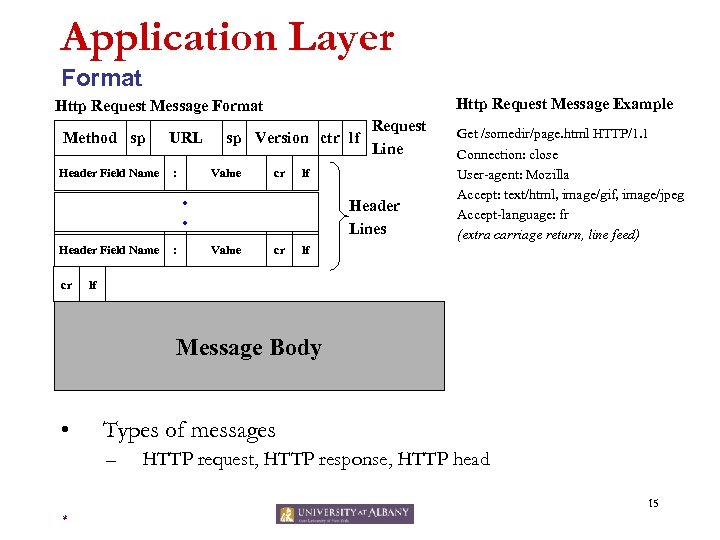 Application Layer Format Http Request Message Example Http Request Message Format Method sp Header Field Name URL : sp Version ctr lf Value cr lf • • Header Field Name cr : Request Line Header Lines Value cr Get /somedir/page. html HTTP/1. 1 Connection: close User-agent: Mozilla Accept: text/html, image/gif, image/jpeg Accept-language: fr (extra carriage return, line feed) lf lf Message Body • Types of messages – HTTP request, HTTP response, HTTP head 15 *
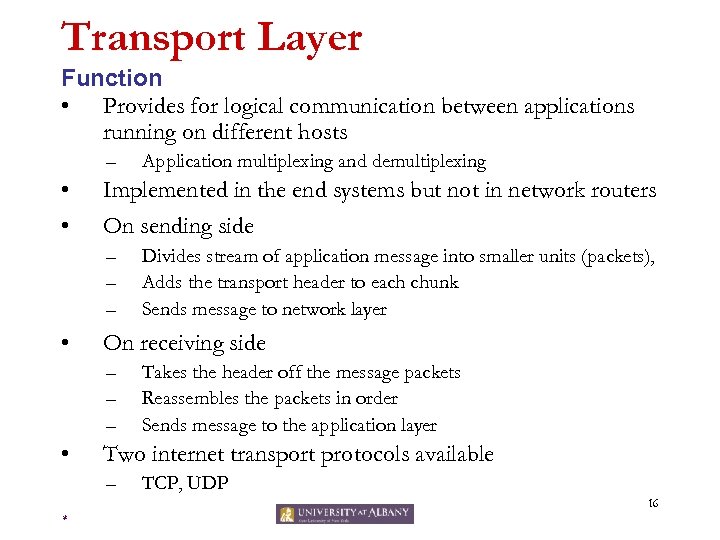 Transport Layer Function • Provides for logical communication between applications running on different hosts – • • Implemented in the end systems but not in network routers On sending side – – – • Divides stream of application message into smaller units (packets), Adds the transport header to each chunk Sends message to network layer On receiving side – – – • Application multiplexing and demultiplexing Takes the header off the message packets Reassembles the packets in order Sends message to the application layer Two internet transport protocols available – TCP, UDP 16 *
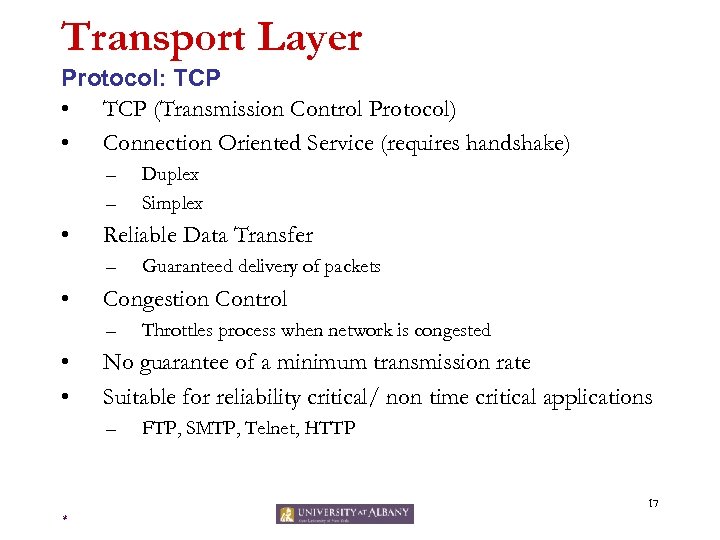 Transport Layer Protocol: TCP • TCP (Transmission Control Protocol) • Connection Oriented Service (requires handshake) – – • Reliable Data Transfer – • Guaranteed delivery of packets Congestion Control – • • Duplex Simplex Throttles process when network is congested No guarantee of a minimum transmission rate Suitable for reliability critical/ non time critical applications – FTP, SMTP, Telnet, HTTP 17 *
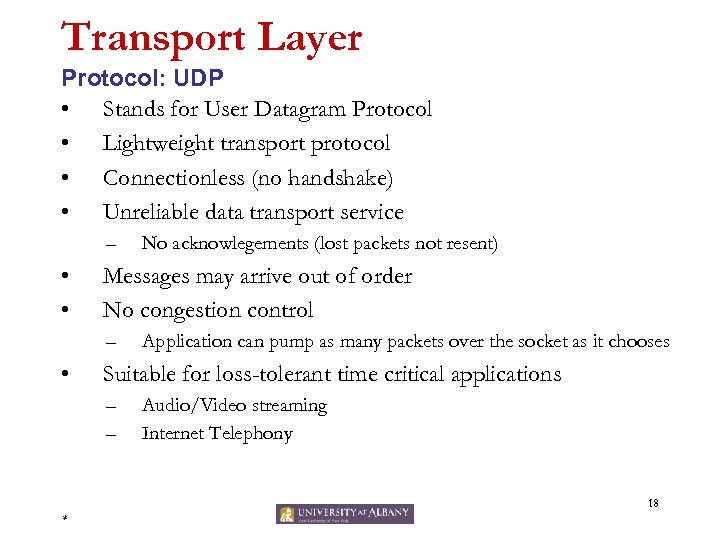 Transport Layer Protocol: UDP • Stands for User Datagram Protocol • Lightweight transport protocol • Connectionless (no handshake) • Unreliable data transport service – • • Messages may arrive out of order No congestion control – • No acknowlegements (lost packets not resent) Application can pump as many packets over the socket as it chooses Suitable for loss-tolerant time critical applications – – Audio/Video streaming Internet Telephony 18 *
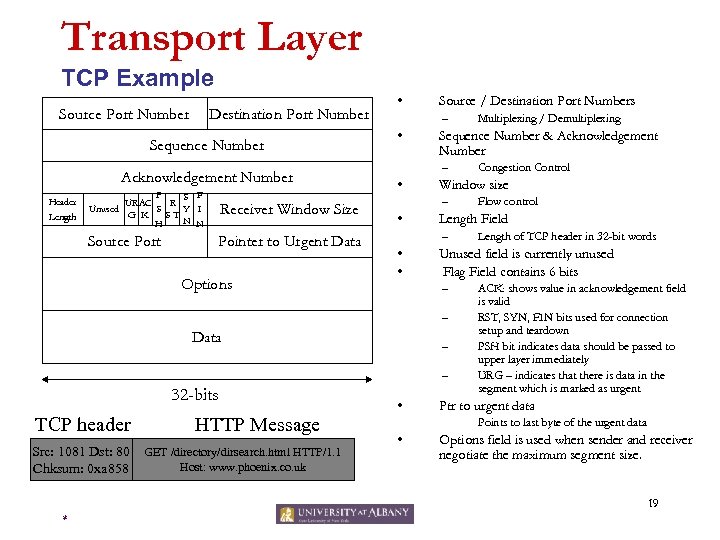 Transport Layer TCP Example Source Port Number Destination Port Number Sequence Number Acknowledgement Number Receiver Window Size Source Port Header Length P S F UR AC R S Y I Unused G K ST N N H Pointer to Urgent Data Options • Source / Destination Port Numbers – • Sequence Number & Acknowledgement Number – • – – – 32 -bits TCP header Src: 1081 Dst: 80 Chksum: 0 xa 858 HTTP Message GET /directory/dirsearch. html HTTP/1. 1 Host: www. phoenix. co. uk • Length of TCP header in 32 -bit words Unused field is currently unused Flag Field contains 6 bits – Data Flow control Length Field – • • Congestion Control Window size – • Multiplexing / Demultiplexing ACK: shows value in acknowledgement field is valid RST, SYN, FIN bits used for connection setup and teardown PSH bit indicates data should be passed to upper layer immediately URG – indicates that there is data in the segment which is marked as urgent Ptr to urgent data Points to last byte of the urgent data • Options field is used when sender and receiver negotiate the maximum segment size. 19 *
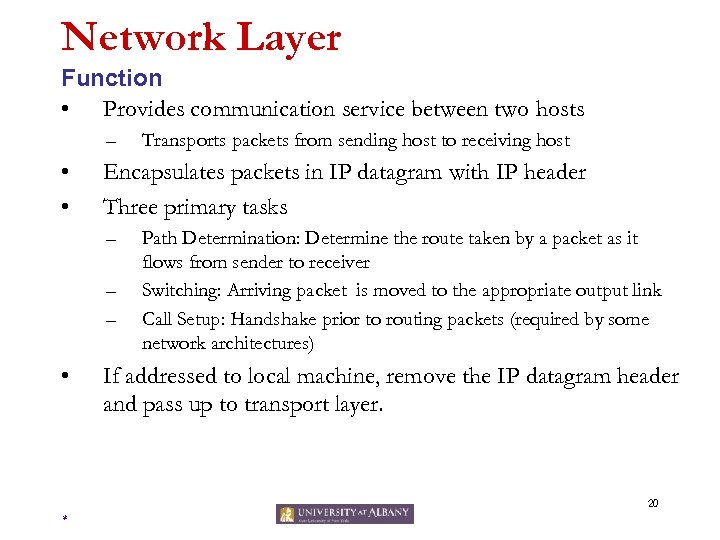 Network Layer Function • Provides communication service between two hosts – • • Encapsulates packets in IP datagram with IP header Three primary tasks – – – • Transports packets from sending host to receiving host Path Determination: Determine the route taken by a packet as it flows from sender to receiver Switching: Arriving packet is moved to the appropriate output link Call Setup: Handshake prior to routing packets (required by some network architectures) If addressed to local machine, remove the IP datagram header and pass up to transport layer. 20 *
 Network Layer Protocols • Network Layer contains several protocols including – – Internet Protocol Address Resolution Protocol (ARP) Internet Control Message Protocol (ICMP) Internet Group Message Protocol (IGMP) 21 *
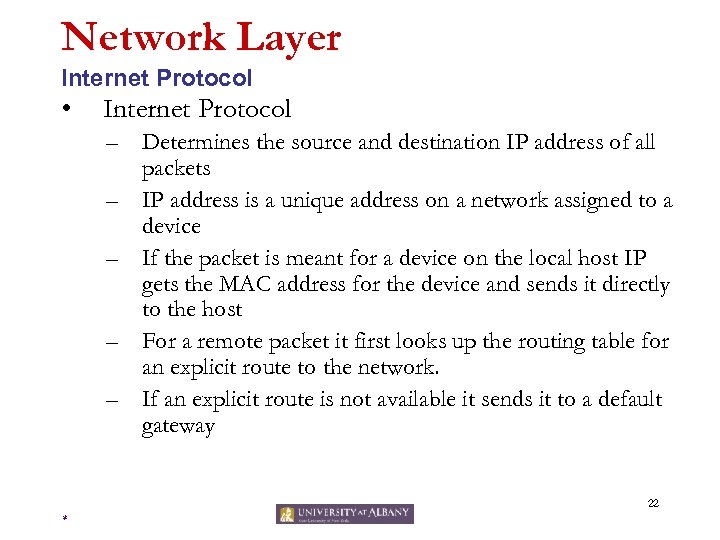 Network Layer Internet Protocol • Internet Protocol – Determines the source and destination IP address of all packets – IP address is a unique address on a network assigned to a device – If the packet is meant for a device on the local host IP gets the MAC address for the device and sends it directly to the host – For a remote packet it first looks up the routing table for an explicit route to the network. – If an explicit route is not available it sends it to a default gateway 22 *
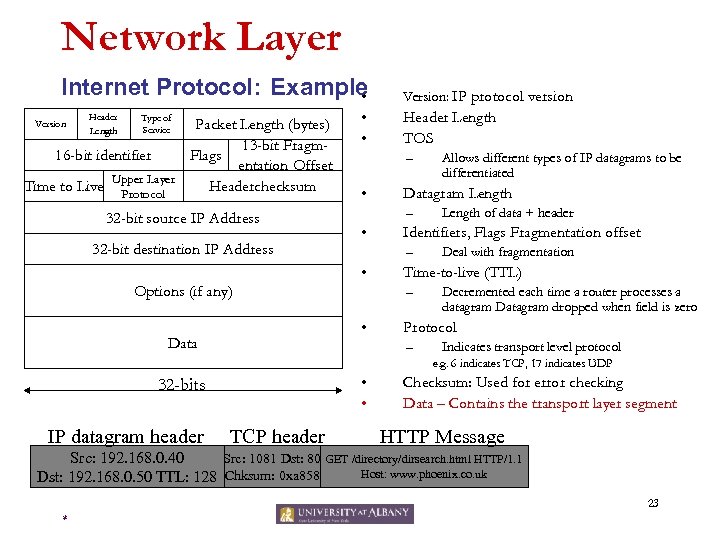 Network Layer Internet Protocol: Example • Header Length Type of Service Packet Length (bytes) 13 -bit Fragm 16 -bit identifier Flags entation Offset Upper Layer Time to Live Protocol Headerchecksum Version 32 -bit source IP Address 32 -bit destination IP Address • • Header Length TOS – • • Deal with fragmentation Time-to-live (TTL) – • Length of data + header Identifiers, Flags Fragmentation offset – Options (if any) Allows different types of IP datagrams to be differentiated Datagram Length – • Data Version: IP protocol version Decremented each time a router processes a datagram Datagram dropped when field is zero Protocol – Indicates transport level protocol e. g. 6 indicates TCP, 17 indicates UDP • • 32 -bits IP datagram header TCP header Checksum: Used for error checking Data – Contains the transport layer segment HTTP Message Src: 192. 168. 0. 40 Src: 1081 Dst: 80 GET /directory/dirsearch. html HTTP/1. 1 Host: www. phoenix. co. uk Dst: 192. 168. 0. 50 TTL: 128 Chksum: 0 xa 858 23 *
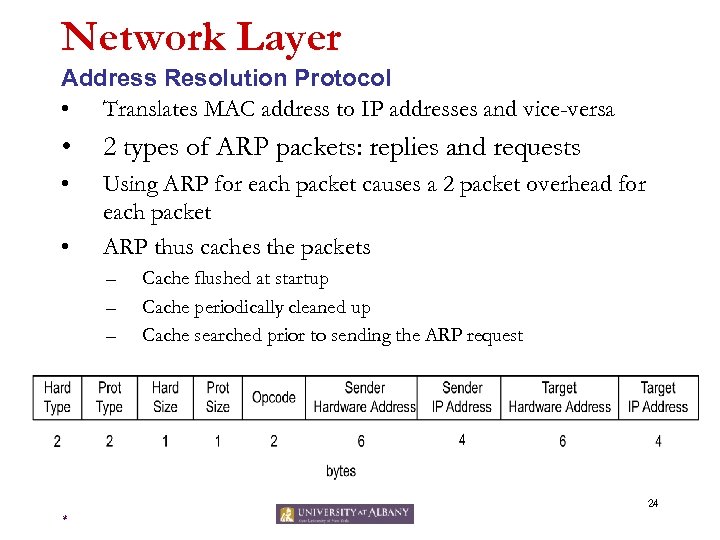 Network Layer Address Resolution Protocol • Translates MAC address to IP addresses and vice-versa • 2 types of ARP packets: replies and requests • Using ARP for each packet causes a 2 packet overhead for each packet ARP thus caches the packets • – – – Cache flushed at startup Cache periodically cleaned up Cache searched prior to sending the ARP request 24 *
 Network Layer Dynamic Host Configuration Protocol • Physical (MAC) addresses identify the hardware and are configured by the manufacturer • Logical (IP) addresses identify the node and are configured by the customer – IP addresses may be reused if a machine is replaced – IP addresses depend on the customers location • Network number • Configuring client nodes is tedious and error-prone 25 *
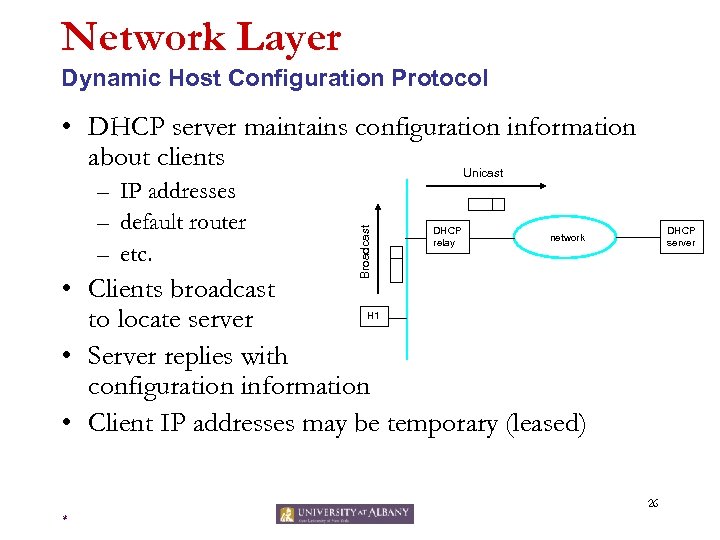 Network Layer Dynamic Host Configuration Protocol – IP addresses – default router – etc. Broadcast • DHCP server maintains configuration information about clients Unicast DHCP relay DHCP server network • Clients broadcast to locate server • Server replies with configuration information • Client IP addresses may be temporary (leased) H 1 26 *
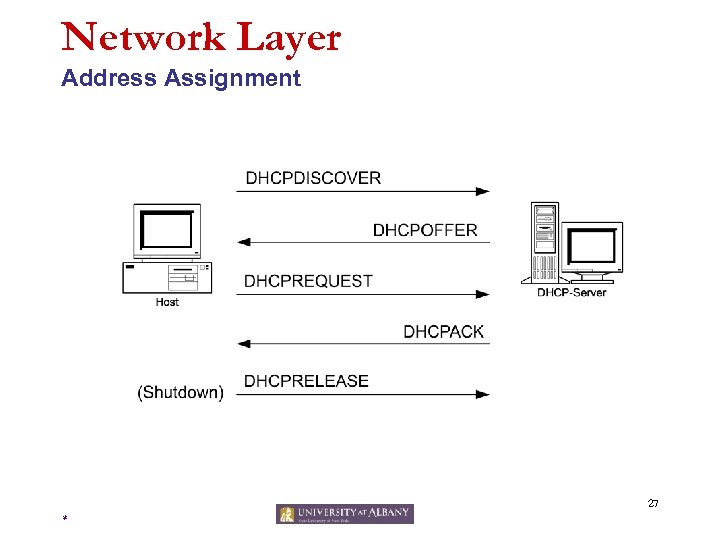 Network Layer Address Assignment 27 *
 Link Layer Function • Purpose is to defines the interface between device & network – • Transfers network layer datagrams over a link from node to node – – • • It contains a driver that is compatible with the network that the device is connected to A node is a router or a host A link is the communication path along two nodes Link Layer protocol defines the format of the packets exchanged between the nodes The packets exchanged by link layer are called frames – – Each frame typically encapsulates one datagram e. g. Ethernet, token ring, FDDI, PPP 28 *
 Link layer Hardware Address • Each frame contains the physical address of the hardware of the packet destination. • This physical address is called the Media Access Control (MAC) address and is burned into the network interface card – – – This is a 12 character hexadecimal number (analogy social security #) Example: 00: A 0: C 9: 0 F: 92: A 5 Here the first six digits are the manufacturers ID and the last six digits are the device ID As each packet arrives at the network interface card the mac address on the packet is compared to the mac address of the device If the addresses match the packet is accepted 29 *
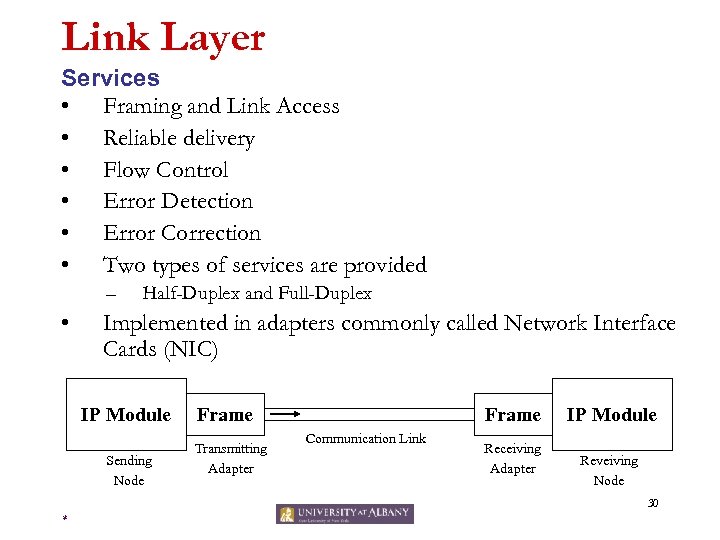 Link Layer Services • Framing and Link Access • Reliable delivery • Flow Control • Error Detection • Error Correction • Two types of services are provided – • Half-Duplex and Full-Duplex Implemented in adapters commonly called Network Interface Cards (NIC) IP Module Sending Node Frame Transmitting Adapter Frame Communication Link Receiving Adapter IP Module Reveiving Node 30 *
 Link Layer Example • Ethernet is the dominant protocol in the LAN market – Primary factors are cost and complexity • Many topologies of Ethernet – Bus Topology – Star Topology • Supports multiple medium – Coaxial Cable – Copper Wire – Fiber Optic • Can transmit data at different rates – 10 Mbps, 100 Mbps, 1 Gbps 31 *
 Physical Layer Function • Accepts IP datagrams and transmits over specific networks. • Maybe a simple device driver (e. g. an Ethernet driver) or a complex subsystem with further data link protocols. 32 *
 OSI Model 33 *
 OSI Reference Model • OSI Reference Model - internationally standardised network architecture. OSI = Open Systems Interconnection: deals with open systems, i. e. systems open for communications with other systems. Specified in ISO 7498. Model has 7 layers. • • • 34 *
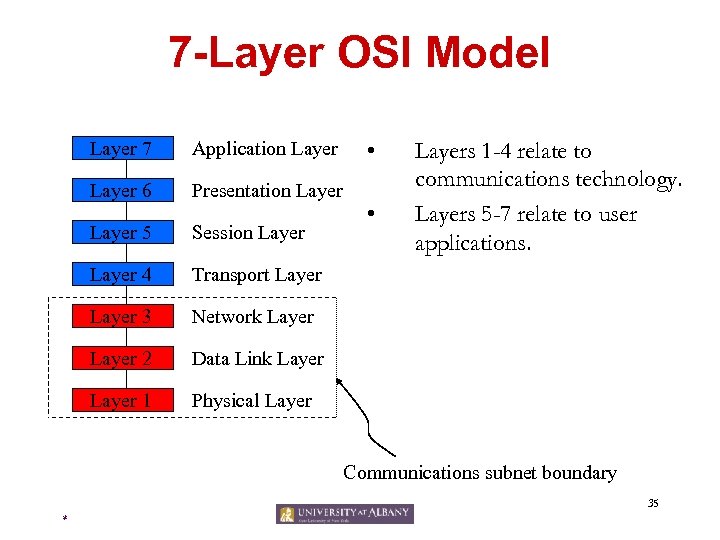 7 -Layer OSI Model Layer 7 Application Layer 6 Presentation Layer 5 Session Layer 4 Network Layer 2 Data Link Layer 1 Layers 1 -4 relate to communications technology. Layers 5 -7 relate to user applications. Transport Layer 3 • Physical Layer • Communications subnet boundary 35 *
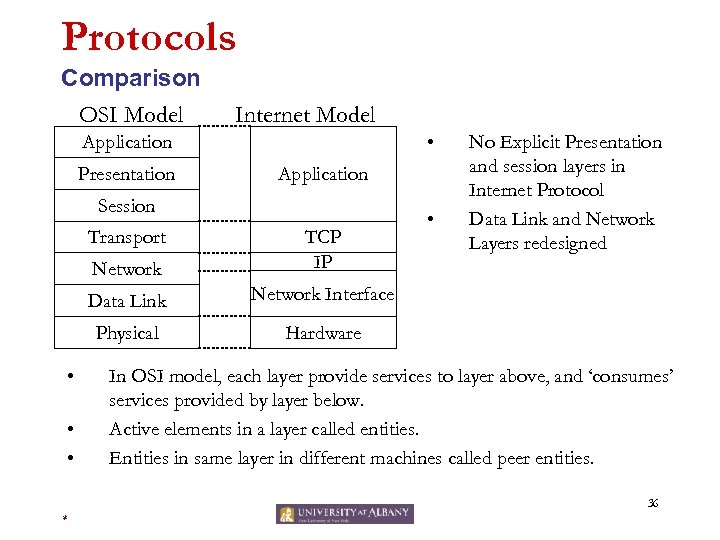 Protocols Comparison OSI Model Internet Model • Application Presentation Application Session Transport Network Data Link • • Network Interface Physical • TCP IP • No Explicit Presentation and session layers in Internet Protocol Data Link and Network Layers redesigned Hardware In OSI model, each layer provide services to layer above, and ‘consumes’ services provided by layer below. Active elements in a layer called entities. Entities in same layer in different machines called peer entities. 36 *
 Application Function • Level at which applications access network services. – Represents services that directly support software applications for file transfers, database access, and electronic mail etc. 37 *
 Presentation Function • Related to representation of transmitted data – Translates different data representations from the Application layer into uniform standard format • Providing services for secure efficient data transmission – e. g. data encryption, and data compression. 38 *
 Session Function • Allows two applications on different computers to establish, use, and end a session. – • e. g. file transfer, remote login Establishes dialog control – • Regulates which side transmits, plus when and how long it transmits. Performs token management and synchronization. 39 *
 Internet Addressing 40 *
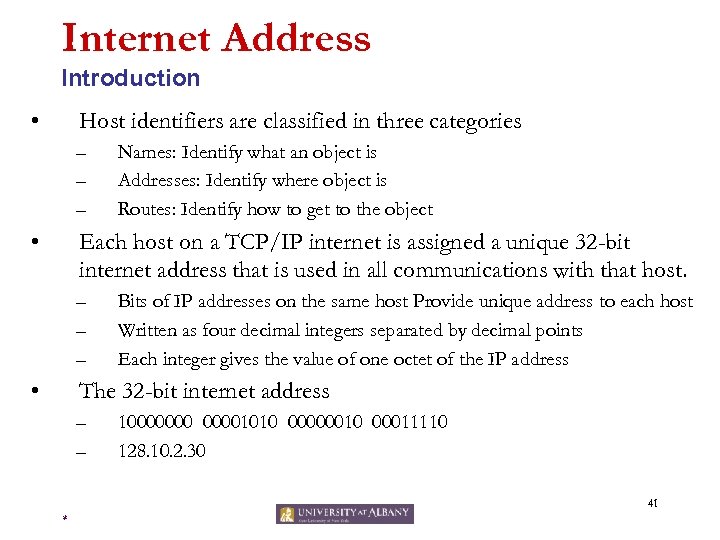 Internet Address Introduction • Host identifiers are classified in three categories – – – • Names: Identify what an object is Addresses: Identify where object is Routes: Identify how to get to the object Each host on a TCP/IP internet is assigned a unique 32 -bit internet address that is used in all communications with that host. – – – • Bits of IP addresses on the same host Provide unique address to each host Written as four decimal integers separated by decimal points Each integer gives the value of one octet of the IP address The 32 -bit internet address – – 100000001010 00000010 00011110 128. 10. 2. 30 41 *
 Internet Address Introduction • Conceptually each address is a pair (hostid, netid) – – • Netid identifies a network Hostid identifies a host on that network Since IP addresses encode both a network and a host on that network, they do not specify individual computers, but a connection to a network – – A router which connects to n networks will have n addresses A multi-homed host will have multiple addresses 42 *
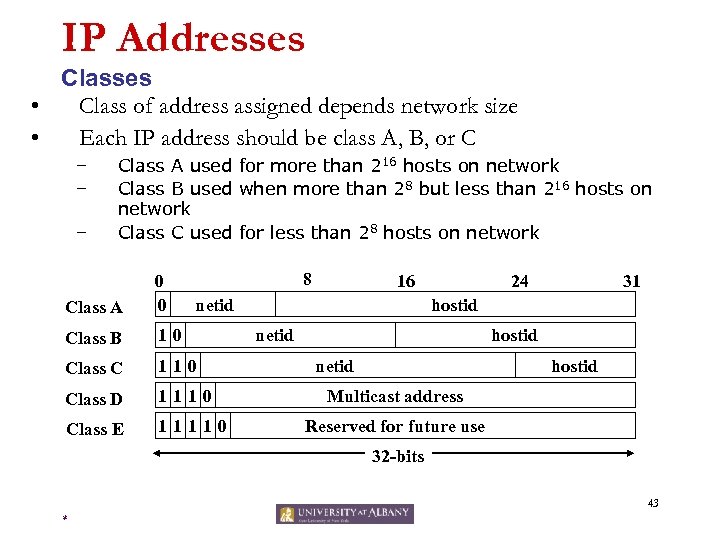 IP Addresses Classes • Class of address assigned depends network size • Each IP address should be class A, B, or C – – – Class A used for more than 216 hosts on network Class B used when more than 28 but less than 216 hosts on network Class C used for less than 28 hosts on network 8 Class A 0 0 Class B 10 Class C 110 Class D 1110 Class E 11110 16 netid 24 31 hostid netid hostid Multicast address Reserved for future use 32 -bits 43 *
 IP Addresses Network & Broadcast Address • Internet addresses can be used to refer to networks as well as individual hosts – • An address with all bits of the hostid equal to 0 is reserved to refer to the network IP addresses can be used to specify a broadcast – – Directed broadcasts are used to broadcast messages to target networks A directed broadcast address has a valid netid hostid with all bits set to 1 Local network broadcast address is used for broadcast to local network independent of any host address Local broadcast address consists of 32 1’s 44 *
 IP Addresses Network & Broadcast Address • A field consisting of zeros means this – IP address with all hostid fields 0 means this host network 127. 0. 0. 0 is the loop back address and used primarily for testing TCP/IP as well as for inter-process comm. Dotted Decimal Notation is used to represent IP addresses – – • • A netid of 0 means the current IP addresses are written as four decimal integers separated by decimal points Each integer gives the value of one octet of the IP address 100000001010 00000010 00011110 128. 10. 2. 30 – – 45 *
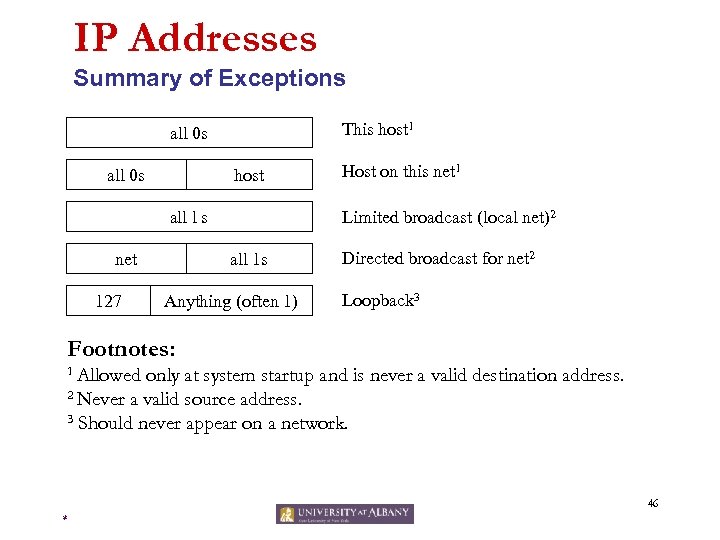 IP Addresses Summary of Exceptions This host 1 all 0 s host all l s net 127 Host on this net 1 Limited broadcast (local net)2 all 1 s Anything (often 1) Directed broadcast for net 2 Loopback 3 Footnotes: 1 Allowed only at system startup and is never a valid destination address. 2 Never a valid source address. 3 Should never appear on a network. 46 *
 IP Addresses Issues • Inadequate to respond to the fast growth of networks – – – • Immense administrative overhead to manage network addresses Routing tables in routers extremely large causing large overheads when routers exchange routing table information Address space of networks will be eventually exhausted (Already short of class B addresses) Original scheme modified to allow sharing of network addresses – – – Transparent Routers ARP Standard IP Subnets 47 *
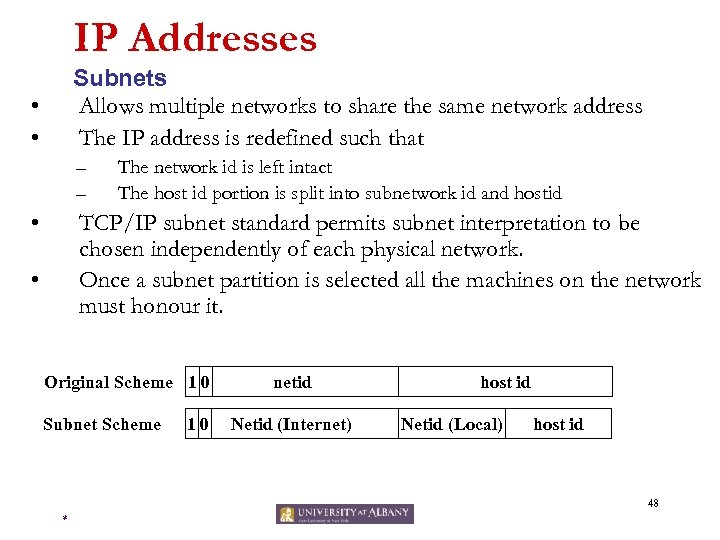 IP Addresses Subnets Allows multiple networks to share the same network address The IP address is redefined such that • • – – • The network id is left intact The host id portion is split into subnetwork id and hostid TCP/IP subnet standard permits subnet interpretation to be chosen independently of each physical network. Once a subnet partition is selected all the machines on the network must honour it. • Original Scheme 1 0 Subnet Scheme 10 netid Netid (Internet) host id Netid (Local) host id 48 *
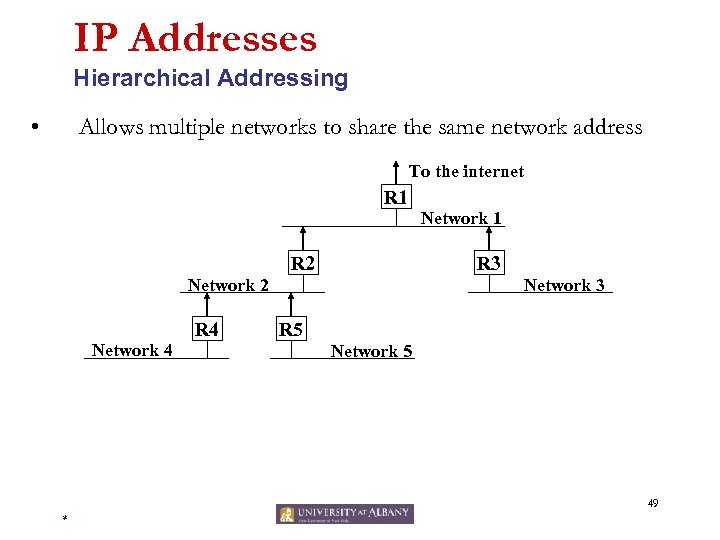 IP Addresses Hierarchical Addressing • Allows multiple networks to share the same network address To the internet R 1 R 2 R 3 Network 2 Network 4 R 4 Network 1 Network 3 R 5 Network 5 49 *
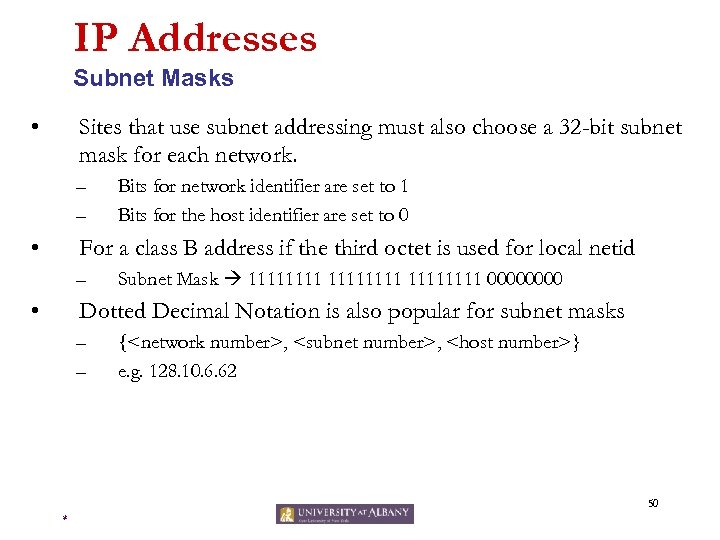 IP Addresses Subnet Masks • Sites that use subnet addressing must also choose a 32 -bit subnet mask for each network. – – • Bits for network identifier are set to 1 Bits for the host identifier are set to 0 For a class B address if the third octet is used for local netid – • Subnet Mask 11111111 0000 Dotted Decimal Notation is also popular for subnet masks – – {
 Mail 51 *
 Mail RFC 822 • Messages consist of a primitive envelope (described in RFC 821), some number of header fields, a blank line, and then the message body. • Each header field (logically) consists of a single line of ASCII text containing the field name, a colon, and, for most fields a value. • RFC 822 was designed decades ago and does not clearly distinguish the envelope fields from the header fields. 52 *
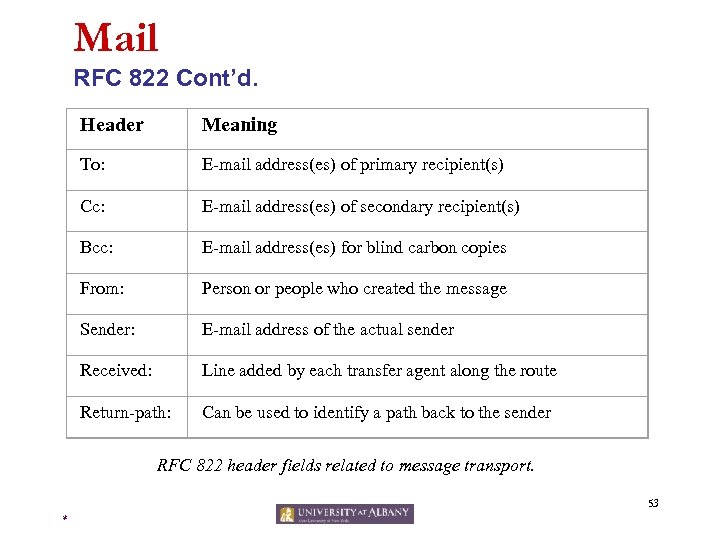 Mail RFC 822 Cont’d. Header Meaning To: E-mail address(es) of primary recipient(s) Cc: E-mail address(es) of secondary recipient(s) Bcc: E-mail address(es) for blind carbon copies From: Person or people who created the message Sender: E-mail address of the actual sender Received: Line added by each transfer agent along the route Return-path: Can be used to identify a path back to the sender RFC 822 header fields related to message transport. 53 *
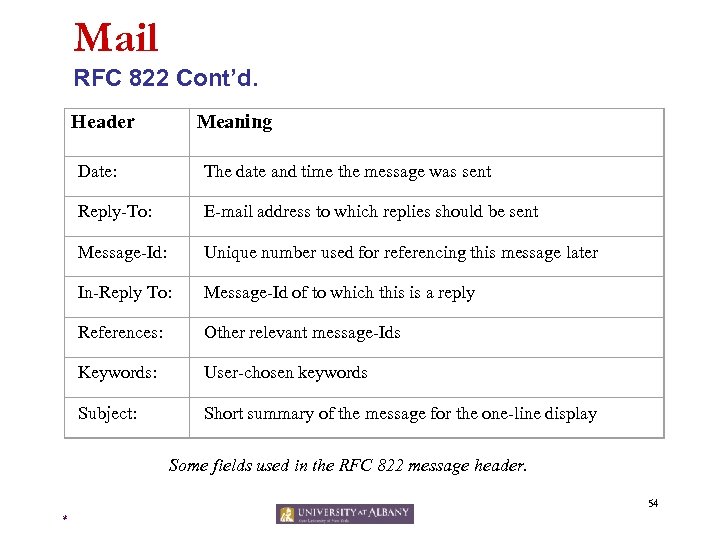 Mail RFC 822 Cont’d. Header Meaning Date: The date and time the message was sent Reply-To: E-mail address to which replies should be sent Message-Id: Unique number used for referencing this message later In-Reply To: Message-Id of to which this is a reply References: Other relevant message-Ids Keywords: User-chosen keywords Subject: Short summary of the message for the one-line display Some fields used in the RFC 822 message header. 54 *
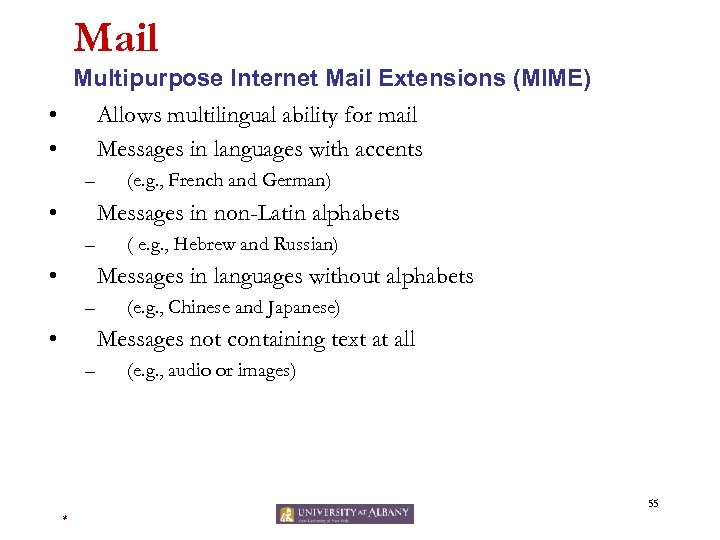 Mail Multipurpose Internet Mail Extensions (MIME) • Allows multilingual ability for mail • Messages in languages with accents – • (e. g. , French and German) Messages in non-Latin alphabets – • ( e. g. , Hebrew and Russian) Messages in languages without alphabets – • (e. g. , Chinese and Japanese) Messages not containing text at all – (e. g. , audio or images) 55 *
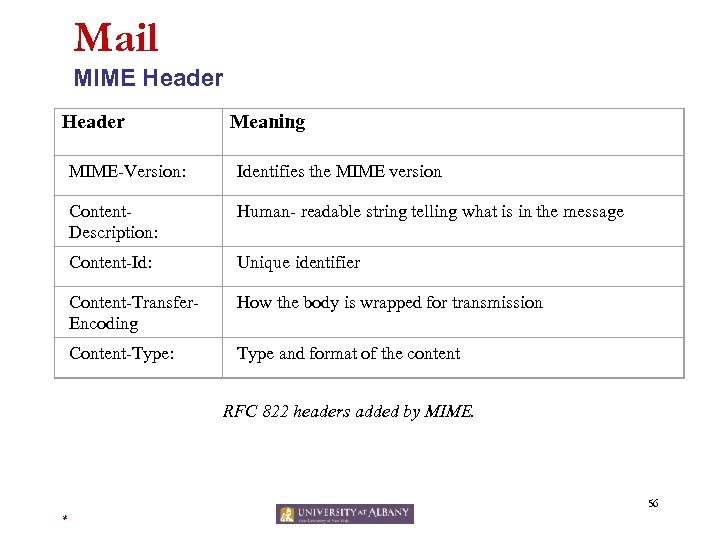 Mail MIME Header Meaning MIME-Version: Identifies the MIME version Content. Description: Human- readable string telling what is in the message Content-Id: Unique identifier Content-Transfer. Encoding How the body is wrapped for transmission Content-Type: Type and format of the content RFC 822 headers added by MIME. 56 *
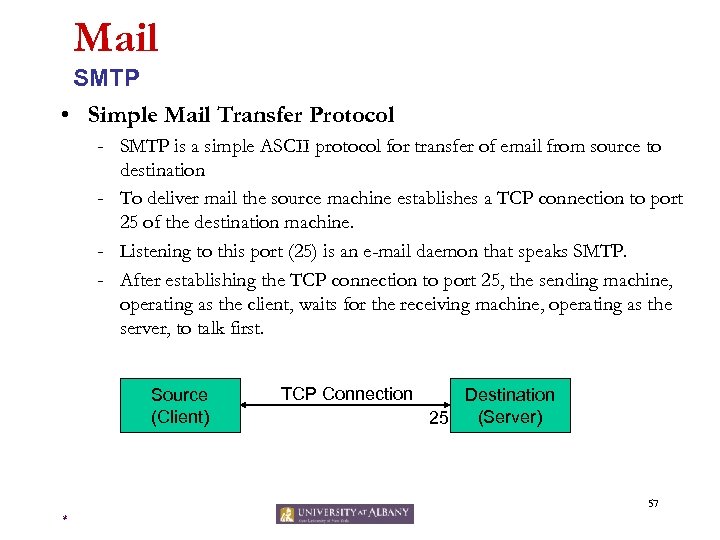 Mail SMTP • Simple Mail Transfer Protocol - SMTP is a simple ASCII protocol for transfer of email from source to destination - To deliver mail the source machine establishes a TCP connection to port 25 of the destination machine. - Listening to this port (25) is an e-mail daemon that speaks SMTP. - After establishing the TCP connection to port 25, the sending machine, operating as the client, waits for the receiving machine, operating as the server, to talk first. Source (Client) TCP Connection Destination (Server) 25 57 *
 Mail SMTP - The server starts by sending a line of text giving its identity and telling whether it is prepared to receive mail. - If it is not, the client releases the connection and tries again later. - Otherwise the client starts sending the messages 58 *
 Mail Post Office Protocol (Version 3) : POP 3 • Allows messages to be delivered even when the receiver is not online • This protocol allows mail stored on the server to be downloaded to the client • POP 3 is invoked when the user starts the mail reader – The mail reader calls up the ISP and establishes a TCP connection with the message transfer agent at port 110. – Once the connection has been established, the POP 3 protocol goes through three states in sequence: • Authorization • Transaction • Update 59 *
 Mail Post Office Protocol (Version 3) : POP 3 • POP 3 protocol supports the ability to download a specific message or set of messages and leave them on the server – most e-mail programs however just download everything and empty the mailbox. • This behavior means that in practice, the only copy is on the user’s hard disk. – If that crashes, all e-mail may lost permanently. 60 *
 Mail Internet Message Access Protocol (IMAP) • IMAP assumes that all the e-mail will remain on the server indefinitely in multiple mailboxes. – Unlike POP 3, which assumes that user will empty the mailbox on every contact and work off-line after that • IMAP provides extensive mechanisms for reading messages or even parts if messages – This feature is useful when a slow modem is used to read the text part of multipart message with large audio and video attachments. 61 *
 Mail Internet Message Access Protocol (IMAP) – IMAP provides mechanisms for creating, destroying, and manipulating multiple mailboxes on the server. – Unlike POP 3, IMAP can also accept outgoing e-mail for shipment to the destination as well as deliver incoming email. 62 *
 Routing 63 *
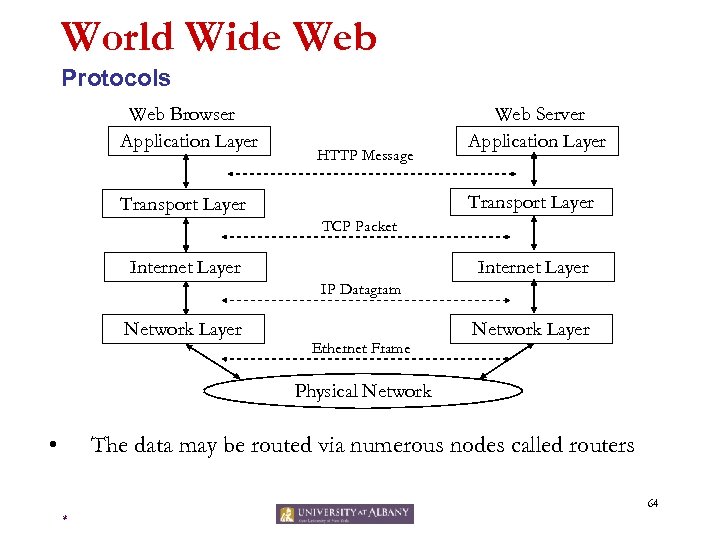 World Wide Web Protocols Web Browser Application Layer HTTP Message Web Server Application Layer Transport Layer TCP Packet Internet Layer IP Datagram Network Layer Ethernet Frame Network Layer Physical Network • The data may be routed via numerous nodes called routers 64 *
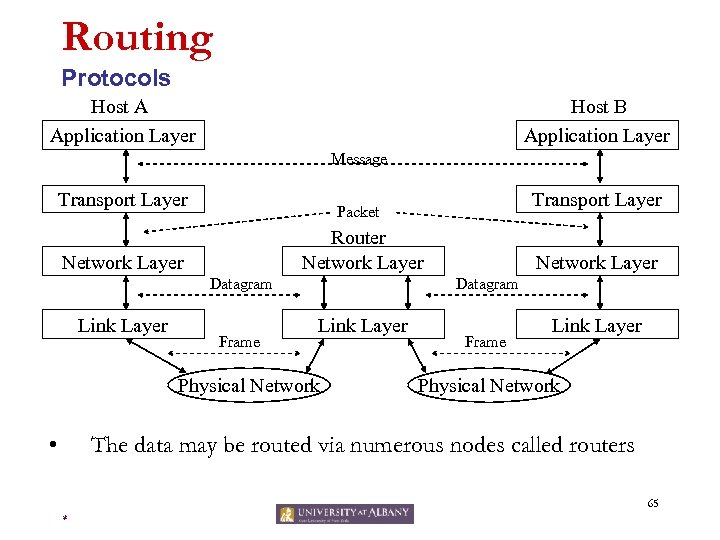 Routing Protocols Host A Application Layer Host B Application Layer Message Transport Layer Router Network Layer Datagram Link Layer Frame Network Layer Datagram Link Layer Physical Network • Transport Layer Packet Frame Link Layer Physical Network The data may be routed via numerous nodes called routers 65 *
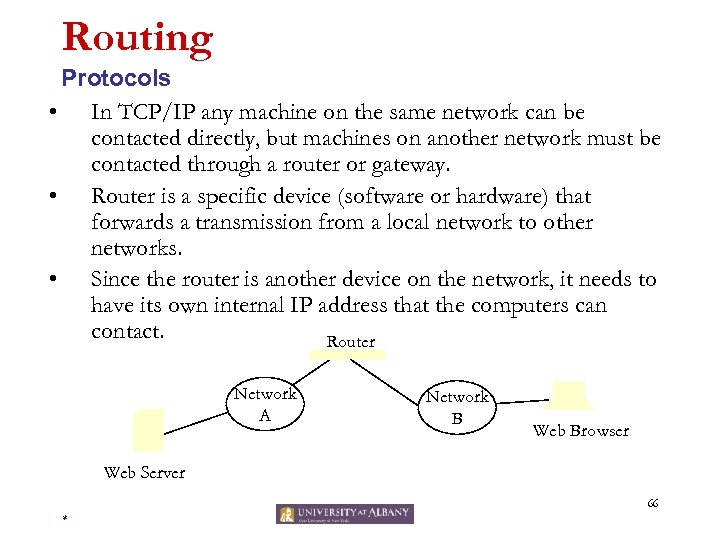 Routing Protocols • In TCP/IP any machine on the same network can be contacted directly, but machines on another network must be contacted through a router or gateway. • Router is a specific device (software or hardware) that forwards a transmission from a local network to other networks. • Since the router is another device on the network, it needs to have its own internal IP address that the computers can contact. Router Network A Network B Web Browser Web Server 66 *
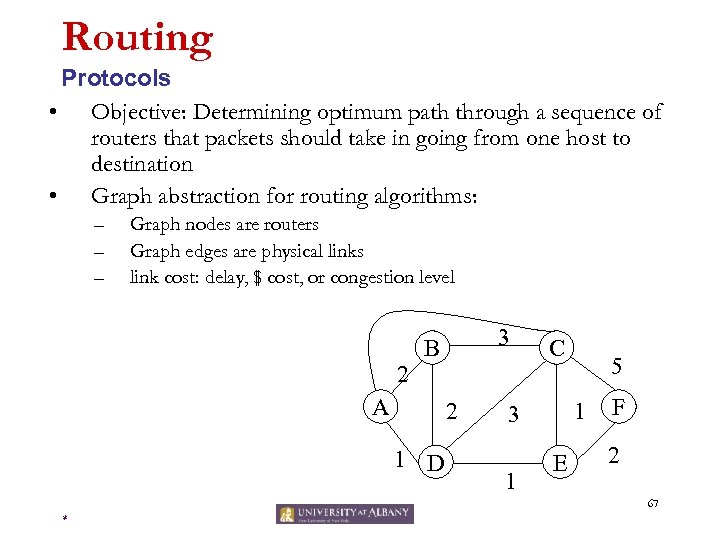 Routing Protocols • Objective: Determining optimum path through a sequence of routers that packets should take in going from one host to destination • Graph abstraction for routing algorithms: – – – Graph nodes are routers Graph edges are physical links link cost: delay, $ cost, or congestion level 2 3 B A 2 1 D C 1 3 1 5 E F 2 67 *
 Routing Algorithms • • Logic for deciding the path Two kinds of routing algorithms – – • Link State Algorithm: Global routing algorithm that uses knowledge of the entire network while making selection Distance Vector Algorithm: Decentralized algorithm compues least cost path in iterative distributed manner The routing algorithms can also be classified as – – Static: Routes change slowly over time (usually via manual intervention) Dynamic: Routing paths change as network traffic loads or network topology changes. 68 *
 Routing Dijkstra’s Algorithm • Net topology, link costs known to all nodes – – • Computes least cost paths from one node (‘source”) to all other nodes – • • accomplished via “link state broadcast” all nodes have same info gives routing table for that node iterative: after k iterations, know least cost path to k dest. ’s Notation: – – c(i, j): link cost from node i to j. cost infinite if not direct neighbors D(v): current value of cost of path from source to dest. V p(v): predecessor node along path from source to v, that is next v N: set of nodes whose least cost path definitively known 69 *
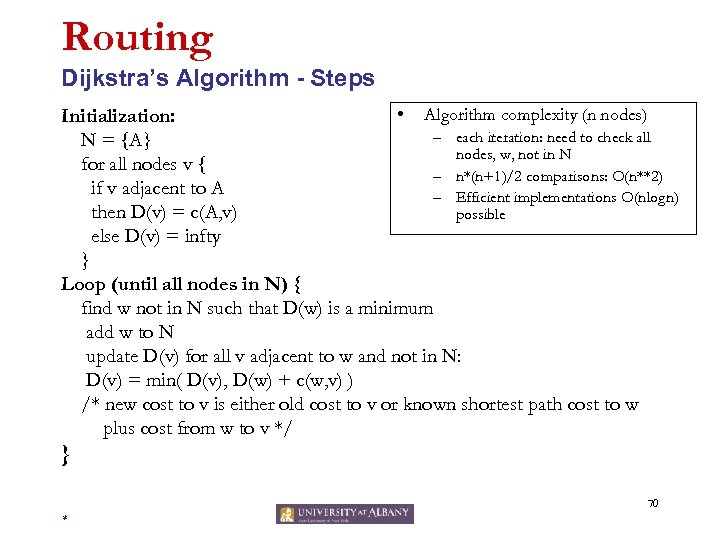 Routing Dijkstra’s Algorithm - Steps • Algorithm complexity (n nodes) Initialization: – each iteration: need to check all N = {A} nodes, w, not in N for all nodes v { – n*(n+1)/2 comparisons: O(n**2) if v adjacent to A – Efficient implementations O(nlogn) then D(v) = c(A, v) possible else D(v) = infty } Loop (until all nodes in N) { find w not in N such that D(w) is a minimum add w to N update D(v) for all v adjacent to w and not in N: D(v) = min( D(v), D(w) + c(w, v) ) /* new cost to v is either old cost to v or known shortest path cost to w plus cost from w to v */ } 70 *
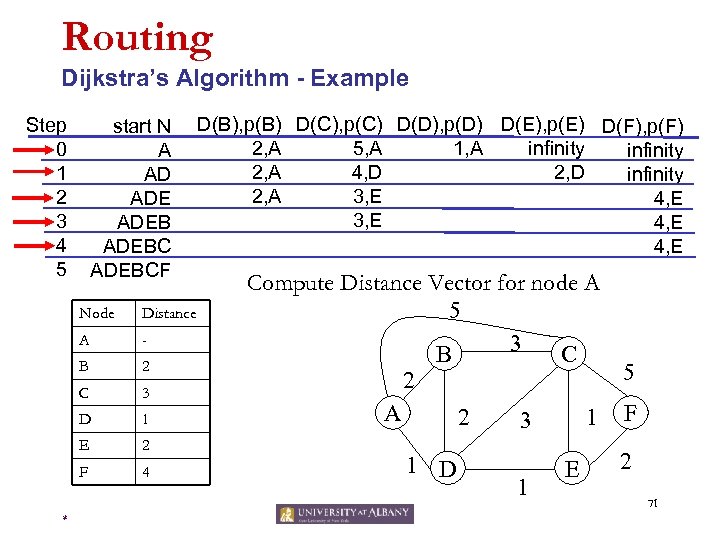 Routing Dijkstra’s Algorithm - Example Step 0 1 2 3 4 5 start N A AD ADEBCF Node A - B 2 C 3 D 1 E 2 F * Distance 4 D(B), p(B) D(C), p(C) D(D), p(D) D(E), p(E) D(F), p(F) 2, A 1, A 5, A infinity 2, A 4, D 2, D infinity 2, A 3, E 4, E Compute Distance Vector for node A 5 3 B C 2 A 2 1 D 1 3 1 E 5 F 2 71
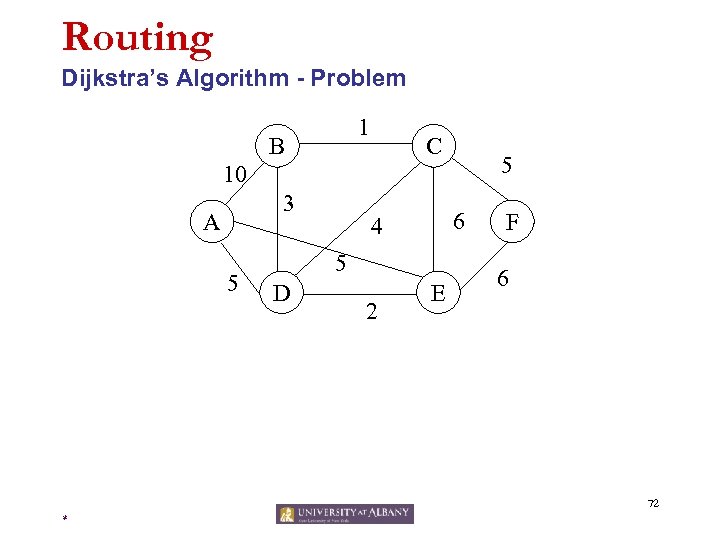 Routing Dijkstra’s Algorithm - Problem 1 B C 5 10 3 A 5 6 4 5 D 2 E F 6 72 *
 Routing Distance Vector Algorithm • • • Each router starts with a distance table consisting of the value “ 0” for itself and the value “infinity” for every other destination Each router will transmit its distance vector to each of its neighbors whenever the information changes (as well as when a link to a neighbor first comes up) Each router saves the most recently received distance vector from each of its neighbors, and calculate its own distance vector, based on minimizing the cost to each destination 73 *
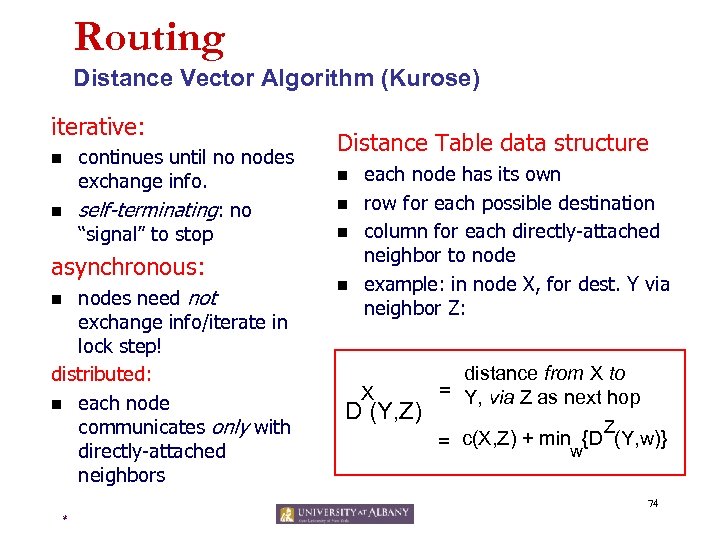 Routing Distance Vector Algorithm (Kurose) iterative: n n continues until no nodes exchange info. self-terminating: no “signal” to stop asynchronous: nodes need not exchange info/iterate in lock step! distributed: n each node communicates only with directly-attached neighbors n Distance Table data structure n n each node has its own row for each possible destination column for each directly-attached neighbor to node example: in node X, for dest. Y via neighbor Z: X D (Y, Z) distance from X to = Y, via Z as next hop Z = c(X, Z) + minw{D (Y, w)} 74 *
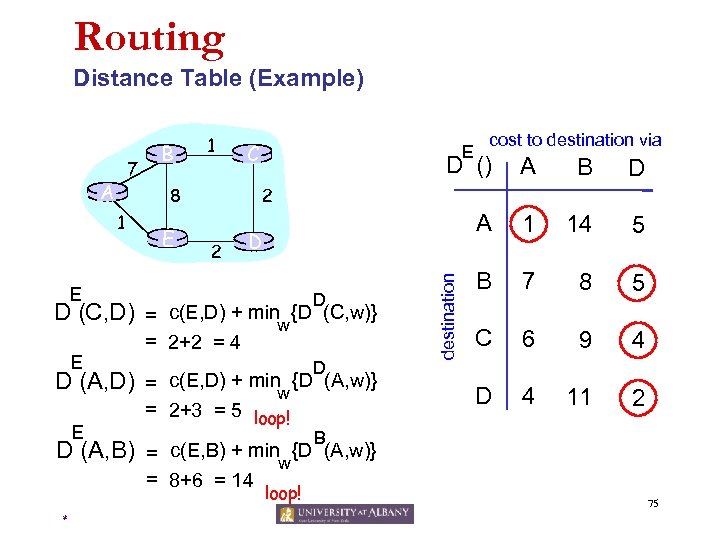 Routing Distance Table (Example) A E D (C, D) D (A, D) E C E cost to destination via D () A B D A 1 14 5 B 7 8 5 C 6 9 4 D 4 11 2 2 8 1 E B E 2 D D = c(E, D) + minw {D (C, w)} = 2+2 = 4 D = c(E, D) + minw {D (A, w)} = 2+3 = 5 loop! destination 7 1 B D (A, B) = c(E, B) + minw{D (A, w)} = 8+6 = 14 * loop! 75
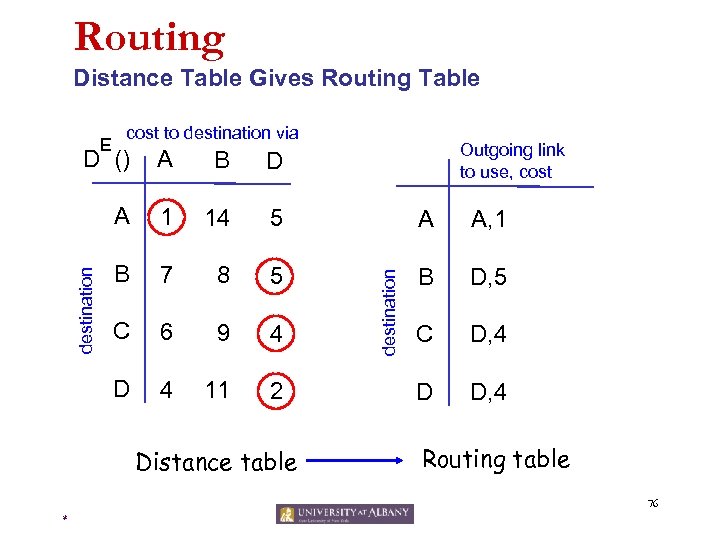 Routing Distance Table Gives Routing Table E cost to destination via Outgoing link to use, cost B D A 1 14 5 A A, 1 B 7 8 5 B D, 5 C 6 9 4 C D, 4 D 4 11 2 D D, 4 Distance table destination A destination D () Routing table 76 *
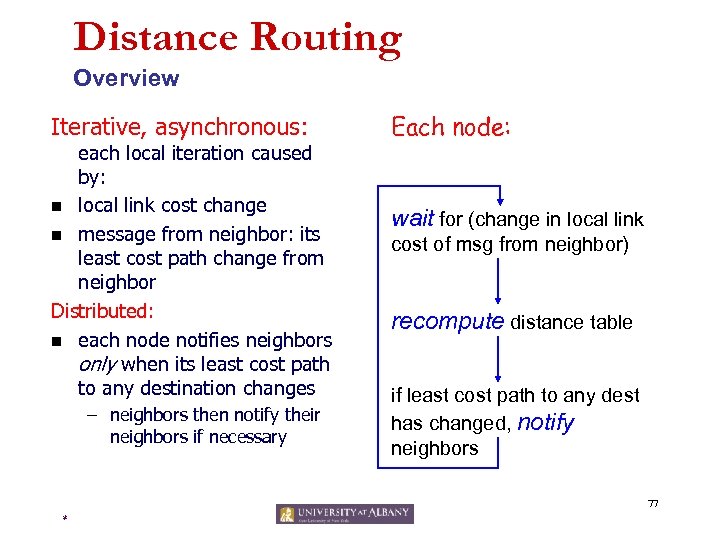 Distance Routing Overview Iterative, asynchronous: each local iteration caused by: n local link cost change n message from neighbor: its least cost path change from neighbor Distributed: n each node notifies neighbors only when its least cost path to any destination changes – neighbors then notify their neighbors if necessary Each node: wait for (change in local link cost of msg from neighbor) recompute distance table if least cost path to any dest has changed, notify neighbors 77 *
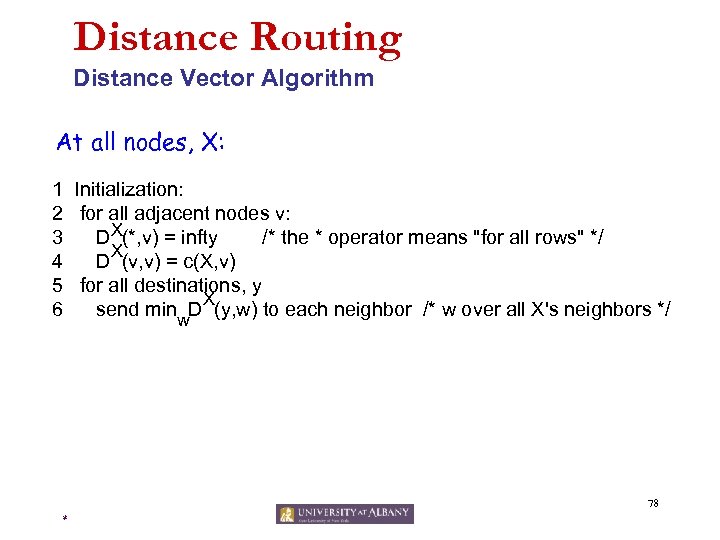 Distance Routing Distance Vector Algorithm At all nodes, X: 1 Initialization: 2 for all adjacent nodes v: 3 DX(*, v) = infty /* the * operator means "for all rows" */ X 4 D (v, v) = c(X, v) 5 for all destinations, y X 6 send min D (y, w) to each neighbor /* w over all X's neighbors */ w 78 *
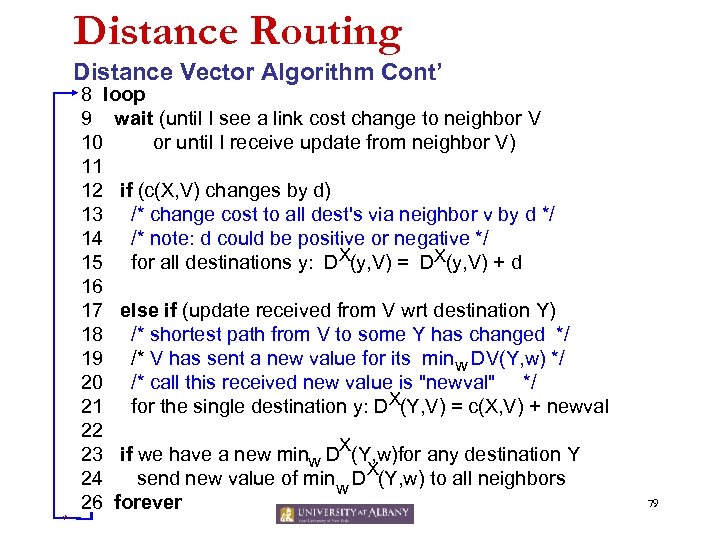 Distance Routing Distance Vector Algorithm Cont’ * 8 loop 9 wait (until I see a link cost change to neighbor V 10 or until I receive update from neighbor V) 11 12 if (c(X, V) changes by d) 13 /* change cost to all dest's via neighbor v by d */ 14 /* note: d could be positive or negative */ 15 for all destinations y: DX(y, V) = DX(y, V) + d 16 17 else if (update received from V wrt destination Y) 18 /* shortest path from V to some Y has changed */ 19 /* V has sent a new value for its minw DV(Y, w) */ 20 /* call this received new value is "newval" */ 21 for the single destination y: DX(Y, V) = c(X, V) + newval 22 23 if we have a new minw DX(Y, w)for any destination Y 24 send new value of min w DX(Y, w) to all neighbors 26 forever 79
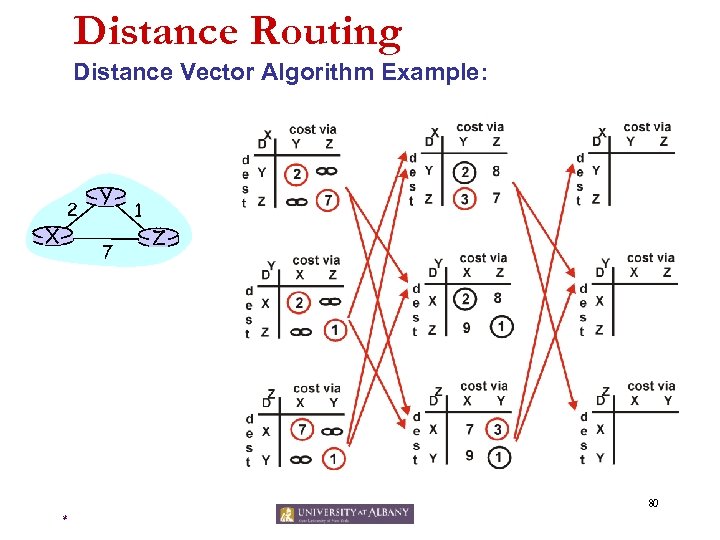 Distance Routing Distance Vector Algorithm Example: 2 X Y 7 1 Z 80 *
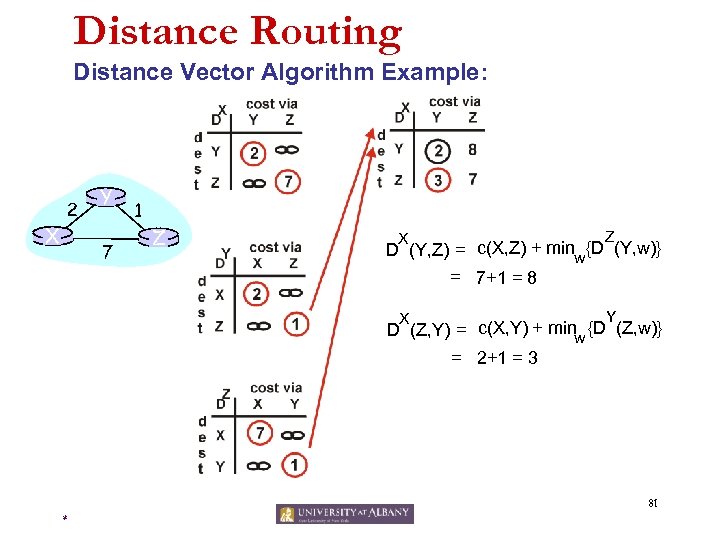 Distance Routing Distance Vector Algorithm Example: 2 X Y 7 1 Z Z X D (Y, Z) = c(X, Z) + minw{D (Y, w)} = 7+1 = 8 Y X D (Z, Y) = c(X, Y) + minw {D (Z, w)} = 2+1 = 3 81 *
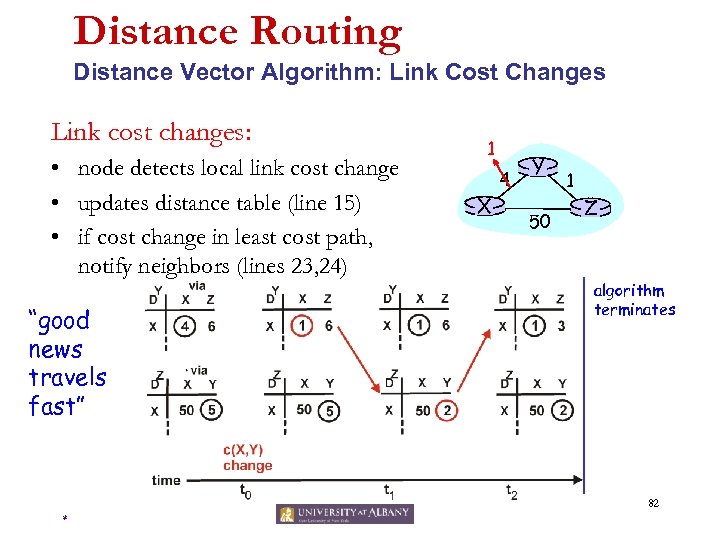 Distance Routing Distance Vector Algorithm: Link Cost Changes Link cost changes: • node detects local link cost change • updates distance table (line 15) • if cost change in least cost path, notify neighbors (lines 23, 24) “good news travels fast” 1 X 4 Y 50 1 Z algorithm terminates 82 *
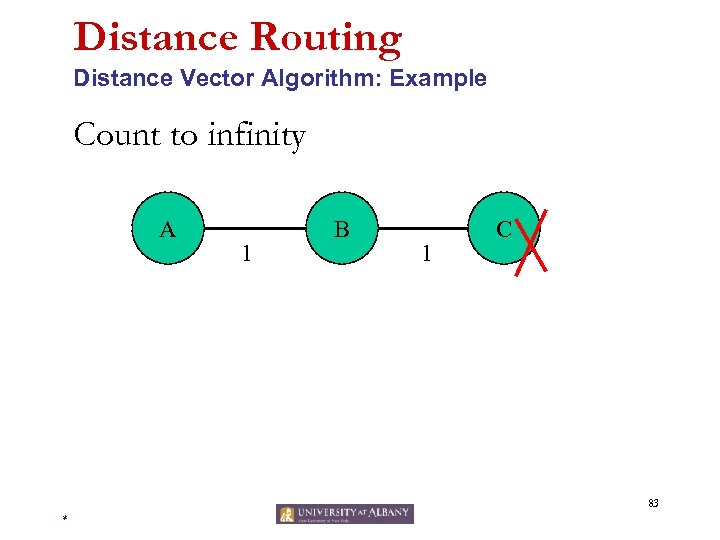 Distance Routing Distance Vector Algorithm: Example Count to infinity A 1 B 1 C 83 *
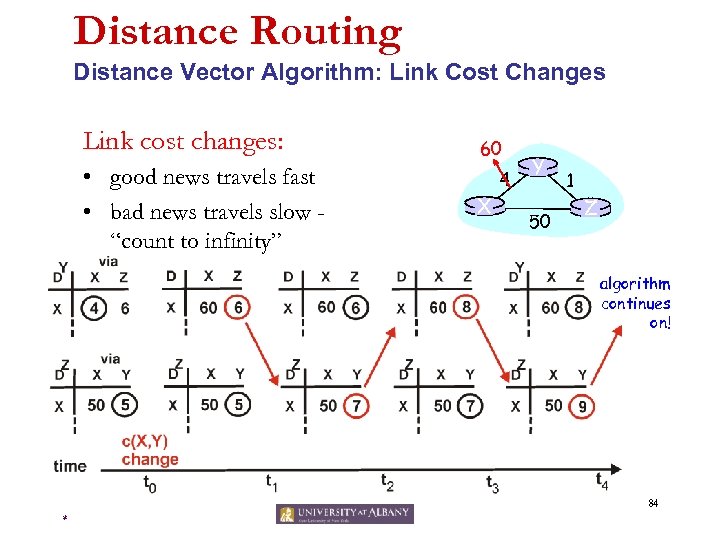 Distance Routing Distance Vector Algorithm: Link Cost Changes Link cost changes: • good news travels fast • bad news travels slow “count to infinity” problem! 60 X 4 Y 50 1 Z algorithm continues on! 84 *
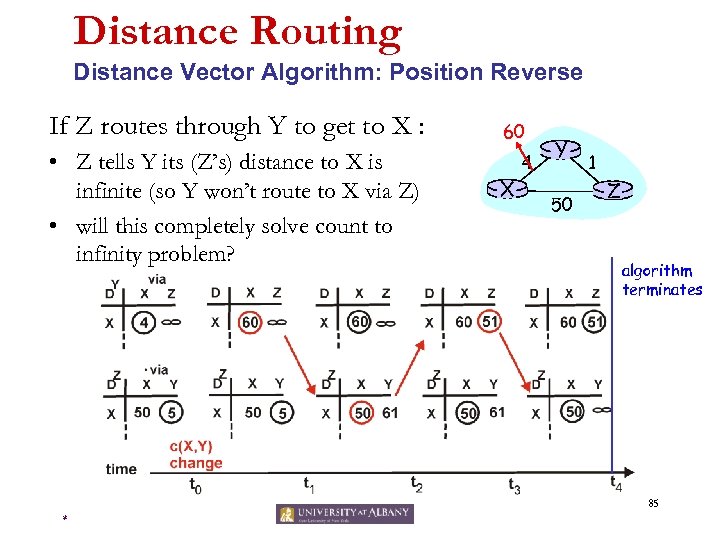 Distance Routing Distance Vector Algorithm: Position Reverse If Z routes through Y to get to X : • Z tells Y its (Z’s) distance to X is infinite (so Y won’t route to X via Z) • will this completely solve count to infinity problem? 60 X 4 Y 50 1 Z algorithm terminates 85 *
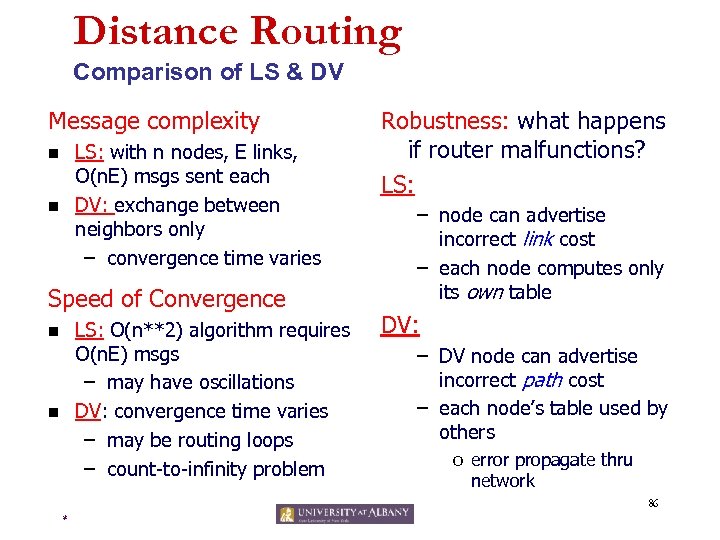 Distance Routing Comparison of LS & DV Message complexity LS: with n nodes, E links, O(n. E) msgs sent each DV: exchange between neighbors only – convergence time varies n n Speed of Convergence LS: O(n**2) algorithm requires O(n. E) msgs – may have oscillations DV: convergence time varies – may be routing loops – count-to-infinity problem n n Robustness: what happens if router malfunctions? LS: – node can advertise incorrect link cost – each node computes only its own table DV: – DV node can advertise incorrect path cost – each node’s table used by others o error propagate thru network 86 *
 Routing Algorithms Summary • LS and DV are representative • There are other type of routing algorithms, especially in circuit switching world, e. g. , hot potato algorithm • Most of the internet routing protocols (think OSPF, BGP etc. ) are based on these fundamental algorithms we introduced just now 87 *
 Physical Hardware - Routers 88 *
 Routers Devices • In TCP/IP any machine on the same network can be contacted directly, but machines on another network must be contacted through a router or gateway. • Router is a specific device (software or hardware) that forwards a transmission from a local network to other networks. • Since the router is another device on the network, it needs to have its own internal IP address that the computers can contact. 89 *
 Routers Ethernet • • • There can only be one device transmitting on a segment at any given time. If two or more devices attempt to transmit at the same time, a collision occurs. After a collision, all devices must retransmit. As you can imagine, as the number of devices on an Ethernet segment increases, the probability for collisions increase. Because devices must spend more time retransmitting data, the network is perceived to be slow. 90 *
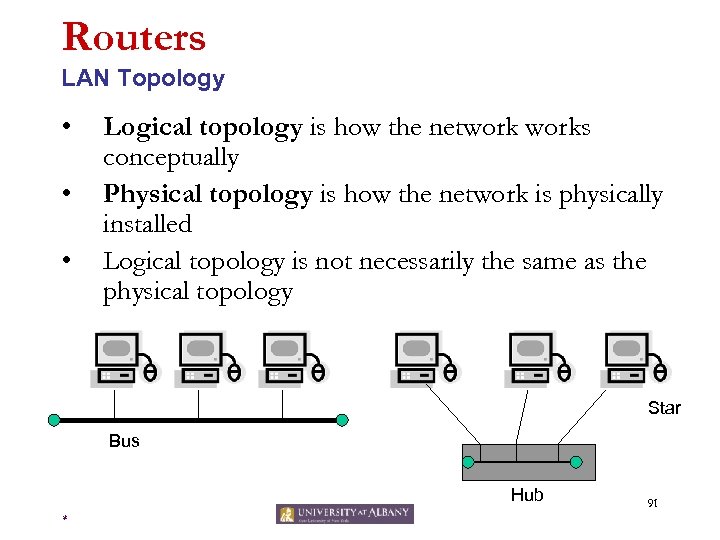 Routers LAN Topology • • • Logical topology is how the networks conceptually Physical topology is how the network is physically installed Logical topology is not necessarily the same as the physical topology Star Bus Hub * 91
 Routing Devices • Switch is a generic term for a device that switches data (packets or frames) • Hub is link layer switch (node to node) – – – • Operates on ethernet frames L 2 switch Uses physical addresses (MAC addresses) Bridge connects two LANS or two segments of the same LAN – – Protocol Independent Operates on ethernet frames L 2 switch Uses physical addresses (mac addresses) 92 *
 Routing Devices • Router is a network layer switch (host to host) – Also called L 3 switch – Uses network addresses – Operates on packets • Gateway is a generic term for an internetworking system – Can be implemented in software and/or hardware – Can operate at any level of the OSI model from application protocols to low-level signaling. 93 *
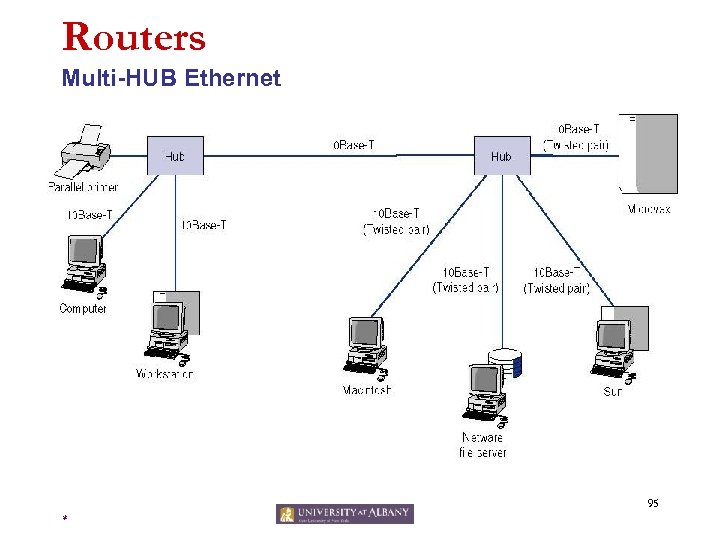
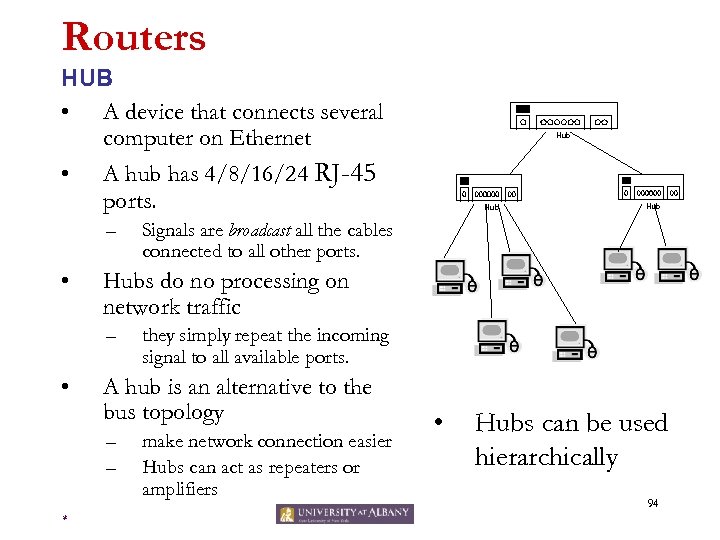 Routers HUB • A device that connects several computer on Ethernet • A hub has 4/8/16/24 RJ-45 ports. – • Hub Signals are broadcast all the cables connected to all other ports. they simply repeat the incoming signal to all available ports. A hub is an alternative to the bus topology – – * Hubs do no processing on network traffic – • Hub make network connection easier Hubs can act as repeaters or amplifiers • Hubs can be used hierarchically 94
 Routers Multi-HUB Ethernet 95 *
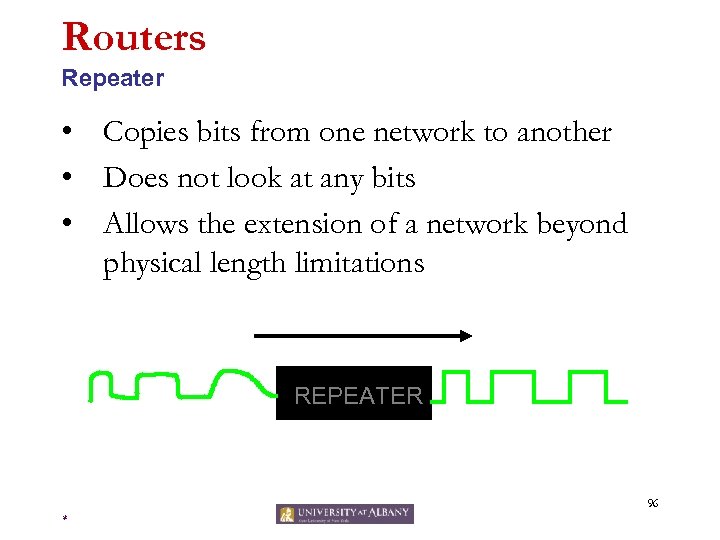 Routers Repeater • Copies bits from one network to another • Does not look at any bits • Allows the extension of a network beyond physical length limitations REPEATER 96 *
 Routers Bridges • • Network can be divided into segments with a bridge Have two Ethernet ports Bridge learns which devices are on each side by MAC address It makes decision to forward or not to forward each packet to the other side – Check the destination MAC address in frame • • Extends the network beyond physical length limitations. Improve network efficiency 97 *
 Routers Switch • Connects several computers in a network by a number of RJ-45 ports – Same as Hubs • Every port works as a Bridge – A switch has table of (MAC, port) pairs • Each device can act independently from other devices 98 *
 Routers Switch Cont’d. • Consider a switch with the following devices attached: – – – – computer 1 computer 2 computer 3 printer file server uplink to the Internet In this case: • • computer 1 could be printing a documen computer 2 connects to a files server computer 3 accesses the Internet. Because the switch intelligently forwards traffic only to the devices involved, there can be multiple independent simultaneous conversations. 99 *
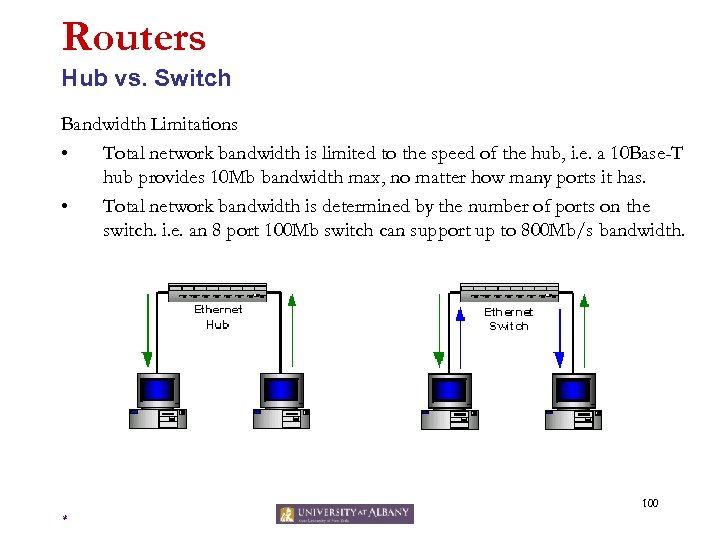 Routers Hub vs. Switch Bandwidth Limitations • Total network bandwidth is limited to the speed of the hub, i. e. a 10 Base-T hub provides 10 Mb bandwidth max, no matter how many ports it has. • Total network bandwidth is determined by the number of ports on the switch. i. e. an 8 port 100 Mb switch can support up to 800 Mb/s bandwidth. 100 *
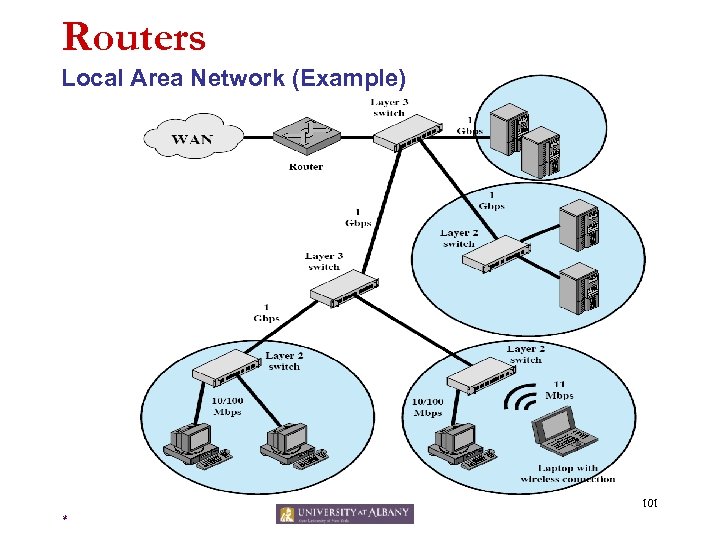 Routers Local Area Network (Example) 101 *
 Routers Layer 3 Switch • Layer 3 switching refers to a class of highperformance routers optimized for the campus LAN or intranet. • Difference with router: – software (router) vs. hardware (switch) • Layer 3 switch: basically an optimization of Internet class routers for the campus intranet 102 *
 Sniffing 103 *
 Sniffing Definition • Network sniffing is used to eavesdrop the network to capture the packets transmitted over the network. • Components of a Sniffer – – The hardware: adapter with promiscuous mode capability Driver: capture the packets and store them in the buffer. Packet filter: filter the packets according to user rules. Packet analyzer: analyses the packets, and generate human readable reports. – Examples: • Tcp. Dump, Win. Dump, Ethereal 104 *
 Sniffing How • Frames are transmitted on Ethernet – Broadcast Frames • Examples? • All computers read the frame – Non-broadcast frames • Examples? • Only the target computer reads the frame • Can the frame be read by other computers? – Hub? – Switch? 105 *
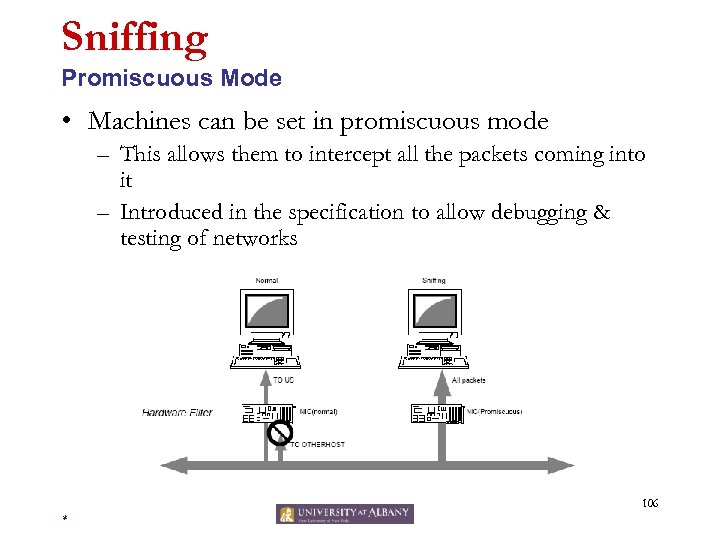 Sniffing Promiscuous Mode • Machines can be set in promiscuous mode – This allows them to intercept all the packets coming into it – Introduced in the specification to allow debugging & testing of networks 106 *
 Sniffing Promiscuous Mode • For most network card, you only need to set a register bit – Then, you can get every frame on the wire – More overhead to computer • At higher level use Windows NDIS to set promiscuous mode – NDIS: Network Driver Interface Specification • Standard API to Network Interface Card – Promiscuous mode is required part of NDIS specification 107 *
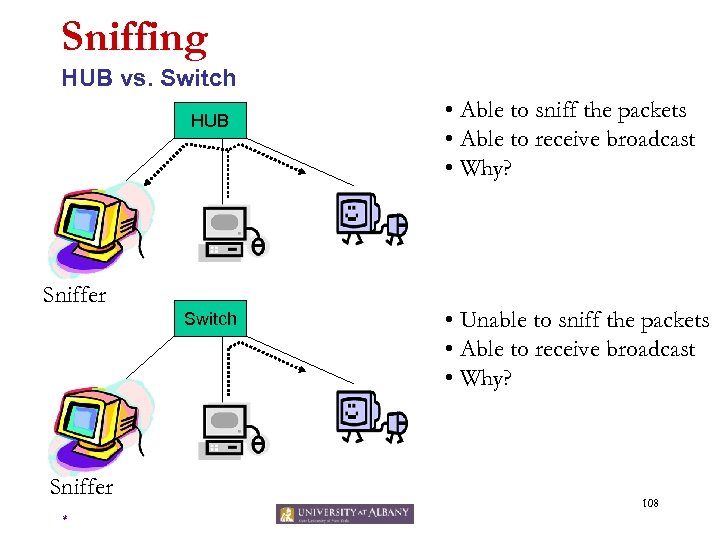 Sniffing HUB vs. Switch HUB Sniffer Switch Sniffer * • Able to sniff the packets • Able to receive broadcast • Why? • Unable to sniff the packets • Able to receive broadcast • Why? 108
 Sniffing ARP Spoofing (Redirecting) • • • Broadcast a response to ARP request by containing the victim’s IP address and this hacker’s MAC address as the source. Others will believe that the hacker has the victim’s IP address, and send packets for the victim to this host. The hacker would then forward the packets to the victim. 109 *
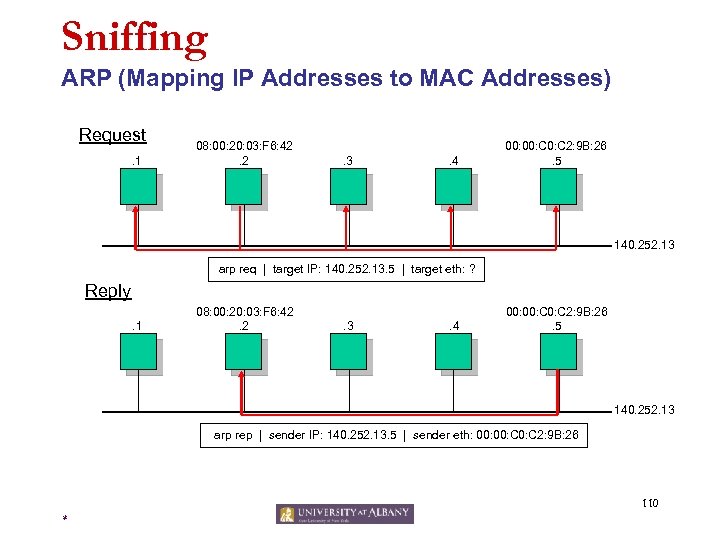 Sniffing ARP (Mapping IP Addresses to MAC Addresses) Request. 1 08: 00: 20: 03: F 6: 42. 2 . 3 . 4 00: C 2: 9 B: 26. 5 140. 252. 13 arp req | target IP: 140. 252. 13. 5 | target eth: ? Reply. 1 08: 00: 20: 03: F 6: 42. 2 . 3 . 4 00: C 2: 9 B: 26. 5 140. 252. 13 arp rep | sender IP: 140. 252. 13. 5 | sender eth: 00: C 2: 9 B: 26 110 *
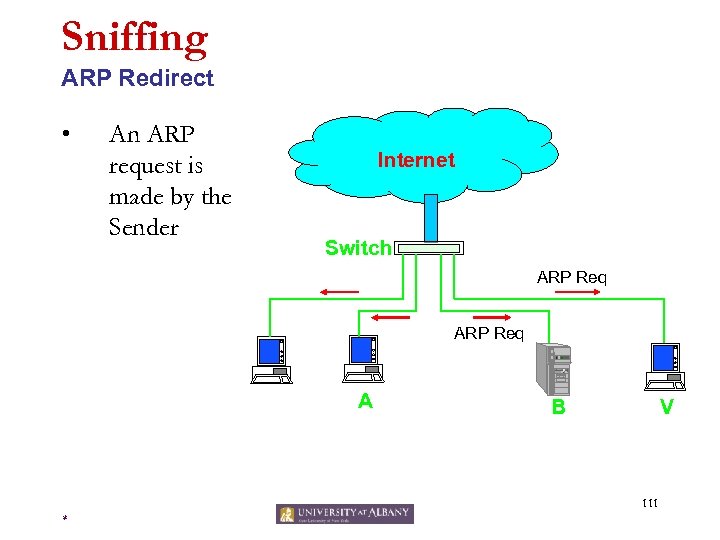 Sniffing ARP Redirect • An ARP request is made by the Sender Internet Switch ARP Req A B V 111 *
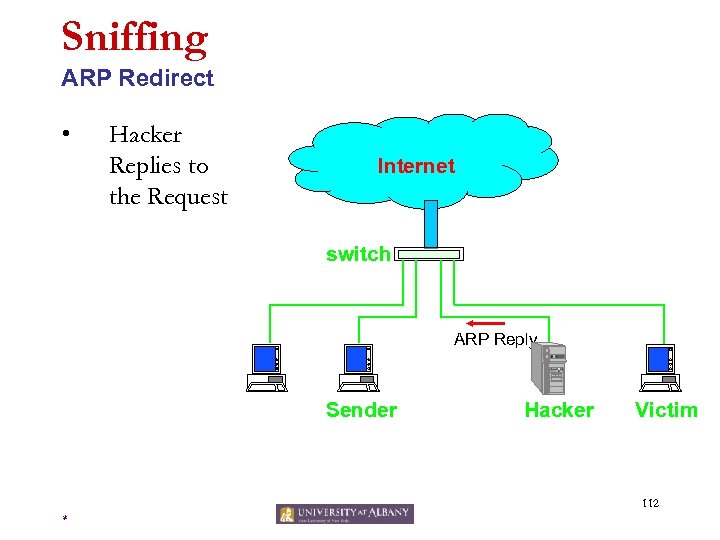 Sniffing ARP Redirect • Hacker Replies to the Request Internet switch ARP Reply Sender Hacker Victim 112 *
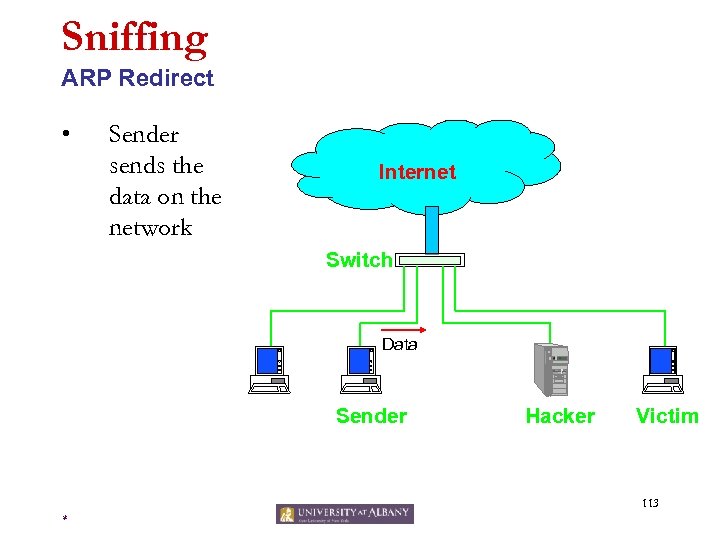 Sniffing ARP Redirect • Sender sends the data on the network Internet Switch Data Sender Hacker Victim 113 *
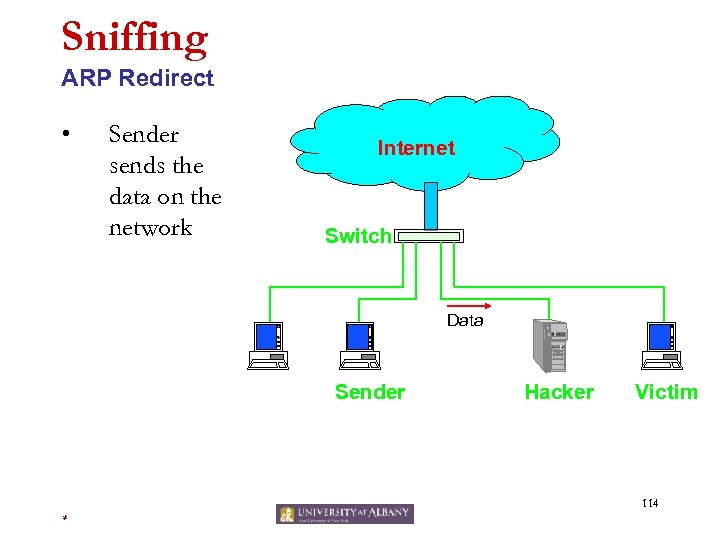 Sniffing ARP Redirect • Sender sends the data on the network Internet Switch Data Sender Hacker Victim 114 *
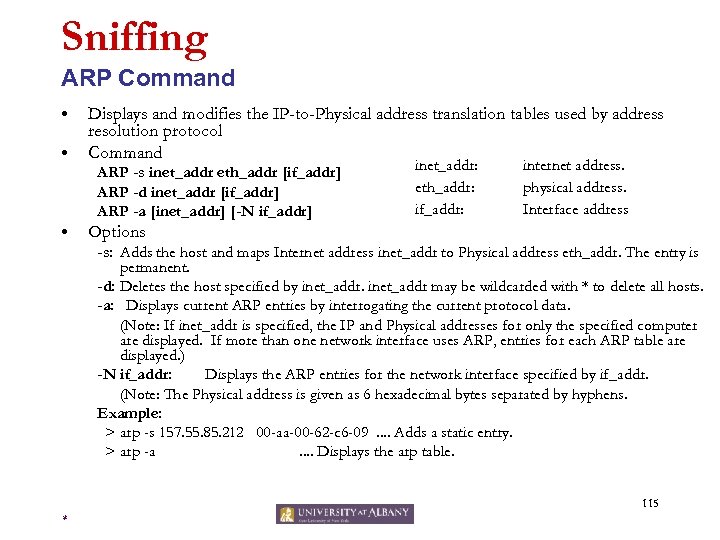 Sniffing ARP Command • • Displays and modifies the IP-to-Physical address translation tables used by address resolution protocol Command ARP -s inet_addr eth_addr [if_addr] ARP -d inet_addr [if_addr] ARP -a [inet_addr] [-N if_addr] • inet_addr: eth_addr: if_addr: internet address. physical address. Interface address Options -s: Adds the host and maps Internet address inet_addr to Physical address eth_addr. The entry is permanent. -d: Deletes the host specified by inet_addr may be wildcarded with * to delete all hosts. -a: Displays current ARP entries by interrogating the current protocol data. (Note: If inet_addr is specified, the IP and Physical addresses for only the specified computer are displayed. If more than one network interface uses ARP, entries for each ARP table are displayed. ) -N if_addr: Displays the ARP entries for the network interface specified by if_addr. (Note: The Physical address is given as 6 hexadecimal bytes separated by hyphens. Example: > arp -s 157. 55. 85. 212 00 -aa-00 -62 -c 6 -09. . Adds a static entry. > arp -a. . Displays the arp table. 115 *
 Sniffing ARP Detection • Detection – A LAN with many computers, we want to detect which one of them is sniffing – We know all IP addresses of those computers – What happens if we send a ARP request with an IP address and a non-broadcasting MAC address? • E. g. fake broadcast FF: FF: FF: FE 116 *
 Sniffing ARP Protection • Set the ARP table static • Replace Hub with Switch – Makes sniffing harder • Sniff the network for sniffing – Monitor changes of mapping of IP and MAC address • Encryption – Ultimate solution: never transmit plain-text information 117 *
 Ethereal 118 *
 Ethereal Functionality • ? 119 *
 Ethereal Download and Install • ? 120 *
 Ethereal Lab 1 • ? 121 *
 Ethereal Lab 2 • ? 122 *
 Junk 123 *
 Transport Function • Manages transmission packets – Repackages long messages when necessary into small packets for transmission – Reassembles packets in correct order to get the original message. • Handles error recognition and recovery. – Transport layer at receiving acknowledges packet delivery. – Resends missing packets 124 *
 Network Function • Manages addressing/routing of data within the subnet – Addresses messages and translates logical addresses and names into physical addresses. – Determines the route from the source to the destination computer – Manages traffic problems, such as switching, routing, and controlling the congestion of data packets. • Routing can be: – Based on static tables – determined at start of each session – Individually determined for each packet, reflecting the current network load. 125 *
 Datalink Function • Packages raw bits from the Physical layer into frames (logical, structured packets for data). Provides reliable transmission of frames • – It waits for an acknowledgment from the receiving computer. – Retransmits frames for which acknowledgement not received 126 *
 Physical Function • • Transmits bits from one computer to another Regulates the transmission of a stream of bits over a physical medium. Defines how the cable is attached to the network adapter and what transmission technique is used to send data over the cable. Deals with issues like • – The definition of 0 and 1, e. g. how many volts represents a 1, and how long a bit lasts? – Whether the channel is simplex or duplex? – How many pins a connector has, and what the function of each pin is? 127 *