


 Скачать презентацию Intelligent Mail Full-Service MTAC August 12 2010
21aef6bcd694322cb38c7549461fd937.ppt
- Количество слайдов: 37
 Intelligent Mail® Full-Service MTAC August 12, 2010
 Agenda Tom Day § § § Move Update IMB Full Service Usage Metrics IMB e. DOC Performance Metrics Postal. One! Outage Metrics Upcoming Releases Pritha Mehra § November 2010 Release – Fulll Service e. Doc verification process – BSA Re-acceptance – Full Service ACS Billing § January Price Change
 Move Update – Mailer Performance § 45, 589 Mailings evaluated between May 9 th and July 15 § 98. 8% of Mailings passed, with an average score of 99. 7% § 1. 2% of Mailings that failed had an average score of 64. 04% § The 546 Failed Mailings were assessed a total of $47, 000
 Move Update – Conclusions § The overwhelming majority of the industry understood the requirement and performed extremely well § Actual performance data fully supports the error reduction from 30% to 25% § If current trends continue, expect continued aggressive reduction of error tolerances §Plan for 5% in January 2013
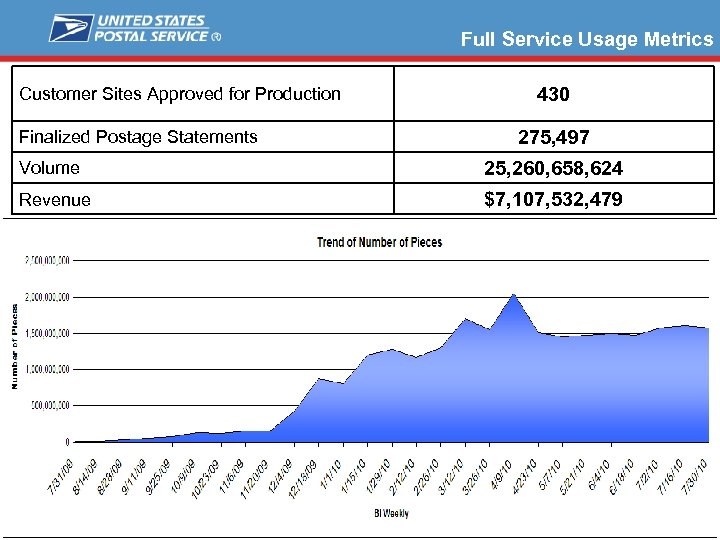 Full Service Usage Metrics Customer Sites Approved for Production Finalized Postage Statements 430 275, 497 Volume 25, 260, 658, 624 Revenue $7, 107, 532, 479
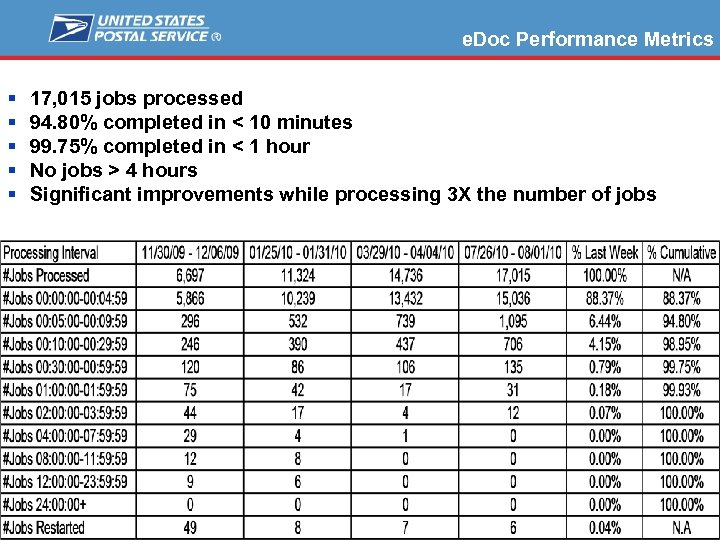 e. Doc Performance Metrics § § § 17, 015 jobs processed 94. 80% completed in < 10 minutes 99. 75% completed in < 1 hour No jobs > 4 hours Significant improvements while processing 3 X the number of jobs
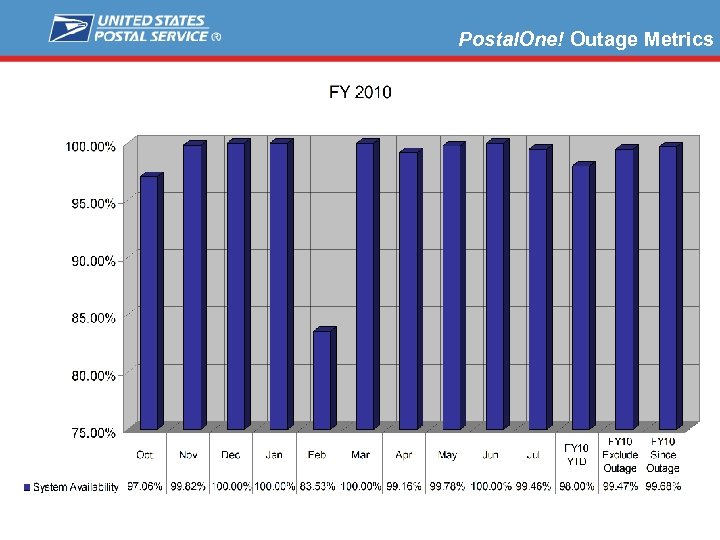 Postal. One! Outage Metrics
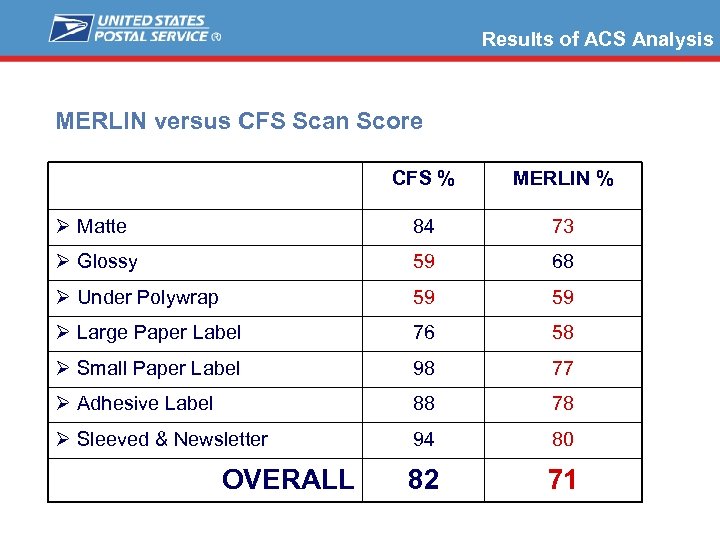 Results of ACS Analysis MERLIN versus CFS Scan Score CFS % MERLIN % Ø Matte 84 73 Ø Glossy 59 68 Ø Under Polywrap 59 59 Ø Large Paper Label 76 58 Ø Small Paper Label 98 77 Ø Adhesive Label 88 78 Ø Sleeved & Newsletter 94 80 82 71 OVERALL
 Results of ACS Analysis § What this data indicates? § The CFS Scanner is not the source of the problem § Focus will be upon operational process § Metrics to track scan vs. manual entry § Obliteration of Barcodes § What this data does not indicate? § Questionable MERLIN Performance § MERLIN measures compliance with specifications § MERLIN is functioning properly / specifications valid
 Upcoming Releases § Full-Service Changes in November 2010 – Full Service e. Doc Verification and Assessment – Full Service ACS Billing § Changes Coming January 2011 – Price Change § Under consideration for June 19, 2011 – Start-the-Clock for all Mailings – e. Dropship
 BEGINNING MAY 2011 Intelligent Mail® barcode will be required for Automation Discounts and Confirm® Service
 Agenda - Pritha What’s coming next…. § November 2010 Release – Fulll Service e. Doc verification process – BSA Re-acceptance – ACS Charge Allocation and Information Flow § January Price Change
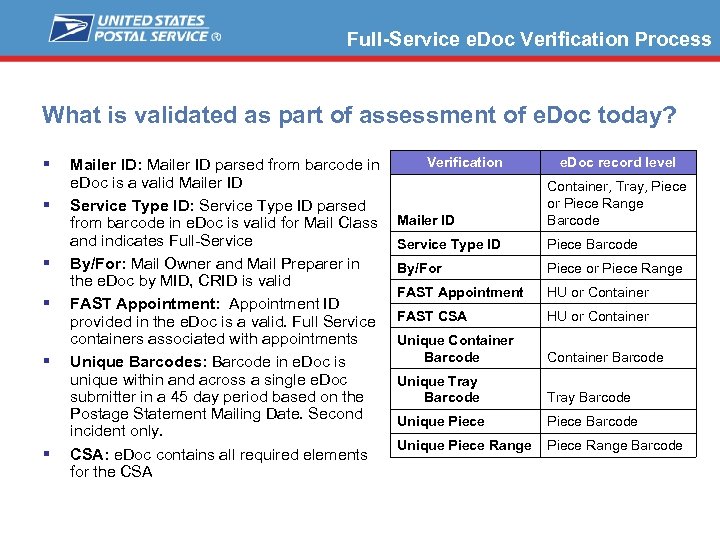 Full-Service e. Doc Verification Process What is validated as part of assessment of e. Doc today? § § § Mailer ID: Mailer ID parsed from barcode in e. Doc is a valid Mailer ID Service Type ID: Service Type ID parsed from barcode in e. Doc is valid for Mail Class and indicates Full-Service By/For: Mail Owner and Mail Preparer in the e. Doc by MID, CRID is valid FAST Appointment: Appointment ID provided in the e. Doc is a valid. Full Service containers associated with appointments Unique Barcodes: Barcode in e. Doc is unique within and across a single e. Doc submitter in a 45 day period based on the Postage Statement Mailing Date. Second incident only. CSA: e. Doc contains all required elements for the CSA Verification e. Doc record level Mailer ID Container, Tray, Piece or Piece Range Barcode Service Type ID Piece Barcode By/For Piece Range FAST Appointment HU or Container FAST CSA HU or Container Unique Container Barcode Unique Tray Barcode Unique Piece Range Barcode
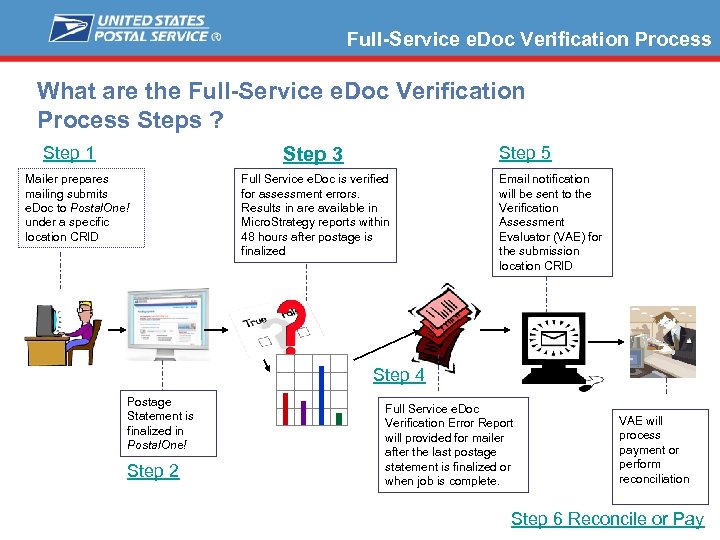 Full-Service e. Doc Verification Process What are the Full-Service e. Doc Verification Process Steps ? Step 1 Step 5 Step 3 Mailer prepares mailing submits e. Doc to Postal. One! under a specific location CRID Full Service e. Doc is verified for assessment errors. Results in are available in Micro. Strategy reports within 48 hours after postage is finalized Email notification will be sent to the Verification Assessment Evaluator (VAE) for the submission location CRID Step 4 Postage Statement is finalized in Postal. One! Step 2 Full Service e. Doc Verification Error Report will provided for mailer after the last postage statement is finalized or when job is complete. VAE will process payment or perform reconciliation Step 6 Reconcile or Pay
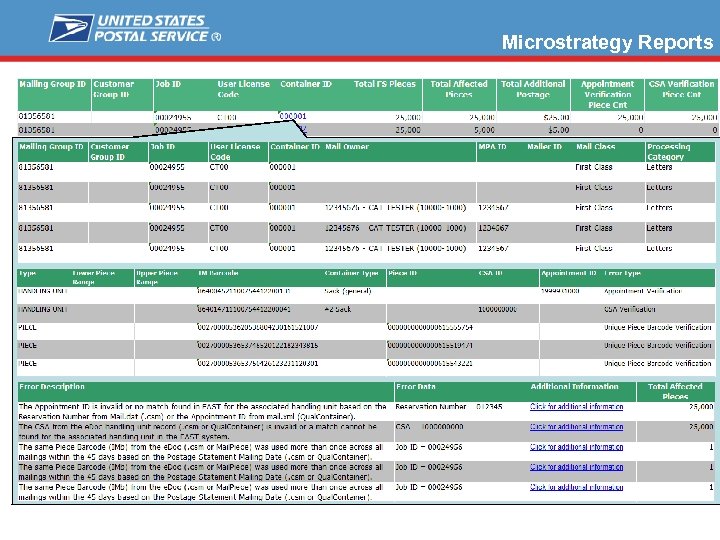 Microstrategy Reports
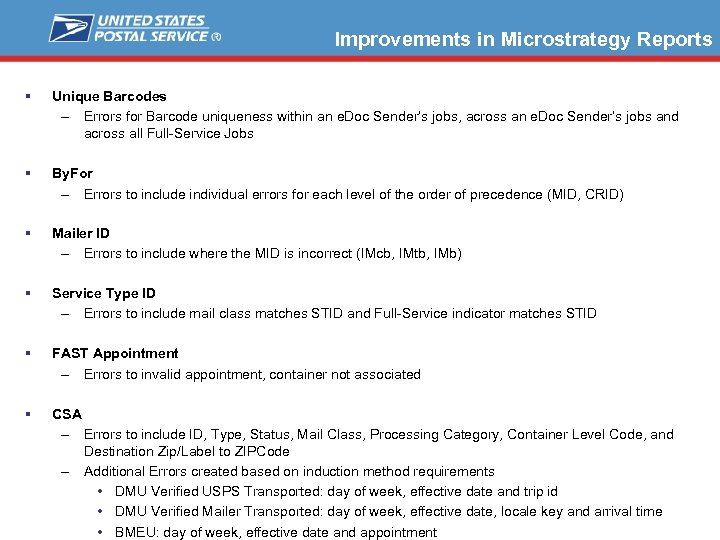 Improvements in Microstrategy Reports § Unique Barcodes – Errors for Barcode uniqueness within an e. Doc Sender’s jobs, across an e. Doc Sender’s jobs and across all Full-Service Jobs § By. For – Errors to include individual errors for each level of the order of precedence (MID, CRID) § Mailer ID – Errors to include where the MID is incorrect (IMcb, IMtb, IMb) § Service Type ID – Errors to include mail class matches STID and Full-Service indicator matches STID § FAST Appointment – Errors to invalid appointment, container not associated § CSA – Errors to include ID, Type, Status, Mail Class, Processing Category, Container Level Code, and Destination Zip/Label to ZIPCode – Additional Errors created based on induction method requirements • DMU Verified USPS Transported: day of week, effective date and trip id • DMU Verified Mailer Transported: day of week, effective date, locale key and arrival time • BMEU: day of week, effective date and appointment
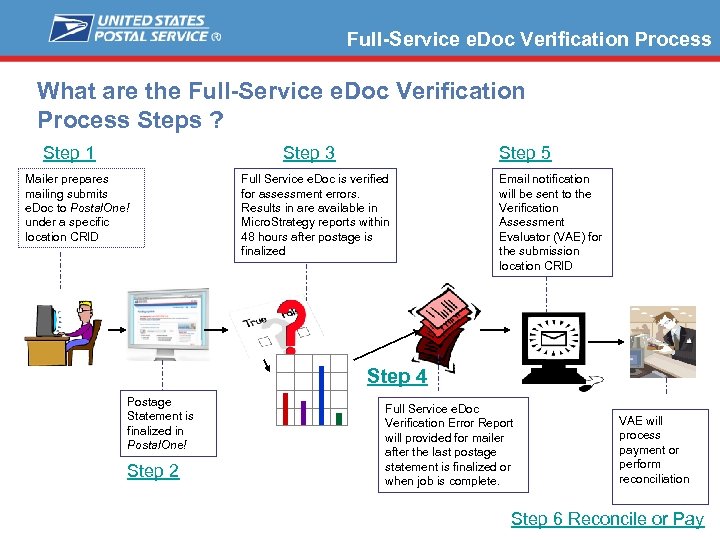 Full-Service e. Doc Verification Process What are the Full-Service e. Doc Verification Process Steps ? Step 1 Step 3 Mailer prepares mailing submits e. Doc to Postal. One! under a specific location CRID Step 5 Full Service e. Doc is verified for assessment errors. Results in are available in Micro. Strategy reports within 48 hours after postage is finalized Email notification will be sent to the Verification Assessment Evaluator (VAE) for the submission location CRID Step 4 Postage Statement is finalized in Postal. One! Step 2 Full Service e. Doc Verification Error Report will provided for mailer after the last postage statement is finalized or when job is complete. VAE will process payment or perform reconciliation Step 6 Reconcile or Pay
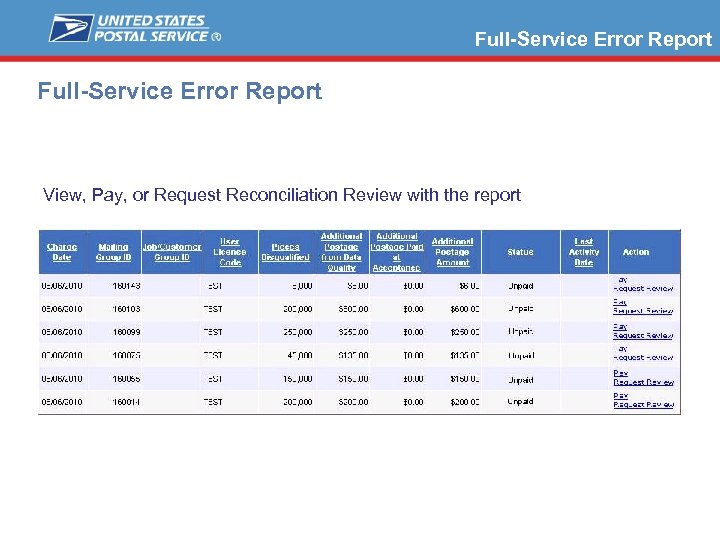 Full-Service Error Report View, Pay, or Request Reconciliation Review with the report
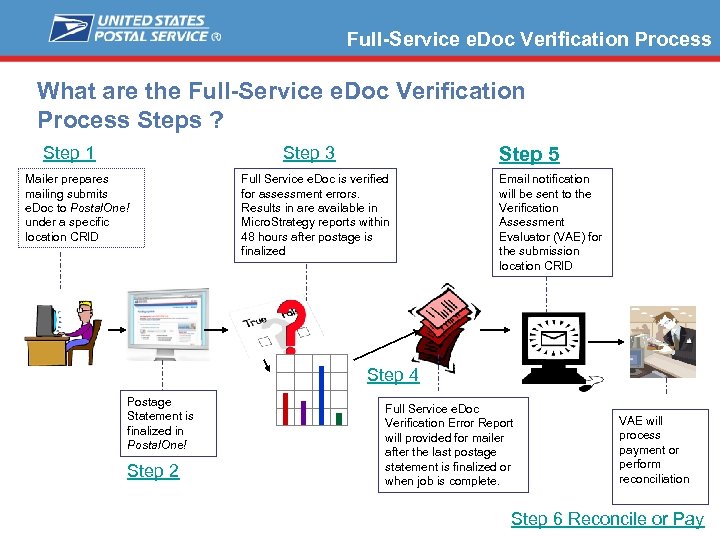 Full-Service e. Doc Verification Process What are the Full-Service e. Doc Verification Process Steps ? Step 1 Step 3 Mailer prepares mailing submits e. Doc to Postal. One! under a specific location CRID Step 5 Full Service e. Doc is verified for assessment errors. Results in are available in Micro. Strategy reports within 48 hours after postage is finalized Email notification will be sent to the Verification Assessment Evaluator (VAE) for the submission location CRID Step 4 Postage Statement is finalized in Postal. One! Step 2 Full Service e. Doc Verification Error Report will provided for mailer after the last postage statement is finalized or when job is complete. VAE will process payment or perform reconciliation Step 6 Reconcile or Pay
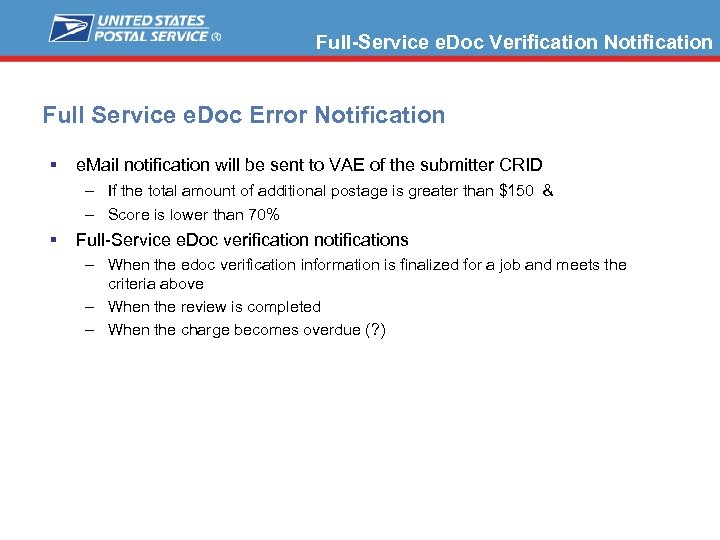 Full-Service e. Doc Verification Notification Full Service e. Doc Error Notification § e. Mail notification will be sent to VAE of the submitter CRID – If the total amount of additional postage is greater than $150 & – Score is lower than 70% § Full-Service e. Doc verification notifications – When the edoc verification information is finalized for a job and meets the criteria above – When the review is completed – When the charge becomes overdue (? )
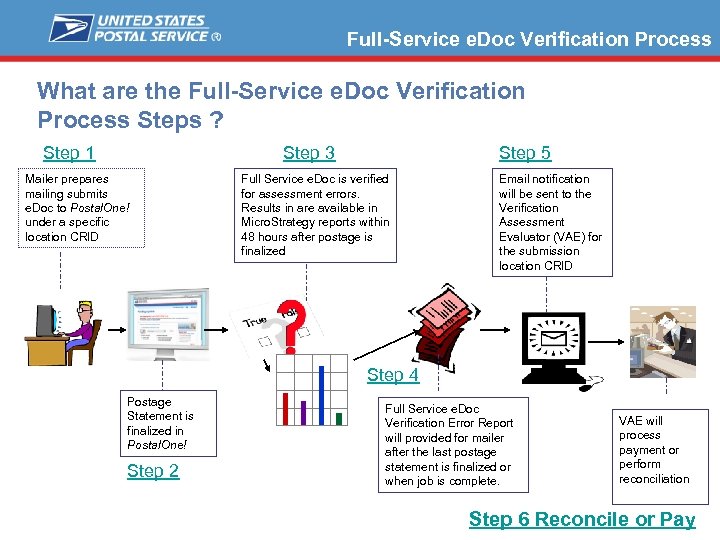 Full-Service e. Doc Verification Process What are the Full-Service e. Doc Verification Process Steps ? Step 1 Step 3 Mailer prepares mailing submits e. Doc to Postal. One! under a specific location CRID Step 5 Full Service e. Doc is verified for assessment errors. Results in are available in Micro. Strategy reports within 48 hours after postage is finalized Email notification will be sent to the Verification Assessment Evaluator (VAE) for the submission location CRID Step 4 Postage Statement is finalized in Postal. One! Step 2 Full Service e. Doc Verification Error Report will provided for mailer after the last postage statement is finalized or when job is complete. VAE will process payment or perform reconciliation Step 6 Reconcile or Pay
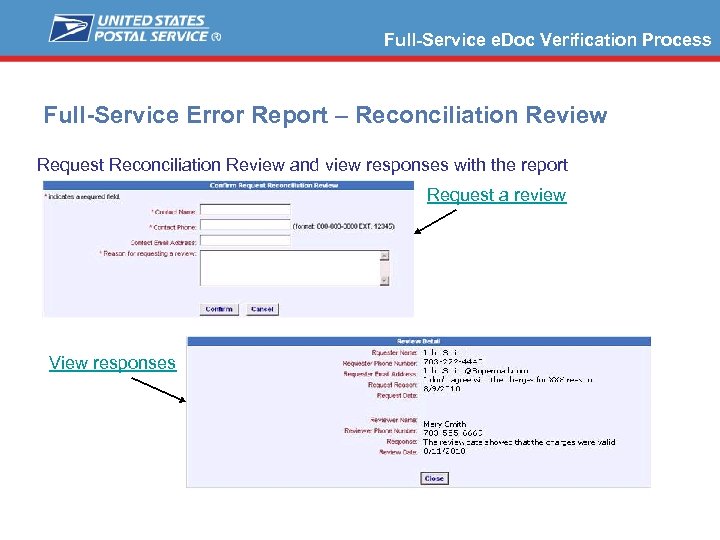 Full-Service e. Doc Verification Process Full-Service Error Report – Reconciliation Review Request Reconciliation Review and view responses with the report Request a review View responses
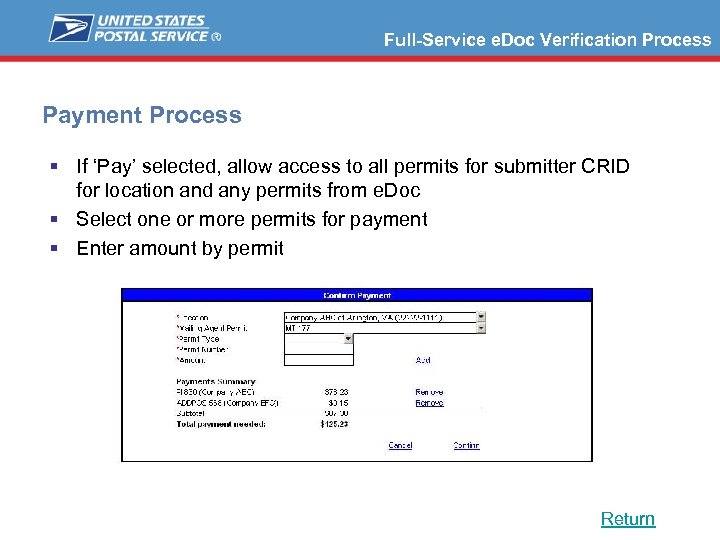 Full-Service e. Doc Verification Process Payment Process § If ‘Pay’ selected, allow access to all permits for submitter CRID for location and any permits from e. Doc § Select one or more permits for payment § Enter amount by permit Return
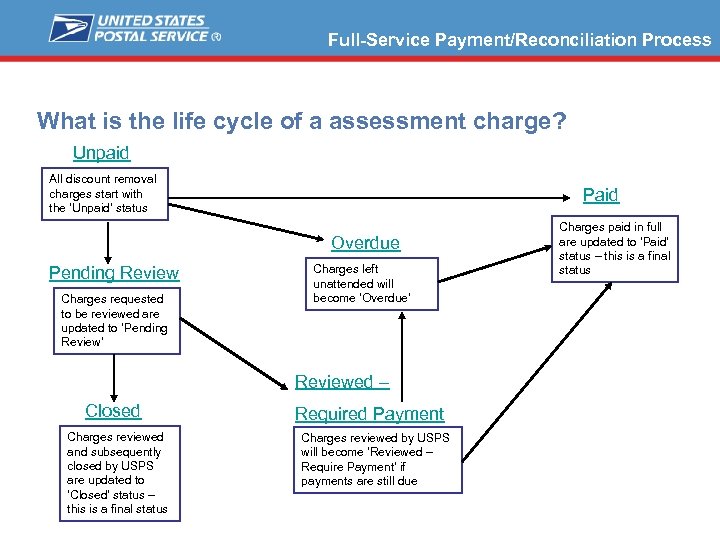 Full-Service Payment/Reconciliation Process What is the life cycle of a assessment charge? Unpaid All discount removal charges start with the ‘Unpaid’ status Paid Overdue Pending Review Charges requested to be reviewed are updated to ‘Pending Review’ Charges left unattended will become ‘Overdue’ Reviewed – Closed Charges reviewed and subsequently closed by USPS are updated to ‘Closed’ status – this is a final status Required Payment Charges reviewed by USPS will become ‘Reviewed – Require Payment’ if payments are still due Charges paid in full are updated to ‘Paid’ status – this is a final status
 Full-Service e. Doc Verification Process What are the roles in Full-Service e. Doc Verification Process ? § Mailer: Responsible for resolving loss of full-service discount charges – Review e. Doc verification errors report – Pay or Request Reconciliation for charges § Remediation Team/Help Desk: Responsible for review of reconciliation requests – Review/investigate reconciliation request – Notify mailer of review results – Require full payment, Adjust payment amount, close § Acceptance Unit: Notified of unpaid charges – Notices mailer of unpaid charges
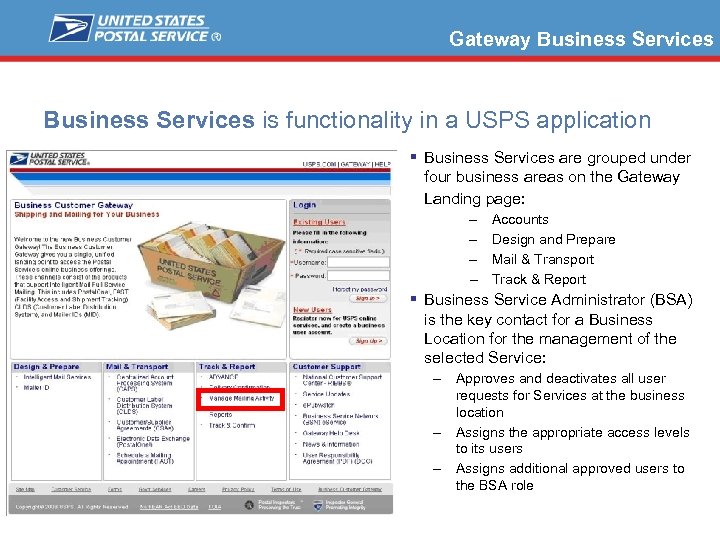 Gateway Business Services is functionality in a USPS application § Business Services are grouped under four business areas on the Gateway Landing page: – – Accounts Design and Prepare Mail & Transport Track & Report § Business Service Administrator (BSA) is the key contact for a Business Location for the management of the selected Service: – Approves and deactivates all user requests for Services at the business location – Assigns the appropriate access levels to its users – Assigns additional approved users to the BSA role
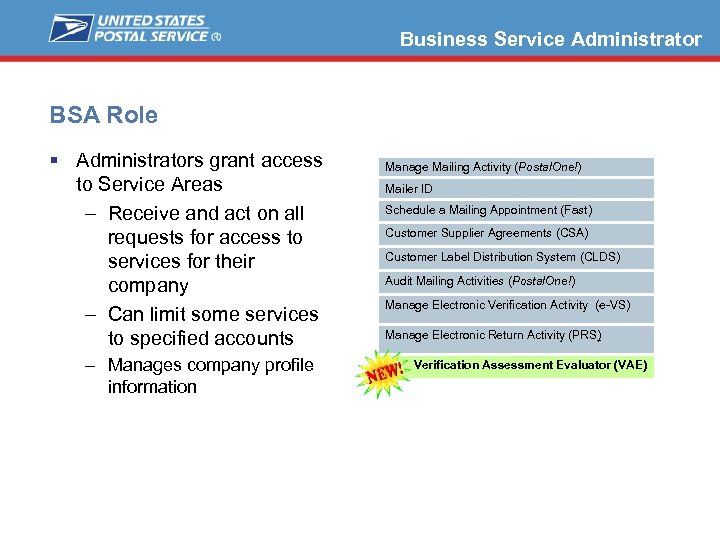 Business Service Administrator BSA Role § Administrators grant access to Service Areas – Receive and act on all requests for access to services for their company – Can limit some services to specified accounts – Manages company profile information Manage Mailing Activity (Postal. One!) Mailer ID Schedule a Mailing Appointment (Fast) Customer Supplier Agreements (CSA) Customer Label Distribution System (CLDS) Audit Mailing Activities (Postal. One!) Manage Electronic Verification Activity (e-VS) Manage Electronic Return Activity (PRS) Verification Assessment Evaluator (VAE)
 Full-Service e. Doc Verification Process How does the Mailer prepare for assessment? § For CRID (location) – Determine who will be responsible for receiving FS e. Doc error emails and notifications? – Determine who will take action on review and payment of FS e. Doc verification errors? § Establish a Verification Assessment Evaluator (VAE) BSAs who will for a CRID (location): – Gain access to Full Service e. Doc error report in Postalone! – BSA will receive email notifications or pop-up notices while on-line alerting the of the need for action – Notify appropriate affected parties of any payments needed – Make payments § BSA and Users of VAE must also have Manage Mailing Activity role (dual role)
 BSA Agreement Modifications BSA Agreement being updated to § Clarify that the USPS considers the VAE BSA as the point of contact for official communications from the USPS for this service § The VAE BSA will be agreeing to receive updates and notifications; and subsequently perform any actionable items conveyed in such communications from the USPS
 Full Service ACS Billing Full Service COA & NIXIE § Notification Period Expiration – Periodicals letters and flats, provided at no charge up to 60 days from first notice – Standard Mail letters and flats and BPM flats, provided at no charge up to 95 days from first notice – System tracks the first notice sent to the mailer for that delivery point this determines the begin of notification period – Notification period begins when data is made available to the mailer
 Full Service ACS Billing Invoicing for ACS § Invoices will be separate from One. Code invoices but will follow the same billing process § Depending on the balance, Mailers will receive an invoice from ACS. – An invoice and statement will be mailed monthly if the balance is more than $50 on the 24 th. – An invoice and statement will be mailed March 24 th and September 24 th of each year if the cumulative balance is less than $50. § Payment must be submitted with a copy of the invoice within 30 days of invoice date.
 January Price Change Plant Verified Drop Shipments Prior to Jan 2, 2011 Current Prices § PVDS mailings verified and paid for before Jan 2, 2011, using the current prices, will be accepted at destination entry postal facilities through Jan 17, 2011, when presented with appropriate verification and payment documentation (PS Form 8125). New Prices § PVDS mailings may be verified and paid for beginning Dec 12, 2010, using the new prices, provided the shipments are not deposited at destination entry postal facilities until Jan 2, 2011, or later, when presented with appropriate verification and payment documentation (PS Form 8125).
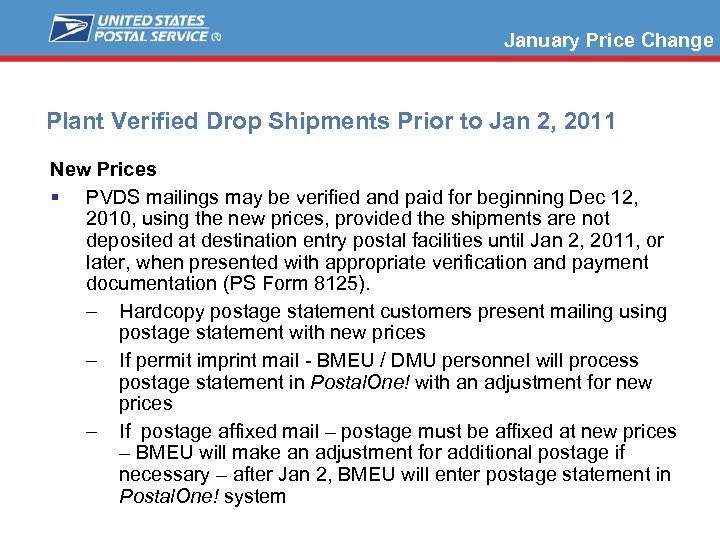 January Price Change Plant Verified Drop Shipments Prior to Jan 2, 2011 New Prices § PVDS mailings may be verified and paid for beginning Dec 12, 2010, using the new prices, provided the shipments are not deposited at destination entry postal facilities until Jan 2, 2011, or later, when presented with appropriate verification and payment documentation (PS Form 8125). – Hardcopy postage statement customers present mailing using postage statement with new prices – If permit imprint mail - BMEU / DMU personnel will process postage statement in Postal. One! with an adjustment for new prices – If postage affixed mail – postage must be affixed at new prices – BMEU will make an adjustment for additional postage if necessary – after Jan 2, BMEU will enter postage statement in Postal. One! system
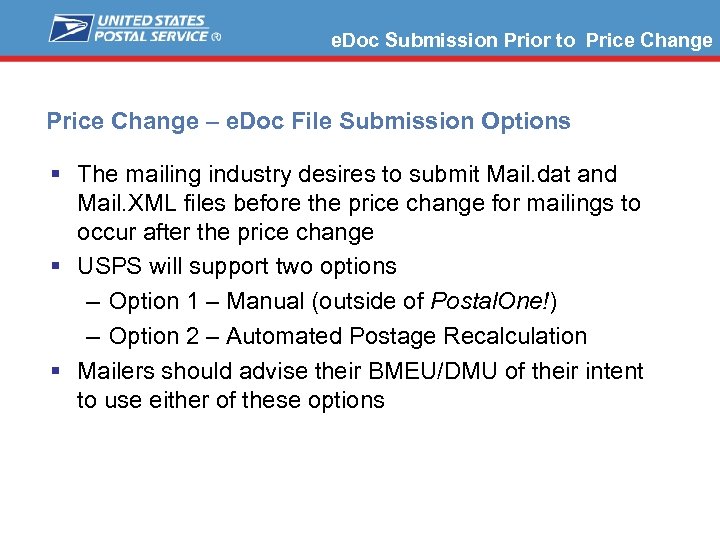 e. Doc Submission Prior to Price Change – e. Doc File Submission Options § The mailing industry desires to submit Mail. dat and Mail. XML files before the price change for mailings to occur after the price change § USPS will support two options – Option 1 – Manual (outside of Postal. One!) – Option 2 – Automated Postage Recalculation § Mailers should advise their BMEU/DMU of their intent to use either of these options
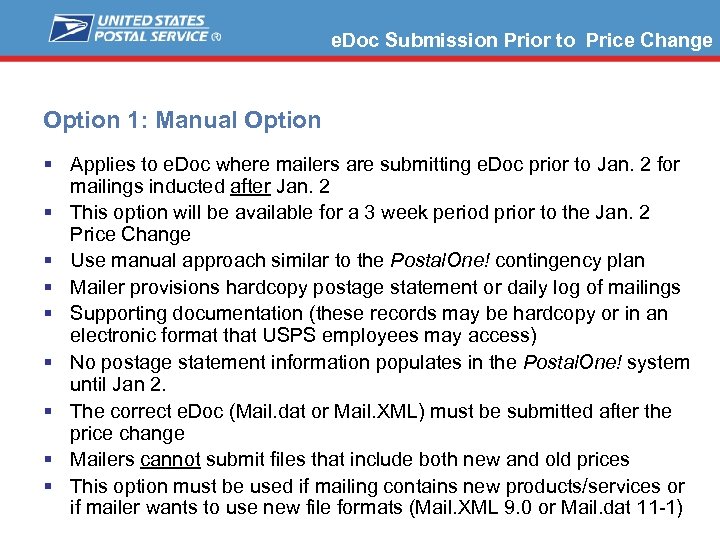 e. Doc Submission Prior to Price Change Option 1: Manual Option § Applies to e. Doc where mailers are submitting e. Doc prior to Jan. 2 for mailings inducted after Jan. 2 § This option will be available for a 3 week period prior to the Jan. 2 Price Change § Use manual approach similar to the Postal. One! contingency plan § Mailer provisions hardcopy postage statement or daily log of mailings § Supporting documentation (these records may be hardcopy or in an electronic format that USPS employees may access) § No postage statement information populates in the Postal. One! system until Jan 2. § The correct e. Doc (Mail. dat or Mail. XML) must be submitted after the price change § Mailers cannot submit files that include both new and old prices § This option must be used if mailing contains new products/services or if mailer wants to use new file formats (Mail. XML 9. 0 or Mail. dat 11 -1)
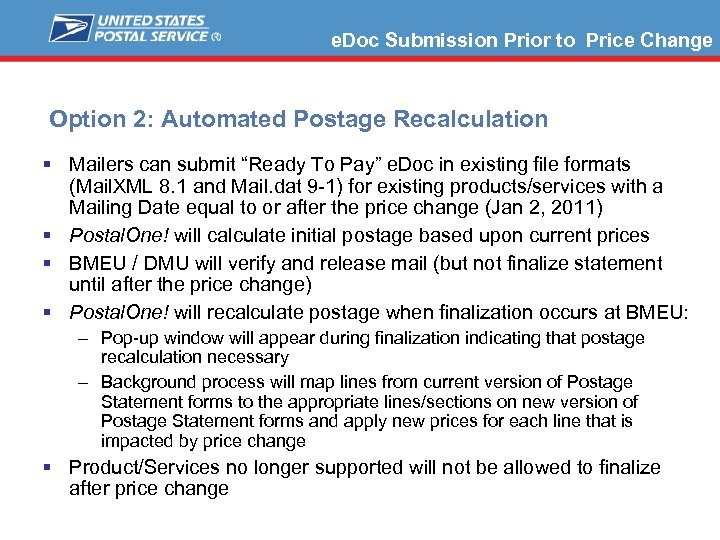 e. Doc Submission Prior to Price Change Option 2: Automated Postage Recalculation § Mailers can submit “Ready To Pay” e. Doc in existing file formats (Mail. XML 8. 1 and Mail. dat 9 -1) for existing products/services with a Mailing Date equal to or after the price change (Jan 2, 2011) § Postal. One! will calculate initial postage based upon current prices § BMEU / DMU will verify and release mail (but not finalize statement until after the price change) § Postal. One! will recalculate postage when finalization occurs at BMEU: – Pop-up window will appear during finalization indicating that postage recalculation necessary – Background process will map lines from current version of Postage Statement forms to the appropriate lines/sections on new version of Postage Statement forms and apply new prices for each line that is impacted by price change § Product/Services no longer supported will not be allowed to finalize after price change
 Migration from POSTNET to IMB § Letters sent to all Permit Holder § Webinar Sessions starting in September 2010 § To assist mailers to migrate to the Intelligent Mail barcode – – – What is Intelligent Mail Important Dates Data Fields in the Intelligent Mail Barcode Implementing Intelligent Mail Barcode Address Reply Mail Products – Permit Reply, Business Reply Mail and Courtesy Reply Mail – Artwork