


 Скачать презентацию Information Technology Essentials 2 nd Edition CHAPTER 6
81c51c9c083d22f7c56684e190464b48.ppt
- Количество слайдов: 52
 Information Technology Essentials 2 nd Edition CHAPTER 6 PRIVACY AND SECURITY Prepared by: Arlene N. Baratang
 OBJECTIVES • Determine the importance of privacy while on-line • Identify actions to take against malicious software. • Apply techniques to protect one-self against different types of malicious attacks online. • Determine different fraud and scam over the internet • Identify different virus and antivirus • Apply different means of protecting computer network against possible security threats. • Understand the difference of software piracy, copyrights and plagiarism Prepared by: Arlene N. Baratang, M. A. 2
 Privacy • Privacy refers to the right of an individual or an organization to give restrictions to whom, where, when and how valuable information is to be given. Prepared by: Arlene N. Baratang, M. A. 3
 Privacy Issues • Accuracy is the state of information whether it is correct and error free which user can consider as free from mistake and a hundred percent true. Prepared by: Arlene N. Baratang, M. A. 4
 Privacy issues … • Property. Acquiring private information of an individual from public venue such as internet as a gain by a company is one of the main issues of privacy online. Who owns the information and who is liable to such disclosure? Information ownership is difficult to determine if data is readily available over the net. Prepared by: Arlene N. Baratang, M. A. 5
 Privacy issues … • Access. This refers to the ability of an individual or an organization to gain information by getting into the database of a company. Prepared by: Arlene N. Baratang, M. A. 6
 Privacy issues … • Collecting publicly but personally identifying the user’s key information. . This means that the moment user filled in textboxes to give personal details, the user agreed that data could be used by the collector on any purpose that they want to. User are compelled to readily give information because of a chance to win in a lottery or raffle prizes, gain complete access to the site or a free electronic copy of materials that they need. Prepared by: Arlene N. Baratang, M. A. 7
 Privacy issues … • Identity theft. With over-exposure of little details of us, stealing identity has become easier now a day through the information available via social media networking sites, blogs and websites. Activities, photos, places frequented to and likes are among details that could be copied and used to whatever illegal by person with undesirable intention. Prepared by: Arlene N. Baratang, M. A. 8
 Privacy issues … • Mistaken identity refers to as incorrectly identifying a person due to the information presented to a person. In digital world, since bits of information are at your fingertips in a click, perception of users may vary on how they interpret and see things. Identifying a person to be someone else occurs due to poor eye sights, poor memory and insufficient information. Prepared by: Arlene N. Baratang, M. A. 9
 Freedom of Information Act • This act gives right to the US citizen of the federal government to gain information from agencies. These agencies must disclose any record that is requested unless that information is protected from public disclosure. Prepared by: Arlene N. Baratang, M. A. 10
 Privacy issues … • Spyware is also known as adware. It is a general term used to describe a malicious software that do not ask for the consent of the user to obtain information. It could alter your computer settings by changing your home page and or additional components to your browsers which at times you don't need or want • An Anti-Spyware programs block any detect threats and remove them from the system by scanning all incoming data via network. Windows Defender, Spy. Doctor and Spy Sweeper are among available in the market to guard user against malicious software. Prepared by: Arlene N. Baratang, M. A. 11
 Privacy issues … • Cookies. There are files stored on the user’s computer while users hop from one website to another and these files are called cookies. These files can be accessed by a web server or the client computer to get data from the user while visiting different websites. Prepared by: Arlene N. Baratang, M. A. 12
 Privacy issues … • Keyloggers. Software that tracks user’s key struck on the keyboard to capture data is referred to as keyloggers. Passwords, bank account and other pertinent information are mostly the targets of this software. There are two ways to protect users from keyloggers: – Use an onscreen keyboard. – Use an anti-keyloggers software. Prepared by: Arlene N. Baratang, M. A. 13
 Privacy issues … • Web bug is also known as track bug. This code is embedded on the email to guarantee if it is viewed by its recipient. This program sends report to the sender if the email was delivered; user was able to read the content and forwarded such email to someone else. There are web bugs on web pages to monitor activities of web visitors of the particular website. Prepared by: Arlene N. Baratang, M. A. 14
 How to protect ourselves against Web bug? 1. Turn off our browser cookies and opt-out to emails that you feel as scam. Marking it as spam may not be the best move. Prepared by: Arlene N. Baratang, M. A. 15
 Laws on Privacy • Gramm-Leach-Bliley Act is an act that requires financial institutions and companies that offer consumers financial products or services like loans, financial or investment advice, or insurance to explain their information-sharing practices to their customers and to safeguard sensitive data. (Source: http: //business. ftc. gov/privacy-andsecurity/gramm-leach-bliley-act) Prepared by: Arlene N. Baratang, M. A. 16
 Laws on privacy… • Health Insurance Portability and Accountability Act of 1996 Act (HIPAA) prompted new Federal regulations which require physicians to ensure they are protecting the privacy and security of patients' medical information and using a standard format when submitting electronic transactions, such as submitting claims to payers. (Source: http: //www. ama-assn. org/ama/pub) Prepared by: Arlene N. Baratang, M. A. 17
 Laws on privacy… • Family Educational Rights and Privacy Act (FERPA) is a Federal law that protects the privacy of student education records. The law applies to all schools that receive funds under an applicable program of the U. S. Department of Education. FERPA gives parents certain rights with respect to their children's education records. These rights transfer to the student when he or she reaches the age of 18 or attends a school beyond the high school level. (Source: http: //www 2. ed. gov/policy/gen/guid/fpco/ferpa/index. html) Prepared by: Arlene N. Baratang, M. A. 18
 Comprehension Check 1. What are the concerns of users who access information in the computer or over the Internet? 2. Discuss some issues that affect the privacy and security of Internet users in a virtual community. 3. What are the laws that protect web users on the use of their personal information? Prepared by: Arlene N. Baratang, M. A. 19
 SECURITY Prepared by: Arlene N. Baratang, M. A. 20
 Computer Criminals • Software Cracking which is also known as warez, is an illegal act of disabling software protection to eliminate encoded copy prevention. The individual engaged in this kind of activity are called crackers. • A naughty programmer who illegally break in to computer or network is known as hacker. Other organized crimes and terrorists who uses the Internet in illegal activities that harm people are the problems which the world is facing today. Prepared by: Arlene N. Baratang, M. A. 21
 Computer Crimes • Computer crime or cybercrime, refers to any criminal activity in which computers, or a computer network, is the source of a crime. This covers a wide variety of crimes, from hacking into databases and stealing sensitive information to using computers to set up illegal activities. Prepared by: Arlene N. Baratang, M. A. 22
 Computer Crimes: 1. Malicious Program also known as malicious software or malware, refers to software programs designed for destruction of computer system and cause impairment even to the user. 2. Internet scams 3. Denial of service attack or Do. S is an attack that making a service unable of taking action to request in an orderly mode. The two main forms of Dos attack are those that break down service and those that flood services. Having a firewall between your computer and Internet connection is one best way of avoiding Dos attack. Prepared by: Arlene N. Baratang, M. A. 23
 Different types of malware differ in attack used such as: • Virus or Viruses is a small software that has the capacity to replicate or make perfect copies of itself. The usual virus set in the computer program and infection spread from computer to computer by unsuspecting users who either use, swap USB, or sends programs to another over a network. The virus has the ability to attached itself to other program and executes secretly when the host program is run. Virus can delete files and corrupt the program of the infected computer. Prepared by: Arlene N. Baratang, M. A. 24
 Different types of malware… • Worms track down computer’s vulnerability and proliferate within its connected network like an infection. It duplicates and leaves copies of itself in the memory of each computer in its path while moving across other computers. Worms often originate from e-mail attachment which seems to be from trusted senders and spread it among e-mail addresses that are in one’s address book. Prepared by: Arlene N. Baratang, M. A. 25
 Different types of malware… • Trojan horses is a type of virus that slows down the speed processing of your computer. If infected by this virus, various symptoms can be observed such as an increase in the number of popup ads and more unauthorized installation of unknown toolbars. It also erases information from your hard drive, completely disable your computer and worsen your computer's performance and stability. Prepared by: Arlene N. Baratang, M. A. 26
 Different types of malware… • Robot Network or botnet is a type of malware that cybercriminal commonly use to spread viruses, exude spam email messages and damage the servers. If your computer becomes part of a botnet, it turns your computer into a robot known as a zombie that executes automated tasks over the Internet without your knowledge. Prepared by: Arlene N. Baratang, M. A. 27
 Internet Scams • Phishing is a scam that deceives people by sending email which came from a legitimate-looking business-like banks or credit card company that ask for personal information and bank details. It appears that you receive an e-mail from your bank because of the fake website they created which is almost identical to the official site. The email recipient will be asked to log in his account and verify its information or click a link. Response must be done immediately unless your account will be terminated. As you log in to the bogus web site or click the hyperlink, it captures the information needed to be used by the criminals operating the scam. Prepared by: Arlene N. Baratang, M. A. 28
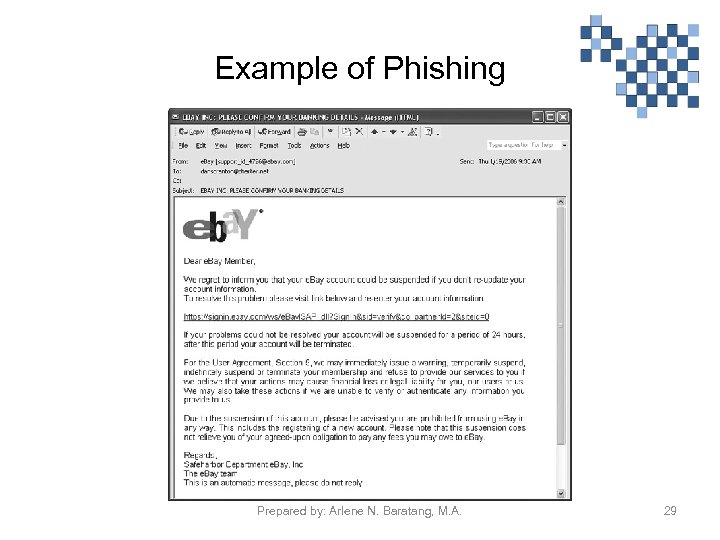 Example of Phishing Prepared by: Arlene N. Baratang, M. A. 29
 Internet scams … • Pharming is an act digging up personal and financial information by having fictitious websites by means of planting fake universal resource locators (URLs) in domain name users. This is most likely creating of website look-alike of legitimate company such as bank that ask for verification of credit card or account number information wherein when you access it’s link, your personal or financial information are being copied and used in fraudulent activities. Prepared by: Arlene N. Baratang, M. A. 30
 Internet scams … • Identity theft is a criminal act done by obtaining personal and financial information wherein the identity of innocent person is being used. The most widely committed identity theft are done through using someone's or stolen credit card number in buying expensive items pretending they are the sole owner of the card. Another is by hacking one’s social media account and use it in posting malicious or nasty words that might ruin other’s reputation. Prepared by: Arlene N. Baratang, M. A. 31
 Internet scams … • Auction fraud is engaged in non- delivery of products acquired through an Internet auction site like Ebay, Ebid, IOffer. com etc. or via false advertising of the product for sale. This means that the seller fails to deliver the item, the seller lied about some aspect of the transaction and the product descriptions may be incomplete, elusive or totally fake. Prepared by: Arlene N. Baratang, M. A. 32
 Internet scams … • Advance fee loans is also done by sending email that offers loans which guarantees approval despite of your credit history. Desperate people become delighted by this quick cash offer. As you take the offer and go with the loan process, you will be asked for an advance fee loan once your loan is approved. Lending company or institution do not operate in this manner so do not be deceived by this false offers. Prepared by: Arlene N. Baratang, M. A. 33
 Internet scams … • Vacation prize is like any other Internet scams that mislead people by offering vacation prize promotion that are usually of poor value services, compel hidden chargers or impose restrictions that are difficult to meet. Example of this is online group buying offers with big discounts, inclusive air fare, hotel accommodation, and other freebies. You are asked to charge it to your credit card but after which you find it difficult to book a flight, reserve for accommodation and the worst scenario is that the travel agency merchant is no longer exist. Prepared by: Arlene N. Baratang, M. A. 34
 Ways to protect oneself from Internet scams: 1. Don’t be tempted with company that gives too good to be true offers. 2. Check the merchant if it is legitimate and transact to group buying sites with good reputation. 3. Be vigilant to e-mail senders that are suspicious looking. Prepared by: Arlene N. Baratang, M. A. 35
 Ways to safeguard computer networks against security threats: 1. Use a firewall. A firewall is software or hardware that screens information coming from the Internet or a network. It helps protect your computer by preventing hackers or malicious software from gaining access to your computer. 2. Use virus protection and keep it up-to-date. Antivirus software can help protect your computer against viruses, through scanning, monitoring email and other files on your computer from unknown viruses, worms, and Trojan horses. If one is detected, the antivirus program either quarantines or deletes it entirely before it crushed your computer and files. Make sure to keep the antivirus on your computer up-to-date. Prepared by: Arlene N. Baratang, M. A. 36
 Ways to safeguard computer networks against …. . 3. Be knowledgeable on Internet scams. Being knowledgeable and updated to new tactics and approach of cyber criminals doing over the internet makes oneself more vigilant and careful on accessing link, giving away personal and financial details to fraudulent people that make unsolicited job offers, telling sad stories or promising an easy money thru sending e-mails. 4. Use distinctive password or biometric authentication. One of the secure means of protection is the use of Biometric Authentication, which uses human attribute s or characteristic for identification in access control. Biometric used unique, measurable characteristic identifiers to mark and describe individuals. Voice, hand print and DNA are under the physiological biometric category while, typing, rhythm, and gait are some related to the behavior of a person which classified under behavioral biometrics. Prepared by: Arlene N. Baratang, M. A. 37
 Ways to safeguard computer networks against …. . 5. Use flash drives carefully. Inserting virus infected flash drive or thumb drive in your computer or other gadgets could corrupt the drive, delete important file in your computer. Regular scanning is suggested for screening virus. Prepared by: Arlene N. Baratang, M. A. 38
 Computer Ethics Prepared by: Arlene N. Baratang, M. A. 39
 The Difference Between Morals, Ethics, and Laws • Morals: one’s personal beliefs about right and wrong • Ethics: standards or codes of behavior expected of an individual by a group • Law: system of rules that tells us what we can and cannot do – Laws are enforced by a set of institutions – Legal acts conform to the law – Moral acts conform to an individual’s belief Prepared by: Arlene N. Baratang, M. A. 40
 • Copyright is one’s ownership that is legally given to an author, composer, playwright, publisher, distributor to exclusive publication, production, sale or distribution of a literary, musical, dramatic, or artistic work. Where in the owner is the only person authorized to reproduced, edit or to give permission to other people on what to do with it. The person who makes alteration, reproduction and use of work that is protected under copyright is punishable by the law. Prepared by: Arlene N. Baratang, M. A. 41
 Software Piracy • Software piracy. According to Harvey Mudd College, “Software piracy refers to as unauthorized use and copying of software. It is similar to original art work, songs, playwright that is protected under the copyright law. It is illegal when installed in a computer, reproduce, distribute, and use in business unpermitted. To become a licensed user a person must purchase the right to use. ” • Forms of Software Piracy: – Having of one-licensed version installed in multiple computers. – Installing software on computers without license. – Uploading licensed version of a software product on the Internet and make it free for downloading. Prepared by: Arlene N. Baratang, M. A. 42
 Plagiarism • According to Oxford University, plagiarism is a form of using of other person’s work or ideas by copying, rephrasing and making it appears to be your own work without full acknowledgement of the source of information. It applies to all published and unpublished material, like manuscript, printed article or electronic form is encompass under this definition. Prepared by: Arlene N. Baratang, M. A. 43
 CAREER IN IT: • Cryptographer • A cryptographer is a person who studies codes, secret writing techniques, it is also the one who make codes and decodes it. Cryptography comes from the Greek words Crypto meaning "hidden or secret and Graphic is from the Greek word graphikos which means writing, picturesque, belonging to drawing, The security of ATM and credit cards, the passwords of your personal computer, facebook, email etc. are all rely on cryptography. The cryptographer hide and show off the encrypted information. Encryption means ordinary text is replaced with text that is incomprehensible when intercepted or translated into a secret code. Prepared by: Arlene N. Baratang, M. A. 44
 Comprehension Check 1. Discuss how crimes are committed using the computer. 2. Enumerate how computer networks can be protected against threats. 3. What is copyright? Explain when a person violates the copyright law. Prepared by: Arlene N. Baratang, M. A. 45
 SUMMARY Computer crime or cybercrime refers to any criminal activity in which computers or computer networks are the sources of crimes. Malicious program or malware refers to software program designed to damage computer system. Computer virus is small software that has the capacity to replicate or make perfect copies of it. Virus can delete files and corrupt the program of the infected computer. Worms tracts down computer’s vulnerability and proliferate within its connected network like an infection, it duplicates and leave copies of itself in the memory of each computer in its path, while moving across other computers. Prepared by: Arlene N. Baratang, M. A. 46
 Summary … Trojan horses is a type of virus that slow down the speed processing of your computer. It erases information from your hard drive, completely disable your computer and worsen your computer's performance and stability. Phishing is a scam that deceives people by sending e-mail which came from a legitimate looking business like banks or credit card company that ask for personal information and bank details. Prepared by: Arlene N. Baratang, M. A. 47
 Summary… • Ways to safeguard computer networks against possible security threats over the internet are by using a firewall. A firewall is software or hardware that screens information coming from the Internet or a network; use antivirus software that can help protect your computer against viruses, through scanning, monitoring e‑mail and other files on your computer from unknown viruses, worms, and Trojan horses; keep knowledgeable on Internet scams; use biometric authentication, and; use flash drives carefully. Prepared by: Arlene N. Baratang, M. A. 48
 REFERENCES • • • http: //business. ftc. gov/privacy-and-security/gramm-leach-bliley-act http: //www. ama-assn. org/ama/pub/physician-resources/solutions-managingyour-practice/coding-billing-insurance/hipaahealth-insurance-portabilityaccountability-act. page http: //www. fraudguides. com/advance_fee_scams. asp http: //www. hackillusion. com/ http: //www. hmc. edu/cis/doc/occ-down/vol 5/iss 1/piracy. html http: //www. ox. ac. uk/students/course_guidance_supervision/goodpractice/abo ut/ http: //www. review-best. com/spyware-trojan-removal-software. htm http: //www. techopedia. com http: //www. techterms. com http: //www 2. ed. gov/policy/gen/guid/fpco/ferpa/index. html Prepared by: Arlene N. Baratang, M. A. 49
 Activity 1 • Computer virus removal • INSTRUCTION: From the list of computer viruses provided by your professor, select two (2) types. Search the Google on the characteristics of these virus and research on the procedure on how to remove it. Answer the activity using this guide: • Name of Virus • Type • Characteristics • Damages that could be done in your system • Removal Procedures Prepared by: Arlene N. Baratang, M. A. 50
 Activity 2 • Malware removal • INSTRUCTION: Answer the following: 1. What are the signs that your system is infected with malware? 2. What are the available anti-malware software programs in the market? 3. List down open source software for malware removal. List the procedure on how you will delete such application in your system. Prepared by: Arlene N. Baratang, M. A. 51
 Prepared by: Arlene N. Baratang, M. A. 52