


 Скачать презентацию Information Systems Chapter 2 Organizing Data and Information
02d9333a94279c08cfe7a9aafb2f4b7d.ppt
- Количество слайдов: 24
 Information Systems Chapter 2 Organizing Data and Information
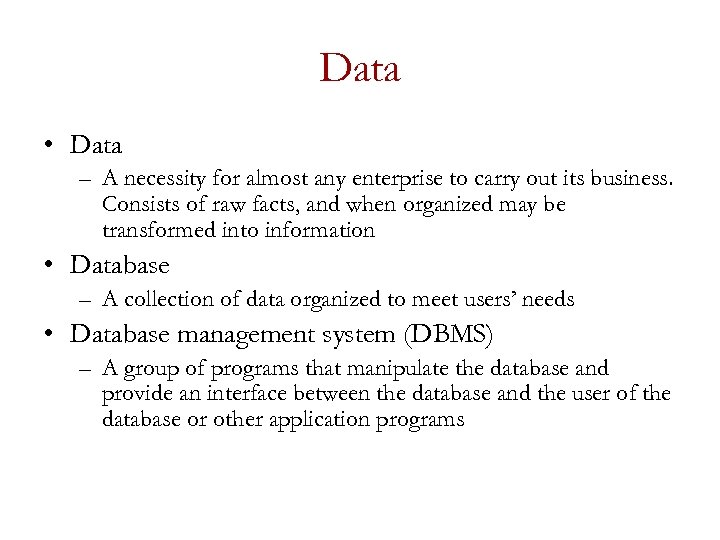 Data • Data – A necessity for almost any enterprise to carry out its business. Consists of raw facts, and when organized may be transformed into information • Database – A collection of data organized to meet users’ needs • Database management system (DBMS) – A group of programs that manipulate the database and provide an interface between the database and the user of the database or other application programs
 DBMS ‘Discussion’ (1) A collection of programs that enables you to store, modify, and extract information from a database. There are many different types of DBMSs, ranging from small systems that run on personal computers to huge systems that run on mainframes. The following are examples of database applications: – – computerized library systems automated teller machines flight reservation systems computerized parts inventory systems From a technical standpoint, DBMSs can differ widely. The terms
 DBMS ‘Discussion’ (2) relational, network, flat, and hierarchical all refer to the way a DBMS organizes information internally. The internal organization can affect how quickly and flexibly you can extract information. Requests for information from a database are made in the form of a query, which is a stylized question. For example, the query SELECT ALL WHERE NAME = "SMITH" AND AGE > 35 requests all records in which the NAME field is SMITH and the AGE
 DBMS ‘Discussion’ (3) field is greater than 35. The set of rules for constructing queries is known as a query language. Different DBMSs support different query languages, although there is a semi-standardized query language called SQL (structured query language). Sophisticated languages for managing database systems are called fourth-generation languages, or 4 GLs for short. The information from a database can be presented in a variety of formats. Most DBMSs include a report writer program that enables you to output data in the form of a report. Many DBMSs also include
 DBMS ‘Discussion’ (4) a graphics component that enables you to output information in the form of graphs and charts.
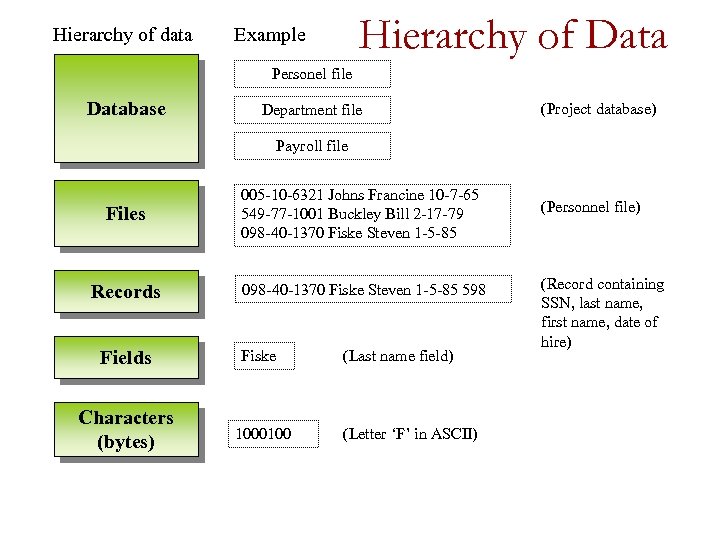 Hierarchy of data Hierarchy of Data Example Personel file Database Department file (Project database) Payroll file Files 005 -10 -6321 Johns Francine 10 -7 -65 549 -77 -1001 Buckley Bill 2 -17 -79 098 -40 -1370 Fiske Steven 1 -5 -85 Records 098 -40 -1370 Fiske Steven 1 -5 -85 598 Fields Fiske Characters (bytes) 1000100 (Last name field) (Letter ‘F’ in ASCII) (Personnel file) (Record containing SSN, last name, first name, date of hire)
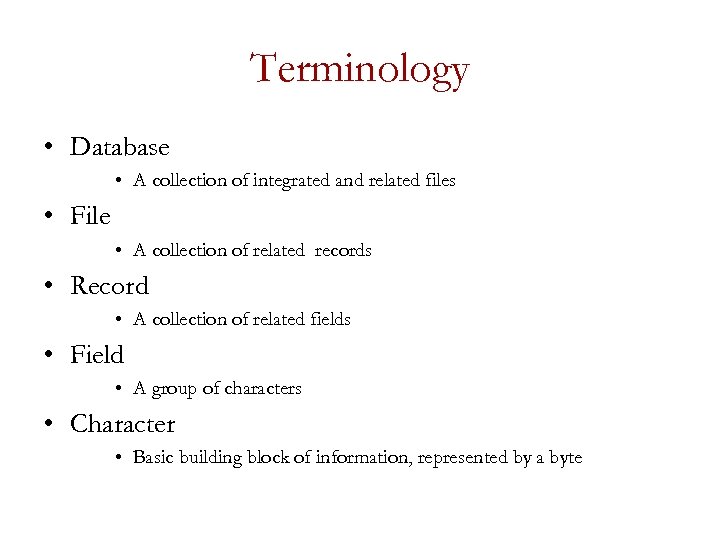 Terminology • Database • A collection of integrated and related files • File • A collection of related records • Record • A collection of related fields • Field • A group of characters • Character • Basic building block of information, represented by a byte
 Data Entities, Attributes, and Keys • Entity • A generalized class of people, places, or things (objects) for which data are collected, stored, and maintained • E. g. , Customer, Employee • Attribute • A characteristic of an entity; something the entity is identified by • E. g. , Customer name, Employee name • Keys • A field or set of fields in a record that is used to identify the record • E. g, A field or set of fields that uniquely identifies the record
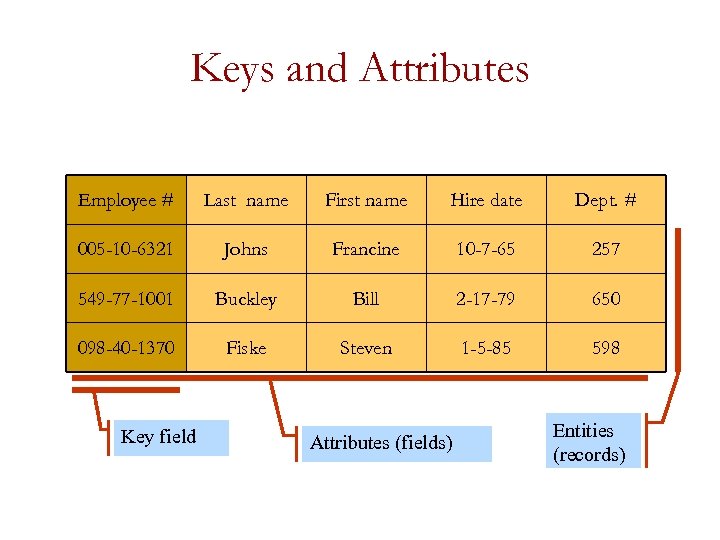 Keys and Attributes Employee # Last name First name Hire date Dept. # 005 -10 -6321 Johns Francine 10 -7 -65 257 549 -77 -1001 Buckley Bill 2 -17 -79 650 098 -40 -1370 Fiske Steven 1 -5 -85 598 Key field Attributes (fields) Entities (records)
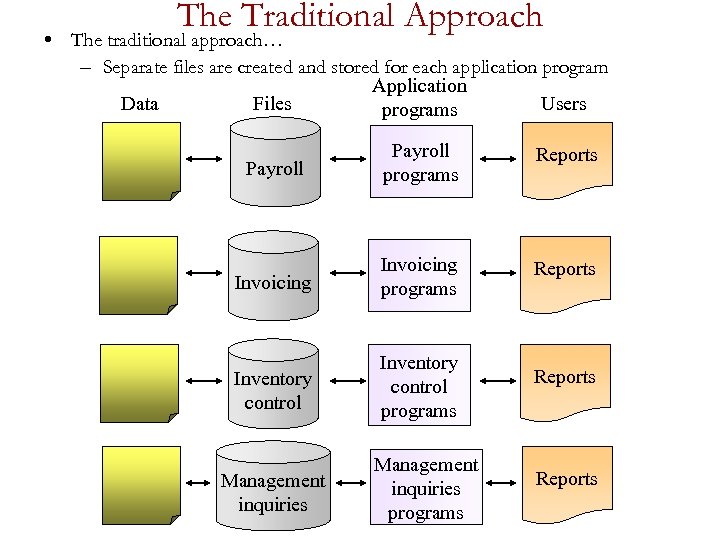 The Traditional Approach • The traditional approach… – Separate files are created and stored for each application program Data Files Application programs Users Payroll programs Reports Invoicing programs Reports Inventory control programs Reports Management inquiries programs Reports
 Drawbacks • Data redundancy – Duplication of data in separate files • Lack of data integrity – The degree to which the data in any one file is accurate • Program-data dependence – A situation in which program and data organized for one application are incompatible with programs and data organized differently for another application
 Database Approach • The database approach… – A pool of related data is shared by multiple application programs – Rather than having separate data files, each application uses a collection of data that is either joined or related in the database
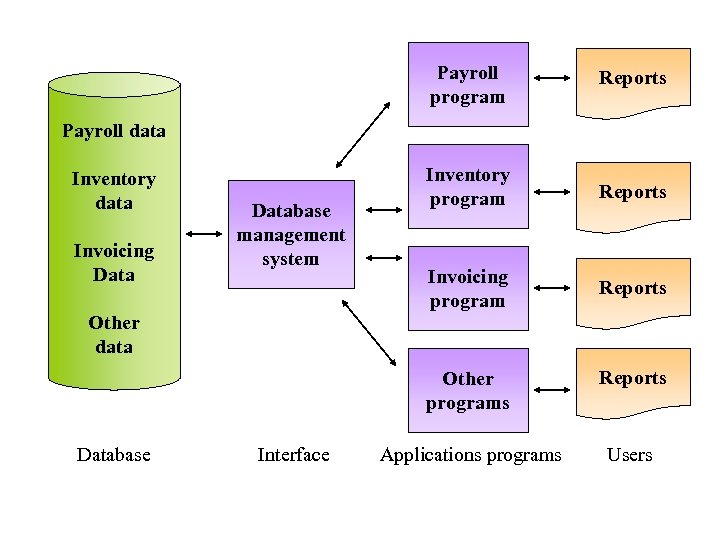 Payroll program Reports Inventory program Reports Invoicing program Reports Payroll data Inventory data Invoicing Database management system Other data Other programs Database Interface Reports Applications programs Users
 Advantages – – – – – Improved strategic use of corporate data Reduced data redundancy Improved data integrity Easier modification and updating Data and program independence Better access to data and information Standardization of data access A framework for program development Better overall protection of the data Shared data and information resources
 Disadvantages – Relatively high cost of purchasing and operating a DBMS in a mainframe operating environment – Increased cost of specialized staff – Increased vulnerability
 Data Modeling and Database Models (1) • Planned data redundancy – A way of organizing data in which the logical database design is altered so that certain data entities are combined – Summary totals are carried in the data records rather than calculated from elemental data – Some data attributes are repeated in more than one data entity to improve database performance
 Data Modeling and Database Models (2) • Data model – A map or diagram of entities and their relationships • Enterprise data modeling – Data modeling done at the level of the entire organization • Entity-relationship (ER) diagrams – A data model that uses basic graphical symbols to show the organization of and relationships between data
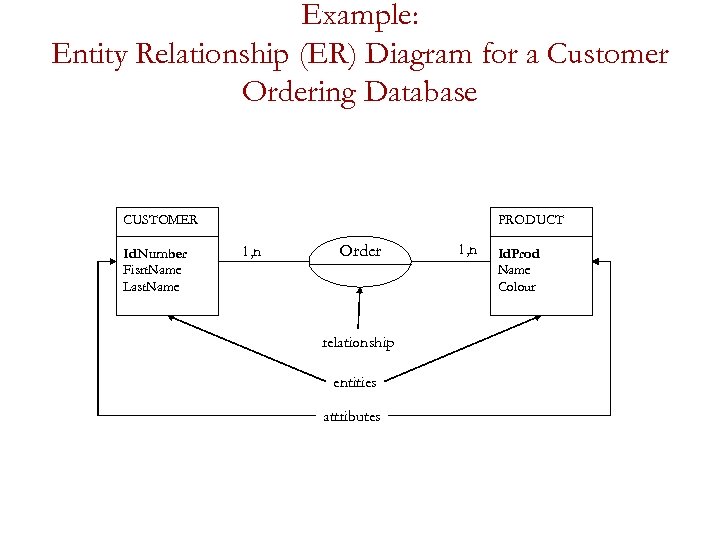 Example: Entity Relationship (ER) Diagram for a Customer Ordering Database CUSTOMER Id. Number Fisrt. Name Last. Name PRODUCT 1, n Order relationship entities attributes 1, n Id. Prod Name Colour
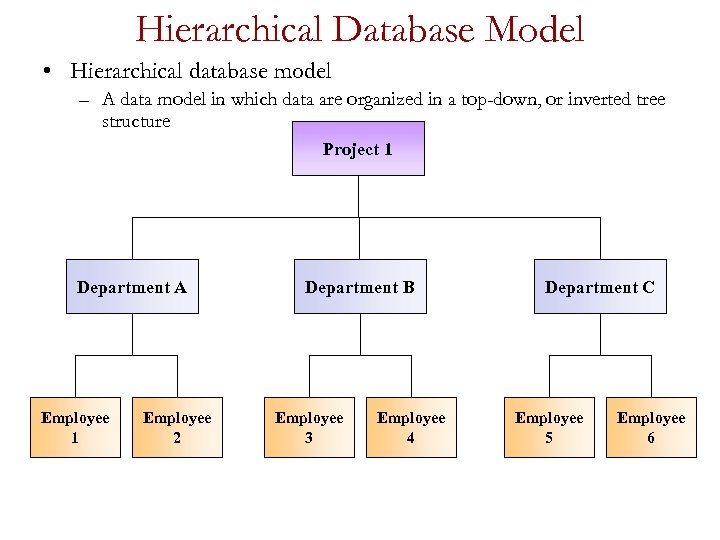 Hierarchical Database Model • Hierarchical database model – A data model in which data are organized in a top-down, or inverted tree structure Project 1 Department A Employee 1 Employee 2 Department B Employee 3 Employee 4 Department C Employee 5 Employee 6
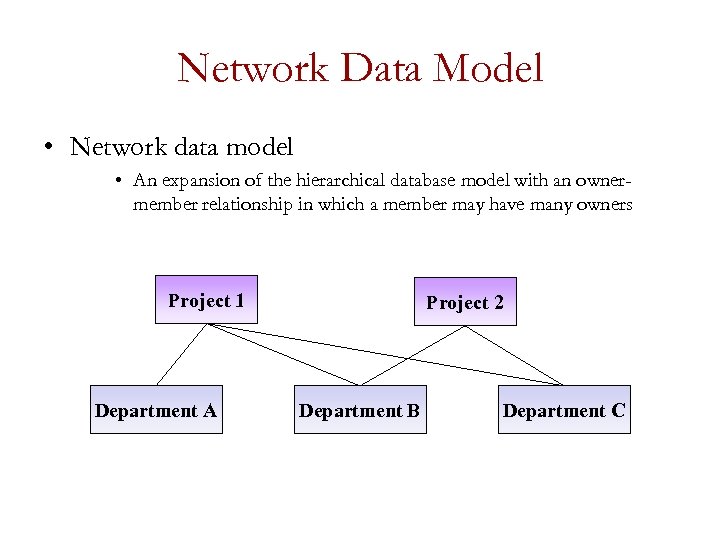 Network Data Model • Network data model • An expansion of the hierarchical database model with an ownermember relationship in which a member may have many owners Project 1 Department A Project 2 Department B Department C
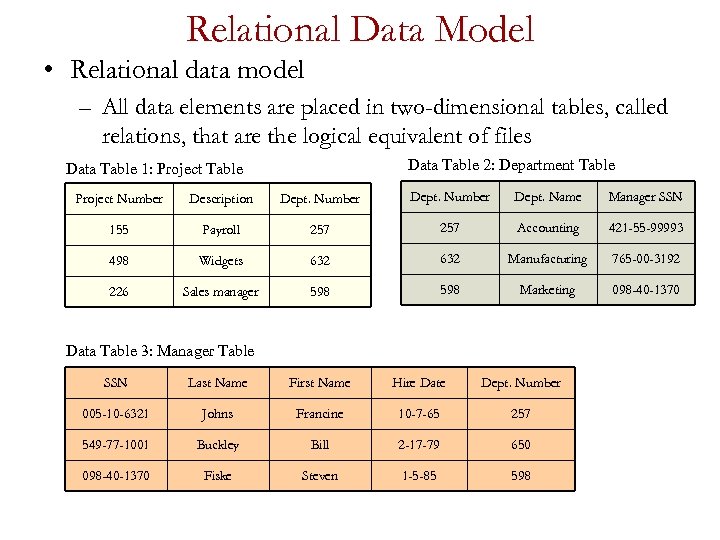 Relational Data Model • Relational data model – All data elements are placed in two-dimensional tables, called relations, that are the logical equivalent of files Data Table 2: Department Table Data Table 1: Project Table Project Number Description Dept. Number Dept. Name Manager SSN 155 Payroll 257 Accounting 421 -55 -99993 498 Widgets 632 Manufacturing 765 -00 -3192 226 Sales manager 598 Marketing 098 -40 -1370 Data Table 3: Manager Table SSN Last Name First Name Hire Date Dept. Number 005 -10 -6321 Johns Francine 10 -7 -65 257 549 -77 -1001 Buckley Bill 2 -17 -79 650 098 -40 -1370 Fiske Steven 1 -5 -85 598
 Relational Database Terminology • Selecting – Data manipulation that eliminates rows according to certain criteria • Projecting – Data manipulation that eliminates columns in a table • Joining – Data manipulation that combines two or more tables • Linked – Relating tables in a relational database together
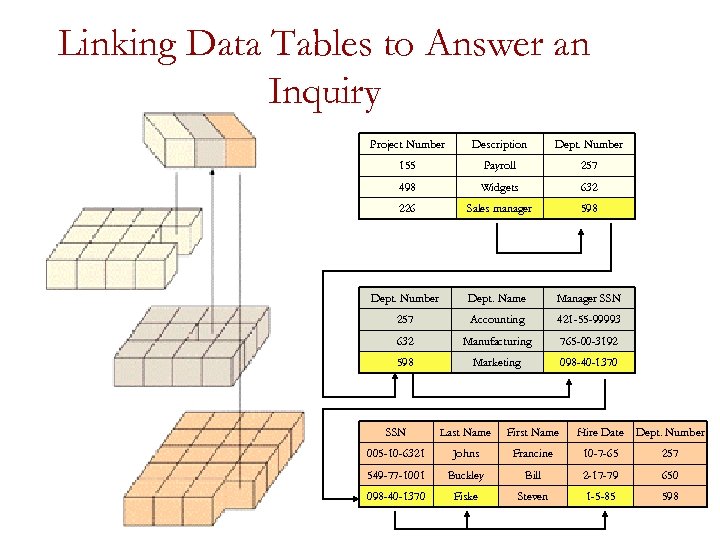 Linking Data Tables to Answer an Inquiry Project Number Description Dept. Number 155 Payroll 257 498 Widgets 632 226 Sales manager 598 Dept. Number Dept. Name Manager SSN 257 Accounting 421 -55 -99993 632 Manufacturing 765 -00 -3192 598 Marketing 098 -40 -1370 SSN Last Name First Name Hire Date Dept. Number 005 -10 -6321 Johns Francine 10 -7 -65 257 549 -77 -1001 Buckley Bill 2 -17 -79 650 098 -40 -1370 Fiske Steven 1 -5 -85 598