


 Скачать презентацию Information Assurance and Society The social issues of
961659aaba45898ff0590707b9bd2686.ppt
- Количество слайдов: 61
 Information Assurance and Society The social issues of information assurance and how it affects you
 What is Information Assurance? • IA is the hardware, software, policies, and procedures needed to protect information and information systems by ensuring availability, integrity, authentication, confidentiality, and non-repudiation. • IA implies the ability to protect, detect, and successfully react to information attacks. • Also called Info. Sec (information security) 2
 We Depend on Computers • Every aspect of our lives is increasingly dependent on computerized systems. • Transportation and communication systems • Banking and finance • Manufacturing and retail However, this information infrastructure is vulnerable 3
 Impact on Society: more info • The Risks Forum: www. risks. org • Carnegie Mellon’s CERT: www. cert. org • National IA Partnership: http: //niap. nist. gov/ • Computer Incident Advisory Capability, CIAC http: //ciac. llnl. gov/ciac/index. html 4
 Example: Computer and Internet Viruses and Attacks • Very visible cost to society • Widely reported in the news media • Computer viruses, worms (Nimda, Code Red, Melissa, SQL Slammer, etc. ) • DDOS attacks • Identity theft via on-line databases 5
 Cost Estimate . • What is included in cost? – Lost data, lost productivity – Cost of employing security personnel – Cost of “cleaning” and restoring • Who should collect info? • Nimda virus estimated at $3 billion • Code Red estimated at $2. 6 billion 6
 Famous Viruses • The Michelangelo virus: In 1992, this virus erased hard drives on artist Michelangelo’s March 6 birthday. The virus actually struck only about 10, 000 computers. • Melissa Virus: A Word macro virus that, when received via e-mail and opened, sent a copy of itself to the first 50 people in the victim’s address book. • I Love You Virus: The love bug cost the world $15 billion in lost productivity. This virus spread faster than Melissa, spreading itself to everyone in the MS Outlook address book. 7
 Increasing Costs • Whatever the costs, they are increasing. – Cost estimates available at: www. Mi 2 g. com and www. net-security. org • Frequency of incidents is increasing. • Sophistication and destructiveness of the incidents is increasing. • Attackers are organized and tools are easy to use and readily available. 8
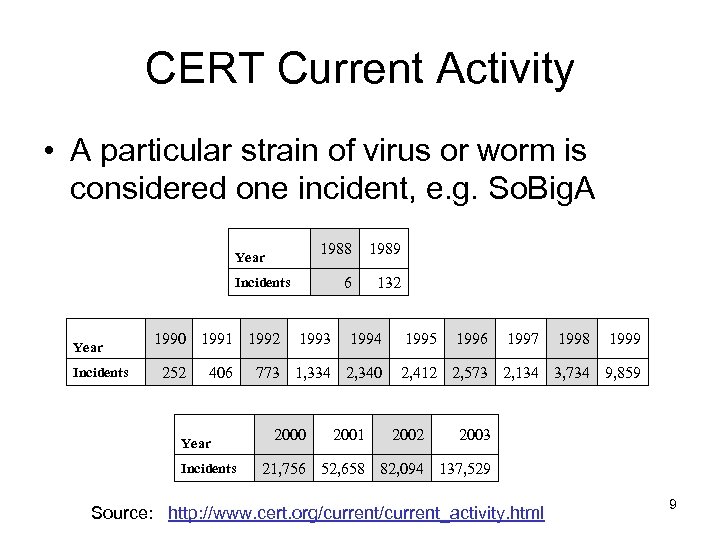 CERT Current Activity • A particular strain of virus or worm is considered one incident, e. g. So. Big. A 1988 1989 6 Year 132 Incidents Year Incidents 1990 1991 1992 252 406 Year Incidents 1993 1994 773 1, 334 2, 340 2001 1995 1996 1997 1998 1999 2, 412 2, 573 2, 134 3, 734 9, 859 2002 2003 21, 756 52, 658 82, 094 137, 529 Source: http: //www. cert. org/current_activity. html 9
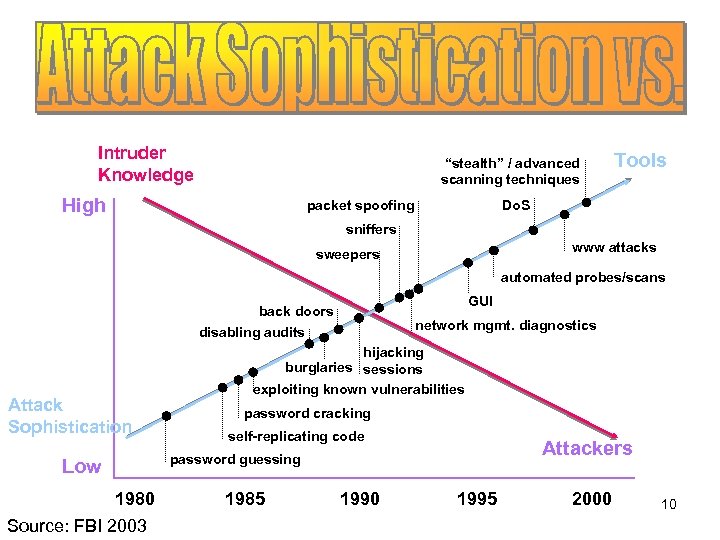 Intruder Knowledge “stealth” / advanced scanning techniques High packet spoofing Tools Do. S sniffers www attacks sweepers automated probes/scans GUI back doors disabling audits Attack Sophistication network mgmt. diagnostics hijacking burglaries sessions exploiting known vulnerabilities password cracking self-replicating code Attackers password guessing Low 1980 Source: FBI 2003 1985 1990 1995 2000 10
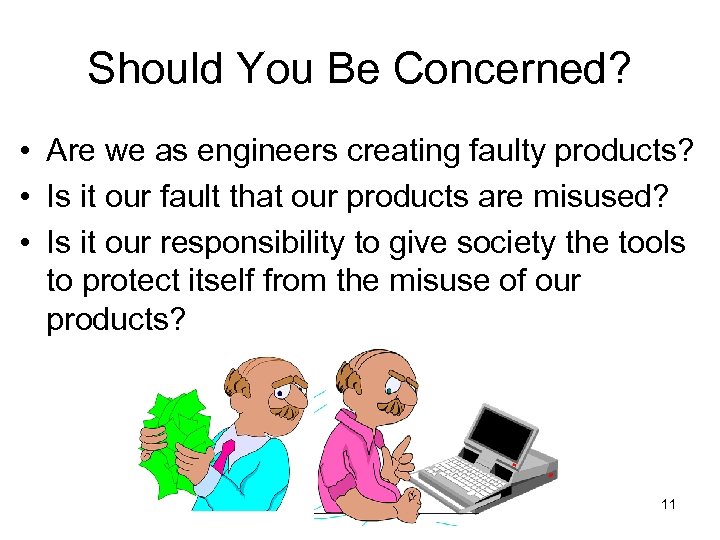 Should You Be Concerned? • Are we as engineers creating faulty products? • Is it our fault that our products are misused? • Is it our responsibility to give society the tools to protect itself from the misuse of our products? 11
 IA at Santa Clara University • At SCU, we want our students: – to be aware of the impact of technology on society – to integrate their personal values with their engineering education • Computer security involves – the hardware and software – the people who use or misuse them – the laws and attitudes of society 12
 SCU Resources for Ethical Questions of IA • Markkula Center for Applied Ethics http: //www. scu. edu/ethics/ • Center for Science, Technology, and Society http: //www. scu. edu/sts/ 13
 Ethical Questions • Many are extensions of noncomputer issues to cyberspace – Plagiarism made easy – Software piracy – Product liability – Improper e-mail or Internet use – Violating copyright (including downloading copyrighted music) – Security vs privacy vs convenience 14
 Issues Unique to Cyberspace • Viruses, worms and other malicious software (malware) • Browser Cookies, Spam, Spyware, etc • Computer Crime and Forensics • Digital Copyright • Some more legal issues • Biometrics • The threat is not limited to cyberspace 15
 Viruses, Worms and other Malicious Software
 Viruses, Worms, etc. What are they? • Viruses- a piece of software that attaches to program files. Each time the program runs, the virus runs too and has the chance to reproduce. • E-mail Viruses- a virus that moves around in email messages and duplicates itself by automatically mailing itself to people in the victim’s e-mail address book. • Worms- software that can reproduce and use computer networks to propagate. Email viruses can also be classified as worms. 17
 Viruses, Worms, etc. What are they? • Trojan Horses- a computer program that claims to do one thing (it may claim to be a game), but does something malicious when you run it. • On the Internet, a distributed denial-of-service (DDo. S) attack is one in which a multitude of compromised systems attack a single target, causing denial of service for users of the targeted system. The flood of incoming messages to the target system forces it to shut down, denying service to legitimate users. 18
 Viruses, Worms, etc. Where do they come from? • People create them for various reasons: – Psychology of vandalism: the thrill of creating destruction. – Fascination of creating something powerful that spreads quickly (Code Red achieved global saturation in 18 hours). – Owning the bragging rights in the hacker community. – Revenge on a company – Financial gain 19
 Viruses, Worms, etc. What you should do • Have anti-virus software and update it frequently – they work! • Use a strong password (password cracking programs are readily available on the Internet) www. password-crackers. com • Install security patches (especially Microsoft) 20
 Viruses, Worms, etc. A problem for ALL computers • If your computer is on the Internet you need to protect it. • Attackers use unguarded systems to launch DDOS attacks and spread malware. 21
 Browser Cookies, Spam and other Annoyances
 Browser Cookies, Spam and Other Annoyances • Unlike viruses and worms, these things are perfectly legal. • Primary issue is user’s privacy • Spam (and telemarketer) issue: corporate free speech or violation of privacy? 23
 Browser Cookies • Cookies make the web easier to use. • Piece of text (name-value pair) that a Web server can store on a user’s computer. • The web site which stored the cookie can later retrieve it. No other information is retrieved. 24
 Use of Browser Cookies • HTML is stateless, so browser cookies allow sites to: – Store user preferences – Accurately determine how many unique users view a certain page – Handle “shopping carts” 25
 What the Issue is • Web sites can gather a lot of info on you and sell that info to telemarketers and email marketers. – They know which pages within a site you visit and how frequently. • Infrastructure providers can create cookies that are visible on multiple sites – The company Double. Click puts ad banners on many sites along with small GIFs that cause Double. Click cookies to be put on your machine – This cross-site profiling worries privacy advocates 26
 Browser Cookies • In June 2000, the FTC found that 97% of web sites studied collected personal information but only 62% of those sites indicated this to the consumer. • 57% of the studied sites contained third party tracking devices. 27
 Other Annoyances • SPAM and Spyware • Scams in online auctions: Selling and buying goods online is popular. But sometimes: • • sellers don’t send the goods, sellers send inferior goods, price is driven up by shill bidding, and illegal goods sold. • Email and Internet Hoaxes – http: //hoaxbusters. ciac. org/ 28
 Computer Crime and Digital Forensics
 Computer Crime and Digital Forensics • Increasing use of computers in crimes. – Web caches helpful in investigations – Incriminating letters recovered from hard drives – Speed dial numbers on cell phones – Financial records of drug dealers 30
 Computer Crime and Digital Forensics • Increase of computer crimes – Fraud – especially credit card, ATM – Embezzlement (anonymity of computer makes it easier) – Sabotage, Identity Theft, etc – Network intrusion 31
 Network Intrusions • Remote system access can be achieved in seconds using automated intruder tools. • Access is sometimes gained for computing resources as well as private data. • Compromise of a series of remote systems, makes it difficult to trace activities to the true source. • Firewalls are not enough to ward off increasingly sophisticated penetration efforts. 32
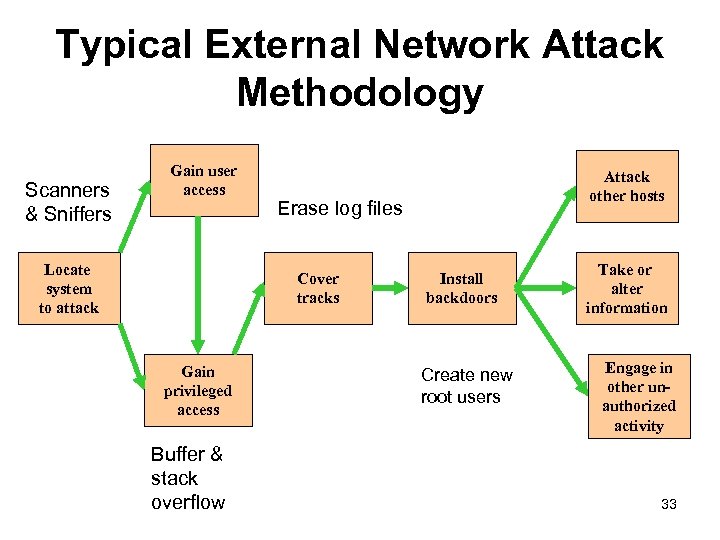 Typical External Network Attack Methodology Scanners & Sniffers Gain user access Locate system to attack Erase log files Cover tracks Gain privileged access Buffer & stack overflow Attack other hosts Install backdoors Create new root users Take or alter information Engage in other unauthorized activity 33
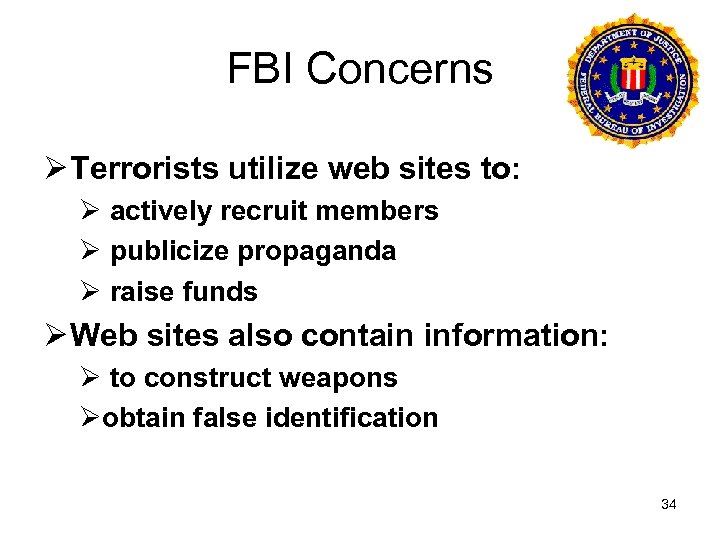 FBI Concerns Ø Terrorists utilize web sites to: Ø actively recruit members Ø publicize propaganda Ø raise funds Ø Web sites also contain information: Ø to construct weapons Øobtain false identification 34
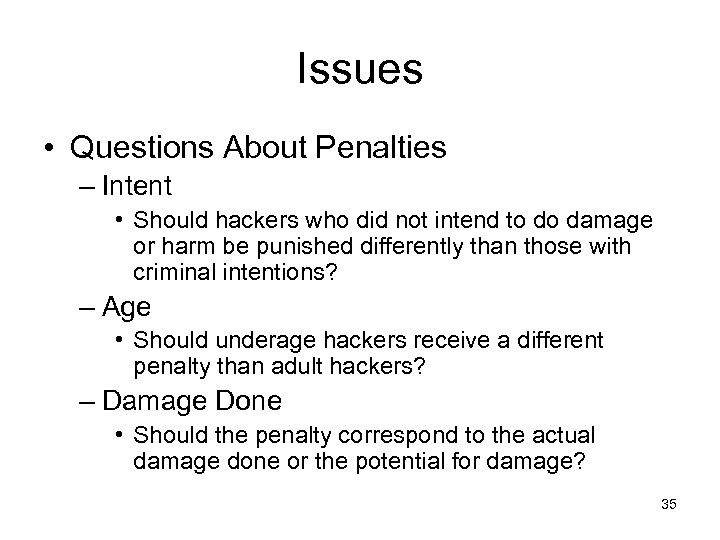 Issues • Questions About Penalties – Intent • Should hackers who did not intend to do damage or harm be punished differently than those with criminal intentions? – Age • Should underage hackers receive a different penalty than adult hackers? – Damage Done • Should the penalty correspond to the actual damage done or the potential for damage? 35
 Digital Copyright and Digital Property Rights
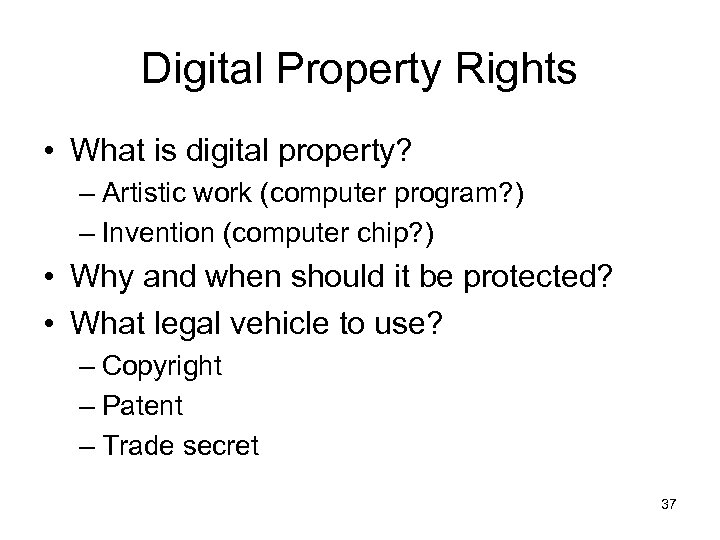 Digital Property Rights • What is digital property? – Artistic work (computer program? ) – Invention (computer chip? ) • Why and when should it be protected? • What legal vehicle to use? – Copyright – Patent – Trade secret 37
 Copyright • Copyrights are designed to protect expressions of ideas. Ideas are free, however, when an artist expresses those ideas in a work of art, that can be copyrighted. Thus, a copyright applies to a creative work such as a story, painting, or song. • Copyright gives the author the exclusive right to make copies of the expression and sell them to the public. Copyright laws exist so that artists can earn a living at their art. 38
 Copyright: Fair Use • All copyrighted material is subject to “fair use”. This allows reproduction for “purposes such as criticism, comment, news reporting, teaching (including multiple copies for classroom use) scholarship or research. ” 39
 DMCA (1998) • The “anti-circumvention” provisions of the Digital Millennium Copyright Act (“DMCA”), are sometimes not used according to the original intent. • Original intent was to stop copyright pirates from defeating anti-piracy protections added to copyrighted works, and to ban “black box” devices intended for that purpose. 40
 DMCA Section 1201 • Section 1201 can be used to stifle free speech and scientific research. Princeton Professor Edward Felten’s team of researchers succeeded in removing a digital watermark in response to a public challenge by Secure Digital Music Initiative. • When the team tried to present their results at an academic conference, SDMI threatened the researchers with liability under the DMCA. 41
 DMCA Example • In 2001, a Russian programmer was jailed for several weeks when he entered the US. • He had worked on a software program which allowed owners of Adobe electronic books (“e -books”) to convert them from Adobe’s e-Book format into Adobe Portable Document Format (“pdf”) files, thereby removing copy restrictions embedded into the files. • His alleged crime was working on a software tool with many legitimate uses, simply because third parties might use the tool to violate copyright. 42
 More Legal Issues • Protection of children on the Internet • Freedom of speech or libel • HIPAA and GLB 43
 Children and the Internet • Elementary and secondary schools use web-based learning and provide Internet access to children. • How to protect children from pornography and inappropriate material and activities? • Communications Decency Act (CDA 1996); Child Online Protection Act (COPA 1998); Children’s Online Privacy Protection Act (COPPA). 44
 Libel on the Internet First amendment protects free speech. Defamation is the act of injuring another’s reputation, honor or good name through false written or oral communication. 45
 Defamation • There are 2 parts to defamation: slander (spoken) and libel (written or spoken in a context which gives them longevity and pervasiveness that exceeds slander). • Broadcasting can be libelous. Libel is more serious than slander. • How does this apply to the Internet? 46
 Defamation and the Law • False and injurious statements on a web page are considered libel. The publisher or author can be sued. • What about anonymous bulletin boards? Who is responsible? 47
 Who is Responsible? • The owner or publisher of the web page is responsible. • Grey area: is that the ISP if the owner is not identifiable? (if defamatory statement was on an anonymous bulletin board). • Cubby vs Compuserve (1991): court ruled that Compuserve was not the publisher. • Oakmont vs Prodigy: Prodigy was held liable as the publisher because it claimed to screen bulletin board postings before they are posted. • Later Telecommunications Act protects ISPs that try to control their sites. 48
 Some Laws – Computer Fraud and Abuse Act (CFAA, 1986) • It is a crime to access, alter, damage, or destroy information on a computer without authorization. • Computers protected under this law include: – – – government computers, financial systems, medical systems, interstate commerce, and any computer on the Internet. 49
 More Laws – USA Patriot Act (USAPA, 2001) • Amends the CFAA. • Allows for recovery of losses due to responding to a hacker attack, assessing damages, and restoring systems. • Higher penalties can be levied against anyone hacking into computers belonging to criminal justice system or the military. • The government can monitor online activity without a court order. 50
 HIPAA and GLB • Health Insurance Portability and Accountability Act - 1996 – Privacy rules take effect 2003 – Security rules take effect 2005 • Gramm Leach Bliley – All financial institutions – Protection of personal information – Rules concerning disclosure 51
 The Threat is not Limited to Cyberspace
 Cyberspace is Linked to Physical Space • Much of our critical infrastructure is controlled by computer: SCADA • 1997 survey of 50 U. S. utilities found that 40 percent of water facilities allow their operators direct access to the Internet, and 60 percent of the SCADA systems could be connected by modem. 53
 54
54
 Water Treatment Plant Vulnerable • November 2001: water treatment facility in Queensland, Australia was attacked via the Internet. • 1 million liters of raw sewage released into a local park and river. • The attacker’s first 44 attempts went unnoticed. 55
 Nuclear Power Plant Vulnerable • In January 2003, the "Slammer" Internet worm took down monitoring computers at First. Energy's idled Davis-Besse nuclear plant. • A subsequent report by the North American Electric Reliability Council said the infection blocked commands that operated other power utilities, although it caused no outages. 56
 Electrical Grid Vulnerable • Substations are the electricity distribution points for towns and neighborhoods where high-voltage electricity is transformed for local use. One scenario involves changing the settings on substations' programmable circuit breakers. • A hacker could lower settings from, say 500 amperes to 200 on some breakers, while raising others to 900. • Normal power usage could trip the 200 amp breakers and take those lines out of service, diverting power and overloading neighboring lines. • With their breakers set at 900 amps -- too high to trip -the overloads would cause transformers and other critical equipment to melt down, requiring major repairs that would prolong a blackout. 57
 More about critical infrastructure Frontline’s “Cyberwar” http: //www. pbs. org/wgbh/pages/frontline/shows/cyberwar 58
 For More Info • The Center for Democracy and Technology http: //www. cdt. org • The Electronic Frontier Foundation http: //www. eff. org • The Privacy Rights Clearinghouse http: //www. privacyrights. org • Computer Professionals for Social Responsibility http: //www. cpsr. org 59
 More Info • Information: the Reading Room at SANS http: //www. sans. org • Training: the Protocol Analysis Institute http: //www. packet-level. com 60
 What SCU is Doing • Program in Information Assurance: CASPIA http: //ia. engr. scu. edu 61