Скачать презентацию Industrial Automation Industrielle Automation 4 Access to devices
f3ddeda19c2864c755cfba08917cf3a8.ppt
- Количество слайдов: 31
 Industrial Automation Industrielle Automation 4 Access to devices 4. 3 OPC 4. 3. 3 Alarms & Events 2012 May 23, HK Prof. Dr. H. Kirrmann ABB Research Centre, Baden, Switzerland
 AE: Overview OPC Common Overview: usage and specifications OPC as an integration tool Clients and Servers: configuration OPC Technology, client and custom interface OPC Data Access Overview: browsing the server Objects, types and properties Communication model Simple Programming Example Standard and components OPC Alarms and Events Specification Overview: definitions and objects Events Alarm Conditions Automation Interface OPC Historical Data Specification Overview Industrial Automation OPC A&E 4. 3. 3 - 2
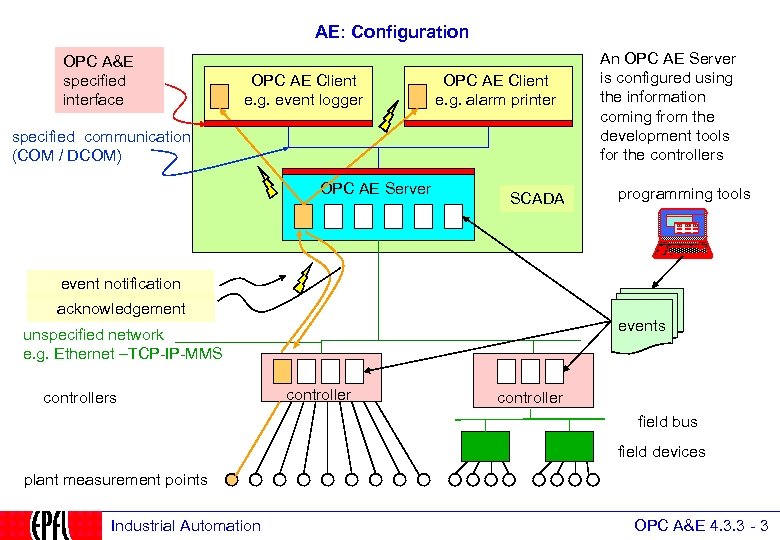 AE: Configuration OPC A&E specified interface OPC AE Client e. g. event logger OPC AE Client e. g. alarm printer specified communication (COM / DCOM) OPC AE Server SCADA An OPC AE Server is configured using the information coming from the development tools for the controllers programming tools event notification acknowledgement events unspecified network e. g. Ethernet –TCP-IP-MMS controllers controller field bus field devices plant measurement points Industrial Automation OPC A&E 4. 3. 3 - 3
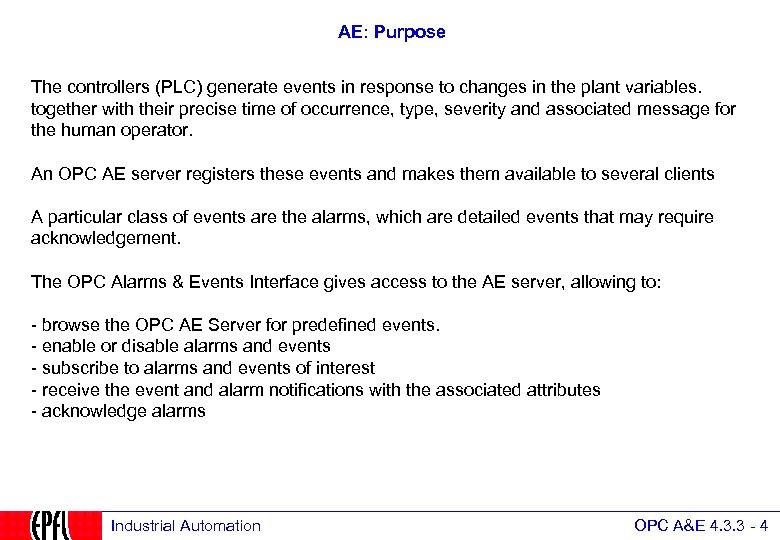 AE: Purpose The controllers (PLC) generate events in response to changes in the plant variables. together with their precise time of occurrence, type, severity and associated message for the human operator. An OPC AE server registers these events and makes them available to several clients A particular class of events are the alarms, which are detailed events that may require acknowledgement. The OPC Alarms & Events Interface gives access to the AE server, allowing to: - browse the OPC AE Server for predefined events. - enable or disable alarms and events - subscribe to alarms and events of interest - receive the event and alarm notifications with the associated attributes - acknowledge alarms Industrial Automation OPC A&E 4. 3. 3 - 4
 AE: Definitions An event is a general change of state that is relevant to the OPC server. An event signal a change: 1) in the field device ("production started") 2) in the OPC server ("alarm acknowledged") 3) in the application ("operator action") An alarm is a state of the process that requires attention and is relevant to the OPC server. An alarm is represented by an alarm condition, which is a state machine indicating if the alarm has been enabled, triggered or acknowledged. An alarm rises several events. An event or an alarm does not transmit process values, but a boolean information indicating a change of state, its originator, the time of its occurrence and a message intended for a human operator. Alarms and events may not get lost (contrarily to OPC DA, which does not guarantee completeness) Alarms and event are precisely time-stamped by their source, (contrarily to process variables, which are time-stamped by the receiving OPC server). Industrial Automation OPC A&E 4. 3. 3 - 5
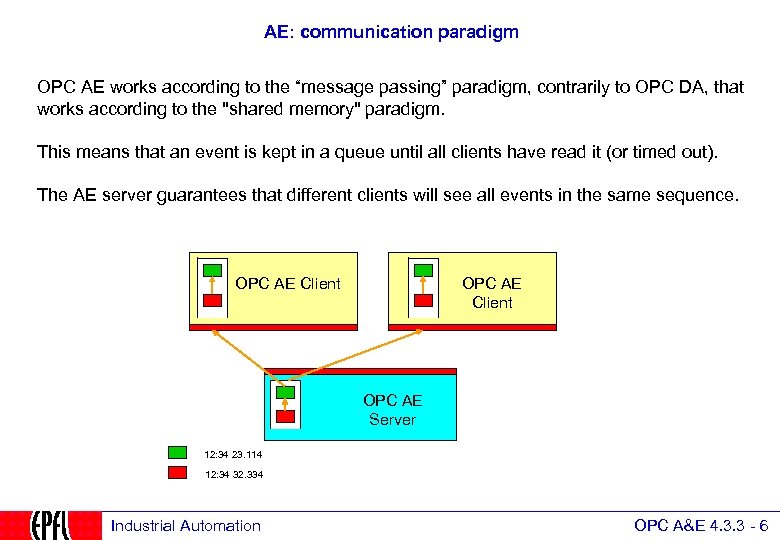 AE: communication paradigm OPC AE works according to the “message passing” paradigm, contrarily to OPC DA, that works according to the "shared memory" paradigm. This means that an event is kept in a queue until all clients have read it (or timed out). The AE server guarantees that different clients will see all events in the same sequence. OPC AE Client OPC AE Server 12: 34 23. 114 12: 34 32. 334 Industrial Automation OPC A&E 4. 3. 3 - 6
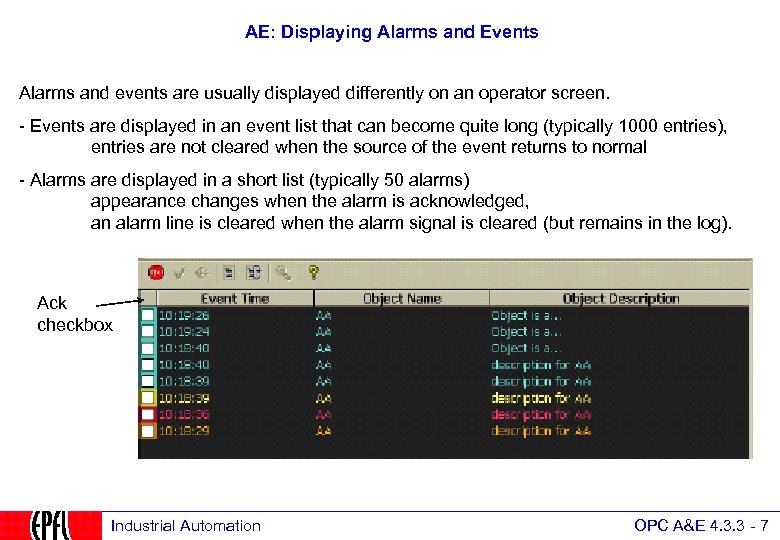 AE: Displaying Alarms and Events Alarms and events are usually displayed differently on an operator screen. - Events are displayed in an event list that can become quite long (typically 1000 entries), entries are not cleared when the source of the event returns to normal - Alarms are displayed in a short list (typically 50 alarms) appearance changes when the alarm is acknowledged, an alarm line is cleared when the alarm signal is cleared (but remains in the log). Ack checkbox Industrial Automation OPC A&E 4. 3. 3 - 7
 AE: Events OPC Common Overview: usage and specifications OPC as an integration tool Clients and Servers: configuration OPC Technology, client and custom interface OPC Data Access Overview: browsing the server Objects, types and properties Communication model Simple Programming Example Standard and components OPC Alarms and Events Specification Overview: definitions and objects Events Alarm Conditions Automation Interface OPC Historical Data Specification Overview Industrial Automation OPC A&E 4. 3. 3 - 8
 AE: Events kinds OPC AE defines three kinds of events: 1. simple: process control system related events (change of a boolean variable) 2. condition-related: notifies a change of an alarm condition (CLEARED, ACKNOWLEDGED), (see later) 3. tracking-related: origin outside of the process (e. g. operator intervention) Industrial Automation OPC A&E 4. 3. 3 - 9
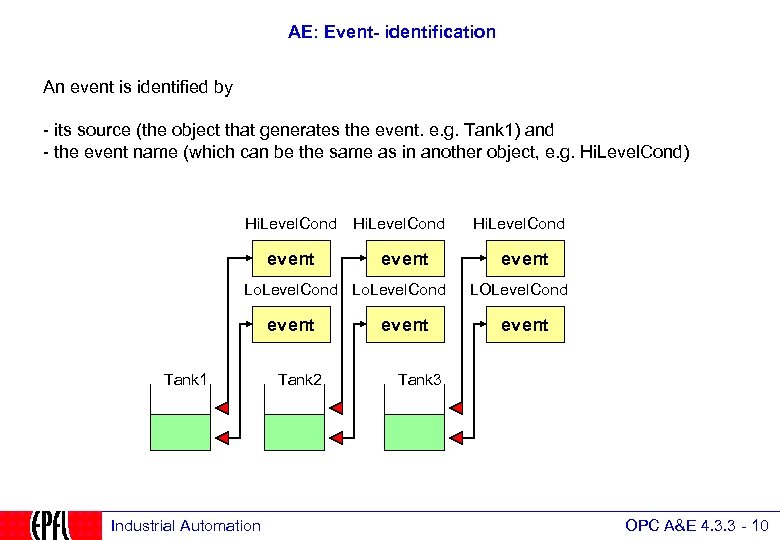 AE: Event- identification An event is identified by - its source (the object that generates the event. e. g. Tank 1) and - the event name (which can be the same as in another object, e. g. Hi. Level. Cond) Hi. Level. Cond event Lo. Level. Cond event Tank 1 Industrial Automation Tank 2 event Hi. Level. Cond event LOLevel. Cond event Tank 3 OPC A&E 4. 3. 3 - 10
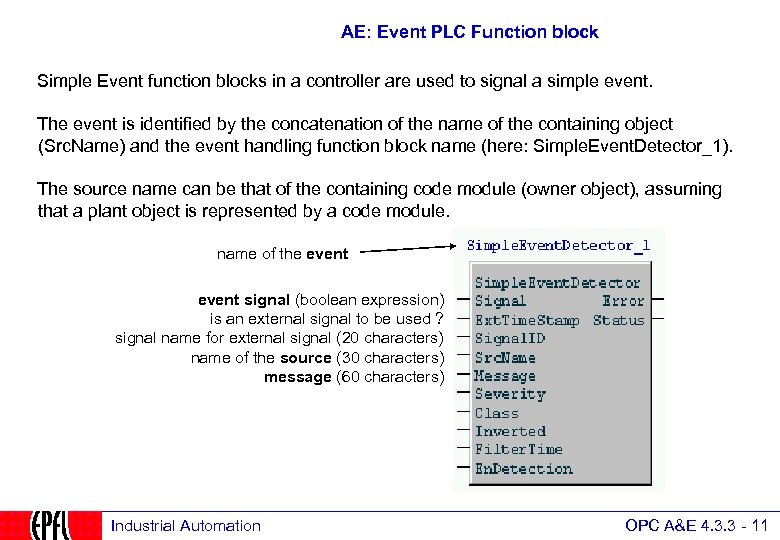 AE: Event PLC Function block Simple Event function blocks in a controller are used to signal a simple event. The event is identified by the concatenation of the name of the containing object (Src. Name) and the event handling function block name (here: Simple. Event. Detector_1). The source name can be that of the containing code module (owner object), assuming that a plant object is represented by a code module. name of the event signal (boolean expression) is an external signal to be used ? signal name for external signal (20 characters) name of the source (30 characters) message (60 characters) Industrial Automation OPC A&E 4. 3. 3 - 11
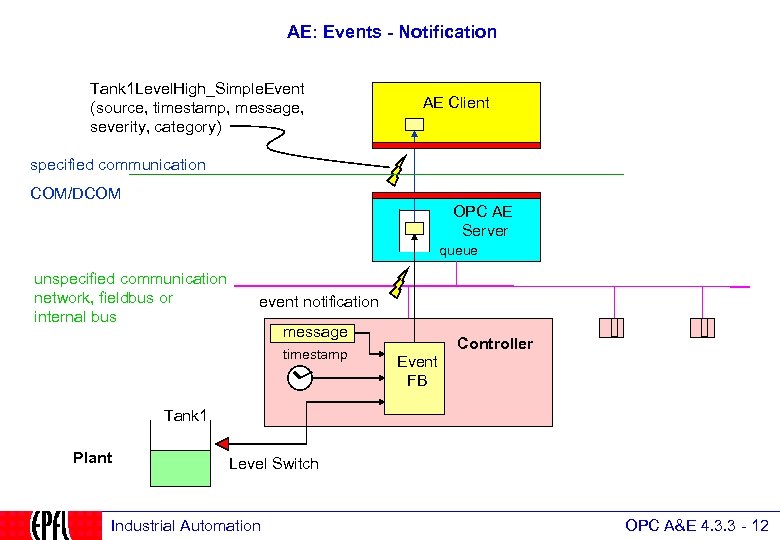 AE: Events - Notification Tank 1 Level. High_Simple. Event (source, timestamp, message, severity, category) AE Client specified communication COM/DCOM OPC AE Server queue unspecified communication network, fieldbus or internal bus event notification message timestamp Controller Event FB Tank 1 Plant Level Switch Industrial Automation OPC A&E 4. 3. 3 - 12
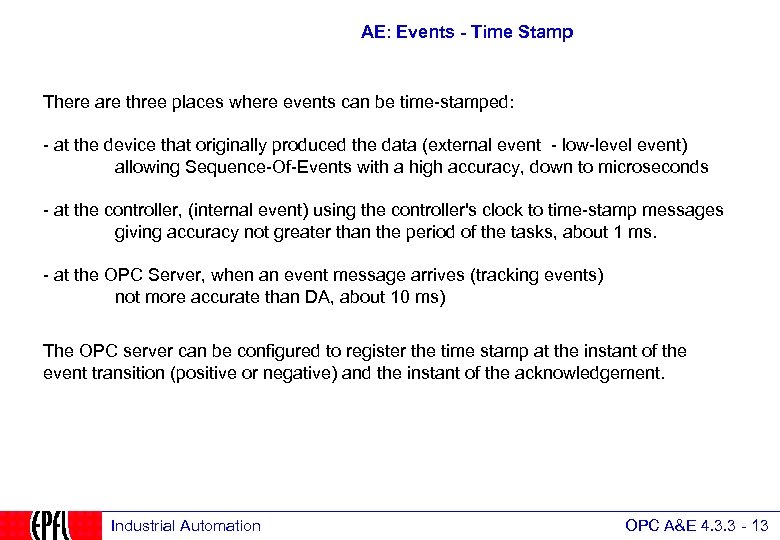 AE: Events - Time Stamp There are three places where events can be time-stamped: - at the device that originally produced the data (external event - low-level event) allowing Sequence-Of-Events with a high accuracy, down to microseconds - at the controller, (internal event) using the controller's clock to time-stamp messages giving accuracy not greater than the period of the tasks, about 1 ms. - at the OPC Server, when an event message arrives (tracking events) not more accurate than DA, about 10 ms) The OPC server can be configured to register the time stamp at the instant of the event transition (positive or negative) and the instant of the acknowledgement. Industrial Automation OPC A&E 4. 3. 3 - 13
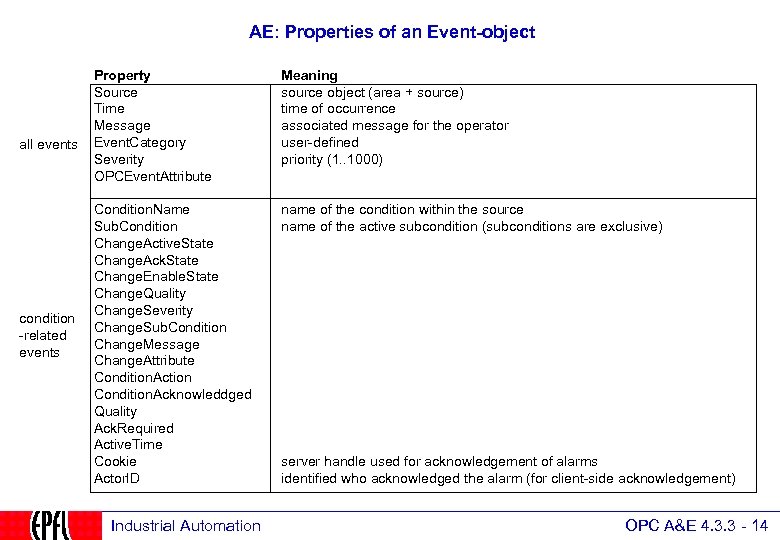 AE: Properties of an Event-object all events condition -related events Property Source Time Message Event. Category Severity OPCEvent. Attribute Meaning source object (area + source) time of occurrence associated message for the operator user-defined priority (1. . 1000) Condition. Name Sub. Condition Change. Active. State Change. Ack. State Change. Enable. State Change. Quality Change. Severity Change. Sub. Condition Change. Message Change. Attribute Condition. Action Condition. Acknowleddged Quality Ack. Required Active. Time Cookie Actor. ID name of the condition within the source name of the active subcondition (subconditions are exclusive) Industrial Automation server handle used for acknowledgement of alarms identified who acknowledged the alarm (for client-side acknowledgement) OPC A&E 4. 3. 3 - 14
 AE: Alarm conditions OPC Common Overview: usage and specifications OPC as an integration tool Clients and Servers: configuration OPC Technology, client and custom interface OPC Data Access Overview: browsing the server Objects, types and properties Communication model Simple Programming Example Standard and components OPC Alarms and Events Specification Overview: definitions and objects Events Alarm Conditions Automation Interface OPC Historical Data Specification Overview Industrial Automation OPC A&E 4. 3. 3 - 15
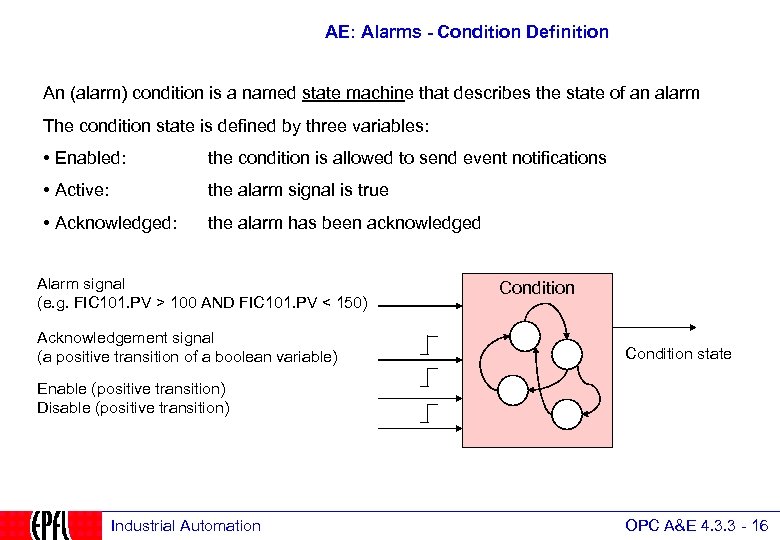 AE: Alarms - Condition Definition An (alarm) condition is a named state machine that describes the state of an alarm The condition state is defined by three variables: • Enabled: the condition is allowed to send event notifications • Active: the alarm signal is true • Acknowledged: the alarm has been acknowledged Alarm signal (e. g. FIC 101. PV > 100 AND FIC 101. PV < 150) Acknowledgement signal (a positive transition of a boolean variable) Condition state Enable (positive transition) Disable (positive transition) Industrial Automation OPC A&E 4. 3. 3 - 16
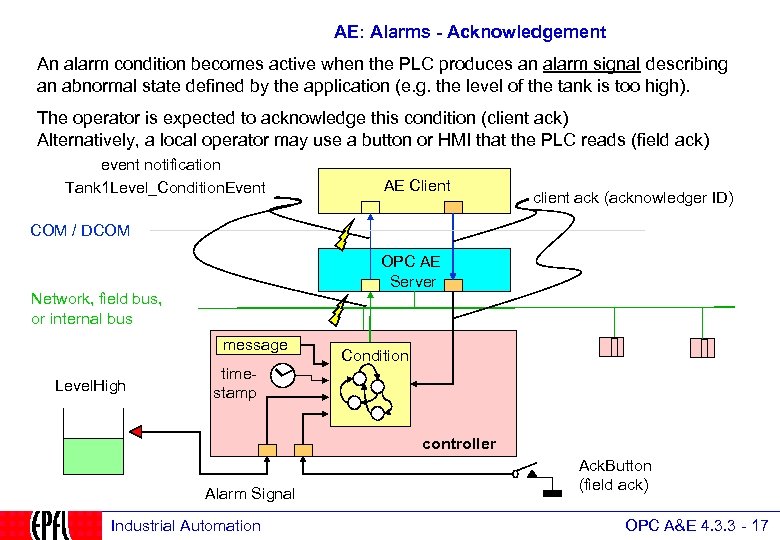 AE: Alarms - Acknowledgement An alarm condition becomes active when the PLC produces an alarm signal describing an abnormal state defined by the application (e. g. the level of the tank is too high). The operator is expected to acknowledge this condition (client ack) Alternatively, a local operator may use a button or HMI that the PLC reads (field ack) event notification Tank 1 Level_Condition. Event AE Client client ack (acknowledger ID) COM / DCOM OPC AE Server Network, field bus, or internal bus message Level. High Condition timestamp controller Alarm Signal Industrial Automation Ack. Button (field ack) OPC A&E 4. 3. 3 - 17
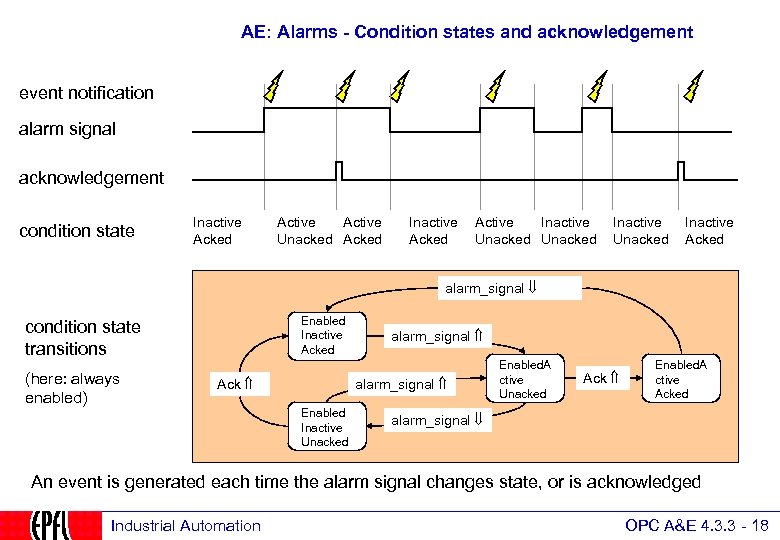 AE: Alarms - Condition states and acknowledgement event notification alarm signal acknowledgement condition state Inactive Acked Active Unacked Acked Inactive Acked Active Inactive Unacked Inactive Acked alarm_signal Enabled Inactive Acked condition state transitions (here: always enabled) Ack alarm_signal Enabled Inactive Unacked Enabled. A ctive Unacked Ack Enabled. A ctive Acked alarm_signal An event is generated each time the alarm signal changes state, or is acknowledged Industrial Automation OPC A&E 4. 3. 3 - 18
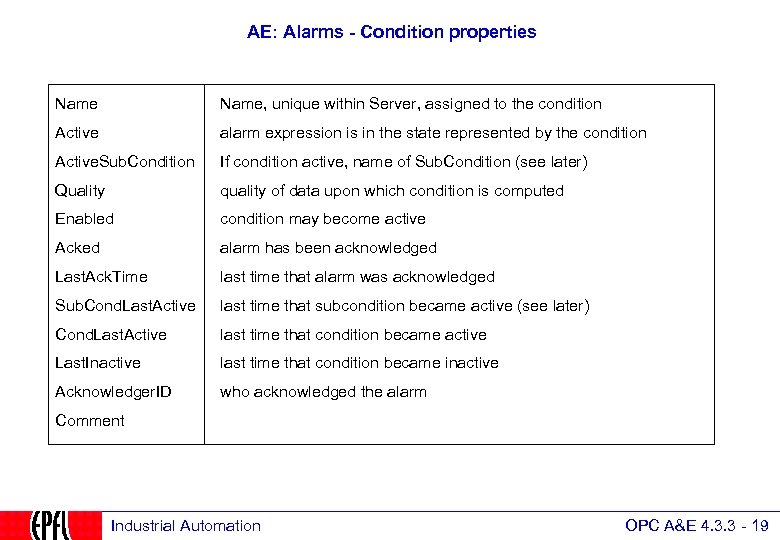 AE: Alarms - Condition properties Name, unique within Server, assigned to the condition Active alarm expression is in the state represented by the condition Active. Sub. Condition If condition active, name of Sub. Condition (see later) Quality quality of data upon which condition is computed Enabled condition may become active Acked alarm has been acknowledged Last. Ack. Time last time that alarm was acknowledged Sub. Cond. Last. Active last time that subcondition became active (see later) Cond. Last. Active last time that condition became active Last. Inactive last time that condition became inactive Acknowledger. ID who acknowledged the alarm Comment Industrial Automation OPC A&E 4. 3. 3 - 19
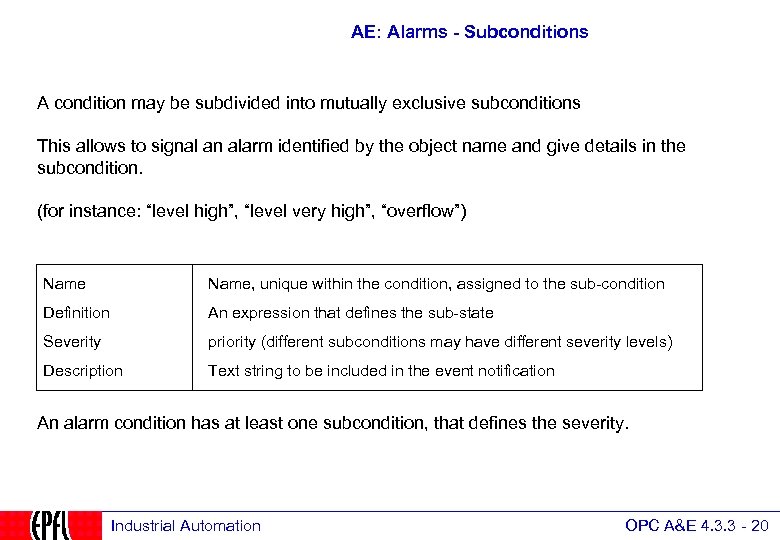 AE: Alarms - Subconditions A condition may be subdivided into mutually exclusive subconditions This allows to signal an alarm identified by the object name and give details in the subcondition. (for instance: “level high”, “level very high”, “overflow”) Name, unique within the condition, assigned to the sub-condition Definition An expression that defines the sub-state Severity priority (different subconditions may have different severity levels) Description Text string to be included in the event notification An alarm condition has at least one subcondition, that defines the severity. Industrial Automation OPC A&E 4. 3. 3 - 20
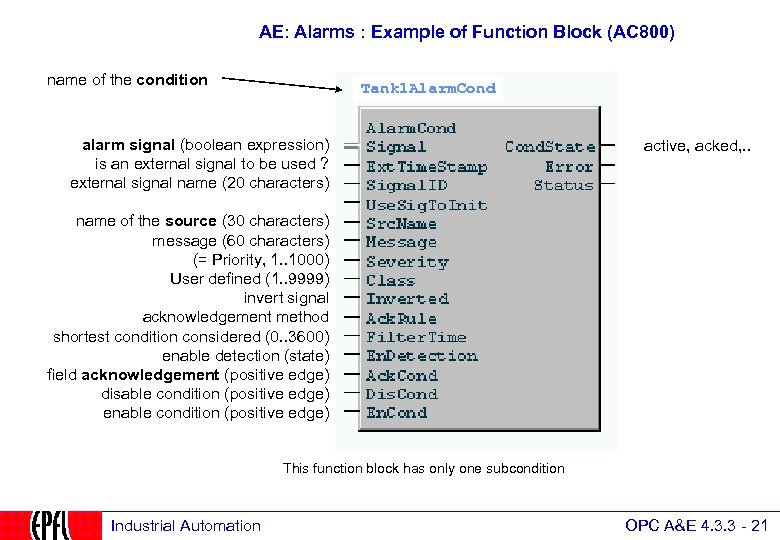 AE: Alarms : Example of Function Block (AC 800) name of the condition Tank 1 Alarm. Cond alarm signal (boolean expression) is an external signal to be used ? external signal name (20 characters) active, acked, . . name of the source (30 characters) message (60 characters) (= Priority, 1. . 1000) User defined (1. . 9999) invert signal acknowledgement method shortest condition considered (0. . 3600) enable detection (state) field acknowledgement (positive edge) disable condition (positive edge) enable condition (positive edge) This function block has only one subcondition Industrial Automation OPC A&E 4. 3. 3 - 21
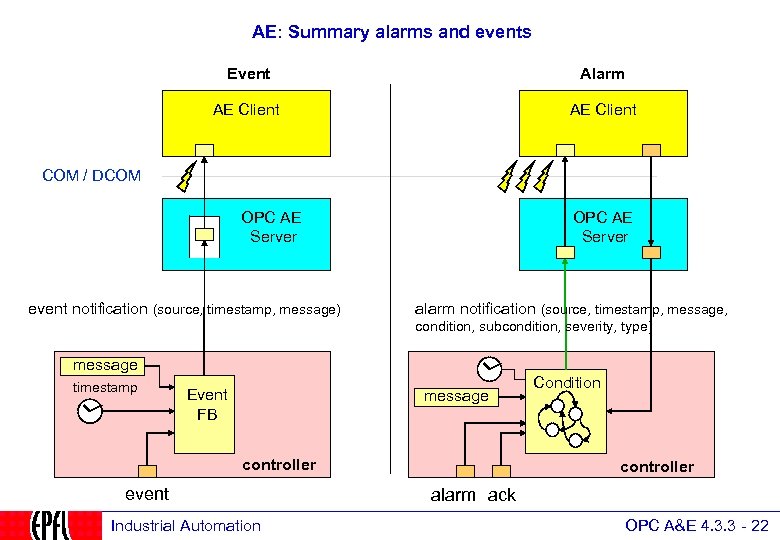 AE: Summary alarms and events Event Alarm AE Client COM / DCOM OPC AE Server event notification (source, timestamp, message) OPC AE Server alarm notification (source, timestamp, message, condition, subcondition, severity, type) message timestamp Event FB message controller event Industrial Automation Condition controller alarm ack OPC A&E 4. 3. 3 - 22
 AE: Automation Interface OPC Common Overview: usage and specifications OPC as an integration tool Clients and Servers: configuration OPC Technology, client and custom interface OPC Data Access Overview: browsing the server Objects, types and properties Communication model Simple Programming Example Standard and components OPC Alarms and Events Specification Overview: definitions and objects Events Alarm Conditions Automation Interface OPC Historical Data Specification Overview Industrial Automation OPC A&E 4. 3. 3 - 23
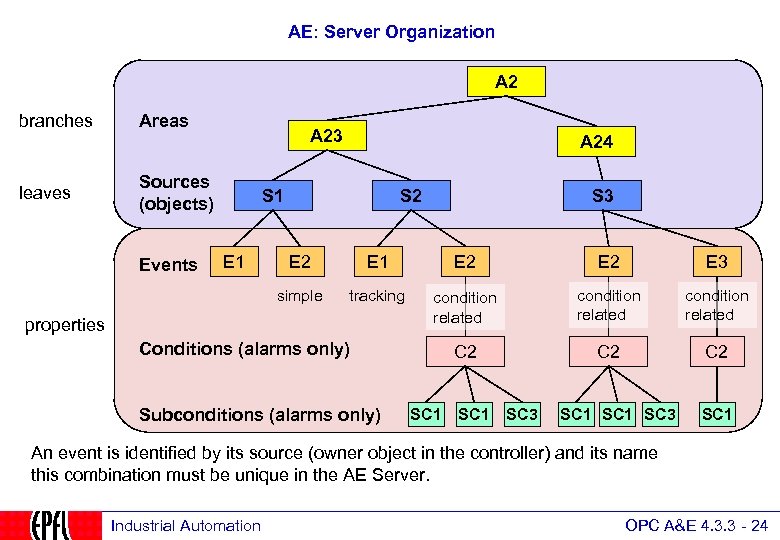 AE: Server Organization A 2 branches leaves Areas A 23 Sources (objects) A 24 S 1 S 3 E 2 E 1 E 2 E 3 simple Events E 1 S 2 tracking condition related C 2 C 2 properties Conditions (alarms only) Subconditions (alarms only) SC 1 SC 3 SC 1 An event is identified by its source (owner object in the controller) and its name this combination must be unique in the AE Server. Industrial Automation OPC A&E 4. 3. 3 - 24
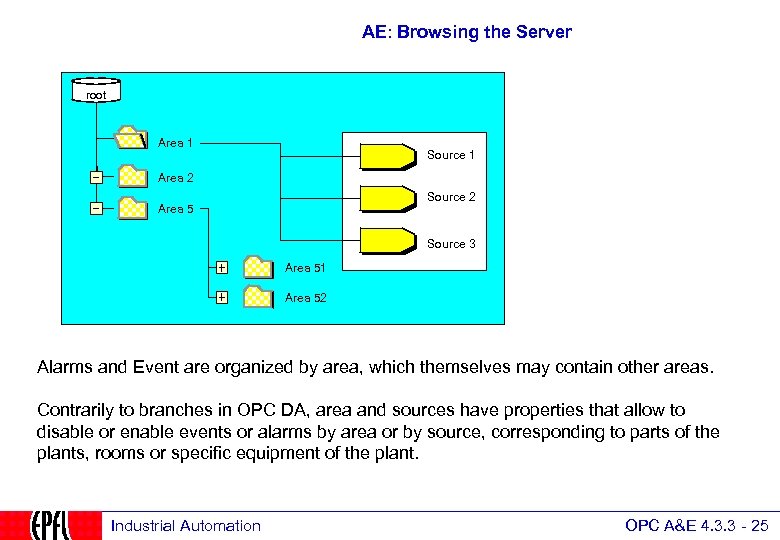 AE: Browsing the Server root Area 1 Source 1 Area 2 Source 2 Area 5 Source 3 Area 51 Area 52 Alarms and Event are organized by area, which themselves may contain other areas. Contrarily to branches in OPC DA, area and sources have properties that allow to disable or enable events or alarms by area or by source, corresponding to parts of the plants, rooms or specific equipment of the plant. Industrial Automation OPC A&E 4. 3. 3 - 25
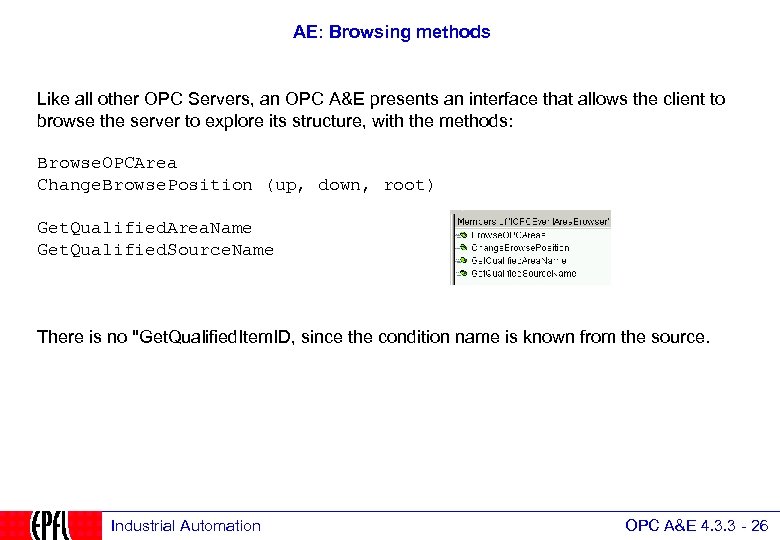 AE: Browsing methods Like all other OPC Servers, an OPC A&E presents an interface that allows the client to browse the server to explore its structure, with the methods: Browse. OPCArea Change. Browse. Position (up, down, root) Get. Qualified. Area. Name Get. Qualified. Source. Name There is no "Get. Qualified. Item. ID, since the condition name is known from the source. Industrial Automation OPC A&E 4. 3. 3 - 26
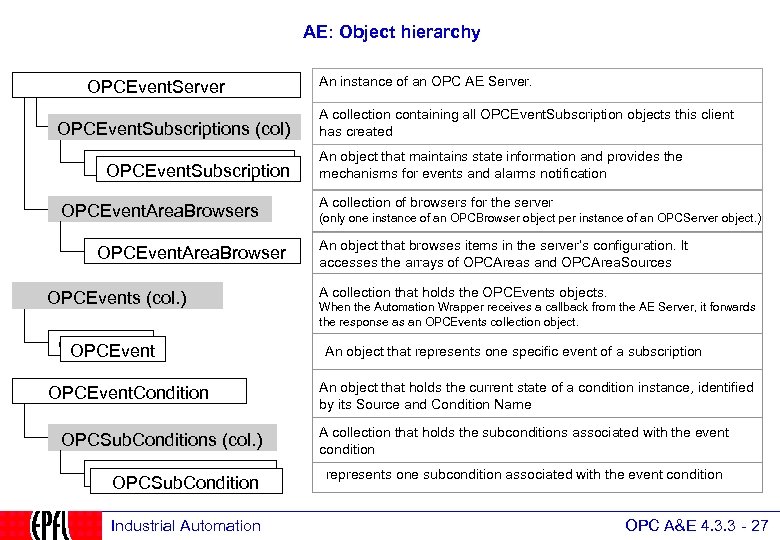 AE: Object hierarchy OPCEvent. Server OPCEvent. Subscriptions (col) OPCEvent. Subscription OPCEvent. Area. Browsers OPCEvent. Area. Browser OPCEvents (col. ) OPCEvent. Condition OPCSub. Conditions (col. ) OPCSub. Condition Industrial Automation An instance of an OPC AE Server. A collection containing all OPCEvent. Subscription objects this client has created An object that maintains state information and provides the mechanisms for events and alarms notification A collection of browsers for the server (only one instance of an OPCBrowser object per instance of an OPCServer object. ) An object that browses items in the server’s configuration. It accesses the arrays of OPCAreas and OPCArea. Sources A collection that holds the OPCEvents objects. When the Automation Wrapper receives a callback from the AE Server, it forwards the response as an OPCEvents collection object. An object that represents one specific event of a subscription An object that holds the current state of a condition instance, identified by its Source and Condition Name A collection that holds the subconditions associated with the event condition represents one subcondition associated with the event condition OPC A&E 4. 3. 3 - 27
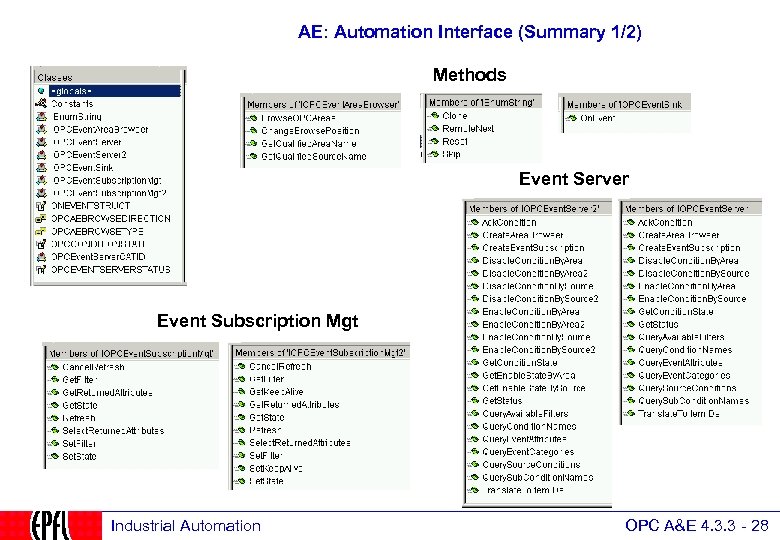 AE: Automation Interface (Summary 1/2) Methods Event Server Event Subscription Mgt Industrial Automation OPC A&E 4. 3. 3 - 28
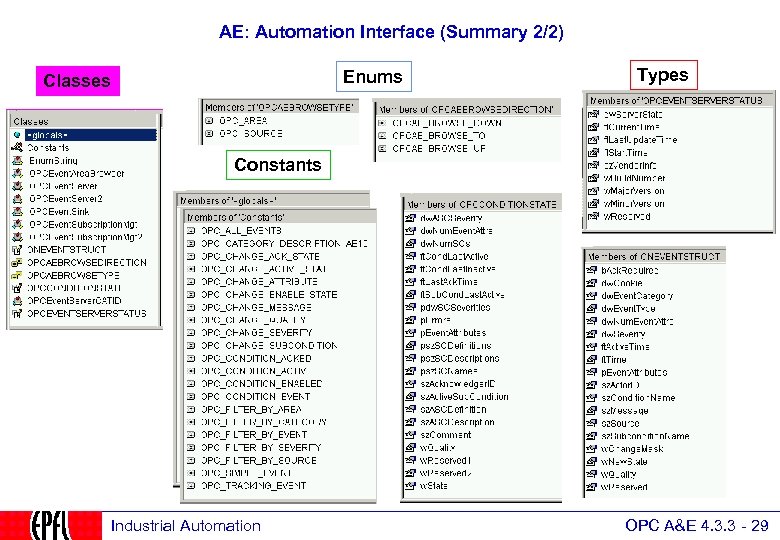 AE: Automation Interface (Summary 2/2) Enums Classes Types Constants Industrial Automation OPC A&E 4. 3. 3 - 29
 AE: To probe further…. OPC Foundation: Specifications http: //www. opcfoundation. org Software. Toolbox Examples in Visual Basic http: //www. softwaretoolbox. com/Tech_Support/Tech. Expertise. Center/OPC/opc. html The Code Project OPC and. NET http: //www. codeproject. com/useritems/opcdotnet. asp Matrikon Free client and server: http: //www. matrikon. com Win. Tech Toolkit for an OPC server http: //www. win-tech. com/html/opcstk. htm New. Age Automation Toolkit for an OPC server http: //www. newageautomation. com Industrial Automation OPC A&E 4. 3. 3 - 30