 Скачать презентацию ID 023 C Model-Based Control Design with a
2ec757ae196ef0e695c104707af92fb4.ppt
- Количество слайдов: 47



ID 023 C: Model-Based Control Design with a Systematic Perspective Simu. Quest Inc. Raymond Turin Co-Founder 12 October 2010 Version: 1. 1
Dr. Raymond Turin n Co-Founder, Chief Technical Officer l Responsible for managing control system and plant model development l Lead Developer of Enginuity, an engine modeling tool package that supports virtual control system development. PREVIOUS EXPERIENCE: n Many years of industrial experience in model-based engine control design and plant modeling n Staff Research Engineer, General Motors Research and Development n Ph. D. in Mech. Eng. from ETH Zurich, Switzerland 2
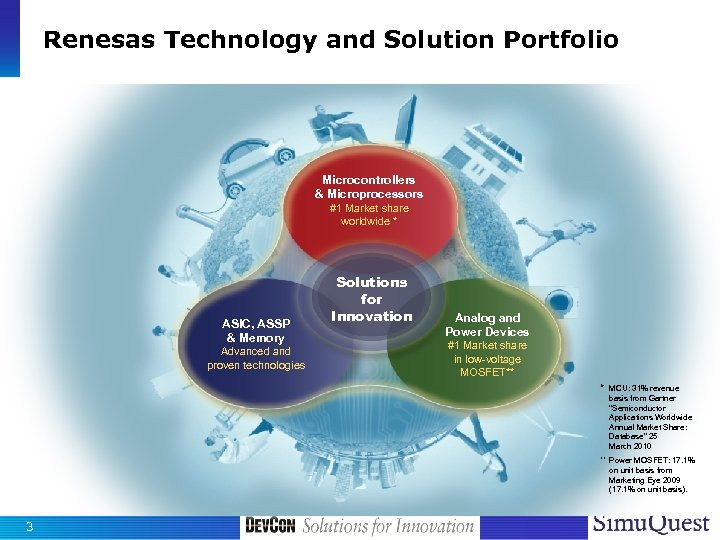
Renesas Technology and Solution Portfolio Microcontrollers & Microprocessors #1 Market share worldwide * ASIC, ASSP & Memory Advanced and proven technologies Solutions for Innovation Analog and Power Devices #1 Market share in low-voltage MOSFET** * MCU: 31% revenue basis from Gartner "Semiconductor Applications Worldwide Annual Market Share: Database" 25 March 2010 ** Power MOSFET: 17. 1% on unit basis from Marketing Eye 2009 (17. 1% on unit basis). 3
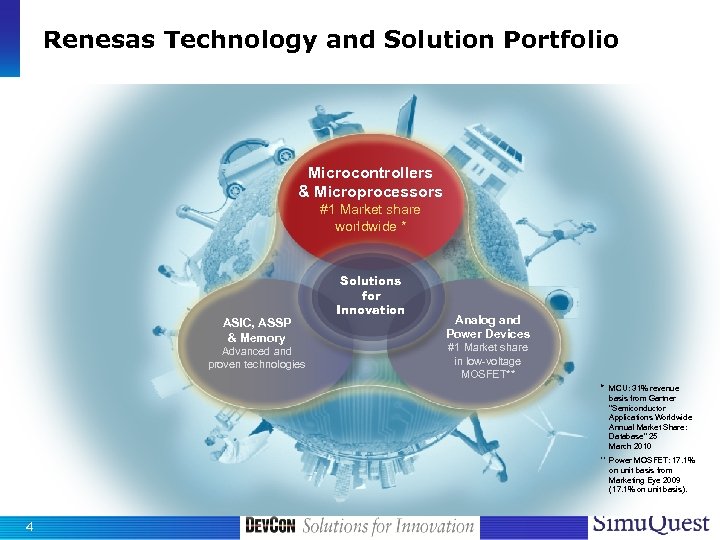
Renesas Technology and Solution Portfolio Microcontrollers & Microprocessors #1 Market share worldwide * ASIC, ASSP & Memory Advanced and proven technologies Solutions for Innovation Analog and Power Devices #1 Market share in low-voltage MOSFET** * MCU: 31% revenue basis from Gartner "Semiconductor Applications Worldwide Annual Market Share: Database" 25 March 2010 ** Power MOSFET: 17. 1% on unit basis from Marketing Eye 2009 (17. 1% on unit basis). 4
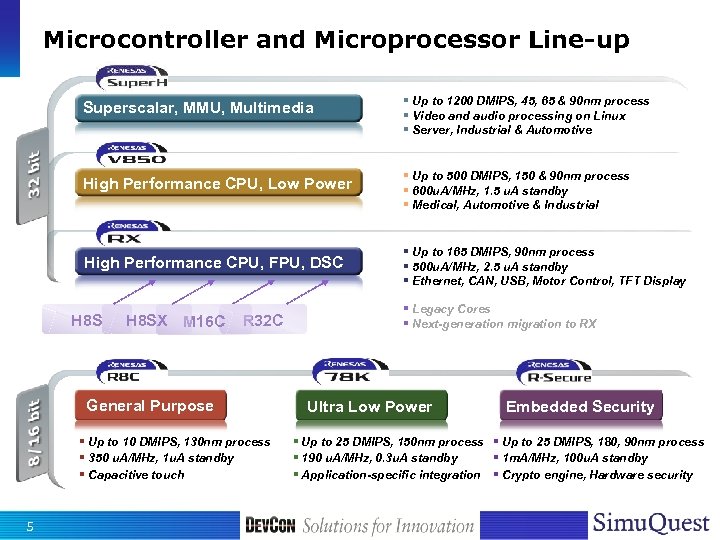
Microcontroller and Microprocessor Line-up Superscalar, MMU, Multimedia § Up to 1200 DMIPS, 45, 65 & 90 nm process § Video and audio processing on Linux § Server, Industrial & Automotive High Performance CPU, Low Power § Up to 500 DMIPS, 150 & 90 nm process § 600 u. A/MHz, 1. 5 u. A standby § Medical, Automotive & Industrial High Performance CPU, FPU, DSC H 8 SX M 16 C R 32 C General Purpose § Up to 10 DMIPS, 130 nm process § 350 u. A/MHz, 1 u. A standby § Capacitive touch 5 § Up to 165 DMIPS, 90 nm process § 500 u. A/MHz, 2. 5 u. A standby § Ethernet, CAN, USB, Motor Control, TFT Display § Legacy Cores § Next-generation migration to RX Ultra Low Power Embedded Security § Up to 25 DMIPS, 150 nm process § Up to 25 DMIPS, 180, 90 nm process § 190 u. A/MHz, 0. 3 u. A standby § 1 m. A/MHz, 100 u. A standby § Application-specific integration § Crypto engine, Hardware security
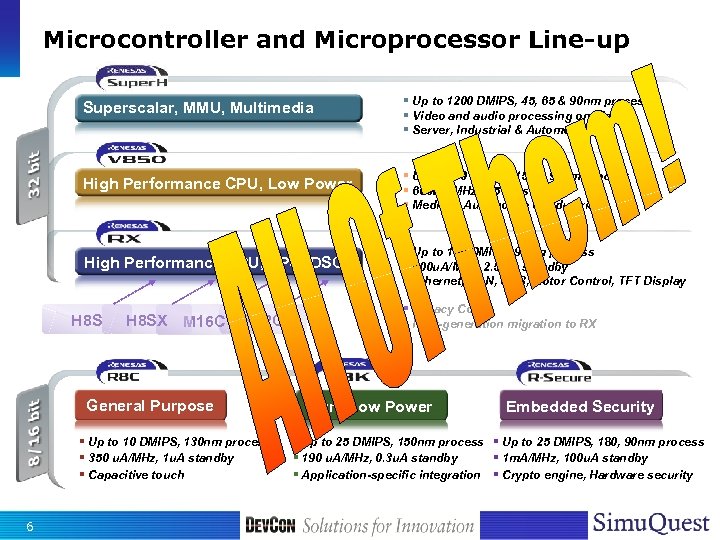
Microcontroller and Microprocessor Line-up Superscalar, MMU, Multimedia § Up to 1200 DMIPS, 45, 65 & 90 nm process § Video and audio processing on Linux § Server, Industrial & Automotive High Performance CPU, Low Power § Up to 500 DMIPS, 150 & 90 nm process § 600 u. A/MHz, 1. 5 u. A standby § Medical, Automotive & Industrial High Performance CPU, FPU, DSC H 8 SX M 16 C R 32 C General Purpose § Up to 10 DMIPS, 130 nm process § 350 u. A/MHz, 1 u. A standby § Capacitive touch 6 § Up to 165 DMIPS, 90 nm process § 500 u. A/MHz, 2. 5 u. A standby § Ethernet, CAN, USB, Motor Control, TFT Display § Legacy Cores § Next-generation migration to RX Ultra Low Power Embedded Security § Up to 25 DMIPS, 150 nm process § Up to 25 DMIPS, 180, 90 nm process § 190 u. A/MHz, 0. 3 u. A standby § 1 m. A/MHz, 100 u. A standby § Application-specific integration § Crypto engine, Hardware security
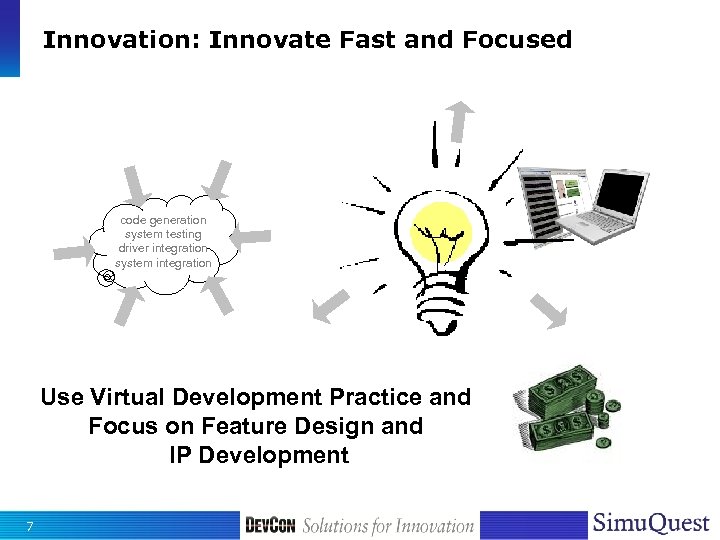
Innovation: Innovate Fast and Focused code generation system testing driver integration system integration Use Virtual Development Practice and Focus on Feature Design and IP Development 7
Agenda n Plant Modeling n Controller Development n Controller Validation n HIL Testing n Q&A 8
Key Takeaways By the end of this session you will: n Understand the idea of model-based development n Understand the importance of plant models for virtual design and validation n Understand the power of interactive model-based design and validation n Know a lot more about engines and engine control 9
Terminology n Plant: A dynamic system including sensors and actuators that is being controlled using a microcontroller n Controller: An algorithm that is implemented on a microcontroller and forces the plant to behave in a predefined way n HIL: Hardware-In-the-Loop n VPM: Virtual Processor Model 10
The Big Picture 11
Why Model-Based n Reuse recurring and tested elementary features l Summer, adder, divider, multiplier, integrator, etc. n Embed features within graphical modeling environment l Use feature model blocks l Design and link complex features graphically l Avoid fat-fingering n Test feature design as you go l Perform functional feature tests without writing any code l Validate integrated system before HW is available n Rapid deployment of fully integrated system l Embed driver code in the form of model blocks l Use automated code generation l Use HIL and VPM for system testing 12
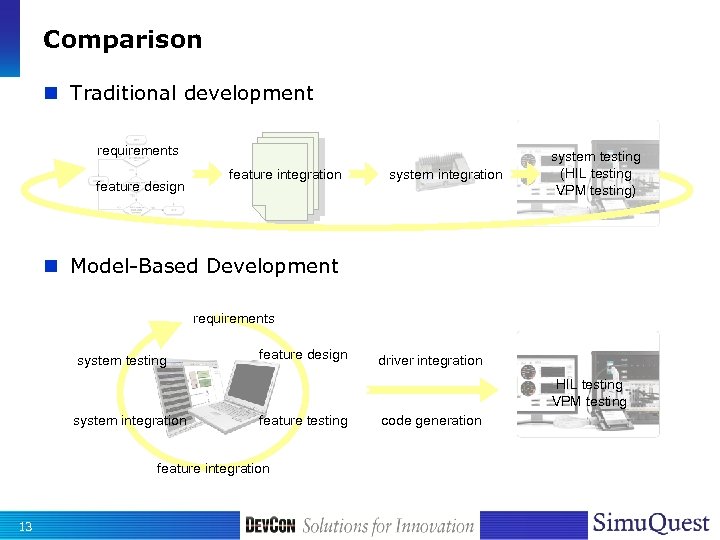
Comparison n Traditional development requirements feature design feature integration system testing (HIL testing VPM testing) n Model-Based Development requirements system testing feature design driver integration HIL testing VPM testing system integration feature testing feature integration 13 code generation
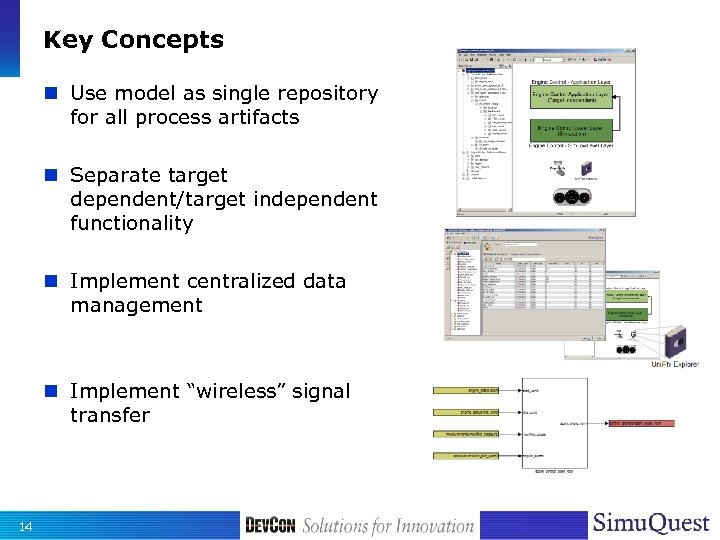
Key Concepts n Use model as single repository for all process artifacts n Separate target dependent/target independent functionality n Implement centralized data management n Implement “wireless” signal transfer 14
Plant Modeling 15
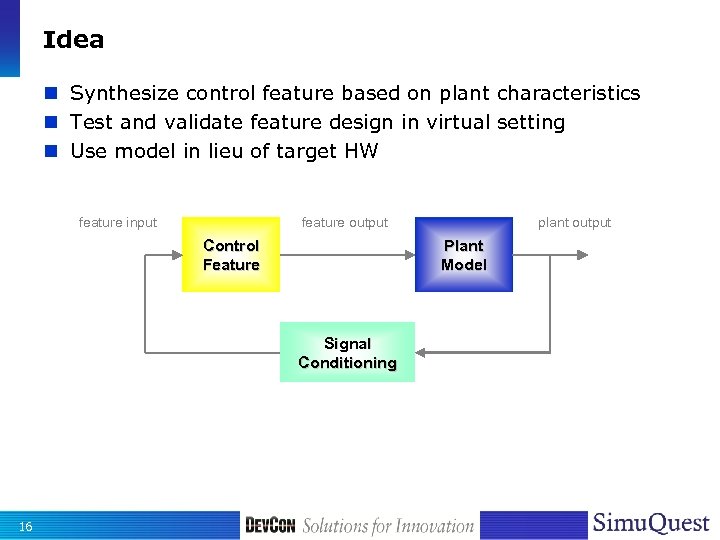
Idea n Synthesize control feature based on plant characteristics n Test and validate feature design in virtual setting n Use model in lieu of target HW feature input feature output Control Feature Plant Model Signal Conditioning 16 plant output
Plant Model Overview n Control Design Model l l Support for model-based controller synthesis Simple model described by ordinary (linear) DE Appears in mathematical description of controller equation Example, internal model design, LQ design, Hinf-design, Kalman-Filter n Simulation Model l Model to support HW design or to validate control design l Distributed parameters, partial DE – support HW design (engine, machinery, etc. ) – Examples: – computational flow dynamics models – finite element models l Zero-dimensional, ordinary DE – Control system validation and hardware in the loop (HIL) validation – physics-based, first principles, physical laws – mean-Value, first principles, look-up – Real-time capable 17
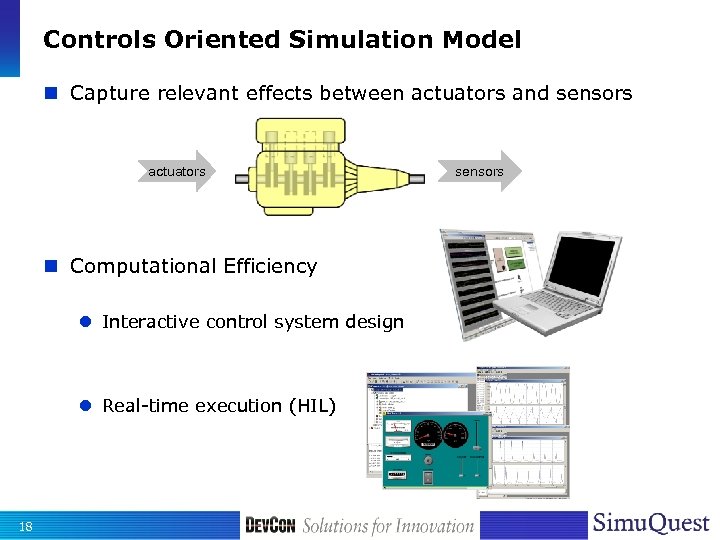
Controls Oriented Simulation Model n Capture relevant effects between actuators and sensors actuators n Computational Efficiency l Interactive control system design l Real-time execution (HIL) 18 sensors
Plant Model Characterization n Physics-based l Based on first principles and physical laws (kinematic, dynamic, thermodynamic, and geometric relationships) l Mass, momentum and energy storage (Newton, Lagrange, etc. ) l Gas laws l Fick’s laws l … n Regression-based l l l 19 Based on empirical data Step-response/Frequency response Non-linear approximation Neural network Look-up (mean-value)
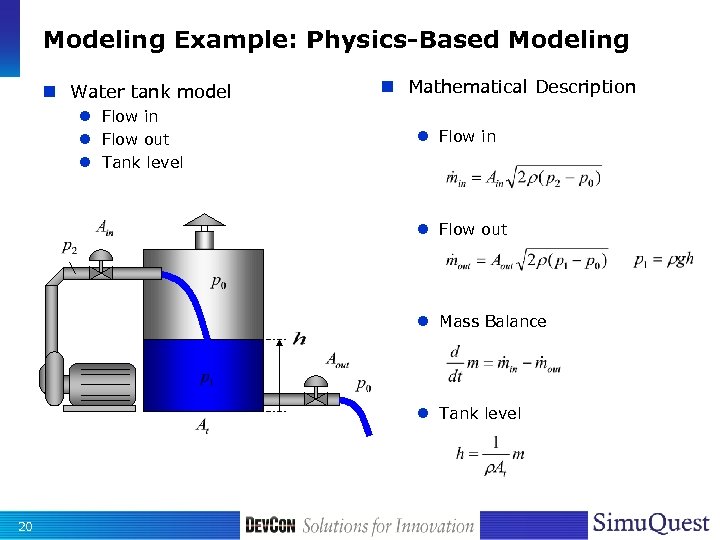
Modeling Example: Physics-Based Modeling n Water tank model l Flow in l Flow out l Tank level n Mathematical Description l Flow in l Flow out l Mass Balance l Tank level 20
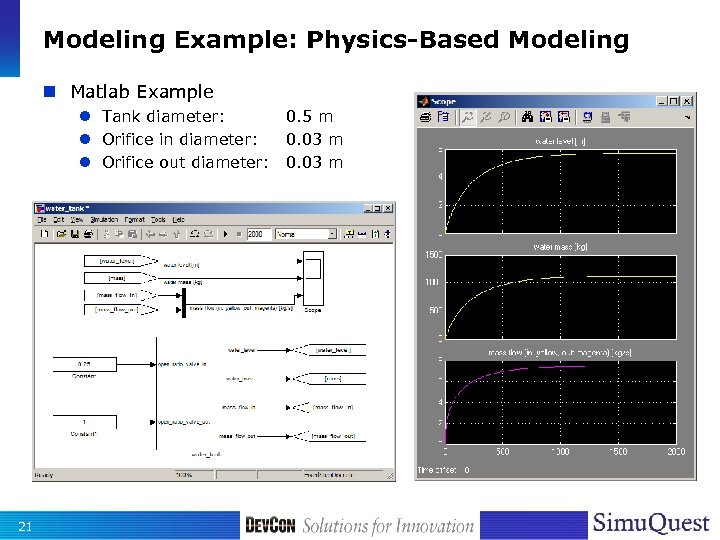
Modeling Example: Physics-Based Modeling n Matlab Example l Tank diameter: l Orifice in diameter: l Orifice out diameter: 21 0. 5 m 0. 03 m
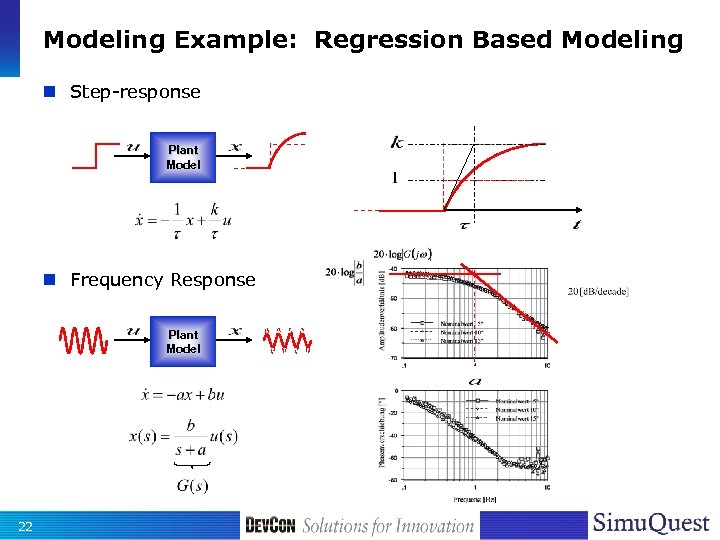
Modeling Example: Regression Based Modeling n Step-response Plant Model n Frequency Response Plant Model 22
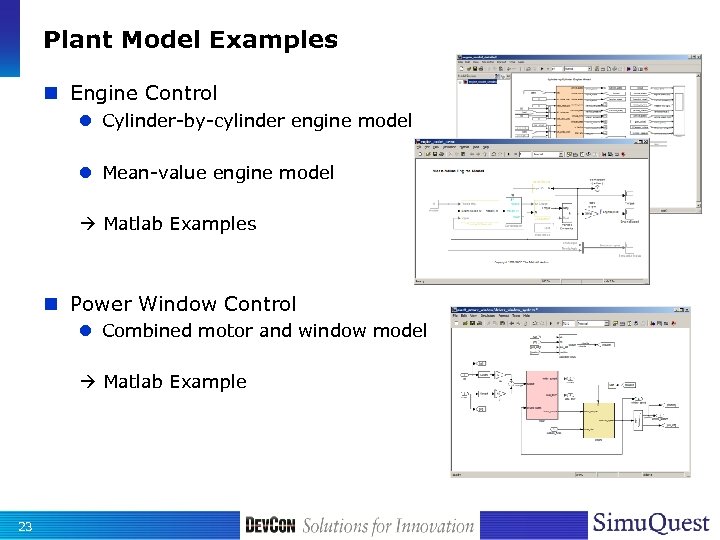
Plant Model Examples n Engine Control l Cylinder-by-cylinder engine model l Mean-value engine model Matlab Examples n Power Window Control l Combined motor and window model Matlab Example 23
Controller Design and Implementation 24
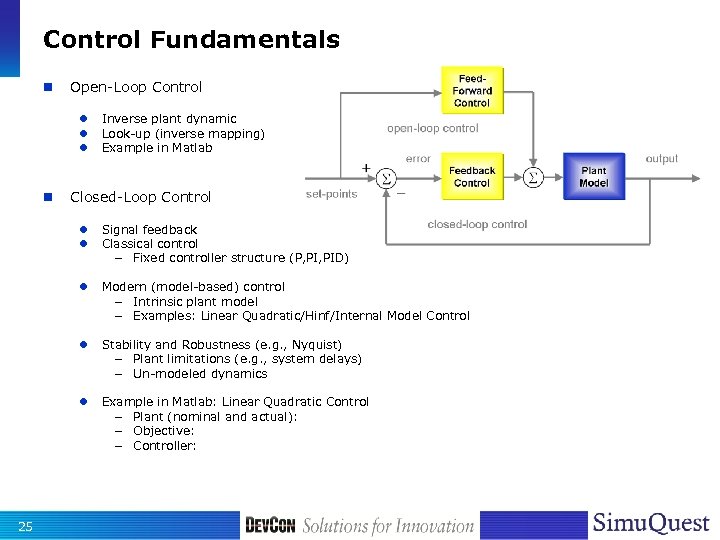
Control Fundamentals n Open-Loop Control l n Inverse plant dynamic Look-up (inverse mapping) Example in Matlab Closed-Loop Control l Modern (model-based) control – Intrinsic plant model – Examples: Linear Quadratic/Hinf/Internal Model Control l Stability and Robustness (e. g. , Nyquist) – Plant limitations (e. g. , system delays) – Un-modeled dynamics l 25 Signal feedback Classical control – Fixed controller structure (P, PID) Example in Matlab: Linear Quadratic Control – Plant (nominal and actual): – Objective: – Controller:
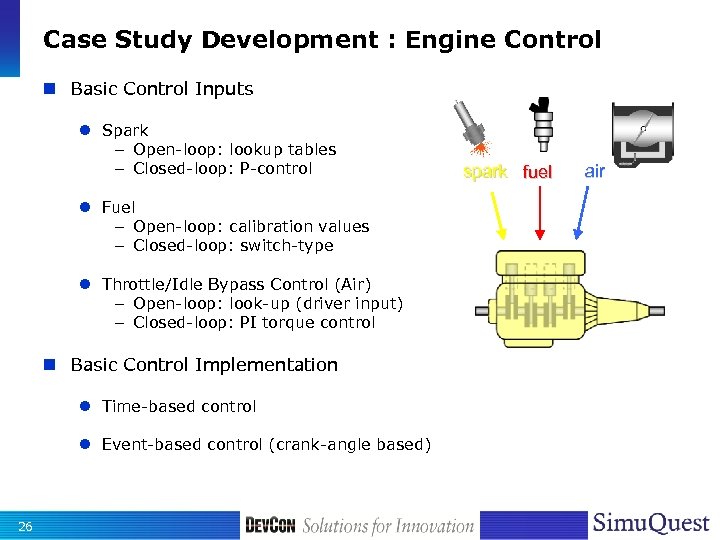
Case Study Development : Engine Control n Basic Control Inputs l Spark – Open-loop: lookup tables – Closed-loop: P-control l Fuel – Open-loop: calibration values – Closed-loop: switch-type l Throttle/Idle Bypass Control (Air) – Open-loop: look-up (driver input) – Closed-loop: PI torque control n Basic Control Implementation l Time-based control l Event-based control (crank-angle based) 26 spark fuel air
Engine Control: Open-Loop Control n Air Control l Open air valves to satisfy torque demand n Fuel metering control l Maintain stoichiometric A/F-ratio (emissions) – Air-charge estimation – Conversion into fuel pulse – Correction during special operating conditions n Spark control l Maximize torque (Base spark at MBT) l Conditional retard/advance (e. g. idle speed, knock control, etc. ) 27
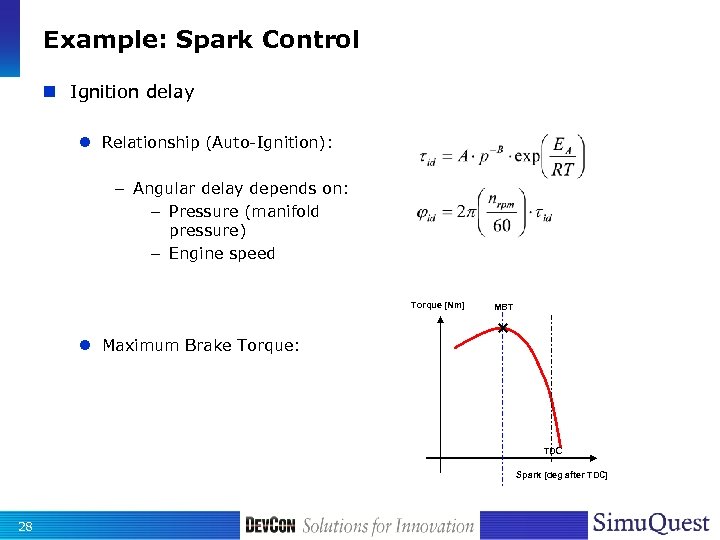
Example: Spark Control n Ignition delay l Relationship (Auto-Ignition): – Angular delay depends on: – Pressure (manifold pressure) – Engine speed Torque [Nm] MBT l Maximum Brake Torque: TDC Spark [deg after TDC] 28
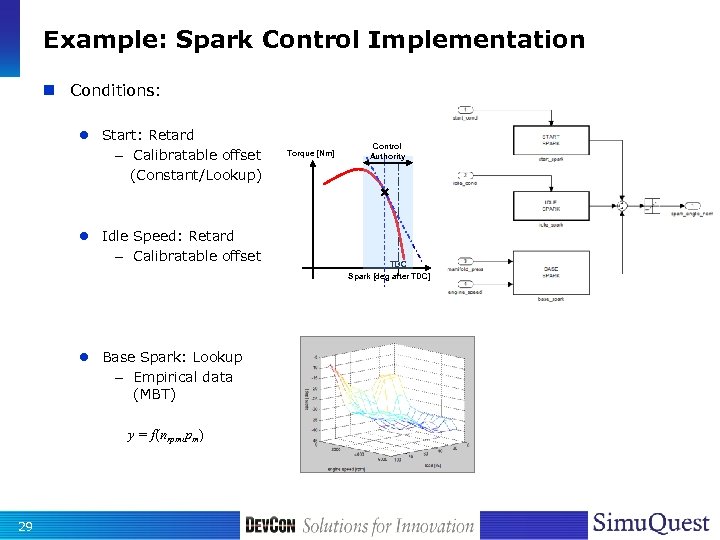
Example: Spark Control Implementation n Conditions: l Start: Retard – Calibratable offset (Constant/Lookup) l Idle Speed: Retard – Calibratable offset Torque [Nm] Control Authority TDC Spark [deg after TDC] l Base Spark: Lookup – Empirical data (MBT) y = f(nrpm, pm) 29
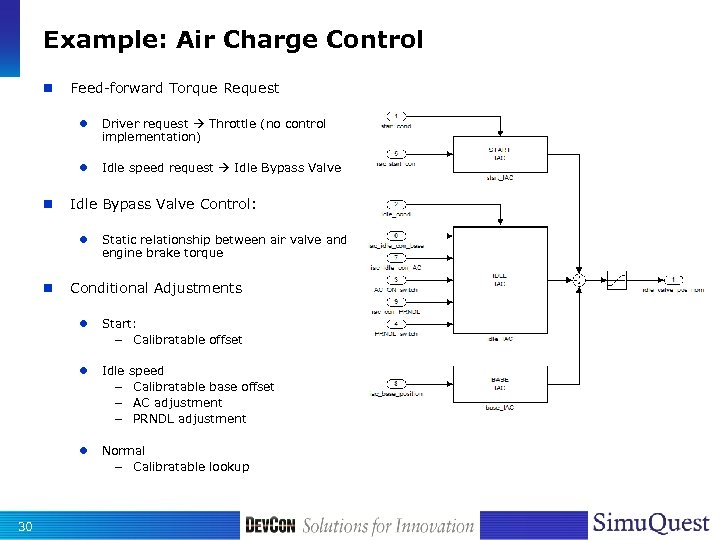
Example: Air Charge Control n Feed-forward Torque Request l l n Driver request Throttle (no control implementation) Idle speed request Idle Bypass Valve Control: l n Static relationship between air valve and engine brake torque Conditional Adjustments l l Idle – – – l 30 Start: – Calibratable offset Normal – Calibratable lookup speed Calibratable base offset AC adjustment PRNDL adjustment
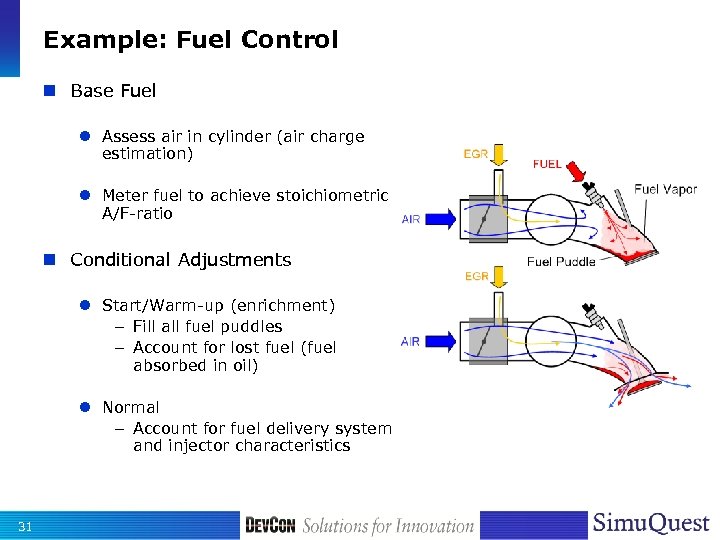
Example: Fuel Control n Base Fuel l Assess air in cylinder (air charge estimation) l Meter fuel to achieve stoichiometric A/F-ratio n Conditional Adjustments l Start/Warm-up (enrichment) – Fill all fuel puddles – Account for lost fuel (fuel absorbed in oil) l Normal – Account for fuel delivery system and injector characteristics 31
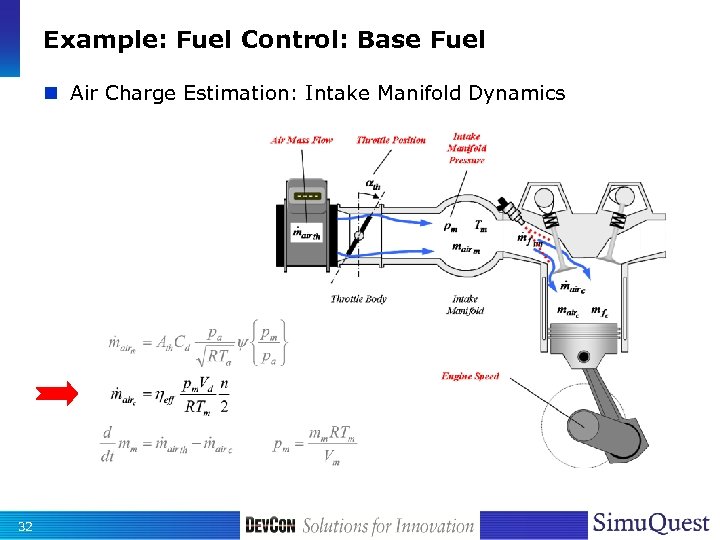
Example: Fuel Control: Base Fuel n Air Charge Estimation: Intake Manifold Dynamics 32
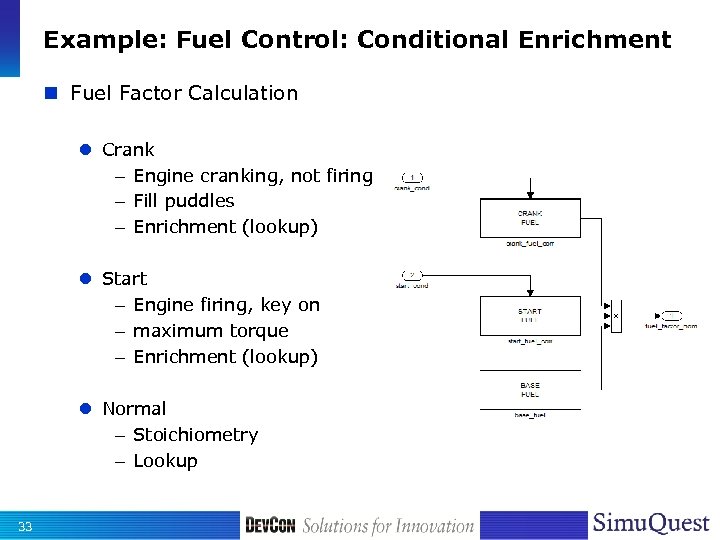
Example: Fuel Control: Conditional Enrichment n Fuel Factor Calculation l Crank – Engine cranking, not firing – Fill puddles – Enrichment (lookup) l Start – Engine firing, key on – maximum torque – Enrichment (lookup) l Normal – Stoichiometry – Lookup 33
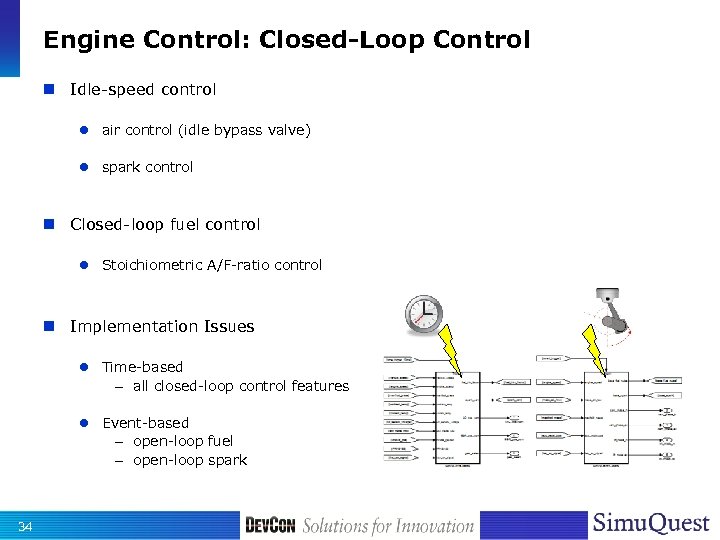
Engine Control: Closed-Loop Control n Idle-speed control l air control (idle bypass valve) l spark control n Closed-loop fuel control l Stoichiometric A/F-ratio control n Implementation Issues l Time-based – all closed-loop control features l Event-based – open-loop fuel – open-loop spark 34
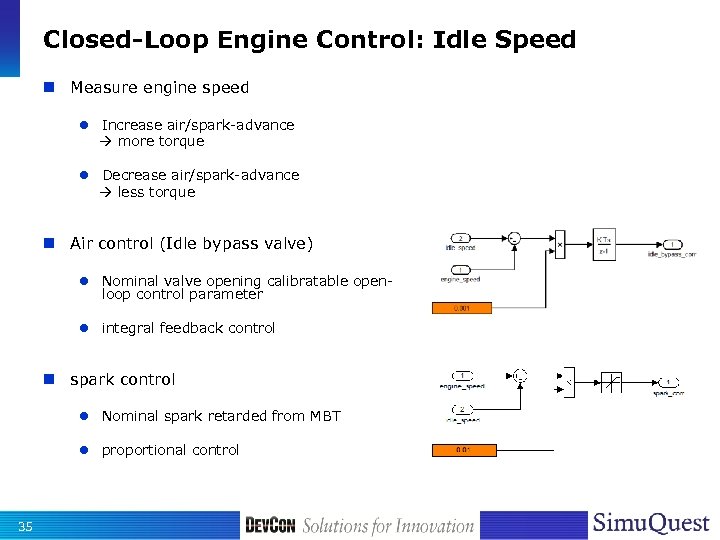
Closed-Loop Engine Control: Idle Speed n Measure engine speed l Increase air/spark-advance more torque l Decrease air/spark-advance less torque n Air control (Idle bypass valve) l Nominal valve opening calibratable openloop control parameter l integral feedback control n spark control l Nominal spark retarded from MBT l proportional control 35
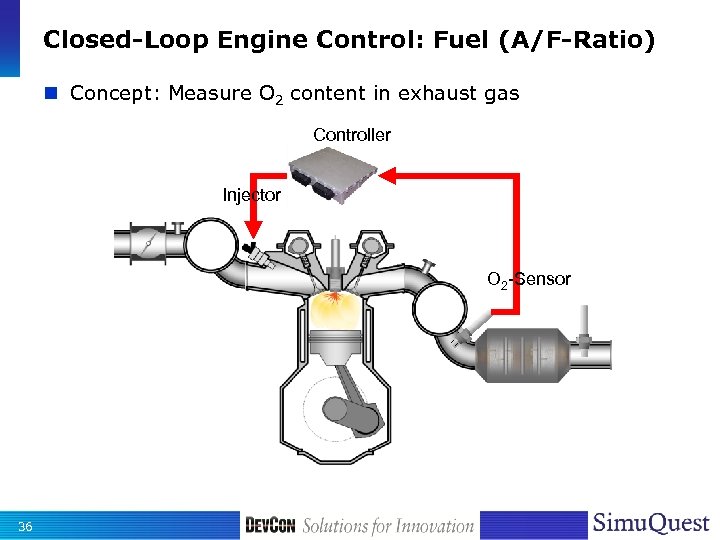
Closed-Loop Engine Control: Fuel (A/F-Ratio) n Concept: Measure O 2 content in exhaust gas Controller Injector O 2 -Sensor 36
![Closed-Loop Engine Control: Fuel (A/F-Ratio) n Considerations Us [V] 1. 0 0. 9 0.](https://present5.com/presentation/2ec757ae196ef0e695c104707af92fb4/image-37.jpg "Closed-Loop Engine Control: Fuel (A/F-Ratio) n Considerations Us [V] 1. 0 0. 9 0.")
Closed-Loop Engine Control: Fuel (A/F-Ratio) n Considerations Us [V] 1. 0 0. 9 0. 8 0. 7 0. 6 0. 5 0. 4 0. 3 0. 2 0. 1 0. 0 l Sensor Characteristic – “Binary” information rich l 0. 6 0. 7 0. 8 0. 9 1 l Switch type control – Rich (reduce fuel) – Lean (increase fuel) – Transition (step) 37 lean 1. 1 1. 2 1. 3 1. 4 fl [-] 1 Us [V] t [s] Uupper [V] Ulower [V] t [s]
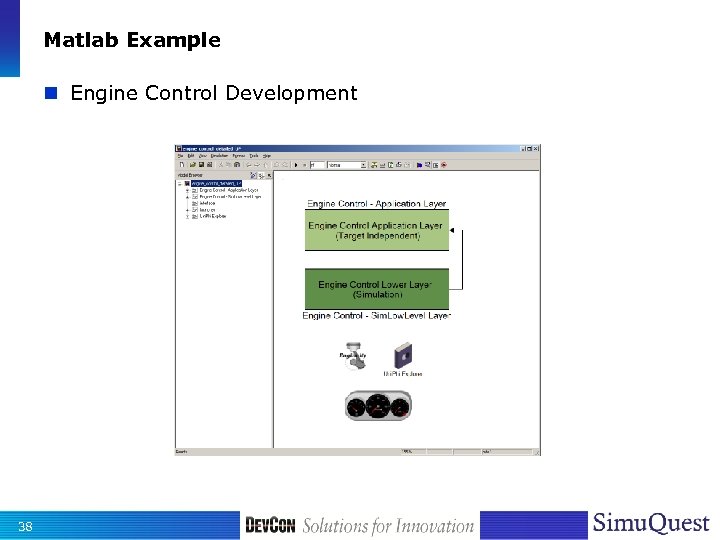
Matlab Example n Engine Control Development 38
Controller Validation 39
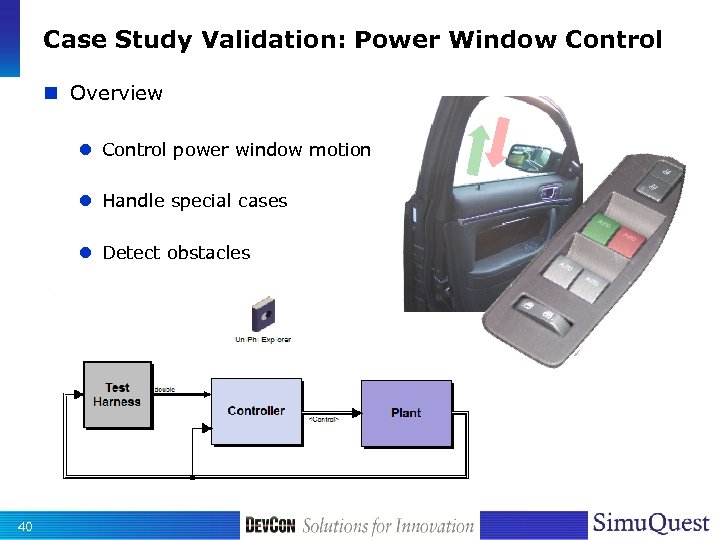
Case Study Validation: Power Window Control n Overview l Control power window motion l Handle special cases l Detect obstacles 40
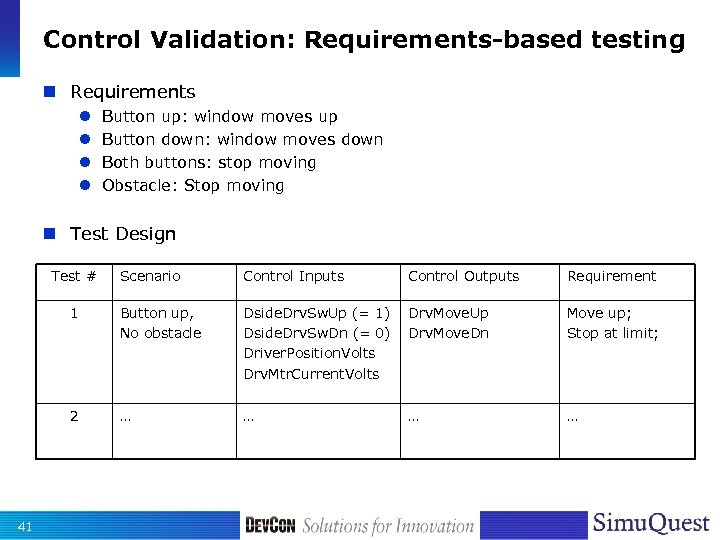
Control Validation: Requirements-based testing n Requirements l l Button up: window moves up Button down: window moves down Both buttons: stop moving Obstacle: Stop moving n Test Design Test # Control Inputs Control Outputs Requirement 1 Button up, No obstacle Dside. Drv. Sw. Up (= 1) Dside. Drv. Sw. Dn (= 0) Driver. Position. Volts Drv. Mtr. Current. Volts Drv. Move. Up Drv. Move. Dn Move up; Stop at limit; 2 41 Scenario … …
Power Window Control Validation: Test Harness n Design test vectors l Design test vectors based on Requirements l Use Simulink Signal Builder to implement and store tests n Establish base line control model l Create functional prototype model with no regard for data types and style guide l Run tests until satisfactory functional behavior n Validate control system l Implement changes l Use stored test results from base-line model to validate controls 42
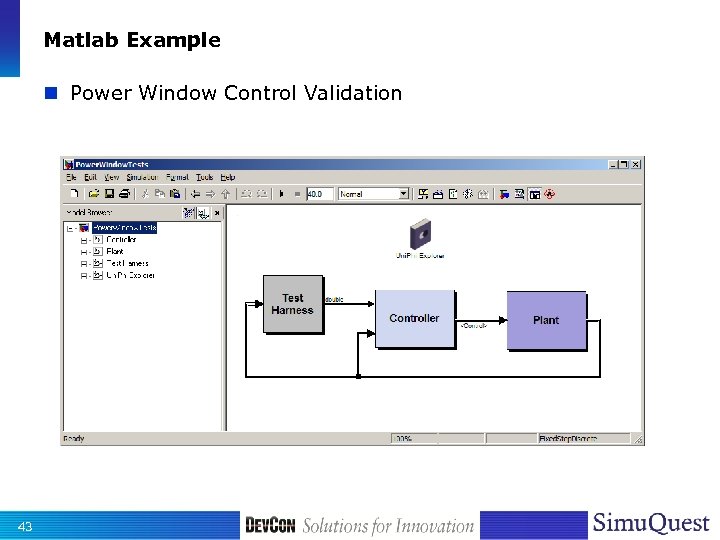
Matlab Example n Power Window Control Validation 43
Code Generation: Refer to Courses 020 L, 024 C 44
Questions? 45
Thank You! 46
 Скачать презентацию ID 023 C Model-Based Control Design with a
2ec757ae196ef0e695c104707af92fb4.ppt