 Скачать презентацию IBM Tivoli System Automation for Multiplatforms v 3
98c6347a92fa6f7a7fb968d24345f447.ppt
- Количество слайдов: 84



IBM Tivoli System Automation for Multiplatforms v 3. 2 Integrating TSAMP v 3. 2 with DB 2 HADR v 10. 1 Author: Gareth Holl Date: May 27 th, 2015 © 2015 IBM Corporation
Objectives When you have completed this module, you will be able to perform these tasks: Explain the general operation of the TSAMP product Identify each of the products and components that make up the total solution and note the integration points Examine what the ‘db 2 haicu’ utility does from the perspective of TSAMP and the automation policy Learn how to control and service the combination of TSAMP and DB 2 HADR 2 © 2015 IBM Corporation
IBM Tivoli System Automation for Multiplatforms Agenda Introduction and Overview System Automation Components Overview Mapping DB 2 Components to TSAMP Resources Integrating TSAMP with DB 2 HADR using db 2 haicu Controlling the Operational State of the DB 2 Resources Disabling Automation (re-gain manual control of DB 2) Serviceability 3 © 2015 IBM Corporation
IBM Tivoli System Automation for Multiplatforms Introduction DB 2 provides a High Availability Disaster Recovery (HADR) feature that keeps a primary and standby database synchronized, and allows an administrator to switch control to a standby DB 2 server DB 2 provides a set of scripts that allow TSAMP to control the DB 2 resources. Scripts that are used by TSAMP to start, stop, and monitor each of the DB 2 resources – this is the primary link between the two products DB 2 provides a utility called ‘db 2 haicu’ that is used to define the domain and automation policy within TSAMP, that is, the initial setup : The automation policy is the set of definitions of all resources, resource groups, and the relationships between them all. The resource definitions contain attributes that define which DB 2 start, stop, and monitor script (the automation scripts) to use for a particular resource. TSAMP can be used to monitor an application’s resources, and automate the starting, stopping, and failover of resources – it will attempt to maintain a desired operational state. 4 © 2015 IBM Corporation
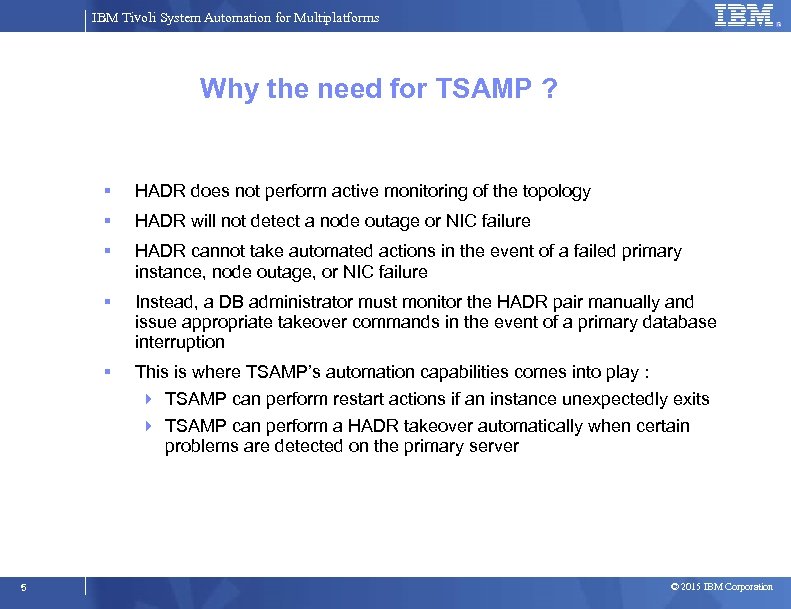
IBM Tivoli System Automation for Multiplatforms Why the need for TSAMP ? HADR does not perform active monitoring of the topology HADR will not detect a node outage or NIC failure HADR cannot take automated actions in the event of a failed primary instance, node outage, or NIC failure Instead, a DB administrator must monitor the HADR pair manually and issue appropriate takeover commands in the event of a primary database interruption This is where TSAMP’s automation capabilities comes into play : TSAMP can perform restart actions if an instance unexpectedly exits TSAMP can perform a HADR takeover automatically when certain problems are detected on the primary server 5 © 2015 IBM Corporation
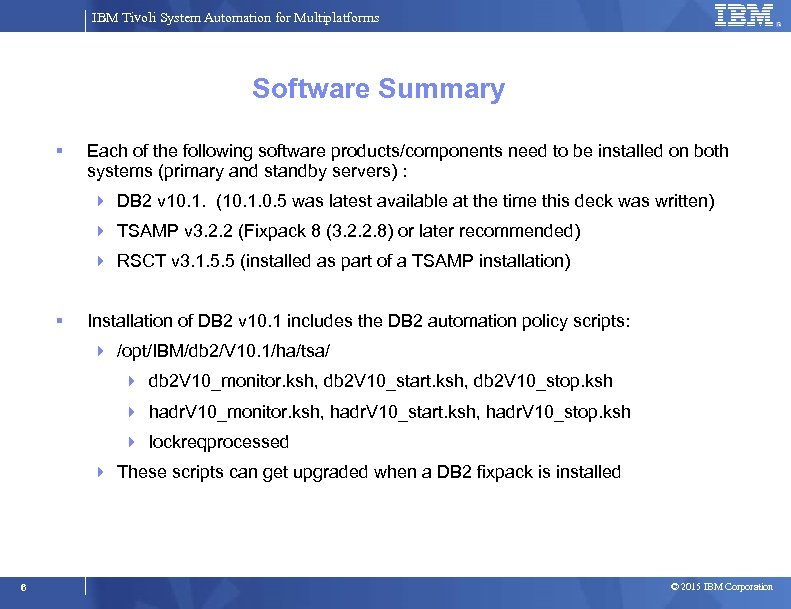
IBM Tivoli System Automation for Multiplatforms Software Summary Each of the following software products/components need to be installed on both systems (primary and standby servers) : DB 2 v 10. 1. (10. 1. 0. 5 was latest available at the time this deck was written) TSAMP v 3. 2. 2 (Fixpack 8 (3. 2. 2. 8) or later recommended) RSCT v 3. 1. 5. 5 (installed as part of a TSAMP installation) Installation of DB 2 v 10. 1 includes the DB 2 automation policy scripts: /opt/IBM/db 2/V 10. 1/ha/tsa/ db 2 V 10_monitor. ksh, db 2 V 10_start. ksh, db 2 V 10_stop. ksh hadr. V 10_monitor. ksh, hadr. V 10_start. ksh, hadr. V 10_stop. ksh lockreqprocessed These scripts can get upgraded when a DB 2 fixpack is installed 6 © 2015 IBM Corporation
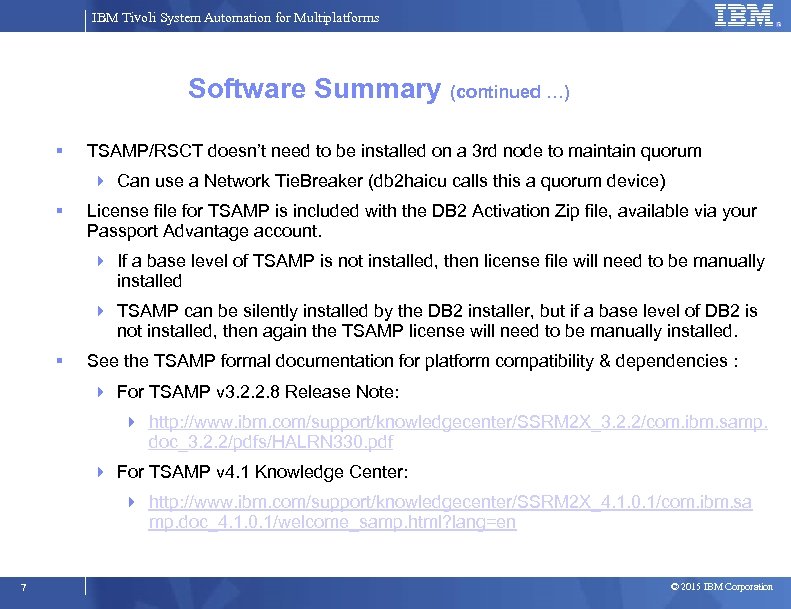
IBM Tivoli System Automation for Multiplatforms Software Summary (continued …) TSAMP/RSCT doesn’t need to be installed on a 3 rd node to maintain quorum Can use a Network Tie. Breaker (db 2 haicu calls this a quorum device) License file for TSAMP is included with the DB 2 Activation Zip file, available via your Passport Advantage account. If a base level of TSAMP is not installed, then license file will need to be manually installed TSAMP can be silently installed by the DB 2 installer, but if a base level of DB 2 is not installed, then again the TSAMP license will need to be manually installed. See the TSAMP formal documentation for platform compatibility & dependencies : For TSAMP v 3. 2. 2. 8 Release Note: http: //www. ibm. com/support/knowledgecenter/SSRM 2 X_3. 2. 2/com. ibm. samp. doc_3. 2. 2/pdfs/HALRN 330. pdf For TSAMP v 4. 1 Knowledge Center: http: //www. ibm. com/support/knowledgecenter/SSRM 2 X_4. 1. 0. 1/com. ibm. sa mp. doc_4. 1. 0. 1/welcome_samp. html? lang=en 7 © 2015 IBM Corporation
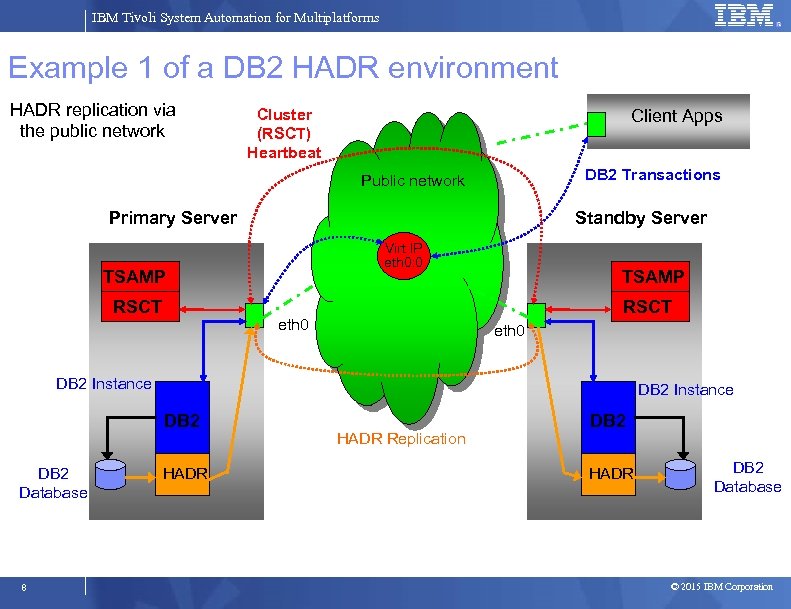
IBM Tivoli System Automation for Multiplatforms Example 1 of a DB 2 HADR environment HADR replication via the public network Cluster (RSCT) Heartbeat Client Apps DB 2 Transactions Public network Primary Server Standby Server Virt IP eth 0: 0 TSAMP RSCT eth 0 DB 2 Instance DB 2 Database 8 HADR Replication DB 2 HADR DB 2 Database © 2015 IBM Corporation
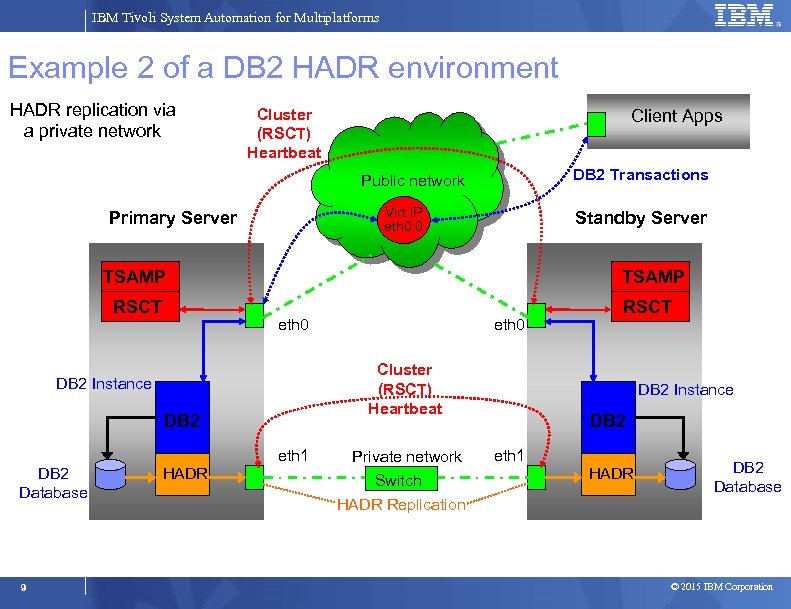
IBM Tivoli System Automation for Multiplatforms Example 2 of a DB 2 HADR environment HADR replication via a private network Cluster (RSCT) Heartbeat Client Apps DB 2 Transactions Public network Virt IP eth 0: 0 Primary Server Standby Server TSAMP RSCT TSAMP eth 0 Cluster (RSCT) Heartbeat DB 2 Instance DB 2 eth 1 DB 2 Database 9 HADR eth 0 Private network Switch HADR Replication RSCT DB 2 Instance DB 2 eth 1 HADR DB 2 Database © 2015 IBM Corporation
IBM Tivoli System Automation for Multiplatforms Progress Introduction and Overview System Automation Components Overview Mapping DB 2 Components to TSAMP Resources Integrating TSAMP with DB 2 HADR using db 2 haicu Controlling the Operational State of the DB 2 Resources Disabling Automation (re-gain manual control of DB 2) Serviceability 10 © 2015 IBM Corporation
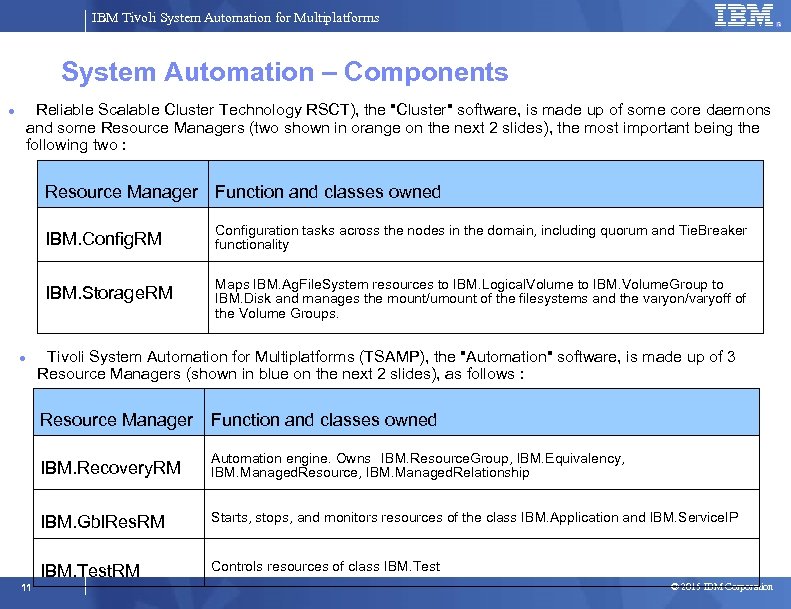
IBM Tivoli System Automation for Multiplatforms System Automation – Components Reliable Scalable Cluster Technology RSCT), the "Cluster" software, is made up of some core daemons and some Resource Managers (two shown in orange on the next 2 slides), the most important being the following two : Resource Manager Function and classes owned IBM. Config. RM IBM. Storage. RM Configuration tasks across the nodes in the domain, including quorum and Tie. Breaker functionality Maps IBM. Ag. File. System resources to IBM. Logical. Volume to IBM. Volume. Group to IBM. Disk and manages the mount/umount of the filesystems and the varyon/varyoff of the Volume Groups. Tivoli System Automation for Multiplatforms (TSAMP), the "Automation" software, is made up of 3 Resource Managers (shown in blue on the next 2 slides), as follows : Resource Manager Function and classes owned IBM. Recovery. RM IBM. Gbl. Res. RM Starts, stops, and monitors resources of the class IBM. Application and IBM. Service. IP IBM. Test. RM 11 Automation engine. Owns IBM. Resource. Group, IBM. Equivalency, IBM. Managed. Resource, IBM. Managed. Relationship Controls resources of class IBM. Test © 2015 IBM Corporation
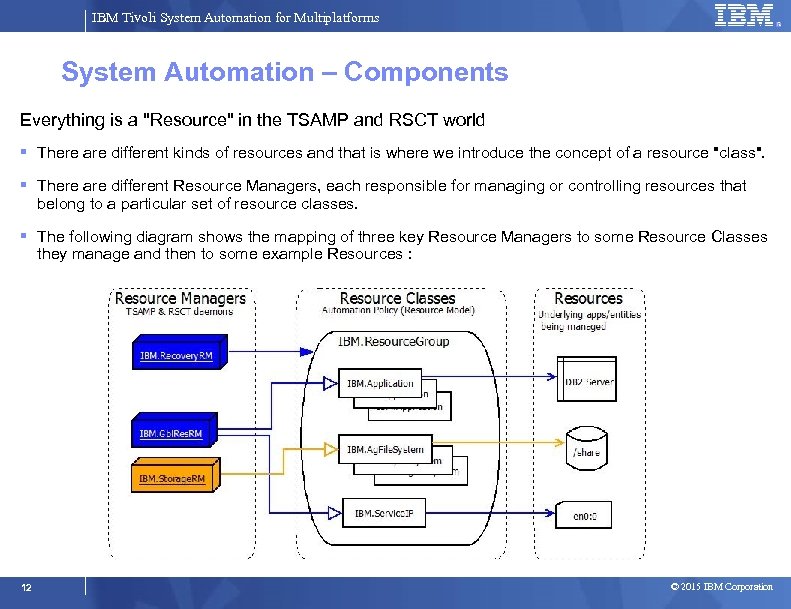
IBM Tivoli System Automation for Multiplatforms System Automation – Components Everything is a "Resource" in the TSAMP and RSCT world There are different kinds of resources and that is where we introduce the concept of a resource "class". There are different Resource Managers, each responsible for managing or controlling resources that belong to a particular set of resource classes. The following diagram shows the mapping of three key Resource Managers to some Resource Classes they manage and then to some example Resources : 12 © 2015 IBM Corporation
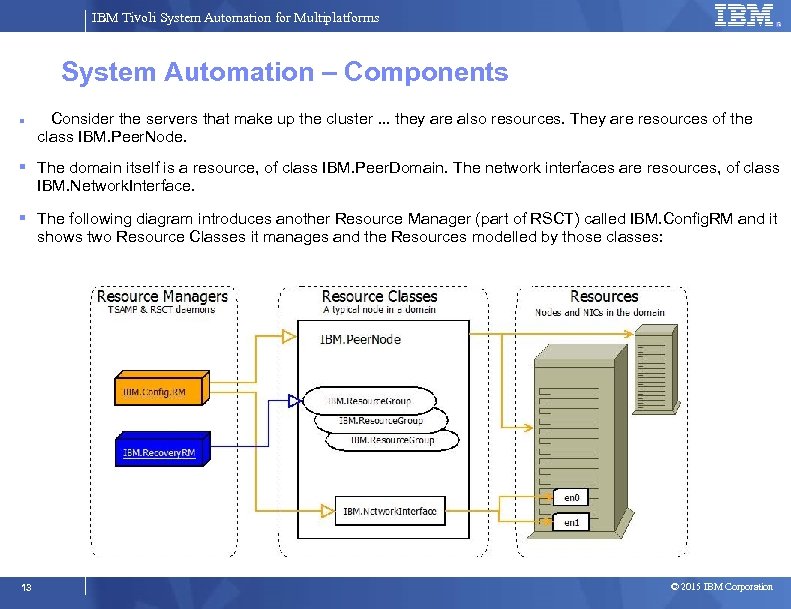
IBM Tivoli System Automation for Multiplatforms System Automation – Components Consider the servers that make up the cluster. . . they are also resources. They are resources of the class IBM. Peer. Node. The domain itself is a resource, of class IBM. Peer. Domain. The network interfaces are resources, of class IBM. Network. Interface. The following diagram introduces another Resource Manager (part of RSCT) called IBM. Config. RM and it shows two Resource Classes it manages and the Resources modelled by those classes: 13 © 2015 IBM Corporation
IBM Tivoli System Automation for Multiplatforms Quorum and Tie. Breaker One of the questions from the ‘db 2 haicu’ utility deals with a cluster/automation concept called Quorum The number of nodes in a cluster that are required to control the resources, modify the cluster definition, or perform certain cluster operations. The main goals of quorum operations: identify who has the majority when a cluster is broken up into sub-clusters keep data consistent, especially when shared file systems are being used protect critical resources…. maintain HA control Two types: configuration vs. operational quorum Note: “configuration” quorum requires 'majority of nodes' (more than half the number of nodes) to be Online for configuration changes to be carried out. Tie. Breaker a Tie. Breaker situation occurs when a cluster with equal number of nodes is split into sub-clusters with equal numbers of nodes need to determine which sub-cluster will have an operational quorum in a tie situation 14 © 2015 IBM Corporation
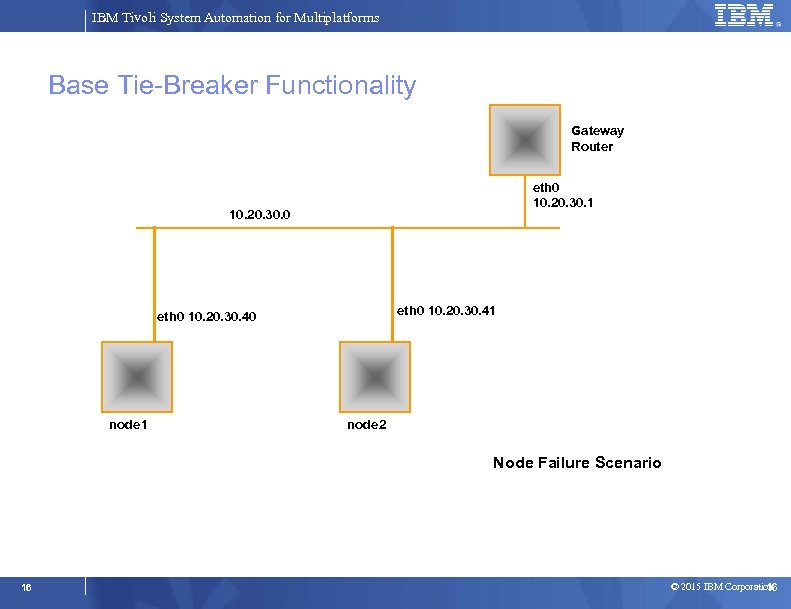
IBM Tivoli System Automation for Multiplatforms db 2 haicu: Quorum and Tie. Breaker (continued. . ) Network Tie. Breaker the goal is for each system to figure out (via the RSCT infrastructure) which one is operational and should therefore take control (if not already the active node). use a pingable system independent of node 1 and node 2, for example node 3 in our example. Although it would be just as easy and viable to use the gateway router for node 1 and node 2. without an active Tie. Breaker, automated failover/takeover will NEVER occur in the event of a cluster split (node outage, or network problem) Create a /usr/sbin/cluster/netmon. cf file on each node. Add IP addresses (one per line) of 3 -5 devices external to the domain that are pingable from each node. This is important for a 2 node cluster to allow the cluster software (RSCT) to quickly identify the source of a heartbeat problem between the nodes. The following 7 slides demonstrate how a Tie. Breaker works … 15 © 2015 IBM Corporation
IBM Tivoli System Automation for Multiplatforms Base Tie-Breaker Functionality Gateway Router eth 0 10. 20. 30. 1 10. 20. 30. 0 eth 0 10. 20. 30. 41 eth 0 10. 20. 30. 40 node 1 node 2 Node Failure Scenario 16 © 2015 IBM Corporation 16
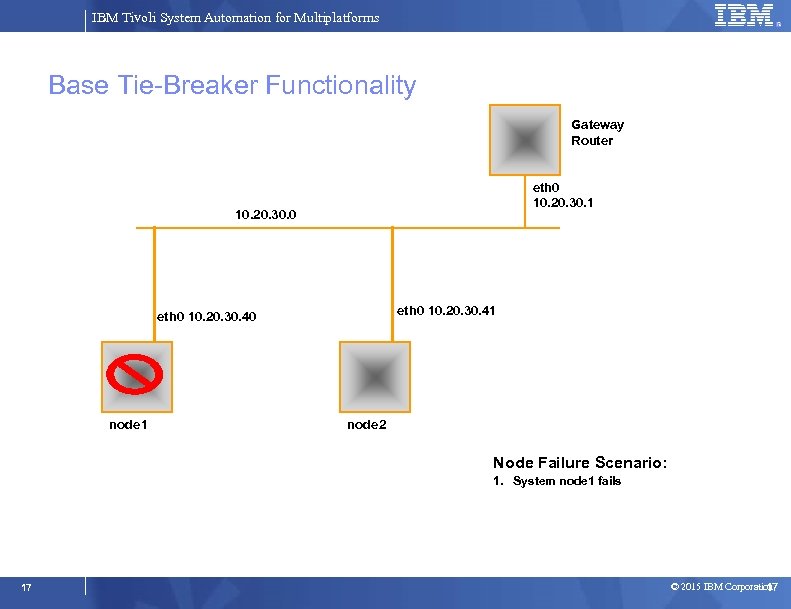
IBM Tivoli System Automation for Multiplatforms Base Tie-Breaker Functionality Gateway Router eth 0 10. 20. 30. 1 10. 20. 30. 0 eth 0 10. 20. 30. 41 eth 0 10. 20. 30. 40 node 1 node 2 Node Failure Scenario: 1. System node 1 fails 17 © 2015 IBM Corporation 17
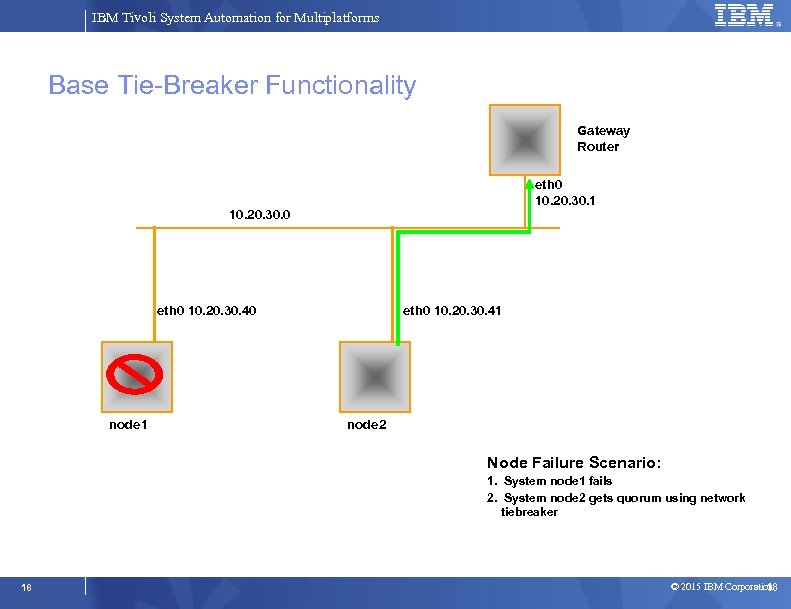
IBM Tivoli System Automation for Multiplatforms Base Tie-Breaker Functionality Gateway Router eth 0 10. 20. 30. 1 10. 20. 30. 0 eth 0 10. 20. 30. 40 node 1 eth 0 10. 20. 30. 41 node 2 Node Failure Scenario: 1. System node 1 fails 2. System node 2 gets quorum using network tiebreaker 18 © 2015 IBM Corporation 18
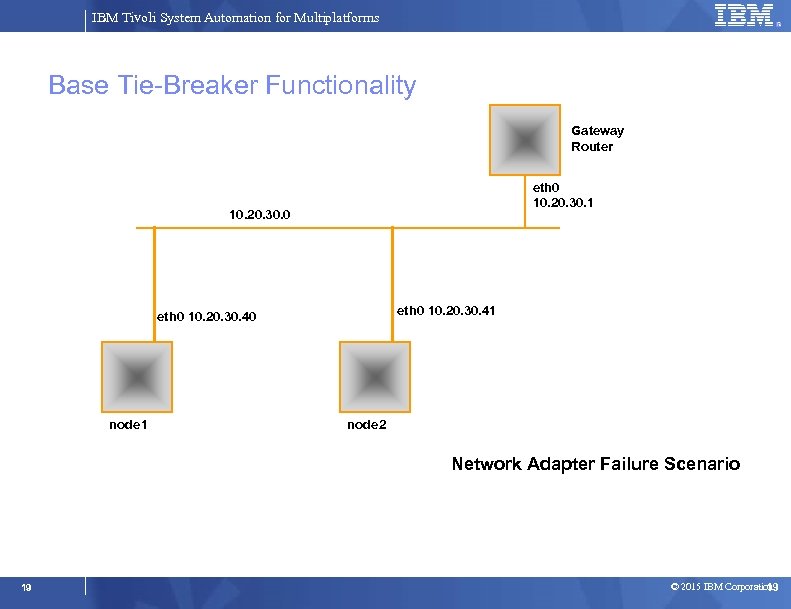
IBM Tivoli System Automation for Multiplatforms Base Tie-Breaker Functionality Gateway Router eth 0 10. 20. 30. 1 10. 20. 30. 0 eth 0 10. 20. 30. 41 eth 0 10. 20. 30. 40 node 1 node 2 Network Adapter Failure Scenario 19 © 2015 IBM Corporation 19
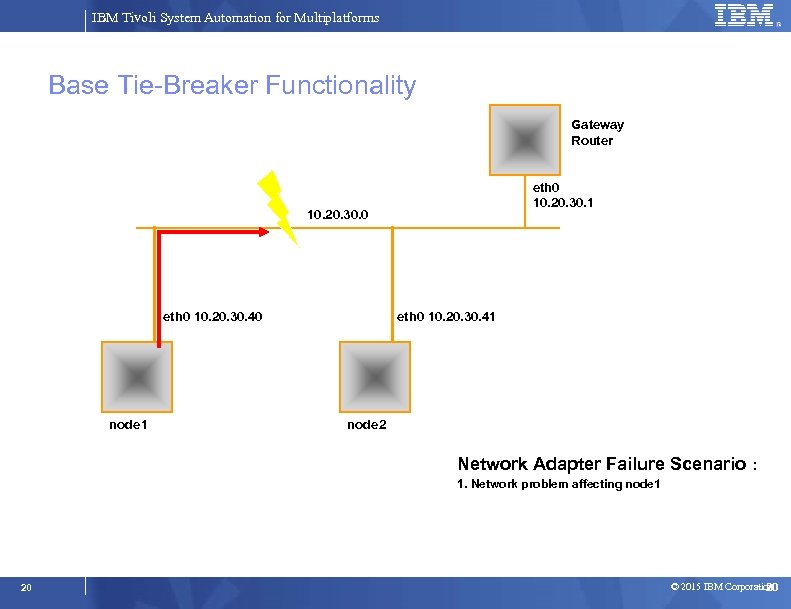
IBM Tivoli System Automation for Multiplatforms Base Tie-Breaker Functionality Gateway Router eth 0 10. 20. 30. 1 10. 20. 30. 0 eth 0 10. 20. 30. 40 node 1 eth 0 10. 20. 30. 41 node 2 Network Adapter Failure Scenario : 1. Network problem affecting node 1 20 © 2015 IBM Corporation 20
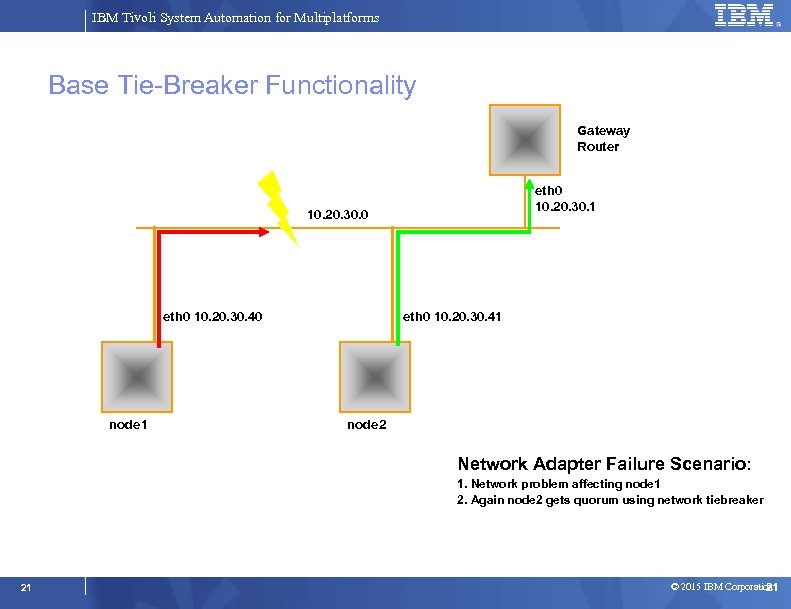
IBM Tivoli System Automation for Multiplatforms Base Tie-Breaker Functionality Gateway Router eth 0 10. 20. 30. 1 10. 20. 30. 0 eth 0 10. 20. 30. 40 node 1 eth 0 10. 20. 30. 41 node 2 Network Adapter Failure Scenario: 1. Network problem affecting node 1 2. Again node 2 gets quorum using network tiebreaker 21 © 2015 IBM Corporation 21
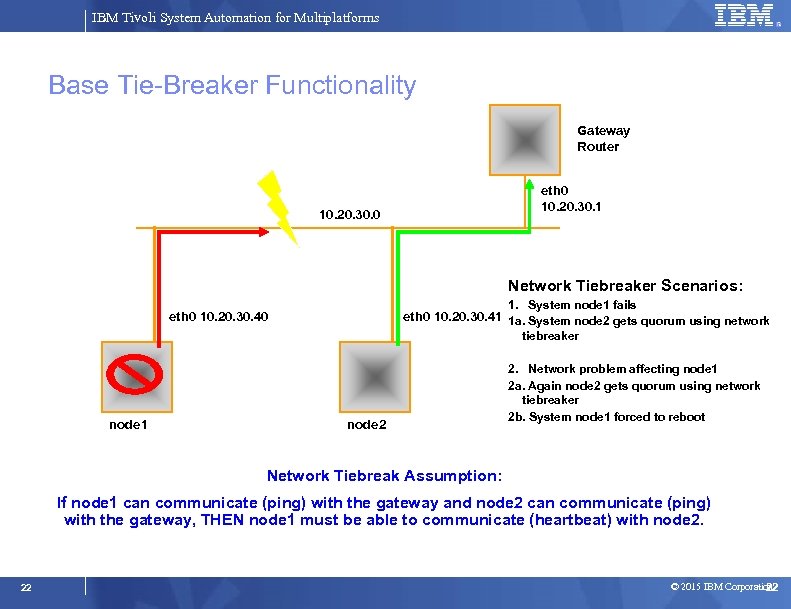
IBM Tivoli System Automation for Multiplatforms Base Tie-Breaker Functionality Gateway Router eth 0 10. 20. 30. 1 10. 20. 30. 0 Network Tiebreaker Scenarios: 1. System node 1 fails eth 0 10. 20. 30. 41 1 a. System node 2 gets quorum using network eth 0 10. 20. 30. 40 tiebreaker node 1 node 2 2. Network problem affecting node 1 2 a. Again node 2 gets quorum using network tiebreaker 2 b. System node 1 forced to reboot Network Tiebreak Assumption: If node 1 can communicate (ping) with the gateway and node 2 can communicate (ping) with the gateway, THEN node 1 must be able to communicate (heartbeat) with node 2. 22 © 2015 IBM Corporation 22
IBM Tivoli System Automation for Multiplatforms Progress Introduction and Overview System Automation Components Overview Mapping DB 2 Components to TSAMP Resources Integrating TSAMP with DB 2 HADR using db 2 haicu Controlling the Operational State of the DB 2 Resources Disabling Automation (re-gain manual control of DB 2) Serviceability 23 © 2015 IBM Corporation
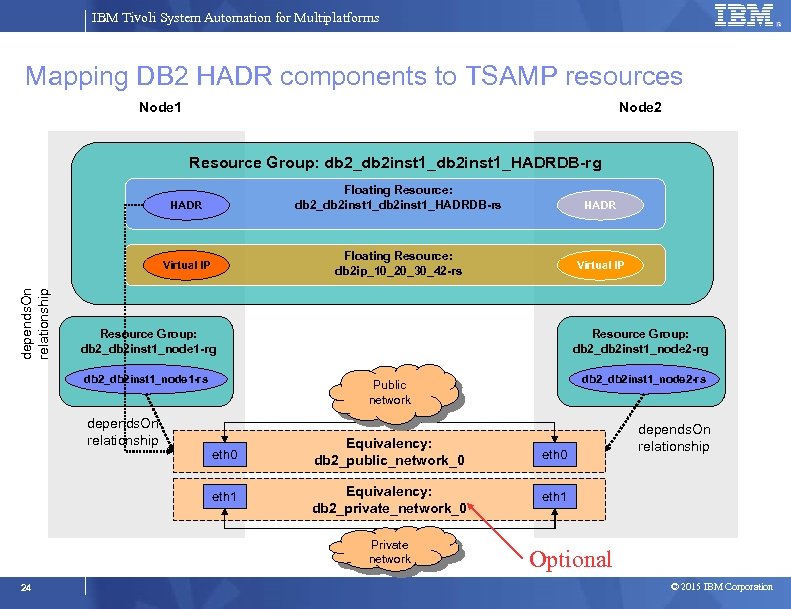
IBM Tivoli System Automation for Multiplatforms Mapping DB 2 HADR components to TSAMP resources Node 1 Node 2 Resource Group: db 2_db 2 inst 1_HADRDB-rg HADR Virtual IP depends. On relationship HADR Floating Resource: db 2_db 2 inst 1_HADRDB-rs Floating Resource: db 2 ip_10_20_30_42 -rs Virtual IP Resource Group: db 2_db 2 inst 1_node 1 -rg db 2_db 2 inst 1_node 1 -rs depends. On relationship Resource Group: db 2_db 2 inst 1_node 2 -rg db 2_db 2 inst 1_node 2 -rs Public network eth 0 Equivalency: db 2_public_network_0 eth 1 Equivalency: db 2_private_network_0 eth 1 Private network 24 depends. On relationship Optional © 2015 IBM Corporation
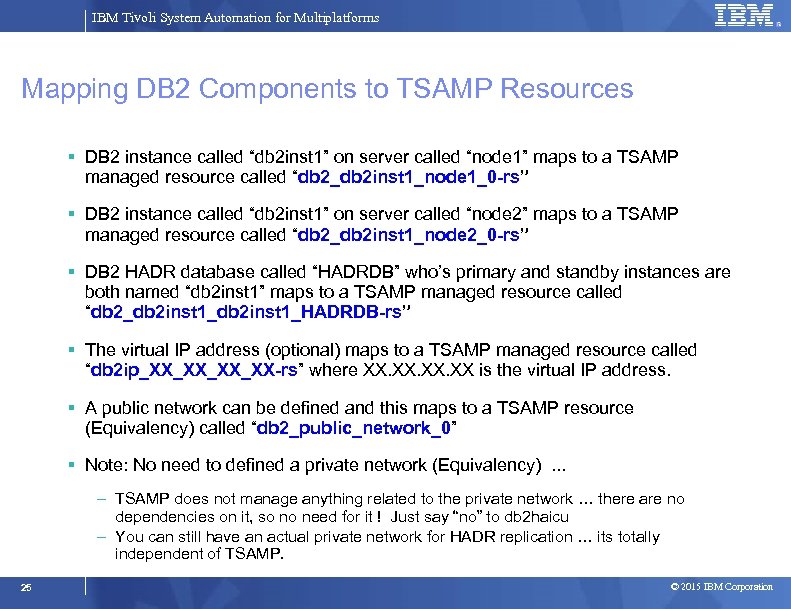
IBM Tivoli System Automation for Multiplatforms Mapping DB 2 Components to TSAMP Resources DB 2 instance called “db 2 inst 1” on server called “node 1” maps to a TSAMP managed resource called “db 2_db 2 inst 1_node 1_0 -rs” DB 2 instance called “db 2 inst 1” on server called “node 2” maps to a TSAMP managed resource called “db 2_db 2 inst 1_node 2_0 -rs” DB 2 HADR database called “HADRDB” who’s primary and standby instances are both named “db 2 inst 1” maps to a TSAMP managed resource called “db 2_db 2 inst 1_HADRDB-rs” The virtual IP address (optional) maps to a TSAMP managed resource called “db 2 ip_XX_XX-rs” where XX. XX. XX is the virtual IP address. A public network can be defined and this maps to a TSAMP resource (Equivalency) called “db 2_public_network_0” Note: No need to defined a private network (Equivalency). . . – TSAMP does not manage anything related to the private network … there are no dependencies on it, so no need for it ! Just say “no” to db 2 haicu – You can still have an actual private network for HADR replication … its totally independent of TSAMP. 25 © 2015 IBM Corporation
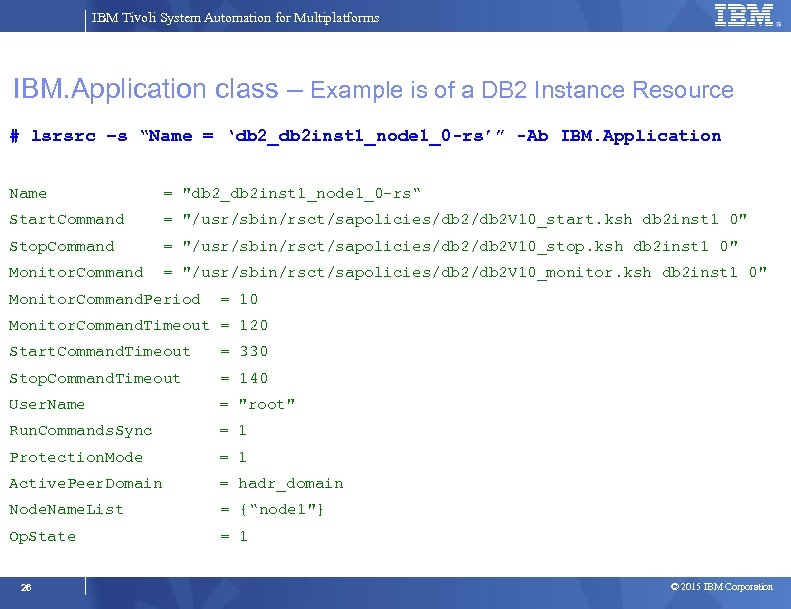
IBM Tivoli System Automation for Multiplatforms IBM. Application class – Example is of a DB 2 Instance Resource # lsrsrc –s “Name = ‘db 2_db 2 inst 1_node 1_0 -rs’” -Ab IBM. Application Name = "db 2_db 2 inst 1_node 1_0 -rs“ Start. Command = "/usr/sbin/rsct/sapolicies/db 2 V 10_start. ksh db 2 inst 1 0" Stop. Command = "/usr/sbin/rsct/sapolicies/db 2 V 10_stop. ksh db 2 inst 1 0" Monitor. Command = "/usr/sbin/rsct/sapolicies/db 2 V 10_monitor. ksh db 2 inst 1 0" Monitor. Command. Period = 10 Monitor. Command. Timeout = 120 Start. Command. Timeout = 330 Stop. Command. Timeout = 140 User. Name = "root" Run. Commands. Sync = 1 Protection. Mode = 1 Active. Peer. Domain = hadr_domain Node. Name. List = {“node 1"} Op. State = 1 26 © 2015 IBM Corporation
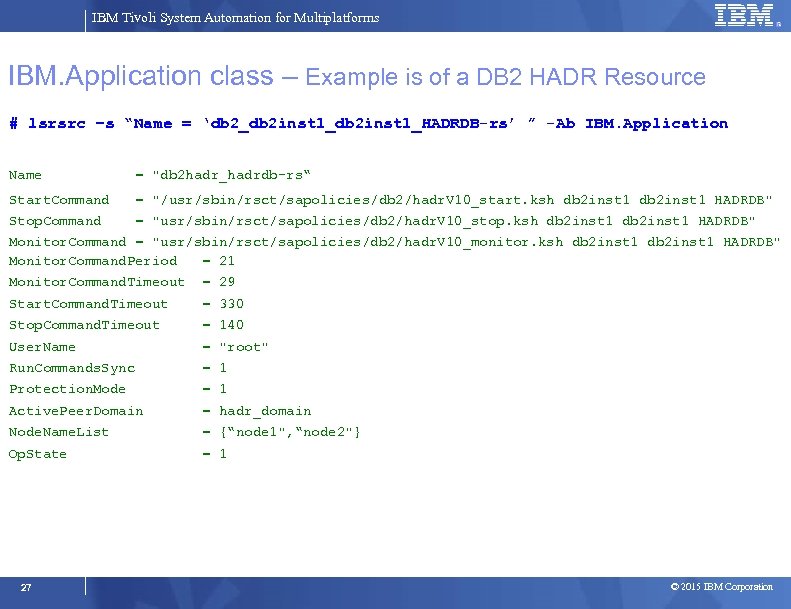
IBM Tivoli System Automation for Multiplatforms IBM. Application class – Example is of a DB 2 HADR Resource # lsrsrc –s “Name = ‘db 2_db 2 inst 1_HADRDB-rs’ ” -Ab IBM. Application Name = "db 2 hadr_hadrdb-rs“ Start. Command = "/usr/sbin/rsct/sapolicies/db 2/hadr. V 10_start. ksh db 2 inst 1 HADRDB" Stop. Command = "usr/sbin/rsct/sapolicies/db 2/hadr. V 10_stop. ksh db 2 inst 1 HADRDB" Monitor. Command = "usr/sbin/rsct/sapolicies/db 2/hadr. V 10_monitor. ksh db 2 inst 1 HADRDB" Monitor. Command. Period = 21 Monitor. Command. Timeout = 29 Start. Command. Timeout = 330 Stop. Command. Timeout = 140 User. Name = "root" Run. Commands. Sync = 1 Protection. Mode = 1 Active. Peer. Domain = hadr_domain Node. Name. List = {“node 1", “node 2"} Op. State = 1 27 © 2015 IBM Corporation
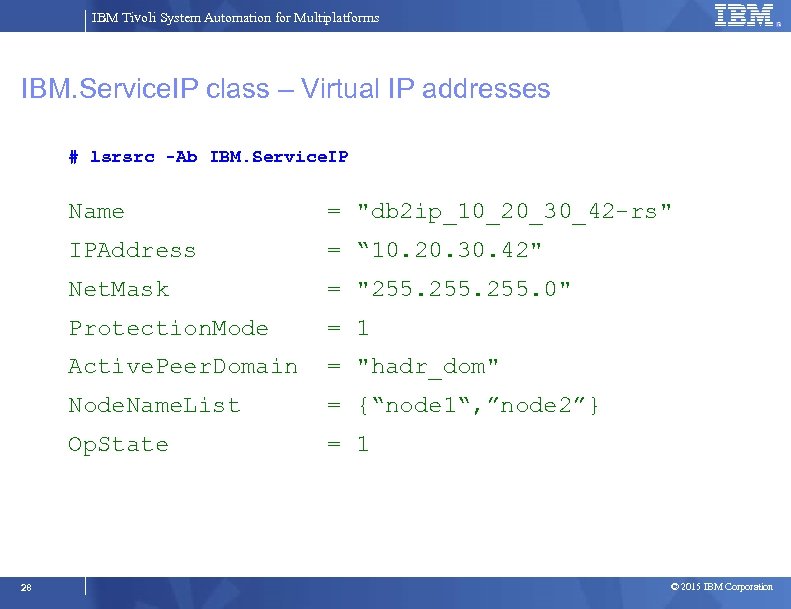
IBM Tivoli System Automation for Multiplatforms IBM. Service. IP class – Virtual IP addresses # lsrsrc -Ab IBM. Service. IP Name = "db 2 ip_10_20_30_42 -rs" IPAddress = “ 10. 20. 30. 42" Net. Mask = "255. 0" Protection. Mode = 1 Active. Peer. Domain = "hadr_dom" Node. Name. List = {“node 1“, ”node 2”} Op. State = 1 28 © 2015 IBM Corporation
IBM Tivoli System Automation for Multiplatforms Progress Introduction and Overview System Automation Components Overview Mapping DB 2 Components to TSAMP Resources Integrating TSAMP with DB 2 HADR using db 2 haicu Controlling the Operational State of the DB 2 Resources Disabling Automation (re-gain manual control of DB 2) Serviceability 29 © 2015 IBM Corporation
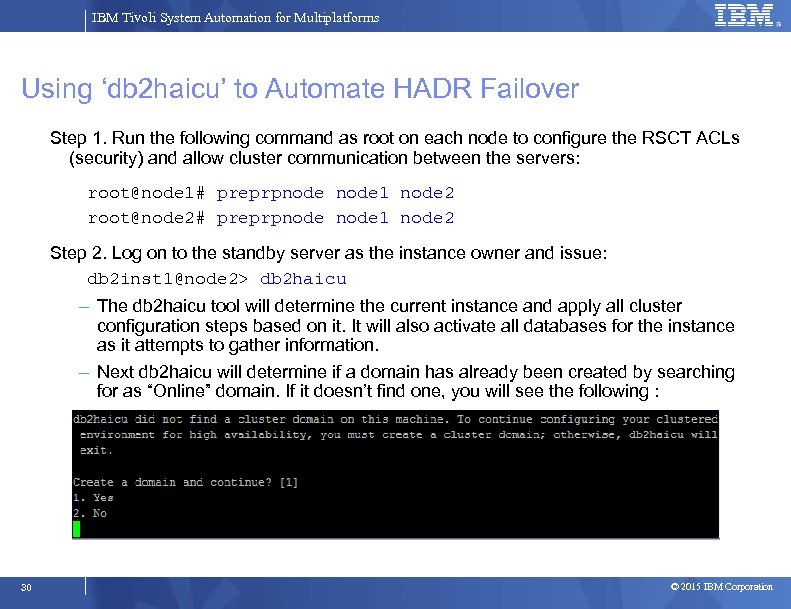
IBM Tivoli System Automation for Multiplatforms Using ‘db 2 haicu’ to Automate HADR Failover Step 1. Run the following command as root on each node to configure the RSCT ACLs (security) and allow cluster communication between the servers: root@node 1# preprpnode 1 node 2 root@node 2# preprpnode 1 node 2 Step 2. Log on to the standby server as the instance owner and issue: db 2 inst 1@node 2> db 2 haicu – The db 2 haicu tool will determine the current instance and apply all cluster configuration steps based on it. It will also activate all databases for the instance as it attempts to gather information. – Next db 2 haicu will determine if a domain has already been created by searching for as “Online” domain. If it doesn’t find one, you will see the following : 30 © 2015 IBM Corporation
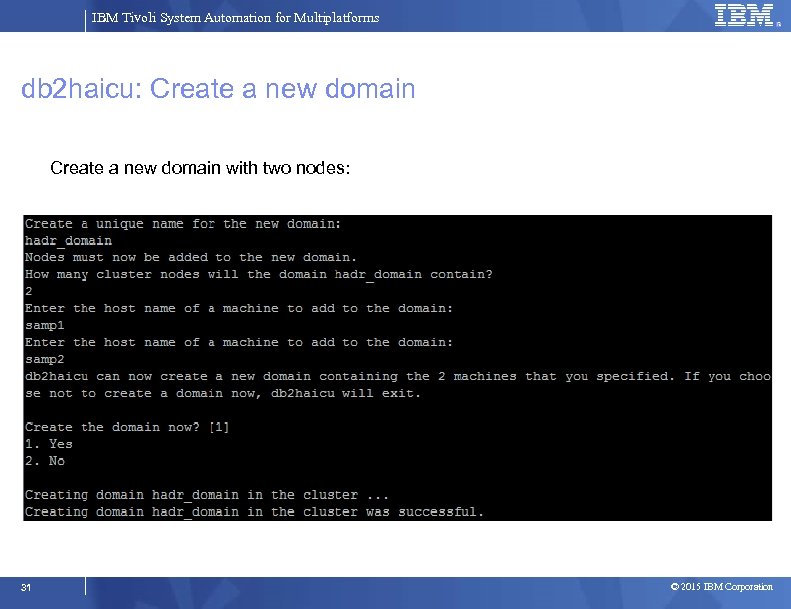
IBM Tivoli System Automation for Multiplatforms db 2 haicu: Create a new domain with two nodes: 31 © 2015 IBM Corporation
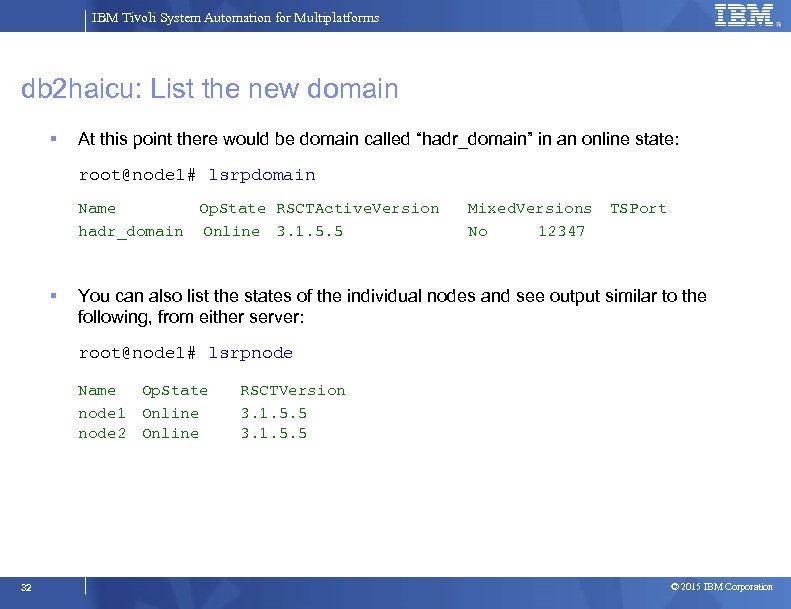
IBM Tivoli System Automation for Multiplatforms db 2 haicu: List the new domain At this point there would be domain called “hadr_domain” in an online state: root@node 1# lsrpdomain Name Op. State RSCTActive. Version Mixed. Versions TSPort hadr_domain Online 3. 1. 5. 5 No 12347 You can also list the states of the individual nodes and see output similar to the following, from either server: root@node 1# lsrpnode Name Op. State node 1 Online node 2 Online 32 RSCTVersion 3. 1. 5. 5 © 2015 IBM Corporation
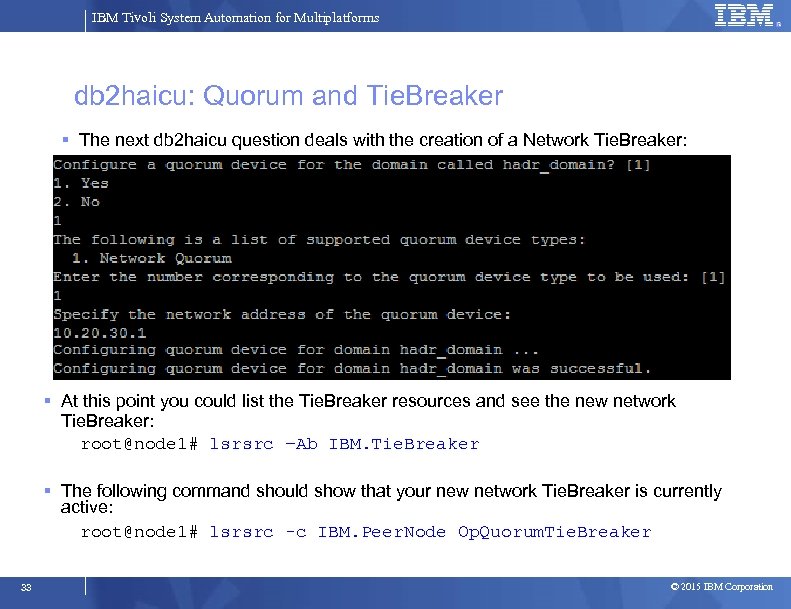
IBM Tivoli System Automation for Multiplatforms db 2 haicu: Quorum and Tie. Breaker The next db 2 haicu question deals with the creation of a Network Tie. Breaker: At this point you could list the Tie. Breaker resources and see the new network Tie. Breaker: root@node 1# lsrsrc –Ab IBM. Tie. Breaker The following command should show that your new network Tie. Breaker is currently active: root@node 1# lsrsrc -c IBM. Peer. Node Op. Quorum. Tie. Breaker 33 © 2015 IBM Corporation
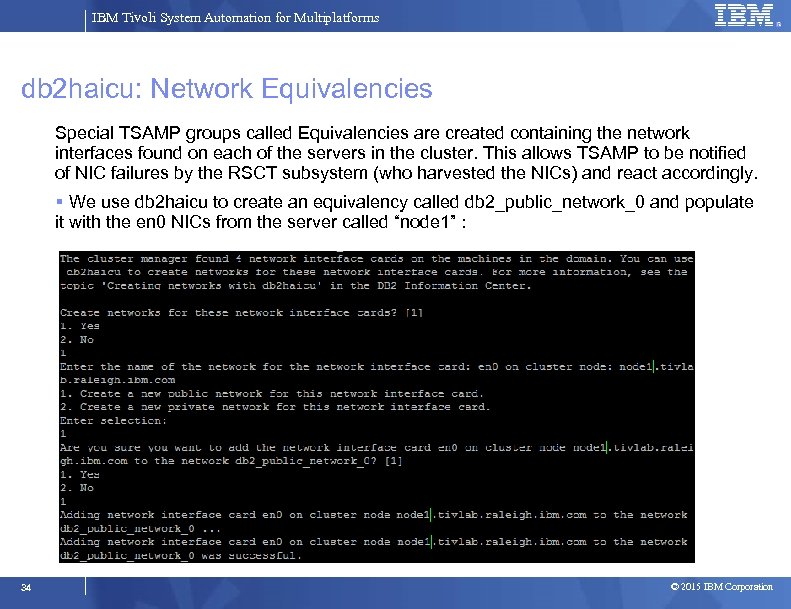
IBM Tivoli System Automation for Multiplatforms db 2 haicu: Network Equivalencies Special TSAMP groups called Equivalencies are created containing the network interfaces found on each of the servers in the cluster. This allows TSAMP to be notified of NIC failures by the RSCT subsystem (who harvested the NICs) and react accordingly. We use db 2 haicu to create an equivalency called db 2_public_network_0 and populate it with the en 0 NICs from the server called “node 1” : 34 © 2015 IBM Corporation
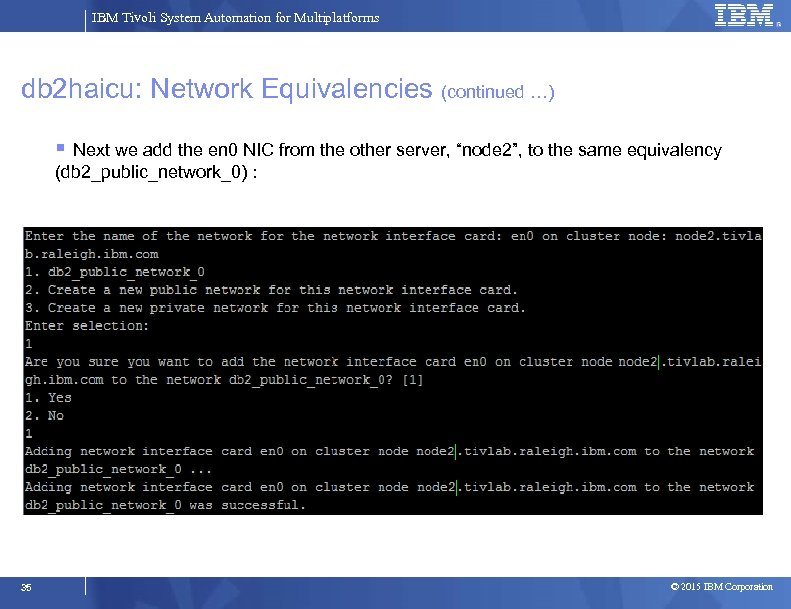
IBM Tivoli System Automation for Multiplatforms db 2 haicu: Network Equivalencies (continued …) Next we add the en 0 NIC from the other server, “node 2”, to the same equivalency (db 2_public_network_0) : 35 © 2015 IBM Corporation
IBM Tivoli System Automation for Multiplatforms db 2 haicu: Private Network In the previous slide, notice the option to say “Yes” or “No” when adding NICs to a network. When asked if a non-public NIC should be added to a private network, this is where I recommend you choose “No”. So don’t create a private network equivalency via db 2 haicu even if your DB 2 HADR environment does use a private network for HADR replication data. 36 © 2015 IBM Corporation
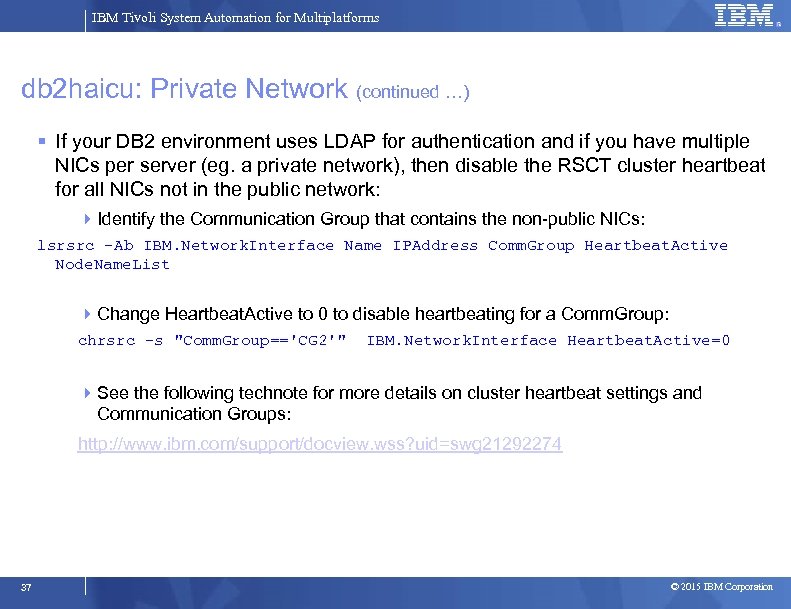
IBM Tivoli System Automation for Multiplatforms db 2 haicu: Private Network (continued …) If your DB 2 environment uses LDAP for authentication and if you have multiple NICs per server (eg. a private network), then disable the RSCT cluster heartbeat for all NICs not in the public network: Identify the Communication Group that contains the non-public NICs: lsrsrc -Ab IBM. Network. Interface Name IPAddress Comm. Group Heartbeat. Active Node. Name. List Change Heartbeat. Active to 0 to disable heartbeating for a Comm. Group: chrsrc -s "Comm. Group=='CG 2'" IBM. Network. Interface Heartbeat. Active=0 See the following technote for more details on cluster heartbeat settings and Communication Groups: http: //www. ibm. com/support/docview. wss? uid=swg 21292274 37 © 2015 IBM Corporation
IBM Tivoli System Automation for Multiplatforms db 2 haicu: Additional NICs per server For non-LDAP setups, its recommended to have at least a 2 nd pair of NICs for cluster heartbeating so as to reduce the likelihood of a forced reboot if there is a problem in the public network (or with the public NICs). For DB 2 v 9. 7 environments, additional “depends. On” relationships need to be manually added to the automation policy, from each HADR database resource to the public network equivalency If db 2 haicu from v 10. 1. 0. 0, v 10. 1, or v 10. 1. 0. 2 is used to create the automation policy, all the necessary depends. On relationships will be missing due to a bug with the db 2 haicu utility (fixed as of 10. 1. 0. 3) … they will need to be manually created. Refer to the following knowledge item to obtain a script that can be used to create any missing relationship in either a DB 2 v 9. 7 or v 10 environment : https: //developer. ibm. com/answers/questions/180984/tsamp-configurationchecker-for-db 2 -hadr-and-ha-sh/ The depends. On relationships between the HADR database resources and the Public Network Equivalency are recommended even if there is only one NIC per server, for both DB 2 v 9. 7 and v 10 environments. 38 © 2015 IBM Corporation
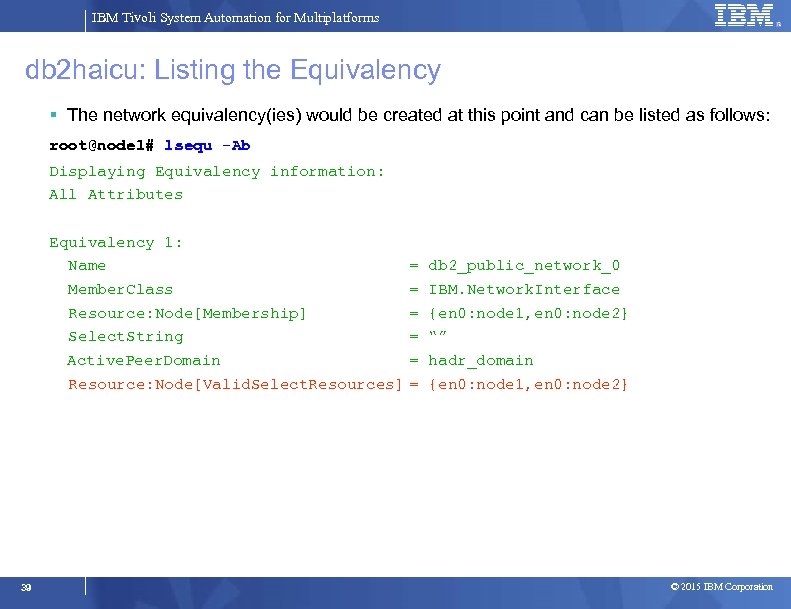
IBM Tivoli System Automation for Multiplatforms db 2 haicu: Listing the Equivalency The network equivalency(ies) would be created at this point and can be listed as follows: root@node 1# lsequ -Ab Displaying Equivalency information: All Attributes Equivalency 1: Name = db 2_public_network_0 Member. Class = IBM. Network. Interface Resource: Node[Membership] = {en 0: node 1, en 0: node 2} Select. String = “” Active. Peer. Domain = hadr_domain Resource: Node[Valid. Select. Resources] = {en 0: node 1, en 0: node 2} 39 © 2015 IBM Corporation
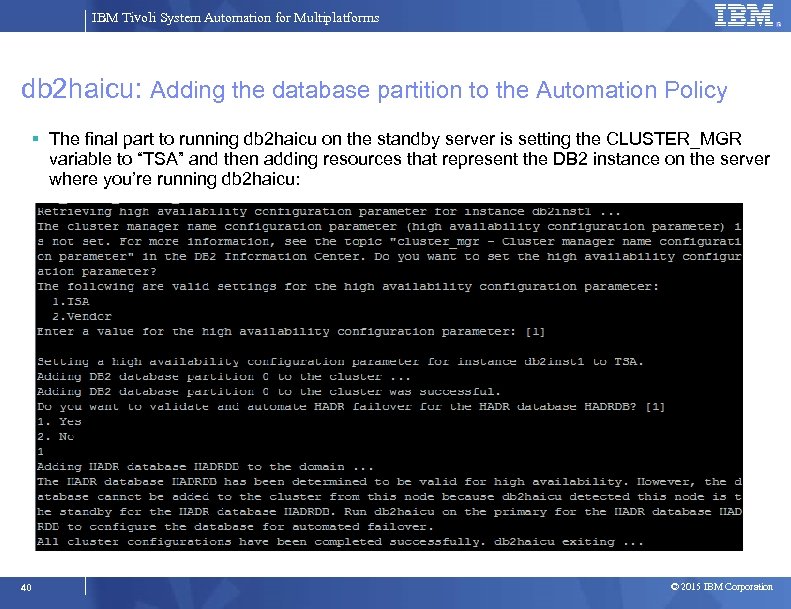
IBM Tivoli System Automation for Multiplatforms db 2 haicu: Adding the database partition to the Automation Policy The final part to running db 2 haicu on the standby server is setting the CLUSTER_MGR variable to “TSA” and then adding resources that represent the DB 2 instance on the server where you’re running db 2 haicu: 40 © 2015 IBM Corporation
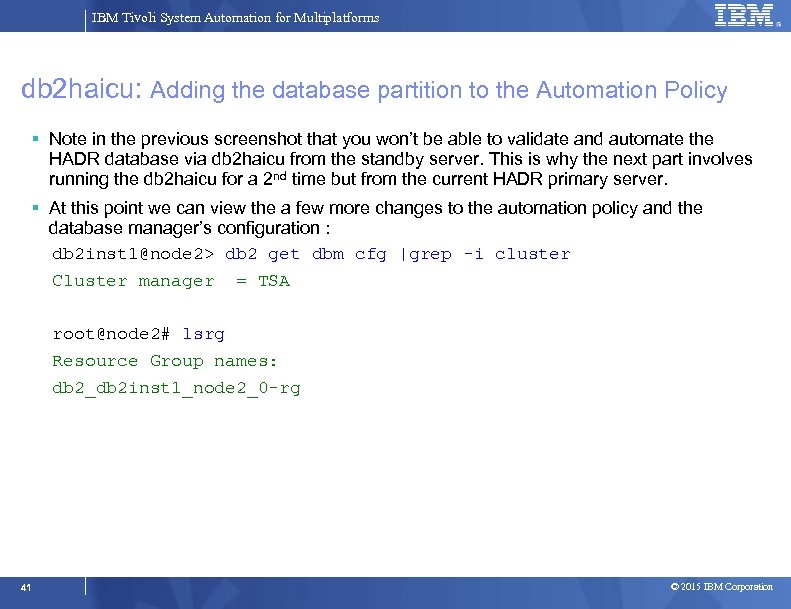
IBM Tivoli System Automation for Multiplatforms db 2 haicu: Adding the database partition to the Automation Policy Note in the previous screenshot that you won’t be able to validate and automate the HADR database via db 2 haicu from the standby server. This is why the next part involves running the db 2 haicu for a 2 nd time but from the current HADR primary server. At this point we can view the a few more changes to the automation policy and the database manager’s configuration : db 2 inst 1@node 2> db 2 get dbm cfg |grep -i cluster Cluster manager = TSA root@node 2# lsrg Resource Group names: db 2_db 2 inst 1_node 2_0 -rg 41 © 2015 IBM Corporation
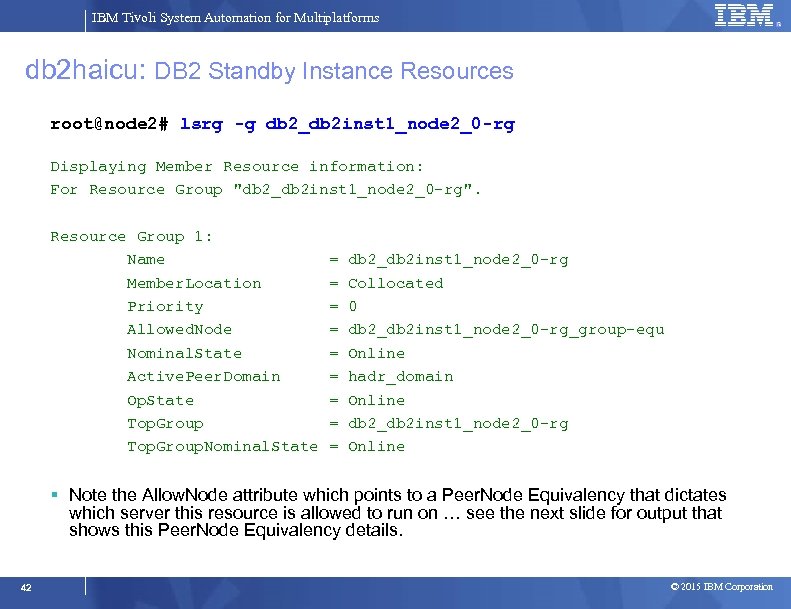
IBM Tivoli System Automation for Multiplatforms db 2 haicu: DB 2 Standby Instance Resources root@node 2# lsrg -g db 2_db 2 inst 1_node 2_0 -rg Displaying Member Resource information: For Resource Group "db 2_db 2 inst 1_node 2_0 -rg". Resource Group 1: Name = db 2_db 2 inst 1_node 2_0 -rg Member. Location = Collocated Priority = 0 Allowed. Node = db 2_db 2 inst 1_node 2_0 -rg_group-equ Nominal. State = Online Active. Peer. Domain = hadr_domain Op. State = Online Top. Group = db 2_db 2 inst 1_node 2_0 -rg Top. Group. Nominal. State = Online Note the Allow. Node attribute which points to a Peer. Node Equivalency that dictates which server this resource is allowed to run on … see the next slide for output that shows this Peer. Node Equivalency details. 42 © 2015 IBM Corporation
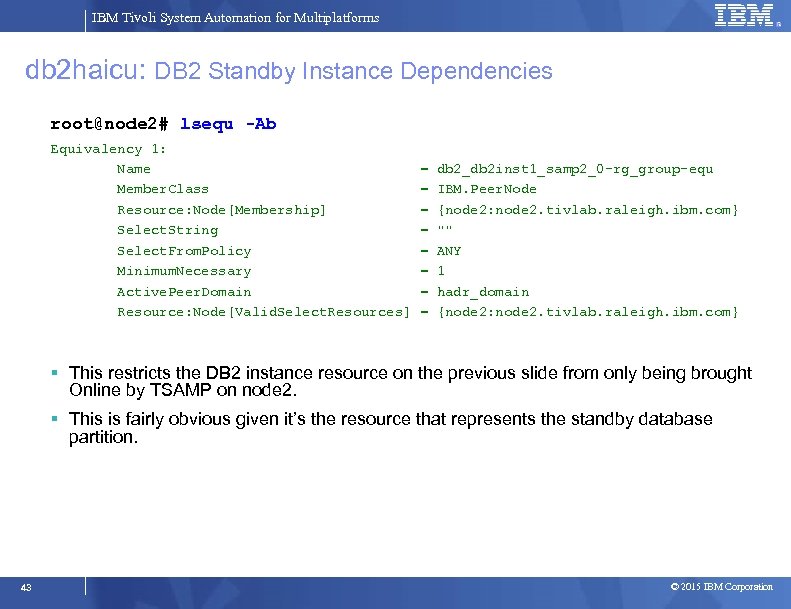
IBM Tivoli System Automation for Multiplatforms db 2 haicu: DB 2 Standby Instance Dependencies root@node 2# lsequ -Ab Equivalency 1: Name = db 2_db 2 inst 1_samp 2_0 -rg_group-equ Member. Class = IBM. Peer. Node Resource: Node[Membership] = {node 2: node 2. tivlab. raleigh. ibm. com} Select. String = "" Select. From. Policy = ANY Minimum. Necessary = 1 Active. Peer. Domain = hadr_domain Resource: Node[Valid. Select. Resources] = {node 2: node 2. tivlab. raleigh. ibm. com} This restricts the DB 2 instance resource on the previous slide from only being brought Online by TSAMP on node 2. This is fairly obvious given it’s the resource that represents the standby database partition. 43 © 2015 IBM Corporation
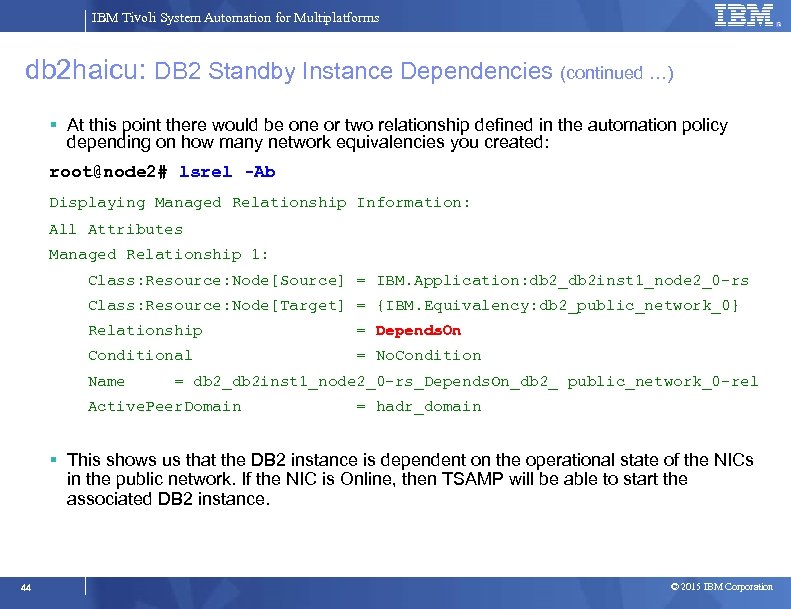
IBM Tivoli System Automation for Multiplatforms db 2 haicu: DB 2 Standby Instance Dependencies (continued …) At this point there would be one or two relationship defined in the automation policy depending on how many network equivalencies you created: root@node 2# lsrel -Ab Displaying Managed Relationship Information: All Attributes Managed Relationship 1: Class: Resource: Node[Source] = IBM. Application: db 2_db 2 inst 1_node 2_0 -rs Class: Resource: Node[Target] = {IBM. Equivalency: db 2_public_network_0} Relationship = Depends. On Conditional = No. Condition Name = db 2_db 2 inst 1_node 2_0 -rs_Depends. On_db 2_ public_network_0 -rel Active. Peer. Domain = hadr_domain This shows us that the DB 2 instance is dependent on the operational state of the NICs in the public network. If the NIC is Online, then TSAMP will be able to start the associated DB 2 instance. 44 © 2015 IBM Corporation
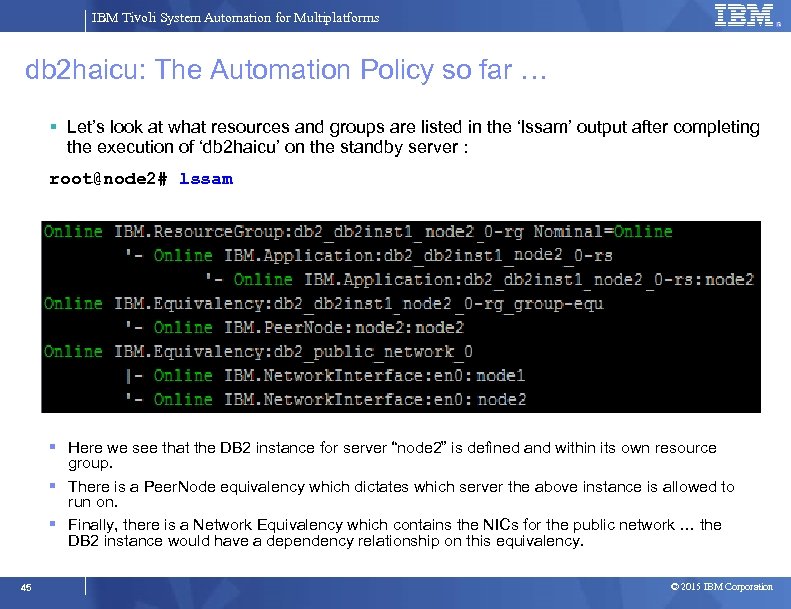
IBM Tivoli System Automation for Multiplatforms db 2 haicu: The Automation Policy so far … Let’s look at what resources and groups are listed in the ‘lssam’ output after completing the execution of ‘db 2 haicu’ on the standby server : root@node 2# lssam Here we see that the DB 2 instance for server “node 2” is defined and within its own resource group. There is a Peer. Node equivalency which dictates which server the above instance is allowed to run on. Finally, there is a Network Equivalency which contains the NICs for the public network … the DB 2 instance would have a dependency relationship on this equivalency. 45 © 2015 IBM Corporation
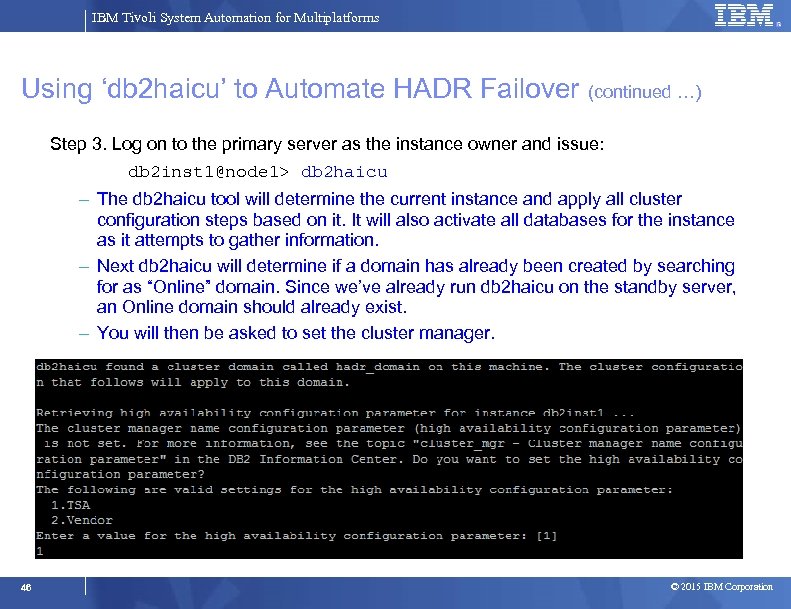
IBM Tivoli System Automation for Multiplatforms Using ‘db 2 haicu’ to Automate HADR Failover (continued …) Step 3. Log on to the primary server as the instance owner and issue: db 2 inst 1@node 1> db 2 haicu – The db 2 haicu tool will determine the current instance and apply all cluster configuration steps based on it. It will also activate all databases for the instance as it attempts to gather information. – Next db 2 haicu will determine if a domain has already been created by searching for as “Online” domain. Since we’ve already run db 2 haicu on the standby server, an Online domain should already exist. – You will then be asked to set the cluster manager. 46 © 2015 IBM Corporation
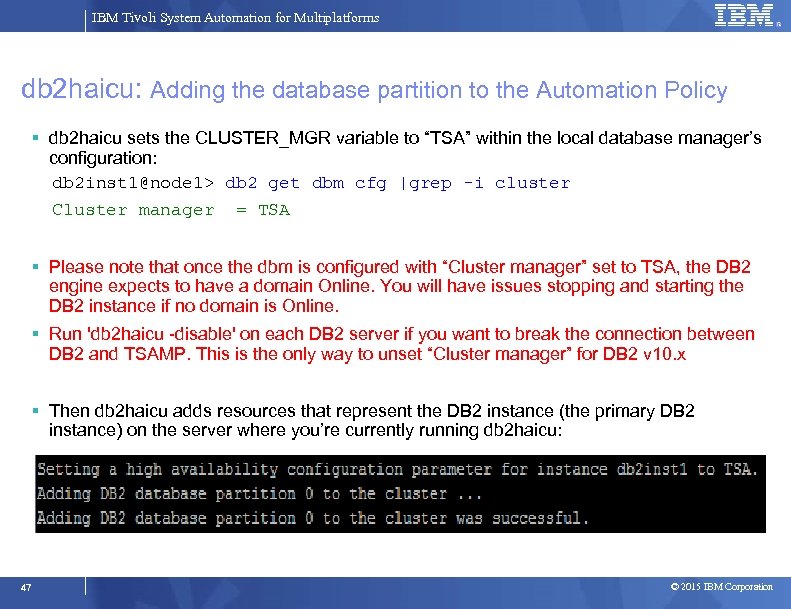
IBM Tivoli System Automation for Multiplatforms db 2 haicu: Adding the database partition to the Automation Policy db 2 haicu sets the CLUSTER_MGR variable to “TSA” within the local database manager’s configuration: db 2 inst 1@node 1> db 2 get dbm cfg |grep -i cluster Cluster manager = TSA Please note that once the dbm is configured with “Cluster manager” set to TSA, the DB 2 engine expects to have a domain Online. You will have issues stopping and starting the DB 2 instance if no domain is Online. Run 'db 2 haicu -disable' on each DB 2 server if you want to break the connection between DB 2 and TSAMP. This is the only way to unset “Cluster manager” for DB 2 v 10. x Then db 2 haicu adds resources that represent the DB 2 instance (the primary DB 2 instance) on the server where you’re currently running db 2 haicu: 47 © 2015 IBM Corporation
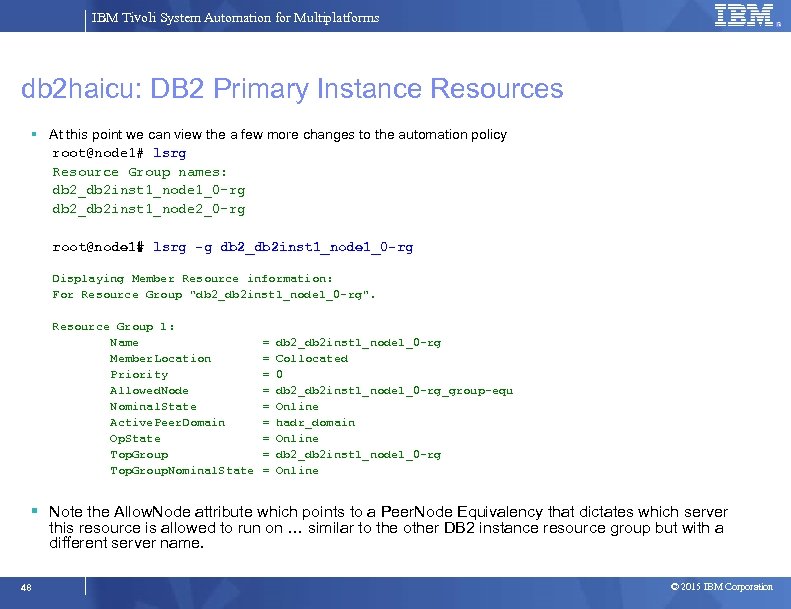
IBM Tivoli System Automation for Multiplatforms db 2 haicu: DB 2 Primary Instance Resources At this point we can view the a few more changes to the automation policy root@node 1# lsrg Resource Group names: db 2_db 2 inst 1_node 1_0 -rg db 2_db 2 inst 1_node 2_0 -rg root@node 1# lsrg -g db 2_db 2 inst 1_node 1_0 -rg Displaying Member Resource information: For Resource Group "db 2_db 2 inst 1_node 1_0 -rg". Resource Group 1: Name = db 2_db 2 inst 1_node 1_0 -rg Member. Location = Collocated Priority = 0 Allowed. Node = db 2_db 2 inst 1_node 1_0 -rg_group-equ Nominal. State = Online Active. Peer. Domain = hadr_domain Op. State = Online Top. Group = db 2_db 2 inst 1_node 1_0 -rg Top. Group. Nominal. State = Online Note the Allow. Node attribute which points to a Peer. Node Equivalency that dictates which server this resource is allowed to run on … similar to the other DB 2 instance resource group but with a different server name. 48 © 2015 IBM Corporation
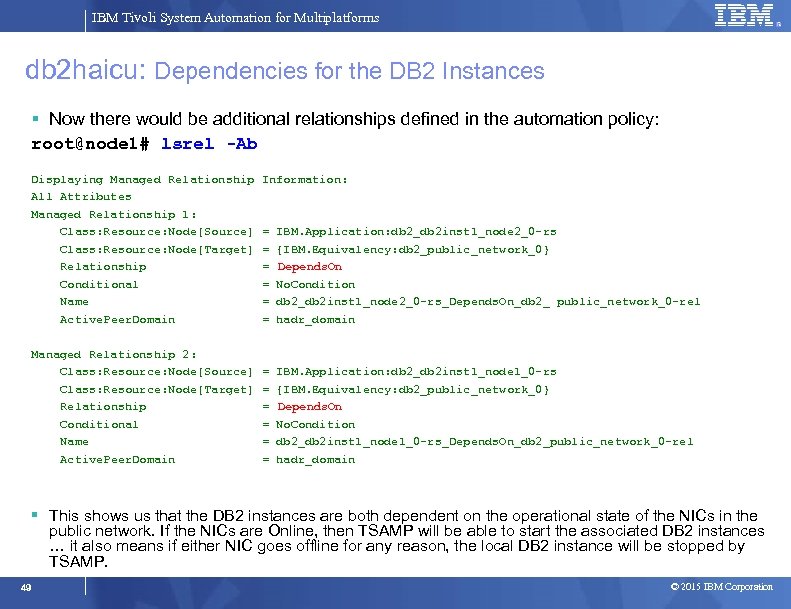
IBM Tivoli System Automation for Multiplatforms db 2 haicu: Dependencies for the DB 2 Instances Now there would be additional relationships defined in the automation policy: root@node 1# lsrel -Ab Displaying Managed Relationship Information: All Attributes Managed Relationship 1: Class: Resource: Node[Source] = IBM. Application: db 2_db 2 inst 1_node 2_0 -rs Class: Resource: Node[Target] = {IBM. Equivalency: db 2_public_network_0} Relationship = Depends. On Conditional = No. Condition Name = db 2_db 2 inst 1_node 2_0 -rs_Depends. On_db 2_ public_network_0 -rel Active. Peer. Domain = hadr_domain Managed Relationship 2: Class: Resource: Node[Source] = IBM. Application: db 2_db 2 inst 1_node 1_0 -rs Class: Resource: Node[Target] = {IBM. Equivalency: db 2_public_network_0} Relationship = Depends. On Conditional = No. Condition Name = db 2_db 2 inst 1_node 1_0 -rs_Depends. On_db 2_public_network_0 -rel Active. Peer. Domain = hadr_domain This shows us that the DB 2 instances are both dependent on the operational state of the NICs in the public network. If the NICs are Online, then TSAMP will be able to start the associated DB 2 instances … it also means if either NIC goes offline for any reason, the local DB 2 instance will be stopped by TSAMP. 49 © 2015 IBM Corporation
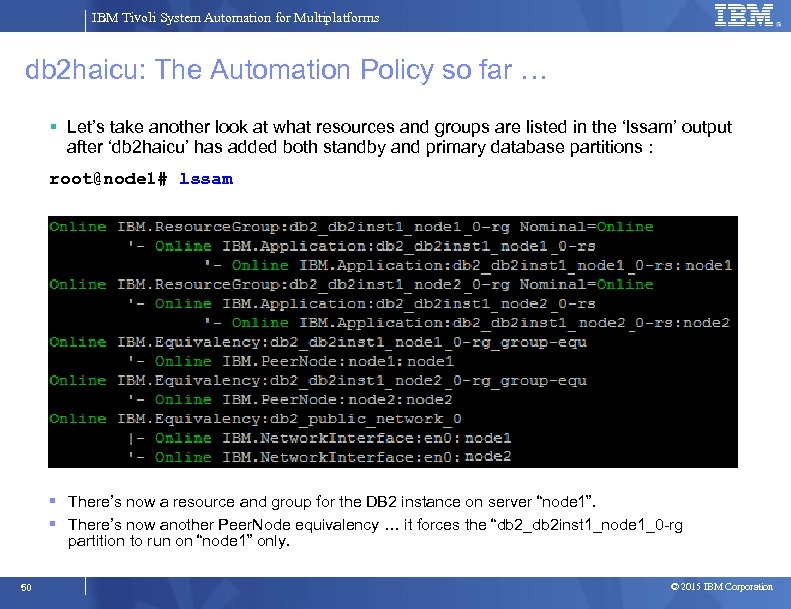
IBM Tivoli System Automation for Multiplatforms db 2 haicu: The Automation Policy so far … Let’s take another look at what resources and groups are listed in the ‘lssam’ output after ‘db 2 haicu’ has added both standby and primary database partitions : root@node 1# lssam There’s now a resource and group for the DB 2 instance on server “node 1”. There’s now another Peer. Node equivalency … it forces the “db 2_db 2 inst 1_node 1_0 -rg partition to run on “node 1” only. 50 © 2015 IBM Corporation
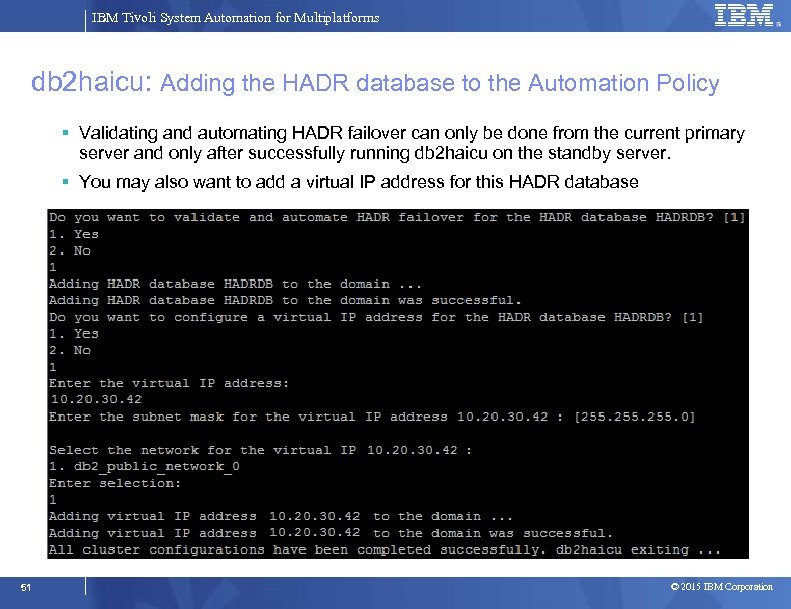
IBM Tivoli System Automation for Multiplatforms db 2 haicu: Adding the HADR database to the Automation Policy Validating and automating HADR failover can only be done from the current primary server and only after successfully running db 2 haicu on the standby server. You may also want to add a virtual IP address for this HADR database 51 © 2015 IBM Corporation
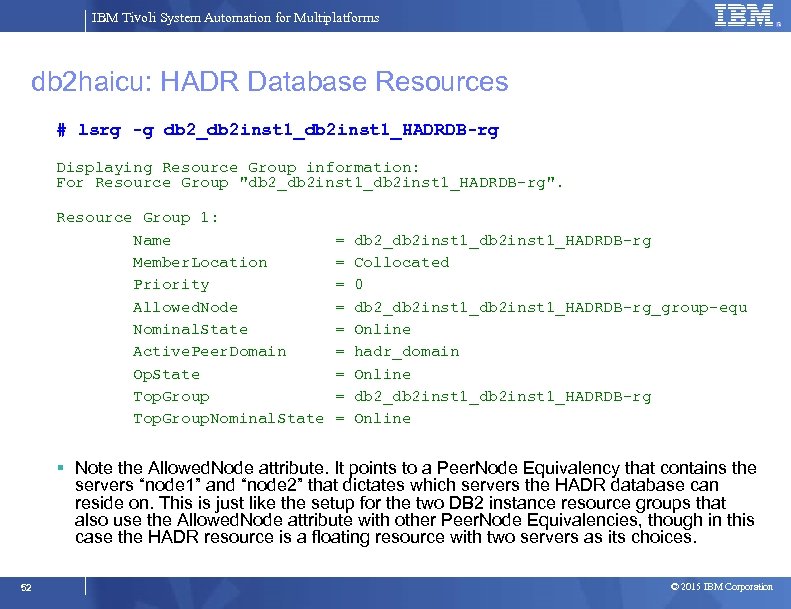
IBM Tivoli System Automation for Multiplatforms db 2 haicu: HADR Database Resources # lsrg -g db 2_db 2 inst 1_HADRDB-rg Displaying Resource Group information: For Resource Group "db 2_db 2 inst 1_HADRDB-rg". Resource Group 1: Name = db 2_db 2 inst 1_HADRDB-rg Member. Location = Collocated Priority = 0 Allowed. Node = db 2_db 2 inst 1_HADRDB-rg_group-equ Nominal. State = Online Active. Peer. Domain = hadr_domain Op. State = Online Top. Group = db 2_db 2 inst 1_HADRDB-rg Top. Group. Nominal. State = Online Note the Allowed. Node attribute. It points to a Peer. Node Equivalency that contains the servers “node 1” and “node 2” that dictates which servers the HADR database can reside on. This is just like the setup for the two DB 2 instance resource groups that also use the Allowed. Node attribute with other Peer. Node Equivalencies, though in this case the HADR resource is a floating resource with two servers as its choices. 52 © 2015 IBM Corporation
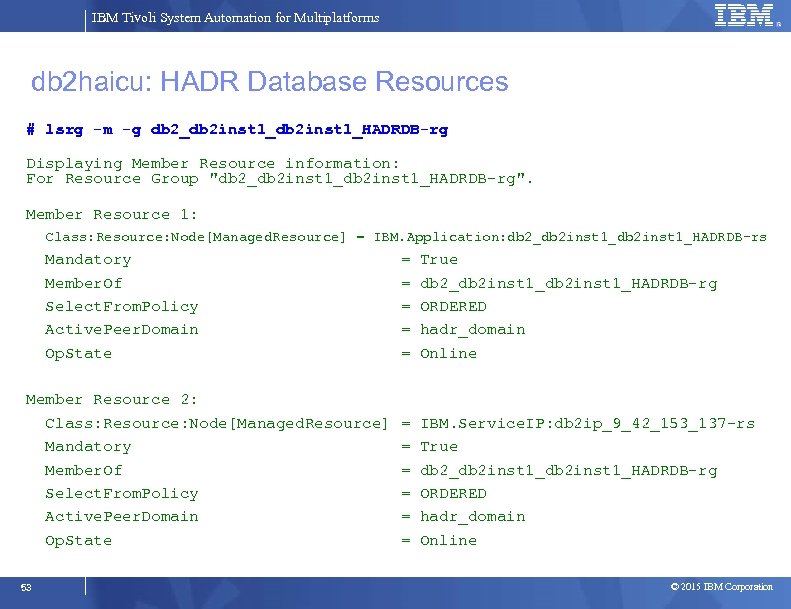
IBM Tivoli System Automation for Multiplatforms db 2 haicu: HADR Database Resources # lsrg -m -g db 2_db 2 inst 1_HADRDB-rg Displaying Member Resource information: For Resource Group "db 2_db 2 inst 1_HADRDB-rg". Member Resource 1: Class: Resource: Node[Managed. Resource] = IBM. Application: db 2_db 2 inst 1_HADRDB-rs Mandatory = True Member. Of = db 2_db 2 inst 1_HADRDB-rg Select. From. Policy = ORDERED Active. Peer. Domain = hadr_domain Op. State = Online Member Resource 2: Class: Resource: Node[Managed. Resource] = IBM. Service. IP: db 2 ip_9_42_153_137 -rs Mandatory = True Member. Of = db 2_db 2 inst 1_HADRDB-rg Select. From. Policy = ORDERED Active. Peer. Domain = hadr_domain Op. State = Online 53 © 2015 IBM Corporation
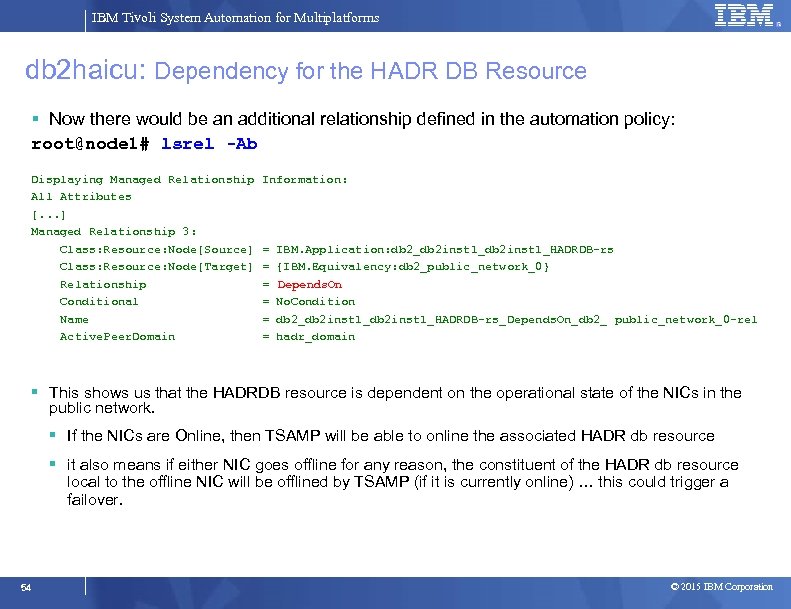
IBM Tivoli System Automation for Multiplatforms db 2 haicu: Dependency for the HADR DB Resource Now there would be an additional relationship defined in the automation policy: root@node 1# lsrel -Ab Displaying Managed Relationship Information: All Attributes [. . . ] Managed Relationship 3: Class: Resource: Node[Source] = IBM. Application: db 2_db 2 inst 1_HADRDB-rs Class: Resource: Node[Target] = {IBM. Equivalency: db 2_public_network_0} Relationship = Depends. On Conditional = No. Condition Name = db 2_db 2 inst 1_HADRDB-rs_Depends. On_db 2_ public_network_0 -rel Active. Peer. Domain = hadr_domain This shows us that the HADRDB resource is dependent on the operational state of the NICs in the public network. If the NICs are Online, then TSAMP will be able to online the associated HADR db resource it also means if either NIC goes offline for any reason, the constituent of the HADR db resource local to the offline NIC will be offlined by TSAMP (if it is currently online) … this could trigger a failover. 54 © 2015 IBM Corporation
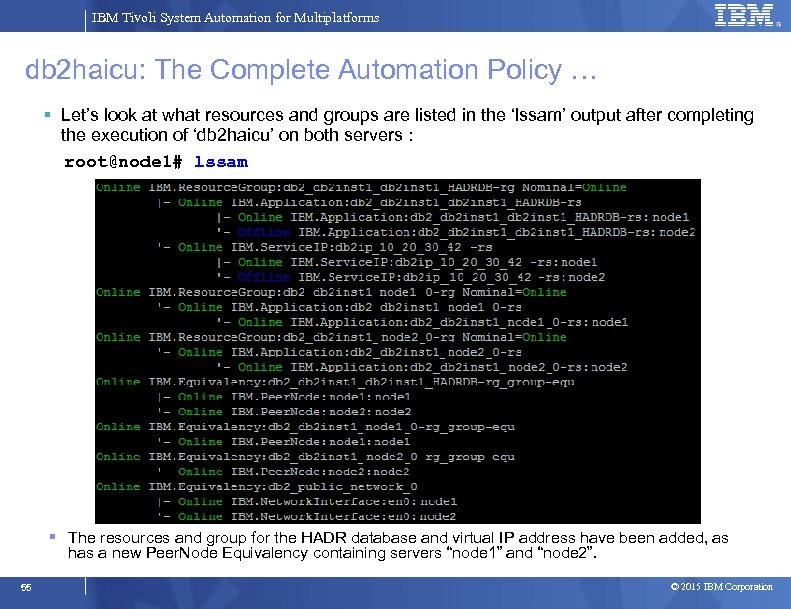
IBM Tivoli System Automation for Multiplatforms db 2 haicu: The Complete Automation Policy … Let’s look at what resources and groups are listed in the ‘lssam’ output after completing the execution of ‘db 2 haicu’ on both servers : root@node 1# lssam The resources and group for the HADR database and virtual IP address have been added, as has a new Peer. Node Equivalency containing servers “node 1” and “node 2”. 55 © 2015 IBM Corporation
IBM Tivoli System Automation for Multiplatforms Progress Introduction and Overview System Automation Components Overview Mapping DB 2 Components to TSAMP Resources Integrating TSAMP with DB 2 HADR using db 2 haicu Controlling the Operational State of the DB 2 Resources Disabling Automation (re-gain manual control of DB 2) Serviceability 56 © 2015 IBM Corporation
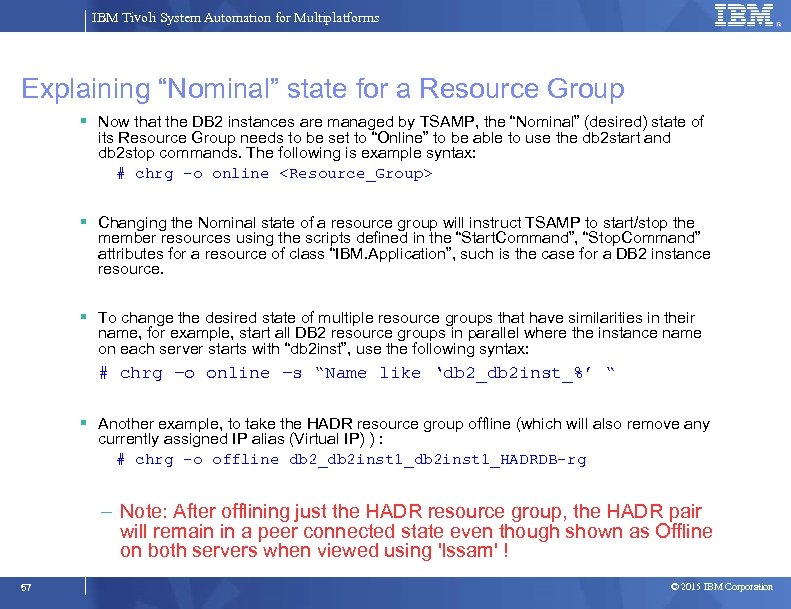
IBM Tivoli System Automation for Multiplatforms Explaining “Nominal” state for a Resource Group Now that the DB 2 instances are managed by TSAMP, the “Nominal” (desired) state of its Resource Group needs to be set to “Online” to be able to use the db 2 start and db 2 stop commands. The following is example syntax: # chrg –o online <Resource_Group> Changing the Nominal state of a resource group will instruct TSAMP to start/stop the member resources using the scripts defined in the “Start. Command”, “Stop. Command” attributes for a resource of class “IBM. Application”, such is the case for a DB 2 instance resource. To change the desired state of multiple resource groups that have similarities in their name, for example, start all DB 2 resource groups in parallel where the instance name on each server starts with “db 2 inst”, use the following syntax: # chrg –o online –s “Name like ‘db 2_db 2 inst_%’ “ Another example, to take the HADR resource group offline (which will also remove any currently assigned IP alias (Virtual IP) ) : # chrg –o offline db 2_db 2 inst 1_HADRDB-rg – Note: After offlining just the HADR resource group, the HADR pair will remain in a peer connected state even though shown as Offline on both servers when viewed using 'lssam' ! 57 © 2015 IBM Corporation
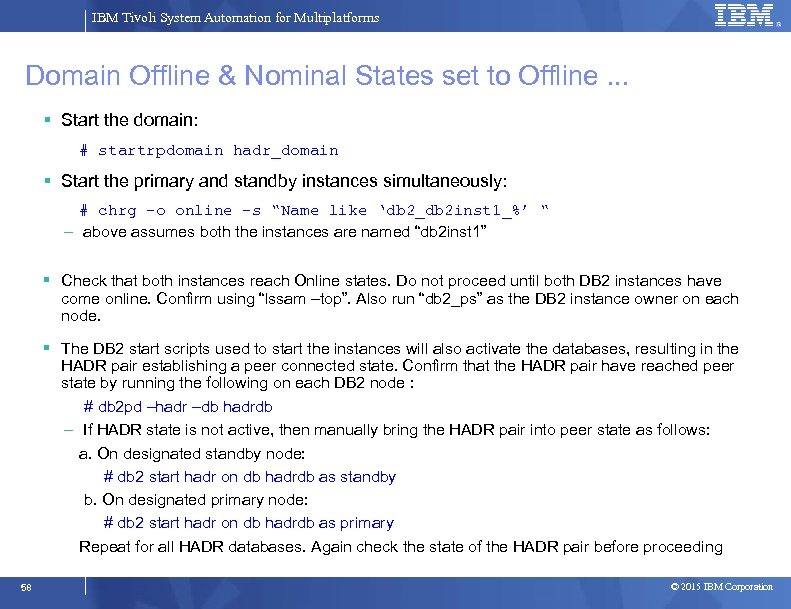
IBM Tivoli System Automation for Multiplatforms Domain Offline & Nominal States set to Offline. . . Start the domain: # startrpdomain hadr_domain Start the primary and standby instances simultaneously: # chrg –o online –s “Name like ‘db 2_db 2 inst 1_%’ “ – above assumes both the instances are named “db 2 inst 1” Check that both instances reach Online states. Do not proceed until both DB 2 instances have come online. Confirm using “lssam –top”. Also run “db 2_ps” as the DB 2 instance owner on each node. The DB 2 start scripts used to start the instances will also activate the databases, resulting in the HADR pair establishing a peer connected state. Confirm that the HADR pair have reached peer state by running the following on each DB 2 node : # db 2 pd –hadr –db hadrdb – If HADR state is not active, then manually bring the HADR pair into peer state as follows: a. On designated standby node: # db 2 start hadr on db hadrdb as standby b. On designated primary node: # db 2 start hadr on db hadrdb as primary Repeat for all HADR databases. Again check the state of the HADR pair before proceeding 58 © 2015 IBM Corporation
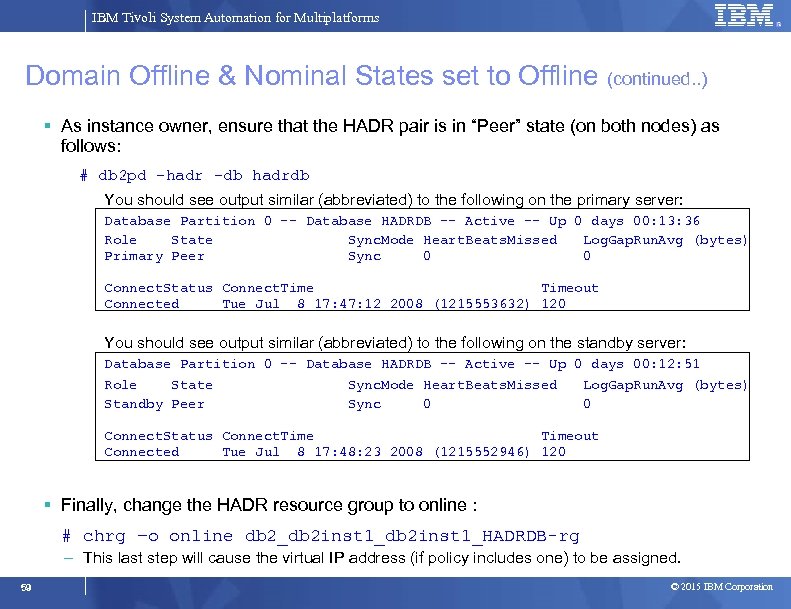
IBM Tivoli System Automation for Multiplatforms Domain Offline & Nominal States set to Offline (continued. . ) As instance owner, ensure that the HADR pair is in “Peer” state (on both nodes) as follows: # db 2 pd –hadr -db hadrdb You should see output similar (abbreviated) to the following on the primary server: Database Partition 0 -- Database HADRDB -- Active -- Up 0 days 00: 13: 36 Role State Sync. Mode Heart. Beats. Missed Log. Gap. Run. Avg (bytes) Primary Peer Sync 0 0 Connect. Status Connect. Time Timeout Connected Tue Jul 8 17: 47: 12 2008 (1215553632) 120 You should see output similar (abbreviated) to the following on the standby server: Database Partition 0 -- Database HADRDB -- Active -- Up 0 days 00: 12: 51 Role State Sync. Mode Heart. Beats. Missed Log. Gap. Run. Avg (bytes) Standby Peer Sync 0 0 Connect. Status Connect. Time Timeout Connected Tue Jul 8 17: 48: 23 2008 (1215552946) 120 Finally, change the HADR resource group to online : # chrg –o online db 2_db 2 inst 1_HADRDB-rg – This last step will cause the virtual IP address (if policy includes one) to be assigned. 59 © 2015 IBM Corporation
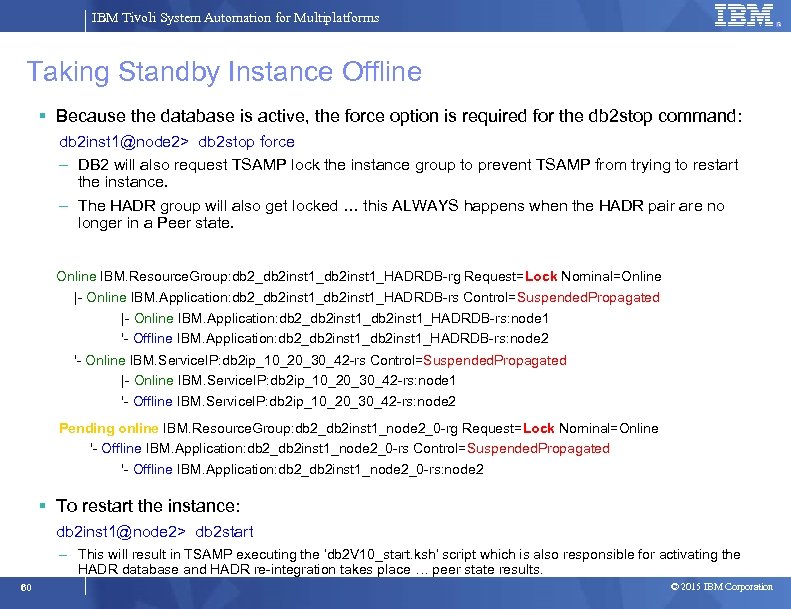
IBM Tivoli System Automation for Multiplatforms Taking Standby Instance Offline Because the database is active, the force option is required for the db 2 stop command: db 2 inst 1@node 2> db 2 stop force – DB 2 will also request TSAMP lock the instance group to prevent TSAMP from trying to restart the instance. – The HADR group will also get locked … this ALWAYS happens when the HADR pair are no longer in a Peer state. Online IBM. Resource. Group: db 2_db 2 inst 1_HADRDB-rg Request=Lock Nominal=Online |- Online IBM. Application: db 2_db 2 inst 1_HADRDB-rs Control=Suspended. Propagated |- Online IBM. Application: db 2_db 2 inst 1_HADRDB-rs: node 1 '- Offline IBM. Application: db 2_db 2 inst 1_HADRDB-rs: node 2 '- Online IBM. Service. IP: db 2 ip_10_20_30_42 -rs Control=Suspended. Propagated |- Online IBM. Service. IP: db 2 ip_10_20_30_42 -rs: node 1 '- Offline IBM. Service. IP: db 2 ip_10_20_30_42 -rs: node 2 Pending online IBM. Resource. Group: db 2_db 2 inst 1_node 2_0 -rg Request=Lock Nominal=Online '- Offline IBM. Application: db 2_db 2 inst 1_node 2_0 -rs Control=Suspended. Propagated '- Offline IBM. Application: db 2_db 2 inst 1_node 2_0 -rs: node 2 To restart the instance: db 2 inst 1@node 2> db 2 start – This will result in TSAMP executing the ‘db 2 V 10_start. ksh’ script which is also responsible for activating the HADR database and HADR re-integration takes place … peer state results. 60 © 2015 IBM Corporation
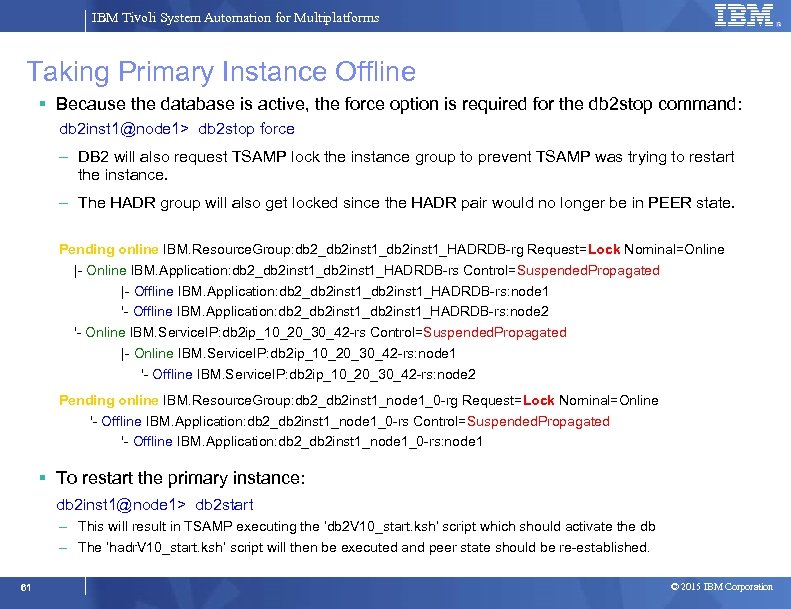
IBM Tivoli System Automation for Multiplatforms Taking Primary Instance Offline Because the database is active, the force option is required for the db 2 stop command: db 2 inst 1@node 1> db 2 stop force – DB 2 will also request TSAMP lock the instance group to prevent TSAMP was trying to restart the instance. – The HADR group will also get locked since the HADR pair would no longer be in PEER state. Pending online IBM. Resource. Group: db 2_db 2 inst 1_HADRDB-rg Request=Lock Nominal=Online |- Online IBM. Application: db 2_db 2 inst 1_HADRDB-rs Control=Suspended. Propagated |- Offline IBM. Application: db 2_db 2 inst 1_HADRDB-rs: node 1 '- Offline IBM. Application: db 2_db 2 inst 1_HADRDB-rs: node 2 '- Online IBM. Service. IP: db 2 ip_10_20_30_42 -rs Control=Suspended. Propagated |- Online IBM. Service. IP: db 2 ip_10_20_30_42 -rs: node 1 '- Offline IBM. Service. IP: db 2 ip_10_20_30_42 -rs: node 2 Pending online IBM. Resource. Group: db 2_db 2 inst 1_node 1_0 -rg Request=Lock Nominal=Online '- Offline IBM. Application: db 2_db 2 inst 1_node 1_0 -rs Control=Suspended. Propagated '- Offline IBM. Application: db 2_db 2 inst 1_node 1_0 -rs: node 1 To restart the primary instance: db 2 inst 1@node 1> db 2 start – This will result in TSAMP executing the ‘db 2 V 10_start. ksh’ script which should activate the db – The ‘hadr. V 10_start. ksh’ script will then be executed and peer state should be re-established. 61 © 2015 IBM Corporation
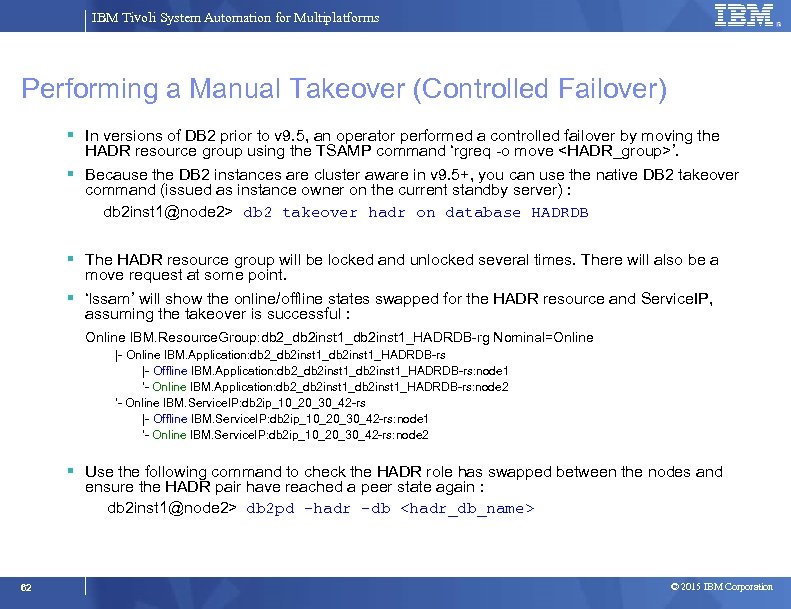
IBM Tivoli System Automation for Multiplatforms Performing a Manual Takeover (Controlled Failover) In versions of DB 2 prior to v 9. 5, an operator performed a controlled failover by moving the HADR resource group using the TSAMP command ‘rgreq -o move <HADR_group>’. Because the DB 2 instances are cluster aware in v 9. 5+, you can use the native DB 2 takeover command (issued as instance owner on the current standby server) : db 2 inst 1@node 2> db 2 takeover hadr on database HADRDB The HADR resource group will be locked and unlocked several times. There will also be a move request at some point. ‘lssam’ will show the online/offline states swapped for the HADR resource and Service. IP, assuming the takeover is successful : Online IBM. Resource. Group: db 2_db 2 inst 1_HADRDB-rg Nominal=Online |- Online IBM. Application: db 2_db 2 inst 1_HADRDB-rs |- Offline IBM. Application: db 2_db 2 inst 1_HADRDB-rs: node 1 '- Online IBM. Application: db 2_db 2 inst 1_HADRDB-rs: node 2 '- Online IBM. Service. IP: db 2 ip_10_20_30_42 -rs |- Offline IBM. Service. IP: db 2 ip_10_20_30_42 -rs: node 1 '- Online IBM. Service. IP: db 2 ip_10_20_30_42 -rs: node 2 Use the following command to check the HADR role has swapped between the nodes and ensure the HADR pair have reached a peer state again : db 2 inst 1@node 2> db 2 pd –hadr –db <hadr_db_name> 62 © 2015 IBM Corporation
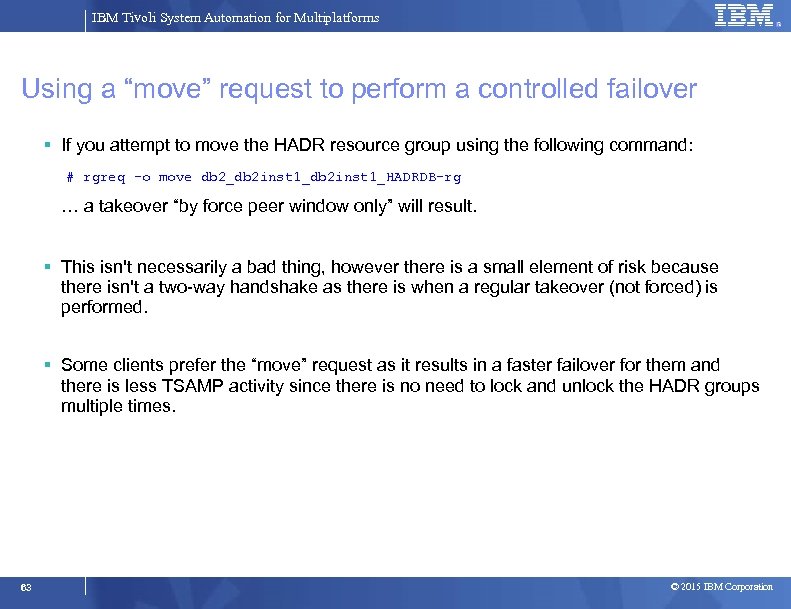
IBM Tivoli System Automation for Multiplatforms Using a “move” request to perform a controlled failover If you attempt to move the HADR resource group using the following command: # rgreq –o move db 2_db 2 inst 1_HADRDB-rg … a takeover “by force peer window only” will result. This isn't necessarily a bad thing, however there is a small element of risk because there isn't a two-way handshake as there is when a regular takeover (not forced) is performed. Some clients prefer the “move” request as it results in a faster failover for them and there is less TSAMP activity since there is no need to lock and unlock the HADR groups multiple times. 63 © 2015 IBM Corporation
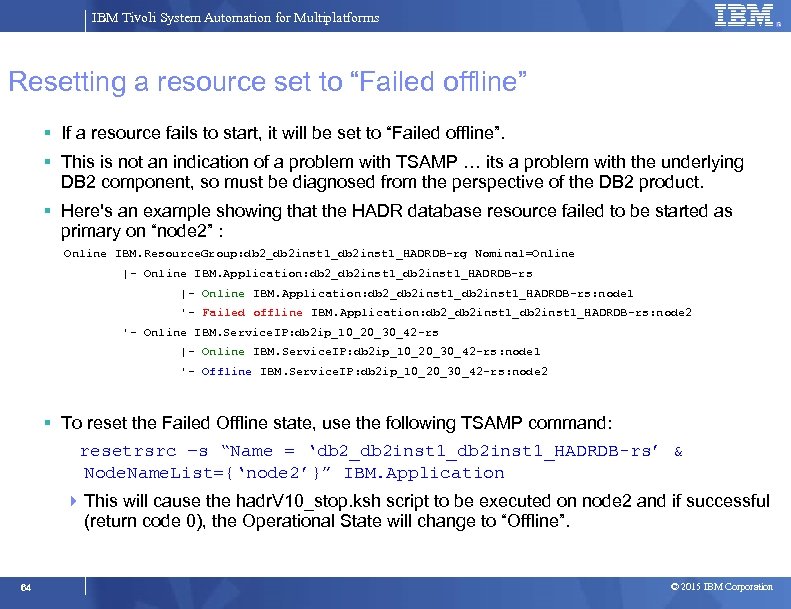
IBM Tivoli System Automation for Multiplatforms Resetting a resource set to “Failed offline” If a resource fails to start, it will be set to “Failed offline”. This is not an indication of a problem with TSAMP … its a problem with the underlying DB 2 component, so must be diagnosed from the perspective of the DB 2 product. Here's an example showing that the HADR database resource failed to be started as primary on “node 2” : Online IBM. Resource. Group: db 2_db 2 inst 1_HADRDB-rg Nominal=Online |- Online IBM. Application: db 2_db 2 inst 1_db 2 inst 1_HADRDB-rs: node 1 '- Failed offline IBM. Application: db 2_db 2 inst 1_HADRDB-rs: node 2 '- Online IBM. Service. IP: db 2 ip_10_20_30_42 -rs |- Online IBM. Service. IP: db 2 ip_10_20_30_42 -rs: node 1 '- Offline IBM. Service. IP: db 2 ip_10_20_30_42 -rs: node 2 To reset the Failed Offline state, use the following TSAMP command: resetrsrc –s “Name = ‘db 2_db 2 inst 1_HADRDB-rs’ & Node. Name. List={‘node 2’}” IBM. Application This will cause the hadr. V 10_stop. ksh script to be executed on node 2 and if successful (return code 0), the Operational State will change to “Offline”. 64 © 2015 IBM Corporation
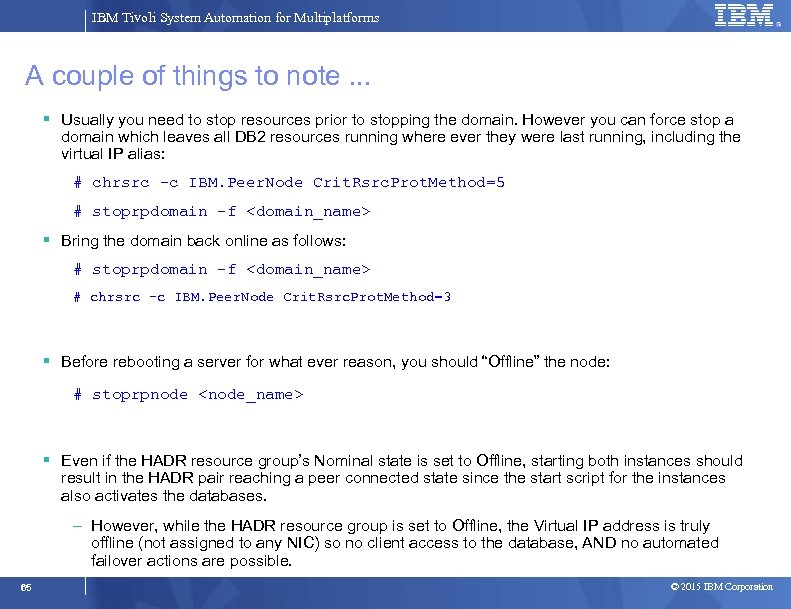
IBM Tivoli System Automation for Multiplatforms A couple of things to note. . . Usually you need to stop resources prior to stopping the domain. However you can force stop a domain which leaves all DB 2 resources running where ever they were last running, including the virtual IP alias: # chrsrc -c IBM. Peer. Node Crit. Rsrc. Prot. Method=5 # stoprpdomain -f <domain_name> Bring the domain back online as follows: # stoprpdomain -f <domain_name> # chrsrc -c IBM. Peer. Node Crit. Rsrc. Prot. Method=3 Before rebooting a server for what ever reason, you should “Offline” the node: # stoprpnode <node_name> Even if the HADR resource group’s Nominal state is set to Offline, starting both instances should result in the HADR pair reaching a peer connected state since the start script for the instances also activates the databases. – However, while the HADR resource group is set to Offline, the Virtual IP address is truly offline (not assigned to any NIC) so no client access to the database, AND no automated failover actions are possible. 65 © 2015 IBM Corporation
IBM Tivoli System Automation for Multiplatforms Failure Scenarios • The various failover scenarios supported by this solution are detailed in section 6 of a whitepaper called “Automated Cluster Controlled HADR (High Availability Disaster Recovery) Configuration Setup using the IBM DB 2 High Availability Instance Configuration Utility (db 2 haicu) ” • This whitepaper can be downloaded via the following URL: http: //download. boulder. ibm. com/ibmdl/pub/software/dw/data/dm 0908 hadrdb 2 haicu/HADR_db 2 haicu. pdf • The following scenarios result in automated actions, including failovers/takeovers: 1. Standby Instance Failure 2. Primary Instance Failure 3. Standby NIC Failures (public network) 4. Primary NIC Failures (public network) 5. Standby Node Failure 6. Primary Node Failure 66 © 2015 IBM Corporation
IBM Tivoli System Automation for Multiplatforms Progress Introduction and Overview System Automation Components Overview Mapping DB 2 Components to TSAMP Resources Integrating TSAMP with DB 2 HADR using db 2 haicu Controlling the Operational State of the DB 2 Resources Disabling Automation (re-gain manual control of DB 2) Serviceability 67 © 2015 IBM Corporation
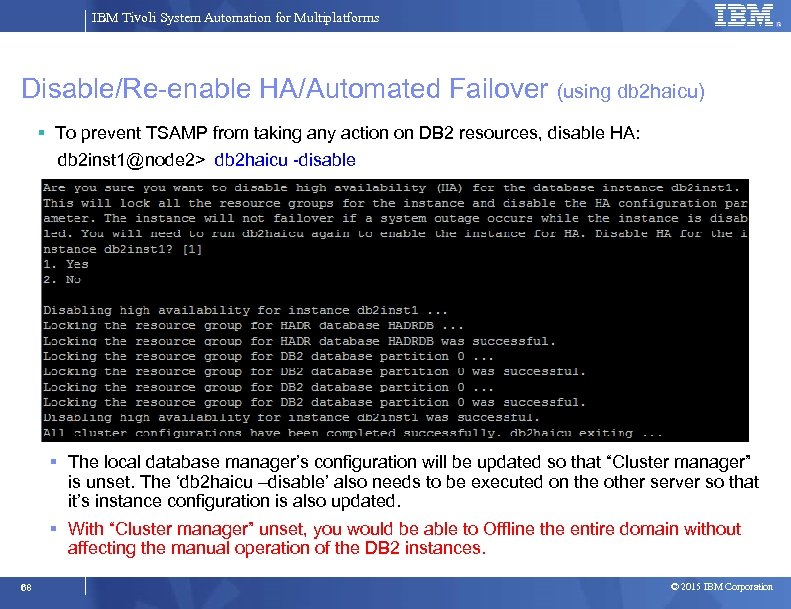
IBM Tivoli System Automation for Multiplatforms Disable/Re-enable HA/Automated Failover (using db 2 haicu) To prevent TSAMP from taking any action on DB 2 resources, disable HA: db 2 inst 1@node 2> db 2 haicu -disable The local database manager’s configuration will be updated so that “Cluster manager” is unset. The ‘db 2 haicu –disable’ also needs to be executed on the other server so that it’s instance configuration is also updated. With “Cluster manager” unset, you would be able to Offline the entire domain without affecting the manual operation of the DB 2 instances. 68 © 2015 IBM Corporation
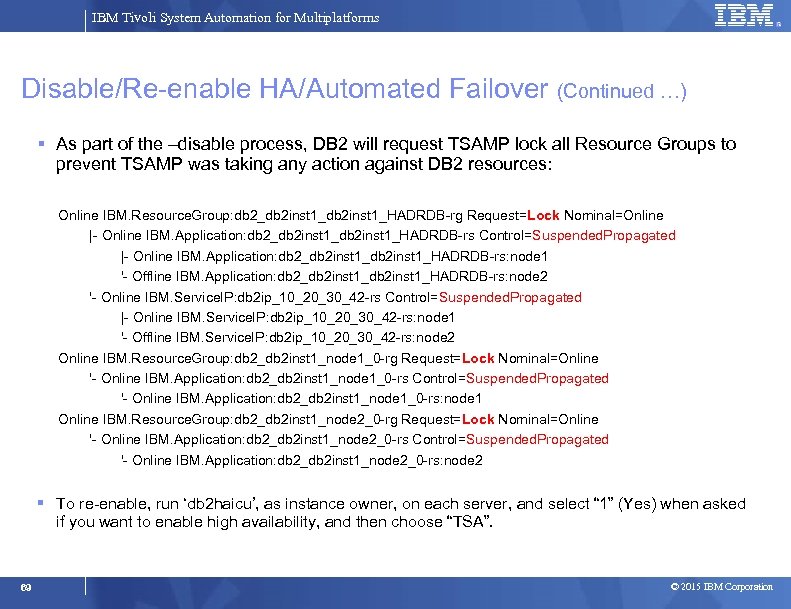
IBM Tivoli System Automation for Multiplatforms Disable/Re-enable HA/Automated Failover (Continued …) As part of the –disable process, DB 2 will request TSAMP lock all Resource Groups to prevent TSAMP was taking any action against DB 2 resources: Online IBM. Resource. Group: db 2_db 2 inst 1_HADRDB-rg Request=Lock Nominal=Online |- Online IBM. Application: db 2_db 2 inst 1_HADRDB-rs Control=Suspended. Propagated |- Online IBM. Application: db 2_db 2 inst 1_HADRDB-rs: node 1 '- Offline IBM. Application: db 2_db 2 inst 1_HADRDB-rs: node 2 '- Online IBM. Service. IP: db 2 ip_10_20_30_42 -rs Control=Suspended. Propagated |- Online IBM. Service. IP: db 2 ip_10_20_30_42 -rs: node 1 '- Offline IBM. Service. IP: db 2 ip_10_20_30_42 -rs: node 2 Online IBM. Resource. Group: db 2_db 2 inst 1_node 1_0 -rg Request=Lock Nominal=Online '- Online IBM. Application: db 2_db 2 inst 1_node 1_0 -rs Control=Suspended. Propagated '- Online IBM. Application: db 2_db 2 inst 1_node 1_0 -rs: node 1 Online IBM. Resource. Group: db 2_db 2 inst 1_node 2_0 -rg Request=Lock Nominal=Online '- Online IBM. Application: db 2_db 2 inst 1_node 2_0 -rs Control=Suspended. Propagated '- Online IBM. Application: db 2_db 2 inst 1_node 2_0 -rs: node 2 To re-enable, run ‘db 2 haicu’, as instance owner, on each server, and select “ 1” (Yes) when asked if you want to enable high availability, and then choose “TSA”. 69 © 2015 IBM Corporation
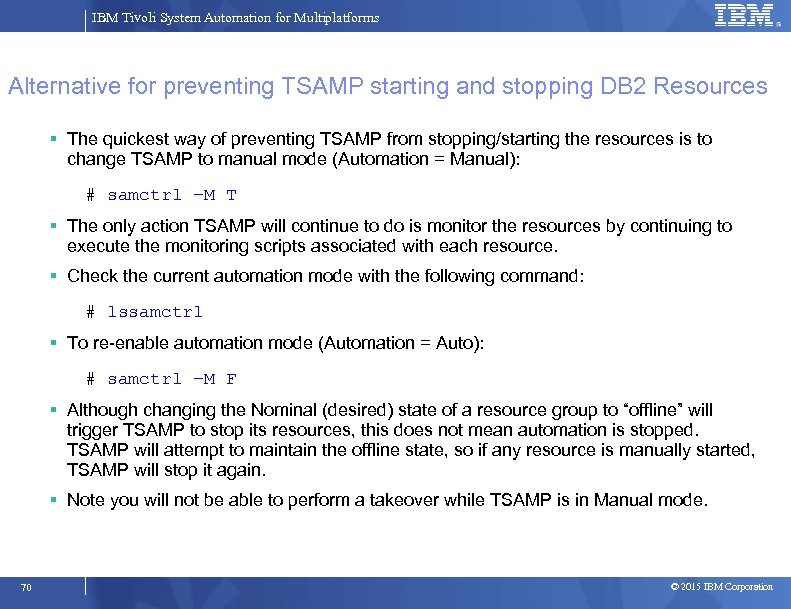
IBM Tivoli System Automation for Multiplatforms Alternative for preventing TSAMP starting and stopping DB 2 Resources The quickest way of preventing TSAMP from stopping/starting the resources is to change TSAMP to manual mode (Automation = Manual): # samctrl –M T The only action TSAMP will continue to do is monitor the resources by continuing to execute the monitoring scripts associated with each resource. Check the current automation mode with the following command: # lssamctrl To re-enable automation mode (Automation = Auto): # samctrl –M F Although changing the Nominal (desired) state of a resource group to “offline” will trigger TSAMP to stop its resources, this does not mean automation is stopped. TSAMP will attempt to maintain the offline state, so if any resource is manually started, TSAMP will stop it again. Note you will not be able to perform a takeover while TSAMP is in Manual mode. 70 © 2015 IBM Corporation
IBM Tivoli System Automation for Multiplatforms Progress Introduction and Overview System Automation Components Overview Mapping DB 2 Components to TSAMP Resources Integrating TSAMP with DB 2 HADR using db 2 haicu Controlling the Operational State of the DB 2 Resources Disabling Automation (re-gain manual control of DB 2) Serviceability 71 © 2015 IBM Corporation
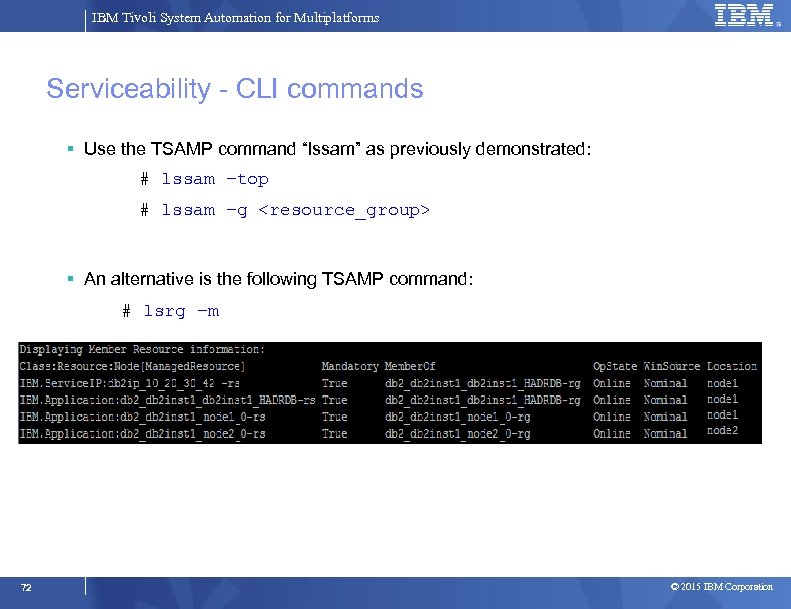
IBM Tivoli System Automation for Multiplatforms Serviceability - CLI commands Use the TSAMP command “lssam” as previously demonstrated: # lssam –top # lssam –g <resource_group> An alternative is the following TSAMP command: # lsrg –m 72 © 2015 IBM Corporation
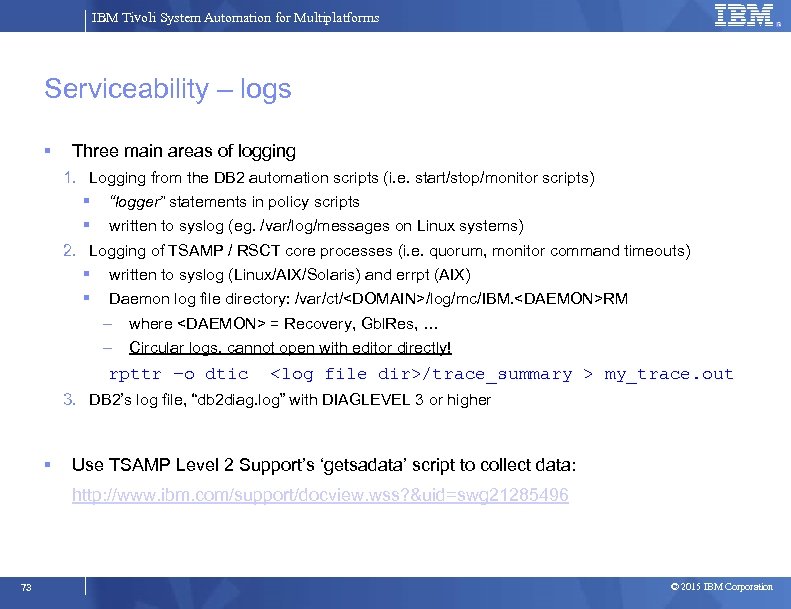
IBM Tivoli System Automation for Multiplatforms Serviceability – logs Three main areas of logging 1. Logging from the DB 2 automation scripts (i. e. start/stop/monitor scripts) “logger” statements in policy scripts written to syslog (eg. /var/log/messages on Linux systems) 2. Logging of TSAMP / RSCT core processes (i. e. quorum, monitor command timeouts) written to syslog (Linux/AIX/Solaris) and errpt (AIX) Daemon log file directory: /var/ct/<DOMAIN>/log/mc/IBM. <DAEMON>RM – where <DAEMON> = Recovery, Gbl. Res, … – Circular logs, cannot open with editor directly! rpttr –o dtic <log file dir>/trace_summary > my_trace. out 3. DB 2’s log file, “db 2 diag. log” with DIAGLEVEL 3 or higher Use TSAMP Level 2 Support’s ‘getsadata’ script to collect data: http: //www. ibm. com/support/docview. wss? &uid=swg 21285496 73 © 2015 IBM Corporation
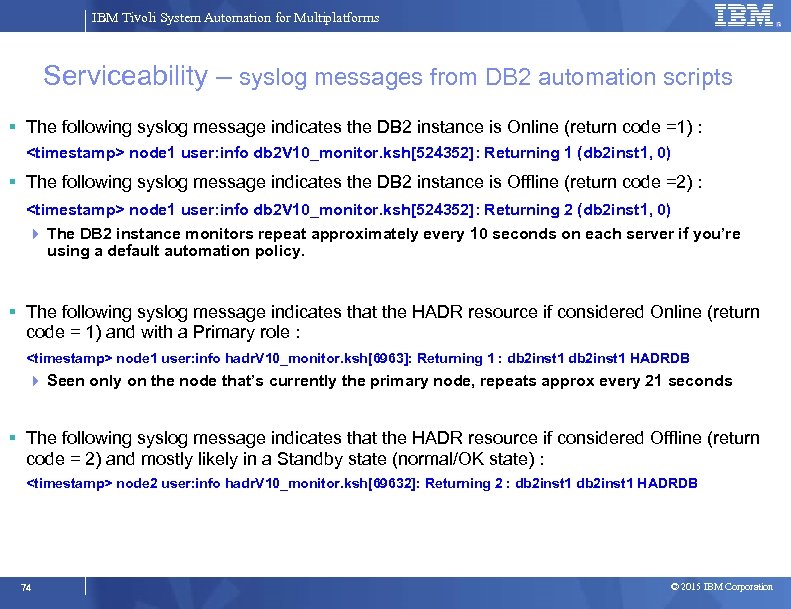
IBM Tivoli System Automation for Multiplatforms Serviceability – syslog messages from DB 2 automation scripts The following syslog message indicates the DB 2 instance is Online (return code =1) : <timestamp> node 1 user: info db 2 V 10_monitor. ksh[524352]: Returning 1 (db 2 inst 1, 0) The following syslog message indicates the DB 2 instance is Offline (return code =2) : <timestamp> node 1 user: info db 2 V 10_monitor. ksh[524352]: Returning 2 (db 2 inst 1, 0) The DB 2 instance monitors repeat approximately every 10 seconds on each server if you’re using a default automation policy. The following syslog message indicates that the HADR resource if considered Online (return code = 1) and with a Primary role : <timestamp> node 1 user: info hadr. V 10_monitor. ksh[6963]: Returning 1 : db 2 inst 1 HADRDB Seen only on the node that’s currently the primary node, repeats approx every 21 seconds The following syslog message indicates that the HADR resource if considered Offline (return code = 2) and mostly likely in a Standby state (normal/OK state) : <timestamp> node 2 user: info hadr. V 10_monitor. ksh[69632]: Returning 2 : db 2 inst 1 HADRDB 74 © 2015 IBM Corporation
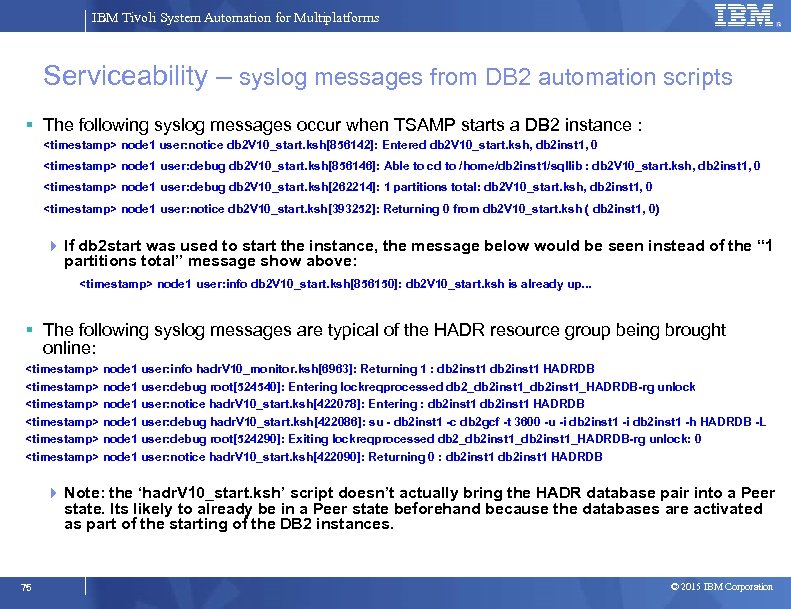
IBM Tivoli System Automation for Multiplatforms Serviceability – syslog messages from DB 2 automation scripts The following syslog messages occur when TSAMP starts a DB 2 instance : <timestamp> node 1 user: notice db 2 V 10_start. ksh[856142]: Entered db 2 V 10_start. ksh, db 2 inst 1, 0 <timestamp> node 1 user: debug db 2 V 10_start. ksh[856146]: Able to cd to /home/db 2 inst 1/sqllib : db 2 V 10_start. ksh, db 2 inst 1, 0 <timestamp> node 1 user: debug db 2 V 10_start. ksh[262214]: 1 partitions total: db 2 V 10_start. ksh, db 2 inst 1, 0 <timestamp> node 1 user: notice db 2 V 10_start. ksh[393252]: Returning 0 from db 2 V 10_start. ksh ( db 2 inst 1, 0) If db 2 start was used to start the instance, the message below would be seen instead of the “ 1 partitions total” message show above: <timestamp> node 1 user: info db 2 V 10_start. ksh[856150]: db 2 V 10_start. ksh is already up. . . The following syslog messages are typical of the HADR resource group being brought online: <timestamp> node 1 user: info hadr. V 10_monitor. ksh[6963]: Returning 1 : db 2 inst 1 HADRDB <timestamp> node 1 user: debug root[524540]: Entering lockreqprocessed db 2_db 2 inst 1_HADRDB-rg unlock <timestamp> node 1 user: notice hadr. V 10_start. ksh[422078]: Entering : db 2 inst 1 HADRDB <timestamp> node 1 user: debug hadr. V 10_start. ksh[422086]: su - db 2 inst 1 -c db 2 gcf -t 3600 -u -i db 2 inst 1 -h HADRDB -L <timestamp> node 1 user: debug root[524290]: Exiting lockreqprocessed db 2_db 2 inst 1_HADRDB-rg unlock: 0 <timestamp> node 1 user: notice hadr. V 10_start. ksh[422090]: Returning 0 : db 2 inst 1 HADRDB Note: the ‘hadr. V 10_start. ksh’ script doesn’t actually bring the HADR database pair into a Peer state. Its likely to already be in a Peer state beforehand because the databases are activated as part of the starting of the DB 2 instances. 75 © 2015 IBM Corporation
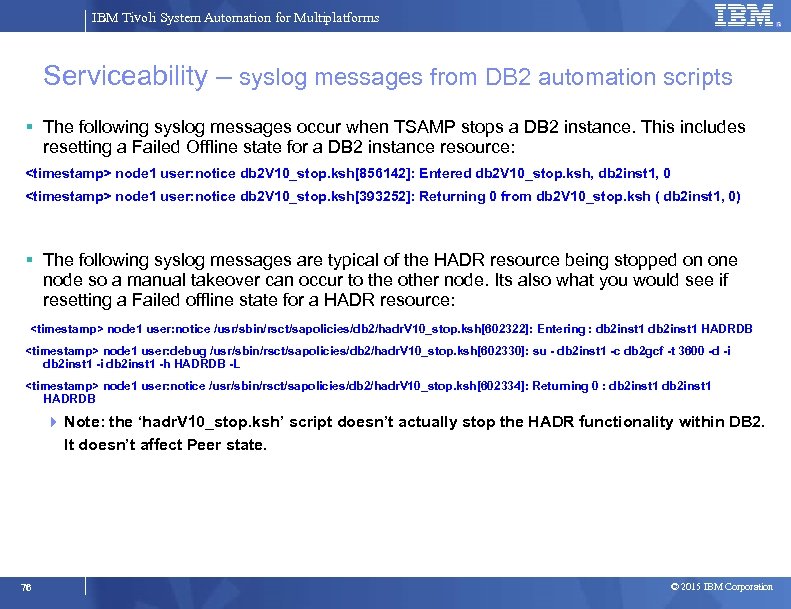
IBM Tivoli System Automation for Multiplatforms Serviceability – syslog messages from DB 2 automation scripts The following syslog messages occur when TSAMP stops a DB 2 instance. This includes resetting a Failed Offline state for a DB 2 instance resource: <timestamp> node 1 user: notice db 2 V 10_stop. ksh[856142]: Entered db 2 V 10_stop. ksh, db 2 inst 1, 0 <timestamp> node 1 user: notice db 2 V 10_stop. ksh[393252]: Returning 0 from db 2 V 10_stop. ksh ( db 2 inst 1, 0) The following syslog messages are typical of the HADR resource being stopped on one node so a manual takeover can occur to the other node. Its also what you would see if resetting a Failed offline state for a HADR resource: <timestamp> node 1 user: notice /usr/sbin/rsct/sapolicies/db 2/hadr. V 10_stop. ksh[602322]: Entering : db 2 inst 1 HADRDB <timestamp> node 1 user: debug /usr/sbin/rsct/sapolicies/db 2/hadr. V 10_stop. ksh[602330]: su - db 2 inst 1 -c db 2 gcf -t 3600 -d -i db 2 inst 1 -h HADRDB -L <timestamp> node 1 user: notice /usr/sbin/rsct/sapolicies/db 2/hadr. V 10_stop. ksh[602334]: Returning 0 : db 2 inst 1 HADRDB Note: the ‘hadr. V 10_stop. ksh’ script doesn’t actually stop the HADR functionality within DB 2. It doesn’t affect Peer state. 76 © 2015 IBM Corporation
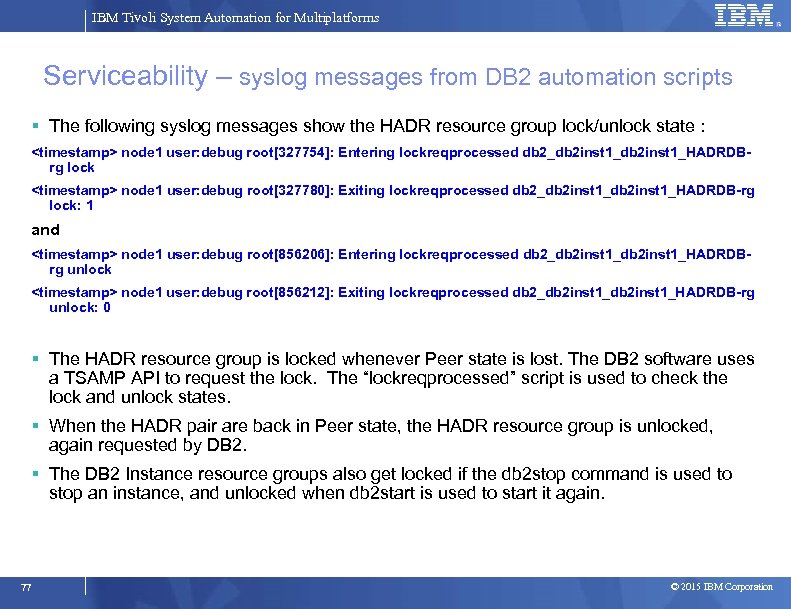
IBM Tivoli System Automation for Multiplatforms Serviceability – syslog messages from DB 2 automation scripts The following syslog messages show the HADR resource group lock/unlock state : <timestamp> node 1 user: debug root[327754]: Entering lockreqprocessed db 2_db 2 inst 1_HADRDBrg lock <timestamp> node 1 user: debug root[327780]: Exiting lockreqprocessed db 2_db 2 inst 1_HADRDB-rg lock: 1 and <timestamp> node 1 user: debug root[856206]: Entering lockreqprocessed db 2_db 2 inst 1_HADRDBrg unlock <timestamp> node 1 user: debug root[856212]: Exiting lockreqprocessed db 2_db 2 inst 1_HADRDB-rg unlock: 0 The HADR resource group is locked whenever Peer state is lost. The DB 2 software uses a TSAMP API to request the lock. The “lockreqprocessed” script is used to check the lock and unlock states. When the HADR pair are back in Peer state, the HADR resource group is unlocked, again requested by DB 2. The DB 2 Instance resource groups also get locked if the db 2 stop command is used to stop an instance, and unlocked when db 2 start is used to start it again. 77 © 2015 IBM Corporation
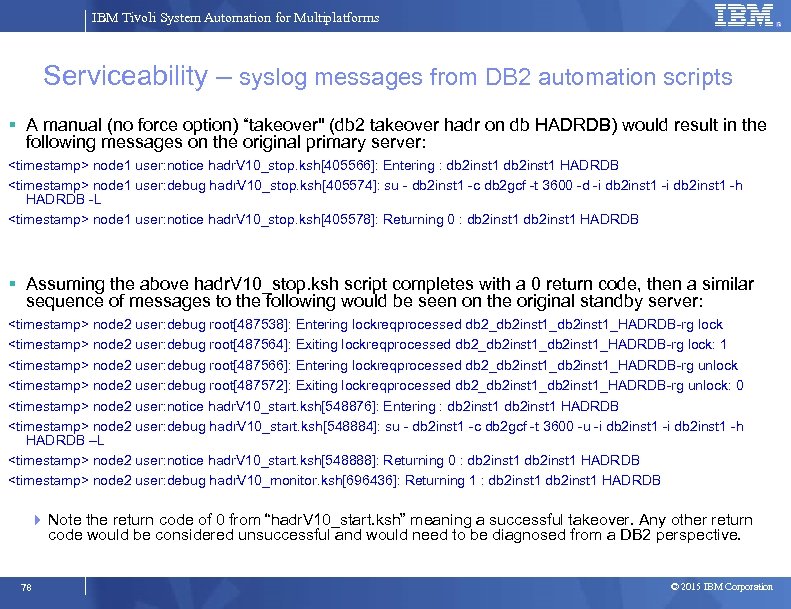
IBM Tivoli System Automation for Multiplatforms Serviceability – syslog messages from DB 2 automation scripts A manual (no force option) “takeover" (db 2 takeover hadr on db HADRDB) would result in the following messages on the original primary server: <timestamp> node 1 user: notice hadr. V 10_stop. ksh[405566]: Entering : db 2 inst 1 HADRDB <timestamp> node 1 user: debug hadr. V 10_stop. ksh[405574]: su - db 2 inst 1 -c db 2 gcf -t 3600 -d -i db 2 inst 1 -h HADRDB -L <timestamp> node 1 user: notice hadr. V 10_stop. ksh[405578]: Returning 0 : db 2 inst 1 HADRDB Assuming the above hadr. V 10_stop. ksh script completes with a 0 return code, then a similar sequence of messages to the following would be seen on the original standby server: <timestamp> node 2 user: debug root[487538]: Entering lockreqprocessed db 2_db 2 inst 1_HADRDB-rg lock <timestamp> node 2 user: debug root[487564]: Exiting lockreqprocessed db 2_db 2 inst 1_HADRDB-rg lock: 1 <timestamp> node 2 user: debug root[487566]: Entering lockreqprocessed db 2_db 2 inst 1_HADRDB-rg unlock <timestamp> node 2 user: debug root[487572]: Exiting lockreqprocessed db 2_db 2 inst 1_HADRDB-rg unlock: 0 <timestamp> node 2 user: notice hadr. V 10_start. ksh[548876]: Entering : db 2 inst 1 HADRDB <timestamp> node 2 user: debug hadr. V 10_start. ksh[548884]: su - db 2 inst 1 -c db 2 gcf -t 3600 -u -i db 2 inst 1 -h HADRDB –L <timestamp> node 2 user: notice hadr. V 10_start. ksh[548888]: Returning 0 : db 2 inst 1 HADRDB <timestamp> node 2 user: debug hadr. V 10_monitor. ksh[696436]: Returning 1 : db 2 inst 1 HADRDB Note the return code of 0 from “hadr. V 10_start. ksh” meaning a successful takeover. Any other return code would be considered unsuccessful and would need to be diagnosed from a DB 2 perspective. 78 © 2015 IBM Corporation
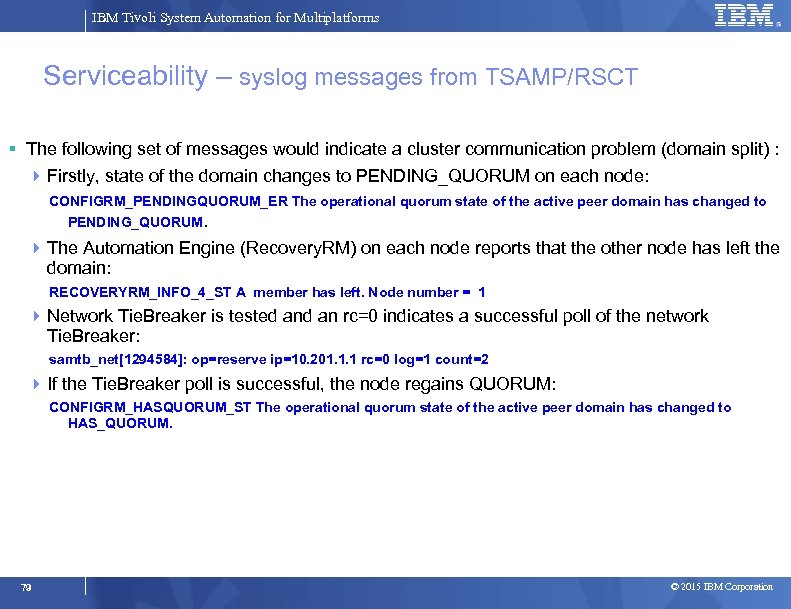
IBM Tivoli System Automation for Multiplatforms Serviceability – syslog messages from TSAMP/RSCT The following set of messages would indicate a cluster communication problem (domain split) : Firstly, state of the domain changes to PENDING_QUORUM on each node: CONFIGRM_PENDINGQUORUM_ER The operational quorum state of the active peer domain has changed to PENDING_QUORUM. The Automation Engine (Recovery. RM) on each node reports that the other node has left the domain: RECOVERYRM_INFO_4_ST A member has left. Node number = 1 Network Tie. Breaker is tested an rc=0 indicates a successful poll of the network Tie. Breaker: samtb_net[1294584]: op=reserve ip=10. 201. 1. 1 rc=0 log=1 count=2 If the Tie. Breaker poll is successful, the node regains QUORUM: CONFIGRM_HASQUORUM_ST The operational quorum state of the active peer domain has changed to HAS_QUORUM. 79 © 2015 IBM Corporation
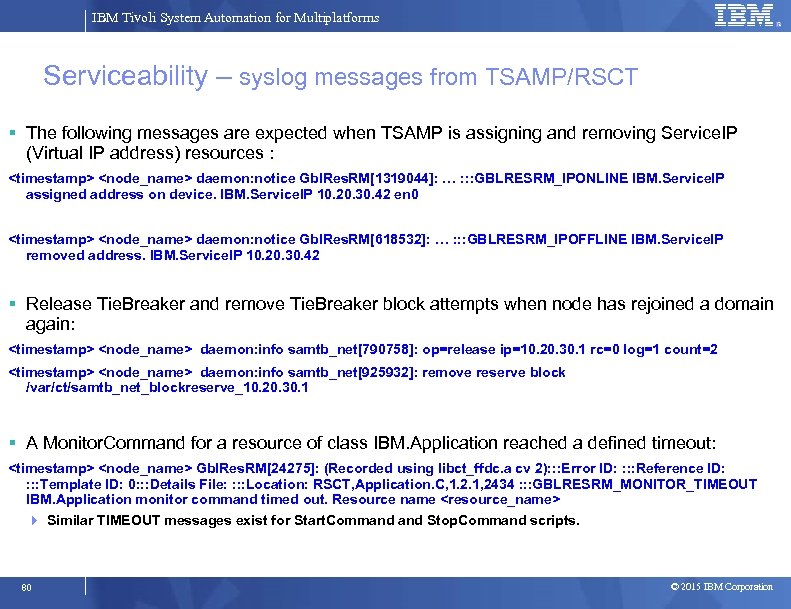
IBM Tivoli System Automation for Multiplatforms Serviceability – syslog messages from TSAMP/RSCT The following messages are expected when TSAMP is assigning and removing Service. IP (Virtual IP address) resources : <timestamp> <node_name> daemon: notice Gbl. Res. RM[1319044]: … : : : GBLRESRM_IPONLINE IBM. Service. IP assigned address on device. IBM. Service. IP 10. 20. 30. 42 en 0 <timestamp> <node_name> daemon: notice Gbl. Res. RM[618532]: … : : : GBLRESRM_IPOFFLINE IBM. Service. IP removed address. IBM. Service. IP 10. 20. 30. 42 Release Tie. Breaker and remove Tie. Breaker block attempts when node has rejoined a domain again: <timestamp> <node_name> daemon: info samtb_net[790758]: op=release ip=10. 20. 30. 1 rc=0 log=1 count=2 <timestamp> <node_name> daemon: info samtb_net[925932]: remove reserve block /var/ct/samtb_net_blockreserve_10. 20. 30. 1 A Monitor. Command for a resource of class IBM. Application reached a defined timeout: <timestamp> <node_name> Gbl. Res. RM[24275]: (Recorded using libct_ffdc. a cv 2): : : Error ID: : Reference ID: : Template ID: 0: : : Details File: : Location: RSCT, Application. C, 1. 2. 1, 2434 : : : GBLRESRM_MONITOR_TIMEOUT IBM. Application monitor command timed out. Resource name <resource_name> Similar TIMEOUT messages exist for Start. Command Stop. Command scripts. 80 © 2015 IBM Corporation
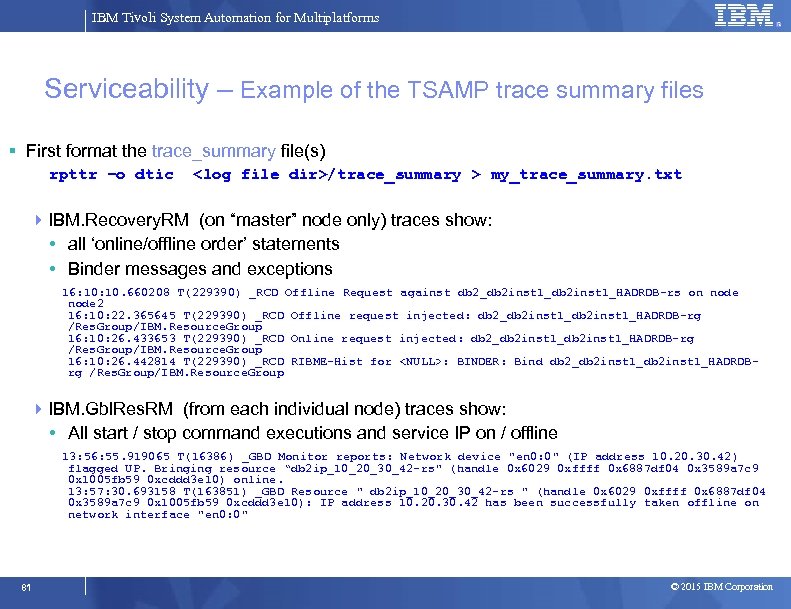
IBM Tivoli System Automation for Multiplatforms Serviceability – Example of the TSAMP trace summary files First format the trace_summary file(s) rpttr –o dtic <log file dir>/trace_summary > my_trace_summary. txt IBM. Recovery. RM (on “master” node only) traces show: • all ‘online/offline order’ statements • Binder messages and exceptions 16: 10. 660208 T(229390) _RCD Offline Request against db 2_db 2 inst 1_HADRDB-rs on node 2 16: 10: 22. 365645 T(229390) _RCD Offline request injected: db 2_db 2 inst 1_HADRDB-rg /Res. Group/IBM. Resource. Group 16: 10: 26. 433653 T(229390) _RCD Online request injected: db 2_db 2 inst 1_HADRDB-rg /Res. Group/IBM. Resource. Group 16: 10: 26. 442814 T(229390) _RCD RIBME-Hist for <NULL>: BINDER: Bind db 2_db 2 inst 1_HADRDBrg /Res. Group/IBM. Resource. Group IBM. Gbl. Res. RM (from each individual node) traces show: • All start / stop command executions and service IP on / offline 13: 56: 55. 919065 T(16386) _GBD Monitor reports: Network device "en 0: 0" (IP address 10. 20. 30. 42) flagged UP. Bringing resource “db 2 ip_10_20_30_42 -rs" (handle 0 x 6029 0 xffff 0 x 6887 df 04 0 x 3589 a 7 c 9 0 x 1005 fb 59 0 xcddd 3 e 10) online. 13: 57: 30. 693158 T(163851) _GBD Resource " db 2 ip_10_20_30_42 -rs " (handle 0 x 6029 0 xffff 0 x 6887 df 04 0 x 3589 a 7 c 9 0 x 1005 fb 59 0 xcddd 3 e 10): IP address 10. 20. 30. 42 has been successfully taken offline on network interface "en 0: 0" 81 © 2015 IBM Corporation
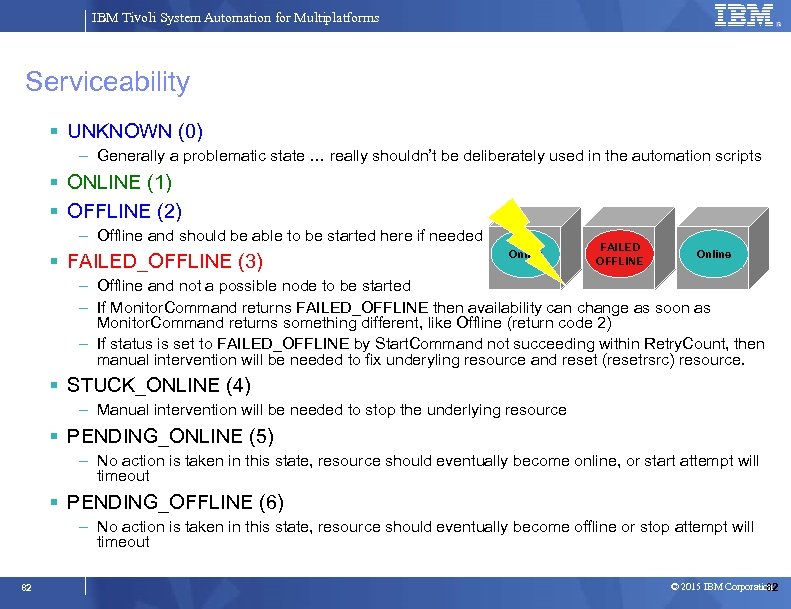
IBM Tivoli System Automation for Multiplatforms Serviceability UNKNOWN (0) – Generally a problematic state … really shouldn’t be deliberately used in the automation scripts ONLINE (1) OFFLINE (2) – Offline and should be able to be started here if needed FAILED_OFFLINE (3) Online FAILED OFFLINE Offline Online – Offline and not a possible node to be started – If Monitor. Command returns FAILED_OFFLINE then availability can change as soon as Monitor. Command returns something different, like Offline (return code 2) – If status is set to FAILED_OFFLINE by Start. Command not succeeding within Retry. Count, then manual intervention will be needed to fix underyling resource and reset (resetrsrc) resource. STUCK_ONLINE (4) – Manual intervention will be needed to stop the underlying resource PENDING_ONLINE (5) – No action is taken in this state, resource should eventually become online, or start attempt will timeout PENDING_OFFLINE (6) – No action is taken in this state, resource should eventually become offline or stop attempt will timeout 82 © 2015 IBM Corporation 82
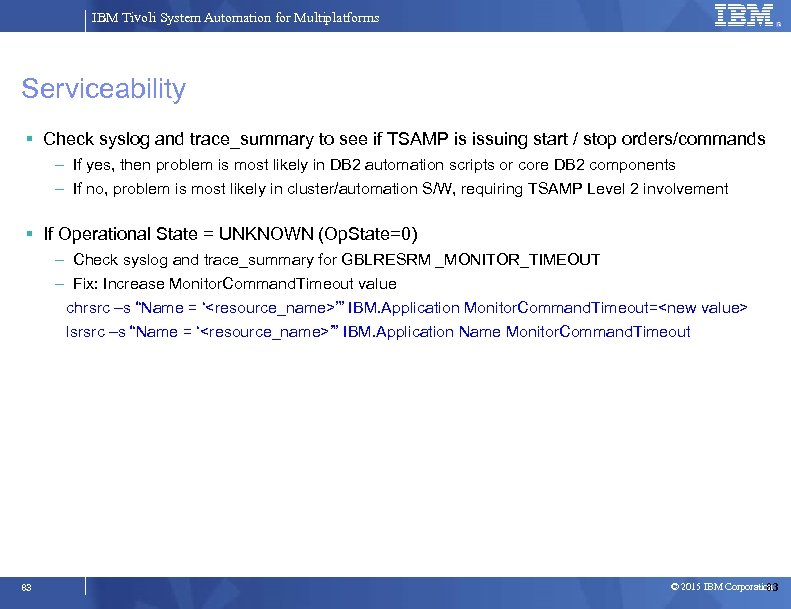
IBM Tivoli System Automation for Multiplatforms Serviceability Check syslog and trace_summary to see if TSAMP is issuing start / stop orders/commands – If yes, then problem is most likely in DB 2 automation scripts or core DB 2 components – If no, problem is most likely in cluster/automation S/W, requiring TSAMP Level 2 involvement If Operational State = UNKNOWN (Op. State=0) – Check syslog and trace_summary for GBLRESRM _MONITOR_TIMEOUT – Fix: Increase Monitor. Command. Timeout value chrsrc –s “Name = ‘<resource_name>’” IBM. Application Monitor. Command. Timeout=<new value> lsrsrc –s “Name = ‘<resource_name>’” IBM. Application Name Monitor. Command. Timeout 83 © 2015 IBM Corporation 83
IBM Tivoli System Automation for Multiplatforms Questions/Comments ? 84 © 2015 IBM Corporation
Скачать презентацию IBM Tivoli System Automation for Multiplatforms v 3
98c6347a92fa6f7a7fb968d24345f447.ppt