 Скачать презентацию IBM Tape Library Monitoring and Reporting Jeff Ziehm
71b79b957b8da8b27517a933eb4aa0df.ppt
- Количество слайдов: 43



IBM Tape Library Monitoring and Reporting Jeff Ziehm Storage Systems Advanced Technical Skills Copyright IBM Corporation 2013 1
Agenda l Management Tools ƒ TS 3500 Web Specialist ƒ TS 3500 Command Line Interface (CLI) ƒ IBM Tape Diagnostic Tool (ITDT) l Monitoring and Reporting Tools ƒ SNMP Audit Logging ƒ Tape System Reporter (TSR) ƒ Read Verify Appliance (RVA) Copyright IBM Corporation 2013 2
SNMP Copyright IBM Corporation 2013 3
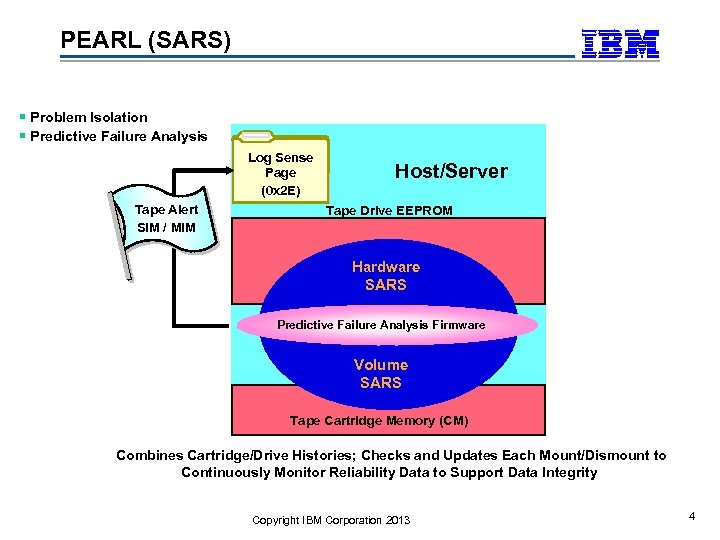
PEARL (SARS) Problem Isolation Predictive Failure Analysis Log Sense Page (0 x 2 E) Tape Alert SIM / MIM Host/Server Tape Drive EEPROM Hardware SARS Predictive Failure Analysis Firmware Volume SARS Tape Cartridge Memory (CM) Combines Cartridge/Drive Histories; Checks and Updates Each Mount/Dismount to Continuously Monitor Reliability Data to Support Data Integrity Copyright IBM Corporation 2013 4
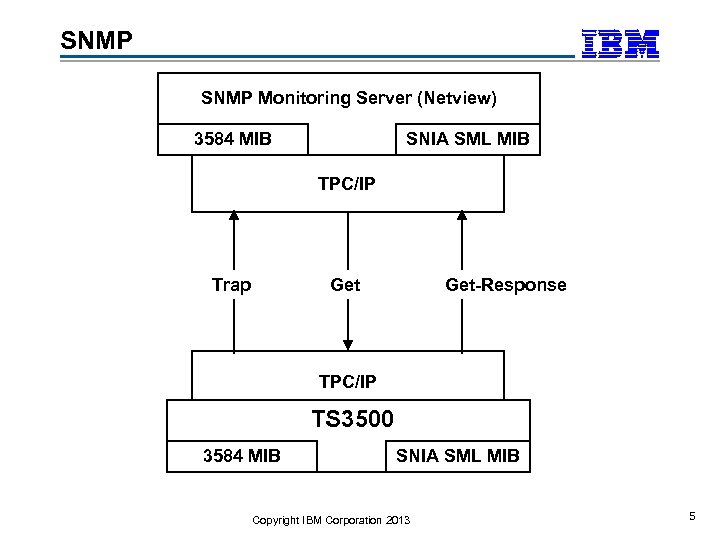
SNMP Monitoring Server (Netview) 3584 MIB SNIA SML MIB TPC/IP Trap Get-Response TPC/IP TS 3500 3584 MIB SNIA SML MIB Copyright IBM Corporation 2013 5
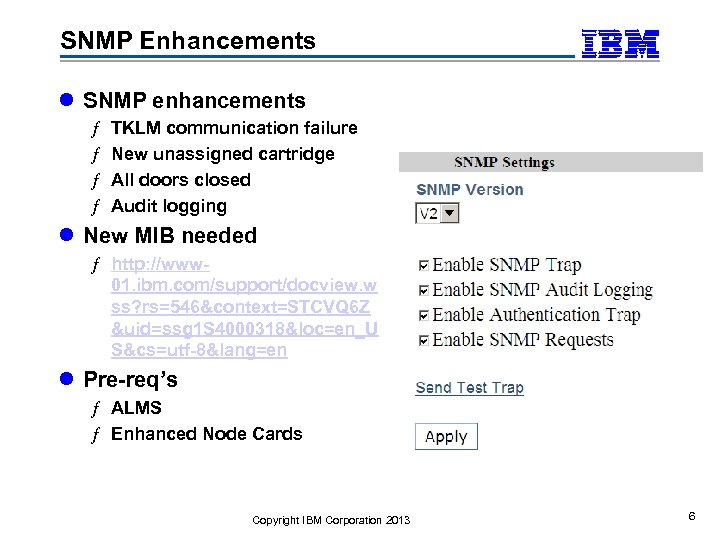
SNMP Enhancements l SNMP enhancements ƒ ƒ TKLM communication failure New unassigned cartridge All doors closed Audit logging l New MIB needed ƒ http: //www 01. ibm. com/support/docview. w ss? rs=546&context=STCVQ 6 Z &uid=ssg 1 S 4000318&loc=en_U S&cs=utf-8&lang=en l Pre-req’s ƒ ALMS ƒ Enhanced Node Cards Copyright IBM Corporation 2013 6
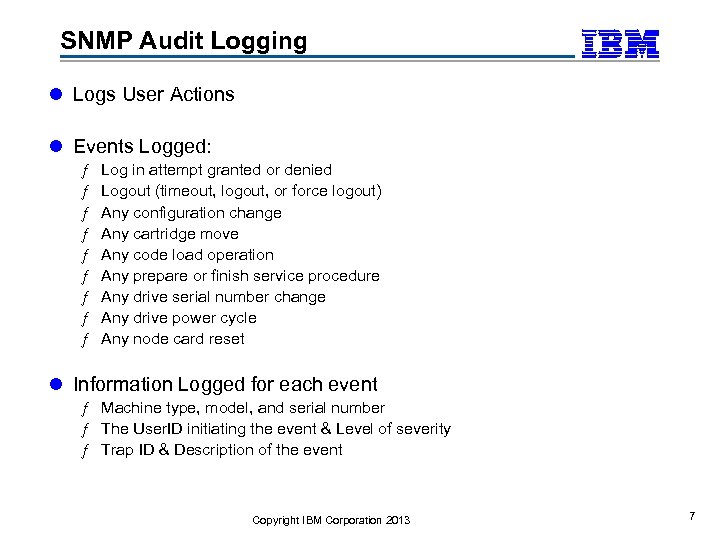
SNMP Audit Logging l Logs User Actions l Events Logged: ƒ ƒ ƒ ƒ ƒ Log in attempt granted or denied Logout (timeout, logout, or force logout) Any configuration change Any cartridge move Any code load operation Any prepare or finish service procedure Any drive serial number change Any drive power cycle Any node card reset l Information Logged for each event ƒ Machine type, model, and serial number ƒ The User. ID initiating the event & Level of severity ƒ Trap ID & Description of the event Copyright IBM Corporation 2013 7
SNMP demo Copyright IBM Corporation 2013 8
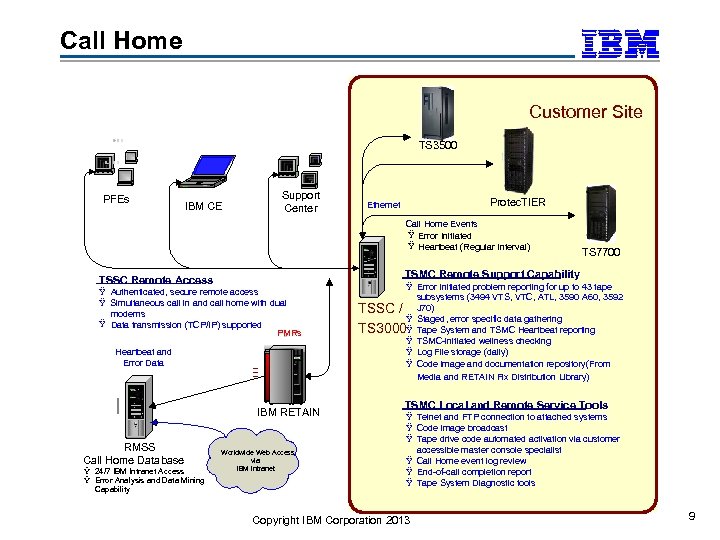
Call Home Customer Site TS 3500 PFEs IBM CE Support Center Protec. TIER Ethernet Call Home Events : Ÿ Error Initiated Ÿ Heartbeat (Regular Interval) TSMC Remote Support Capability TSSC Remote Access Ÿ Authenticated, secure remote access Ÿ Simultaneous call in and call home with dual modems Ÿ Data transmission (TCP/IP) supported PMRs Heartbeat and Error Data IBM RETAIN RMSS Call Home Database Ÿ 24/7 IBM Intranet Access Ÿ Error Analysis and Data Mining Capability TS 7700 Worldwide Web Access via IBM Intranet Ÿ Error Initiated problem reporting for up to 43 tape subsystems (3494 VTS, VTC, ATL, 3590 A 60, 3592 TSSC / J 70) Ÿ Staged, error specific data gathering TS 3000Ÿ Tape System and TSMC Heartbeat reporting Ÿ TSMC-initiated wellness checking Ÿ Log File storage (daily) Ÿ Code image and documentation repository(From Media and RETAIN Fix Distribution Library) TSMC Local and Remote Service Tools Ÿ Telnet and FTP connection to attached systems Ÿ Code image broadcast Ÿ Tape drive code automated activation via customer accessible master console specialist Ÿ Call Home event log review Ÿ End-of-call completion report Ÿ Tape System Diagnostic tools Copyright IBM Corporation 2013 9
Tape System Reporter (TSR) Read. Verify Appliance (RVA) Copyright IBM Corporation 2013 10
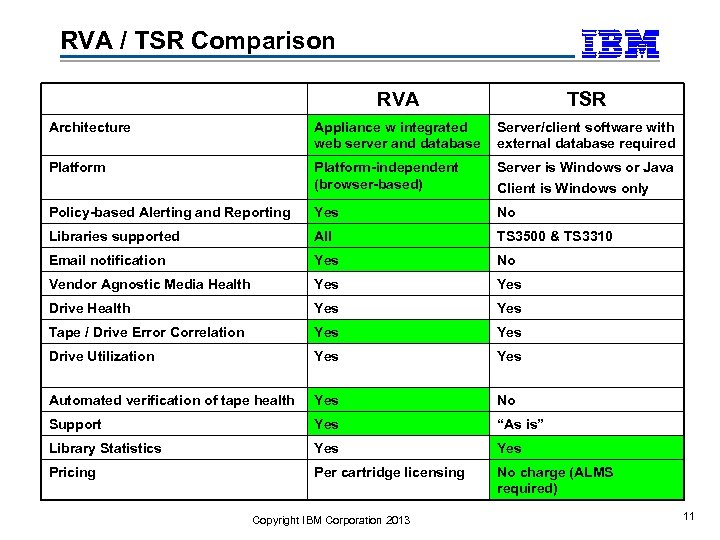
RVA / TSR Comparison RVA TSR Architecture Appliance w integrated web server and database Server/client software with external database required Platform-independent (browser-based) Server is Windows or Java Client is Windows only Policy-based Alerting and Reporting Yes No Libraries supported All TS 3500 & TS 3310 Email notification Yes No Vendor Agnostic Media Health Yes Drive Health Yes Tape / Drive Error Correlation Yes Drive Utilization Yes Automated verification of tape health Yes No Support Yes “As is” Library Statistics Yes Pricing Per cartridge licensing No charge (ALMS required) Copyright IBM Corporation 2013 11
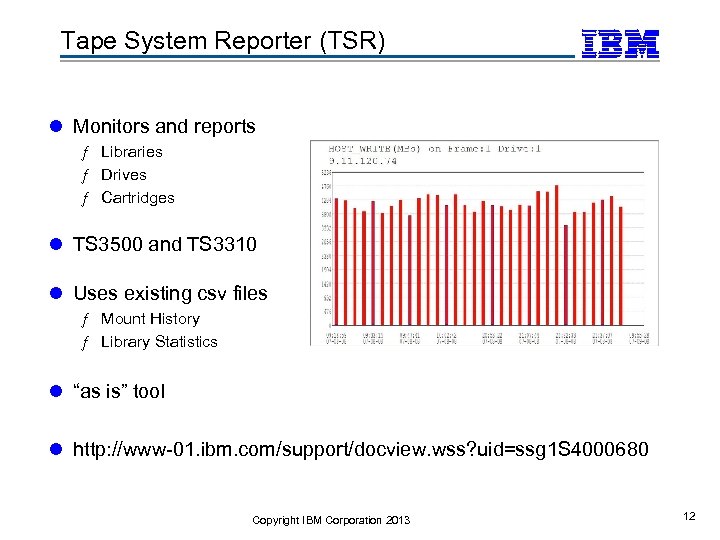
Tape System Reporter (TSR) l Monitors and reports ƒ Libraries ƒ Drives ƒ Cartridges l TS 3500 and TS 3310 l Uses existing csv files ƒ Mount History ƒ Library Statistics l “as is” tool l http: //www-01. ibm. com/support/docview. wss? uid=ssg 1 S 4000680 Copyright IBM Corporation 2013 12
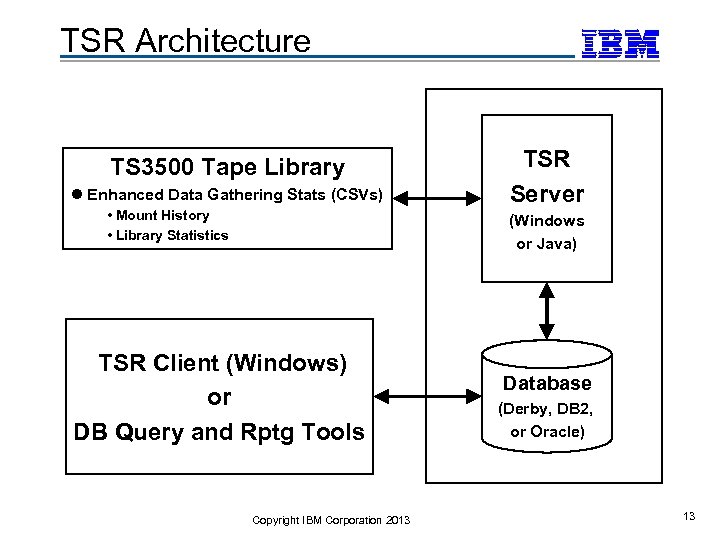
TSR Architecture TS 3500 Tape Library l Enhanced Data Gathering Stats (CSVs) • Mount History • Library Statistics TSR Server (Windows or Java) TSR Client (Windows) or DB Query and Rptg Tools Copyright IBM Corporation 2013 Database (Derby, DB 2, or Oracle) 13
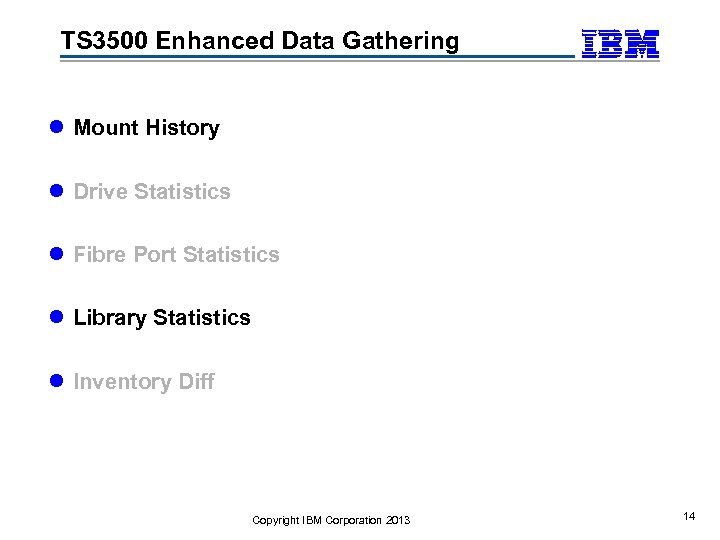
TS 3500 Enhanced Data Gathering l Mount History l Drive Statistics l Fibre Port Statistics l Library Statistics l Inventory Diff Copyright IBM Corporation 2013 14
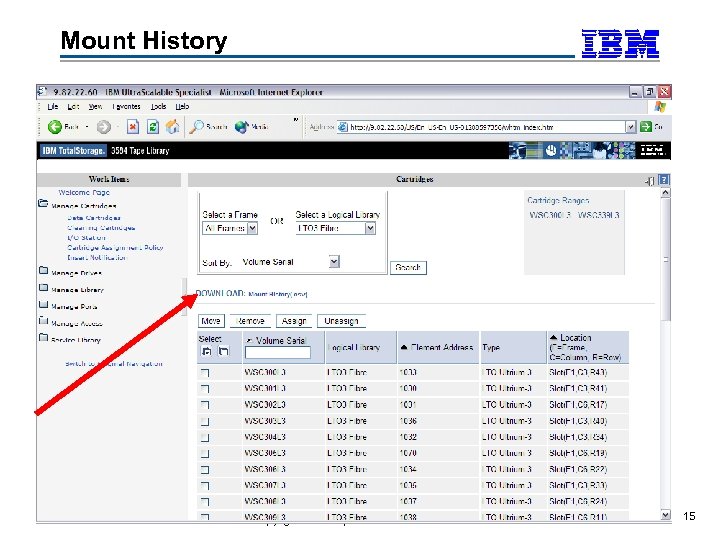
Mount History Copyright IBM Corporation 2013 15
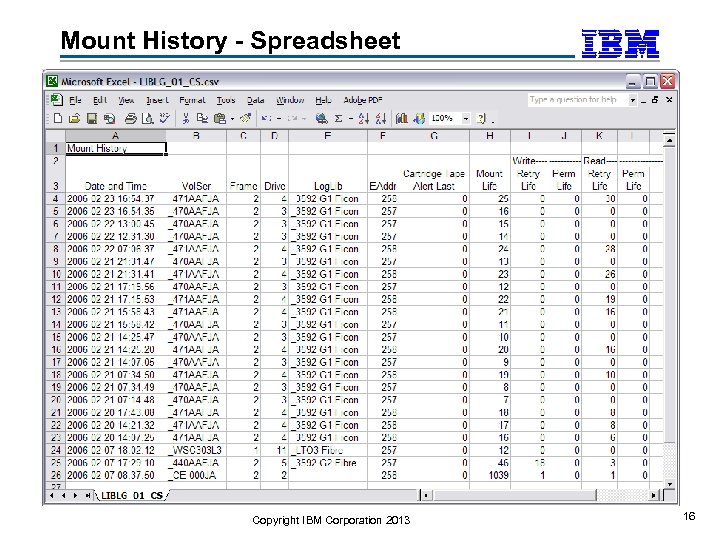
Mount History - Spreadsheet Copyright IBM Corporation 2013 16
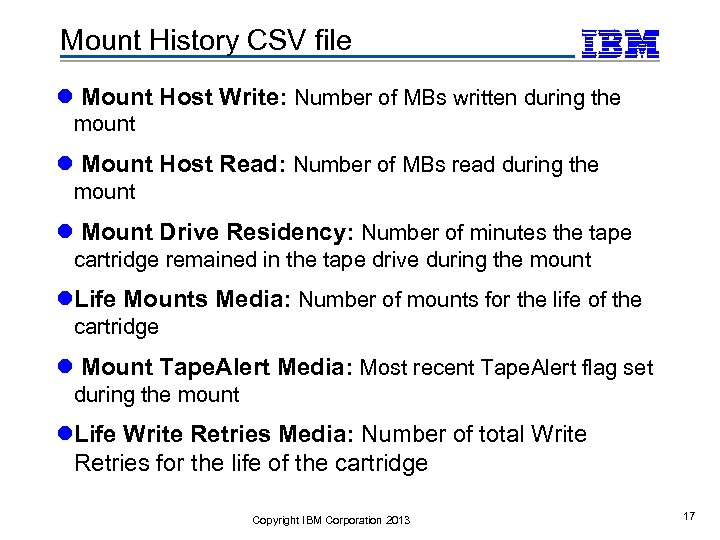
Mount History CSV file l Mount Host Write: Number of MBs written during the mount l Mount Host Read: Number of MBs read during the mount l Mount Drive Residency: Number of minutes the tape cartridge remained in the tape drive during the mount l. Life Mounts Media: Number of mounts for the life of the cartridge l Mount Tape. Alert Media: Most recent Tape. Alert flag set during the mount l. Life Write Retries Media: Number of total Write Retries for the life of the cartridge Copyright IBM Corporation 2013 17
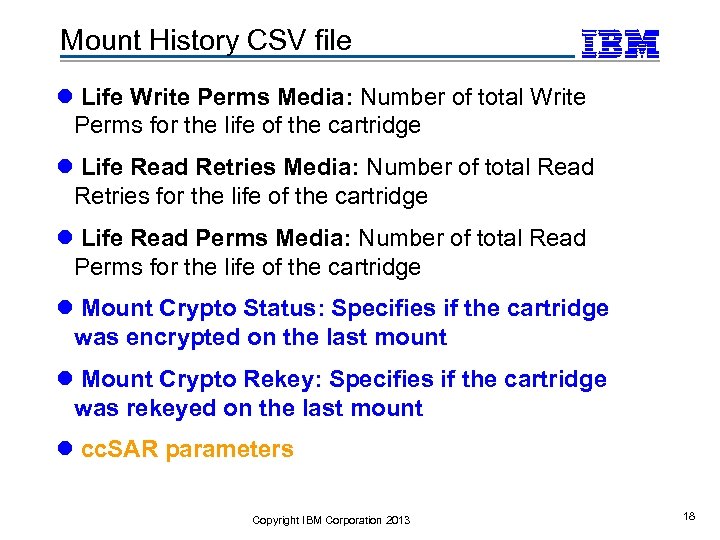
Mount History CSV file l Life Write Perms Media: Number of total Write Perms for the life of the cartridge l Life Read Retries Media: Number of total Read Retries for the life of the cartridge l Life Read Perms Media: Number of total Read Perms for the life of the cartridge l Mount Crypto Status: Specifies if the cartridge was encrypted on the last mount l Mount Crypto Rekey: Specifies if the cartridge was rekeyed on the last mount l cc. SAR parameters Copyright IBM Corporation 2013 18
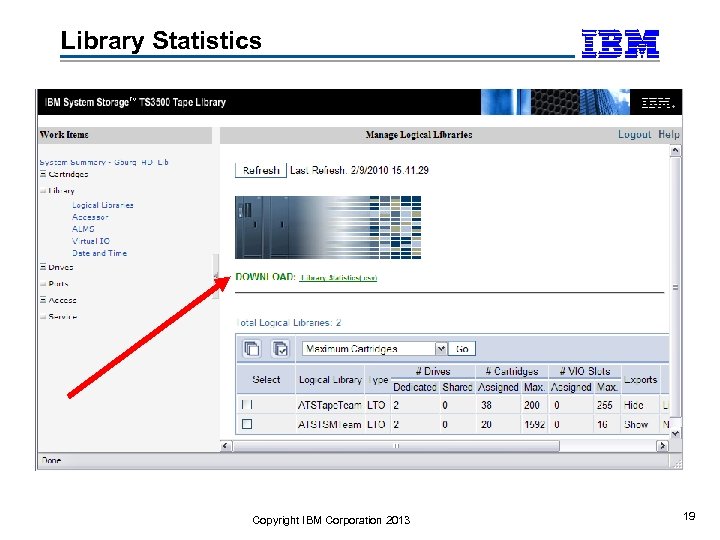
Library Statistics Copyright IBM Corporation 2013 19
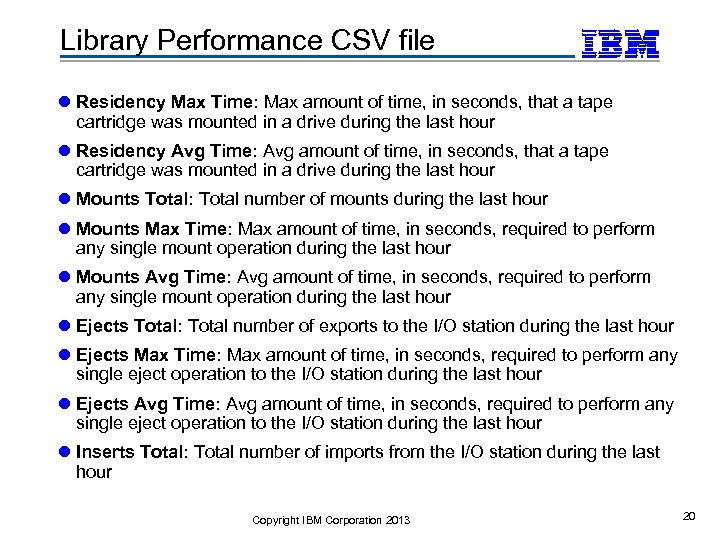
Library Performance CSV file l Residency Max Time: Max amount of time, in seconds, that a tape cartridge was mounted in a drive during the last hour l Residency Avg Time: Avg amount of time, in seconds, that a tape cartridge was mounted in a drive during the last hour l Mounts Total: Total number of mounts during the last hour l Mounts Max Time: Max amount of time, in seconds, required to perform any single mount operation during the last hour l Mounts Avg Time: Avg amount of time, in seconds, required to perform any single mount operation during the last hour l Ejects Total: Total number of exports to the I/O station during the last hour l Ejects Max Time: Max amount of time, in seconds, required to perform any single eject operation to the I/O station during the last hour l Ejects Avg Time: Avg amount of time, in seconds, required to perform any single eject operation to the I/O station during the last hour l Inserts Total: Total number of imports from the I/O station during the last hour Copyright IBM Corporation 2013 20
Server Operations l Check if ALMS is installed and enabled ƒ Download and store Mount History file • If successful, wait 10 minutes • If fail, retry in 1 minute ƒ If Library Performance is available, download and store Library Performance file • If successful, wait 60 minutes • If fail, retry in 1 minute Copyright IBM Corporation 2013 21
TSR Prereqs l TS 3500 with ALMS ƒ Mount History Stats: All models • Firmware 8140 for MB/sec fields ƒ Library Stats • Enhanced node cards (Lx 3 or enhanced Lx 2) l Windows 2000, XP, W 2 K 3 & W 2 K 8 for TSR Client l Apache Derby, DB 2, or Oracle l DB 2 Run-Time Client Lite (Windows TSR Server only) l Java 1. 4. 1 or later (Java TSR Server only) l Connectivity thru firewalls Copyright IBM Corporation 2013 22
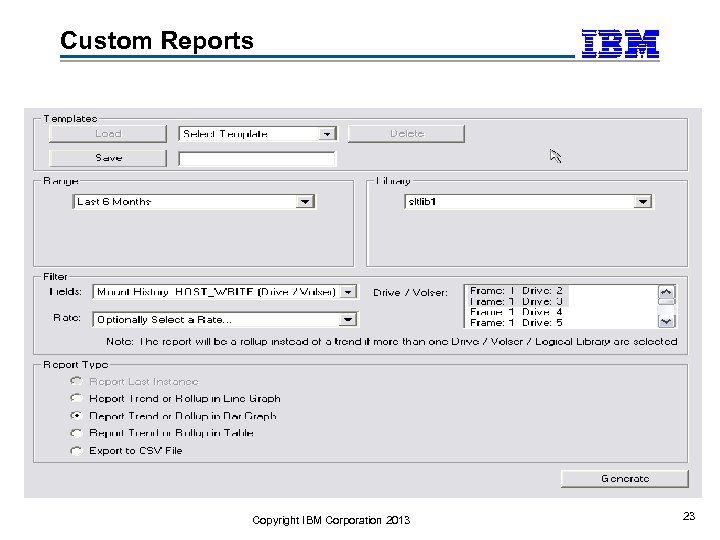
Custom Reports Copyright IBM Corporation 2013 23
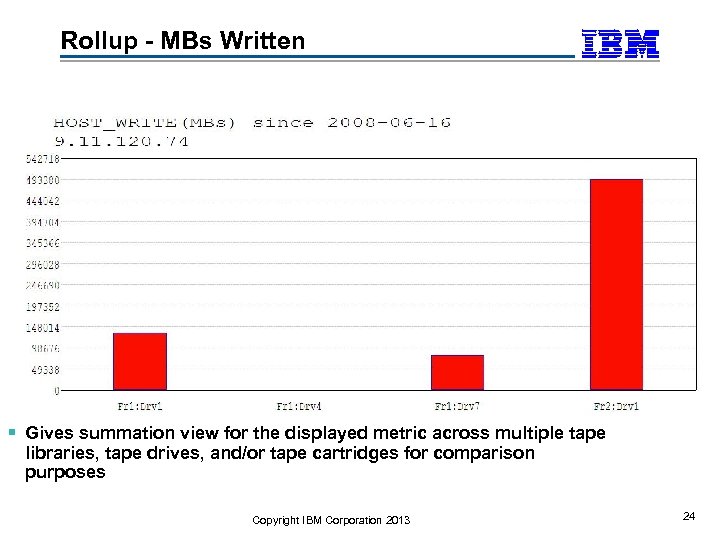
Rollup - MBs Written Gives summation view for the displayed metric across multiple tape libraries, tape drives, and/or tape cartridges for comparison purposes Copyright IBM Corporation 2013 24
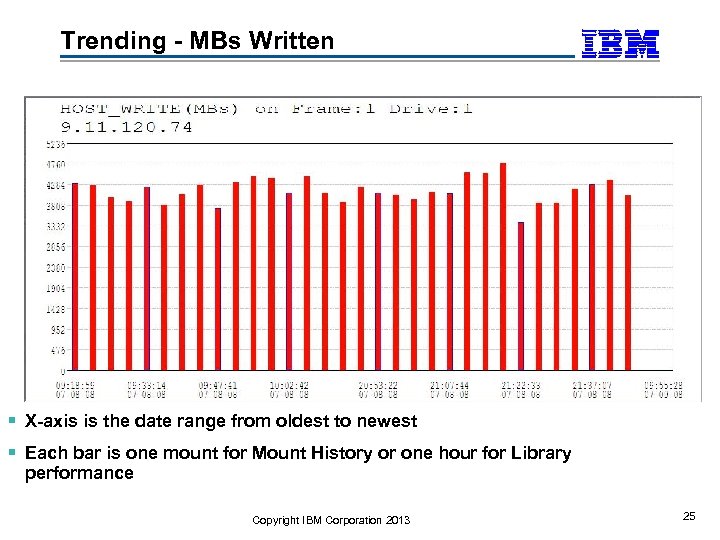
Trending - MBs Written X-axis is the date range from oldest to newest Each bar is one mount for Mount History or one hour for Library performance Copyright IBM Corporation 2013 25
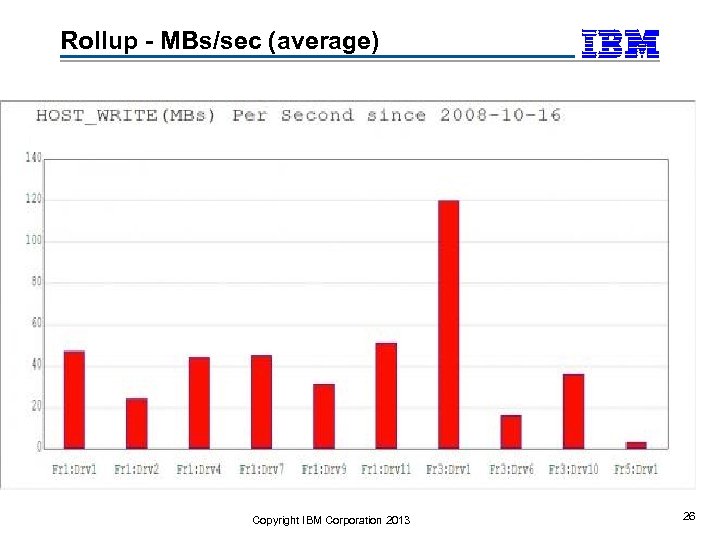
Rollup - MBs/sec (average) Copyright IBM Corporation 2013 26
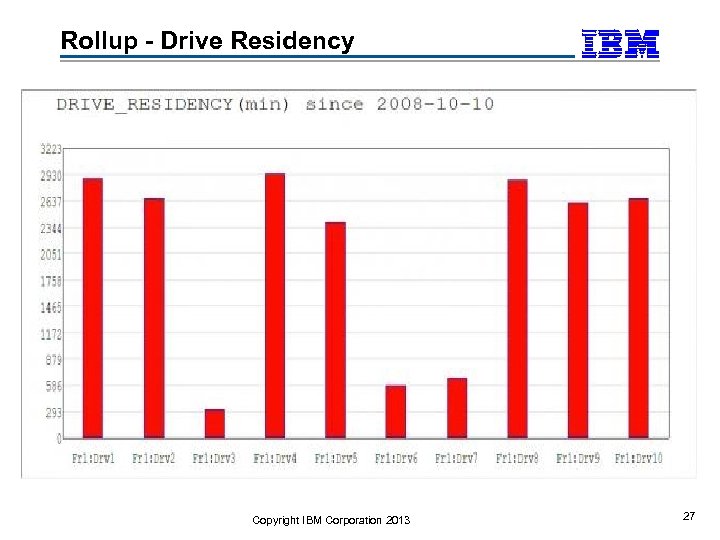
Rollup - Drive Residency Copyright IBM Corporation 2013 27
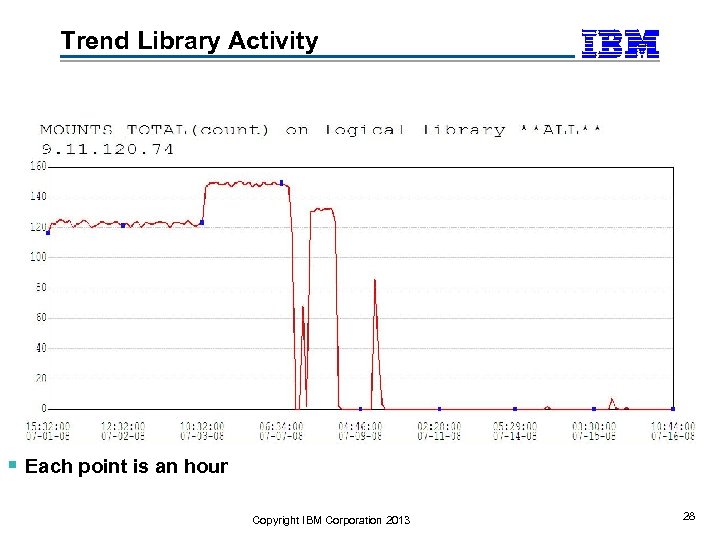
Trend Library Activity Each point is an hour Copyright IBM Corporation 2013 28
Tape System Reporter (TSR) demo Copyright IBM Corporation 2013 29
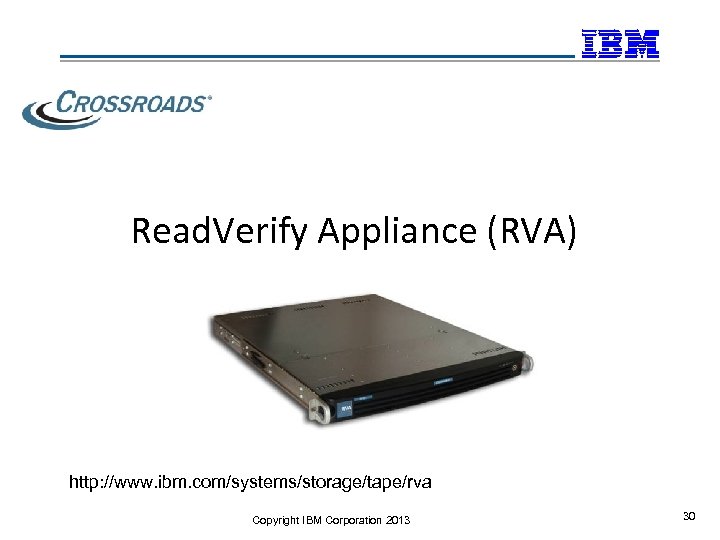
Read. Verify Appliance (RVA) http: //www. ibm. com/systems/storage/tape/rva Copyright IBM Corporation 2013 30
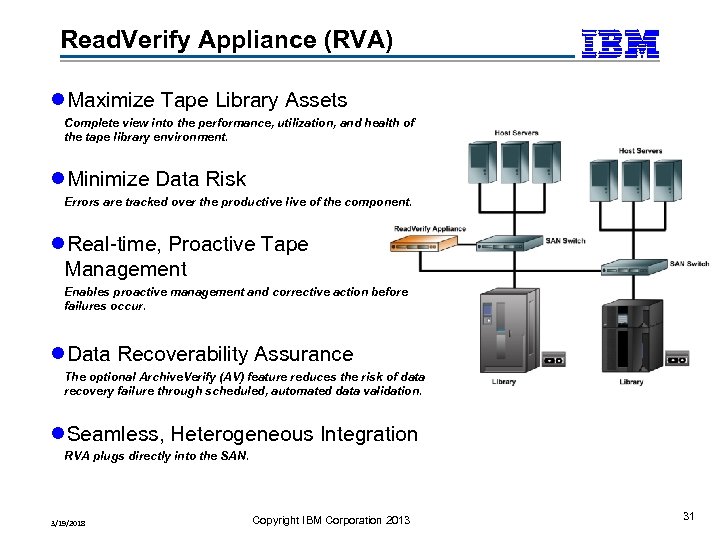
Read. Verify Appliance (RVA) l. Maximize Tape Library Assets Complete view into the performance, utilization, and health of the tape library environment. l. Minimize Data Risk Errors are tracked over the productive live of the component. l. Real-time, Proactive Tape Management Enables proactive management and corrective action before failures occur. l. Data Recoverability Assurance The optional Archive. Verify (AV) feature reduces the risk of data recovery failure through scheduled, automated data validation. l. Seamless, Heterogeneous Integration RVA plugs directly into the SAN. 3/19/2018 Copyright IBM Corporation 2013 31
Three Tiered Communication l. Real-time Alerts ƒ Provides immediate notification of events most critical to user l. Automatically Generated reports ƒ Provides snap-shot of library activities ƒ Can be used to identify unusual behavior to prompt further UI drill-down l. Graphical User Interface ƒ Drill down details for problem identification ƒ Trend analysis 3/19/2018 Copyright IBM Corporation 2013 32
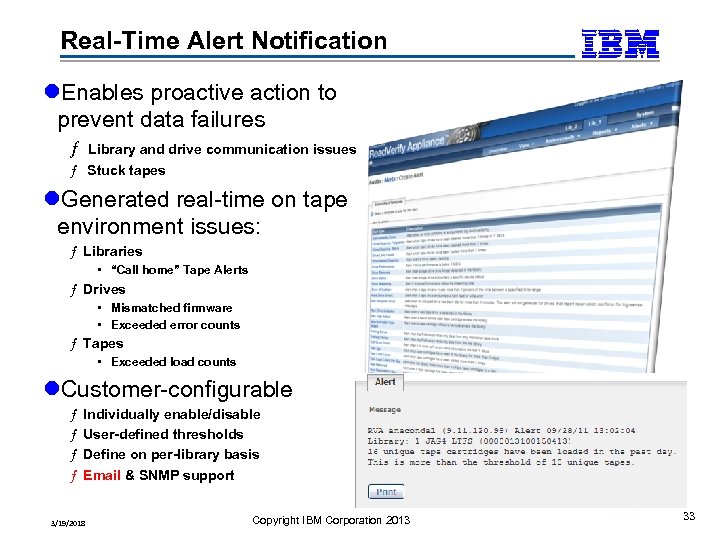
Real-Time Alert Notification l. Enables proactive action to prevent data failures ƒ Library and drive communication issues ƒ Stuck tapes l. Generated real-time on tape environment issues: ƒ Libraries • “Call home” Tape Alerts ƒ Drives • Mismatched firmware • Exceeded error counts ƒ Tapes • Exceeded load counts l. Customer-configurable ƒ ƒ Individually enable/disable User-defined thresholds Define on per-library basis Email & SNMP support 3/19/2018 Copyright IBM Corporation 2013 33
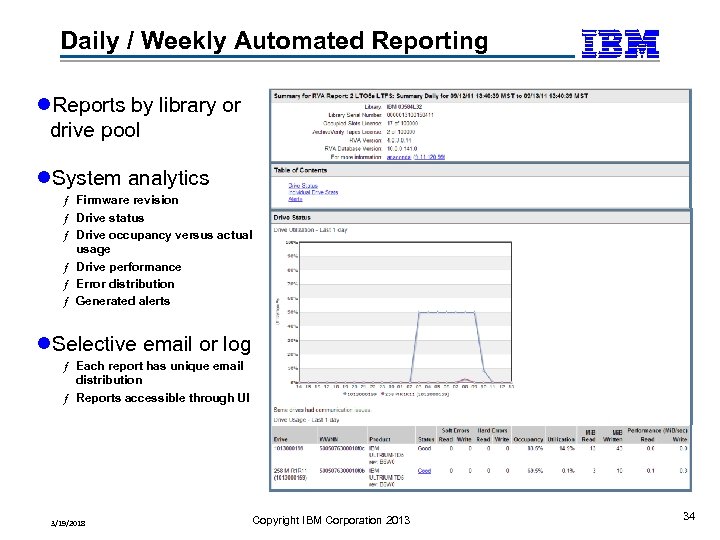
Daily / Weekly Automated Reporting l. Reports by library or drive pool l. System analytics ƒ Firmware revision ƒ Drive status ƒ Drive occupancy versus actual usage ƒ Drive performance ƒ Error distribution ƒ Generated alerts l. Selective email or log ƒ Each report has unique email distribution ƒ Reports accessible through UI 3/19/2018 Copyright IBM Corporation 2013 34
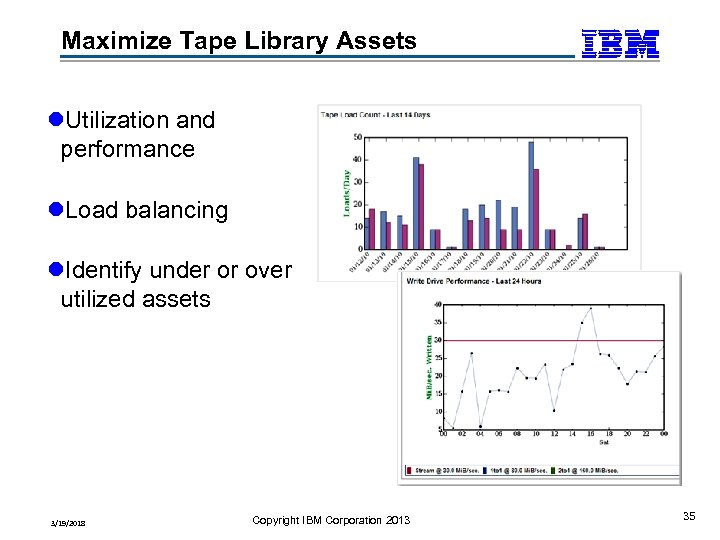
Maximize Tape Library Assets l. Utilization and performance l. Load balancing l. Identify under or over utilized assets 3/19/2018 Copyright IBM Corporation 2013 35
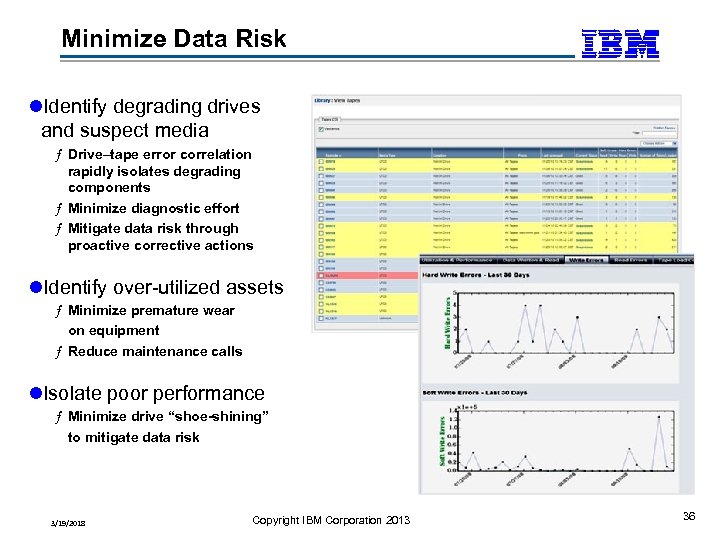
Minimize Data Risk l. Identify degrading drives and suspect media ƒ Drive–tape error correlation rapidly isolates degrading components ƒ Minimize diagnostic effort ƒ Mitigate data risk through proactive corrective actions l. Identify over-utilized assets ƒ Minimize premature wear on equipment ƒ Reduce maintenance calls l. Isolate poor performance ƒ Minimize drive “shoe-shining” to mitigate data risk 3/19/2018 Copyright IBM Corporation 2013 36
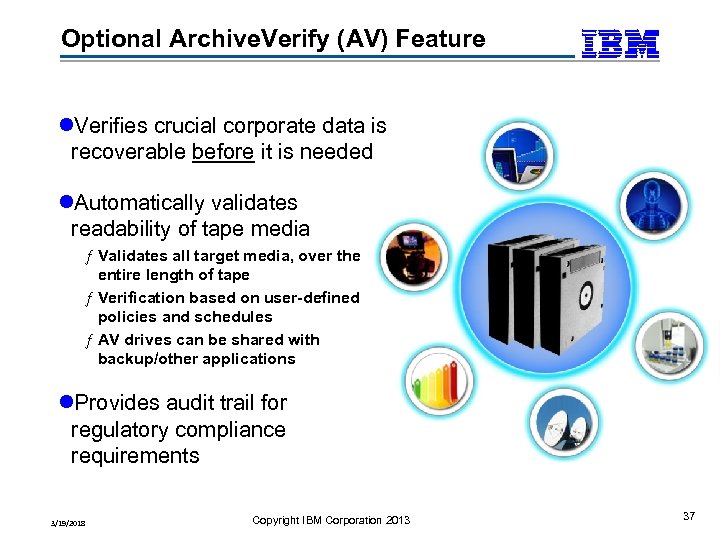
Optional Archive. Verify (AV) Feature l. Verifies crucial corporate data is recoverable before it is needed l. Automatically validates readability of tape media ƒ Validates all target media, over the entire length of tape ƒ Verification based on user-defined policies and schedules ƒ AV drives can be shared with backup/other applications l. Provides audit trail for regulatory compliance requirements 3/19/2018 Copyright IBM Corporation 2013 37
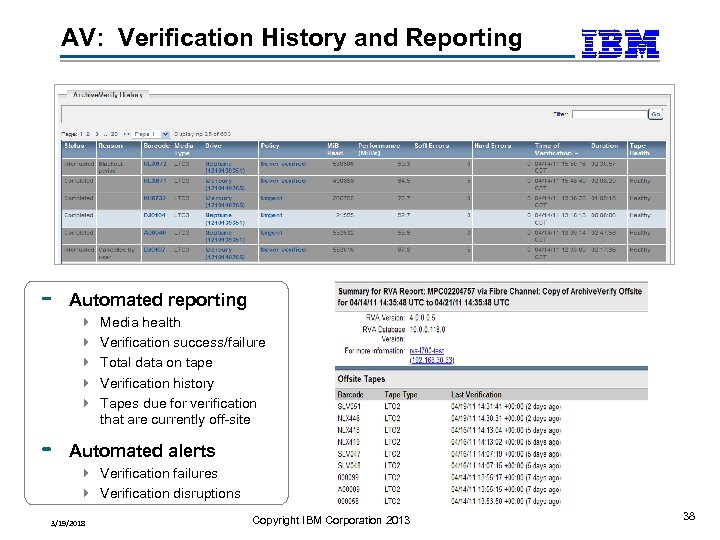
AV: Verification History and Reporting Automated reporting 4 4 4 Media health Verification success/failure Total data on tape Verification history Tapes due for verification that are currently off-site Automated alerts 4 Verification failures 4 Verification disruptions 3/19/2018 Copyright IBM Corporation 2013 38
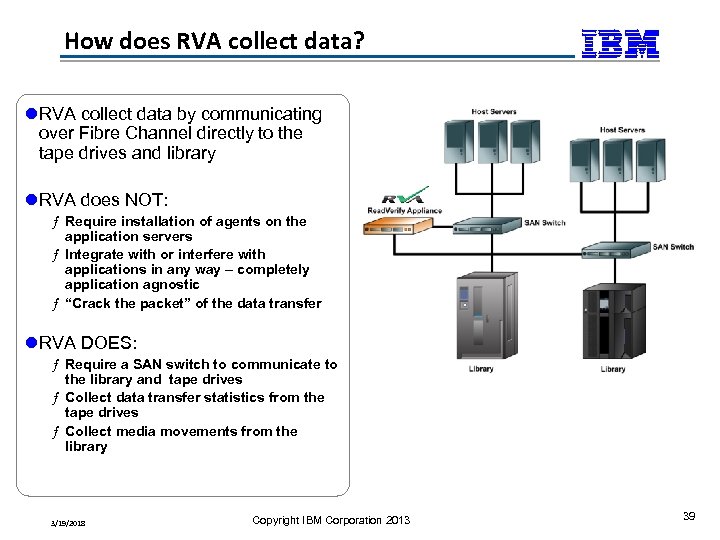
How does RVA collect data? l. RVA collect data by communicating over Fibre Channel directly to the tape drives and library l. RVA does NOT: ƒ Require installation of agents on the application servers ƒ Integrate with or interfere with applications in any way – completely application agnostic ƒ “Crack the packet” of the data transfer l. RVA DOES: ƒ Require a SAN switch to communicate to the library and tape drives ƒ Collect data transfer statistics from the tape drives ƒ Collect media movements from the library 3/19/2018 Copyright IBM Corporation 2013 39
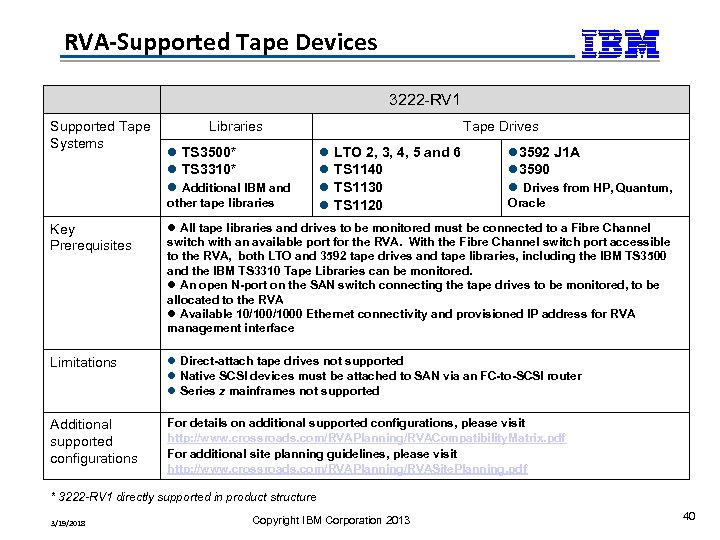
RVA-Supported Tape Devices 3222 -RV 1 Supported Tape Systems Libraries l TS 3500* l TS 3310* l Additional IBM and other tape libraries Tape Drives l LTO 2, 3, 4, 5 and 6 l TS 1140 l TS 1130 l TS 1120 l 3592 J 1 A l 3590 l Drives from HP, Quantum, Oracle Key Prerequisites l All tape libraries and drives to be monitored must be connected to a Fibre Channel switch with an available port for the RVA. With the Fibre Channel switch port accessible to the RVA, both LTO and 3592 tape drives and tape libraries, including the IBM TS 3500 and the IBM TS 3310 Tape Libraries can be monitored. l An open N-port on the SAN switch connecting the tape drives to be monitored, to be allocated to the RVA l Available 10/1000 Ethernet connectivity and provisioned IP address for RVA management interface Limitations l Direct-attach tape drives not supported l Native SCSI devices must be attached to SAN via an FC-to-SCSI router l Series z mainframes not supported Additional supported configurations For details on additional supported configurations, please visit http: //www. crossroads. com/RVAPlanning/RVACompatibility. Matrix. pdf For additional site planning guidelines, please visit http: //www. crossroads. com/RVAPlanning/RVASite. Planning. pdf * 3222 -RV 1 directly supported in product structure 3/19/2018 Copyright IBM Corporation 2013 40
Read Verify Appliance (RVA) demo Copyright IBM Corporation 2013 41
Read Verify Appliance (RVA) demo Copyright IBM Corporation 2013 42
Questions Copyright IBM Corporation 2013 43
Скачать презентацию IBM Tape Library Monitoring and Reporting Jeff Ziehm
71b79b957b8da8b27517a933eb4aa0df.ppt