 Скачать презентацию IBM Software Group Process Integration Sales Technical
89f4c25f0fd6916d17f14badeac15df1.ppt
- Количество слайдов: 40



® IBM Software Group Process Integration Sales Technical Enablement Workshop (STEW) End to End Demo World Wide Web. Sphere Business Integration Technical Sales
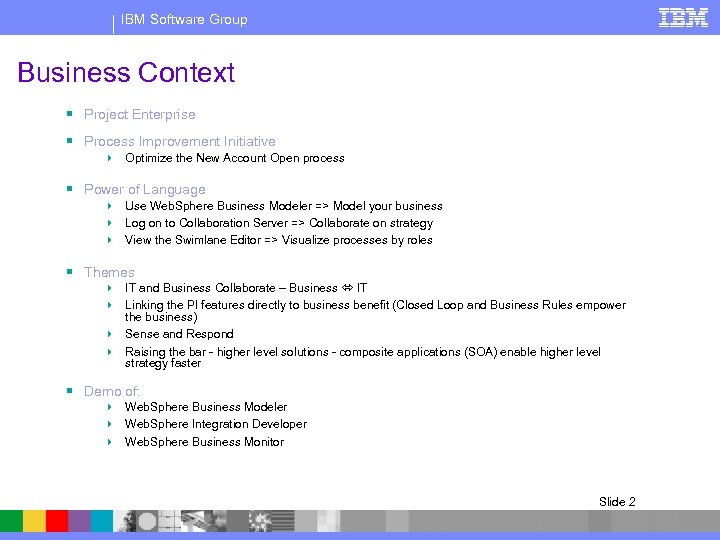
IBM Software Group Business Context § Project Enterprise § Process Improvement Initiative 4 Optimize the New Account Open process § Power of Language 4 Use Web. Sphere Business Modeler => Model your business 4 Log on to Collaboration Server => Collaborate on strategy 4 View the Swimlane Editor => Visualize processes by roles § Themes 4 IT and Business Collaborate – Business IT 4 Linking the PI features directly to business benefit (Closed Loop and Business Rules empower the business) 4 Sense and Respond 4 Raising the bar - higher level solutions - composite applications (SOA) enable higher level strategy faster § Demo of: 4 Web. Sphere Business Modeler 4 Web. Sphere Integration Developer 4 Web. Sphere Business Monitor Slide 2
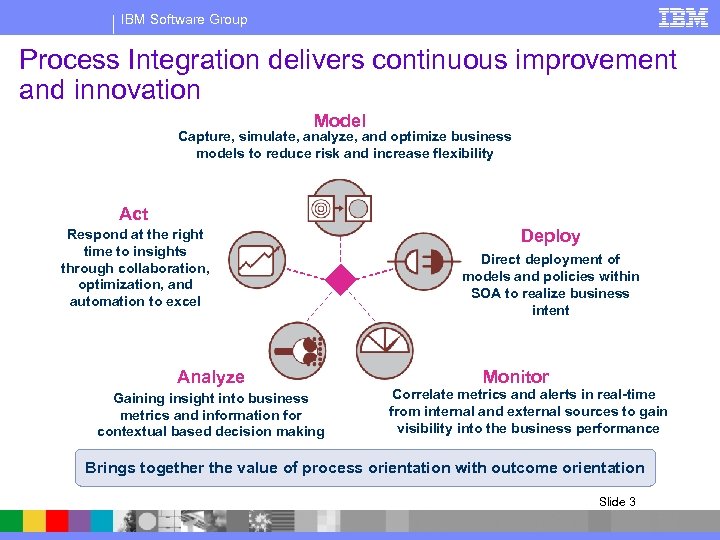
IBM Software Group Process Integration delivers continuous improvement and innovation Model Capture, simulate, analyze, and optimize business models to reduce risk and increase flexibility Act Respond at the right time to insights through collaboration, optimization, and automation to excel Analyze Gaining insight into business metrics and information for contextual based decision making Deploy Direct deployment of models and policies within SOA to realize business intent Monitor Correlate metrics and alerts in real-time from internal and external sources to gain visibility into the business performance Brings together the value of process orientation with outcome orientation Slide 3
IBM Software Group Start with Modeling the Business JK Enterprises launches their Business Process Improvement project. After carefully reviewing the business requirements and goals in IBM Rational Requisite Pro, Monica, a Business Analyst, is ready to begin her work on the new Account Opening Process Integration project. As part of other work last year, JK Enterprises documented some of their processes in Visio. Monica leverages that work by importing the drawings into IBM Web. Sphere Business Modeler V 6. She imports an existing Visio drawing of the As Is “Account Verification” process. This is gives her a basic drawing of the As Is process, but it does not contain important business metrics, such as costs, durations, roles, resources, organization, etc. Monica uses Web. Sphere Business Modeler to complete the As Is process by adding business metrics, which she in turn uses to perform some preliminary static analysis, simulations and dynamic analysis. Slide 4
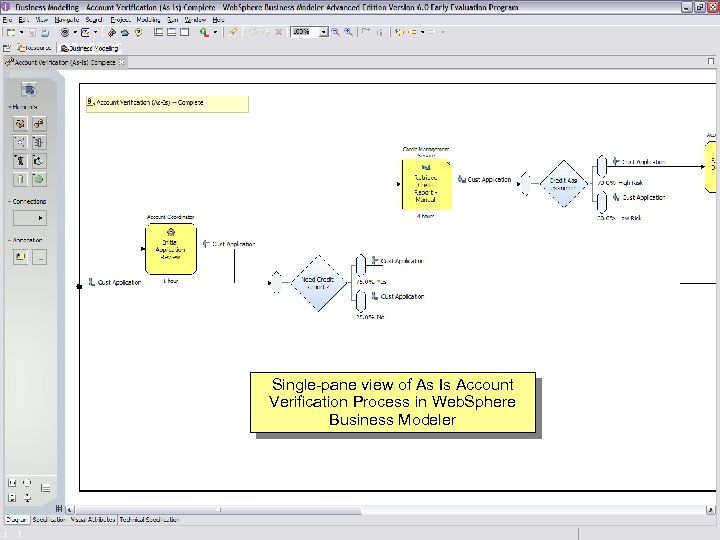
IBM Software Group Single-pane view of As Is Account Verification Process in Web. Sphere Business Modeler Slide 5
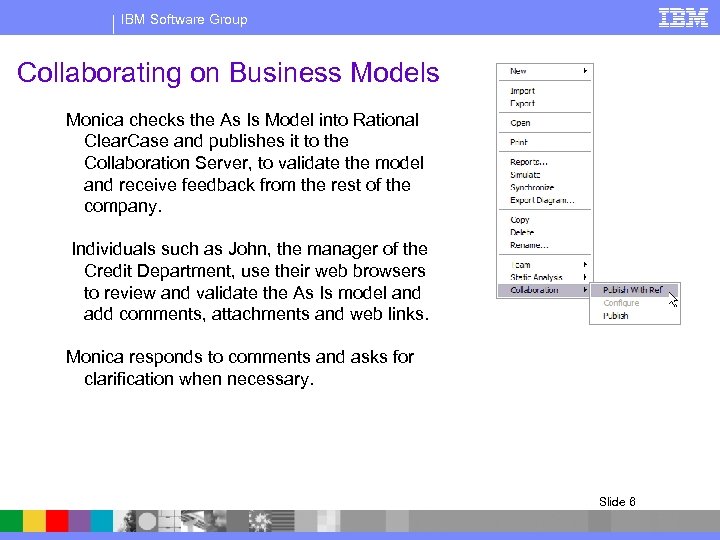
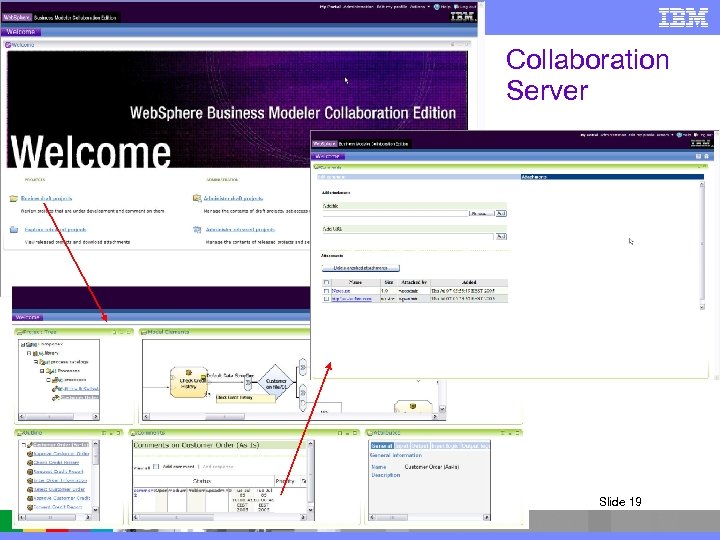
IBM Software Group Collaborating on Business Models Monica checks the As Is Model into Rational Clear. Case and publishes it to the Collaboration Server, to validate the model and receive feedback from the rest of the company. Individuals such as John, the manager of the Credit Department, use their web browsers to review and validate the As Is model and add comments, attachments and web links. Monica responds to comments and asks for clarification when necessary. Slide 6
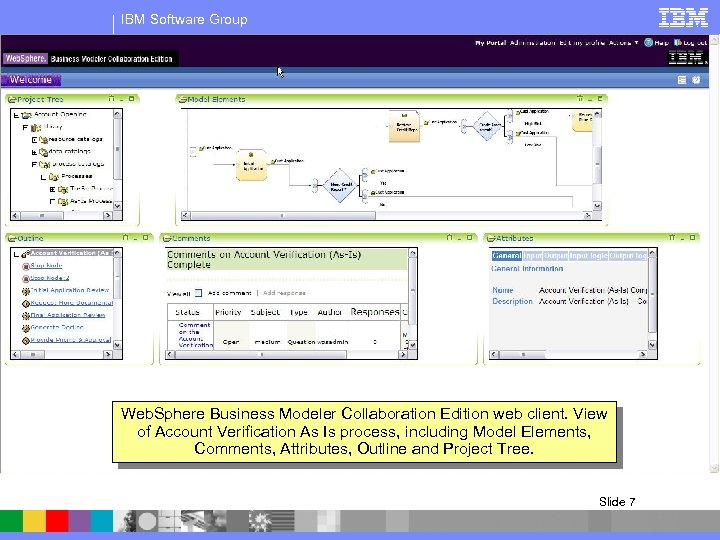
IBM Software Group Web. Sphere Business Modeler Collaboration Edition web client. View of Account Verification As Is process, including Model Elements, Comments, Attributes, Outline and Project Tree. Slide 7
IBM Software Group Optimize the Process – To-Be Upon receiving several comments and documentation as attachments, Monica makes some minor changes the As Is Account Verification process model as required. She is now ready to model the To Be model, which will represents an optimized Account Verification process. Monica knows that she will transform portions of the To Be model into useful artifacts for automation and also possibly for development of new services, if required. She also knows that from the same model she will also generate an Observation Model that will be used to monitor the process once it is automated and deployed. Monica bases her design of the To Be model on the requirements and goals she reviewed in Requisite Pro, as well as the results of her static analysis, simulation and dynamic analysis of the As Is model. Fortunately, Monica was able to find several opportunities for automation and improvement of the process, which she is now incorporating into the To Be model. Slide 8
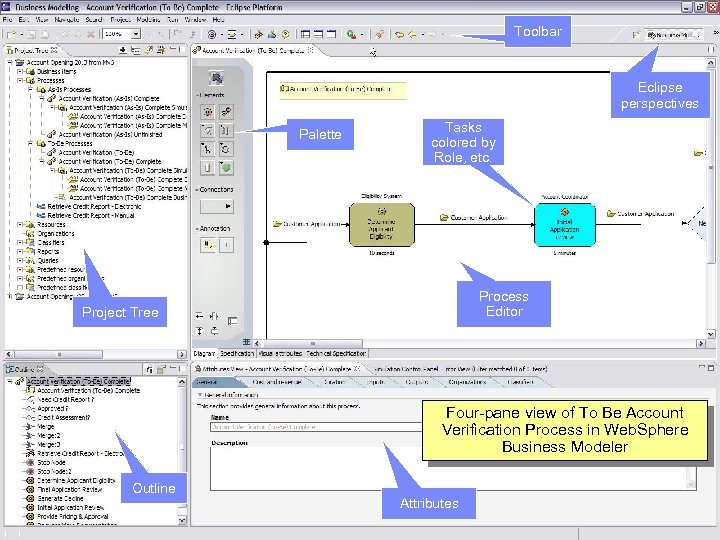
IBM Software Group Toolbar Eclipse perspectives Palette Tasks colored by Role, etc. Process Editor Project Tree Four-pane view of To Be Account Verification Process in Web. Sphere Business Modeler Outline Attributes Slide 9
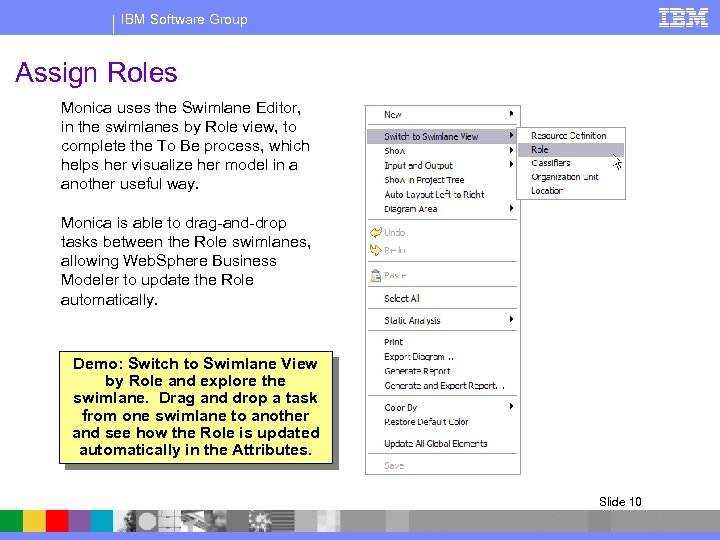
IBM Software Group Assign Roles Monica uses the Swimlane Editor, in the swimlanes by Role view, to complete the To Be process, which helps her visualize her model in a another useful way. Monica is able to drag-and-drop tasks between the Role swimlanes, allowing Web. Sphere Business Modeler to update the Role automatically. Demo: Switch to Swimlane View by Role and explore the swimlane. Drag and drop a task from one swimlane to another and see how the Role is updated automatically in the Attributes. Slide 10
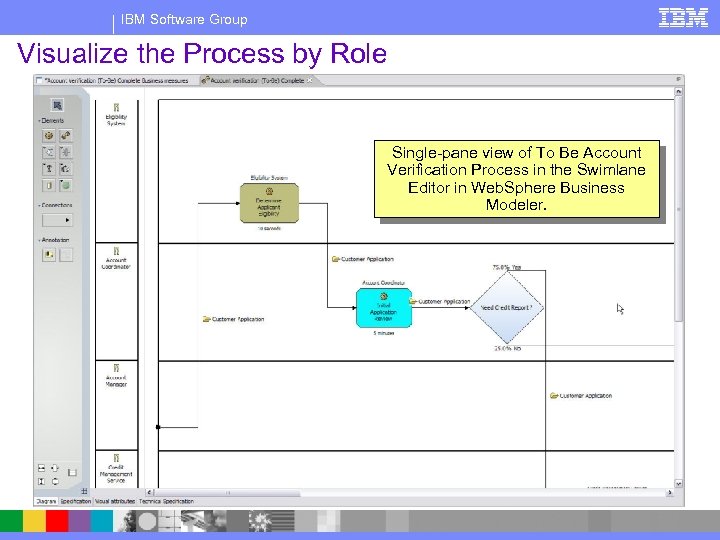
IBM Software Group Visualize the Process by Role Single-pane view of To Be Account Verification Process in the Swimlane Editor in Web. Sphere Business Modeler. Slide 11
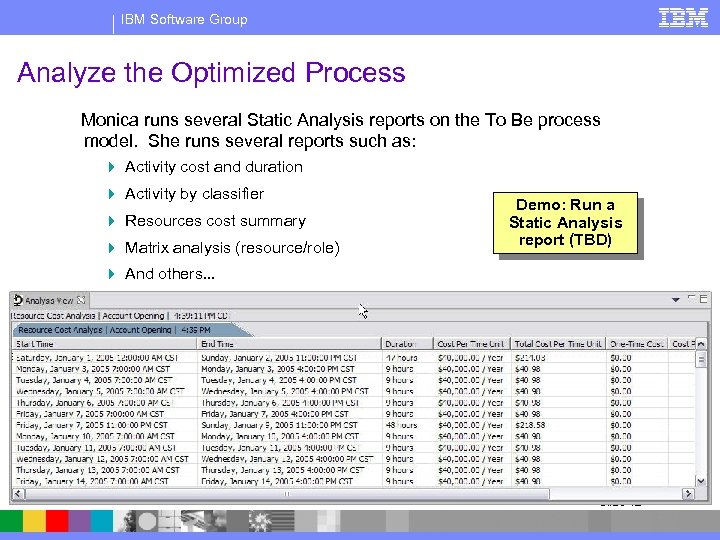
IBM Software Group Analyze the Optimized Process Monica runs several Static Analysis reports on the To Be process model. She runs several reports such as: 4 Activity cost and duration 4 Activity by classifier 4 Resources cost summary 4 Matrix analysis (resource/role) Demo: Run a Static Analysis report (TBD) 4 And others. . . Slide 12
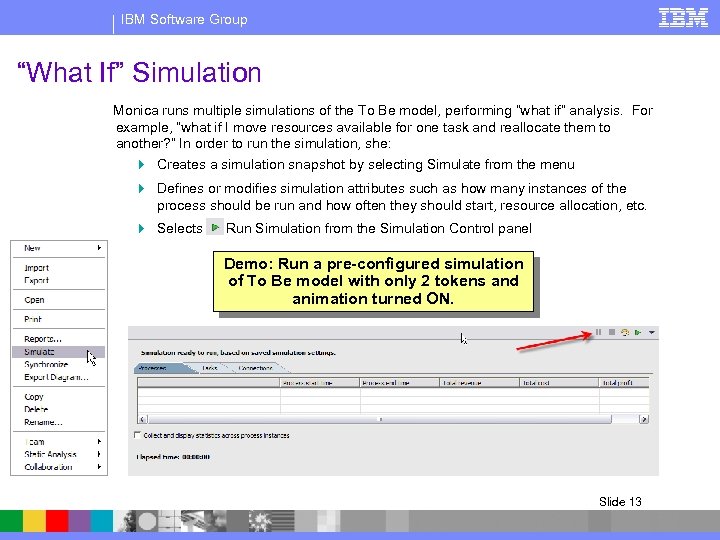
IBM Software Group “What If” Simulation Monica runs multiple simulations of the To Be model, performing “what if” analysis. For example, “what if I move resources available for one task and reallocate them to another? ” In order to run the simulation, she: 4 Creates a simulation snapshot by selecting Simulate from the menu 4 Defines or modifies simulation attributes such as how many instances of the process should be run and how often they should start, resource allocation, etc. 4 Selects Run Simulation from the Simulation Control panel Demo: Run a pre-configured simulation of To Be model with only 2 tokens and animation turned ON. Slide 13
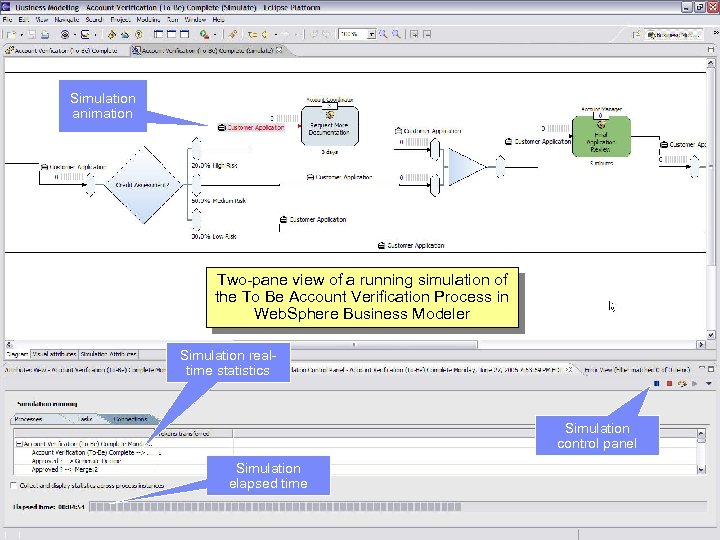
IBM Software Group Simulation animation Two-pane view of a running simulation of the To Be Account Verification Process in Web. Sphere Business Modeler Simulation realtime statistics Simulation control panel Simulation elapsed time Slide 14
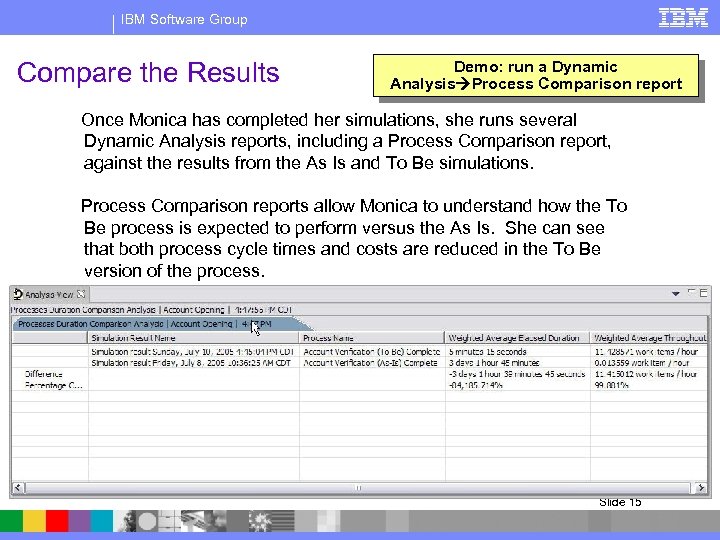
IBM Software Group Compare the Results Demo: run a Dynamic Analysis Process Comparison report Once Monica has completed her simulations, she runs several Dynamic Analysis reports, including a Process Comparison report, against the results from the As Is and To Be simulations. Process Comparison reports allow Monica to understand how the To Be process is expected to perform versus the As Is. She can see that both process cycle times and costs are reduced in the To Be version of the process. Slide 15
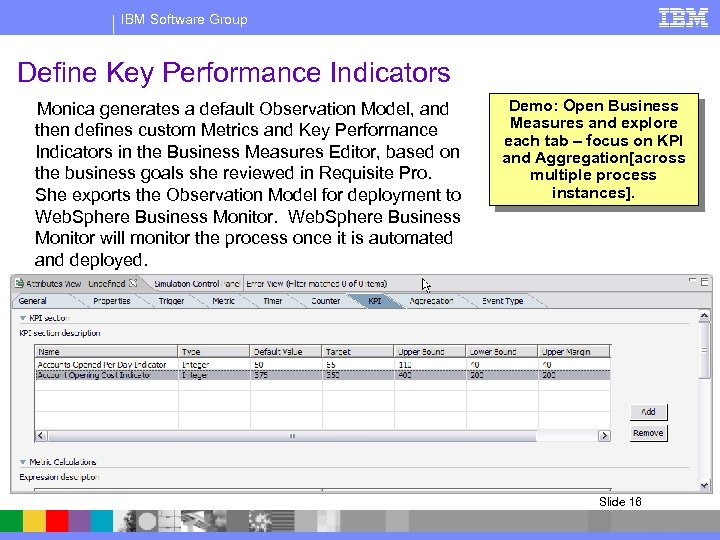
IBM Software Group Define Key Performance Indicators Monica generates a default Observation Model, and then defines custom Metrics and Key Performance Indicators in the Business Measures Editor, based on the business goals she reviewed in Requisite Pro. She exports the Observation Model for deployment to Web. Sphere Business Monitor will monitor the process once it is automated and deployed. Demo: Open Business Measures and explore each tab – focus on KPI and Aggregation[across multiple process instances]. Slide 16
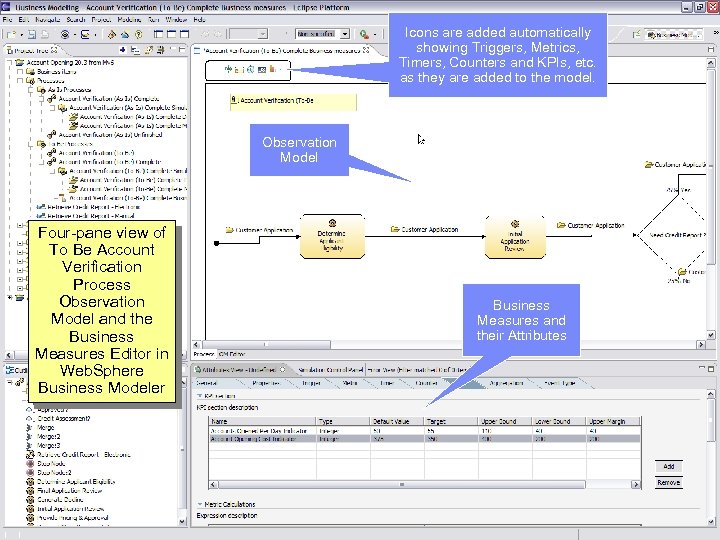
IBM Software Group Icons are added automatically showing Triggers, Metrics, Timers, Counters and KPIs, etc. as they are added to the model. Observation Model Four-pane view of To Be Account Verification Process Observation Model and the Business Measures Editor in Web. Sphere Business Modeler Business Measures and their Attributes Slide 17
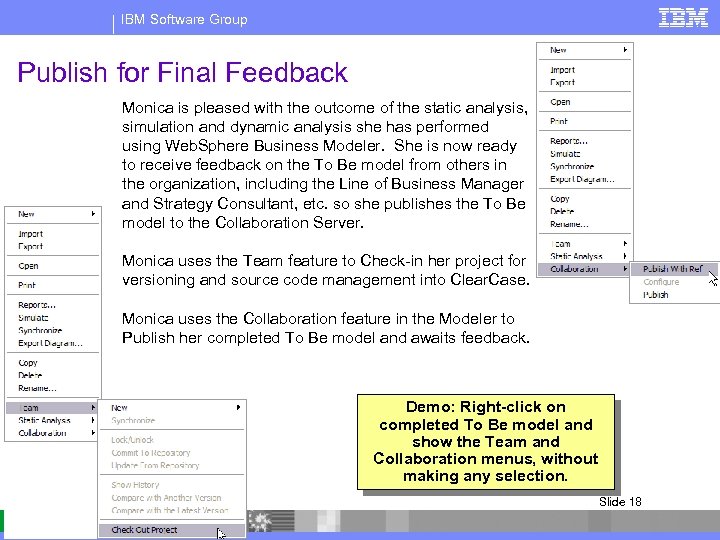
IBM Software Group Publish for Final Feedback Monica is pleased with the outcome of the static analysis, simulation and dynamic analysis she has performed using Web. Sphere Business Modeler. She is now ready to receive feedback on the To Be model from others in the organization, including the Line of Business Manager and Strategy Consultant, etc. so she publishes the To Be model to the Collaboration Server. Monica uses the Team feature to Check-in her project for versioning and source code management into Clear. Case. Monica uses the Collaboration feature in the Modeler to Publish her completed To Be model and awaits feedback. Demo: Right-click on completed To Be model and show the Team and Collaboration menus, without making any selection. Slide 18
IBM Software Group Collaboration Server Slide 19
IBM Software Group Collaboration – Business IT Michelle the Operations Manager and John the manager of the Credit Operations department review offer some additional suggestions. Bob the VP of Sales has his key reps review the way applications are submitted to see if they have any ideas on how to improve. They come back with several great ideas. Bob circulates the KPIs to the other execs who add a few relevant metrics they’d like to see included in the new solution. All agree on what needs to be done, with knowledge of the impacts to their way of working, and an understanding of the benefits they expect. After optimizing the To Be Model and validating it with the business community, Monica is confident that it is ready for automation and deployment. Slide 20
IBM Software Group Forward Engineer - Time to Value Monica tweaks the to-be to incorporate the new ideas. It’s now optimized and ready to forward engineer. Using Web. Sphere Business Modeler, Monica transforms the optimized To Be model into useful artifacts such as the BPEL model, WSDLs and XSDs, for her Integration Developer counterpart, Sandeep, to automate and deploy to Web. Sphere Process Server. The Solution Architect, Wilhelm, will use the same process model as a business contract. He will use Rational Software Architect (RSA) to read the model and drag-and-drop modeling artifacts to create his UML diagrams. He will later use diagrams, again in RSA, to generate J 2 EE artifacts for new service implementations specified in Monica’s process model. Slide 21
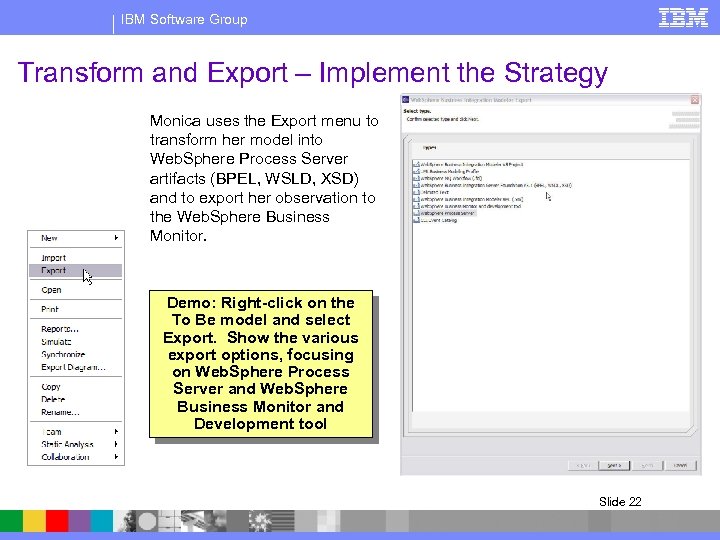
IBM Software Group Transform and Export – Implement the Strategy Monica uses the Export menu to transform her model into Web. Sphere Process Server artifacts (BPEL, WSLD, XSD) and to export her observation to the Web. Sphere Business Monitor. Demo: Right-click on the To Be model and select Export. Show the various export options, focusing on Web. Sphere Process Server and Web. Sphere Business Monitor and Development tool Slide 22
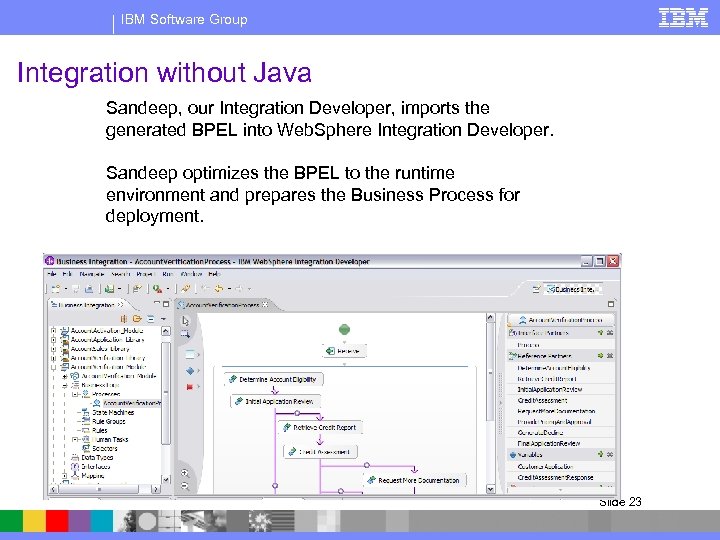
IBM Software Group Integration without Java Sandeep, our Integration Developer, imports the generated BPEL into Web. Sphere Integration Developer. Sandeep optimizes the BPEL to the runtime environment and prepares the Business Process for deployment. Slide 23
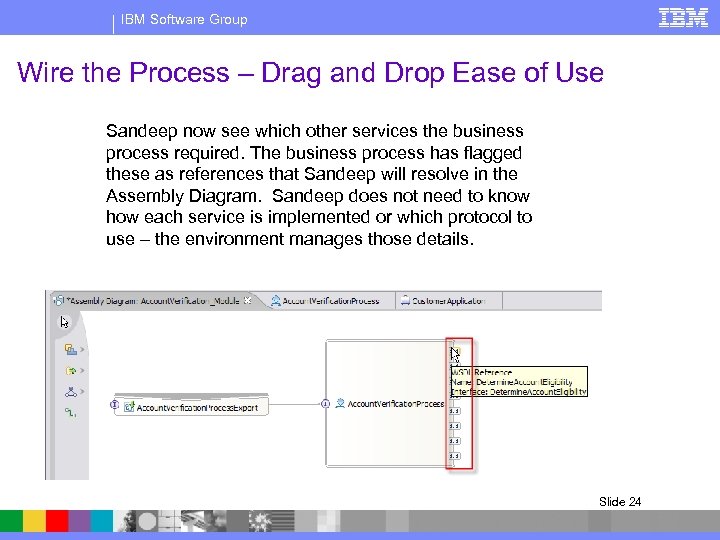
IBM Software Group Wire the Process – Drag and Drop Ease of Use Sandeep now see which other services the business process required. The business process has flagged these as references that Sandeep will resolve in the Assembly Diagram. Sandeep does not need to know how each service is implemented or which protocol to use – the environment manages those details. Slide 24
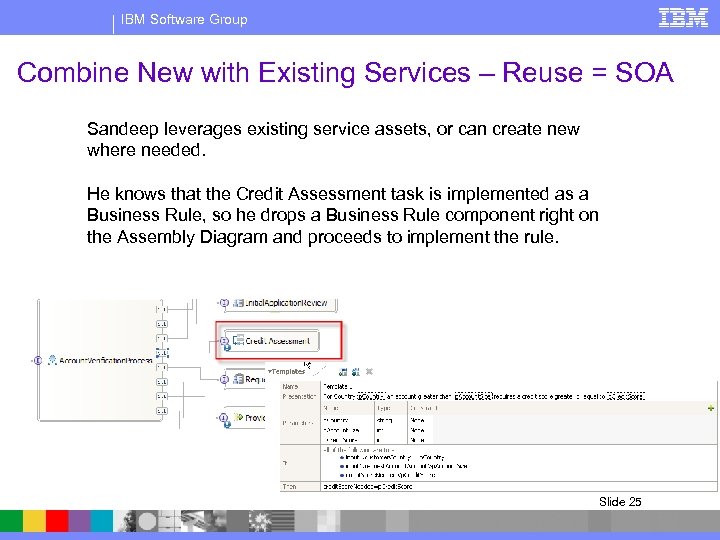
IBM Software Group Combine New with Existing Services – Reuse = SOA Sandeep leverages existing service assets, or can create new where needed. He knows that the Credit Assessment task is implemented as a Business Rule, so he drops a Business Rule component right on the Assembly Diagram and proceeds to implement the rule. Slide 25
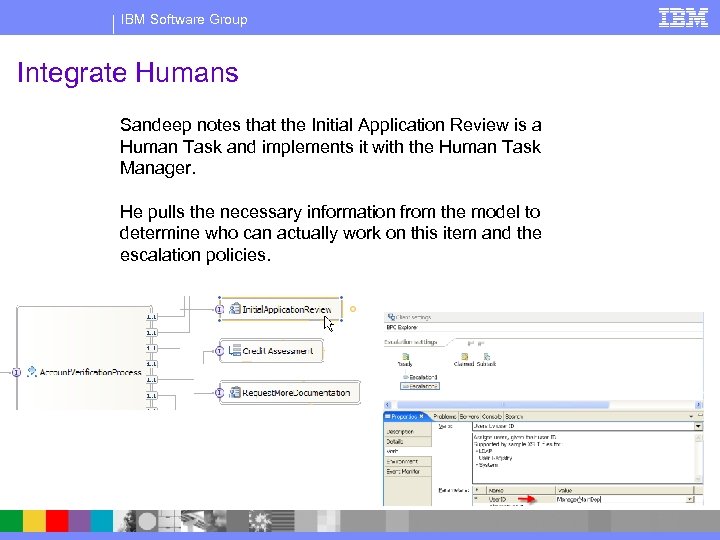
IBM Software Group Integrate Humans Sandeep notes that the Initial Application Review is a Human Task and implements it with the Human Task Manager. He pulls the necessary information from the model to determine who can actually work on this item and the escalation policies. Slide 26
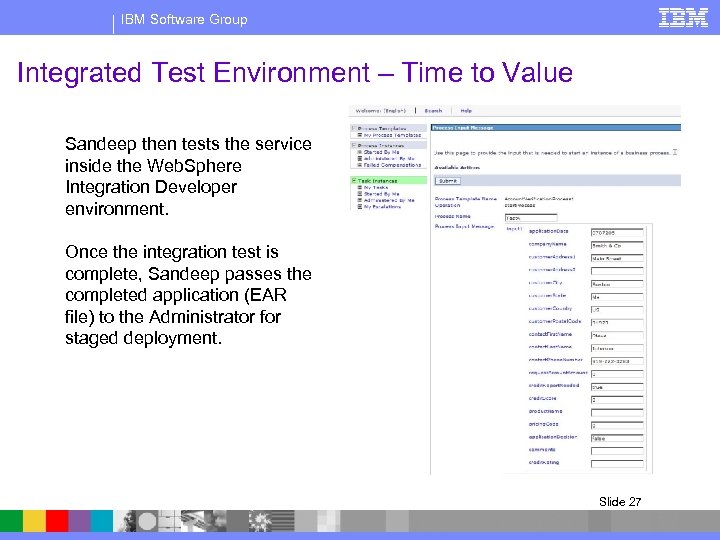
IBM Software Group Integrated Test Environment – Time to Value Sandeep then tests the service inside the Web. Sphere Integration Developer environment. Once the integration test is complete, Sandeep passes the completed application (EAR file) to the Administrator for staged deployment. Slide 27
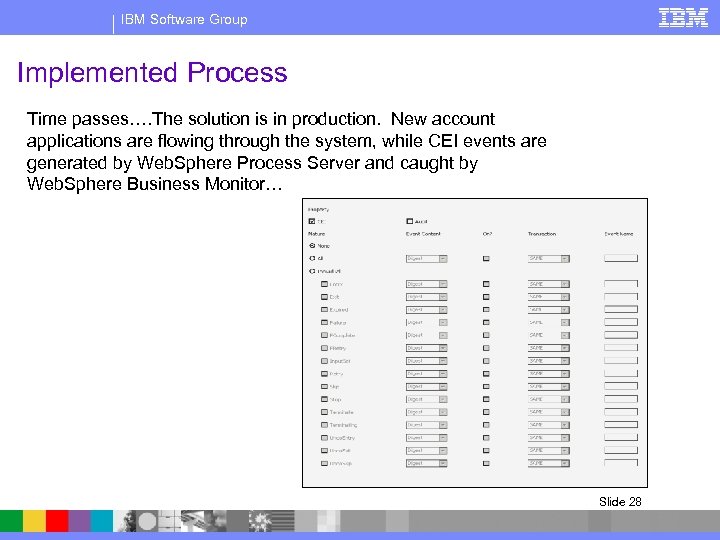
IBM Software Group Implemented Process Time passes…. The solution is in production. New account applications are flowing through the system, while CEI events are generated by Web. Sphere Process Server and caught by Web. Sphere Business Monitor… Slide 28
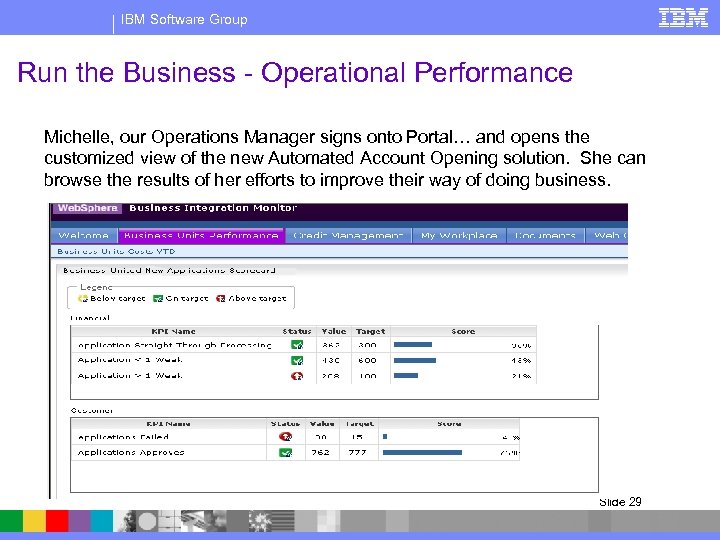
IBM Software Group Run the Business - Operational Performance Michelle, our Operations Manager signs onto Portal… and opens the customized view of the new Automated Account Opening solution. She can browse the results of her efforts to improve their way of doing business. Slide 29
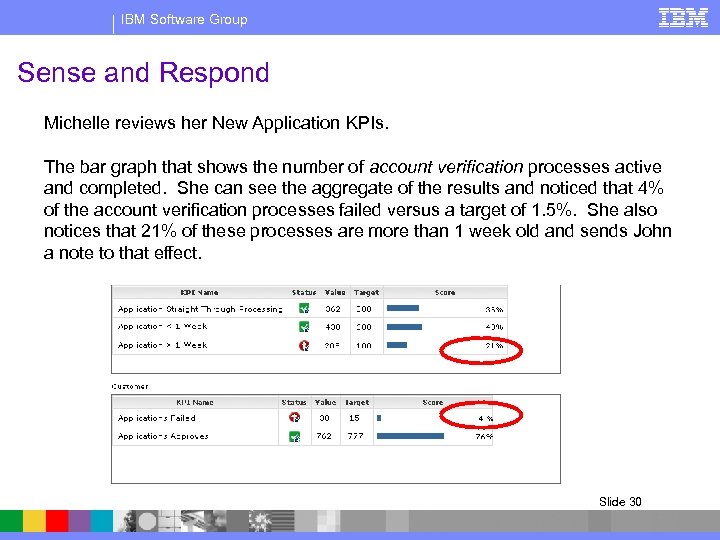
IBM Software Group Sense and Respond Michelle reviews her New Application KPIs. The bar graph that shows the number of account verification processes active and completed. She can see the aggregate of the results and noticed that 4% of the account verification processes failed versus a target of 1. 5%. She also notices that 21% of these processes are more than 1 week old and sends John a note to that effect. Slide 30
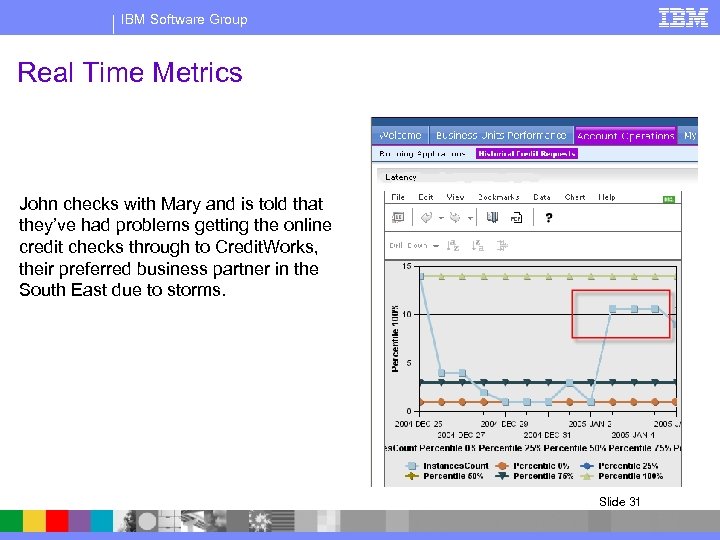
IBM Software Group Real Time Metrics John checks with Mary and is told that they’ve had problems getting the online credit checks through to Credit. Works, their preferred business partner in the South East due to storms. Slide 31
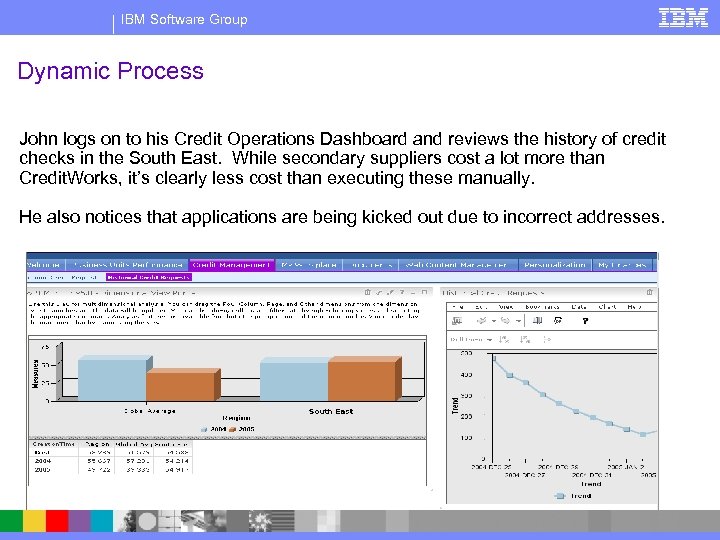
IBM Software Group Dynamic Process John logs on to his Credit Operations Dashboard and reviews the history of credit checks in the South East. While secondary suppliers cost a lot more than Credit. Works, it’s clearly less cost than executing these manually. He also notices that applications are being kicked out due to incorrect addresses. Slide 32
IBM Software Group Dynamic Process – Power of Business Rules and Closed Loop John IMs Sandeep and they agree to change the Business Rule to route credit checks first to any provider who is online, regardless of price. He sends a note to Monica and asks that the process be updated to return these applications to the sales department for repair when the address can’t be validated. John’s pretty pleased with himself, and his ability to manage his operation. Michelle’s Blackberry buzzes while she’s in her meeting with John telling her everything’s taken care of. Slide 33
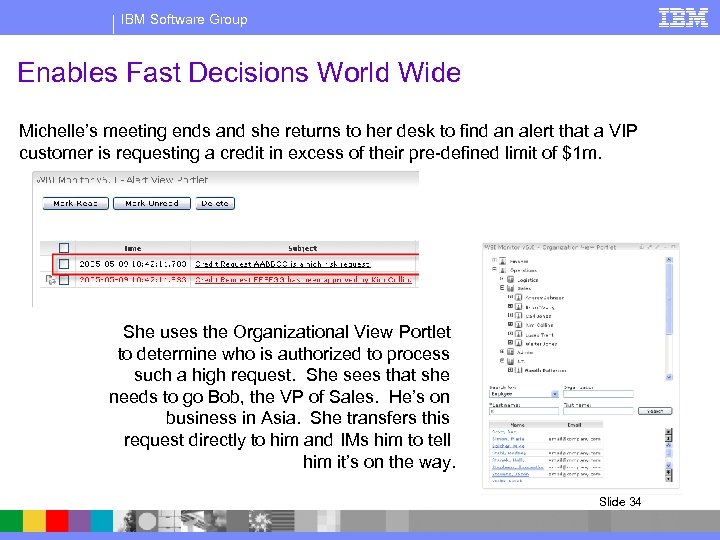
IBM Software Group Enables Fast Decisions World Wide Michelle’s meeting ends and she returns to her desk to find an alert that a VIP customer is requesting a credit in excess of their pre-defined limit of $1 m. She uses the Organizational View Portlet to determine who is authorized to process such a high request. She sees that she needs to go Bob, the VP of Sales. He’s on business in Asia. She transfers this request directly to him and IMs him to tell him it’s on the way. Slide 34
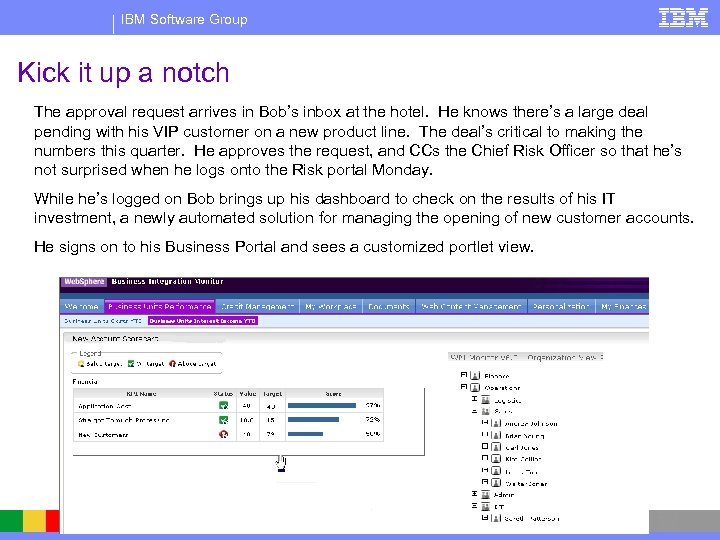
IBM Software Group Kick it up a notch The approval request arrives in Bob’s inbox at the hotel. He knows there’s a large deal pending with his VIP customer on a new product line. The deal’s critical to making the numbers this quarter. He approves the request, and CCs the Chief Risk Officer so that he’s not surprised when he logs onto the Risk portal Monday. While he’s logged on Bob brings up his dashboard to check on the results of his IT investment, a newly automated solution for managing the opening of new customer accounts. He signs on to his Business Portal and sees a customized portlet view. Slide 35
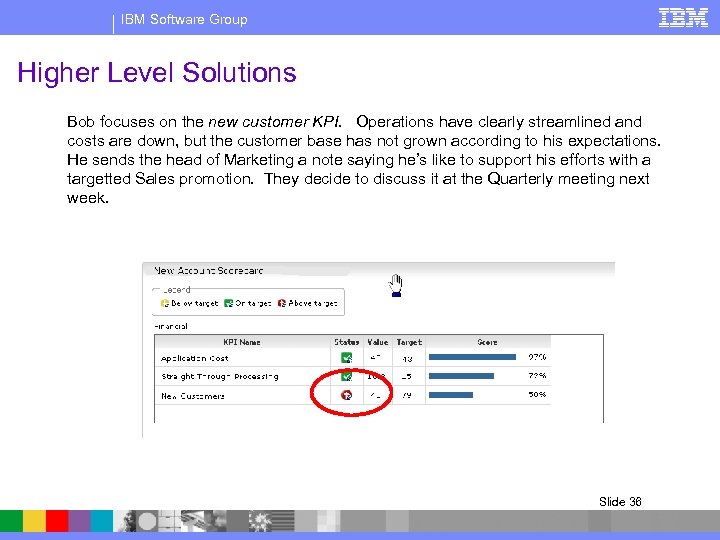
IBM Software Group Higher Level Solutions Bob focuses on the new customer KPI. Operations have clearly streamlined and costs are down, but the customer base has not grown according to his expectations. He sends the head of Marketing a note saying he’s like to support his efforts with a targetted Sales promotion. They decide to discuss it at the Quarterly meeting next week. Slide 36
IBM Software Group Implement Strategy Faster At the meeting the execs brainstorm on how they should approach the goal of increasing market share. They come up with two different ideas which they agree to pilot with different promotions in each of two regions, North East and Mid West. Effectiveness of the promotions will be measured by percent increase of new customers opening accounts in each region. The Chief Risk Officer approves the promotion with the provision that the success also be measured by credit quality. The promotions are executed in the next quarter…. . Slide 37
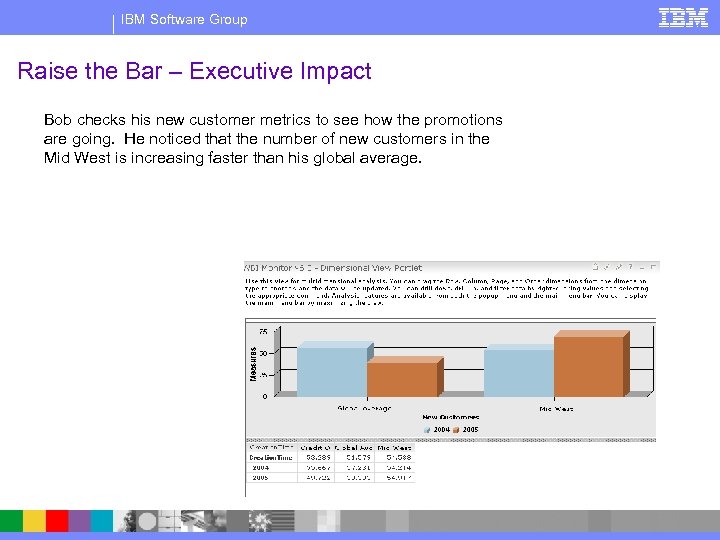
IBM Software Group Raise the Bar – Executive Impact Bob checks his new customer metrics to see how the promotions are going. He noticed that the number of new customers in the Mid West is increasing faster than his global average. Slide 38
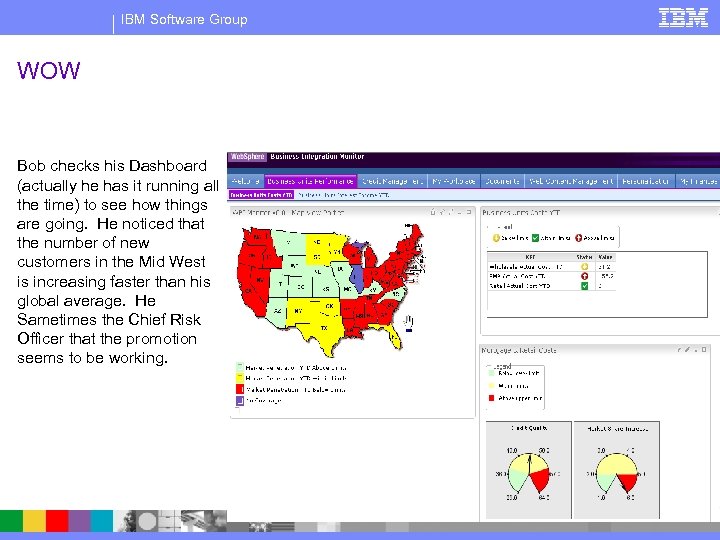
IBM Software Group WOW Bob checks his Dashboard (actually he has it running all the time) to see how things are going. He noticed that the number of new customers in the Mid West is increasing faster than his global average. He Sametimes the Chief Risk Officer that the promotion seems to be working. Slide 39
IBM Software Group Key Points § By now everyone will have forgotten about Monica and Sandeep and Wilhelm (IT) and be focused on Michelle and John and Bob and the execs, who: § Business and IT integrated § Can Sense and Respond real-time § Are empowered to actually run their business units as the want to and need to - directly tied to things like Closed Loop and Business Rules (Mary and John) § Gained strategic advantage with higher level solutions – Composite applications (SOA) break down organizational barriers and empower execs to implement strategy faster. § Notice by the way that a project that strated as a way to cut costs is now directly impacting Revenue. Slide 40
Скачать презентацию IBM Software Group Process Integration Sales Technical
89f4c25f0fd6916d17f14badeac15df1.ppt