 Скачать презентацию IBM Software Group Lotus Software IBM Web Sphere
7f663b6e523a4db72769c37507f43349.ppt
- Количество слайдов: 56



IBM Software Group Lotus Software IBM Web. Sphere Portal Version 6. 1 and Roadmap Phillip de Ridder - IBM Software Group Date: 06/05/08 © 2008 IBM Corporation
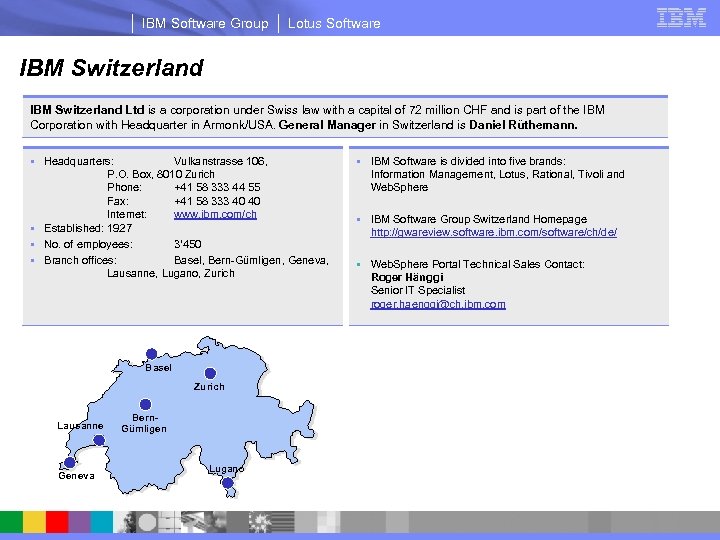
IBM Software Group Lotus Software IBM Switzerland Ltd is a corporation under Swiss law with a capital of 72 million CHF and is part of the IBM Corporation with Headquarter in Armonk/USA. General Manager in Switzerland is Daniel Rüthemann. § Headquarters: Vulkanstrasse 106, P. O. Box, 8010 Zurich Phone: +41 58 333 44 55 Fax: +41 58 333 40 40 Internet: www. ibm. com/ch § Established: 1927 § No. of employees: 3‘ 450 § Branch offices: Basel, Bern-Gümligen, Geneva, Lausanne, Lugano, Zurich Basel Zurich Lausanne Geneva Bern. Gümligen Lugano § IBM Software is divided into five brands: Information Management, Lotus, Rational, Tivoli and Web. Sphere § IBM Software Group Switzerland Homepage http: //gwareview. software. ibm. com/software/ch/de/ § Web. Sphere Portal Technical Sales Contact: Roger Hänggi Senior IT Specialist roger. haenggi@ch. ibm. com
IBM Software Group Lotus Software Content § Web. Sphere Portal Overview § Web. Sphere Portal 6. 1 Beta Overview – Extended Web 2. 0 Support – Site Construction and Customization Enhancements – Business Process Support Flexibility – Developer Flexibility Extensions – New Capabilities for Security Management – Site Management Enhancements – Search Flexibility § Roadmap post Web. Sphere Portal V 6. 1 § Q&A
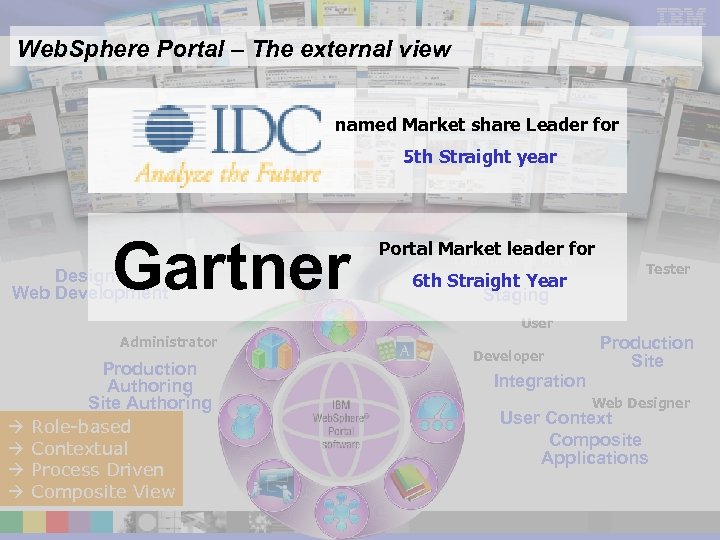
IBM Software Group Lotus Software Web. Sphere Portal – The external view named Market share Leader for 5 th Straight year Gartner Design / Web Development Server Cluster Administrator Production Authoring Site Authoring Role-based Contextual Process Driven Composite View Single Server Small Deployment Portal Market leader for Departmental Portal 6 th Straight Year Staging User Developer Tester Large scale Deployment Production Site Integration Release. Builder Web Designer User Context Composite Applications
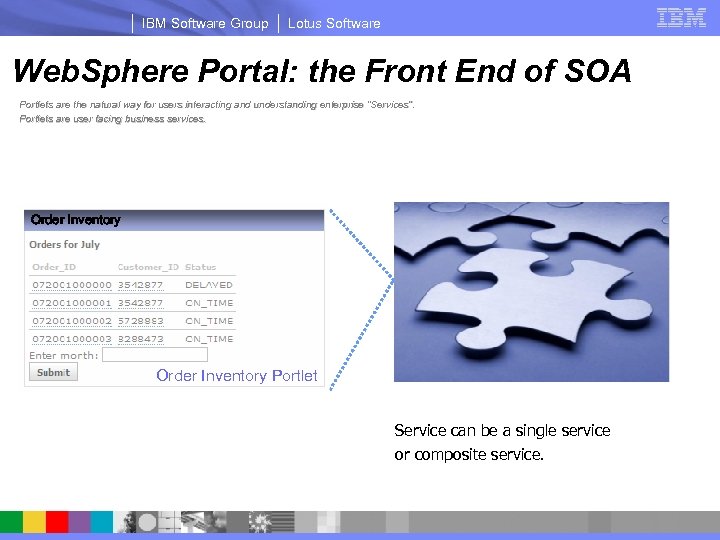
IBM Software Group Lotus Software Web. Sphere Portal: the Front End of SOA Portlets are the natural way for users interacting and understanding enterprise “Services”. Portlets are user facing business services. Order Inventory Portlet Order Inventory Service can be a single service or composite service.
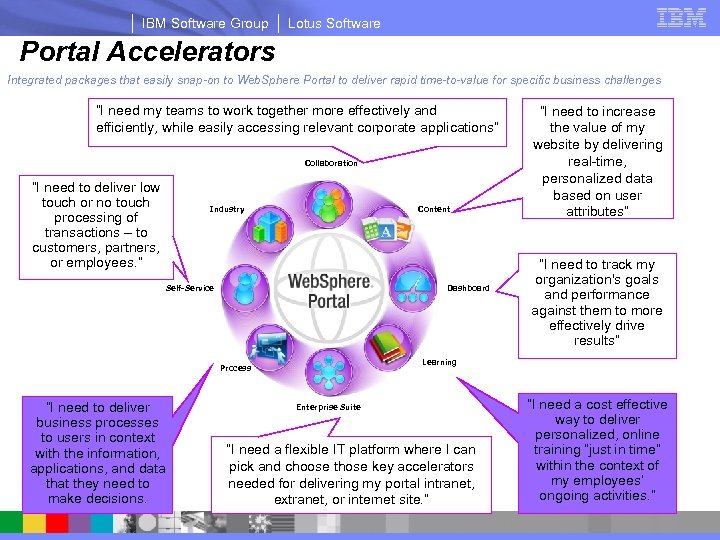
IBM Software Group Lotus Software Portal Accelerators Integrated packages that easily snap-on to Web. Sphere Portal to deliver rapid time-to-value for specific business challenges “I need my teams to work together more effectively and efficiently, while easily accessing relevant corporate applications” Collaboration “I need to deliver low touch or no touch processing of transactions – to customers, partners, or employees. ” Industry Content Self-Service Dashboard “I need to track my organization's goals and performance against them to more effectively drive results” Learning Process “I need to deliver business processes to users in context with the information, applications, and data that they need to make decisions. “I need to increase the value of my website by delivering real-time, personalized data based on user attributes” Enterprise Suite “I need a flexible IT platform where I can pick and choose those key accelerators needed for delivering my portal intranet, extranet, or internet site. ” “I need a cost effective way to deliver personalized, online training “just in time” within the context of my employees’ ongoing activities. ”
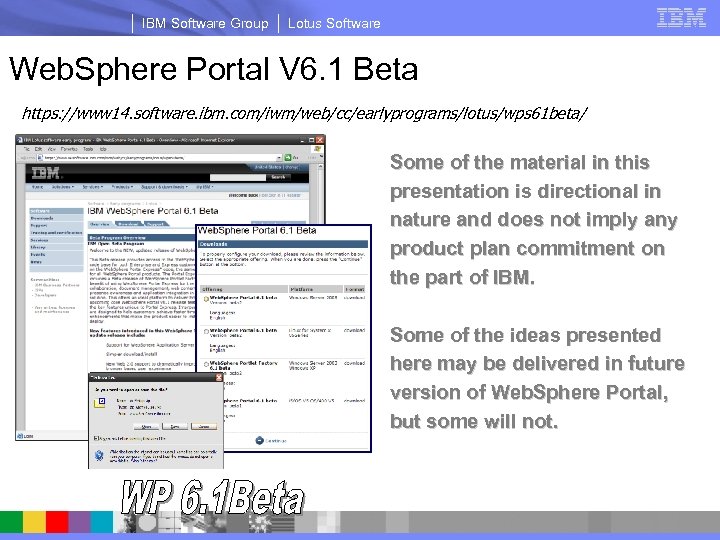
IBM Software Group Lotus Software Web. Sphere Portal V 6. 1 Beta https: //www 14. software. ibm. com/iwm/web/cc/earlyprograms/lotus/wps 61 beta/ Some of the material in this presentation is directional in nature and does not imply any product plan commitment on the part of IBM. Some of the ideas presented here may be delivered in future version of Web. Sphere Portal, but some will not. Things that are currently only shipping in Beta are tagged with this marker:
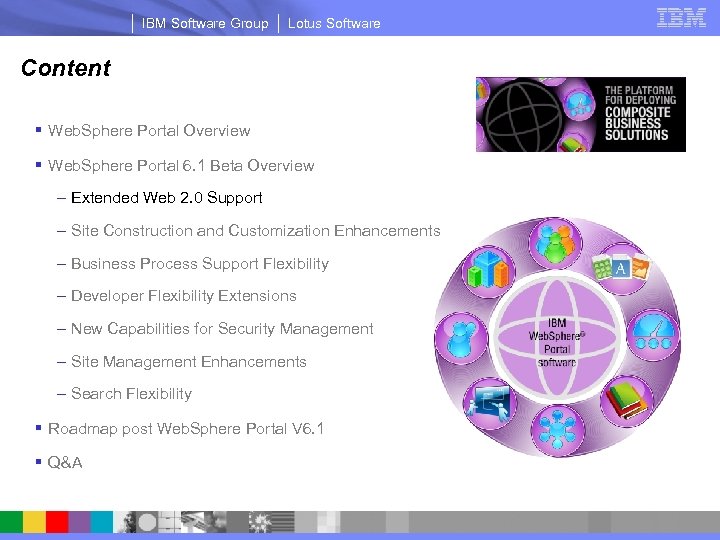
IBM Software Group Lotus Software Content § Web. Sphere Portal Overview § Web. Sphere Portal 6. 1 Beta Overview – Extended Web 2. 0 Support – Site Construction and Customization Enhancements – Business Process Support Flexibility – Developer Flexibility Extensions – New Capabilities for Security Management – Site Management Enhancements – Search Flexibility § Roadmap post Web. Sphere Portal V 6. 1 § Q&A
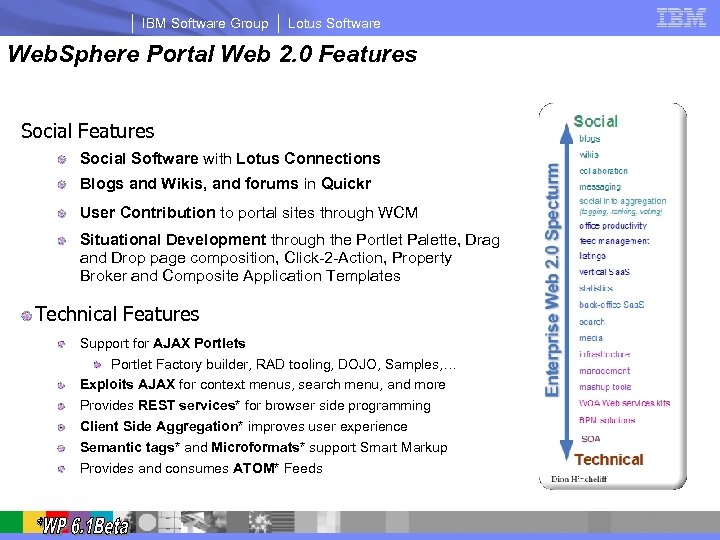
IBM Software Group Lotus Software Web. Sphere Portal Web 2. 0 Features Social Software with Lotus Connections Blogs and Wikis, and forums in Quickr User Contribution to portal sites through WCM Situational Development through the Portlet Palette, Drag and Drop page composition, Click-2 -Action, Property Broker and Composite Application Templates Technical Features Support for AJAX Portlets Portlet Factory builder, RAD tooling, DOJO, Samples, … Exploits AJAX for context menus, search menu, and more Provides REST services* for browser side programming Client Side Aggregation* improves user experience Semantic tags* and Microformats* support Smart Markup Provides and consumes ATOM* Feeds
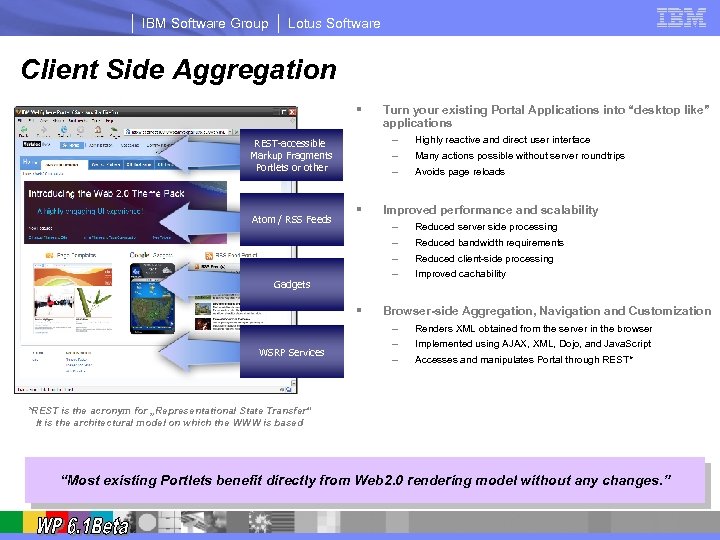
IBM Software Group Lotus Software Client Side Aggregation § – – – REST-accessible Markup Fragments Portlets or other Atom / RSS Feeds § § Highly reactive and direct user interface Many actions possible without server roundtrips Avoids page reloads Improved performance and scalability – – Gadgets WSRP Services Turn your existing Portal Applications into “desktop like” applications Reduced server side processing Reduced bandwidth requirements Reduced client-side processing Improved cachability Browser-side Aggregation, Navigation and Customization – – – Renders XML obtained from the server in the browser Implemented using AJAX, XML, Dojo, and Java. Script Accesses and manipulates Portal through REST* *REST is the acronym for „Representational State Transfer“ It is the architectural model on which the WWW is based “Most existing Portlets benefit directly from Web 2. 0 rendering model without any changes. ”
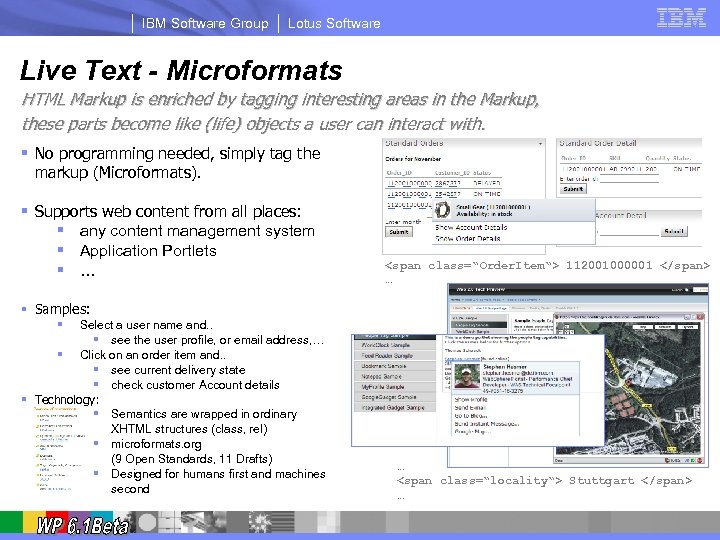
IBM Software Group Lotus Software Live Text - Microformats HTML Markup is enriched by tagging interesting areas in the Markup, these parts become like (life) objects a user can interact with. § No programming needed, simply tag the markup (Microformats). § Supports web content from all places: § any content management system § Application Portlets § … … <span class=“Order. Item“> 112001000001 </span> … § Samples: § Select a user name and. . § see the user profile, or email address, … § Click on an order item and. . § see current delivery state § check customer Account details § Technology: § Semantics are wrapped in ordinary XHTML structures (class, rel) § microformats. org (9 Open Standards, 11 Drafts) § Designed for humans first and machines second … <span class=“locality“> Stuttgart </span> …
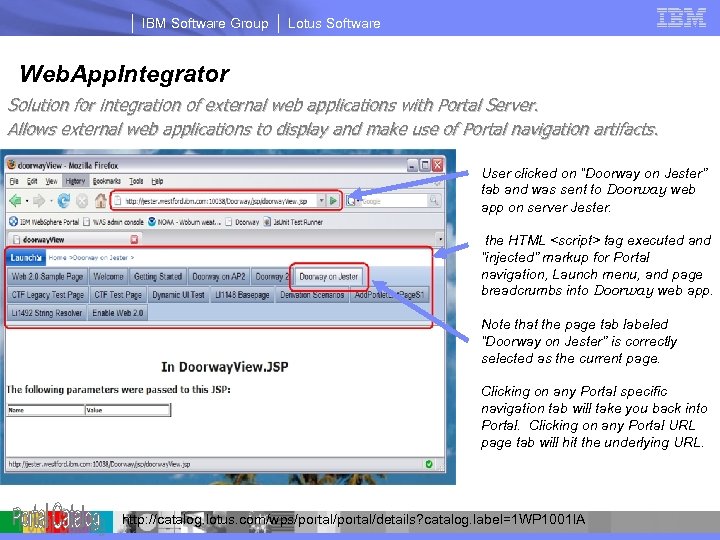
IBM Software Group Lotus Software Web. App. Integrator Solution for integration of external web applications with Portal Server. Allows external web applications to display and make use of Portal navigation artifacts. • User clicked on “Doorway on Jester” tab and was sent to Doorway web app on server Jester. • the HTML <script> tag executed and “injected” markup for Portal navigation, Launch menu, and page breadcrumbs into Doorway web app. • Note that the page tab labeled “Doorway on Jester” is correctly selected as the current page. • Clicking on any Portal specific navigation tab will take you back into Portal. Clicking on any Portal URL page tab will hit the underlying URL. http: //catalog. lotus. com/wps/portal/details? catalog. label=1 WP 1001 IA
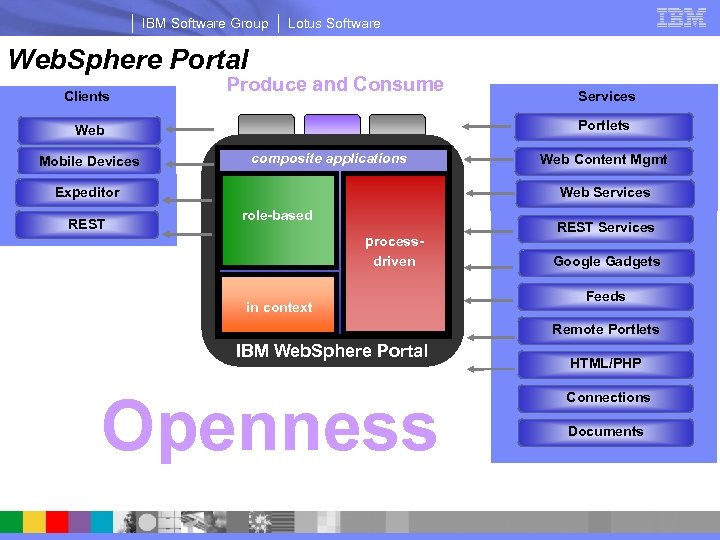
IBM Software Group Lotus Software Web. Sphere Portal Clients Produce and Consume Portlets Web Mobile Devices composite applications Web Content Mgmt Web Services Expeditor REST Services role-based processdriven in context REST Services Google Gadgets Feeds Remote Portlets IBM Web. Sphere Portal Critical enabler: Openness HTML/PHP Connections Documents Standards based access to integration and innovation
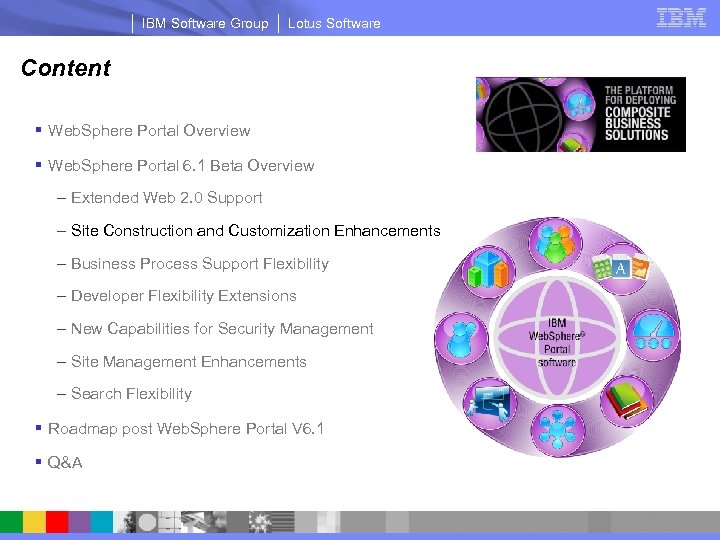
IBM Software Group Lotus Software Content § Web. Sphere Portal Overview § Web. Sphere Portal 6. 1 Beta Overview – Extended Web 2. 0 Support – Site Construction and Customization Enhancements – Business Process Support Flexibility – Developer Flexibility Extensions – New Capabilities for Security Management – Site Management Enhancements – Search Flexibility § Roadmap post Web. Sphere Portal V 6. 1 § Q&A
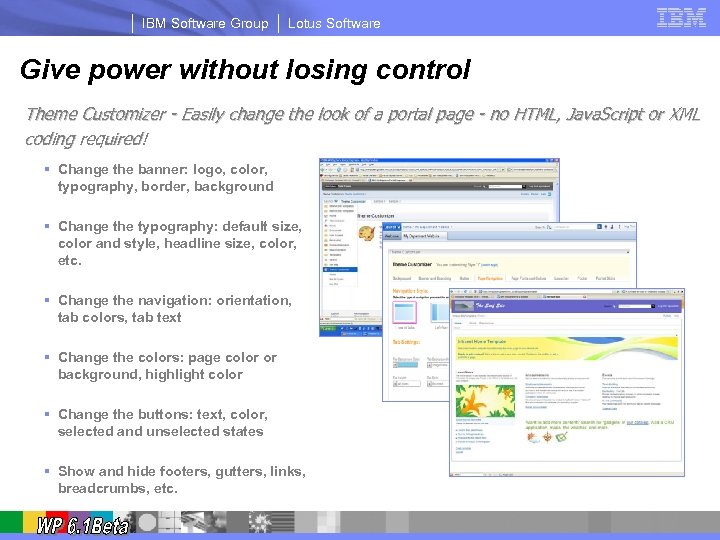
IBM Software Group Lotus Software Give power without losing control Theme Customizer - Easily change the look of a portal page - no HTML, Java. Script or XML coding required! § Change the banner: logo, color, typography, border, background § Change the typography: default size, color and style, headline size, color, etc. § Change the navigation: orientation, tab colors, tab text § Change the colors: page color or background, highlight color § Change the buttons: text, color, selected and unselected states § Show and hide footers, gutters, links, breadcrumbs, etc.
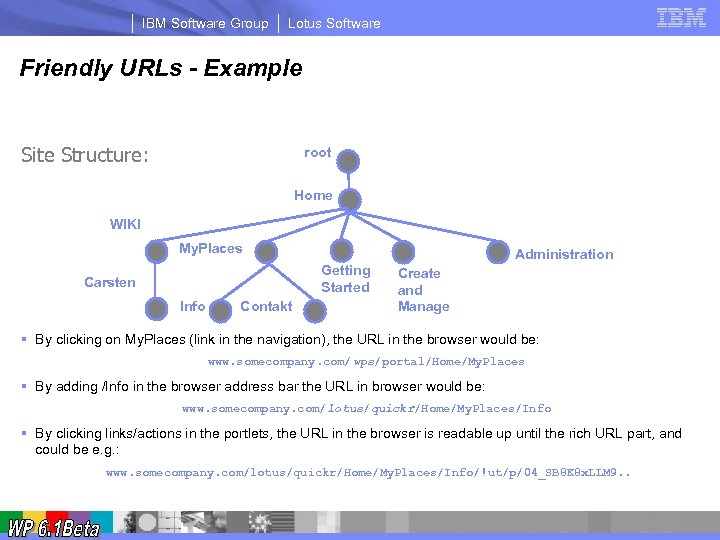
IBM Software Group Lotus Software Friendly URLs - Example Site Structure: root Home WIKI My. Places Administration Getting Started Carsten Info Contakt Create and Manage § By clicking on My. Places (link in the navigation), the URL in the browser would be: www. somecompany. com/wps/portal/Home/My. Places § By adding /Info in the browser address bar the URL in browser would be: www. somecompany. com/lotus/quickr/Home/My. Places/Info § By clicking links/actions in the portlets, the URL in the browser is readable up until the rich URL part, and could be e. g. : www. somecompany. com/lotus/quickr/Home/My. Places/Info/!ut/p/04_SB 8 K 8 x. LLM 9. .
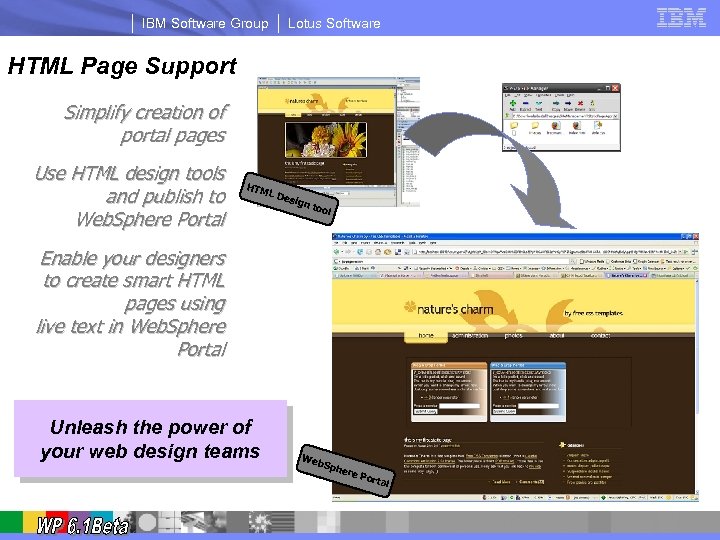
IBM Software Group Lotus Software HTML Page Support Simplify creation of portal pages Use HTML design tools and publish to Web. Sphere Portal publish HTM L De sign tool Enable your designers to create smart HTML pages using live text in Web. Sphere Portal Unleash the power of your web design teams Portal Navigation Portlets Web Sph ere Port al
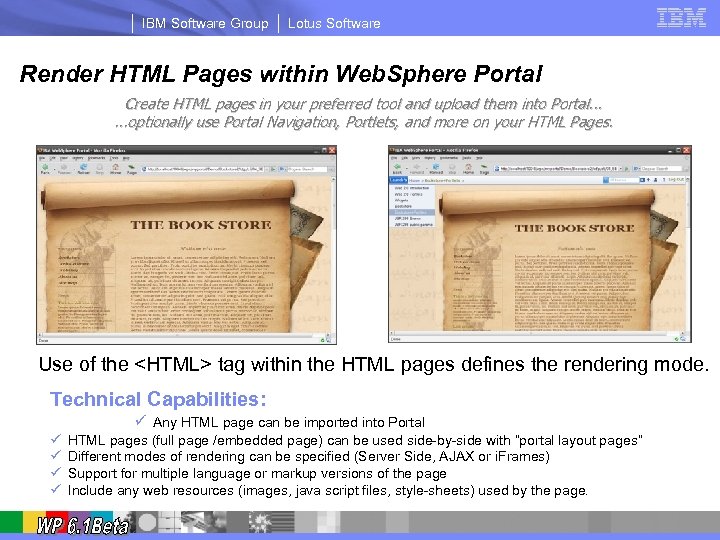
IBM Software Group Lotus Software Render HTML Pages within Web. Sphere Portal Create HTML pages in your preferred tool and upload them into Portal. . . optionally use Portal Navigation, Portlets, and more on your HTML Pages. Left hand Navigation HTML page defines <HTML> tag. full HTML Page Portal Banner HTML page does not define <HTML> tag. embedded HTML Page Use of the <HTML> tag within the HTML pages defines the rendering mode. Technical Capabilities: ü Any HTML page can be imported into Portal ü ü HTML pages (full page /embedded page) can be used side-by-side with “portal layout pages“ Different modes of rendering can be specified (Server Side, AJAX or i. Frames) Support for multiple language or markup versions of the page Include any web resources (images, java script files, style-sheets) used by the page.
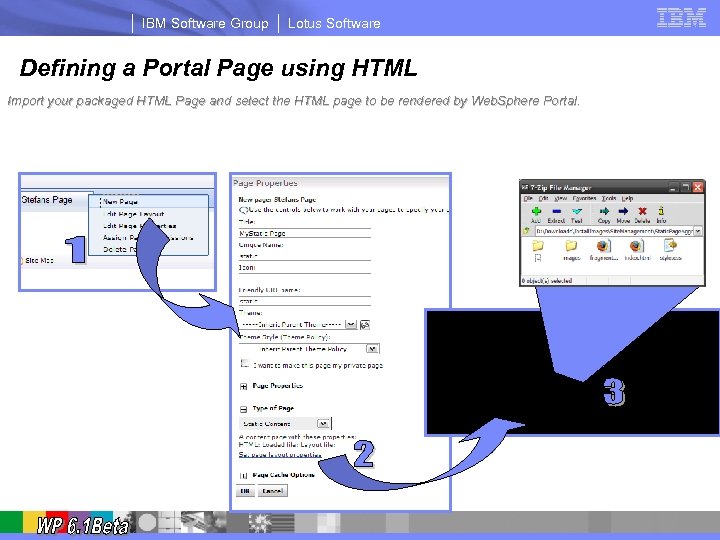
IBM Software Group Lotus Software Defining a Portal Page using HTML Import your packaged HTML Page and select the HTML page to be rendered by Web. Sphere Portal.
IBM Software Group Lotus Software Content § Web. Sphere Portal Overview § Web. Sphere Portal 6. 1 Beta Overview – Extended Web 2. 0 Support – Site Construction and Customization Enhancements – Business Process Support Flexibility – Developer Flexibility Extensions – New Capabilities for Security Management – Site Management Enhancements – Search Flexibility § Roadmap post Web. Sphere Portal V 6. 1 § Q&A
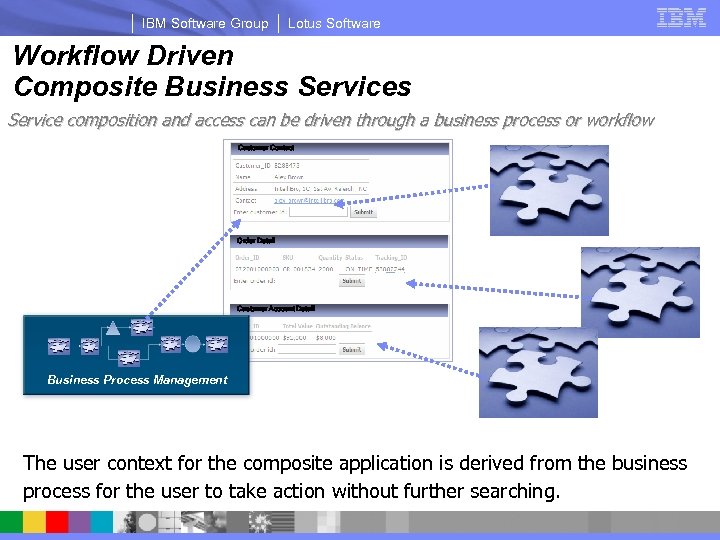
IBM Software Group Lotus Software Workflow Driven Composite Business Service composition and access can be driven through a business process or workflow Customer Contact Order Detail Customer Account Detail Business Process Management The user context for the composite application is derived from the business process for the user to take action without further searching.
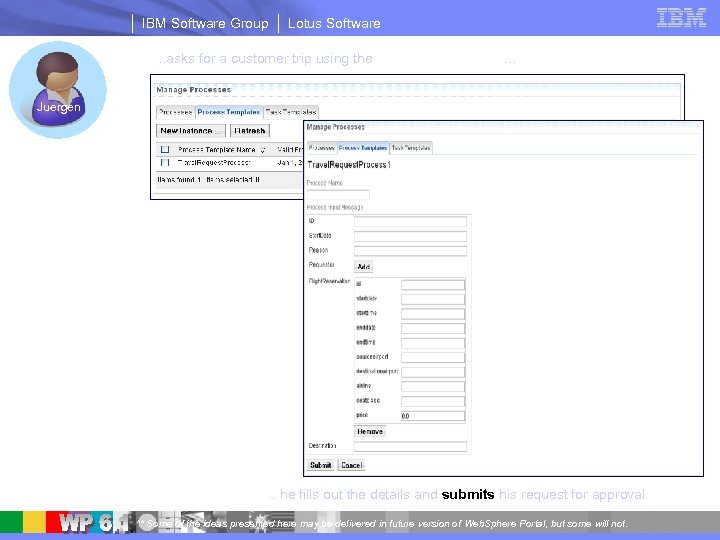
IBM Software Group Lotus Software . . asks for a customer trip using the My-Process Portlet… Juergen . . he fills out the details and submits his request for approval. ** Some of the ideas presented here may be delivered in future version of Web. Sphere Portal, but some will not.
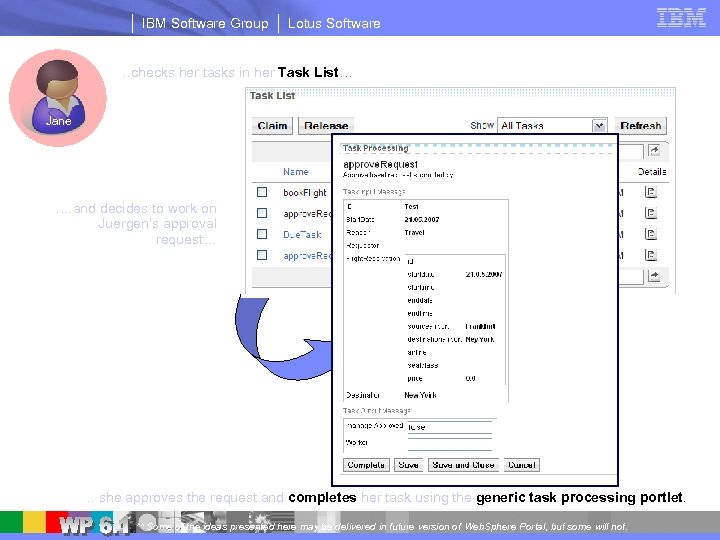
IBM Software Group Lotus Software . . checks her tasks in her Task List… Jane …. and decides to work on Juergen’s approval request… . . she approves the request and completes her task using the generic task processing portlet. ** Some of the ideas presented here may be delivered in future version of Web. Sphere Portal, but some will not.
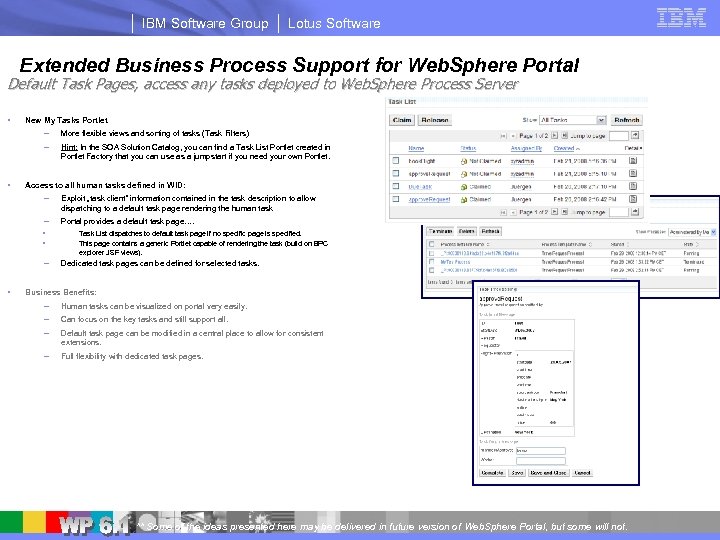
IBM Software Group Lotus Software Extended Business Process Support for Web. Sphere Portal Default Task Pages, access any tasks deployed to Web. Sphere Process Server § New My Tasks Portlet – § More flexible views and sorting of tasks (Task Filters) – Hint: In the SOA Solution Catalog, you can find a Task List Portlet created in Portlet Factory that you can use as a jumpstart if you need your own Portlet. Access to all human tasks defined in WID: – Exploit „task client“ information contained in the task description to allow dispatching to a default task page rendering the human task – Portal provides a default task page…. • • – § Task List dispatches to default task page if no specific page is specified. This page contains a generic Portlet capable of rendering the task (build on BPC explorer JSF views). Dedicated task pages can be defined for selected tasks. Business Benefits: – Human tasks can be visualized on portal very easily. – Can focus on the key tasks and still support all. – Default task page can be modified in a central place to allow for consistent extensions. – Full flexibility with dedicated task pages. ** Some of the ideas presented here may be delivered in future version of Web. Sphere Portal, but some will not.
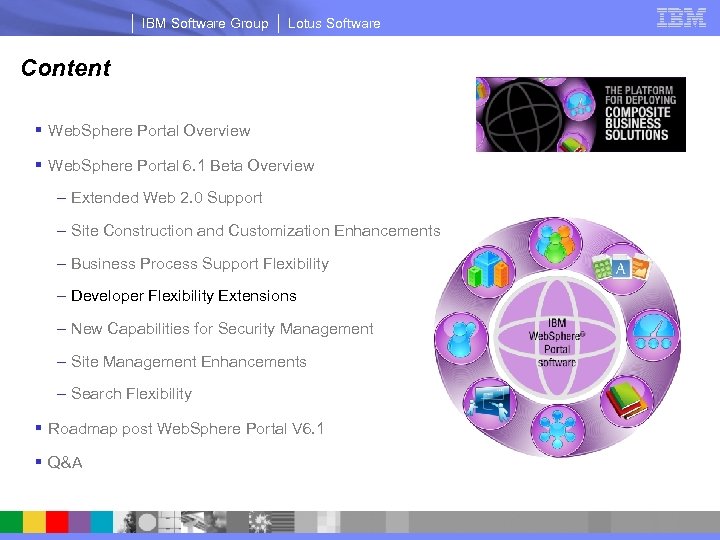
IBM Software Group Lotus Software Content § Web. Sphere Portal Overview § Web. Sphere Portal 6. 1 Beta Overview – Extended Web 2. 0 Support – Site Construction and Customization Enhancements – Business Process Support Flexibility – Developer Flexibility Extensions – New Capabilities for Security Management – Site Management Enhancements – Search Flexibility § Roadmap post Web. Sphere Portal V 6. 1 § Q&A
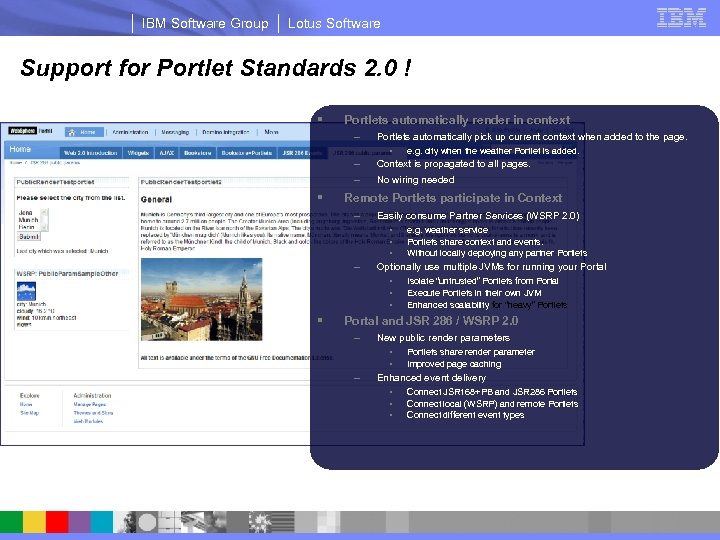
IBM Software Group Lotus Software Support for Portlet Standards 2. 0 ! § Portlets automatically render in context – Portlets automatically pick up current context when added to the page. – – Context is propagated to all pages. • § No wiring needed Remote Portlets participate in Context – Easily consume Partner Services (WSRP 2. 0) • • • – e. g. weather service Portlets share context and events. Without locally deploying any partner Portlets Optionally use multiple JVMs for running your Portal • • • § e. g. city when the weather Portlet is added. Isolate “untrusted” Portlets from Portal Execute Portlets in their own JVM Enhanced scalability for “heavy” Portlets Portal and JSR 286 / WSRP 2. 0 – New public render parameters • • – Portlets share render parameter Improved page caching Enhanced event delivery • • • Connect JSR 168+PB and JSR 286 Portlets Connect local (WSRP) and remote Portlets Connect different event types
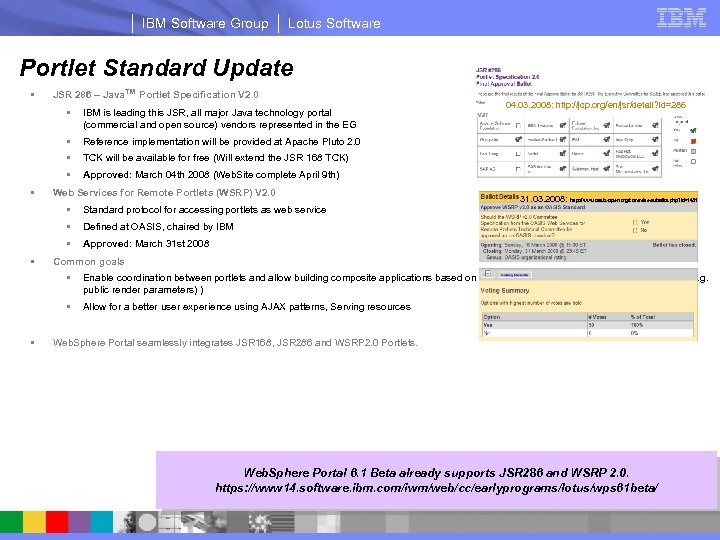
IBM Software Group Lotus Software Portlet Standard Update § JSR 286 – Java™ Portlet Specification V 2. 0 § § TCK will be available for free (Will extend the JSR 168 TCK) § Approved: March 04 th 2008 (Web. Site complete April 9 th) Web Services for Remote Portlets (WSRP) V 2. 0 § Defined at OASIS, chaired by IBM § 31. 03. 2008: http: //www. oasis-open. org/committees/ballot. php? id=1431 Standard protocol for accessing portlets as web service § § 04. 03. 2008: http: //jcp. org/en/jsr/detail? id=286 Reference implementation will be provided at Apache Pluto 2. 0 § § IBM is leading this JSR, all major Java technology portal (commercial and open source) vendors represented in the EG Approved: March 31 st 2008 Common goals § § § Enable coordination between portlets and allow building composite applications based on portlet components (events and render context (e. g. public render parameters) ) Allow for a better user experience using AJAX patterns, Serving resources Web. Sphere Portal seamlessly integrates JSR 168, JSR 286 and WSRP 2. 0 Portlets. Web. Sphere Portal 6. 1 Beta already supports JSR 286 and WSRP 2. 0. https: //www 14. software. ibm. com/iwm/web/cc/earlyprograms/lotus/wps 61 beta/
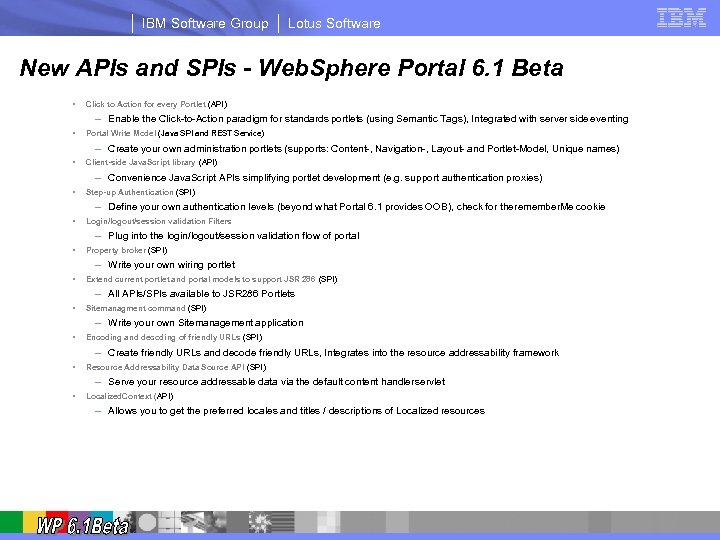
IBM Software Group Lotus Software New APIs and SPIs - Web. Sphere Portal 6. 1 Beta § Click to Action for every Portlet (API) – Enable the Click-to-Action paradigm for standards portlets (using Semantic Tags), Integrated with server side eventing § Portal Write Model (Java SPI and REST Service) – Create your own administration portlets (supports: Content-, Navigation-, Layout- and Portlet-Model, Unique names) § Client-side Java. Script library (API) § Step-up Authentication (SPI) § Login/logout/session validation Filters – Convenience Java. Script APIs simplifying portlet development (e. g. support authentication proxies) – Define your own authentication levels (beyond what Portal 6. 1 provides OOB), check for the remember. Me cookie – Plug into the login/logout/session validation flow of portal § Property broker (SPI) § Extend current portlet and portal models to support JSR 286 (SPI) § Sitemanagment command (SPI) – Write your own wiring portlet – All APIs/SPIs available to JSR 286 Portlets – Write your own Sitemanagement application § Encoding and decoding of friendly URLs (SPI) – Create friendly URLs and decode friendly URLs, Integrates into the resource addressability framework § Resource Addressability Data Source API (SPI) § Localized. Context (API) – Serve your resource addressable data via the default content handler servlet – Allows you to get the preferred locales and titles / descriptions of Localized resources
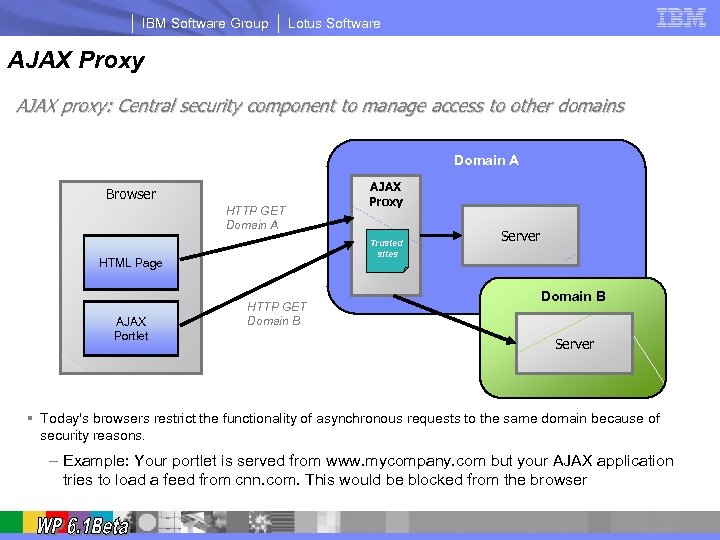
IBM Software Group Lotus Software AJAX Proxy AJAX proxy: Central security component to manage access to other domains Domain A Browser HTTP GET Domain A Trusted sites HTML Page AJAX Portlet AJAX Proxy HTTP GET Domain B Server § Today's browsers restrict the functionality of asynchronous requests to the same domain because of security reasons. – Example: Your portlet is served from www. mycompany. com but your AJAX application tries to load a feed from cnn. com. This would be blocked from the browser
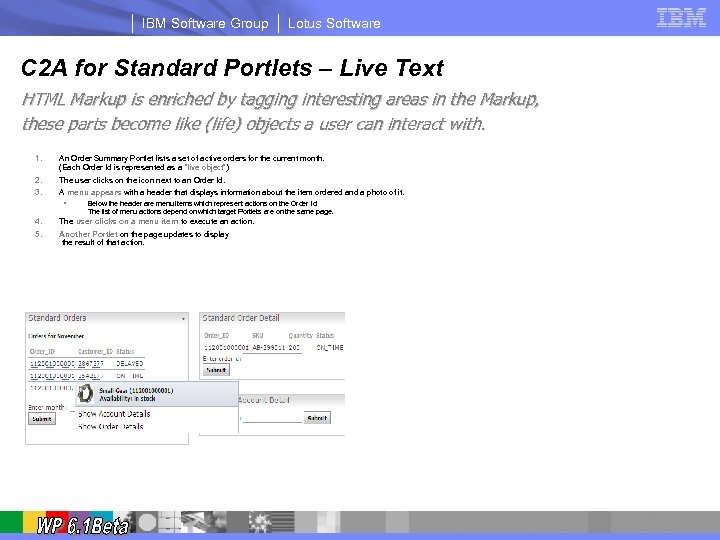
IBM Software Group Lotus Software C 2 A for Standard Portlets – Live Text HTML Markup is enriched by tagging interesting areas in the Markup, these parts become like (life) objects a user can interact with. 1. An Order Summary Portlet lists a set of active orders for the current month. (Each Order Id is represented as a “live object”) 2. 3. The user clicks on the icon next to an Order Id. A menu appears with a header that displays information about the item ordered and a photo of it. • 4. 5. Below the header are menu items which represent actions on the Order Id. The list of menu actions depend on which target Portlets are on the same page. The user clicks on a menu item to execute an action. Another Portlet on the page updates to display the result of that action.
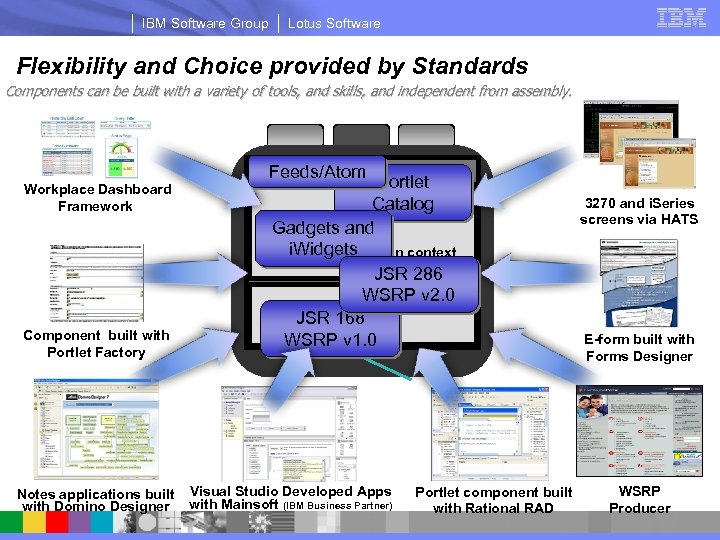
IBM Software Group Lotus Software Flexibility and Choice provided by Standards Components can be built with a variety of tools, and skills, and independent from assembly. Workplace Dashboard Framework Component built with Portlet Factory Notes applications built with Domino Designer composite applications Feeds/Atom Portlet Catalog role-based and Gadgets i. Widgets in context services JSR 286 WSRP v 2. 0 process driven JSR 168 WSRP v 1. 0 Visual Studio Developed Apps with Mainsoft (IBM Business Partner) Portlet component built with Rational RAD 3270 and i. Series screens via HATS E-form built with Forms Designer WSRP Producer
IBM Software Group Lotus Software Content § Web. Sphere Portal Overview § Web. Sphere Portal 6. 1 Beta Overview – Extended Web 2. 0 Support – Site Construction and Customization Enhancements – Business Process Support Flexibility – Developer Flexibility Extensions – New Capabilities for Security Management – Site Management Enhancements – Search Flexibility § Roadmap post Web. Sphere Portal V 6. 1 § Q&A
IBM Software Group Lotus Software Security Enhancements - Web. Sphere Portal 6. 1 Beta § Greatly improved Security Configuration – Less steps involved in frequent tasks like switching to LDAP (no disable/enable security required anymore) – Easier to use SSL and Key Management – Predefined Security profiles for WSRP – Easy to Setup and Use Federated User Repositories § SPNEGO support (Windows® Desktop SSO) – Automatically authenticate the user if logged into his desktop § Remember Me Cookie Support – User can select the website to remember them for delivering personalized content without login – Also provides step-up Authentication Framework for customer authentication levels
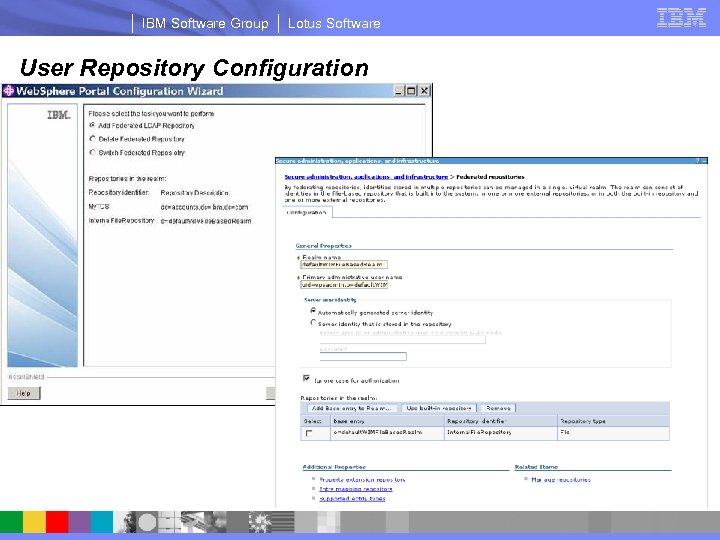
IBM Software Group Lotus Software User Repository Configuration
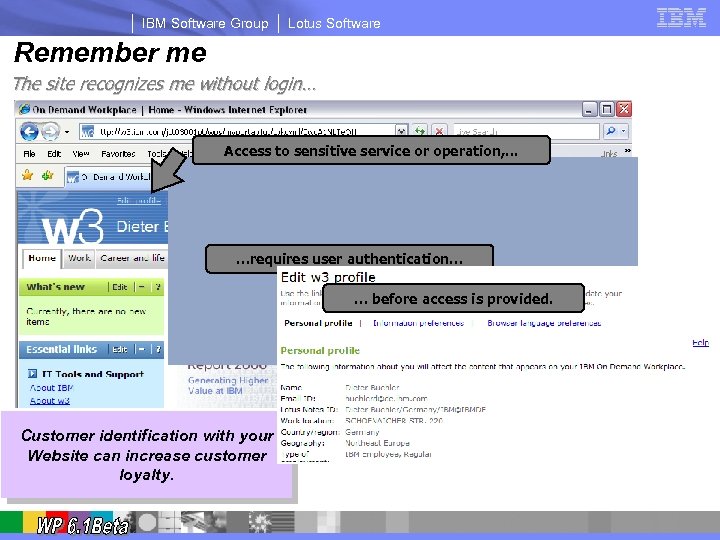
IBM Software Group Lotus Software Remember me The site recognizes me without login… Access to sensitive service or operation, . . . …requires user authentication… … before access is provided. Customer identification with your Website can increase customer loyalty.
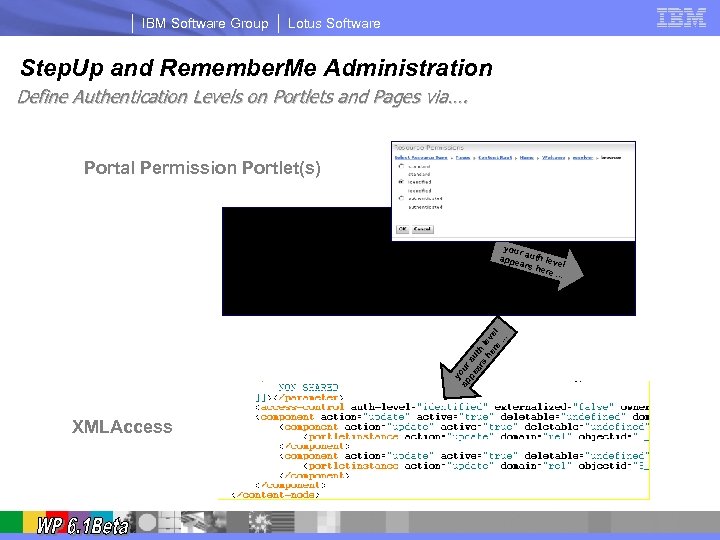
IBM Software Group Lotus Software Step. Up and Remember. Me Administration Define Authentication Levels on Portlets and Pages via…. Portal Permission Portlet(s) y ap our pe au ar th s he lev re el. . . your appe auth lev el ars h ere. . . XMLAccess
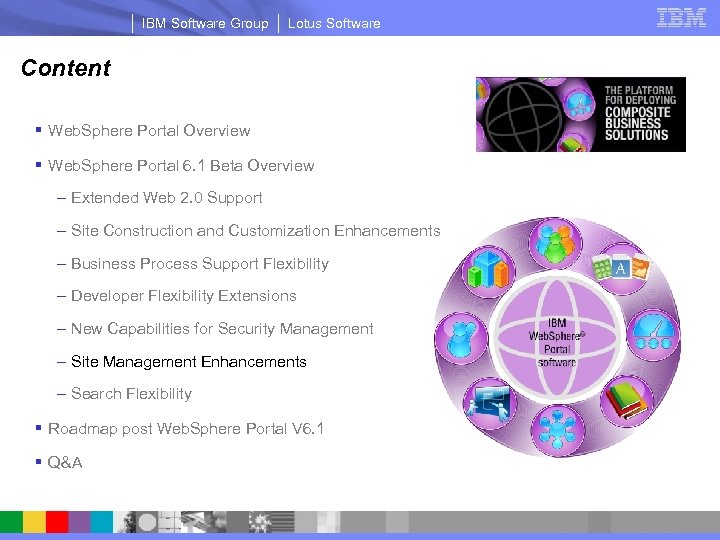
IBM Software Group Lotus Software Content § Web. Sphere Portal Overview § Web. Sphere Portal 6. 1 Beta Overview – Extended Web 2. 0 Support – Site Construction and Customization Enhancements – Business Process Support Flexibility – Developer Flexibility Extensions – New Capabilities for Security Management – Site Management Enhancements – Search Flexibility § Roadmap post Web. Sphere Portal V 6. 1 § Q&A
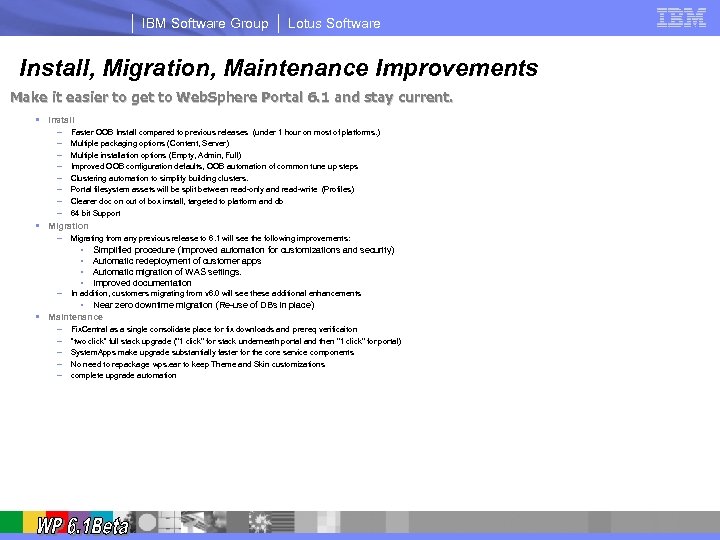
IBM Software Group Lotus Software Install, Migration, Maintenance Improvements Make it easier to get to Web. Sphere Portal 6. 1 and stay current. § Install – – – – Faster OOB Install compared to previous releases (under 1 hour on most of platforms. ) Multiple packaging options (Content, Server) Multiple installation options (Empty, Admin, Full) Improved OOB configuration defaults, OOB automation of common tune up steps Clustering automation to simplify building clusters. Portal filesystem assets will be split between read-only and read-write (Profiles) Clearer doc on out of box install, targeted to platform and db 64 bit Support § Migration – Migrating from any previous release to 6. 1 will see the following improvements: • • – Simplified procedure (Improved automation for customizations and security) Automatic redeployment of customer apps Automatic migration of WAS settings. Improved documentation In addition, customers migrating from v 6. 0 will see these additional enhancements • § Near zero downtime migration (Re-use of DBs in place) Maintenance – – – Fix. Central as a single consolidate place for fix downloads and prereq verificaiton “two click” full stack upgrade ("1 click" for stack underneath portal and then "1 click" for portal) System. Apps make upgrade substantially faster for the core service components No need to repackage wps. ear to keep Theme and Skin customizations complete upgrade automation
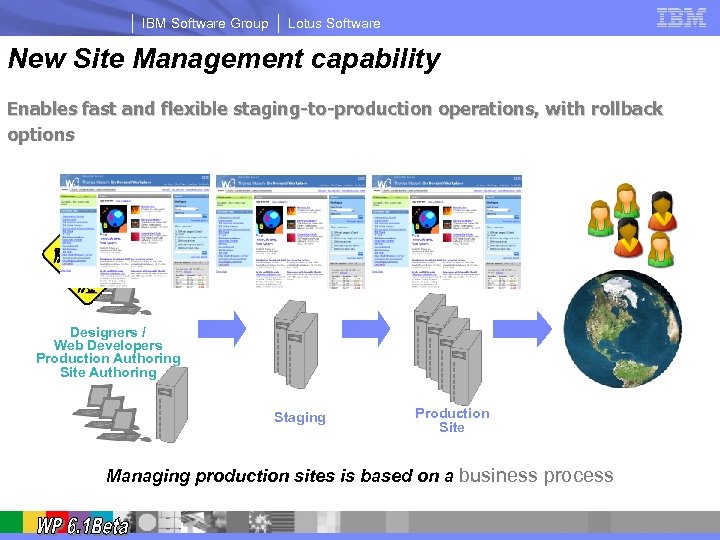
IBM Software Group Lotus Software New Site Management capability Enables fast and flexible staging-to-production operations, with rollback options Designers / Web Developers Production Authoring Site Authoring Staging Production Site Managing production sites is based on a business process
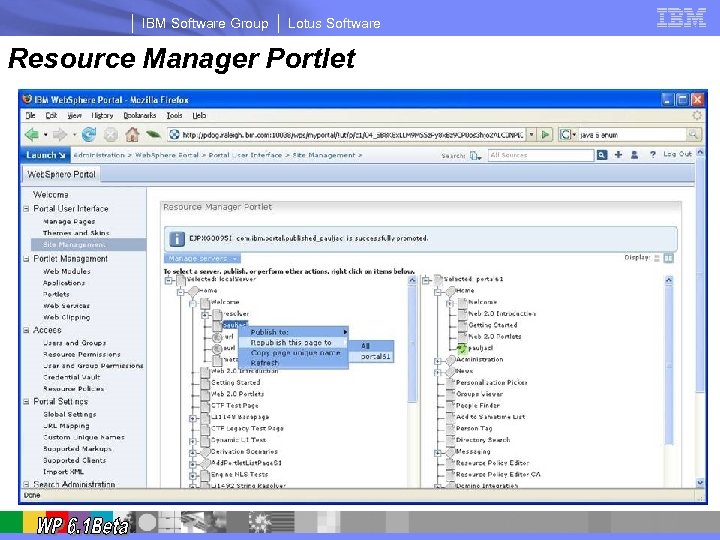
IBM Software Group Lotus Software Resource Manager Portlet
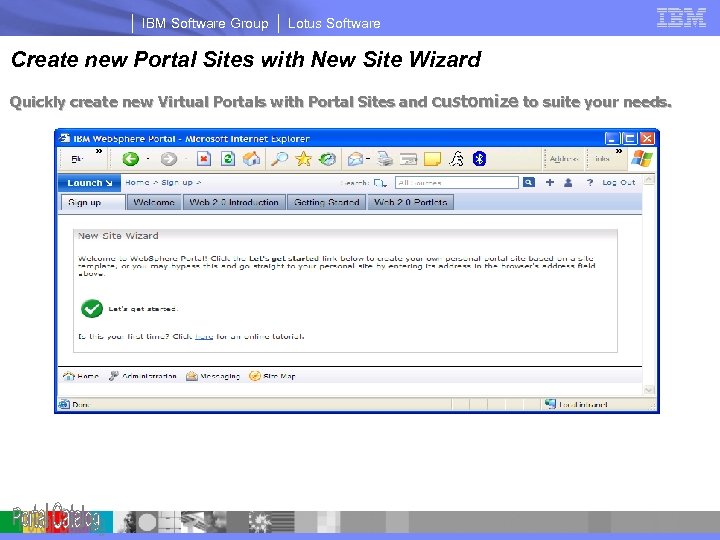
IBM Software Group Lotus Software Create new Portal Sites with New Site Wizard Quickly create new Virtual Portals with Portal Sites and customize to suite your needs. The New Site Wizard combines several administrative actions into a single portlet: • User enrollment • Virtual Portal creation • Portal content import
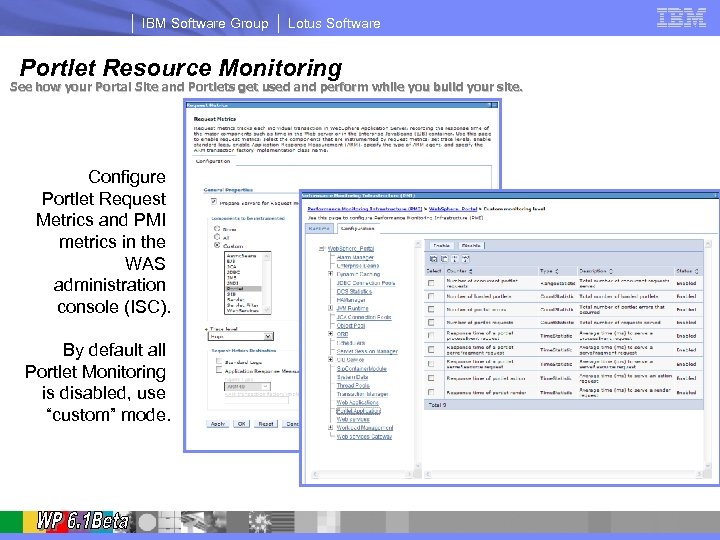
IBM Software Group Lotus Software Portlet Resource Monitoring See how your Portal Site and Portlets get used and perform while you build your site. Configure Portlet Request Metrics and PMI metrics in the WAS administration console (ISC). By default all Portlet Monitoring is disabled, use “custom” mode.
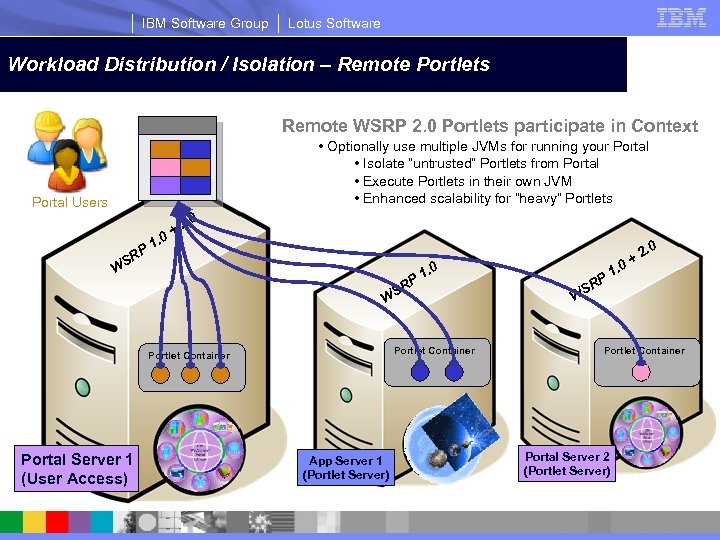
IBM Software Group Lotus Software Single Server – All Portlets are executed locally Workload Distribution / Isolation – Remote Portlets Remote WSRP 2. 0 Portlets participate in Context • Optionally use multiple JVMs for running your Portal • Isolate “untrusted” Portlets from Portal • Execute Portlets in their own JVM • Enhanced scalability for “heavy” Portlets Portal Users P SR 1. 0 2. 0 + W P SR 1. 0 W Portlet Container Portal Server 1 (User Access) App Server 1 (Portlet Server) SR P 1. 0 2. 0 + W Portlet Container Portal Server 2 (Portlet Server)
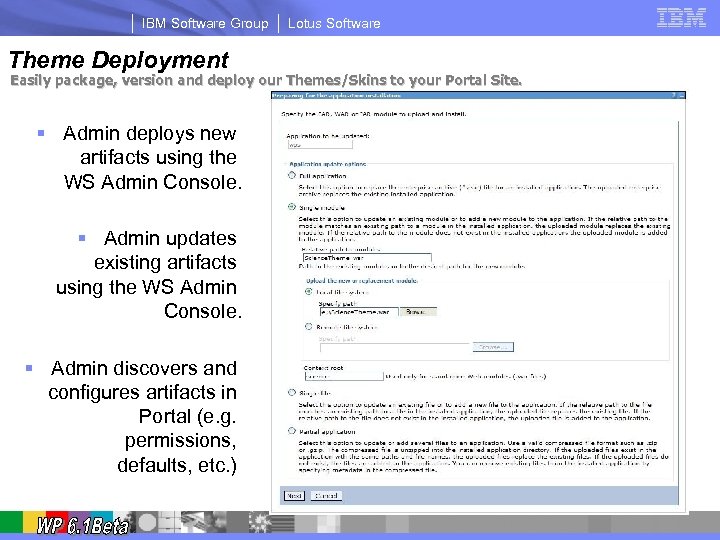
IBM Software Group Theme Deployment Lotus Software Easily package, version and deploy our Themes/Skins to your Portal Site. § Admin deploys new artifacts using the WS Admin Console. § Admin updates existing artifacts using the WS Admin Console. § Admin discovers and configures artifacts in Portal (e. g. permissions, defaults, etc. )
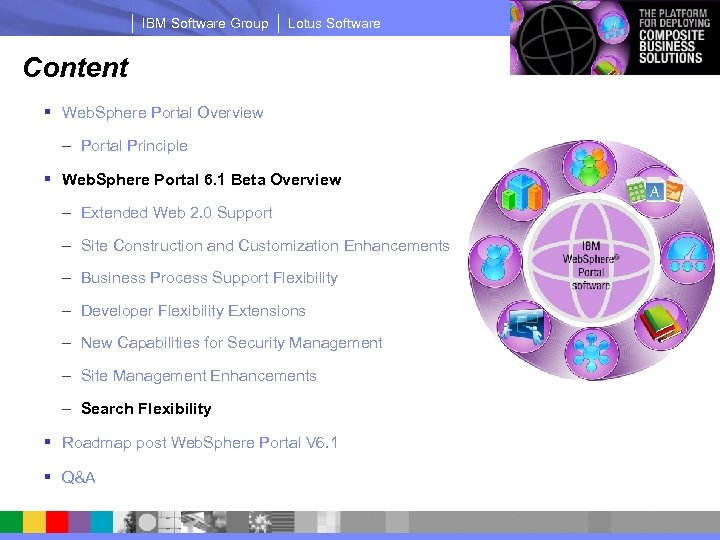
IBM Software Group Lotus Software Content § Web. Sphere Portal Overview – Portal Principle § Web. Sphere Portal 6. 1 Beta Overview – Extended Web 2. 0 Support – Site Construction and Customization Enhancements – Business Process Support Flexibility – Developer Flexibility Extensions – New Capabilities for Security Management – Site Management Enhancements – Search Flexibility § Roadmap post Web. Sphere Portal V 6. 1 § Q&A
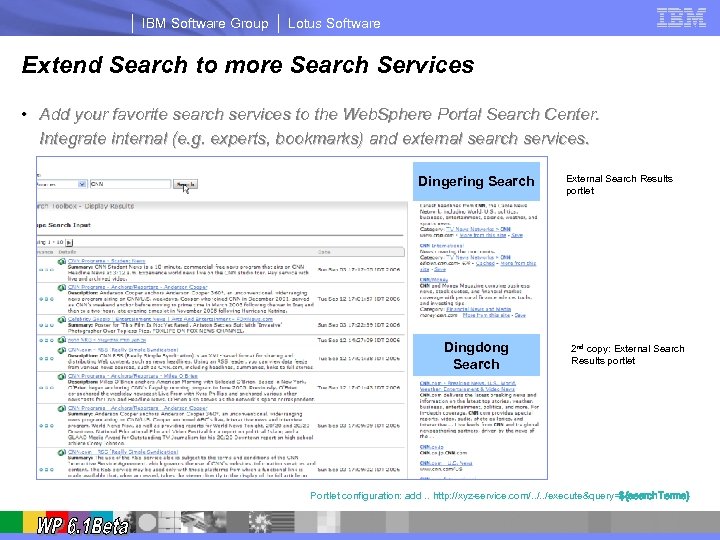
IBM Software Group Lotus Software Extend Search to more Search Services • Add your favorite search services to the Web. Sphere Portal Search Center. Integrate internal (e. g. experts, bookmarks) and external search services. Dingering Search Dingdong Search External Search Results portlet 2 nd copy: External Search Results portlet Portlet configuration: add. . http: //xyz-service. com/. . /execute&query=${search. Terms}
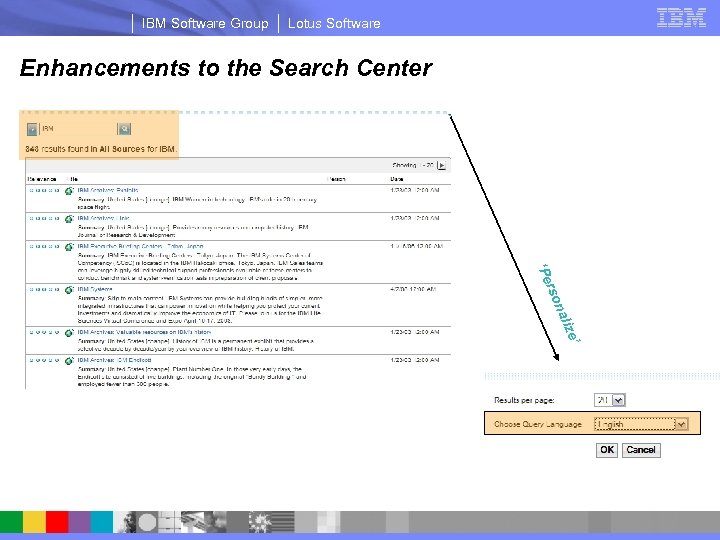
IBM Software Group Lotus Software Enhancements to the Search Center ’ e aliz son r ‘Pe
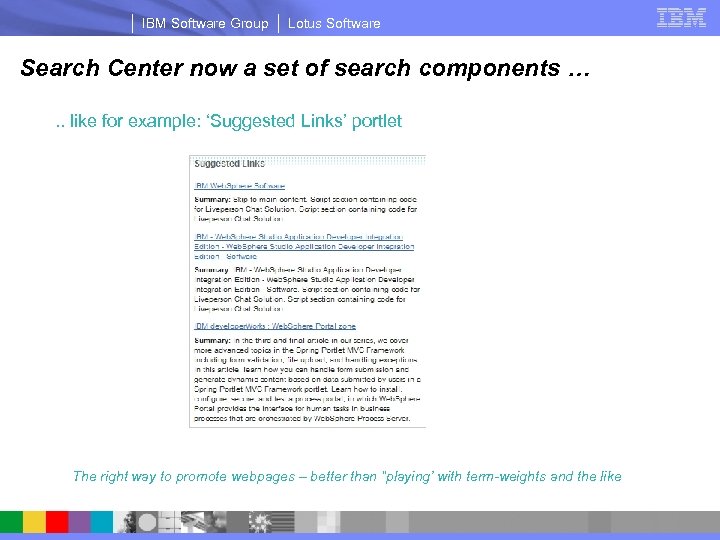
IBM Software Group Lotus Software Search Center now a set of search components …. . like for example: ‘Suggested Links’ portlet The right way to promote webpages – better than “playing’ with term-weights and the like
IBM Software Group Lotus Software Content § Web. Sphere Portal Overview – Portal Principle § Web. Sphere Portal 6. 1 Beta Overview – Extended Web 2. 0 Support – Site Construction and Customization Enhancements – Business Process Support Flexibility – Developer Flexibility Extensions – New Capabilities for Security Management – Site Management Enhancements – Search Flexibility § Roadmap post Web. Sphere Portal V 6. 1 § Q&A
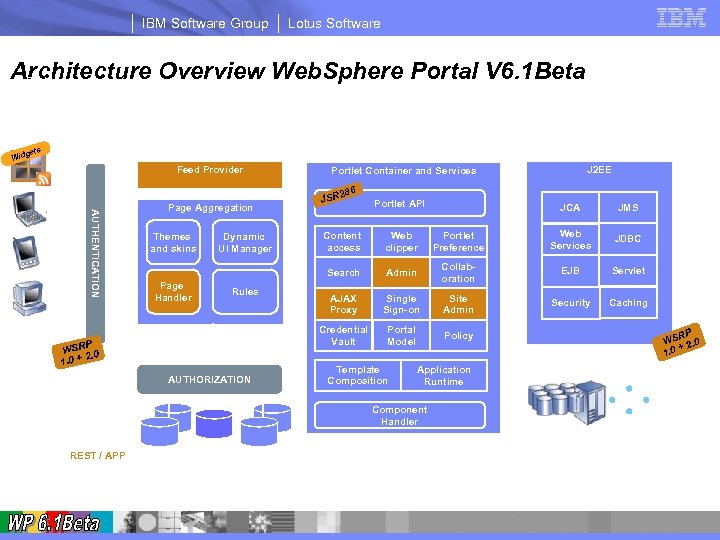
IBM Software Group Lotus Software Architecture Overview Web. Sphere Portal V 6. 1 Beta Desktop and mobile Browsers, Mashups and offline Clients gets Wid Feed Provider 286 AUTHENTICATION . Remote portlet consumer Page Aggregation J 2 EE Portlet Container and Services JSR Portlet API JCA JMS Rules P WSR. 0 0+2 1. AUTHORIZATION Web clipper Portlet Preference Web Services JDBC Admin Collaboration EJB Servlet AJAX Proxy Single Sign-on Site Admin Security Caching Credential Vault Page Handler Dynamic UI Manager Content access Search Themes and skins Portal Model Policy Template Composition RP WS 2. 0 + 1. 0 Application Runtime. XML Access Portal Script User REST / APP Portal LDAP profile Database(s) Database Directorie(s) Component Handler Enterprise Data, Applications, Internet Content Process Server Remote portlet producer
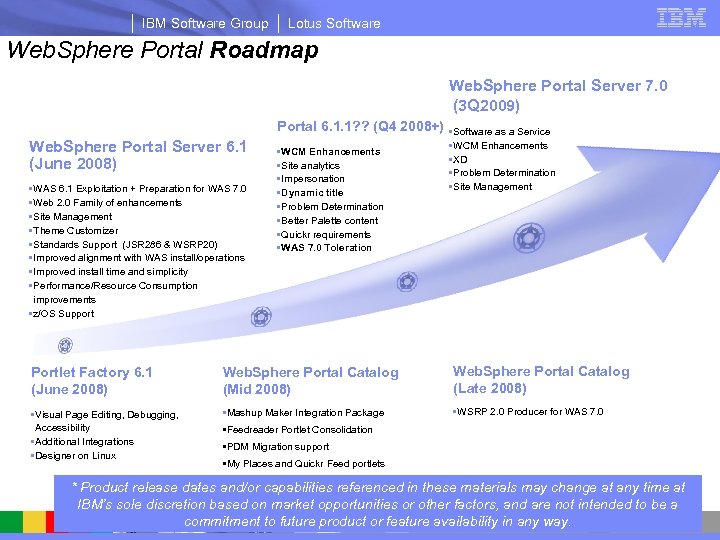
IBM Software Group Lotus Software Web. Sphere Portal Roadmap Web. Sphere Portal Server 7. 0 (3 Q 2009) Portal 6. 1. 1? ? (Q 4 2008+) Web. Sphere Portal Server 6. 1 (June 2008) • WAS 6. 1 Exploitation + Preparation for WAS 7. 0 • Web 2. 0 Family of enhancements • Site Management • Theme Customizer • Standards Support (JSR 286 & WSRP 20) • Improved alignment with WAS install/operations • Improved install time and simplicity • Performance/Resource Consumption improvements • z/OS Support • WCM Enhancements • Site analytics • Impersonation • Dynamic title • Problem Determination • Better Palette content • Quickr requirements • WAS 7. 0 Toleration • Software as a Service • WCM Enhancements • XD • Problem Determination • Site Management Portlet Factory 6. 1 (June 2008) Web. Sphere Portal Catalog (Mid 2008) Web. Sphere Portal Catalog (Late 2008) • Visual Page Editing, Debugging, Accessibility • Additional Integrations • Designer on Linux • Mashup Maker Integration Package • WSRP 2. 0 Producer for WAS 7. 0 • Feedreader Portlet Consolidation • PDM Migration support • My Places and Quickr Feed portlets * Product release dates and/or capabilities referenced in these materials may change at any time at IBM’s sole discretion based on market opportunities or other factors, and are not intended to be a commitment to future product or feature availability in any way.

® © 2007 IBM Corporation
IBM Software Group Lotus Software Collaboration Content Industry Dashboard Self-Service Learning Process Enterprise Suite Questions & Answers 53
IBM Software Group Lotus Software Additional Information and Resources – General Portal § Websphere Portal and Workplace Catalog: – http: //www. ibm. com/software/genservers/portal/portlet/catalog § Webspere Portal Product Information: – http: //www. ibm. com/software/genservers/portal/enable/ § Web. Sphere Portal Information Center documentation – http: //www. ibm. com/developerworks/websphere/zones/portal/proddoc. html § Portal Accelerators: – http: //www. ibm. com/software/info 1/websphere/index. jsp? tab=landings/portalbuzz
IBM Software Group Lotus Software Additional Information and Resources - Developers § Web. Sphere Portal V 6. 1 Beta – https: //www 14. software. ibm. com/iwm/web/cc/earlyprograms/lotus/wps 61 beta/ § Websphere Portal Business Solutions Catalog: – http: //catalog. lotus. com/wps/portal § Webspere Portal Product Information: – http: //www-306. ibm. com/software/genservers/portal § Web. Sphere Portal Information Center Documentation: – http: //www. ibm. com/developerworks/websphere/zones/portal/proddoc. html § JSR 286 information – Specification: http: //jcp. org/en/jsr/detail? id=286 – Reference Implementation: http: //portals. apache. org/pluto/ § WSRP V 2. 0 – http: //docs. oasis-open. org/wsrp/v 2/wsrp-2. 0 -spec. html § WAS 6. 1 WSRP producer – http: //catalog. lotus. com/portal? Nav. Code=1 WP 1001 BA § Resource Addressability Framework – http: //www. ibm. com/developerworks/websphere/library/techarticles/0710_koeth. html#download
IBM Software Group Lotus Software © IBM Corporation 2008. All Rights Reserved. The workshops, sessions and materials have been prepared by IBM or the session speakers and reflect their own views. They are provided for informational purposes only, and are neither intended to, nor shall have the effect of being, legal or other guidance or advice to any participant. While efforts were made to verify the completeness and accuracy of the information contained in this presentation, it is provided AS IS without warranty of any kind, express or implied. IBM shall not be responsible for any damages arising out of the use of, or otherwise related to, this presentation or any other materials. Nothing contained in this presentation is intended to, nor shall have the effect of, creating any warranties or representations from IBM or its suppliers or licensors, or altering the terms and conditions of the applicable license agreement governing the use of IBM software. References in this presentation to IBM products, programs, or services do not imply that they will be available in all countries in which IBM operates. Product release dates and/or capabilities referenced in this presentation may change at any time at IBM’s sole discretion based on market opportunities or other factors, and are not intended to be a commitment to future product or feature availability in any way. Nothing contained in these materials is intended to, nor shall have the effect of, stating or implying that any activities undertaken by you will result in any specific sales, revenue growth or other results. Performance is based on measurements and projections using standard IBM benchmarks in a controlled environment. The actual throughput or performance that any user will experience will vary depending upon many factors, including considerations such as the amount of multiprogramming in the user's job stream, the I/O configuration, the storage configuration, and the workload processed. Therefore, no assurance can be given that an individual user will achieve results similar to those stated here. All customer examples described are presented as illustrations of how those customers have used IBM products and the results they may have achieved. Actual environmental costs and performance characteristics may vary by customer. The following are trademarks of the International Business Machines Corporation in the United States and/or other countries. For a complete list of IBM trademarks, see www. ibm. com/legal/copytrade. shtml AIX, CICSPlex, DB 2 Universal Database, i 5/OS, IBM, the IBM logo, IMS, i. Series, Lotus, OMEGAMON, OS/390, Parallel Sysplex, pure. XML, Rational, RCAF, Redbooks, Sametime, Smart SOA, System i 5, System z , Tivoli, Web. Sphere, and z/OS. Java and all Java-based trademarks are trademarks of Sun Microsystems, Inc. in the United States, other countries, or both. Microsoft and Windows are trademarks of Microsoft Corporation in the United States, other countries, or both. Intel and Pentium are trademarks or registered trademarks of Intel Corporation or its subsidiaries in the United States and other countries. UNIX is a registered trademark of The Open Group in the United States and other countries. Linux is a registered trademark of Linus Torvalds in the United States, other countries, or both. Other company, product, or service names may be trademarks or service marks of others.
Скачать презентацию IBM Software Group Lotus Software IBM Web Sphere
7f663b6e523a4db72769c37507f43349.ppt