 Скачать презентацию IBM Pure Flex Systems Introduction to prepackaging Virtual
d27a768de723de14991a1835ace54296.ppt
- Количество слайдов: 19



IBM Pure. Flex Systems Introduction to prepackaging Virtual Appliances © 2012 IBM Corporation
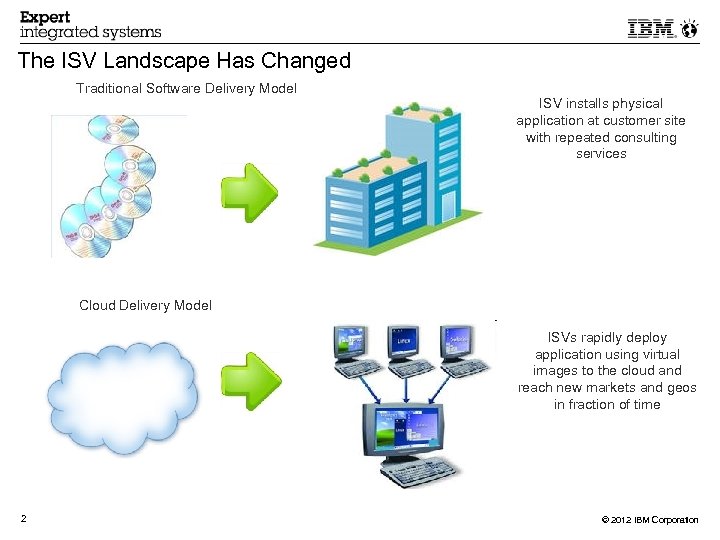
The ISV Landscape Has Changed Traditional Software Delivery Model ISV installs physical application at customer site with repeated consulting services Cloud Delivery Model ISVs rapidly deploy application using virtual images to the cloud and reach new markets and geos in fraction of time 2 © 2012 IBM Corporation
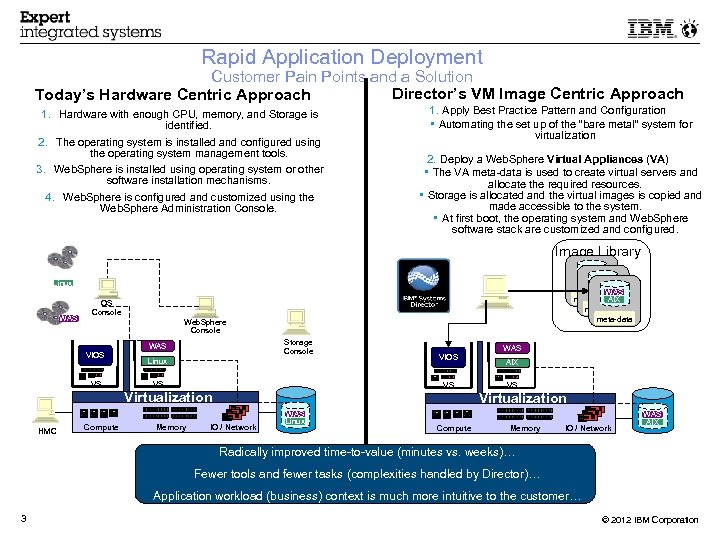
Rapid Application Deployment Customer Pain Points and a Solution Director’s VM Image Centric Approach Today’s Hardware Centric Approach 1. Hardware with enough CPU, memory, and Storage is identified. 2. The operating system is installed and configured using the operating system management tools. 3. Web. Sphere is installed using operating system or other software installation mechanisms. 4. Web. Sphere is configured and customized using the Web. Sphere Administration Console. 1. Apply Best Practice Pattern and Configuration • Automating the set up of the “bare metal” system for virtualization 2. Deploy a Web. Sphere Virtual Appliances (VA) • The VA meta-data is used to create virtual servers and allocate the required resources. • Storage is allocated and the virtual images is copied and made accessible to the system. • At first boot, the operating system and Web. Sphere software stack are customized and configured. Image Library WAS AIX WAS meta-data AIX meta-data Linux WAS OS Console Web. Sphere Console Storage Console WAS VIOS VS VS Virtualization HMC Compute WAS Linux Memory AIX VS Virtualization IO / Network WAS Linux Compute Memory IO / Network WAS AIX Radically improved time-to-value (minutes vs. weeks)… Fewer tools and fewer tasks (complexities handled by Director)… Application workload (business) context is much more intuitive to the customer… 3 © 2012 IBM Corporation
Taking Applications to the Next Level Optimizing applications for virtualization layer Prepackaging virtual appliances for IBM Pure. Flex Systems Virtual Appliance accelerates time-to-value: Reduce installation times with pre-integrated, self-contained system or virtual machine image file Reduce configuration time with combined software with operating system to run on a virtual machine Reduce complexity with LPAR/VM configurations A Virtual Appliance provides: Cloud characteristics: automation and self-service No code changes needed 4 © 2012 IBM Corporation
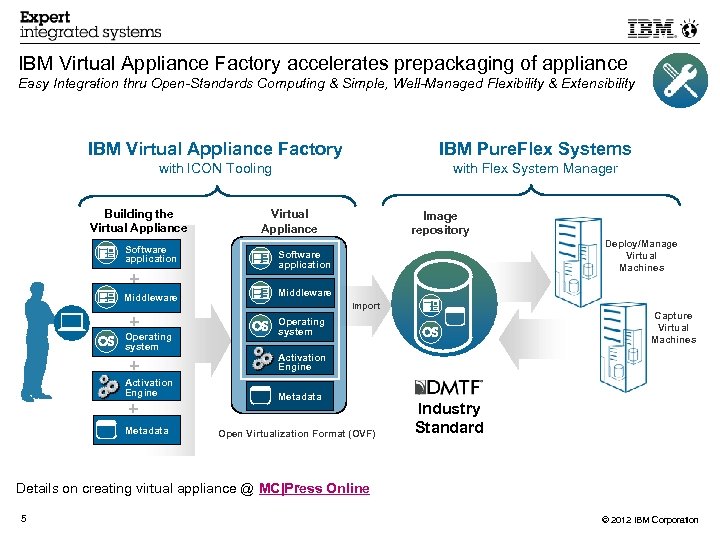
IBM Virtual Appliance Factory accelerates prepackaging of appliance Easy Integration thru Open-Standards Computing & Simple, Well-Managed Flexibility & Extensibility IBM Virtual Appliance Factory IBM Pure. Flex Systems with ICON Tooling with Flex System Manager Building the Virtual Appliance Software application Middleware Operating system + Activation Engine + Metadata Deploy/Manage Virtual Machines Software application + + Image repository Import Operating system Capture Virtual Machines Activation Engine Metadata Open Virtualization Format (OVF) Industry Standard Details on creating virtual appliance @ MC|Press Online 5 © 2012 IBM Corporation
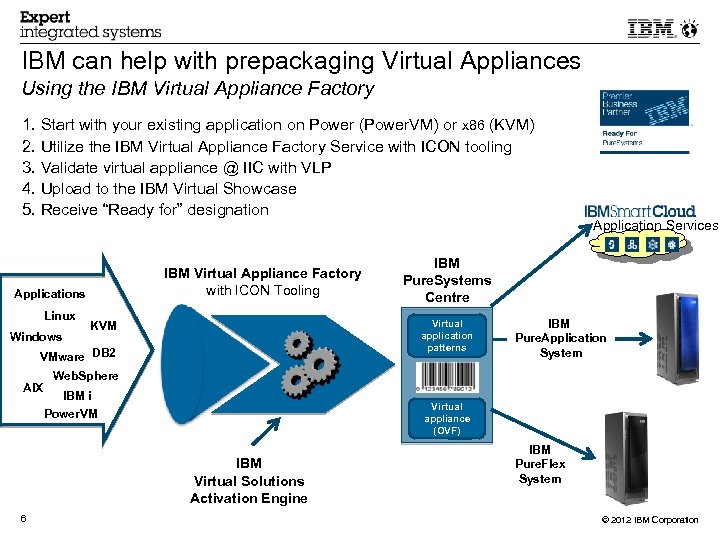
IBM can help with prepackaging Virtual Appliances Using the IBM Virtual Appliance Factory 1. Start with your existing application on Power (Power. VM) or x 86 (KVM) 2. Utilize the IBM Virtual Appliance Factory Service with ICON tooling 3. Validate virtual appliance @ IIC with VLP 4. Upload to the IBM Virtual Showcase 5. Receive “Ready for” designation IBM Virtual Appliance Factory with ICON Tooling Applications Linux Windows VMware DB 2 AIX IBM Pure. Application System Web. Sphere IBM i Power. VM Virtual appliance (OVF) IBM Virtual Solutions Activation Engine 6 IBM Pure. Systems Centre Virtual application patterns KVM Application Services IBM Pure. Flex System © 2012 IBM Corporation
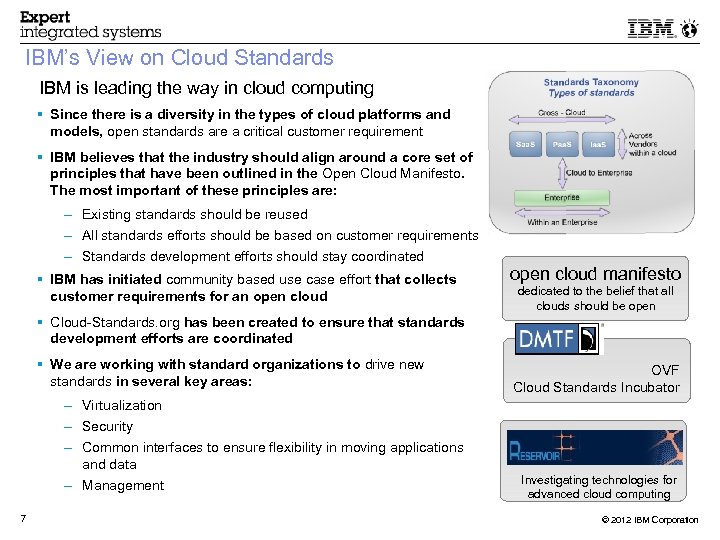
IBM’s View on Cloud Standards IBM is leading the way in cloud computing Since there is a diversity in the types of cloud platforms and models, open standards are a critical customer requirement IBM believes that the industry should align around a core set of principles that have been outlined in the Open Cloud Manifesto. The most important of these principles are: – Existing standards should be reused – All standards efforts should be based on customer requirements – Standards development efforts should stay coordinated IBM has initiated community based use case effort that collects customer requirements for an open cloud manifesto dedicated to the belief that all clouds should be open Cloud-Standards. org has been created to ensure that standards development efforts are coordinated We are working with standard organizations to drive new standards in several key areas: – Virtualization – Security – Common interfaces to ensure flexibility in moving applications and data – Management 7 OVF Cloud Standards Incubator Investigating technologies for advanced cloud computing © 2012 IBM Corporation
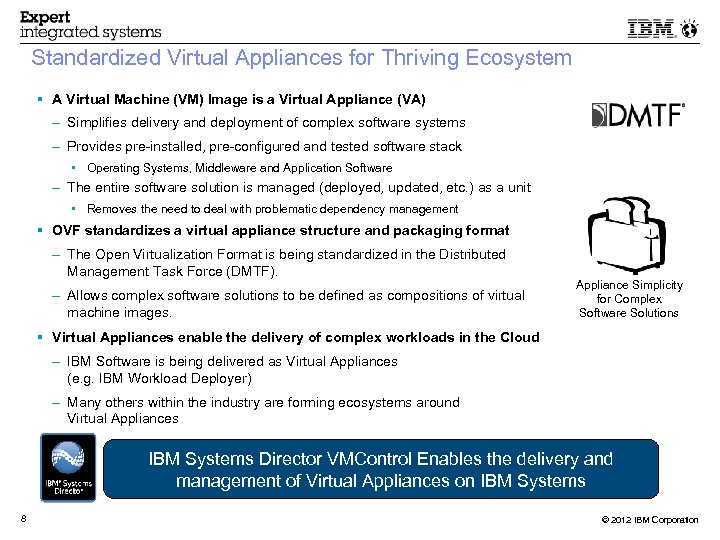
Standardized Virtual Appliances for Thriving Ecosystem A Virtual Machine (VM) Image is a Virtual Appliance (VA) – Simplifies delivery and deployment of complex software systems – Provides pre-installed, pre-configured and tested software stack • Operating Systems, Middleware and Application Software – The entire software solution is managed (deployed, updated, etc. ) as a unit • Removes the need to deal with problematic dependency management OVF standardizes a virtual appliance structure and packaging format – The Open Virtualization Format is being standardized in the Distributed Management Task Force (DMTF). – Allows complex software solutions to be defined as compositions of virtual machine images. Appliance Simplicity for Complex Software Solutions Virtual Appliances enable the delivery of complex workloads in the Cloud – IBM Software is being delivered as Virtual Appliances (e. g. IBM Workload Deployer) – Many others within the industry are forming ecosystems around Virtual Appliances IBM Systems Director VMControl Enables the delivery and management of Virtual Appliances on IBM Systems 8 © 2012 IBM Corporation
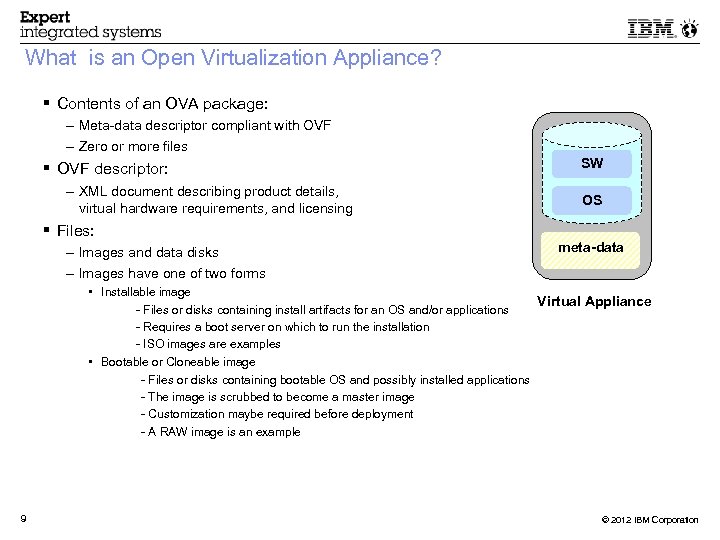
What is an Open Virtualization Appliance? Contents of an OVA package: – Meta-data descriptor compliant with OVF – Zero or more files OVF descriptor: – XML document describing product details, virtual hardware requirements, and licensing SW OS Files: – Images and data disks – Images have one of two forms meta-data • Installable image Virtual Appliance - Files or disks containing install artifacts for an OS and/or applications - Requires a boot server on which to run the installation - ISO images are examples • Bootable or Cloneable image – - Files or disks containing bootable OS and possibly installed applications – - The image is scrubbed to become a master image – - Customization maybe required before deployment – - A RAW image is an example 9 © 2012 IBM Corporation
Open Virtualization Format (OVF) Disk Section → Defines all disk images at global level Network Section → Defines all network definition at global level (private vs public) Virtual System Collection – Virtual System – Product Section → Defines application, service and static info that needs to be refreshed after deployment of Virtual Appliance – Hardware Section → Defines the Virtual Hardware to be used per Virtual Server 10 © 2012 IBM Corporation
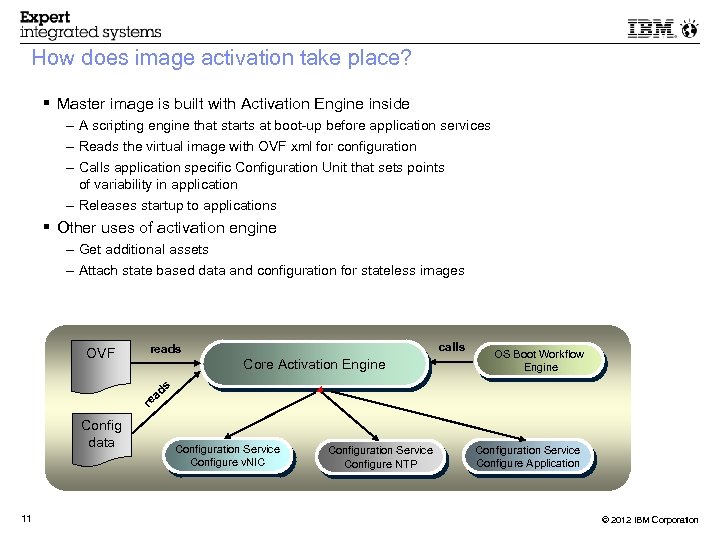
How does image activation take place? Master image is built with Activation Engine inside – A scripting engine that starts at boot-up before application services – Reads the virtual image with OVF xml for configuration – Calls application specific Configuration Unit that sets points of variability in application – Releases startup to applications Other uses of activation engine – Get additional assets – Attach state based data and configuration for stateless images OVF calls reads Core Activation Engine OS Boot Workflow Engine s d ea r Config data 11 Configuration Service Configure v. NIC Configuration Service Configure NTP Configuration Service Configure Application © 2012 IBM Corporation
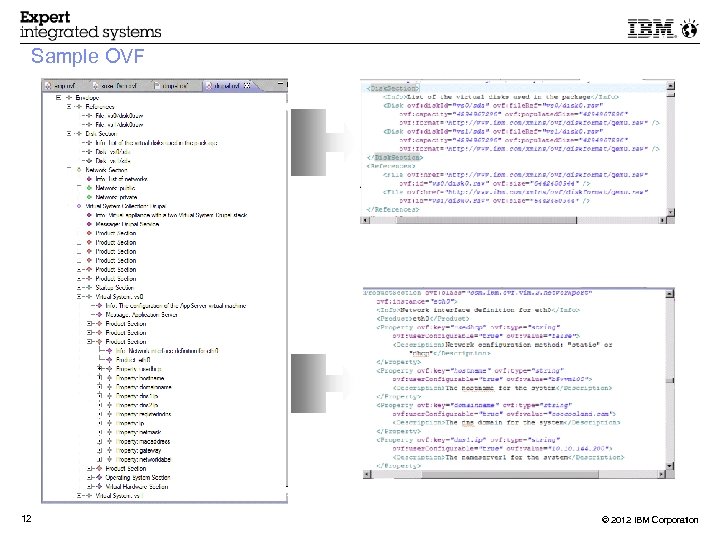
Sample OVF 12 © 2012 IBM Corporation
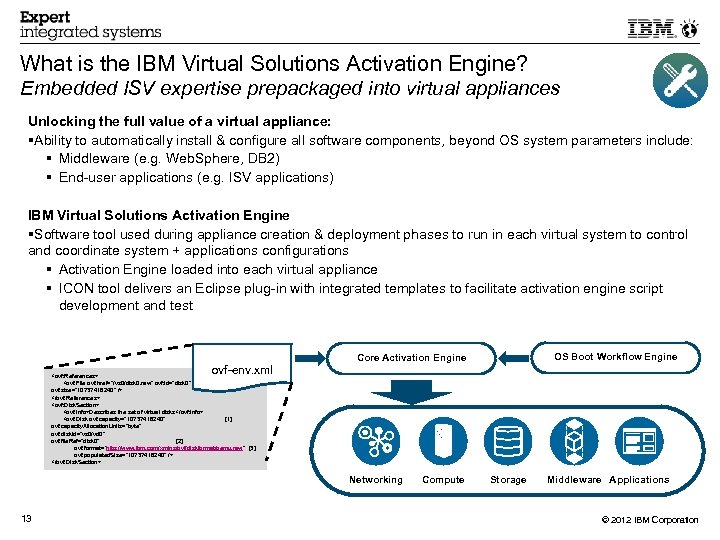
What is the IBM Virtual Solutions Activation Engine? Embedded ISV expertise prepackaged into virtual appliances Unlocking the full value of a virtual appliance: Ability to automatically install & configure all software components, beyond OS system parameters include: Middleware (e. g. Web. Sphere, DB 2) End-user applications (e. g. ISV applications) IBM Virtual Solutions Activation Engine Software tool used during appliance creation & deployment phases to run in each virtual system to control and coordinate system + applications configurations Activation Engine loaded into each virtual appliance ICON tool delivers an Eclipse plug-in with integrated templates to facilitate activation engine script development and test ovf-env. xml OS Boot Workflow Engine Core Activation Engine <ovf: References> <ovf: File ovf: href="/vs 0/disk 0. raw" ovf: id="disk 0" ovf: size="10737418240" /> </ovf: References> <ovf: Disk. Section> <ovf: Info>Describes the set of virtual disks</ovf: Info> <ovf: Disk ovf: capacity="10737418240" [1] ovf: capacity. Allocation. Units="byte" ovf: disk. Id="vs 0/vd 0" ovf: file. Ref="disk 0" [2] ovf: format="http: //www. ibm. com/xmlns/ovf/diskformat/qemu. raw" [3] ovf: populated. Size="10737418240" /> </ovf: Disk. Section> Networking 13 Compute Storage Middleware Applications © 2012 IBM Corporation
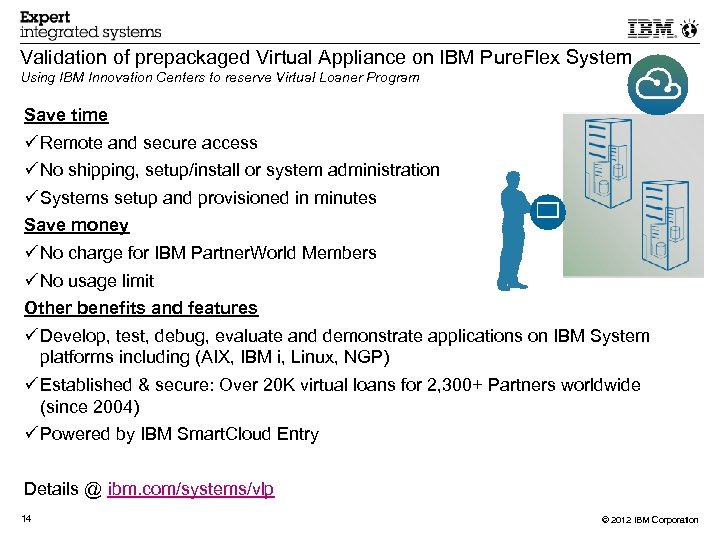
Validation of prepackaged Virtual Appliance on IBM Pure. Flex System Using IBM Innovation Centers to reserve Virtual Loaner Program Save time Remote and secure access No shipping, setup/install or system administration Systems setup and provisioned in minutes Save money No charge for IBM Partner. World Members No usage limit Other benefits and features Develop, test, debug, evaluate and demonstrate applications on IBM System platforms including (AIX, IBM i, Linux, NGP) Established & secure: Over 20 K virtual loans for 2, 300+ Partners worldwide (since 2004) Powered by IBM Smart. Cloud Entry Details @ ibm. com/systems/vlp 14 © 2012 IBM Corporation
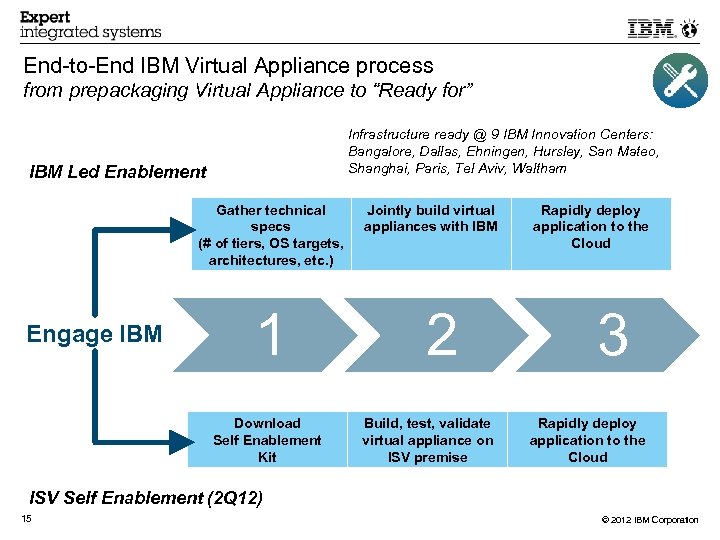
End-to-End IBM Virtual Appliance process from prepackaging Virtual Appliance to “Ready for” Infrastructure ready @ 9 IBM Innovation Centers: Bangalore, Dallas, Ehningen, Hursley, San Mateo, Shanghai, Paris, Tel Aviv, Waltham IBM Led Enablement Gather technical specs (# of tiers, OS targets, architectures, etc. ) Engage IBM 1 Download Self Enablement Kit Jointly build virtual appliances with IBM 2 Build, test, validate virtual appliance on ISV premise Rapidly deploy application to the Cloud 3 Rapidly deploy application to the Cloud ISV Self Enablement (2 Q 12) 15 © 2012 IBM Corporation
QUESTIONS ? 16 © 2012 IBM Corporation
17 © 2012 IBM Corporation
Legal Disclaimer • © IBM Corporation 2012. All Rights Reserved. • The information contained in this publication is provided for informational purposes only. While efforts were made to verify the completeness and accuracy of the information contained • • • 18 in this publication, it is provided AS IS without warranty of any kind, express or implied. In addition, this information is based on IBM ’s current product plans and strategy, which are subject to change by IBM without notice. IBM shall not be responsible for any damages arising out of the use of, or otherwise related to, this publication or any other materials. Nothing contained in this publication is intended to, nor shall have the effect of, creating any warranties or representations from IBM or its suppliers or licensors, or altering the terms and conditions of the applicable license agreement governing the use of IBM software. References in this presentation to IBM products, programs, or services do not imply that they will be available in all countries in which IBM operates. Product release dates and/or capabilities referenced in this presentation may change at any time at IBM ’s sole discretion based on market opportunities or other factors, and are not intended to be a commitment to future product or feature availability in any way. Nothing contained in these materials is intended to, nor shall have the effect of, stating or implying that any activities undertaken by you will result in any specific sales, revenue growth or other results. If the text contains performance statistics or references to benchmarks, insert the following language; otherwise delete: Performance is based on measurements and projections using standard IBM benchmarks in a controlled environment. The actual throughput or performance that any user will experience will vary depending upon many factors, including considerations such as the amount of multiprogramming in the user's job stream, the I/O configuration, the storage configuration, and the workload processed. Therefore, no assurance can be given that an individual user will achieve results similar to those stated here. If the text includes any customer examples, please confirm we have prior written approval from such customer and insert the following language; otherwise delete: All customer examples described are presented as illustrations of how those customers have used IBM products and the results they may have achieved. Actual environmental costs and performance characteristics may vary by customer. Please review text for proper trademark attribution of IBM products. At first use, each product name must be the full name and include appropriate trademark symbols (e. g. , IBM Lotus® Sametime® Unyte™). Subsequent references can drop “IBM” but should include the proper branding (e. g. , Lotus Sametime Gateway, or Web. Sphere Application Server). Please refer to http: //www. ibm. com/legal/copytrade. shtml for guidance on which trademarks require the ® or ™ symbol. Do not use abbreviations for IBM product names in your presentation. All product names must be used as adjectives rather than nouns. Please list all of the trademarks that you use in your presentation as follows; delete any not included in your presentation. IBM, the IBM logo, Lotus Notes, Domino, Quickr, Sametime, Web. Sphere, UC 2, Partner. World and Lotusphere are trademarks of International Business Machines Corporation in the United States, other countries, or both. Unyte is a trademark of Web. Dialogs, Inc. , in the United States, other countries, or both. If you reference Adobe® in the text, please mark the first use and include the following; otherwise delete: Adobe, the Adobe logo, Post. Script, and the Post. Script logo are either registered trademarks or trademarks of Adobe Systems Incorporated in the United States, and/or other countries. If you reference Java™ in the text, please mark the first use and include the following; otherwise delete: Java and all Java-based trademarks are trademarks of Sun Microsystems, Inc. in the United States, other countries, or both. If you reference Microsoft® and/or Windows® in the text, please mark the first use and include the following, as applicable; otherwise delete: Microsoft and Windows are trademarks of Microsoft Corporation in the United States, other countries, or both. If you reference Intel® and/or any of the following Intel products in the text, please mark the first use and include those that you use as follows; otherwise delete: Intel, Intel Centrino, Celeron, Intel Xeon, Intel Speed. Step, Itanium, and Pentium are trademarks or registered trademarks of Intel Corporation or its subsidiaries in the United States and other countries. If you reference UNIX® in the text, please mark the first use and include the following; otherwise delete: UNIX is a registered trademark of The Open Group in the United States and other countries. If you reference Linux® in your presentation, please mark the first use and include the following; otherwise delete: Linux is a registered trademark of Linus Torvalds in the United States, other countries, or both. Other company, product, or service names may be trademarks or service marks of others. If the text/graphics include screenshots, no actual IBM employee names may be used (even your own), if your screenshots include fictitious company names (e. g. , Renovations, Zeta Bank, Acme) please update and insert the following; otherwise delete: All references to [insert fictitious company name] refer to a fictitious company and are used for illustration purposes only. © 2012 IBM Corporation
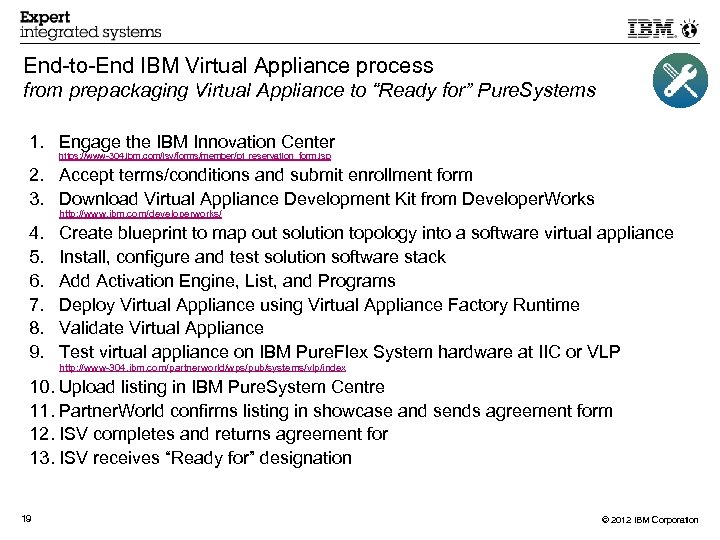
End-to-End IBM Virtual Appliance process from prepackaging Virtual Appliance to “Ready for” Pure. Systems 1. Engage the IBM Innovation Center https: //www-304. ibm. com/isv/forms/member/pt_reservation_form. jsp 2. Accept terms/conditions and submit enrollment form 3. Download Virtual Appliance Development Kit from Developer. Works http: //www. ibm. com/developerworks/ 4. 5. 6. 7. 8. 9. Create blueprint to map out solution topology into a software virtual appliance Install, configure and test solution software stack Add Activation Engine, List, and Programs Deploy Virtual Appliance using Virtual Appliance Factory Runtime Validate Virtual Appliance Test virtual appliance on IBM Pure. Flex System hardware at IIC or VLP http: //www-304. ibm. com/partnerworld/wps/pub/systems/vlp/index 10. Upload listing in IBM Pure. System Centre 11. Partner. World confirms listing in showcase and sends agreement form 12. ISV completes and returns agreement for 13. ISV receives “Ready for” designation 19 © 2012 IBM Corporation
Скачать презентацию IBM Pure Flex Systems Introduction to prepackaging Virtual
d27a768de723de14991a1835ace54296.ppt