 Скачать презентацию IBM Power Systems med operativsystemet IBM i Serverkonsolidering
428c3ef2b28e6ea5efd1b430dca67f9a.ppt
- Количество слайдов: 50



IBM Power Systems med operativsystemet IBM i Serverkonsolidering med LPAR Mølgaard Data A/S Jørgen Johansen (jjo@mgd. dk) IBM Certified Specialist - Power Systems Sales IBM Certified Solutions Expert SAP Certified Technology Consultant 15 -03 -2018
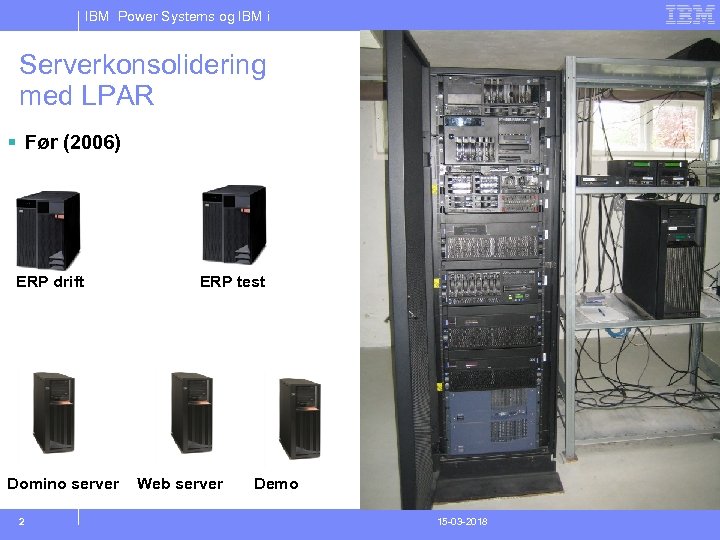
IBM Power Systems og IBM i Serverkonsolidering med LPAR § Før (2006) ERP drift Domino server 2 ERP test Web server Demo 15 -03 -2018
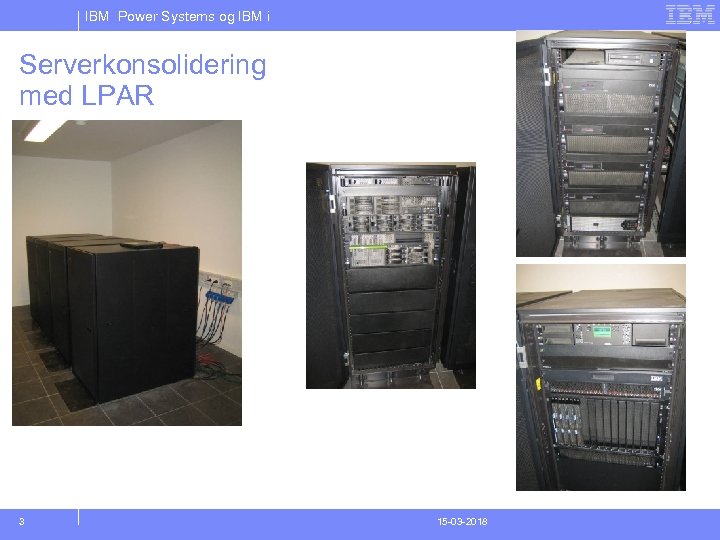
IBM Power Systems og IBM i Serverkonsolidering med LPAR 3 15 -03 -2018
IBM Power Systems og IBM i Overview of IBM i partitions at V 6 R 1 4
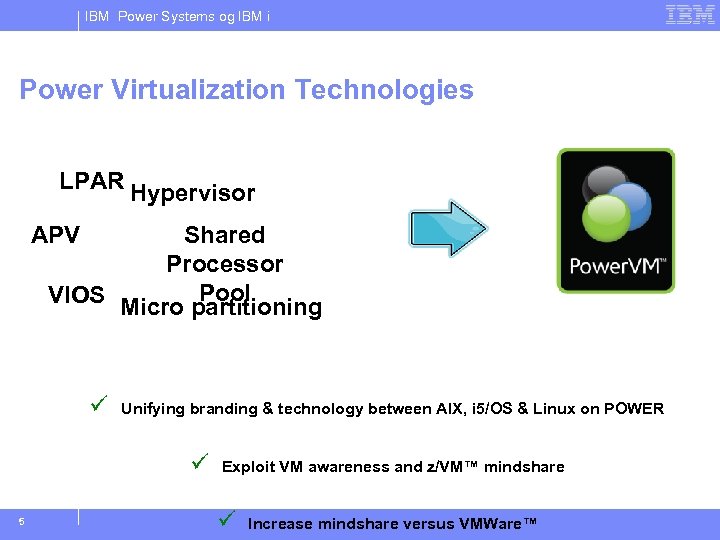
IBM Power Systems og IBM i Power Virtualization Technologies LPAR Hypervisor APV Shared Processor Pool VIOS Micro partitioning ü Unifying branding & technology between AIX, i 5/OS & Linux on POWER ü 5 Exploit VM awareness and z/VM™ mindshare ü Increase mindshare versus VMWare™
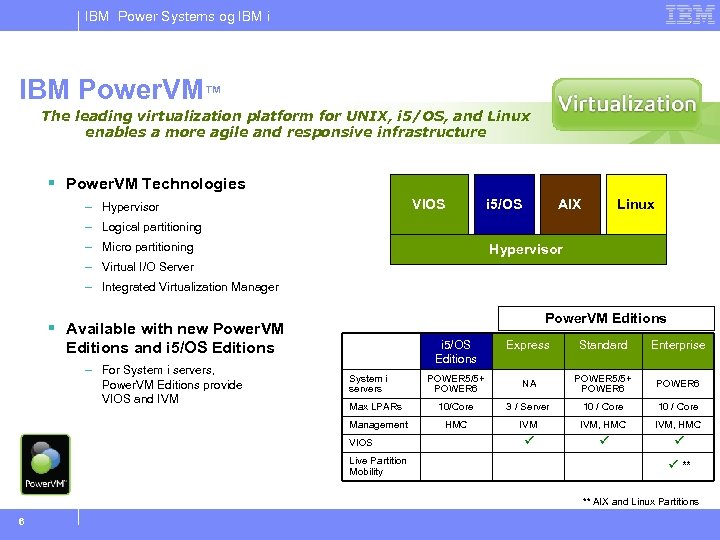
IBM Power Systems og IBM i IBM Power. VM™ The leading virtualization platform for UNIX, i 5/OS, and Linux enables a more agile and responsive infrastructure § Power. VM Technologies VIOS – Hypervisor i 5/OS AIX Linux – Logical partitioning – Micro partitioning Hypervisor – Virtual I/O Server – Integrated Virtualization Manager Power. VM Editions § Available with new Power. VM Editions and i 5/OS Editions Express Standard Enterprise POWER 5/5+ POWER 6 NA POWER 5/5+ POWER 6 Max LPARs 10/Core 3 / Server 10 / Core Management – For System i servers, Power. VM Editions provide VIOS and IVM i 5/OS Editions HMC IVM, HMC ü ü ü System i servers VIOS Live Partition Mobility ü ** ** AIX and Linux Partitions 6
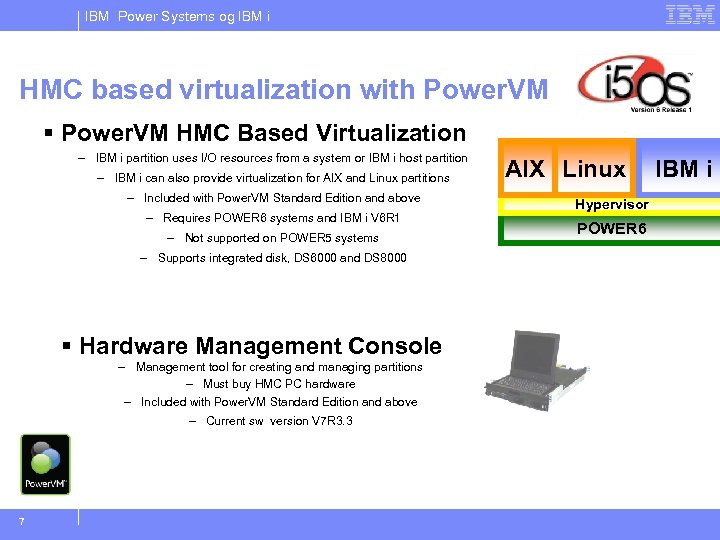
IBM Power Systems og IBM i HMC based virtualization with Power. VM § Power. VM HMC Based Virtualization – IBM i partition uses I/O resources from a system or IBM i host partition – IBM i can also provide virtualization for AIX and Linux partitions – Included with Power. VM Standard Edition and above – Requires POWER 6 systems and IBM i V 6 R 1 – Not supported on POWER 5 systems – Supports integrated disk, DS 6000 and DS 8000 § Hardware Management Console – Management tool for creating and managing partitions – Must buy HMC PC hardware – Included with Power. VM Standard Edition and above – Current sw version V 7 R 3. 3 7 AIX Linux Hypervisor POWER 6 IBM i
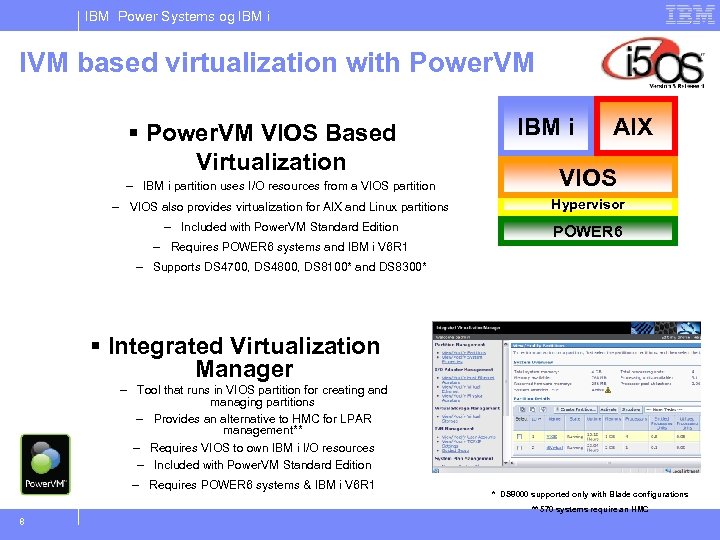
IBM Power Systems og IBM i IVM based virtualization with Power. VM § Power. VM VIOS Based Virtualization IBM i AIX – IBM i partition uses I/O resources from a VIOS partition VIOS – VIOS also provides virtualization for AIX and Linux partitions Hypervisor – Included with Power. VM Standard Edition POWER 6 – Requires POWER 6 systems and IBM i V 6 R 1 – Supports DS 4700, DS 4800, DS 8100* and DS 8300* § Integrated Virtualization Manager – Tool that runs in VIOS partition for creating and managing partitions – Provides an alternative to HMC for LPAR management** – Requires VIOS to own IBM i I/O resources – Included with Power. VM Standard Edition – Requires POWER 6 systems & IBM i V 6 R 1 * DS 8000 supported only with Blade configurations ** 570 systems require an HMC 8
IBM Power Systems og IBM i Demo 9
IBM Power Systems og IBM i Hosted client scenarios 10
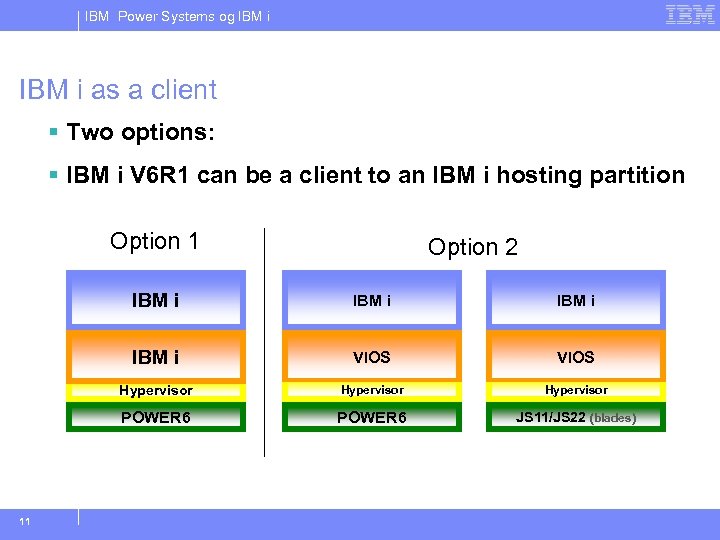
IBM Power Systems og IBM i as a client § Two options: § IBM i V 6 R 1 can be a client to an IBM i hosting partition Option 1 Option 2 IBM i VIOS Hypervisor POWER 6 11 IBM i POWER 6 JS 11/JS 22 (blades)
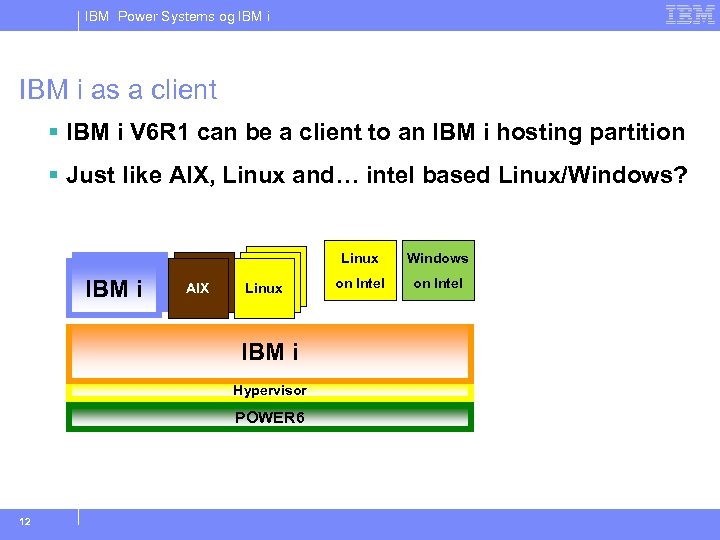
IBM Power Systems og IBM i as a client § IBM i V 6 R 1 can be a client to an IBM i hosting partition § Just like AIX, Linux and… intel based Linux/Windows? Linux IBM i AIX Linux IBM i Hypervisor POWER 6 12 Windows on Intel
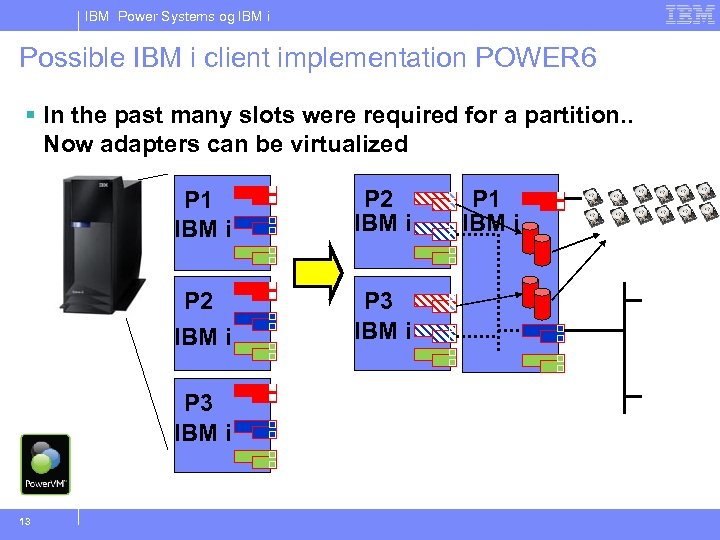
IBM Power Systems og IBM i Possible IBM i client implementation POWER 6 § In the past many slots were required for a partition. . Now adapters can be virtualized P 1 IBM i P 2 IBM i P 3 IBM i 13 P 1 IBM i
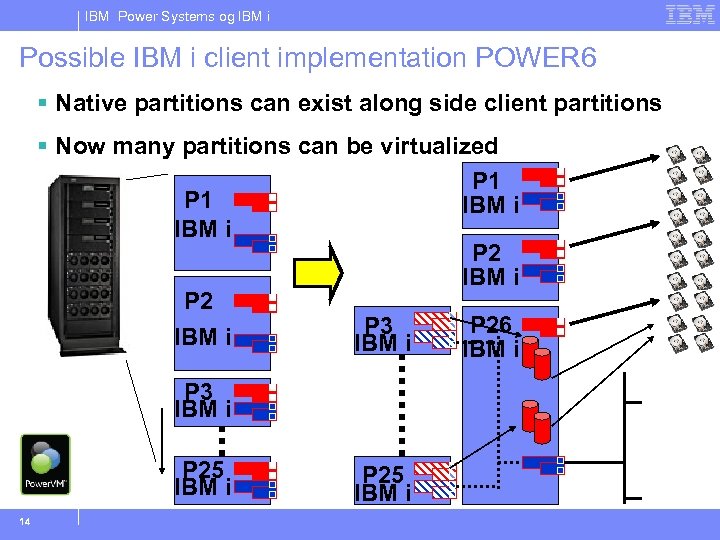
IBM Power Systems og IBM i Possible IBM i client implementation POWER 6 § Native partitions can exist along side client partitions § Now many partitions can be virtualized P 1 IBM i P 26 P 3 IBM i P 3 IBM i P 25 IBM i 14 P 25 IBM i
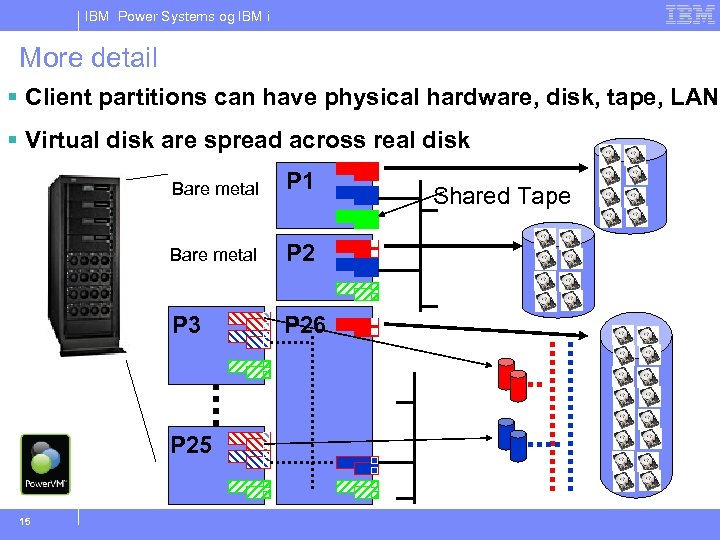
IBM Power Systems og IBM i More detail § Client partitions can have physical hardware, disk, tape, LAN § Virtual disk are spread across real disk Bare metal P 1 Bare metal P 2 P 3 P 26 P 25 15 Shared Tape
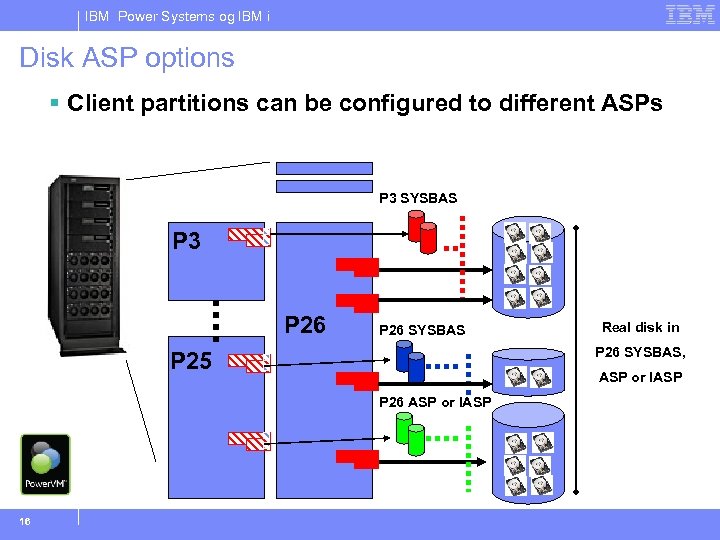
IBM Power Systems og IBM i Disk ASP options § Client partitions can be configured to different ASPs P 3 SYSBAS P 3 P 26 SYSBAS, P 25 ASP or IASP P 26 ASP or IASP 16 Real disk in
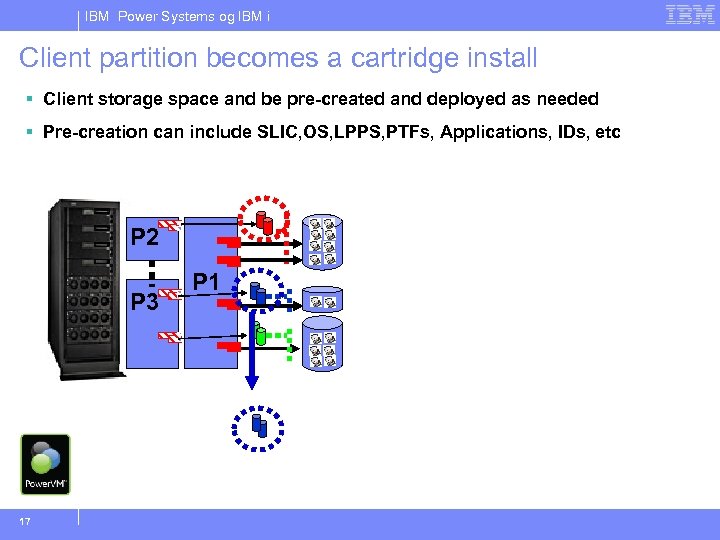
IBM Power Systems og IBM i Client partition becomes a cartridge install § Client storage space and be pre-created and deployed as needed § Pre-creation can include SLIC, OS, LPPS, PTFs, Applications, IDs, etc P 2 P 3 17 P 1
IBM Power Systems og IBM i Client partition planning 18
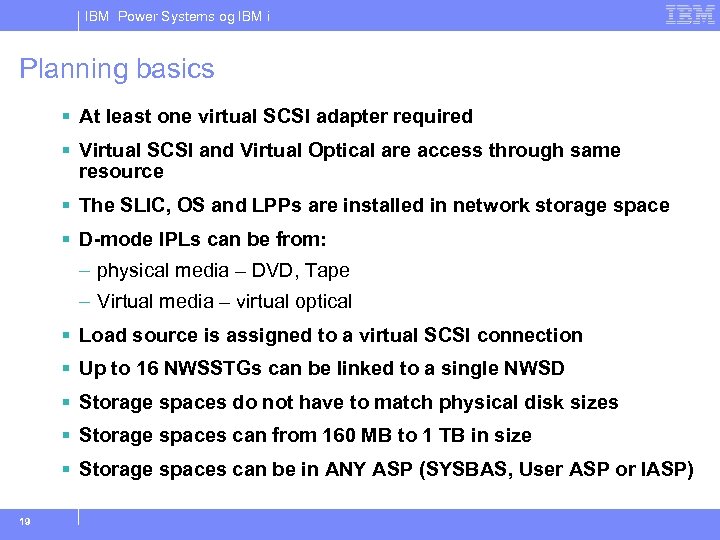
IBM Power Systems og IBM i Planning basics § At least one virtual SCSI adapter required § Virtual SCSI and Virtual Optical are access through same resource § The SLIC, OS and LPPs are installed in network storage space § D-mode IPLs can be from: – physical media – DVD, Tape – Virtual media – virtual optical § Load source is assigned to a virtual SCSI connection § Up to 16 NWSSTGs can be linked to a single NWSD § Storage spaces do not have to match physical disk sizes § Storage spaces can from 160 MB to 1 TB in size § Storage spaces can be in ANY ASP (SYSBAS, User ASP or IASP) 19
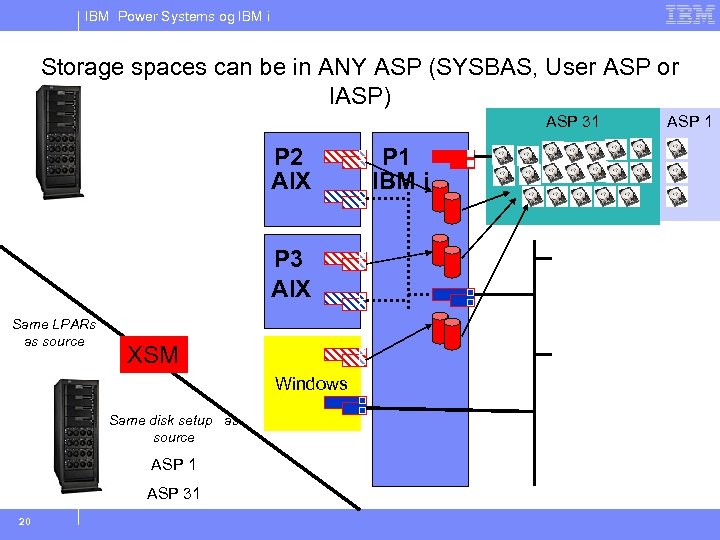
IBM Power Systems og IBM i Storage spaces can be in ANY ASP (SYSBAS, User ASP or IASP) ASP 31 P 2 AIX P 3 AIX Same LPARs as source XSM Windows Same disk setup as source ASP 1 ASP 31 20 P 1 IBM i ASP 1
IBM Power Systems og IBM i Implementing client partitions 21
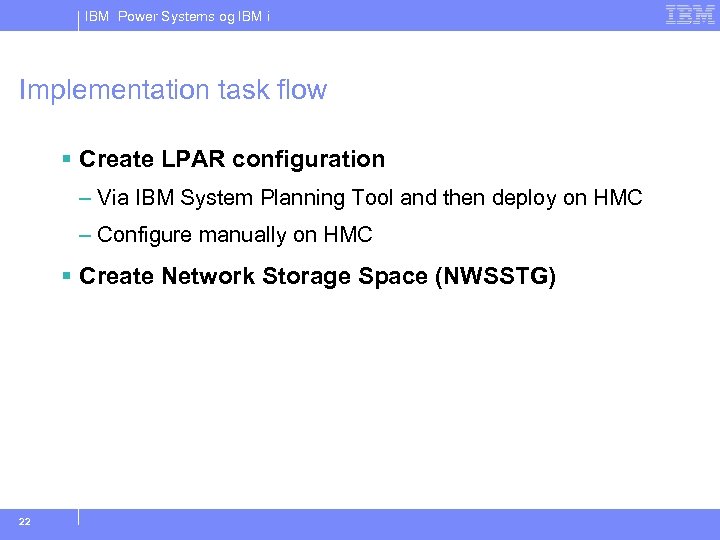
IBM Power Systems og IBM i Implementation task flow § Create LPAR configuration – Via IBM System Planning Tool and then deploy on HMC – Configure manually on HMC § Create Network Storage Space (NWSSTG) 22
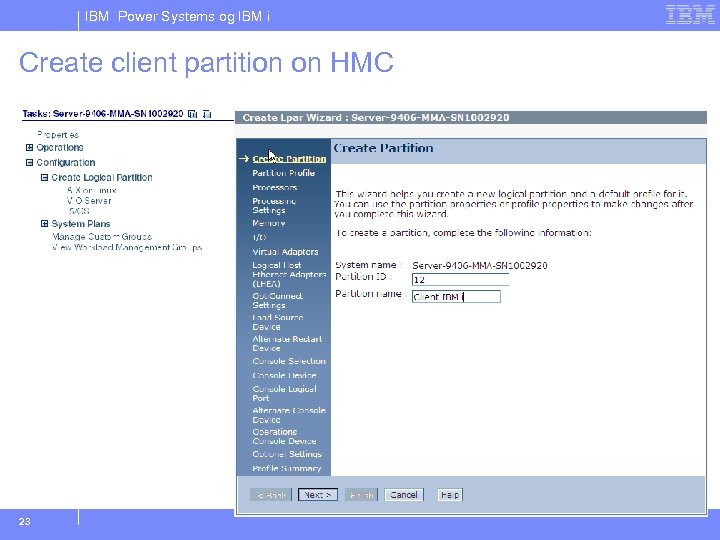
IBM Power Systems og IBM i Create client partition on HMC 23
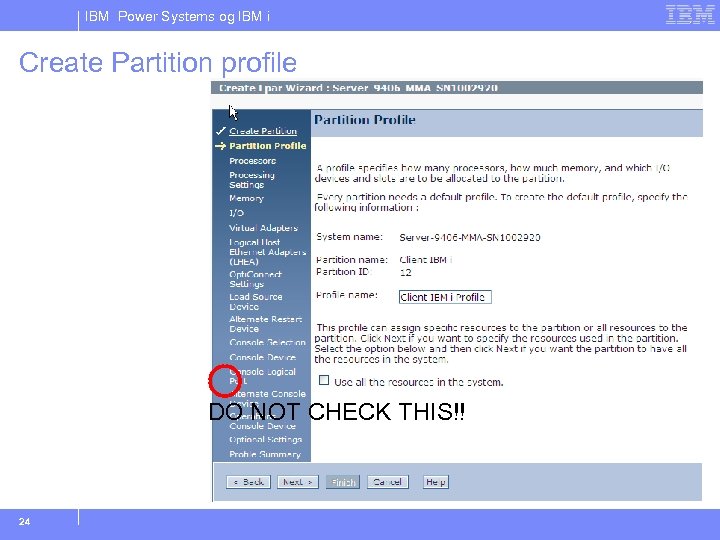
IBM Power Systems og IBM i Create Partition profile DO NOT CHECK THIS!! 24
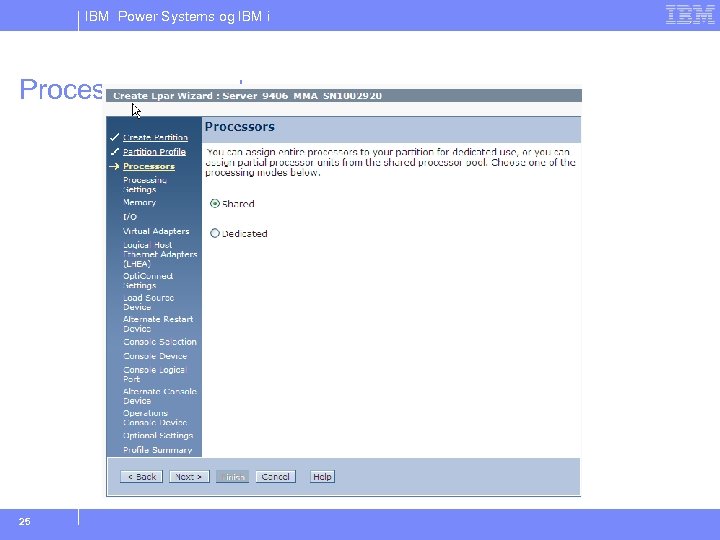
IBM Power Systems og IBM i Processor usage type 25
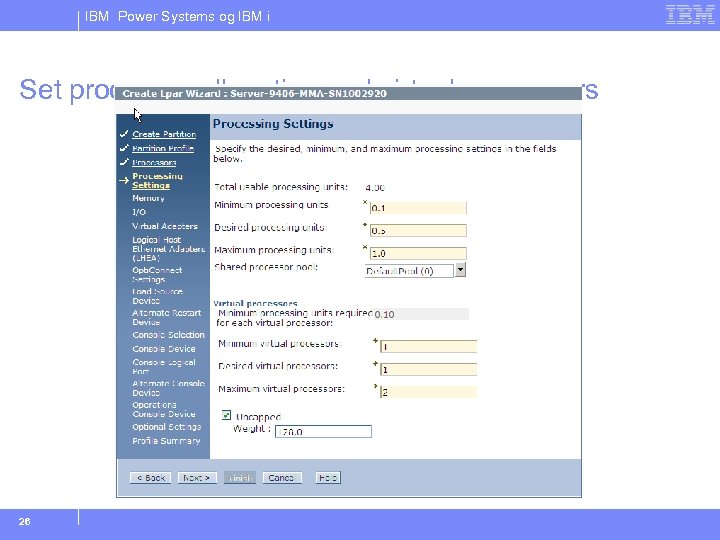
IBM Power Systems og IBM i Set processor allocation and virtual processors 26
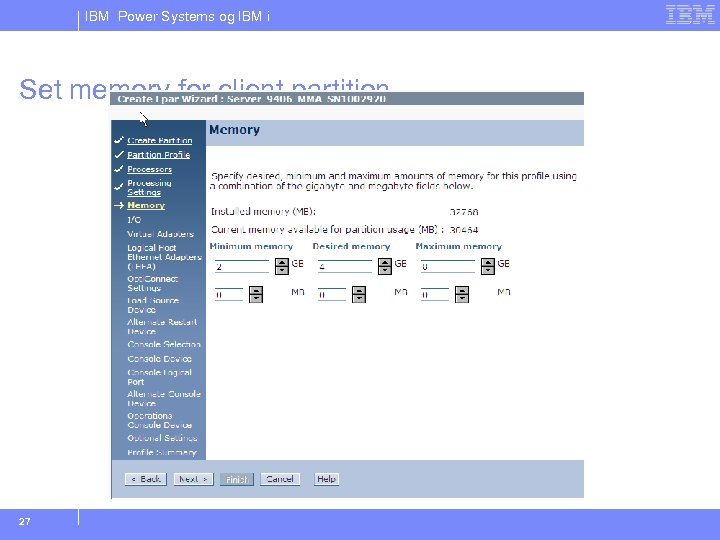
IBM Power Systems og IBM i Set memory for client partition 27
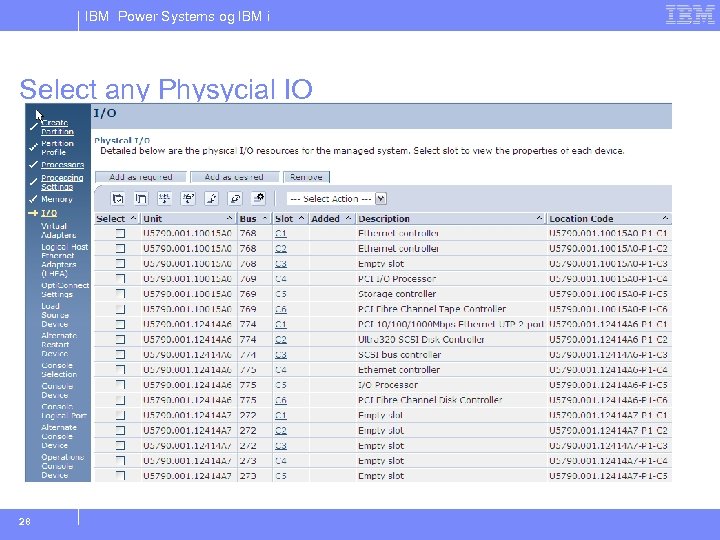
IBM Power Systems og IBM i Select any Physycial IO 28
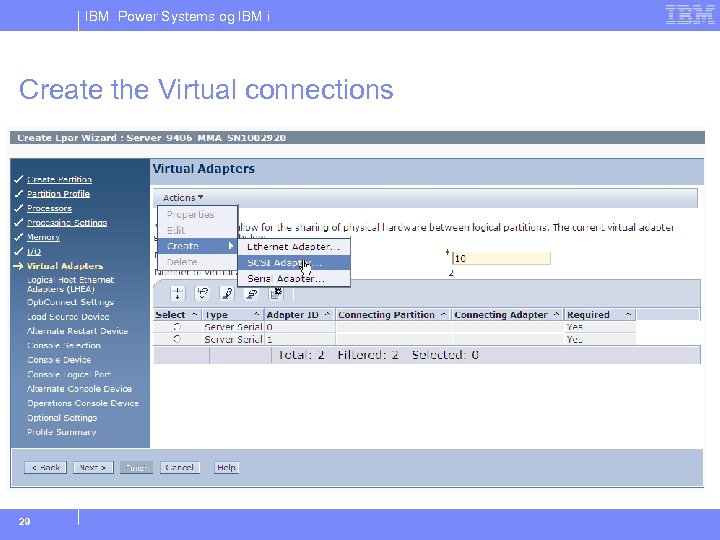
IBM Power Systems og IBM i Create the Virtual connections 29
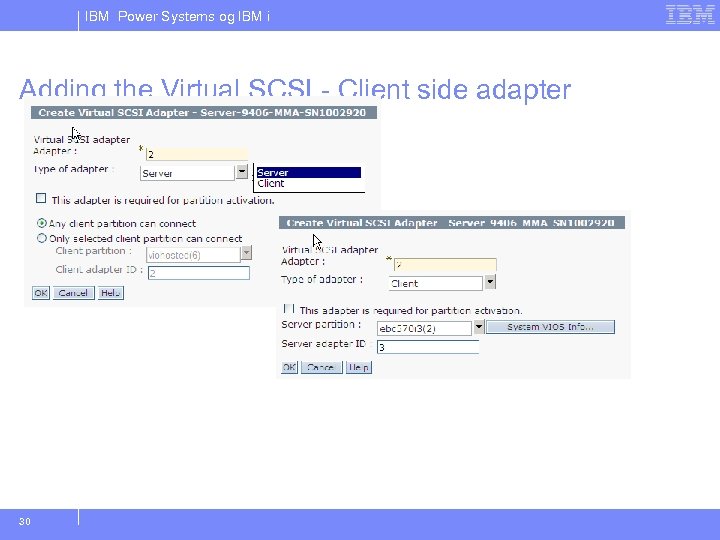
IBM Power Systems og IBM i Adding the Virtual SCSI - Client side adapter 30
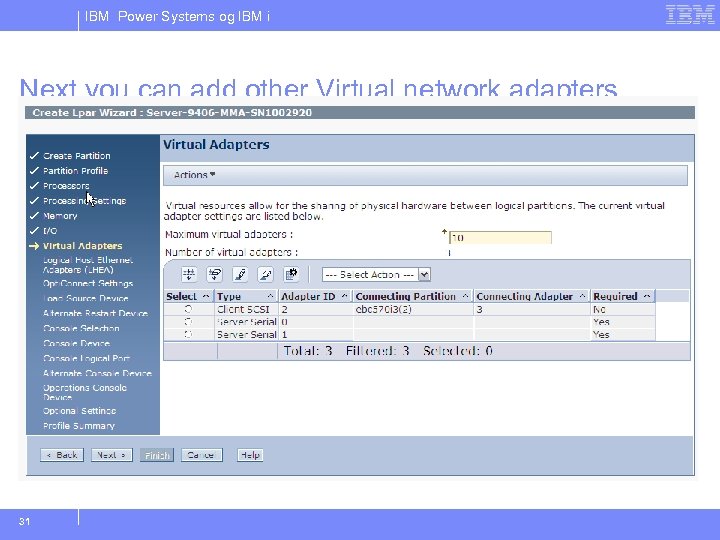
IBM Power Systems og IBM i Next you can add other Virtual network adapters 31
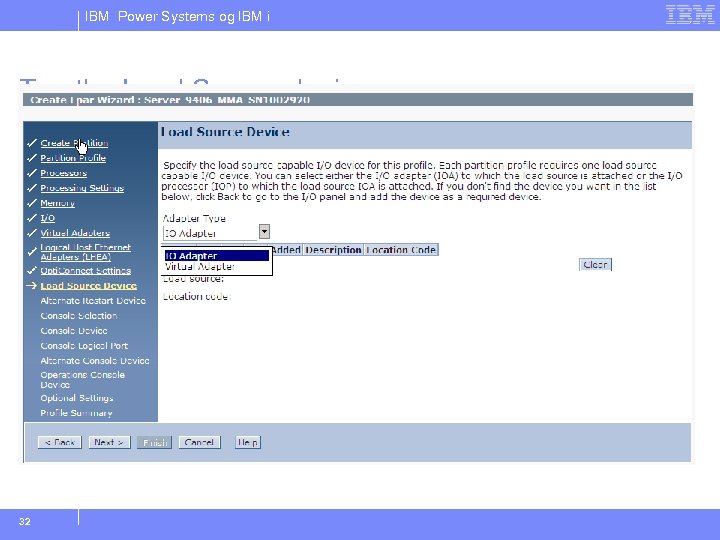
IBM Power Systems og IBM i Tag the Load Source device 32
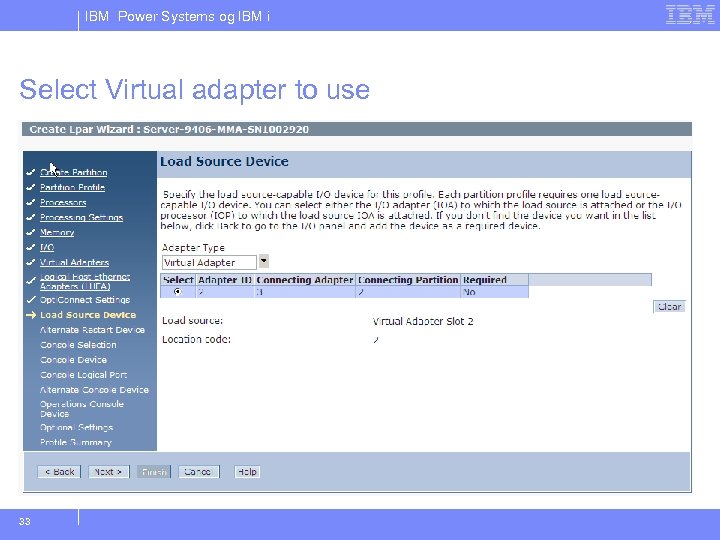
IBM Power Systems og IBM i Select Virtual adapter to use 33
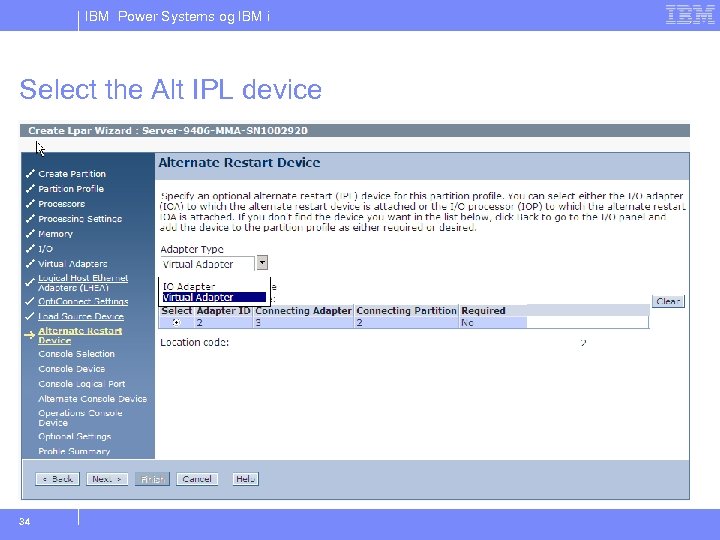
IBM Power Systems og IBM i Select the Alt IPL device 34
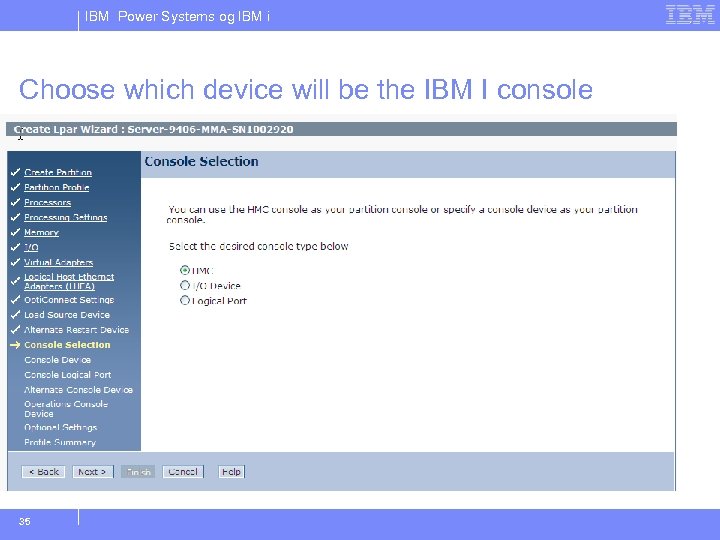
IBM Power Systems og IBM i Choose which device will be the IBM I console 35
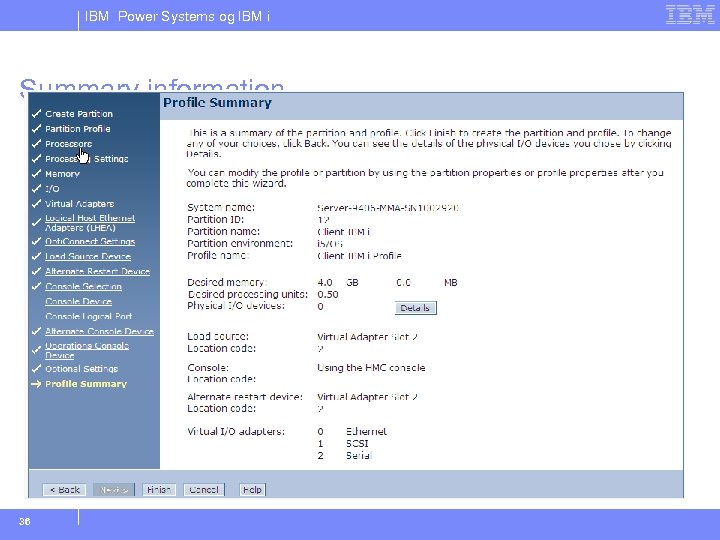
IBM Power Systems og IBM i Summary information 36
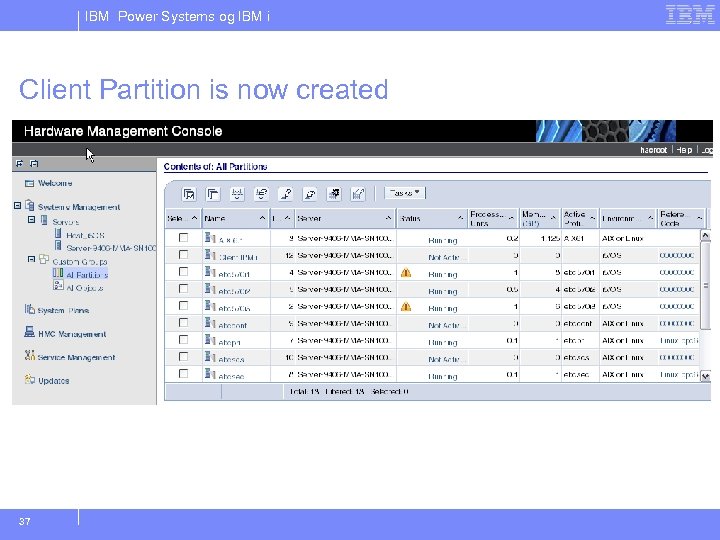
IBM Power Systems og IBM i Client Partition is now created 37
IBM Power Systems og IBM i Implementing Host side media 38
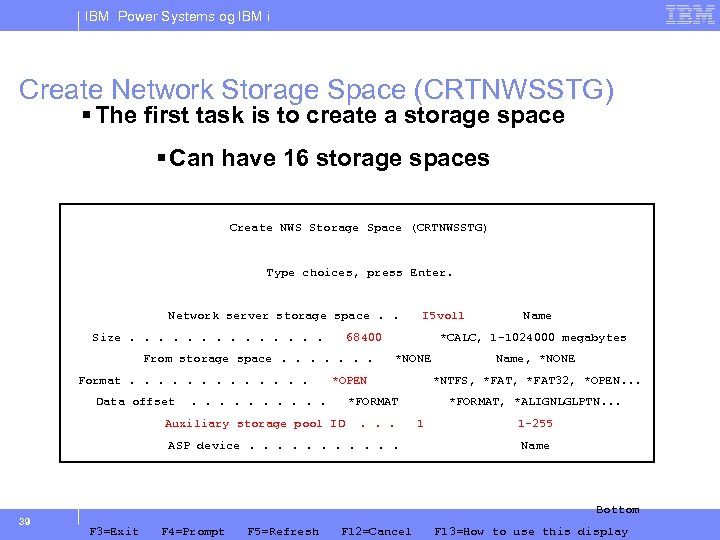
IBM Power Systems og IBM i Create Network Storage Space (CRTNWSSTG) § The first task is to create a storage space § Can have 16 storage spaces Create NWS Storage Space (CRTNWSSTG) Type choices, press Enter. Network server storage space. . Size. . . 68400 From storage space. . . . Format. . . Data offset . . Name *CALC, 1 -1024000 megabytes *NONE *OPEN. . . ASP device. . . Name, *NONE *NTFS, *FAT 32, *OPEN. . . *FORMAT Auxiliary storage pool ID 39 I 5 vol 1 *FORMAT, *ALIGNLGLPTN. . . 1 1 -255 Name Bottom F 3=Exit F 4=Prompt F 5=Refresh F 12=Cancel F 13=How to use this display
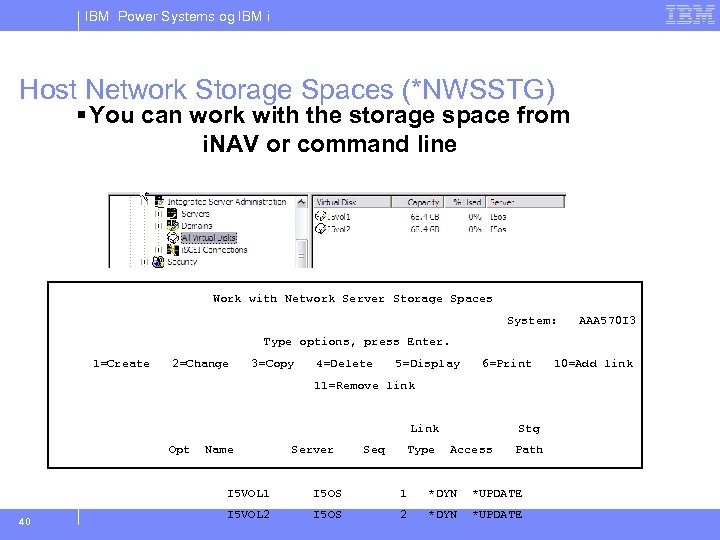
IBM Power Systems og IBM i Host Network Storage Spaces (*NWSSTG) § You can work with the storage space from i. NAV or command line Work with Network Server Storage Spaces System: AAA 570 I 3 Type options, press Enter. 1=Create 2=Change 3=Copy 4=Delete 5=Display 6=Print 11=Remove link Link Opt Name Server Seq Type Stg Access Path I 5 VOL 1 40 I 5 OS 1 *DYN *UPDATE I 5 VOL 2 I 5 OS 2 *DYN *UPDATE 10=Add link
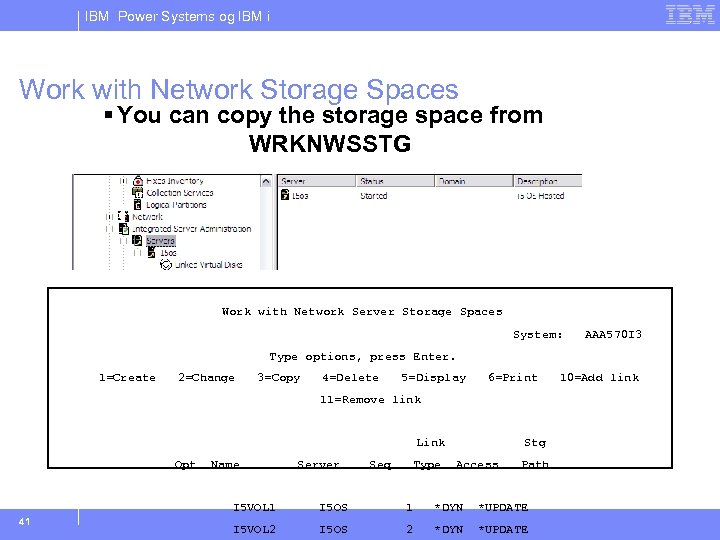
IBM Power Systems og IBM i Work with Network Storage Spaces § You can copy the storage space from WRKNWSSTG Work with Network Server Storage Spaces System: AAA 570 I 3 Type options, press Enter. 1=Create 2=Change 3=Copy 4=Delete 5=Display 6=Print 11=Remove link Link Opt Name Server Seq Type Stg Access Path I 5 VOL 1 41 I 5 OS 1 *DYN *UPDATE I 5 VOL 2 I 5 OS 2 *DYN *UPDATE 10=Add link
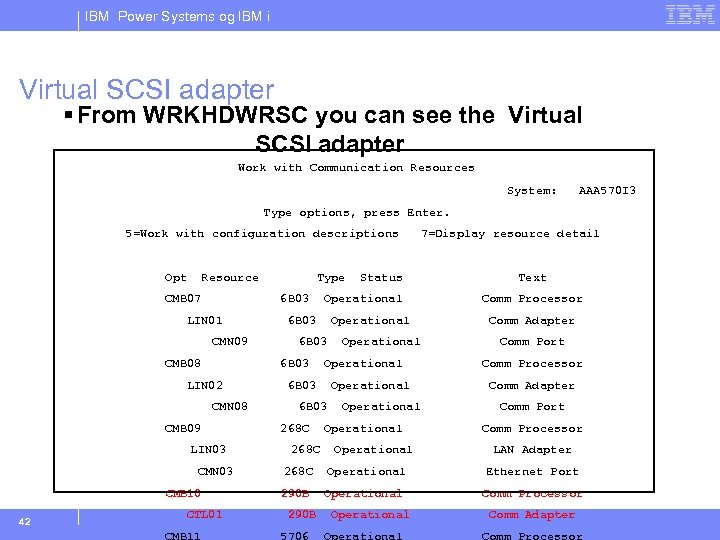
IBM Power Systems og IBM i Virtual SCSI adapter § From WRKHDWRSC you can see the Virtual SCSI adapter Work with Communication Resources System: AAA 570 I 3 Type options, press Enter. 5=Work with configuration descriptions Opt Resource CMB 07 6 B 03 LIN 01 CMN 09 CMB 08 CMN 08 CMB 09 LIN 03 CMB 10 CTL 01 CMB 11 Operational 6 B 03 268 C Status Operational 6 B 03 LIN 02 42 Type 7=Display resource detail Operational Text Comm Processor Comm Adapter Comm Port Comm Processor LAN Adapter 268 C Operational Ethernet Port 290 B Operational Comm Processor 290 B 5706 Operational Comm Adapter Comm Processor
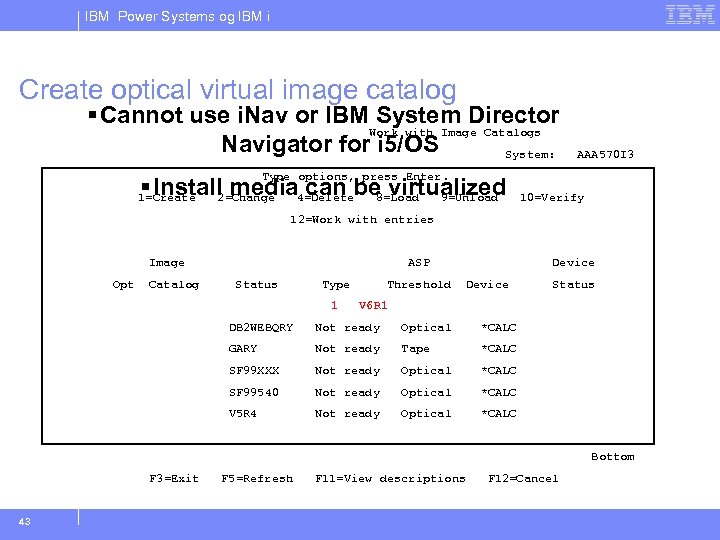
IBM Power Systems og IBM i Create optical virtual image catalog § Cannot use i. Nav or IBM System Director Work with Image Catalogs Navigator for i 5/OS System: AAA 570 I 3 Type options, press Enter. § Install media 4=Deletebe virtualized can 8=Load 9=Unload 2=Change 1=Create 10=Verify 12=Work with entries Image Opt Catalog ASP Status Type 1 Threshold Device Status V 6 R 1 DB 2 WEBQRY Not ready Optical *CALC GARY Not ready Tape *CALC SF 99 XXX Not ready Optical *CALC SF 99540 Not ready Optical *CALC V 5 R 4 Not ready Optical *CALC Bottom F 3=Exit 43 F 5=Refresh F 11=View descriptions F 12=Cancel
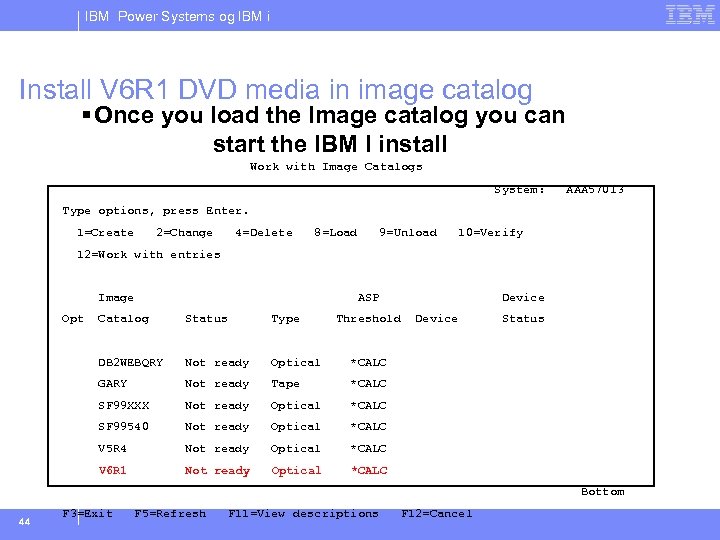
IBM Power Systems og IBM i Install V 6 R 1 DVD media in image catalog § Once you load the Image catalog you can start the IBM I install Work with Image Catalogs System: AAA 570 I 3 Type options, press Enter. 1=Create 2=Change 4=Delete 8=Load 9=Unload 10=Verify 12=Work with entries Image Opt ASP Catalog Status Type Threshold DB 2 WEBQRY Not ready Optical *CALC GARY Not ready Tape *CALC SF 99 XXX Not ready Optical *CALC SF 99540 Not ready Optical *CALC V 5 R 4 Not ready Optical *CALC V 6 R 1 Not ready Optical Device Status *CALC Bottom 44 F 3=Exit F 5=Refresh F 11=View descriptions F 12=Cancel
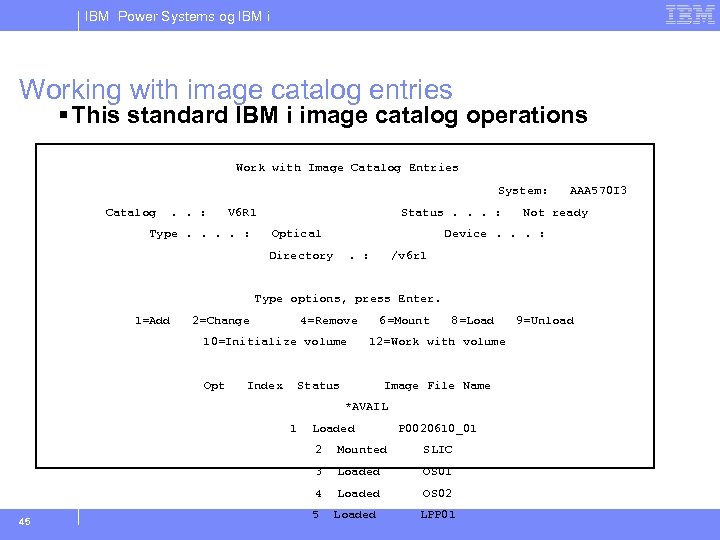
IBM Power Systems og IBM i Working with image catalog entries § This standard IBM i image catalog operations Work with Image Catalog Entries System: Catalog . . : V 6 R 1 Type. . : Status. . . : Optical AAA 570 I 3 Not ready Device. . . : Directory . : /v 6 r 1 Type options, press Enter. 1=Add 2=Change 4=Remove 10=Initialize volume Opt Index 6=Mount 8=Load 12=Work with volume Status Image File Name *AVAIL 1 Loaded P 0020610_01 2 SLIC 3 Loaded OS 01 4 45 Mounted Loaded OS 02 5 Loaded LPP 01 9=Unload
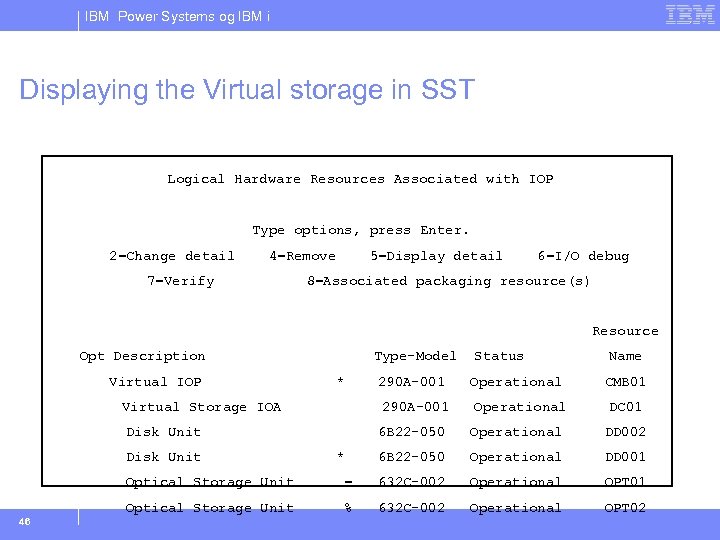
IBM Power Systems og IBM i Displaying the Virtual storage in SST Logical Hardware Resources Associated with IOP Type options, press Enter. 2=Change detail 4=Remove 7=Verify 5=Display detail 6=I/O debug 8=Associated packaging resource(s) Resource Opt Description Virtual IOP Type-Model * 290 A-001 Virtual Storage IOA 290 A-001 Disk Unit Status Operational Name CMB 01 DC 01 6 B 22 -050 DD 002 6 B 22 -050 * Operational DD 001 Optical Storage Unit 632 C-002 Operational OPT 01 Optical Storage Unit 46 = % 632 C-002 Operational OPT 02
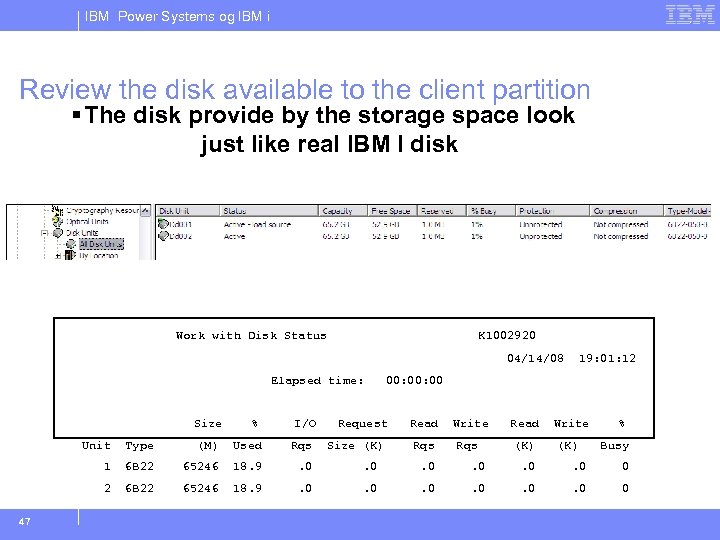
IBM Power Systems og IBM i Review the disk available to the client partition § The disk provide by the storage space look just like real IBM I disk Work with Disk Status K 1002920 04/14/08 Elapsed time: Size % I/O 00: 00 Request Read Write Rqs (K) % Unit Type (M) Used Rqs 1 6 B 22 65246 18. 9 . 0 . 0 . 0 0 2 47 Size (K) 19: 01: 12 Busy 6 B 22 65246 18. 9 . 0 . 0 . 0 0
IBM Power Systems og IBM i Backup methods for client partitions 54
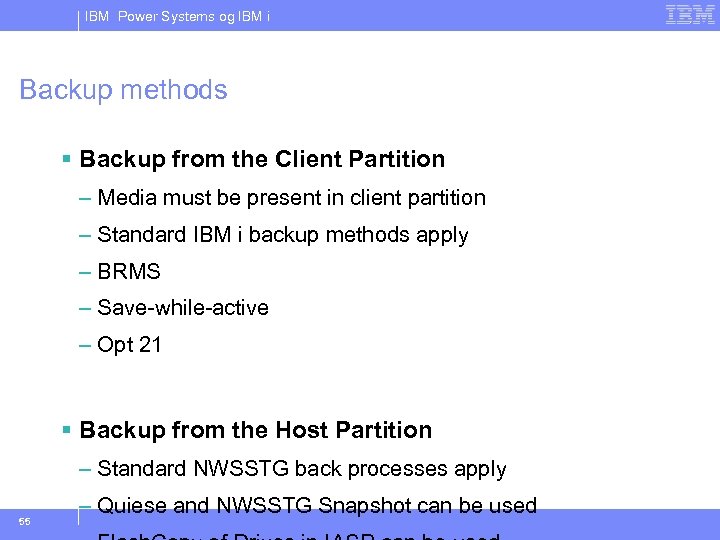
IBM Power Systems og IBM i Backup methods § Backup from the Client Partition – Media must be present in client partition – Standard IBM i backup methods apply – BRMS – Save-while-active – Opt 21 § Backup from the Host Partition – Standard NWSSTG back processes apply 55 – Quiese and NWSSTG Snapshot can be used
IBM Power Systems og IBM i Hosted client scenarios demo 56
Скачать презентацию IBM Power Systems med operativsystemet IBM i Serverkonsolidering
428c3ef2b28e6ea5efd1b430dca67f9a.ppt