 Скачать презентацию IBM Power Systems Get to the Web Fast
a618800be5aeca122f584f64b9113135.ppt
- Количество слайдов: 88



IBM Power Systems™ Get to the Web Fast with System i Access for Web http: //www. ibm. com/systems/i/software/access/we Linda Hirsch b LLHIRSCH@us. ibm. com IBM Rochester, Minnesota System i Access for Web Development
Table of Contents • What is System i Access for Web? • Getting started • Ways to roll out to end users • Control access to functions Note! A copy of this presentation can be found at: ftp: //ftp. software. ibm. com/as 400/products/clientaccess/win 32/presentations/2008_hasg © 2008 IBM Corporation 2
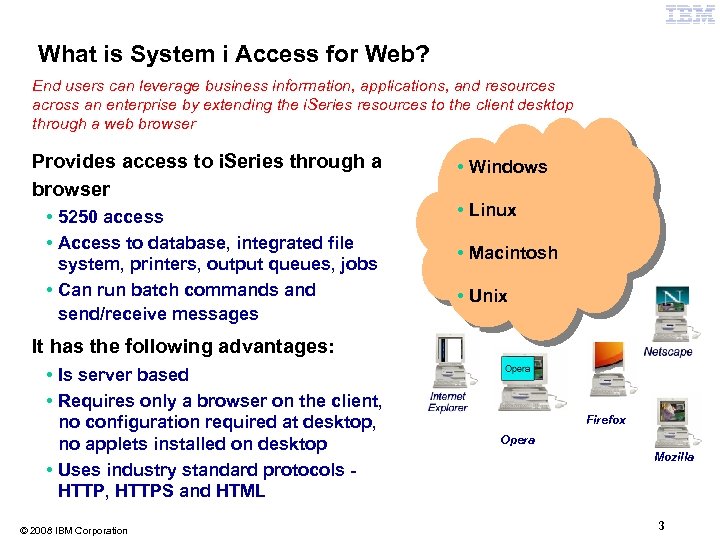
What is System i Access for Web? End users can leverage business information, applications, and resources across an enterprise by extending the i. Series resources to the client desktop through a web browser Provides access to i. Series through a browser • 5250 access • Access to database, integrated file system, printers, output queues, jobs • Can run batch commands and send/receive messages OS/400 V 5 R 2 V 5 R 3 V 5 R 4 • Windows • Linux • Macintosh • Unix It has the following advantages: • Is server based • Requires only a browser on the client, no configuration required at desktop, no applets installed on desktop • Uses industry standard protocols HTTP, HTTPS and HTML © 2008 IBM Corporation Firefox Opera Mozilla 3
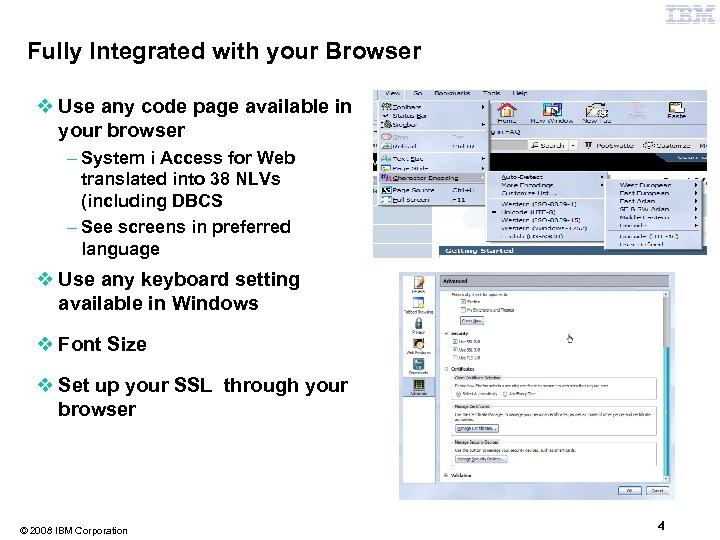
Fully Integrated with your Browser v Use any code page available in your browser – System i Access for Web translated into 38 NLVs (including DBCS – See screens in preferred language v Use any keyboard setting available in Windows v Font Size v Set up your SSL through your browser © 2008 IBM Corporation 4
Packaging and Ordering © 2008 IBM Corporation 5
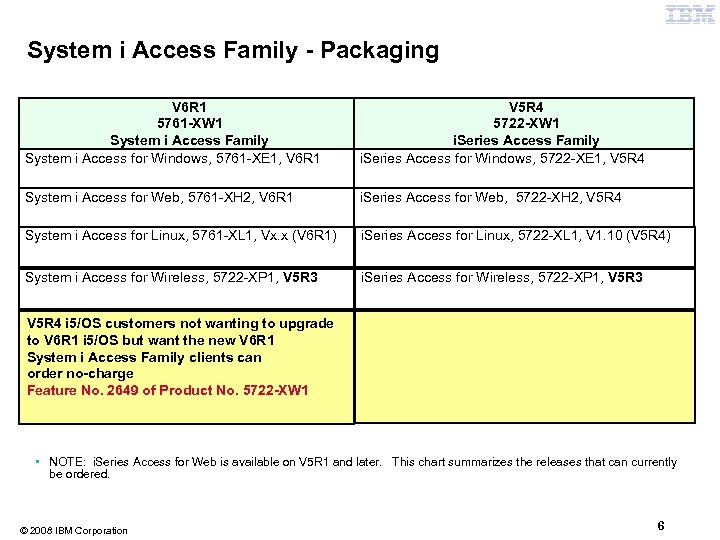
System i Access Family - Packaging V 6 R 1 5761 -XW 1 System i Access Family System i Access for Windows, 5761 -XE 1, V 6 R 1 V 5 R 4 5722 -XW 1 i. Series Access Family i. Series Access for Windows, 5722 -XE 1, V 5 R 4 System i Access for Web, 5761 -XH 2, V 6 R 1 i. Series Access for Web, 5722 -XH 2, V 5 R 4 System i Access for Linux, 5761 -XL 1, Vx. x (V 6 R 1) i. Series Access for Linux, 5722 -XL 1, V 1. 10 (V 5 R 4) System i Access for Wireless, 5722 -XP 1, V 5 R 3 i. Series Access for Wireless, 5722 -XP 1, V 5 R 3 V 5 R 4 i 5/OS customers not wanting to upgrade to V 6 R 1 i 5/OS but want the new V 6 R 1 System i Access Family clients can order no-charge Feature No. 2649 of Product No. 5722 -XW 1 • NOTE: i. Series Access for Web is available on V 5 R 1 and later. This chart summarizes the releases that can currently be ordered. © 2008 IBM Corporation 6
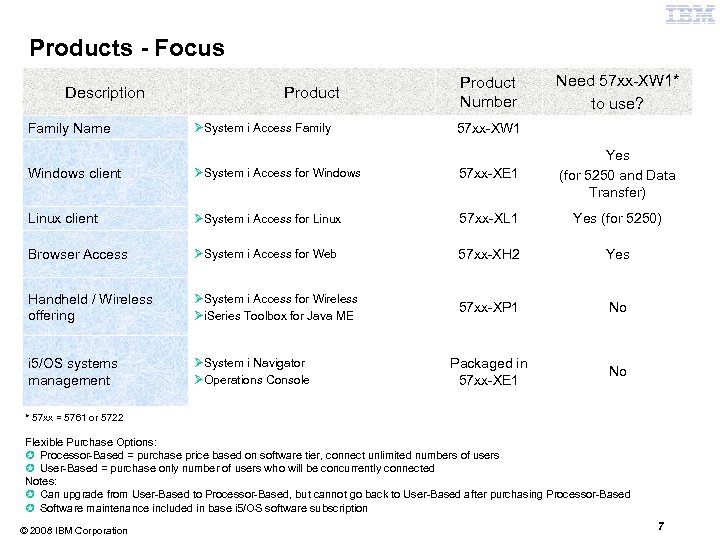
Products - Focus Description Family Name Product ØSystem i Access Family Product Number Need 57 xx-XW 1* to use? 57 xx-XW 1 Windows client ØSystem i Access for Windows 57 xx-XE 1 Yes (for 5250 and Data Transfer) Linux client ØSystem i Access for Linux 57 xx-XL 1 Yes (for 5250) Browser Access ØSystem i Access for Web 57 xx-XH 2 Yes Handheld / Wireless offering ØSystem i Access for Wireless Øi. Series Toolbox for Java ME 57 xx-XP 1 No i 5/OS systems management ØSystem i Navigator ØOperations Console Packaged in 57 xx-XE 1 No * 57 xx = 5761 or 5722 Flexible Purchase Options: µ Processor-Based = purchase price based on software tier, connect unlimited numbers of users µ User-Based = purchase only number of users who will be concurrently connected Notes: µ Can upgrade from User-Based to Processor-Based, but cannot go back to User-Based after purchasing Processor-Based µ Software maintenance included in base i 5/OS software subscription © 2008 IBM Corporation 7
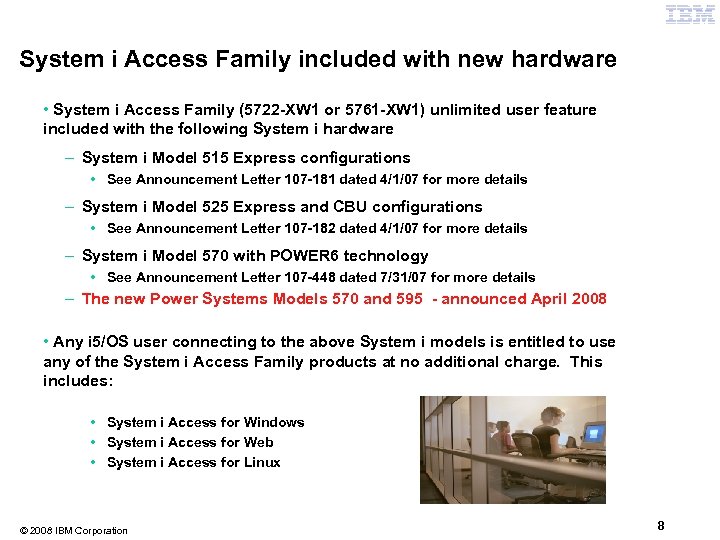
System i Access Family included with new hardware • System i Access Family (5722 -XW 1 or 5761 -XW 1) unlimited user feature included with the following System i hardware – System i Model 515 Express configurations • See Announcement Letter 107 -181 dated 4/1/07 for more details – System i Model 525 Express and CBU configurations • See Announcement Letter 107 -182 dated 4/1/07 for more details – System i Model 570 with POWER 6 technology • See Announcement Letter 107 -448 dated 7/31/07 for more details – The new Power Systems Models 570 and 595 - announced April 2008 • Any i 5/OS user connecting to the above System i models is entitled to use any of the System i Access Family products at no additional charge. This includes: • System i Access for Windows • System i Access for Web • System i Access for Linux © 2008 IBM Corporation 8
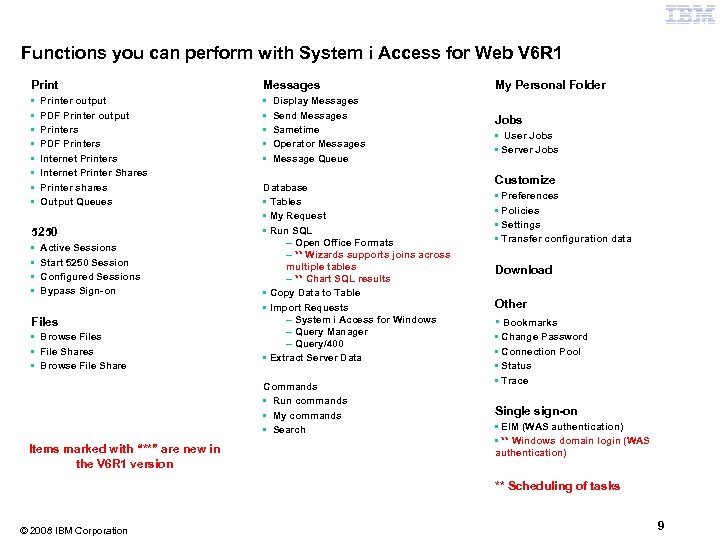
Functions you can perform with System i Access for Web V 6 R 1 Print Messages • • • • Printer output PDF Printer output Printers PDF Printers Internet Printer Shares Printer shares Output Queues 5250 • • Active Sessions Start 5250 Session Configured Sessions Bypass Sign-on Files • Browse Files • File Shares • Browse File Share Display Messages Send Messages Sametime Operator Messages Message Queue Database • Tables • My Request • Run SQL – Open Office Formats – ** Wizards supports joins across multiple tables – ** Chart SQL results • Copy Data to Table • Import Requests – System i Access for Windows – Query Manager – Query/400 • Extract Server Data Commands • Run commands • My commands • Search Items marked with “**” are new in the V 6 R 1 version My Personal Folder Jobs • User Jobs • Server Jobs Customize • Preferences • Policies • Settings • Transfer configuration data Download Other • Bookmarks • Change Password • Connection Pool • Status • Trace Single sign-on • EIM (WAS authentication) • ** Windows domain login (WAS authentication) ** Scheduling of tasks © 2008 IBM Corporation 9
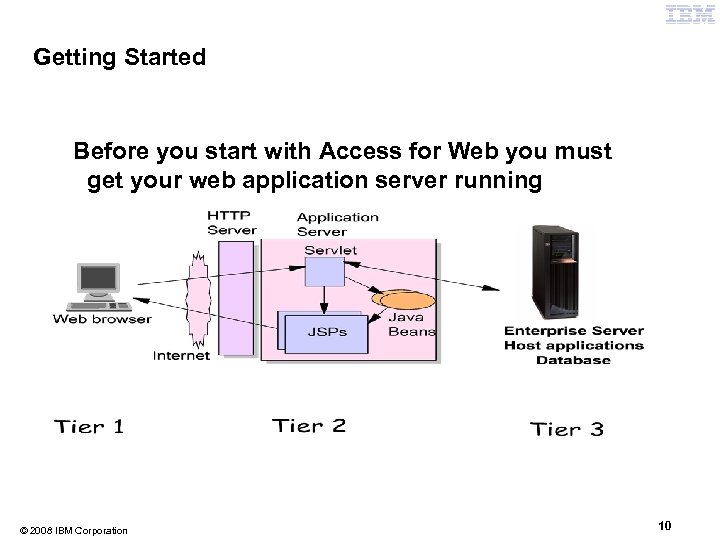
Getting Started Before you start with Access for Web you must get your web application server running © 2008 IBM Corporation 10
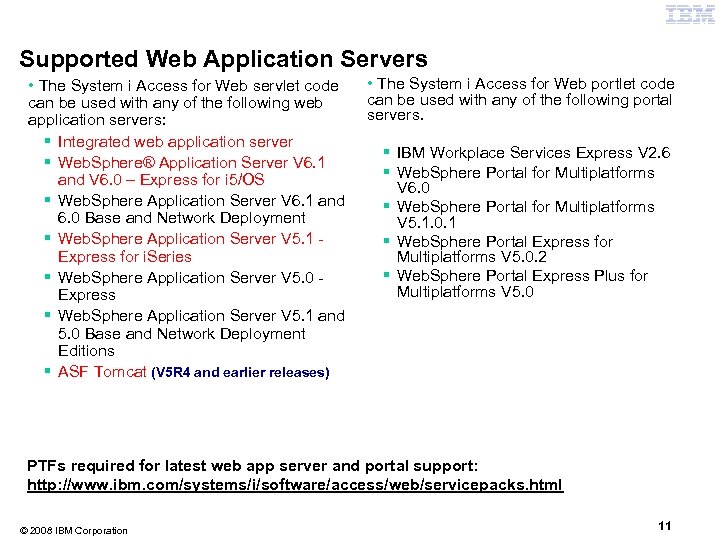
Supported Web Application Servers • The System i Access for Web servlet code can be used with any of the following web application servers: § Integrated web application server § Web. Sphere® Application Server V 6. 1 and V 6. 0 – Express for i 5/OS § Web. Sphere Application Server V 6. 1 and 6. 0 Base and Network Deployment § Web. Sphere Application Server V 5. 1 Express for i. Series § Web. Sphere Application Server V 5. 0 Express § Web. Sphere Application Server V 5. 1 and 5. 0 Base and Network Deployment Editions § ASF Tomcat (V 5 R 4 and earlier releases) • The System i Access for Web portlet code can be used with any of the following portal servers. § IBM Workplace Services Express V 2. 6 § Web. Sphere Portal for Multiplatforms V 6. 0 § Web. Sphere Portal for Multiplatforms V 5. 1. 0. 1 § Web. Sphere Portal Express for Multiplatforms V 5. 0. 2 § Web. Sphere Portal Express Plus for Multiplatforms V 5. 0 PTFs required for latest web app server and portal support: http: //www. ibm. com/systems/i/software/access/web/servicepacks. html © 2008 IBM Corporation 11
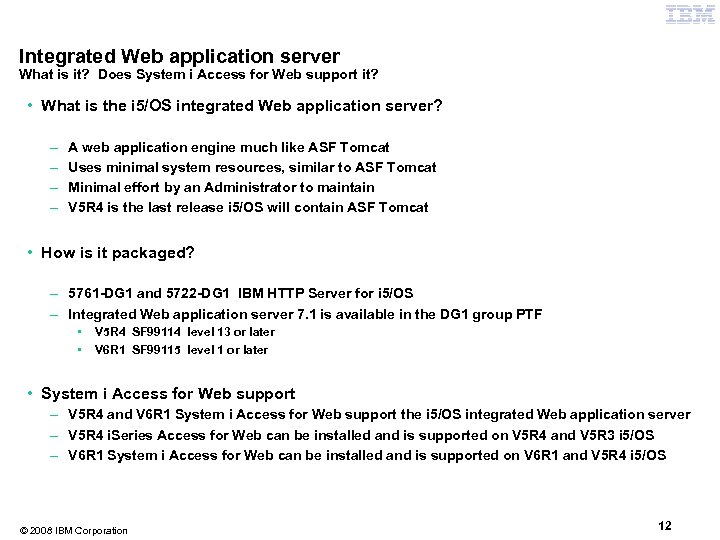
Integrated Web application server What is it? Does System i Access for Web support it? • What is the i 5/OS integrated Web application server? – – A web application engine much like ASF Tomcat Uses minimal system resources, similar to ASF Tomcat Minimal effort by an Administrator to maintain V 5 R 4 is the last release i 5/OS will contain ASF Tomcat • How is it packaged? – 5761 -DG 1 and 5722 -DG 1 IBM HTTP Server for i 5/OS – Integrated Web application server 7. 1 is available in the DG 1 group PTF • • V 5 R 4 SF 99114 level 13 or later V 6 R 1 SF 99115 level 1 or later • System i Access for Web support – V 5 R 4 and V 6 R 1 System i Access for Web support the i 5/OS integrated Web application server – V 5 R 4 i. Series Access for Web can be installed and is supported on V 5 R 4 and V 5 R 3 i 5/OS – V 6 R 1 System i Access for Web can be installed and is supported on V 6 R 1 and V 5 R 4 i 5/OS © 2008 IBM Corporation 12
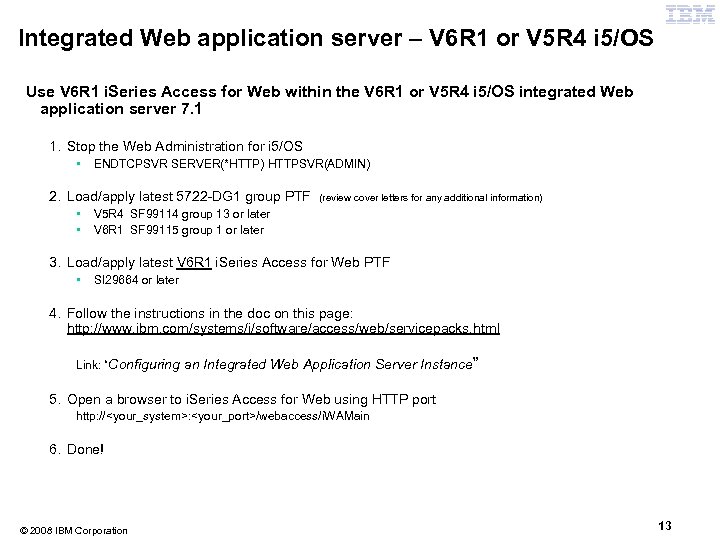
Integrated Web application server – V 6 R 1 or V 5 R 4 i 5/OS Use V 6 R 1 i. Series Access for Web within the V 6 R 1 or V 5 R 4 i 5/OS integrated Web application server 7. 1 1. Stop the Web Administration for i 5/OS • ENDTCPSVR SERVER(*HTTP) HTTPSVR(ADMIN) 2. Load/apply latest 5722 -DG 1 group PTF • • (review cover letters for any additional information) V 5 R 4 SF 99114 group 13 or later V 6 R 1 SF 99115 group 1 or later 3. Load/apply latest V 6 R 1 i. Series Access for Web PTF • SI 29664 or later 4. Follow the instructions in the doc on this page: http: //www. ibm. com/systems/i/software/access/web/servicepacks. html Link: “Configuring an Integrated Web Application Server Instance” 5. Open a browser to i. Series Access for Web using HTTP port http: //<your_system>: <your_port>/webaccess/i. WAMain 6. Done! © 2008 IBM Corporation 13
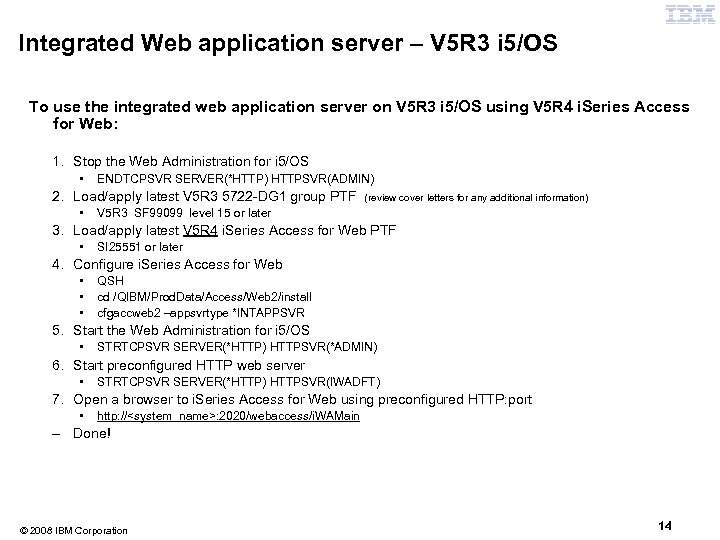
Integrated Web application server – V 5 R 3 i 5/OS To use the integrated web application server on V 5 R 3 i 5/OS using V 5 R 4 i. Series Access for Web: 1. Stop the Web Administration for i 5/OS • ENDTCPSVR SERVER(*HTTP) HTTPSVR(ADMIN) 2. Load/apply latest V 5 R 3 5722 -DG 1 group PTF • (review cover letters for any additional information) V 5 R 3 SF 99099 level 15 or later 3. Load/apply latest V 5 R 4 i. Series Access for Web PTF • SI 25551 or later 4. Configure i. Series Access for Web • • • QSH cd /QIBM/Prod. Data/Access/Web 2/install cfgaccweb 2 –appsvrtype *INTAPPSVR 5. Start the Web Administration for i 5/OS • STRTCPSVR SERVER(*HTTP) HTTPSVR(*ADMIN) 6. Start preconfigured HTTP web server • STRTCPSVR SERVER(*HTTP) HTTPSVR(IWADFT) 7. Open a browser to i. Series Access for Web using preconfigured HTTP: port • http: //<system_name>: 2020/webaccess/i. WAMain – Done! © 2008 IBM Corporation 14
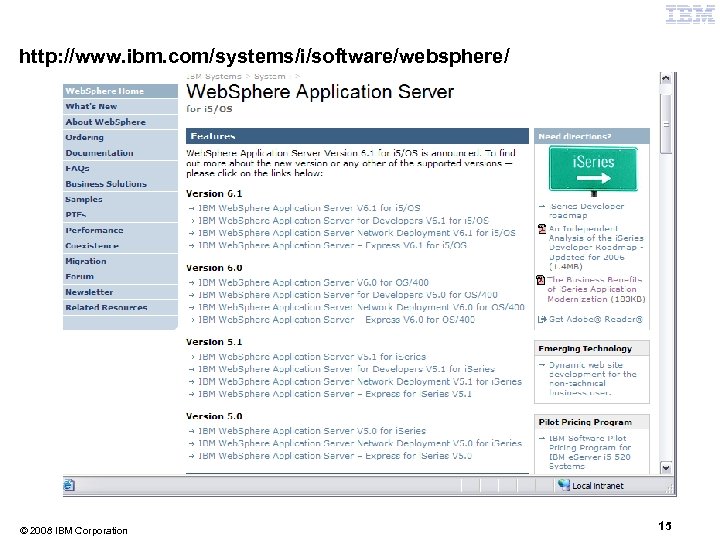
http: //www. ibm. com/systems/i/software/websphere/ © 2008 IBM Corporation 15
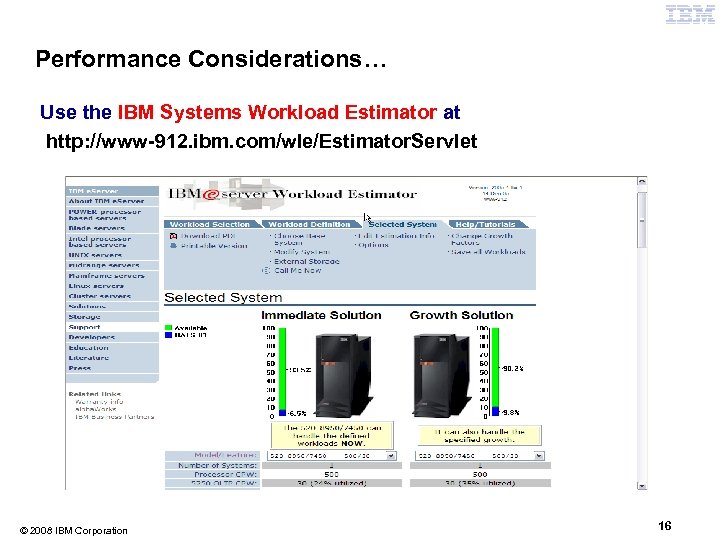
Performance Considerations… Use the IBM Systems Workload Estimator at http: //www-912. ibm. com/wle/Estimator. Servlet © 2008 IBM Corporation 16
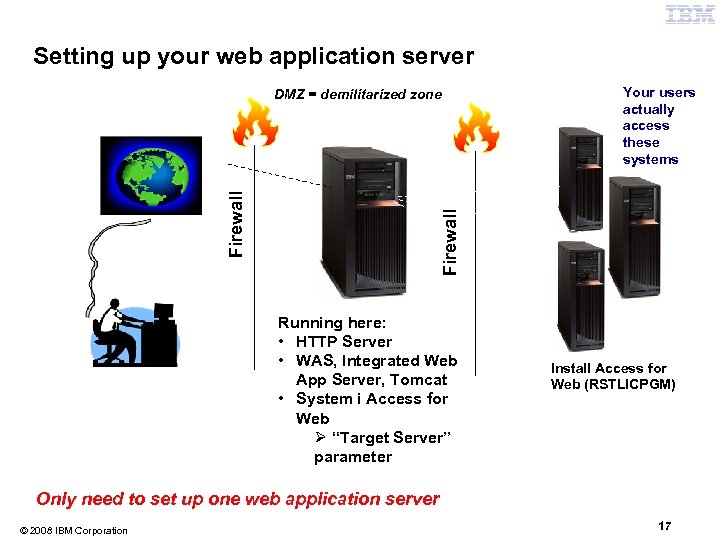
Setting up your web application server HTTP or HTTPS Your users actually access these systems Firewall DMZ = demilitarized DMZ zone Running here: • HTTP Server • WAS, Integrated Web App Server, Tomcat • System i Access for Web Ø “Target Server” parameter Install Access for Web (RSTLICPGM) Only need to set up one web application server © 2008 IBM Corporation 17
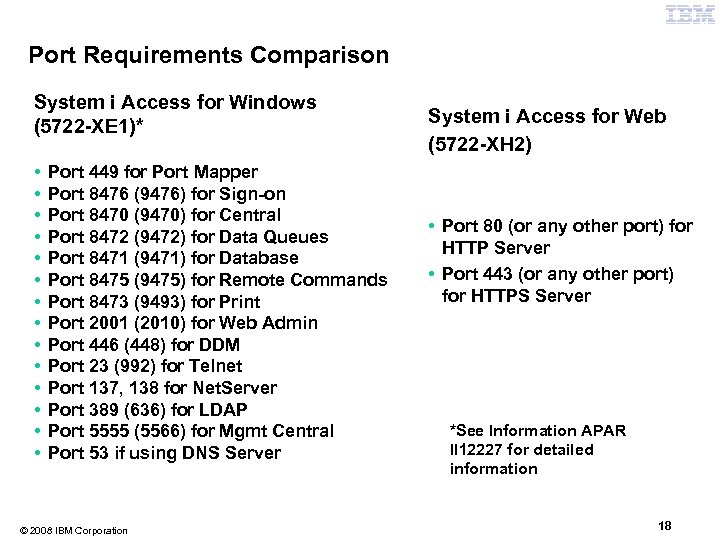
Port Requirements Comparison System i Access for Windows (5722 -XE 1)* • • • • Port 449 for Port Mapper Port 8476 (9476) for Sign-on Port 8470 (9470) for Central Port 8472 (9472) for Data Queues Port 8471 (9471) for Database Port 8475 (9475) for Remote Commands Port 8473 (9493) for Print Port 2001 (2010) for Web Admin Port 446 (448) for DDM Port 23 (992) for Telnet Port 137, 138 for Net. Server Port 389 (636) for LDAP Port 5555 (5566) for Mgmt Central Port 53 if using DNS Server © 2008 IBM Corporation System i Access for Web (5722 -XH 2) • Port 80 (or any other port) for HTTP Server • Port 443 (or any other port) for HTTPS Server *See Information APAR II 12227 for detailed information 18
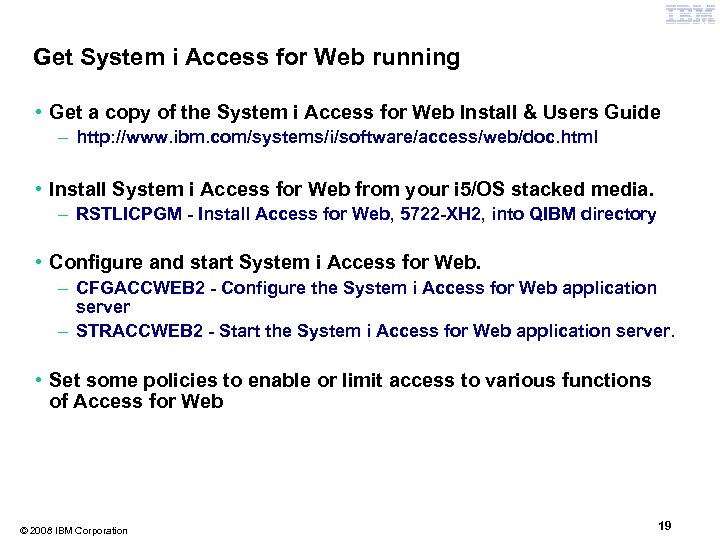
Get System i Access for Web running • Get a copy of the System i Access for Web Install & Users Guide – http: //www. ibm. com/systems/i/software/access/web/doc. html • Install System i Access for Web from your i 5/OS stacked media. – RSTLICPGM - Install Access for Web, 5722 -XH 2, into QIBM directory • Configure and start System i Access for Web. – CFGACCWEB 2 - Configure the System i Access for Web application server – STRACCWEB 2 - Start the System i Access for Web application server. • Set some policies to enable or limit access to various functions of Access for Web © 2008 IBM Corporation 19
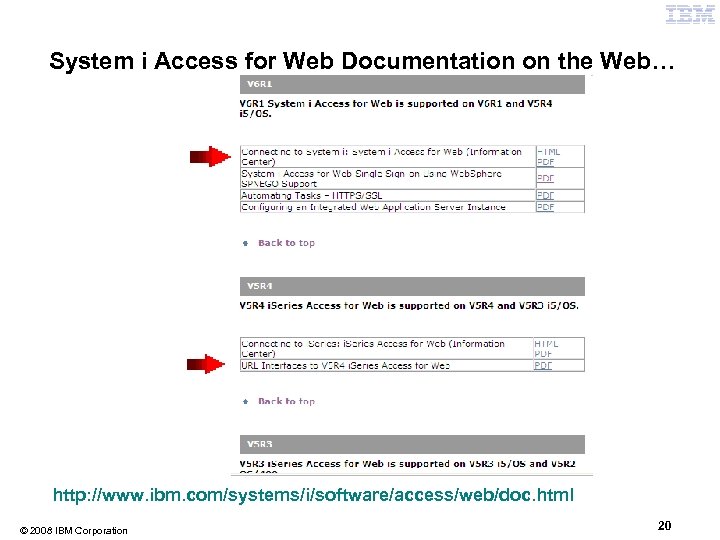
System i Access for Web Documentation on the Web… http: //www. ibm. com/systems/i/software/access/web/doc. html © 2008 IBM Corporation 20
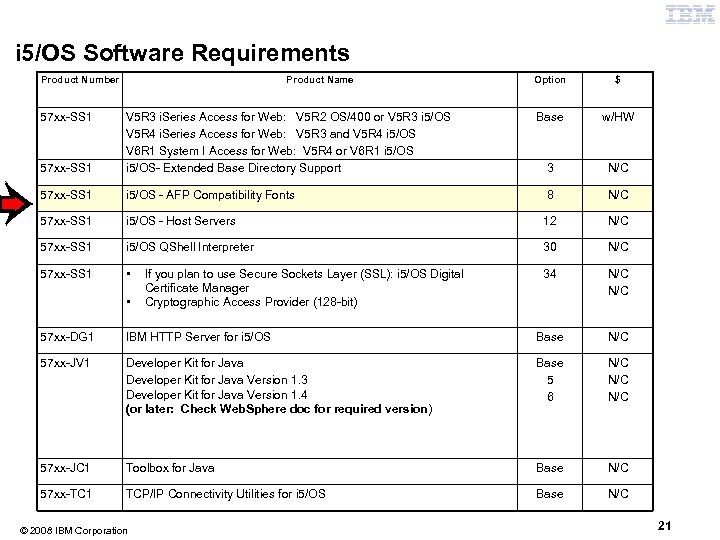
i 5/OS Software Requirements Product Number 57 xx-SS 1 Product Name Option $ Base w/HW 3 N/C 57 xx-SS 1 V 5 R 3 i. Series Access for Web: V 5 R 2 OS/400 or V 5 R 3 i 5/OS V 5 R 4 i. Series Access for Web: V 5 R 3 and V 5 R 4 i 5/OS V 6 R 1 System I Access for Web: V 5 R 4 or V 6 R 1 i 5/OS- Extended Base Directory Support 57 xx-SS 1 i 5/OS - AFP Compatibility Fonts 8 N/C 57 xx-SS 1 i 5/OS - Host Servers 12 N/C 57 xx-SS 1 i 5/OS QShell Interpreter 30 N/C 57 xx-SS 1 • 34 N/C • If you plan to use Secure Sockets Layer (SSL): i 5/OS Digital Certificate Manager Cryptographic Access Provider (128 -bit) 57 xx-DG 1 IBM HTTP Server for i 5/OS Base N/C 57 xx-JV 1 Developer Kit for Java Version 1. 3 Developer Kit for Java Version 1. 4 (or later: Check Web. Sphere doc for required version) Base 5 6 N/C N/C 57 xx-JC 1 Toolbox for Java Base N/C 57 xx-TC 1 TCP/IP Connectivity Utilities for i 5/OS Base N/C © 2008 IBM Corporation 21
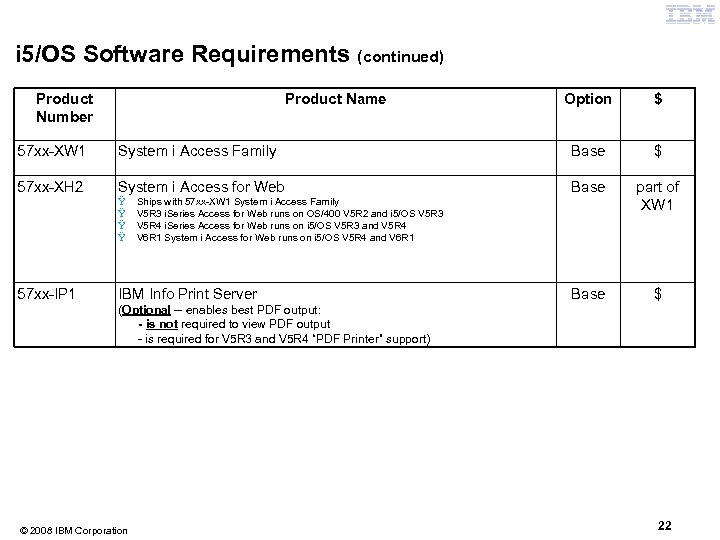
i 5/OS Software Requirements (continued) Product Number Product Name Option $ 57 xx-XW 1 System i Access Family Base $ 57 xx-XH 2 System i Access for Web Base part of XW 1 Base $ Ÿ Ÿ 57 xx-IP 1 Ships with 57 xx-XW 1 System i Access Family V 5 R 3 i. Series Access for Web runs on OS/400 V 5 R 2 and i 5/OS V 5 R 3 V 5 R 4 i. Series Access for Web runs on i 5/OS V 5 R 3 and V 5 R 4 V 6 R 1 System i Access for Web runs on i 5/OS V 5 R 4 and V 6 R 1 IBM Info Print Server (Optional -- enables best PDF output: - is not required to view PDF output - is required for V 5 R 3 and V 5 R 4 “PDF Printer” support) © 2008 IBM Corporation 22
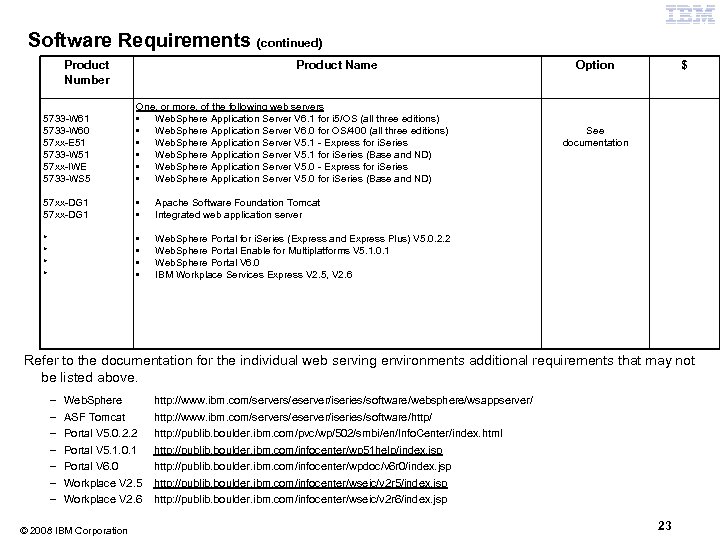
Software Requirements (continued) Product Number Product Name 5733 -W 61 5733 -W 60 57 xx-E 51 5733 -W 51 57 xx-IWE 5733 -WS 5 One, or more, of the following web servers • Web. Sphere Application Server V 6. 1 for i 5/OS (all three editions) • Web. Sphere Application Server V 6. 0 for OS/400 (all three editions) • Web. Sphere Application Server V 5. 1 - Express for i. Series • Web. Sphere Application Server V 5. 1 for i. Series (Base and ND) • Web. Sphere Application Server V 5. 0 - Express for i. Series • Web. Sphere Application Server V 5. 0 for i. Series (Base and ND) 57 xx-DG 1 • • • $ Apache Software Foundation Tomcat Integrated web application server * * Option Web. Sphere Portal for i. Series (Express and Express Plus) V 5. 0. 2. 2 Web. Sphere Portal Enable for Multiplatforms V 5. 1. 0. 1 Web. Sphere Portal V 6. 0 IBM Workplace Services Express V 2. 5, V 2. 6 See documentation Refer to the documentation for the individual web serving environments additional requirements that may not be listed above. – – – – Web. Sphere ASF Tomcat Portal V 5. 0. 2. 2 Portal V 5. 1. 0. 1 Portal V 6. 0 http: //www. ibm. com/servers/eserver/iseries/software/websphere/wsappserver/ http: //www. ibm. com/servers/eserver/iseries/software/http/ http: //publib. boulder. ibm. com/pvc/wp/502/smbi/en/Info. Center/index. html http: //publib. boulder. ibm. com/infocenter/wp 51 help/index. jsp http: //publib. boulder. ibm. com/infocenter/wpdoc/v 6 r 0/index. jsp Workplace V 2. 5 Workplace V 2. 6 http: //publib. boulder. ibm. com/infocenter/wseic/v 2 r 5/index. jsp http: //publib. boulder. ibm. com/infocenter/wseic/v 2 r 6/index. jsp © 2008 IBM Corporation 23
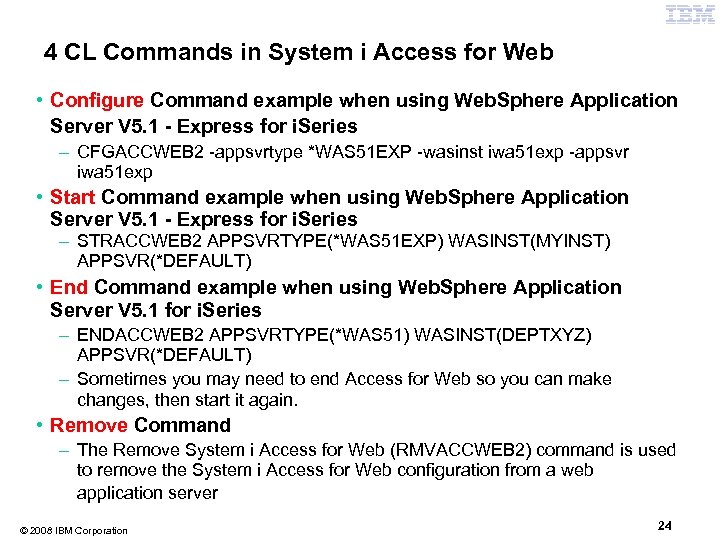
4 CL Commands in System i Access for Web Example of the CL commands • Configure Command example when using Web. Sphere Application Server V 5. 1 - Express for i. Series – CFGACCWEB 2 -appsvrtype *WAS 51 EXP -wasinst iwa 51 exp -appsvr iwa 51 exp • Start Command example when using Web. Sphere Application Server V 5. 1 - Express for i. Series – STRACCWEB 2 APPSVRTYPE(*WAS 51 EXP) WASINST(MYINST) APPSVR(*DEFAULT) • End Command example when using Web. Sphere Application Server V 5. 1 for i. Series – ENDACCWEB 2 APPSVRTYPE(*WAS 51) WASINST(DEPTXYZ) APPSVR(*DEFAULT) – Sometimes you may need to end Access for Web so you can make changes, then start it again. • Remove Command – The Remove System i Access for Web (RMVACCWEB 2) command is used to remove the System i Access for Web configuration from a web application server © 2008 IBM Corporation 24
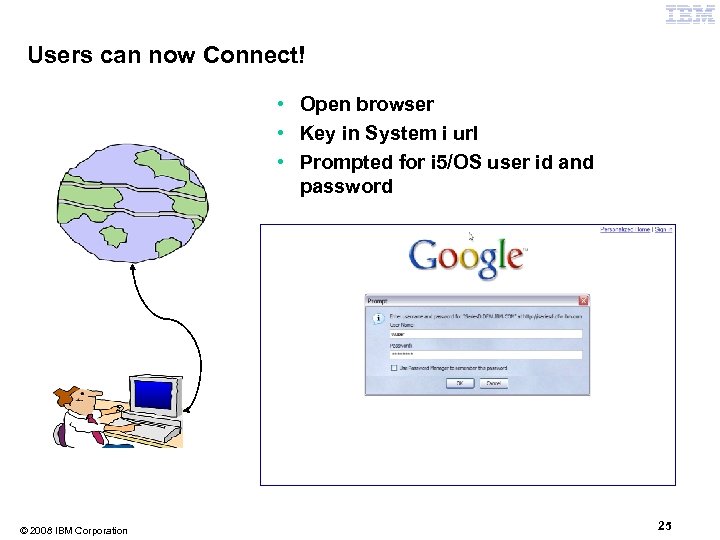
Users can now Connect! • Open browser • Key in System i url • Prompted for i 5/OS user id and password © 2008 IBM Corporation 25
Different Ways to Roll Out System i Access for Web • Use ‘out of the box’ – Set some policies to limit what functions are accessible to your users, and give them the URL address to System i Access for Web • Use ‘out of the box’, but set up predefined functions – You can set up preconfigured 5250 sessions that users (or groups of users) can run, can create predefined database requests for users to run, set up commands users can run, etc. • Create your own ‘window’ to your system through Access for Web – Add company banners to screens, set up ‘click and link’ tasks that users can perform, set up macros to simplify user access. • Use Access for Web with the IBM Web. Sphere Portal solution – A single unified workspace in which your employees, trading partners, and customers can easily find and use the applications and information that they need © 2008 IBM Corporation 26
Different Ways to Roll Out System i Access for Web • Use ‘out of the box’, but set up predefined functions • Create your own ‘window’ to your system through System i Access for Web • Use the Web. Sphere Portal solution © 2008 IBM Corporation 27
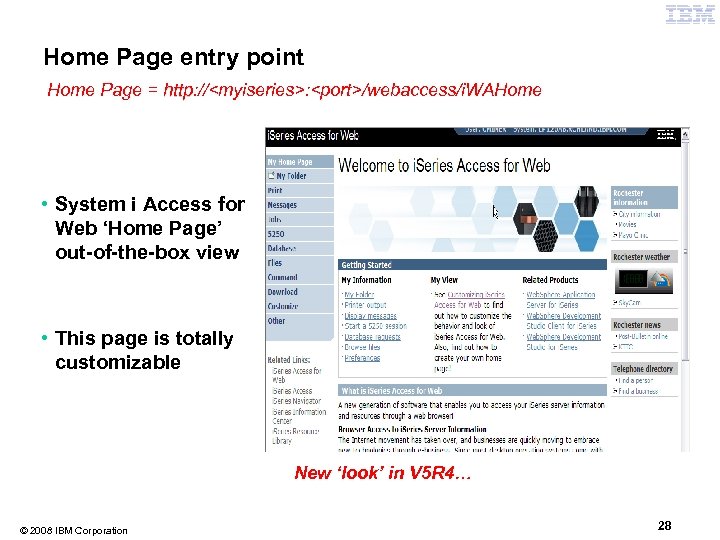
Home Page entry point Home Page = http: //<myiseries>: <port>/webaccess/i. WAHome http • System i Access for Web ‘Home Page’ out-of-the-box view • This page is totally customizable New ‘look’ in V 5 R 4… © 2008 IBM Corporation 28
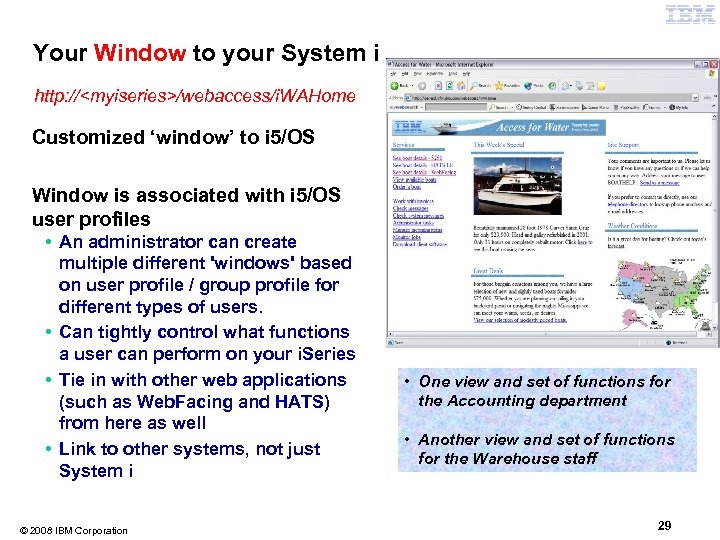
Your Window to your System i http: //<myiseries>/webaccess/i. WAHome http Customized ‘window’ to i 5/OS Window is associated with i 5/OS user profiles • An administrator can create multiple different 'windows' based on user profile / group profile for different types of users. • Can tightly control what functions a user can perform on your i. Series • Tie in with other web applications (such as Web. Facing and HATS) from here as well • Link to other systems, not just System i © 2008 IBM Corporation • One view and set of functions for the Accounting department • Another view and set of functions for the Warehouse staff 29
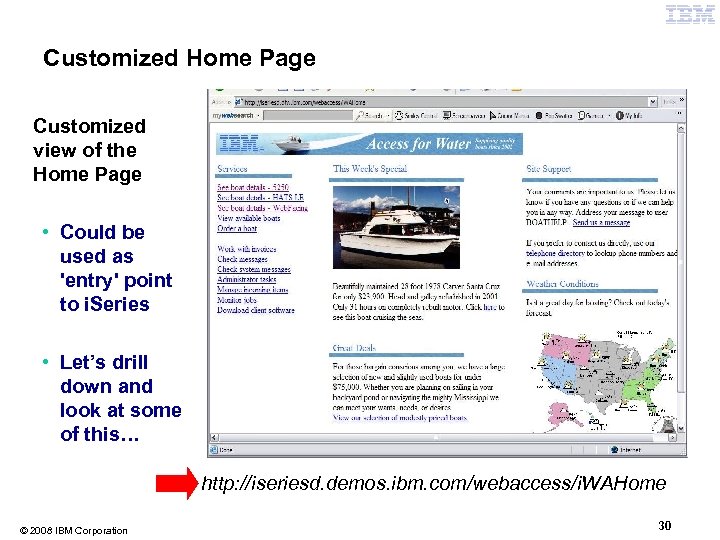
Customized Home Page Customized view of the Home Page • Could be used as 'entry' point to i. Series • Let’s drill down and look at some of this… http: //iseriesd. demos. ibm. com/webaccess/i. WAHome © 2008 IBM Corporation 30
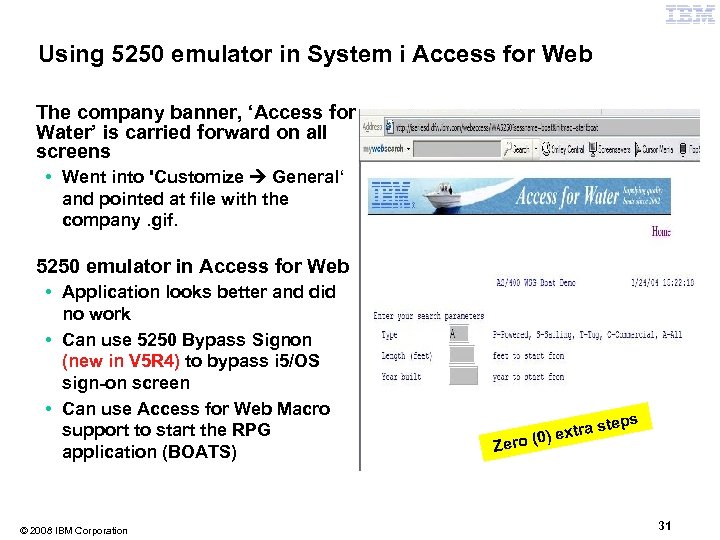
Using 5250 emulator in System i Access for Web The company banner, ‘Access for Water’ is carried forward on all screens • Went into 'Customize General‘ and pointed at file with the company. gif. 5250 emulator in Access for Web • Application looks better and did no work • Can use 5250 Bypass Signon (new in V 5 R 4) to bypass i 5/OS sign-on screen • Can use Access for Web Macro support to start the RPG application (BOATS) © 2008 IBM Corporation Zer xtra o (0) e steps 31
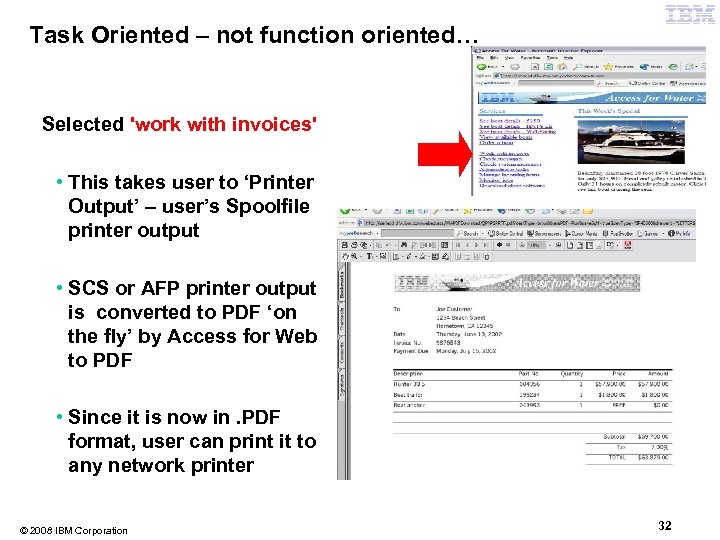
Task Oriented – not function oriented… Selected 'work with invoices' • This takes user to ‘Printer Output’ – user’s Spoolfile printer output • SCS or AFP printer output is converted to PDF ‘on the fly’ by Access for Web to PDF • Since it is now in. PDF format, user can print it to any network printer © 2008 IBM Corporation 32
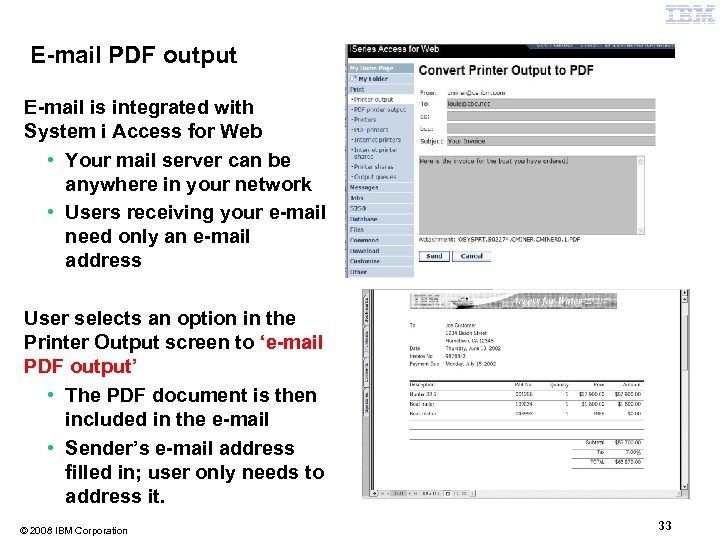
E-mail PDF output E-mail is integrated with System i Access for Web • Your mail server can be anywhere in your network • Users receiving your e-mail need only an e-mail address User selects an option in the Printer Output screen to ‘e-mail PDF output’ • The PDF document is then included in the e-mail • Sender’s e-mail address filled in; user only needs to address it. © 2008 IBM Corporation 33
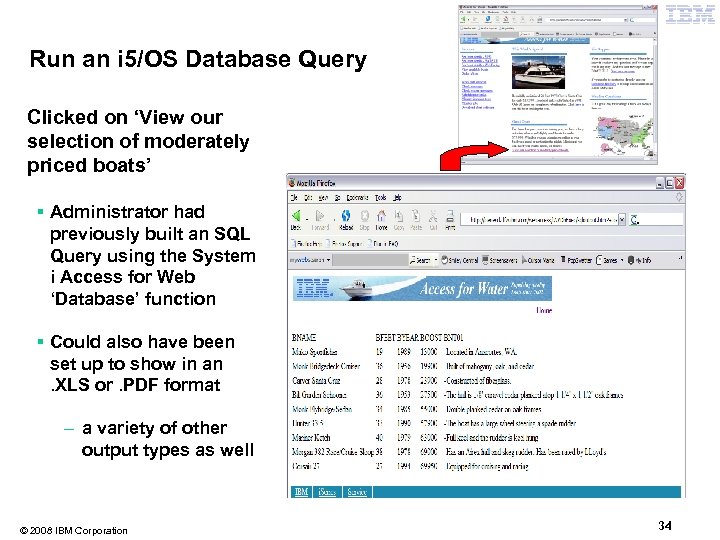
Run an i 5/OS Database Query Clicked on ‘View our selection of moderately priced boats’ § Administrator had previously built an SQL Query using the System i Access for Web ‘Database’ function § Could also have been set up to show in an. XLS or. PDF format – a variety of other output types as well © 2008 IBM Corporation 34
Try out System i Access for Web on a demo server! Start your browser and connect to the following web site: http: //iseriesd. demos. ibm. com/webaccess/i. WAHome (case sensitive) User ID = WACUST Password = demo 2 pwd User ID = BOATADMIN Password = demo 2 pwd This shows the basic look of System i Access for Web as we ship it. You can try various functions -including working with printer output, creating database requests, etc. Click on the 5250 tab, sign onto the i. Series, then start an RPG application called BOATS and run it. This is an example of how a customer might design a web page for their use. You will see that an end user could start the same BOATS application by clicking on the 5250 session, or they could have used HATS to run the application. You will also see other links that would let a user work with spooled file information, work with IFS, run database requests, etc. . Send email to: LLHIRSCH@us. ibm. com to reset the user profiles if either gets disabled. © 2008 IBM Corporation 35
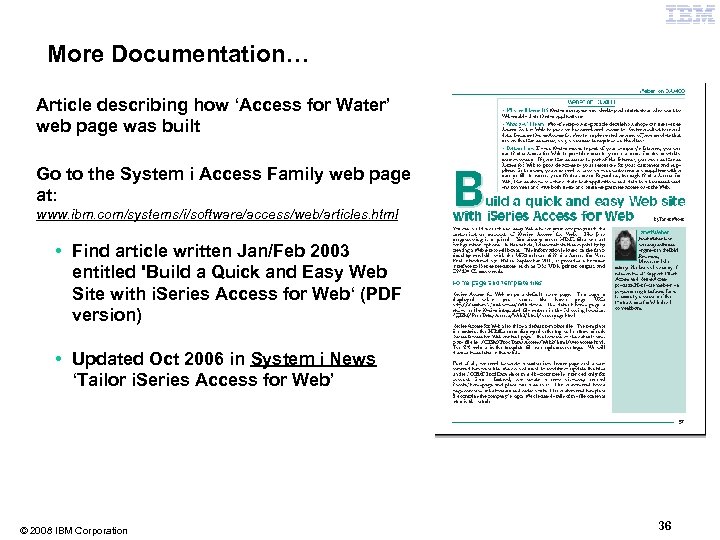
More Documentation… Article describing how ‘Access for Water’ web page was built Go to the System i Access Family web page at: www. ibm. com/systems/i/software/access/web/articles. html • Find article written Jan/Feb 2003 entitled 'Build a Quick and Easy Web Site with i. Series Access for Web‘ (PDF version) • Updated Oct 2006 in System i News ‘Tailor i. Series Access for Web’ © 2008 IBM Corporation 36
Different Ways to Rollout Access for Web • Use ‘out of the box’, but set up predefined functions • Create your own ‘window’ to your system through Access for Web • Use the Web. Sphere Portal solution © 2008 IBM Corporation 37
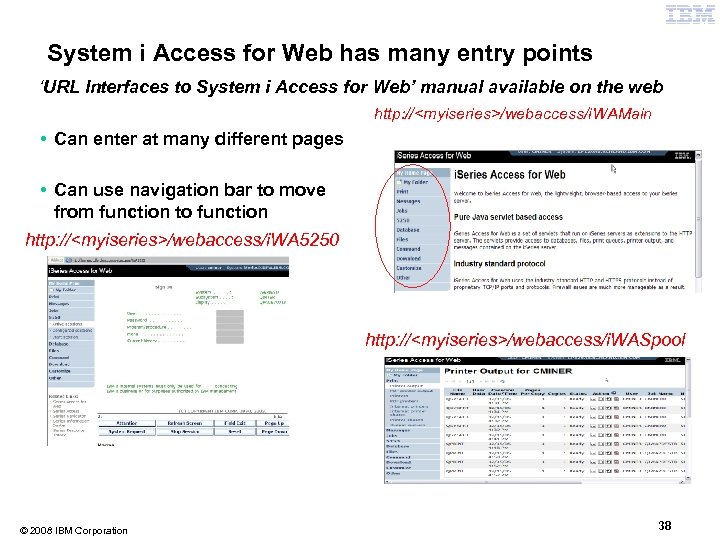
System i Access for Web has many entry points ‘URL Interfaces to System i Access for Web’ manual available on the web http: //<myiseries>/webaccess/i. WAMain • Can enter at many different pages • Can use navigation bar to move from function to function http: //<myiseries>/webaccess/i. WA 5250 http: //<myiseries>/webaccess/i. WASpool © 2008 IBM Corporation 38
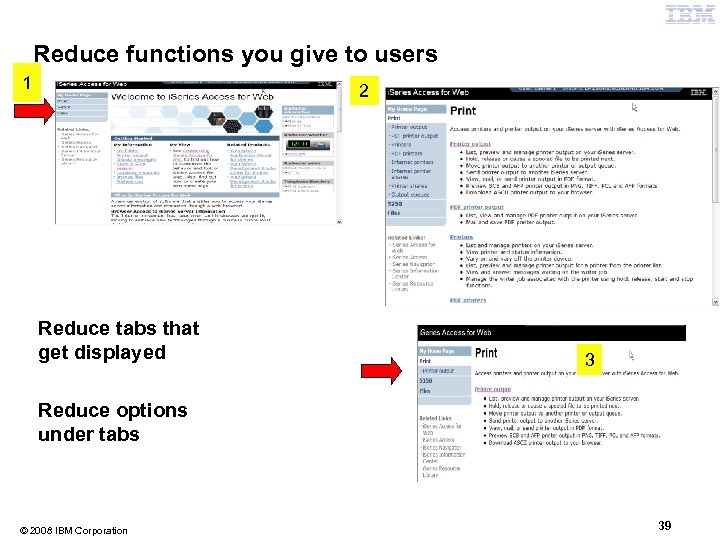
Reduce functions you give to users 1 2 2 Reduce tabs that get displayed Reduce options under tabs © 2008 IBM Corporation 3 3 39
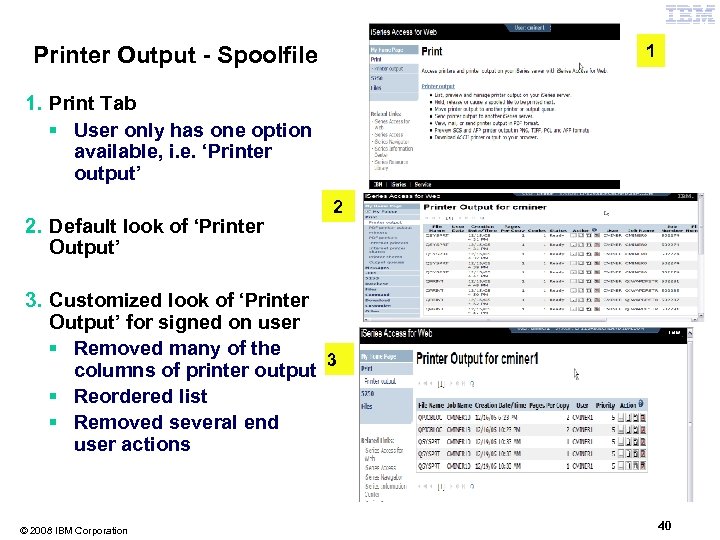
1 Printer Output - Spoolfile 1. Print Tab § User only has one option available, i. e. ‘Printer output’ 2. Default look of ‘Printer Output’ 2 3. Customized look of ‘Printer Output’ for signed on user § Removed many of the 3 columns of printer output § Reordered list § Removed several end user actions © 2008 IBM Corporation 40
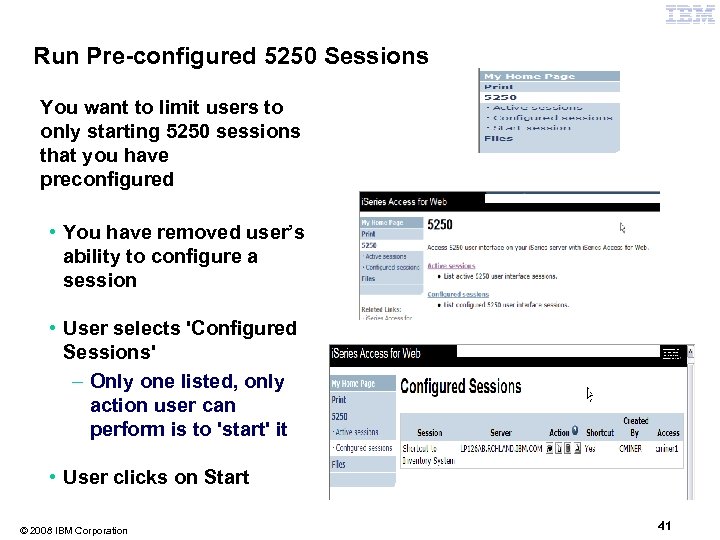
Run Pre-configured 5250 Sessions You want to limit users to only starting 5250 sessions that you have preconfigured • You have removed user’s ability to configure a session • User selects 'Configured Sessions' – Only one listed, only action user can perform is to 'start' it • User clicks on Start © 2008 IBM Corporation 41
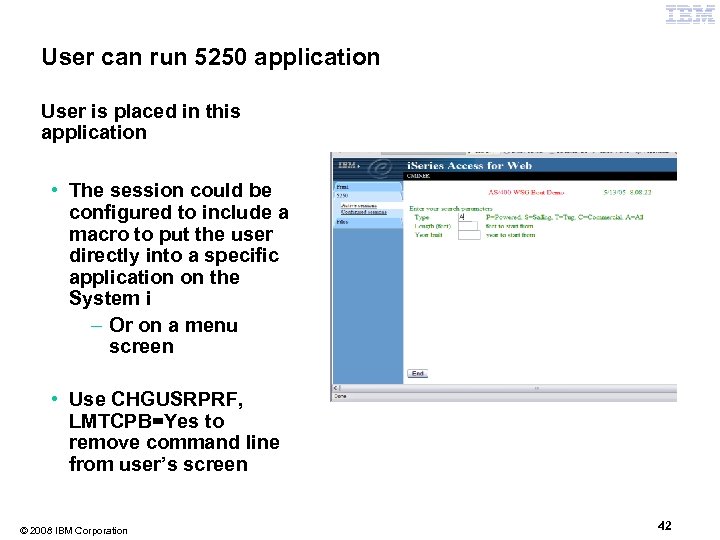
User can run 5250 application User is placed in this application • The session could be configured to include a macro to put the user directly into a specific application on the System i – Or on a menu screen • Use CHGUSRPRF, LMTCPB=Yes to remove command line from user’s screen © 2008 IBM Corporation 42
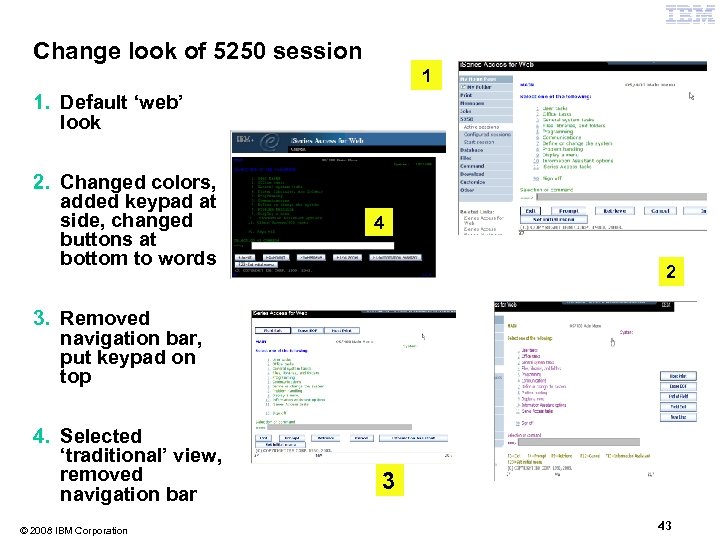
Change look of 5250 session 1 1. Default ‘web’ look 2. Changed colors, added keypad at side, changed buttons at bottom to words 4 2 3. Removed navigation bar, put keypad on top 4. Selected ‘traditional’ view, removed navigation bar © 2008 IBM Corporation 3 43
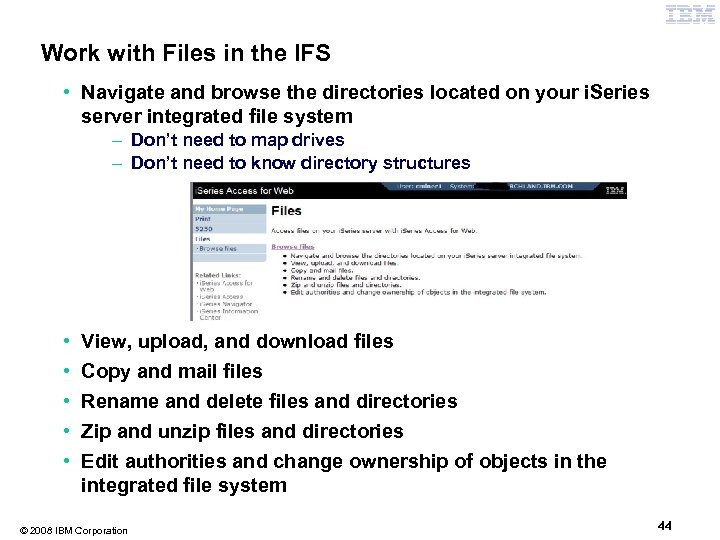
Work with Files in the IFS • Navigate and browse the directories located on your i. Series server integrated file system – Don’t need to map drives – Don’t need to know directory structures • • • View, upload, and download files Copy and mail files Rename and delete files and directories Zip and unzip files and directories Edit authorities and change ownership of objects in the integrated file system © 2008 IBM Corporation 44
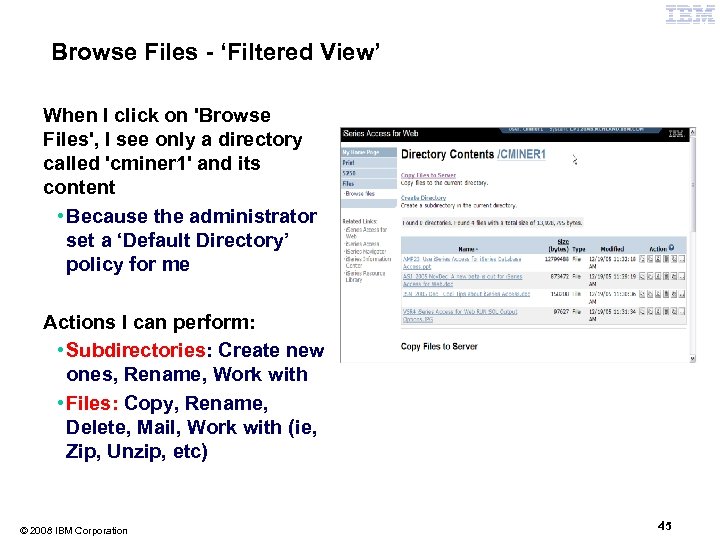
Browse Files - ‘Filtered View’ When I click on 'Browse Files', I see only a directory called 'cminer 1' and its content • Because the administrator set a ‘Default Directory’ policy for me Actions I can perform: • Subdirectories: Create new ones, Rename, Work with • Files: Copy, Rename, Delete, Mail, Work with (ie, Zip, Unzip, etc) © 2008 IBM Corporation 45
Different Ways to Rollout System i Access for Web • Use ‘out of the box’, but set up predefined functions • Create your own ‘window’ to your system through Access for Web • Use the Web. Sphere Portal solution © 2008 IBM Corporation 46
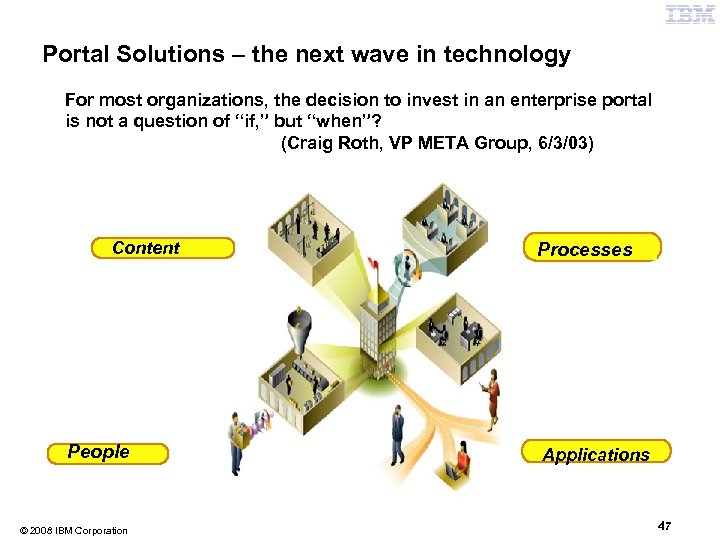
Portal Solutions – the next wave in technology For most organizations, the decision to invest in an enterprise portal is not a question of “if, ” but “when”? (Craig Roth, VP META Group, 6/3/03) Content People © 2008 IBM Corporation Processes Applications 47
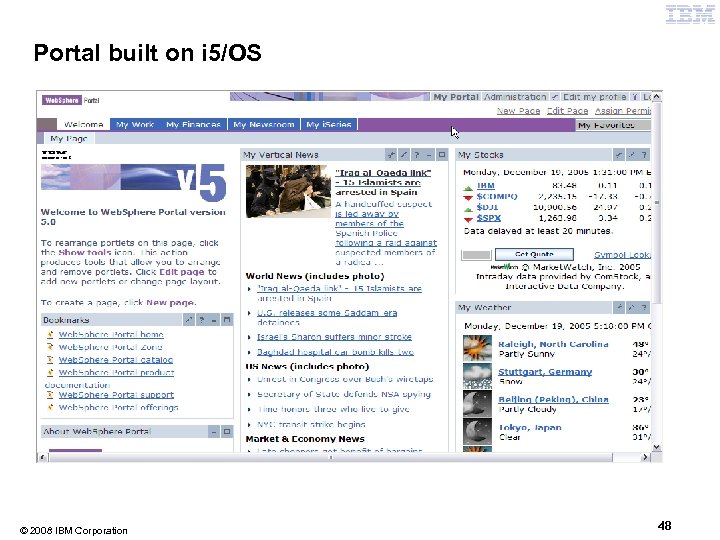
Portal built on i 5/OS © 2008 IBM Corporation 48
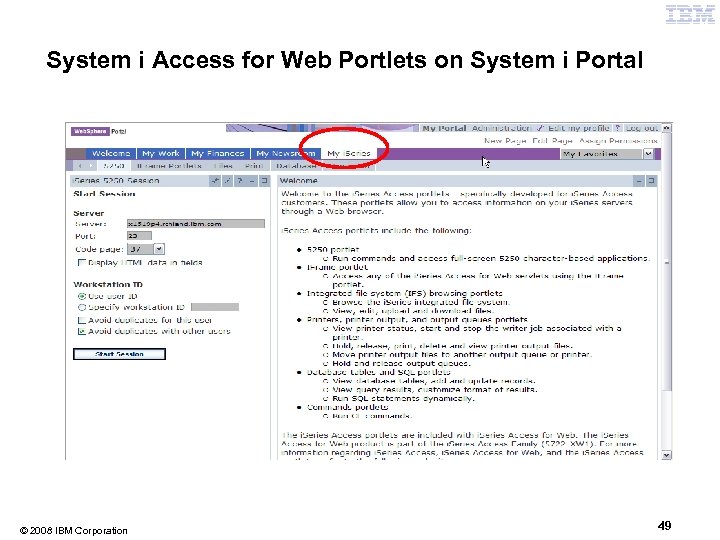
System i Access for Web Portlets on System i Portal © 2008 IBM Corporation 49
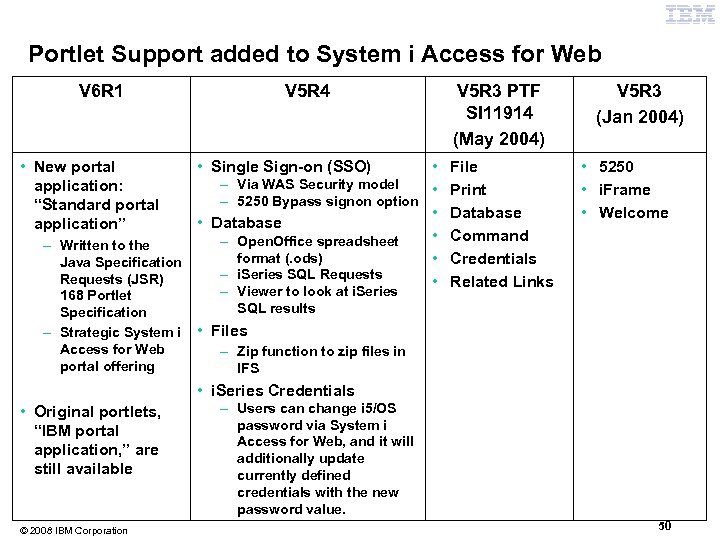
Portlet Support added to System i Access for Web V 6 R 1 • New portal application: “Standard portal application” V 5 R 4 • – Via WAS Security model • – 5250 Bypass signon option • • Database • – Open. Office spreadsheet – Written to the format (. ods) • Java Specification – i. Series SQL Requests (JSR) • 168 Portlet Specification – Strategic System i Access for Web portal offering • Single Sign-on (SSO) – Viewer to look at i. Series SQL results V 5 R 3 PTF SI 11914 (May 2004) File Print Database Command Credentials Related Links V 5 R 3 (Jan 2004) • 5250 • i. Frame • Welcome • Files – Zip function to zip files in IFS • i. Series Credentials • Original portlets, “IBM portal application, ” are still available © 2008 IBM Corporation – Users can change i 5/OS password via System i Access for Web, and it will additionally update currently defined credentials with the new password value. 50
Different Ways to Rollout Access for Web • Use ‘out of the box’, but set up predefined functions • Create your own ‘window’ to your system through Access for Web • Use the Web. Sphere Portal solution © 2008 IBM Corporation 51
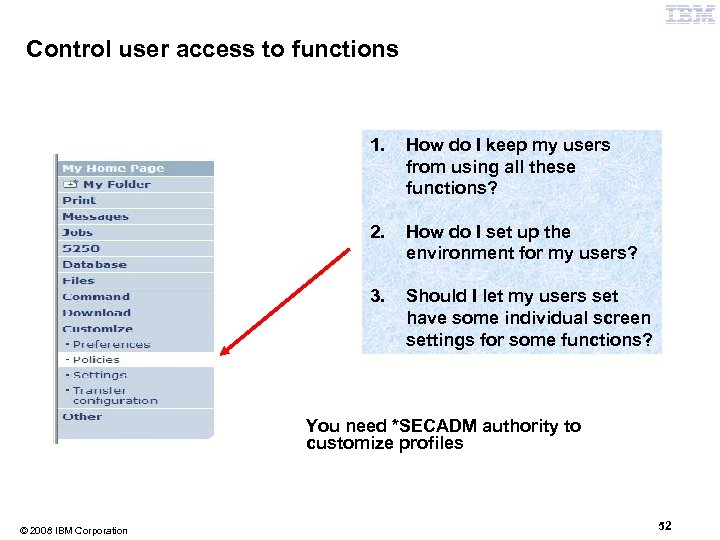
Control user access to functions 1. How do I keep my users from using all these functions? 2. How do I set up the environment for my users? 3. Should I let my users set have some individual screen settings for some functions? You need *SECADM authority to customize profiles © 2008 IBM Corporation 52
System i Access for Web uses i 5/OS User Profiles When an System i Access for Web user attempts to access any function on the i. Series, the following sequence of checks are made to authenticate user access: • • • User profile Group profile(s) *PUBLIC profile is the set of default policy settings shipped with Access for Web • The defaults allow most functions to be available to all users The settings in these policies indicate what functions within System i Access for Web, a user can attempt to use. • • • For Example: Let's say you give users full access to the 'Database' tab. You have Object Level authority set up on your data When a user attempts to use one of the System i Access for Web Database GUIs to get at the database information, the user will get an i 5/OS message indicating they are not authorized to access data © 2008 IBM Corporation 53
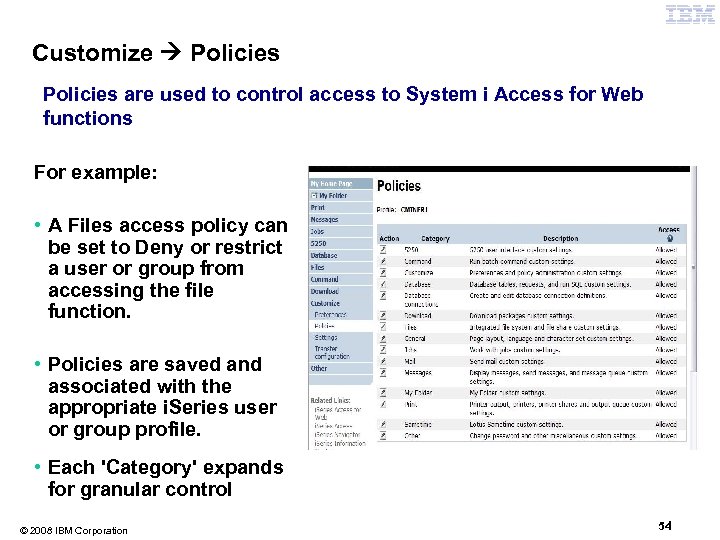
Customize Policies are used to control access to System i Access for Web functions For example: • A Files access policy can be set to Deny or restrict a user or group from accessing the file function. • Policies are saved and associated with the appropriate i. Series user or group profile. • Each 'Category' expands for granular control © 2008 IBM Corporation 54
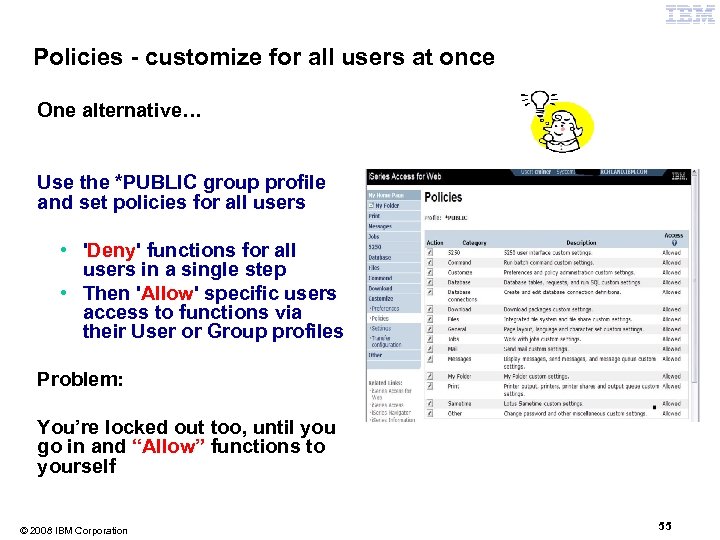
Policies - customize for all users at once One alternative… Use the *PUBLIC group profile and set policies for all users • 'Deny' functions for all users in a single step • Then 'Allow' specific users access to functions via their User or Group profiles Problem: You’re locked out too, until you go in and “Allow” functions to yourself © 2008 IBM Corporation 55
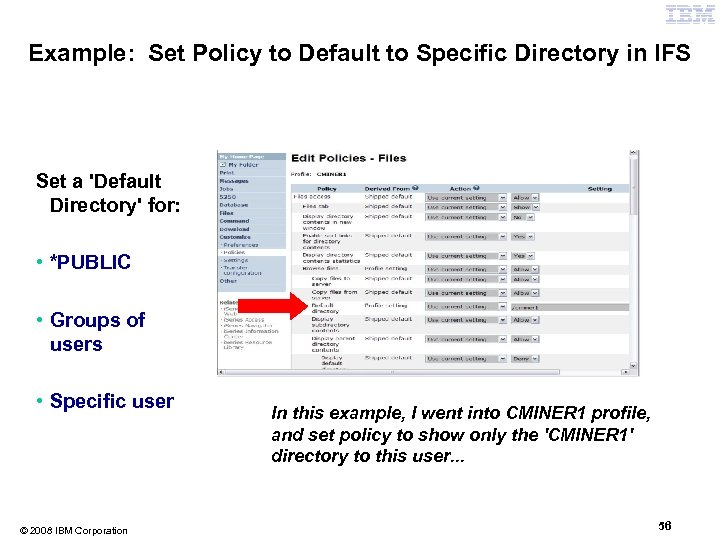
Example: Set Policy to Default to Specific Directory in IFS Set a 'Default Directory' for: • *PUBLIC • Groups of users • Specific user © 2008 IBM Corporation In this example, I went into CMINER 1 profile, and set policy to show only the 'CMINER 1' directory to this user. . . 56
• My Folder • Print • Messages • Jobs • 5250 • Database • Files • Commands • Customize • Downloads • Mail © 2008 IBM Corporation 57
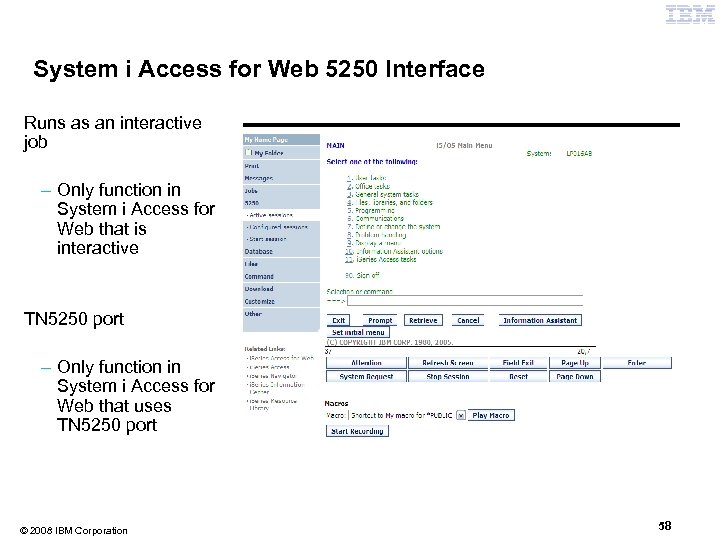
System i Access for Web 5250 Interface Runs as an interactive job – Only function in System i Access for Web that is interactive TN 5250 port – Only function in System i Access for Web that uses TN 5250 port © 2008 IBM Corporation 58
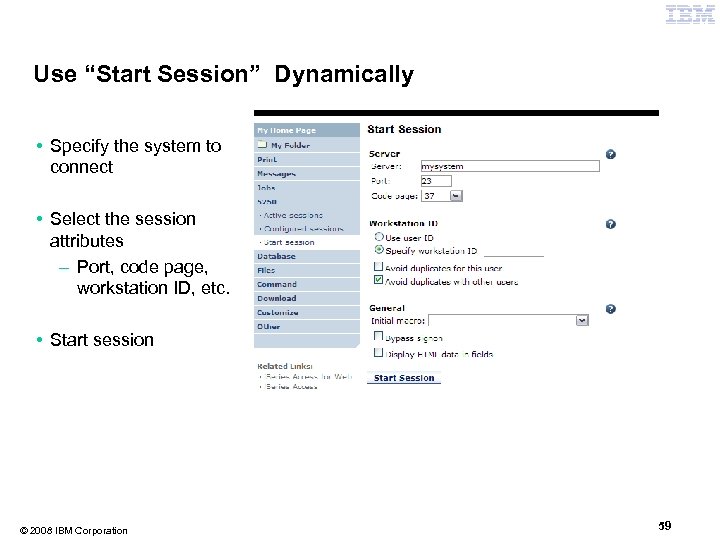
Use “Start Session” Dynamically • Specify the system to connect • Select the session attributes – Port, code page, workstation ID, etc. • Start session © 2008 IBM Corporation 59
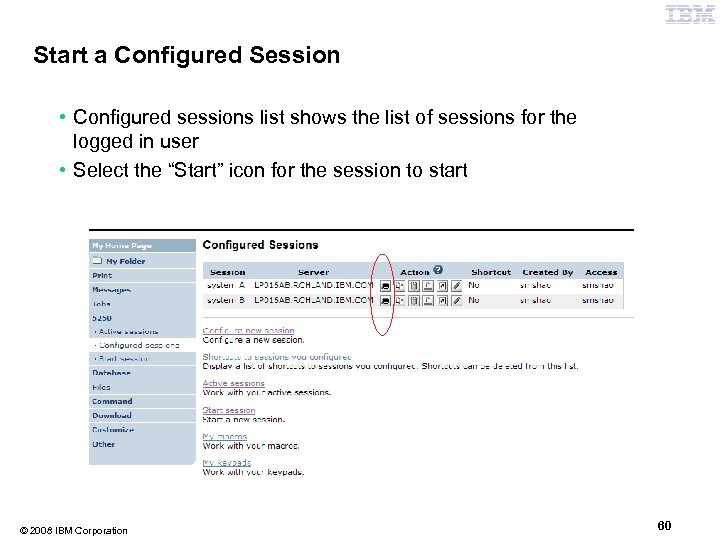
Start a Configured Session • Configured sessions list shows the list of sessions for the logged in user • Select the “Start” icon for the session to start © 2008 IBM Corporation 60
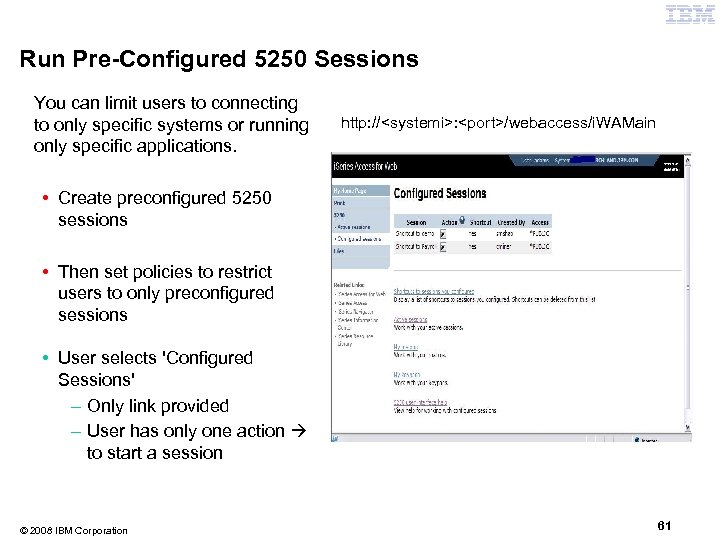
Run Pre-Configured 5250 Sessions You can limit users to connecting to only specific systems or running only specific applications. http: //<systemi>: <port>/webaccess/i. WAMain • Create preconfigured 5250 sessions • Then set policies to restrict users to only preconfigured sessions • User selects 'Configured Sessions' – Only link provided – User has only one action to start a session © 2008 IBM Corporation 61
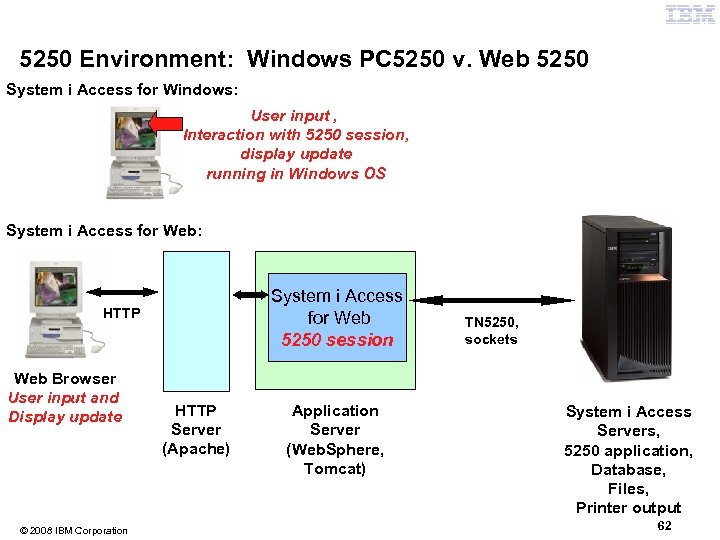
5250 Environment: Windows PC 5250 v. Web 5250 System i Access for Windows: User input , Interaction with 5250 session, display update running in Windows OS System i Access for Web: System i Access for Web 5250 session HTTP Web Browser User input and Display update © 2008 IBM Corporation HTTP Server (Apache) Application Server (Web. Sphere, Tomcat) TN 5250, sockets System i Access Servers, 5250 application, Database, Files, Printer output 62
Things to know Because of the architecture on the previous chart—that 5250 session is implemented using HTML and that the 5250 session is separate from the user input and display update-- here are considerations: • Not intended to replace full function emulators like PC 5250, Host On Demand, etc. for purposes of "heads-down" data entry type of operations – Does not include graphics, EHLAPPI, DDE functionality – Does not provide keyboard mapping – Does not support certain keys the way PC 5250 does (i. e. , Field Exit) • Does not include Printer Emulation (push to printer) – i 5/OS strategy is Internet Printing Protocol (IPP) printing – System i Access for Web provides capability to convert spooled files to PDF • No direct interaction with server, so unsolicited server messages can't be received. – Need to request refresh to see break messages • Does not include file transfer from session © 2008 IBM Corporation 63
• My Folder • Print • Messages • Jobs • 5250 • Database • Files • Commands • Customize • Downloads • Mail © 2008 IBM Corporation 64
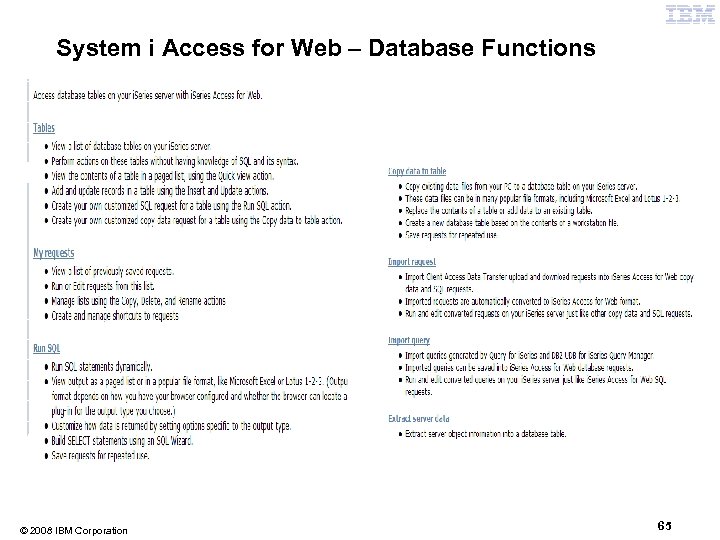
System i Access for Web – Database Functions © 2008 IBM Corporation 65
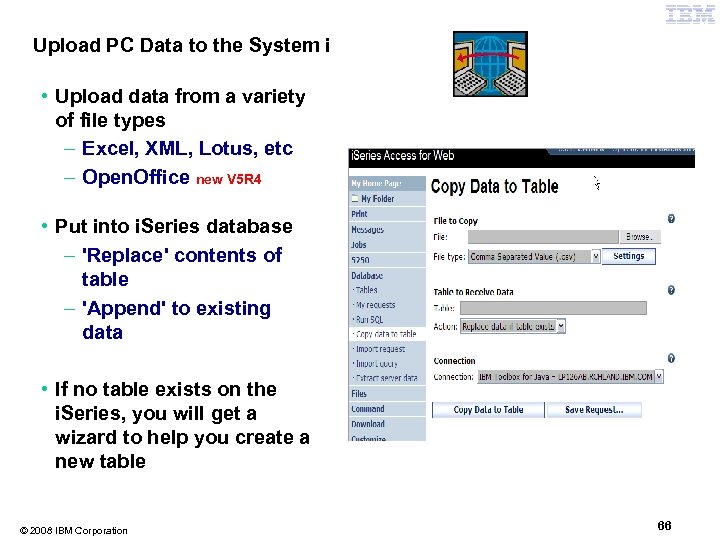
Upload PC Data to the System i • Upload data from a variety of file types – Excel, XML, Lotus, etc – Open. Office new V 5 R 4 • Put into i. Series database – 'Replace' contents of table – 'Append' to existing data • If no table exists on the i. Series, you will get a wizard to help you create a new table © 2008 IBM Corporation 66
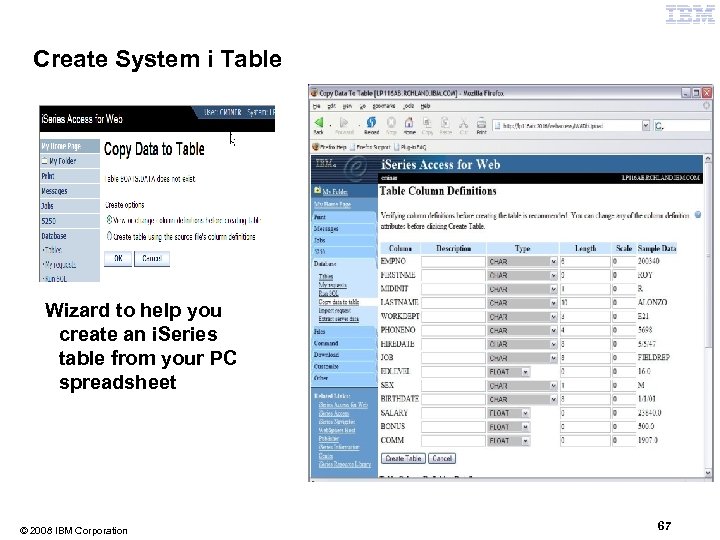
Create System i Table Wizard to help you create an i. Series table from your PC spreadsheet © 2008 IBM Corporation 67
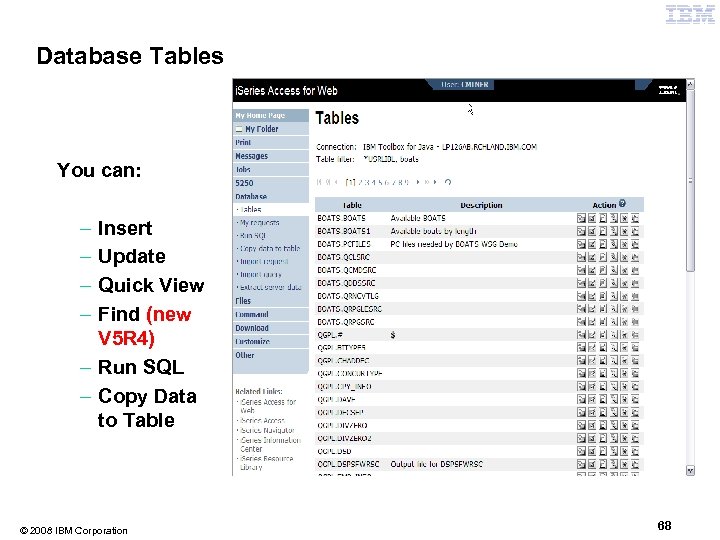
Database Tables You can: – – Insert Update Quick View Find (new V 5 R 4) – Run SQL – Copy Data to Table © 2008 IBM Corporation 68
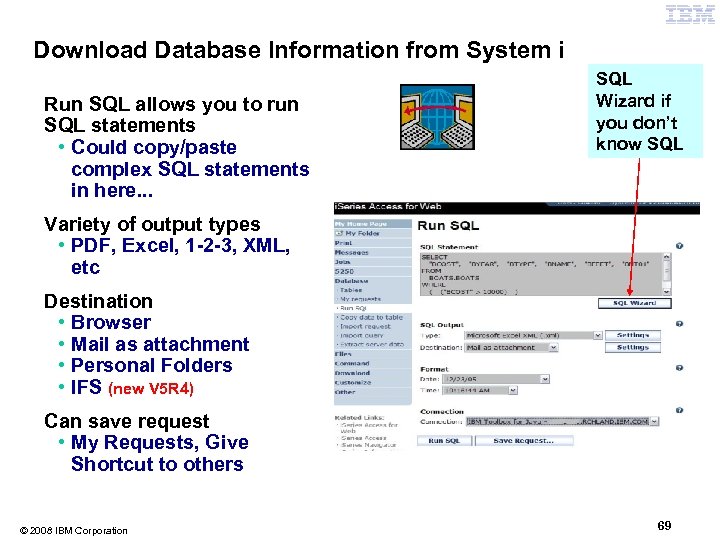
Download Database Information from System i Run SQL allows you to run SQL statements • Could copy/paste complex SQL statements in here. . . SQL Wizard if you don’t know SQL Variety of output types • PDF, Excel, 1 -2 -3, XML, etc Destination • Browser • Mail as attachment • Personal Folders • IFS (new V 5 R 4) Can save request • My Requests, Give Shortcut to others © 2008 IBM Corporation 69
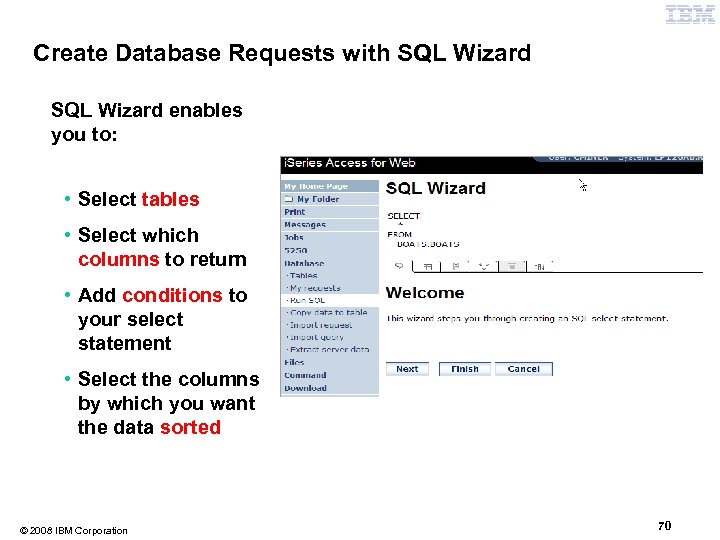
Create Database Requests with SQL Wizard enables you to: • Select tables • Select which columns to return • Add conditions to your select statement • Select the columns by which you want the data sorted © 2008 IBM Corporation 70
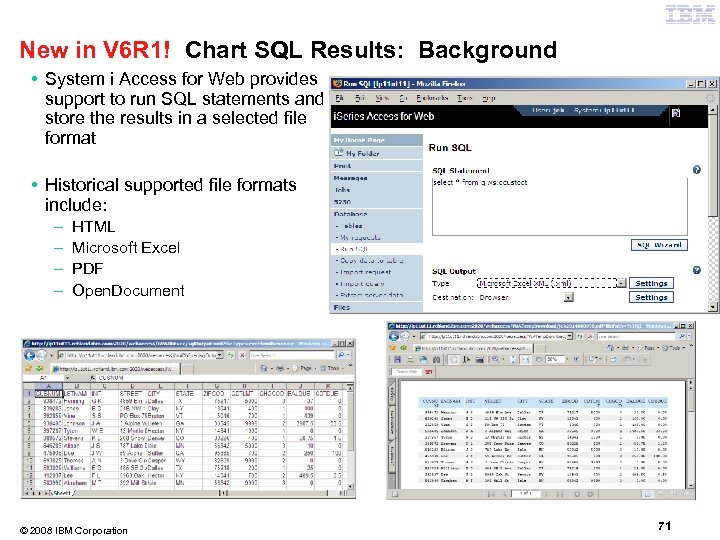
New in V 6 R 1! Chart SQL Results: Background • System i Access for Web provides support to run SQL statements and store the results in a selected file format • Historical supported file formats include: – – HTML Microsoft Excel PDF Open. Document © 2008 IBM Corporation 71
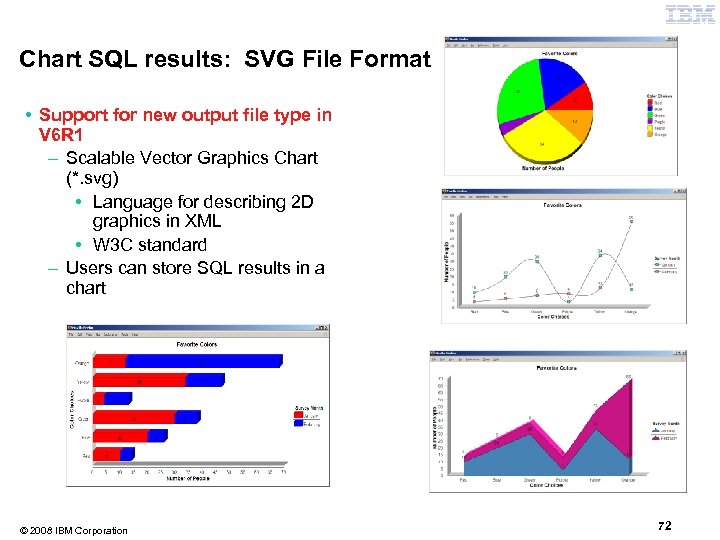
Chart SQL results: SVG File Format • Support for new output file type in V 6 R 1 – Scalable Vector Graphics Chart (*. svg) • Language for describing 2 D graphics in XML • W 3 C standard – Users can store SQL results in a chart © 2008 IBM Corporation 72
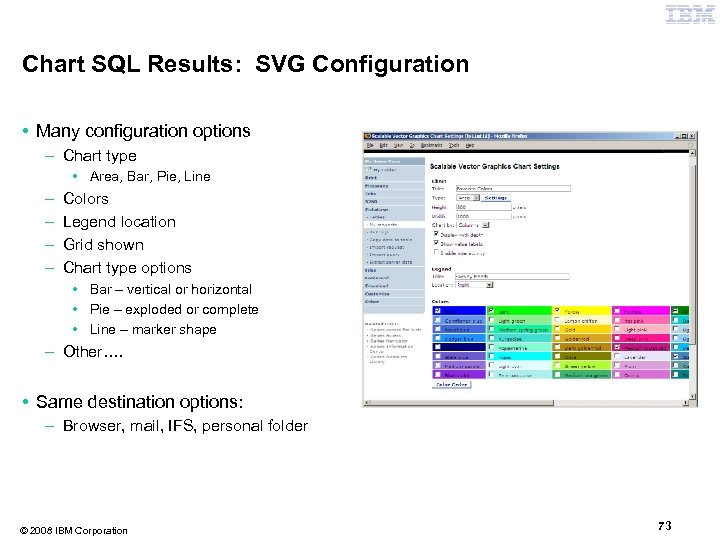
Chart SQL Results: SVG Configuration • Many configuration options – Chart type • Area, Bar, Pie, Line – – Colors Legend location Grid shown Chart type options • Bar – vertical or horizontal • Pie – exploded or complete • Line – marker shape – Other…. • Same destination options: – Browser, mail, IFS, personal folder © 2008 IBM Corporation 73
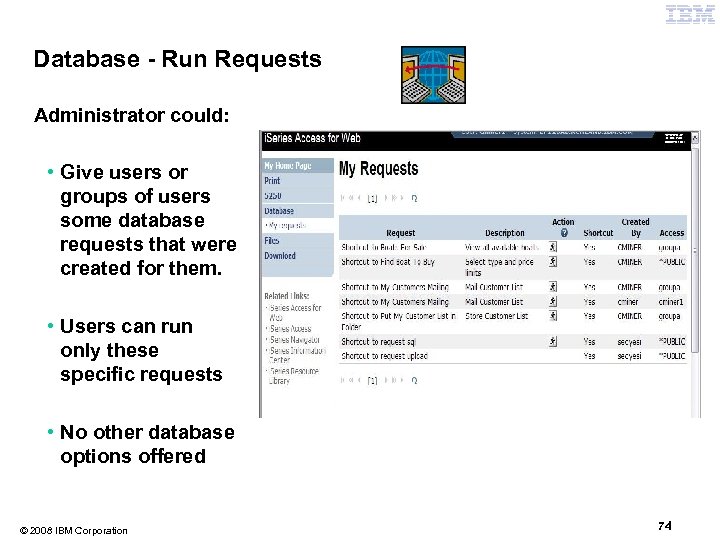
Database - Run Requests Administrator could: • Give users or groups of users some database requests that were created for them. • Users can run only these specific requests • No other database options offered © 2008 IBM Corporation 74
Printing • My Folder • Print • Messages • Jobs • 5250 • Database • Files • Commands • Customize • Downloads • Mail © 2008 IBM Corporation 75
Work with Printer Output, Printers, Queues Typical end user printer tasks • Printer Output • PDF Printer Output Tasks more oriented toward system operators, administrators, programmers, etc • Printers • PDF Printers • Internet Printer Shares • Output Queues © 2008 IBM Corporation 76
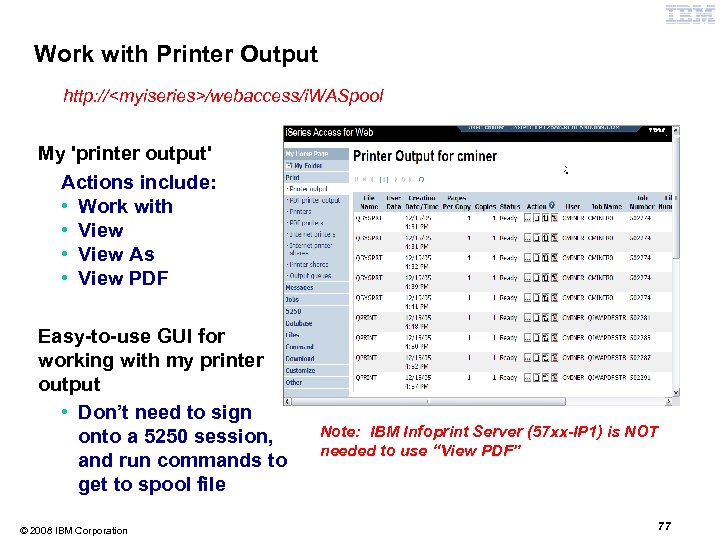
Work with Printer Output http: //<myiseries>/webaccess/i. WASpool My 'printer output' Actions include: • Work with • View As • View PDF Easy-to-use GUI for working with my printer output • Don’t need to sign onto a 5250 session, and run commands to get to spool file © 2008 IBM Corporation Note: IBM Infoprint Server (57 xx-IP 1) is NOT needed to use “View PDF” 77
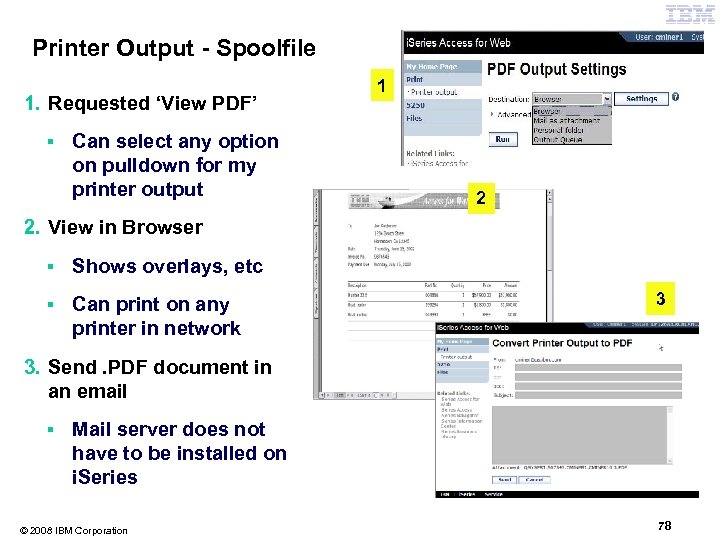
Printer Output - Spoolfile 1. Requested ‘View PDF’ ▪ Can select any option on pulldown for my printer output 1 2 2. View in Browser ▪ Shows overlays, etc ▪ Can print on any printer in network 3 3. Send. PDF document in an email ▪ Mail server does not have to be installed on i. Series © 2008 IBM Corporation 78
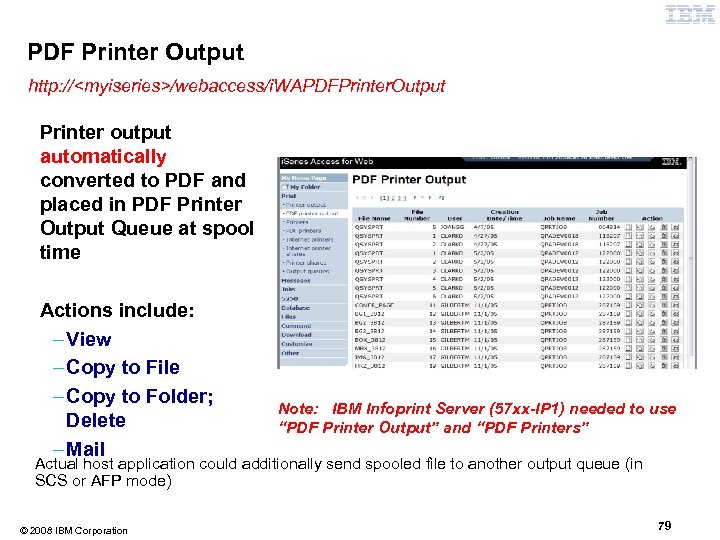
PDF Printer Output http: //<myiseries>/webaccess/i. WAPDFPrinter. Output Printer output automatically converted to PDF and placed in PDF Printer Output Queue at spool time Actions include: – View – Copy to File – Copy to Folder; Delete – Mail Note: IBM Infoprint Server (57 xx-IP 1) needed to use “PDF Printer Output” and “PDF Printers” Actual host application could additionally send spooled file to another output queue (in SCS or AFP mode) © 2008 IBM Corporation 79
Many other functions in the product! • My Folder • Print • Messages • Jobs • 5250 • Database • Files • Commands • Customize • Downloads • Mail © 2008 IBM Corporation We briefly covered only three areas: 5250, Database, Print 80
Other new functions in V 6 R 1 © 2008 IBM Corporation 81
New in V 6 R 1! Single sign-on via Windows domain login – V 6 R 1 – WAS 6. 1 provides a trust association interceptor (TAI) that uses the Simple and Protected GSS-API Negotiation Mechanism (SPNEGO) to securely negotiate and authenticate HTTP requires for secured resources in WAS. • This uses kerberbos authentication. • The SPNEGO TAI enables Windows domain login to be used when granting access to secure resources in WAS. – When V 6 R 1 System i Access for Web is configured in a SPNEGO TAI environment, the Windows workstation user can login to the Windows domain and have Access for Web use those credentials to authenticate to i 5/OS © 2008 IBM Corporation 82
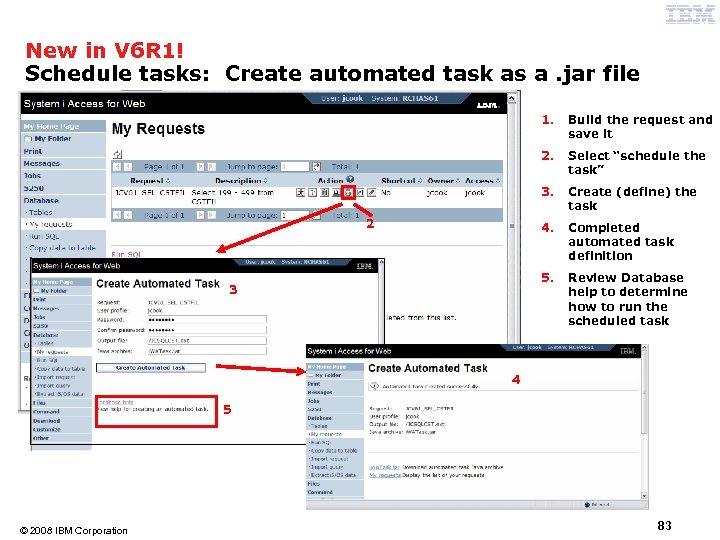
New in V 6 R 1! Schedule tasks: Create automated task as a. jar file 1. 2. Create (define) the task 4. Completed automated task definition 5. 3 Select “schedule the task” 3. 2 Build the request and save it Review Database help to determine how to run the scheduled task 4 5 © 2008 IBM Corporation 83
Summary © 2008 IBM Corporation 84
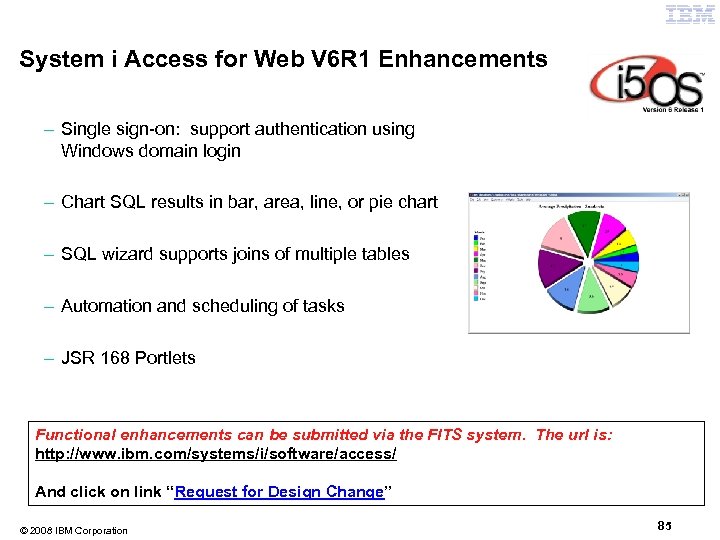
System i Access for Web V 6 R 1 Enhancements – Single sign-on: support authentication using Windows domain login – Chart SQL results in bar, area, line, or pie chart – SQL wizard supports joins of multiple tables – Automation and scheduling of tasks – JSR 168 Portlets Functional enhancements can be submitted via the FITS system. The url is: http: //www. ibm. com/systems/i/software/access/ And click on link “Request for Design Change” © 2008 IBM Corporation 85
Why use System i Access for Web? Start simple, grow fast. . . § Any System i customer -- with any hardware model - can quickly get started working in a Web environment ƒ If their system is not capable to running WAS, they can easily install the ASF Tomcat web application server. ASF Tomcat runs on hardware with 70 CPW and 256 MB memory § Any System i customer -- with little Web experience - can easily get started working with e-business A great first step to get System i into ebusiness ƒ System i Access for Web is simple to install and configure ƒ No programming skills required to set it up § Any System i customer -- without training or setup on users' desktops can extend the reach of their resources to end users ƒ Use customize facility to set up view ('window') to System i and to control access to various i 5/OS resources – all built around i 5/OS user profiles © 2008 IBM Corporation Use 'out of the box' 86
Additional Information • System i Access Family Home page: – http: //www. ibm. com/systems/i/software/access • System i Access for Web Home page: – http: //www. ibm. com/systems/i/software/access/web/ • Demo of System i Access for Web: – http: //iseriesd. demos. ibm. com/webaccess/i. WAHome © 2008 IBM Corporation 87
Trademarks and Disclaimers 8 IBM Corporation 1994 -2008. All rights reserved. References in this document to IBM products or services do not imply that IBM intends to make them available in every country. The following terms are trademarks of International Business Machines Corporation in the United States, other countries, or both: IBM, IBM (logo). I 5/OS, IBM i, System i, AS/400, i. Series, OS/400 Rational is a trademark of International Business Machines Corporation and Rational Software Corporation in the United States, other countries, or both. Intel, Intel Logo, Intel Inside logo, Intel Centrino logo, Celeron, Intel Xeon, Intel Speed. Step, Itanium, and Pentium are trademarks or registered trademarks of Intel Corporation or its subsidiaries in the United States and other countries. Linux is a trademark of Linus Torvalds in the United States, other countries, or both. Microsoft, Windows NT, and the Windows logo are trademarks of Microsoft Corporation in the United States, other countries, or both. UNIX is a registered trademark of The Open Group in the United States and other countries. Java and all Java-based trademarks are trademarks of Sun Microsystems, Inc. in the United States, other countries, or both. Other company, product or service names may be trademarks or service marks of others. Information is provided "AS IS" without warranty of any kind. All customer examples described are presented as illustrations of how those customers have used IBM products and the results they may have achieved. Actual environmental costs and performance characteristics may vary by customer. Information concerning non-IBM products was obtained from a supplier of these products, published announcement material, or other publicly available sources and does not constitute an endorsement of such products by IBM. Sources for non-IBM list prices and performance numbers are taken from publicly available information, including vendor announcements and vendor worldwide homepages. IBM has not tested these products and cannot confirm the accuracy of performance, capability, or any other claims related to non-IBM products. Questions on the capability of non-IBM products should be addressed to the supplier of those products. All statements regarding IBM future direction and intent are subject to change or withdrawal without notice, and represent goals and objectives only. Contact your local IBM office or IBM authorized reseller for the full text of the specific Statement of Direction. Some information addresses anticipated future capabilities. Such information is not intended as a definitive statement of a commitment to specific levels of performance, function or delivery schedules with respect to any future products. Such commitments are only made in IBM product announcements. The information is presented here to communicate IBM's current investment and development activities as a good faith effort to help with our customers' future planning. Performance is based on measurements and projections using standard IBM benchmarks in a controlled environment. The actual throughput or performance that any user will experience will vary depending upon considerations such as the amount of multiprogramming in the user's job stream, the I/O configuration, the storage configuration, and the workload processed. Therefore, no assurance can be given that an individual user will achieve throughput or performance improvements equivalent to the ratios stated here. Photographs shown are of engineering prototypes. Changes may be incorporated in production models. © 2008 IBM Corporation 88
Скачать презентацию IBM Power Systems Get to the Web Fast
a618800be5aeca122f584f64b9113135.ppt