 Скачать презентацию IBM Power Systems Gateway 400 user group presentation Integrated
9dbed2075928952ce78ea4144cd18f3b.ppt
- Количество слайдов: 70



IBM Power Systems™ Gateway/400 user group presentation Integrated File System: Fundamentals Margaret Fenlon mfenlon@us. ibm. com
IBM Power Systems Integrated File System: Fundamentals Contents §Concepts ƒ Stream File ƒ Directory ƒ Subtree ƒ File System ƒ Integrated File System ƒ Path Name ƒ Current Working Directory ƒ Home Directory ƒ Hard Link ƒ Symbolic (Soft) Link ƒ Dot and Dot-Dot ƒ NLS 3 §File Systems ƒ Overview ƒ "root" (/) ƒ QOpen. Sys ƒ User-defined File System (UDFS) ƒ QSYS. LIB ƒ QDLS ƒ QOPT ƒ QNet. Ware ƒ QNTC ƒ QFile. Svr. 400 ƒ NFS ƒ Summary §Accessing Data ƒ Overview ƒ System i Navigator ƒ i 5/OS Net. Server ƒ Virus Scanning ƒ Traditional IBM i 5/OSTM Applications ƒ APIs ƒ CL Commands ƒ Qshell ƒ FTP ƒ i 5/OS PASE ƒ IBM Toolbox for Java © 2008 IBM Corporation
IBM Power Systems Concepts 4 © 2008 IBM Corporation
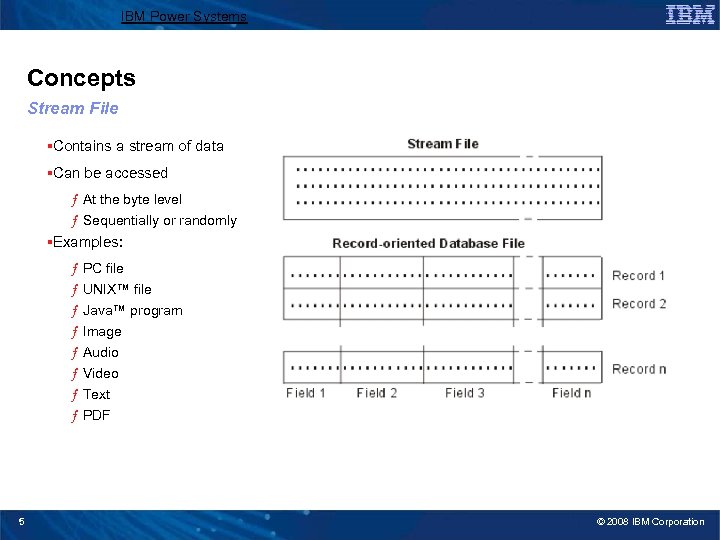
IBM Power Systems Concepts Stream File §Contains a stream of data §Can be accessed ƒ At the byte level ƒ Sequentially or randomly §Examples: ƒ PC file ƒ UNIX™ file ƒ Java™ program ƒ Image ƒ Audio ƒ Video ƒ Text ƒ PDF 5 © 2008 IBM Corporation
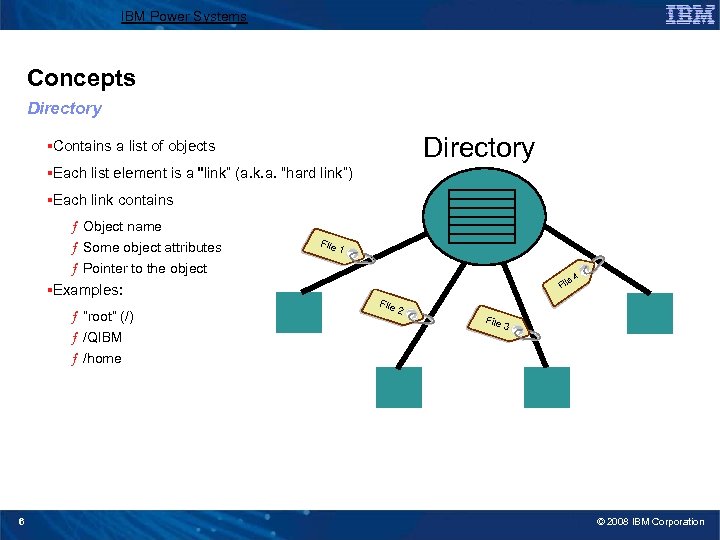
IBM Power Systems Concepts Directory §Contains a list of objects §Each list element is a "link” (a. k. a. “hard link”) §Each link contains ƒ Object name ƒ Some object attributes ƒ Pointer to the object §Examples: ƒ “root” (/) ƒ /QIBM ƒ /home 6 File 1 File 2 File e 4 3 © 2008 IBM Corporation
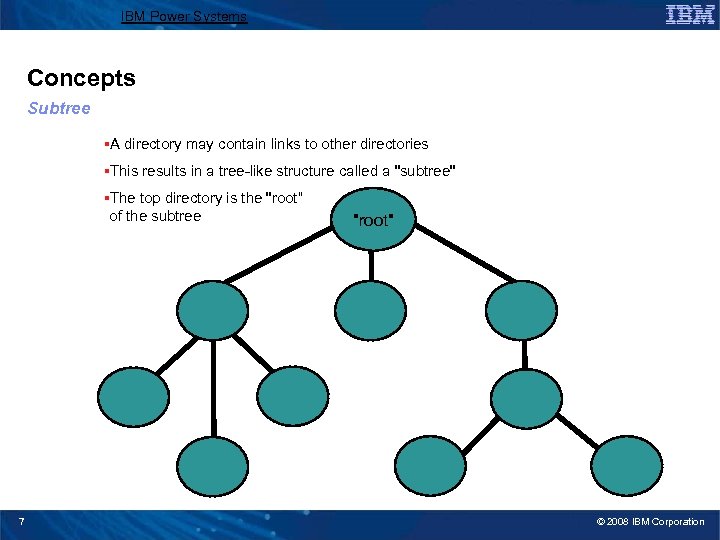
IBM Power Systems Concepts Subtree §A directory may contain links to other directories §This results in a tree-like structure called a "subtree" §The top directory is the "root“ of the subtree 7 "root" © 2008 IBM Corporation
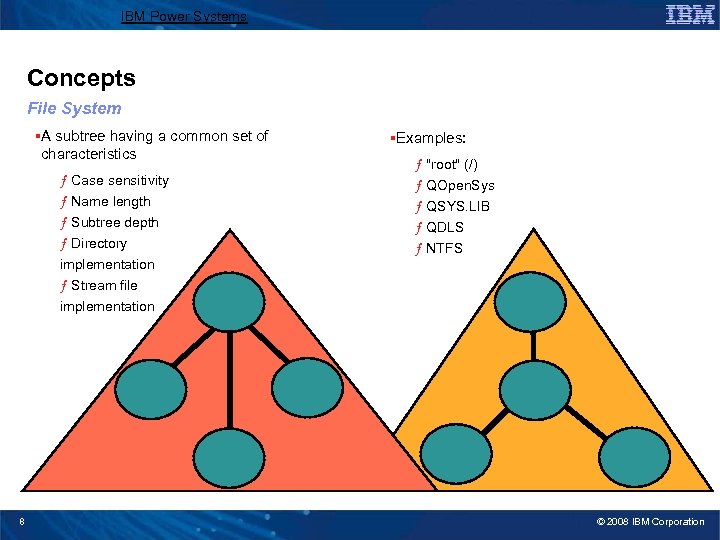
IBM Power Systems Concepts File System §A subtree having a common set of characteristics ƒ Case sensitivity ƒ Name length ƒ Subtree depth ƒ Directory implementation ƒ Stream file implementation 8 §Examples: ƒ "root" (/) ƒ QOpen. Sys ƒ QSYS. LIB ƒ QDLS ƒ NTFS © 2008 IBM Corporation
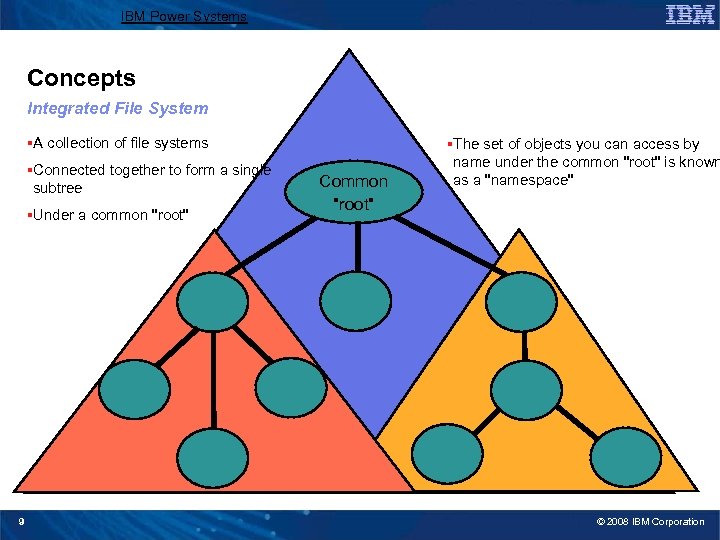
IBM Power Systems Concepts Integrated File System §A collection of file systems §Connected together to form a single subtree §Under a common "root" 9 Common "root" §The set of objects you can access by name under the common "root" is known as a "namespace" © 2008 IBM Corporation
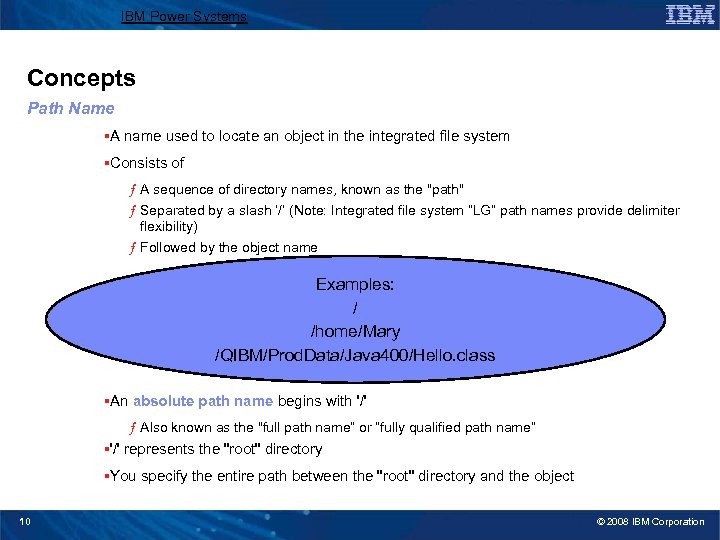
IBM Power Systems Concepts Path Name §A name used to locate an object in the integrated file system §Consists of ƒ A sequence of directory names, known as the "path" ƒ Separated by a slash ‘/’ (Note: Integrated file system “LG” path names provide delimiter flexibility) ƒ Followed by the object name Examples: / /home/Mary /QIBM/Prod. Data/Java 400/Hello. class §An absolute path name begins with '/' ƒ Also known as the "full path name“ or “fully qualified path name” §'/' represents the "root" directory §You specify the entire path between the "root" directory and the object 10 © 2008 IBM Corporation
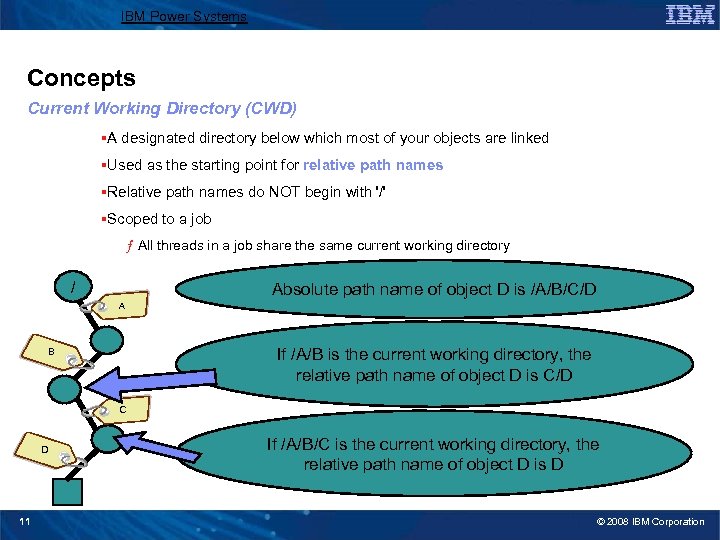
IBM Power Systems Concepts Current Working Directory (CWD) §A designated directory below which most of your objects are linked §Used as the starting point for relative path names §Relative path names do NOT begin with '/' §Scoped to a job ƒ All threads in a job share the same current working directory / Absolute path name of object D is /A/B/C/D A If /A/B is the current working directory, the relative path name of object D is C/D B C D 11 If /A/B/C is the current working directory, the relative path name of object D is D © 2008 IBM Corporation
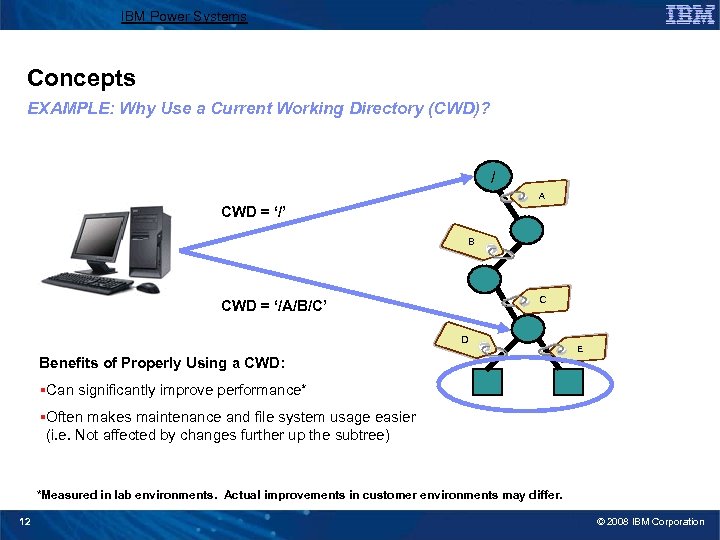
IBM Power Systems Concepts EXAMPLE: Why Use a Current Working Directory (CWD)? / A CWD = ‘/’ B C CWD = ‘/A/B/C’ D E Benefits of Properly Using a CWD: §Can significantly improve performance* §Often makes maintenance and file system usage easier (i. e. Not affected by changes further up the subtree) *Measured in lab environments. Actual improvements in customer environments may differ. 12 © 2008 IBM Corporation
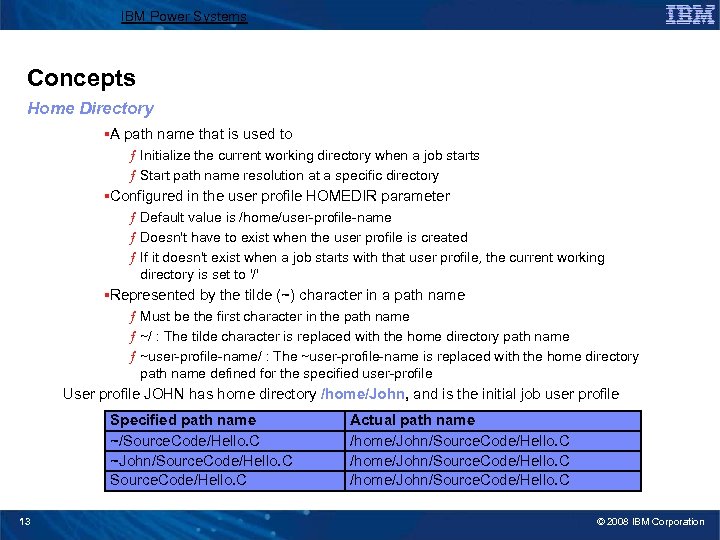
IBM Power Systems Concepts Home Directory §A path name that is used to ƒ Initialize the current working directory when a job starts ƒ Start path name resolution at a specific directory §Configured in the user profile HOMEDIR parameter ƒ Default value is /home/user-profile-name ƒ Doesn't have to exist when the user profile is created ƒ If it doesn't exist when a job starts with that user profile, the current working directory is set to '/' §Represented by the tilde (~) character in a path name ƒ Must be the first character in the path name ƒ ~/ : The tilde character is replaced with the home directory path name ƒ ~user-profile-name/ : The ~user-profile-name is replaced with the home directory path name defined for the specified user-profile User profile JOHN has home directory /home/John, and is the initial job user profile Specified path name ~/Source. Code/Hello. C ~John/Source. Code/Hello. C 13 Actual path name /home/John/Source. Code/Hello. C © 2008 IBM Corporation
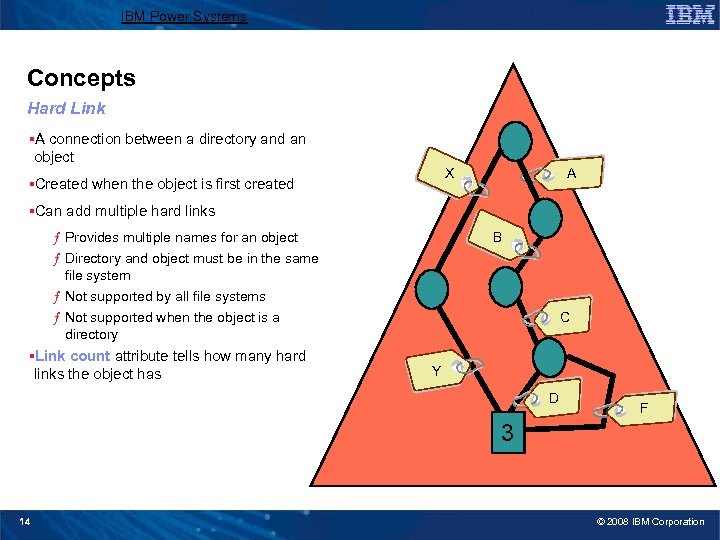
IBM Power Systems Concepts Hard Link §A connection between a directory and an object A X §Created when the object is first created §Can add multiple hard links ƒ Provides multiple names for an object ƒ Directory and object must be in the same file system ƒ Not supported by all file systems ƒ Not supported when the object is a directory §Link count attribute tells how many hard links the object has B C Y D F 2 1 3 14 © 2008 IBM Corporation
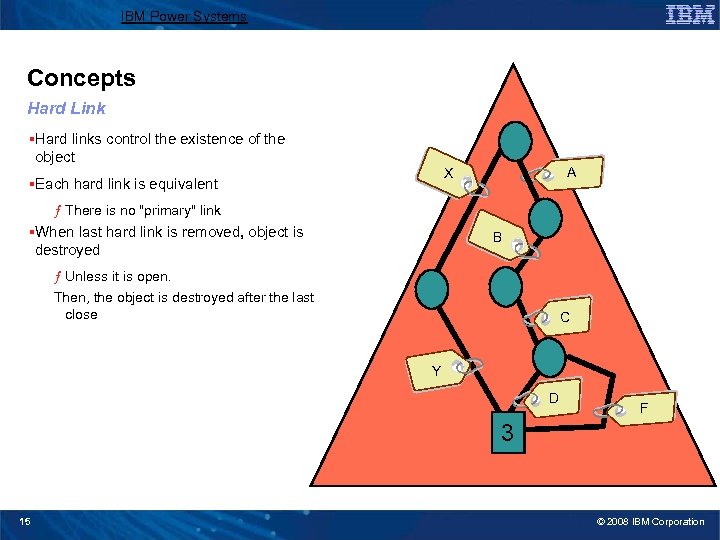
IBM Power Systems Concepts Hard Link §Hard links control the existence of the object X X §Each hard link is equivalent A ƒ There is no "primary" link §When last hard link is removed, object is destroyed B B ƒ Unless it is open. Then, the object is destroyed after the last close C Y Y D F 2 1 3 0 15 © 2008 IBM Corporation
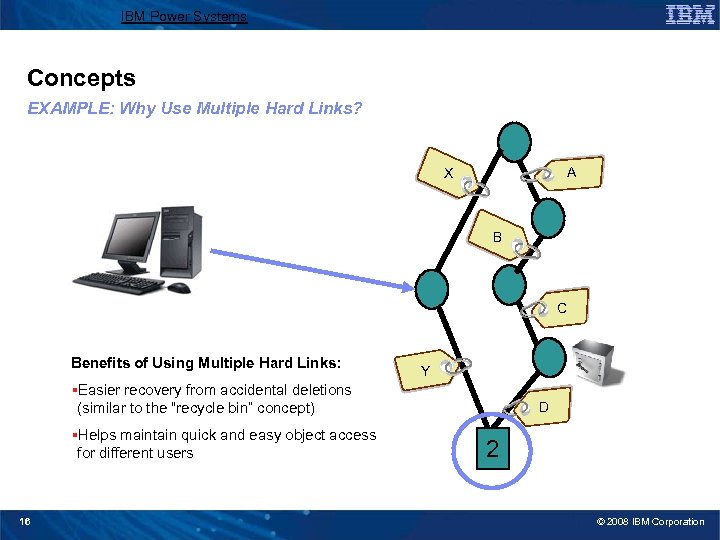
IBM Power Systems Concepts EXAMPLE: Why Use Multiple Hard Links? A X B C Benefits of Using Multiple Hard Links: Y §Easier recovery from accidental deletions (similar to the “recycle bin” concept) §Helps maintain quick and easy object access for different users 16 D 2 1 © 2008 IBM Corporation
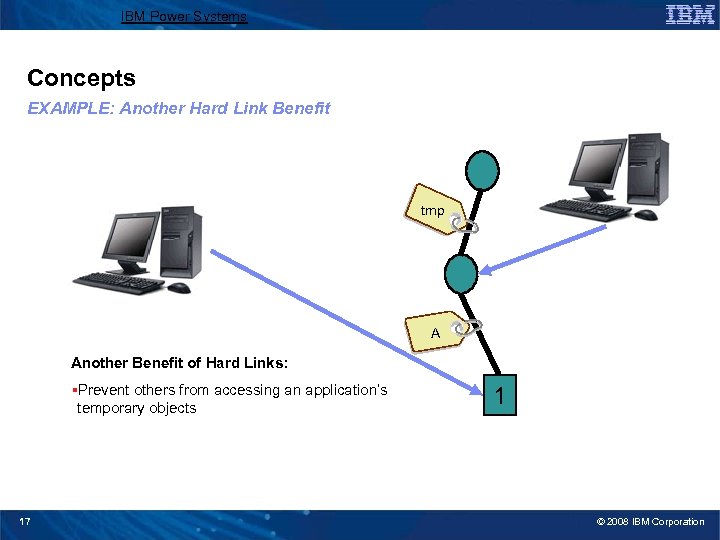
IBM Power Systems Concepts EXAMPLE: Another Hard Link Benefit tmp A Another Benefit of Hard Links: §Prevent others from accessing an application’s temporary objects 17 0 1 © 2008 IBM Corporation
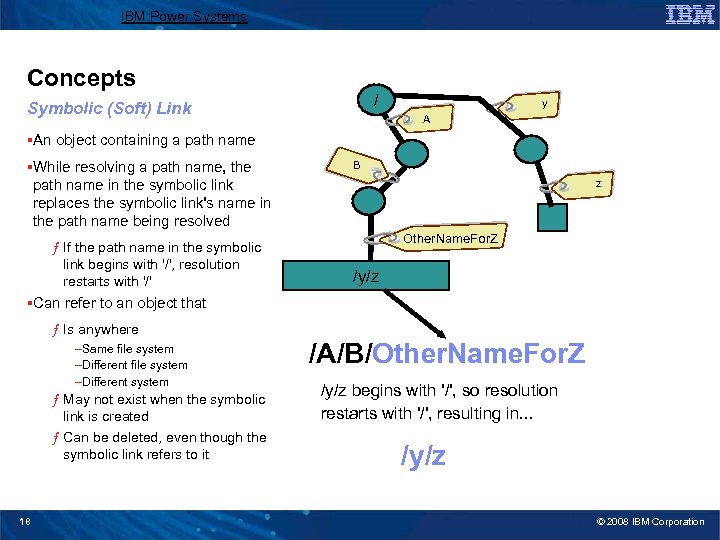
IBM Power Systems Concepts / Symbolic (Soft) Link y A §An object containing a path name §While resolving a path name, the path name in the symbolic link replaces the symbolic link's name in the path name being resolved ƒ If the path name in the symbolic link begins with '/', resolution restarts with '/' B z Other. Name. For. Z /y/z §Can refer to an object that ƒ Is anywhere –Same file system –Different system ƒ May not exist when the symbolic link is created ƒ Can be deleted, even though the symbolic link refers to it 18 /A/B/Other. Name. For. Z /y/z begins with '/', so resolution restarts with '/', resulting in. . . /y/z © 2008 IBM Corporation
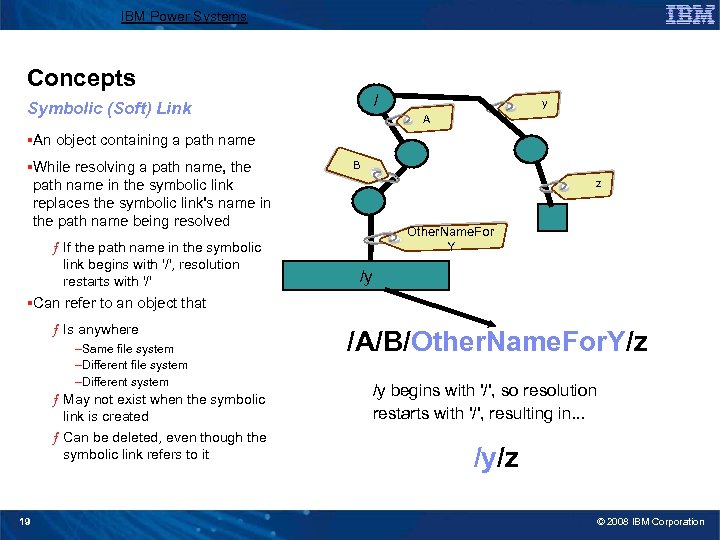
IBM Power Systems Concepts / Symbolic (Soft) Link y A §An object containing a path name §While resolving a path name, the path name in the symbolic link replaces the symbolic link's name in the path name being resolved ƒ If the path name in the symbolic link begins with '/', resolution restarts with '/' B z Other. Name. For Y /y §Can refer to an object that ƒ Is anywhere –Same file system –Different system ƒ May not exist when the symbolic link is created ƒ Can be deleted, even though the symbolic link refers to it 19 /A/B/Other. Name. For. Y/z /y begins with '/', so resolution restarts with '/', resulting in. . . /y/z © 2008 IBM Corporation
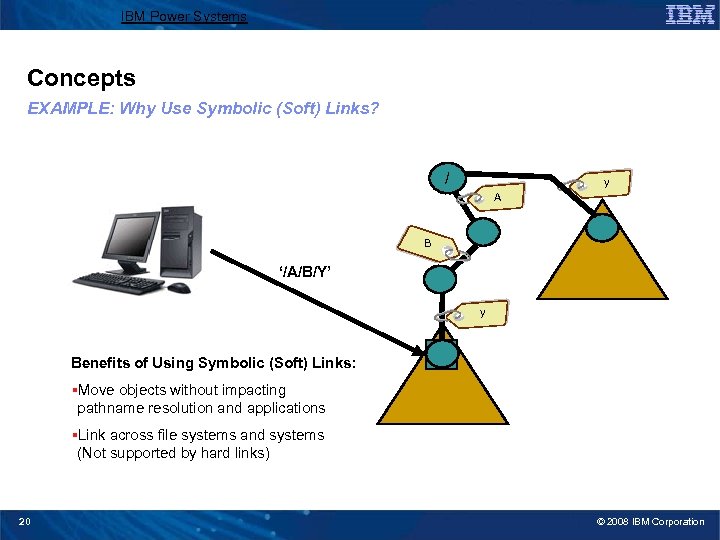
IBM Power Systems Concepts EXAMPLE: Why Use Symbolic (Soft) Links? / y A B ‘/A/B/Y’ y Benefits of Using Symbolic (Soft) Links: /y §Move objects without impacting pathname resolution and applications §Link across file systems and systems (Not supported by hard links) 20 © 2008 IBM Corporation
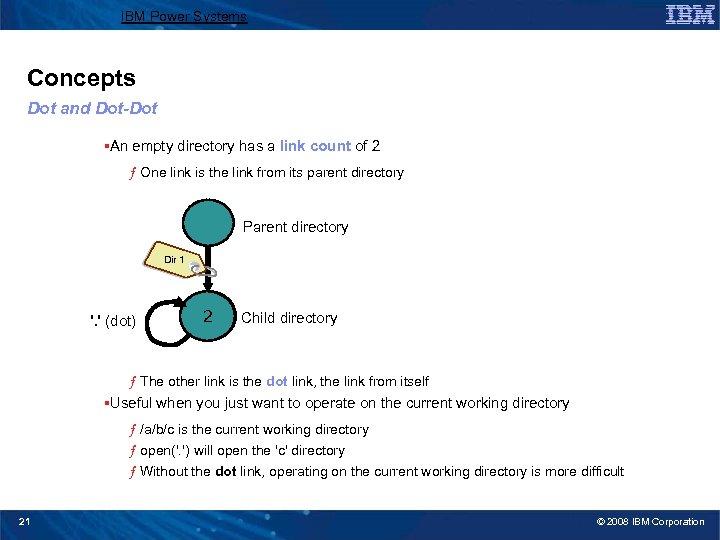
IBM Power Systems Concepts Dot and Dot-Dot §An empty directory has a link count of 2 ƒ One link is the link from its parent directory Parent directory Dir 1 '. ' (dot) 1 2 Child directory ƒ The other link is the dot link, the link from itself §Useful when you just want to operate on the current working directory ƒ /a/b/c is the current working directory ƒ open('. ') will open the 'c' directory ƒ Without the dot link, operating on the current working directory is more difficult 21 © 2008 IBM Corporation
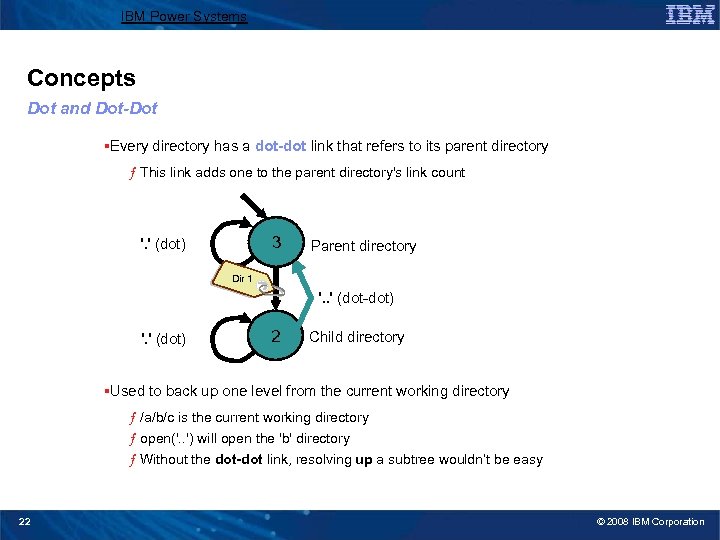
IBM Power Systems Concepts Dot and Dot-Dot §Every directory has a dot-dot link that refers to its parent directory ƒ This link adds one to the parent directory's link count 3 2 '. ' (dot) Parent directory Dir 1 '. . ' (dot-dot) '. ' (dot) 2 Child directory §Used to back up one level from the current working directory ƒ /a/b/c is the current working directory ƒ open('. . ') will open the 'b' directory ƒ Without the dot-dot link, resolving up a subtree wouldn’t be easy 22 © 2008 IBM Corporation
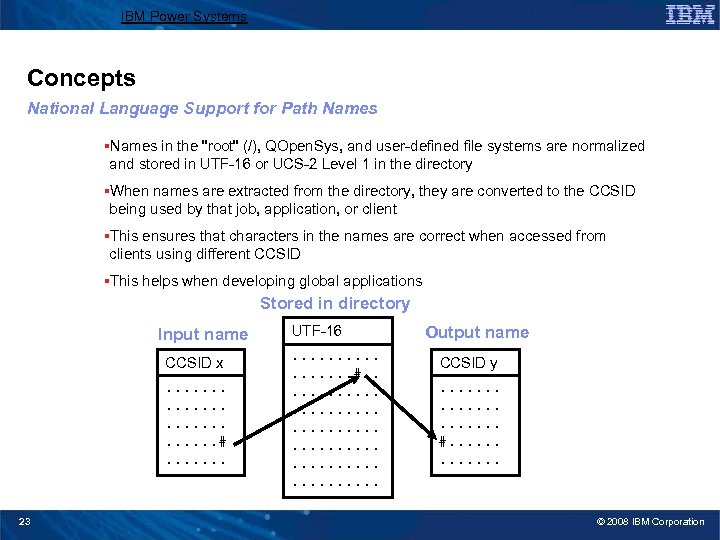
IBM Power Systems Concepts National Language Support for Path Names §Names in the "root" (/), QOpen. Sys, and user-defined file systems are normalized and stored in UTF-16 or UCS-2 Level 1 in the directory §When names are extracted from the directory, they are converted to the CCSID being used by that job, application, or client §This ensures that characters in the names are correct when accessed from clients using different CCSID §This helps when developing global applications Stored in directory Input name CCSID x. . . . #. . . . 23 UTF-16. . . . #. . . . Output name CCSID y. . . . . #. . . © 2008 IBM Corporation
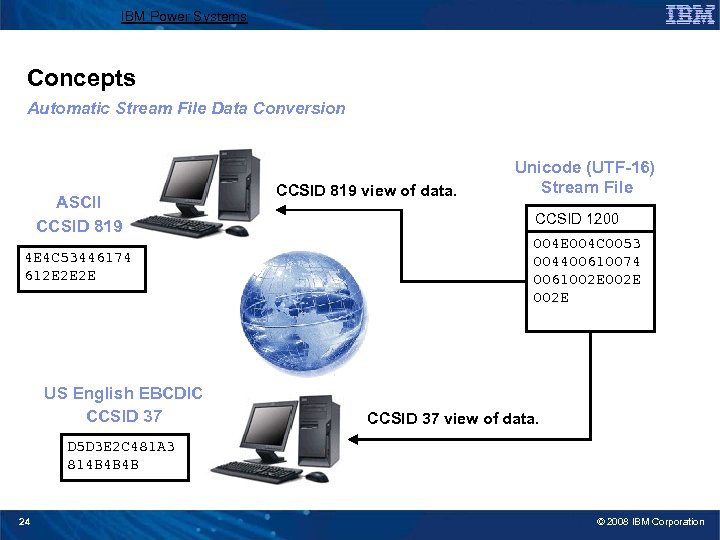
IBM Power Systems Concepts Automatic Stream File Data Conversion ASCII CCSID 819 4 E 4 C 53446174 612 E 2 E 2 E US English EBCDIC CCSID 37 CCSID 819 view of data. Unicode (UTF-16) Stream File CCSID 1200 004 E 004 C 0053 004400610074 0061002 E CCSID 37 view of data. D 5 D 3 E 2 C 481 A 3 814 B 4 B 4 B 24 © 2008 IBM Corporation
IBM Power Systems File Systems 25 © 2008 IBM Corporation
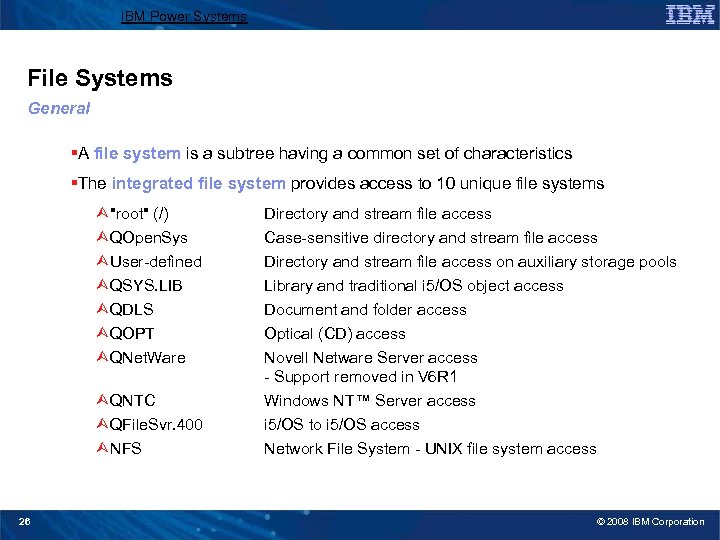
IBM Power Systems File Systems General §A file system is a subtree having a common set of characteristics §The integrated file system provides access to 10 unique file systems Ù"root" (/) ÙQOpen. Sys ÙUser-defined ÙQSYS. LIB ÙQDLS ÙQOPT ÙQNet. Ware ÙQNTC ÙQFile. Svr. 400 ÙNFS 26 Directory and stream file access Case-sensitive directory and stream file access Directory and stream file access on auxiliary storage pools Library and traditional i 5/OS object access Document and folder access Optical (CD) access Novell Netware Server access - Support removed in V 6 R 1 Windows NT™ Server access i 5/OS to i 5/OS access Network File System - UNIX file system access © 2008 IBM Corporation
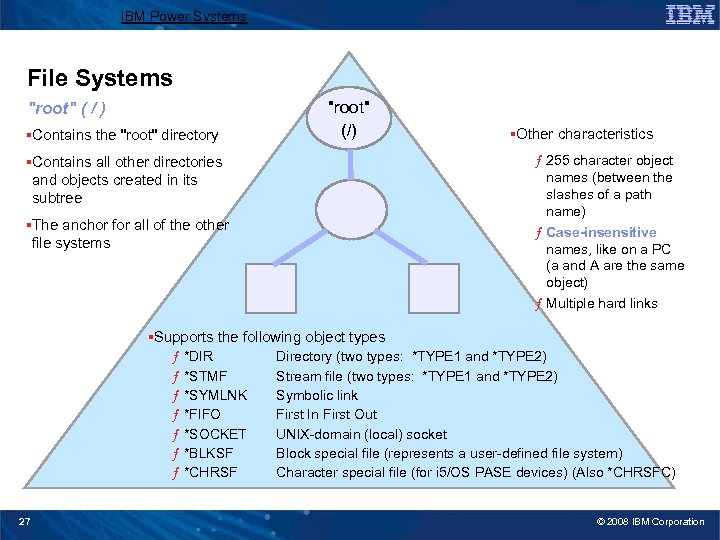
IBM Power Systems File Systems "root" ( / ) §Contains the "root" directory "root" (/) §Other characteristics ƒ 255 character object names (between the slashes of a path name) ƒ Case-insensitive names, like on a PC (a and A are the same object) ƒ Multiple hard links §Contains all other directories and objects created in its subtree §The anchor for all of the other file systems §Supports the following object types ƒ *DIR ƒ *STMF ƒ *SYMLNK ƒ *FIFO ƒ *SOCKET ƒ *BLKSF ƒ *CHRSF 27 Directory (two types: *TYPE 1 and *TYPE 2) Stream file (two types: *TYPE 1 and *TYPE 2) Symbolic link First In First Out UNIX-domain (local) socket Block special file (represents a user-defined file system) Character special file (for i 5/OS PASE devices) (Also *CHRSFC) © 2008 IBM Corporation
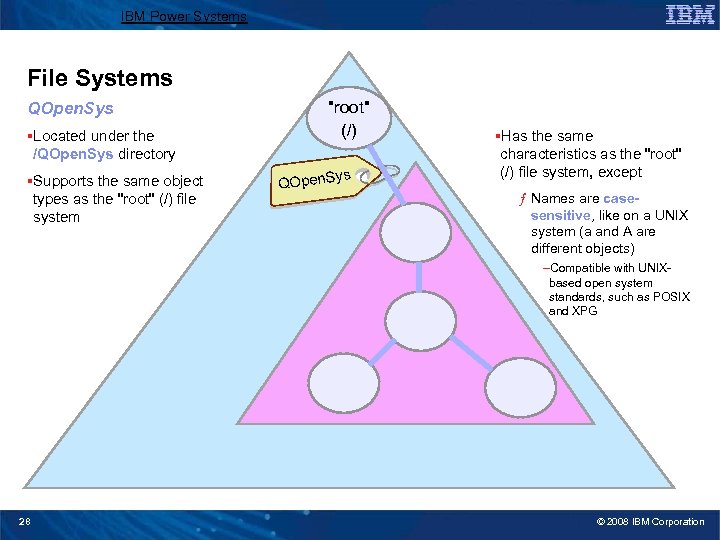
IBM Power Systems File Systems QOpen. Sys §Located under the /QOpen. Sys directory §Supports the same object types as the "root" (/) file system "root" (/) ys QOpen. S §Has the same characteristics as the "root" (/) file system, except ƒ Names are casesensitive, like on a UNIX system (a and A are different objects) –Compatible with UNIXbased open system standards, such as POSIX and XPG 28 © 2008 IBM Corporation
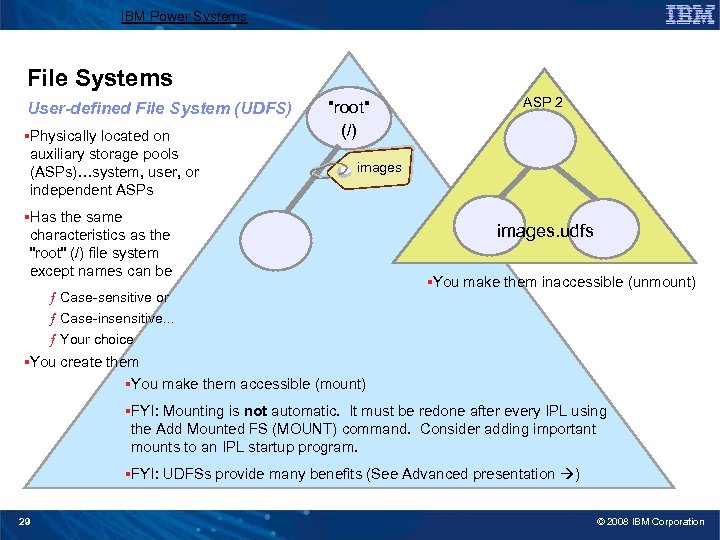
IBM Power Systems File Systems User-defined File System (UDFS) §Physically located on auxiliary storage pools (ASPs)…system, user, or independent ASPs "root" (/) ASP 2 images §Has the same characteristics as the "root" (/) file system except names can be ƒ Case-sensitive or ƒ Case-insensitive. . . ƒ Your choice images. udfs §You make them inaccessible (unmount) §You create them §You make them accessible (mount) §FYI: Mounting is not automatic. It must be redone after every IPL using the Add Mounted FS (MOUNT) command. Consider adding important mounts to an IPL startup program. §FYI: UDFSs provide many benefits (See Advanced presentation ) 29 © 2008 IBM Corporation
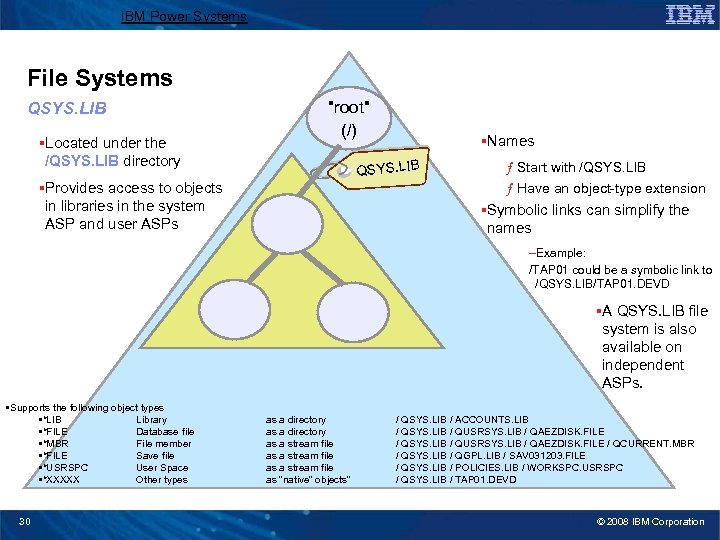
IBM Power Systems File Systems QSYS. LIB §Located under the /QSYS. LIB directory "root" (/) §Names QSYS. LIB §Provides access to objects in libraries in the system ASP and user ASPs ƒ Start with /QSYS. LIB ƒ Have an object-type extension §Symbolic links can simplify the names –Example: /TAP 01 could be a symbolic link to /QSYS. LIB/TAP 01. DEVD §A QSYS. LIB file system is also available on independent ASPs. • Supports the following object types • *LIB Library • *FILE Database file • *MBR File member • *FILE Save file • *USRSPC User Space • *XXXXX Other types 30 as a directory as a stream file as “native” objects” / QSYS. LIB / ACCOUNTS. LIB / QSYS. LIB / QUSRSYS. LIB / QAEZDISK. FILE / QCURRENT. MBR / QSYS. LIB / QGPL. LIB / SAV 031203. FILE / QSYS. LIB / POLICIES. LIB / WORKSPC. USRSPC / QSYS. LIB / TAP 01. DEVD © 2008 IBM Corporation
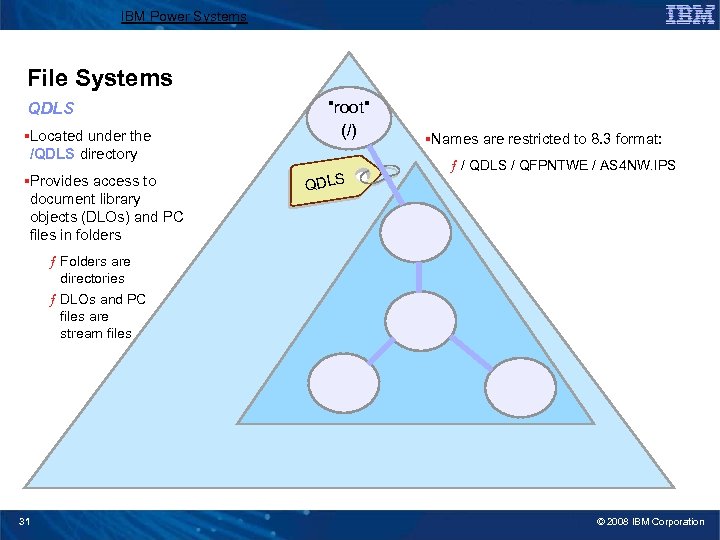
IBM Power Systems File Systems QDLS §Located under the /QDLS directory §Provides access to document library objects (DLOs) and PC files in folders "root" (/) QDLS §Names are restricted to 8. 3 format: ƒ / QDLS / QFPNTWE / AS 4 NW. IPS ƒ Folders are directories ƒ DLOs and PC files are stream files 31 © 2008 IBM Corporation
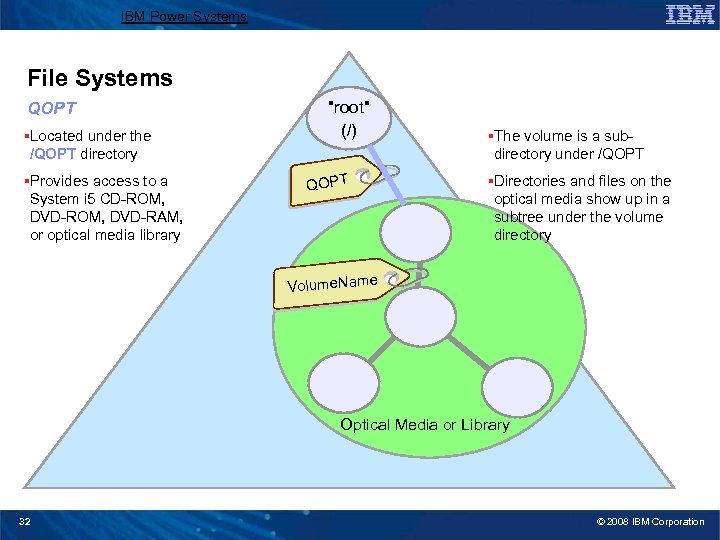
IBM Power Systems File Systems QOPT §Located under the /QOPT directory §Provides access to a System i 5 CD-ROM, DVD-RAM, or optical media library "root" (/) QOPT §The volume is a subdirectory under /QOPT §Directories and files on the optical media show up in a subtree under the volume directory Volume. Name Optical Media or Library 32 © 2008 IBM Corporation
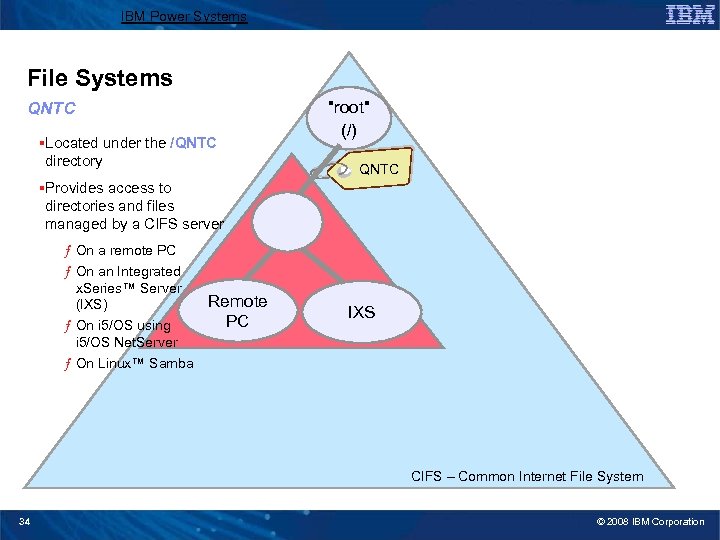
IBM Power Systems File Systems QNTC §Located under the /QNTC directory "root" (/) QNTC §Provides access to directories and files managed by a CIFS server ƒ On a remote PC ƒ On an Integrated x. Series™ Server Remote (IXS) PC ƒ On i 5/OS using i 5/OS Net. Server ƒ On Linux™ Samba IXS CIFS – Common Internet File System 34 © 2008 IBM Corporation
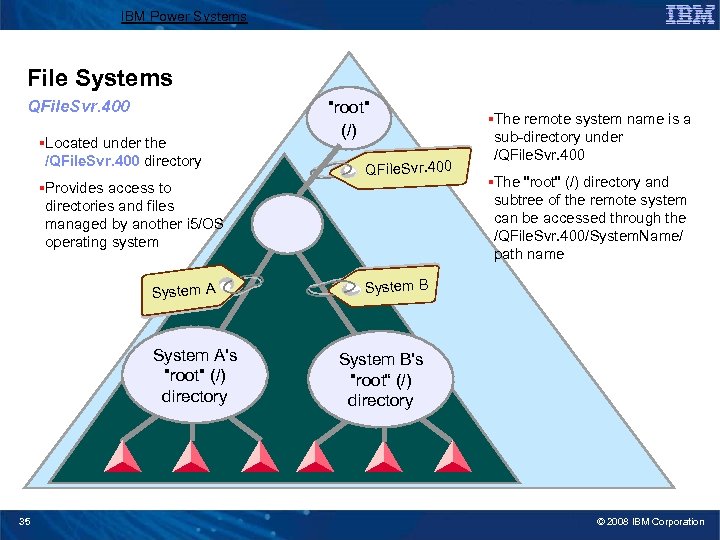
IBM Power Systems File Systems QFile. Svr. 400 §Located under the /QFile. Svr. 400 directory "root" (/) QFile. Svr. 400 §Provides access to directories and files managed by another i 5/OS operating system System A's "root" (/) directory 35 §The remote system name is a sub-directory under /QFile. Svr. 400 §The "root" (/) directory and subtree of the remote system can be accessed through the /QFile. Svr. 400/System. Name/ path name System B's "root“ (/) directory © 2008 IBM Corporation
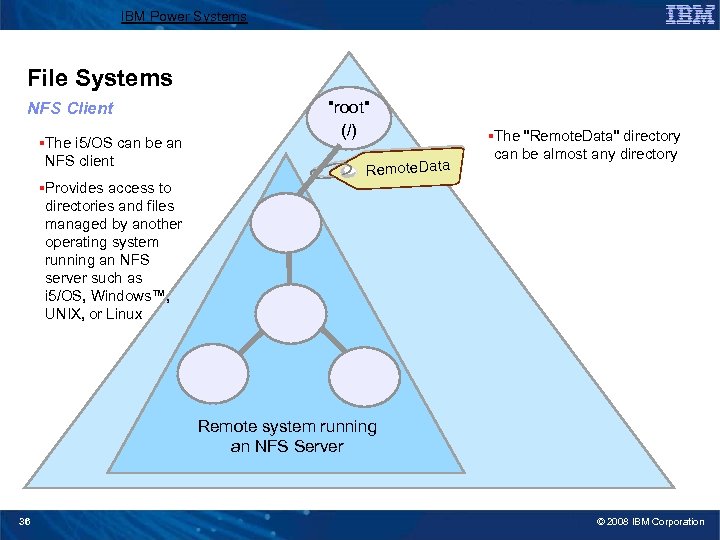
IBM Power Systems File Systems NFS Client §The i 5/OS can be an NFS client "root" (/) Remote. Data §The "Remote. Data" directory can be almost any directory §Provides access to directories and files managed by another operating system running an NFS server such as i 5/OS, Windows™, UNIX, or Linux Remote system running an NFS Server 36 © 2008 IBM Corporation
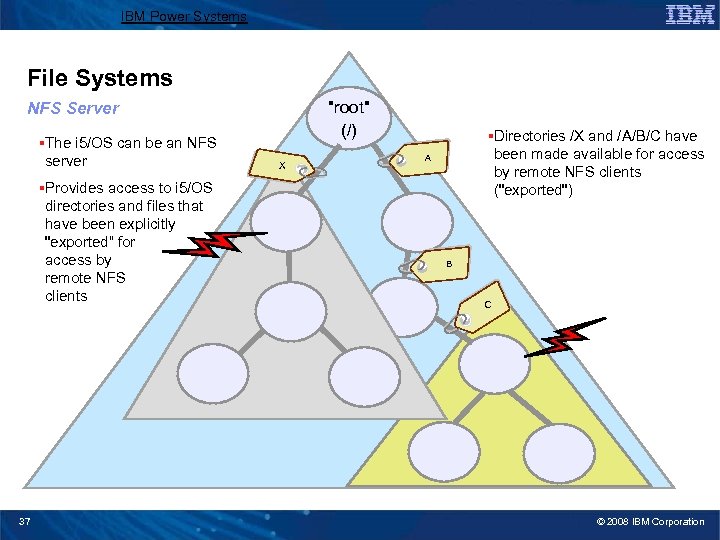
IBM Power Systems File Systems "root" (/) NFS Server §The i 5/OS can be an NFS server §Provides access to i 5/OS directories and files that have been explicitly "exported“ for access by remote NFS clients 37 X §Directories /X and /A/B/C have been made available for access by remote NFS clients ("exported") A B C © 2008 IBM Corporation
IBM Power Systems Accessing Data 38 © 2008 IBM Corporation
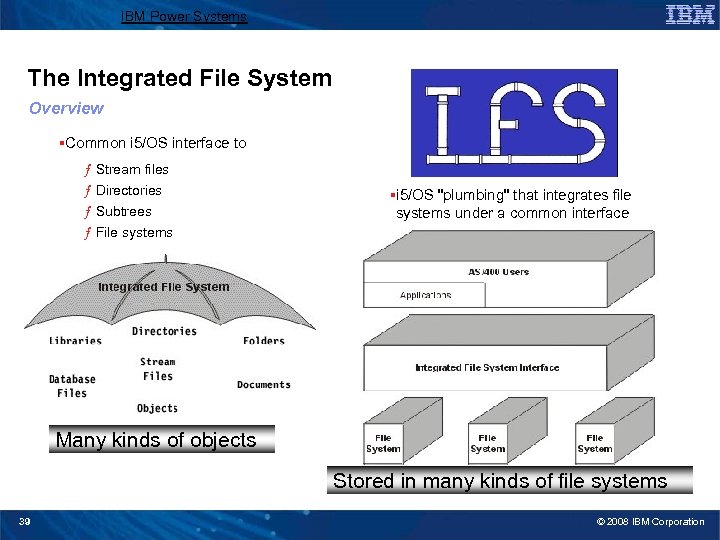
IBM Power Systems The Integrated File System Overview §Common i 5/OS interface to ƒ Stream files ƒ Directories ƒ Subtrees ƒ File systems §i 5/OS "plumbing" that integrates file systems under a common interface Many kinds of objects Stored in many kinds of file systems 39 © 2008 IBM Corporation
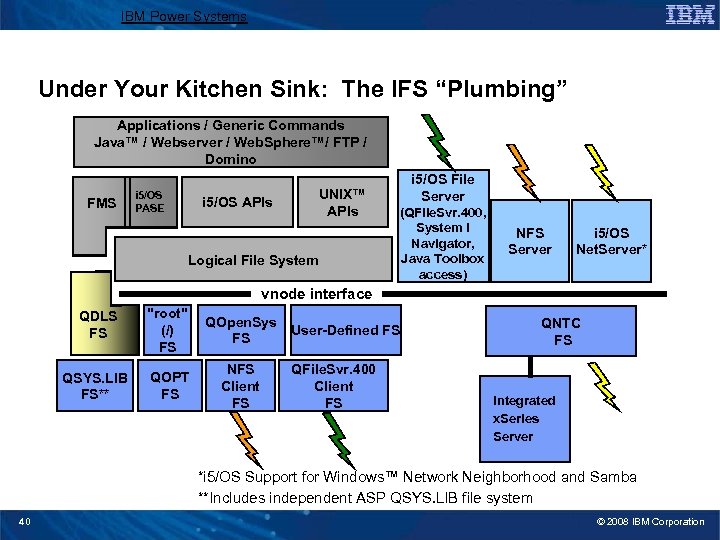
IBM Power Systems Under Your Kitchen Sink: The IFS “Plumbing” Applications / Generic Commands Java™ / Webserver / Web. Sphere™/ FTP / Domino FMS i 5/OS PASE UNIX™ APIs i 5/OS APIs Logical File System i 5/OS File Server (QFile. Svr. 400, System i Navigator, Java Toolbox access) NFS Server i 5/OS Net. Server* vnode interface QDLS FS "root" (/) FS QOpen. Sys FS QSYS. LIB FS** QOPT FS NFS Client FS User-Defined FS QFile. Svr. 400 Client FS QNTC FS Integrated x. Series Server *i 5/OS Support for Windows™ Network Neighborhood and Samba **Includes independent ASP QSYS. LIB file system 40 © 2008 IBM Corporation
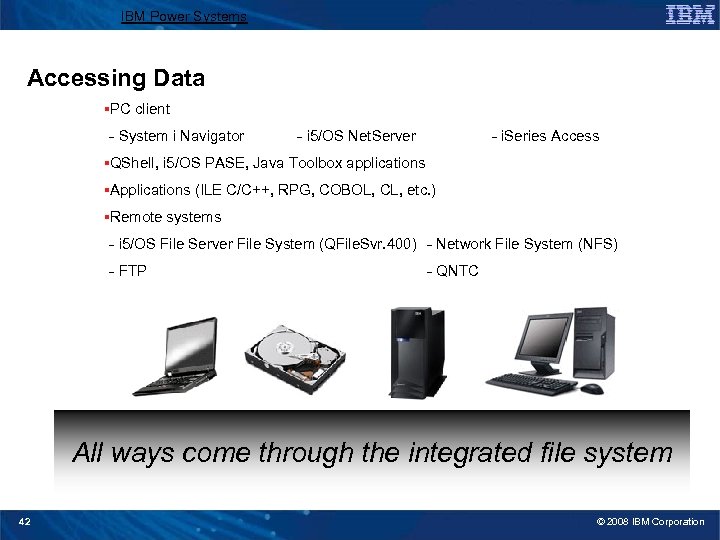
IBM Power Systems Accessing Data §PC client - System i Navigator - i 5/OS Net. Server - i. Series Access §QShell, i 5/OS PASE, Java Toolbox applications §Applications (ILE C/C++, RPG, COBOL, CL, etc. ) §Remote systems - i 5/OS File Server File System (QFile. Svr. 400) - Network File System (NFS) - FTP - QNTC All ways come through the integrated file system 42 © 2008 IBM Corporation
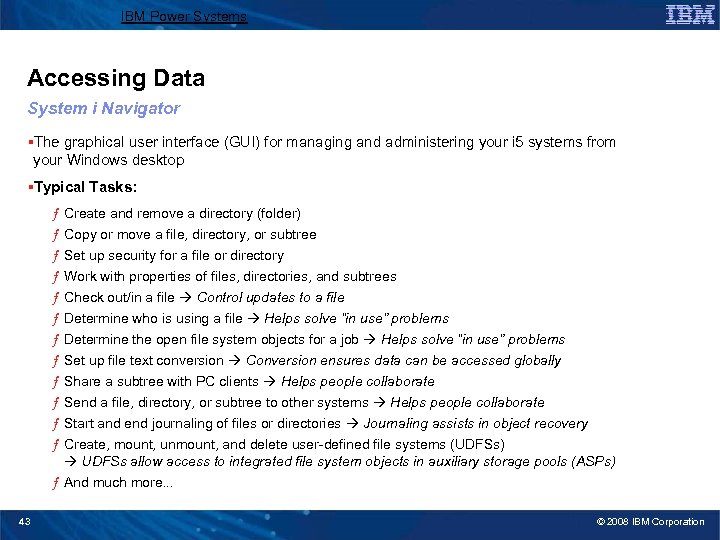
IBM Power Systems Accessing Data System i Navigator §The graphical user interface (GUI) for managing and administering your i 5 systems from your Windows desktop §Typical Tasks: ƒ Create and remove a directory (folder) ƒ Copy or move a file, directory, or subtree ƒ Set up security for a file or directory ƒ Work with properties of files, directories, and subtrees ƒ Check out/in a file Control updates to a file ƒ Determine who is using a file Helps solve “in use” problems ƒ Determine the open file system objects for a job Helps solve “in use” problems ƒ Set up file text conversion Conversion ensures data can be accessed globally ƒ Share a subtree with PC clients Helps people collaborate ƒ Send a file, directory, or subtree to other systems Helps people collaborate ƒ Start and end journaling of files or directories Journaling assists in object recovery ƒ Create, mount, unmount, and delete user-defined file systems (UDFSs) UDFSs allow access to integrated file system objects in auxiliary storage pools (ASPs) ƒ And much more. . . 43 © 2008 IBM Corporation
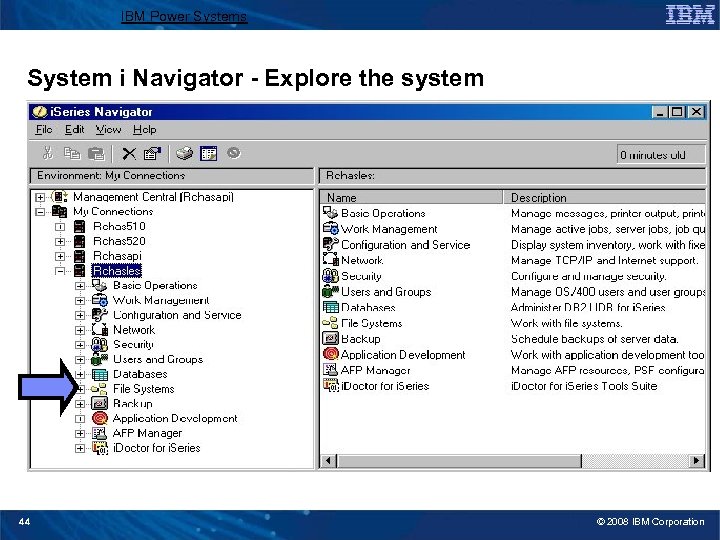
IBM Power Systems System i Navigator - Explore the system 44 © 2008 IBM Corporation
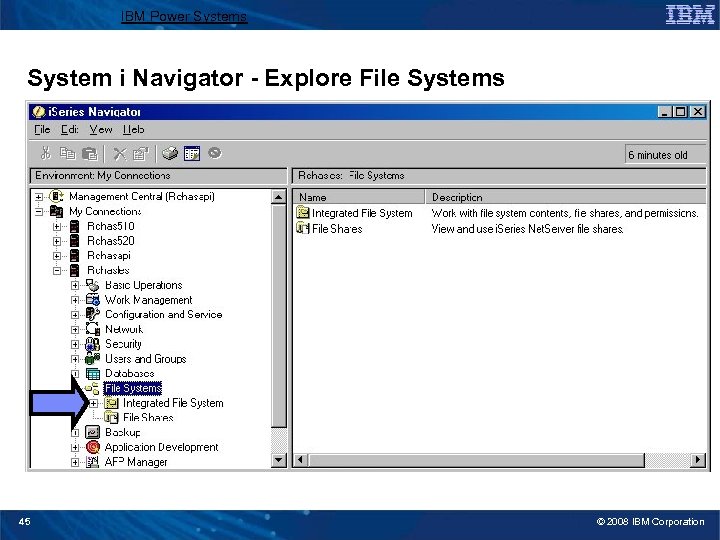
IBM Power Systems System i Navigator - Explore File Systems 45 © 2008 IBM Corporation
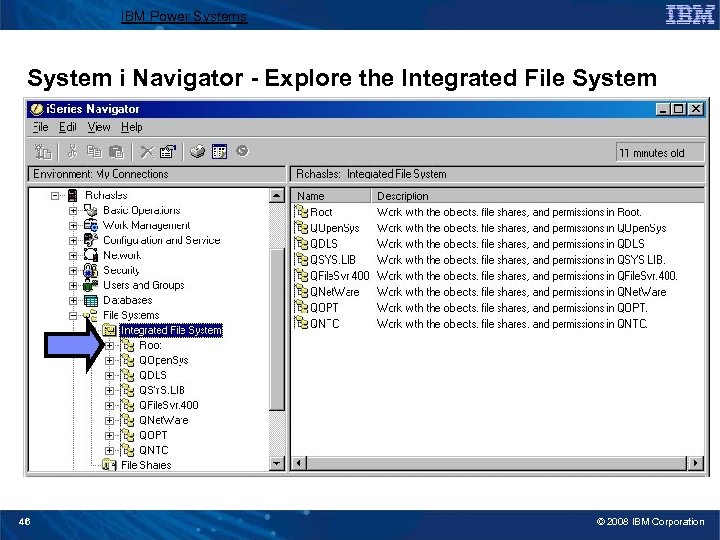
IBM Power Systems System i Navigator - Explore the Integrated File System 46 © 2008 IBM Corporation
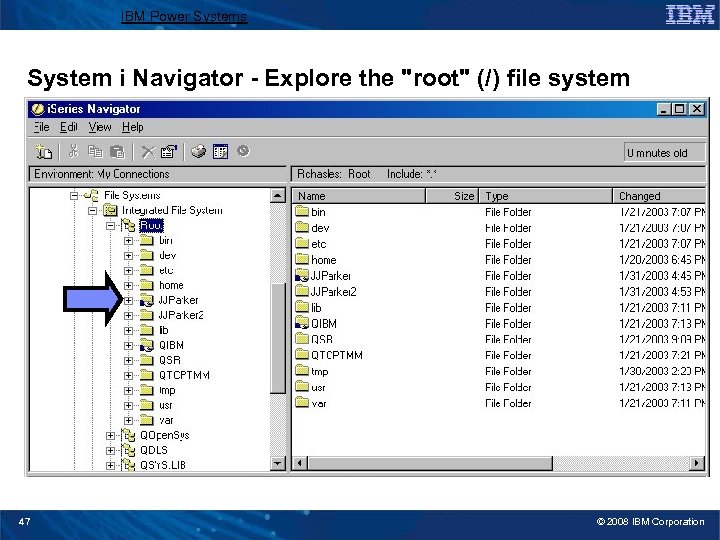
IBM Power Systems System i Navigator - Explore the "root" (/) file system 47 © 2008 IBM Corporation
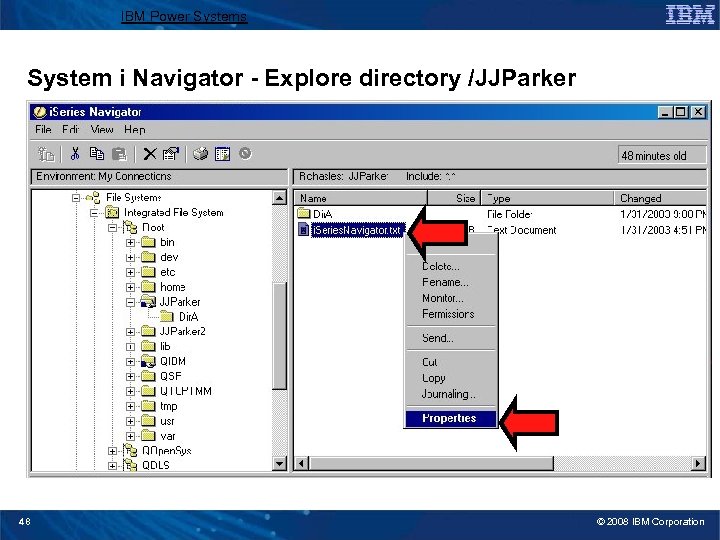
IBM Power Systems System i Navigator - Explore directory /JJParker 48 © 2008 IBM Corporation
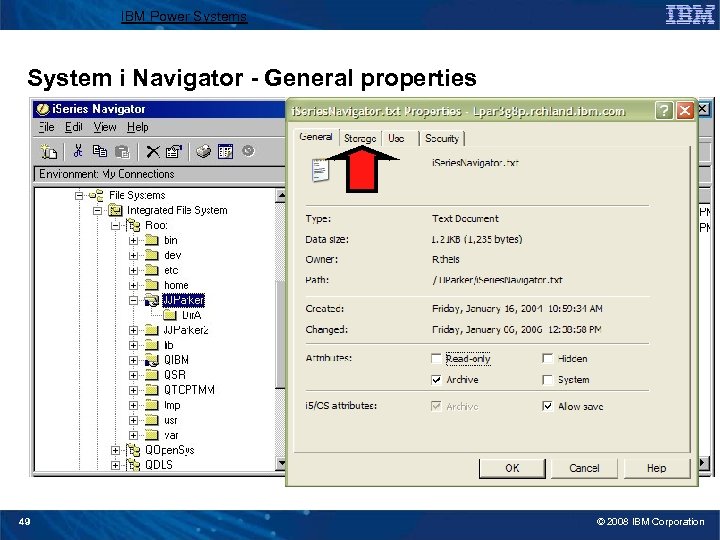
IBM Power Systems System i Navigator - General properties 49 © 2008 IBM Corporation
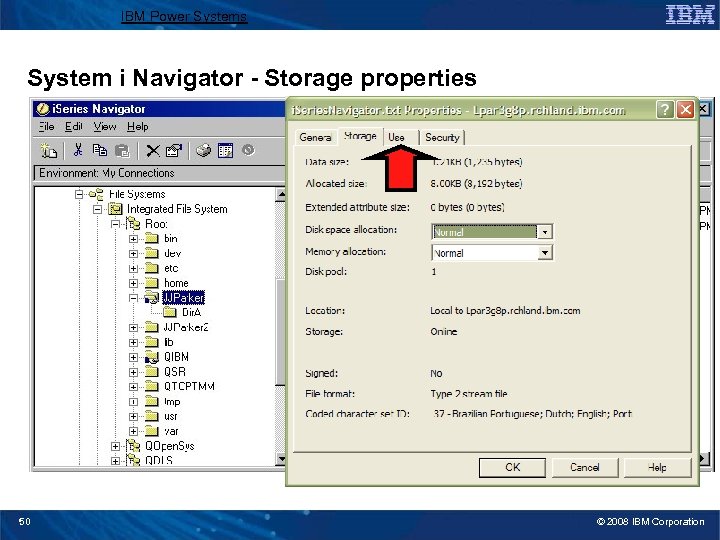
IBM Power Systems System i Navigator - Storage properties 50 © 2008 IBM Corporation
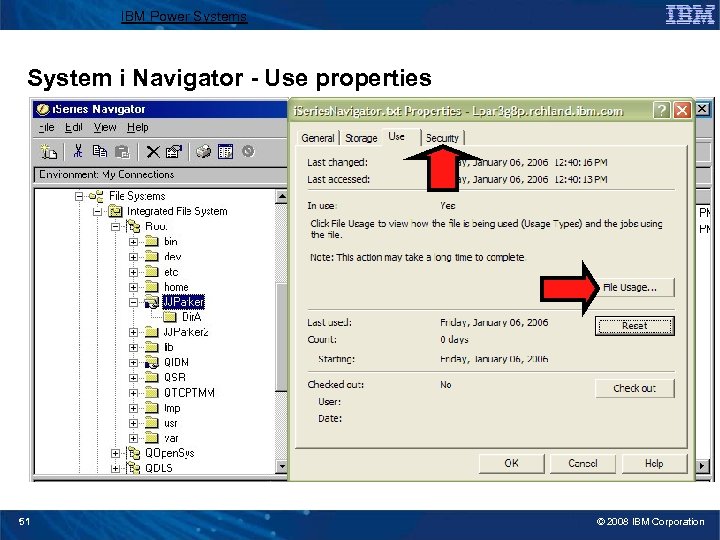
IBM Power Systems System i Navigator - Use properties 51 © 2008 IBM Corporation
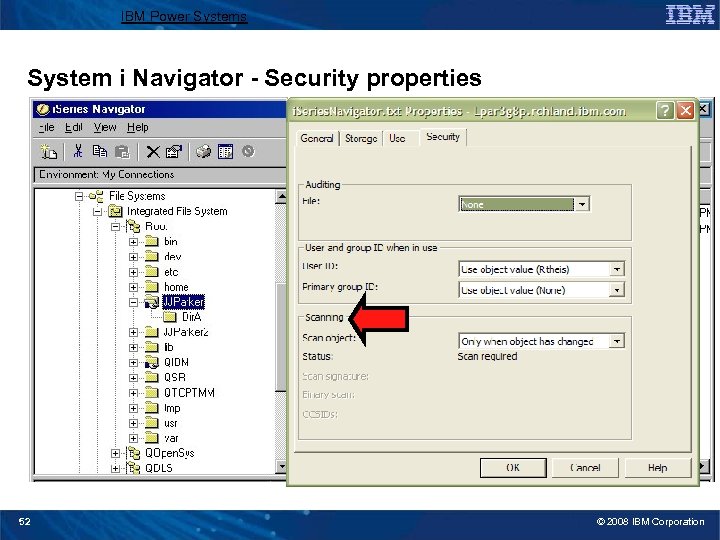
IBM Power Systems System i Navigator - Security properties 52 © 2008 IBM Corporation
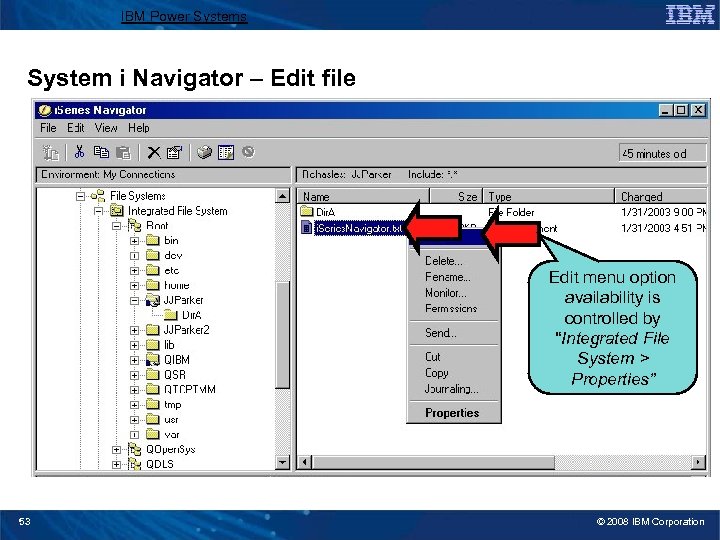
IBM Power Systems System i Navigator – Edit file Edit menu option availability is controlled by “Integrated File System > Properties” 53 © 2008 IBM Corporation
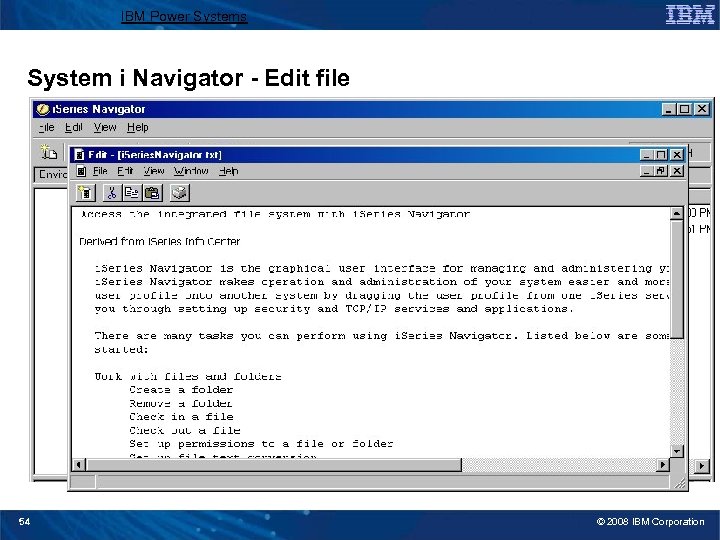
IBM Power Systems System i Navigator - Edit file 54 © 2008 IBM Corporation
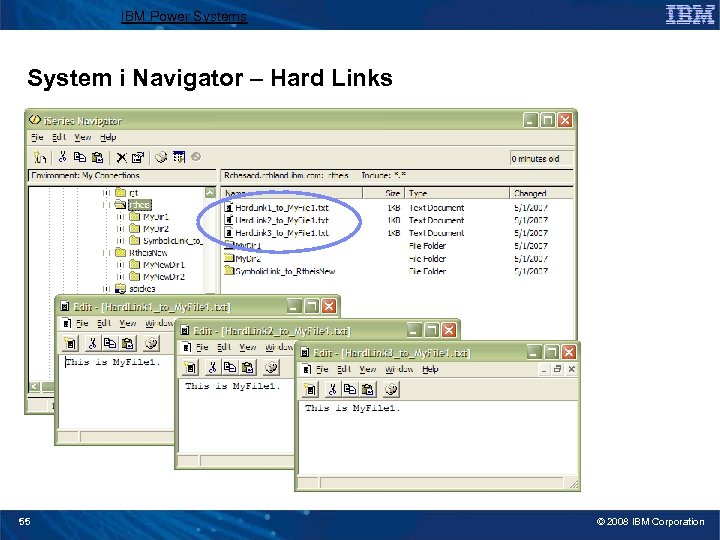
IBM Power Systems System i Navigator – Hard Links 55 © 2008 IBM Corporation
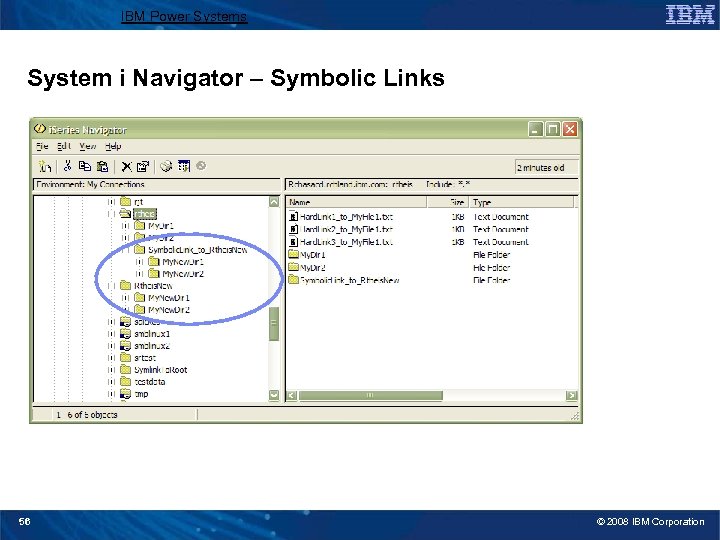
IBM Power Systems System i Navigator – Symbolic Links 56 © 2008 IBM Corporation
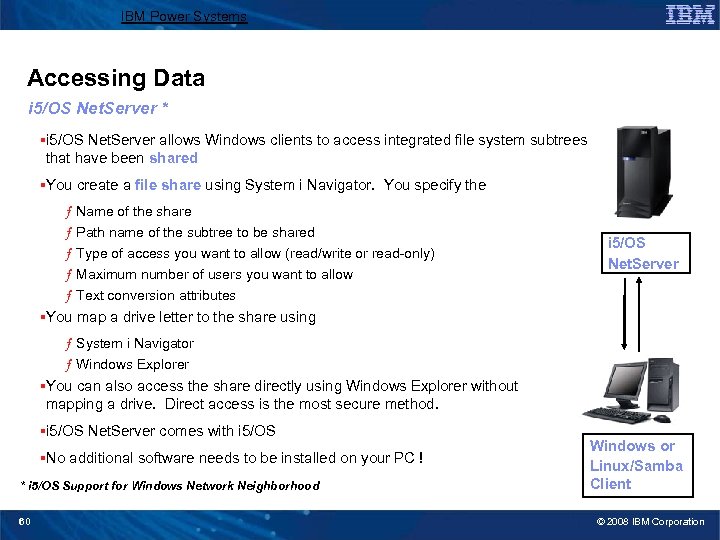
IBM Power Systems Accessing Data i 5/OS Net. Server * §i 5/OS Net. Server allows Windows clients to access integrated file system subtrees that have been shared §You create a file share using System i Navigator. You specify the ƒ Name of the share ƒ Path name of the subtree to be shared ƒ Type of access you want to allow (read/write or read-only) ƒ Maximum number of users you want to allow ƒ Text conversion attributes i 5/OS Net. Server §You map a drive letter to the share using ƒ System i Navigator ƒ Windows Explorer §You can also access the share directly using Windows Explorer without mapping a drive. Direct access is the most secure method. §i 5/OS Net. Server comes with i 5/OS §No additional software needs to be installed on your PC ! * i 5/OS Support for Windows Network Neighborhood 60 Windows or Linux/Samba Client © 2008 IBM Corporation
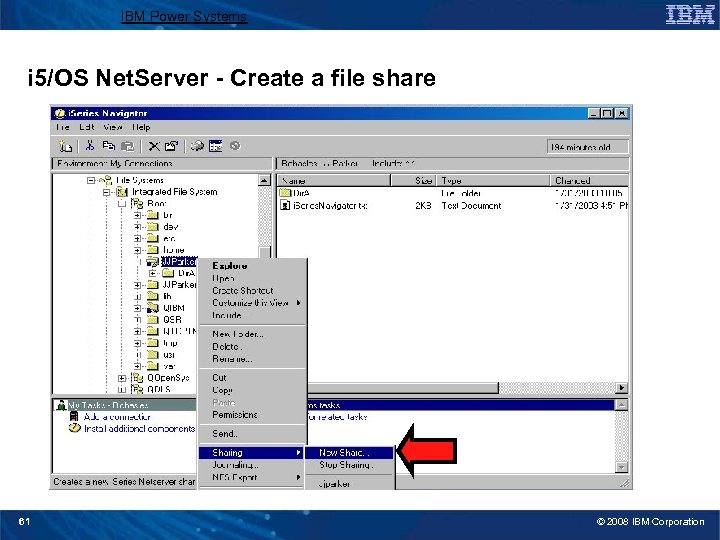
IBM Power Systems i 5/OS Net. Server - Create a file share 61 © 2008 IBM Corporation
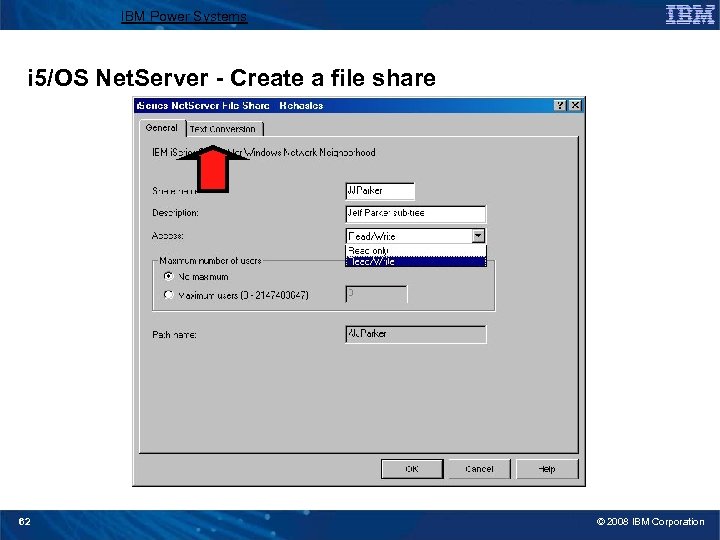
IBM Power Systems i 5/OS Net. Server - Create a file share 62 © 2008 IBM Corporation
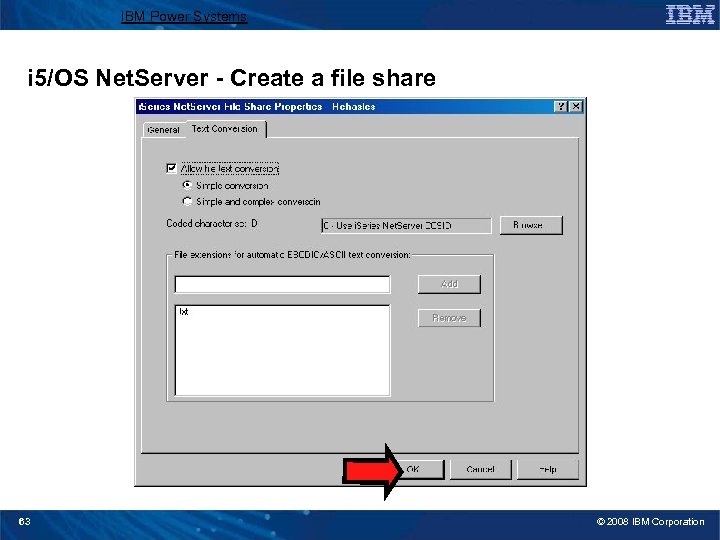
IBM Power Systems i 5/OS Net. Server - Create a file share 63 © 2008 IBM Corporation
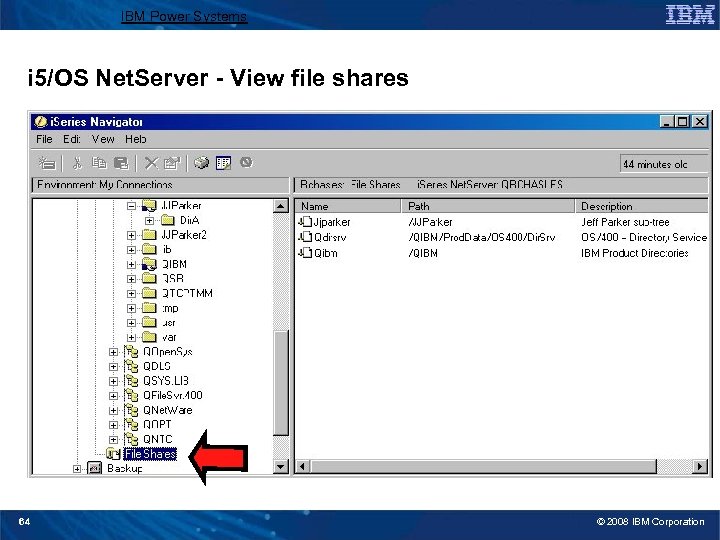
IBM Power Systems i 5/OS Net. Server - View file shares 64 © 2008 IBM Corporation
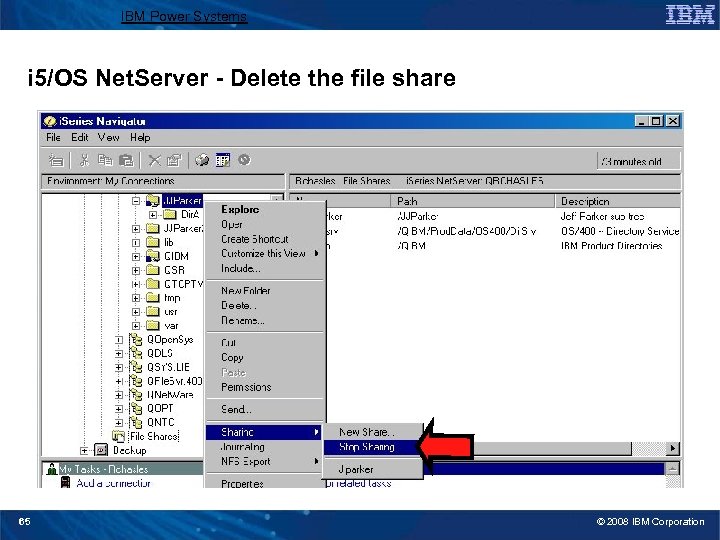
IBM Power Systems i 5/OS Net. Server - Delete the file share 65 © 2008 IBM Corporation
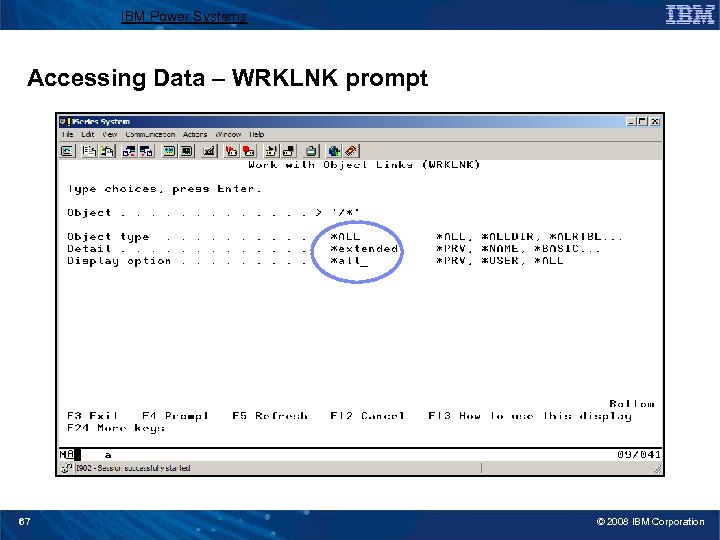
IBM Power Systems Accessing Data – WRKLNK prompt 67 © 2008 IBM Corporation
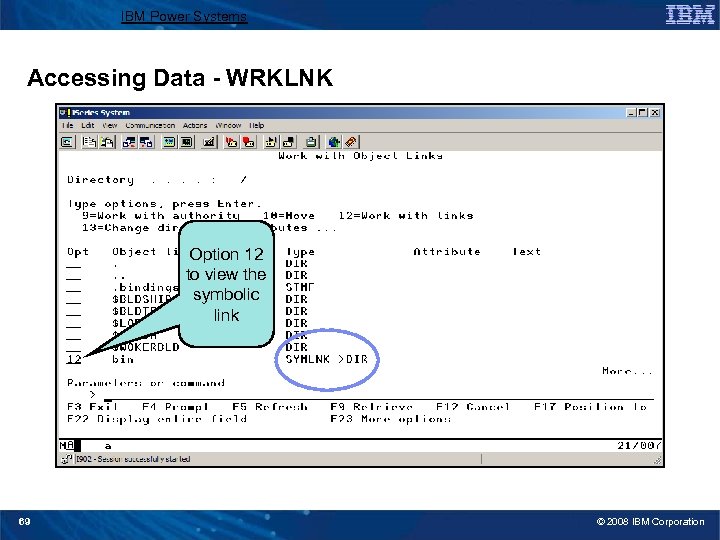
IBM Power Systems Accessing Data - WRKLNK Option 12 to view the symbolic link 69 © 2008 IBM Corporation
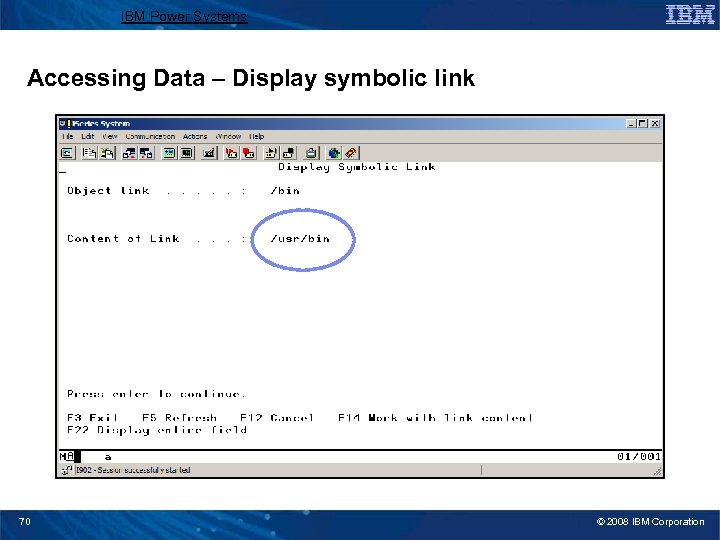
IBM Power Systems Accessing Data – Display symbolic link 70 © 2008 IBM Corporation
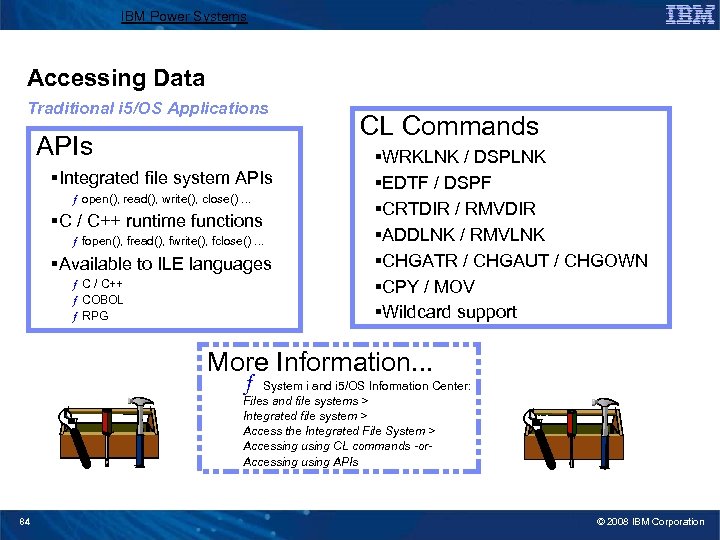
IBM Power Systems Accessing Data Traditional i 5/OS Applications APIs §Integrated file system APIs ƒ open(), read(), write(), close(). . . §C / C++ runtime functions ƒ fopen(), fread(), fwrite(), fclose(). . . §Available to ILE languages ƒ C / C++ ƒ COBOL ƒ RPG CL Commands §WRKLNK / DSPLNK §EDTF / DSPF §CRTDIR / RMVDIR §ADDLNK / RMVLNK §CHGATR / CHGAUT / CHGOWN §CPY / MOV §Wildcard support More Information. . . ƒ System i and i 5/OS Information Center: Files and file systems > Integrated file system > Access the Integrated File System > Accessing using CL commands -or. Accessing using APIs 84 © 2008 IBM Corporation
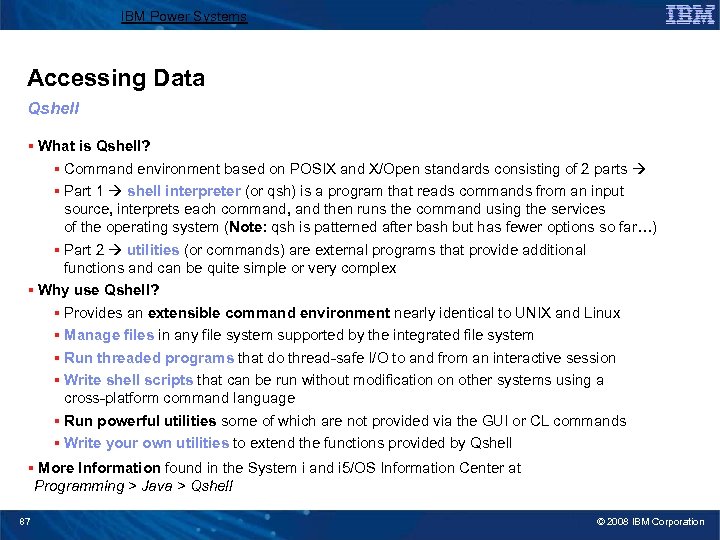
IBM Power Systems Accessing Data Qshell § What is Qshell? § Command environment based on POSIX and X/Open standards consisting of 2 parts § Part 1 shell interpreter (or qsh) is a program that reads commands from an input source, interprets each command, and then runs the command using the services of the operating system (Note: qsh is patterned after bash but has fewer options so far…) § Part 2 utilities (or commands) are external programs that provide additional functions and can be quite simple or very complex § Why use Qshell? § Provides an extensible command environment nearly identical to UNIX and Linux § Manage files in any file system supported by the integrated file system § Run threaded programs that do thread-safe I/O to and from an interactive session § Write shell scripts that can be run without modification on other systems using a cross-platform command language § Run powerful utilities some of which are not provided via the GUI or CL commands § Write your own utilities to extend the functions provided by Qshell § More Information found in the System i and i 5/OS Information Center at Programming > Java > Qshell 87 © 2008 IBM Corporation
IBM Power Systems Accessing Data FTP §Use name format 1 (NAMEFMT 1) to use path names to specify the files being transferred §You must use stream mode (MODE S) and file structure (STRUCT F) when transferring stream files §Can specify how CCSID conversion is to be handled (TYPE C) §The integrated file system limits FTP support to transferring file data only. You cannot use FTP to transfer attribute data. §QSYS. LIB file system considerations ƒ FTP support is limited to physical file members, source physical file members, and save files. You cannot use FTP to transfer other object types, such as programs (*PGM). ƒ However, you can save other object types to a save file, transfer the save file, and then restore the objects. ƒ Recommended that you pre-create the target file when sending to the QSYS. LIB file system 89 © 2008 IBM Corporation
IBM Power Systems Accessing Data i 5/OS PASE §Allows you to port AIX™ applications to the i 5/OS with minimal effort §Provides an integrated runtime environment that allows you to run UNIX applications without the complexity of managing a UNIX system §Uses the integrated file system for data access §More information found in the System i and i 5/OS Information Center at Integrated operating environments > i 5/OS PASE 90 © 2008 IBM Corporation
IBM Power Systems Accessing Data IBM Toolbox for Java §Shipped with i. Series Access for Windows §Provides Java classes for accessing i 5/OS resources ƒ Including the integrated file system §Uses the i. Series Access for Windows Host Servers as access points to the system §More information found in the System i and i 5/OS Information Center at Programming > Java > IBM Toolbox for Java 91 © 2008 IBM Corporation
IBM Power Systems References § System i and i 5/OS Information Center § Your System i and i 5/OS information source § http: //publib. boulder. ibm. com/iseries/ § System i Resource Center § The essential destination for the i. Series community. It gives you access to a wealth of information to help you improve your IT department…and your business. § http: //www-03. ibm. com/systems/i/resources/ § System i and i 5/OS Information Center Integrated file system Topic (Files and file systems > Integrated file system) § File system information (Work with file systems) § NLS (Programming support > Naming and international support) § Integrated file system and System i Navigator (Working with files and folders using System i Navigator) § And much more… 92 © 2008 IBM Corporation
IBM Power Systems™ Gateway/400 user group presentation Integrated File System: Fundamentals Margaret Fenlon mfenlon@us. ibm. com
IBM Power Systems Trademarks and Disclaimers 8 IBM Corporation 1994 -2008. All rights reserved. References in this document to IBM products or services do not imply that IBM intends to make them available in every country. Trademarks of International Business Machines Corporation in the United States, other countries, or both can be found on the World Wide Web at http: //www. ibm. com/legal/copytrade. shtml. Intel, Intel logo, Intel Inside logo, Intel Centrino logo, Celeron, Intel Xeon, Intel Speed. Step, Itanium, and Pentium are trademarks or registered trademarks of Intel Corporation or its subsidiaries in the United States and other countries. Linux is a registered trademark of Linus Torvalds in the United States, other countries, or both. Microsoft, Windows NT, and the Windows logo are trademarks of Microsoft Corporation in the United States, other countries, or both. IT Infrastructure Library is a registered trademark of the Central Computer and Telecommunications Agency which is now part of the Office of Government Commerce. ITIL is a registered trademark, and a registered community trademark of the Office of Government Commerce, and is registered in the U. S. Patent and Trademark Office. UNIX is a registered trademark of The Open Group in the United States and other countries. Java and all Java-based trademarks are trademarks of Sun Microsystems, Inc. in the United States, other countries, or both. Other company, product, or service names may be trademarks or service marks of others. Information is provided "AS IS" without warranty of any kind. The customer examples described are presented as illustrations of how those customers have used IBM products and the results they may have achieved. Actual environmental costs and performance characteristics may vary by customer. Information concerning non-IBM products was obtained from a supplier of these products, published announcement material, or other publicly available sources and does not constitute an endorsement of such products by IBM. Sources for non-IBM list prices and performance numbers are taken from publicly available information, including vendor announcements and vendor worldwide homepages. IBM has not tested these products and cannot confirm the accuracy of performance, capability, or any other claims related to non-IBM products. Questions on the capability of non-IBM products should be addressed to the supplier of those products. All statements regarding IBM future direction and intent are subject to change or withdrawal without notice, and represent goals and objectives only. Some information addresses anticipated future capabilities. Such information is not intended as a definitive statement of a commitment to specific levels of performance, function or delivery schedules with respect to any future products. Such commitments are only made in IBM product announcements. The information is presented here to communicate IBM's current investment and development activities as a good faith effort to help with our customers' future planning. Performance is based on measurements and projections using standard IBM benchmarks in a controlled environment. The actual throughput or performance that any user will experience will vary depending upon considerations such as the amount of multiprogramming in the user's job stream, the I/O configuration, the storage configuration, and the workload processed. Therefore, no assurance can be given that an individual user will achieve throughput or performance improvements equivalent to the ratios stated here. Prices are suggested U. S. list prices and are subject to change without notice. Starting price may not include a hard drive, operating system or other features. Contact your IBM representative or Business Partner for the most current pricing in your geography. Photographs shown may be engineering prototypes. Changes may be incorporated in production models. 94 © 2008 IBM Corporation
Скачать презентацию IBM Power Systems Gateway 400 user group presentation Integrated
9dbed2075928952ce78ea4144cd18f3b.ppt