 Скачать презентацию IBM Power Systems Agenda Key Session Number 43
67c9c02bbfa3b36e21f80b552de88079.ppt
- Количество слайдов: 84



IBM Power Systems™ Agenda Key: Session Number: 43 ME 420219 System i Access in the. NET World Lorie Du. Bois - ldubois@us. ibm. com System i Access Development
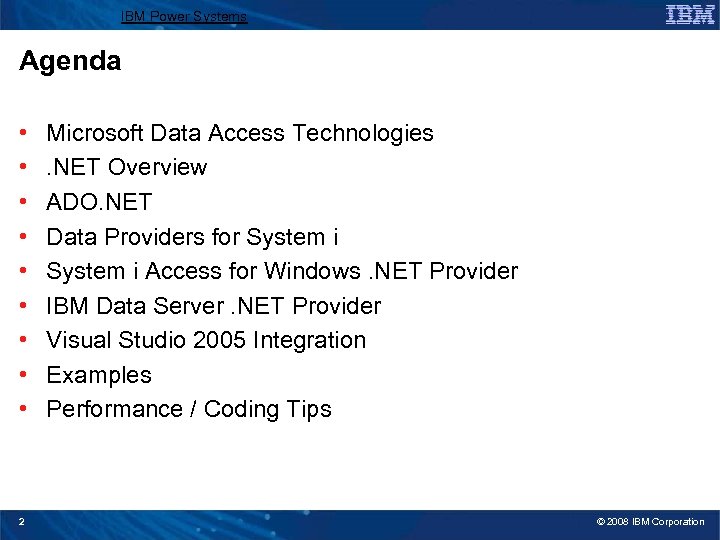
IBM Power Systems Agenda • • • 2 Microsoft Data Access Technologies. NET Overview ADO. NET Data Providers for System i Access for Windows. NET Provider IBM Data Server. NET Provider Visual Studio 2005 Integration Examples Performance / Coding Tips © 2008 IBM Corporation
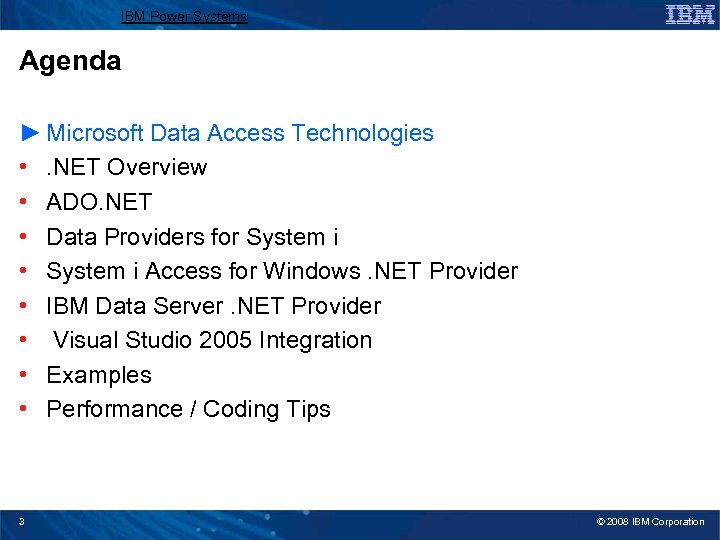
IBM Power Systems Agenda ► Microsoft Data Access Technologies • . NET Overview • ADO. NET • Data Providers for System i • System i Access for Windows. NET Provider • IBM Data Server. NET Provider • Visual Studio 2005 Integration • Examples • Performance / Coding Tips 3 © 2008 IBM Corporation
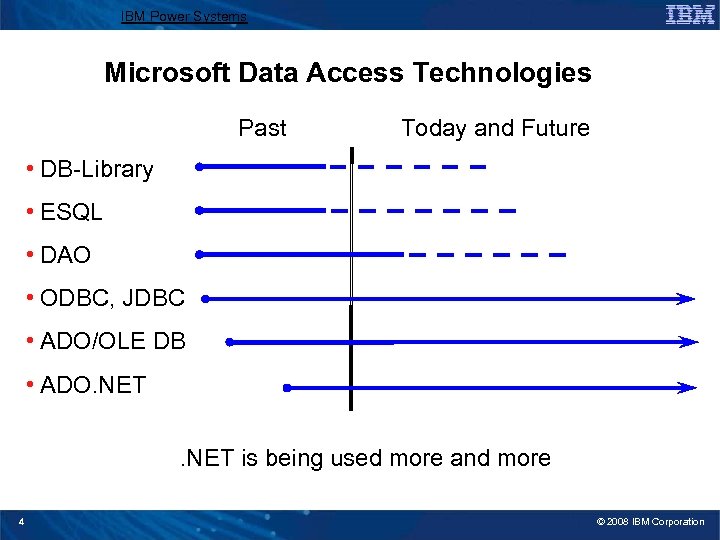
IBM Power Systems Microsoft Data Access Technologies Past Today and Future • DB-Library • ESQL • DAO • ODBC, JDBC • ADO/OLE DB • ADO. NET is being used more and more 4 © 2008 IBM Corporation
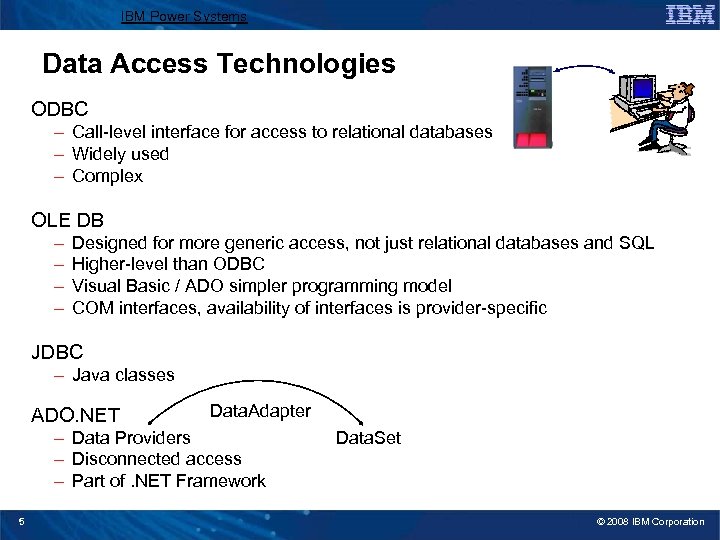
IBM Power Systems Data Access Technologies ODBC – Call-level interface for access to relational databases – Widely used – Complex OLE DB – – Designed for more generic access, not just relational databases and SQL Higher-level than ODBC Visual Basic / ADO simpler programming model COM interfaces, availability of interfaces is provider-specific JDBC – Java classes ADO. NET Data. Adapter – Data Providers – Disconnected access – Part of. NET Framework 5 Data. Set © 2008 IBM Corporation
IBM Power Systems Agenda • Microsoft Data Access Technologies ►. NET Overview • ADO. NET • Data Providers for System i • System i Access for Windows. NET Provider • IBM Data Server. NET Provider • Visual Studio 2005 Integration • Examples • Performance / Coding Tips 6 © 2008 IBM Corporation
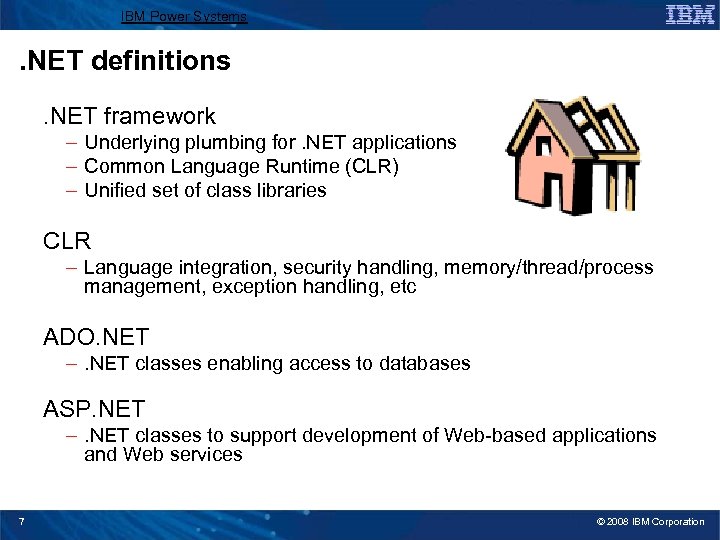
IBM Power Systems . NET definitions. NET framework – Underlying plumbing for. NET applications – Common Language Runtime (CLR) – Unified set of class libraries CLR – Language integration, security handling, memory/thread/process management, exception handling, etc ADO. NET –. NET classes enabling access to databases ASP. NET –. NET classes to support development of Web-based applications and Web services 7 © 2008 IBM Corporation
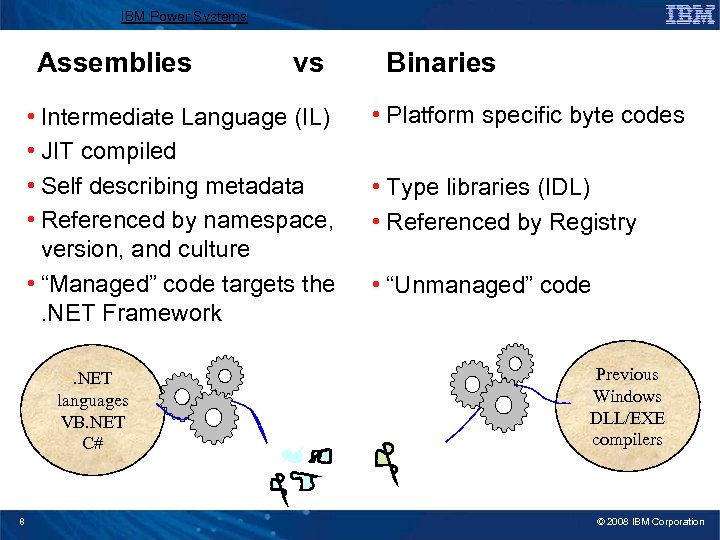
IBM Power Systems Assemblies vs • Intermediate Language (IL) • JIT compiled • Self describing metadata • Referenced by namespace, version, and culture • “Managed” code targets the. NET Framework. NET languages VB. NET C# 8 Binaries • Platform specific byte codes • Type libraries (IDL) • Referenced by Registry • “Unmanaged” code Previous Windows DLL/EXE compilers © 2008 IBM Corporation
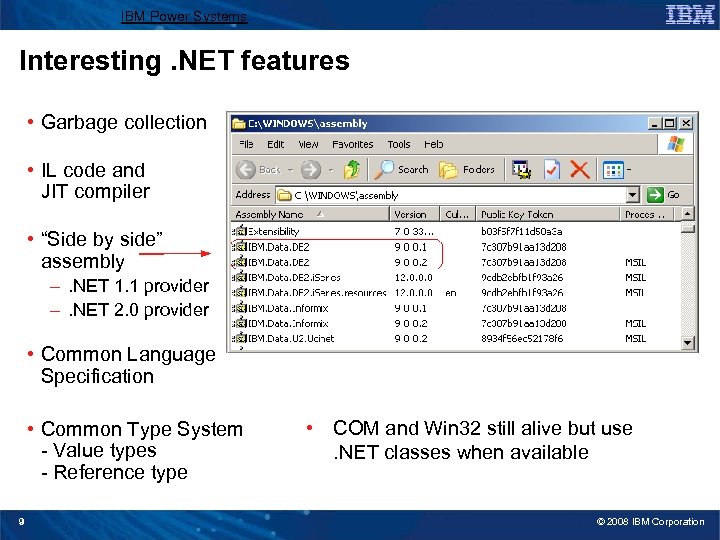
IBM Power Systems Interesting. NET features • Garbage collection • IL code and JIT compiler • “Side by side” assembly –. NET 1. 1 provider –. NET 2. 0 provider • Common Language Specification • Common Type System - Value types - Reference type 9 • COM and Win 32 still alive but use. NET classes when available © 2008 IBM Corporation
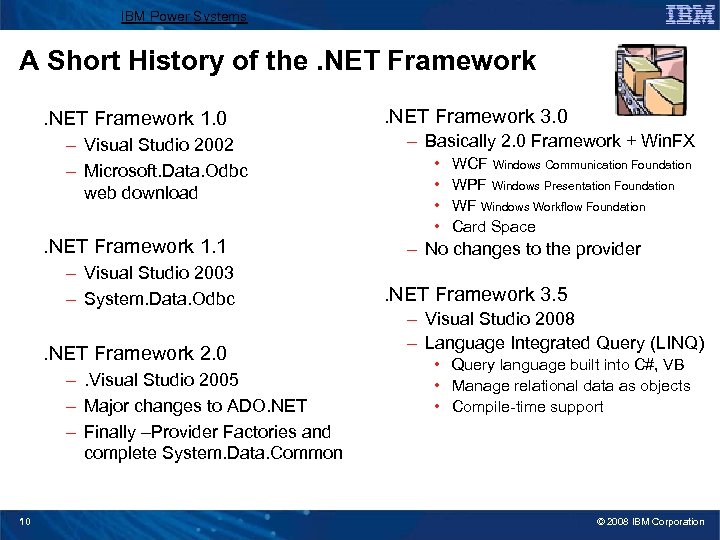
IBM Power Systems A Short History of the. NET Framework 1. 0 – Visual Studio 2002 – Microsoft. Data. Odbc web download . NET Framework 1. 1 – Visual Studio 2003 – System. Data. Odbc . NET Framework 2. 0 –. Visual Studio 2005 – Major changes to ADO. NET – Finally –Provider Factories and complete System. Data. Common 10 . NET Framework 3. 0 – Basically 2. 0 Framework + Win. FX • • WCF Windows Communication Foundation WPF Windows Presentation Foundation WF Windows Workflow Foundation Card Space – No changes to the provider . NET Framework 3. 5 – Visual Studio 2008 – Language Integrated Query (LINQ) • Query language built into C#, VB • Manage relational data as objects • Compile-time support © 2008 IBM Corporation
IBM Power Systems Agenda • Microsoft Data Access Technologies • . NET Overview ► ADO. NET • Data Providers for System i • System i Access for Windows. NET Provider • IBM Data Server. NET Provider • Visual Studio 2005 Integration • Examples • Performance / Coding Tips 11 © 2008 IBM Corporation
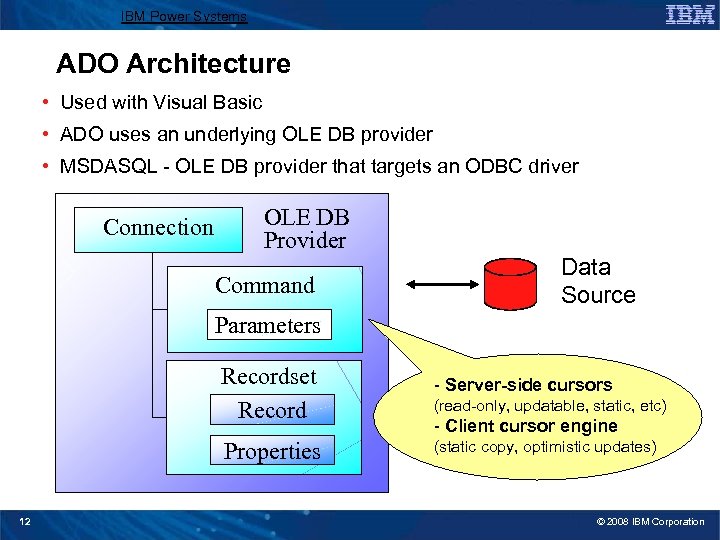
IBM Power Systems ADO Architecture • Used with Visual Basic • ADO uses an underlying OLE DB provider • MSDASQL - OLE DB provider that targets an ODBC driver Connection OLE DB Provider Command Data Source Parameters Recordset Record Properties 12 - Server-side cursors (static copy, optimistic updates) (read-only, updatable, static, etc) - Client cursor engine © 2008 IBM Corporation
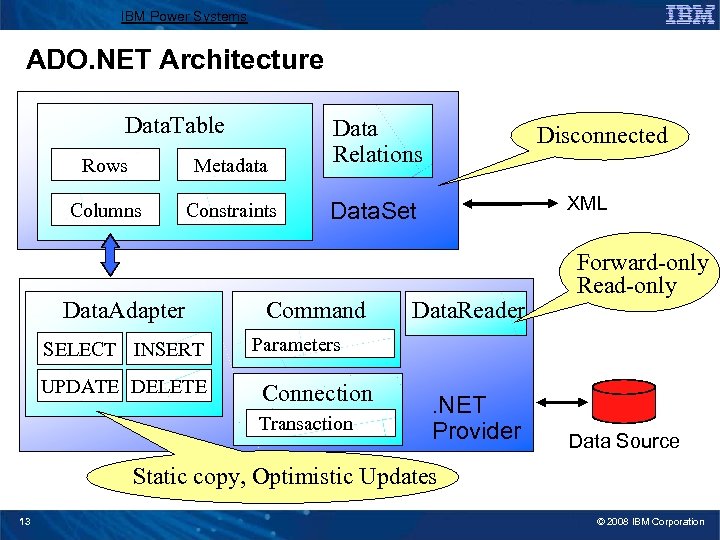
IBM Power Systems ADO. NET Architecture Data. Table Rows Metadata Data Relations Columns Constraints Data. Set Data. Adapter SELECT INSERT UPDATE DELETE Command Disconnected XML Data. Reader Forward-only Read-only Parameters Connection Transaction . NET Provider Data Source Static copy, Optimistic Updates 13 © 2008 IBM Corporation
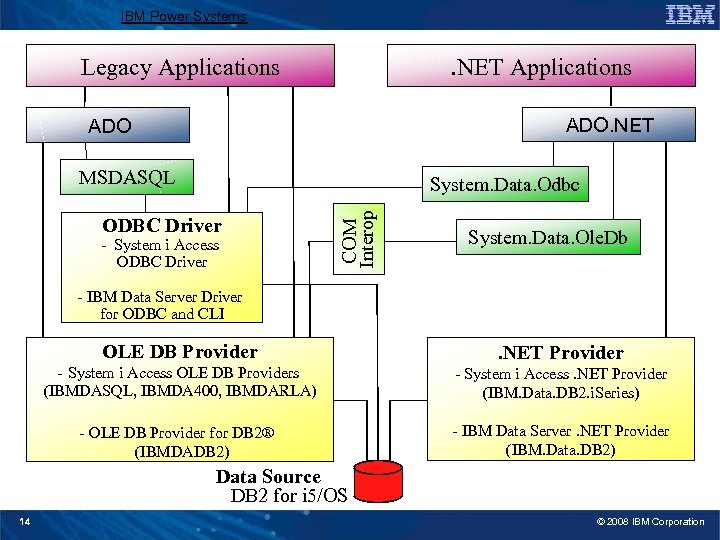
IBM Power Systems . NET Applications Legacy Applications ADO. NET ADO MSDASQL ODBC Driver - System i Access ODBC Driver COM Interop System. Data. Odbc System. Data. Ole. Db - IBM Data Server Driver for ODBC and CLI OLE DB Provider - System i Access OLE DB Providers . NET Provider (IBMDASQL, IBMDA 400, IBMDARLA) - System i Access. NET Provider (IBM. Data. DB 2. i. Series) - OLE DB Provider for DB 2® (IBMDADB 2) - IBM Data Server. NET Provider (IBM. Data. DB 2) Data Source DB 2 for i 5/OS 14 © 2008 IBM Corporation
IBM Power Systems Agenda • Microsoft Data Access Technologies • . NET Overview • ADO. NET ► Data Providers for System i • System i Access for Windows. NET Provider • IBM Data Server. NET Provider • Visual Studio 2005 Integration • Examples • Performance / Coding Tips 15 © 2008 IBM Corporation
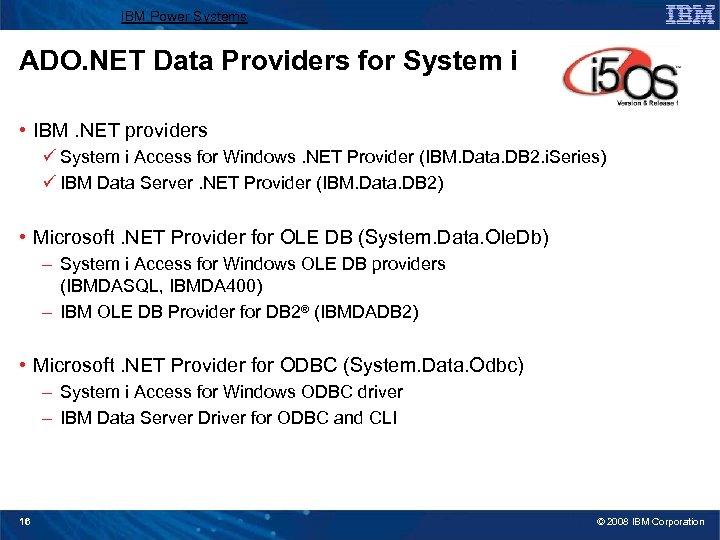
IBM Power Systems ADO. NET Data Providers for System i • IBM. NET providers ü System i Access for Windows. NET Provider (IBM. Data. DB 2. i. Series) ü IBM Data Server. NET Provider (IBM. Data. DB 2) • Microsoft. NET Provider for OLE DB (System. Data. Ole. Db) – System i Access for Windows OLE DB providers (IBMDASQL, IBMDA 400) – IBM OLE DB Provider for DB 2® (IBMDADB 2) • Microsoft. NET Provider for ODBC (System. Data. Odbc) – System i Access for Windows ODBC driver – IBM Data Server Driver for ODBC and CLI 16 © 2008 IBM Corporation
IBM Power Systems ADO Data Providers for System i • IBM OLE DB providers – System i Access for Windows OLE DB Providers (IBMDASQL, IBMDA 400, IBMDARLA) – IBM OLE DB Provider for DB 2® (IBMDADB 2) • Microsoft OLE DB provider for ODBC (MSDASQL) – MSDASQL originally not supported in 64 -bit, but due to popular demand, is now in Windows Server 2008 and Vista SP 1 • System i Access ODBC driver • IBM Data Server Driver for ODBC and CLI 17 © 2008 IBM Corporation
IBM Power Systems Agenda • Microsoft Data Access Technologies • . NET Overview • ADO. NET • Data Providers for System i ► System i Access for Windows. NET Provider • IBM Data Server. NET Provider • Visual Studio 2005 Integration • Examples • Performance / Coding Tips 18 © 2008 IBM Corporation
IBM Power Systems General Information • Part of System i Access for Windows 5761 -XE 1 ü no additional license needed • V 5 R 3 M 0 / V 5 R 4 M 0 Target the 1. 0 and 1. 1. NET Framework • V 6 R 1 M 0 Requires the 2. 0. NET Framework • Works with System i database server jobs (QZDASOINIT) • N-2 Support for i. Series / System i – V 5 R 3 M 0, V 5 R 4 M 0, V 6 R 1 M 0 • Using an older application with the V 6 R 1 M 0 provider requires: - Recompilation with Visual Studio 2005, or - Assembly redirect (machine. config or app. config) 10. 0 12. 0. 0. 0 • Documentation installed as part of the Toolkit component, in Client AccessMRIxxxx folder (cwbmptch. hlp) 19 © 2008 IBM Corporation
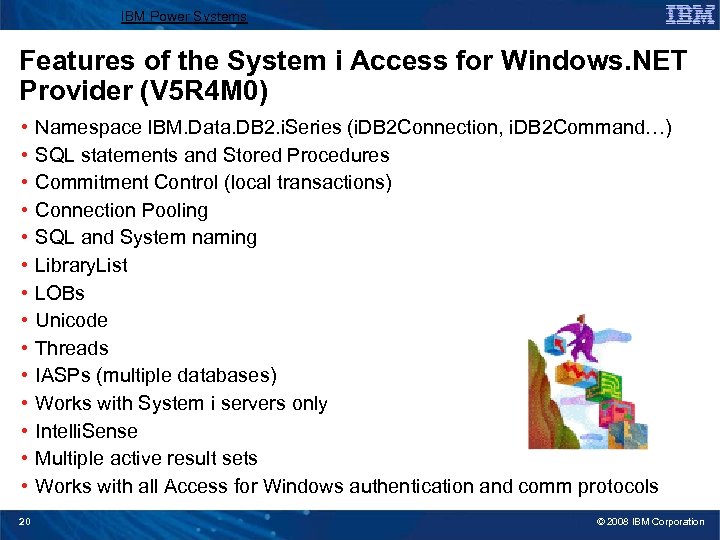
IBM Power Systems Features of the System i Access for Windows. NET Provider (V 5 R 4 M 0) • • • • 20 Namespace IBM. Data. DB 2. i. Series (i. DB 2 Connection, i. DB 2 Command…) SQL statements and Stored Procedures Commitment Control (local transactions) Connection Pooling SQL and System naming Library. List LOBs Unicode Threads IASPs (multiple databases) Works with System i servers only Intelli. Sense Multiple active result sets Works with all Access for Windows authentication and comm protocols © 2008 IBM Corporation
IBM Power Systems V 6 R 1 M 0 Enhancements • Support for. NET Framework 2. 0 base class model (System. Data. Common) • 64 -bit support (one DLL does both 32 -bit and 64 -bit) – install SP 1 • Distributed transactions via System. Transactions • Multi-row (block) inserts using the Add. Batch method • Permission classes • Many new Connection. String properties • Integration with Visual Studio 2005 wizards • Command. Builder enhancements 1 V 6 R • Decimal float and Datalink data types • Improved control over sending and receiving data in blocks 21 © 2008 IBM Corporation
IBM Power Systems New Classes in V 6 R 1 M 0 • • 22 i. DB 2 Connection. String. Builder i. DB 2 Data. Source. Enumerator i. DB 2 Data. Link data type i. DB 2 Dec. Float 16 and i. DB 2 Dec. Float 34 data types i. DB 2 Factory i. DB 2 Permission / i. DB 2 Permission. Attribute i. DB 2 Null. Value. Exception i. DB 2 Transaction. Failed. Exception © 2008 IBM Corporation
IBM Power Systems New Connection. String properties in V 6 R 1 M 0 • Distributed Transaction properties: – – Enlist Transaction. Completion. Timeout Xa. Lock. Timeout Xa. Transaction. Timeout • Miscellaneous properties: – – – – 23 Autocommit. Isolation. Level Block. Size Enable. Pre. Fetch Lob. Block. Size Numeric. Error. Option Persist. Security. Info Query. Storage. Limit • Properties corresponding to new Special Registers: – Application. Name – default value is the name of the. exe program – Client. Accounting – Client. Program ID – Client. User ID – Client. Workstation • Decimal float properties: – Decfloat. Error. Option – Decfloat. Rounding. Mode – Dec. Numeric. As. String property also applies to Decimal float types © 2008 IBM Corporation
IBM Power Systems New Connection. String properties in V 6 R 1 M 0 • Properties that can inherit from i. DB 2 Provider. Settings or be set on the Connection. String: – – Date. Time. As. String Dec. Numeric. As. String Char. Bit. Data. Ccsid Setting these properties on the Connection. String overrides whatever may be set in i. DB 2 Provider. Settings. 24 • Schema property: – Schema. Search. List ü Only used with the Get. Schema methods ü Useful with Visual Studio Server Explorer When Schema. Search. List is not specified, the default value depends on the naming convention: SQL naming Default. Collection System naming Library. List © 2008 IBM Corporation
IBM Power Systems New i. DB 2 Command. Builder options in V 6 R 1 M 0 • Set. All. Values property – affects data sent on the Update command – False ties in with new DB 2 for i 5/OS Extended Indicator support – True same behavior as in the past • Conflict. Option property – affects how optimistic updates are performed – Compare. All. Searchable. Values • Same behavior as in the past all searchable values checked in WHERE clause – Compare. Row. Version • Requires new Row Change Timestamp • Better optimistic update method only row change timestamp and RID are checked in WHERE clause – Overwrite. Changes • Only key values are used in the WHERE clause when making updates Careful, this option does not detect conflicting changes 25 © 2008 IBM Corporation
IBM Power Systems For more information • System i Access for Windows. NET Provider web page – http: //www. ibm. com/systems/i/software/access/windows/dotnet/ • NET Technical Reference - cwbmptch. hlp – Found in. . IBMClient AccessMrixxxx directory Documents all the class interfaces for the. NET Provider • “V 6 R 1 Breathes New Life into DB 2 for i 5/OS. NET Provider” – http: //www. mcpressonline. com/database/db 2/v 6 r 1 -breathes-new-life-into-db 2 -fori 5/os-net-provider. html • Redbook – “Integrating DB 2 Universal Database for i. Series with Microsoft ADO. NET” – http: //www. redbooks. ibm. com/abstracts/sg 246440. html? Open describes the older ADO. NET 1. 0/1. 1 provider functionality 26 © 2008 IBM Corporation
IBM Power Systems Agenda • Microsoft Data Access Technologies • . NET Overview • ADO. NET • Data Providers for System i • System i Access for Windows. NET Provider ► IBM Data Server. NET Provider • Visual Studio 2005 Integration • Examples • Performance / Coding Tips 27 © 2008 IBM Corporation
IBM Power Systems General Information • Several pieces of the puzzle: – IBM Data Server. NET Provider (version 9. 0 or 9. 5) – IBM Database Add-ins for Visual Studio 2005 • IBM Data Server Client contains both the. NET Provider and the VS Add-ins – DB 2 Connect license required for access to System i • Several packaging schemes, see: Types of IBM data server clients at http: //publib. boulder. ibm. com/infocenter/db 2 luw/v 9 r 5/index. jsp? topic=/com. ibm. db 2. luw. qb. client. doc/c 0022612. html • Support for – 1. 1. NET Framework – 2. 0 and 3. 0. NET Framework – 64 -bit operating systems (no Itanium support) • requires 2. 0+ Framework • packaged as separate 32 -bit and 64 -bit assemblies • Works with System i DRDA server jobs (QRWTSRVR) 28 © 2008 IBM Corporation
IBM Power Systems Features of the IBM Data Server. NET Provider (V 9. 0) • • Namespace IBM. Data. DB 2 (DB 2 Connection, DB 2 Command…) SQL statements and Stored Procedures, SQL naming only Local and Distributed transactions Federated database support Connection Pooling Unicode Threads Support for many types of database servers, not just System I – DB 2® -- Linux, UNIX, Windows, z/OS, System i – Uni. Verse® version 10. 2 or later use “Server. Type=UNIVERSE” in Connection. String – Uni. Data® version 7. 1. 11 or later use “Server. Type=UNIDATA” in Connection. String • The following. NET Provider features are not supported by U 2 servers (Uni. Verse and Uni. Data): – Multiple active result sets – LOBs, XML – DB 2 Bulk. Copy, DB 2 Result. Set, DB 2 Types, Execute. Page. Reader, Update. Batch. Size 29 © 2008 IBM Corporation
IBM Power Systems Features of the IBM Data Server. NET Provider (V 9. 5) The V 9. 5 release extends functionality of the 9. 0 release: • Support for IBM Informix® Dynamic Server (IDS), version 11. 10 and later – Can use IBM. Data. DB 2 provider (DB 2 Connection, DB 2 Command, etc), or IBM. Data. Informix provider (Ifx. Connection, Ifx. Command, etc), the behavior is the same 30 © 2008 IBM Corporation
IBM Power Systems DB 2 Development Add-ins for Visual Studio 2005 The DB 2 Add-ins for Visual Studio 2005 9. 5 contain many features: • Support for many different types of IBM Data Servers • Integration with Visual Studio Server Explorer – IBM Server Explorer no longer used • Designers to create, clone, and modify database objects – Tables and Views – Stored Procedures and Functions • Web Services – Create and deploy Web services for WAS CE v 1. 1 / Apache Tomcat v 5. 5 – Create and deploy IIS Web Services • New filters for viewing different types of tables and selecting schemas to display • Enhanced XML tooling – Register Annotated XML Schema – Generate Web services for Annotated XML Schema • Support for federated databases (Nicknames) 31 © 2008 IBM Corporation
IBM Power Systems Supported tools • Visual Studio 2005 supported by V 9 and 9. 5 • Visual Studio 2008 supported by V 9. 5 FP 1 • LINQ – not supported yet but high priority • Enterprise Framework Library – not supported yet but high priority 32 © 2008 IBM Corporation
IBM Power Systems For more information • IBM Data Server. NET Provider – DB 2 Connect http: //www. ibm. com/software/data/db 2 connect – Recommended reading list: DB 2 for Linux, UNIX, and Windows development: http: //www. ibm. com/developerworks/db 2/library/techarticle/dm-0509 poon 2/ – DB 2 and. NET FAQ http: //www. ibm. com/developerworks/wikis/display/DB 2+and+. NET+FAQ – DB 2 Version 9. 5 for Linux, UNIX, and Windows: Developing ADO. NET and OLE DB Applications ftp: //ftp. software. ibm. com/ps/products/db 2/info/vr 95/pdf/en_US/db 2 ane 950. pdf • IBM Database Add-ins for Visual Studio 2005 – Overview of IBM Database Add-ins for Visual Studio 2005. NET http: //www. ibm. com/developerworks/db 2/library/techarticle/dm-0512 surange/ 33 © 2008 IBM Corporation
IBM Power Systems Agenda • Microsoft Data Access Technologies • . NET Overview • ADO. NET • Data Providers for System i • System i Access for Windows. NET Provider • IBM Data Server. NET Provider ► Visual Studio 2005 Integration • Examples • Performance / Coding Tips 34 © 2008 IBM Corporation
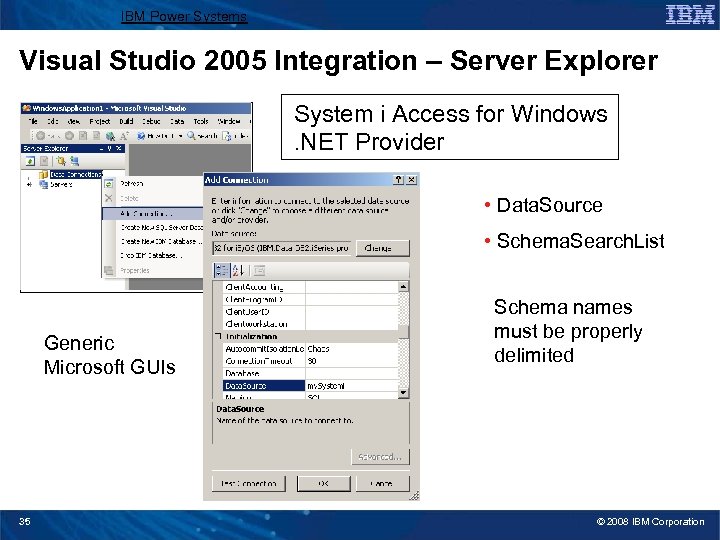
IBM Power Systems Visual Studio 2005 Integration – Server Explorer System i Access for Windows. NET Provider • Data. Source • Schema. Search. List Generic Microsoft GUIs 35 Schema names must be properly delimited © 2008 IBM Corporation
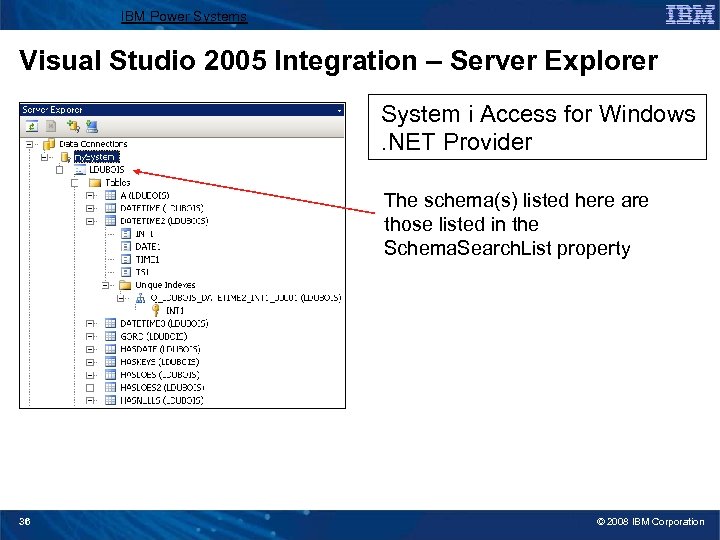
IBM Power Systems Visual Studio 2005 Integration – Server Explorer System i Access for Windows. NET Provider The schema(s) listed here are those listed in the Schema. Search. List property 36 © 2008 IBM Corporation
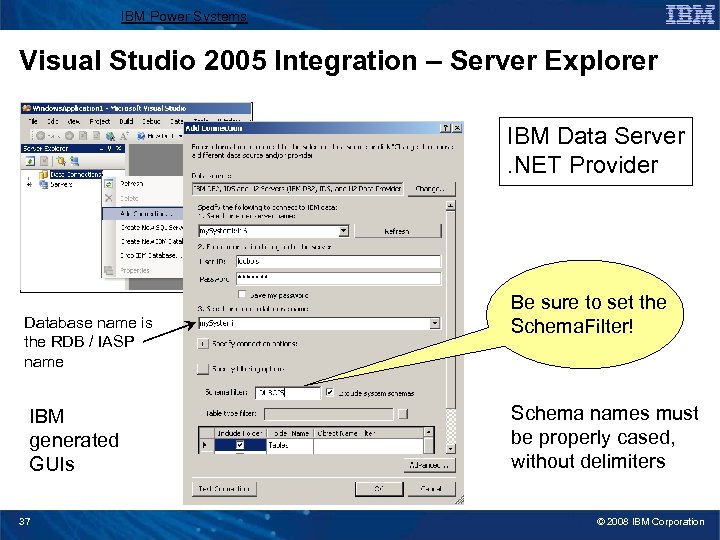
IBM Power Systems Visual Studio 2005 Integration – Server Explorer IBM Data Server. NET Provider Database name is the RDB / IASP name IBM generated GUIs 37 Be sure to set the Schema. Filter! Schema names must be properly cased, without delimiters © 2008 IBM Corporation
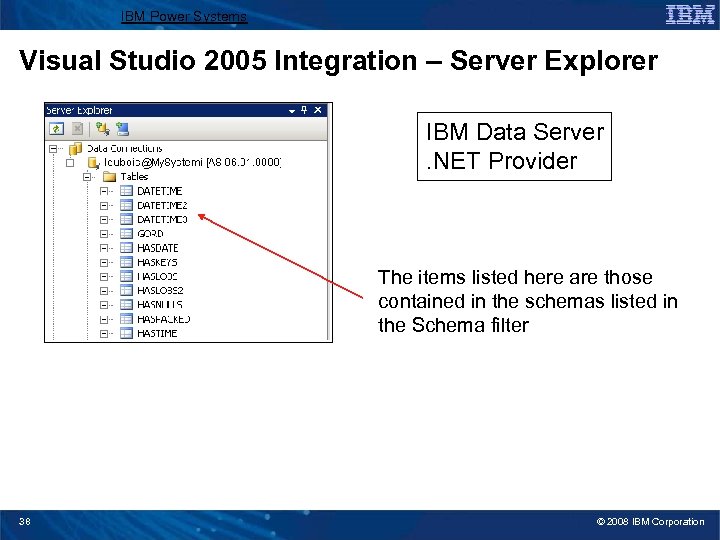
IBM Power Systems Visual Studio 2005 Integration – Server Explorer IBM Data Server. NET Provider The items listed here are those contained in the schemas listed in the Schema filter 38 © 2008 IBM Corporation
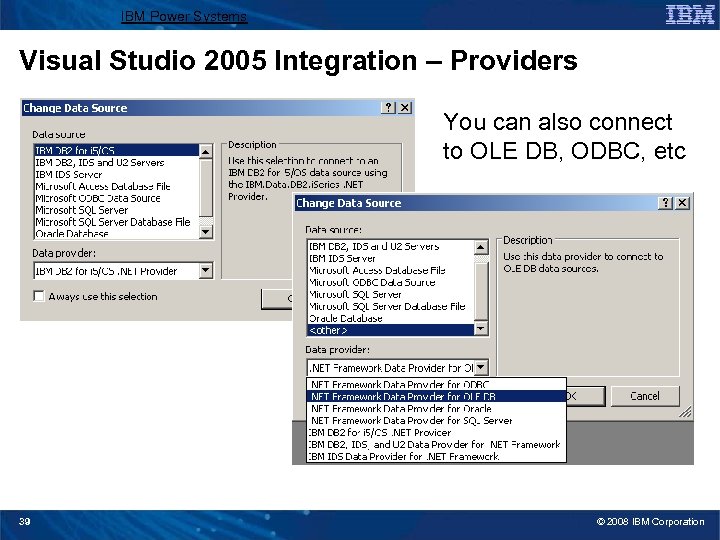
IBM Power Systems Visual Studio 2005 Integration – Providers You can also connect to OLE DB, ODBC, etc 39 © 2008 IBM Corporation
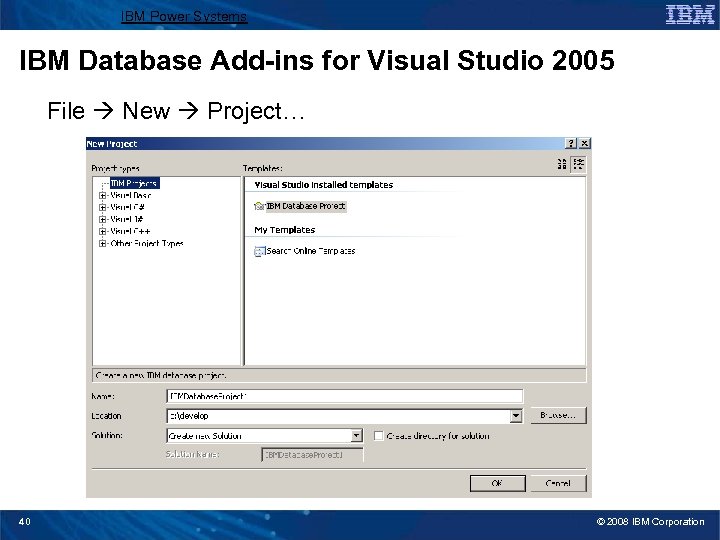
IBM Power Systems IBM Database Add-ins for Visual Studio 2005 File New Project… 40 © 2008 IBM Corporation
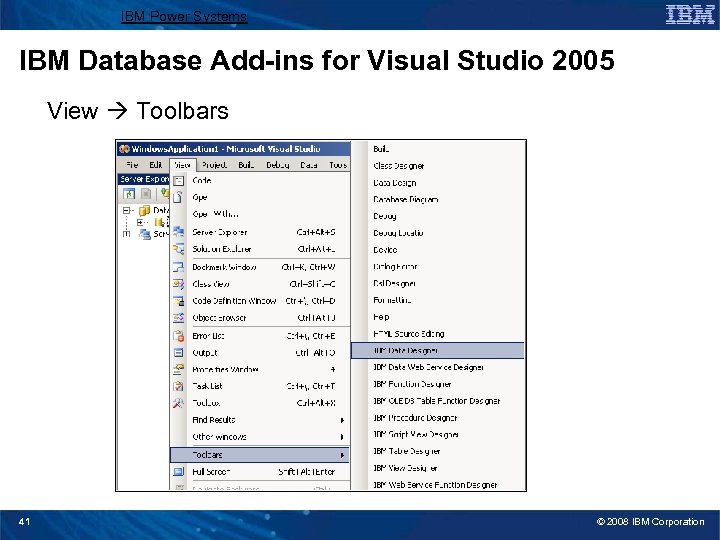
IBM Power Systems IBM Database Add-ins for Visual Studio 2005 View Toolbars 41 © 2008 IBM Corporation
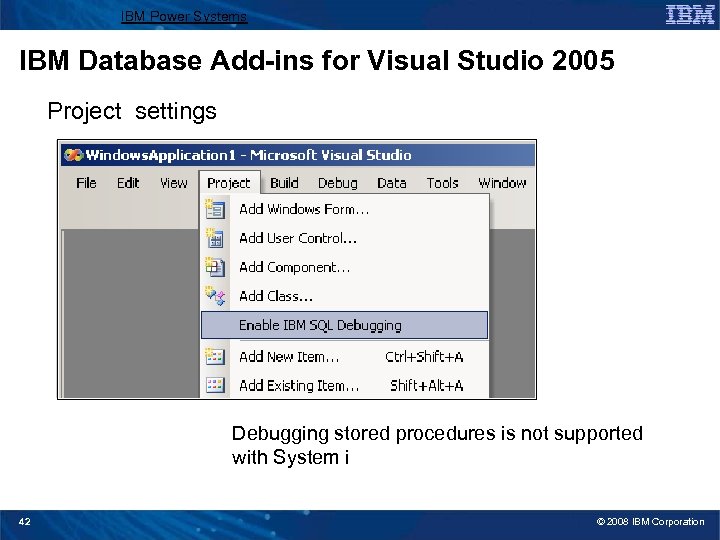
IBM Power Systems IBM Database Add-ins for Visual Studio 2005 Project settings Debugging stored procedures is not supported with System i 42 © 2008 IBM Corporation
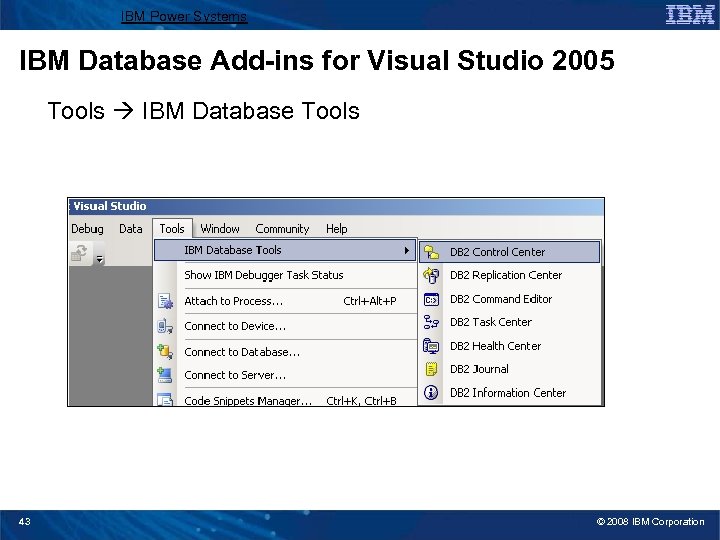
IBM Power Systems IBM Database Add-ins for Visual Studio 2005 Tools IBM Database Tools 43 © 2008 IBM Corporation
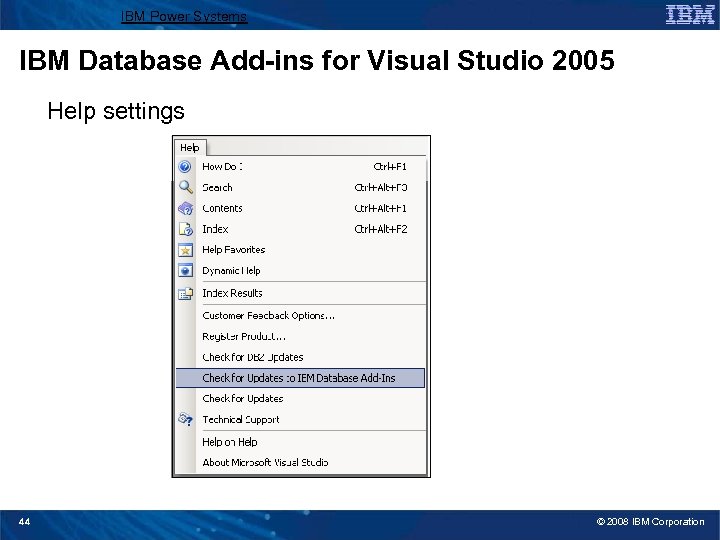
IBM Power Systems IBM Database Add-ins for Visual Studio 2005 Help settings 44 © 2008 IBM Corporation
IBM Power Systems Agenda • Microsoft Data Access Technologies • . NET Overview • ADO. NET • Data Providers for System i • System i Access for Windows. NET Provider • IBM Data Server. NET Provider • Visual Studio 2005 Integration ► Examples • Performance / Coding Tips 45 © 2008 IBM Corporation
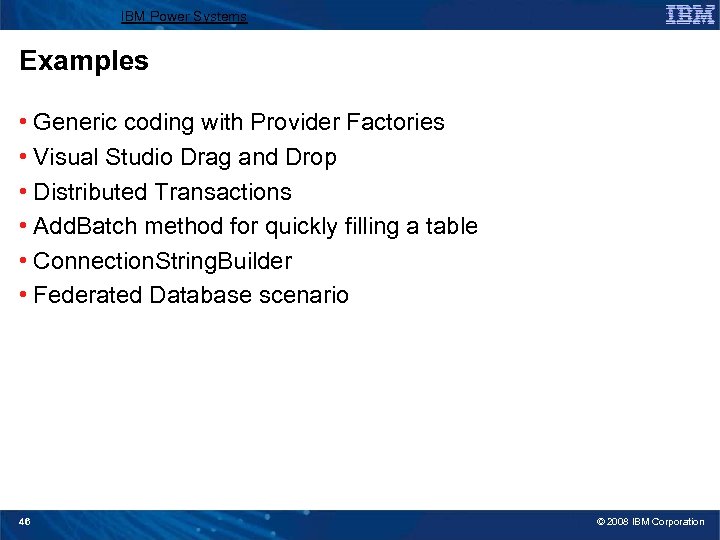
IBM Power Systems Examples • Generic coding with Provider Factories • Visual Studio Drag and Drop • Distributed Transactions • Add. Batch method for quickly filling a table • Connection. String. Builder • Federated Database scenario 46 © 2008 IBM Corporation
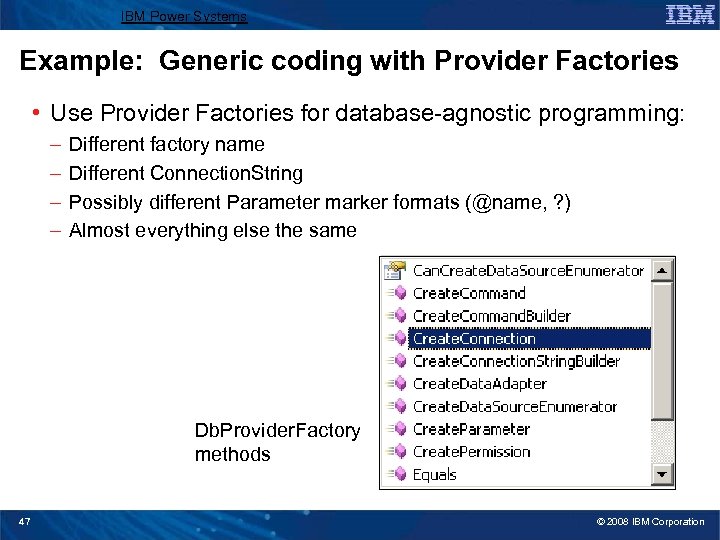
IBM Power Systems Example: Generic coding with Provider Factories • Use Provider Factories for database-agnostic programming: – – Different factory name Different Connection. String Possibly different Parameter marker formats (@name, ? ) Almost everything else the same Db. Provider. Factory methods 47 © 2008 IBM Corporation
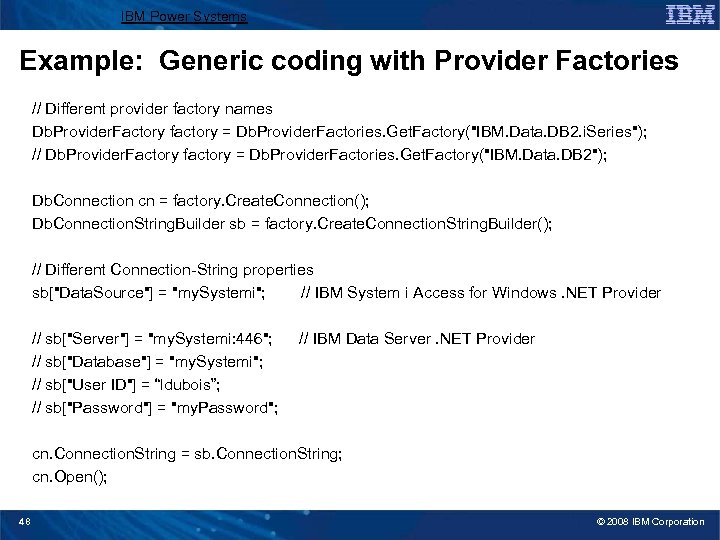
IBM Power Systems Example: Generic coding with Provider Factories // Different provider factory names Db. Provider. Factory factory = Db. Provider. Factories. Get. Factory("IBM. Data. DB 2. i. Series"); // Db. Provider. Factory factory = Db. Provider. Factories. Get. Factory("IBM. Data. DB 2"); Db. Connection cn = factory. Create. Connection(); Db. Connection. String. Builder sb = factory. Create. Connection. String. Builder(); // Different Connection-String properties sb["Data. Source"] = "my. Systemi"; // IBM System i Access for Windows. NET Provider // sb["Server"] = "my. Systemi: 446"; // sb["Database"] = "my. Systemi"; // sb["User ID"] = “ldubois”; // sb["Password"] = "my. Password"; // IBM Data Server. NET Provider cn. Connection. String = sb. Connection. String; cn. Open(); 48 © 2008 IBM Corporation
IBM Power Systems Example: Visual Studio Drag and Drop • In this example, we’ll use the Visual Studio designers to: – Create a data source – Select a table from the data source and see a Table. Adapter automatically created for us – Drag and drop the data from the table onto our Windows Form – Run the application and see a data grid showing the data from our table – Insert a row, delete a row, and update a row without writing any code 49 © 2008 IBM Corporation
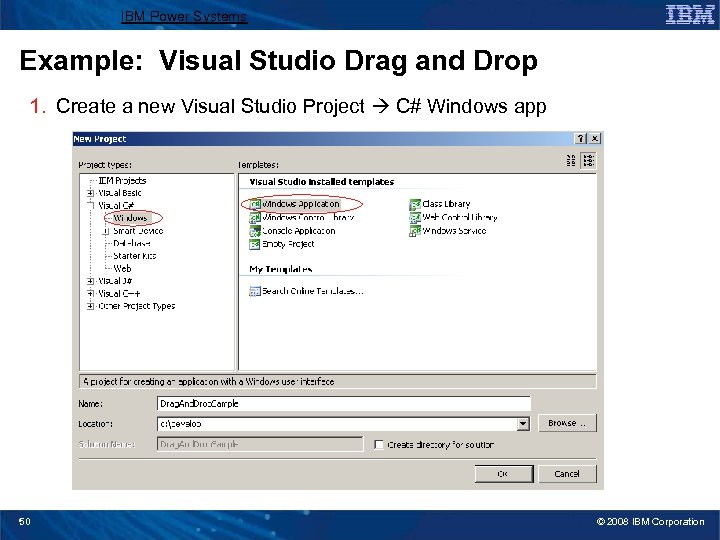
IBM Power Systems Example: Visual Studio Drag and Drop 1. Create a new Visual Studio Project C# Windows app 50 © 2008 IBM Corporation
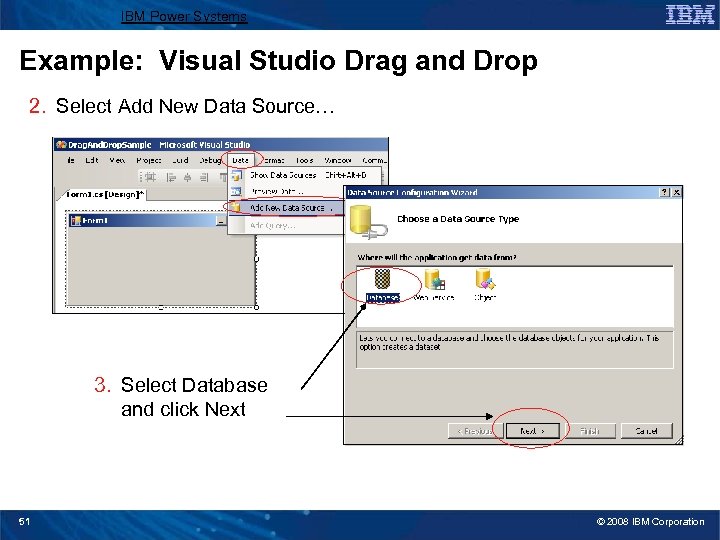
IBM Power Systems Example: Visual Studio Drag and Drop 2. Select Add New Data Source… 3. Select Database and click Next 51 © 2008 IBM Corporation
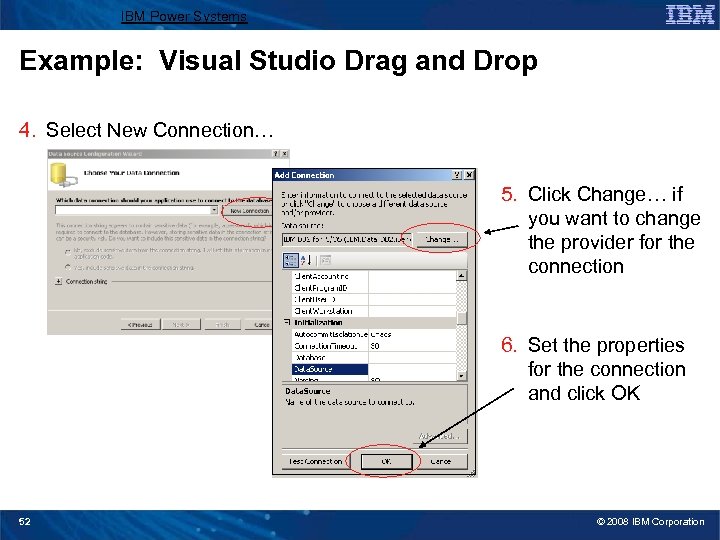
IBM Power Systems Example: Visual Studio Drag and Drop 4. Select New Connection… 5. Click Change… if you want to change the provider for the connection 6. Set the properties for the connection and click OK 52 © 2008 IBM Corporation
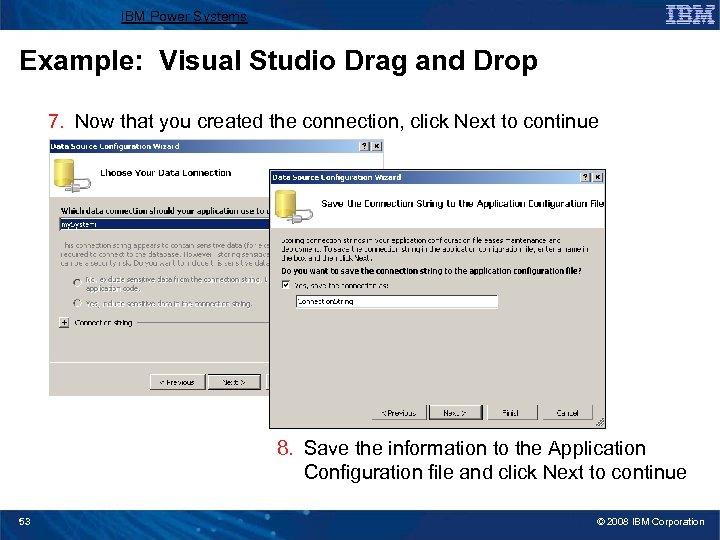
IBM Power Systems Example: Visual Studio Drag and Drop 7. Now that you created the connection, click Next to continue 8. Save the information to the Application Configuration file and click Next to continue 53 © 2008 IBM Corporation
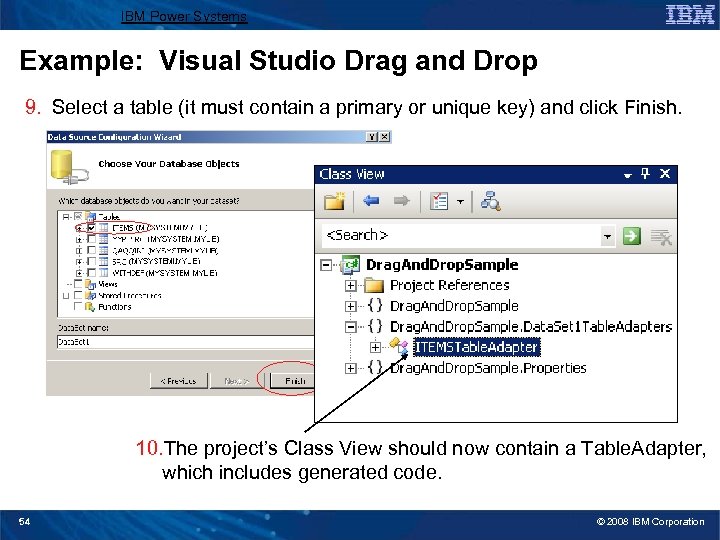
IBM Power Systems Example: Visual Studio Drag and Drop 9. Select a table (it must contain a primary or unique key) and click Finish. 10. The project’s Class View should now contain a Table. Adapter, which includes generated code. 54 © 2008 IBM Corporation
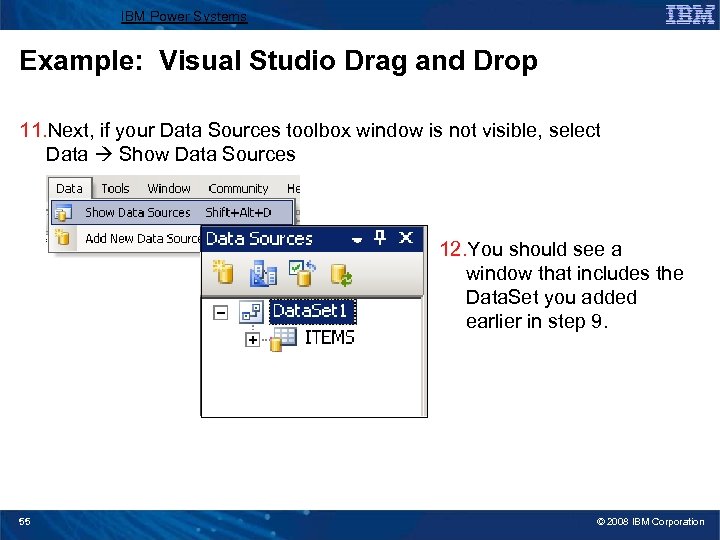
IBM Power Systems Example: Visual Studio Drag and Drop 11. Next, if your Data Sources toolbox window is not visible, select Data Show Data Sources 12. You should see a window that includes the Data. Set you added earlier in step 9. 55 © 2008 IBM Corporation
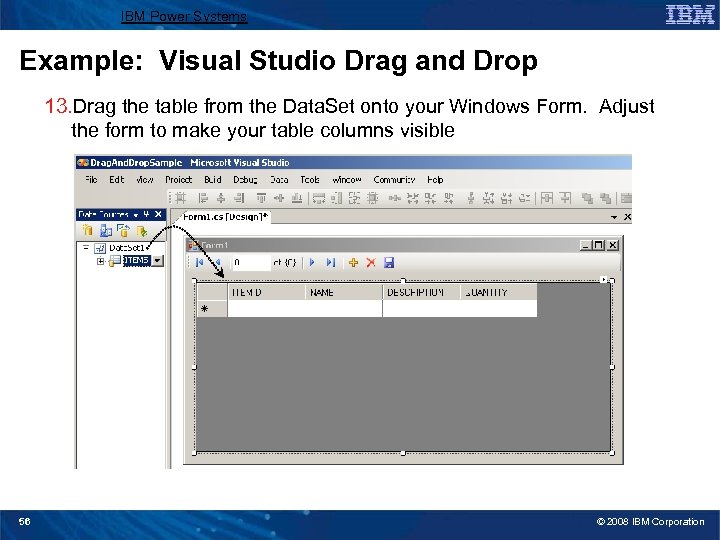
IBM Power Systems Example: Visual Studio Drag and Drop 13. Drag the table from the Data. Set onto your Windows Form. Adjust the form to make your table columns visible 56 © 2008 IBM Corporation
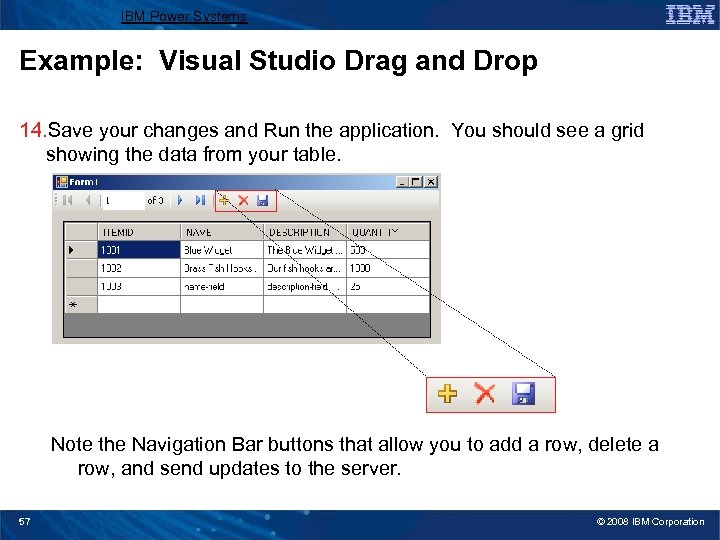
IBM Power Systems Example: Visual Studio Drag and Drop 14. Save your changes and Run the application. You should see a grid showing the data from your table. Note the Navigation Bar buttons that allow you to add a row, delete a row, and send updates to the server. 57 © 2008 IBM Corporation
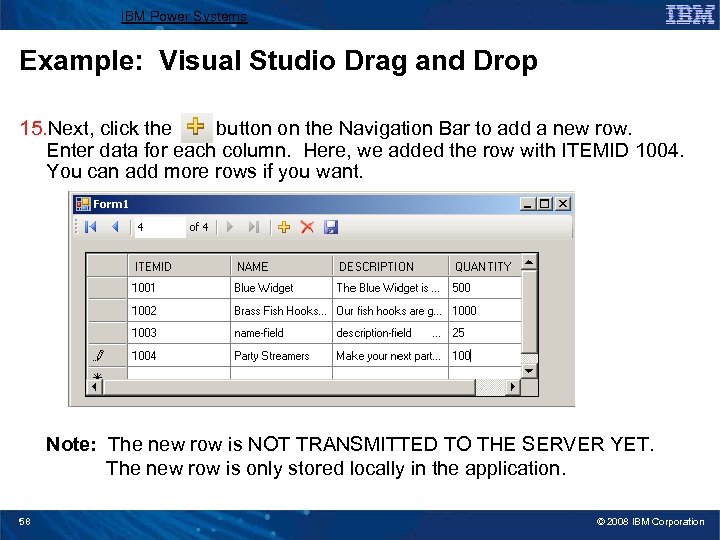
IBM Power Systems Example: Visual Studio Drag and Drop 15. Next, click the button on the Navigation Bar to add a new row. Enter data for each column. Here, we added the row with ITEMID 1004. You can add more rows if you want. Note: The new row is NOT TRANSMITTED TO THE SERVER YET. The new row is only stored locally in the application. 58 © 2008 IBM Corporation
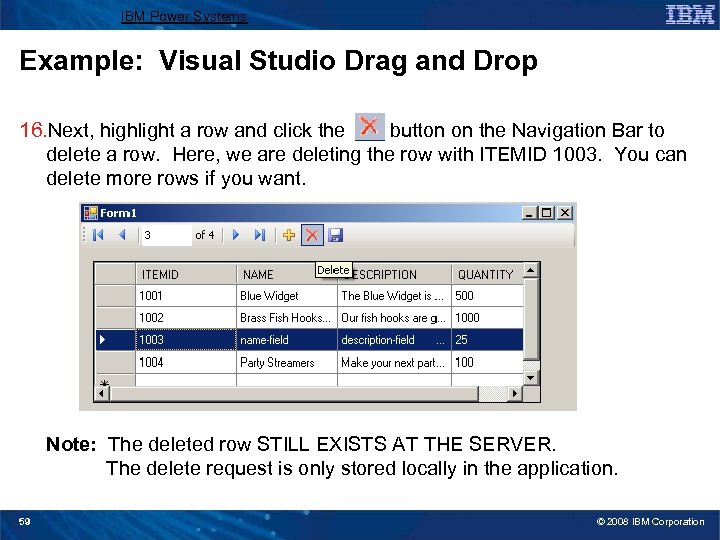
IBM Power Systems Example: Visual Studio Drag and Drop 16. Next, highlight a row and click the button on the Navigation Bar to delete a row. Here, we are deleting the row with ITEMID 1003. You can delete more rows if you want. Note: The deleted row STILL EXISTS AT THE SERVER. The delete request is only stored locally in the application. 59 © 2008 IBM Corporation
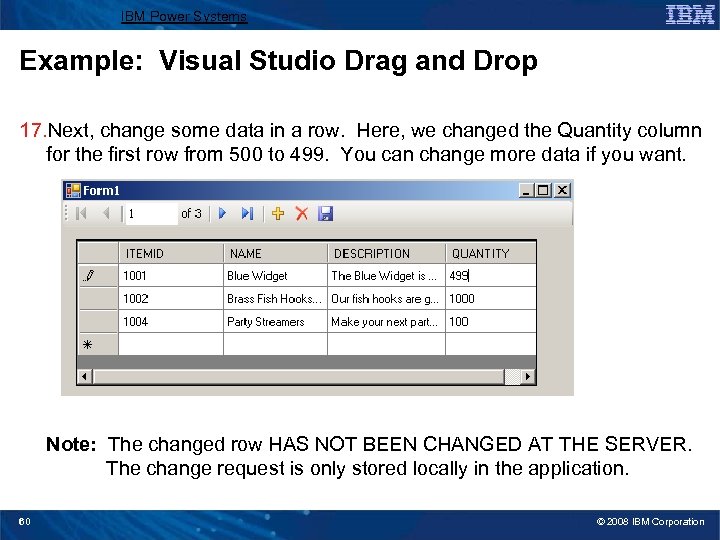
IBM Power Systems Example: Visual Studio Drag and Drop 17. Next, change some data in a row. Here, we changed the Quantity column for the first row from 500 to 499. You can change more data if you want. Note: The changed row HAS NOT BEEN CHANGED AT THE SERVER. The change request is only stored locally in the application. 60 © 2008 IBM Corporation
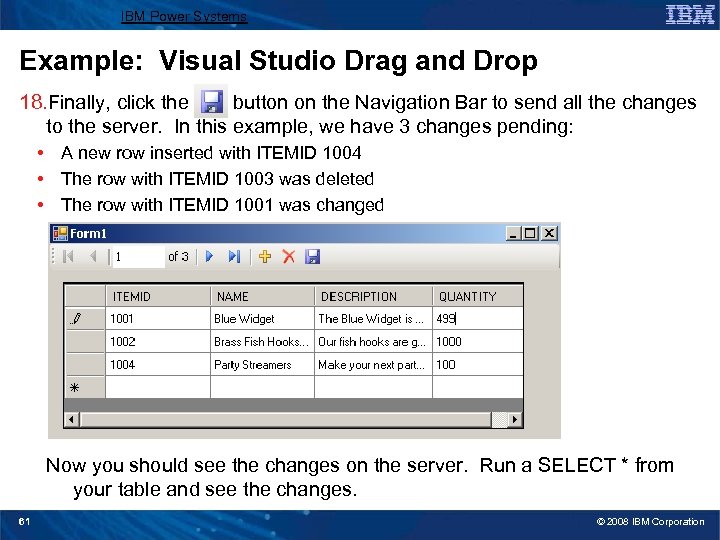
IBM Power Systems Example: Visual Studio Drag and Drop 18. Finally, click the button on the Navigation Bar to send all the changes to the server. In this example, we have 3 changes pending: • A new row inserted with ITEMID 1004 • The row with ITEMID 1003 was deleted • The row with ITEMID 1001 was changed Now you should see the changes on the server. Run a SELECT * from your table and see the changes. 61 © 2008 IBM Corporation
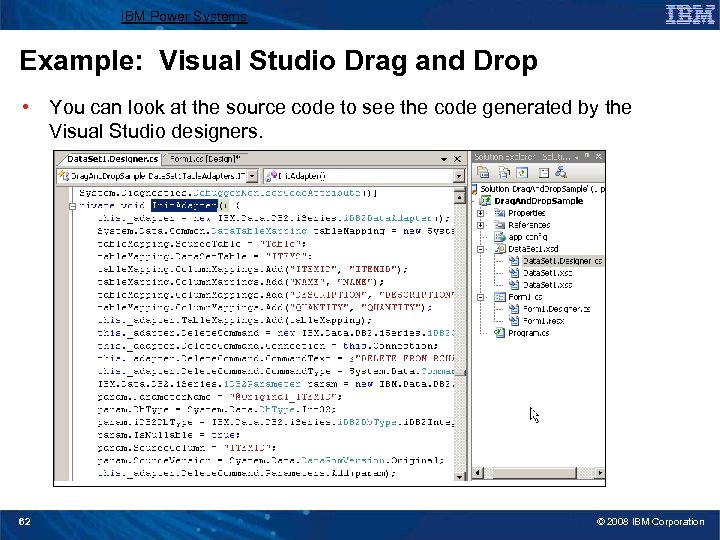
IBM Power Systems Example: Visual Studio Drag and Drop • You can look at the source code to see the code generated by the Visual Studio designers. 62 © 2008 IBM Corporation
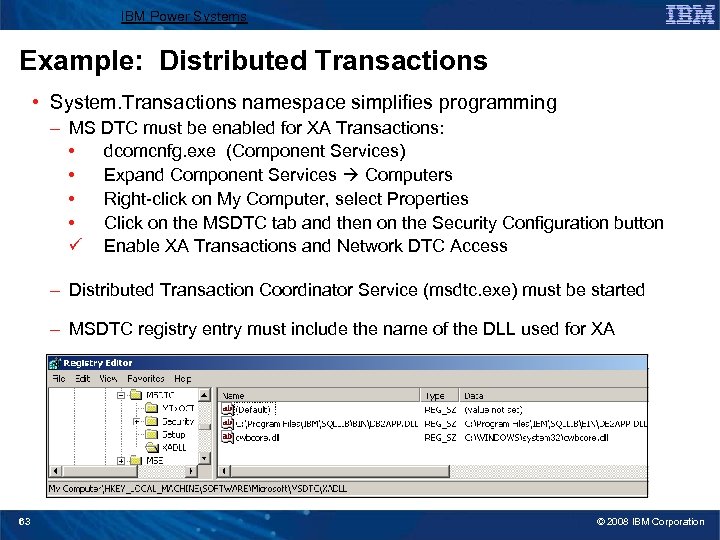
IBM Power Systems Example: Distributed Transactions • System. Transactions namespace simplifies programming – MS DTC must be enabled for XA Transactions: • dcomcnfg. exe (Component Services) • Expand Component Services Computers • Right-click on My Computer, select Properties • Click on the MSDTC tab and then on the Security Configuration button ü Enable XA Transactions and Network DTC Access – Distributed Transaction Coordinator Service (msdtc. exe) must be started – MSDTC registry entry must include the name of the DLL used for XA 63 © 2008 IBM Corporation
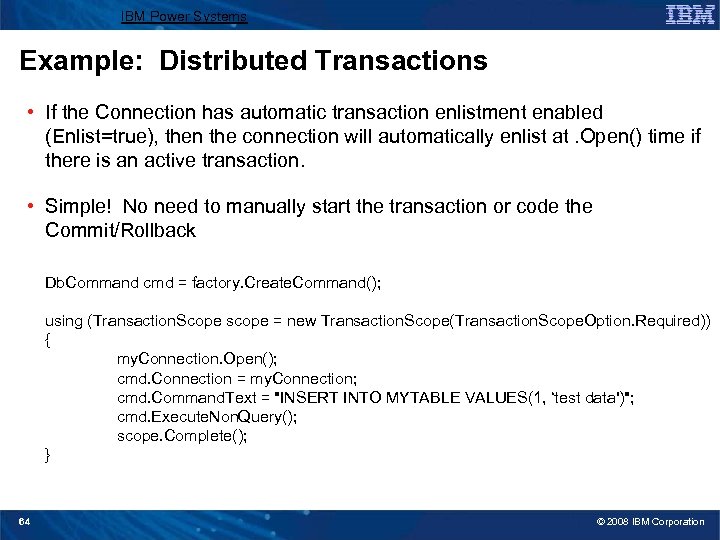
IBM Power Systems Example: Distributed Transactions • If the Connection has automatic transaction enlistment enabled (Enlist=true), then the connection will automatically enlist at. Open() time if there is an active transaction. • Simple! No need to manually start the transaction or code the Commit/Rollback Db. Command cmd = factory. Create. Command(); using (Transaction. Scope scope = new Transaction. Scope(Transaction. Scope. Option. Required)) { my. Connection. Open(); cmd. Connection = my. Connection; cmd. Command. Text = "INSERT INTO MYTABLE VALUES(1, ‘test data')"; cmd. Execute. Non. Query(); scope. Complete(); } 64 © 2008 IBM Corporation
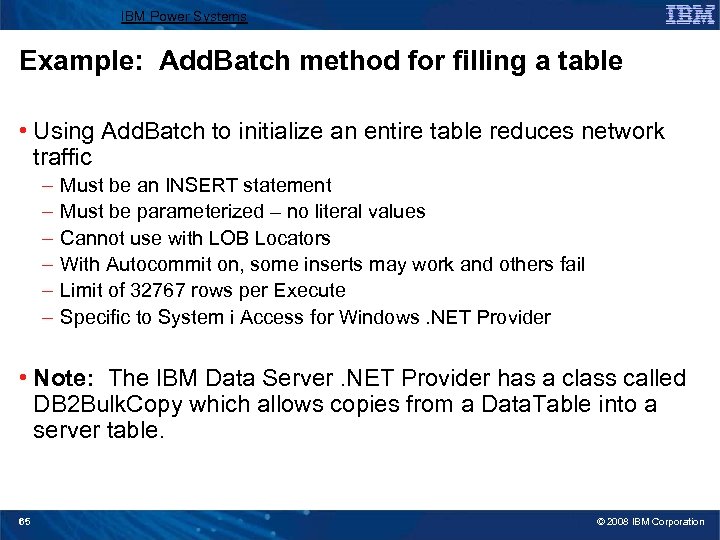
IBM Power Systems Example: Add. Batch method for filling a table • Using Add. Batch to initialize an entire table reduces network traffic – – – Must be an INSERT statement Must be parameterized – no literal values Cannot use with LOB Locators With Autocommit on, some inserts may work and others fail Limit of 32767 rows per Execute Specific to System i Access for Windows. NET Provider • Note: The IBM Data Server. NET Provider has a class called DB 2 Bulk. Copy which allows copies from a Data. Table into a server table. 65 © 2008 IBM Corporation
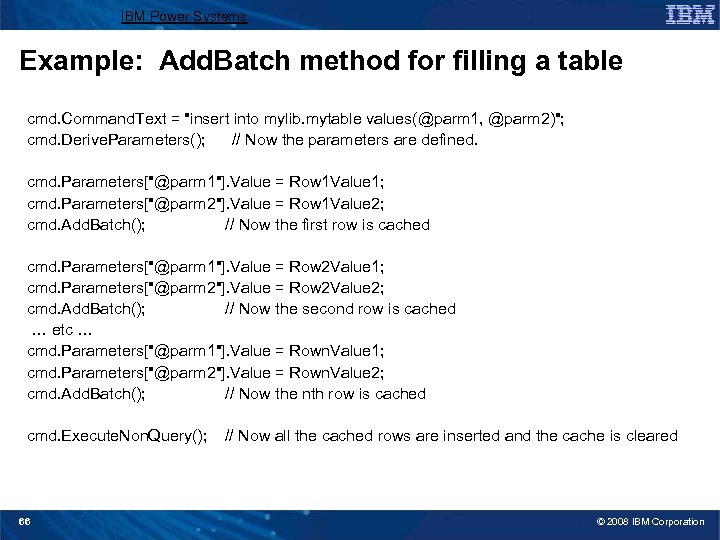
IBM Power Systems Example: Add. Batch method for filling a table cmd. Command. Text = "insert into mylib. mytable values(@parm 1, @parm 2)"; cmd. Derive. Parameters(); // Now the parameters are defined. cmd. Parameters["@parm 1"]. Value = Row 1 Value 1; cmd. Parameters["@parm 2"]. Value = Row 1 Value 2; cmd. Add. Batch(); // Now the first row is cached cmd. Parameters["@parm 1"]. Value = Row 2 Value 1; cmd. Parameters["@parm 2"]. Value = Row 2 Value 2; cmd. Add. Batch(); // Now the second row is cached … etc … cmd. Parameters["@parm 1"]. Value = Rown. Value 1; cmd. Parameters["@parm 2"]. Value = Rown. Value 2; cmd. Add. Batch(); // Now the nth row is cached cmd. Execute. Non. Query(); 66 // Now all the cached rows are inserted and the cache is cleared © 2008 IBM Corporation
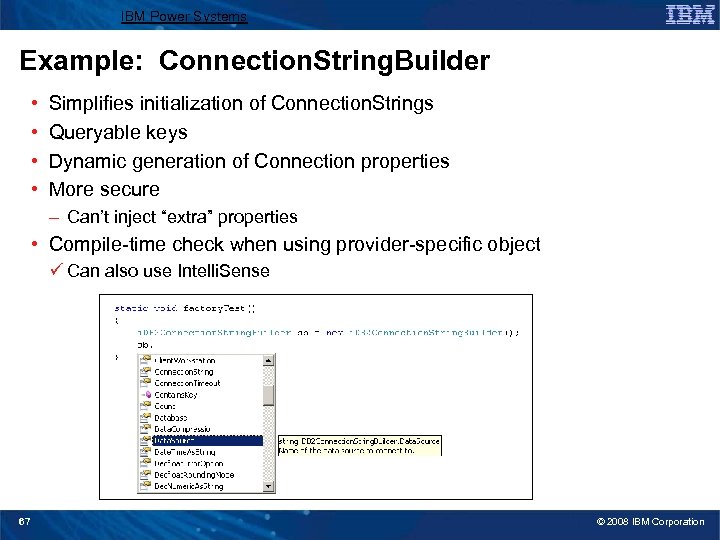
IBM Power Systems Example: Connection. String. Builder • • Simplifies initialization of Connection. Strings Queryable keys Dynamic generation of Connection properties More secure – Can’t inject “extra” properties • Compile-time check when using provider-specific object ü Can also use Intelli. Sense 67 © 2008 IBM Corporation
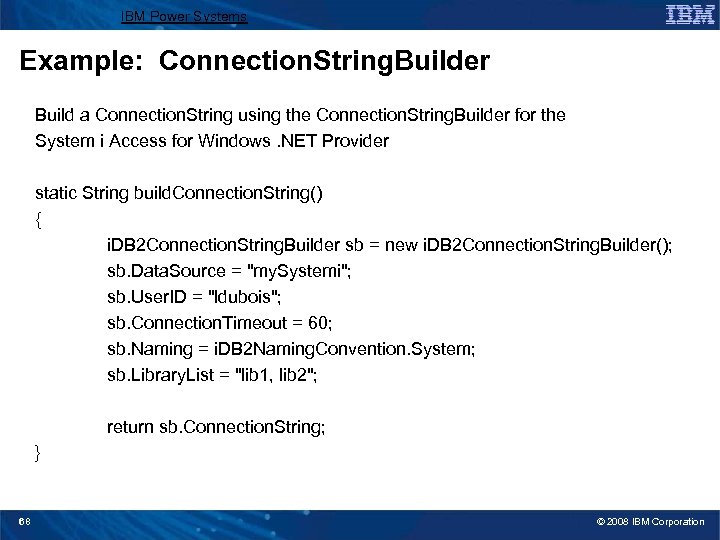
IBM Power Systems Example: Connection. String. Builder Build a Connection. String using the Connection. String. Builder for the System i Access for Windows. NET Provider static String build. Connection. String() { i. DB 2 Connection. String. Builder sb = new i. DB 2 Connection. String. Builder(); sb. Data. Source = "my. Systemi"; sb. User. ID = "ldubois"; sb. Connection. Timeout = 60; sb. Naming = i. DB 2 Naming. Convention. System; sb. Library. List = "lib 1, lib 2"; return sb. Connection. String; } 68 © 2008 IBM Corporation
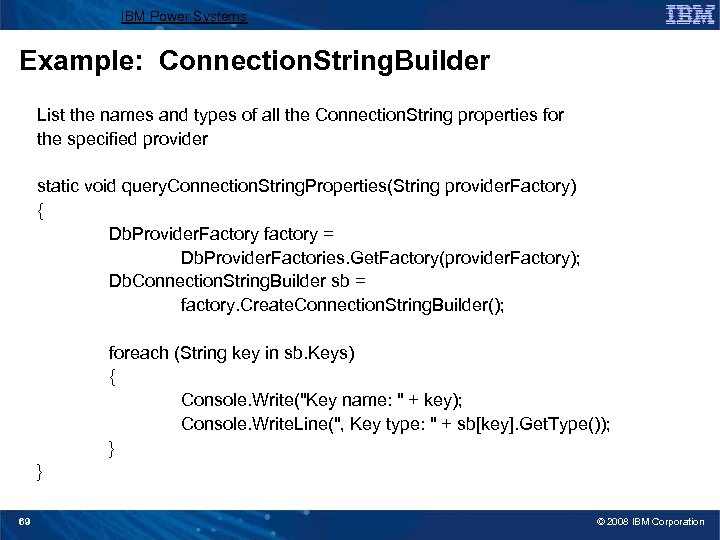
IBM Power Systems Example: Connection. String. Builder List the names and types of all the Connection. String properties for the specified provider static void query. Connection. String. Properties(String provider. Factory) { Db. Provider. Factory factory = Db. Provider. Factories. Get. Factory(provider. Factory); Db. Connection. String. Builder sb = factory. Create. Connection. String. Builder(); foreach (String key in sb. Keys) { Console. Write("Key name: " + key); Console. Write. Line(", Key type: " + sb[key]. Get. Type()); } } 69 © 2008 IBM Corporation
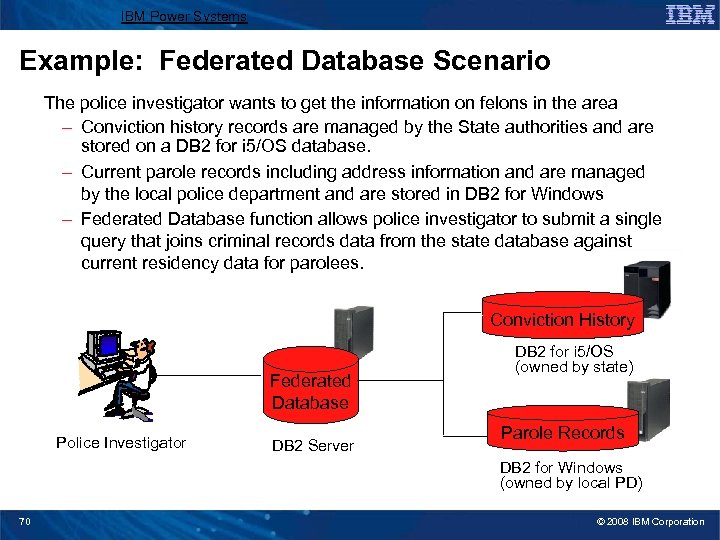
IBM Power Systems Example: Federated Database Scenario The police investigator wants to get the information on felons in the area – Conviction history records are managed by the State authorities and are stored on a DB 2 for i 5/OS database. – Current parole records including address information and are managed by the local police department and are stored in DB 2 for Windows – Federated Database function allows police investigator to submit a single query that joins criminal records data from the state database against current residency data for parolees. Conviction History Federated Database Police Investigator DB 2 Server DB 2 for i 5/OS (owned by state) Parole Records DB 2 for Windows (owned by local PD) 70 © 2008 IBM Corporation
IBM Power Systems Agenda • Microsoft Data Access Technologies • . NET Overview • ADO. NET • Data Providers for System i • System i Access for Windows. NET Provider • IBM Data Server. NET Provider • Examples ► Performance / Coding Tips 71 © 2008 IBM Corporation
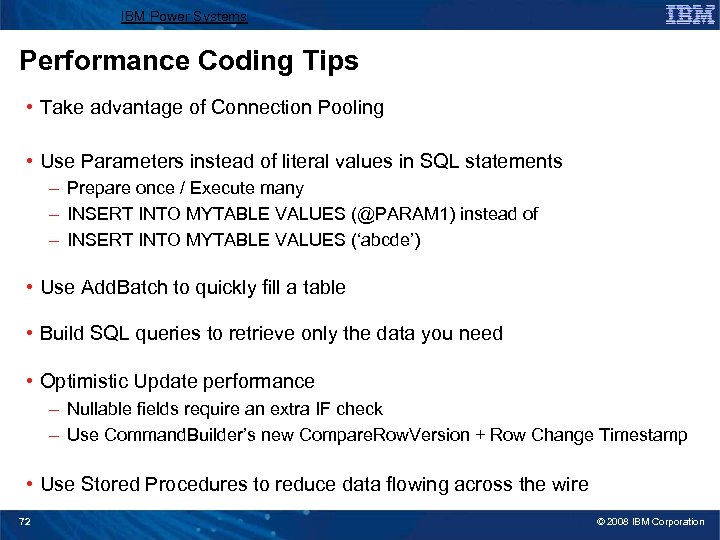
IBM Power Systems Performance Coding Tips • Take advantage of Connection Pooling • Use Parameters instead of literal values in SQL statements – Prepare once / Execute many – INSERT INTO MYTABLE VALUES (@PARAM 1) instead of – INSERT INTO MYTABLE VALUES (‘abcde’) • Use Add. Batch to quickly fill a table • Build SQL queries to retrieve only the data you need • Optimistic Update performance – Nullable fields require an extra IF check – Use Command. Builder’s new Compare. Row. Version + Row Change Timestamp • Use Stored Procedures to reduce data flowing across the wire 72 © 2008 IBM Corporation
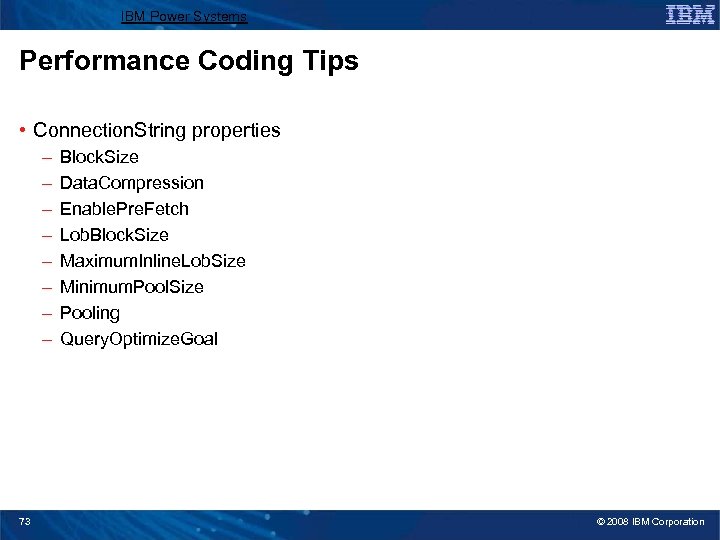
IBM Power Systems Performance Coding Tips • Connection. String properties – – – – 73 Block. Size Data. Compression Enable. Pre. Fetch Lob. Block. Size Maximum. Inline. Lob. Size Minimum. Pool. Size Pooling Query. Optimize. Goal © 2008 IBM Corporation
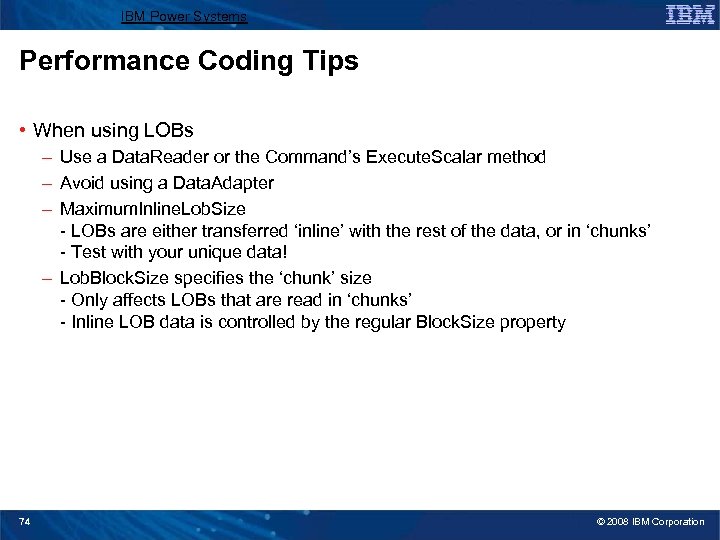
IBM Power Systems Performance Coding Tips • When using LOBs – Use a Data. Reader or the Command’s Execute. Scalar method – Avoid using a Data. Adapter – Maximum. Inline. Lob. Size - LOBs are either transferred ‘inline’ with the rest of the data, or in ‘chunks’ - Test with your unique data! – Lob. Block. Size specifies the ‘chunk’ size - Only affects LOBs that are read in ‘chunks’ - Inline LOB data is controlled by the regular Block. Size property 74 © 2008 IBM Corporation
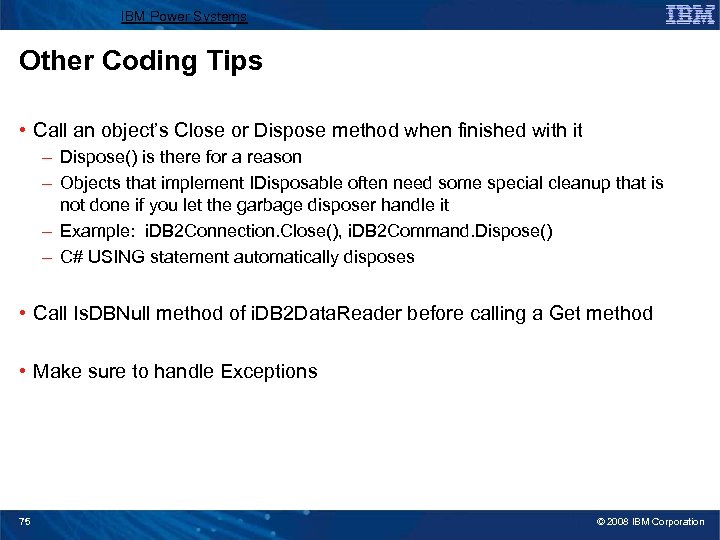
IBM Power Systems Other Coding Tips • Call an object’s Close or Dispose method when finished with it – Dispose() is there for a reason – Objects that implement IDisposable often need some special cleanup that is not done if you let the garbage disposer handle it – Example: i. DB 2 Connection. Close(), i. DB 2 Command. Dispose() – C# USING statement automatically disposes • Call Is. DBNull method of i. DB 2 Data. Reader before calling a Get method • Make sure to handle Exceptions 75 © 2008 IBM Corporation
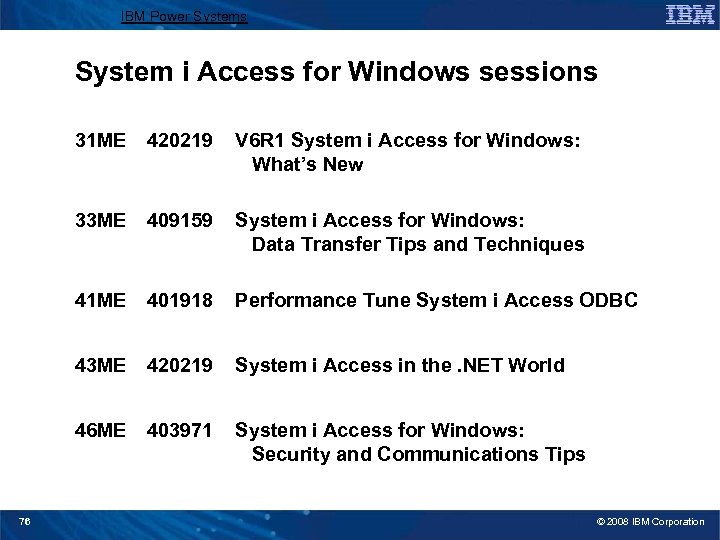
IBM Power Systems System i Access for Windows sessions 31 ME 420219 33 ME 409159 System i Access for Windows: Data Transfer Tips and Techniques 41 ME 401918 Performance Tune System i Access ODBC 43 ME 420219 System i Access in the. NET World 46 ME 403971 76 V 6 R 1 System i Access for Windows: What’s New System i Access for Windows: Security and Communications Tips © 2008 IBM Corporation
IBM Power Systems Appendix • ADO. NET Comparisions to Other DB Access Models • Additional Information 77 © 2008 IBM Corporation
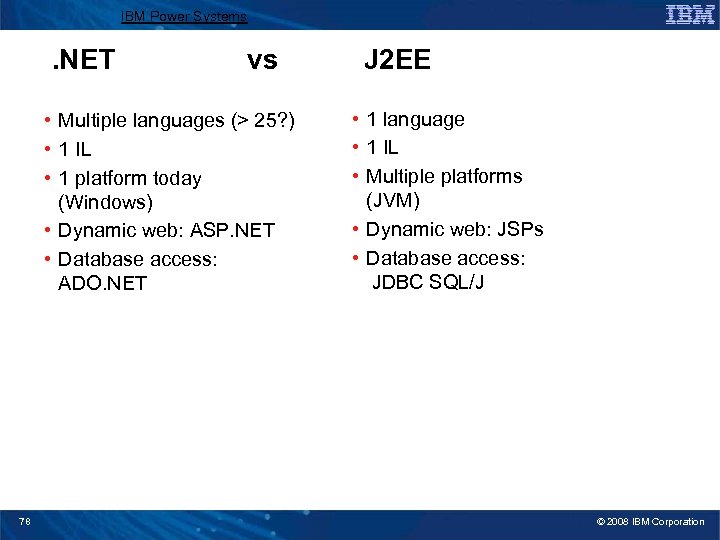
IBM Power Systems . NET vs • Multiple languages (> 25? ) • 1 IL • 1 platform today (Windows) • Dynamic web: ASP. NET • Database access: ADO. NET 78 J 2 EE • 1 language • 1 IL • Multiple platforms (JVM) • Dynamic web: JSPs • Database access: JDBC SQL/J © 2008 IBM Corporation
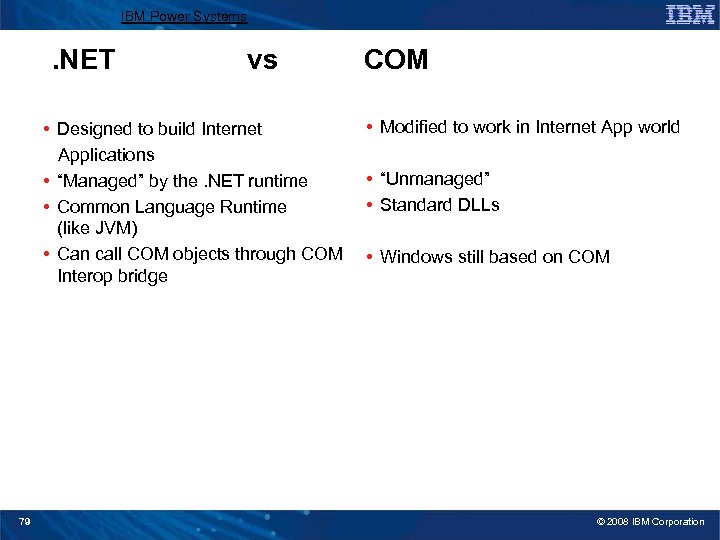
IBM Power Systems . NET vs • Designed to build Internet Applications • “Managed” by the. NET runtime • Common Language Runtime (like JVM) • Can call COM objects through COM Interop bridge 79 COM • Modified to work in Internet App world • “Unmanaged” • Standard DLLs • Windows still based on COM © 2008 IBM Corporation
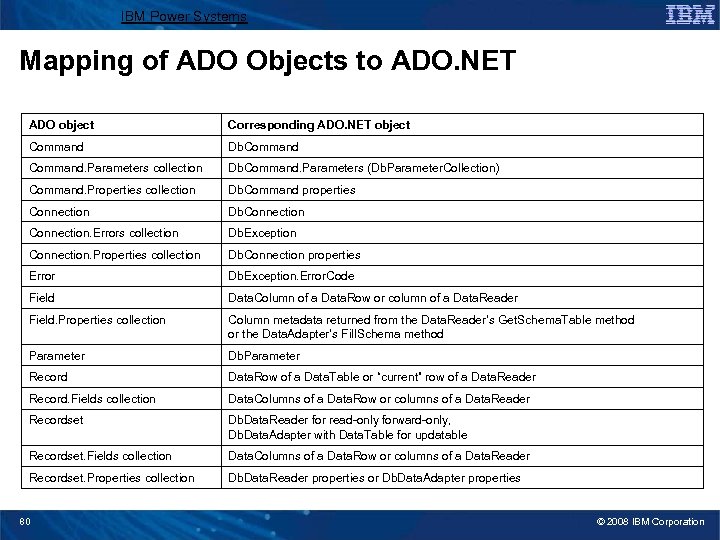
IBM Power Systems Mapping of ADO Objects to ADO. NET ADO object Corresponding ADO. NET object Command Db. Command. Parameters collection Db. Command. Parameters (Db. Parameter. Collection) Command. Properties collection Db. Command properties Connection Db. Connection. Errors collection Db. Exception Connection. Properties collection Db. Connection properties Error Db. Exception. Error. Code Field Data. Column of a Data. Row or column of a Data. Reader Field. Properties collection Column metadata returned from the Data. Reader’s Get. Schema. Table method or the Data. Adapter’s Fill. Schema method Parameter Db. Parameter Record Data. Row of a Data. Table or “current” row of a Data. Reader Record. Fields collection Data. Columns of a Data. Row or columns of a Data. Reader Recordset Db. Data. Reader for read-only forward-only, Db. Data. Adapter with Data. Table for updatable Recordset. Fields collection Data. Columns of a Data. Row or columns of a Data. Reader Recordset. Properties collection Db. Data. Reader properties or Db. Data. Adapter properties 80 © 2008 IBM Corporation
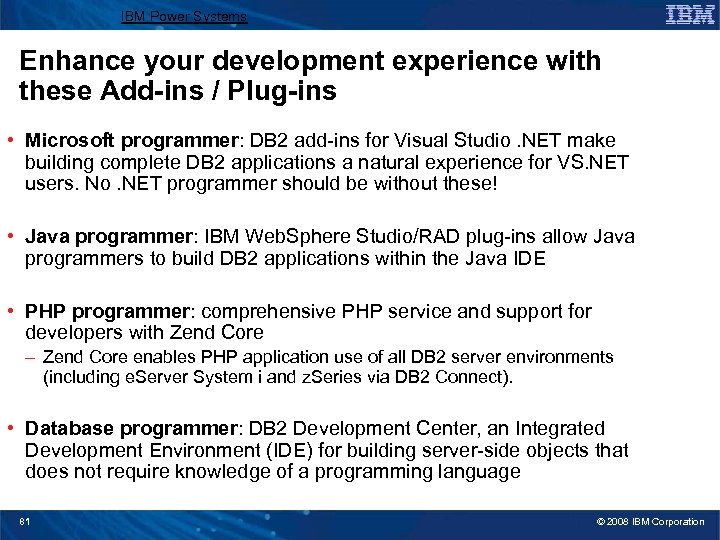
IBM Power Systems Enhance your development experience with these Add-ins / Plug-ins • Microsoft programmer: DB 2 add-ins for Visual Studio. NET make building complete DB 2 applications a natural experience for VS. NET users. No. NET programmer should be without these! • Java programmer: IBM Web. Sphere Studio/RAD plug-ins allow Java programmers to build DB 2 applications within the Java IDE • PHP programmer: comprehensive PHP service and support for developers with Zend Core – Zend Core enables PHP application use of all DB 2 server environments (including e. Server System i and z. Series via DB 2 Connect). • Database programmer: DB 2 Development Center, an Integrated Development Environment (IDE) for building server-side objects that does not require knowledge of a programming language 81 © 2008 IBM Corporation
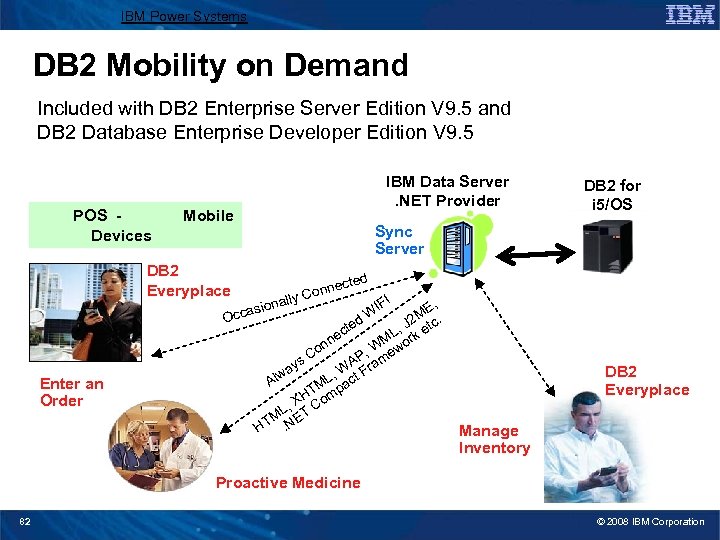
IBM Power Systems DB 2 Mobility on Demand Included with DB 2 Enterprise Server Edition V 9. 5 and DB 2 Database Enterprise Developer Edition V 9. 5 POS Devices Mobile DB 2 Everyplace O Enter an Order IBM Data Server. NET Provider DB 2 for i 5/OS Sync Server ted ally nec Con I , IF W ME. d J 2 tc cte L, rk e M o ne on , W ew C s AP m ay W t Fra , w Al ML pac T XH Com , ML ET HT. N ion ccas DB 2 Everyplace Manage Inventory Proactive Medicine 82 © 2008 IBM Corporation
IBM Power Systems Sample Code Disclaimer This material contains IBM copyrighted sample programming source code for your consideration. This sample code has not been thoroughly tested under all conditions. IBM, therefore, cannot guarantee or imply reliability, serviceability, or function. IBM provides no program services for this material. This material is provided "AS IS" WITHOUT WARRANTY OF ANY KIND, EITHER EXPRESS OR IMPLIED, INCLUDING, BUT NOT LIMITED TO, THE IMPLIED WARRANTIES OF FITNESS FOR A PARTICULAR PURPOSE, OR NON-INFRINGEMENT. SOME JURISDICTIONS DO NOT ALLOW THE EXCLUSION OF IMPLIED WARRANTIES, SO THE ABOVE EXCLUSIONS MAY NOT APPLY TO YOU. IN NO EVENT WILL IBM BE LIABLE TO ANY PARTY FOR ANY DIRECT, INDIRECT, SPECIAL OR OTHER CONSEQUENTIAL DAMAGES FOR ANY USE OF THIS MATERIAL INCLUDING, WITHOUT LIMITATION, ANY LOST PROFITS, BUSINESS INTERRUPTION, LOSS OF PROGRAMS OR OTHER DATA ON YOUR INFORMATION HANDLING SYSTEM OR OTHERWISE, EVEN IF EXPRESSLY ADVISED OF THE POSSIBILITY OF SUCH DAMAGES. 83 © 2008 IBM Corporation
IBM System i Trademarks and Disclaimers 8 IBM Corporation 1994 -2008. All rights reserved. References in this document to IBM products or services do not imply that IBM intends to make them available in every country. Trademarks of International Business Machines Corporation in the United States, other countries, or both can be found on the World Wide Web at http: //www. ibm. com/legal/copytrade. shtml. Intel, Intel logo, Intel Inside logo, Intel Centrino logo, Celeron, Intel Xeon, Intel Speed. Step, Itanium, and Pentium are trademarks or registered trademarks of Intel Corporation or its subsidiaries in the United States and other countries. Linux is a registered trademark of Linus Torvalds in the United States, other countries, or both. Microsoft, Windows NT, and the Windows logo are trademarks of Microsoft Corporation in the United States, other countries, or both. IT Infrastructure Library is a registered trademark of the Central Computer and Telecommunications Agency which is now part of the Office of Government Commerce. ITIL is a registered trademark, and a registered community trademark of the Office of Government Commerce, and is registered in the U. S. Patent and Trademark Office. UNIX is a registered trademark of The Open Group in the United States and other countries. Java and all Java-based trademarks are trademarks of Sun Microsystems, Inc. in the United States, other countries, or both. Other company, product, or service names may be trademarks or service marks of others. Information is provided "AS IS" without warranty of any kind. The customer examples described are presented as illustrations of how those customers have used IBM products and the results they may have achieved. Actual environmental costs and performance characteristics may vary by customer. Information concerning non-IBM products was obtained from a supplier of these products, published announcement material, or other publicly available sources and does not constitute an endorsement of such products by IBM. Sources for non-IBM list prices and performance numbers are taken from publicly available information, including vendor announcements and vendor worldwide homepages. IBM has not tested these products and cannot confirm the accuracy of performance, capability, or any other claims related to non-IBM products. Questions on the capability of non-IBM products should be addressed to the supplier of those products. All statements regarding IBM future direction and intent are subject to change or withdrawal without notice, and represent goals and objectives only. Some information addresses anticipated future capabilities. Such information is not intended as a definitive statement of a commitment to specific levels of performance, function or delivery schedules with respect to any future products. Such commitments are only made in IBM product announcements. The information is presented here to communicate IBM's current investment and development activities as a good faith effort to help with our customers' future planning. Performance is based on measurements and projections using standard IBM benchmarks in a controlled environment. The actual throughput or performance that any user will experience will vary depending upon considerations such as the amount of multiprogramming in the user's job stream, the I/O configuration, the storage configuration, and the workload processed. Therefore, no assurance can be given that an individual user will achieve throughput or performance improvements equivalent to the ratios stated here. Prices are suggested U. S. list prices and are subject to change without notice. Starting price may not include a hard drive, operating system or other features. Contact your IBM representative or Business Partner for the most current pricing in your geography. Photographs shown may be engineering prototypes. Changes may be incorporated in production models. 84 i want an i. © 2008 IBM Corporation
Скачать презентацию IBM Power Systems Agenda Key Session Number 43
67c9c02bbfa3b36e21f80b552de88079.ppt