 Скачать презентацию IBM i and Blade Center 2 Q 2009
58e8991a1eed4617acd0a0cfa8152f83.ppt
- Количество слайдов: 53



IBM i and Blade. Center 2 Q 2009 Update Vess Natchev and Kyle Wurgler vess@us. ibm. com, wurgler@us. ibm. com, IBM Systems Lab Services and Training
Agenda • Where to start with IBM i on blade • Hardware overview: – – – – Power blade servers technical overview New expansion adapters Blade. Center S components and I/O connections Blade. Center H components and I/O connections Switch module portfolio Expansion adapter portfolio for IBM i Feature codes and ordering • Virtualization overview – – – – VIOS-based virtualization overview I/O options for Blade. Center H and Blade. Center S Configuring storage for IBM i on blade Configuring storage with the SAS RAID Controller Module Virtual tape Multiple Virtual SCSI adapters Active Memory Sharing on blade 2 © 2009 IBM Corporation
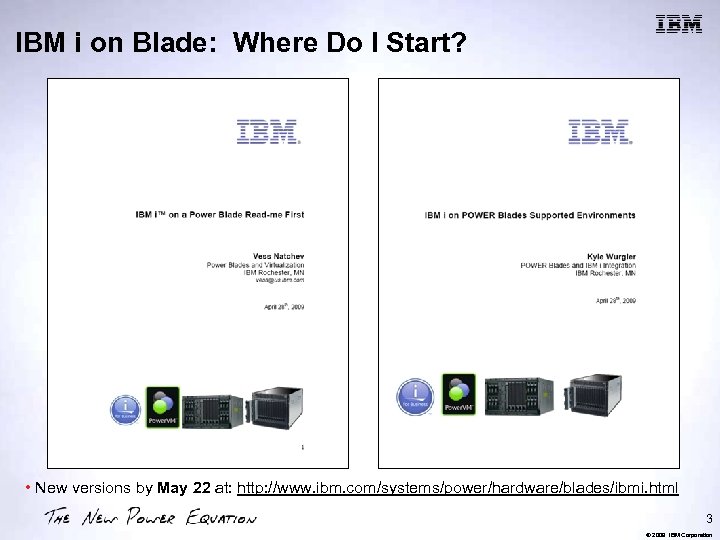
IBM i on Blade: Where Do I Start? • New versions by May 22 at: http: //www. ibm. com/systems/power/hardware/blades/ibmi. html 3 © 2009 IBM Corporation
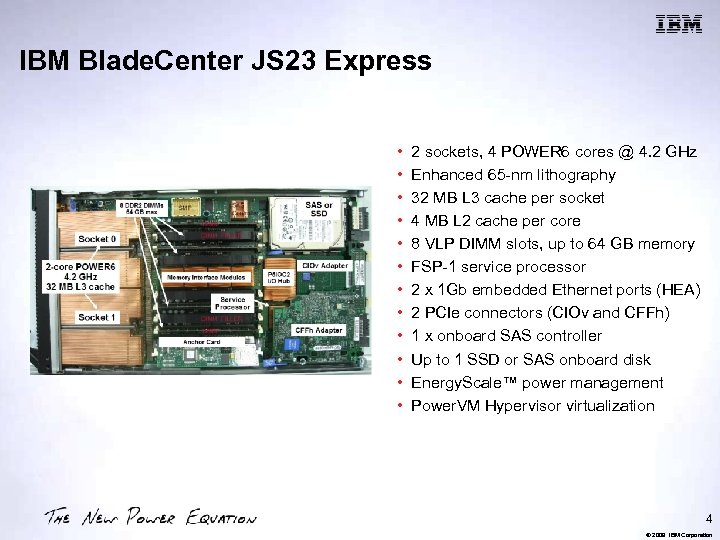
IBM Blade. Center JS 23 Express • • • 2 sockets, 4 POWER 6 cores @ 4. 2 GHz Enhanced 65 -nm lithography 32 MB L 3 cache per socket 4 MB L 2 cache per core 8 VLP DIMM slots, up to 64 GB memory FSP-1 service processor 2 x 1 Gb embedded Ethernet ports (HEA) 2 PCIe connectors (CIOv and CFFh) 1 x onboard SAS controller Up to 1 SSD or SAS onboard disk Energy. Scale™ power management Power. VM Hypervisor virtualization 4 © 2009 IBM Corporation
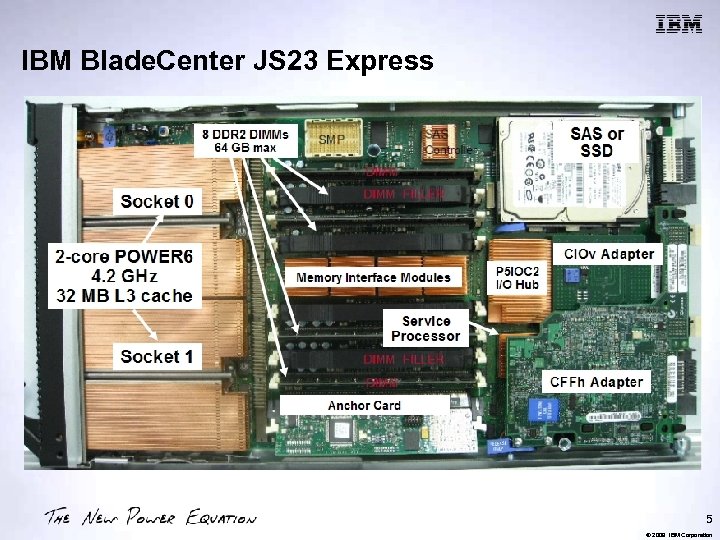
IBM Blade. Center JS 23 Express 5 © 2009 IBM Corporation
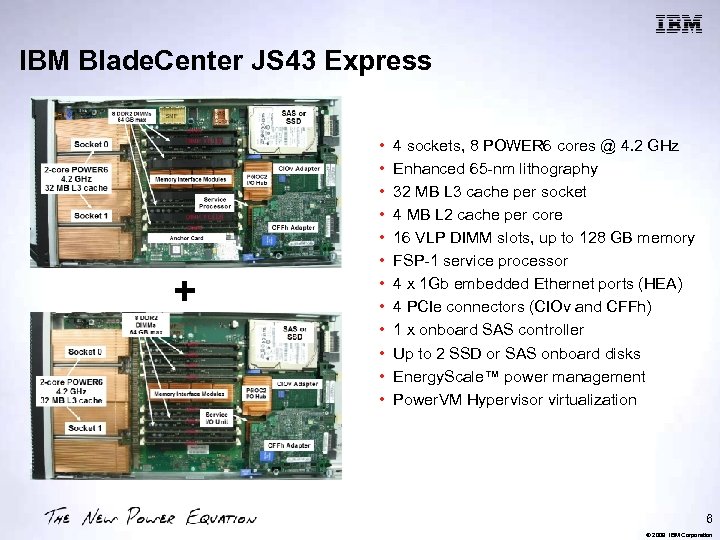
IBM Blade. Center JS 43 Express + • • • 4 sockets, 8 POWER 6 cores @ 4. 2 GHz Enhanced 65 -nm lithography 32 MB L 3 cache per socket 4 MB L 2 cache per core 16 VLP DIMM slots, up to 128 GB memory FSP-1 service processor 4 x 1 Gb embedded Ethernet ports (HEA) 4 PCIe connectors (CIOv and CFFh) 1 x onboard SAS controller Up to 2 SSD or SAS onboard disks Energy. Scale™ power management Power. VM Hypervisor virtualization 6 © 2009 IBM Corporation
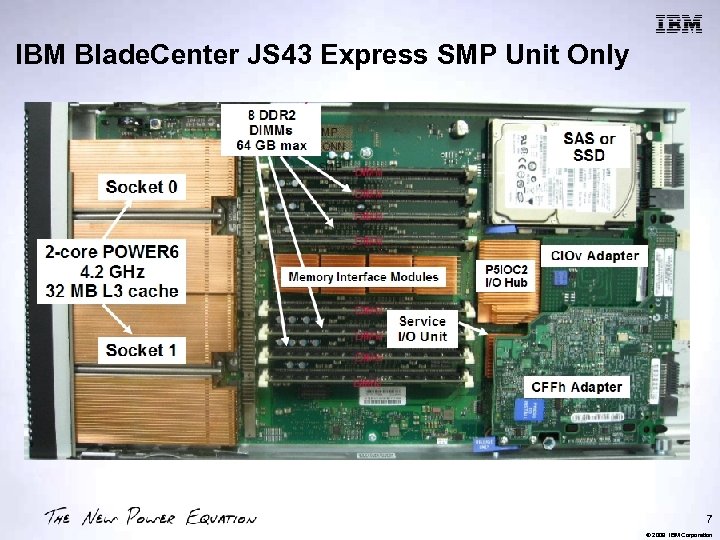
IBM Blade. Center JS 43 Express SMP Unit Only 7 © 2009 IBM Corporation
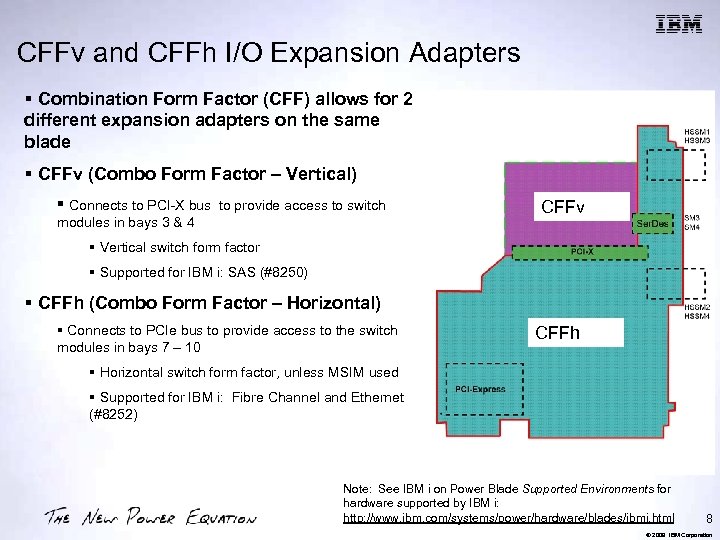
CFFv and CFFh I/O Expansion Adapters § Combination Form Factor (CFF) allows for 2 different expansion adapters on the same blade § CFFv (Combo Form Factor – Vertical) § Connects to PCI-X bus to provide access to switch modules in bays 3 & 4 CFFv § Vertical switch form factor § Supported for IBM i: SAS (#8250) § CFFh (Combo Form Factor – Horizontal) § Connects to PCIe bus to provide access to the switch modules in bays 7 – 10 CFFh § Horizontal switch form factor, unless MSIM used § Supported for IBM i: Fibre Channel and Ethernet (#8252) Note: See IBM i on Power Blade Supported Environments for hardware supported by IBM i: http: //www. ibm. com/systems/power/hardware/blades/ibmi. html 8 © 2009 IBM Corporation
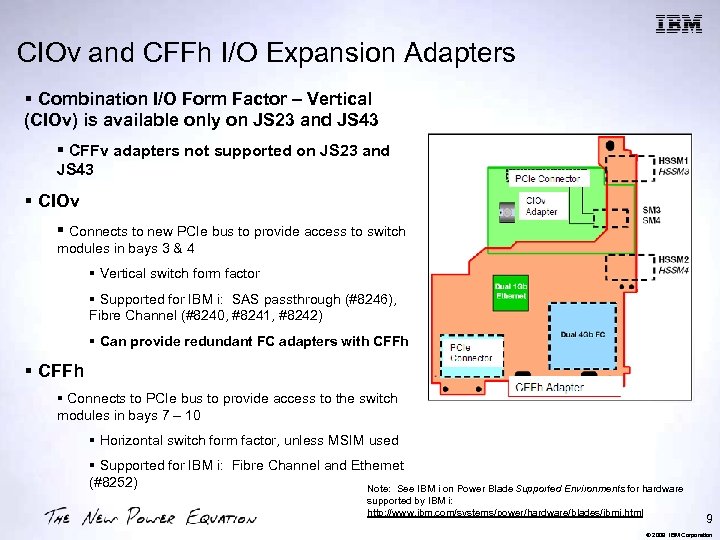
CIOv and CFFh I/O Expansion Adapters § Combination I/O Form Factor – Vertical (CIOv) is available only on JS 23 and JS 43 § CFFv adapters not supported on JS 23 and JS 43 § CIOv § Connects to new PCIe bus to provide access to switch modules in bays 3 & 4 § Vertical switch form factor § Supported for IBM i: SAS passthrough (#8246), Fibre Channel (#8240, #8241, #8242) § Can provide redundant FC adapters with CFFh § Connects to PCIe bus to provide access to the switch modules in bays 7 – 10 § Horizontal switch form factor, unless MSIM used § Supported for IBM i: Fibre Channel and Ethernet (#8252) Note: See IBM i on Power Blade Supported Environments for hardware supported by IBM i: http: //www. ibm. com/systems/power/hardware/blades/ibmi. html 9 © 2009 IBM Corporation
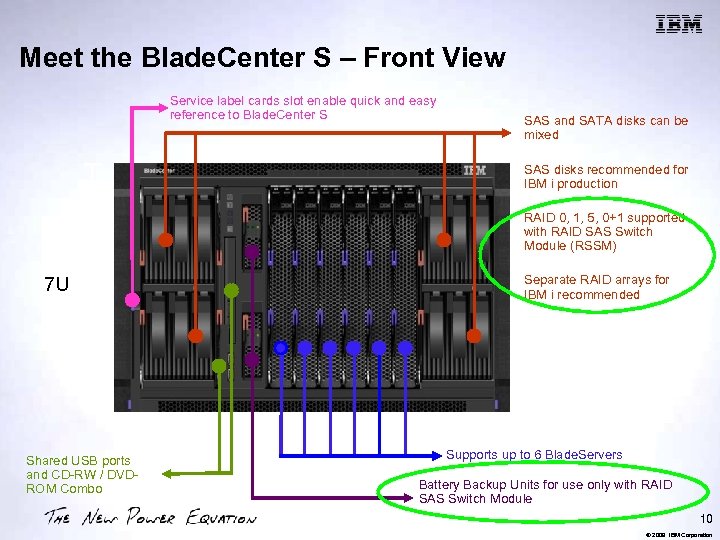
Meet the Blade. Center S – Front View Service label cards slot enable quick and easy reference to Blade. Center S SAS and SATA disks can be mixed SAS disks recommended for IBM i production RAID 0, 1, 5, 0+1 supported with RAID SAS Switch Module (RSSM) 7 U Separate RAID arrays for IBM i recommended Shared USB ports and CD-RW / DVDROM Combo Supports up to 6 Blade. Servers Battery Backup Units for use only with RAID SAS Switch Module 10 © 2009 IBM Corporation
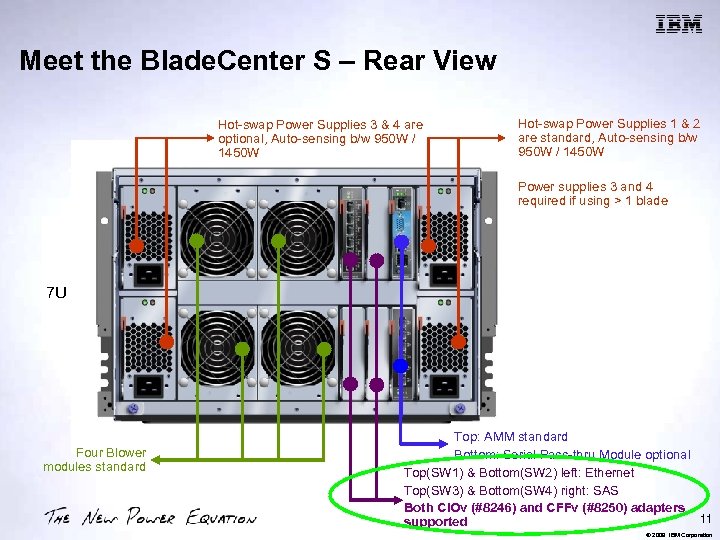
Meet the Blade. Center S – Rear View Hot-swap Power Supplies 3 & 4 are optional, Auto-sensing b/w 950 W / 1450 W Hot-swap Power Supplies 1 & 2 are standard, Auto-sensing b/w 950 W / 1450 W Power supplies 3 and 4 required if using > 1 blade 7 U Four Blower modules standard Top: AMM standard Bottom: Serial Pass-thru Module optional Top(SW 1) & Bottom(SW 2) left: Ethernet Top(SW 3) & Bottom(SW 4) right: SAS Both CIOv (#8246) and CFFv (#8250) adapters 11 supported © 2009 IBM Corporation
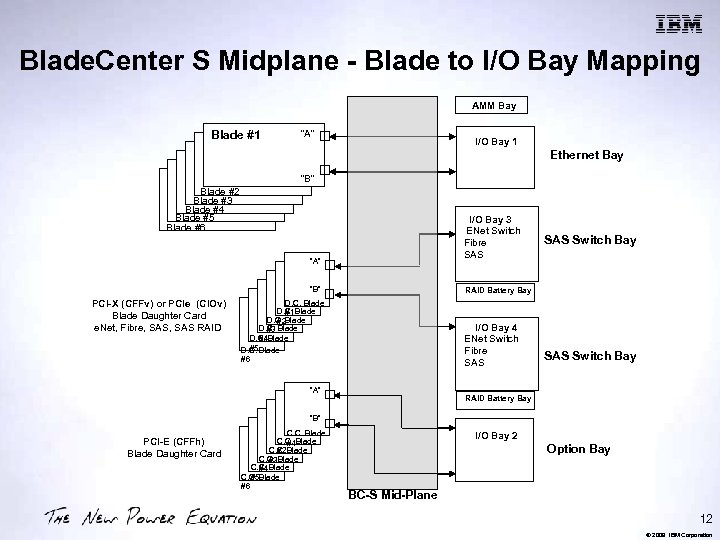
Blade. Center S Midplane - Blade to I/O Bay Mapping AMM Bay Blade #1 “A” I/O Bay 1 Ethernet Bay “B” Blade #2 Blade #3 Blade #4 Blade #5 Blade #6 I/O Bay 3 ENet Switch Fibre SAS “A” “B” PCI-X (CFFv) or PCIe (CIOv) Blade Daughter Card e. Net, Fibre, SAS RAID SAS Switch Bay RAID Battery Bay D. C. Blade #1 D. C. Blade #2 D. C. Blade #3 #4 D. C. Blade #5 D. C. Blade #6 I/O Bay 4 ENet Switch Fibre SAS “A” SAS Switch Bay RAID Battery Bay “B” PCI-E (CFFh) Blade Daughter Card C. C. Blade #1 C. C. Blade #2 C. C. Blade #3 C. C. Blade #4 #5 C. C. Blade #6 I/O Bay 2 Option Bay BC-S Mid-Plane 12 © 2009 IBM Corporation
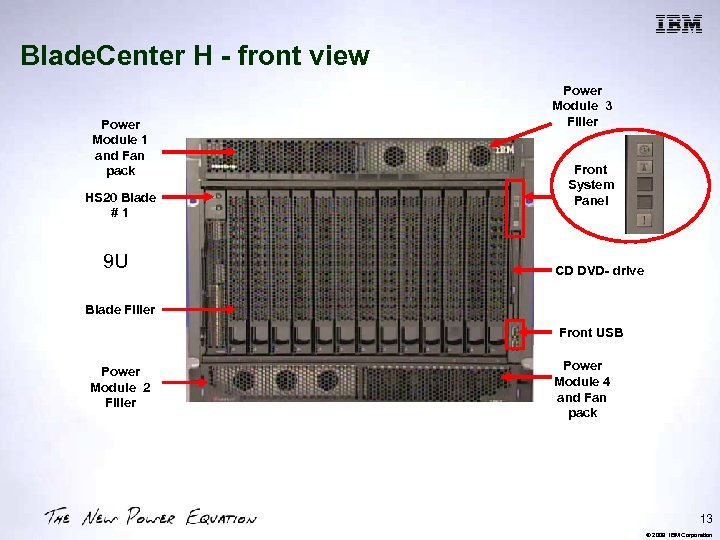
Blade. Center H - front view Power Module 1 and Fan pack HS 20 Blade #1 9 U Power Module 3 Filler Front System Panel CD DVD- drive Blade Filler Front USB Power Module 2 Filler Power Module 4 and Fan pack 13 © 2009 IBM Corporation
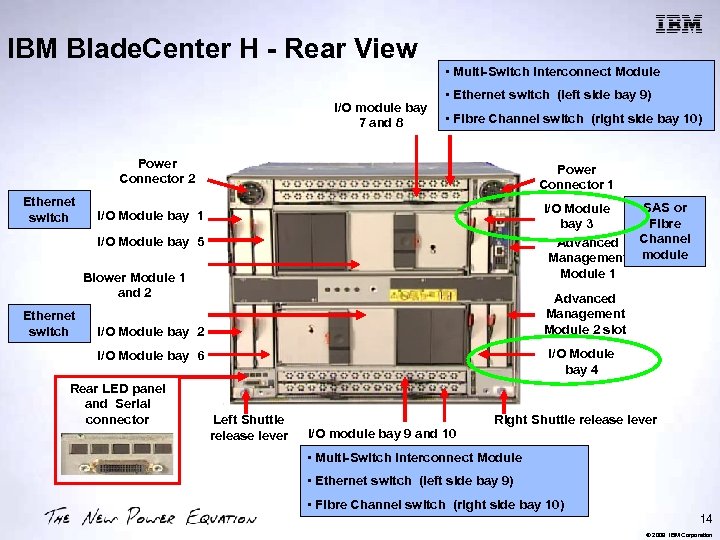
IBM Blade. Center H - Rear View I/O module bay 7 and 8 • Multi-Switch Interconnect Module • Ethernet switch (left side bay 9) • Fibre Channel switch (right side bay 10) Power Connector 2 Ethernet switch Power Connector 1 SAS or I/O Module Fibre bay 3 Channel Advanced Management module Module 1 I/O Module bay 5 Blower Module 1 and 2 Ethernet switch Advanced Management Module 2 slot I/O Module bay 2 I/O Module bay 4 I/O Module bay 6 Rear LED panel and Serial connector Left Shuttle release lever I/O module bay 9 and 10 Right Shuttle release lever • Multi-Switch Interconnect Module • Ethernet switch (left side bay 9) • Fibre Channel switch (right side bay 10) 14 © 2009 IBM Corporation
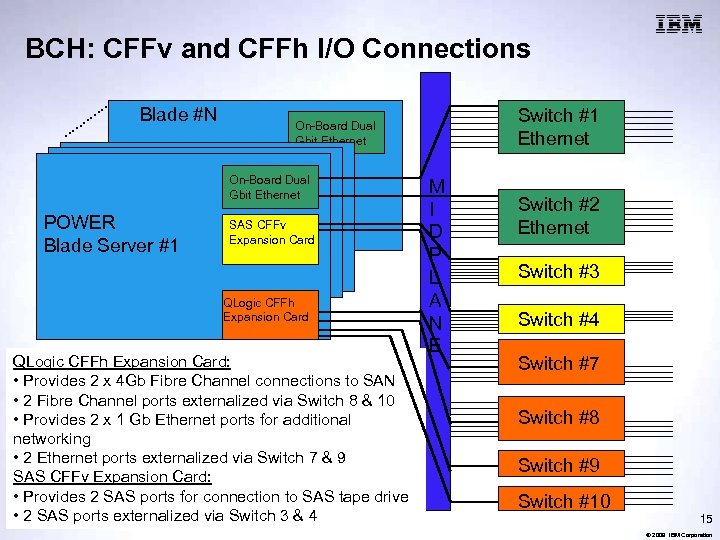
BCH: CFFv and CFFh I/O Connections Blade #N On-Board Dual Gbit Ethernet POWER Blade Server #1 Switch #1 Ethernet On-Board Dual Gbit Ethernet SAS CFFv Expansion Card QLogic CFFh Expansion Card: • Provides 2 x 4 Gb Fibre Channel connections to SAN • 2 Fibre Channel ports externalized via Switch 8 & 10 • Provides 2 x 1 Gb Ethernet ports for additional networking • 2 Ethernet ports externalized via Switch 7 & 9 SAS CFFv Expansion Card: • Provides 2 SAS ports for connection to SAS tape drive • 2 SAS ports externalized via Switch 3 & 4 M I D P L A N E Switch #2 Ethernet Switch #3 Switch #4 Switch #7 Switch #8 Switch #9 Switch #10 15 © 2009 IBM Corporation
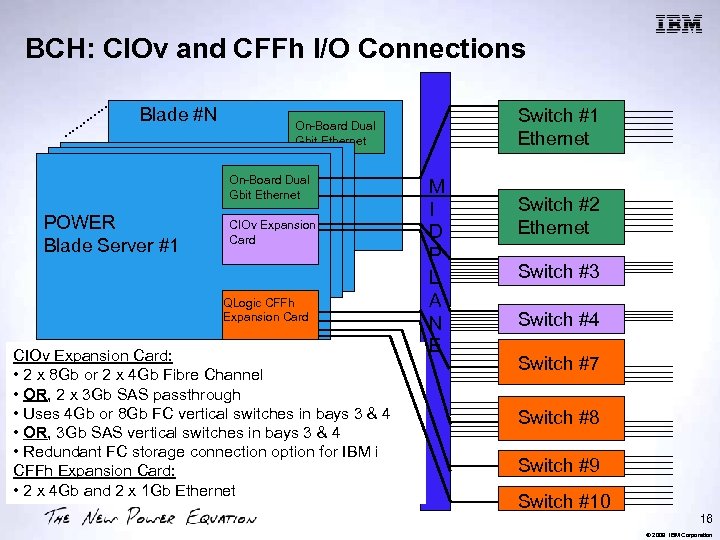
BCH: CIOv and CFFh I/O Connections Blade #N On-Board Dual Gbit Ethernet POWER Blade Server #1 Switch #1 Ethernet On-Board Dual Gbit Ethernet CIOv Expansion Card QLogic CFFh Expansion Card CIOv Expansion Card: • 2 x 8 Gb or 2 x 4 Gb Fibre Channel • OR, 2 x 3 Gb SAS passthrough • Uses 4 Gb or 8 Gb FC vertical switches in bays 3 & 4 • OR, 3 Gb SAS vertical switches in bays 3 & 4 • Redundant FC storage connection option for IBM i CFFh Expansion Card: • 2 x 4 Gb and 2 x 1 Gb Ethernet M I D P L A N E Switch #2 Ethernet Switch #3 Switch #4 Switch #7 Switch #8 Switch #9 Switch #10 16 © 2009 IBM Corporation
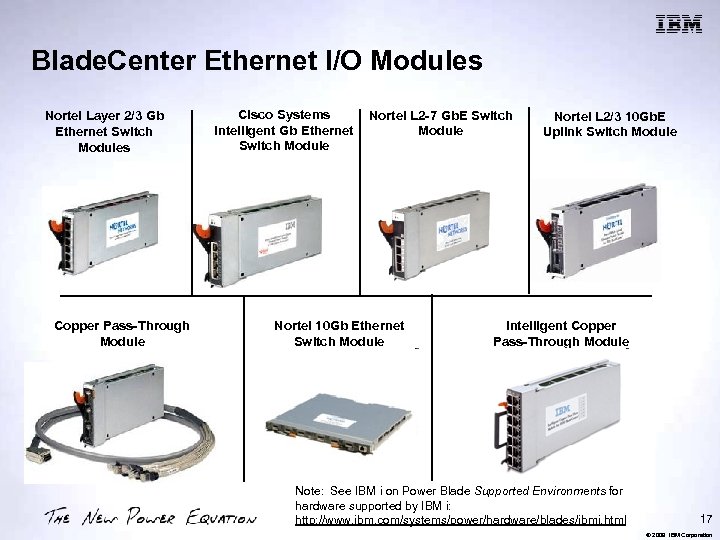
Blade. Center Ethernet I/O Modules Nortel Layer 2/3 Gb Ethernet Switch Modules Copper Pass-Through Module Cisco Systems Intelligent Gb Ethernet Switch Module Nortel L 2 -7 Gb. E Switch Module Nortel 10 Gb Ethernet Switch Module Nortel L 2/3 10 Gb. E Uplink Switch Module Intelligent Copper Pass-Through Module Note: See IBM i on Power Blade Supported Environments for hardware supported by IBM i: http: //www. ibm. com/systems/power/hardware/blades/ibmi. html 17 © 2009 IBM Corporation
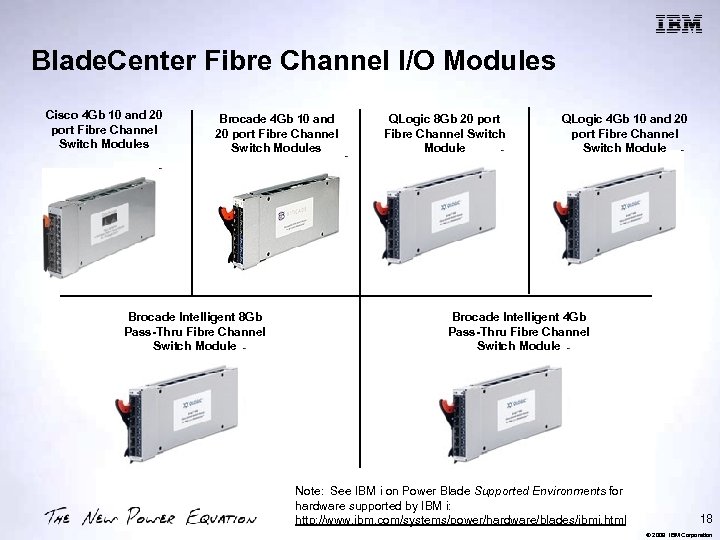
Blade. Center Fibre Channel I/O Modules Cisco 4 Gb 10 and 20 port Fibre Channel Switch Modules Brocade Intelligent 8 Gb Pass-Thru Fibre Channel Switch Module QLogic 8 Gb 20 port Fibre Channel Switch Module QLogic 4 Gb 10 and 20 port Fibre Channel Switch Module Brocade Intelligent 4 Gb Pass-Thru Fibre Channel Switch Module Note: See IBM i on Power Blade Supported Environments for hardware supported by IBM i: http: //www. ibm. com/systems/power/hardware/blades/ibmi. html 18 © 2009 IBM Corporation
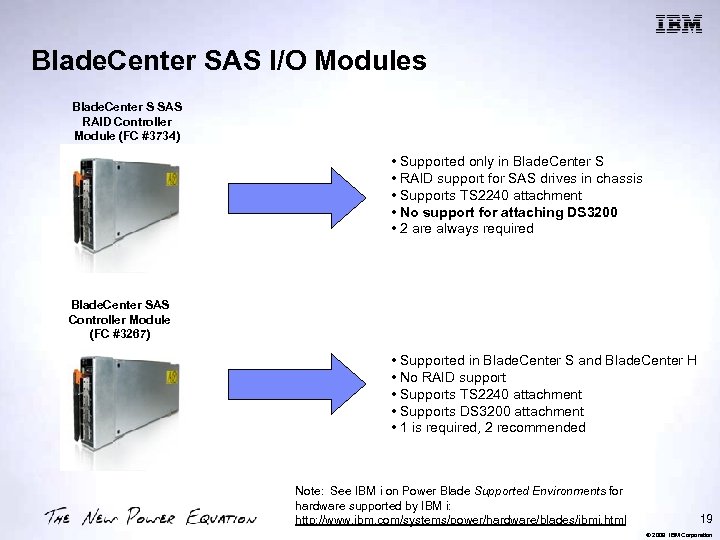
Blade. Center SAS I/O Modules Blade. Center S SAS RAID Controller Module (FC #3734) • Supported only in Blade. Center S • RAID support for SAS drives in chassis • Supports TS 2240 attachment • No support for attaching DS 3200 • 2 are always required Blade. Center SAS Controller Module (FC #3267) • Supported in Blade. Center S and Blade. Center H • No RAID support • Supports TS 2240 attachment • Supports DS 3200 attachment • 1 is required, 2 recommended Note: See IBM i on Power Blade Supported Environments for hardware supported by IBM i: http: //www. ibm. com/systems/power/hardware/blades/ibmi. html 19 © 2009 IBM Corporation
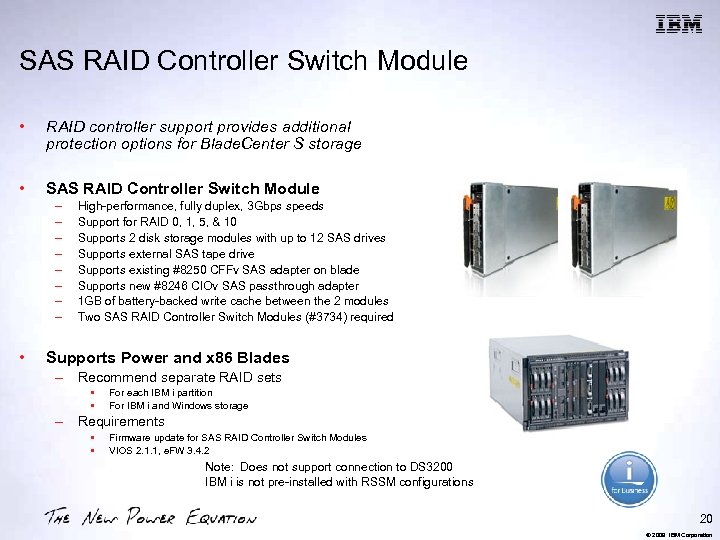
SAS RAID Controller Switch Module • RAID controller support provides additional protection options for Blade. Center S storage • SAS RAID Controller Switch Module – – – – • High-performance, fully duplex, 3 Gbps speeds Support for RAID 0, 1, 5, & 10 Supports 2 disk storage modules with up to 12 SAS drives Supports external SAS tape drive Supports existing #8250 CFFv SAS adapter on blade Supports new #8246 CIOv SAS passthrough adapter 1 GB of battery-backed write cache between the 2 modules Two SAS RAID Controller Switch Modules (#3734) required Supports Power and x 86 Blades – Recommend separate RAID sets • • For each IBM i partition For IBM i and Windows storage – Requirements • • Firmware update for SAS RAID Controller Switch Modules VIOS 2. 1. 1, e. FW 3. 4. 2 Note: Does not support connection to DS 3200 IBM i is not pre-installed with RSSM configurations 20 © 2009 IBM Corporation
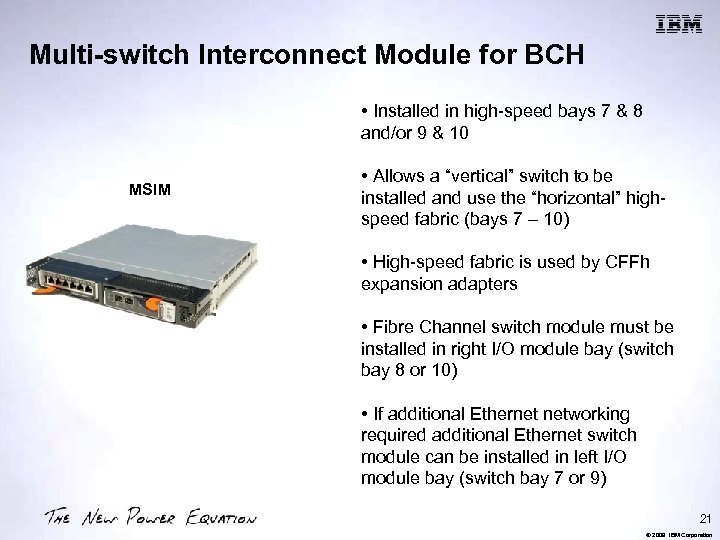
Multi-switch Interconnect Module for BCH • Installed in high-speed bays 7 & 8 and/or 9 & 10 MSIM • Allows a “vertical” switch to be installed and use the “horizontal” highspeed fabric (bays 7 – 10) • High-speed fabric is used by CFFh expansion adapters • Fibre Channel switch module must be installed in right I/O module bay (switch bay 8 or 10) • If additional Ethernet networking required additional Ethernet switch module can be installed in left I/O module bay (switch bay 7 or 9) 21 © 2009 IBM Corporation
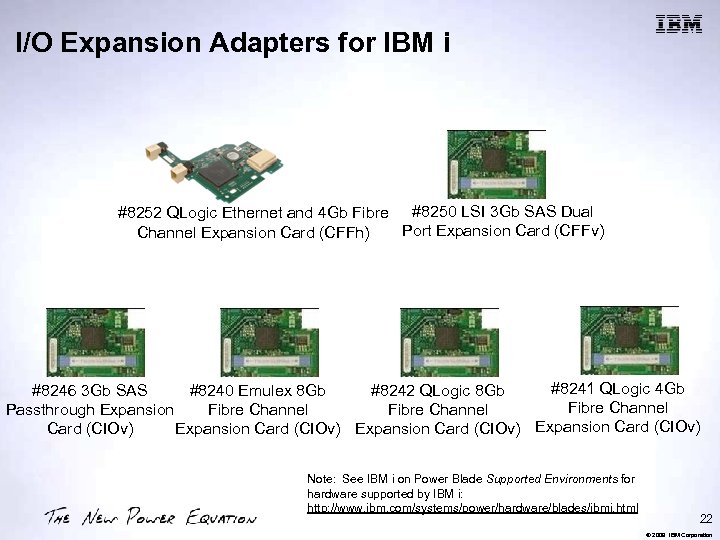
I/O Expansion Adapters for IBM i #8252 QLogic Ethernet and 4 Gb Fibre #8250 LSI 3 Gb SAS Dual Port Expansion Card (CFFv) Channel Expansion Card (CFFh) #8241 QLogic 4 Gb #8246 3 Gb SAS #8240 Emulex 8 Gb #8242 QLogic 8 Gb Fibre Channel Passthrough Expansion Fibre Channel Card (CIOv) Expansion Card (CIOv) Note: See IBM i on Power Blade Supported Environments for hardware supported by IBM i: http: //www. ibm. com/systems/power/hardware/blades/ibmi. html 22 © 2009 IBM Corporation
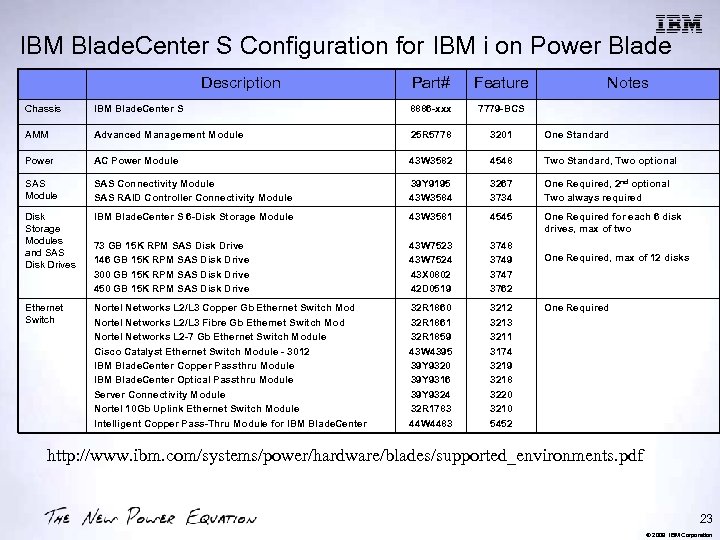
IBM Blade. Center S Configuration for IBM i on Power Blade Description Part# Feature Notes Chassis IBM Blade. Center S 8886 -xxx 7779 -BCS AMM Advanced Management Module 25 R 5778 3201 One Standard Power AC Power Module 43 W 3582 4548 Two Standard, Two optional SAS Module SAS Connectivity Module SAS RAID Controller Connectivity Module 39 Y 9195 43 W 3584 3267 3734 One Required, 2 nd optional Two always required Disk Storage Modules and SAS Disk Drives IBM Blade. Center S 6 -Disk Storage Module 43 W 3581 4545 One Required for each 6 disk drives, max of two 73 GB 15 K RPM SAS Disk Drive 146 GB 15 K RPM SAS Disk Drive 300 GB 15 K RPM SAS Disk Drive 450 GB 15 K RPM SAS Disk Drive 43 W 7523 43 W 7524 43 X 0802 42 D 0519 3748 3749 3747 3762 Ethernet Switch Nortel Networks L 2/L 3 Copper Gb Ethernet Switch Mod Nortel Networks L 2/L 3 Fibre Gb Ethernet Switch Mod Nortel Networks L 2 -7 Gb Ethernet Switch Module Cisco Catalyst Ethernet Switch Module - 3012 IBM Blade. Center Copper Passthru Module IBM Blade. Center Optical Passthru Module Server Connectivity Module Nortel 10 Gb Uplink Ethernet Switch Module Intelligent Copper Pass-Thru Module for IBM Blade. Center 32 R 1860 32 R 1861 32 R 1859 43 W 4395 39 Y 9320 39 Y 9316 39 Y 9324 32 R 1783 44 W 4483 3212 3213 3211 3174 3219 3218 3220 3210 5452 One Required, max of 12 disks One Required http: //www. ibm. com/systems/power/hardware/blades/supported_environments. pdf 23 © 2009 IBM Corporation
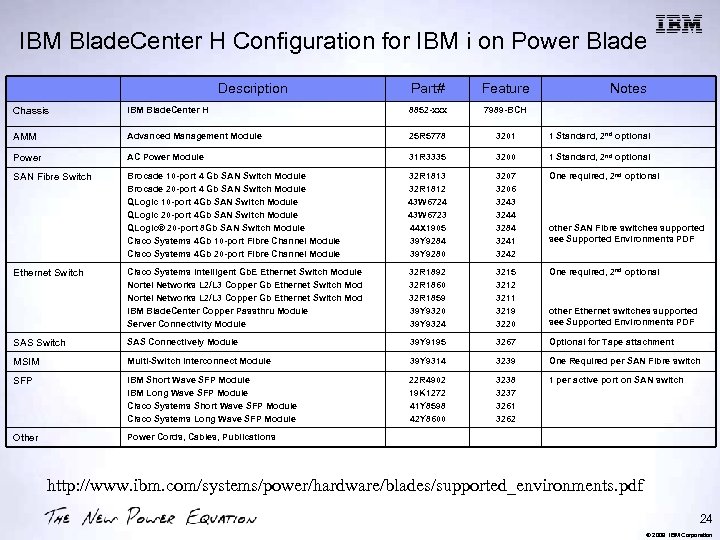
IBM Blade. Center H Configuration for IBM i on Power Blade Description Part# Feature Notes Chassis IBM Blade. Center H 8852 -xxx 7989 -BCH AMM Advanced Management Module 25 R 5778 3201 1 Standard, 2 nd optional Power AC Power Module 31 R 3335 3200 1 Standard, 2 nd optional SAN Fibre Switch Brocade 10 -port 4 Gb SAN Switch Module Brocade 20 -port 4 Gb SAN Switch Module QLogic 10 -port 4 Gb SAN Switch Module QLogic 20 -port 4 Gb SAN Switch Module QLogic® 20 -port 8 Gb SAN Switch Module Cisco Systems 4 Gb 10 -port Fibre Channel Module Cisco Systems 4 Gb 20 -port Fibre Channel Module 32 R 1813 32 R 1812 43 W 6724 43 W 6723 44 X 1905 39 Y 9284 39 Y 9280 3207 3206 3243 3244 3284 3241 3242 One required, 2 nd optional Cisco Systems Intelligent Gb. E Ethernet Switch Module Nortel Networks L 2/L 3 Copper Gb Ethernet Switch Mod IBM Blade. Center Copper Passthru Module Server Connectivity Module 32 R 1892 32 R 1860 32 R 1859 39 Y 9320 39 Y 9324 3215 3212 3211 3219 3220 One required, 2 nd optional SAS Switch SAS Connectively Module 39 Y 9195 3267 Optional for Tape attachment MSIM Multi-Switch Interconnect Module 39 Y 9314 3239 One Required per SAN Fibre switch SFP IBM Short Wave SFP Module IBM Long Wave SFP Module Cisco Systems Short Wave SFP Module Cisco Systems Long Wave SFP Module 22 R 4902 19 K 1272 41 Y 8598 42 Y 8600 3238 3237 3261 3262 1 per active port on SAN switch Other Power Cords, Cables, Publications Ethernet Switch other SAN Fibre switches supported see Supported Environments PDF other Ethernet switches supported see Supported Environments PDF http: //www. ibm. com/systems/power/hardware/blades/supported_environments. pdf 24 © 2009 IBM Corporation
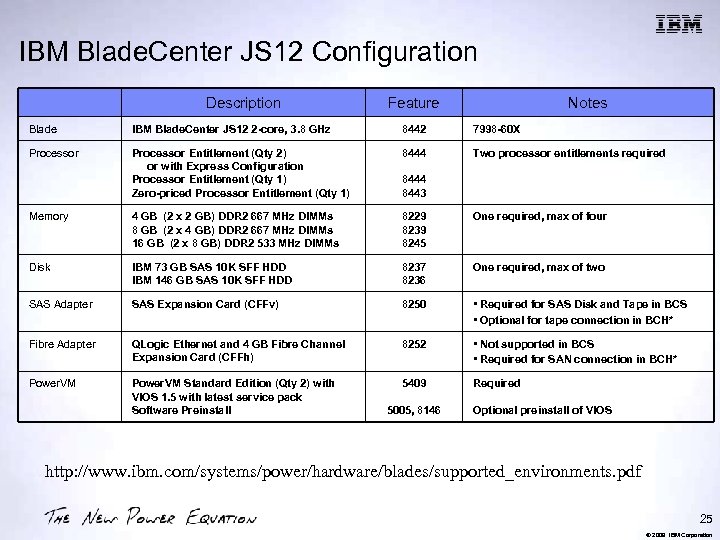
IBM Blade. Center JS 12 Configuration Description Feature Notes Blade IBM Blade. Center JS 12 2 -core, 3. 8 GHz 8442 7998 -60 X Processor Entitlement (Qty 2) or with Express Configuration Processor Entitlement (Qty 1) Zero-priced Processor Entitlement (Qty 1) 8444 Two processor entitlements required Memory 4 GB (2 x 2 GB) DDR 2 667 MHz DIMMs 8 GB (2 x 4 GB) DDR 2 667 MHz DIMMs 16 GB (2 x 8 GB) DDR 2 533 MHz DIMMs 8229 8239 8245 One required, max of four Disk IBM 73 GB SAS 10 K SFF HDD IBM 146 GB SAS 10 K SFF HDD 8237 8236 One required, max of two SAS Adapter SAS Expansion Card (CFFv) 8250 • Required for SAS Disk and Tape in BCS • Optional for tape connection in BCH* Fibre Adapter QLogic Ethernet and 4 GB Fibre Channel Expansion Card (CFFh) 8252 • Not supported in BCS • Required for SAN connection in BCH* Power. VM Standard Edition (Qty 2) with VIOS 1. 5 with latest service pack Software Preinstall 5409 Required 8444 8443 5005, 8146 Optional preinstall of VIOS http: //www. ibm. com/systems/power/hardware/blades/supported_environments. pdf 25 © 2009 IBM Corporation
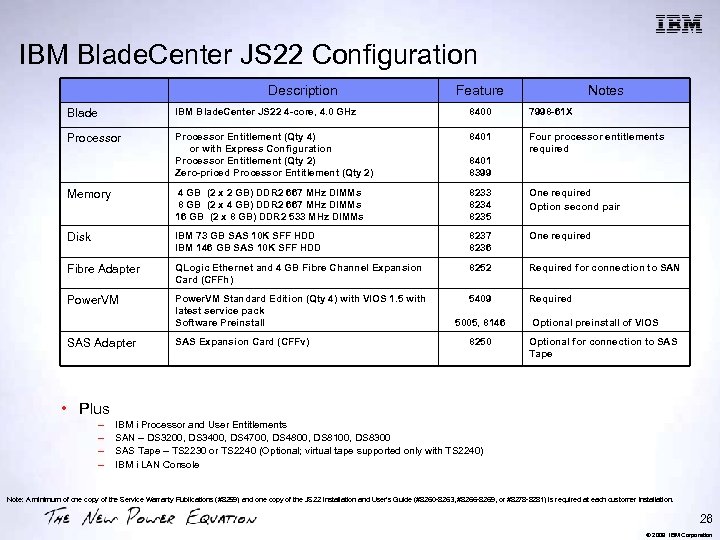
IBM Blade. Center JS 22 Configuration Description Feature Notes Blade IBM Blade. Center JS 22 4 -core, 4. 0 GHz 8400 7998 -61 X Processor Entitlement (Qty 4) or with Express Configuration Processor Entitlement (Qty 2) Zero-priced Processor Entitlement (Qty 2) 8401 Four processor entitlements required Memory 4 GB (2 x 2 GB) DDR 2 667 MHz DIMMs 8 GB (2 x 4 GB) DDR 2 667 MHz DIMMs 16 GB (2 x 8 GB) DDR 2 533 MHz DIMMs 8233 8234 8235 One required Option second pair Disk IBM 73 GB SAS 10 K SFF HDD IBM 146 GB SAS 10 K SFF HDD 8237 8236 One required Fibre Adapter QLogic Ethernet and 4 GB Fibre Channel Expansion Card (CFFh) 8252 Required for connection to SAN Power. VM Standard Edition (Qty 4) with VIOS 1. 5 with latest service pack Software Preinstall 5409 Required SAS Adapter SAS Expansion Card (CFFv) 8401 8399 5005, 8146 8250 Optional preinstall of VIOS Optional for connection to SAS Tape • Plus – – IBM i Processor and User Entitlements SAN – DS 3200, DS 3400, DS 4700, DS 4800, DS 8100, DS 8300 SAS Tape – TS 2230 or TS 2240 (Optional; virtual tape supported only with TS 2240) IBM i LAN Console Note: A minimum of one copy of the Service Warranty Publications (#8259) and one copy of the JS 22 Installation and User's Guide (#8260 -8263, #8266 -8269, or #8278 -8281) is required at each customer installation. 26 © 2009 IBM Corporation
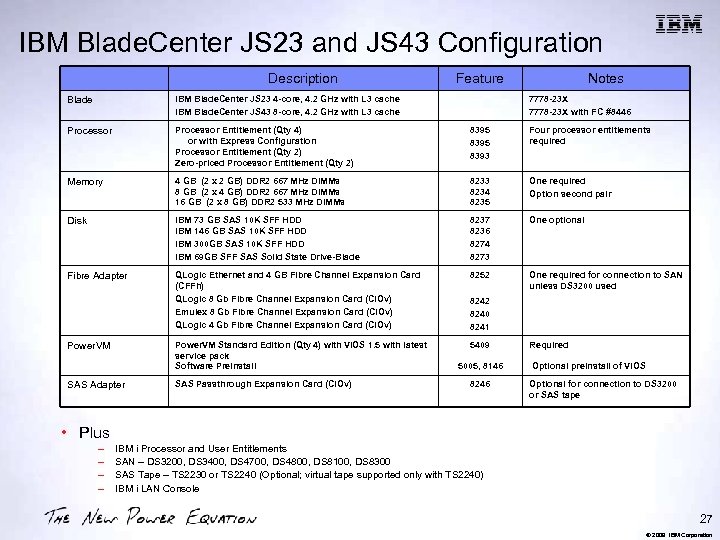
IBM Blade. Center JS 23 and JS 43 Configuration Description Feature Notes Blade IBM Blade. Center JS 23 4 -core, 4. 2 GHz with L 3 cache IBM Blade. Center JS 43 8 -core, 4. 2 GHz with L 3 cache Processor Entitlement (Qty 4) or with Express Configuration Processor Entitlement (Qty 2) Zero-priced Processor Entitlement (Qty 2) 8395 8393 Four processor entitlements required Memory 4 GB (2 x 2 GB) DDR 2 667 MHz DIMMs 8 GB (2 x 4 GB) DDR 2 667 MHz DIMMs 16 GB (2 x 8 GB) DDR 2 533 MHz DIMMs 8233 8234 8235 One required Option second pair Disk IBM 73 GB SAS 10 K SFF HDD IBM 146 GB SAS 10 K SFF HDD IBM 300 GB SAS 10 K SFF HDD IBM 69 GB SFF SAS Solid State Drive-Blade 8237 8236 8274 8273 One optional Fibre Adapter QLogic Ethernet and 4 GB Fibre Channel Expansion Card (CFFh) QLogic 8 Gb Fibre Channel Expansion Card (CIOv) Emulex 8 Gb Fibre Channel Expansion Card (CIOv) QLogic 4 Gb Fibre Channel Expansion Card (CIOv) 8252 One required for connection to SAN unless DS 3200 used Power. VM Standard Edition (Qty 4) with VIOS 1. 5 with latest service pack Software Preinstall 5409 Power. VM SAS Adapter SAS Passthrough Expansion Card (CIOv) 7778 -23 X with FC #8446 8242 8240 8241 5005, 8146 8246 Required Optional preinstall of VIOS Optional for connection to DS 3200 or SAS tape • Plus – – IBM i Processor and User Entitlements SAN – DS 3200, DS 3400, DS 4700, DS 4800, DS 8100, DS 8300 SAS Tape – TS 2230 or TS 2240 (Optional; virtual tape supported only with TS 2240) IBM i LAN Console 27 © 2009 IBM Corporation
Virtualization Overview 28 © 2009 IBM Corporation
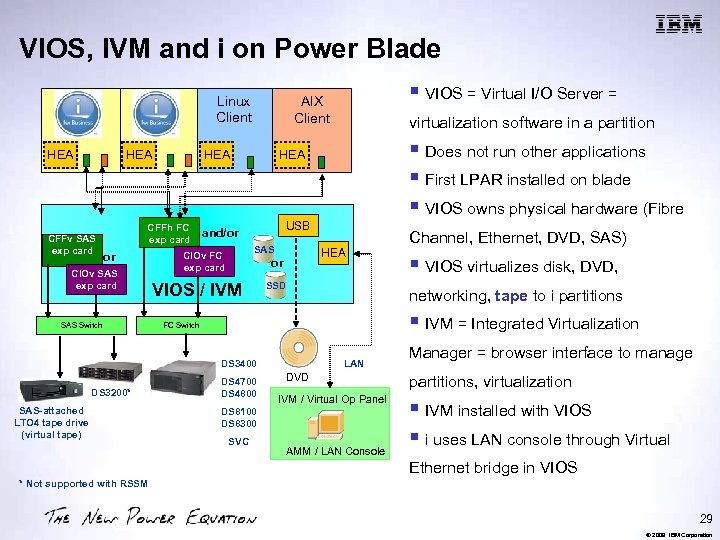
VIOS, IVM and i on Power Blade Linux Client HEA CFFv SAS exp card HEA CFFh FC exp card or CIOv SAS exp card SAS Switch SAS-attached LTO 4 tape drive (virtual tape) § Does not run other applications § First LPAR installed on blade § VIOS owns physical hardware (Fibre USB SAS HEA or VIOS / IVM SSD Channel, Ethernet, DVD, SAS) § VIOS virtualizes disk, DVD, networking, tape to i partitions § IVM = Integrated Virtualization FC Switch DS 3400 DS 3200* virtualization software in a partition HEA and/or CIOv FC exp card § VIOS = Virtual I/O Server = AIX Client DS 4700 DS 4800 LAN DVD IVM / Virtual Op Panel DS 8100 DS 8300 SVC AMM / LAN Console Manager = browser interface to manage partitions, virtualization § IVM installed with VIOS § i uses LAN console through Virtual Ethernet bridge in VIOS * Not supported with RSSM 29 © 2009 IBM Corporation
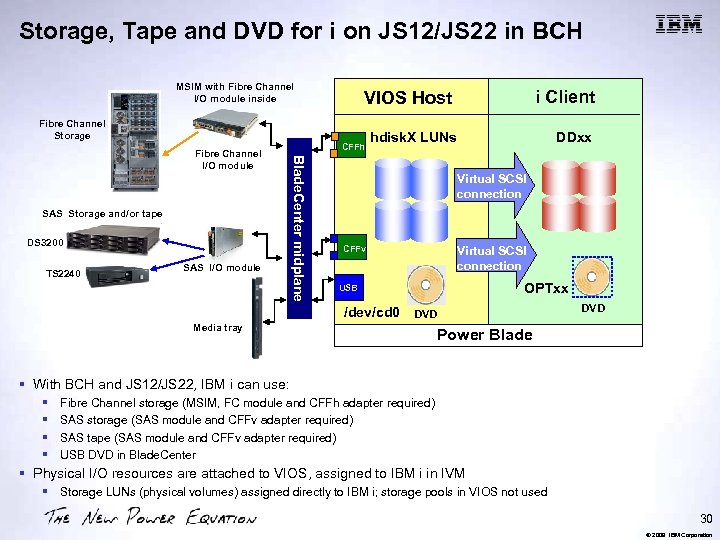
Storage, Tape and DVD for i on JS 12/JS 22 in BCH MSIM with Fibre Channel I/O module inside Fibre Channel Storage SAS Storage and/or tape DS 3200 TS 2240 SAS I/O module CFFh Blade. Center midplane Fibre Channel I/O module i Client VIOS Host hdisk. X LUNs DDxx Virtual SCSI connection CFFv Virtual SCSI connection OPTxx USB /dev/cd 0 DVD Media tray DVD Power Blade § With BCH and JS 12/JS 22, IBM i can use: § § Fibre Channel storage (MSIM, FC module and CFFh adapter required) SAS storage (SAS module and CFFv adapter required) SAS tape (SAS module and CFFv adapter required) USB DVD in Blade. Center § Physical I/O resources are attached to VIOS, assigned to IBM i in IVM § Storage LUNs (physical volumes) assigned directly to IBM i; storage pools in VIOS not used 30 © 2009 IBM Corporation
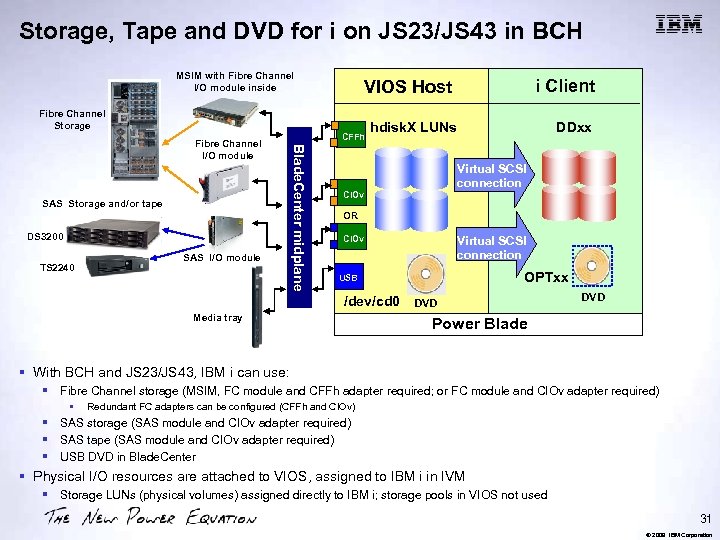
Storage, Tape and DVD for i on JS 23/JS 43 in BCH MSIM with Fibre Channel I/O module inside Fibre Channel Storage SAS Storage and/or tape DS 3200 TS 2240 SAS I/O module CFFh Blade. Center midplane Fibre Channel I/O module i Client VIOS Host hdisk. X LUNs DDxx Virtual SCSI connection CIOv OR CIOv Virtual SCSI connection OPTxx USB /dev/cd 0 Media tray DVD Power Blade § With BCH and JS 23/JS 43, IBM i can use: § Fibre Channel storage (MSIM, FC module and CFFh adapter required; or FC module and CIOv adapter required) § Redundant FC adapters can be configured (CFFh and CIOv) § SAS storage (SAS module and CIOv adapter required) § SAS tape (SAS module and CIOv adapter required) § USB DVD in Blade. Center § Physical I/O resources are attached to VIOS, assigned to IBM i in IVM § Storage LUNs (physical volumes) assigned directly to IBM i; storage pools in VIOS not used 31 © 2009 IBM Corporation
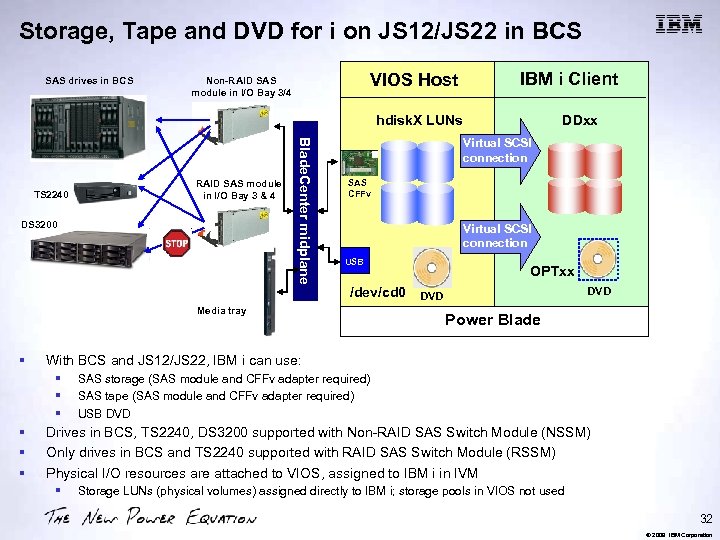
Storage, Tape and DVD for i on JS 12/JS 22 in BCS SAS drives in BCS VIOS Host Non-RAID SAS module in I/O Bay 3/4 IBM i Client hdisk. X LUNs RAID SAS module in I/O Bay 3 & 4 DS 3200 Blade. Center midplane TS 2240 Virtual SCSI connection SAS CFFv Virtual SCSI connection USB /dev/cd 0 Media tray § OPTxx DVD Power Blade With BCS and JS 12/JS 22, IBM i can use: § § § DDxx SAS storage (SAS module and CFFv adapter required) SAS tape (SAS module and CFFv adapter required) USB DVD Drives in BCS, TS 2240, DS 3200 supported with Non-RAID SAS Switch Module (NSSM) Only drives in BCS and TS 2240 supported with RAID SAS Switch Module (RSSM) Physical I/O resources are attached to VIOS, assigned to IBM i in IVM § Storage LUNs (physical volumes) assigned directly to IBM i; storage pools in VIOS not used 32 © 2009 IBM Corporation
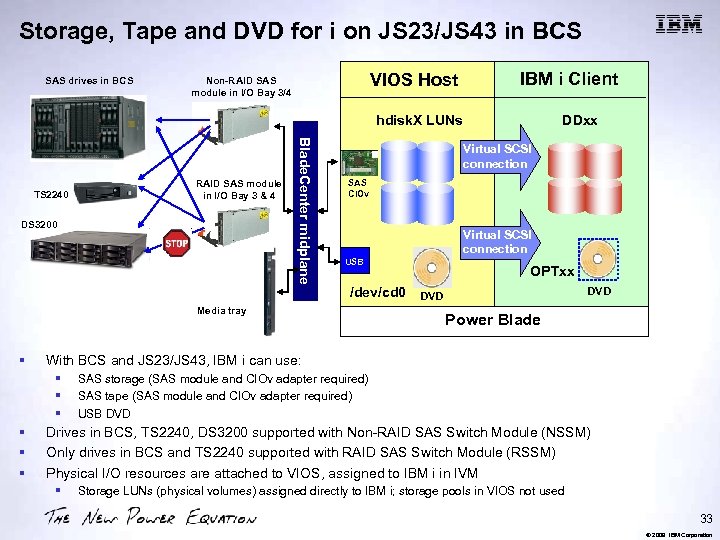
Storage, Tape and DVD for i on JS 23/JS 43 in BCS SAS drives in BCS VIOS Host Non-RAID SAS module in I/O Bay 3/4 IBM i Client hdisk. X LUNs RAID SAS module in I/O Bay 3 & 4 DS 3200 Blade. Center midplane TS 2240 Virtual SCSI connection SAS CIOv Virtual SCSI connection USB /dev/cd 0 Media tray § OPTxx DVD Power Blade With BCS and JS 23/JS 43, IBM i can use: § § § DDxx SAS storage (SAS module and CIOv adapter required) SAS tape (SAS module and CIOv adapter required) USB DVD Drives in BCS, TS 2240, DS 3200 supported with Non-RAID SAS Switch Module (NSSM) Only drives in BCS and TS 2240 supported with RAID SAS Switch Module (RSSM) Physical I/O resources are attached to VIOS, assigned to IBM i in IVM § Storage LUNs (physical volumes) assigned directly to IBM i; storage pools in VIOS not used 33 © 2009 IBM Corporation
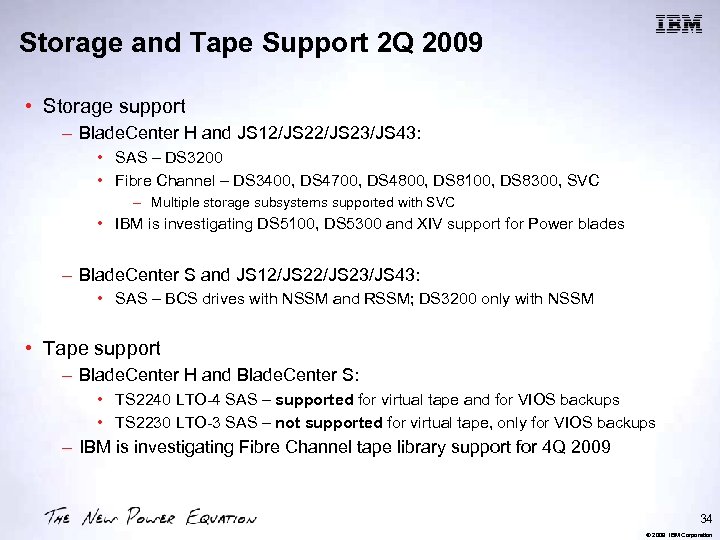
Storage and Tape Support 2 Q 2009 • Storage support – Blade. Center H and JS 12/JS 23/JS 43: • SAS – DS 3200 • Fibre Channel – DS 3400, DS 4700, DS 4800, DS 8100, DS 8300, SVC – Multiple storage subsystems supported with SVC • IBM is investigating DS 5100, DS 5300 and XIV support for Power blades – Blade. Center S and JS 12/JS 23/JS 43: • SAS – BCS drives with NSSM and RSSM; DS 3200 only with NSSM • Tape support – Blade. Center H and Blade. Center S: • TS 2240 LTO-4 SAS – supported for virtual tape and for VIOS backups • TS 2230 LTO-3 SAS – not supported for virtual tape, only for VIOS backups – IBM is investigating Fibre Channel tape library support for 4 Q 2009 34 © 2009 IBM Corporation
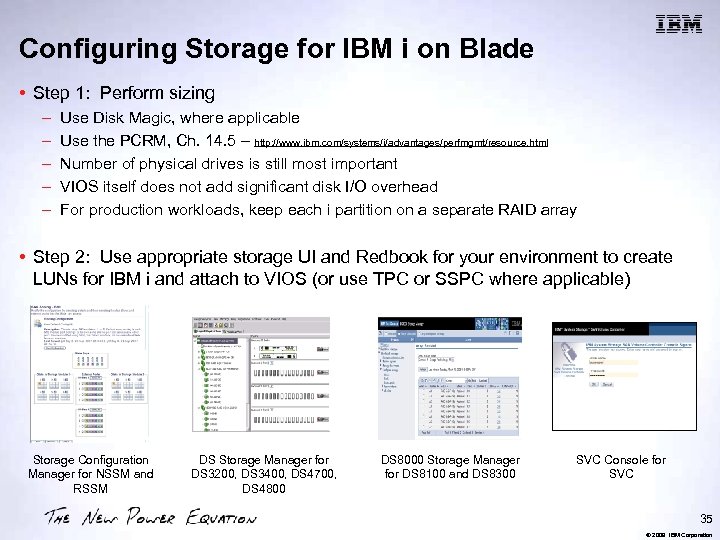
Configuring Storage for IBM i on Blade • Step 1: Perform sizing – – – Use Disk Magic, where applicable Use the PCRM, Ch. 14. 5 – http: //www. ibm. com/systems/i/advantages/perfmgmt/resource. html Number of physical drives is still most important VIOS itself does not add significant disk I/O overhead For production workloads, keep each i partition on a separate RAID array • Step 2: Use appropriate storage UI and Redbook for your environment to create LUNs for IBM i and attach to VIOS (or use TPC or SSPC where applicable) Storage Configuration Manager for NSSM and RSSM DS Storage Manager for DS 3200, DS 3400, DS 4700, DS 4800 DS 8000 Storage Manager for DS 8100 and DS 8300 SVC Console for SVC 35 © 2009 IBM Corporation
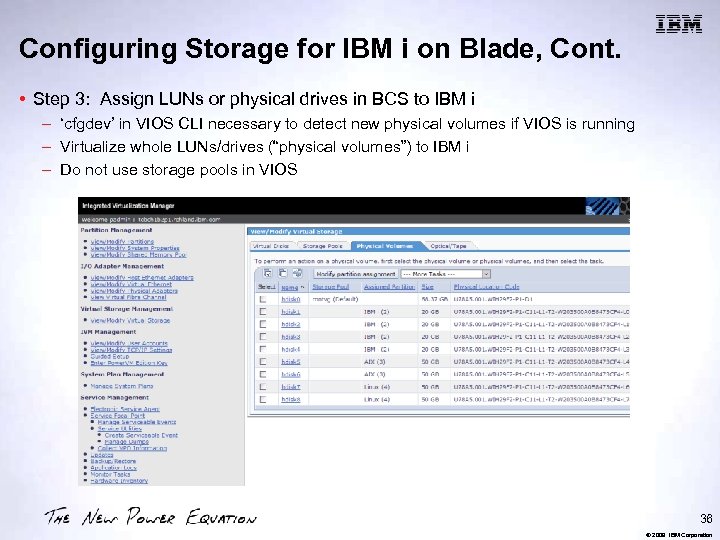
Configuring Storage for IBM i on Blade, Cont. • Step 3: Assign LUNs or physical drives in BCS to IBM i – ‘cfgdev’ in VIOS CLI necessary to detect new physical volumes if VIOS is running – Virtualize whole LUNs/drives (“physical volumes”) to IBM i – Do not use storage pools in VIOS 36 © 2009 IBM Corporation
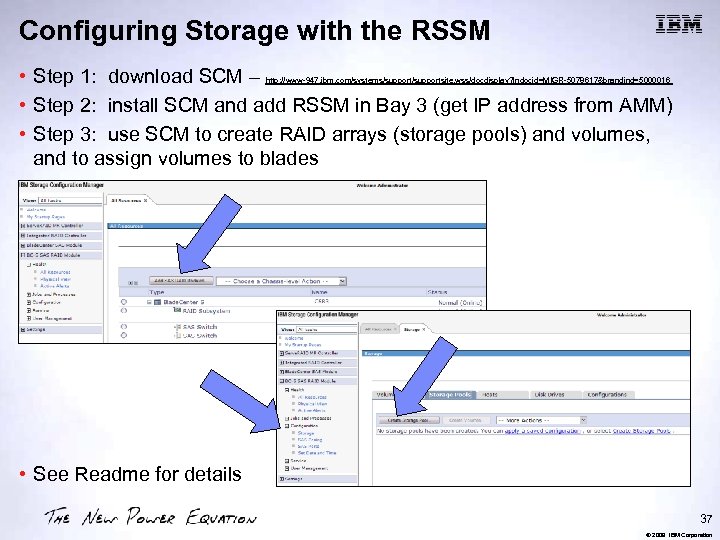
Configuring Storage with the RSSM • Step 1: download SCM – • Step 2: install SCM and add RSSM in Bay 3 (get IP address from AMM) • Step 3: use SCM to create RAID arrays (storage pools) and volumes, and to assign volumes to blades http: //www-947. ibm. com/systems/supportsite. wss/docdisplay? lndocid=MIGR-5078617&brandind=5000016 • See Readme for details 37 © 2009 IBM Corporation
IBM i Support for Virtual Tape • Virtual tape support enables IBM i partitions to directly backup to Power. VM VIOS attached tape drive saving hardware costs and management time • Simplifies backup and restore processing with Blade. Center implementations – – – • Simplifies migration to blades from tower/rack servers – • LTO-4 drive can read backup tapes from LTO-2, 3, 4 drives Supports IBM Systems Storage SAS LTO-4 Drive – – • IBM i 6. 1 partitions on Blade. Center JS 12, JS 23, JS 43 Supports IBM i save/restore commands & BRMS Supports Blade. Center S and H implementations TS 2240 SAS ONLY for Blade. Center IBM is investigating Fibre Channel tape library support for 4 Q 2009 Requirements – VIOS 2. 1. 1, e. FW 3. 4. 2, IBM i 6. 1 PTFs 38 © 2009 IBM Corporation
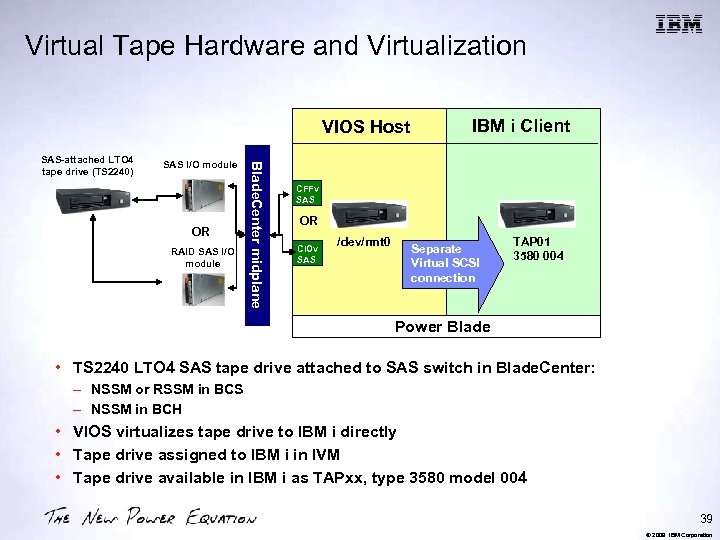
Virtual Tape Hardware and Virtualization VIOS Host SAS I/O module OR RAID SAS I/O module Blade. Center midplane SAS-attached LTO 4 tape drive (TS 2240) IBM i Client CFFv SAS OR CIOv SAS /dev/rmt 0 Separate Virtual SCSI connection TAP 01 3580 004 Power Blade • TS 2240 LTO 4 SAS tape drive attached to SAS switch in Blade. Center: – NSSM or RSSM in BCS – NSSM in BCH • VIOS virtualizes tape drive to IBM i directly • Tape drive assigned to IBM i in IVM • Tape drive available in IBM i as TAPxx, type 3580 model 004 39 © 2009 IBM Corporation
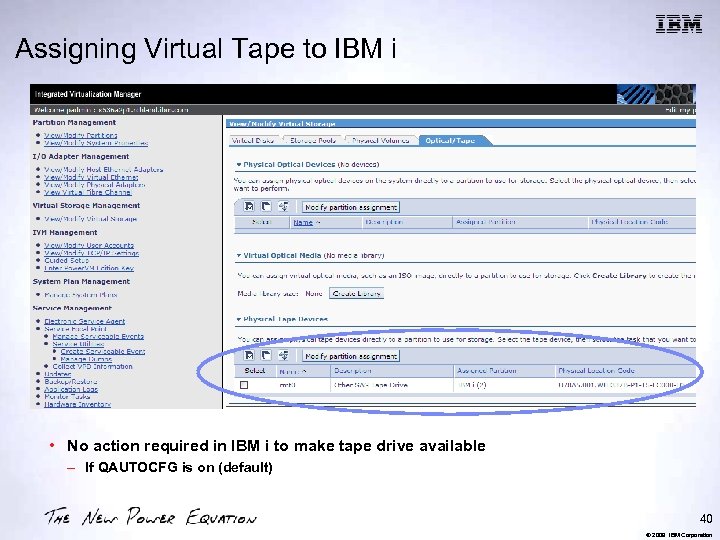
Assigning Virtual Tape to IBM i • No action required in IBM i to make tape drive available – If QAUTOCFG is on (default) 40 © 2009 IBM Corporation
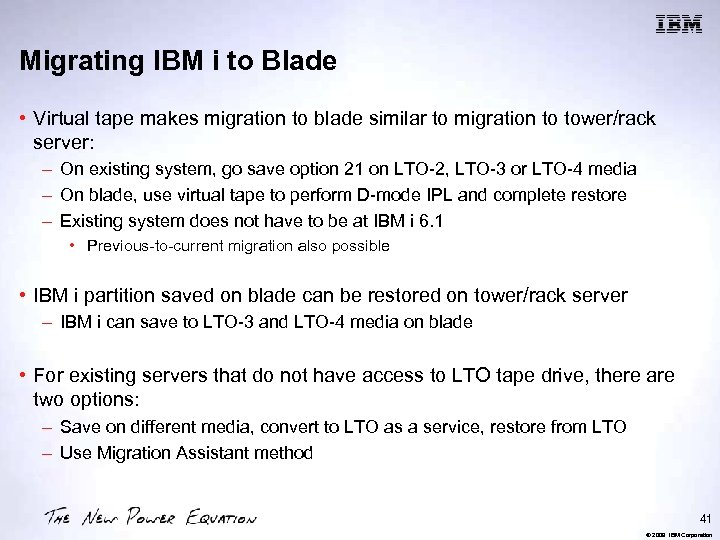
Migrating IBM i to Blade • Virtual tape makes migration to blade similar to migration to tower/rack server: – On existing system, go save option 21 on LTO-2, LTO-3 or LTO-4 media – On blade, use virtual tape to perform D-mode IPL and complete restore – Existing system does not have to be at IBM i 6. 1 • Previous-to-current migration also possible • IBM i partition saved on blade can be restored on tower/rack server – IBM i can save to LTO-3 and LTO-4 media on blade • For existing servers that do not have access to LTO tape drive, there are two options: – Save on different media, convert to LTO as a service, restore from LTO – Use Migration Assistant method 41 © 2009 IBM Corporation
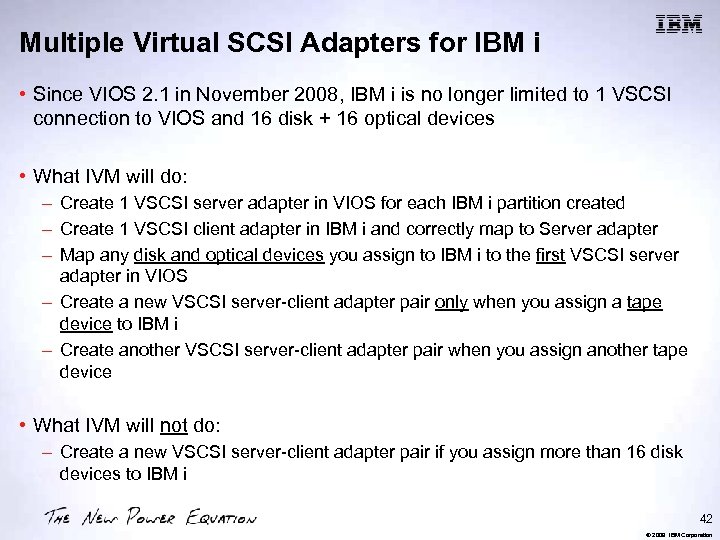
Multiple Virtual SCSI Adapters for IBM i • Since VIOS 2. 1 in November 2008, IBM i is no longer limited to 1 VSCSI connection to VIOS and 16 disk + 16 optical devices • What IVM will do: – Create 1 VSCSI server adapter in VIOS for each IBM i partition created – Create 1 VSCSI client adapter in IBM i and correctly map to Server adapter – Map any disk and optical devices you assign to IBM i to the first VSCSI server adapter in VIOS – Create a new VSCSI server-client adapter pair only when you assign a tape device to IBM i – Create another VSCSI server-client adapter pair when you assign another tape device • What IVM will not do: – Create a new VSCSI server-client adapter pair if you assign more than 16 disk devices to IBM i 42 © 2009 IBM Corporation
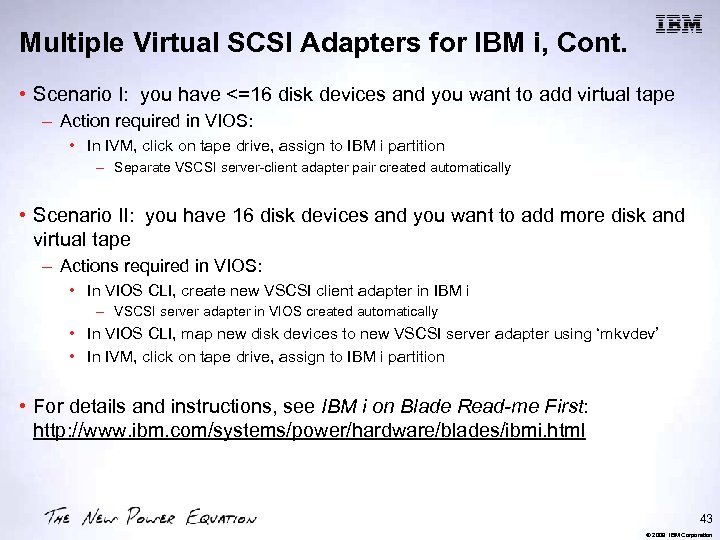
Multiple Virtual SCSI Adapters for IBM i, Cont. • Scenario I: you have <=16 disk devices and you want to add virtual tape – Action required in VIOS: • In IVM, click on tape drive, assign to IBM i partition – Separate VSCSI server-client adapter pair created automatically • Scenario II: you have 16 disk devices and you want to add more disk and virtual tape – Actions required in VIOS: • In VIOS CLI, create new VSCSI client adapter in IBM i – VSCSI server adapter in VIOS created automatically • In VIOS CLI, map new disk devices to new VSCSI server adapter using ‘mkvdev’ • In IVM, click on tape drive, assign to IBM i partition • For details and instructions, see IBM i on Blade Read-me First: http: //www. ibm. com/systems/power/hardware/blades/ibmi. html 43 © 2009 IBM Corporation
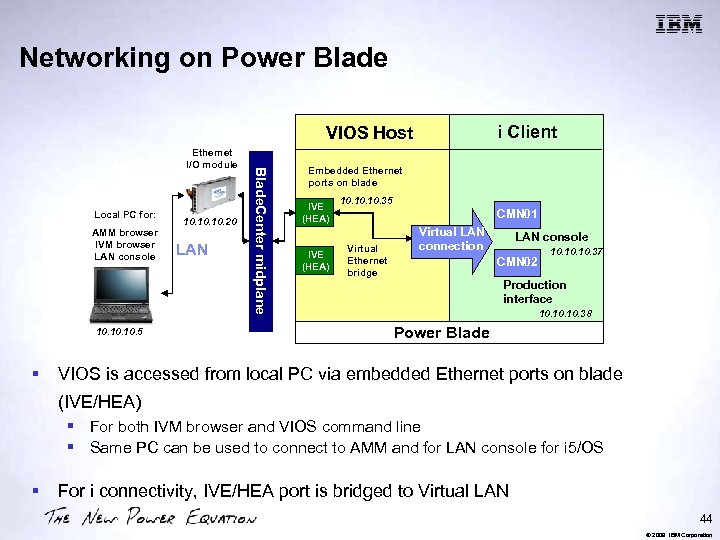
Networking on Power Blade i Client VIOS Host Local PC for: AMM browser IVM browser LAN console IVE 10. 10. 5 § 10. 10. 20 LAN Blade. Center midplane Ethernet I/O module Embedded Ethernet ports on blade IVE (HEA) 10. 10. 35 CMN 01 Virtual Ethernet bridge Virtual LAN connection LAN console CMN 02 10. 10. 37 Production interface 10. 10. 38 Power Blade VIOS is accessed from local PC via embedded Ethernet ports on blade (IVE/HEA) § For both IVM browser and VIOS command line § Same PC can be used to connect to AMM and for LAN console for i 5/OS § For i connectivity, IVE/HEA port is bridged to Virtual LAN 44 © 2009 IBM Corporation
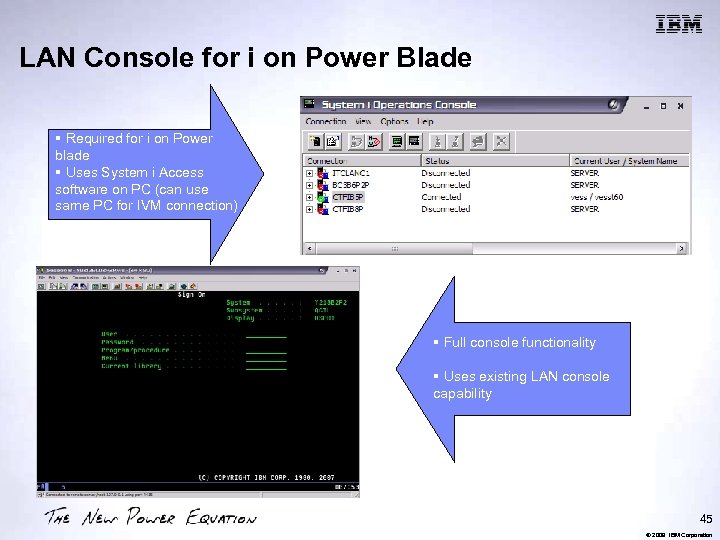
LAN Console for i on Power Blade § Required for i on Power blade § Uses System i Access software on PC (can use same PC for IVM connection) § Full console functionality § Uses existing LAN console capability 45 © 2009 IBM Corporation
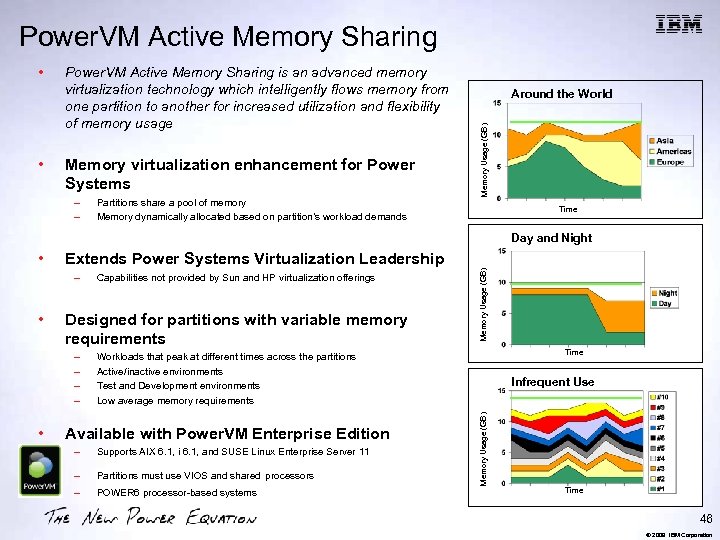
Power. VM Active Memory Sharing • Power. VM Active Memory Sharing is an advanced memory virtualization technology which intelligently flows memory from one partition to another for increased utilization and flexibility of memory usage Memory virtualization enhancement for Power Systems – – Partitions share a pool of memory Memory dynamically allocated based on partition’s workload demands Around the World Memory Usage (GB) • Time Day and Night – • Designed for partitions with variable memory requirements – – • Capabilities not provided by Sun and HP virtualization offerings Memory Usage (GB) Extends Power Systems Virtualization Leadership Time Workloads that peak at different times across the partitions Active/inactive environments Test and Development environments Low average memory requirements Available with Power. VM Enterprise Edition – Supports AIX 6. 1, i 6. 1, and SUSE Linux Enterprise Server 11 – Partitions must use VIOS and shared processors – POWER 6 processor-based systems Infrequent Use Memory Usage (GB) • Time 46 © 2009 IBM Corporation
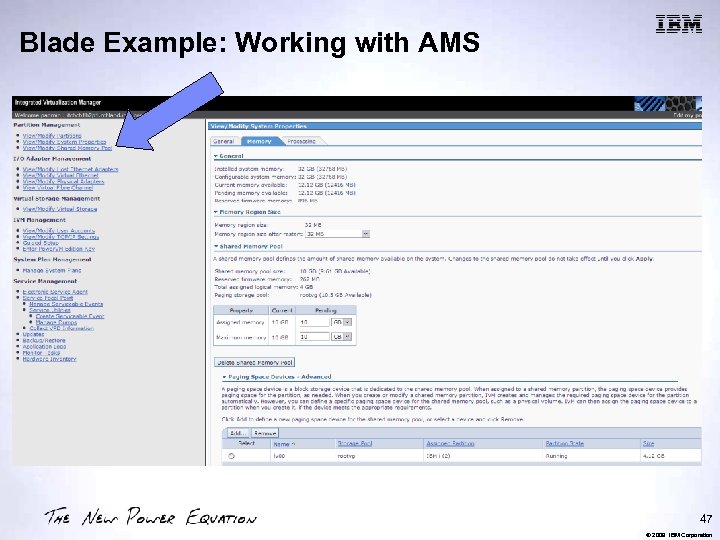
Blade Example: Working with AMS 47 © 2009 IBM Corporation
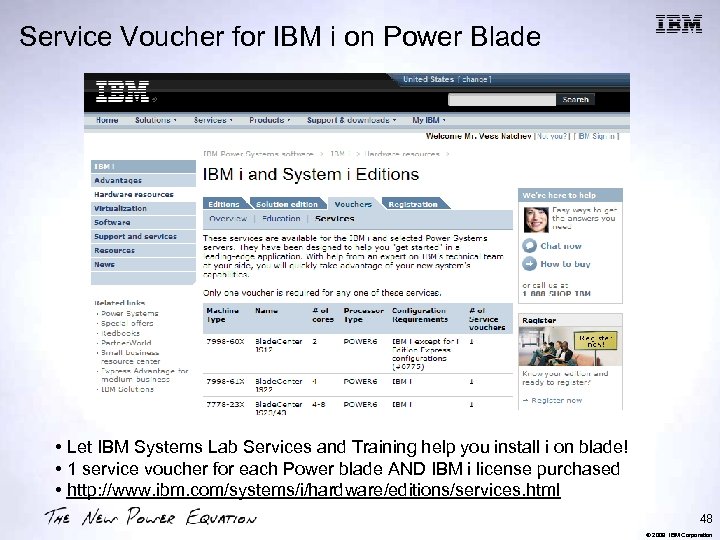
Service Voucher for IBM i on Power Blade • Let IBM Systems Lab Services and Training help you install i on blade! • 1 service voucher for each Power blade AND IBM i license purchased • http: //www. ibm. com/systems/i/hardware/editions/services. html 48 © 2009 IBM Corporation
Further Reading • IBM i on Blade Read-me First: http: //www. ibm. com/systems/power/hardware/blades/ibmi. html • IBM i on Blade Supported Environments: http: //www. ibm. com/systems/power/hardware/blades/ibmi. html • IBM i on Blade Performance Information: http: //www. ibm. com/systems/i/advantages/perfmgmt/resource. html • Service vouchers: http: //www. ibm. com/systems/i/hardware/editions/services. html • IBM i on Blade Training: http: //www. ibm. com/systems/i/support/itc/educ. html 49 © 2009 IBM Corporation
Trademarks and Disclaimers 8 IBM Corporation 1994 -2007. All rights reserved. References in this document to IBM products or services do not imply that IBM intends to make them available in every country. Trademarks of International Business Machines Corporation in the United States, other countries, or both can be found on the World Wide Web at http: //www. ibm. com/legal/copytrade. shtml. Intel, Intel logo, Intel Inside logo, Intel Centrino logo, Celeron, Intel Xeon, Intel Speed. Step, Itanium, and Pentium are trademarks or registered trademarks of Intel Corporation or its subsidiaries in the United States and other countries. Linux is a registered trademark of Linus Torvalds in the United States, other countries, or both. Microsoft, Windows NT, and the Windows logo are trademarks of Microsoft Corporation in the United States, other countries, or both. IT Infrastructure Library is a registered trademark of the Central Computer and Telecommunications Agency which is now part of the Office of Government Commerce. ITIL is a registered trademark, and a registered community trademark of the Office of Government Commerce, and is registered in the U. S. Patent and Trademark Office. UNIX is a registered trademark of The Open Group in the United States and other countries. Java and all Java-based trademarks are trademarks of Sun Microsystems, Inc. in the United States, other countries, or both. Other company, product, or service names may be trademarks or service marks of others. Information is provided "AS IS" without warranty of any kind. The customer examples described are presented as illustrations of how those customers have used IBM products and the results they may have achieved. Actual environmental costs and performance characteristics may vary by customer. Information concerning non-IBM products was obtained from a supplier of these products, published announcement material, or other publicly available sources and does not constitute an endorsement of such products by IBM. Sources for non-IBM list prices and performance numbers are taken from publicly available information, including vendor announcements and vendor worldwide homepages. IBM has not tested these products and cannot confirm the accuracy of performance, capability, or any other claims related to non-IBM products. Questions on the capability of non-IBM products should be addressed to the supplier of those products. All statements regarding IBM future direction and intent are subject to change or withdrawal without notice, and represent goals and objectives only. Some information addresses anticipated future capabilities. Such information is not intended as a definitive statement of a commitment to specific levels of performance, function or delivery schedules with respect to any future products. Such commitments are only made in IBM product announcements. The information is presented here to communicate IBM's current investment and development activities as a good faith effort to help with our customers' future planning. Performance is based on measurements and projections using standard IBM benchmarks in a controlled environment. The actual throughput or performance that any user will experience will vary depending upon considerations such as the amount of multiprogramming in the user's job stream, the I/O configuration, the storage configuration, and the workload processed. Therefore, no assurance can be given that an individual user will achieve throughput or performance improvements equivalent to the ratios stated here. Prices are suggested U. S. list prices and are subject to change without notice. Starting price may not include a hard drive, operating system or other features. Contact your IBM representative or Business Partner for the most current pricing in your geography. Photographs shown may be engineering prototypes. Changes may be incorporated in production models. 50 © 2009 IBM Corporation
Special notices This document was developed for IBM offerings in the United States as of the date of publication. IBM may not make these offerings available in other countries, and the information is subject to change without notice. Consult your local IBM business contact for information on the IBM offerings available in your area. Information in this document concerning non-IBM products was obtained from the suppliers of these products or other public sources. Questions on the capabilities of non-IBM products should be addressed to the suppliers of those products. IBM may have patents or pending patent applications covering subject matter in this document. The furnishing of this document does not give you any license to these patents. Send license inquires, in writing, to IBM Director of Licensing, IBM Corporation, New Castle Drive, Armonk, NY 10504 -1785 USA. All statements regarding IBM future direction and intent are subject to change or withdrawal without notice, and represent goals and objectives only. The information contained in this document has not been submitted to any formal IBM test and is provided "AS IS" with no warranties or guarantees either expressed or implied. All examples cited or described in this document are presented as illustrations of the manner in which some IBM products can be used and the results that may be achieved. Actual environmental costs and performance characteristics will vary depending on individual client configurations and conditions. IBM Global Financing offerings are provided through IBM Credit Corporation in the United States and other IBM subsidiaries and divisions worldwide to qualified commercial and government clients. Rates are based on a client's credit rating, financing terms, offering type, equipment type and options, and may vary by country. Other restrictions may apply. Rates and offerings are subject to change, extension or withdrawal without notice. IBM is not responsible for printing errors in this document that result in pricing or information inaccuracies. All prices shown are IBM's United States suggested list prices and are subject to change without notice; reseller prices may vary. IBM hardware products are manufactured from new parts, or new and serviceable used parts. Regardless, our warranty terms apply. Any performance data contained in this document was determined in a controlled environment. Actual results may vary significantly and are dependent on many factors including system hardware configuration and software design and configuration. Some measurements quoted in this document may have been made on development-level systems. There is no guarantee these measurements will be the same on generallyavailable systems. Some measurements quoted in this document may have been estimated through extrapolation. Users of this document should verify the applicable data for their specific environment. Revised September 26, 2006 51 © 2009 IBM Corporation
Special notices (cont. ) IBM, the IBM logo, ibm. com AIX, AIX (logo), AIX 6 (logo), AS/400, Blade. Center, Blue Gene, Cluster. Proven, DB 2, ESCON, IBM i (logo), IBM Business Partner (logo), Intelli. Station, Load. Leveler, Lotus Notes, Operating System/400, OS/400, Partner. Link, Partner. World, Power. PC, p. Series, Rational, RISC System/6000, RS/6000, THINK, Tivoli (logo), Tivoli Management Environment, Web. Sphere, x. Series, z/OS, z. Series, AIX 5 L, Chiphopper, Chipkill, Cloudscape, DB 2 Universal Database, DS 4000, DS 6000, DS 8000, Energy. Scale, Enterprise Workload Manager, General Purpose File System, , GPFS, HACMP/6000, HASM, IBM Systems Director Active Energy Manager, i. Series, Micro-Partitioning, POWER, Power. Executive, Power. VM (logo), Power. HA, Power Architecture, Power Everywhere, Power Family, POWER Hypervisor, Power Systems, Power Systems (logo), Power Systems Software (logo), POWER 2, POWER 3, POWER 4+, POWER 5+, POWER 6, System i, System p 5, System Storage, System z, Tivoli Enterprise, TME 10, Workload Partitions Manager and X-Architecture are trademarks or registered trademarks of International Business Machines Corporation in the United States, other countries, or both. If these and other IBM trademarked terms are marked on their first occurrence in this information with a trademark symbol (® or ™), these symbols indicate U. S. registered or common law trademarks owned by IBM at the time this information was published. Such trademarks may also be registered or common law trademarks in other countries. A current list of IBM trademarks is available on the Web at "Copyright and trademark information" at www. ibm. com/legal/copytrade. shtml The Power Architecture and Power. org wordmarks and the Power and Power. org logos and related marks are trademarks and service marks licensed by Power. org. UNIX is a registered trademark of The Open Group in the United States, other countries or both. Linux is a registered trademark of Linus Torvalds in the United States, other countries or both. Microsoft, Windows and the Windows logo are registered trademarks of Microsoft Corporation in the United States, other countries or both. Intel, Itanium, Pentium are registered trademarks and Xeon is a trademark of Intel Corporation or its subsidiaries in the United States, other countries or both. AMD Opteron is a trademark of Advanced Micro Devices, Inc. Java and all Java-based trademarks and logos are trademarks of Sun Microsystems, Inc. in the United States, other countries or both. TPC-C and TPC-H are trademarks of the Transaction Performance Processing Council (TPPC). SPECint, SPECfp, SPECjbb, SPECweb, SPECj. App. Server, SPEC OMP, SPECviewperf, SPECapc, SPEChpc, SPECjvm, SPECmail, SPECimap and SPECsfs are trademarks of the Standard Performance Evaluation Corp (SPEC). Net. Bench is a registered trademark of Ziff Davis Media in the United States, other countries or both. Alti. Vec is a trademark of Freescale Semiconductor, Inc. Cell Broadband Engine is a trademark of Sony Computer Entertainment Inc. Infini. Band, Infini. Band Trade Association and the Infini. Band design marks are trademarks and/or service marks of the Infini. Band Trade Association. Other company, product and service names may be trademarks or service marks of others. Revised April 24, 2008 52 © 2009 IBM Corporation
Notes on performance estimates r. Perf for AIX r. Perf (Relative Performance) is an estimate of commercial processing performance relative to other IBM UNIX systems. It is derived from an IBM analytical model which uses characteristics from IBM internal workloads, TPC and SPEC benchmarks. The r. Perf model is not intended to represent any specific public benchmark results and should not be reasonably used in that way. The model simulates some of the system operations such as CPU, cache and memory. However, the model does not simulate disk or network I/O operations. • r. Perf estimates are calculated based on systems with the latest levels of AIX and other pertinent software at the time of system announcement. Actual performance will vary based on application and configuration specifics. The IBM e. Server p. Series 640 is the baseline reference system and has a value of 1. 0. Although r. Perf may be used to approximate relative IBM UNIX commercial processing performance, actual system performance may vary and is dependent upon many factors including system hardware configuration and software design and configuration. Note that the r. Perf methodology used for the POWER 6 systems is identical to that used for the POWER 5 systems. Variations in incremental system performance may be observed in commercial workloads due to changes in the underlying system architecture. All performance estimates are provided "AS IS" and no warranties or guarantees are expressed or implied by IBM. Buyers should consult other sources of information, including system benchmarks, and application sizing guides to evaluate the performance of a system they are considering buying. For additional information about r. Perf, contact your local IBM office or IBM authorized reseller. ==================================== CPW for IBM i Commercial Processing Workload (CPW) is a relative measure of performance of processors running the IBM i operating system. Performance in customer environments may vary. The value is based on maximum configurations. More performance information is available in the Performance Capabilities Reference at: www. ibm. com/systems/i/solutions/perfmgmt/resource. html Revised April 2, 2007 53 © 2009 IBM Corporation
Скачать презентацию IBM i and Blade Center 2 Q 2009
58e8991a1eed4617acd0a0cfa8152f83.ppt