 Скачать презентацию IBM Cloud Think it Build it Tap into
8a50ae5f49cc4647d5531237ebc79bf7.ppt
- Количество слайдов: 26



IBM Cloud: Think it. Build it. Tap into it. Jueves de Softlayer Carlos Aguado Fidalgo IBM Cloud Technical Sales © 2015 IBM Corporation
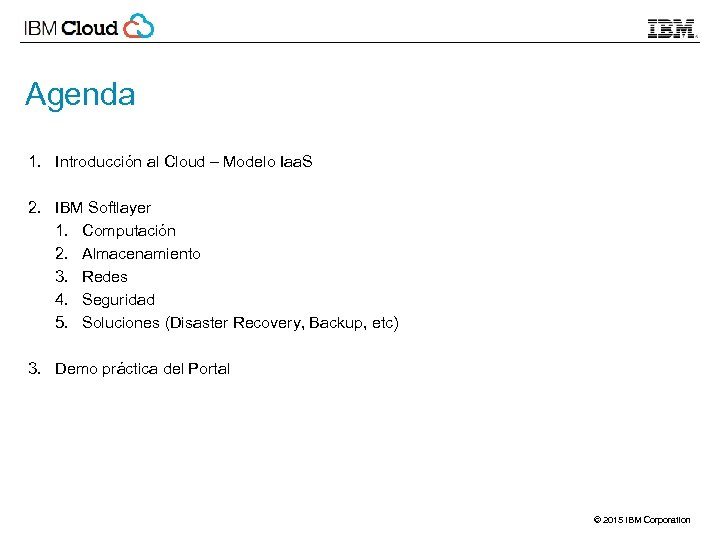
Agenda 1. Introducción al Cloud – Modelo Iaa. S 2. IBM Softlayer 1. Computación 2. Almacenamiento 3. Redes 4. Seguridad 5. Soluciones (Disaster Recovery, Backup, etc) 3. Demo práctica del Portal © 2015 IBM Corporation
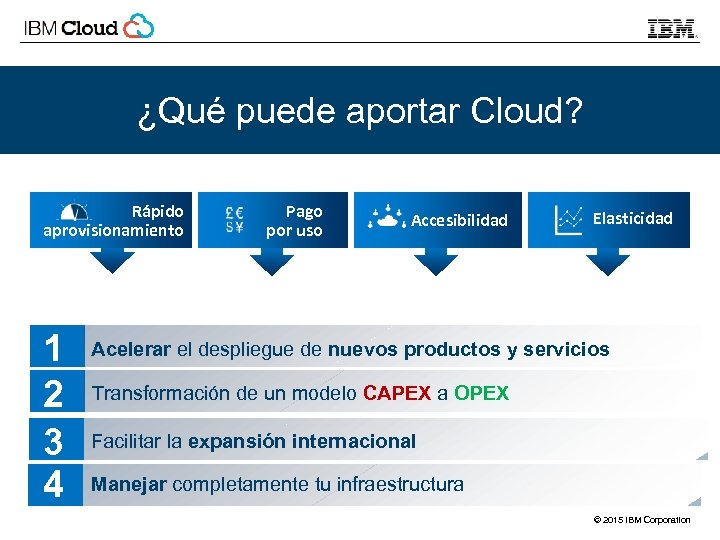
¿Qué puede aportar Cloud? Rápido aprovisionamiento 1 2 3 4 Pago por uso Accesibilidad Elasticidad Acelerar el despliegue de nuevos productos y servicios Transformación de un modelo CAPEX a OPEX Facilitar la expansión internacional Manejar completamente tu infraestructura © 2015 IBM Corporation
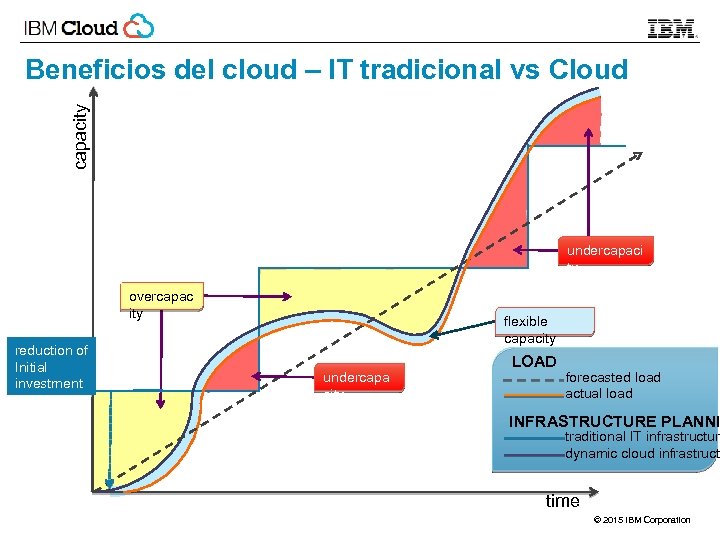
capacity Beneficios del cloud – IT tradicional vs Cloud undercapaci ty overcapac ity reduction of Initial investment flexible capacity undercapa city LOAD forecasted load actual load INFRASTRUCTURE PLANNI traditional IT infrastructure dynamic cloud infrastruct time © 2015 IBM Corporation
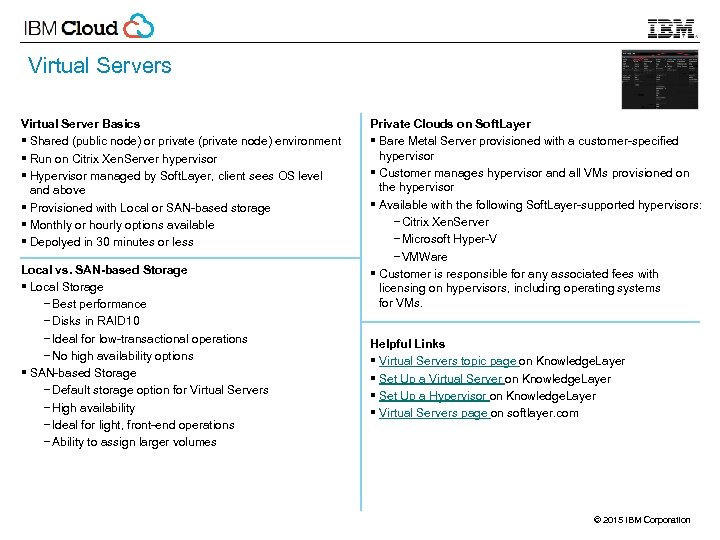
Virtual Servers Virtual Server Basics § Shared (public node) or private (private node) environment § Run on Citrix Xen. Server hypervisor § Hypervisor managed by Soft. Layer, client sees OS level and above § Provisioned with Local or SAN-based storage § Monthly or hourly options available § Depolyed in 30 minutes or less Local vs. SAN-based Storage § Local Storage − Best performance − Disks in RAID 10 − Ideal for low-transactional operations − No high availability options § SAN-based Storage − Default storage option for Virtual Servers − High availability − Ideal for light, front-end operations − Ability to assign larger volumes Private Clouds on Soft. Layer § Bare Metal Server provisioned with a customer-specified hypervisor § Customer manages hypervisor and all VMs provisioned on the hypervisor § Available with the following Soft. Layer-supported hypervisors: − Citrix Xen. Server − Microsoft Hyper-V − VMWare § Customer is responsible for any associated fees with licensing on hypervisors, including operating systems for VMs. Helpful Links § Virtual Servers topic page on Knowledge. Layer § Set Up a Virtual Server on Knowledge. Layer § Set Up a Hypervisor on Knowledge. Layer § Virtual Servers page on softlayer. com © 2015 IBM Corporation
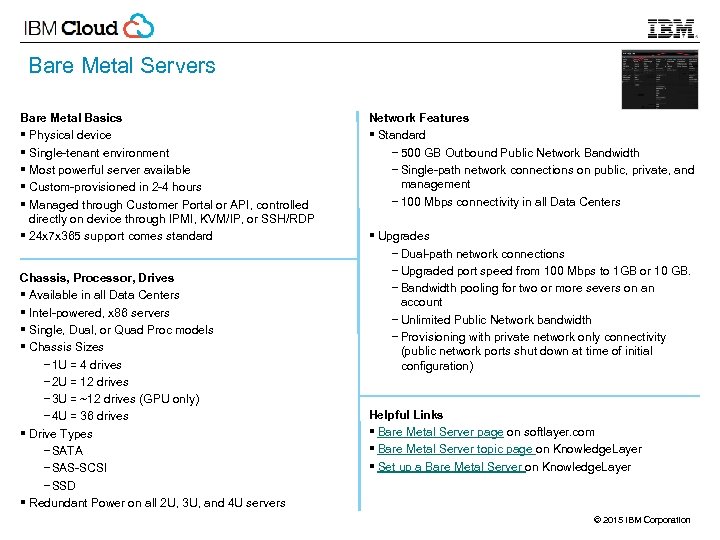
Bare Metal Servers Bare Metal Basics § Physical device § Single-tenant environment § Most powerful server available § Custom-provisioned in 2 -4 hours § Managed through Customer Portal or API, controlled directly on device through IPMI, KVM/IP, or SSH/RDP § 24 x 7 x 365 support comes standard Chassis, Processor, Drives § Available in all Data Centers § Intel-powered, x 86 servers § Single, Dual, or Quad Proc models § Chassis Sizes − 1 U = 4 drives − 2 U = 12 drives − 3 U = ~12 drives (GPU only) − 4 U = 36 drives § Drive Types − SATA − SAS-SCSI − SSD § Redundant Power on all 2 U, 3 U, and 4 U servers Network Features § Standard − 500 GB Outbound Public Network Bandwidth − Single-path network connections on public, private, and management − 100 Mbps connectivity in all Data Centers § Upgrades − Dual-path network connections − Upgraded port speed from 100 Mbps to 1 GB or 10 GB. − Bandwidth pooling for two or more severs on an account − Unlimited Public Network bandwidth − Provisioning with private network only connectivity (public network ports shut down at time of initial configuration) Helpful Links § Bare Metal Server page on softlayer. com § Bare Metal Server topic page on Knowledge. Layer § Set up a Bare Metal Server on Knowledge. Layer © 2015 IBM Corporation
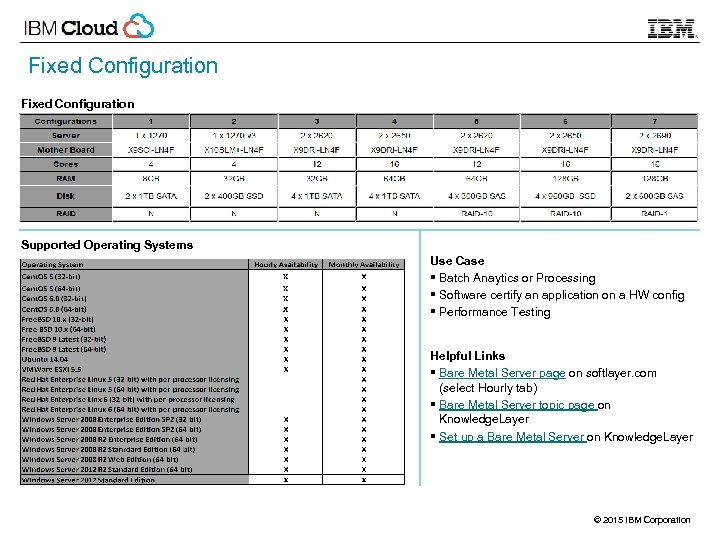
Fixed Configuration Supported Operating Systems Use Case § Batch Anaytics or Processing § Software certify an application on a HW config § Performance Testing Helpful Links § Bare Metal Server page on softlayer. com (select Hourly tab) § Bare Metal Server topic page on Knowledge. Layer § Set up a Bare Metal Server on Knowledge. Layer © 2015 IBM Corporation
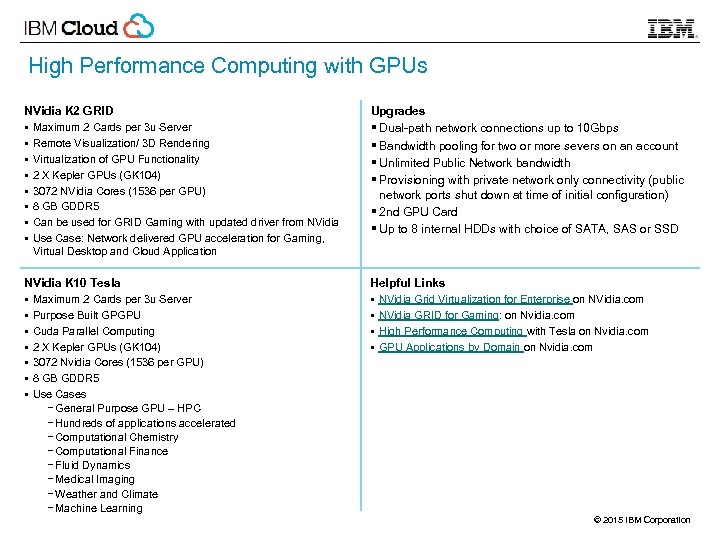
High Performance Computing with GPUs NVidia K 2 GRID § Maximum 2 Cards per 3 u Server § Remote Visualization/ 3 D Rendering § Virtualization of GPU Functionality § 2 X Kepler GPUs (GK 104) § 3072 NVidia Cores (1536 per GPU) § 8 GB GDDR 5 § Can be used for GRID Gaming with updated driver from NVidia § Use Case: Network delivered GPU acceleration for Gaming, Upgrades § Dual-path network connections up to 10 Gbps § Bandwidth pooling for two or more severs on an account § Unlimited Public Network bandwidth § Provisioning with private network only connectivity (public network ports shut down at time of initial configuration) § 2 nd GPU Card § Up to 8 internal HDDs with choice of SATA, SAS or SSD Virtual Desktop and Cloud Application NVidia K 10 Tesla § Maximum 2 Cards per 3 u Server § Purpose Built GPGPU § Cuda Parallel Computing § 2 X Kepler GPUs (GK 104) § 3072 Nvidia Cores (1536 per GPU) § 8 GB GDDR 5 § Use Cases − General Purpose GPU – HPC − Hundreds of applications accelerated − Computational Chemistry − Computational Finance − Fluid Dynamics − Medical Imaging − Weather and Climate − Machine Learning Helpful Links § NVidia Grid Virtualization for Enterprise on NVidia. com § NVidia GRID for Gaming: on Nvidia. com § High Performance Computing with Tesla on Nvidia. com § GPU Applications by Domain on Nvidia. com © 2015 IBM Corporation
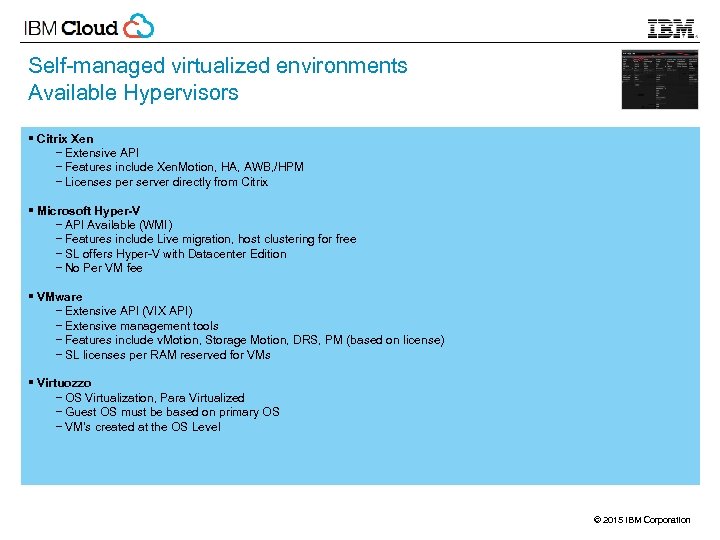
Self-managed virtualized environments Available Hypervisors § Citrix Xen − Extensive API − Features include Xen. Motion, HA, AWB, /HPM − Licenses per server directly from Citrix § Microsoft Hyper-V − API Available (WMI) − Features include Live migration, host clustering for free − SL offers Hyper-V with Datacenter Edition − No Per VM fee § VMware − Extensive API (VIX API) − Extensive management tools − Features include v. Motion, Storage Motion, DRS, PM (based on license) − SL licenses per RAM reserved for VMs § Virtuozzo − OS Virtualization, Para Virtualized − Guest OS must be based on primary OS − VM’s created at the OS Level © 2015 IBM Corporation
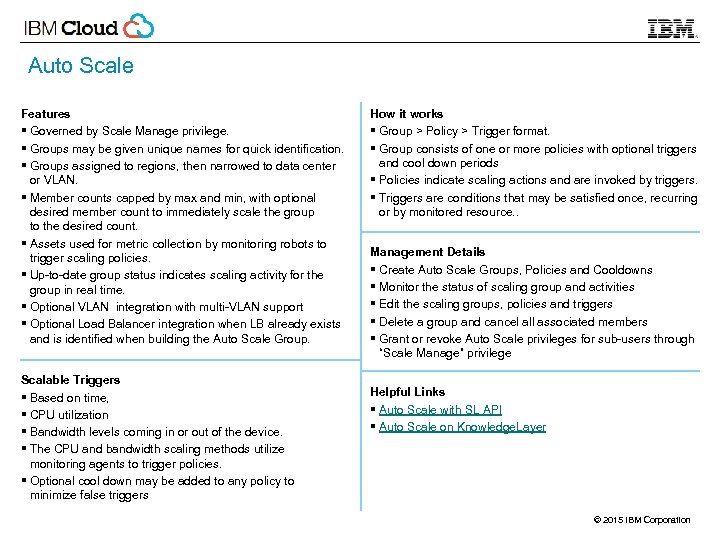
Auto Scale Features § Governed by Scale Manage privilege. § Groups may be given unique names for quick identification. § Groups assigned to regions, then narrowed to data center or VLAN. § Member counts capped by max and min, with optional desired member count to immediately scale the group to the desired count. § Assets used for metric collection by monitoring robots to trigger scaling policies. § Up-to-date group status indicates scaling activity for the group in real time. § Optional VLAN integration with multi-VLAN support § Optional Load Balancer integration when LB already exists and is identified when building the Auto Scale Group. Scalable Triggers § Based on time, § CPU utilization § Bandwidth levels coming in or out of the device. § The CPU and bandwidth scaling methods utilize monitoring agents to trigger policies. § Optional cool down may be added to any policy to minimize false triggers How it works § Group > Policy > Trigger format. § Group consists of one or more policies with optional triggers and cool down periods § Policies indicate scaling actions and are invoked by triggers. § Triggers are conditions that may be satisfied once, recurring or by monitored resource. . Management Details § Create Auto Scale Groups, Policies and Cooldowns § Monitor the status of scaling group and activities § Edit the scaling groups, policies and triggers § Delete a group and cancel all associated members § Grant or revoke Auto Scale privileges for sub-users through “Scale Manage” privilege Helpful Links § Auto Scale with SL API § Auto Scale on Knowledge. Layer © 2015 IBM Corporation
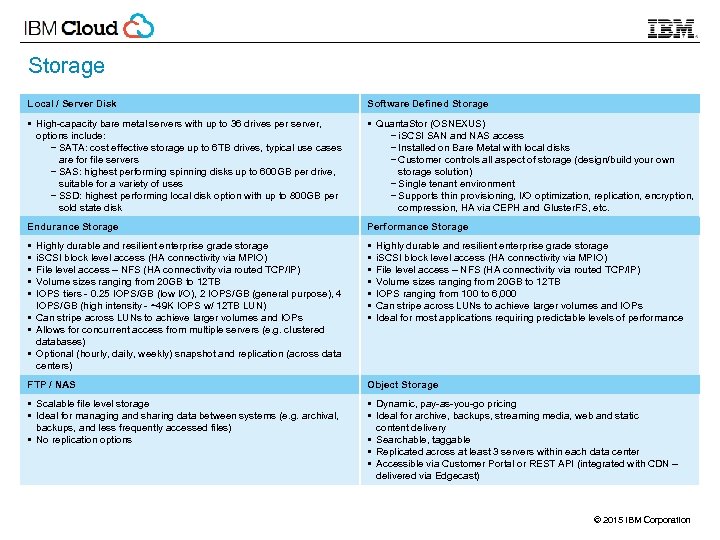
Storage Local / Server Disk Software Defined Storage § High-capacity bare metal servers with up to 36 drives per server, options include: − SATA: cost effective storage up to 6 TB drives, typical use cases are for file servers − SAS: highest performing spinning disks up to 600 GB per drive, suitable for a variety of uses − SSD: highest performing local disk option with up to 800 GB per sold state disk § Quanta. Stor (OSNEXUS) − i. SCSI SAN and NAS access − Installed on Bare Metal with local disks − Customer controls all aspect of storage (design/build your own storage solution) − Single tenant environment − Supports thin provisioning, I/O optimization, replication, encryption, compression, HA via CEPH and Gluster. FS, etc. Endurance Storage Performance Storage § § § Highly durable and resilient enterprise grade storage i. SCSI block level access (HA connectivity via MPIO) File level access – NFS (HA connectivity via routed TCP/IP) Volume sizes ranging from 20 GB to 12 TB IOPS tiers - 0. 25 IOPS/GB (low I/O), 2 IOPS/GB (general purpose), 4 IOPS/GB (high intensity - ~49 K IOPS w/ 12 TB LUN) § Can stripe across LUNs to achieve larger volumes and IOPs § Allows for concurrent access from multiple servers (e. g. clustered databases) § Optional (hourly, daily, weekly) snapshot and replication (across data centers) § § § § FTP / NAS Object Storage § Scalable file level storage § Ideal for managing and sharing data between systems (e. g. archival, backups, and less frequently accessed files) § No replication options § Dynamic, pay-as-you-go pricing § Ideal for archive, backups, streaming media, web and static content delivery § Searchable, taggable § Replicated across at least 3 servers within each data center § Accessible via Customer Portal or REST API (integrated with CDN – delivered via Edgecast) Highly durable and resilient enterprise grade storage i. SCSI block level access (HA connectivity via MPIO) File level access – NFS (HA connectivity via routed TCP/IP) Volume sizes ranging from 20 GB to 12 TB IOPS ranging from 100 to 6, 000 Can stripe across LUNs to achieve larger volumes and IOPs Ideal for most applications requiring predictable levels of performance © 2015 IBM Corporation
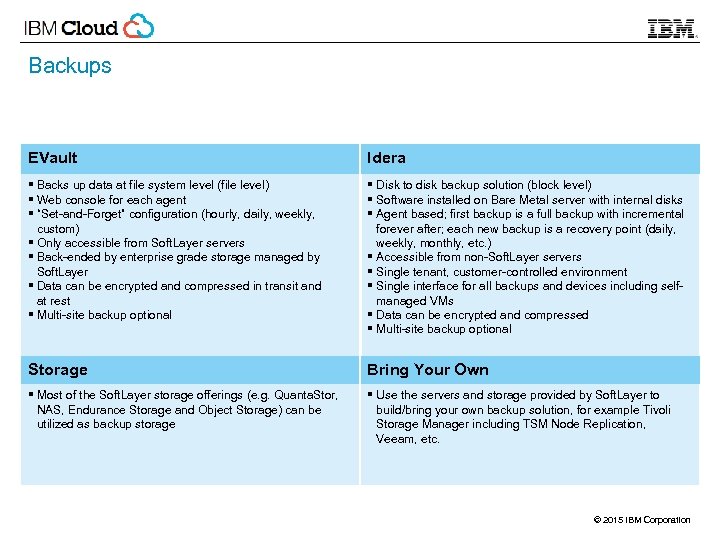
Backups EVault Idera § Backs up data at file system level (file level) § Web console for each agent § “Set-and-Forget” configuration (hourly, daily, weekly, custom) § Only accessible from Soft. Layer servers § Back-ended by enterprise grade storage managed by Soft. Layer § Data can be encrypted and compressed in transit and at rest § Multi-site backup optional § Disk to disk backup solution (block level) § Software installed on Bare Metal server with internal disks § Agent based; first backup is a full backup with incremental forever after; each new backup is a recovery point (daily, weekly, monthly, etc. ) § Accessible from non-Soft. Layer servers § Single tenant, customer-controlled environment § Single interface for all backups and devices including selfmanaged VMs § Data can be encrypted and compressed § Multi-site backup optional Storage Bring Your Own § Most of the Soft. Layer storage offerings (e. g. Quanta. Stor, NAS, Endurance Storage and Object Storage) can be utilized as backup storage § Use the servers and storage provided by Soft. Layer to build/bring your own backup solution, for example Tivoli Storage Manager including TSM Node Replication, Veeam, etc. © 2015 IBM Corporation
Network Components at Soft. Layer § § Generic Network Layout Loadbalancers Firewalls Gateway: Vyatta © 2015 IBM Corporation
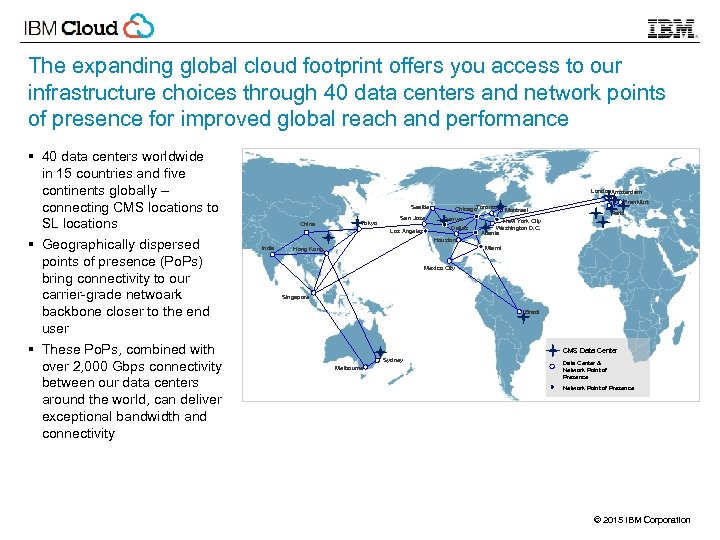
The expanding global cloud footprint offers you access to our infrastructure choices through 40 data centers and network points of presence for improved global reach and performance § 40 data centers worldwide in 15 countries and five continents globally – connecting CMS locations to SL locations § Geographically dispersed points of presence (Po. Ps) bring connectivity to our carrier-grade netwoark backbone closer to the end user § These Po. Ps, combined with over 2, 000 Gbps connectivity between our data centers around the world, can deliver exceptional bandwidth and connectivity London. Amsterdam Seattle China Tokyo San Jose Los Angeles Chicago. Toronto Denver Dallas Houston India Frankfurt Montreal Paris New York City Washington D. C. Atlanta Miami Hong Kong Mexico City Singapore Brazil CMS Data Center Sydney Melbourne Data Center & Network Point of Presence © 2015 IBM Corporation
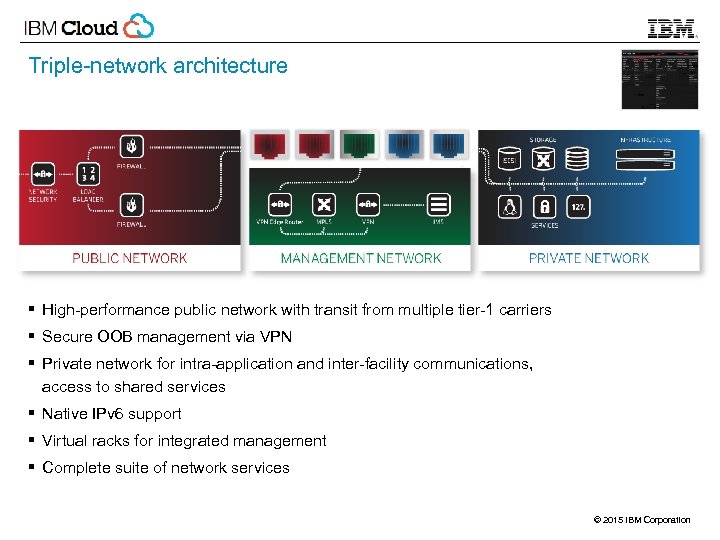
Triple-network architecture § High-performance public network with transit from multiple tier-1 carriers § Secure OOB management via VPN § Private network for intra-application and inter-facility communications, access to shared services § Native IPv 6 support § Virtual racks for integrated management § Complete suite of network services © 2015 IBM Corporation
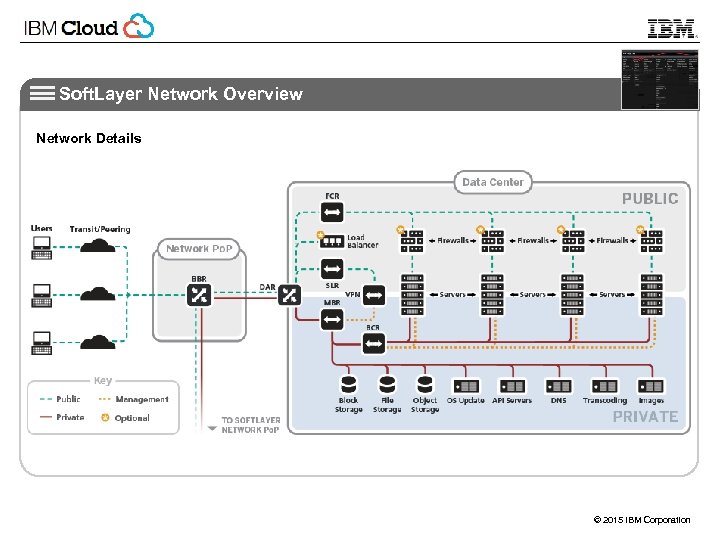
Soft. Layer Network Overview Network Details © 2015 IBM Corporation
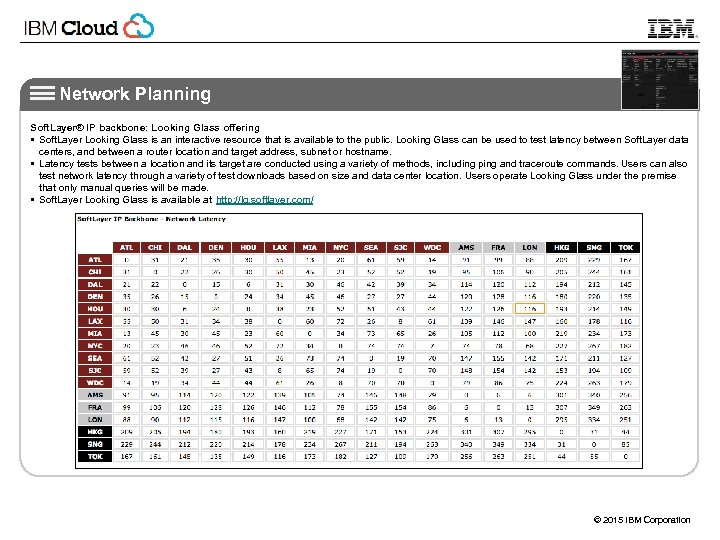
Network Planning Soft. Layer® IP backbone: Looking Glass offering § Soft. Layer Looking Glass is an interactive resource that is available to the public. Looking Glass can be used to test latency between Soft. Layer data centers, and between a router location and target address, subnet or hostname. § Latency tests between a location and its target are conducted using a variety of methods, including ping and traceroute commands. Users can also test network latency through a variety of test downloads based on size and data center location. Users operate Looking Glass under the premise that only manual queries will be made. § Soft. Layer Looking Glass is available at http: //lg. softlayer. com/ © 2015 IBM Corporation
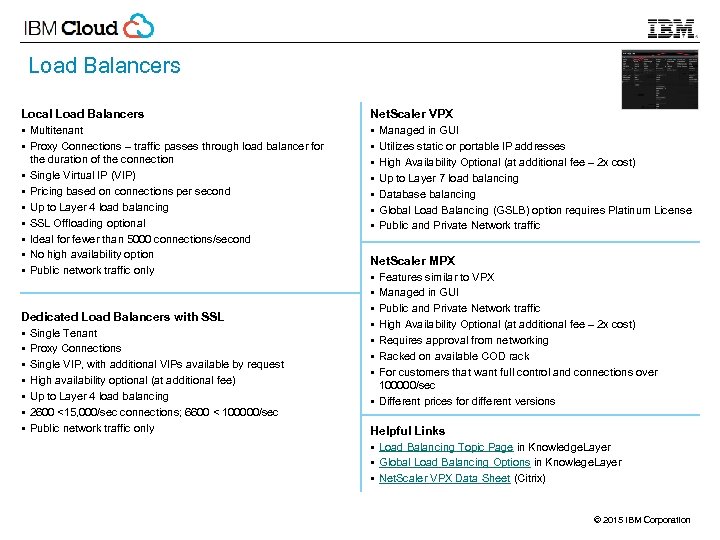
Load Balancers Local Load Balancers § Multitenant § Proxy Connections – traffic passes through load balancer for § § § § the duration of the connection Single Virtual IP (VIP) Pricing based on connections per second Up to Layer 4 load balancing SSL Offloading optional Ideal for fewer than 5000 connections/second No high availability option Public network traffic only Dedicated Load Balancers with SSL § Single Tenant § Proxy Connections § Single VIP, with additional VIPs available by request § High availability optional (at additional fee) § Up to Layer 4 load balancing § 2600 <15, 000/sec connections; 6600 < 100000/sec § Public network traffic only Net. Scaler VPX § Managed in GUI § Utilizes static or portable IP addresses § High Availability Optional (at additional fee – 2 x cost) § Up to Layer 7 load balancing § Database balancing § Global Load Balancing (GSLB) option requires Platinum License § Public and Private Network traffic Net. Scaler MPX § Features similar to VPX § Managed in GUI § Public and Private Network traffic § High Availability Optional (at additional fee – 2 x cost) § Requires approval from networking § Racked on available COD rack § For customers that want full control and connections over 100000/sec § Different prices for different versions Helpful Links § Load Balancing Topic Page in Knowledge. Layer § Global Load Balancing Options in Knowlege. Layer § Net. Scaler VPX Data Sheet (Citrix) © 2015 IBM Corporation
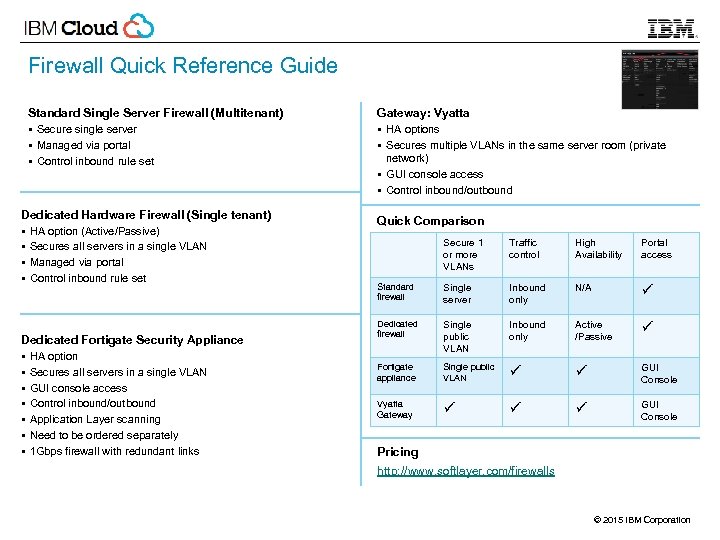
Firewall Quick Reference Guide Standard Single Server Firewall (Multitenant) § Secure single server § Managed via portal § Control inbound rule set Dedicated Hardware Firewall (Single tenant) § HA option (Active/Passive) § Secures all servers in a single VLAN § Managed via portal § Control inbound rule set Dedicated Fortigate Security Appliance § HA option § Secures all servers in a single VLAN § GUI console access § Control inbound/outbound § Application Layer scanning § Need to be ordered separately § 1 Gbps firewall with redundant links Gateway: Vyatta § HA options § Secures multiple VLANs in the same server room (private network) § GUI console access § Control inbound/outbound Quick Comparison Secure 1 or more VLANs Traffic control High Availability Portal access Standard firewall Single server Inbound only N/A ü Dedicated firewall Single public VLAN Inbound only Active /Passive ü Fortigate appliance Single public VLAN ü ü GUI Console Vyatta Gateway ü ü ü GUI Console Pricing http: //www. softlayer. com/firewalls © 2015 IBM Corporation
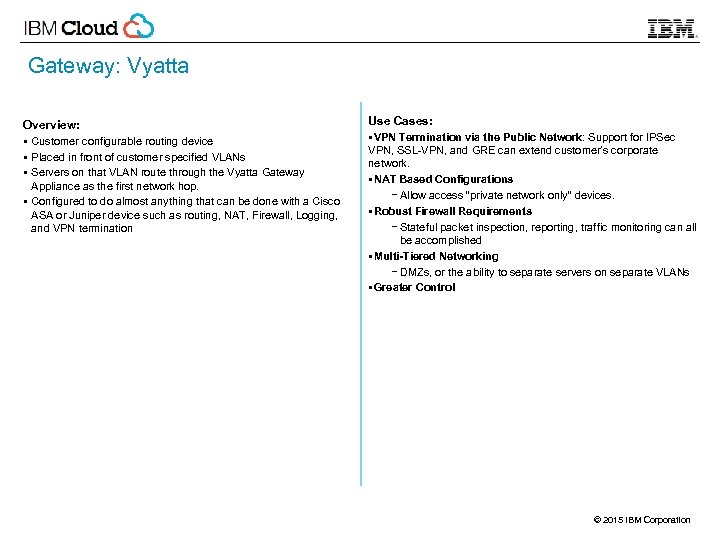
Gateway: Vyatta Overview: § Customer configurable routing device § Placed in front of customer specified VLANs § Servers on that VLAN route through the Vyatta Gateway Appliance as the first network hop. § Configured to do almost anything that can be done with a Cisco ASA or Juniper device such as routing, NAT, Firewall, Logging, and VPN termination Use Cases: §VPN Termination via the Public Network: Support for IPSec VPN, SSL-VPN, and GRE can extend customer’s corporate network. §NAT Based Configurations − Allow access “private network only” devices. §Robust Firewall Requirements − Stateful packet inspection, reporting, traffic monitoring can all be accomplished §Multi-Tiered Networking − DMZs, or the ability to separate servers on separate VLANs §Greater Control © 2015 IBM Corporation
CDN Basics § Soft. Layer partners with Edgecast for all Content Delivery services. § As of July 2014 Edgecast routes content through 44 geographically diverse nodes. § Charged on a per GB basis for bandwidth. § Offer standard and SSL delivery options Global Standard vs Global Premium § Global Standard is the default for most CDN services. Delivers from Soft. Layer POPs around the globe. § Global Premium is required for premium transit routes, including Vietnam, Malaysia, Philippines, Korea, and other Asia-Pacific countries. HTTP Large Object vs HTTP Small Object § HTTP Large Object − Videos and Objects over 300 k − Utilizes SSD for storage − Delivers peak performance and fast start times § HTTP Small Object − Designed for objects under 300 k − Delivers content directly from RAM − Ideal for HTML, CSS, Java © 2015 IBM Corporation
Monitoring Basics Additional Monitoring Options § Clients must configure monitors and alerts on each device or account. § Automated monitoring tickets are customer facing only. § Automated Reboot from Monitoring: Monitoring system automatically reboots the server when a monitoring alert is issued. § 24/7/365 NOC Monitoring: A personal notification will be sent in the event a monitoring alert is issued. TCP Monitoring Nimsoft Monitoring § Complimentary TCP includes PING monitoring only. − Default setting: • Public IP with 0 second delay • Recommended that clients update default to avoid false positives. − Advanced TCP Options (additional fee) • DNS: Generic NSLOOKUP on address • DNS Custom: NSLOOKUP on specific domain • FTP: FTP connection on Port 21 • HTTP: HTTP connection on Port 80 • HTTP Custom: HTTP connection on Port 80, with check for given response text • HTTPS: HTTP connection on Port 443 • IMAP: IMAP connection on address • LDAP: LDAP connection on address • NNTP: NTTP connection on address • POP: POP connection on address • SMTP: SMTP connection on address • SSH: SSH connection on Port 22 • TCP Custom: TCP connection to specified port • TELNET: TELNET connection on Port 23 • UDP SIP: UDP connection to specified port § Basic Monitoring: Hardware and OS − CPU, Disk, and Memory − Process − Remote System and Windows Services § Advanced Monitoring: System Health − DHCP − File Checking − LDAP − Mounted File Systems − NTP − Network Traffic − Performance − SNMP § Premium Monitoring: Application − Apache − DNS − Email − IIS − MSSQL − MYSQL − Tom. Cat © 2015 IBM Corporation
![Soft. Layer API at a glance Soft. Layer [main] API § Version 3. 0](https://present5.com/presentation/8a50ae5f49cc4647d5531237ebc79bf7/image-23.jpg "Soft. Layer API at a glance Soft. Layer [main] API § Version 3. 0")
Soft. Layer API at a glance Soft. Layer [main] API § Version 3. 0 API provides 2, 200 function calls to over 180 services § § Supports REST, SOAP & XML-RPC interfaces § § Is a major direct source of revenue Clients implemented in C#, Perl, PHP, Python, Ruby, VB. Net, command line Python client Accessible from mobile devices as well Object Storage API: § Based on Open. Stack Swift § REST-based § Clients: Java, Ruby, PHP, Python § Supports Containers and Objects § Content Delivery Network integration § Search integration Basic Concepts: § Endpoint (public or private) § Service (e. g. Account, Storage. . ) § Method or Action (e. g. get. Users()) § Data Types (String, boolean, int and Complex) § Properties (local, relational, count) § Result limits (rows filtering) § Object Masks (properties filtering) To begin using the API: §Enable the API use from Customer Portal §Create unique secret API key §Authentication based on user and API key §Choose language client library Message Queue API: § REST-based § 64 k max § Key/value pair message fields § Clients: C#, Java, Ruby, PHP, Python § Supports Topics, Topic Tags, Subscriptions § Persistent via Cloudant data layer © 2015 IBM Corporation
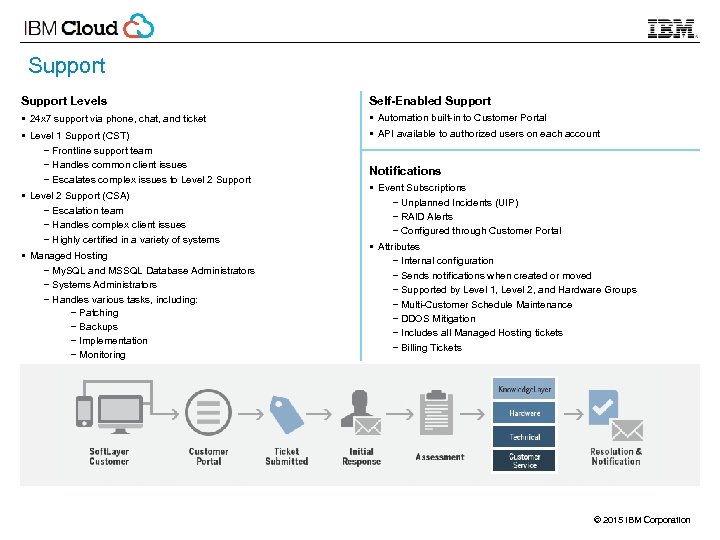
Support Levels Self-Enabled Support § 24 x 7 support via phone, chat, and ticket § Automation built-in to Customer Portal § API available to authorized users on each account § Level 1 Support (CST) − Frontline support team − Handles common client issues − Escalates complex issues to Level 2 Support § Level 2 Support (CSA) − Escalation team − Handles complex client issues − Highly certified in a variety of systems § Managed Hosting − My. SQL and MSSQL Database Administrators − Systems Administrators − Handles various tasks, including: − Patching − Backups − Implementation − Monitoring Notifications § Event Subscriptions − Unplanned Incidents (UIP) − RAID Alerts − Configured through Customer Portal § Attributes − Internal configuration − Sends notifications when created or moved − Supported by Level 1, Level 2, and Hardware Groups − Multi-Customer Schedule Maintenance − DDOS Mitigation − Includes all Managed Hosting tickets − Billing Tickets © 2015 IBM Corporation
Cloud IBM Soft. Layer Thank You! © 2015 IBM Corporation
© 2015 IBM Corporation
Скачать презентацию IBM Cloud Think it Build it Tap into
8a50ae5f49cc4647d5531237ebc79bf7.ppt