 Скачать презентацию IBM 備份解決方案 TSM Advanced Function and Files X
254de6386491462f9251e917609bb081.ppt
- Количество слайдов: 44



IBM 備份解決方案 TSM Advanced Function and Files. X 聚碩科技 技術顧問 沈保任
® SYSAGE Computing Business Unit Agenda î 前言 î IBM 備份解決方案 î TSM 功能簡介 î TSM Fast. Back 功能簡介 © IBM Corporation 2008
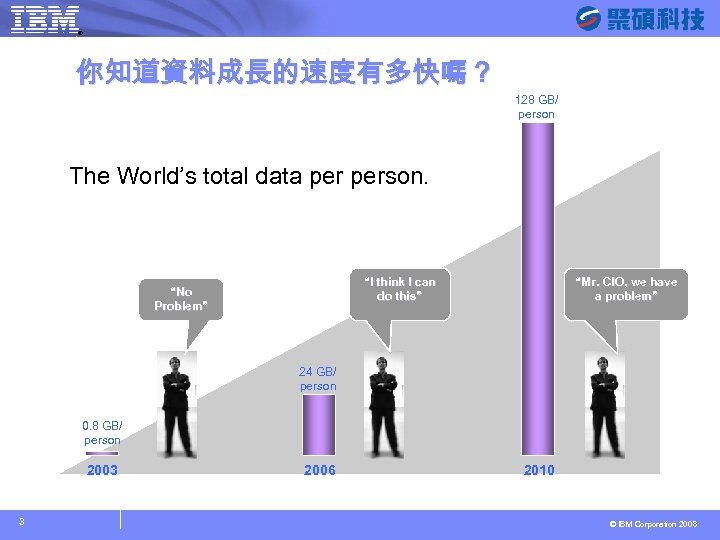
® SYSAGE Computing Business Unit 你知道資料成長的速度有多快嗎? 128 GB/ person The World’s total data person. “I think I can do this” “No Problem” “Mr. CIO, we have a problem” 24 GB/ person 0. 8 GB/ person 2003 3 2006 2010 © IBM Corporation 2008
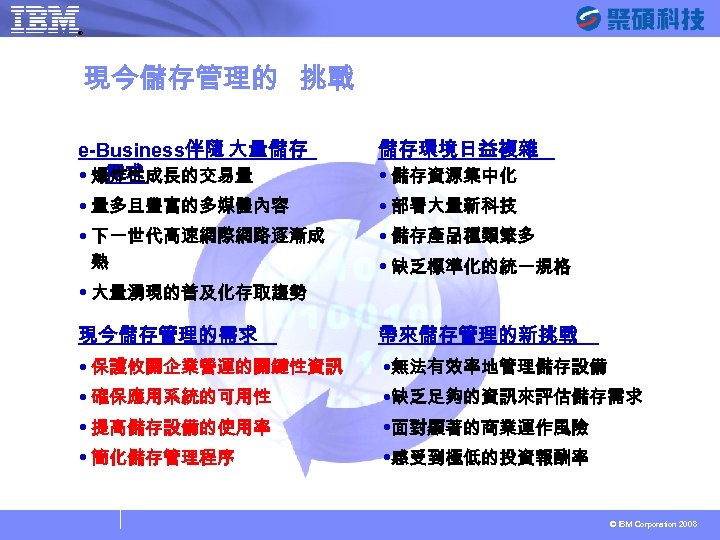
® SYSAGE Computing Business Unit 現今儲存管理的 挑戰 e-Business伴隨 大量儲存 需求 爆炸性成長的交易量 儲存環境日益複雜 儲存資源集中化 量多且豐富的多媒體內容 下一世代高速網際網路逐漸成 部署大量新科技 儲存產品種類繁多 缺乏標準化的統一規格 熟 大量湧現的普及化存取趨勢 現今儲存管理的需求 帶來儲存管理的新挑戰 保護攸關企業營運的關鍵性資訊 確保應用系統的可用性 提高儲存設備的使用率 簡化儲存管理程序 無法有效率地管理儲存設備 缺乏足夠的資訊來評估儲存需求 面對顯著的商業運作風險 感受到極低的投資報酬率 © IBM Corporation 2008
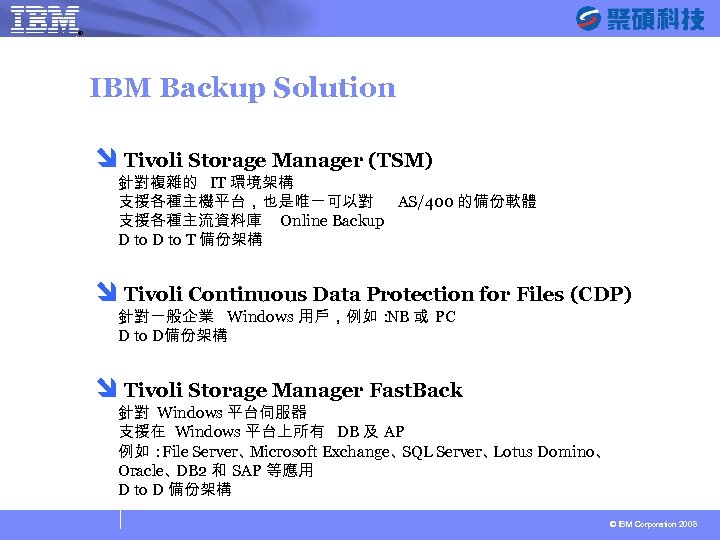
® SYSAGE Computing Business Unit IBM Backup Solution î Tivoli Storage Manager (TSM) 針對複雜的 IT 環境架構 支援各種主機平台,也是唯一可以對 AS/400 的備份軟體 支援各種主流資料庫 Online Backup D to T 備份架構 î Tivoli Continuous Data Protection for Files (CDP) 針對一般企業 Windows 用戶,例如: 或 PC NB D to D備份架構 î Tivoli Storage Manager Fast. Back 針對 Windows 平台伺服器 支援在 Windows 平台上所有 DB 及 AP 例如: File Server、 Microsoft Exchange、 SQL Server、 Lotus Domino、 Oracle、 DB 2 和 SAP 等應用 D to D 備份架構 © IBM Corporation 2008
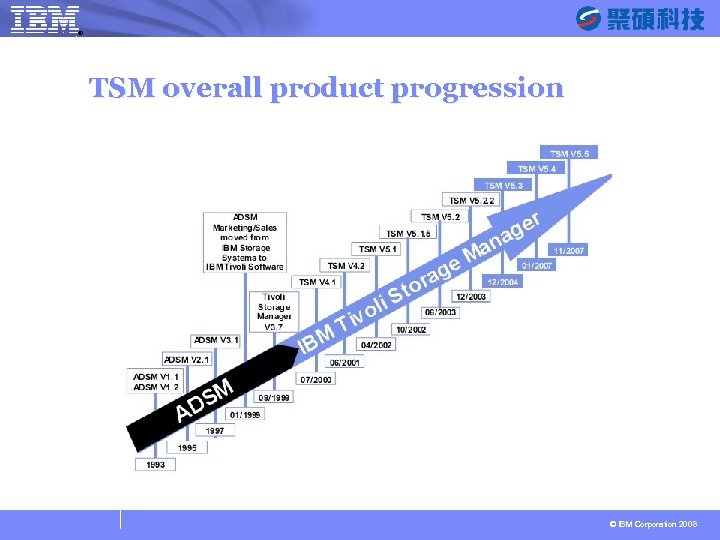
® SYSAGE Computing Business Unit TSM overall product progression © IBM Corporation 2008
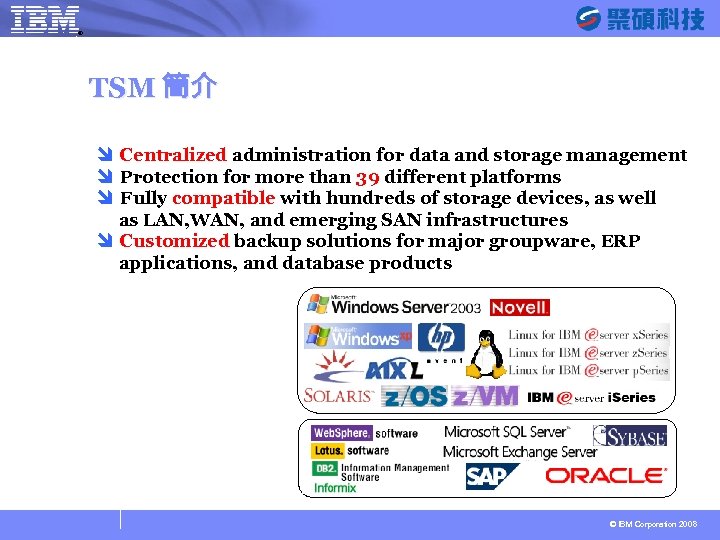
® SYSAGE Computing Business Unit TSM 簡介 î Centralized administration for data and storage management î Protection for more than 39 different platforms î Fully compatible with hundreds of storage devices, as well as LAN, WAN, and emerging SAN infrastructures î Customized backup solutions for major groupware, ERP applications, and database products © IBM Corporation 2008
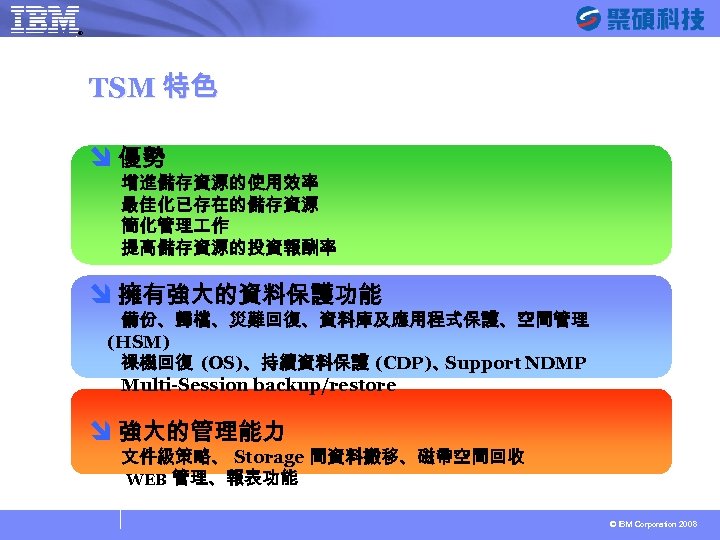
® SYSAGE Computing Business Unit TSM 特色 î 優勢 增進儲存資源的使用效率 最佳化已存在的儲存資源 簡化管理 作 提高儲存資源的投資報酬率 î 擁有強大的資料保護功能 備份、歸檔、災難回復、資料庫及應用程式保護、空間管理 (HSM) 祼機回復 (OS)、持續資料保護 (CDP)、 Support NDMP Multi-Session backup/restore î 強大的管理能力 文件級策略、 Storage 間資料搬移、磁帶空間回收 WEB 管理、報表功能 © IBM Corporation 2008
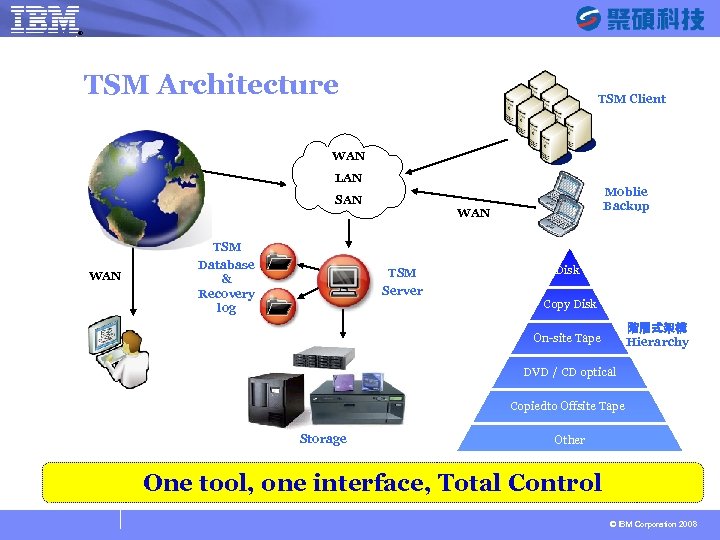
® SYSAGE Computing Business Unit TSM Architecture TSM Client WAN LAN Moblie Backup SAN WAN TSM WAN Database & Recovery log TSM Server Disk Copy Disk 階層式架構 Hierarchy On-site Tape DVD / CD optical Copiedto Offsite Tape Storage Other One tool, one interface, Total Control © IBM Corporation 2008
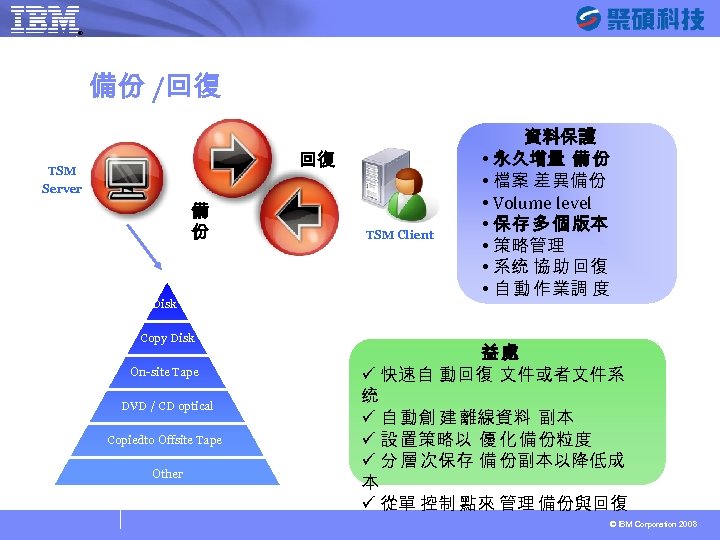
® SYSAGE Computing Business Unit 備份 /回復 回復 TSM Server 備 份 Disk Copy Disk On-site Tape DVD / CD optical Copiedto Offsite Tape Other TSM Client 資料保護 永久增量 備 份 檔案 差 異備份 Volume level 保 存 多 個 版本 策略管理 系统 協 助 回復 自 動 作 業調 度 益處 ü 快速自 動回復 文件或者文件系 统 ü 自 動創 建 離線資料 副本 ü 設 置策略以 優 化 備 份粒度 ü 分 層 次保存 備 份副本以降低成 本 ü 從單 控制 點來 管理 備份與回復 © IBM Corporation 2008
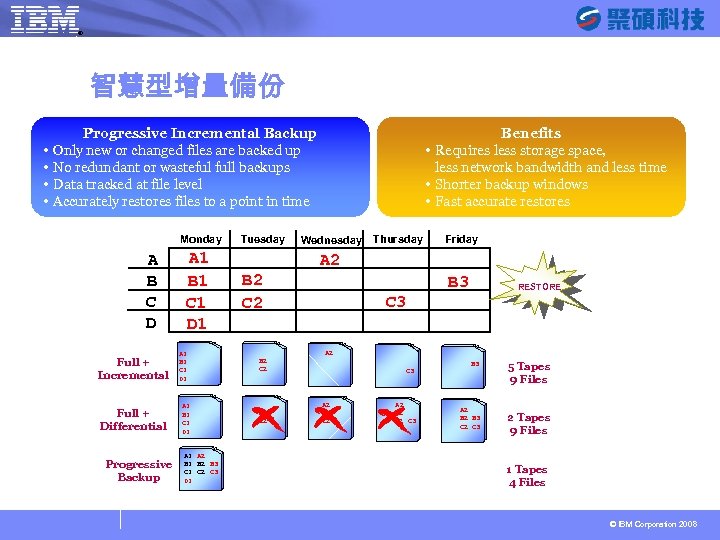
® SYSAGE Computing Business Unit 智慧型增量備份 Progressive Incremental Backup Only new or changed files are backed up No redundant or wasteful full backups Data tracked at file level Accurately restores files to a point in time Monday A B C D Full + Incremental Full + Differential Progressive Backup A 1 B 1 C 1 D 1 A 2 B 1 B 2 B 3 C 1 C 2 C 3 D 1 Tuesday Benefits Requires less storage space, less network bandwidth and less time Shorter backup windows Fast accurate restores Wednesday Thursday Friday A 2 B 2 C 2 B 3 RESTORE C 3 A 2 B 2 C 2 A 2 B 2 C 3 B 3 A 2 B 3 C 2 C 3 5 Tapes 9 Files 2 Tapes 9 Files 1 Tapes 4 Files © IBM Corporation 2008
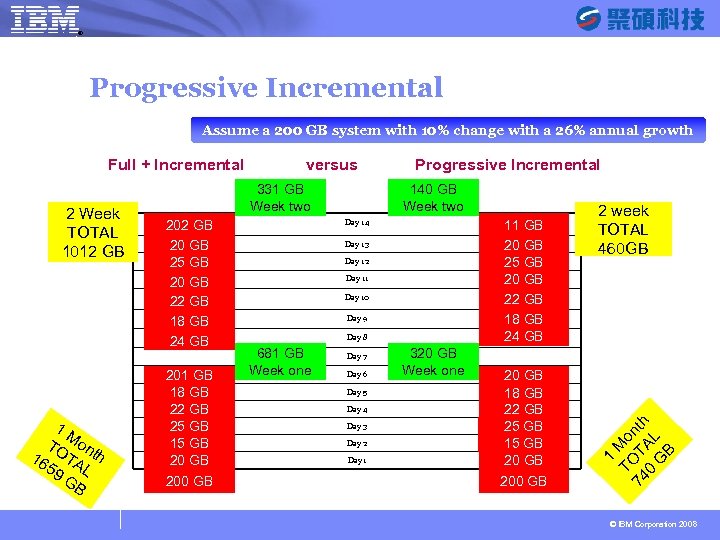
® SYSAGE Computing Business Unit Progressive Incremental Assume a 200 GB system with 10% change with a 26% annual growth 2 Week TOTAL 1012 GB 1 M TO ont 16 TA h 59 L GB versus 331 GB Week two 202 GB 20 GB 25 GB 20 GB 22 GB 18 GB 24 GB 201 GB 18 GB 22 GB 25 GB 15 GB 200 GB Progressive Incremental 140 GB Week two Day 14 11 GB 20 GB 25 GB 20 GB 22 GB 18 GB 24 GB Day 13 Day 12 Day 11 Day 10 Day 9 Day 8 681 GB Week one Day 7 Day 6 Day 5 Day 4 Day 3 Day 2 Day 1 320 GB Week one 20 GB 18 GB 22 GB 25 GB 15 GB 200 GB 2 week TOTAL 460 GB 1 TO Mo 74 T nth 0 AL G B Full + Incremental © IBM Corporation 2008
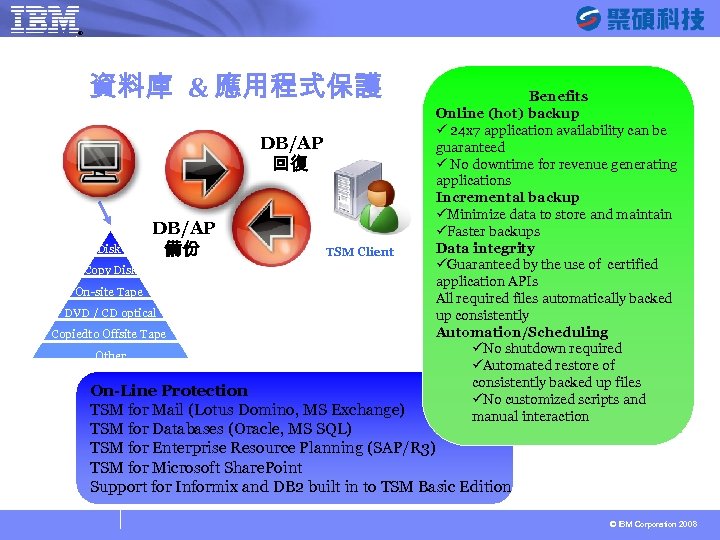
® SYSAGE Computing Business Unit 資料庫 & 應用程式保護 DB/AP 回復 Disk DB/AP 備份 Copy Disk On-site Tape DVD / CD optical Copiedto Offsite Tape Other TSM Client Benefits Online (hot) backup ü 24 x 7 application availability can be guaranteed ü No downtime for revenue generating applications Incremental backup üMinimize data to store and maintain üFaster backups Data integrity üGuaranteed by the use of certified application APIs All required files automatically backed up consistently Automation/Scheduling üNo shutdown required üAutomated restore of consistently backed up files üNo customized scripts and manual interaction On-Line Protection TSM for Mail (Lotus Domino, MS Exchange) TSM for Databases (Oracle, MS SQL) TSM for Enterprise Resource Planning (SAP/R 3) TSM for Microsoft Share. Point Support for Informix and DB 2 built in to TSM Basic Edition © IBM Corporation 2008
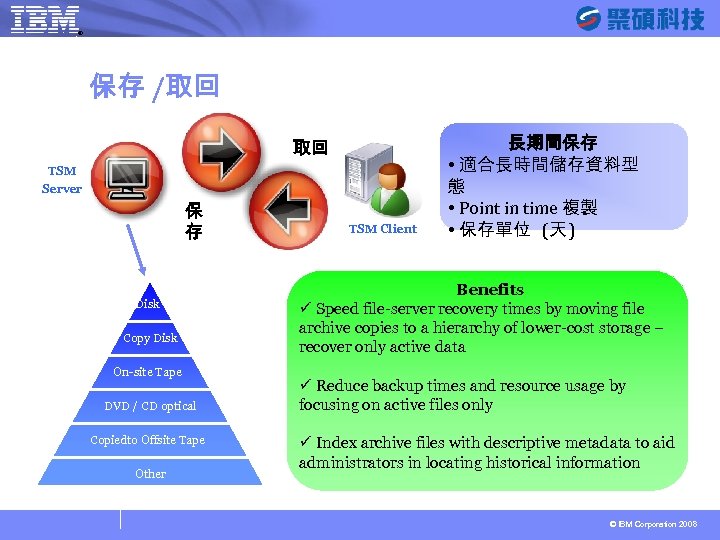
® SYSAGE Computing Business Unit 保存 /取回 取回 TSM Server 保 存 Disk Copy Disk On-site Tape DVD / CD optical Copiedto Offsite Tape Other TSM Client 長期間保存 適合長時間儲存資料型 態 Point in time 複製 保存單位 (天 ) Benefits ü Speed file-server recovery times by moving file archive copies to a hierarchy of lower-cost storage – recover only active data ü Reduce backup times and resource usage by focusing on active files only ü Index archive files with descriptive metadata to aid administrators in locating historical information © IBM Corporation 2008
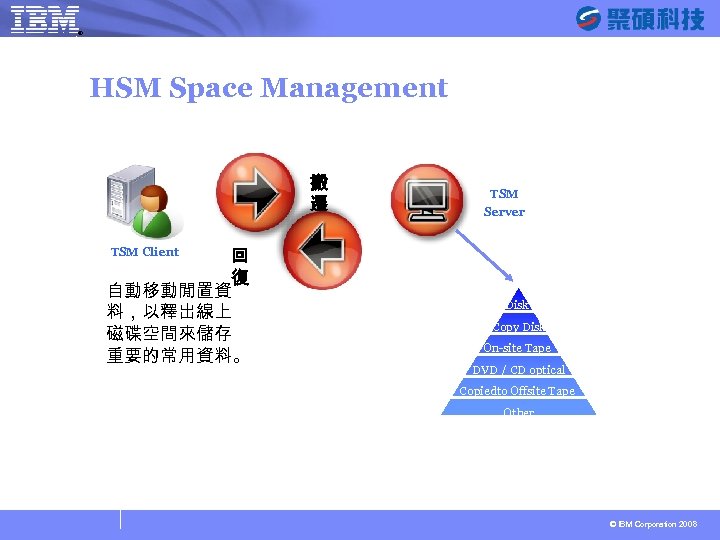
® SYSAGE Computing Business Unit HSM Space Management 搬 遷 回 復 自動移動閒置資 料,以釋出線上 磁碟空間來儲存 重要的常用資料。 TSM Server TSM Client Disk Copy Disk On-site Tape DVD / CD optical Copiedto Offsite Tape Other © IBM Corporation 2008
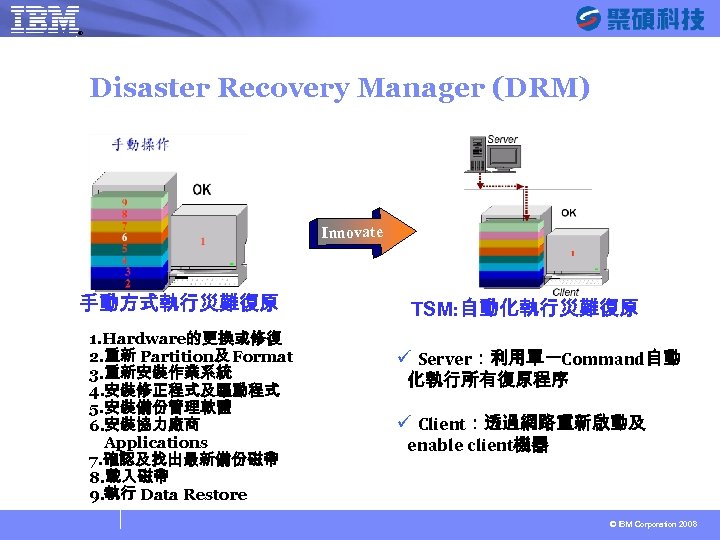
® SYSAGE Computing Business Unit Disaster Recovery Manager (DRM) Innovate 手動方式執行災難復原 1. Hardware的更換或修復 2. 重新 Partition及 Format 3. 重新安裝作業系統 4. 安裝修正程式及驅動程式 5. 安裝備份管理軟體 6. 安裝協力廠商 Applications 7. 確認及找出最新備份磁帶 8. 載入磁帶 9. 執行 Data Restore TSM: 自動化執行災難復原 ü Server:利用單一Command自動 化執行所有復原程序 ü Client:透過網路重新啟動及 enable client機器 © IBM Corporation 2008
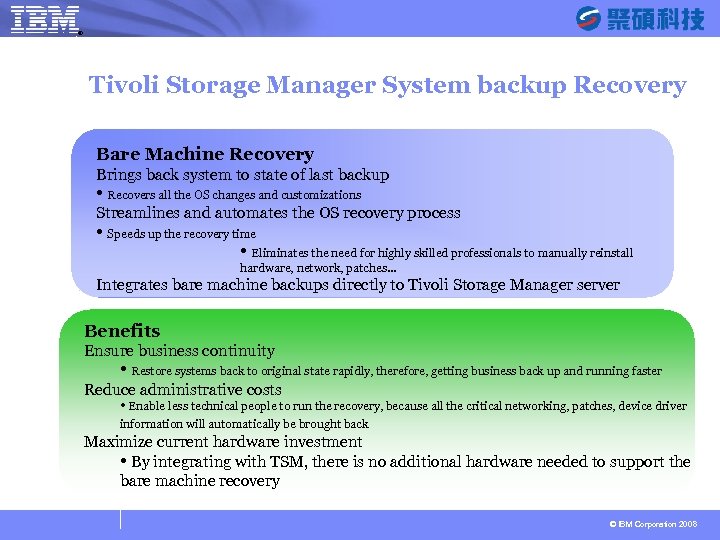
® SYSAGE Computing Business Unit Tivoli Storage Manager System backup Recovery Bare Machine Recovery Brings back system to state of last backup Recovers all the OS changes and customizations Streamlines and automates the OS recovery process Speeds up the recovery time Eliminates the need for highly skilled professionals to manually reinstall hardware, network, patches… Integrates bare machine backups directly to Tivoli Storage Manager server Benefits Ensure business continuity Restore systems back to original state rapidly, therefore, getting business back up and running faster Reduce administrative costs Enable less technical people to run the recovery, because all the critical networking, patches, device driver information will automatically be brought back Maximize current hardware investment By integrating with TSM, there is no additional hardware needed to support the bare machine recovery © IBM Corporation 2008
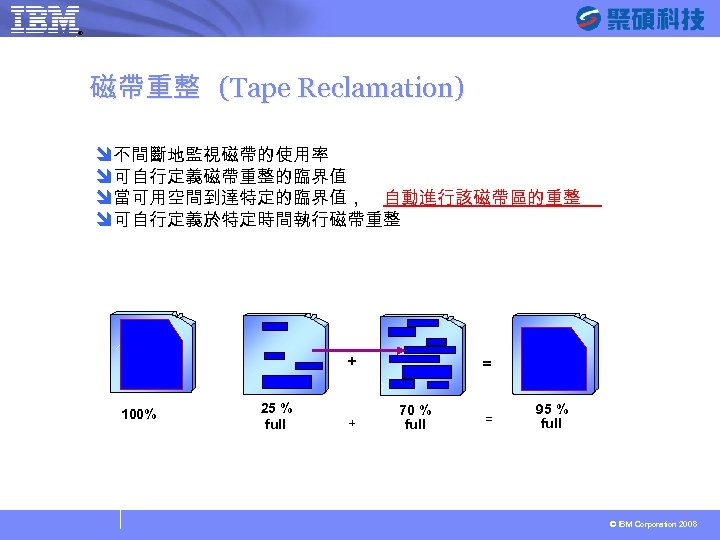
® SYSAGE Computing Business Unit 磁帶重整 (Tape Reclamation) î不間斷地監視磁帶的使用率 î可自行定義磁帶重整的臨界值 î當可用空間到達特定的臨界值, 自動進行該磁帶區的重整 î可自行定義於特定時間執行磁帶重整 + 100% 25 % full + = 70 % full = 95 % full © IBM Corporation 2008
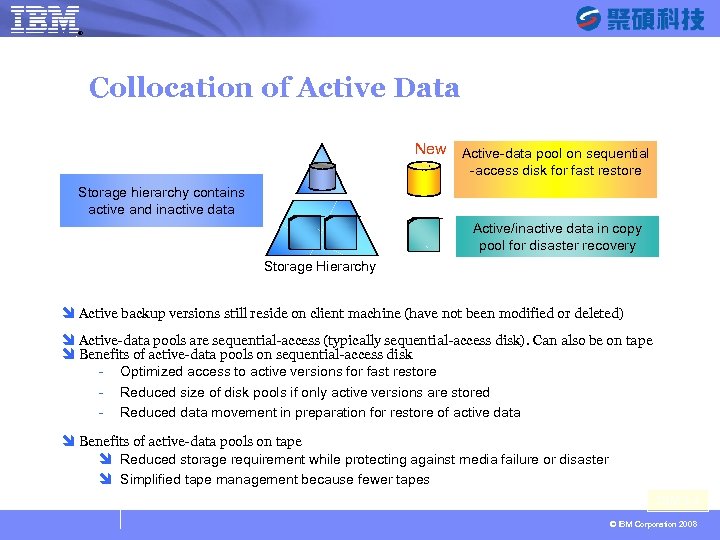
® SYSAGE Computing Business Unit Collocation of Active Data New Active-data pool on sequential -access disk for fast restore Storage hierarchy contains active and inactive data Active/inactive data in copy pool for disaster recovery Storage Hierarchy î Active backup versions still reside on client machine (have not been modified or deleted) î Active-data pools are sequential-access (typically sequential-access disk). Can also be on tape î Benefits of active-data pools on sequential-access disk - Optimized access to active versions for fast restore - Reduced size of disk pools if only active versions are stored - Reduced data movement in preparation for restore of active data î Benefits of active-data pools on tape î Reduced storage requirement while protecting against media failure or disaster î Simplified tape management because fewer tapes TSM 5. 4 © IBM Corporation 2008
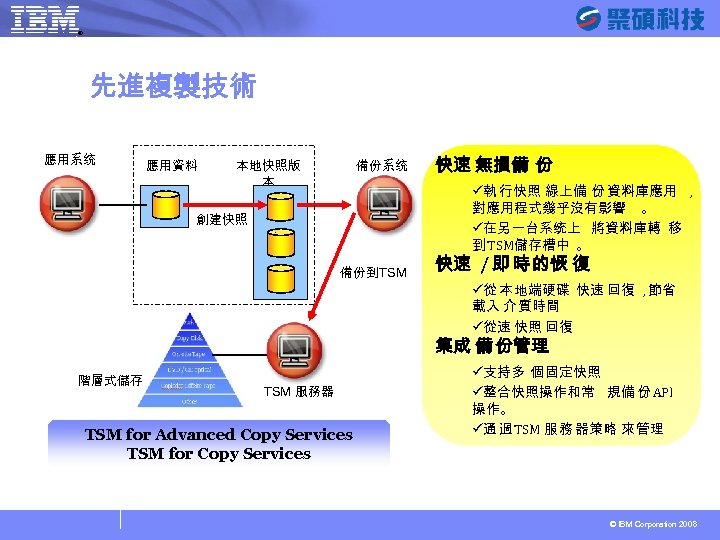
® SYSAGE Computing Business Unit 先進複製技術 應用系统 應用資料 本地快照版 本 備份系统 快速 無損備 份 ü執 行快照 線上備 份 資料庫應用 , 對應用程式幾乎沒有影響 。 ü在另一台系统上 將資料庫轉 移 到 TSM儲存槽中 。 創建快照 備份到TSM 快速 / 即 時 的恢 復 ü從 本 地端硬碟 快速 回復 , 節省 載入 介 質時間 ü從速 快照 回復 集成 備 份管理 階層式儲存 TSM 服務器 TSM for Advanced Copy Services TSM for Copy Services ü支持多 個 固定快照 ü整合快照操作和常 規備 份 API 操作。 ü通 過 TSM 服 務 器策略 來 管理 © IBM Corporation 2008
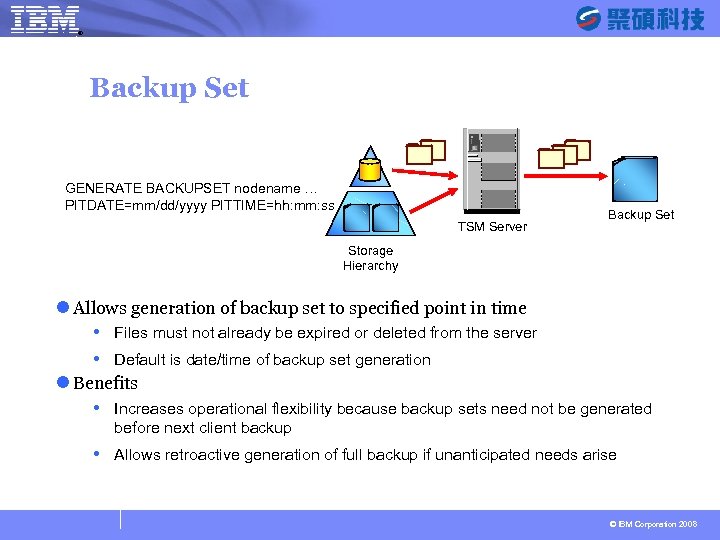
® SYSAGE Computing Business Unit Backup Set GENERATE BACKUPSET nodename … PITDATE=mm/dd/yyyy PITTIME=hh: mm: ss TSM Server Backup Set Storage Hierarchy l Allows generation of backup set to specified point in time Files must not already be expired or deleted from the server Default is date/time of backup set generation l Benefits Increases operational flexibility because backup sets need not be generated before next client backup Allows retroactive generation of full backup if unanticipated needs arise © IBM Corporation 2008
® SYSAGE Computing Business Unit Files. X 簡介 Founded in 2000 Privately held company with 44 employees Headquartered in Newton, MA Development lab in Haifa, Israel 100+ customers across major segments including government, finance, healthcare, education and manufacturing Existing IBM technology partnerships 22 © IBM Corporation 2008
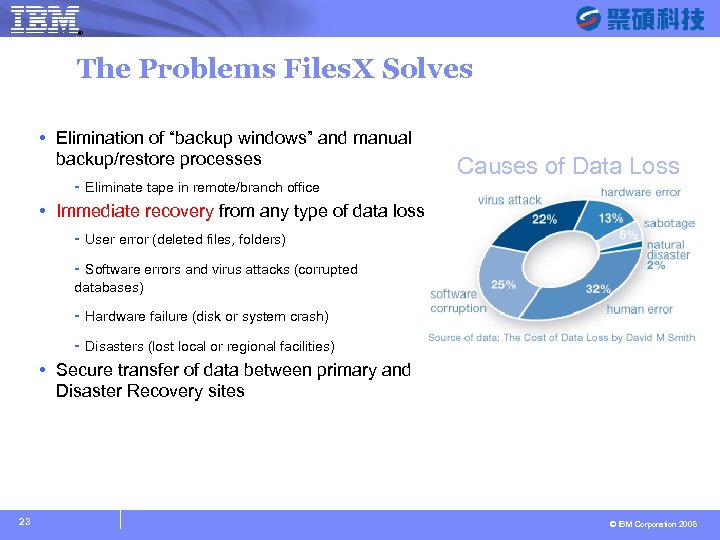
® SYSAGE Computing Business Unit The Problems Files. X Solves Elimination of “backup windows” and manual backup/restore processes - Eliminate tape in remote/branch office Immediate recovery from any type of data loss - User error (deleted files, folders) Causes of Data Loss - Software errors and virus attacks (corrupted databases) - Hardware failure (disk or system crash) - Disasters (lost local or regional facilities) Secure transfer of data between primary and Disaster Recovery sites 23 © IBM Corporation 2008
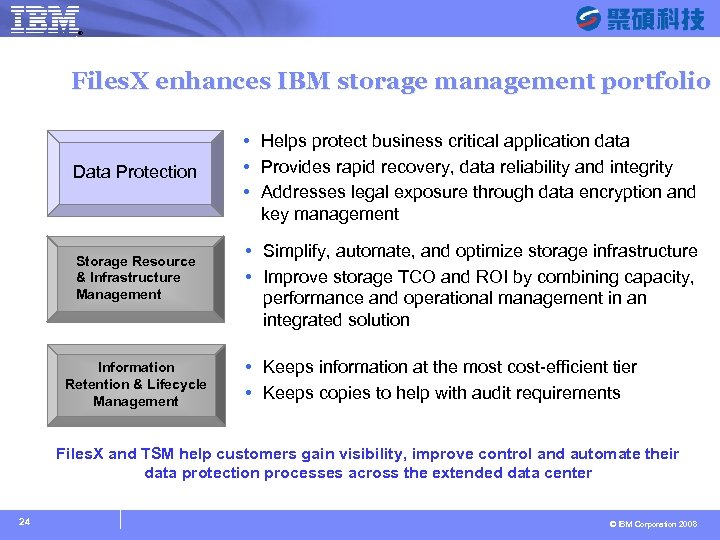
® SYSAGE Computing Business Unit Files. X enhances IBM storage management portfolio Data Protection Storage Resource & Infrastructure Management Information Retention & Lifecycle Management Helps protect business critical application data Provides rapid recovery, data reliability and integrity Addresses legal exposure through data encryption and key management Simplify, automate, and optimize storage infrastructure Improve storage TCO and ROI by combining capacity, performance and operational management in an integrated solution Keeps information at the most cost-efficient tier Keeps copies to help with audit requirements Files. X and TSM help customers gain visibility, improve control and automate their data protection processes across the extended data center 24 © IBM Corporation 2008
® SYSAGE Computing Business Unit Quick Hit Value Proposition What are the main benefits and key features of Files. X? Disk-based, block-level, incremental forever backup technology improves recovery point objectives (RPO) through continuous data protection (CDP) with very little impact on production servers Policy engine allows you to balance recovery requirements with the costs of storage and bandwidth on a per-application basis. Instantly recover files, folders, volumes, and entire systems: • Xpress Mount: drag-and-drop individual files from the backup repository • Instant Restore: provides instant access to large volumes while they are restored in the background • Bare Metal Recovery: bring up an OS volume on a dissimilar server in < 1 hour Page 25 © IBM Corporation 2008
® SYSAGE Computing Business Unit Files. X 專利技術 Eliminates the need for traditional backup windows by continuously capturing the changes in data at the block level, Flexible policy Unique instant restore capability Replace the use of tape in small Individual Mail Restore out of the box SAN enabled Built in block level CDP Application aware CDP Bare Machine Recovery Built in Active Directory support and remote offices Integrates with your existing tape backup applications © IBM Corporation 2008
® SYSAGE Computing Business Unit Product Value Proposition Data Protection Flexibility - Enables scheduled, frequent and continuous protection of data and applications from a single platform. Unmatched Recoverability - Enables file, volume, bare-metal and granular recovery from a single image, providing full recoverability for Less Storage Selective Replication - Lowers bandwidth usage enabling efficient centralized protection of remote office environments Optimal Performance – Block-level incremental forever reduces storage and eliminates backup windows while instant restore nearly eliminates downtime during recovery procedures. Simplicity of Control – Intuitive interface allows for remote management of disk based data protection with flexibility to control centrally. High-Availability On-Demand – Near instant recovery from efficient virtual mount process enables high application availability with less hardware required. © IBM Corporation 2008
® SYSAGE Computing Business Unit What is CDP是一種數據的連續時間點的保護技術,其根本作用是能在故障瞬間 完成任何時間點的故障恢復,達到業務快速連續的目的。 從根本上解決傳統備份中 低恢復能力 和 非精細時間策略的先天弱點 於那些還沒有部署數據備份解決方案的用戶來說,他們在第一次選擇備 份產品時可能還會首選傳統的磁帶備份解決方案,畢竟這是一種成熟的 技術,更容易上手。 。對 RPO (Recovery Point Objective) 是指能把數據恢復到過去的哪個時間點 RTO (Recovery Time Objective) 也可以理解為企業能容忍的恢復時間。 如果採用傳統的備份方式,備份數據是不能立即使用的,必須先恢復到 備份服務器,這就延長了恢復時間。 RPO又可以理解為企業能容忍的最 大數據丟失量。如果採用一日一備的方式, RPO就是 24小時,這是一些關 鍵業務所不能容忍的。 © IBM Corporation 2008
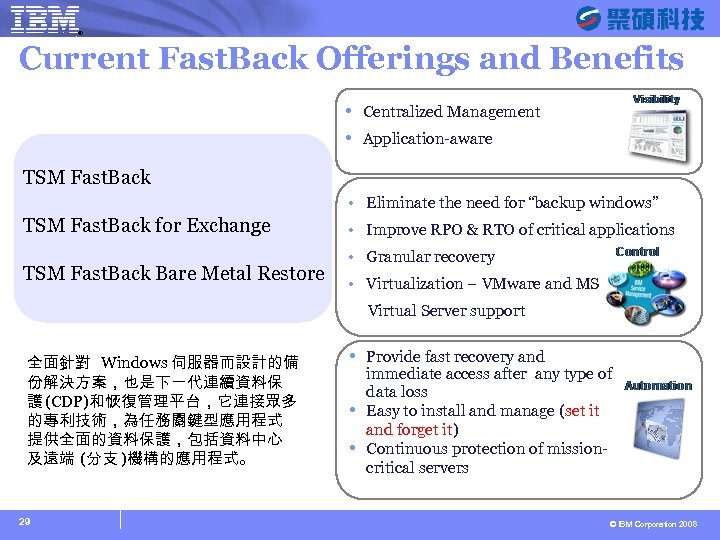
® SYSAGE Computing Business Unit Current Fast. Back Offerings and Benefits Centralized Management Application-aware TSM Fast. Back • Eliminate the need for “backup windows” TSM Fast. Back for Exchange TSM Fast. Back Bare Metal Restore • Improve RPO & RTO of critical applications • Granular recovery • Virtualization – VMware and MS Virtual Server support 全面針對 Windows 伺服器而設計的備 份解決方案,也是下一代連續資料保 護 (CDP)和恢復管理平台,它連接眾多 的專利技術,為任務關鍵型應用程式 提供全面的資料保護,包括資料中心 及遠端 (分支 )機構的應用程式。 29 Provide fast recovery and immediate access after any type of data loss Easy to install and manage (set it and forget it) Continuous protection of missioncritical servers © IBM Corporation 2008
® SYSAGE Computing Business Unit TSM Fast. Back î Data block level 增量備份 î 靈活的策略引擎,滿足每個應用程式嚴格資料保護及保留需求 î 獨特即時回復功能 (near-Real-time) î 可完全取代磁帶的備份機制 î 可與 TSM 結合 (DDT) î 適用 IT 人員少的小型 / 遠端辨公室採用 © IBM Corporation 2008
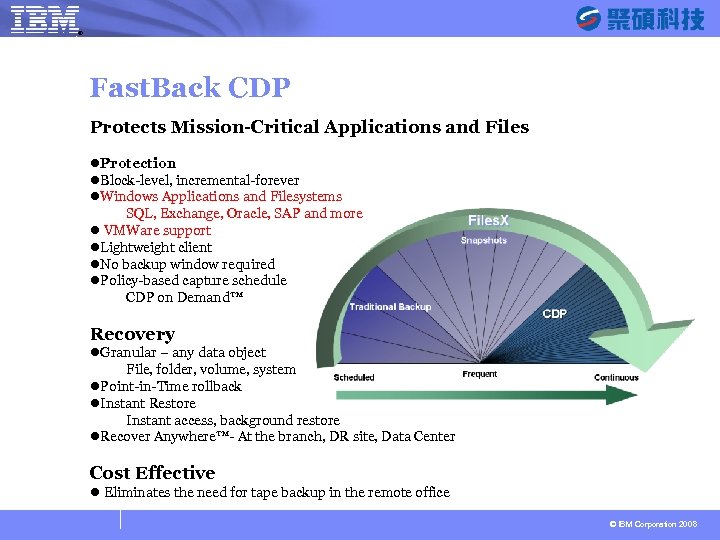
® SYSAGE Computing Business Unit Fast. Back CDP Protects Mission-Critical Applications and Files l. Protection l. Block-level, incremental-forever l. Windows Applications and Filesystems SQL, Exchange, Oracle, SAP and more l VMWare support l. Lightweight client l. No backup window required l. Policy-based capture schedule CDP on Demand™ Recovery l. Granular – any data object File, folder, volume, system l. Point-in-Time rollback l. Instant Restore Instant access, background restore l. Recover Anywhere™- At the branch, DR site, Data Center Cost Effective l Eliminates the need for tape backup in the remote office © IBM Corporation 2008
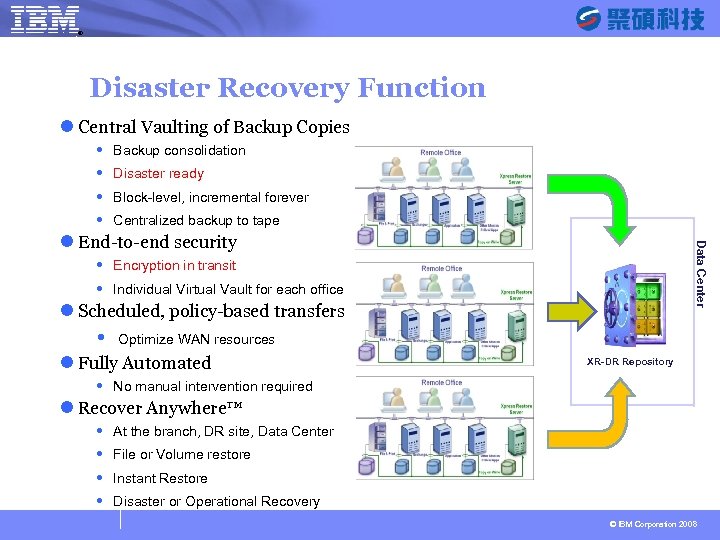
® SYSAGE Computing Business Unit Disaster Recovery Function l Central Vaulting of Backup Copies Backup consolidation Disaster ready Block-level, incremental forever Centralized backup to tape Data Center l End-to-end security Encryption in transit Individual Virtual Vault for each office l Scheduled, policy-based transfers Optimize WAN resources l Fully Automated XR-DR Repository No manual intervention required l Recover Anywhere™ At the branch, DR site, Data Center File or Volume restore Instant Restore Disaster or Operational Recovery © IBM Corporation 2008
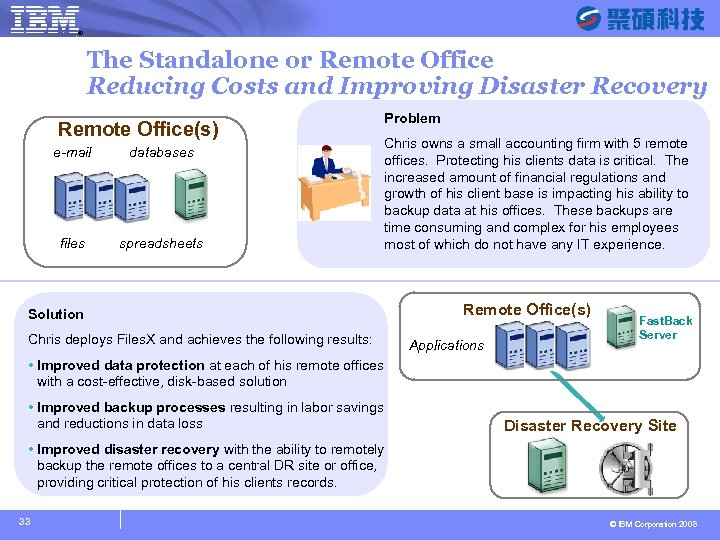
SYSAGE Computing Business Unit ® The Standalone or Remote Office Reducing Costs and Improving Disaster Recovery Remote Office(s) e-mail databases files spreadsheets Problem Chris owns a small accounting firm with 5 remote offices. Protecting his clients data is critical. The increased amount of financial regulations and growth of his client base is impacting his ability to backup data at his offices. These backups are time consuming and complex for his employees most of which do not have any IT experience. Solution Chris deploys Files. X and achieves the following results: Improved data protection at each of his remote offices with a cost-effective, disk-based solution Improved backup processes resulting in labor savings and reductions in data loss Remote Office(s) Fast. Back Server Applications Re pl ica tio n Disaster Recovery Site Improved disaster recovery with the ability to remotely backup the remote offices to a central DR site or office, providing critical protection of his clients records. 33 © IBM Corporation 2008
® SYSAGE Computing Business Unit TSM Fast. Back for Exchange î 可搭配 TSM Fast. Back 或獨立安裝 î 協助 IT 人員快速回復 Exchange 資料物件 郵件或附件、連絡人、行事曆、 作、記事、資料夾清單和 EDB î 簡易友善的 GUI 介面 î 支援 Exchange 5. 5、2000、2003、2007 甚至能從損壞的 EDB打開回復物件 î 可以直接原回到 Exchange Server 或由 SMTP 送到用戶端 î 可與 Active Directory 結合 © IBM Corporation 2008
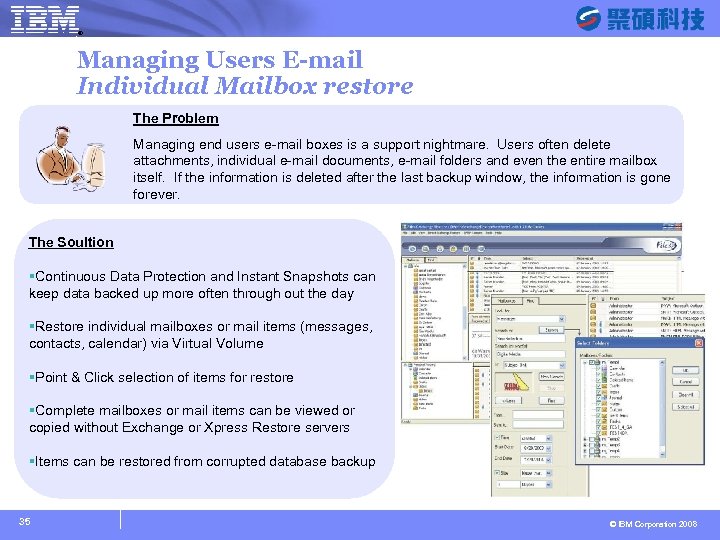
® SYSAGE Computing Business Unit Managing Users E-mail Individual Mailbox restore The Problem Managing end users e-mail boxes is a support nightmare. Users often delete attachments, individual e-mail documents, e-mail folders and even the entire mailbox itself. If the information is deleted after the last backup window, the information is gone forever. The Soultion §Continuous Data Protection and Instant Snapshots can keep data backed up more often through out the day §Restore individual mailboxes or mail items (messages, contacts, calendar) via Virtual Volume §Point & Click selection of items for restore §Complete mailboxes or mail items can be viewed or copied without Exchange or Xpress Restore servers §Items can be restored from corrupted database backup 35 © IBM Corporation 2008
® SYSAGE Computing Business Unit TSM Fast. Back Bare Metal Restore î 可搭配 TSM Fast. Back î 獨有的虛擬回復(Virtual Recovery)技術 災難發生後數分鐘內即可以讀取應用程式和資料庫 î 可輕鬆快速回復整個系統至完全不同的伺服器上 VMware 或 Microsoft Virtual Server î 可將應用程式和資料庫回復成一致的恢復點(時間點回滾) î 也適用於系統遷移的理想 具 © IBM Corporation 2008
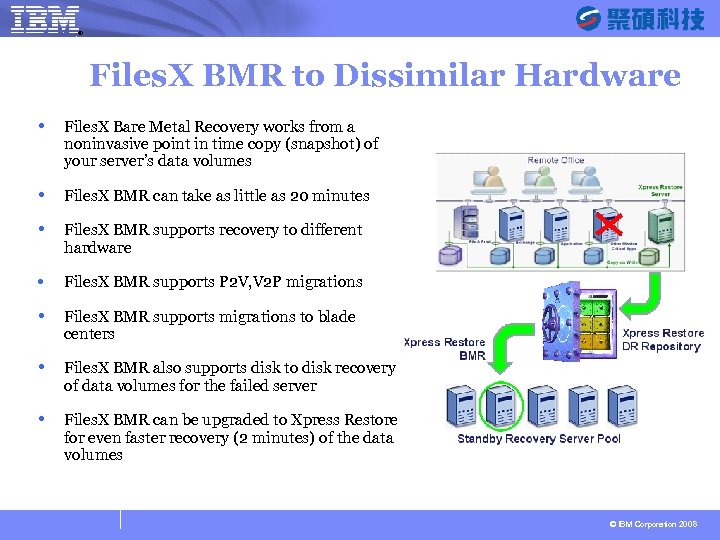
® SYSAGE Computing Business Unit Files. X BMR to Dissimilar Hardware Files. X Bare Metal Recovery works from a noninvasive point in time copy (snapshot) of your server’s data volumes Files. X BMR can take as little as 20 minutes Files. X BMR supports recovery to different hardware • Files. X BMR supports P 2 V, V 2 P migrations Files. X BMR supports migrations to blade centers Files. X BMR also supports disk to disk recovery of data volumes for the failed server Files. X BMR can be upgraded to Xpress Restore for even faster recovery (2 minutes) of the data volumes © IBM Corporation 2008
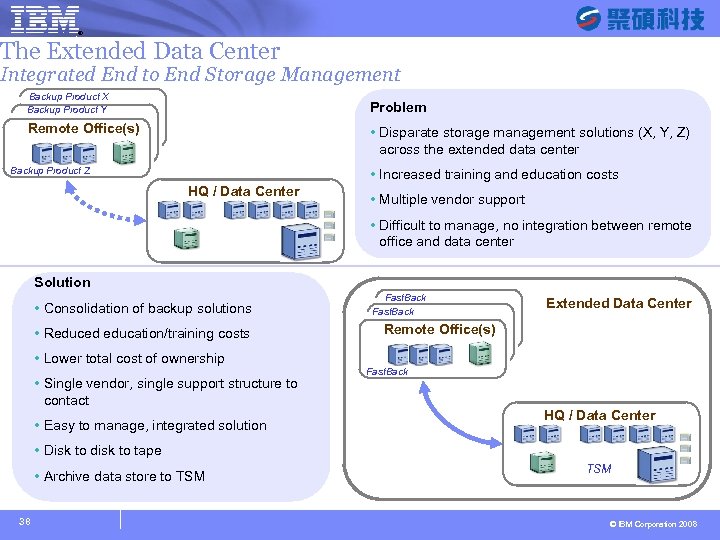
® SYSAGE Computing Business Unit The Extended Data Center Integrated End to End Storage Management Backup Product X Backup Product Y Problem Remote Office(s) Disparate storage management solutions (X, Y, Z) across the extended data center Backup Product Z Increased training and education costs HQ / Data Center Multiple vendor support Difficult to manage, no integration between remote office and data center Solution Consolidation of backup solutions Reduced education/training costs Lower total cost of ownership Single vendor, single support structure to contact Easy to manage, integrated solution Fast. Back Extended Data Center Remote Office(s) Fast. Back HQ / Data Center Disk to disk to tape Archive data store to TSM 38 TSM © IBM Corporation 2008
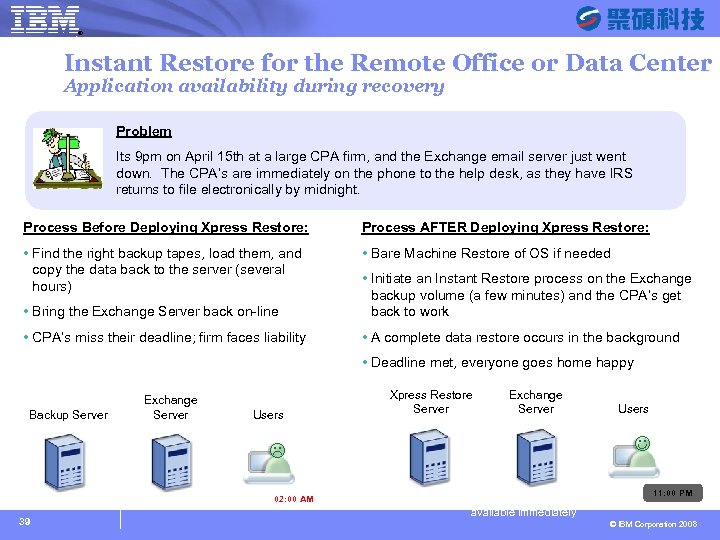
® SYSAGE Computing Business Unit Instant Restore for the Remote Office or Data Center Application availability during recovery Problem Its 9 pm on April 15 th at a large CPA firm, and the Exchange email server just went down. The CPA’s are immediately on the phone to the help desk, as they have IRS returns to file electronically by midnight. Process Before Deploying Xpress Restore: Process AFTER Deploying Xpress Restore: Find the right backup tapes, load them, and copy the data back to the server (several hours) Bare Machine Restore of OS if needed Bring the Exchange Server back on-line Initiate an Instant Restore process on the Exchange backup volume (a few minutes) and the CPA’s get back to work CPA’s miss their deadline; firm faces liability A complete data restore occurs in the background Deadline met, everyone goes home happy Backup Server Exchange Server Users Copy Then go all data on-line 02: 00 AM 39 Xpress Restore Server Exchange Server Background Users Restore Application & data are available immediately 11: 00 PM © IBM Corporation 2008
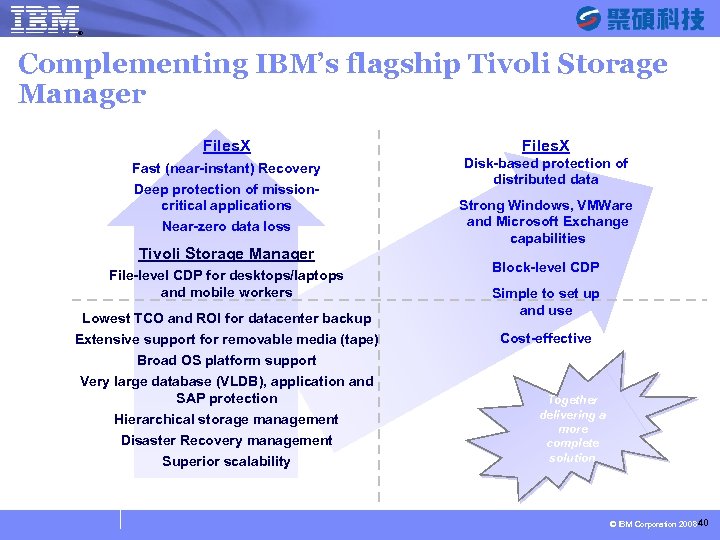
® SYSAGE Computing Business Unit Continuous Data Protection (CDP) Complementing IBM’s flagship Tivoli Storage Manager Enterprise Data Center Mid-Market and Remote Offices Files. X Fast (near-instant) Recovery Disk-based protection of distributed data Deep protection of missioncritical applications Near-zero data loss Tivoli Storage Manager File-level CDP for desktops/laptops and mobile workers Lowest TCO and ROI for datacenter backup Scheduled Protection Extensive support for removable media (tape) Broad OS platform support Very large database (VLDB), application and SAP protection Hierarchical storage management Disaster Recovery management Superior scalability Strong Windows, VMWare and Microsoft Exchange capabilities Block-level CDP Simple to set up and use Cost-effective Together delivering a more complete solution © IBM Corporation 2008 40
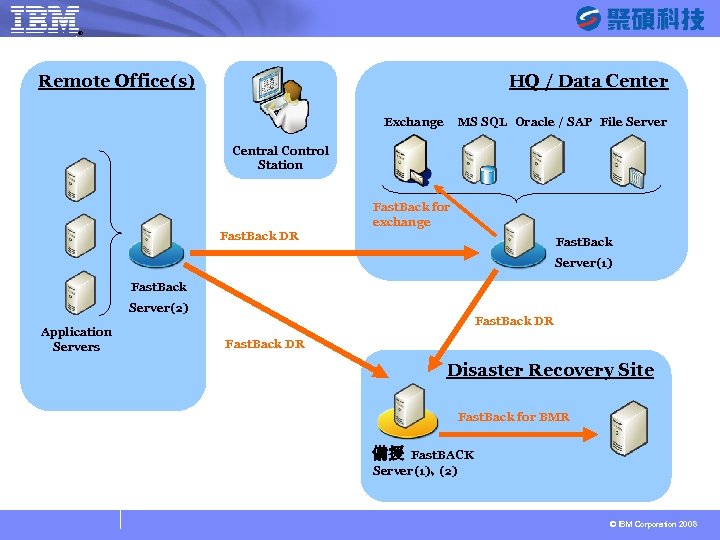
® SYSAGE Computing Business Unit HQ / Data Center Remote Office(s) Exchange MS SQL Oracle / SAP File Server Central Control Station Fast. Back for exchange Fast. Back DR Fast. Back Server(1) Fast. Back Server(2) Application Servers Fast. Back DR Disaster Recovery Site Fast. Back for BMR 備援 Fast. BACK Server(1)、 (2) © IBM Corporation 2008
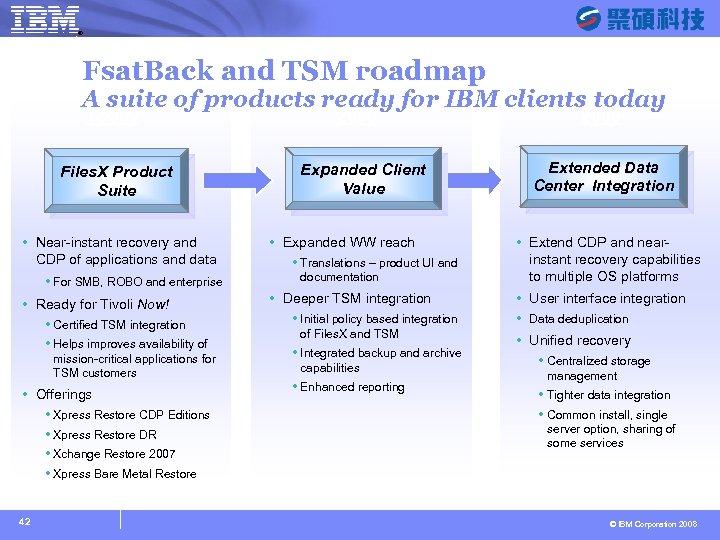
SYSAGE Computing Business Unit ® Fsat. Back and TSM roadmap A suite of products ready for IBM clients today Today Files. X Product Suite Near-instant recovery and CDP of applications and data For SMB, ROBO and enterprise Ready for Tivoli Now! Certified TSM integration Helps improves availability of mission-critical applications for TSM customers Offerings Xpress Restore CDP Editions Xpress Restore DR Xchange Restore 2007 2008 Expanded Client Value Expanded WW reach Translations – product UI and documentation Deeper TSM integration Initial policy based integration of Files. X and TSM Integrated backup and archive capabilities Enhanced reporting 2009 Extended Data Center Integration Extend CDP and nearinstant recovery capabilities to multiple OS platforms User interface integration Data deduplication Unified recovery Centralized storage management Tighter data integration Common install, single server option, sharing of some services Xpress Bare Metal Restore 42 © IBM Corporation 2008
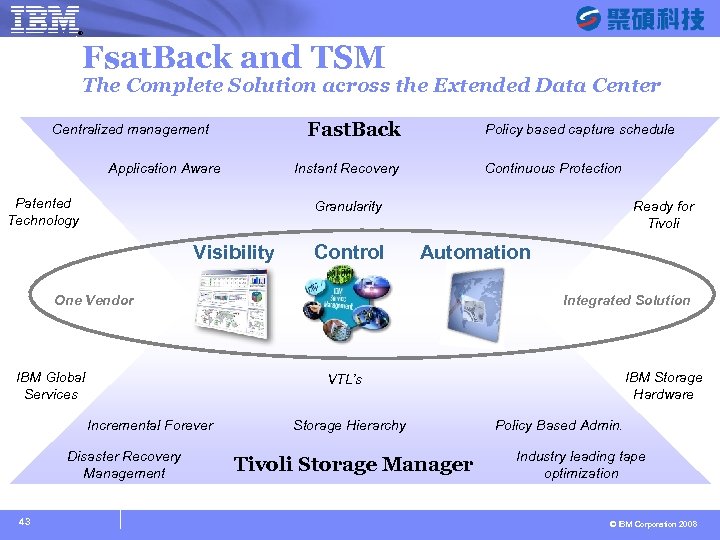
® SYSAGE Computing Business Unit Fsat. Back and TSM The Complete Solution across the Extended Data Center Fast. Back Centralized management Policy based capture schedule Instant Recovery Application Aware Patented Technology Continuous Protection Ready for Tivoli Granularity Visibility Control Automation Integrated Solution One Vendor IBM Global Services Incremental Forever Disaster Recovery Management 43 IBM Storage Hardware VTL’s Storage Hierarchy Tivoli Storage Manager Policy Based Admin. Industry leading tape optimization © IBM Corporation 2008
® SYSAGE Computing Business Unit © IBM Corporation 2008
Скачать презентацию IBM 備份解決方案 TSM Advanced Function and Files X
254de6386491462f9251e917609bb081.ppt