


 Скачать презентацию IAUG Eastern Connect Avaya Aura Messaging Vic Kingrey
fe3b8149744243421297644ac32a57a1.ppt
- Количество слайдов: 45
 IAUG Eastern Connect Avaya Aura Messaging Vic Kingrey Solutions Architect – Business Communications Solutions Group vlkingrey@avaya. com
 Overview of Avaya Aura Messaging 6. 1 Avaya Aura Messaging allows for flexible, centralized and redundant deployments of Unified Messaging, meeting the needs of legacy installed base and green-field opportunities, while bringing new productivity enabling features to market. Release 6. 1 delivers: • Flexible, per-user storage options for increased compatibility, competitiveness, and market differentiation - Exchange 2007/2010 - Zimbra 7 • Basic/Mainstream mailbox licensing schema for flexibility in matching mailbox price with functionality needs. - Improves mailbox price-point competitiveness in marketplace • Audix TUI emulation and data migration utility provides evolutionary path for ~20 M seat installed base • External Directory (AD) data-sourcing for reduced implementation /administrative effort - when using Exchange storage only (one-way) • Native Inbound Fax support and other fax improvements • Expanded interoperability with CS 1000 broadens product reach in portfolio • Additional E. 164 mailbox support for flexibility in customer numbering plans • Quality improvements for field/lab found issues • Audio branding Release 6. 1 increases competitiveness and enables evolutionary migration opportunity from our 2 nd largest installed base, Intuity Audix. Avaya – Proprietary. Use pursuant to Avaya policy. 2
 Avaya Aura Messaging ► 100 % Linux solution • No Windows Updates • No Patch Tuesday ► Outlook form support (no desktop plug-in required) • IMAP 4 • Play on Phone ►Flexible per-user Message Store • Play on PC • MMS, Exchange, Zimbra • Voice Forward • Voice Reply ►Greater per-user Telephony User Interface (TUI) • Call Sender • Retaining User Interface • Octel Aria like & Intuity Audix like ►New & Improved Web Subscriber Options • Reach Me ►Basic Embedded Speech Auto Attendant • Notify Me • No Supplementary Servers • My Phone • Personal Lists ►Native Inbound Fax ►Single Server or multi-server deployments as needed for scale and availability ►Active Directory synchronization (for Exchange store only) ►Improved Locally Survivable options and Disaster recovery with remote application ►Basic / Full Mailbox licensing servers • N+1 Application Server Support Avaya – Proprietary. Use pursuant to Avaya policy. 3
 Facilitate Migration For Intuity Systems 4 New capabilities improve end user productivity 4 Near identical TUIs and features means no retraining 4 Centralization lowers operating costs 4 Single server option lowers capital and support costs 4 Tools enable transparent data/mailbox migration 4 Fully supported system ensures investment protection 4 Migration programs ease transition costs Avaya – Proprietary. Use pursuant to Avaya policy. 4
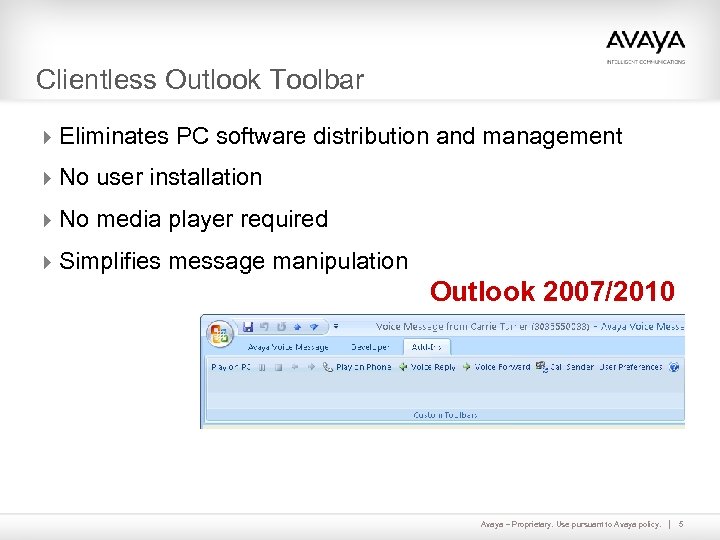 Clientless Outlook Toolbar 4 Eliminates PC software distribution and management 4 No user installation 4 No media player required 4 Simplifies message manipulation Outlook 2007/2010 Avaya – Proprietary. Use pursuant to Avaya policy. 5
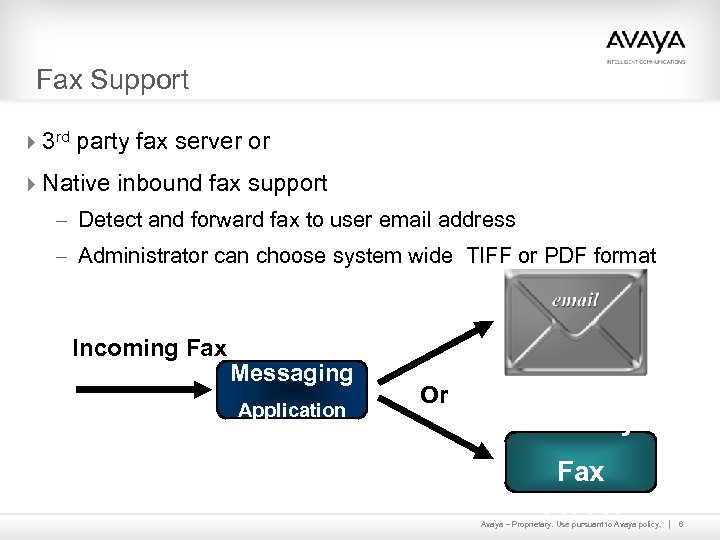 Fax Support 43 rd party fax server or 4 Native inbound fax support – Detect and forward fax to user email address – Administrator can choose system wide TIFF or PDF format Incoming Fax Messaging Application Or 3 rd Party Fax Server Avaya – Proprietary. Use pursuant to Avaya policy. 6
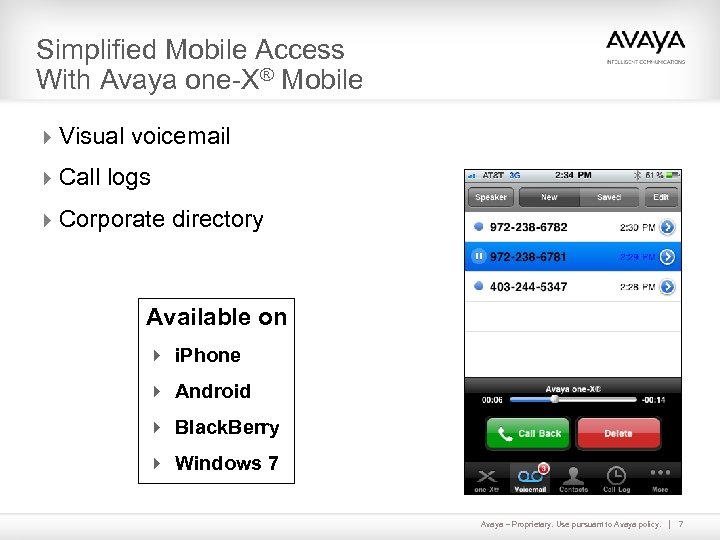 Simplified Mobile Access With Avaya one-X® Mobile 4 Visual voicemail 4 Call logs 4 Corporate directory Available on 4 i. Phone 4 Android 4 Black. Berry 4 Windows 7 Avaya – Proprietary. Use pursuant to Avaya policy. 7
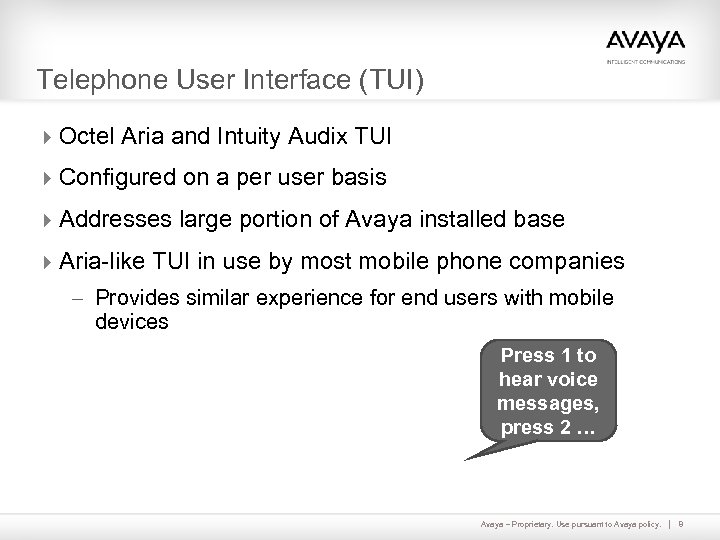 Telephone User Interface (TUI) 4 Octel Aria and Intuity Audix TUI 4 Configured on a per user basis 4 Addresses large portion of Avaya installed base 4 Aria-like TUI in use by most mobile phone companies – Provides similar experience for end users with mobile devices Press 1 to hear voice messages, press 2 … Avaya – Proprietary. Use pursuant to Avaya policy. 8
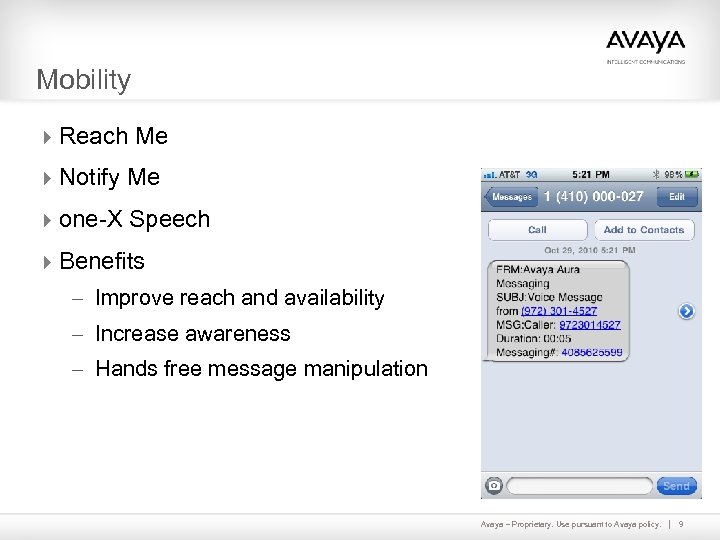 Mobility 4 Reach Me 4 Notify Me 4 one-X Speech 4 Benefits – Improve reach and availability – Increase awareness – Hands free message manipulation Avaya – Proprietary. Use pursuant to Avaya policy. 9
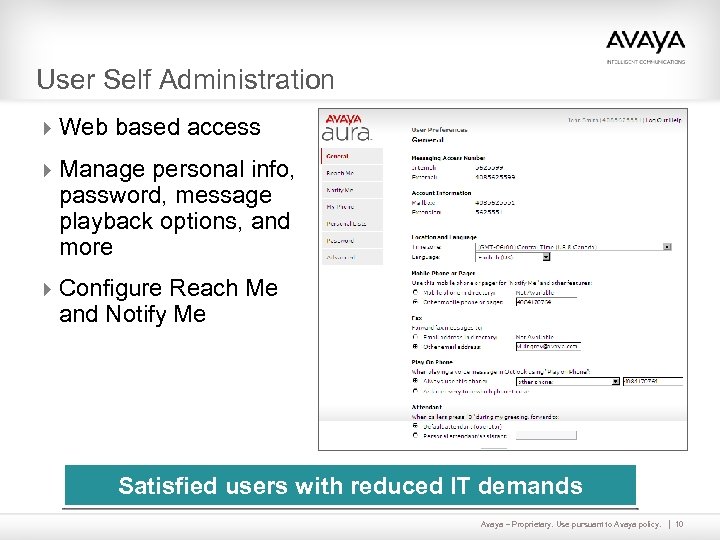 User Self Administration 4 Web based access 4 Manage personal info, password, message playback options, and more 4 Configure Reach Me and Notify Me Satisfied users with reduced IT demands Avaya – Proprietary. Use pursuant to Avaya policy. 10
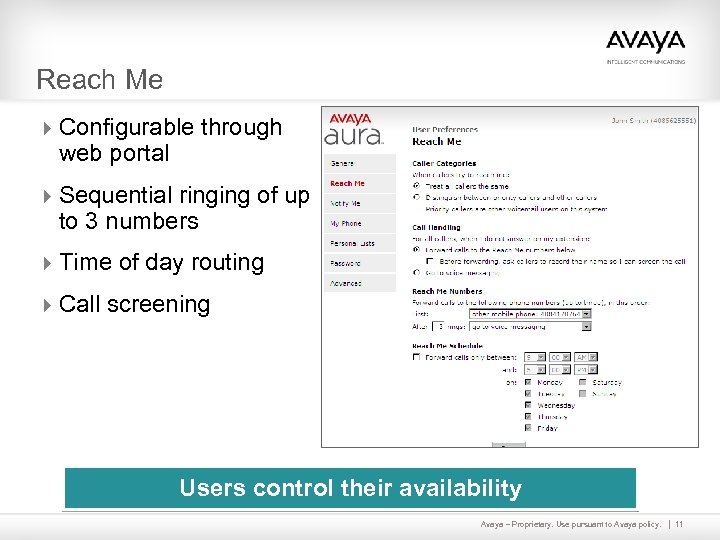 Reach Me 4 Configurable through web portal 4 Sequential ringing of up to 3 numbers 4 Time of day routing 4 Call screening Users control their availability Avaya – Proprietary. Use pursuant to Avaya policy. 11
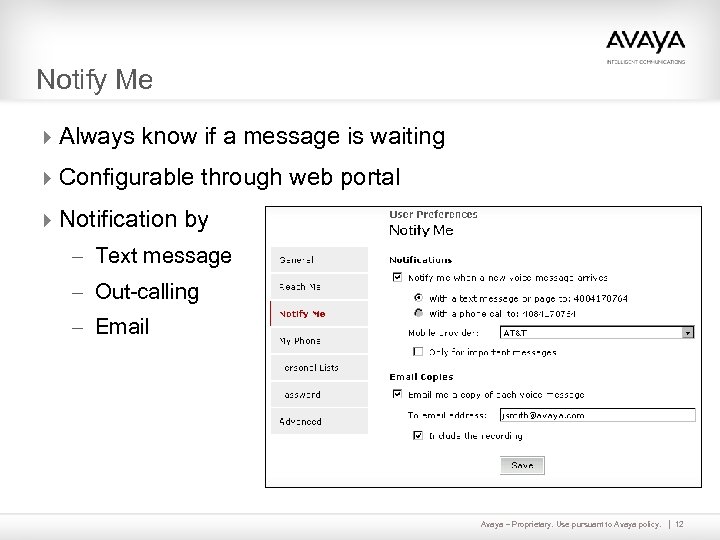 Notify Me 4 Always know if a message is waiting 4 Configurable through web portal 4 Notification by – Text message – Out-calling – Email Avaya – Proprietary. Use pursuant to Avaya policy. 12
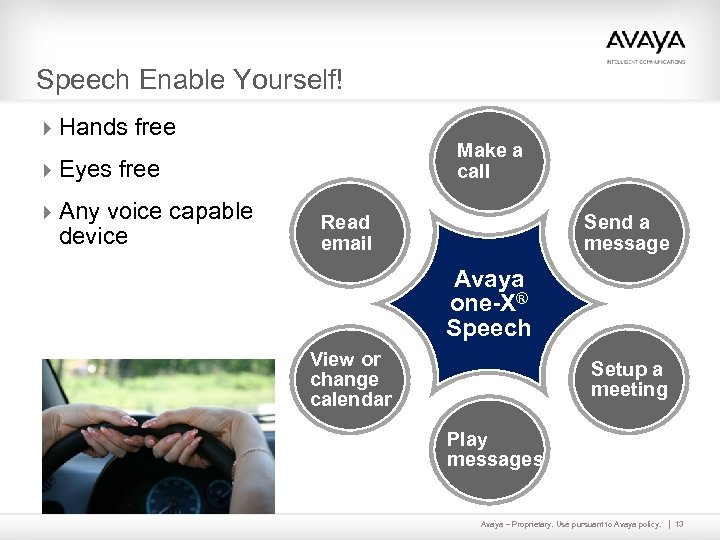 Speech Enable Yourself! 4 Hands free Make a call 4 Eyes free 4 Any voice capable device Send a message Read email Avaya one-X® Speech View or change calendar Setup a meeting Play messages Avaya – Proprietary. Use pursuant to Avaya policy. 13
 Voice Recognition - Just Say It 4 Speech-enabled auto attendant 4 Speech message addressing 4 Enables users to say names instead of keying in extensions 4 No additional servers or 3 rd party elements 4 Available for supported languages (G 13) Virtual receptionist Avaya – Proprietary. Use pursuant to Avaya policy. 14
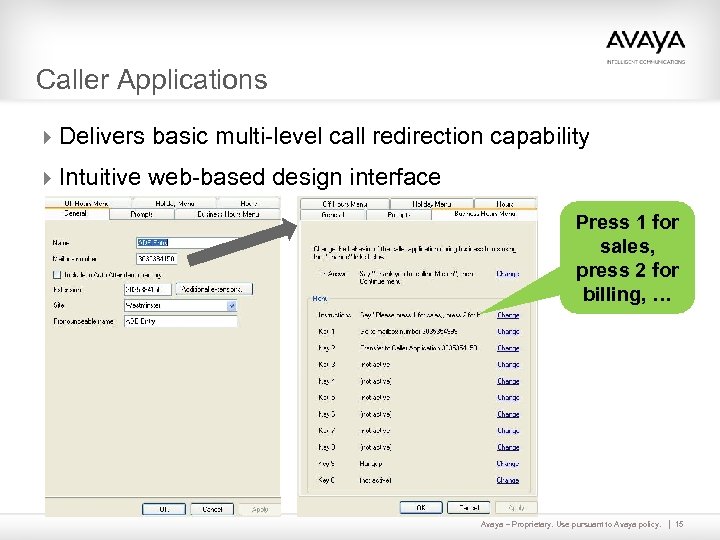 Caller Applications 4 Delivers basic multi-level call redirection capability 4 Intuitive web-based design interface Press 1 for sales, press 2 for billing, … Avaya – Proprietary. Use pursuant to Avaya policy. 15
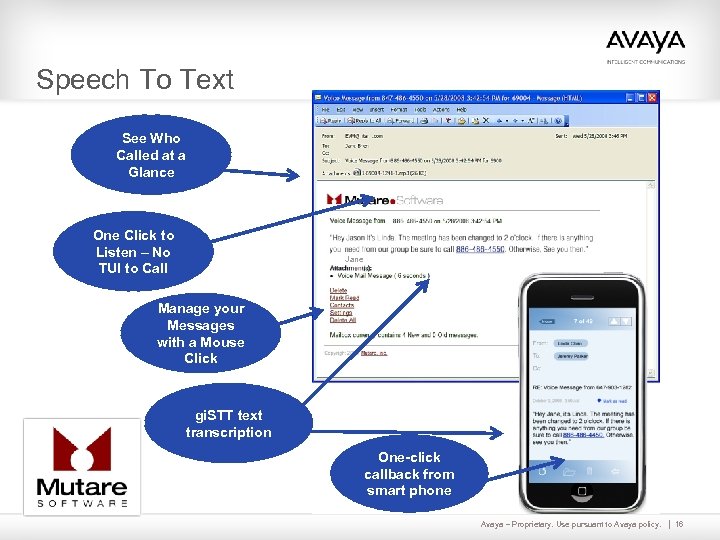 Speech To Text See Who Called at a Glance One Click to Listen – No TUI to Call Jane Manage your Messages with a Mouse Click gi. STT text transcription One-click callback from smart phone Avaya – Proprietary. Use pursuant to Avaya policy. 16
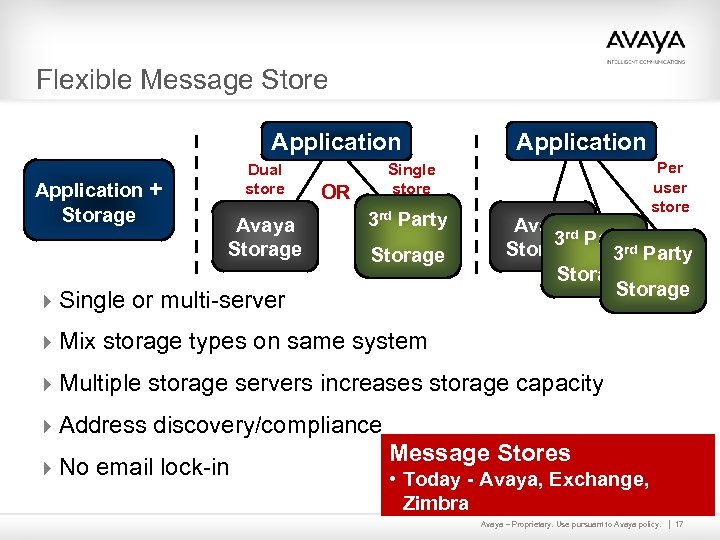 Flexible Message Store Application + Storage Dual store Avaya Storage Application Per user store Single store OR 3 rd Party Storage 4 Single or multi-server Avaya 3 rd Party Storage 4 Mix storage types on same system 4 Multiple storage servers increases storage capacity 4 Address discovery/compliance 4 No email lock-in Message Stores • Today - Avaya, Exchange, Zimbra Avaya – Proprietary. Use pursuant to Avaya policy. 17
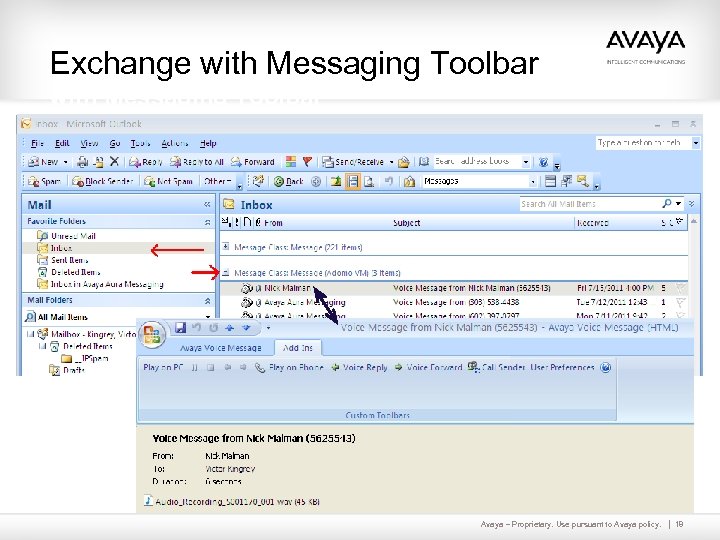 Exchange with Messaging Toolbar Avaya – Proprietary. Use pursuant to Avaya policy. 18
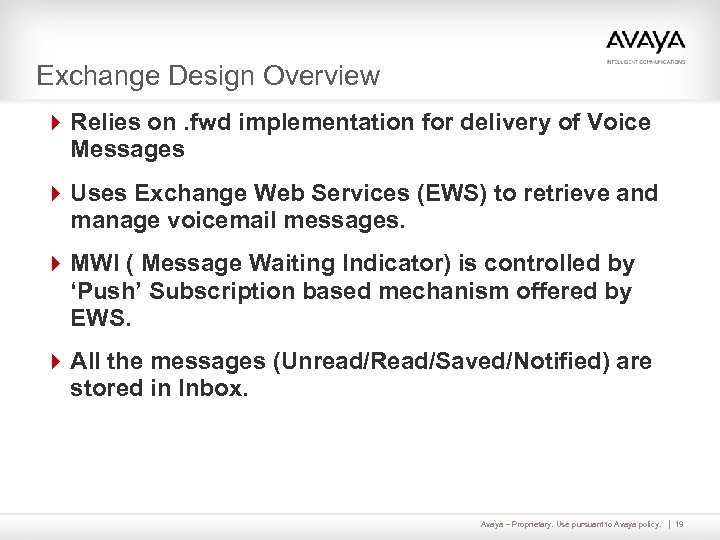 Exchange Design Overview 4 Relies on. fwd implementation for delivery of Voice Messages 4 Uses Exchange Web Services (EWS) to retrieve and manage voicemail messages. 4 MWI ( Message Waiting Indicator) is controlled by ‘Push’ Subscription based mechanism offered by EWS. 4 All the messages (Unread/Read/Saved/Notified) are stored in Inbox. Avaya – Proprietary. Use pursuant to Avaya policy. 19
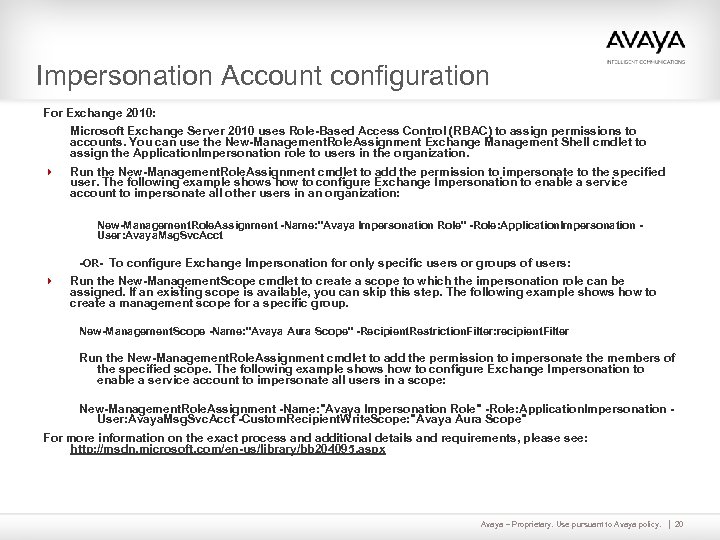 Impersonation Account configuration For Exchange 2010: Microsoft Exchange Server 2010 uses Role-Based Access Control (RBAC) to assign permissions to accounts. You can use the New-Management. Role. Assignment Exchange Management Shell cmdlet to assign the Application. Impersonation role to users in the organization. 4 Run the New-Management. Role. Assignment cmdlet to add the permission to impersonate to the specified user. The following example shows how to configure Exchange Impersonation to enable a service account to impersonate all other users in an organization: New-Management. Role. Assignment -Name: "Avaya Impersonation Role" -Role: Application. Impersonation User: Avaya. Msg. Svc. Acct -OR- To configure Exchange Impersonation for only specific users or groups of users: 4 Run the New-Management. Scope cmdlet to create a scope to which the impersonation role can be assigned. If an existing scope is available, you can skip this step. The following example shows how to create a management scope for a specific group. New-Management. Scope -Name: "Avaya Aura Scope" -Recipient. Restriction. Filter: recipient. Filter Run the New-Management. Role. Assignment cmdlet to add the permission to impersonate the members of the specified scope. The following example shows how to configure Exchange Impersonation to enable a service account to impersonate all users in a scope: New-Management. Role. Assignment -Name: "Avaya Impersonation Role" -Role: Application. Impersonation User: Avaya. Msg. Svc. Acct -Custom. Recipient. Write. Scope: "Avaya Aura Scope" For more information on the exact process and additional details and requirements, please see: http: //msdn. microsoft. com/en-us/library/bb 204095. aspx Avaya – Proprietary. Use pursuant to Avaya policy. 20
 Autodiscover service 4 AAM expects Autodiscover service to be available “https: //autodiscover.
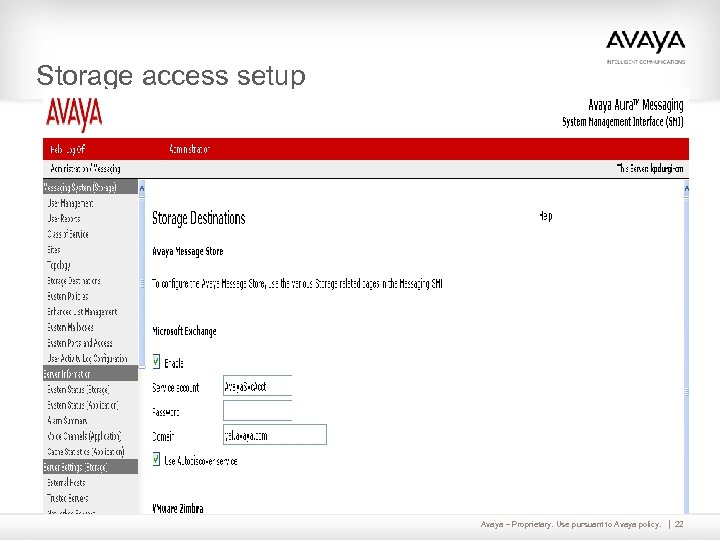 Storage access setup Avaya – Proprietary. Use pursuant to Avaya policy. 22
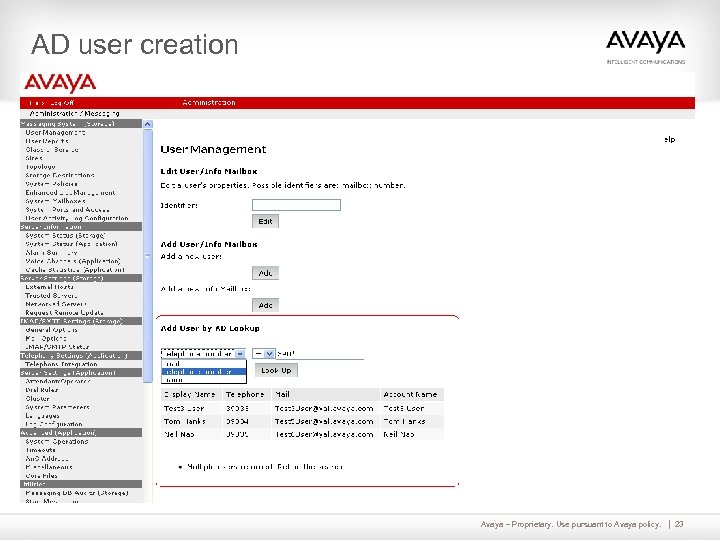 AD user creation Avaya – Proprietary. Use pursuant to Avaya policy. 23
 Subscriber – Voice Mail management 4 Exchange Web Services (EWS) is used to retrieve messages. – A message is identified as a Avaya Voice Message if – Message-Context : Voice-Message header. 4 Greetings continue to be stored in Avaya Message store. 4 Voice messages are forwarded to Store Id ( however they are being addressed ‘TO’ Avaya message store internal id - mail) 4 Unread / Read / Saved messages all are stored in INBOX and are accessible only from INBOX. 4 Outlook form continues to work similar to Avaya Message store users from Outlook. Avaya – Proprietary. Use pursuant to Avaya policy. 24
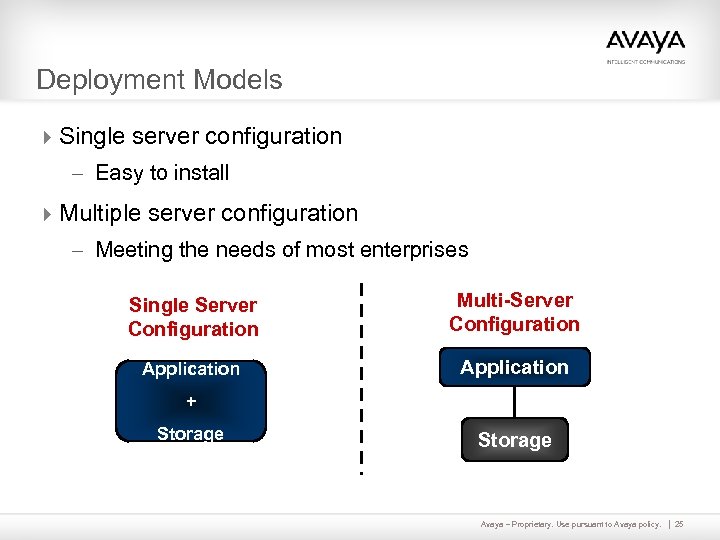 Deployment Models 4 Single server configuration – Easy to install 4 Multiple server configuration – Meeting the needs of most enterprises Single Server Configuration Multi-Server Configuration Application + Storage Avaya – Proprietary. Use pursuant to Avaya policy. 25
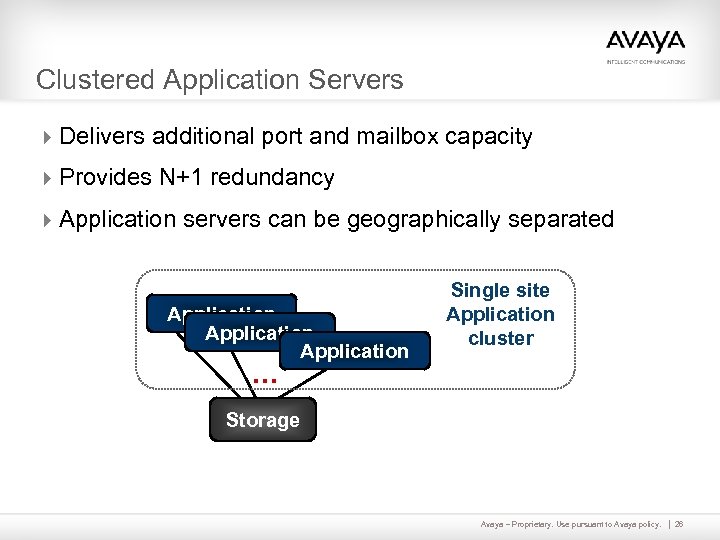 Clustered Application Servers 4 Delivers additional port and mailbox capacity 4 Provides N+1 redundancy 4 Application servers can be geographically separated Application Single site Application cluster … Storage Avaya – Proprietary. Use pursuant to Avaya policy. 26
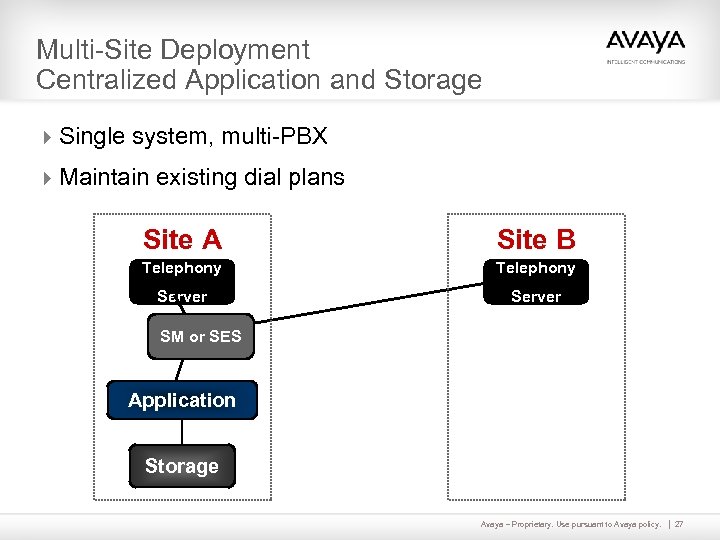 Multi-Site Deployment Centralized Application and Storage 4 Single system, multi-PBX 4 Maintain existing dial plans Site A Site B Telephony Server SM or SES Application Storage Avaya – Proprietary. Use pursuant to Avaya policy. 27
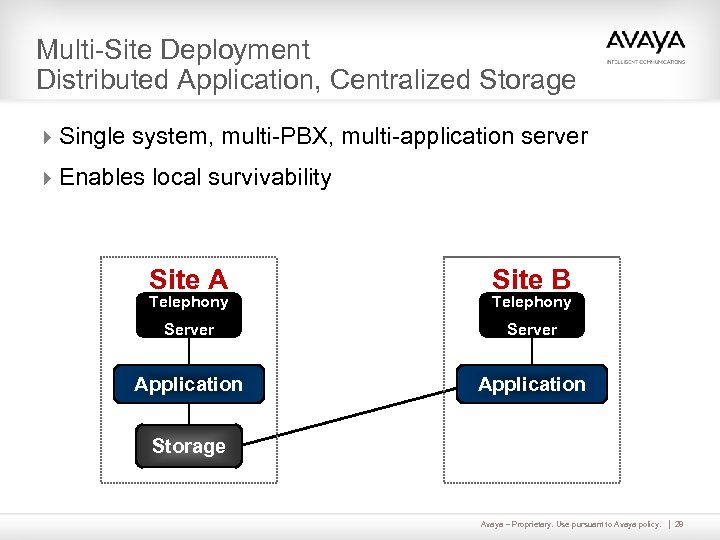 Multi-Site Deployment Distributed Application, Centralized Storage 4 Single system, multi-PBX, multi-application server 4 Enables local survivability Site A Site B Telephony Server Application Storage Avaya – Proprietary. Use pursuant to Avaya policy. 28
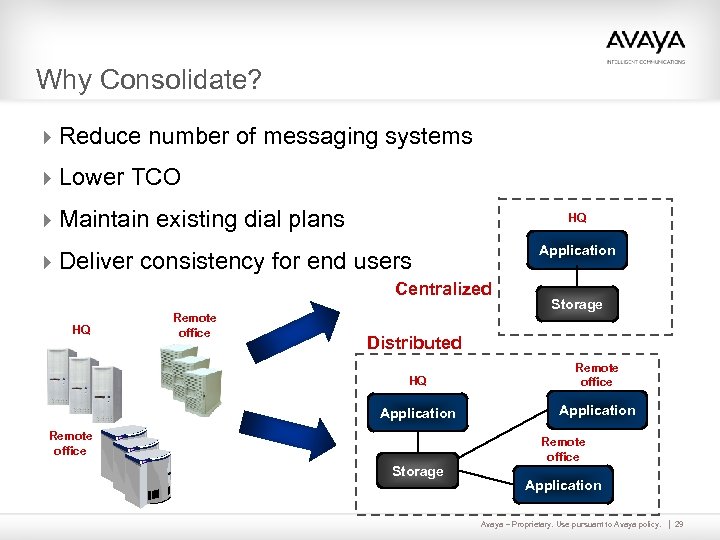 Why Consolidate? 4 Reduce number of messaging systems 4 Lower TCO 4 Maintain existing dial plans HQ Application 4 Deliver consistency for end users Centralized HQ Remote office Storage Distributed HQ Remote office Application Remote office Storage Remote office Application Avaya – Proprietary. Use pursuant to Avaya policy. 29
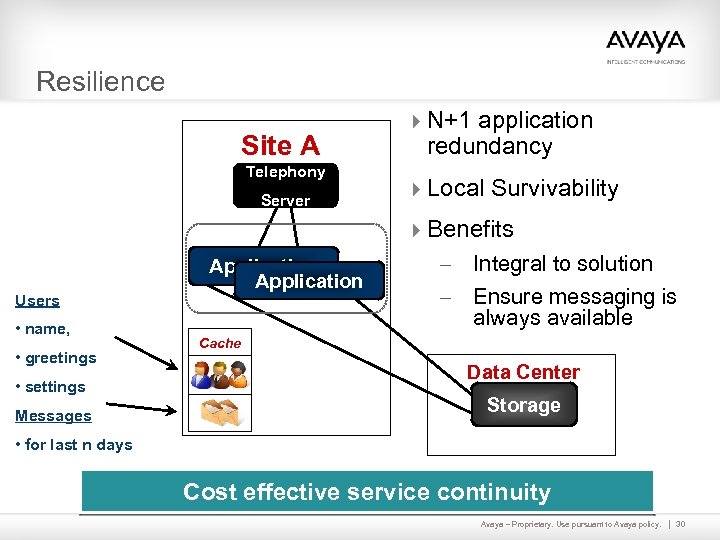 Resilience Site A Telephony Server 4 N+1 application redundancy 4 Local Survivability 4 Benefits Users • name, • greetings • settings Messages Application Integral to solution – Ensure messaging is always available – Cache Data Center Storage • for last n days Cost effective service continuity Avaya – Proprietary. Use pursuant to Avaya policy. 30
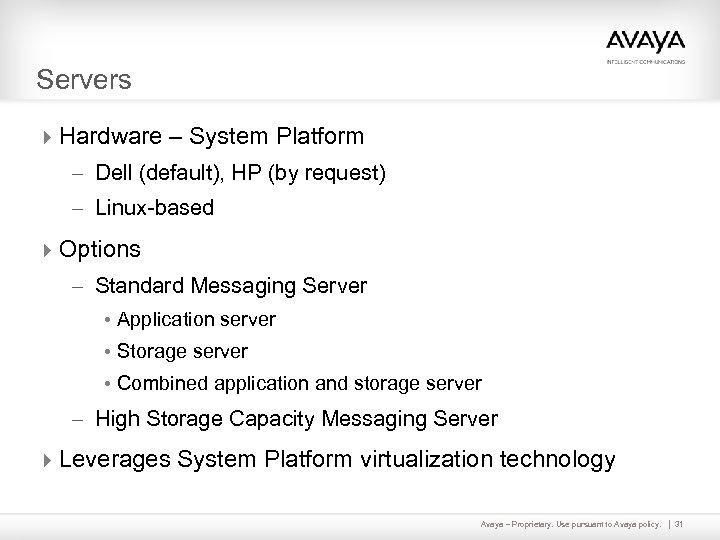 Servers 4 Hardware – System Platform – Dell (default), HP (by request) – Linux-based 4 Options – Standard Messaging Server • Application server • Storage server • Combined application and storage server – High Storage Capacity Messaging Server 4 Leverages System Platform virtualization technology Avaya – Proprietary. Use pursuant to Avaya policy. 31
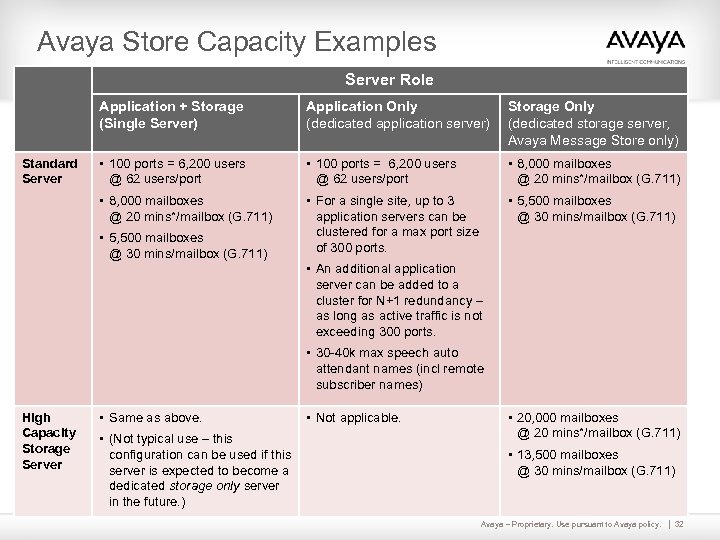 Avaya Store Capacity Examples Server Role Application + Storage (Single Server) Storage Only (dedicated storage server, Avaya Message Store only) • 100 ports = 6, 200 users @ 62 users/port • 8, 000 mailboxes @ 20 mins*/mailbox (G. 711) Standard Server Application Only (dedicated application server) • For a single site, up to 3 application servers can be clustered for a max port size of 300 ports. • 5, 500 mailboxes @ 30 mins/mailbox (G. 711) • An additional application server can be added to a cluster for N+1 redundancy – as long as active traffic is not exceeding 300 ports. • 30 -40 k max speech auto attendant names (incl remote subscriber names) High Capacity Storage Server • Same as above. • (Not typical use – this configuration can be used if this server is expected to become a dedicated storage only server in the future. ) • Not applicable. • 20, 000 mailboxes @ 20 mins*/mailbox (G. 711) • 13, 500 mailboxes @ 30 mins/mailbox (G. 711) Avaya – Proprietary. Use pursuant to Avaya policy. 32
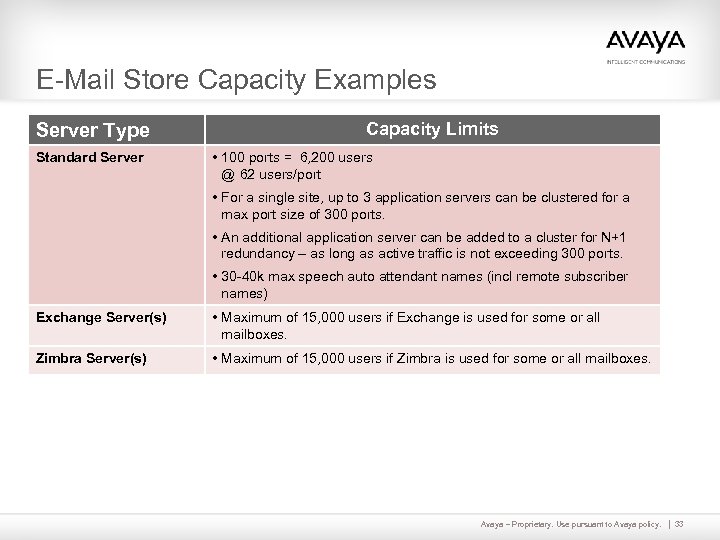 E-Mail Store Capacity Examples Server Type Standard Server Capacity Limits • 100 ports = 6, 200 users @ 62 users/port • For a single site, up to 3 application servers can be clustered for a max port size of 300 ports. • An additional application server can be added to a cluster for N+1 redundancy – as long as active traffic is not exceeding 300 ports. • 30 -40 k max speech auto attendant names (incl remote subscriber names) Exchange Server(s) • Maximum of 15, 000 users if Exchange is used for some or all mailboxes. Zimbra Server(s) • Maximum of 15, 000 users if Zimbra is used for some or all mailboxes. Avaya – Proprietary. Use pursuant to Avaya policy. 33
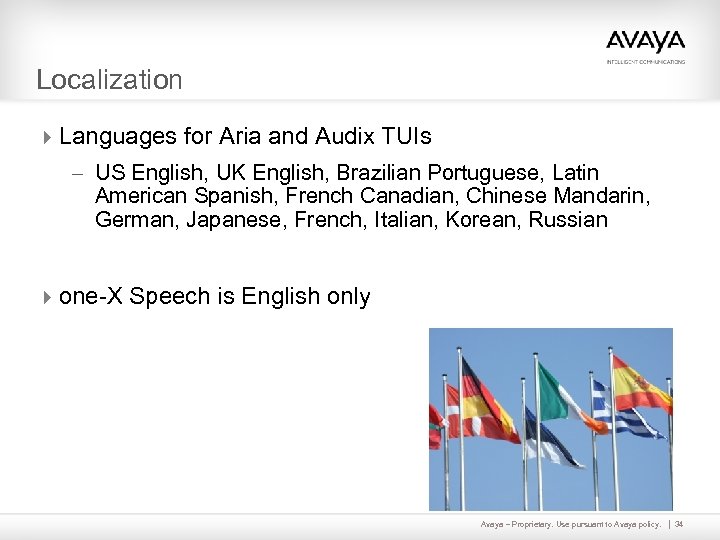 Localization 4 Languages for Aria and Audix TUIs – US English, UK English, Brazilian Portuguese, Latin American Spanish, French Canadian, Chinese Mandarin, German, Japanese, French, Italian, Korean, Russian 4 one-X Speech is English only Avaya – Proprietary. Use pursuant to Avaya policy. 34
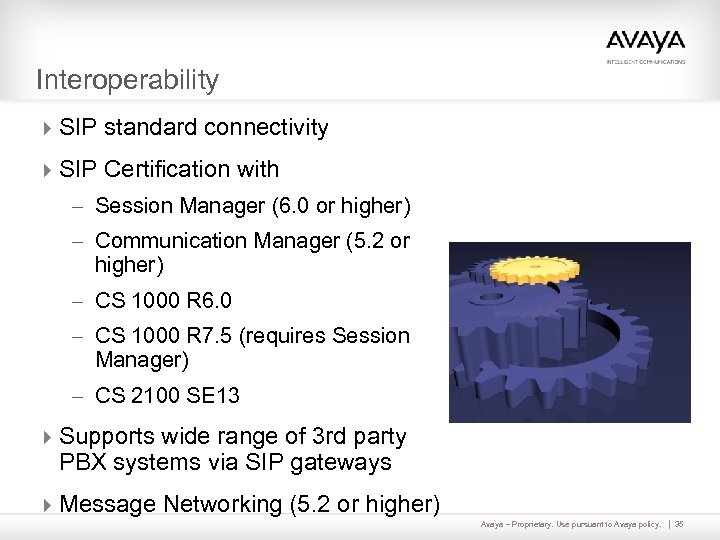 Interoperability 4 SIP standard connectivity 4 SIP Certification with – Session Manager (6. 0 or higher) – Communication Manager (5. 2 or higher) – CS 1000 R 6. 0 – CS 1000 R 7. 5 (requires Session Manager) – CS 2100 SE 13 4 Supports wide range of 3 rd party PBX systems via SIP gateways 4 Message Networking (5. 2 or higher) Avaya – Proprietary. Use pursuant to Avaya policy. 35
 Packaging 4 2 feature levels – on a per user basis – Basic • • Call answering Voice messaging User Preferences web pages Avaya, Exchange, or Zimbra storage – Mainstream • Access to all features including Reach Me, Notify Me, fax, speech-based features, and IMAP access. 4 Optional capabilities – one-X Speech • Server extra • Licenses included with each mainstream messaging application user license – Speech to text (Mutare EVM) Avaya – Proprietary. Use pursuant to Avaya policy. 36
 Installed Base Migrations 4 TUI support – Aria, Audix 4 Migration tools for Intuity Audix 4 Programs/promotions/offers – Refer to Avaya offer documents for full details – ASIPP • Upgrade pricing for Modular Messaging and Call. Pilot systems on current releases • Migration pricing for other systems – Collaborate Your Way • Reduces cost of upgrades when purchasing applications – 0% financing through September 30, 2011 (NA only) Avaya – Proprietary. Use pursuant to Avaya policy. 37
 Comparison To Intuity Audix TUI 4 Commonly used commands are preserved 4 Functionality not included – Only 2 greeting types supported – Increase/Decrease volume – Fax (not supported via TUI) – Un-delete – Forward message with comment at end – Outgoing/Filed messages – Administrative Settings by TUI • Mailbox / Distribution Lists (use User Preferences) • Set Personal Operator via TUI (use Web Preferences) • Multiple Greetings – Standard and Temporary Absence Greeting only • Option to address a message before recording it Avaya – Proprietary. Use pursuant to Avaya policy. 38
 Comparison To Octel Aria TUI 4 Maintains familiar Aria menu structure to smooth user transition 4 Sending to multiple recipients – Build recipients list first, then set delivery options and send 4 Slightly different message categories (with shortcuts): – 1. 1 Unread, 1. 2 Read, 1. 3 Saved (archived) messages 4 Lesser used or no longer relevant features not included: – Bulletin broadcast messages • Use system distribution lists or system broadcast instead – – – Extended prompts - standard and rapid prompts are available Home/Guest mailbox Secretary access Delivery confirmation Volume control Avaya – Proprietary. Use pursuant to Avaya policy. 39
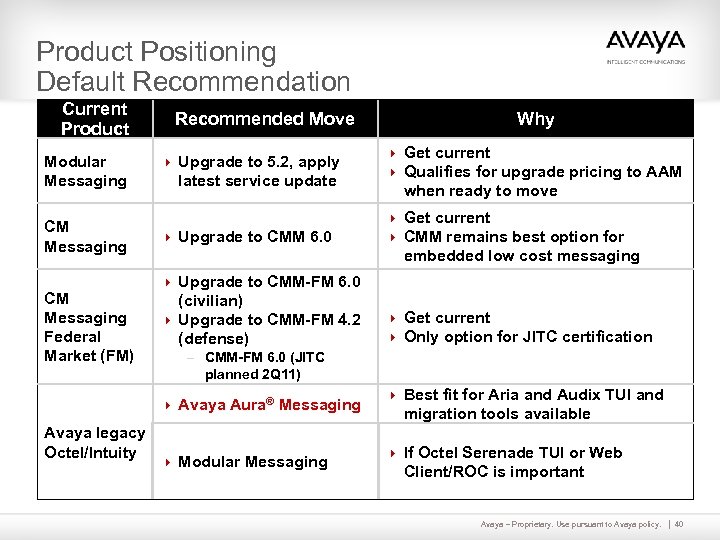 Product Positioning Default Recommendation Current Product Modular Messaging CM Messaging Federal Market (FM) Recommended Move 4 Upgrade to 5. 2, apply latest service update 4 Upgrade to CMM 6. 0 Why 4 Get current 4 Qualifies for upgrade pricing to AAM when ready to move 4 Get current 4 CMM remains best option for embedded low cost messaging 4 Upgrade to CMM-FM 6. 0 (civilian) 4 Upgrade to CMM-FM 4. 2 (defense) 4 Get current 4 Only option for JITC certification – CMM-FM 6. 0 (JITC planned 2 Q 11) 4 Avaya Aura® Messaging Avaya legacy Octel/Intuity 4 Modular Messaging 4 Best fit for Aria and Audix TUI and migration tools available 4 If Octel Serenade TUI or Web Client/ROC is important Avaya – Proprietary. Use pursuant to Avaya policy. 40
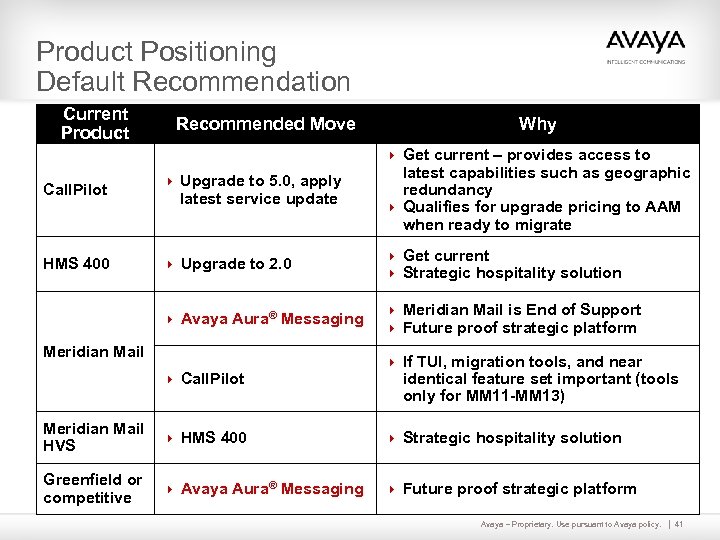 Product Positioning Default Recommendation Current Product Recommended Move Why 4 Get current – provides access to Call. Pilot 4 Upgrade to 5. 0, apply latest service update latest capabilities such as geographic redundancy 4 Qualifies for upgrade pricing to AAM when ready to migrate 4 Upgrade to 2. 0 4 Get current 4 Strategic hospitality solution 4 Avaya Aura® Messaging HMS 400 4 Meridian Mail is End of Support 4 Future proof strategic platform Meridian Mail 4 Call. Pilot 4 If TUI, migration tools, and near identical feature set important (tools only for MM 11 -MM 13) Meridian Mail HVS 4 HMS 400 4 Strategic hospitality solution Greenfield or competitive 4 Avaya Aura® Messaging 4 Future proof strategic platform Avaya – Proprietary. Use pursuant to Avaya policy. 41
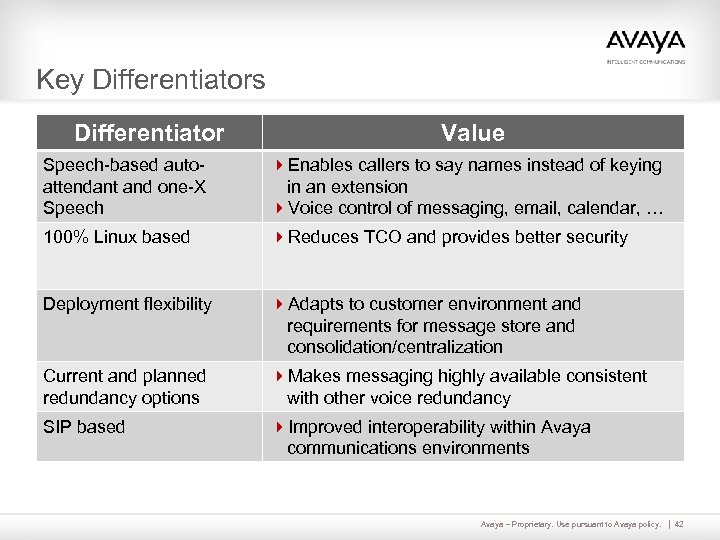 Key Differentiators Differentiator Value Speech-based autoattendant and one-X Speech 4 Enables callers to say names instead of keying in an extension 4 Voice control of messaging, email, calendar, … 100% Linux based 4 Reduces TCO and provides better security Deployment flexibility 4 Adapts to customer environment and requirements for message store and consolidation/centralization Current and planned redundancy options 4 Makes messaging highly available consistent with other voice redundancy SIP based 4 Improved interoperability within Avaya communications environments Avaya – Proprietary. Use pursuant to Avaya policy. 42
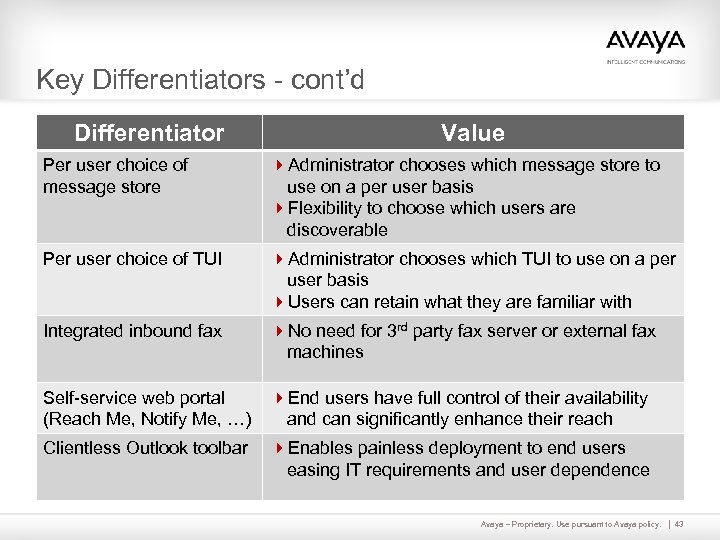 Key Differentiators - cont’d Differentiator Value Per user choice of message store 4 Administrator chooses which message store to use on a per user basis 4 Flexibility to choose which users are discoverable Per user choice of TUI 4 Administrator chooses which TUI to use on a per user basis 4 Users can retain what they are familiar with Integrated inbound fax 4 No need for 3 rd party fax server or external fax machines Self-service web portal (Reach Me, Notify Me, …) 4 End users have full control of their availability and can significantly enhance their reach Clientless Outlook toolbar 4 Enables painless deployment to end users easing IT requirements and user dependence Avaya – Proprietary. Use pursuant to Avaya policy. 43
 References and Resources 4 Sales/partner portal general link http: //portal. avaya. com/ptl. Web/products/P 0792 4 Contacts – Marketing • Denis Fortier denisfortier@avaya. com – Product Management • Roger Brassard brassard@avaya. com • Mike Wasserburger wasserburger@avaya. com • Richard Rundstein richardrunds@avaya. com – Sales • Vic Kingrey vlkingrey@avaya. com Avaya – Proprietary. Use pursuant to Avaya policy. 44
 thank you Vic Kingrey vlkingrey@avaya. com 408 -562 -5535 Avaya – Proprietary. Use pursuant to Avaya policy. 45