


 Скачать презентацию I O devices q Peripheral devices also called I O
b2bdab0116b1df7eb9027cb0d62a38ff.ppt
- Количество слайдов: 86
 I/O devices q Peripheral devices (also called I/O devices) are pieces of equipment that exchange data with a CPU q Examples: switches, LED, CRT, printers, keyboard, keypad q Speed and characteristics of these devices are very different from that of CPU so they cannot be connected directly q Interface chips are needed to resolve this problem q Main function of an interface chip is to synchronize data transfer between CPU and I/O device q Data pins of interface chip are connected to CPU data bus and I/O port pins are connected to I/O device hsabaghianb @ kashanu. ac. ir Microprocessors 1 -1
 I/O devices q Since a CPU may have multiple I/O devices, CPU data bus may be connected to data buses of multiple interface q An address decoder is used to select one device to respond to the CPU I/O request q Different CPUs deal with I/O devices differently q Some CPUs have dedicated instructions for performing input and output operations (isolated I/O) q Other CPUs use the same instruction for reading from memory and reading from input devices, as well as writing data into memory and writing data into output devices (memory-mapped I/O) q MCS-51 (8051) is memory mapped hsabaghianb @ kashanu. ac. ir Microprocessors 1 -2
 Synchronization of CPU and interface chip q There must be a mechanism to make sure that there are valid data in the interface chip when CPU reads them q Input synchronization: two ways of doing this 1. Polling method v interface chip uses a status bit to indicate if it has valid data for CPU v CPU keeps checking status bit until it is set, and then reads data from interface chip v Simple method, used when CPU has nothing else to do 2. Interrupt driven method: interface chip interrupts the CPU when it has new data. CPU executes the ISR hsabaghianb @ kashanu. ac. ir Microprocessors 1 -3
 Synchronization of CPU and interface chip q Output synchronization: two ways of doing this 1. Polling method v interface chip uses a status bit to indicate that the data register is empty v CPU keeps checking status bit until it is set, and then writes data into interface chip 2. Interrupt driven method: interface chip interrupts the CPU when it data register is empty. CPU executes the ISR hsabaghianb @ kashanu. ac. ir Microprocessors 1 -4
 Synchronization of CPU and interface chip q Methods used to synchronize data transfer between interface chip and I/O devices: 1. Brute force method: interface chip returns voltage levels in its input ports to CPU and makes data written by CPU directly available on its output ports v All 8051 port can perform brute force I/O 2. Strobe method: v During input, the I/O device activates a strobe signal when data are stable. Interface chip latches the data v For output, interface chip places output data on output port. when data is stable, it activates a strobe signal. I/O device latches the data 3. Handshake method: two handshake signals are needed v One is asserted by interface chip and the other by I/O device hsabaghianb @ kashanu. ac. ir Microprocessors 1 -5
 8051 ports hsabaghianb @ kashanu. ac. ir Microprocessors 1 -6
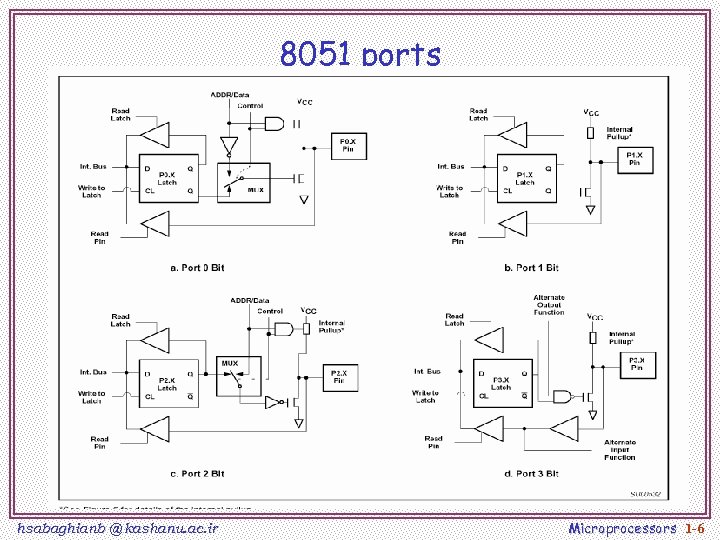
 8051 ports q Ports 1, 2, and 3 have internal pullups, and Port 0 has open drain outputs. q To be used as an input, the port bit latch must contain a 1, which turns off the output driver FET. q For Ports 1, 2, and 3, the pin is pulled high by a weak internal pullup, and can be pulled low by an external source. q Port 0 differs in that its internal pullups are not active during normal port operation (writing a 1 to the bit latch leaves both output FETs off, so the pin floats). hsabaghianb @ kashanu. ac. ir Microprocessors 1 -7
 8051 I/O Ports: Hardware Specs q P 0 is open drain. v. Has to be pulled high by external 10 K resistors. v. Not needed if P 0 is used for address lines q P 1, P 2, P 3 have internal pull-ups q Port fan- out (number of devices it can drive) is limited. v. Use buffers (74 LS 244, 74 LS 245, etc) to increase drive. q P 1, P 2, P 3 can drive up to 4 LS-TTL inputs hsabaghianb @ kashanu. ac. ir Microprocessors 1 -8
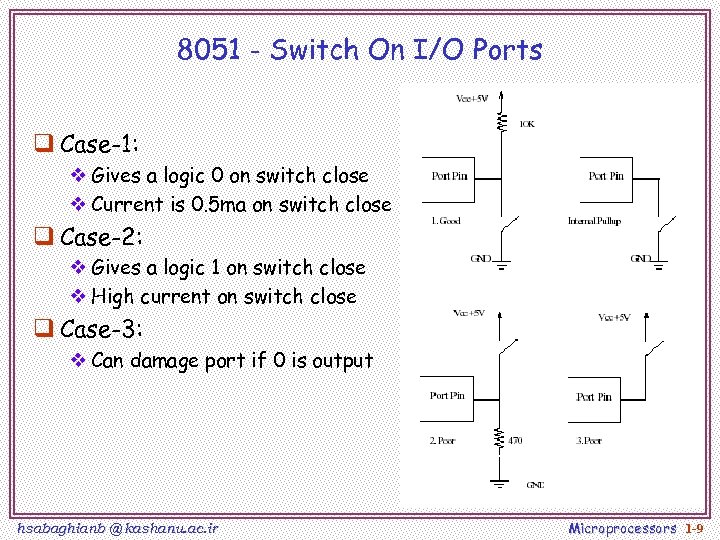 8051 - Switch On I/O Ports q Case-1: v Gives a logic 0 on switch close v Current is 0. 5 ma on switch close q Case-2: v Gives a logic 1 on switch close v High current on switch close q Case-3: v Can damage port if 0 is output hsabaghianb @ kashanu. ac. ir Microprocessors 1 -9
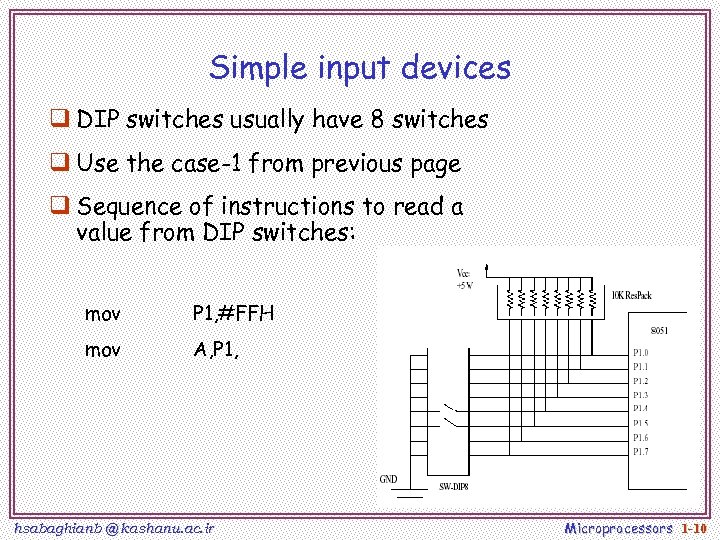 Simple input devices q DIP switches usually have 8 switches q Use the case-1 from previous page q Sequence of instructions to read a value from DIP switches: mov P 1, #FFH mov A, P 1, hsabaghianb @ kashanu. ac. ir Microprocessors 1 -10
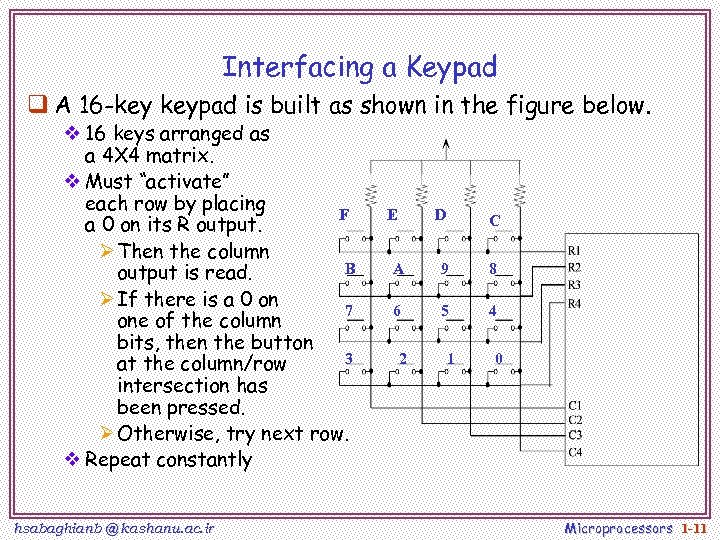 Interfacing a Keypad q A 16 -key keypad is built as shown in the figure below. v 16 keys arranged as a 4 X 4 matrix. v Must “activate” each row by placing F a 0 on its R output. Ø Then the column B output is read. Ø If there is a 0 on 7 one of the column bits, then the button 3 at the column/row intersection has been pressed. Ø Otherwise, try next row. v Repeat constantly hsabaghianb @ kashanu. ac. ir E D C A 9 8 6 5 4 2 1 0 Microprocessors 1 -11
 Bouncing Contacts q Push-button switches, toggle switches, and electromechanical relays all have one thing in common: contacts. q Metal contacts make and break the circuit and carry the current in switches and relays. Because they are metal, contacts have mass. q Since at least one of the contacts is movable, it has springiness. q Since contacts are designed to open and close quickly, there is little resistance (damping) to their movement hsabaghianb @ kashanu. ac. ir Microprocessors 1 -12
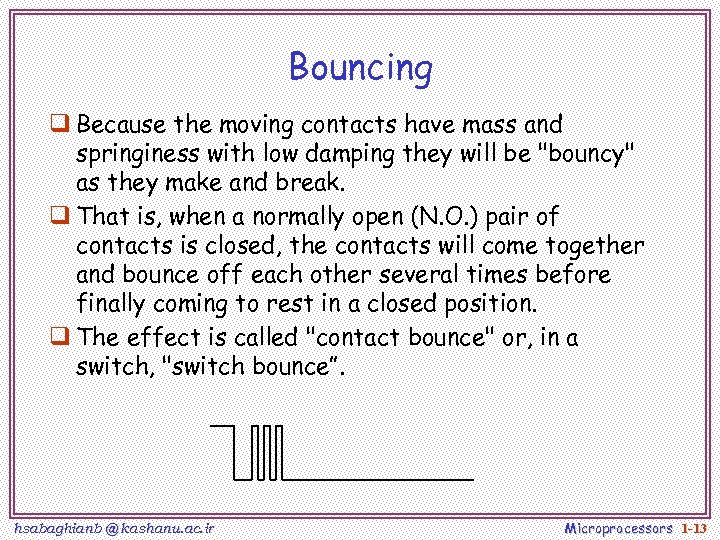 Bouncing q Because the moving contacts have mass and springiness with low damping they will be "bouncy" as they make and break. q That is, when a normally open (N. O. ) pair of contacts is closed, the contacts will come together and bounce off each other several times before finally coming to rest in a closed position. q The effect is called "contact bounce" or, in a switch, "switch bounce”. hsabaghianb @ kashanu. ac. ir Microprocessors 1 -13
 Why is it a problem? q If such a switch is used as a source to an edge-triggered input such as INT 0, then the MCS-51 will think that there were several “events” and respond several times. q The bouncing of the switch may last for several milliseconds. v. Given that the MCS-51 operates at microsecond speed, a short ISR may execute several times in response to the above described bounciness hsabaghianb @ kashanu. ac. ir Microprocessors 1 -14
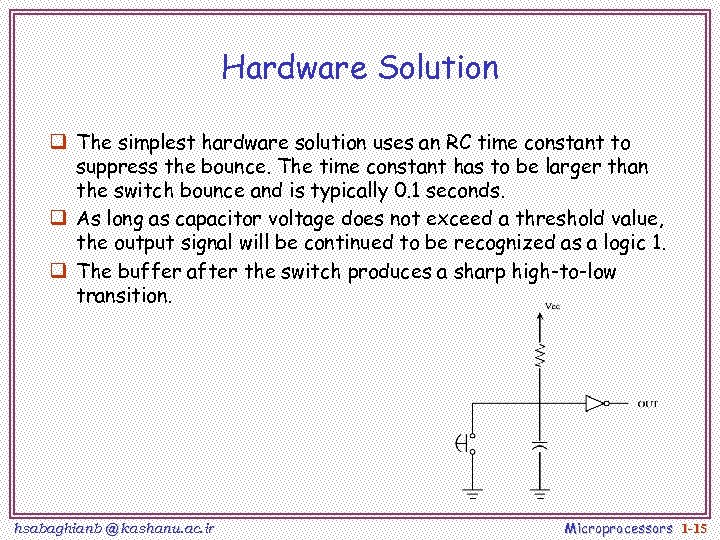 Hardware Solution q The simplest hardware solution uses an RC time constant to suppress the bounce. The time constant has to be larger than the switch bounce and is typically 0. 1 seconds. q As long as capacitor voltage does not exceed a threshold value, the output signal will be continued to be recognized as a logic 1. q The buffer after the switch produces a sharp high-to-low transition. hsabaghianb @ kashanu. ac. ir Microprocessors 1 -15
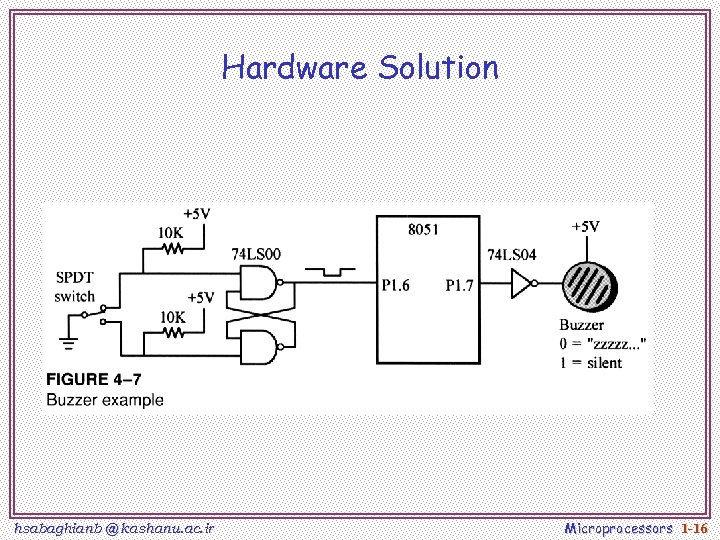 Hardware Solution hsabaghianb @ kashanu. ac. ir Microprocessors 1 -16
 Software Solution q It is also possible to counter the bouncing problem using software. q The easies way is the wait-and-see technique v. When the input drops, an “appropriate” delay is executed (10 ms), then the value of the line is checked again to make sure the line has stopped bouncing hsabaghianb @ kashanu. ac. ir Microprocessors 1 -17
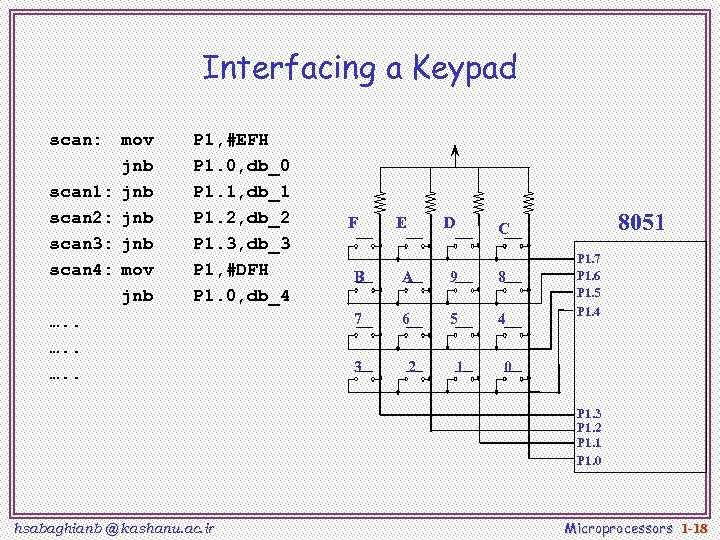 Interfacing a Keypad scan: scan 1: scan 2: scan 3: scan 4: mov jnb jnb mov jnb P 1, #EFH P 1. 0, db_0 P 1. 1, db_1 P 1. 2, db_2 P 1. 3, db_3 P 1, #DFH P 1. 0, db_4 …. . F E D B A 9 8 7 6 5 4 3 2 8051 C 1 P 1. 7 P 1. 6 P 1. 5 P 1. 4 0 P 1. 3 P 1. 2 P 1. 1 P 1. 0 hsabaghianb @ kashanu. ac. ir Microprocessors 1 -18
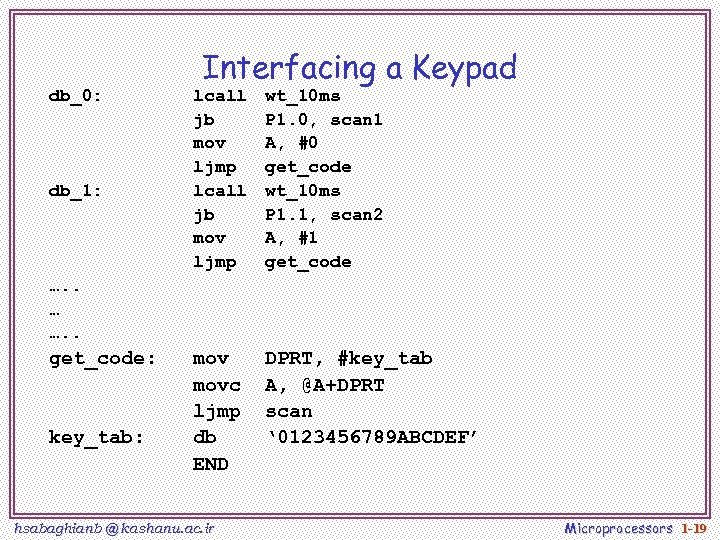 db_0: db_1: Interfacing a Keypad lcall jb mov ljmp wt_10 ms P 1. 0, scan 1 A, #0 get_code wt_10 ms P 1. 1, scan 2 A, #1 get_code movc ljmp db END DPRT, #key_tab A, @A+DPRT scan ‘ 0123456789 ABCDEF’ …. . … …. . get_code: key_tab: hsabaghianb @ kashanu. ac. ir Microprocessors 1 -19
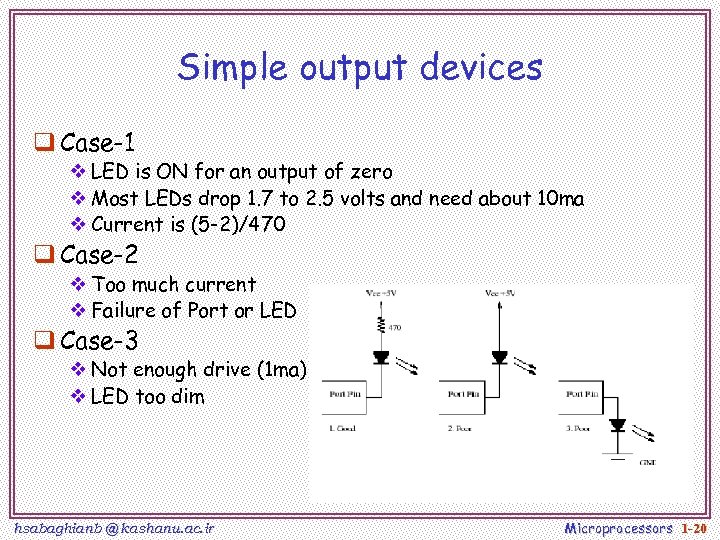 Simple output devices q Case-1 v LED is ON for an output of zero v Most LEDs drop 1. 7 to 2. 5 volts and need about 10 ma v Current is (5 -2)/470 q Case-2 v Too much current v Failure of Port or LED q Case-3 v Not enough drive (1 ma) v LED too dim hsabaghianb @ kashanu. ac. ir Microprocessors 1 -20
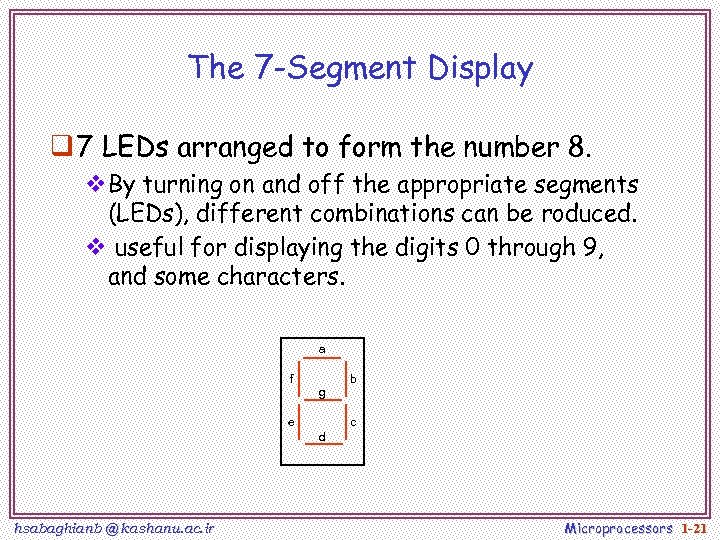 The 7 -Segment Display q 7 LEDs arranged to form the number 8. v. By turning on and off the appropriate segments (LEDs), different combinations can be roduced. v useful for displaying the digits 0 through 9, and some characters. a f g e b c d hsabaghianb @ kashanu. ac. ir Microprocessors 1 -21
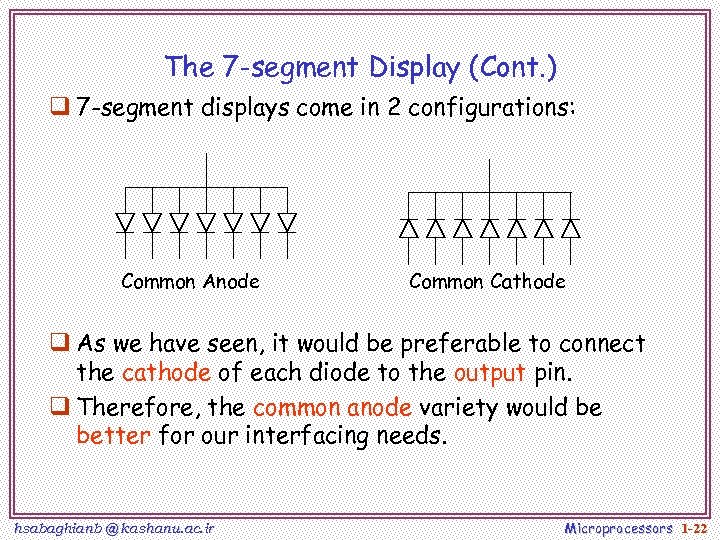 The 7 -segment Display (Cont. ) q 7 -segment displays come in 2 configurations: Common Anode Common Cathode q As we have seen, it would be preferable to connect the cathode of each diode to the output pin. q Therefore, the common anode variety would be better for our interfacing needs. hsabaghianb @ kashanu. ac. ir Microprocessors 1 -22
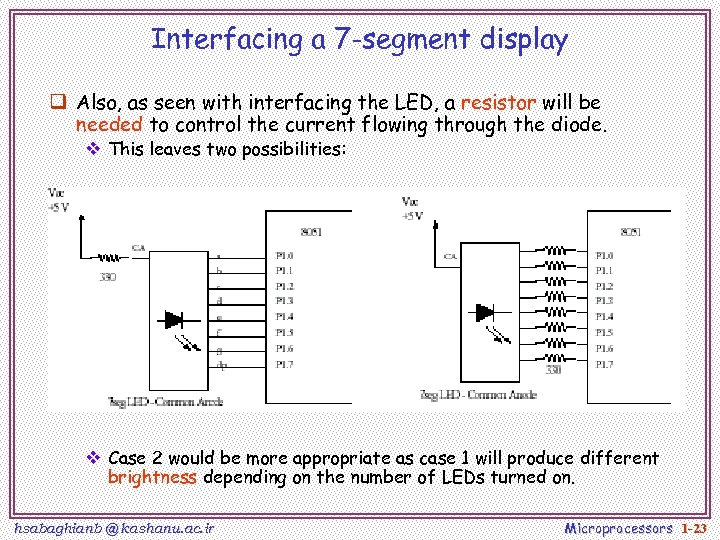 Interfacing a 7 -segment display q Also, as seen with interfacing the LED, a resistor will be needed to control the current flowing through the diode. v This leaves two possibilities: v Case 2 would be more appropriate as case 1 will produce different brightness depending on the number of LEDs turned on. hsabaghianb @ kashanu. ac. ir Microprocessors 1 -23
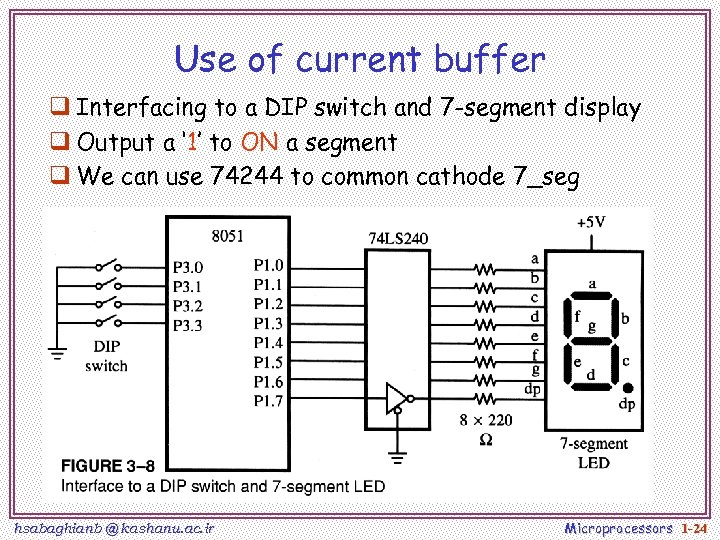 Use of current buffer q Interfacing to a DIP switch and 7 -segment display q Output a ‘ 1’ to ON a segment q We can use 74244 to common cathode 7_seg hsabaghianb @ kashanu. ac. ir Microprocessors 1 -24
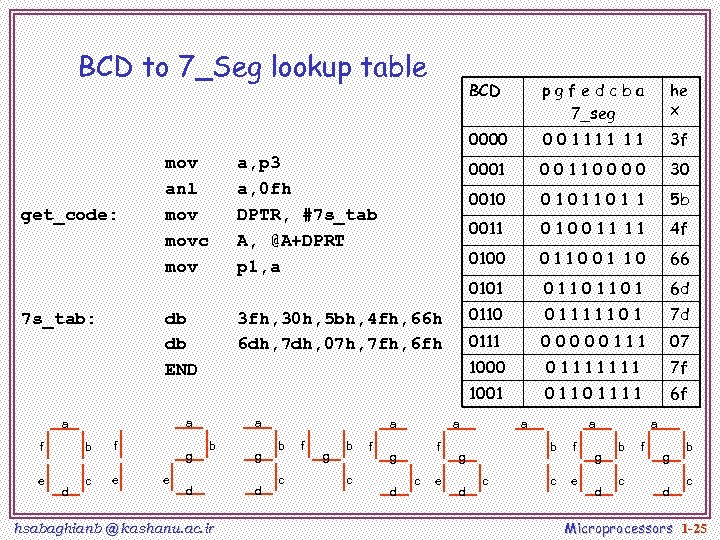 BCD to 7_Seg lookup table BCD pgfedcba 7_seg he x 0000 001111 11 3 f 0001 00110000 30 0010 0101101 1 5 b 0011 010011 11 4 f 0100 011001 10 66 0101 01101101 6 d 3 fh, 30 h, 5 bh, 4 fh, 66 h 6 dh, 7 dh, 07 h, 7 fh, 6 fh 0110 01111101 7 d 0111 00000111 07 1000 01111111 7 f 1001 7 s_tab: a, p 3 a, 0 fh DPTR, #7 s_tab A, @A+DPRT p 1, a db db END get_code: mov anl movc mov 01101111 6 f a a f b f e c e d g e a b d hsabaghianb @ kashanu. ac. ir g d a b c f g b c f a f g d c e a b g d a c f c e g d a b c f g d b c Microprocessors 1 -25
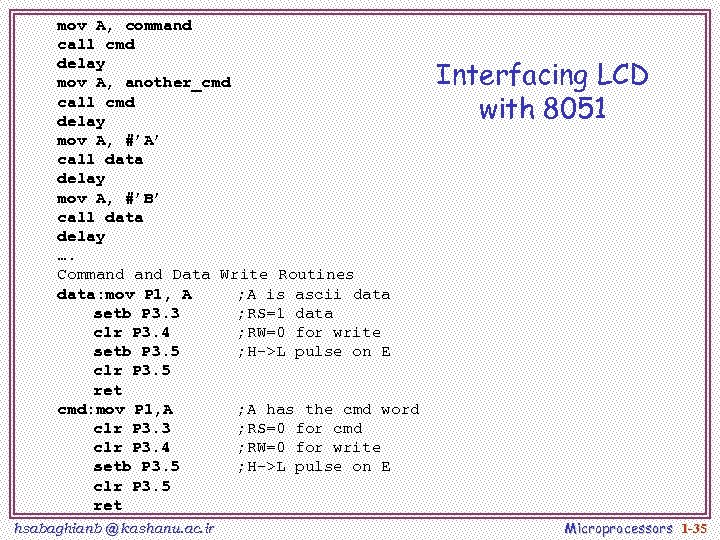
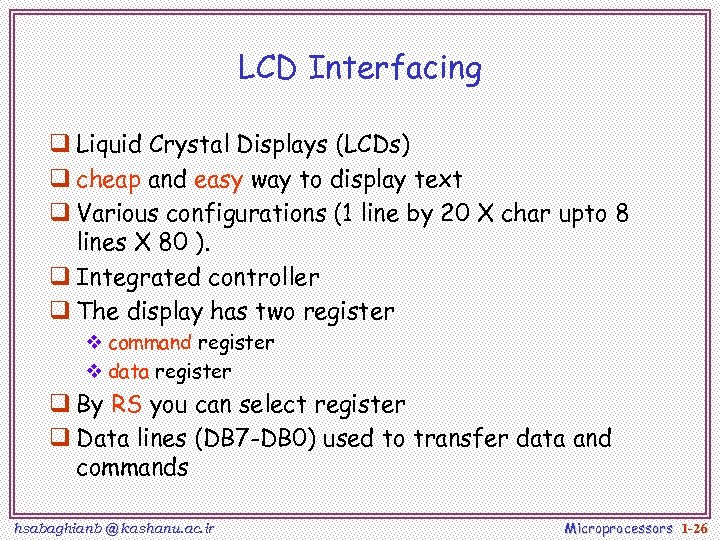 LCD Interfacing q Liquid Crystal Displays (LCDs) q cheap and easy way to display text q Various configurations (1 line by 20 X char upto 8 lines X 80 ). q Integrated controller q The display has two register v command register v data register q By RS you can select register q Data lines (DB 7 -DB 0) used to transfer data and commands hsabaghianb @ kashanu. ac. ir Microprocessors 1 -26
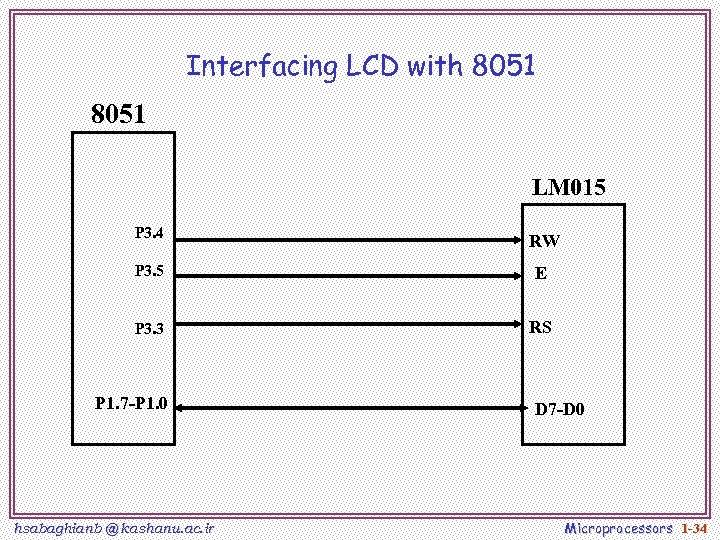
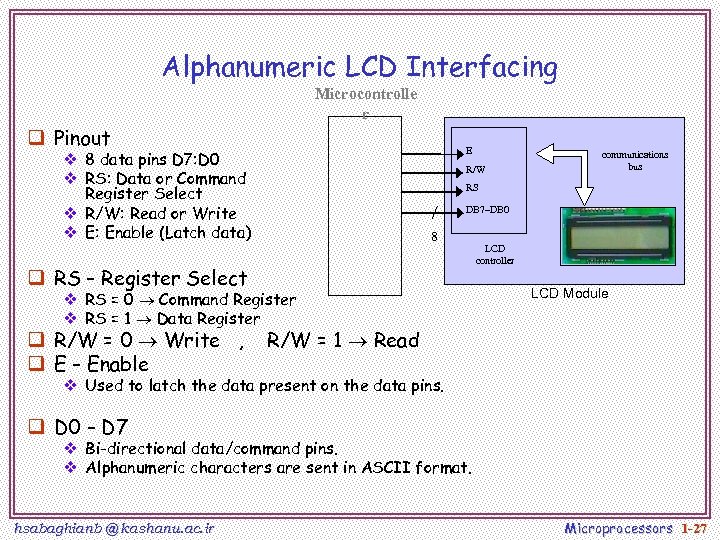 Alphanumeric LCD Interfacing Microcontrolle r q Pinout E v 8 data pins D 7: D 0 v RS: Data or Command Register Select v R/W: Read or Write v E: Enable (Latch data) R/W RS DB 7–DB 0 8 q RS – Register Select v RS = 0 Command Register v RS = 1 Data Register q R/W = 0 Write , q E – Enable communications bus LCD controller LCD Module R/W = 1 Read v Used to latch the data present on the data pins. q D 0 – D 7 v Bi-directional data/command pins. v Alphanumeric characters are sent in ASCII format. hsabaghianb @ kashanu. ac. ir Microprocessors 1 -27
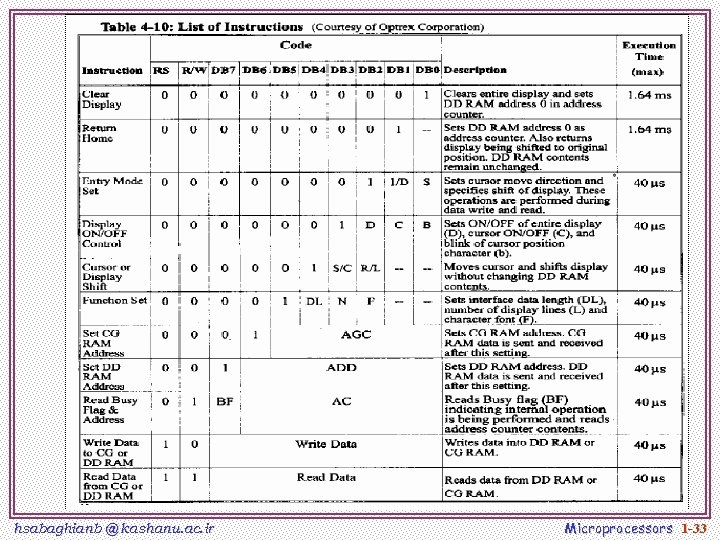
 LCD Commands q The LCD’s internal controller can accept several commands and modify the display accordingly. These commands would be things like: v Clear screen v Return home v Decrement/Increment cursor q After writing to the LCD, it takes some time for it to complete its internal operations. During this time, it will not accept any new commands or data. v We need to insert time delay between any two commands or data sent to LCD hsabaghianb @ kashanu. ac. ir Microprocessors 1 -28
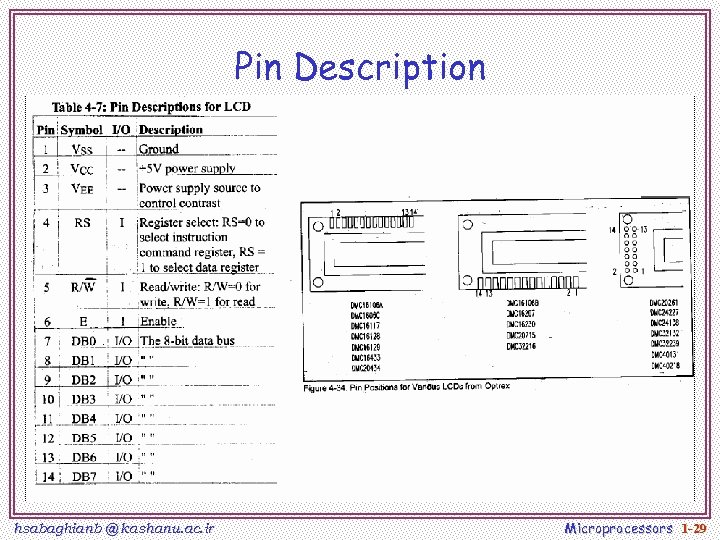 Pin Description hsabaghianb @ kashanu. ac. ir Microprocessors 1 -29
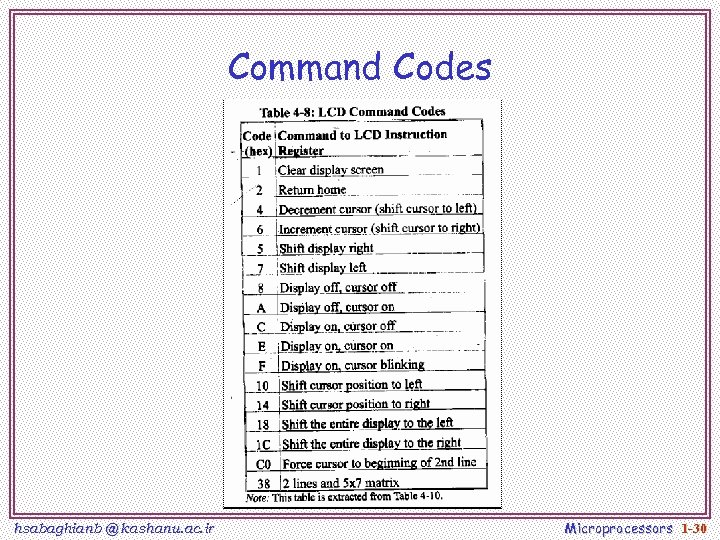 Command Codes hsabaghianb @ kashanu. ac. ir Microprocessors 1 -30
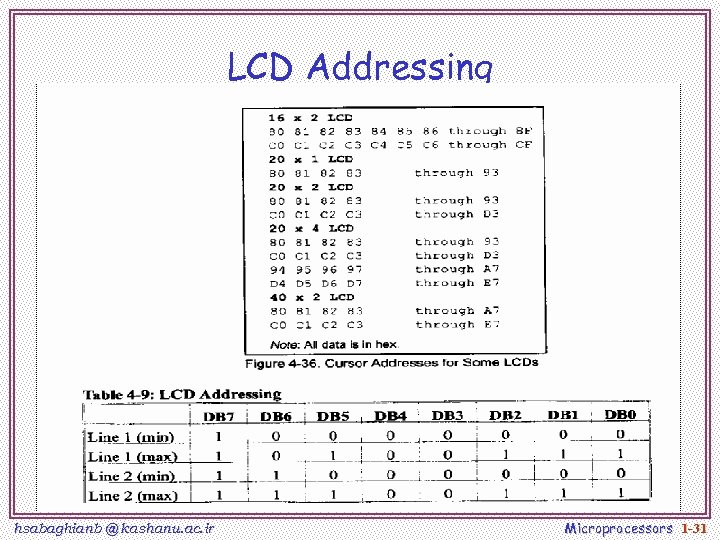 LCD Addressing hsabaghianb @ kashanu. ac. ir Microprocessors 1 -31
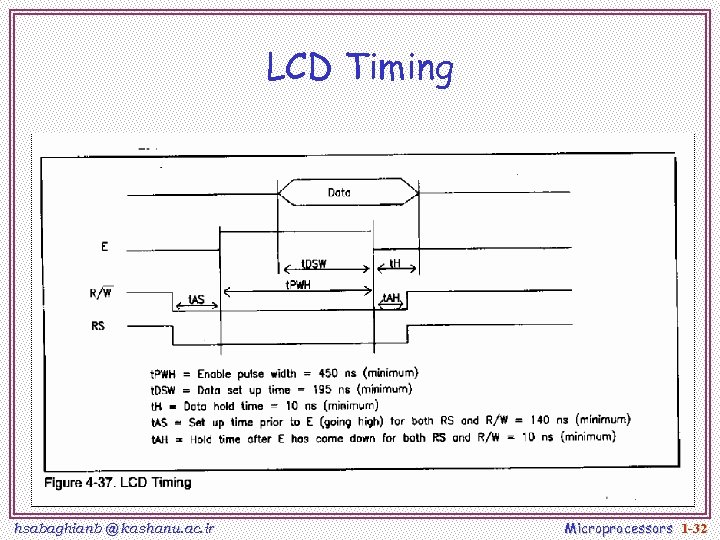 LCD Timing hsabaghianb @ kashanu. ac. ir Microprocessors 1 -32
 hsabaghianb @ kashanu. ac. ir Microprocessors 1 -33
 Interfacing LCD with 8051 LM 015 P 3. 4 RW P 3. 5 E P 3. 3 RS P 1. 7 -P 1. 0 hsabaghianb @ kashanu. ac. ir D 7 -D 0 Microprocessors 1 -34
 mov A, command call cmd delay mov A, another_cmd call cmd delay mov A, #’A’ call data delay mov A, #’B’ call data delay …. Command Data Write Routines data: mov P 1, A ; A is ascii data setb P 3. 3 ; RS=1 data clr P 3. 4 ; RW=0 for write setb P 3. 5 ; H->L pulse on E clr P 3. 5 ret cmd: mov P 1, A ; A has the cmd word clr P 3. 3 ; RS=0 for cmd clr P 3. 4 ; RW=0 for write setb P 3. 5 ; H->L pulse on E clr P 3. 5 ret hsabaghianb @ kashanu. ac. ir Interfacing LCD with 8051 Microprocessors 1 -35
 Example hsabaghianb @ kashanu. ac. ir Microprocessors 1 -36
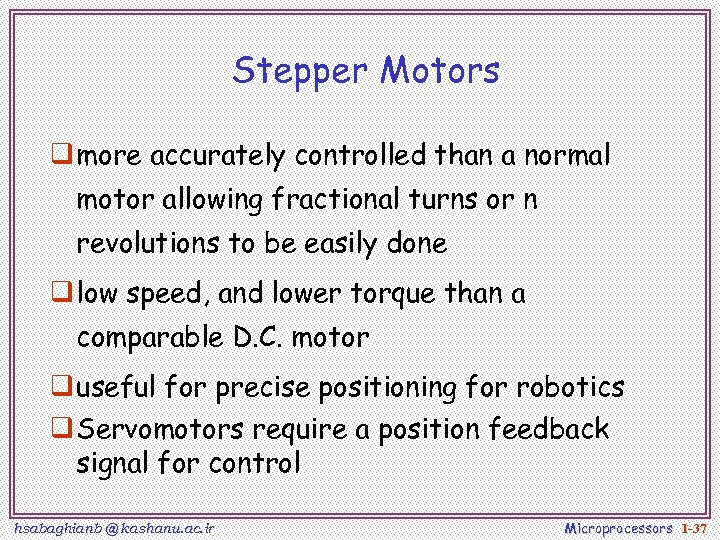 Stepper Motors q more accurately controlled than a normal motor allowing fractional turns or n revolutions to be easily done q low speed, and lower torque than a comparable D. C. motor q useful for precise positioning for robotics q Servomotors require a position feedback signal for control hsabaghianb @ kashanu. ac. ir Microprocessors 1 -37
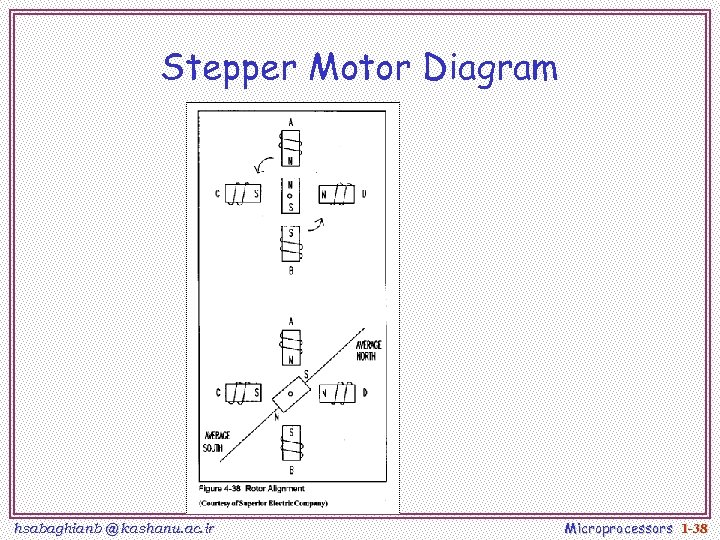 Stepper Motor Diagram hsabaghianb @ kashanu. ac. ir Microprocessors 1 -38
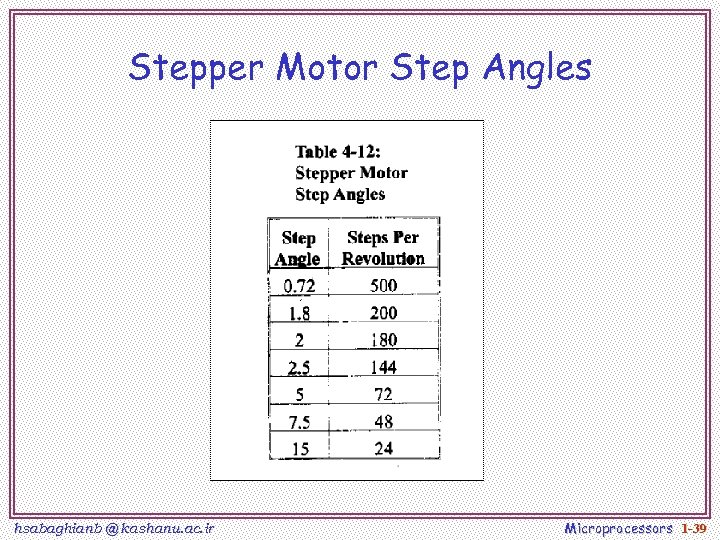 Stepper Motor Step Angles hsabaghianb @ kashanu. ac. ir Microprocessors 1 -39
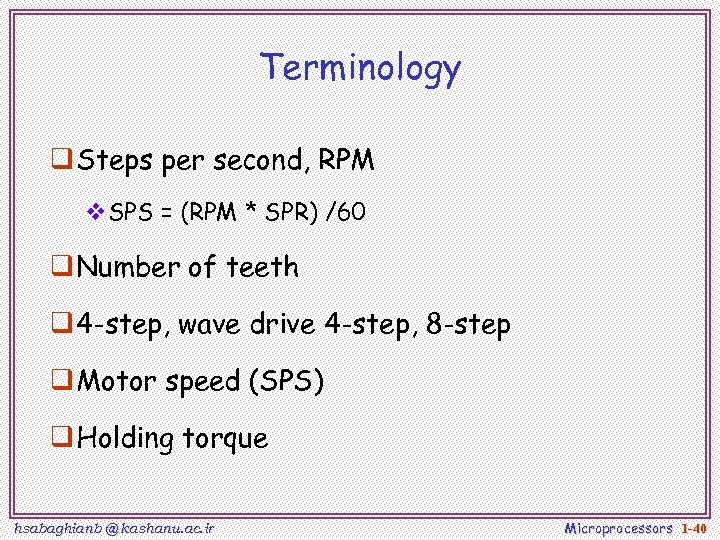 Terminology q Steps per second, RPM v. SPS = (RPM * SPR) /60 q Number of teeth q 4 -step, wave drive 4 -step, 8 -step q Motor speed (SPS) q Holding torque hsabaghianb @ kashanu. ac. ir Microprocessors 1 -40
 Stepper Motor Types v. Variable Reluctance v. Permanent Magnet hsabaghianb @ kashanu. ac. ir Microprocessors 1 -41
 Variable Reluctance Motors hsabaghianb @ kashanu. ac. ir Microprocessors 1 -42
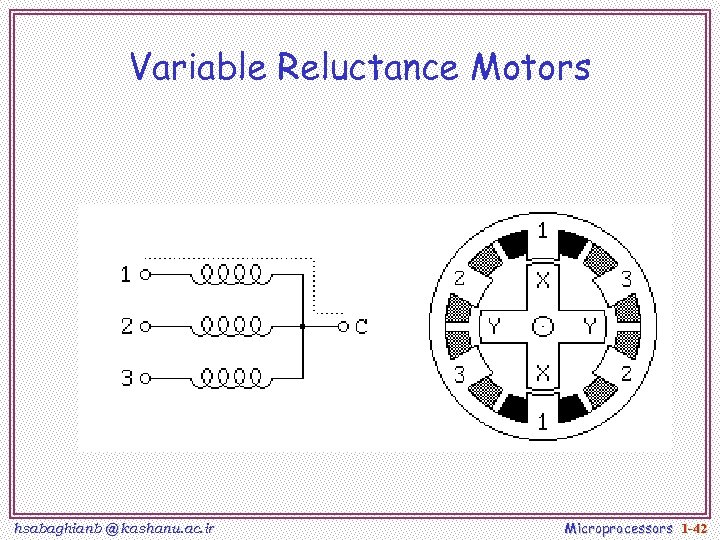
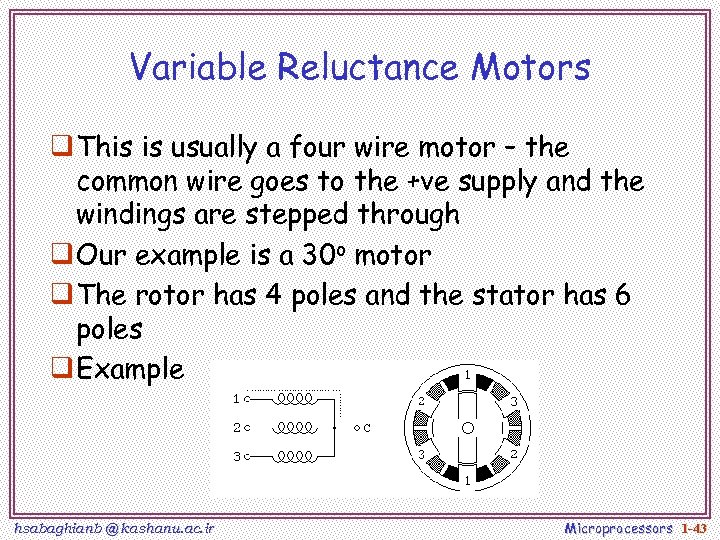 Variable Reluctance Motors q This is usually a four wire motor – the common wire goes to the +ve supply and the windings are stepped through q Our example is a 30 o motor q The rotor has 4 poles and the stator has 6 poles q Example hsabaghianb @ kashanu. ac. ir Microprocessors 1 -43
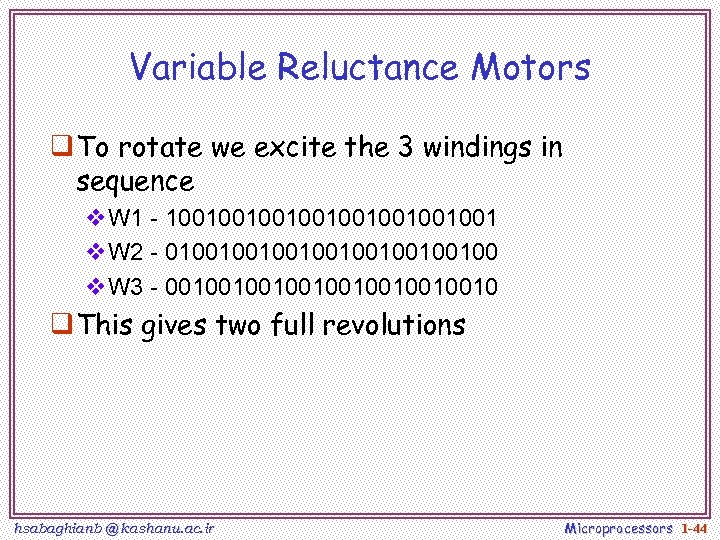 Variable Reluctance Motors q To rotate we excite the 3 windings in sequence v. W 1 - 1001001001001 v. W 2 - 0100100100100 v. W 3 - 0010010010010 q This gives two full revolutions hsabaghianb @ kashanu. ac. ir Microprocessors 1 -44
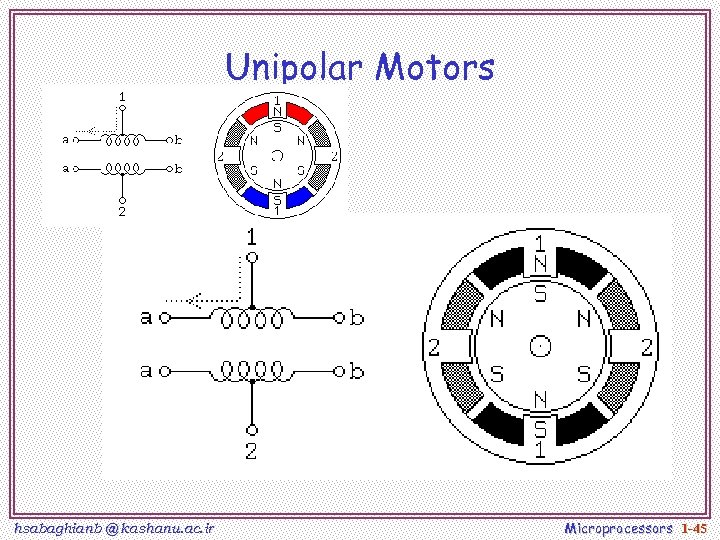 Unipolar Motors hsabaghianb @ kashanu. ac. ir Microprocessors 1 -45
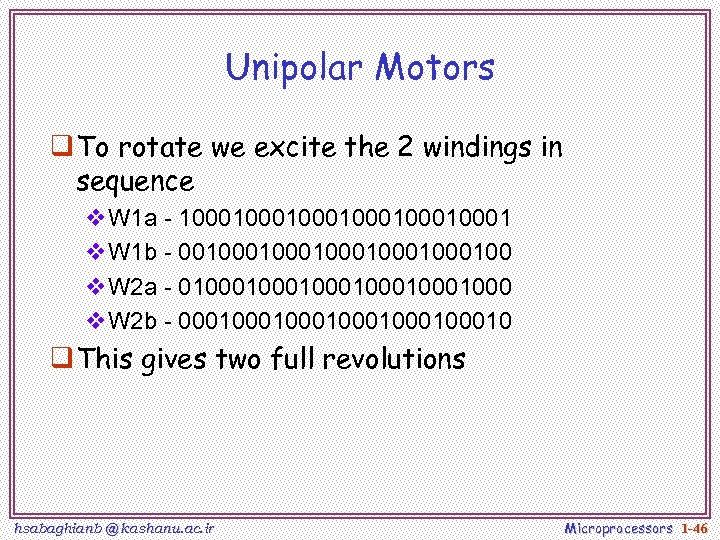 Unipolar Motors q To rotate we excite the 2 windings in sequence v. W 1 a - 1000100010001 v. W 1 b - 0010001000100 v. W 2 a - 0100010001000 v. W 2 b - 0001000100010 q This gives two full revolutions hsabaghianb @ kashanu. ac. ir Microprocessors 1 -46
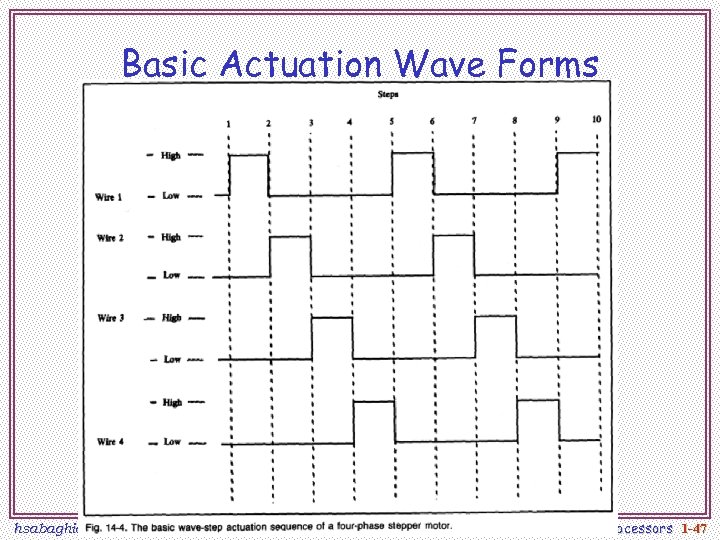 Basic Actuation Wave Forms hsabaghianb @ kashanu. ac. ir Microprocessors 1 -47
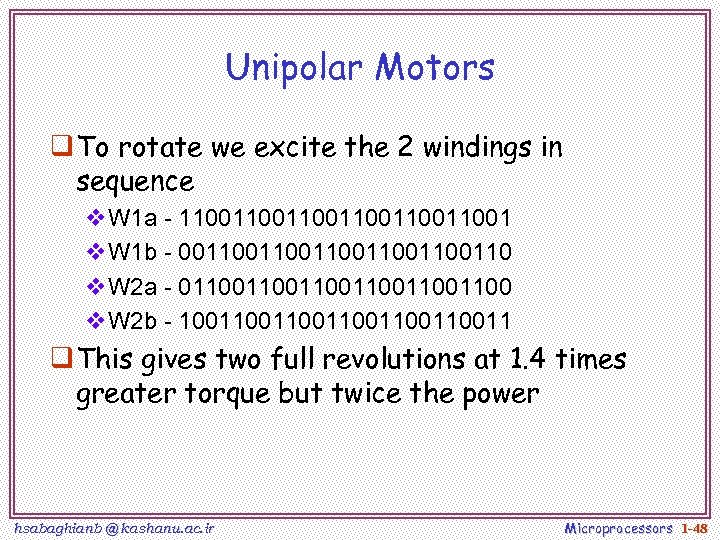 Unipolar Motors q To rotate we excite the 2 windings in sequence v. W 1 a - 1100110011001 v. W 1 b - 0011001100110 v. W 2 a - 0110011001100 v. W 2 b - 1001100110011 q This gives two full revolutions at 1. 4 times greater torque but twice the power hsabaghianb @ kashanu. ac. ir Microprocessors 1 -48
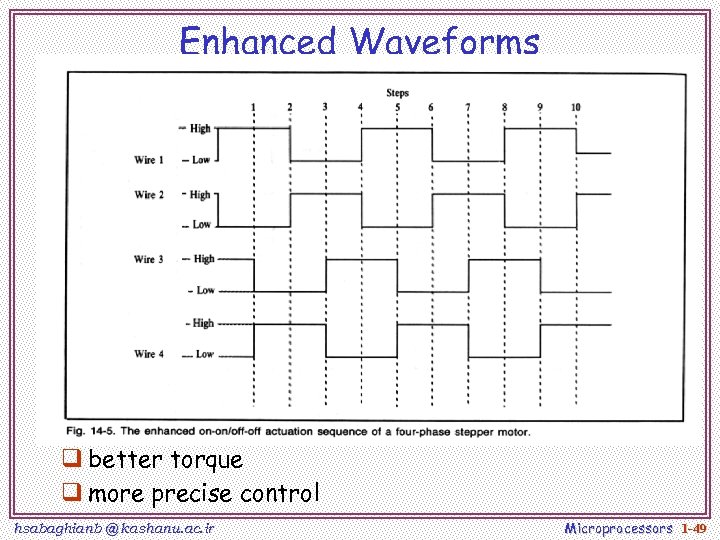 Enhanced Waveforms q better torque q more precise control hsabaghianb @ kashanu. ac. ir Microprocessors 1 -49
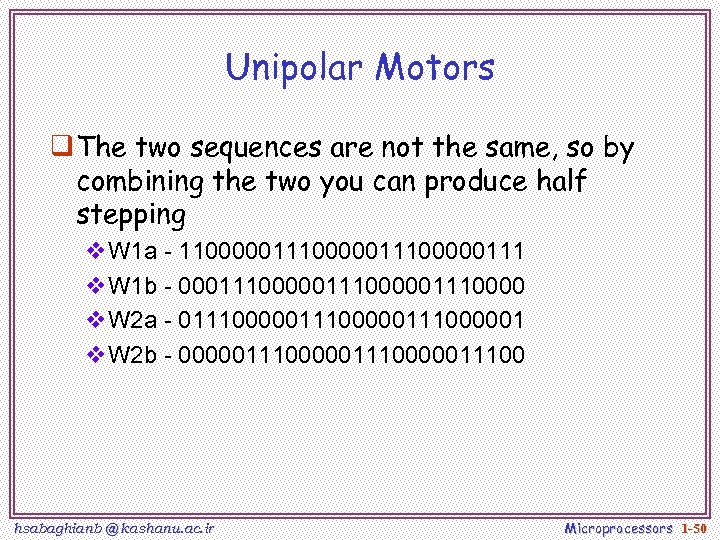 Unipolar Motors q The two sequences are not the same, so by combining the two you can produce half stepping v. W 1 a - 110000011100000111 v. W 1 b - 000111000001110000 v. W 2 a - 011100000111000001 v. W 2 b - 000001110000011100 hsabaghianb @ kashanu. ac. ir Microprocessors 1 -50
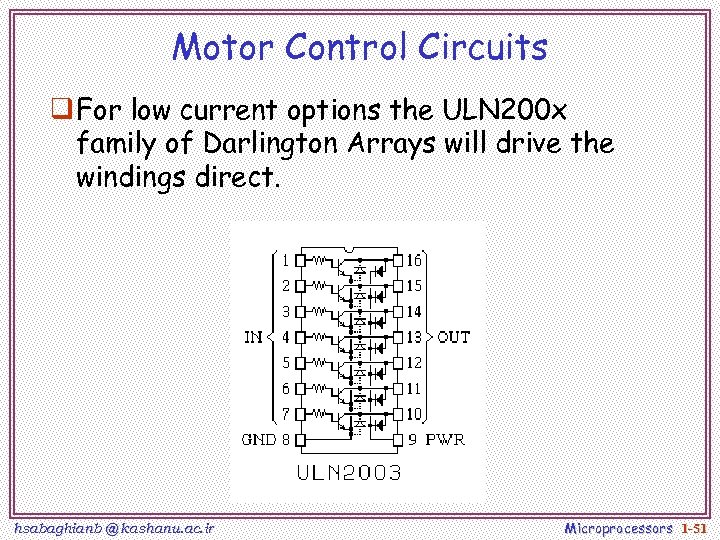 Motor Control Circuits q For low current options the ULN 200 x family of Darlington Arrays will drive the windings direct. hsabaghianb @ kashanu. ac. ir Microprocessors 1 -51
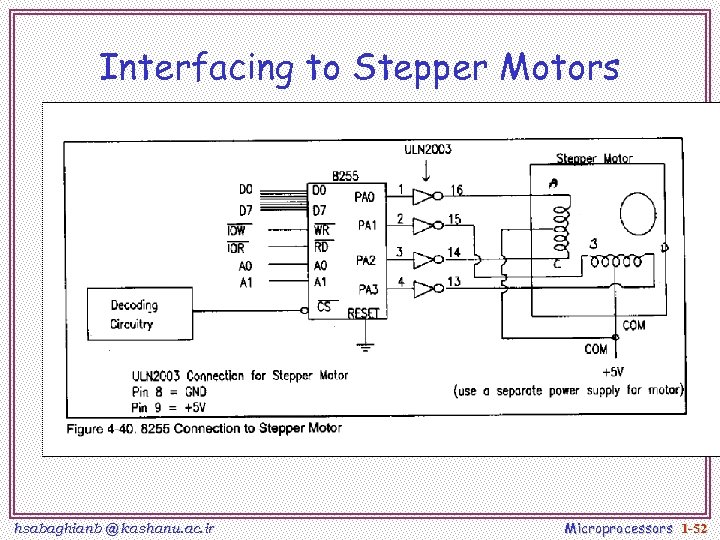 Interfacing to Stepper Motors hsabaghianb @ kashanu. ac. ir Microprocessors 1 -52
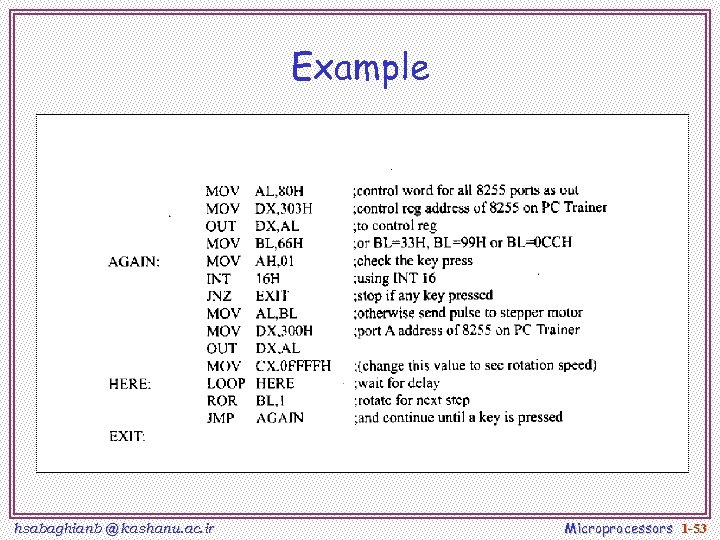 Example hsabaghianb @ kashanu. ac. ir Microprocessors 1 -53
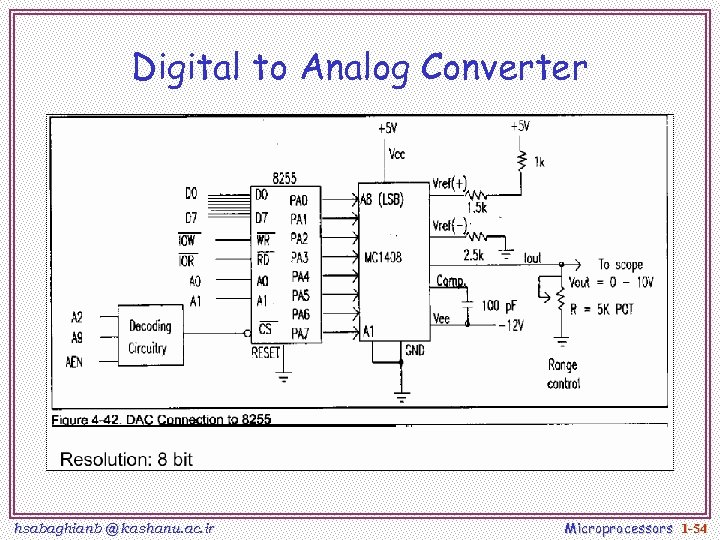 Digital to Analog Converter hsabaghianb @ kashanu. ac. ir Microprocessors 1 -54
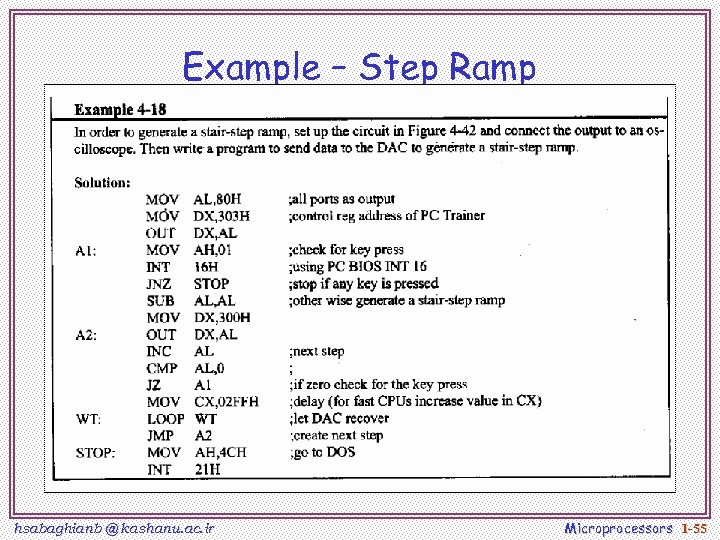 Example – Step Ramp hsabaghianb @ kashanu. ac. ir Microprocessors 1 -55
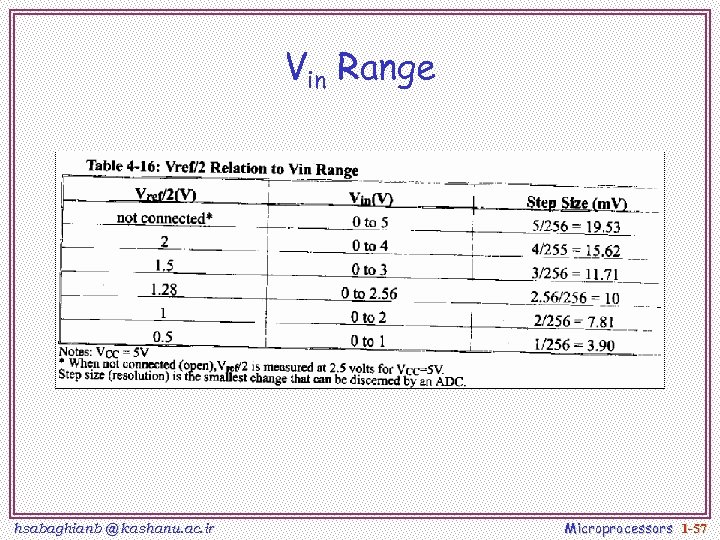
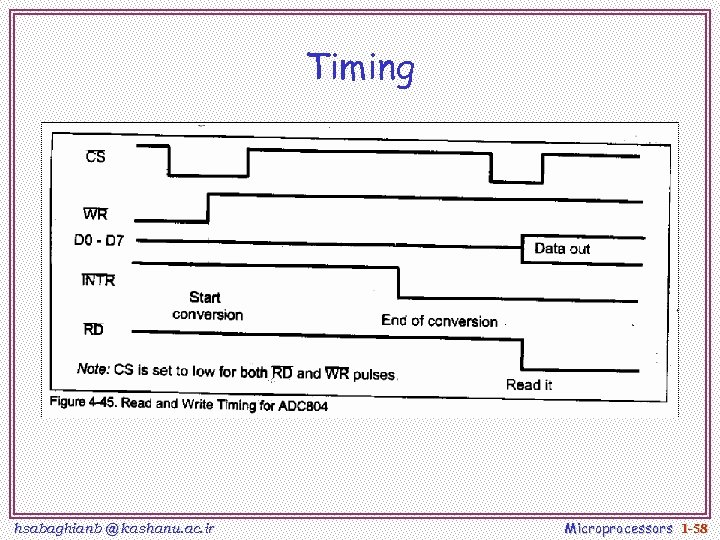
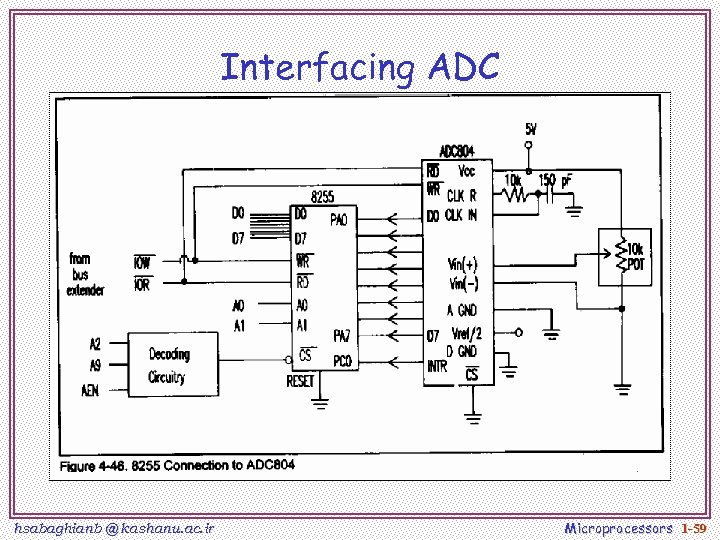
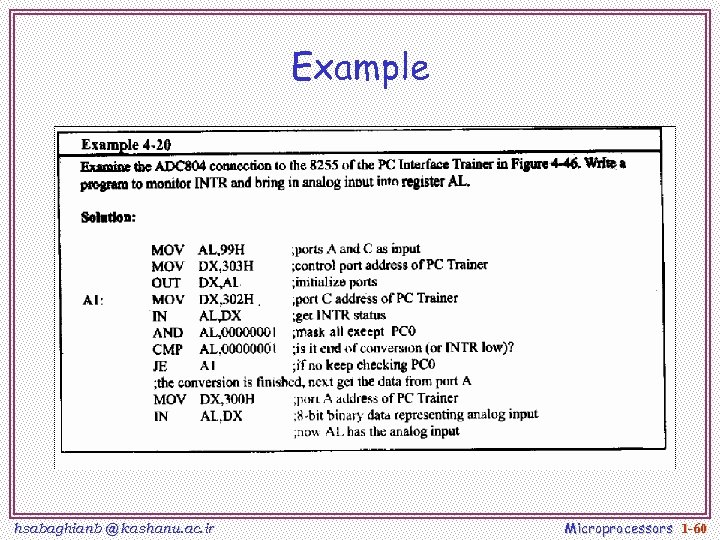
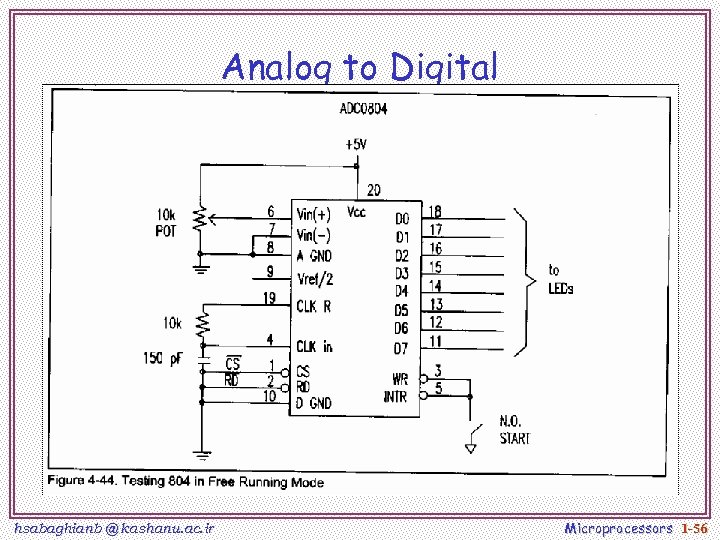 Analog to Digital hsabaghianb @ kashanu. ac. ir Microprocessors 1 -56
 Vin Range hsabaghianb @ kashanu. ac. ir Microprocessors 1 -57
 Timing hsabaghianb @ kashanu. ac. ir Microprocessors 1 -58
 Interfacing ADC hsabaghianb @ kashanu. ac. ir Microprocessors 1 -59
 Example hsabaghianb @ kashanu. ac. ir Microprocessors 1 -60
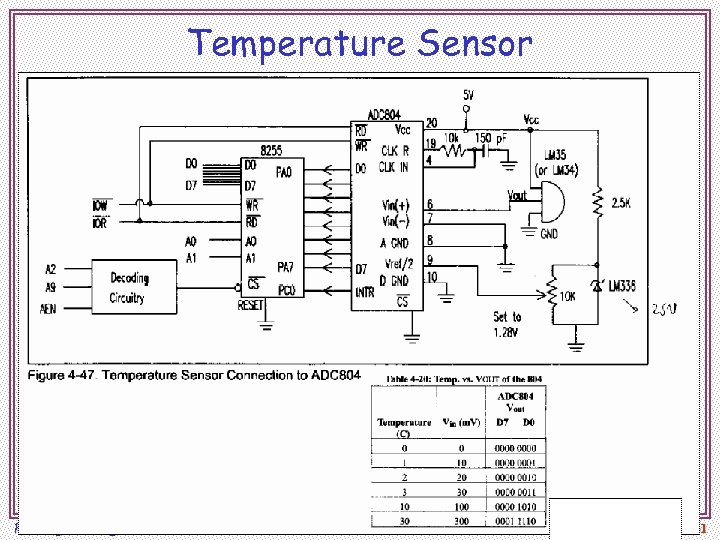 Temperature Sensor hsabaghianb @ kashanu. ac. ir Microprocessors 1 -61
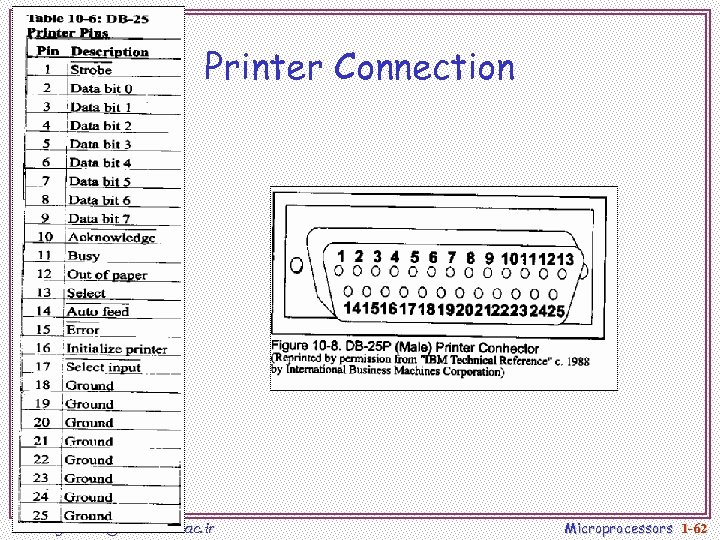 Printer Connection hsabaghianb @ kashanu. ac. ir Microprocessors 1 -62
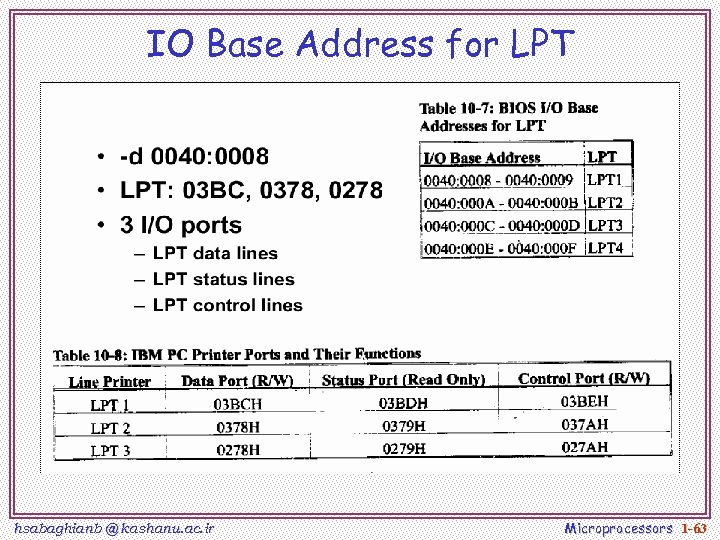 IO Base Address for LPT hsabaghianb @ kashanu. ac. ir Microprocessors 1 -63
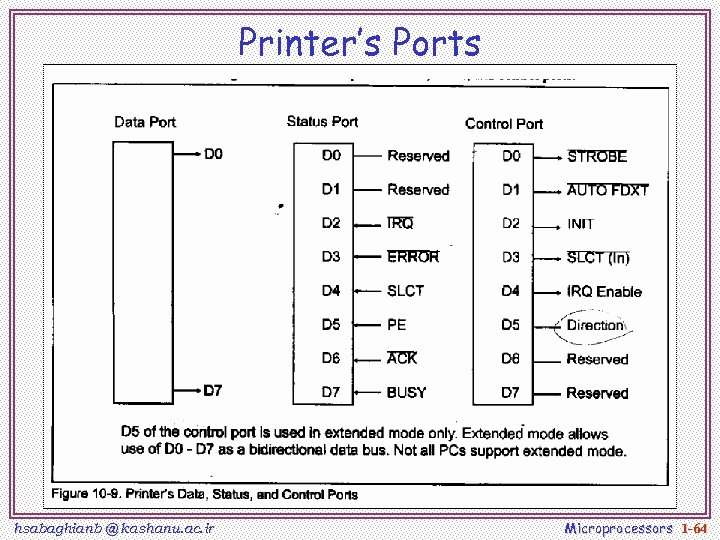 Printer’s Ports hsabaghianb @ kashanu. ac. ir Microprocessors 1 -64
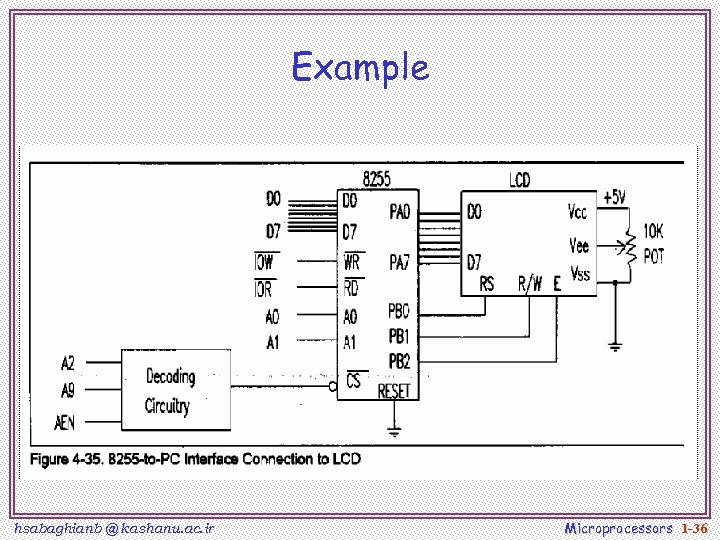
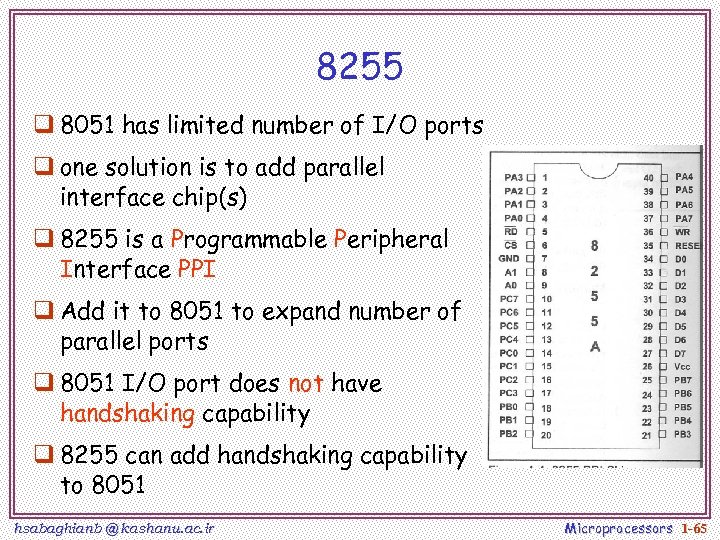 8255 q 8051 has limited number of I/O ports q one solution is to add parallel interface chip(s) q 8255 is a Programmable Peripheral Interface PPI q Add it to 8051 to expand number of parallel ports q 8051 I/O port does not have handshaking capability q 8255 can add handshaking capability to 8051 hsabaghianb @ kashanu. ac. ir Microprocessors 1 -65
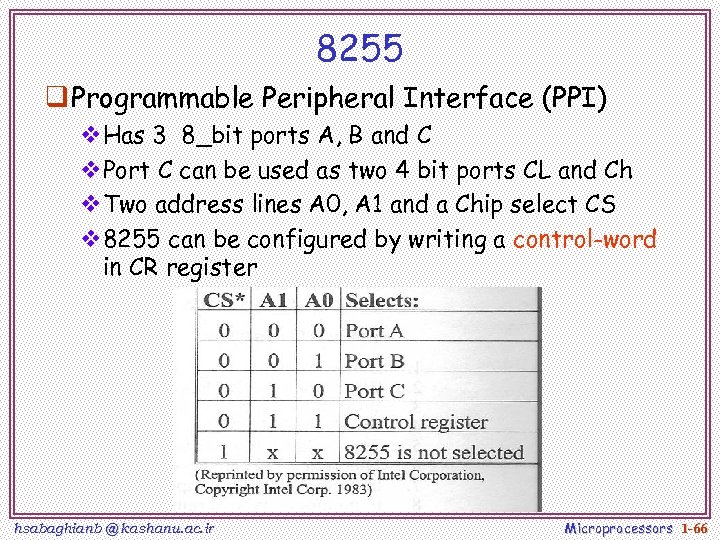 8255 q Programmable Peripheral Interface (PPI) v. Has 3 8_bit ports A, B and C v. Port C can be used as two 4 bit ports CL and Ch v. Two address lines A 0, A 1 and a Chip select CS v 8255 can be configured by writing a control-word in CR register hsabaghianb @ kashanu. ac. ir Microprocessors 1 -66
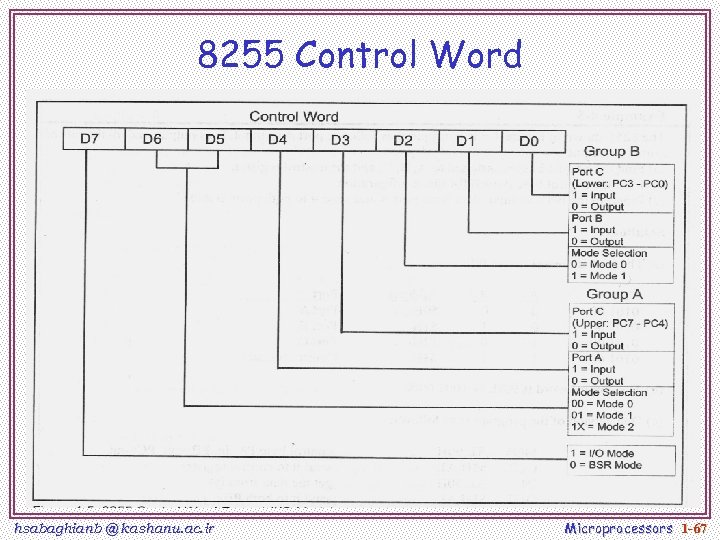 8255 Control Word hsabaghianb @ kashanu. ac. ir Microprocessors 1 -67
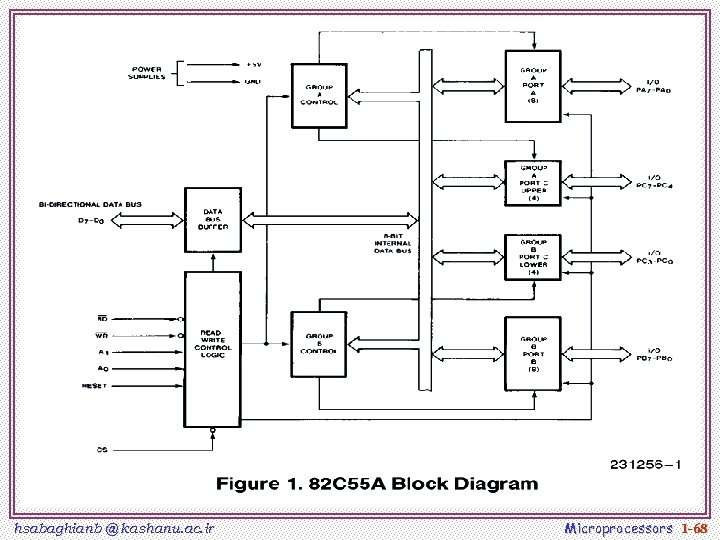 hsabaghianb @ kashanu. ac. ir Microprocessors 1 -68
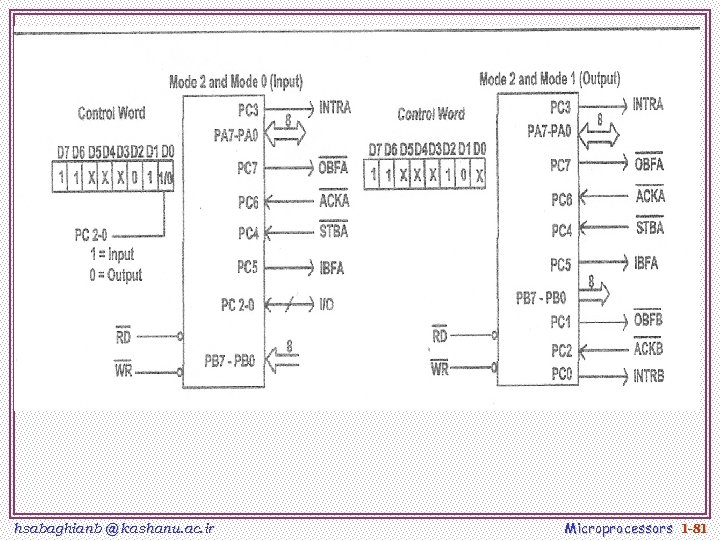
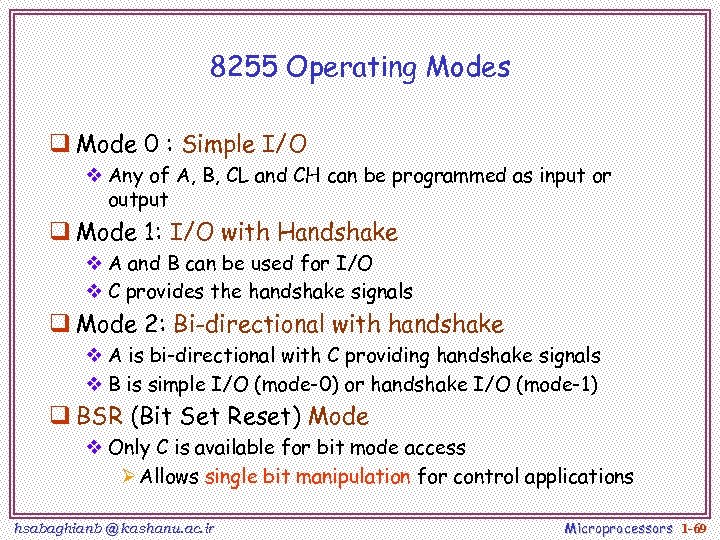 8255 Operating Modes q Mode 0 : Simple I/O v Any of A, B, CL and CH can be programmed as input or output q Mode 1: I/O with Handshake v A and B can be used for I/O v C provides the handshake signals q Mode 2: Bi-directional with handshake v A is bi-directional with C providing handshake signals v B is simple I/O (mode-0) or handshake I/O (mode-1) q BSR (Bit Set Reset) Mode v Only C is available for bit mode access Ø Allows single bit manipulation for control applications hsabaghianb @ kashanu. ac. ir Microprocessors 1 -69
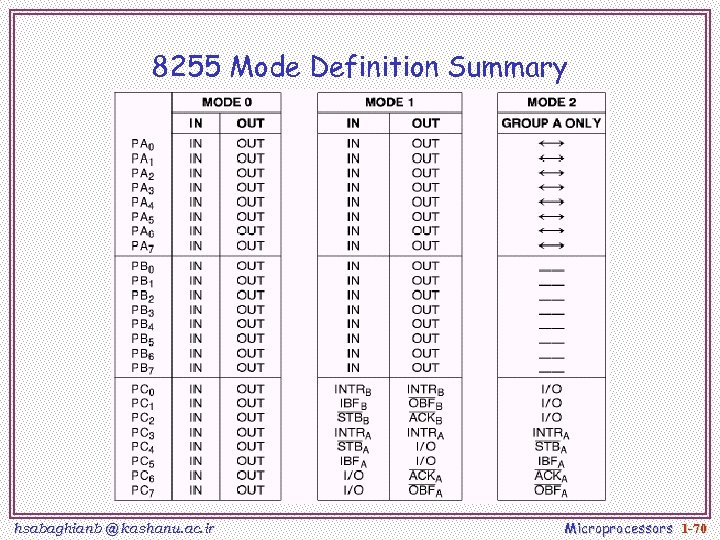 8255 Mode Definition Summary hsabaghianb @ kashanu. ac. ir Microprocessors 1 -70
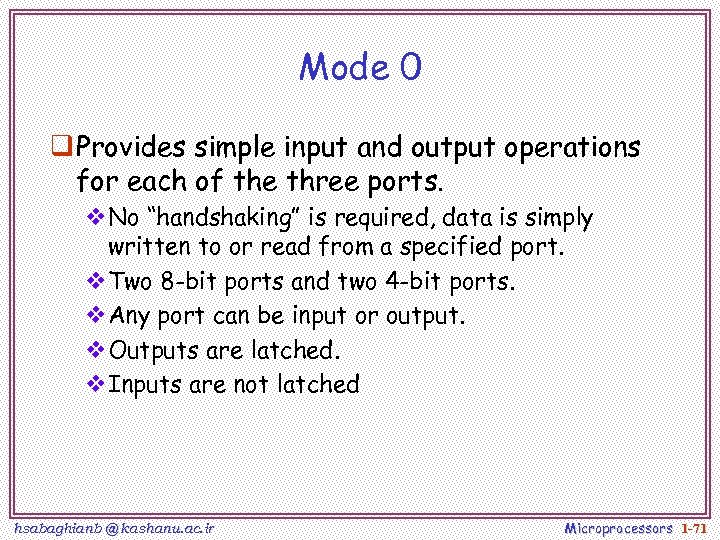 Mode 0 q Provides simple input and output operations for each of the three ports. v. No “handshaking” is required, data is simply written to or read from a specified port. v. Two 8 -bit ports and two 4 -bit ports. v. Any port can be input or output. v. Outputs are latched. v. Inputs are not latched hsabaghianb @ kashanu. ac. ir Microprocessors 1 -71
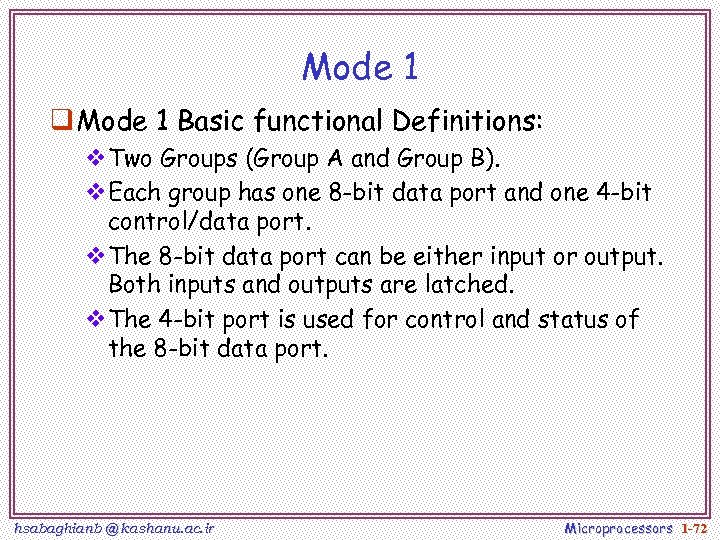 Mode 1 q Mode 1 Basic functional Definitions: v. Two Groups (Group A and Group B). v. Each group has one 8 -bit data port and one 4 -bit control/data port. v. The 8 -bit data port can be either input or output. Both inputs and outputs are latched. v. The 4 -bit port is used for control and status of the 8 -bit data port. hsabaghianb @ kashanu. ac. ir Microprocessors 1 -72
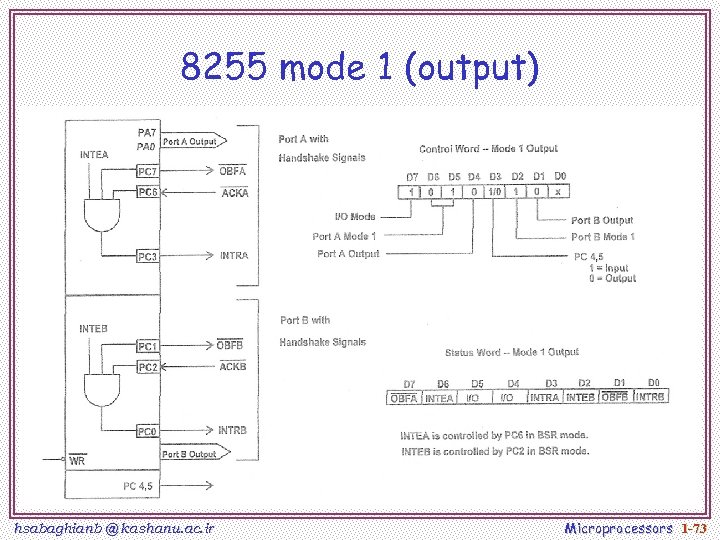 8255 mode 1 (output) hsabaghianb @ kashanu. ac. ir Microprocessors 1 -73
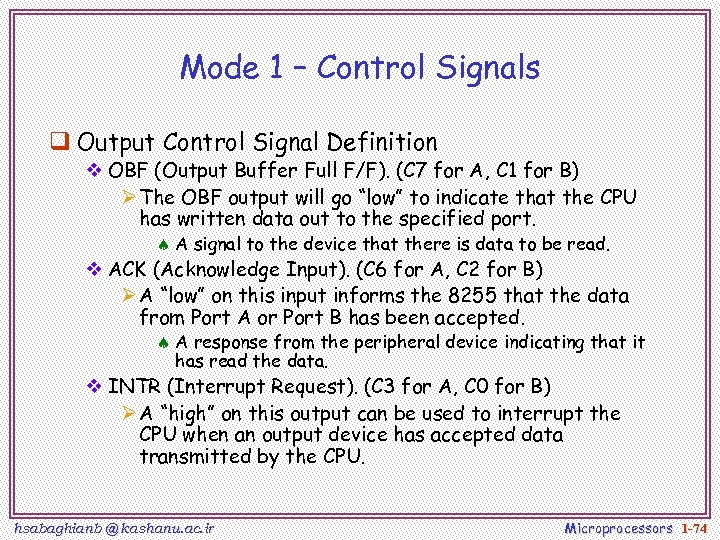 Mode 1 – Control Signals q Output Control Signal Definition v OBF (Output Buffer Full F/F). (C 7 for A, C 1 for B) Ø The OBF output will go “low” to indicate that the CPU has written data out to the specified port. ª A signal to the device that there is data to be read. v ACK (Acknowledge Input). (C 6 for A, C 2 for B) Ø A “low” on this input informs the 8255 that the data from Port A or Port B has been accepted. ª A response from the peripheral device indicating that it has read the data. v INTR (Interrupt Request). (C 3 for A, C 0 for B) Ø A “high” on this output can be used to interrupt the CPU when an output device has accepted data transmitted by the CPU. hsabaghianb @ kashanu. ac. ir Microprocessors 1 -74
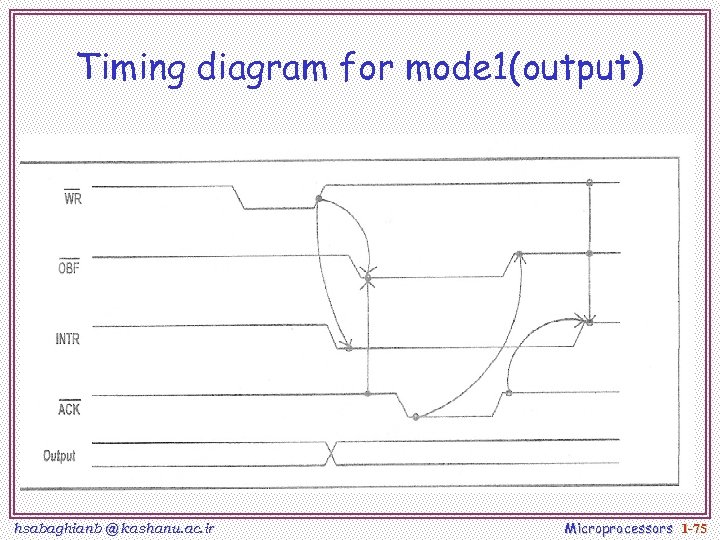 Timing diagram for mode 1(output) hsabaghianb @ kashanu. ac. ir Microprocessors 1 -75
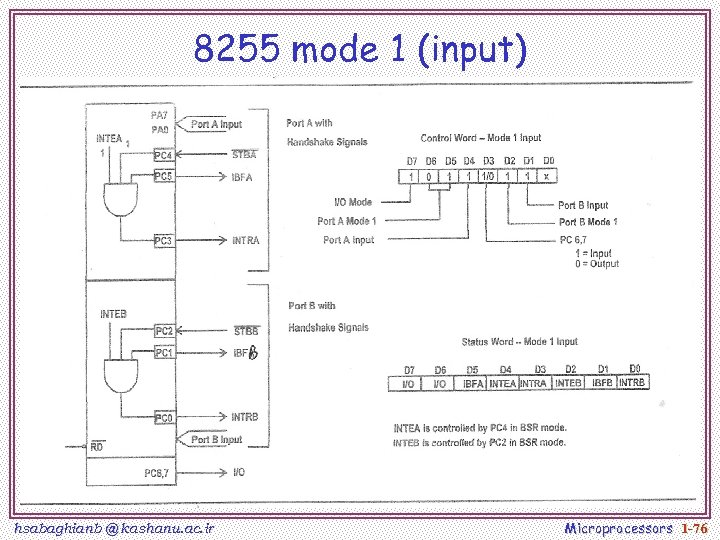 8255 mode 1 (input) hsabaghianb @ kashanu. ac. ir Microprocessors 1 -76
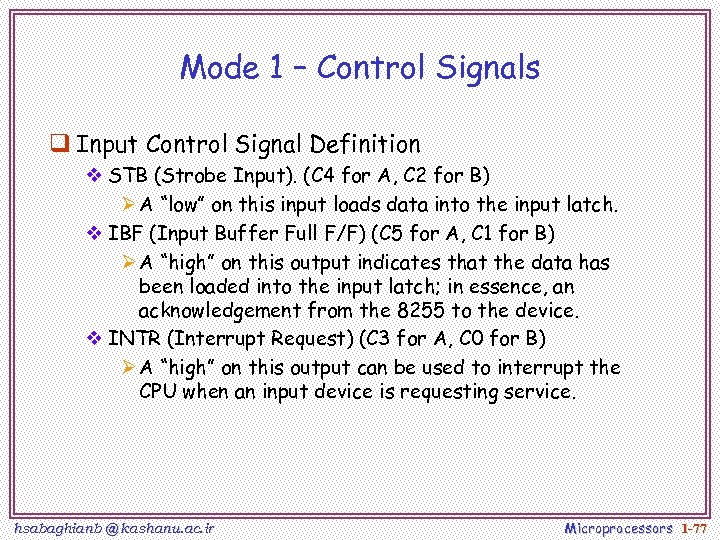 Mode 1 – Control Signals q Input Control Signal Definition v STB (Strobe Input). (C 4 for A, C 2 for B) Ø A “low” on this input loads data into the input latch. v IBF (Input Buffer Full F/F) (C 5 for A, C 1 for B) Ø A “high” on this output indicates that the data has been loaded into the input latch; in essence, an acknowledgement from the 8255 to the device. v INTR (Interrupt Request) (C 3 for A, C 0 for B) Ø A “high” on this output can be used to interrupt the CPU when an input device is requesting service. hsabaghianb @ kashanu. ac. ir Microprocessors 1 -77
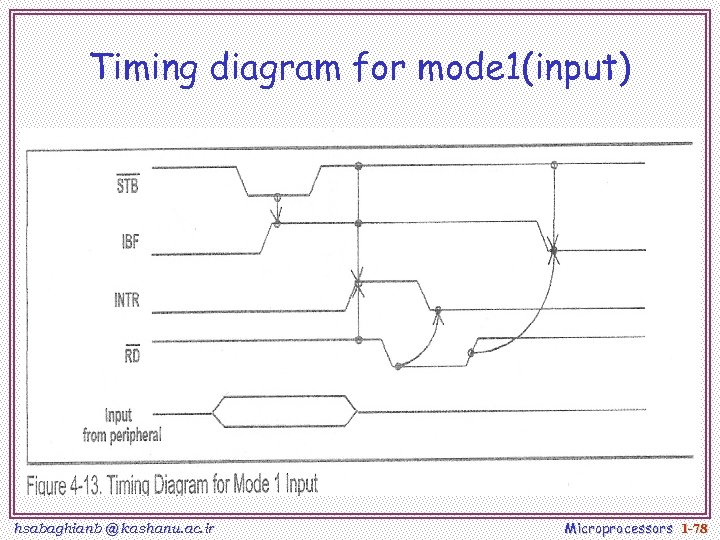 Timing diagram for mode 1(input) hsabaghianb @ kashanu. ac. ir Microprocessors 1 -78
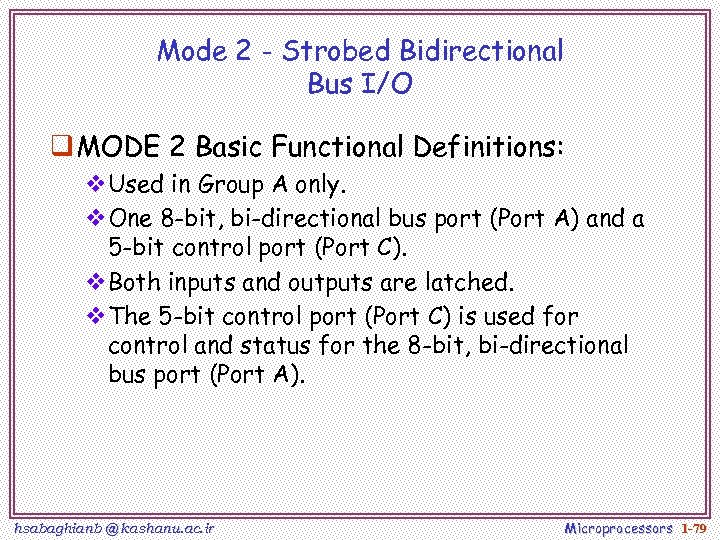 Mode 2 - Strobed Bidirectional Bus I/O q MODE 2 Basic Functional Definitions: v. Used in Group A only. v. One 8 -bit, bi-directional bus port (Port A) and a 5 -bit control port (Port C). v. Both inputs and outputs are latched. v. The 5 -bit control port (Port C) is used for control and status for the 8 -bit, bi-directional bus port (Port A). hsabaghianb @ kashanu. ac. ir Microprocessors 1 -79
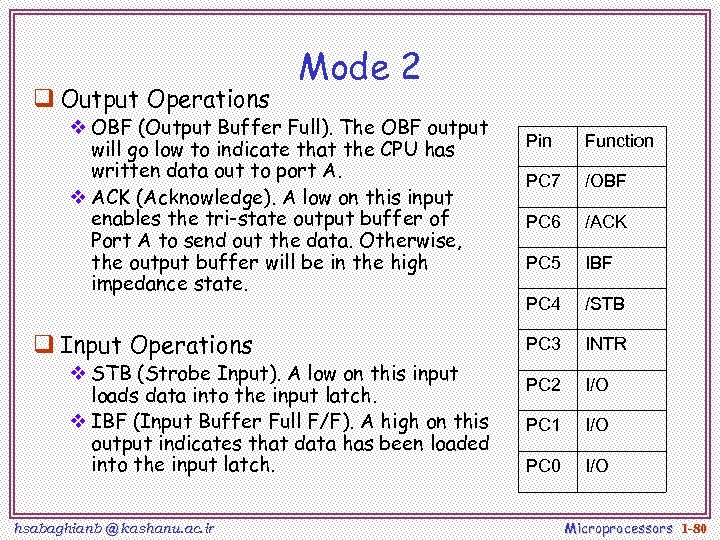 q Output Operations Mode 2 v OBF (Output Buffer Full). The OBF output will go low to indicate that the CPU has written data out to port A. v ACK (Acknowledge). A low on this input enables the tri-state output buffer of Port A to send out the data. Otherwise, the output buffer will be in the high impedance state. q Input Operations v STB (Strobe Input). A low on this input loads data into the input latch. v IBF (Input Buffer Full F/F). A high on this output indicates that data has been loaded into the input latch. hsabaghianb @ kashanu. ac. ir Pin Function PC 7 /OBF PC 6 /ACK PC 5 IBF PC 4 /STB PC 3 INTR PC 2 I/O PC 1 I/O PC 0 I/O Microprocessors 1 -80
 hsabaghianb @ kashanu. ac. ir Microprocessors 1 -81
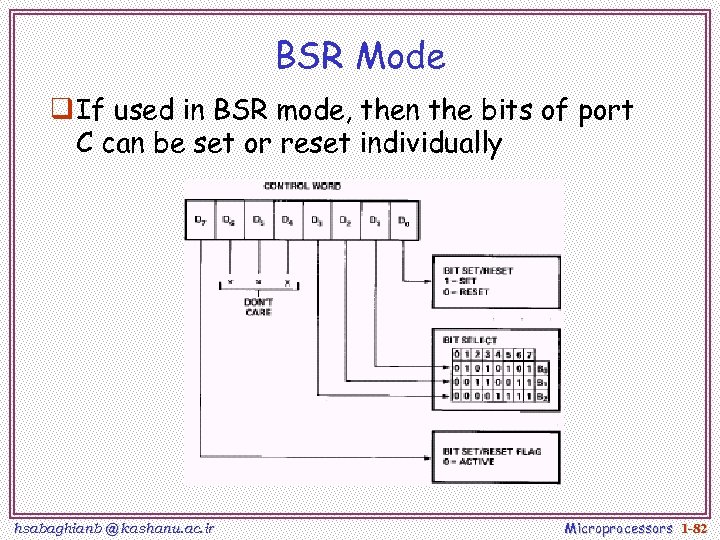 BSR Mode q If used in BSR mode, then the bits of port C can be set or reset individually hsabaghianb @ kashanu. ac. ir Microprocessors 1 -82
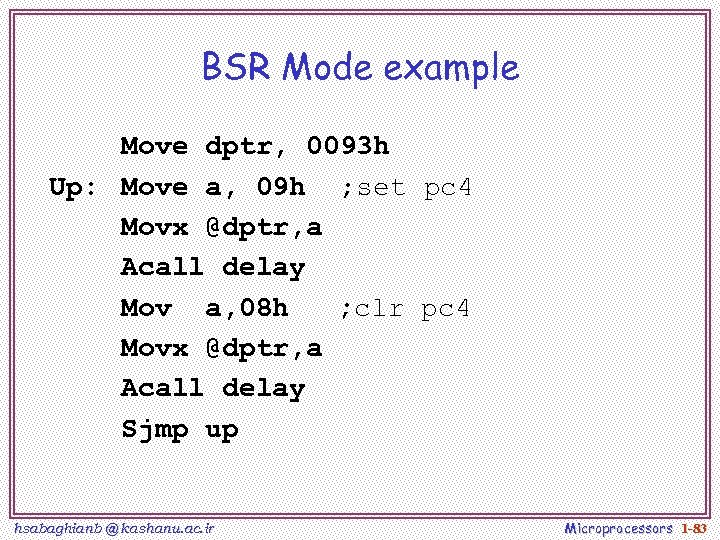 BSR Mode example Move dptr, 0093 h Up: Move a, 09 h ; set pc 4 Movx @dptr, a Acall delay Mov a, 08 h ; clr pc 4 Movx @dptr, a Acall delay Sjmp up hsabaghianb @ kashanu. ac. ir Microprocessors 1 -83
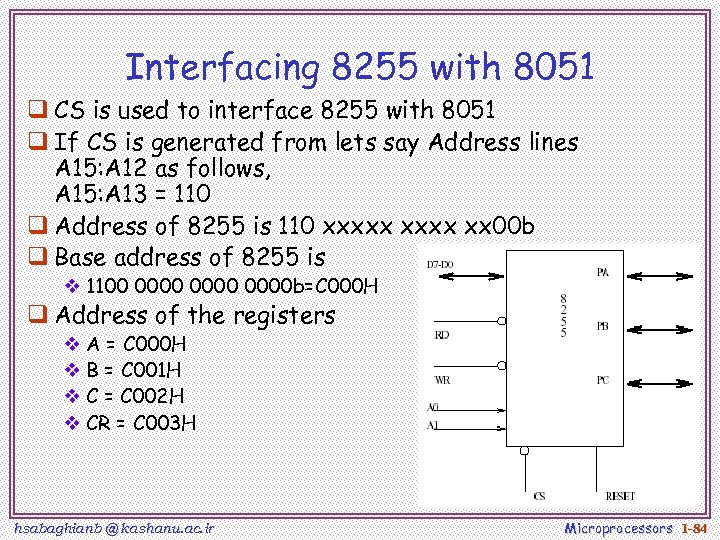 Interfacing 8255 with 8051 q CS is used to interface 8255 with 8051 q If CS is generated from lets say Address lines A 15: A 12 as follows, A 15: A 13 = 110 q Address of 8255 is 110 xxxxx xx 00 b q Base address of 8255 is v 1100 0000 b=C 000 H q Address of the registers v A = C 000 H v B = C 001 H v C = C 002 H v CR = C 003 H hsabaghianb @ kashanu. ac. ir Microprocessors 1 -84
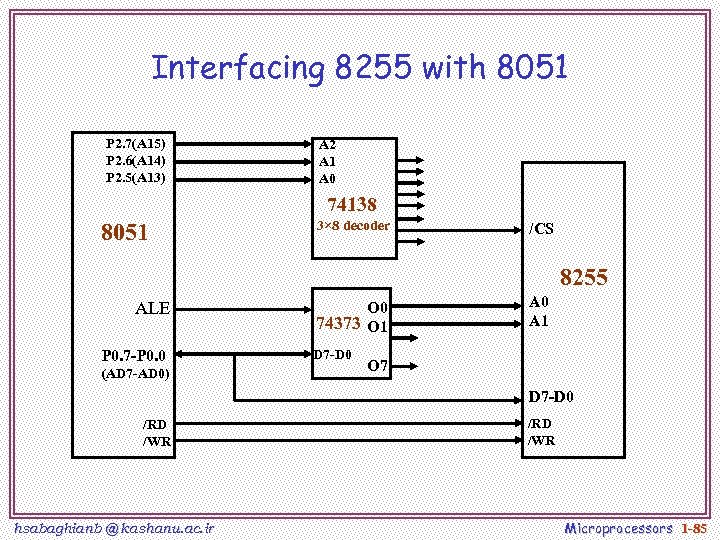 Interfacing 8255 with 8051 P 2. 7(A 15) P 2. 6(A 14) P 2. 5(A 13) A 2 A 1 A 0 74138 8051 3× 8 decoder /CS 8255 ALE P 0. 7 -P 0. 0 (AD 7 -AD 0) O 0 74373 O 1 D 7 -D 0 A 1 O 7 D 7 -D 0 /RD /WR hsabaghianb @ kashanu. ac. ir /RD /WR Microprocessors 1 -85
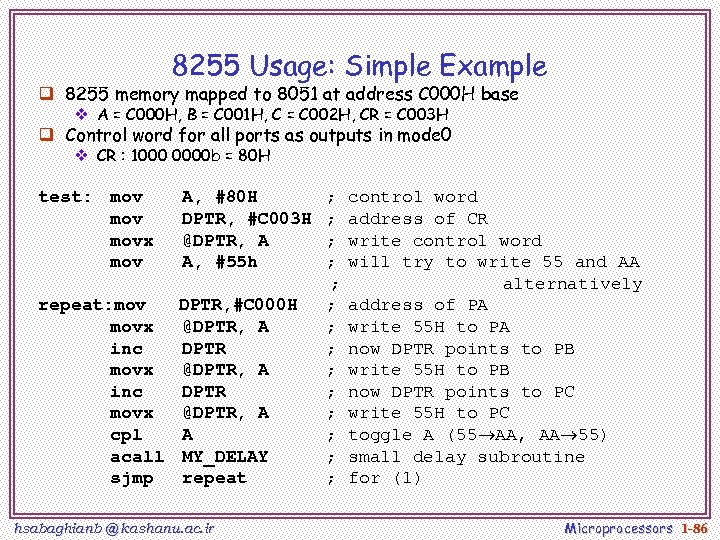 8255 Usage: Simple Example q 8255 memory mapped to 8051 at address C 000 H base v A = C 000 H, B = C 001 H, C = C 002 H, CR = C 003 H q Control word for all ports as outputs in mode 0 v CR : 1000 0000 b = 80 H test: mov movx mov A, #80 H DPTR, #C 003 H @DPTR, A A, #55 h repeat: mov DPTR, #C 000 H movx @DPTR, A inc DPTR movx @DPTR, A cpl A acall MY_DELAY sjmp repeat hsabaghianb @ kashanu. ac. ir ; ; ; ; control word address of CR write control word will try to write 55 and AA alternatively address of PA write 55 H to PA now DPTR points to PB write 55 H to PB now DPTR points to PC write 55 H to PC toggle A (55 AA, AA 55) small delay subroutine for (1) Microprocessors 1 -86