


 Скачать презентацию HUAWEI e Sight Network Overview Presentation Author ID Zhaoting 00191671
c8b01e574f207854c08901397f7d03da.ppt
- Количество слайдов: 44
 HUAWEI e. Sight Network Overview Presentation Author/ID: Zhaoting/00191671 Dept: Enterprise Networking Marketing Execution Dept Version: V 6. 0 (2017)
 Author/ID Zhaoting/00191671 Department Enterprise Networking Marketing Execution Dept Group Email Address ask_e. Sight_MKT@huawei. com Co-author/ID Approver/ID Dujiang 00160616 Release Date 2016 -07 -20 . e befor Pleas g this pa delete e e stomer nt to cu se you pre
 Intended Audience and Change History Product Name e. Sight Network Version V 6. 0 Content This slide describes e. Sight features. Material Usage The front-line customer managers and product managers can use this slide to introduce e. Sight Network to customers. Purpose This slide describes management concepts and highlights of e. Sight. Change History V 1. 0, 2013 -11 -20, author: Lijialian/00059516. Initial version. V 2. 0, 2014 -07 -30, author: Lijialian/00059516. Update V 3. 0, 2015 -01 -20, author: Zhaoting/00191671. Update V 4. 0, 2016 -07 -12, author: Chengfei/00218381. Update V 5. 0, 2017 -02 -27, author: Chengfei/00218381. Update V 6. 0, 2017 -11 -15, author: Shanshan/00242855. Update
 Contents 1 Network Management Status and Challenges 2 Huawei e. Sight Management Features 3 Success Stories 3
 Multi-Vendor Devices and Multiple NMSs Increase Network Management Costs Network resources Management system Costs The styles and operating graphical user interfaces (GUIs) of different NMSs are different, increasing costs on learning how to use these NMS products. Various NMSs cannot be associated. 4
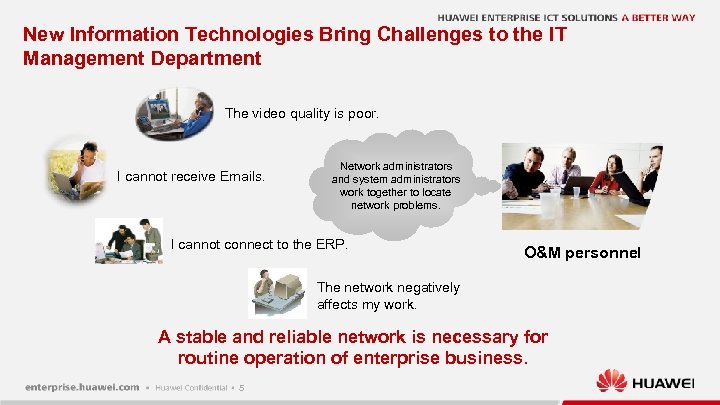 New Information Technologies Bring Challenges to the IT Management Department The video quality is poor. I cannot receive Emails. Network administrators and system administrators work together to locate network problems. I cannot connect to the ERP. O&M personnel The network negatively affects my work. A stable and reliable network is necessary for routine operation of enterprise business. 5
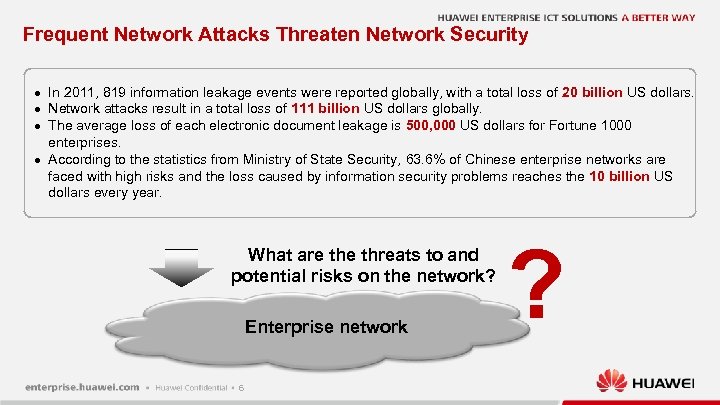 Frequent Network Attacks Threaten Network Security l l In 2011, 819 information leakage events were reported globally, with a total loss of 20 billion US dollars. Network attacks result in a total loss of 111 billion US dollars globally. The average loss of each electronic document leakage is 500, 000 US dollars for Fortune 1000 enterprises. According to the statistics from Ministry of State Security, 63. 6% of Chinese enterprise networks are faced with high risks and the loss caused by information security problems reaches the 10 billion US dollars every year. What are threats to and potential risks on the network? Enterprise network 6 ?
 Contents 3 Success Stories 7
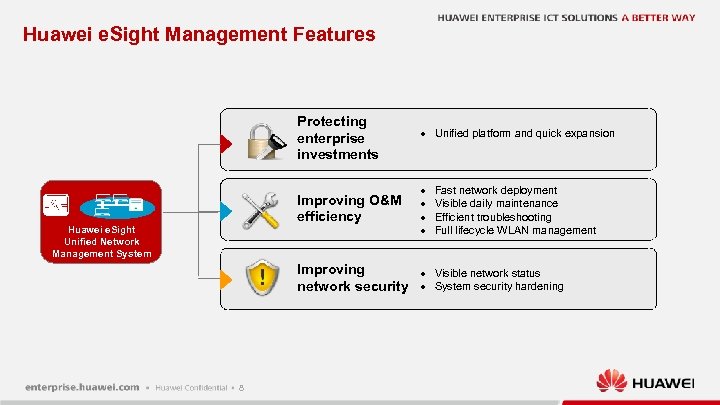 Huawei e. Sight Management Features Protecting enterprise investments Improving O&M efficiency Huawei e. Sight Unified Network Management System l l l Improving network security 8 l l Unified platform and quick expansion Fast network deployment Visible daily maintenance Efficient troubleshooting Full lifecycle WLAN management Visible network status System security hardening
 Protecting Enterprise Investments l Unified platform and quick expansion 9
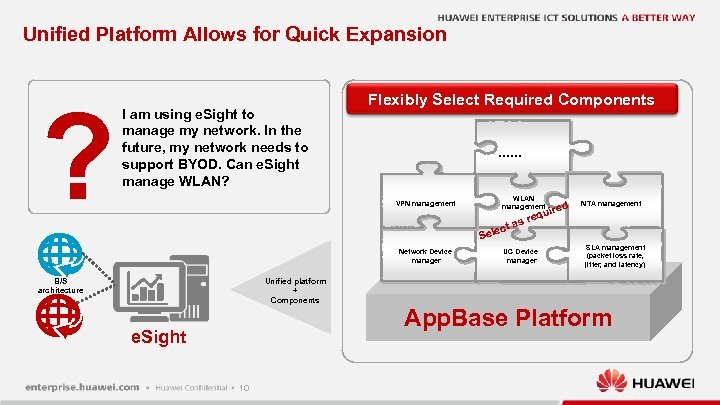 Unified Platform Allows for Quick Expansion ? I am using e. Sight to manage my network. In the future, my network needs to support BYOD. Can e. Sight manage WLAN? Flexibly Select Required Components …… VPN management WLAN management ec Sel Network Device manager t as red ui req UC Device manager NTA management SLA management (packet loss rate, jitter, and latency) Unified platform + Components B/S architecture App. Base Platform e. Sight 10
 Improving O&M Efficiency l l Fast network deployment Visible daily maintenance Efficient troubleshooting Full lifecycle WLAN management 11
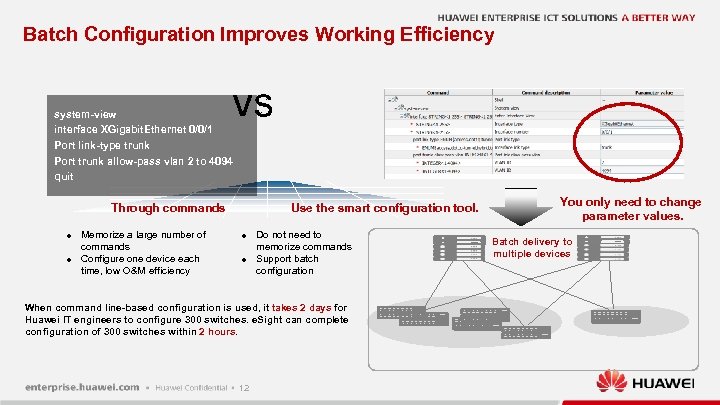 Batch Configuration Improves Working Efficiency VS system-view interface XGigabit. Ethernet 0/0/1 Port link-type trunk Port trunk allow-pass vlan 2 to 4094 quit Use the smart configuration tool. Through commands l l Memorize a large number of commands Configure one device each time, low O&M efficiency l l Do not need to memorize commands Support batch configuration When command line-based configuration is used, it takes 2 days for Huawei IT engineers to configure 300 switches. e. Sight can complete configuration of 300 switches within 2 hours. 12 You only need to change parameter values. Batch delivery to multiple devices …. . .
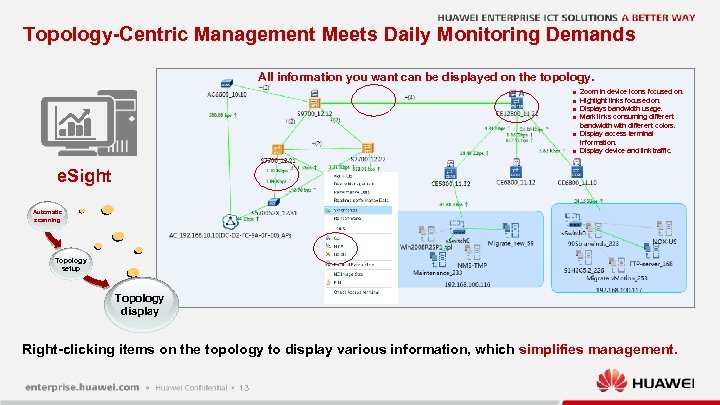 Topology-Centric Management Meets Daily Monitoring Demands All information you want can be displayed on the topology. l l l Zoom in device icons focused on. Highlight links focused on. Displays bandwidth usage. Mark links consuming different bandwidth with different colors. Display access terminal information. Display device and link traffic. e. Sight Automatic scanning Topology setup Topology display Right-clicking items on the topology to display various information, which simplifies management. 13
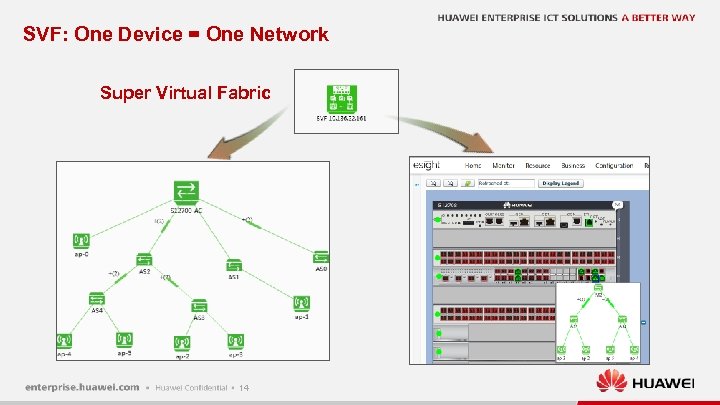 SVF: One Device = One Network Super Virtual Fabric 14
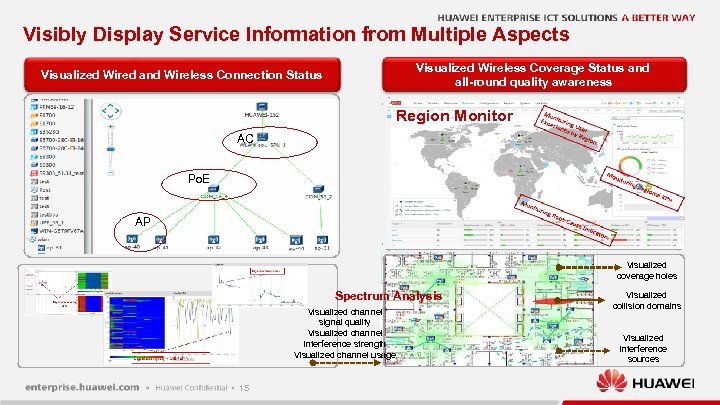 Visibly Display Service Information from Multiple Aspects Visualized Wireless Coverage Status and all-round quality awareness Visualized Wired and Wireless Connection Status Region Monitor AC Po. E AP Visualized coverage holes Spectrum Analysis Visualized channel signal quality Visualized channel interference strength Visualized channel usage 15 Visualized collision domains Visualized interference sources
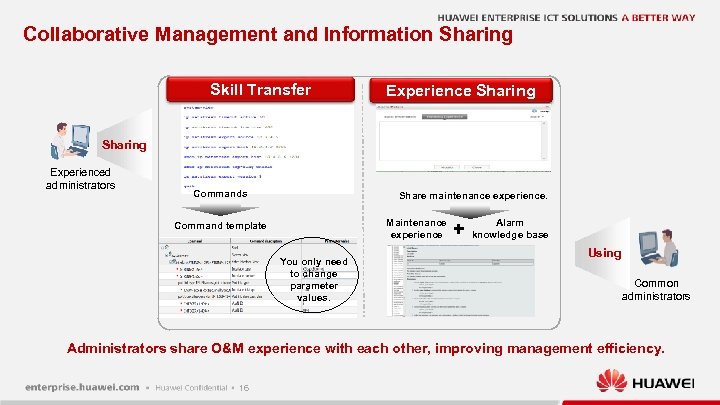 Collaborative Management and Information Sharing Skill Transfer Experience Sharing Experienced administrators Commands Share maintenance experience. Maintenance experience Command template You only need to change parameter values. + Alarm knowledge base Using Common administrators Administrators share O&M experience with each other, improving management efficiency. 16
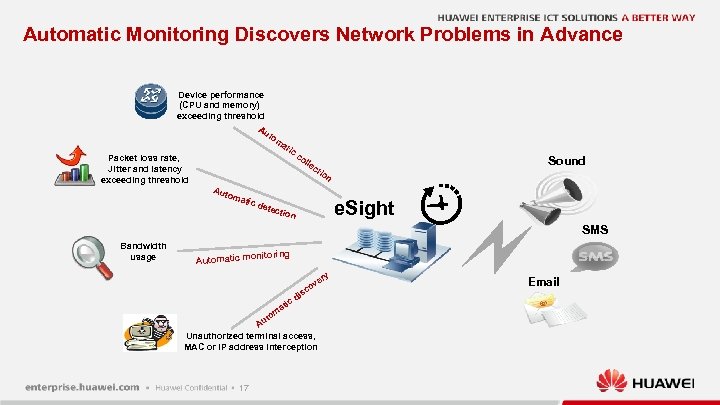 Automatic Monitoring Discovers Network Problems in Advance Device performance (CPU and memory) exceeding threshold Au to m at ic c ol lec Packet loss rate, Jitter and latency exceeding threshold Sound tio Aut oma n tic d e. Sight etec tion SMS Bandwidth usage onitoring Automatic m y er ov isc d ic at m to Au Unauthorized terminal access, MAC or IP address interception 17 Email
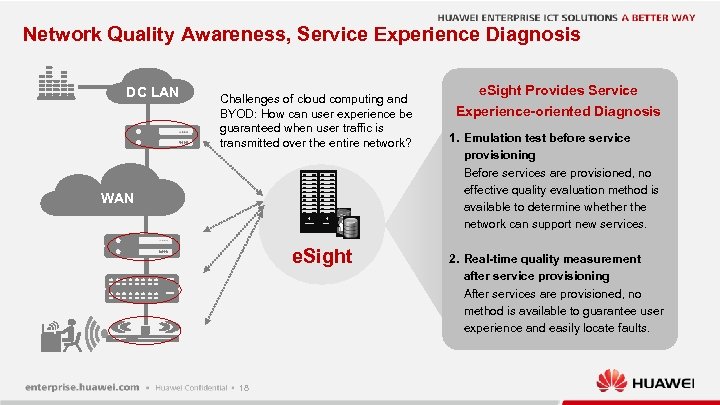 Network Quality Awareness, Service Experience Diagnosis DC LAN Challenges of cloud computing and BYOD: How can user experience be guaranteed when user traffic is transmitted over the entire network? WAN e. Sight 18 e. Sight Provides Service Experience-oriented Diagnosis 1. Emulation test before service provisioning Before services are provisioned, no effective quality evaluation method is available to determine whether the network can support new services. 2. Real-time quality measurement after service provisioning After services are provisioned, no method is available to guarantee user experience and easily locate faults.
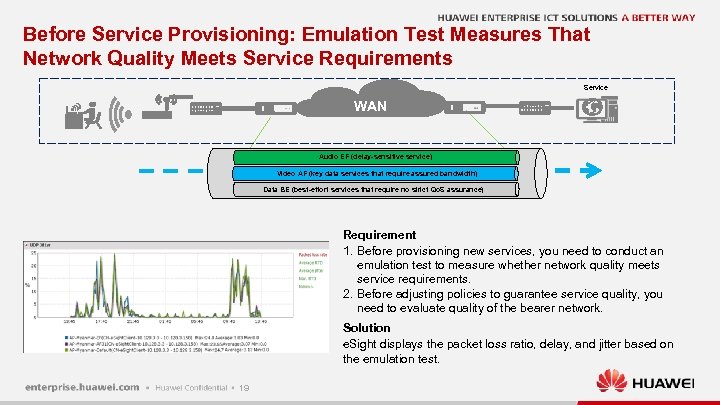 Before Service Provisioning: Emulation Test Measures That Network Quality Meets Service Requirements Service WAN Audio EF (delay-sensitive service) Video AF (key data services that require assured bandwidth) Carrier network Data BE (best-effort services that require no strict Qo. S assurance) Requirement 1. Before provisioning new services, you need to conduct an emulation test to measure whether network quality meets service requirements. 2. Before adjusting policies to guarantee service quality, you need to evaluate quality of the bearer network. Solution e. Sight displays the packet loss ratio, delay, and jitter based on the emulation test. 19
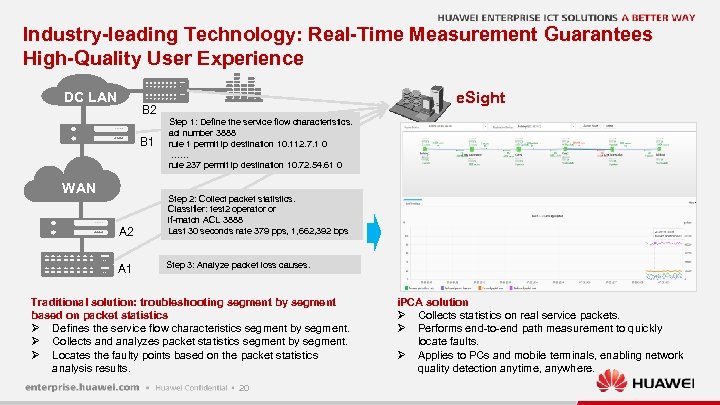 Industry-leading Technology: Real-Time Measurement Guarantees High-Quality User Experience DC LAN e. Sight B 2 B 1 WAN A 2 A 1 Step 1: Define the service flow characteristics. acl number 3888 rule 1 permit ip destination 10. 112. 7. 1 0 …… rule 237 permit ip destination 10. 72. 54. 61 0 Step 2: Collect packet statistics. Classifier: test 2 operator or if-match ACL 3888 Last 30 seconds rate 379 pps, 1, 662, 392 bps Step 3: Analyze packet loss causes. Traditional solution: troubleshooting segment by segment based on packet statistics Ø Defines the service flow characteristics segment by segment. Ø Collects and analyzes packet statistics segment by segment. Ø Locates the faulty points based on the packet statistics analysis results. 20 i. PCA solution Ø Collects statistics on real service packets. Ø Performs end-to-end path measurement to quickly locate faults. Ø Applies to PCs and mobile terminals, enabling network quality detection anytime, anywhere.
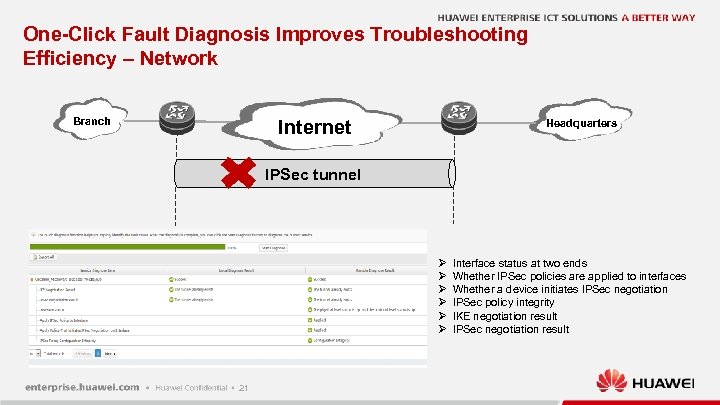 One-Click Fault Diagnosis Improves Troubleshooting Efficiency – Network Branch Internet Headquarters IPSec tunnel Ø Ø Ø 21 Interface status at two ends Whether IPSec policies are applied to interfaces Whether a device initiates IPSec negotiation IPSec policy integrity IKE negotiation result IPSec negotiation result
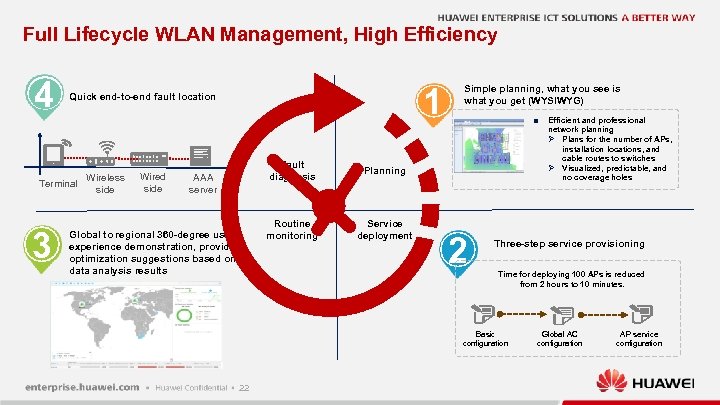 Full Lifecycle WLAN Management, High Efficiency 4 Terminal 3 1 Quick end-to-end fault location Wireless side Wired side Fault diagnosis AAA server Global to regional 360 -degree user experience demonstration, providing optimization suggestions based on data analysis results Service deployment n Planning Routine monitoring Simple planning, what you see is what you get (WYSIWYG) 2 Three-step service provisioning Time for deploying 100 APs is reduced from 2 hours to 10 minutes. Basic configuration 22 Efficient and professional network planning Ø Plans for the number of APs, installation locations, and cable routes to switches Ø Visualized, predictable, and no coverage holes Global AC configuration AP service configuration
 WLAN Planner, Making Network Planning More Efficient and Accurate Traditional Manual Planning Huawei WLAN Planner 1. Graphic Planning Report Reducing network construction time by 25% 2. Automatic Deployment Planning depends on experience Automatic and efficient planning 30 minutes per floor 5 minutes per floor 23 Automatic AP deployment, increasing the planning efficiency by 30% 3. Simulation Multi-dimensional signal simulation
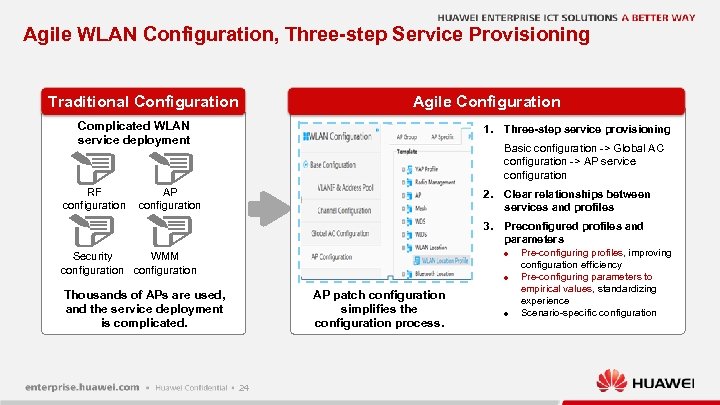 Agile WLAN Configuration, Three-step Service Provisioning Traditional Configuration Agile Configuration Complicated WLAN service deployment RF configuration 1. Three-step service provisioning Basic configuration -> Global AC configuration -> AP service configuration AP configuration 2. Clear relationships between services and profiles 3. Preconfigured profiles and parameters l Security WMM configuration l Thousands of APs are used, and the service deployment is complicated. AP patch configuration simplifies the configuration process. 24 l Pre-configuring profiles, improving configuration efficiency Pre-configuring parameters to empirical values, standardizing experience Scenario-specific configuration
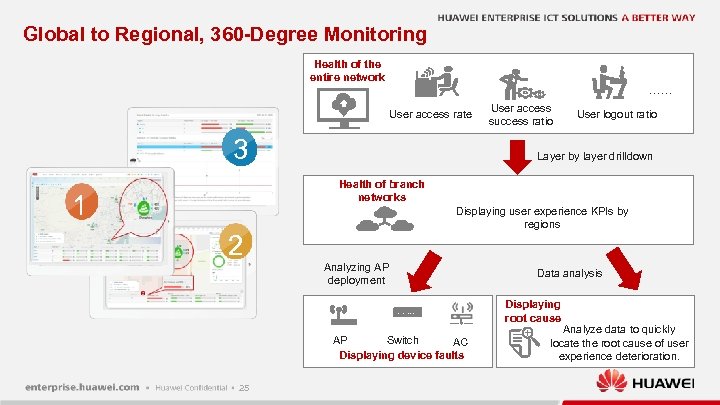 Global to Regional, 360 -Degree Monitoring Health of the entire network …… User access rate 3 User access success ratio User logout ratio Layer by layer drilldown Health of branch networks 1 Displaying user experience KPIs by regions 2 Analyzing AP deployment Data analysis Displaying root cause AP Switch AC Displaying device faults 25 Analyze data to quickly locate the root cause of user experience deterioration.
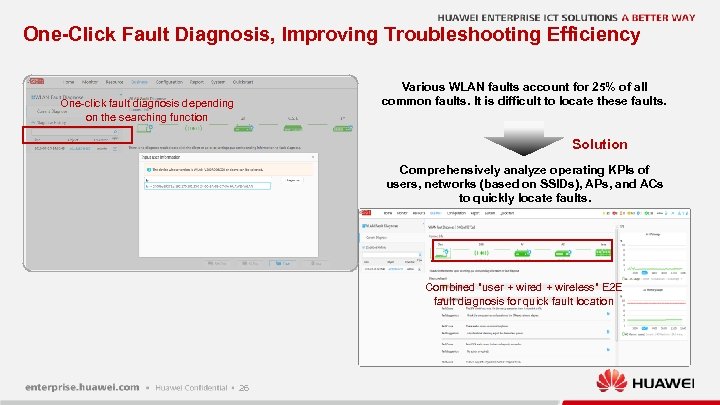 One-Click Fault Diagnosis, Improving Troubleshooting Efficiency Various WLAN faults account for 25% of all common faults. It is difficult to locate these faults. One-click fault diagnosis depending on the searching function Solution Comprehensively analyze operating KPIs of users, networks (based on SSIDs), APs, and ACs to quickly locate faults. Combined "user + wired + wireless" E 2 E fault diagnosis for quick fault location 26
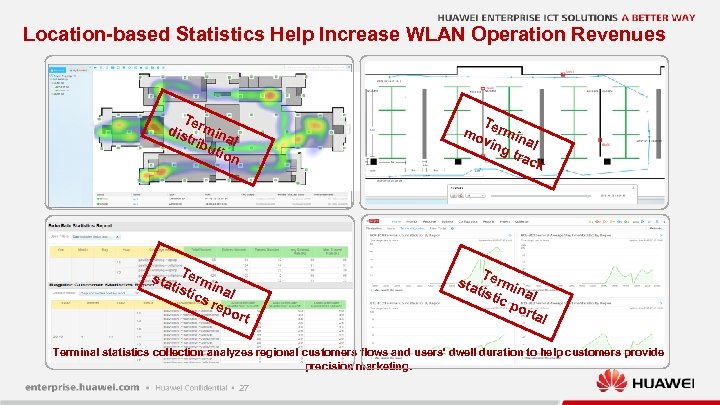 Location-based Statistics Help Increase WLAN Operation Revenues Te dis rmin trib al utio n T mo ermin vin a g tr l ack sta Term in tist ics al rep ort T sta ermi n tist ic p al ort al Terminal statistics collection analyzes regional customers flows and users' dwell duration to help customers provide precision marketing. 27
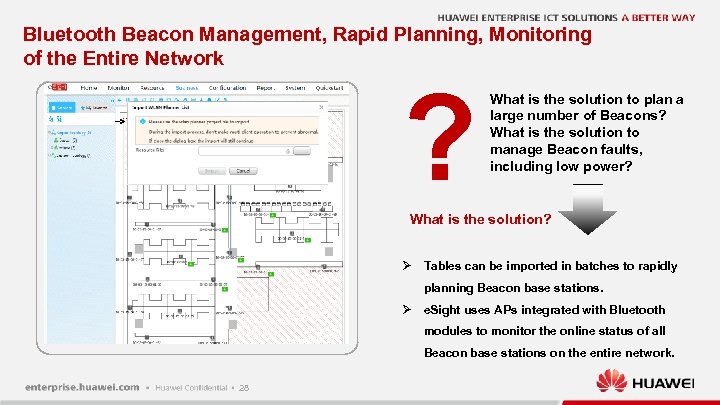 Bluetooth Beacon Management, Rapid Planning, Monitoring of the Entire Network ? What is the solution to plan a large number of Beacons? What is the solution to manage Beacon faults, including low power? What is the solution? Ø Tables can be imported in batches to rapidly planning Beacon base stations. Ø e. Sight uses APs integrated with Bluetooth modules to monitor the online status of all Beacon base stations on the entire network. 28
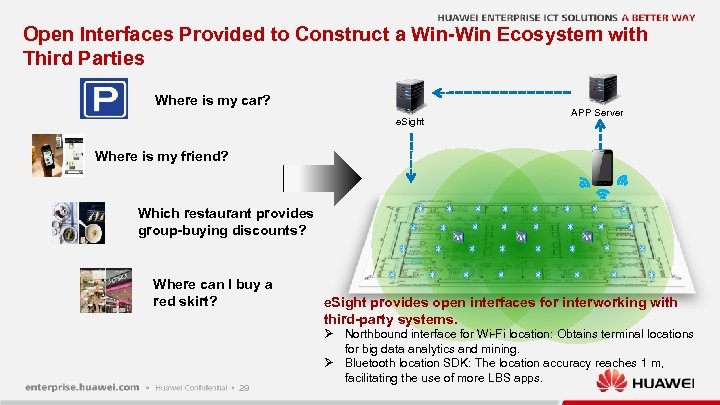 Open Interfaces Provided to Construct a Win-Win Ecosystem with Third Parties Where is my car? e. Sight APP Server Where is my friend? Which restaurant provides group-buying discounts? Where can I buy a red skirt? 29 e. Sight provides open interfaces for interworking with third-party systems. Ø Northbound interface for Wi-Fi location: Obtains terminal locations for big data analytics and mining. Ø Bluetooth location SDK: The location accuracy reaches 1 m, facilitating the use of more LBS apps.
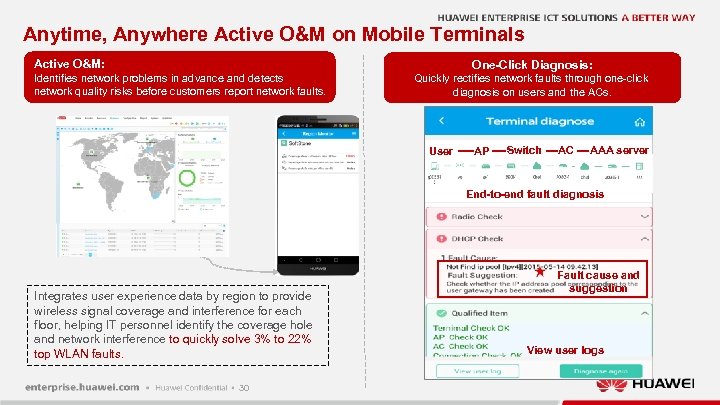 Anytime, Anywhere Active O&M on Mobile Terminals Active O&M: One-Click Diagnosis: Identifies network problems in advance and detects network quality risks before customers report network faults. Quickly rectifies network faults through one-click diagnosis on users and the ACs. User AP Switch AC AAA server End-to-end fault diagnosis Integrates user experience data by region to provide wireless signal coverage and interference for each floor, helping IT personnel identify the coverage hole and network interference to quickly solve 3% to 22% top WLAN faults. 30 Fault cause and suggestion View user logs
 Improving Network Security l l Visible network status System security hardening 31
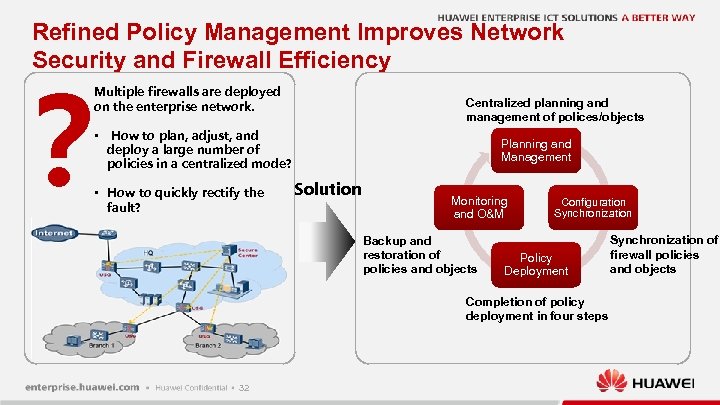 Refined Policy Management Improves Network Security and Firewall Efficiency ? Multiple firewalls are deployed on the enterprise network. • Centralized planning and management of polices/objects How to plan, adjust, and deploy a large number of policies in a centralized mode? • How to quickly rectify the fault? Planning and Management Solution Monitoring and O&M Backup and restoration of policies and objects Configuration Synchronization Policy Deployment Completion of policy deployment in four steps 32 Synchronization of firewall policies and objects
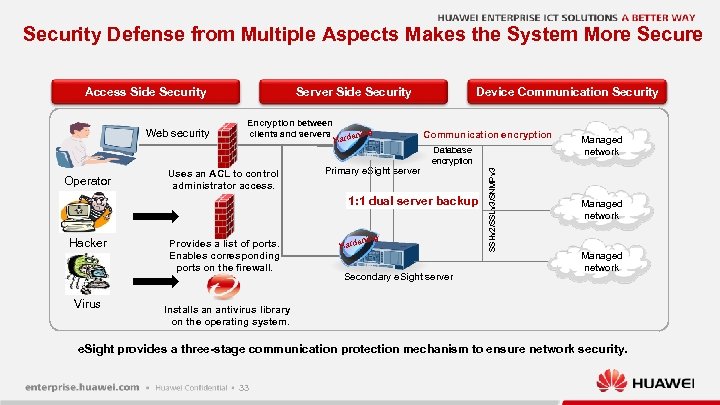 Security Defense from Multiple Aspects Makes the System More Secure Web security Operator Server Side Security Encryption between clients and servers Uses an ACL to control administrator access. ening Hard Primary e. Sight server Device Communication Security Communication encryption Database encryption 1: 1 dual server backup Hacker Virus Provides a list of ports. Enables corresponding ports on the firewall. ening Hard Secondary e. Sight server SSHv 2/SSLv 3/SNMPv 3 Access Side Security Managed network Installs an antivirus library on the operating system. e. Sight provides a three-stage communication protection mechanism to ensure network security. 33
 Contents 34
 Bank of Brazil e. Sight Monitors Network Quality l Background Ø Bank of Brazil has branches sparsely distributed across a wide geography. Ø The bank network transmits traffic from a diverse set of devices. Ø The bank had rolled out a Vo. IP service but it's quality was poor. The Vo. IP device manufacturer claimed that the poor quality was not the fault of the devices. l Solution Ø Huawei used the e. Sight SLA module to monitor the bank network and carries out testing on the voice quality using Huawei Vo. IP devices. Ø The e. Sight produced results showing that the quality of the bank network needed improving. Ø The e. Sight regularly monitored KPIs (such as latency, jitter, and packet loss). It sends alarms of potential performance deterioration to help the customer troubleshoot and optimize the network. l Benefits to the customer Ø The e. Sight is able to visualize network quality for both customer and leased networks and provides a professional easy-to-use solution to help customers build high-quality networks that deliver high-quality services. 35
 Boven. IJ Hospital e. Sight Platform for IT-Enabled Healthcare System l Background Ø With IT playing an increasingly important role in day-to-day healthcare operations, Boven. IJ was seeking a vendor that could offer a reliable network solution that implements unified management and reduces operation and maintenance (O&M) costs. Ø The two most important factors for Boven. IJ were: 1. Simple management and operation 2. Interoperability and compatibility l Solution Ø The e. Sight is a lightweight NMS that uses a browser/server architecture. Ø The system's modular design allows for flexible deployment options for different enterprise network scenarios. Ø The e. Sight manages devices from multiple vendors using different adaptation packages. Ø Easy secondary development. Ø The e. Sight supports unified management of wired network devices and WLAN devices. l Benefits to the customer Ø With e. Sight, Boven. IJ can monitor network devices in real time and prevent faults through a clear understanding of network status. The system helps locate and rectify faults quickly through an alarm topology linkage. Ø These features significantly reduce the cost and complexity of network maintenance and help ensure reliable operation of the Boven. IJ healthcare network. 36
 Local Taxation Bureau in Guizhou Province e. Sight Secures Network Management l Background Ø The local taxation bureau of Guizhou province constructed a three-level (provincial, municipal, county) WAN and required an easy-to-use and stable management platform to monitor and manage all security devices, routers, and switches on the WAN in a unified manner. Ø The customer wanted to monitor branch bandwidth utilization and application traffic distribution and direction on links to find the bottleneck on the WAN and ensure stable running of key services. l Solution Ø Hierarchical network management: Deploys a professional version e. Sight on the provincial network center and a standard version e. Sight on each municipal or county network, so headquarters administrators can know the branch network status while the headquarters and branches manage devices on their own network. Manages user access permissions based on their rights and domains, making network management more secure. Ø Traffic analysis: Monitors WAN links between the provincial network center and each municipal or county network to detect abnormal traffic and unauthorized applications in real time, ensuring bandwidth for and stable running of key services. Provides various traffic reports and sends reports to network administrators through emails, so network administrators can know long-term traffic and application distribution in each branch and obtain professional and accurate statistics for network optimization and planning. Simple and effective O&M: Supports device import, addition, and configuration in a batch to significantly improve O&M efficiency. l Benefits to the customer Ø The solution simplifies O&M by deploying e. Sight separately on the provincial network center and each municipal or county network, and reduces maintenance workloads through hierarchical and unified network management. Ø The solution provides visible traffic statistics for troubleshooting and network planning by using the traffic analysis function to monitor key WAN links. 37
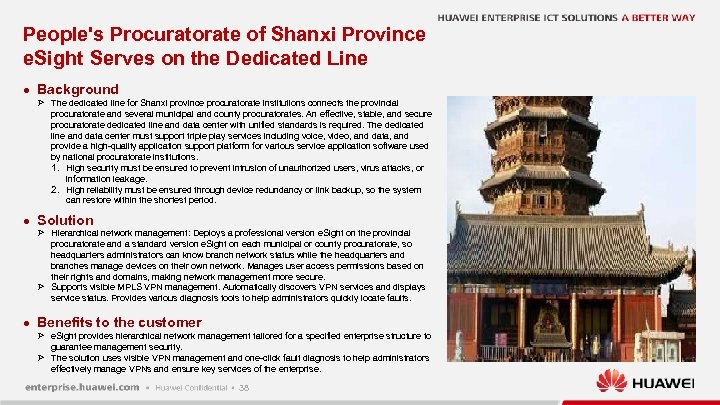 People's Procuratorate of Shanxi Province e. Sight Serves on the Dedicated Line l Background Ø The dedicated line for Shanxi province procuratorate institutions connects the provincial procuratorate and several municipal and county procuratorates. An effective, stable, and secure procuratorate dedicated line and data center with unified standards is required. The dedicated line and data center must support triple play services including voice, video, and data, and provide a high-quality application support platform for various service application software used by national procuratorate institutions. 1. High security must be ensured to prevent intrusion of unauthorized users, virus attacks, or information leakage. 2. High reliability must be ensured through device redundancy or link backup, so the system can restore within the shortest period. l Solution Ø Hierarchical network management: Deploys a professional version e. Sight on the provincial procuratorate and a standard version e. Sight on each municipal or county procuratorate, so headquarters administrators can know branch network status while the headquarters and branches manage devices on their own network. Manages user access permissions based on their rights and domains, making network management more secure. Ø Supports visible MPLS VPN management. Automatically discovers VPN services and displays service status. Provides various diagnosis tools to help administrators quickly locate faults. l Benefits to the customer Ø e. Sight provides hierarchical network management tailored for a specified enterprise structure to guarantee management security. Ø The solution uses visible VPN management and one-click fault diagnosis to help administrators effectively manage VPNs and ensure key services of the enterprise. 38
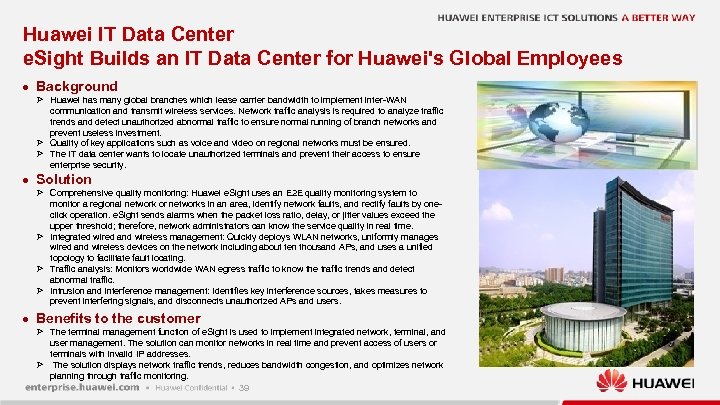 Huawei IT Data Center e. Sight Builds an IT Data Center for Huawei's Global Employees l Background Ø Huawei has many global branches which lease carrier bandwidth to implement inter-WAN communication and transmit wireless services. Network traffic analysis is required to analyze traffic trends and detect unauthorized abnormal traffic to ensure normal running of branch networks and prevent useless investment. Ø Quality of key applications such as voice and video on regional networks must be ensured. Ø The IT data center wants to locate unauthorized terminals and prevent their access to ensure enterprise security. l Solution Ø Comprehensive quality monitoring: Huawei e. Sight uses an E 2 E quality monitoring system to monitor a regional network or networks in an area, identify network faults, and rectify faults by oneclick operation. e. Sight sends alarms when the packet loss ratio, delay, or jitter values exceed the upper threshold; therefore, network administrators can know the service quality in real time. Ø Integrated wired and wireless management: Quickly deploys WLAN networks, uniformly manages wired and wireless devices on the network including about ten thousand APs, and uses a unified topology to facilitate fault locating. Ø Traffic analysis: Monitors worldwide WAN egress traffic to know the traffic trends and detect abnormal traffic. Ø Intrusion and interference management: Identifies key interference sources, takes measures to prevent interfering signals, and disconnects unauthorized APs and users. l Benefits to the customer Ø The terminal management function of e. Sight is used to implement integrated network, terminal, and user management. The solution can monitor networks in real time and prevent access of users or terminals with invalid IP addresses. Ø The solution displays network traffic trends, reduces bandwidth congestion, and optimizes network planning through traffic monitoring. 39
 Prison Administration Bureau of Liaoning Province e. Sight Delivers Multi Vendor Management l Background Ø The prison project involved multiple types of devices, including video devices, service, and data devices. Ø The prison backbone network used ZTE devices, which caused testing difficulties. Ø NMS was recognized as the key to project success. l Solution Ø e. Sight is capable of managing devices of multiple vendors. Ø It automatically discovers SNMP capable devices, such as routers and switches, across the Ø Ø Ø l whole network. This includes ZTE devices. Provides highly visible colored panels that identify third-party devices and port status. Integrates common tools such as Telnet, Trace, and Ping, which enable users to directly log in to devices and perform tests. Supports customized devices types and provides performance counters (such as the CPU, memory usage, and interface traffic) and fault information for third-party devices. Displays third-party device alarms in real time and uses different colors to identify the alarm clearance status. Supports predefined reports such as resource, performance, alarm information, link connection and disconnection, and device connection and disconnection. Benefits to the customer Ø e. Sight can manage devices of multiple vendors in a unified manner, which reduces enterprise O&M costs and creates value for the enterprise. 40
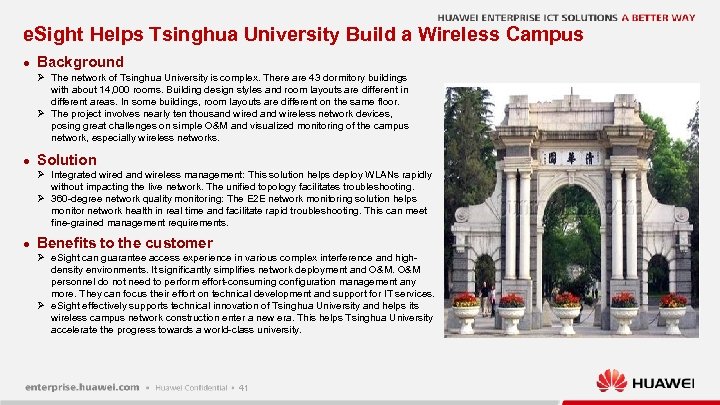 e. Sight Helps Tsinghua University Build a Wireless Campus l Background Ø The network of Tsinghua University is complex. There are 43 dormitory buildings with about 14, 000 rooms. Building design styles and room layouts are different in different areas. In some buildings, room layouts are different on the same floor. Ø The project involves nearly ten thousand wired and wireless network devices, posing great challenges on simple O&M and visualized monitoring of the campus network, especially wireless networks. l Solution Ø Integrated wired and wireless management: This solution helps deploy WLANs rapidly without impacting the live network. The unified topology facilitates troubleshooting. Ø 360 -degree network quality monitoring: The E 2 E network monitoring solution helps monitor network health in real time and facilitate rapid troubleshooting. This can meet fine-grained management requirements. l Benefits to the customer Ø e. Sight can guarantee access experience in various complex interference and highdensity environments. It significantly simplifies network deployment and O&M personnel do not need to perform effort-consuming configuration management any more. They can focus their effort on technical development and support for IT services. Ø e. Sight effectively supports technical innovation of Tsinghua University and helps its wireless campus network construction enter a new era. This helps Tsinghua University accelerate the progress towards a world-class university. 41
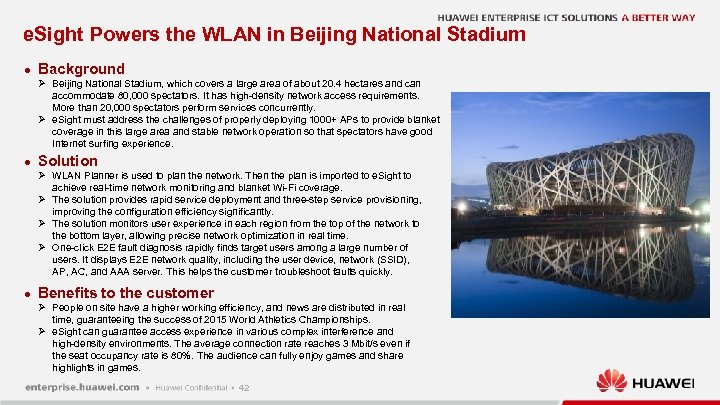 e. Sight Powers the WLAN in Beijing National Stadium l Background Ø Beijing National Stadium, which covers a large area of about 20. 4 hectares and can accommodate 80, 000 spectators. It has high-density network access requirements. More than 20, 000 spectators perform services concurrently. Ø e. Sight must address the challenges of properly deploying 1000+ APs to provide blanket coverage in this large area and stable network operation so that spectators have good Internet surfing experience. l Solution Ø WLAN Planner is used to plan the network. Then the plan is imported to e. Sight to achieve real-time network monitoring and blanket Wi-Fi coverage. Ø The solution provides rapid service deployment and three-step service provisioning, improving the configuration efficiency significantly. Ø The solution monitors user experience in each region from the top of the network to the bottom layer, allowing precise network optimization in real time. Ø One-click E 2 E fault diagnosis rapidly finds target users among a large number of users. It displays E 2 E network quality, including the user device, network (SSID), AP, AC, and AAA server. This helps the customer troubleshoot faults quickly. l Benefits to the customer Ø People on site have a higher working efficiency, and news are distributed in real time, guaranteeing the success of 2015 World Athletics Championships. Ø e. Sight can guarantee access experience in various complex interference and high-density environments. The average connection rate reaches 3 Mbit/s even if the seat occupancy rate is 80%. The audience can fully enjoy games and share highlights in games. 42
 HUAWEI ENTERPRISE ICT SOLUTIONS A BETTER WAY Copyright © 2016 Huawei Technologies Co. , Ltd. All Rights Reserved. The information in this document may contain predictive statements including, without limitation, statements regarding the future financial and operating results, future product portfolio, new technology, etc. There a number of factors that could cause actual results and developments to differ materially from those expressed or implied in the predictive statements. Therefore, such information is provided for reference purpose only and constitutes neither an offer nor an acceptance. Huawei may change the information at any time without notice.