


 Скачать презентацию Huawei Device PT Test Instructions Repair Engineering Dept
Huawei Device PT Test Instructions.pptx
- Количество слайдов: 18
 Huawei Device PT Test Instructions Repair Engineering Dept
 Course objectives After learning this course, you can: n What is PT, Test items of PT test n PT station setup n PT test procedure n TOP failure trouble shooting 2 HUAWEI TECHNOLOGIES CO. , LTD. 2 Huawei Confidential
 01 What is PT 目录 02 PT Station Setup Diagram Contents 03 PT Test procedure 04 PT test items and Logs Explanation 05 Trouble Shooting
 01 What is PT PT testing : Monitoring power on current/idle current/leak current of phone, changing the phone’s status(power on/sleep/power off) by commands via USB circuit , Programmable power supply(Keithley 2303/2306 or Agilent 66311 B/66319 D) as power source. There are three modes for PT testing, the details refers to PT instructions of each model Mode 1: Testing with jig Mode 2: Testing with fake battery Mode 3: Testing with Jig box 4
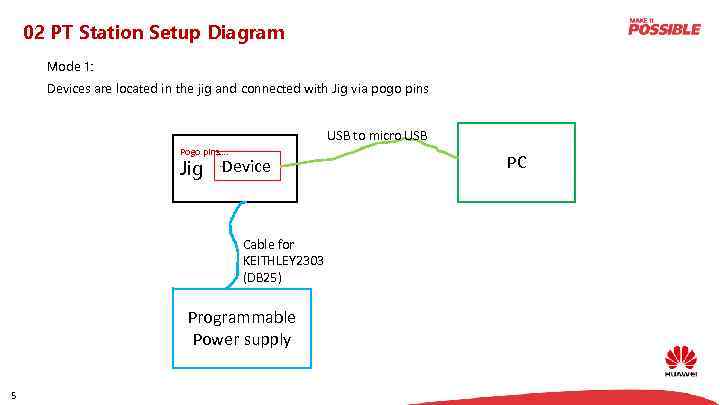 02 PT Station Setup Diagram Mode 1: Devices are located in the jig and connected with Jig via pogo pins USB to micro USB Pogo pins…. … Jig Device Cable for KEITHLEY 2303 (DB 25) Programmable Power supply 5 PC
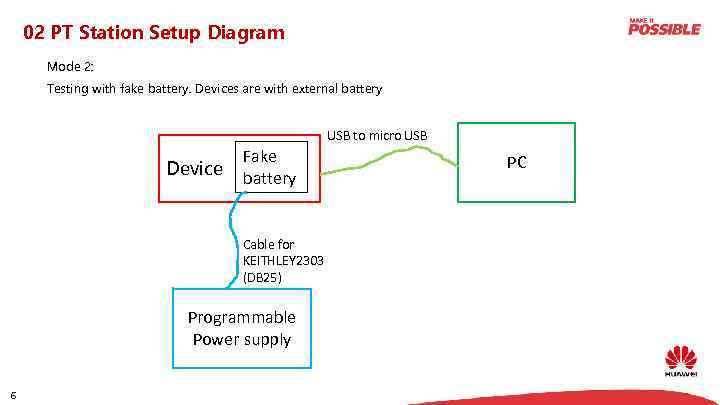 02 PT Station Setup Diagram Mode 2: Testing with fake battery. Devices are with external battery USB to micro USB Device Fake battery Cable for KEITHLEY 2303 (DB 25) Programmable Power supply 6 PC
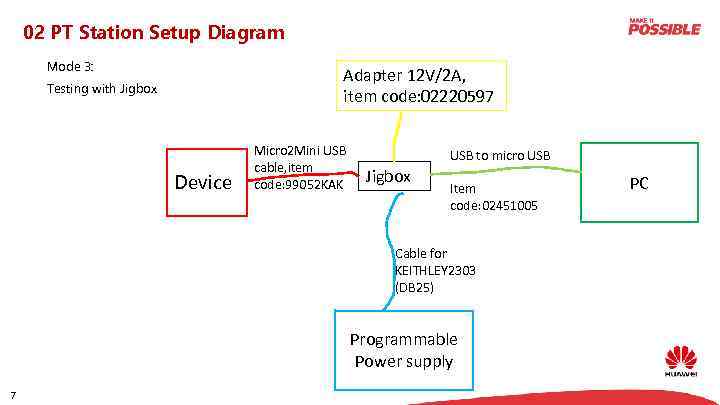 02 PT Station Setup Diagram Mode 3: Adapter 12 V/2 A, item code: 02220597 Testing with Jigbox Device Micro 2 Mini USB cable, item code: 99052 KAK USB to micro USB Jigbox Item code: 02451005 Cable for KEITHLEY 2303 (DB 25) Programmable Power supply 7 PC
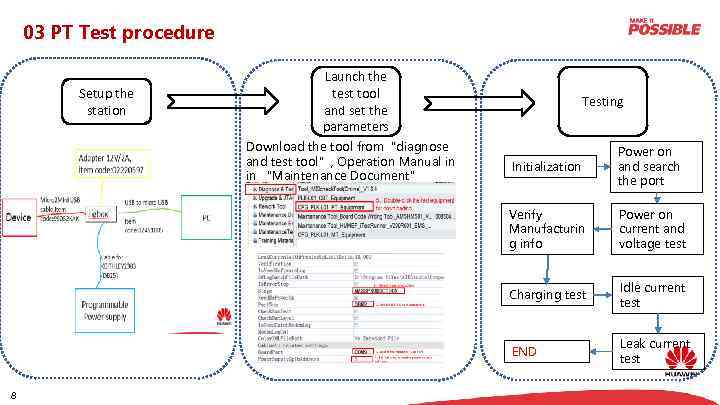 03 PT Test procedure Setup the station Launch the test tool and set the parameters Download the tool from“diagnose and test tool”, Operation Manual in in “Maintenance Document” Testing Power on and search the port Verify Manufacturin g info Power on current and voltage test Charging test Idle current test END 8 Initialization Leak current test
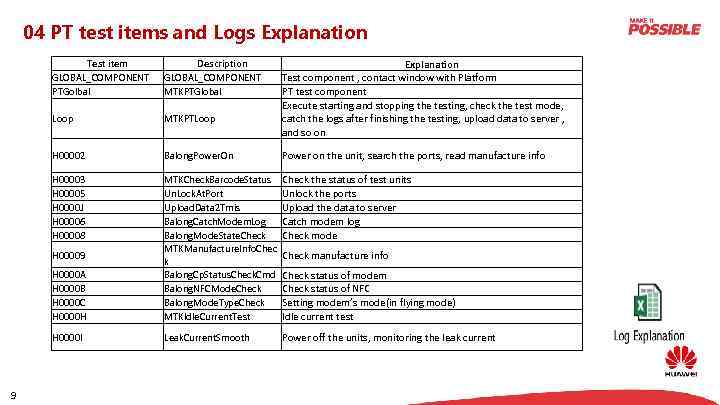 04 PT test items and Logs Explanation Test component , contact window with Platform PT test component Execute starting and stopping the testing, check the test mode, catch the logs after finishing the testing, upload data to server , and so on Test item GLOBAL_COMPONENT PTGolbal Description GLOBAL_COMPONENT MTKPTGlobal Loop MTKPTLoop H 00002 Balong. Power. On Power on the unit, search the ports, read manufacture info H 00003 H 00005 H 0000 J H 00006 H 00008 Check the status of test units Unlock the ports Upload the data to server Catch modem log Check mode H 0000 A H 0000 B H 0000 C H 0000 H MTKCheck. Barcode. Status Un. Lock. At. Port Upload. Data 2 Tmis Balong. Catch. Modem. Log Balong. Mode. State. Check MTKManufacture. Info. Chec k Balong. Cp. Status. Check. Cmd Balong. NFCMode. Check Balong. Mode. Type. Check MTKIdle. Current. Test H 0000 I Leak. Current. Smooth Power off the units, monitoring the leak current H 00009 9 Check manufacture info Check status of modem Check status of NFC Setting modem’s mode(in flying mode) Idle current test
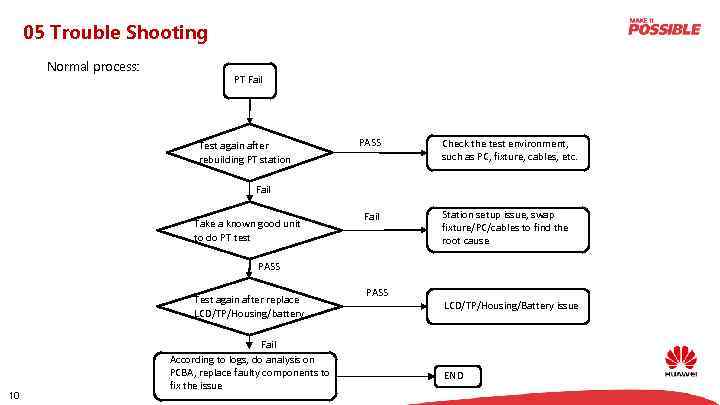 05 Trouble Shooting Normal process: PT Fail Test again after rebuilding PT station PASS Check the test environment, such as PC, fixture, cables, etc. Fail Take a known good unit to do PT test Fail Station setup issue, swap fixture/PC/cables to find the root cause PASS Test again after replace LCD/TP/Housing/battery 10 Fail According to logs, do analysis on PCBA, replace faulty components to fix the issue PASS LCD/TP/Housing/Battery issue END
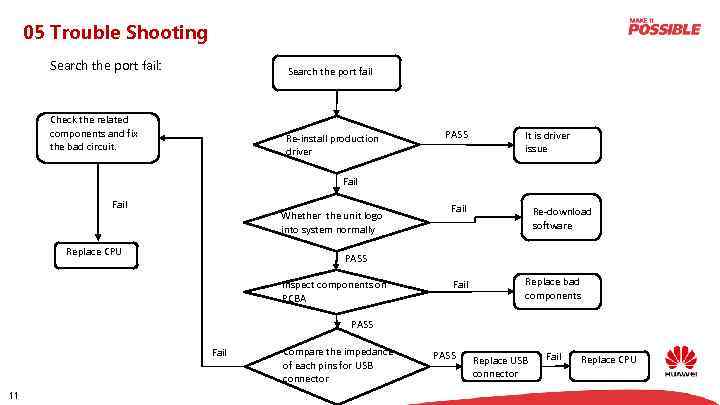 05 Trouble Shooting Search the port fail: Search the port fail Check the related components and fix the bad circuit. Re-install production driver PASS It is driver issue Fail Whether the unit logo into system normally Replace CPU Fail Re-download software PASS Inspect components on PCBA Fail Replace bad components PASS Fail 11 Compare the impedance of each pins for USB connector PASS Replace USB connector Fail Replace CPU
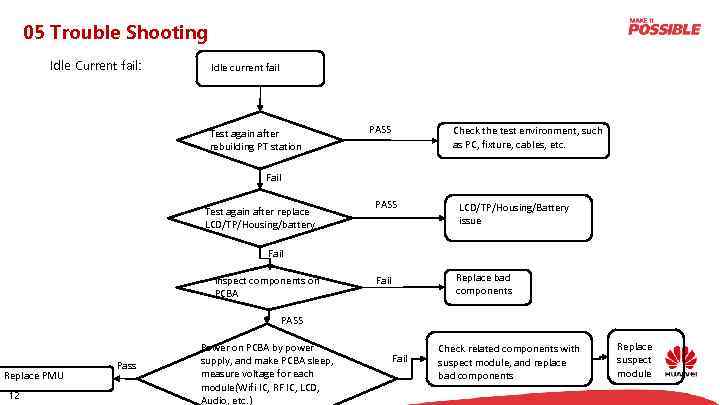 05 Trouble Shooting Idle Current fail: Idle current fail Test again after rebuilding PT station PASS Check the test environment, such as PC, fixture, cables, etc. Fail Test again after replace LCD/TP/Housing/battery PASS LCD/TP/Housing/Battery issue Fail Replace bad components Fail Inspect components on PCBA PASS Replace PMU 12 Pass Power on PCBA by power supply, and make PCBA sleep, measure voltage for each module(Wifi IC, RF IC, LCD, Audio, etc. ) Fail Check related components with suspect module, and replace bad components Replace suspect module
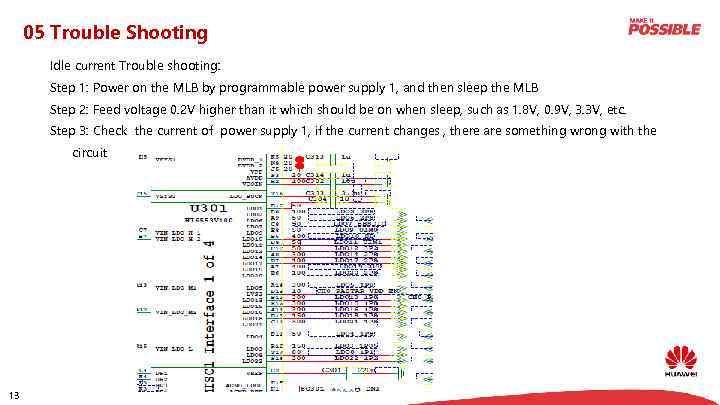 05 Trouble Shooting Idle current Trouble shooting: Step 1: Power on the MLB by programmable power supply 1, and then sleep the MLB Step 2: Feed voltage 0. 2 V higher than it which should be on when sleep, such as 1. 8 V, 0. 9 V, 3. 3 V, etc. Step 3: Check the current of power supply 1, if the current changes , there are something wrong with the circuit 13
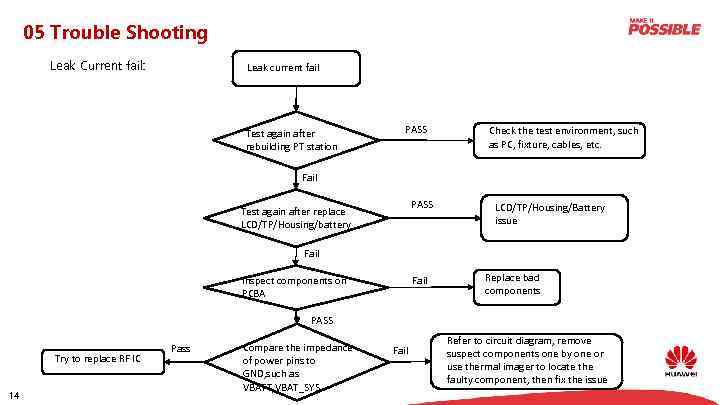 05 Trouble Shooting Leak Current fail: Leak current fail Test again after rebuilding PT station PASS Check the test environment, such as PC, fixture, cables, etc. Fail PASS Test again after replace LCD/TP/Housing/battery LCD/TP/Housing/Battery issue Fail Inspect components on PCBA Fail Replace bad components PASS Try to replace RF IC 14 Pass Compare the impedance of power pins to GND, such as VBATT, VBAT_SYS Fail Refer to circuit diagram, remove suspect components one by one or use thermal imager to locate the faulty component, then fix the issue
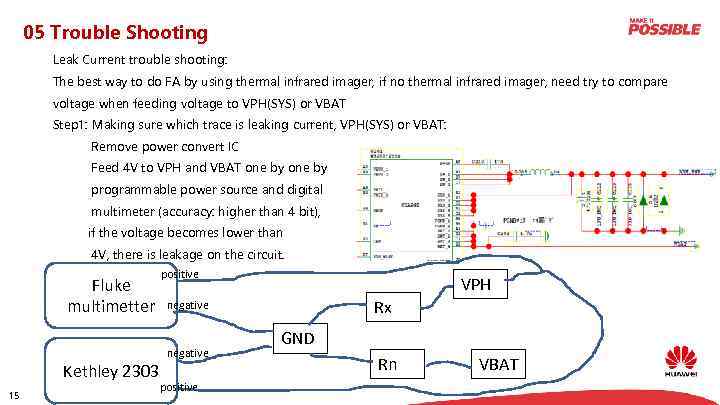 05 Trouble Shooting Leak Current trouble shooting: The best way to do FA by using thermal infrared imager, if no thermal infrared imager, need try to compare voltage when feeding voltage to VPH(SYS) or VBAT Step 1: Making sure which trace is leaking current, VPH(SYS) or VBAT: Remove power convert IC Feed 4 V to VPH and VBAT one by programmable power source and digital multimeter (accuracy: higher than 4 bit), if the voltage becomes lower than 4 V, there is leakage on the circuit. Fluke multimetter Kethley 2303 15 positive VPH Rx negative positive GND Rn VBAT
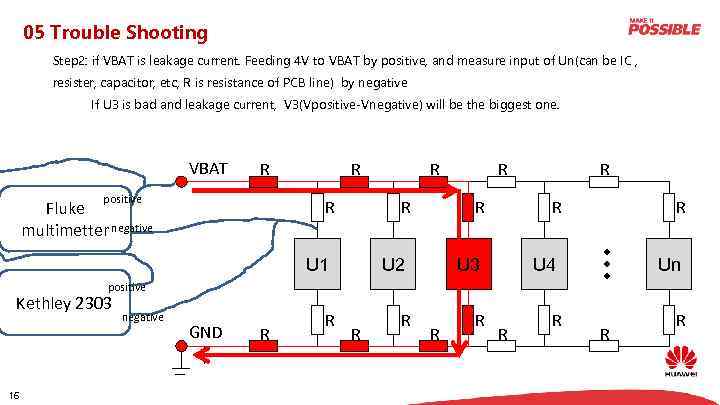 05 Trouble Shooting Step 2: if VBAT is leakage current. Feeding 4 V to VBAT by positive, and measure input of Un(can be IC , resister, capacitor, etc, R is resistance of PCB line) by negative If U 3 is bad and leakage current, V 3(Vpositive-Vnegative) will be the biggest one. VBAT R positive R R Fluke multimetter negative R R U 1 R R U 2 R R U 3 R U 4 Un positive Kethley 2303 16 negative GND R R R R R
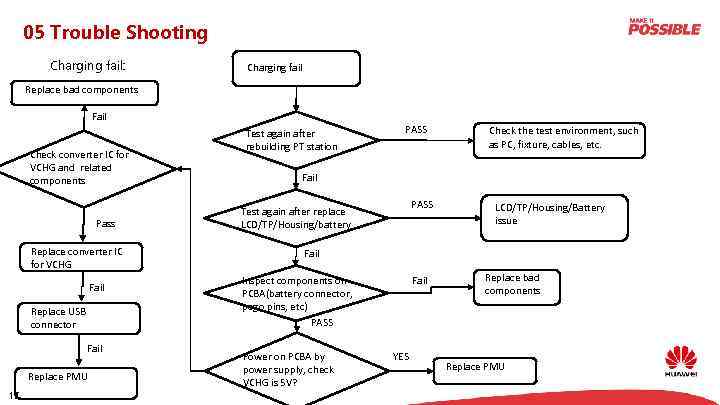 05 Trouble Shooting Charging fail: Charging fail Replace bad components Fail Check converter IC for VCHG and related components Pass Replace converter IC for VCHG Fail Replace USB connector Fail Replace PMU 17 Test again after rebuilding PT station PASS Check the test environment, such as PC, fixture, cables, etc. Fail PASS Test again after replace LCD/TP/Housing/battery LCD/TP/Housing/Battery issue Fail Inspect components on PCBA(battery connector, pogo pins, etc) PASS Power on PCBA by power supply, check VCHG is 5 V? Fail YES Replace bad components Replace PMU
 Thank you www. huawei. com Copyright© 2015 Huawei Technologies Co. , Ltd. All Rights Reserved. The information in this document may contain predictive statements including, without limitation, statements regarding the future financial and operating results, future product portfolio, new technology, etc. There a number of factors that could cause actual results and developments to differ materially from those expressed or implied in the predictive statements. Therefore, such information is provided for reference purpose only and constitutes neither an offer nor an acceptance. Huawei may change the information at any time without notice.