


 Скачать презентацию http www eomf ou edu Datasets Geo-Referenced
f6b19efe378455a21383336747ee799a.ppt
- Количество слайдов: 30
 http: //www. eomf. ou. edu/ Datasets – Geo-Referenced Field Photo Library
 • Register a user • Log in • Upload – Please upload individual files or a zip file of images (png, jpeg, gif) , < 650 MB • Edit the uploaded file and publish them • Query the photo library
 • Upload your homework 1 photo to the library • Be sure the photo has been geotagged and change photo name to building names before upload • Edit the online comment, – Change Status to Public – Choose right Category – Description: OU Building, Building Name, 2009 Spring field method course, Your name. • Check the results • Query in the library
 Query Photo • • Seach keywords: OU building Or seach your own user name Submit the query Check the photo Scroll down and select file type and size Download the file Open in google earth
 Google Earth • http: //earth. google. com/ • A virtual globe, map and geographic information program that was originally called Earth Viewer, and was created by Keyhole, Inc, a company acquired by Google in 2004. • It maps the Earth by the superimposition of images obtained from satellite imagery, aerial photography and GIS 3 D globe.
 Release History • Released as Google Earth in 2005, Availabe on Microsoft Windows 2000, XP, Vista, Mac OS X 10. 3. 9 and above, Linux (released on June 12, 2006), and Free. BSD. • also available as a browser plugin (released on June 2, 2008) for Firefox, Safari 3, IE 6 and IE 7. • available on the i. Phone OS on October 27, 2008, as a free download from the App Store. • In addition to releasing an updated Keyhole based client, Google also added the imagery from the Earth database to their web based mapping software. Google map.
 • • • Keyhole Earthviewer 1. 0 - June 11, 2001 Keyhole Earthviewer 1. 4 - 2002 Keyhole Earthviewer 1. 6 - February 2003 Keyhole LT 1. 7. 1 - August 26, 2003 Keyhole NV 1. 7. 2 - October 16, 2003 Keyhole 2. 2 - August 19, 2004 Google Earth 3. 0 - June 2005 Google Earth 4. 0 - June 11, 2006 Google Earth 4. 1 - May 9, 2007 Google Earth 4. 2 - August 23, 2007 Google Earth 4. 3 - April 15, 2008 Google Earth 5. 0 Beta - February 2, 2009
 Resolution • Resolution available is based somewhat on the points of interest and popularity • Most land (except for some islands) is covered in at least 15 meters of resolution. • Melbourne, Victoria, Las Vegas, Nevada, and Cambridge, Cambridgeshire include examples of the highest resolution, at 15 cm (6 inches).
 Search and DEM • search for addresses for some countries, enter coordinates, or simply use the mouse to browse to a location. • 3 D images of terrain and buildings are available • digital elevation model (DEM) data collected by NASA's Shuttle Radar Topography Mission (SRTM).
 KML • Many people use the applications to add their own data, making them available through BBS or blog • Google Earth is able to show all kinds of images overlaid on the surface of the earth and is also a Web Map Service client. • Google Earth supports managing threedimensional Geospatial data through Keyhole Markup Language (KML).
 3 D building and Street View • 3 D buildings and structures (such as bridges), which consist of users' submissions using Sketch. Up, a 3 D modeling program. • In version 4. 3 released on April 15, 2008, Google Street View was fully integrated into the program allowing the program to provide an on the street level view in many locations. • 360°panoramic street-level views
 Ocean Imagery • version 5. 0 (February 2009) , the entirety of Google Earth's ocean floor imagery was updated to new images by SIO, NOAA, US Navy, NGA, and GEBCO. • Google Ocean feature allows users to zoom below the surface of the ocean and view the 3 D bathymetry beneath the waves. • On April 14, 2009, Google added underwater terrain data for the Great Lakes.
 Wikipedia and Panoramio • Geographic Web Layer integration with Wikipedia and Panoramio • Wikipedia entries are scraped for coordinates via the Coord templates • Panoramio is a geolocation-oriented photo sharing website.
 Sky mode • In version 4. 2, released August 22, 2007, Google Earth added a Sky tool for viewing stars and astronomical images • Hubble Space Telescope • web-based version of Google Sky available at http: //www. google. com/sky/
 Historical Imagery • Introduced in version 5. 0 • Traverse back in time and study earlier stages of any place. • Very useful for research purposes that require analysis of past records of various places.
 Mars • Introduced in Version 5. 0 • A separate globe of the planet Mars • The maps are of a much higher resolution than those on the browser version of Google Mars • 3 D renderings of the Martian terrain. • extremely high resolution images from the Mars Reconnaissance Orbiter's Hi. RISE camera that are of a similar resolution to those of the cities on Earth. • high resolution panoramic images from various Mars landers, such as the Mars Exploration Rovers, Spirit and Opportunity, that can be viewed in a similar way to Google Street View.
 Coordinate System and Projection • The internal coordinate system of Google Earth is geographic coordinates (latitude/longitude) on the World Geodetic System of 1984 (WGS 84) datum. • Google Earth shows the earth as it looks from an elevated platform such as an airplane or orbiting satellite. • The projection used to achieve this effect is called the General Perspective. This is similar to the Orthographic projection, except that the point of perspective is a finite (near earth) distance rather than an infinite (deep space) distance.
 Baseline resolutions • U. S. : 15 m (some states are completely in 1 m or better) • Germany, Switzerland, Netherlands, Denmark, U. K. , Andorra, Luxembourg, Liechtenstein, San Marino, Vatican City: 1 m or better • Czech Republic 0. 2 m (Prague 0. 1 m) Slovakia, Hungary: 2. 5 m (medium resolution) • Global: Generally 15 m (some areas, such as Antarctica, are in extremely low resolution), but this depends on the quality of the satellite/aerial photograph uploaded.
 Typical high resolutions • U. S. : 1 m, 0. 6 m, 0. 3 m, 0. 15 m (extremely rare; e. g. Cambridge and Google Campus, or Glendale) • Europe: 0. 3 m, 0. 15 m (e. g. Berlin, Zürich, Hamburg), 0. 1 m Prague
 Altitude resolution • Surface: varies by country • Seabed: Not applicable (a colorscale approximating sea floor depth is "printed" on the spherical surface).
 Age: Images dates vary • The image data can be seen from squares made when Digital. Globe Coverage is enabled. The date next to the copyright information is not the correct image date. • Zooming in or out could change the date of the pictures. • Most of the international urban image dates are from 2004 and have not been updated. • However, most US images are kept current. • Google announces imagery updates on their Lat. Long Blog in form of a quiz, with hints of the updated locations. The answers are posted some days later in the same blog. http: //google-latlong. blogspot. com/
 GPS integration • read tracks and waypoints from a GPS device. • A variety of third party applications can generate KML or KMZ files based on userspecified or user-recorded waypoints. • Real-time navigation
 User Guide • Help – Tutorial • Help – shortcut
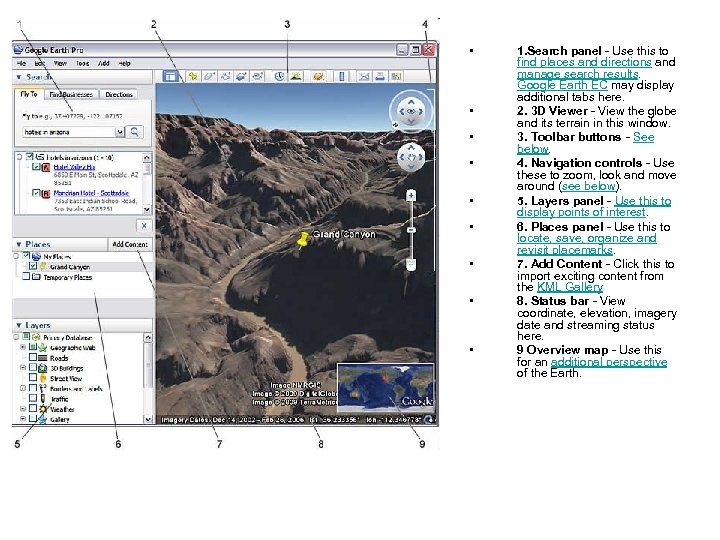 • • • 1. Search panel - Use this to find places and directions and manage search results. Google Earth EC may display additional tabs here. 2. 3 D Viewer - View the globe and its terrain in this window. 3. Toolbar buttons - See below. 4. Navigation controls - Use these to zoom, look and move around (see below). 5. Layers panel - Use this to display points of interest. 6. Places panel - Use this to locate, save, organize and revisit placemarks. 7. Add Content - Click this to import exciting content from the KML Gallery 8. Status bar - View coordinate, elevation, imagery date and streaming status here. 9 Overview map - Use this for an additional perspective of the Earth.
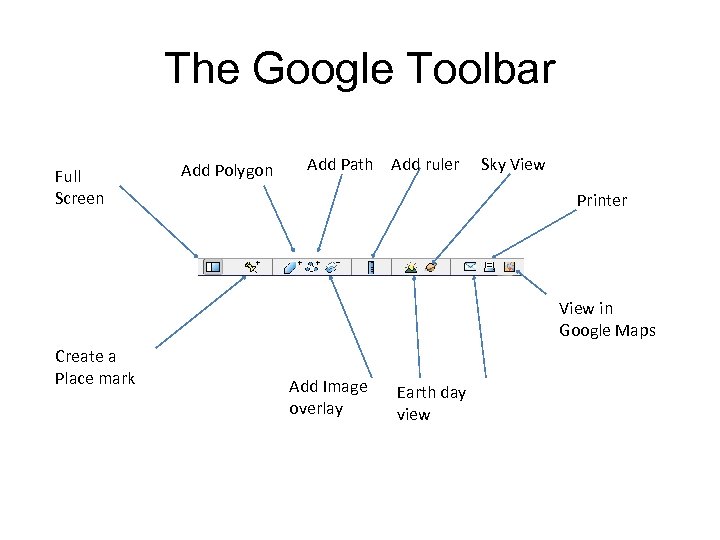 The Google Toolbar Full Screen Add Polygon Add Path Add ruler Sky View Printer View in Google Maps Create a Place mark Add Image overlay Earth day view
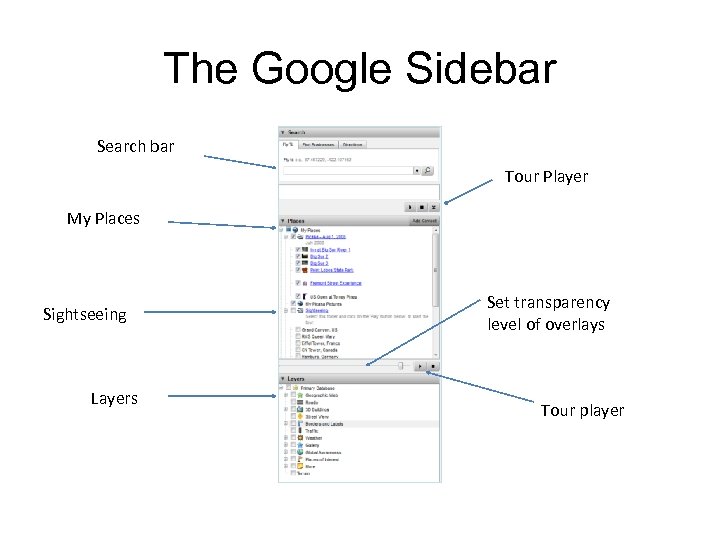 The Google Sidebar Search bar Tour Player My Places Sightseeing Layers Set transparency level of overlays Tour player
 Navigating on the Earth • http: //earth. google. com/intl/en/userguide/v 5/tutorials/navigating. html
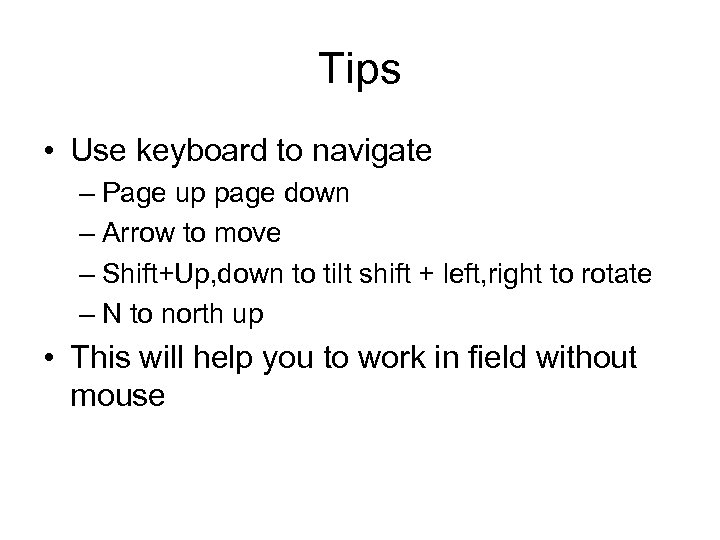 Tips • Use keyboard to navigate – Page up page down – Arrow to move – Shift+Up, down to tilt shift + left, right to rotate – N to north up • This will help you to work in field without mouse
 Tips • Tools - Options • Change elevation exaggeration to 3 to give you exaggerated terrain • Go to Cache tab – Chang the disk cache size to 2000 MB – This will give you more cache for offline
 Google Earth Community • dedicated to producing placemarks of interesting or educational perspectives http: //bbs. keyhole. com • http: //www. youtube. com/user/Google. Earth Video. Help • http: //www. youtube. com/user/Sketch. Up. Vid eo • http: //wikimapia. org/