


 Скачать презентацию HP CM 8060 8050 Color MFP with Edgeline Technology
a4da58f89ae4ee369b94868f933e4b80.ppt
- Количество слайдов: 26
 HP CM 8060/8050 Color MFP with Edgeline Technology Service and Support Training Image Quality Module © 2007 Hewlett-Packard Development Company, L. P. The information contained herein is subject to change without notice
 Image Quality • Image pipeline • Calibrations and adjustments • Test pages • IQ troubleshooting
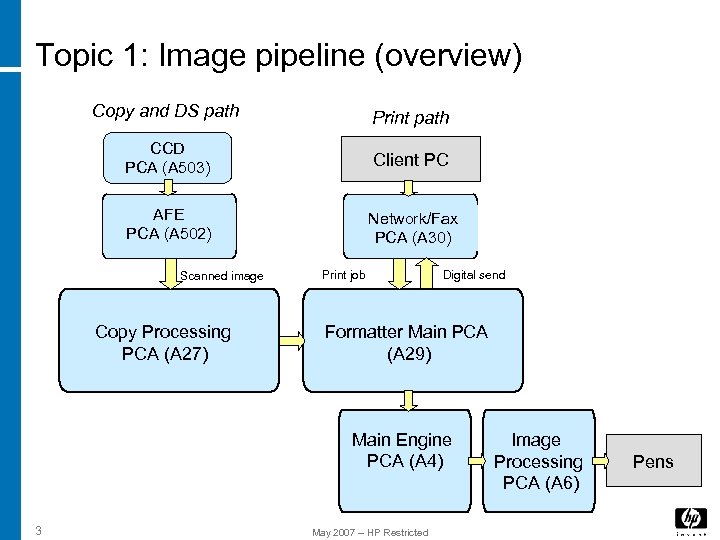 Topic 1: Image pipeline (overview) Copy and DS path Print path CCD PCA (A 503) Client PC AFE PCA (A 502) Network/Fax PCA (A 30) Scanned image Copy Processing PCA (A 27) Print job Digital send Formatter Main PCA (A 29) Main Engine PCA (A 4) 3 May 2007 – HP Restricted Image Processing PCA (A 6) Pens
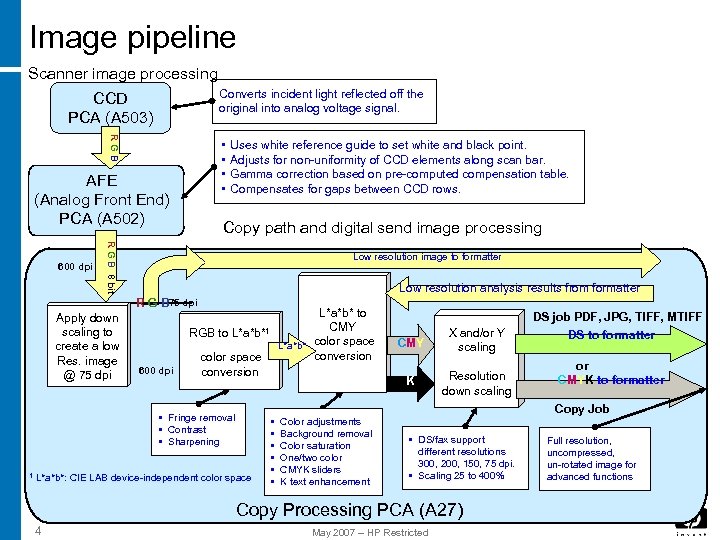 Image pipeline Scanner image processing Converts incident light reflected off the original into analog voltage signal. CCD PCA (A 503) RGB • • AFE (Analog Front End) PCA (A 502) Copy path and digital send image processing R G B 8 bit 600 dpi Uses white reference guide to set white and black point. Adjusts for non-uniformity of CCD elements along scan bar. Gamma correction based on pre-computed compensation table. Compensates for gaps between CCD rows. Low resolution image to formatter Low resolution analysis results from formatter R G B 75 dpi Apply down scaling to create a low Res. image @ 75 dpi RGB to 600 dpi color space conversion L*a*b*: CIE LAB device-independent color space • • • CMY X and/or Y scaling K L*a*b*1 • Fringe removal • Contrast • Sharpening 1 L*a*b* to CMY L*a*b* color space conversion Resolution down scaling or CMYK to formatter Copy Job Color adjustments Background removal Color saturation One/two color CMYK sliders K text enhancement • DS/fax support different resolutions 300, 200, 150, 75 dpi. • Scaling 25 to 400% Copy Processing PCA (A 27) 4 DS job PDF, JPG, TIFF, MTIFF DS to formatter May 2007 – HP Restricted Full resolution, uncompressed, un-rotated image for advanced functions
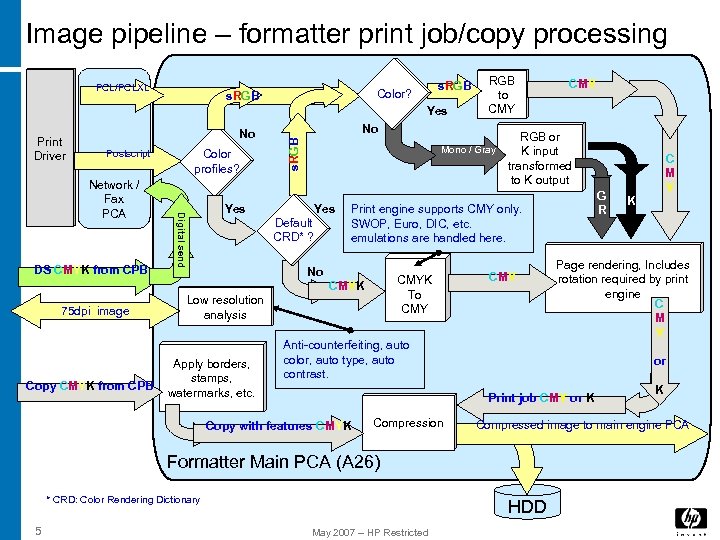 Image pipeline – formatter print job/copy processing PCL/PCLXL s. RGB Color? s. RGB Yes No Color profiles? Postscript DS CMYK from CPB Digital send Network / Fax PCA No s. RGB Print Driver Mono / Gray Yes Default CRD* ? No CMYK To CMY Copy CMYK from CPB Low resolution analysis Apply borders, stamps, watermarks, etc. RGB or K input transformed to K output CMY Anti-counterfeiting, auto color, auto type, auto contrast. G R Compression K Compressed image to main engine PCA HDD May 2007 – HP Restricted K or Formatter Main PCA (A 26) * CRD: Color Rendering Dictionary C M Y Page rendering, Includes rotation required by print engine C M Y Print job CMY or K Copy with features CMYK 5 CMY Print engine supports CMY only. SWOP, Euro, DIC, etc. emulations are handled here. CMYK 75 dpi image RGB to CMY
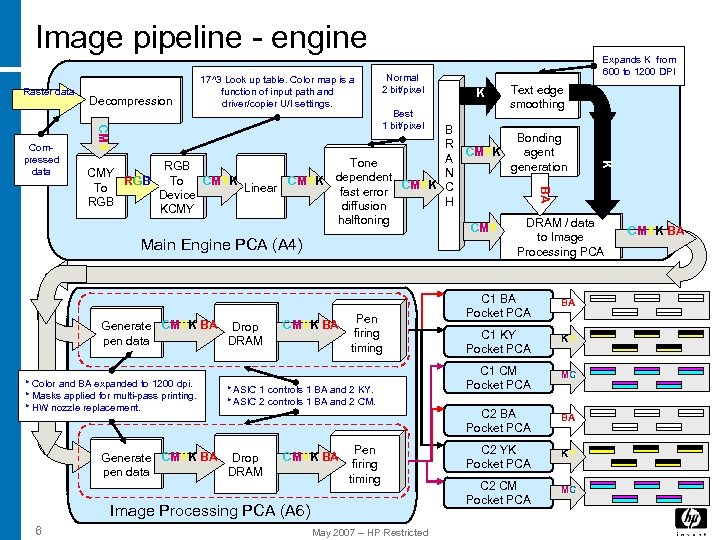 Image pipeline - engine Raster data CMY B R A Tone N dependent CMYK C fast error H diffusion halftoning * Color and BA expanded to 1200 dpi. * Masks applied for multi-pass printing. * HW nozzle replacement. CMYK BA Pen firing timing * ASIC 1 controls 1 BA and 2 KY. * ASIC 2 controls 1 BA and 2 CM. Generate CMYK BA Drop pen data DRAM CMYK BA Pen firing timing Image Processing PCA (A 6) 6 Text edge smoothing CMYK Bonding agent generation Best 1 bit/pixel Main Engine PCA (A 4) Generate CMYK BA Drop pen data DRAM K May 2007 – HP Restricted BA RGB CMY To RGB CMYK Linear To Device RGB KCMY Normal 2 bit/pixel K Compressed data Decompression 17^3 Look up table. Color map is a function of input path and driver/copier U/I settings. Expands K from 600 to 1200 DPI CMY DRAM / data to Image Processing PCA C 1 BA Pocket PCA BA C 1 KY Pocket PCA KY C 1 CM Pocket PCA MC C 2 BA Pocket PCA BA C 2 YK Pocket PCA KY C 2 CM Pocket PCA MC CMYK BA
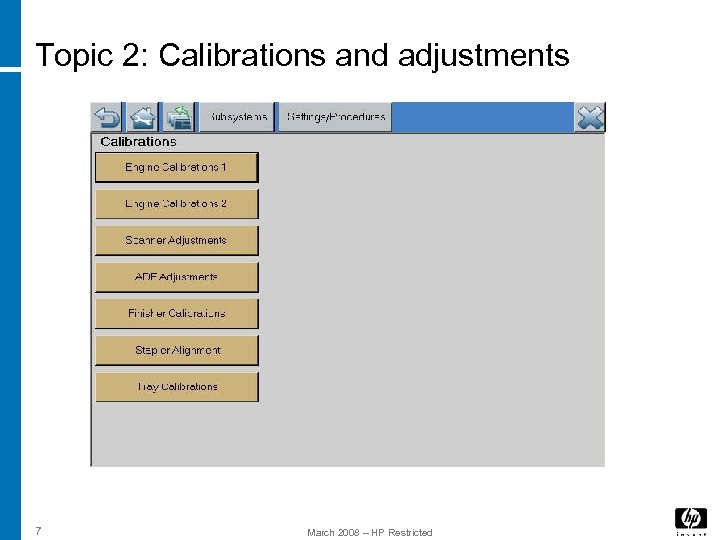 Topic 2: Calibrations and adjustments 7 March 2008 – HP Restricted
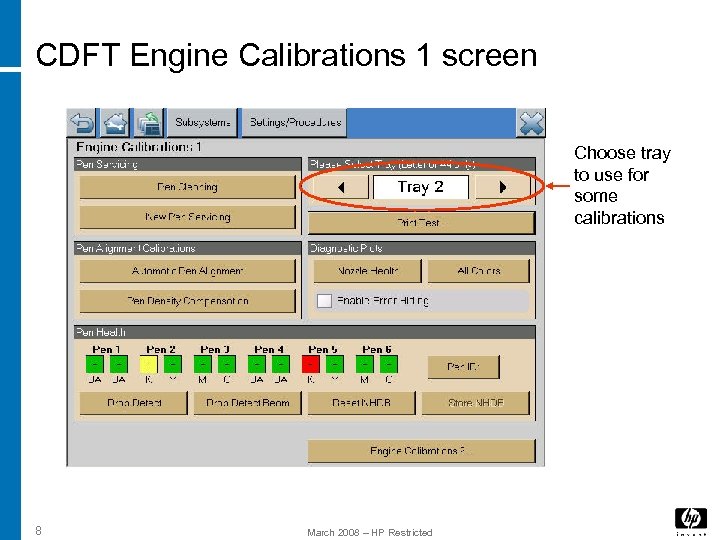 CDFT Engine Calibrations 1 screen Choose tray to use for some calibrations 8 March 2008 – HP Restricted
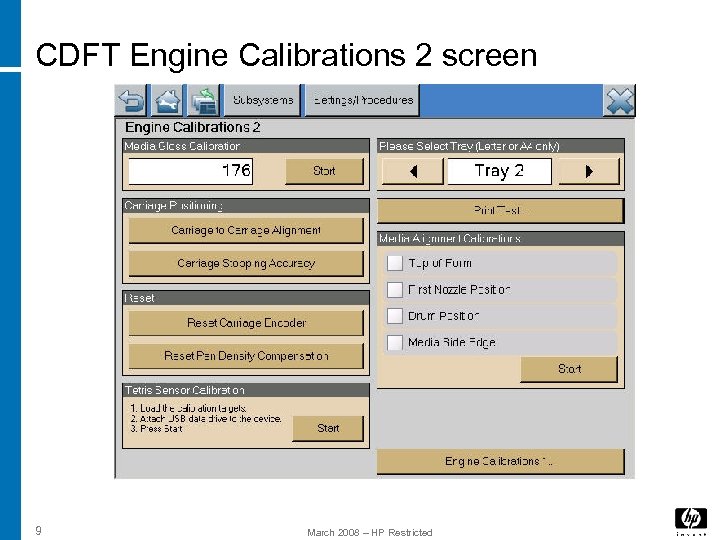 CDFT Engine Calibrations 2 screen 9 March 2008 – HP Restricted
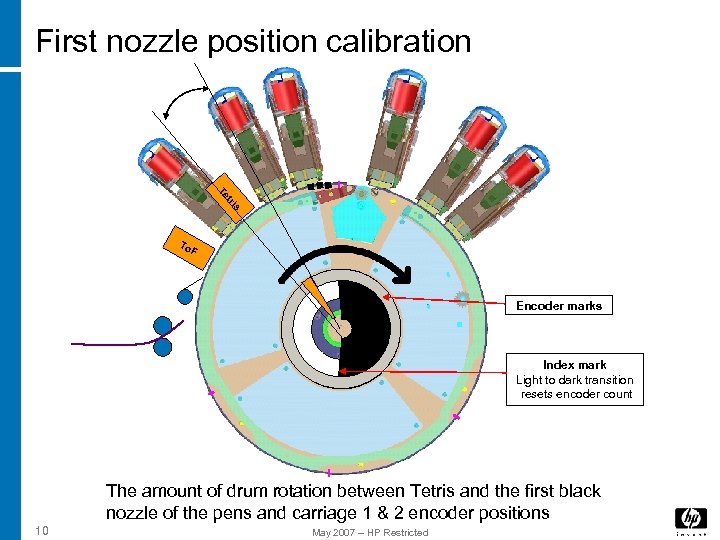 First nozzle position calibration s tri Te To F Encoder marks Index mark Light to dark transition resets encoder count The amount of drum rotation between Tetris and the first black nozzle of the pens and carriage 1 & 2 encoder positions 10 May 2007 – HP Restricted
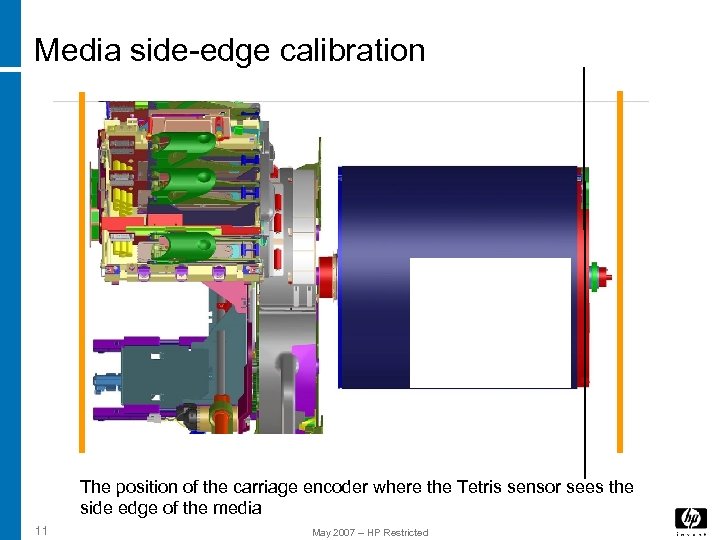 Media side-edge calibration The position of the carriage encoder where the Tetris sensor sees the side edge of the media 11 May 2007 – HP Restricted
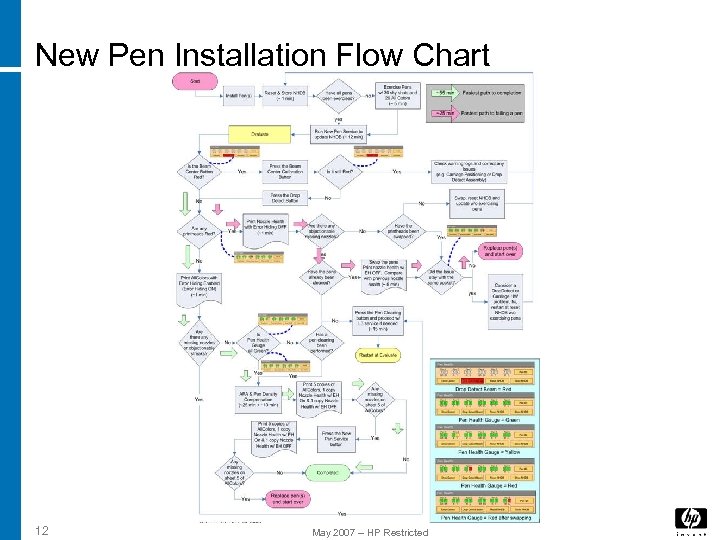 New Pen Installation Flow Chart 12 May 2007 – HP Restricted
 Lab
Lab
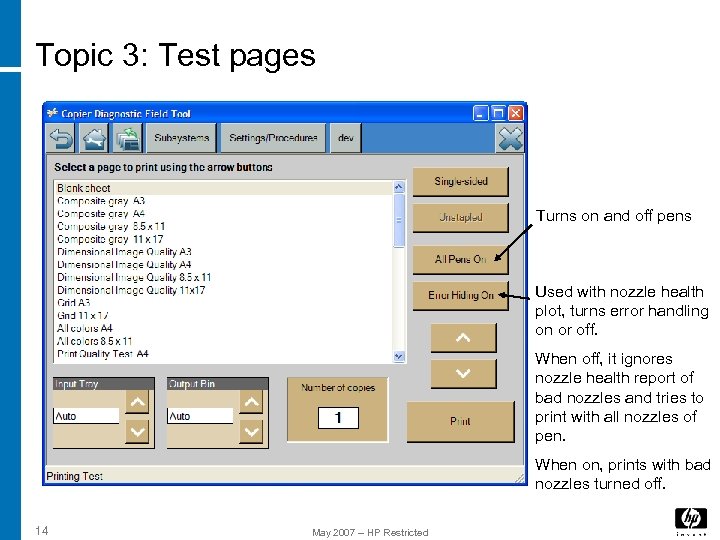 Topic 3: Test pages Turns on and off pens Used with nozzle health plot, turns error handling on or off. When off, it ignores nozzle health report of bad nozzles and tries to print with all nozzles of pen. When on, prints with bad nozzles turned off. 14 May 2007 – HP Restricted
 Lab
Lab
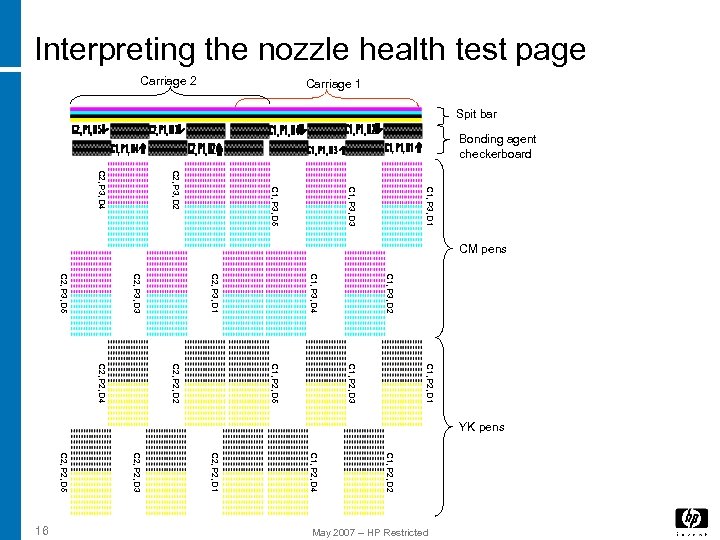 Interpreting the nozzle health test page C 1, P 3, D 1 C 1, P 3, D 3 C 1, P 3, D 5 C 2, P 3, D 2 C 2, P 3, D 4 C 1, P 3, D 2 C 1, P 3, D 4 C 2, P 3, D 1 C 2, P 3, D 3 C 2, P 3, D 5 C 1, P 2, D 1 C 1, P 2, D 3 C 1, P 2, D 5 C 2, P 2, D 2 C 2, P 2, D 4 C 1, P 2, D 2 C 1, P 2, D 4 C 2, P 2, D 1 C 2, P 2, D 3 C 2, P 2, D 5 May 2007 – HP Restricted 16 Carriage 1 Carriage 2 Spit bar Bonding agent checkerboard CM pens YK pens
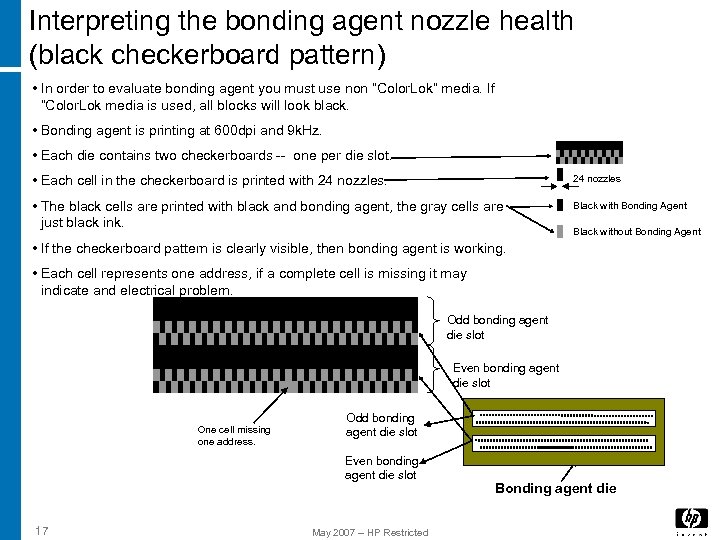 Interpreting the bonding agent nozzle health (black checkerboard pattern) • In order to evaluate bonding agent you must use non “Color. Lok” media. If “Color. Lok media is used, all blocks will look black. • Bonding agent is printing at 600 dpi and 9 k. Hz. • Each die contains two checkerboards -- one per die slot. • Each cell in the checkerboard is printed with 24 nozzles • The black cells are printed with black and bonding agent, the gray cells are just black ink. Black with Bonding Agent Black without Bonding Agent • If the checkerboard pattern is clearly visible, then bonding agent is working. • Each cell represents one address, if a complete cell is missing it may indicate and electrical problem. Odd bonding agent die slot Even bonding agent die slot One cell missing one address. Odd bonding agent die slot Even bonding agent die slot 17 May 2007 – HP Restricted Bonding agent die
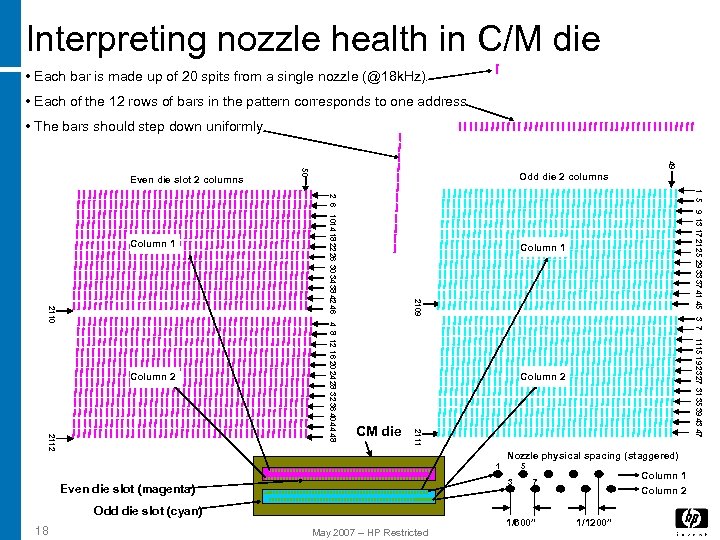 Interpreting nozzle health in C/M die • Each bar is made up of 20 spits from a single nozzle (@18 k. Hz). • Each of the 12 rows of bars in the pattern corresponds to one address. • The bars should step down uniformly. 49 Column 2 2111 2112 CM die Nozzle physical spacing (staggered) 1 5 3 Even die slot (magenta) Odd die slot (cyan) 18 1 5 9 13 17 21 25 29 33 37 41 45 3 7 1115 19 23 27 31 35 39 43 47 Column 1 2109 2110 Column 2 Odd die 2 columns 2 6 1014 18 22 26 30 34 38 42 46 4 8 12 16 20 24 28 32 36 40 44 48 Column 1 50 Even die slot 2 columns May 2007 – HP Restricted Column 1 Column 2 7 1/600” 1/1200”
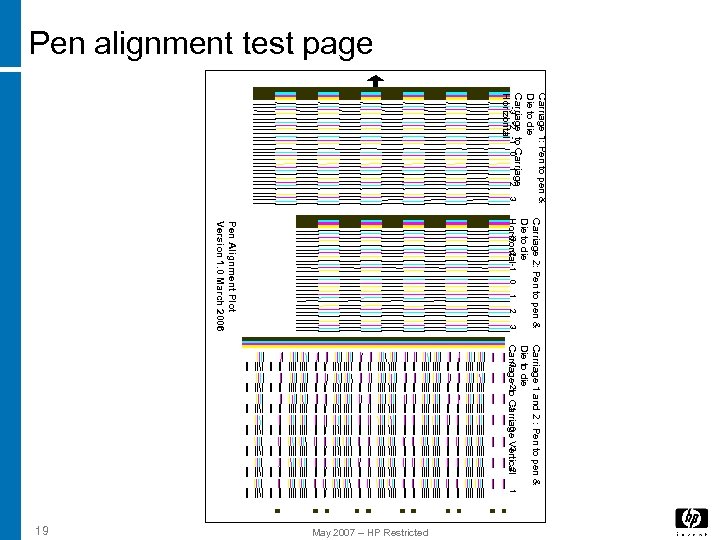 Pen alignment test page Carriage 1: Pen to pen & Die to die Carriage to Carriage -3 -2 -1 0 1 2 3 Horizontal Carriage 2: Pen to pen & Die to die -3 -2 Horizontal -1 0 1 2 3 Pen Alignment Plot Version 1. 0 March 2006 Carriage 1 and 2 : Pen to pen & Die to die -3 -1 3 2 0 Carriage-2 to Carriage Vertical 1 May 2007 – HP Restricted 19
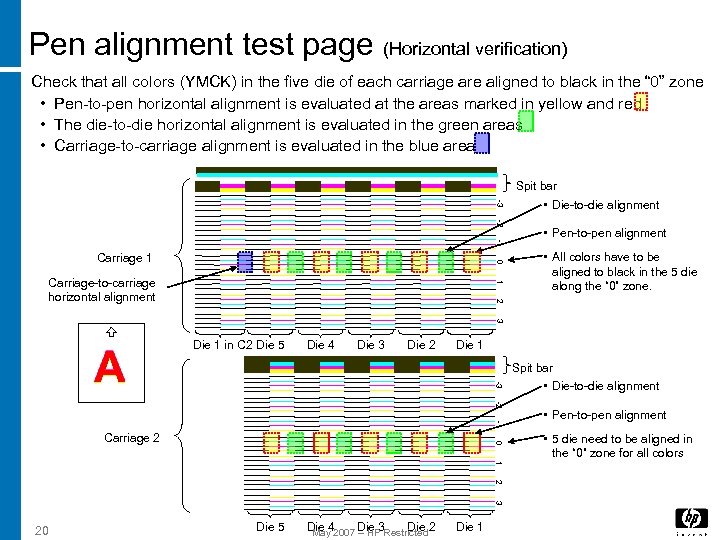 Pen alignment test page (Horizontal verification) Check that all colors (YMCK) in the five die of each carriage are aligned to black in the “ 0” zone • Pen-to-pen horizontal alignment is evaluated at the areas marked in yellow and red • The die-to-die horizontal alignment is evaluated in the green areas • Carriage-to-carriage alignment is evaluated in the blue area Spit bar -3 -2 -1 0 Carriage 1 1 Carriage-to-carriage horizontal alignment • Die-to-die alignment • Pen-to-pen alignment • All colors have to be aligned to black in the 5 die along the “ 0” zone. 2 3 Die 4 Die 3 Die 2 Die 1 Spit bar -3 A Die 1 in C 2 Die 5 -2 -1 0 Carriage 2 1 2 3 20 Die 5 Die 42007 Die 3 Restricted 2 Die May – HP Die 1 • Die-to-die alignment • Pen-to-pen alignment • 5 die need to be aligned in the “ 0” zone for all colors
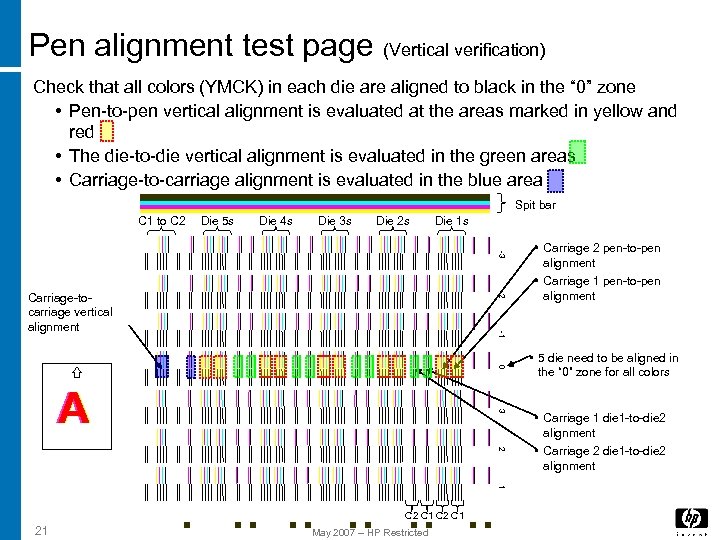 Pen alignment test page (Vertical verification) Check that all colors (YMCK) in each die are aligned to black in the “ 0” zone • Pen-to-pen vertical alignment is evaluated at the areas marked in yellow and red • The die-to-die vertical alignment is evaluated in the green areas • Carriage-to-carriage alignment is evaluated in the blue area Spit bar C 1 to C 2 Die 5 s Die 4 s Die 3 s Die 2 s Die 1 s -3 -2 -1 Carriage-tocarriage vertical alignment 0 3 A 2 1 C 2 C 1 21 • Carriage 2 pen-to-pen alignment • Carriage 1 pen-to-pen alignment May 2007 – HP Restricted • 5 die need to be aligned in the “ 0” zone for all colors • Carriage 1 die 1 -to-die 2 alignment • Carriage 2 die 1 -to-die 2 alignment
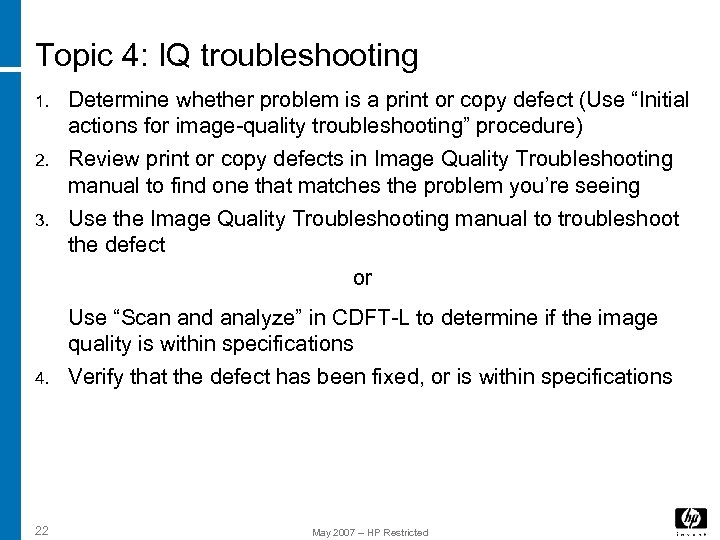 Topic 4: IQ troubleshooting 1. 2. 3. Determine whether problem is a print or copy defect (Use “Initial actions for image-quality troubleshooting” procedure) Review print or copy defects in Image Quality Troubleshooting manual to find one that matches the problem you’re seeing Use the Image Quality Troubleshooting manual to troubleshoot the defect or 4. Use “Scan and analyze” in CDFT-L to determine if the image quality is within specifications Verify that the defect has been fixed, or is within specifications 22 May 2007 – HP Restricted
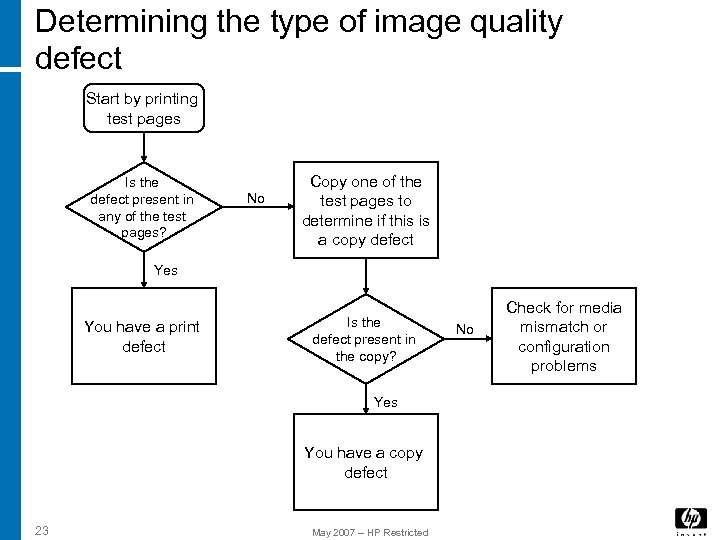 Determining the type of image quality defect Start by printing test pages Is the defect present in any of the test pages? No Copy one of the test pages to determine if this is a copy defect Yes You have a print defect Is the defect present in the copy? Yes You have a copy defect 23 May 2007 – HP Restricted No Check for media mismatch or configuration problems
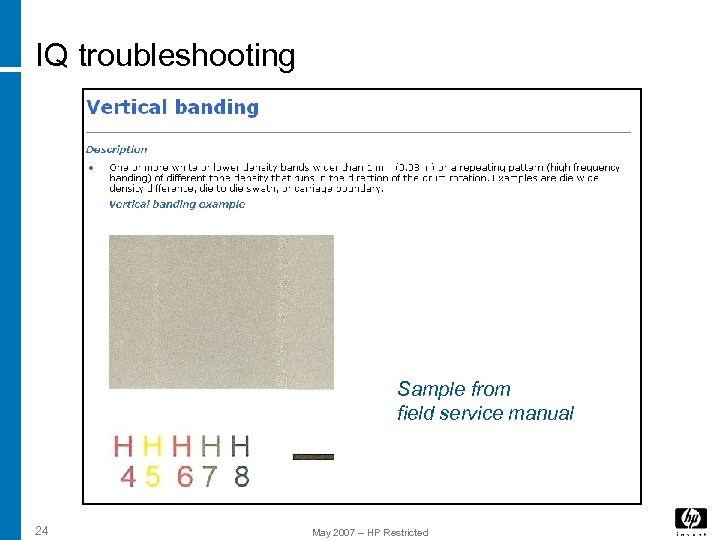 IQ troubleshooting Sample from field service manual 24 May 2007 – HP Restricted
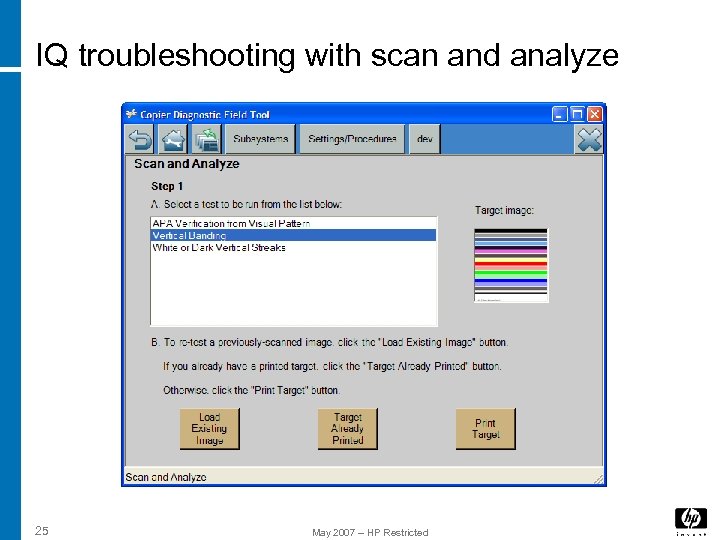 IQ troubleshooting with scan and analyze 25 May 2007 – HP Restricted
 Lab
Lab