Скачать презентацию How Microsoft IT Architected and Deployed Unified Communications
45ce7a086fbf0d9910d6a9e3e0d1ea9c.ppt
- Количество слайдов: 29
 How Microsoft IT Architected and Deployed Unified Communications Jonathan R. Lewis Sr. IT Manager, Australia Microsoft Corporation
 Microsoft IT Purpose • Be Microsoft’s first and best customer • Ensure security of Microsoft’s digital assets • Drive productivity of our customers, clients, and partners • Run a world class information technology (IT) environment November 2006 3
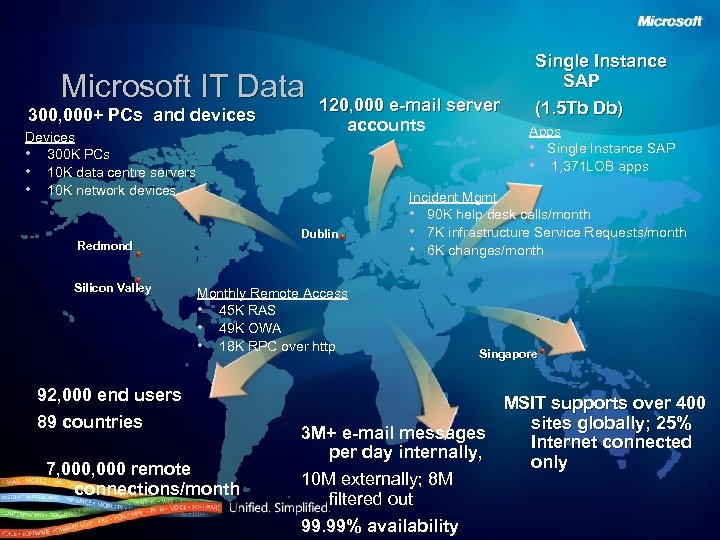 Microsoft IT Data 300, 000+ PCs and devices Devices • 300 K PCs • 10 K data centre servers • 10 K network devices Dublin Redmond Silicon Valley 120, 000 e-mail server accounts Monthly Remote Access • 45 K RAS • 49 K OWA • 18 K RPC over http 92, 000 end users 89 countries 7, 000 remote connections/month Single Instance SAP (1. 5 Tb Db) Apps • Single Instance SAP • 1, 371 LOB apps Incident Mgmt • 90 K help desk calls/month • 7 K infrastructure Service Requests/month • 6 K changes/month Singapore MSIT supports over 400 sites globally; 25% 3 M+ e-mail messages Internet connected per day internally, only 10 M externally; 8 M filtered out 99. 99% availability
 Before (Live Communication Server 2005). . .
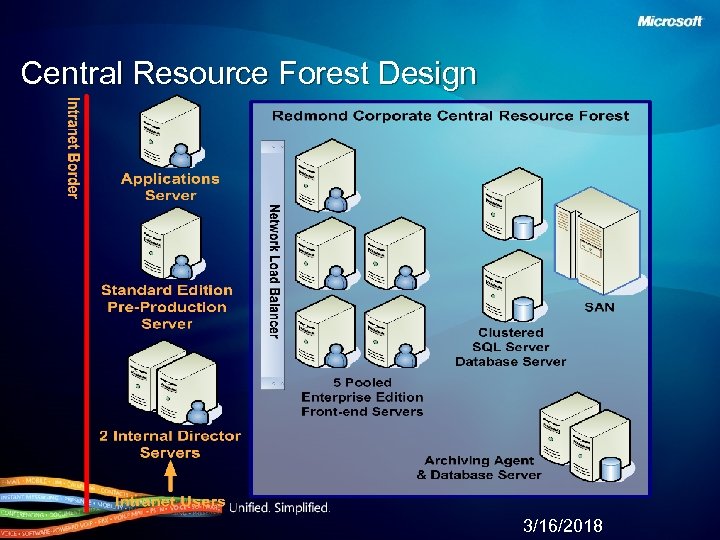 Central Resource Forest Design 3/16/2018
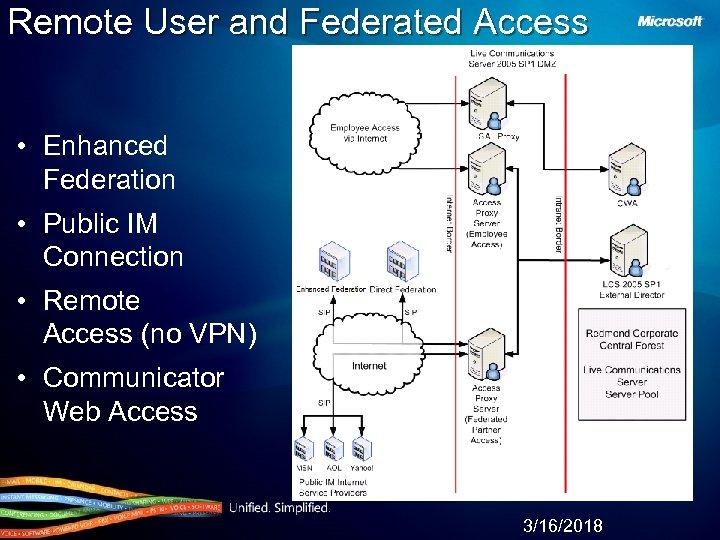 Remote User and Federated Access • Enhanced Federation • Public IM Connection • Remote Access (no VPN) • Communicator Web Access 3/16/2018
 After (Office Communication Server 2 K 7). . .
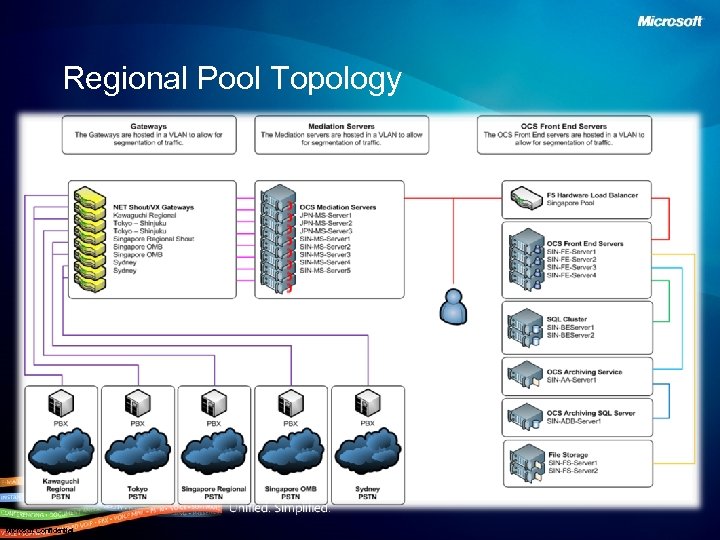 Regional Pool Topology Microsoft Confidential
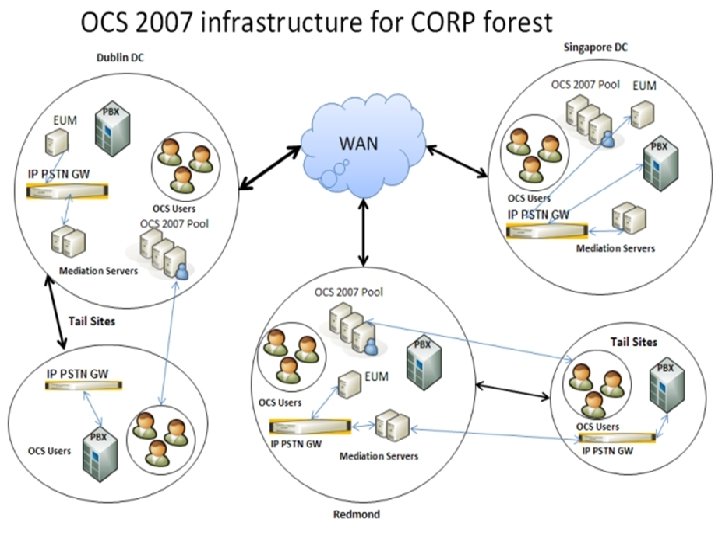
 MS IT OCS Topology • LCS Corp deployment was a single EE Pool for all global users. • Chose Regional model for OCS (Redmond, Dublin, Singapore) – Improved performance for regional users • • Especially for Audio and Video Web Components and Conferencing Remote Access Provisioning Still Automated – Also lays foundation for global business continuance and disaster recovery strategy Microsoft Confidential
 Business and IT Benefits • Information worker within Microsoft saves approx 68 min (3%) per week thru use of OCS/Communicator • High availability and low operating cost with Enterprise Edition pool-based regionally managed system – >99. 9 – 3 dedicated FTE to support – Low user/ticket ratio • Single Identity management system using AD • Secure IM – Single client for all IM contacts via PIC and Federation – Intelligent IM Filter provides simple protection • Against malware, links, attachments • Insure Intellectual Property stays internal November 2006 12
 MS IT Deployment Overview • • • Regional Deployments Exchange UM for voicemail EE, CE and SE Topologies Parallel OCS and LCS deployment Not Just the Corp deployment – Converting our MMS LCS Customers to OCS – New MMS customers will be hosted on OCS Microsoft Confidential
 UC Planning Considerations • Regional site PBX requirements • Local dial plan interrogation • Gateway requirements • User Communication • Exchange UM Integration • UC Routing (Location Profiles) • Network traffic planning • Mediation Server placement
 Site Selection Considerations • Deploy to countries where regulatory and homologation hurdles are cleared for gateway and Vo. IP deployments. • Site has adequate bandwidth for added UC users (Peer to Peer), and Client to Mediation Server. • Device availability (Catalina or Tanjay) • PBX has spare QSIG T 1/E 1 ports for gateway connectivity • Users – Basic phone users with PSTN phone number Microsoft Confidential
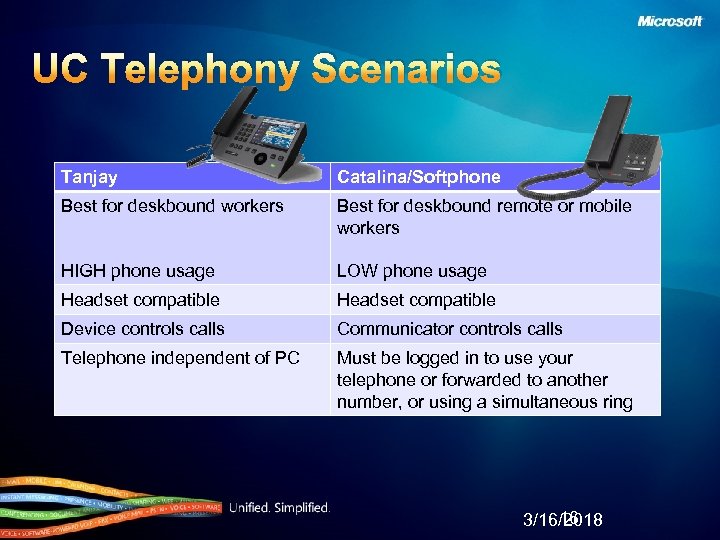 UC Telephony Scenarios Tanjay Catalina/Softphone Best for deskbound workers Best for deskbound remote or mobile workers HIGH phone usage LOW phone usage Headset compatible Device controls calls Communicator controls calls Telephone independent of PC Must be logged in to use your telephone or forwarded to another number, or using a simultaneous ring 16 3/16/2018
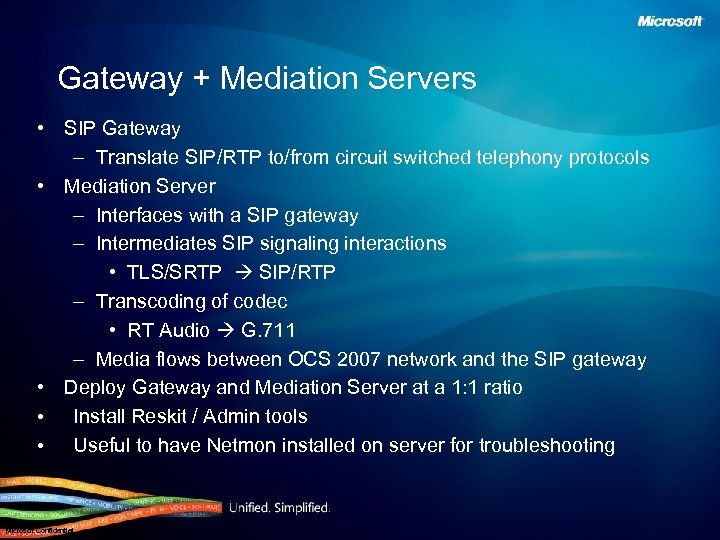 Gateway + Mediation Servers • SIP Gateway – Translate SIP/RTP to/from circuit switched telephony protocols • Mediation Server – Interfaces with a SIP gateway – Intermediates SIP signaling interactions • TLS/SRTP SIP/RTP – Transcoding of codec • RT Audio G. 711 – Media flows between OCS 2007 network and the SIP gateway • Deploy Gateway and Mediation Server at a 1: 1 ratio • Install Reskit / Admin tools • Useful to have Netmon installed on server for troubleshooting Microsoft Confidential
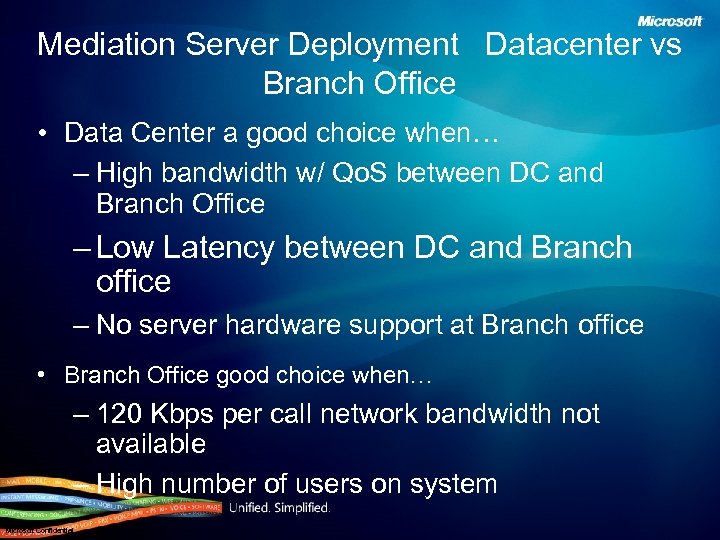 Mediation Server Deployment Datacenter vs Branch Office • Data Center a good choice when… – High bandwidth w/ Qo. S between DC and Branch Office – Low Latency between DC and Branch office – No server hardware support at Branch office • Branch Office good choice when… – 120 Kbps per call network bandwidth not available – High number of users on system Microsoft Confidential
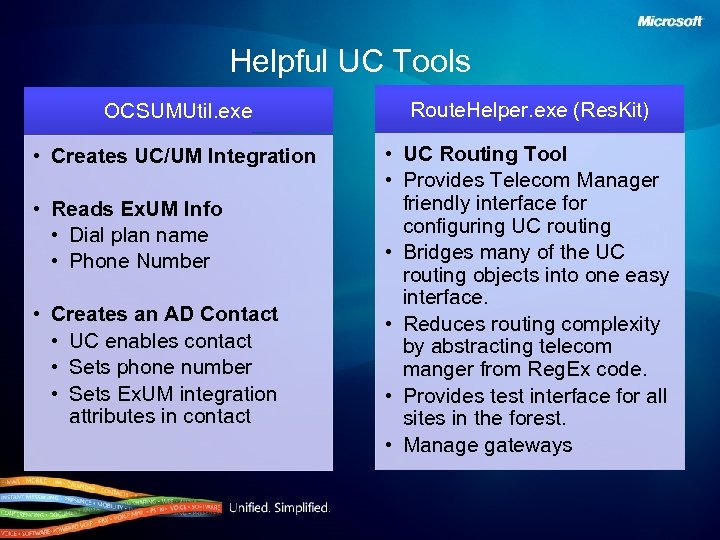 Helpful UC Tools OCSUMUtil. exe Route. Helper. exe (Res. Kit) • Creates UC/UM Integration • UC Routing Tool • Provides Telecom Manager friendly interface for configuring UC routing • Bridges many of the UC routing objects into one easy interface. • Reduces routing complexity by abstracting telecom manger from Reg. Ex code. • Provides test interface for all sites in the forest. • Manage gateways • Reads Ex. UM Info • Dial plan name • Phone Number • Creates an AD Contact • UC enables contact • Sets phone number • Sets Ex. UM integration attributes in contact
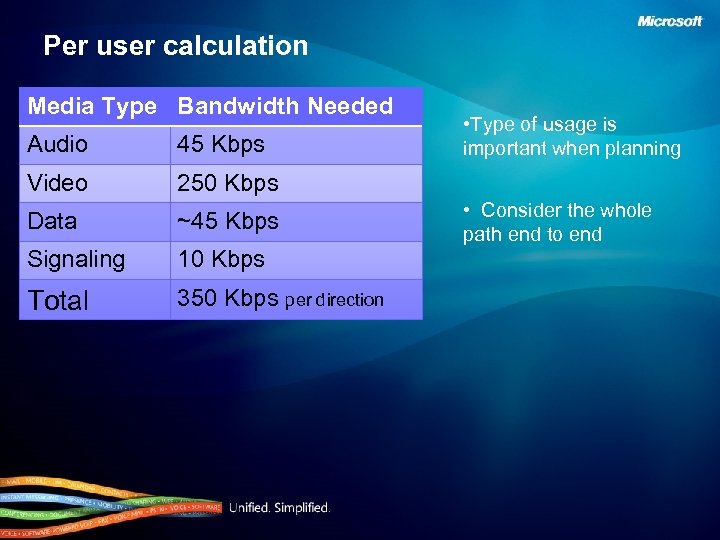 Per user calculation Media Type Bandwidth Needed Audio 45 Kbps Video 250 Kbps Data ~45 Kbps Signaling 10 Kbps Total 350 Kbps per direction • Type of usage is important when planning • Consider the whole path end to end
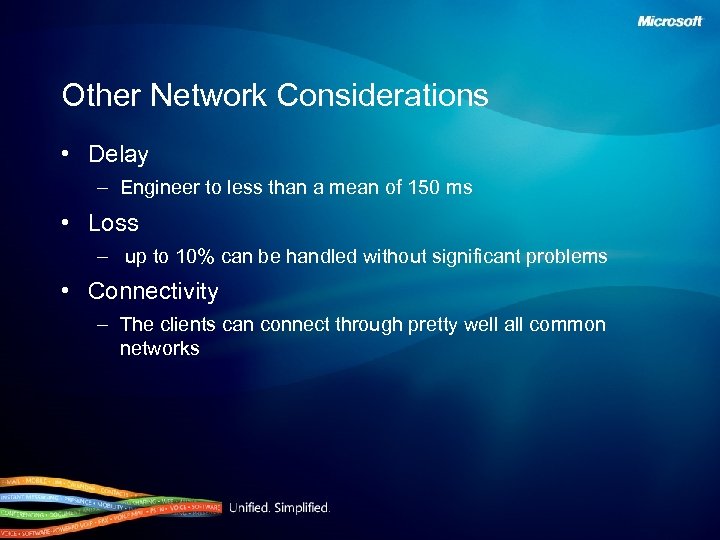 Other Network Considerations • Delay – Engineer to less than a mean of 150 ms • Loss – up to 10% can be handled without significant problems • Connectivity – The clients can connect through pretty well all common networks
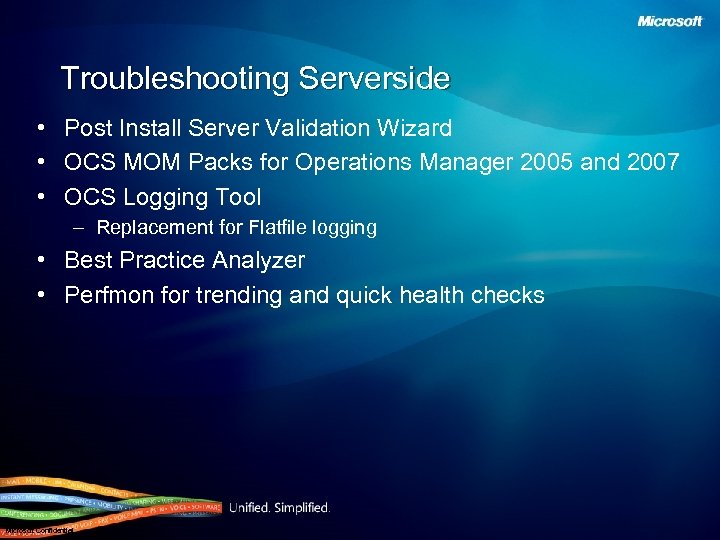 Troubleshooting Serverside • Post Install Server Validation Wizard • OCS MOM Packs for Operations Manager 2005 and 2007 • OCS Logging Tool – Replacement for Flatfile logging • Best Practice Analyzer • Perfmon for trending and quick health checks Microsoft Confidential
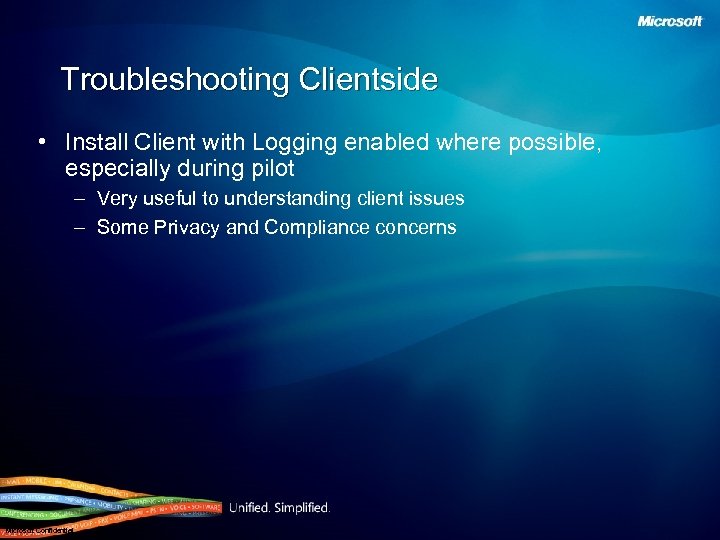 Troubleshooting Clientside • Install Client with Logging enabled where possible, especially during pilot – Very useful to understanding client issues – Some Privacy and Compliance concerns Microsoft Confidential
 Voice Troubleshooting • Steps to Isolate Voice Quality Issue: • Get a clear definition of the issue. Is it reproducible consistently. • Did anything change recently – new devices, new environment “Anything at all” • Which end is the problem • Network parameters to consider – Jitter, Packet loss, Delay, Bandwidth • Touch points for Media • • • Device (Hard phone/Soft phone) Computer/Laptop Mediation Server Media Gateway PSTN network/Mobile Operator • Install Ethereal or Netmon on Mediation servers
 Lessons Learned • Important to drive synergies between all teams (Networking, Telephony, Messaging and UC) early. • Lack of telephone number standardization caused delays in enabling users. • Wireless can be problematic. • Live Meeting without wired power can cause issues. • Using voice from other enterprise locations causes RTP to go over TCP, firewalls typically only allow 443 or 80 which causes audio to go over 443 via TCP. • Legacy network hubs / switches can cause poor audio. • Slower laptop CPU’s can be problematic with UC audio and Round. Table, especially when Recording. Microsoft Confidential
 Gateway Lessons Learned • Choose good partners • Provide site deployment plans early and often to Gateway Vendor so that delays in homologation don’t hinder deployments. • Bring up T 1/E 1 2 weeks prior to deployment • Standardize on tie line interfaces between the PBX and UC (i. e. QSIG) Microsoft Confidential
 Deployment Challenges • Dial Plans are located in UC, PBX, Gateways and Exchange UM • Not all Telco carriers are created equal – Each country is different for T 1/E 1 configuration – Variable length phone numbers – Outbound Caller ID variants – Inconsistent, inbound Caller ID can impersonate internal users if it matches the length and range of an internal extension. • Users that require advanced PBX features are impacted. Microsoft Confidential
 Best Practices • Infrastructure – Standardize gateway hardware – Deploy in phases – Ensure a crisp and well thought out enablement process • End User – Create strong communications package – Standardize user devices – Introduce users to the softphone concept – End user training/preparation – Helpdesk preparation September 07 28