 Скачать презентацию Highly Available Unicenter Solutions — A High Level
0a44bd1d68b2b15e4eaf24621b60f077.ppt
- Количество слайдов: 22



Highly Available Unicenter Solutions - A High Level Summary Draft – Last Revised June 9, 2006
Glossary The following terms and abbreviations are used in this presentation: - “HA” = Highly Available - “USD” = Unicenter Service Desk - “e. IAM” = CA e. Trust Embedded Identity and Access Management - “MSCS” = Microsoft Cluster Server - “Cluster Name” = Network name associated with the cluster group - “NSM” = Unicenter Network System Management - “DSM” = Unicenter Desktop Server Management © 2005 Computer Associates International, Inc. (CA). All trademarks, trade names, services marks and logos referenced herein belong to their respective companies.
Objectives - This presentation provides a high level overview of Unicenter NSM, DSM and USD Highly Available Solutions. - The focus of this presentation is Microsoft Cluster (MSCS). Brightstor High Availability Option and HA for the Unix platforms is outside the scope of this presentation. - There are other documents that discusses Brightstor High Availability implementation for Unicenter NSM and USD © 2005 Computer Associates International, Inc. (CA). All trademarks, trade names, services marks and logos referenced herein belong to their respective companies.
Unicenter NSM
Unicenter NSM - Release 11. 0 supports Ingres MDB - Release 11. 1 supports SQL 2000 and SQL 2005 MDB - Provides out-of-box Highly Available solution for Windows Platform only © 2005 Computer Associates International, Inc. (CA). All trademarks, trade names, services marks and logos referenced herein belong to their respective companies.
Unicenter NSM - If NSM install is carried out in a cluster environment, it will automatically detect the environment and present the HA option. - Not all components are HA - If installing in an HA environment, the components that are not HA are not displayed for selection © 2005 Computer Associates International, Inc. (CA). All trademarks, trade names, services marks and logos referenced herein belong to their respective companies.
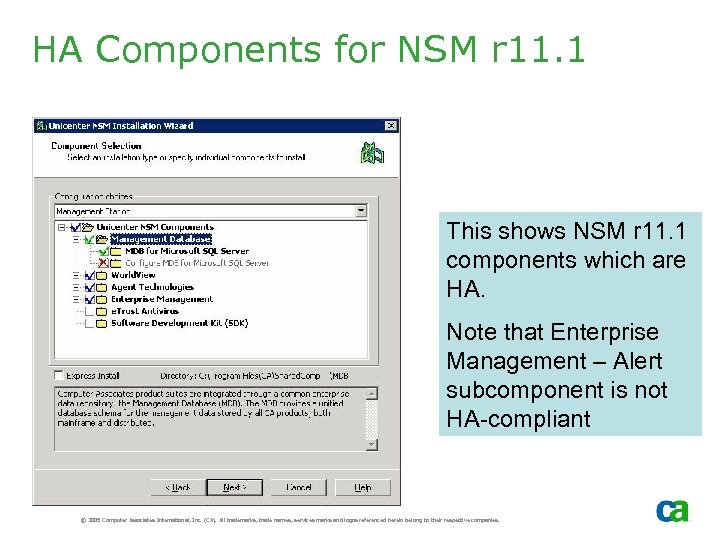
HA Components for NSM r 11. 1 This shows NSM r 11. 1 components which are HA. Note that Enterprise Management – Alert subcomponent is not HA-compliant © 2005 Computer Associates International, Inc. (CA). All trademarks, trade names, services marks and logos referenced herein belong to their respective companies.
Unicenter DSM
Unicenter DSM r 11. 1 - Release 11. 1 provides SQL 2000 and SQL 2005 support - HA support is targeted for future release - HA SQL MDB can be created from DSM media, however, if the MDB Server fails over, restart of CAF service is required (this has been corrected in 11. 2 release) © 2005 Computer Associates International, Inc. (CA). All trademarks, trade names, services marks and logos referenced herein belong to their respective companies.
Unicenter DSM HA MDB - There are two documents describing this – each supporting a different scenario: - First scenario documents installation of DSM in a non-HA environment. Then the database is first detached then attached it to the SQL instance which is HA. This scenario is ideal for moving non- HA MDB to HA MDB - Second scenario documents installation of DSM HA MDB in a cluster environment. © 2005 Computer Associates International, Inc. (CA). All trademarks, trade names, services marks and logos referenced herein belong to their respective companies.
Unicenter Service Desk
Unicenter Service Desk (USD) - USD HA is targeted for future release - Several documents available in the Implementation Best Practices “Fault Tolerance” section that describe different scenarios on how to install various USD components in an HA environment © 2005 Computer Associates International, Inc. (CA). All trademarks, trade names, services marks and logos referenced herein belong to their respective companies.
Scenario #1 - In this scenario, HA SQL MDB is installed from USD media, with the Primary Server and e. IAM installed on non-HA Server - Install Remote Components without e. IAM on cluster nodes - Install non-HA Primary Server with e. IAM on a different server which is not part of any Cluster © 2005 Computer Associates International, Inc. (CA). All trademarks, trade names, services marks and logos referenced herein belong to their respective companies.
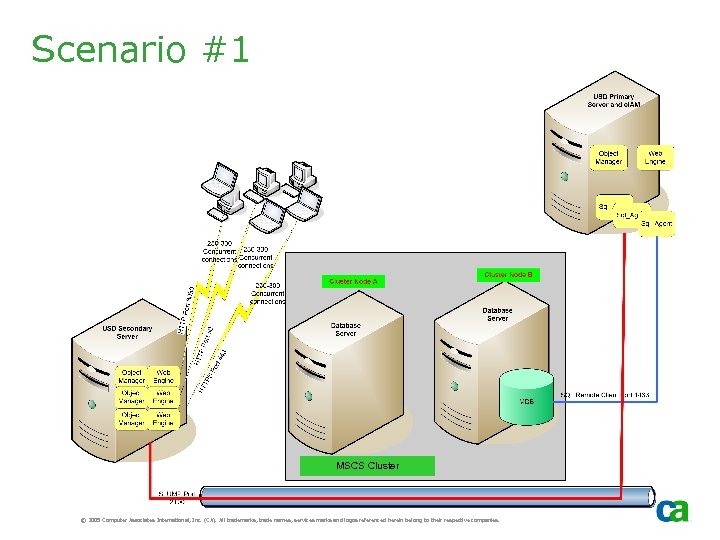
Scenario #1 MSCS Cluster © 2005 Computer Associates International, Inc. (CA). All trademarks, trade names, services marks and logos referenced herein belong to their respective companies.
References - Review “Best Practices for Implementing Unicenter Service Desk r 11. 1 in an HA MSCS Environment” - Part 1 – Install remote components without e. IAM - Part 2 – Install non-HA Primary Server with e. IAM © 2005 Computer Associates International, Inc. (CA). All trademarks, trade names, services marks and logos referenced herein belong to their respective companies.
Scenario #2 - In this scenario, HA SQL MDB is installed from USD media - HA Primary Server is installed on the same cluster but in different cluster group - Non-HA e. IAM is installed without MDB on a different server © 2005 Computer Associates International, Inc. (CA). All trademarks, trade names, services marks and logos referenced herein belong to their respective companies.
Scenario #2 - Install Remote Components without e. IAM on the active node only. No requirement to install on the other cluster nodes - Install non-HA e. IAM without MDB on a different server. This requires special considerations - Install HA Primary Server on the same cluster but different cluster group © 2005 Computer Associates International, Inc. (CA). All trademarks, trade names, services marks and logos referenced herein belong to their respective companies.
Scenario #2 – Active Modes - Primary Server and MDB active on different cluster nodes. This is desirable and normal mode - Primary Server and MDB active on the same cluster node. This would be the case if second cluster node is lost - Primary Server and MDB active on different cluster nodes (i. e. , active nodes have been swapped around) © 2005 Computer Associates International, Inc. (CA). All trademarks, trade names, services marks and logos referenced herein belong to their respective companies.
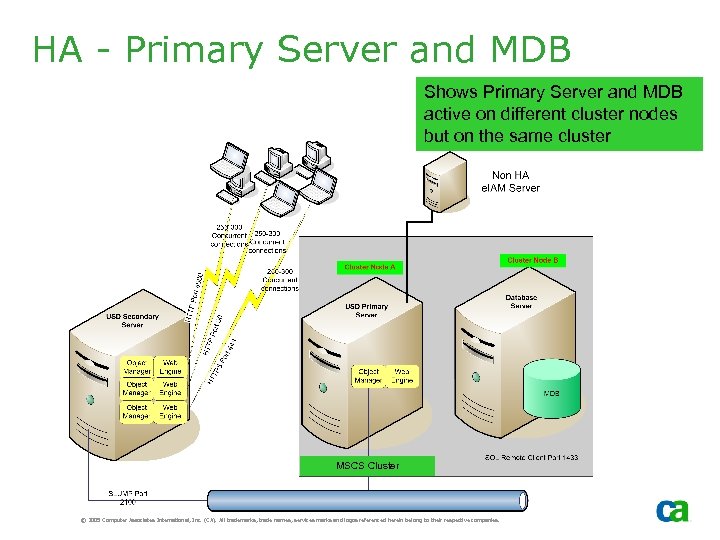
HA - Primary Server and MDB Shows Primary Server and MDB active on different cluster nodes but on the same cluster MSCS Cluster © 2005 Computer Associates International, Inc. (CA). All trademarks, trade names, services marks and logos referenced herein belong to their respective companies.
References - Review “Best Practices for Implementing Unicenter Service Desk r 11. 1 in an HA MSCS Environment” presentation series: - Part 1 – Install remote components without MDB - Part 2 – Install non HA e. IAM without MDB - Part 3 – Install HA Primary Server © 2005 Computer Associates International, Inc. (CA). All trademarks, trade names, services marks and logos referenced herein belong to their respective companies.
Scenario #3 - In this scenario, - Install HA SQL MDB with e. IAM from USD media - Install HA Primary Server on the same cluster but different cluster group - The key difference between scenario #2 and scenario #3 is that, in this scenario, e. IAM is also installed on the same cluster © 2005 Computer Associates International, Inc. (CA). All trademarks, trade names, services marks and logos referenced herein belong to their respective companies.
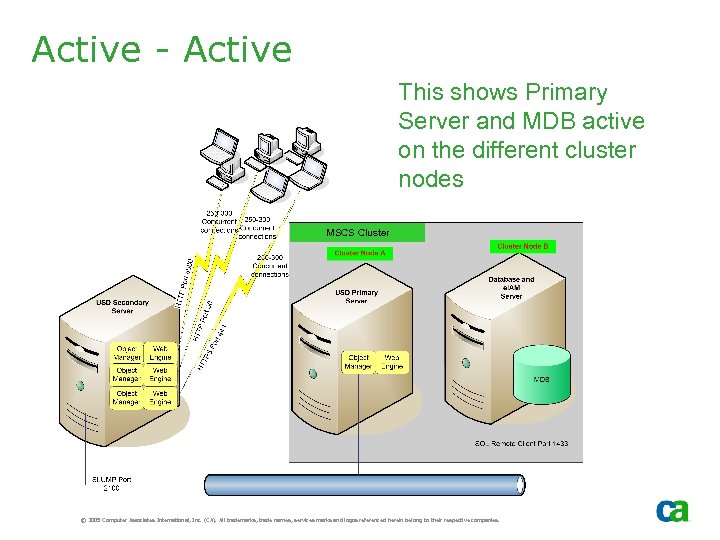
Active - Active This shows Primary Server and MDB active on the different cluster nodes MSCS Cluster © 2005 Computer Associates International, Inc. (CA). All trademarks, trade names, services marks and logos referenced herein belong to their respective companies.
Скачать презентацию Highly Available Unicenter Solutions — A High Level
0a44bd1d68b2b15e4eaf24621b60f077.ppt