


 Скачать презентацию Hardware Design Using EDK This material exempt per
1bb5b6812ed8e618e630df85b5a2acd6.ppt
- Количество слайдов: 40
 Hardware Design Using EDK This material exempt per Department of Commerce license exception TSU © 2007 Xilinx, Inc. All Rights Reserved
 Objectives After completing this module, you will be able to: • Describe how to add hardware to an existing XPS • • project Discuss the function of Platform Generator (Plat. Gen) Utilize the integration between ISE™ and Xilinx Platform Studio (XPS) to enhance the design flow Utilize the Xflow in XPS Describe the steps involved in creating a submodule with XPS and integrating the submodule into a bigger system with ISE
 Outline • Adding System Components • Generating the System netlists (Plat. Gen) • Generating the Bitstream – Manually with ISE: Project Navigator Integration • Top Level • Submodule – Automatically from XPS: Xflow Integration
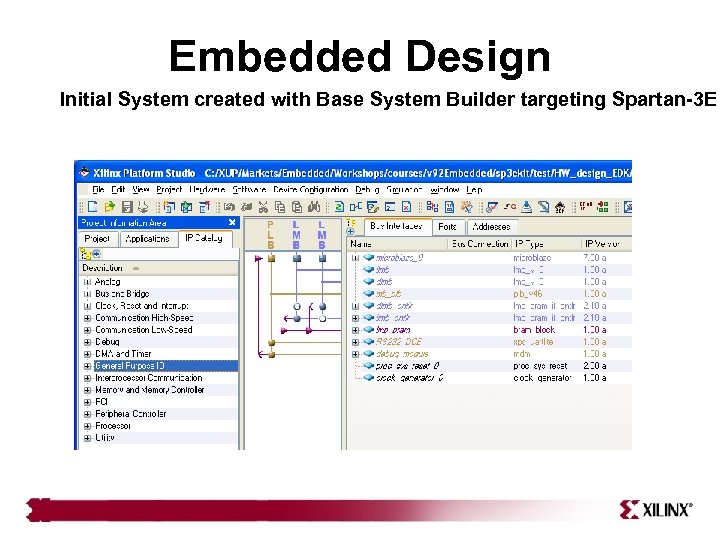 Embedded Design Initial System created with Base System Builder targeting Spartan-3 E
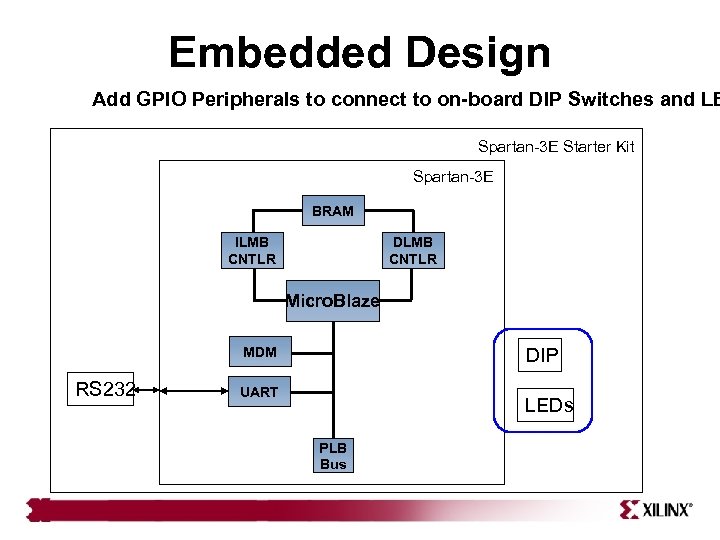 Embedded Design Add GPIO Peripherals to connect to on-board DIP Switches and LE Spartan-3 E Starter Kit Spartan-3 E BRAM ILMB CNTLR DLMB CNTLR Micro. Blaze DIP MDM RS 232 UART LEDs PLB Bus
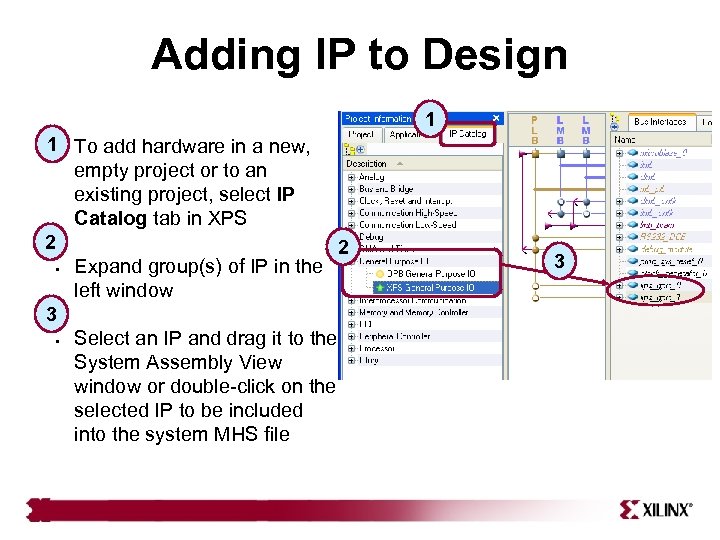 Adding IP to Design 1 1 • To add hardware in a new, empty project or to an existing project, select IP Catalog tab in XPS 2 2 • Expand group(s) of IP in the left window 3 • Select an IP and drag it to the System Assembly View window or double-click on the selected IP to be included into the system MHS file 3
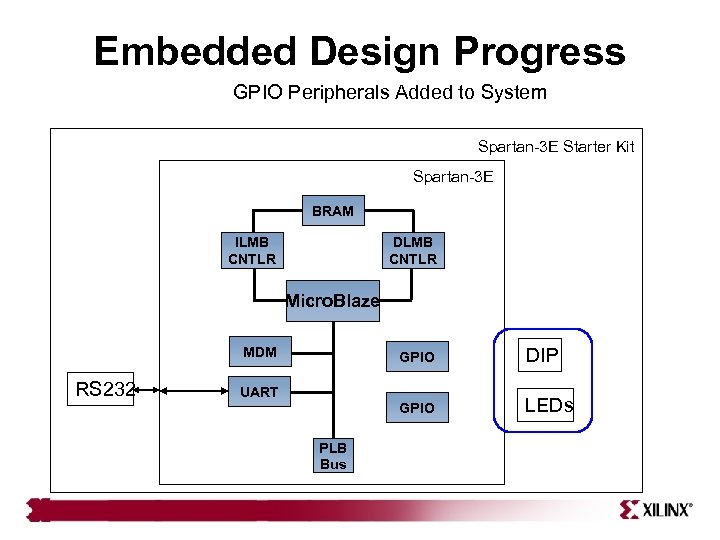 Embedded Design Progress GPIO Peripherals Added to System Spartan-3 E Starter Kit Spartan-3 E BRAM ILMB CNTLR DLMB CNTLR Micro. Blaze GPIO RS 232 DIP GPIO MDM LEDs UART PLB Bus
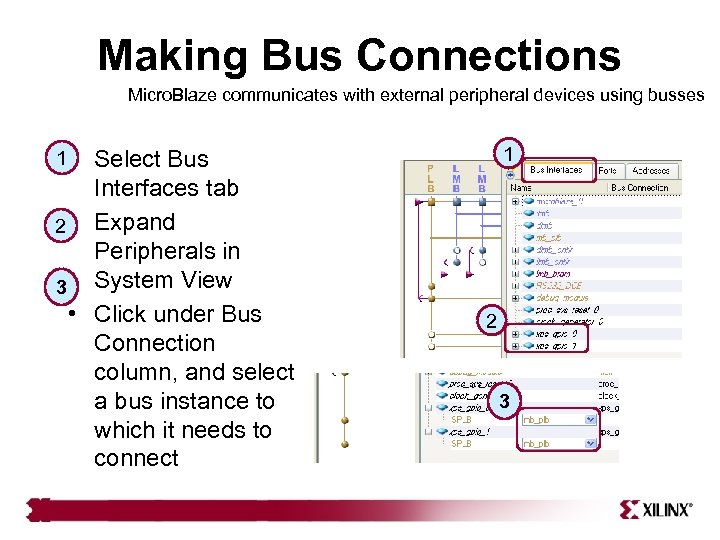 Making Bus Connections Micro. Blaze communicates with external peripheral devices using busses 1 1 • Select Bus Interfaces tab 2 • Expand Peripherals in 3 System View • Click under Bus Connection column, and select a bus instance to which it needs to connect 2 3
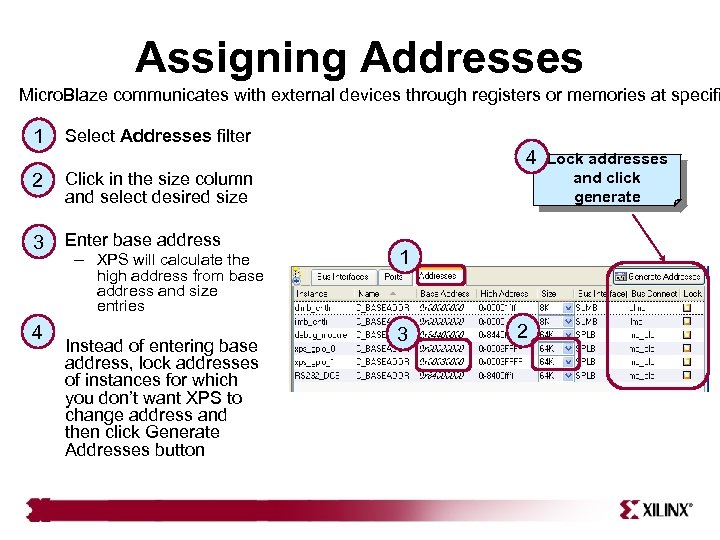 Assigning Addresses Micro. Blaze communicates with external devices through registers or memories at specifi • 1 Select Addresses filter • 2 Click in the size column and select desired size • 3 Enter base address – XPS will calculate the 4 high address from base address and size entries 4 • Instead of entering base address, lock addresses of instances for which you don’t want XPS to change address and then click Generate Addresses button 1 3 2 Lock addresses and click generate
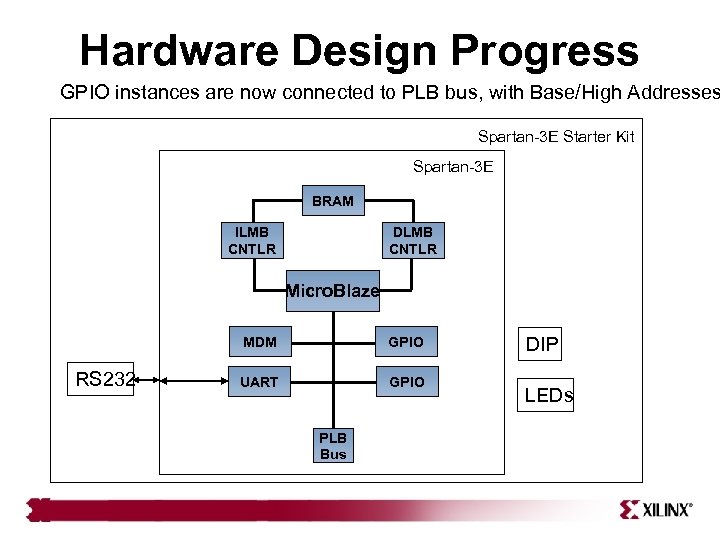 Hardware Design Progress GPIO instances are now connected to PLB bus, with Base/High Addresses Spartan-3 E Starter Kit Spartan-3 E BRAM ILMB CNTLR DLMB CNTLR Micro. Blaze MDM RS 232 GPIO UART GPIO PLB Bus DIP LEDs
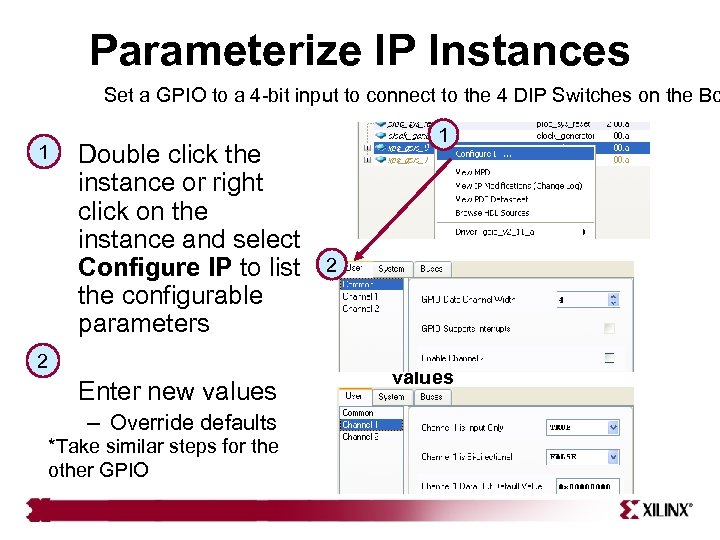 Parameterize IP Instances Set a GPIO to a 4 -bit input to connect to the 4 DIP Switches on the Bo 1 Double click the instance or right click on the instance and select Configure IP to list the configurable parameters 2 Enter new values – Override defaults *Take similar steps for the other GPIO 1 2 3 Overriding values
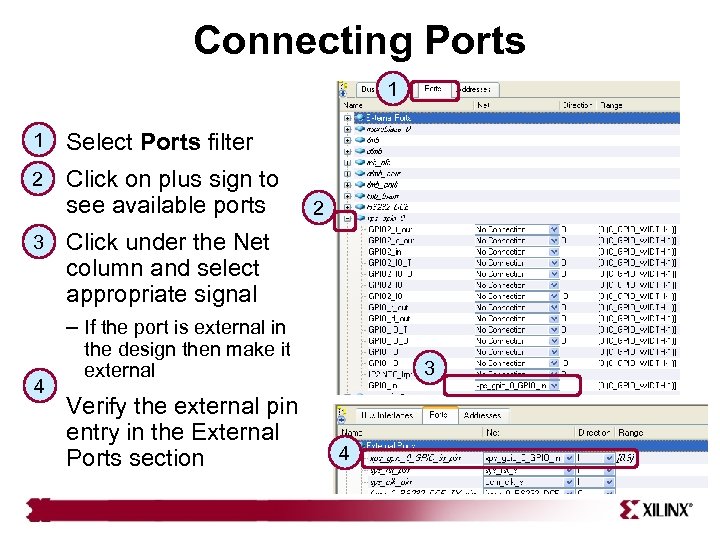 Connecting Ports 1 1 Select Ports filter 2 Click on plus sign to see available ports 3 2 Click under the Net column and select appropriate signal – If the port is external in 4 the design then make it external Verify the external pin entry in the External Ports section 3 4
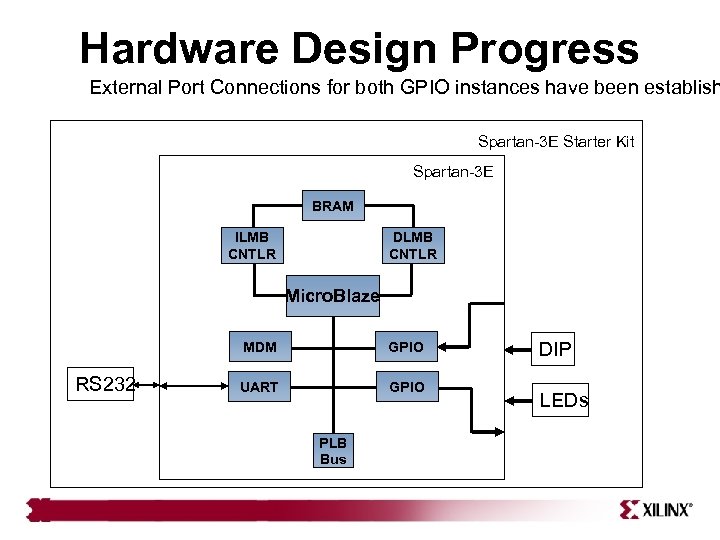 Hardware Design Progress External Port Connections for both GPIO instances have been establish Spartan-3 E Starter Kit Spartan-3 E BRAM ILMB CNTLR DLMB CNTLR Micro. Blaze MDM RS 232 GPIO UART GPIO PLB Bus DIP LEDs
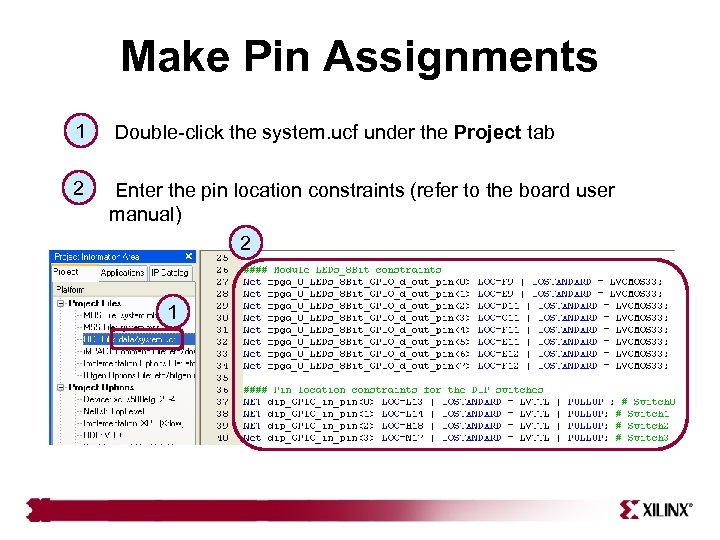 Make Pin Assignments 1 Double-click the system. ucf under the Project tab 2 Enter the pin location constraints (refer to the board user manual) 2 1
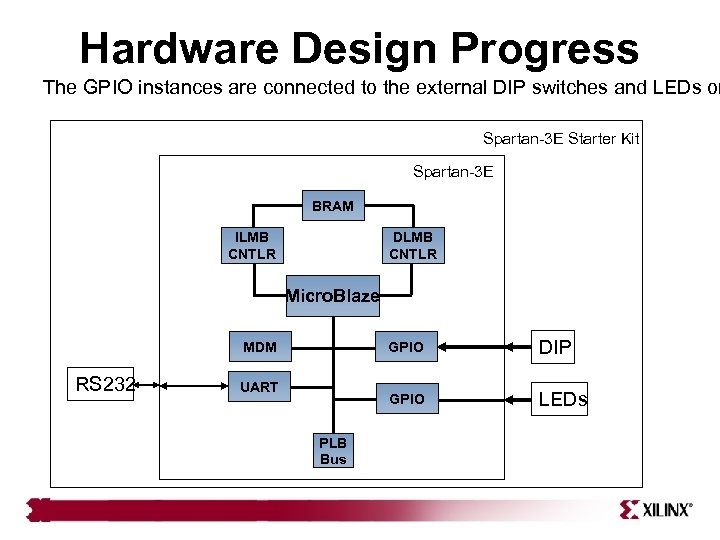 Hardware Design Progress The GPIO instances are connected to the external DIP switches and LEDs on Spartan-3 E Starter Kit Spartan-3 E BRAM ILMB CNTLR DLMB CNTLR Micro. Blaze GPIO RS 232 UART PLB Bus DIP GPIO MDM LEDs
 Outline • Adding System Components • Generating the System Netlists (Plat. Gen) • Generating the Bitstream – Manually in ISE: Project Navigator Integration • Top Level • Submodule – Automatically from XPS: Xflow Integration
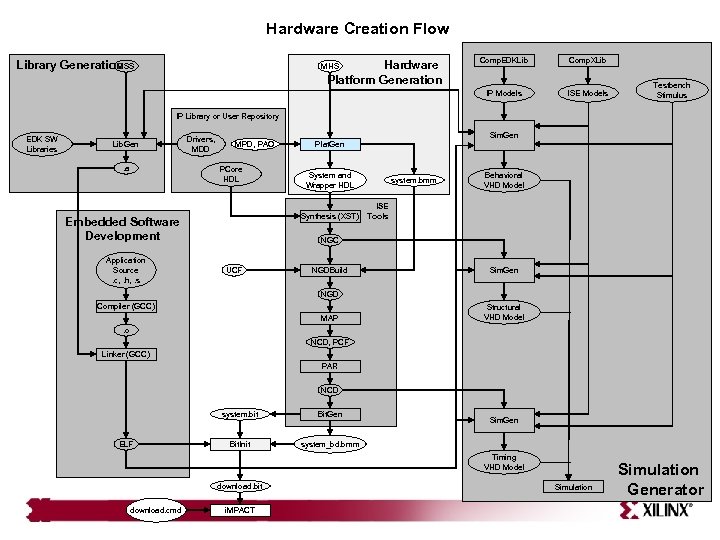 Hardware Creation Flow Hardware Platform Generation MHS Comp. EDKLib Comp. XLib IP Models MSS Library Generation ISE Models Testbench Stimulus IP Library or User Repository EDK SW Libraries Lib. Gen. a Drivers, MDD Sim. Gen MPD, PAO PCore HDL System and Wrapper HDL Synthesis (XST) Embedded Software Development Application Source. c, . h, . s Plat. Gen system. bmm Behavioral VHD Model ISE Tools NGC UCF NGDBuild Sim. Gen NGD Compiler (GCC) MAP Structural VHD Model . o NCD, PCF Linker (GCC) PAR NCD system. bit ELF Bit. Gen Bit. Init system_bd. bmm Sim. Gen Timing VHD Model download. bit download. cmd i. MPACT Simulation Generator
 Hardware Design • After defining the system hardware and connectivity, the next step is to create hardware netlists with the Platform Generator (Plat. Gen) • Plat. Gen inputs the following files: – Microprocessor Hardware Specification (MHS) file – Microprocessor Peripheral Definitions (MPD) file • Plat. Gen constructs the embedded processor system in the form of hardware netlists (HDL and
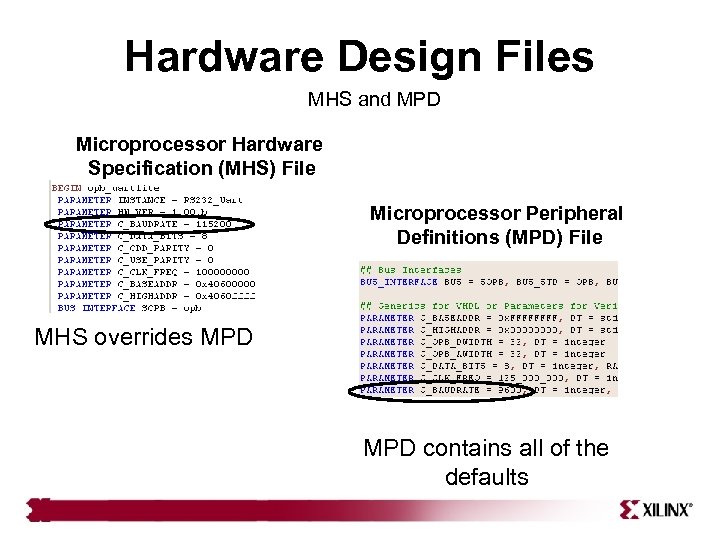 Hardware Design Files MHS and MPD Microprocessor Hardware Specification (MHS) File Microprocessor Peripheral Definitions (MPD) File MHS overrides MPD contains all of the defaults
![Plat. Gen • Plat. Generated Directories HDL directory – system. [vhd|v] file (if top](https://present5.com/presentation/1bb5b6812ed8e618e630df85b5a2acd6/image-20.jpg "Plat. Gen • Plat. Generated Directories HDL directory – system. [vhd|v] file (if top") Plat. Gen • Plat. Generated Directories HDL directory – system. [vhd|v] file (if top level) project_directory – system_stub. [vhd|v] file (if submodule) – peripheral_wrapper. [vhd|v] files implementation directory • Implementation directory synthesis directory – peripheral_wrapper. ngc files – system. ngc file – system. bmm file • Synthesis directory – peripheral_wrapper. [prj|scr] files – system. [prj|scr] files hdl directory
Plat. Gen • Plat. Generated Directories HDL directory – system. [vhd|v] file (if top level) project_directory – system_stub. [vhd|v] file (if submodule) – peripheral_wrapper. [vhd|v] files implementation directory • Implementation directory synthesis directory – peripheral_wrapper. ngc files – system. ngc file – system. bmm file • Synthesis directory – peripheral_wrapper. [prj|scr] files – system. [prj|scr] files hdl directory
 Plat. Gen Memory Generation • Platform Generator generates the necessary banks of memory and the initialization files for the block RAM block (bram_block). The block RAM block is coupled with a block RAM controller • Current block RAM controllers for Micro. Blaze include the following: – PLB block RAM controller (xps_bram_if_cntlr) – OPB block RAM controller (opb_bram_if_cntlr)
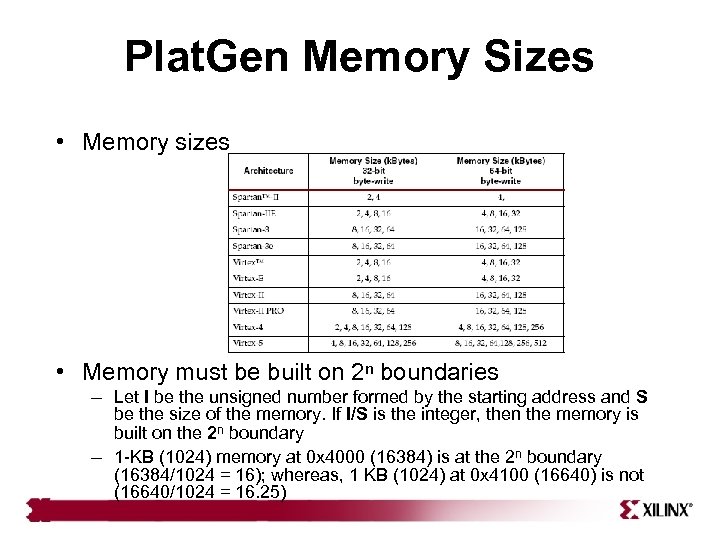 Plat. Gen Memory Sizes • Memory sizes • Memory must be built on 2ⁿ boundaries – Let I be the unsigned number formed by the starting address and S be the size of the memory. If I/S is the integer, then the memory is built on the 2ⁿ boundary – 1 -KB (1024) memory at 0 x 4000 (16384) is at the 2ⁿ boundary (16384/1024 = 16); whereas, 1 KB (1024) at 0 x 4100 (16640) is not (16640/1024 = 16. 25)
 Block Memory Map • A Block RAM Memory Map (BMM) file contains a syntactic description of how individual block RAMs constitute a contiguous logical data space • Plat. Gen has the following policy for writing a BMM file: – If PORTA is connected and PORTB is not connected, the generated BMM will be from PORTA point of reference – If PORTA is not connected and PORTB is connected, the generated BMM will be from PORTB point of reference – If PORTA is connected and PORTB is connected, the generated BMM will be from PORTA point of reference
 Outline • Adding System Components • Generate the System Netlists (Plat. Gen) • Generate the Bitstream – Manually in ISE: Project Navigator Integration – Automatically with XPS: Xflow Integration
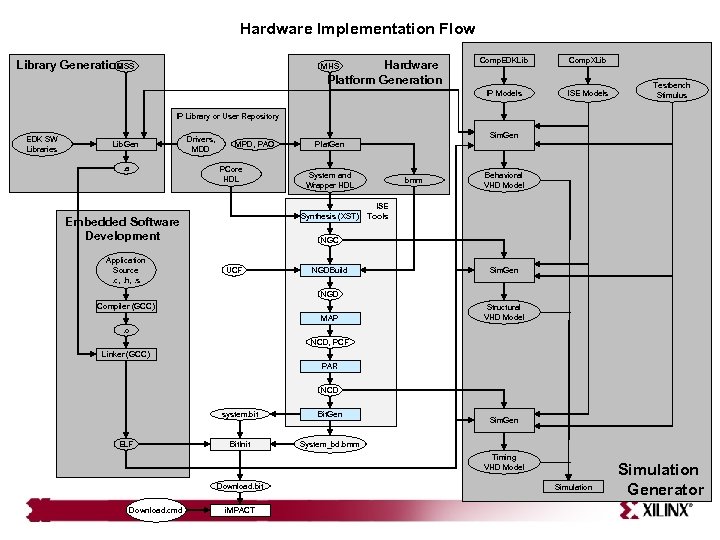 Hardware Implementation Flow Hardware Platform Generation MHS Comp. EDKLib Comp. XLib IP Models MSS Library Generation ISE Models Testbench Stimulus IP Library or User Repository EDK SW Libraries Lib. Gen. a Drivers, MDD Sim. Gen MPD, PAO PCore HDL System and Wrapper HDL Synthesis (XST) Embedded Software Development Application Source. c, . h, . s Plat. Gen bmm Behavioral VHD Model ISE Tools NGC UCF NGDBuild Sim. Gen NGD Compiler (GCC) MAP Structural VHD Model . o NCD, PCF Linker (GCC) PAR NCD system. bit ELF Bit. Gen Bit. Init System_bd. bmm Sim. Gen Timing VHD Model Download. bit Download. cmd i. MPACT Simulation Generator
 Outline • Adding System Components • Generate the System Netlists (Plat. Gen) • Generate the Bitstream – Manually in ISE: Project Navigator Integration – Automatically with XPS: Xflow Integration
 Manual ISE Flow User generates bitstream in ISE • The processor system (. xmp) can be added and connected in an ISE project – XPS can be invoked from ISE • Benefits include – Add additional logic to the FPGA design – Synthesize the design by utilizing ISE™-supported synthesis tools – Control the FPGA implementation flow by using ISE • Timing and constraints entry • Implementation tool flow control • Point tool control – FPGA Editor tool – Constraints Editor tool – Chip. Scope Pro tool
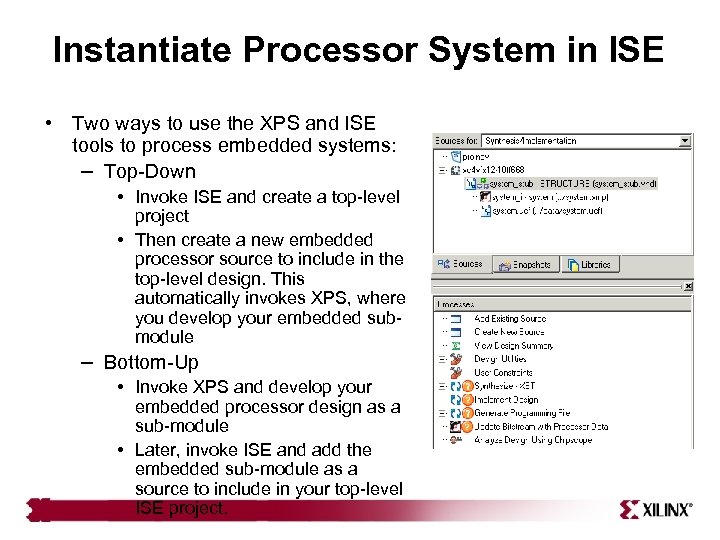 Instantiate Processor System in ISE • Two ways to use the XPS and ISE tools to process embedded systems: – Top-Down • Invoke ISE and create a top-level project • Then create a new embedded processor source to include in the top-level design. This automatically invokes XPS, where you develop your embedded submodule – Bottom-Up • Invoke XPS and develop your embedded processor design as a sub-module • Later, invoke ISE and add the embedded sub-module as a source to include in your top-level ISE project.
 Outline • Adding System Components • Generating the System Netlists (Plat. Gen) • Generate the Bitstream – Manually in ISE: Project Navigator Integration – Automatically with XPS: Xflow Integration
 Hardware Implementation Automated Approach • Xflow – Automatically implements hardware and generates the bitstream – Input files →. ngc netlists, system. bmm file, system. vhd, . ucf – Output Files → system. bit, system_bd. bmm – Xflow calls the ISE™ Implementation tools using fast_runtime. opt file • NGDBuild, MAP, PAR, and TRACE are executed – Xflow then calls the Bit. Gen program using bitgen. ut file • Bit. Gen generates the bit file system. bit • Bit. Gen also generates the back-annotated system_bd. bmm BMM file, which contains the physical location of the block RAMs
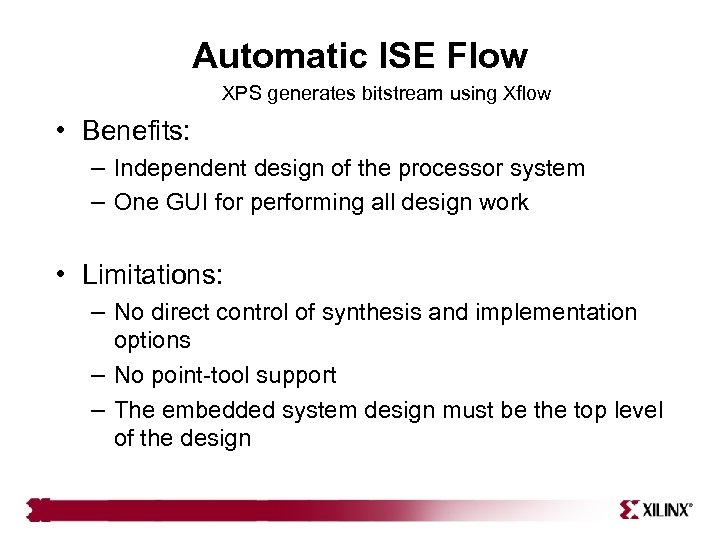 Automatic ISE Flow XPS generates bitstream using Xflow • Benefits: – Independent design of the processor system – One GUI for performing all design work • Limitations: – No direct control of synthesis and implementation options – No point-tool support – The embedded system design must be the top level of the design
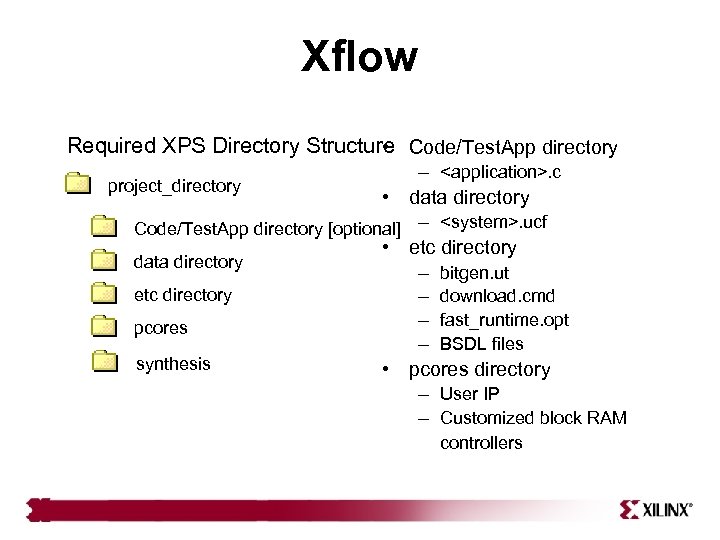 Xflow Required XPS Directory Structure Code/Test. App directory • –
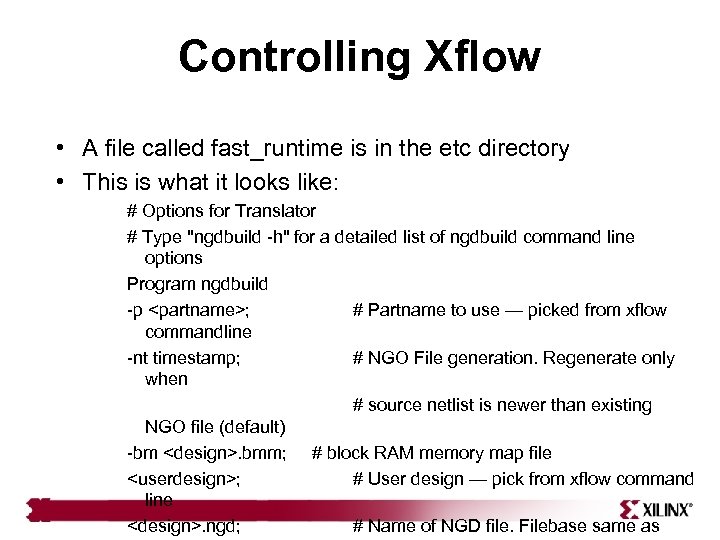 Controlling Xflow • A file called fast_runtime is in the etc directory • This is what it looks like: # Options for Translator # Type "ngdbuild -h" for a detailed list of ngdbuild command line options Program ngdbuild -p
 Knowledge Check • What are some of the advantages of using ISE™ and XPS integration? • What are some of the advantages of using Xflow and XPS integration?
 Answers • What are some of the advantages of using ISE™ and XPS integration? – Add additional logic to the FPGA design – Synthesize the design by utilizing ISE-supported synthesis tools – Control the FPGA implementation flow by using ISE • What are some of the advantages of using Xflow and XPS integration? – One GUI to perform all design work – Simple push-button flow
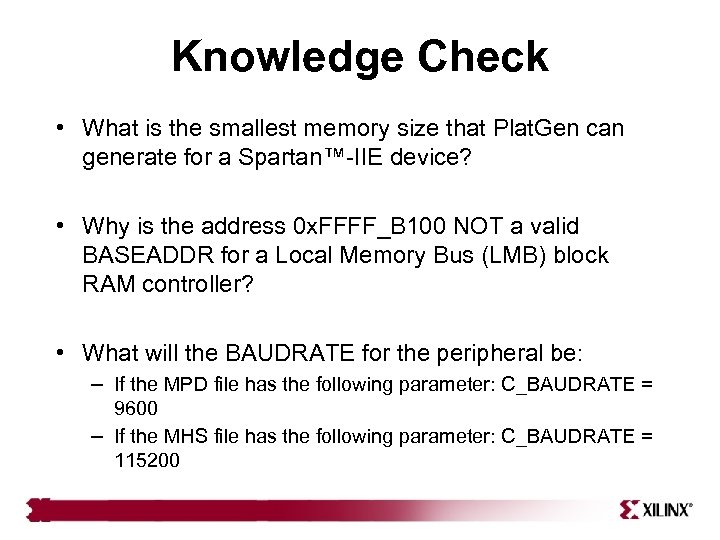 Knowledge Check • What is the smallest memory size that Plat. Gen can generate for a Spartan™-IIE device? • Why is the address 0 x. FFFF_B 100 NOT a valid BASEADDR for a Local Memory Bus (LMB) block RAM controller? • What will the BAUDRATE for the peripheral be: – If the MPD file has the following parameter: C_BAUDRATE = 9600 – If the MHS file has the following parameter: C_BAUDRATE = 115200
 Answers • What is the smallest memory size that Plat. Gen can generate for a Spartan™-IIE device? – 2 KB • Why is the address 0 x. FFFF_B 100 NOT a valid BASEADDR for a Local Memory Bus (LMB) block RAM controller? – It is not on a 2 n boundary • What will the BAUDRATE for the peripheral be: – If the MPD file has the following parameter: C_BAUDRATE = 9600 – If the MHS file has the following parameter: C_BAUDRATE = 115200 • The BAUDRATE will be 115200
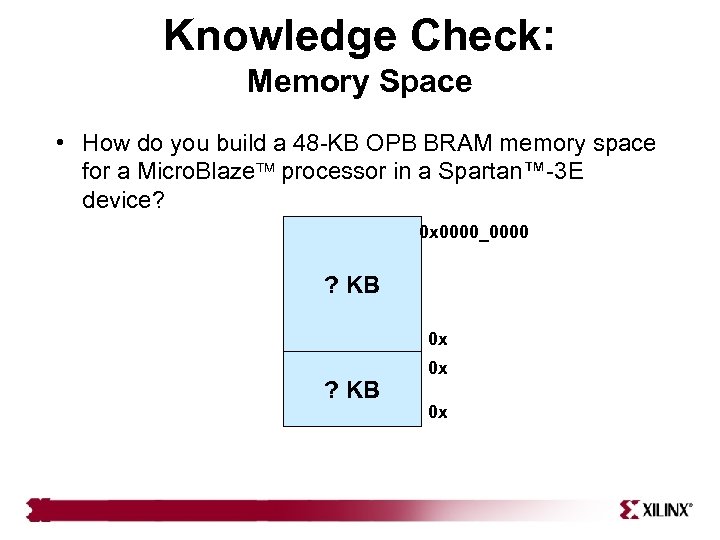 Knowledge Check: Memory Space • How do you build a 48 -KB OPB BRAM memory space for a Micro. Blaze processor in a Spartan™-3 E device? 0 x 0000_0000 ? KB 0 x 0 x
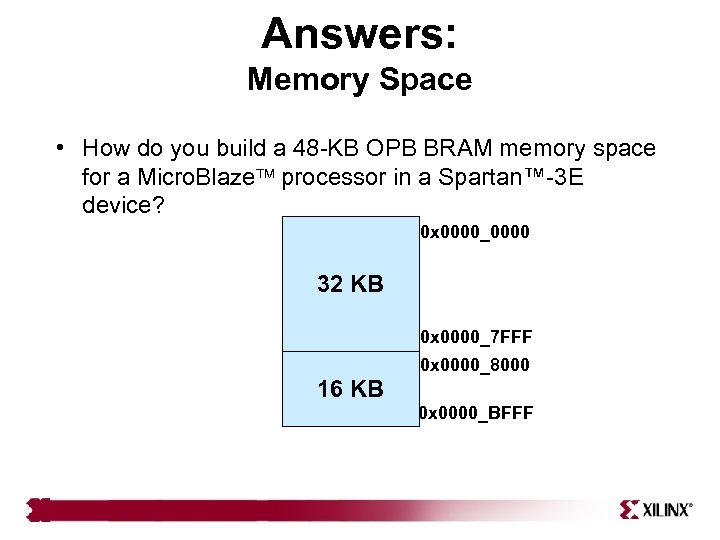 Answers: Memory Space • How do you build a 48 -KB OPB BRAM memory space for a Micro. Blaze processor in a Spartan™-3 E device? 0 x 0000_0000 32 KB 0 x 0000_7 FFF 0 x 0000_8000 16 KB 0 x 0000_BFFF
 Where Can I Learn More? • Tool documentation – Embedded System Tools Guide Xilinx Platform Studio • Support Website – EDK Website: www. xilinx. com/edk