


 Скачать презентацию H 600 RFHawk Training Agenda Tuesday
f62bdb7679913744365ec0e8a8f92db1.ppt
- Количество слайдов: 88
 H 600 RFHawk Training
 Agenda: Tuesday § Why Did You Purchase the H 600? – – What are your expectations from the H 600? Why did you buy the H 600? What features attracted your attention? What are your expectations for this training? § Overview of the H 600 30 min § H 600 System Architecture § H 600 Basic Instrument Operation Demo 4 hrs – Scan – Classify – Locate § H 600 Mapping Tutorial 1 hour – Describe the process to acquire a map and load it into the H 600 § H 600 Mapping Lab 1 hour 2 RF Hawk Product Introduction - TEKTRONIX CONFIDENTIAL
 Agenda: Wednesday § Signal Location Practical Aspect 2 hour – Techniques and equipment to use the H 600 to locate signals with the H 600 § Finding Bugs Lab 1 hour § Field Guide to Signals 1 hour – A guide to the characteristics of common signals and how to visually spot them on a Spectrum Analyzer § Spectral Correlation Analysis Overview 1 hour 3 RF Hawk Product Introduction - TEKTRONIX CONFIDENTIAL
![The H 600 RFHawk [1/2] § Is a Signal Hunter § Handheld, ruggedized, battery](https://present5.com/presentation/f62bdb7679913744365ec0e8a8f92db1/image-4.jpg "The H 600 RFHawk [1/2] § Is a Signal Hunter § Handheld, ruggedized, battery") The H 600 RFHawk [1/2] § Is a Signal Hunter § Handheld, ruggedized, battery operated § Has an intuitive set of signal hunting tools, optimized for field operations – SCAN, the environment – CLASSIFY, the known – LOCATE, the unknown 4 RF Hawk Product Introduction - TEKTRONIX CONFIDENTIAL wk RF Ha
The H 600 RFHawk [1/2] § Is a Signal Hunter § Handheld, ruggedized, battery operated § Has an intuitive set of signal hunting tools, optimized for field operations – SCAN, the environment – CLASSIFY, the known – LOCATE, the unknown 4 RF Hawk Product Introduction - TEKTRONIX CONFIDENTIAL wk RF Ha
![The H 600 RFHawk [2/2] § Classification tools can be customized § Uses proven](https://present5.com/presentation/f62bdb7679913744365ec0e8a8f92db1/image-5.jpg "The H 600 RFHawk [2/2] § Classification tools can be customized § Uses proven") The H 600 RFHawk [2/2] § Classification tools can be customized § Uses proven technology to extract RF signal’s inherent characteristics § Findings/data can be exported for further analysis 5 RF Hawk Product Introduction - TEKTRONIX CONFIDENTIAL
The H 600 RFHawk [2/2] § Classification tools can be customized § Uses proven technology to extract RF signal’s inherent characteristics § Findings/data can be exported for further analysis 5 RF Hawk Product Introduction - TEKTRONIX CONFIDENTIAL
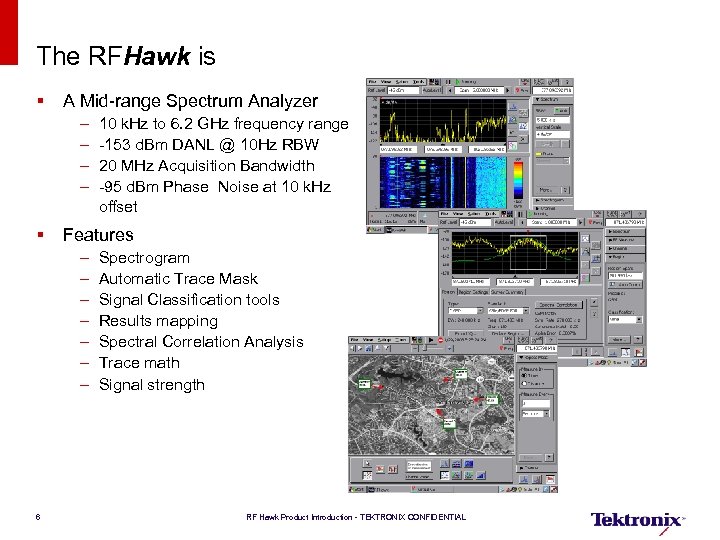 The RFHawk is § A Mid-range Spectrum Analyzer – – 10 k. Hz to 6. 2 GHz frequency range -153 d. Bm DANL @ 10 Hz RBW 20 MHz Acquisition Bandwidth -95 d. Bm Phase Noise at 10 k. Hz offset § Features – – – – 6 Spectrogram Automatic Trace Mask Signal Classification tools Results mapping Spectral Correlation Analysis Trace math Signal strength RF Hawk Product Introduction - TEKTRONIX CONFIDENTIAL
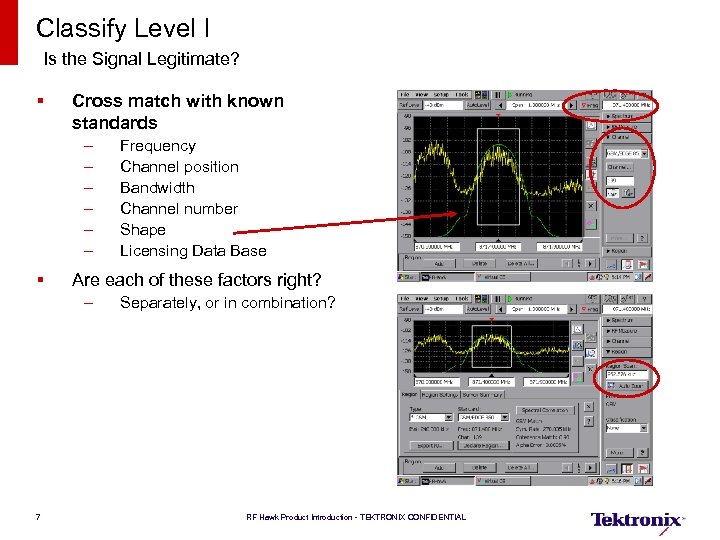 Classify Level I Is the Signal Legitimate? § Cross match with known standards – – – § Are each of these factors right? – 7 Frequency Channel position Bandwidth Channel number Shape Licensing Data Base Separately, or in combination? RF Hawk Product Introduction - TEKTRONIX CONFIDENTIAL
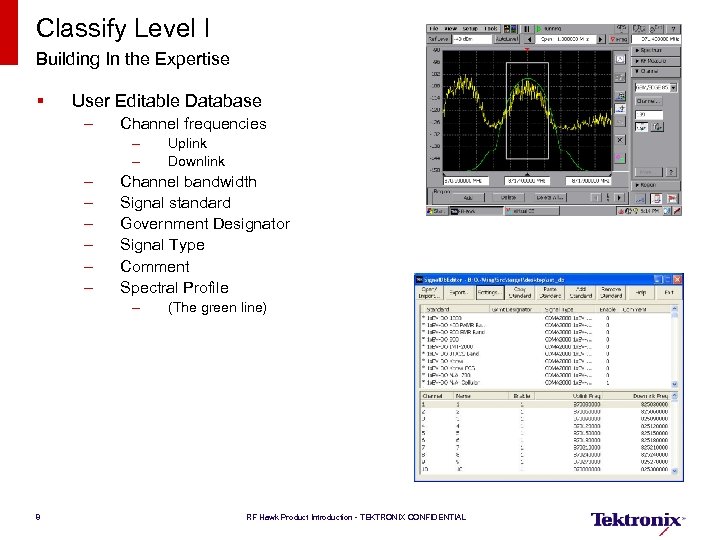 Classify Level I Building In the Expertise § User Editable Database – Channel frequencies – – – – Channel bandwidth Signal standard Government Designator Signal Type Comment Spectral Profile – 8 Uplink Downlink (The green line) RF Hawk Product Introduction - TEKTRONIX CONFIDENTIAL
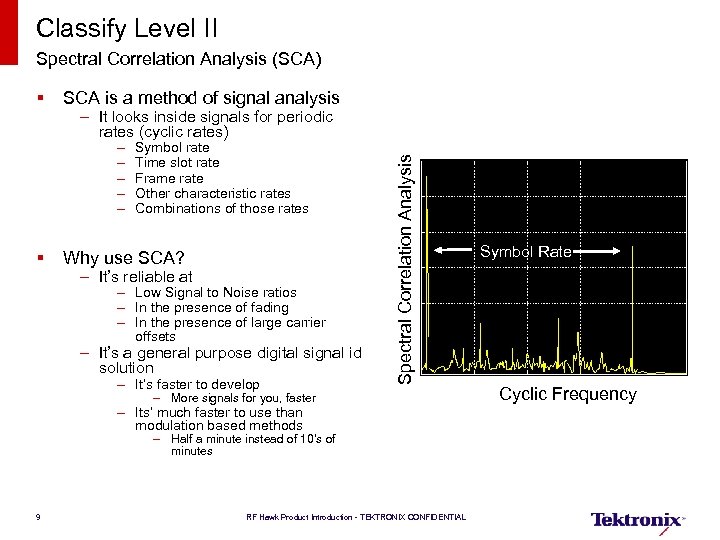 Classify Level II Spectral Correlation Analysis (SCA) § SCA is a method of signal analysis – – – Symbol rate Time slot rate Frame rate Other characteristic rates Combinations of those rates § Why use SCA? – It’s reliable at – Low Signal to Noise ratios – In the presence of fading – In the presence of large carrier offsets – It’s a general purpose digital signal id solution – It’s faster to develop Spectral Correlation Analysis – It looks inside signals for periodic rates (cyclic rates) – More signals for you, faster – Its’ much faster to use than modulation based methods – Half a minute instead of 10’s of minutes 9 RF Hawk Product Introduction - TEKTRONIX CONFIDENTIAL Symbol Rate Cyclic Frequency
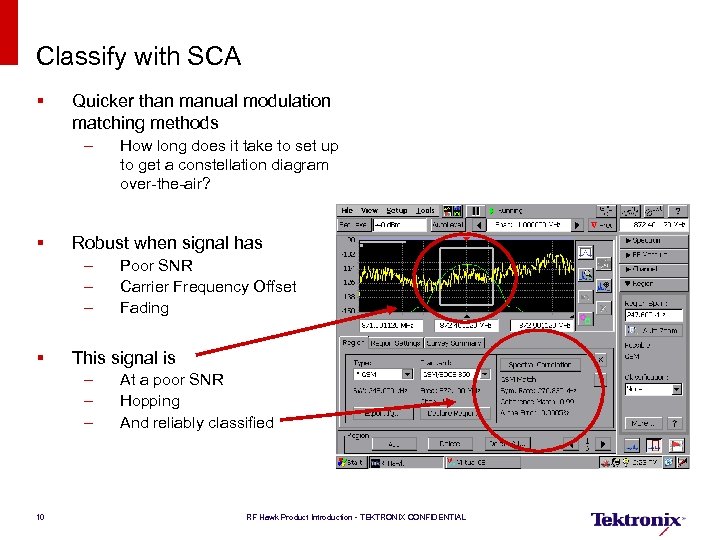 Classify with SCA § Quicker than manual modulation matching methods – § Robust when signal has – – – § Poor SNR Carrier Frequency Offset Fading This signal is – – – 10 How long does it take to set up to get a constellation diagram over-the-air? At a poor SNR Hopping And reliably classified RF Hawk Product Introduction - TEKTRONIX CONFIDENTIAL
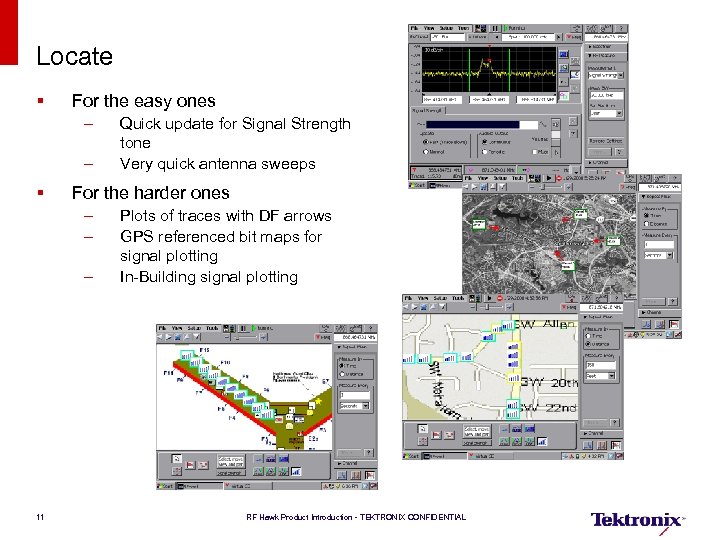 Locate § For the easy ones – – § For the harder ones – – – 11 Quick update for Signal Strength tone Very quick antenna sweeps Plots of traces with DF arrows GPS referenced bit maps for signal plotting In-Building signal plotting RF Hawk Product Introduction - TEKTRONIX CONFIDENTIAL
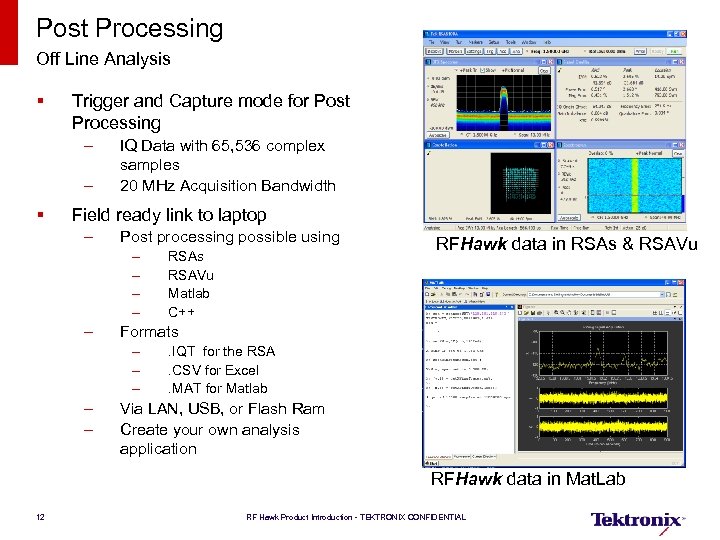 Post Processing Off Line Analysis § Trigger and Capture mode for Post Processing – – § IQ Data with 65, 536 complex samples 20 MHz Acquisition Bandwidth Field ready link to laptop – Post processing possible using – – – RFHawk data in RSAs & RSAVu Formats – – – RSAs RSAVu Matlab C++ . IQT for the RSA. CSV for Excel. MAT for Matlab Via LAN, USB, or Flash Ram Create your own analysis application RFHawk data in Mat. Lab 12 RF Hawk Product Introduction - TEKTRONIX CONFIDENTIAL
 Signals for the First Release § Level II Classification (Spectral Correlation Analysis, Spectral Mask, and Channel Tables) – – § GSM CDMA (IS-95 and 2000) W-CDMA ATSC Level I Classification (Spectral Mask and Channel Tables) – – – § 1 x-EV-DO IS-136 Wi. Max AMPS 802. 11 a/b/g Basic Classification (Channel Tables) – – 13 Broadcast AM/FM Broadcast Video Most of the Commercial Two Way Radio Most of the Non-commercial Two Way Radio RF Hawk Product Introduction - TEKTRONIX CONFIDENTIAL
 Other features § Declassification for Security Applications – – Start, Programs, System Utilities, System Reset Cleans all internal memory Certified to standards Will not touch external memory – PCMCIA cards – USB Memory sticks – LAN drives § Saving RF Data on Maps – CSV data, Latitude, Longitude, and Timestamp § Exporting IQ data – RSA – IQT – Excel – CSV – Matlab – MAT 14 RF Hawk Product Introduction - TEKTRONIX CONFIDENTIAL
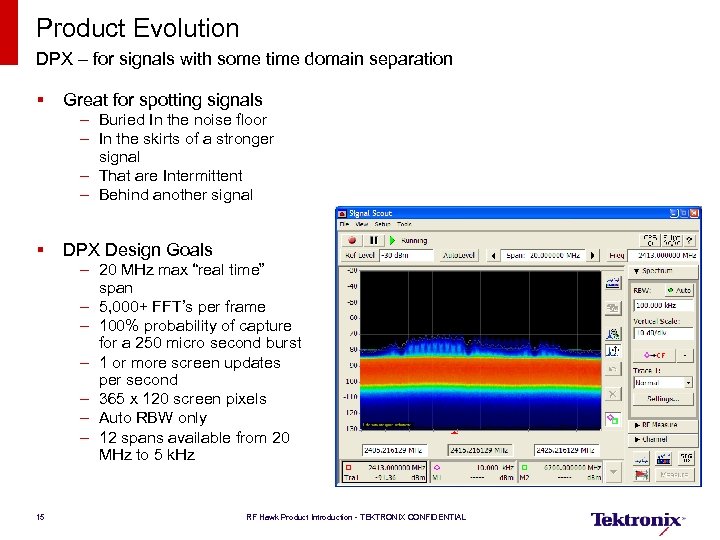 Product Evolution DPX – for signals with some time domain separation § Great for spotting signals – Buried In the noise floor – In the skirts of a stronger signal – That are Intermittent – Behind another signal § DPX Design Goals – 20 MHz max “real time” span – 5, 000+ FFT’s per frame – 100% probability of capture for a 250 micro second burst – 1 or more screen updates per second – 365 x 120 screen pixels – Auto RBW only – 12 spans available from 20 MHz to 5 k. Hz 15 RF Hawk Product Introduction - TEKTRONIX CONFIDENTIAL
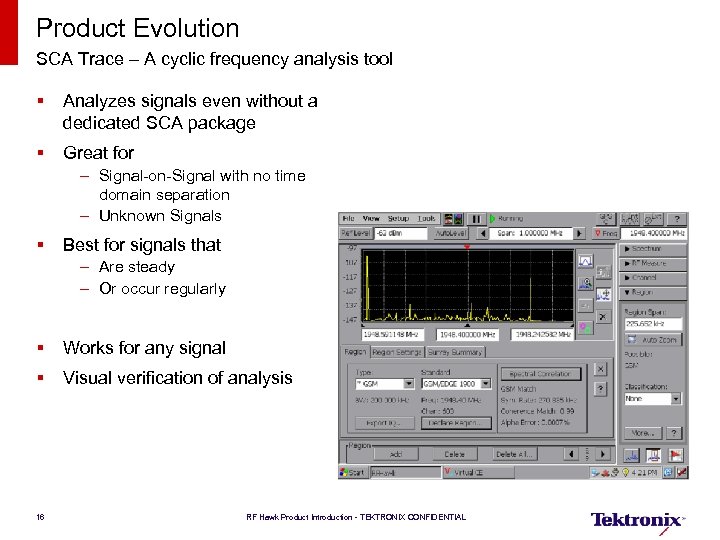 Product Evolution SCA Trace – A cyclic frequency analysis tool § Analyzes signals even without a dedicated SCA package § Great for – Signal-on-Signal with no time domain separation – Unknown Signals § Best for signals that – Are steady – Or occur regularly § Works for any signal § Visual verification of analysis 16 RF Hawk Product Introduction - TEKTRONIX CONFIDENTIAL
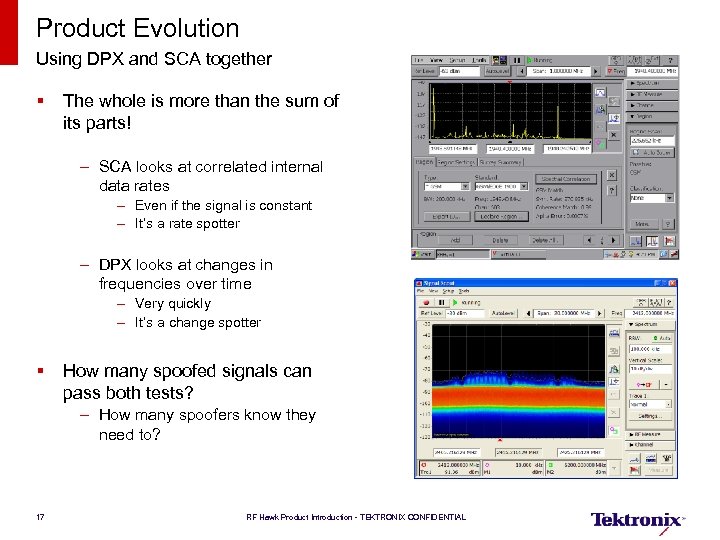 Product Evolution Using DPX and SCA together § The whole is more than the sum of its parts! – SCA looks at correlated internal data rates – Even if the signal is constant – It’s a rate spotter – DPX looks at changes in frequencies over time – Very quickly – It’s a change spotter § How many spoofed signals can pass both tests? – How many spoofers know they need to? 17 RF Hawk Product Introduction - TEKTRONIX CONFIDENTIAL
 System Architecture 18 RF Hawk Product Introduction - TEKTRONIX CONFIDENTIAL
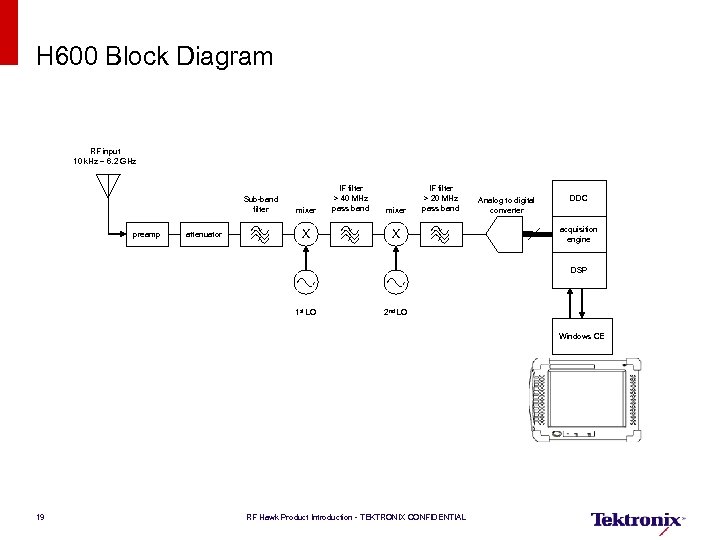 H 600 Block Diagram RF input 10 k. Hz – 6. 2 GHz Sub-band filter preamp attenuator mixer X IF filter > 40 MHz pass band mixer IF filter > 20 MHz pass band X Analog to digital converter DDC acquisition engine DSP 1 st LO 2 nd LO Windows CE 19 RF Hawk Product Introduction - TEKTRONIX CONFIDENTIAL
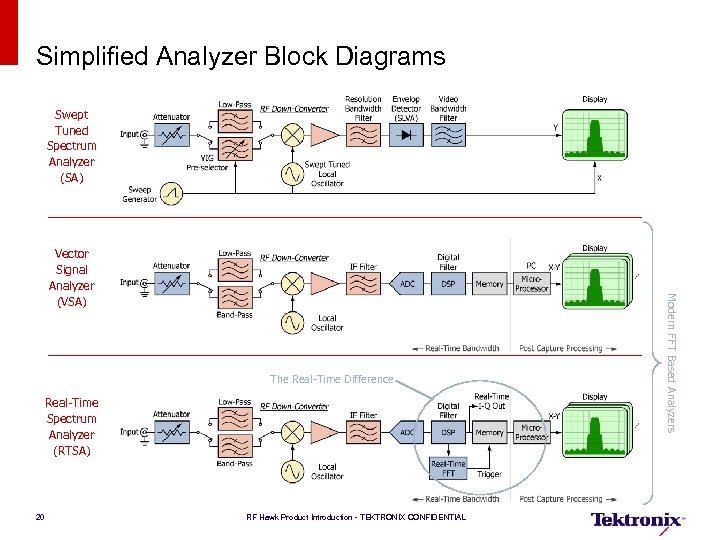 Simplified Analyzer Block Diagrams Swept Tuned Spectrum Analyzer (SA) The Real-Time Difference Real-Time Spectrum Analyzer (RTSA) 20 RF Hawk Product Introduction - TEKTRONIX CONFIDENTIAL Modern FFT Based Analyzers Vector Signal Analyzer (VSA)
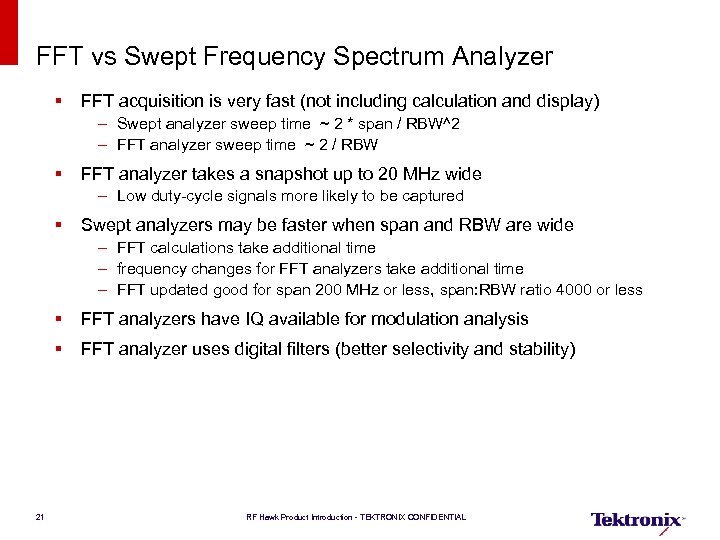 FFT vs Swept Frequency Spectrum Analyzer § FFT acquisition is very fast (not including calculation and display) – Swept analyzer sweep time ~ 2 * span / RBW^2 – FFT analyzer sweep time ~ 2 / RBW § FFT analyzer takes a snapshot up to 20 MHz wide – Low duty-cycle signals more likely to be captured § Swept analyzers may be faster when span and RBW are wide – FFT calculations take additional time – frequency changes for FFT analyzers take additional time – FFT updated good for span 200 MHz or less, span: RBW ratio 4000 or less § FFT analyzers have IQ available for modulation analysis § FFT analyzer uses digital filters (better selectivity and stability) 21 RF Hawk Product Introduction - TEKTRONIX CONFIDENTIAL
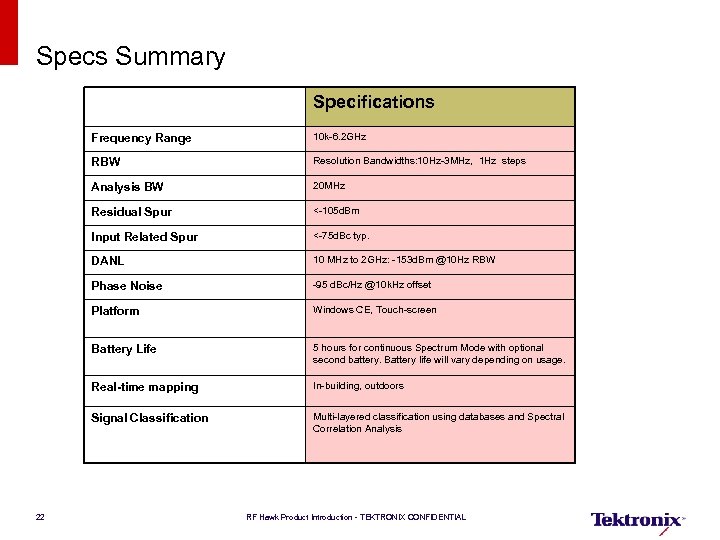 Specs Summary Specifications Frequency Range RBW Resolution Bandwidths: 10 Hz-3 MHz, 1 Hz steps Analysis BW 20 MHz Residual Spur <-105 d. Bm Input Related Spur <-75 d. Bc typ. DANL 10 MHz to 2 GHz: -153 d. Bm @10 Hz RBW Phase Noise -95 d. Bc/Hz @10 k. Hz offset Platform Windows CE, Touch-screen Battery Life 5 hours for continuous Spectrum Mode with optional second battery. Battery life will vary depending on usage. Real-time mapping In-building, outdoors Signal Classification 22 10 k-6. 2 GHz Multi-layered classification using databases and Spectral Correlation Analysis RF Hawk Product Introduction - TEKTRONIX CONFIDENTIAL
![Ordering Guide [1/4] Ordering Information § H 600 RFHawk Signal Hunter with built-in GPS](https://present5.com/presentation/f62bdb7679913744365ec0e8a8f92db1/image-23.jpg "Ordering Guide [1/4] Ordering Information § H 600 RFHawk Signal Hunter with built-in GPS") Ordering Guide [1/4] Ordering Information § H 600 RFHawk Signal Hunter with built-in GPS Standard Accessories § H 600 RFHawk Quick Start User Manual § H 600 RFHawk installation software § AC Power Adapter § Lithium-Ion Battery § GPS Antenna § Tilt stand § Soft carry case § BNC Connector cover (2) § N Connector cover (1) § Audio jack mute plug (mute all audio output from the instrument speaker) 23 RF Hawk Product Introduction - TEKTRONIX CONFIDENTIAL
Ordering Guide [1/4] Ordering Information § H 600 RFHawk Signal Hunter with built-in GPS Standard Accessories § H 600 RFHawk Quick Start User Manual § H 600 RFHawk installation software § AC Power Adapter § Lithium-Ion Battery § GPS Antenna § Tilt stand § Soft carry case § BNC Connector cover (2) § N Connector cover (1) § Audio jack mute plug (mute all audio output from the instrument speaker) 23 RF Hawk Product Introduction - TEKTRONIX CONFIDENTIAL
![Ordering Guide [2/4] Warranty § One Year on parts and labor Language Options §](https://present5.com/presentation/f62bdb7679913744365ec0e8a8f92db1/image-24.jpg "Ordering Guide [2/4] Warranty § One Year on parts and labor Language Options §") Ordering Guide [2/4] Warranty § One Year on parts and labor Language Options § H 600 L 0 English manual Power Options § H 600 L 99 No Manual Power Options § H 600 A 0 North America § H 600 A 1 Universal EURO § H 600 A 10 China § H 600 A 11 India § H 600 A 2 United Kingdom § H 600 A 3 Australia § H 600 A 5 Switzerland § H 600 A 6 Japan § H 600 A 99 No Power Cord or AC Adapter 24 RF Hawk Product Introduction - TEKTRONIX CONFIDENTIAL
Ordering Guide [2/4] Warranty § One Year on parts and labor Language Options § H 600 L 0 English manual Power Options § H 600 L 99 No Manual Power Options § H 600 A 0 North America § H 600 A 1 Universal EURO § H 600 A 10 China § H 600 A 11 India § H 600 A 2 United Kingdom § H 600 A 3 Australia § H 600 A 5 Switzerland § H 600 A 6 Japan § H 600 A 99 No Power Cord or AC Adapter 24 RF Hawk Product Introduction - TEKTRONIX CONFIDENTIAL
![Ordering Guide [3/4] Service Options § H 600 -SRVC 1 – H 600 R](https://present5.com/presentation/f62bdb7679913744365ec0e8a8f92db1/image-25.jpg "Ordering Guide [3/4] Service Options § H 600 -SRVC 1 – H 600 R") Ordering Guide [3/4] Service Options § H 600 -SRVC 1 – H 600 R 3 Repair Service 3 Years (including warranty) – H 600 R 5 Repair Service 5 Years (including warranty) § H 600 -SRVC 2 – H 600 C 3 Calibration Service 3 Years – H 600 C 5 Calibration Service 5 Years – H 600 CA 1 Provides a single calibration event or coverage § H 600 -SRVC 3 – H 600 D 1 Calibration Data Report – H 600 D 3 Calibration Data Report 3 Years (with Option C 3) – H 600 D 5 Calibration Data Report 5 Years (with Option C 5) 25 RF Hawk Product Introduction - TEKTRONIX CONFIDENTIAL
Ordering Guide [3/4] Service Options § H 600 -SRVC 1 – H 600 R 3 Repair Service 3 Years (including warranty) – H 600 R 5 Repair Service 5 Years (including warranty) § H 600 -SRVC 2 – H 600 C 3 Calibration Service 3 Years – H 600 C 5 Calibration Service 5 Years – H 600 CA 1 Provides a single calibration event or coverage § H 600 -SRVC 3 – H 600 D 1 Calibration Data Report – H 600 D 3 Calibration Data Report 3 Years (with Option C 3) – H 600 D 5 Calibration Data Report 5 Years (with Option C 5) 25 RF Hawk Product Introduction - TEKTRONIX CONFIDENTIAL
![Ordering Guide [4/4] Suggested RF Hawk Accessories (focused on cellular) § Sniffer Antenna, Broadband:](https://present5.com/presentation/f62bdb7679913744365ec0e8a8f92db1/image-26.jpg "Ordering Guide [4/4] Suggested RF Hawk Accessories (focused on cellular) § Sniffer Antenna, Broadband:") Ordering Guide [4/4] Suggested RF Hawk Accessories (focused on cellular) § Sniffer Antenna, Broadband: Order 119 -6609 -00 § Beam Antenna, 824 to 896 MHz: Order 119 -6594 -00 § Beam Antenna, 896 to 960 MHz: Order 119 -6595 -00 § Beam Antenna, 1710 to 1880 MHz: Order 119 -6596 -00 § Beam Antenna, 1850 to 1990 MHz: Order 119 -6597 -00 § Magnetic Mount Antenna, 824 to 2170 MHz: Order 119 -6970 -00 § Pre-Filter, General Purpose, 824 to 2500 MHz, Type-N (f) Connector – Order 119 -7246 -00 § Pre-Filter, General Purpose, 824 to 6200 MHz, Type-N (f) Connector – Order 119 -7426 -00 § Cable, 50 Ω, BNC (m) 3 foot (91 cm): Order 012 -0482 -00 § Cable, 50 Ω, Straight Type-N(m) and angled Type-N (m) connector, 1. 6 foot (50 cm): Order 1744977 -00 § Cable, 50 Ω, Type-N (m) to Type-N (m) connector, 3 foot (91 cm): Order 174 -5002 -00 § Cable, 50 Ω, Type-N (m) to Type-N (m) connector, 6 foot Cable (1. 83 m): Order 012 -0114 -00 26 RF Hawk Product Introduction - TEKTRONIX CONFIDENTIAL
Ordering Guide [4/4] Suggested RF Hawk Accessories (focused on cellular) § Sniffer Antenna, Broadband: Order 119 -6609 -00 § Beam Antenna, 824 to 896 MHz: Order 119 -6594 -00 § Beam Antenna, 896 to 960 MHz: Order 119 -6595 -00 § Beam Antenna, 1710 to 1880 MHz: Order 119 -6596 -00 § Beam Antenna, 1850 to 1990 MHz: Order 119 -6597 -00 § Magnetic Mount Antenna, 824 to 2170 MHz: Order 119 -6970 -00 § Pre-Filter, General Purpose, 824 to 2500 MHz, Type-N (f) Connector – Order 119 -7246 -00 § Pre-Filter, General Purpose, 824 to 6200 MHz, Type-N (f) Connector – Order 119 -7426 -00 § Cable, 50 Ω, BNC (m) 3 foot (91 cm): Order 012 -0482 -00 § Cable, 50 Ω, Straight Type-N(m) and angled Type-N (m) connector, 1. 6 foot (50 cm): Order 1744977 -00 § Cable, 50 Ω, Type-N (m) to Type-N (m) connector, 3 foot (91 cm): Order 174 -5002 -00 § Cable, 50 Ω, Type-N (m) to Type-N (m) connector, 6 foot Cable (1. 83 m): Order 012 -0114 -00 26 RF Hawk Product Introduction - TEKTRONIX CONFIDENTIAL
 Demo 27 RF Hawk Product Introduction - TEKTRONIX CONFIDENTIAL
![Product Demonstration [1/3] Scan – Full featured SA for field use – – 3](https://present5.com/presentation/f62bdb7679913744365ec0e8a8f92db1/image-28.jpg "Product Demonstration [1/3] Scan – Full featured SA for field use – – 3") Product Demonstration [1/3] Scan – Full featured SA for field use – – 3 key controls Autolevel Simplicity, Drawers & full features 8 icons – Demonstrated – – Markers Noise Floor Channel Tables Measurements – Noise Floor – Signal Strength – AM/FM Demod – Ease of use 28 RF Hawk Product Introduction - TEKTRONIX CONFIDENTIAL
Product Demonstration [1/3] Scan – Full featured SA for field use – – 3 key controls Autolevel Simplicity, Drawers & full features 8 icons – Demonstrated – – Markers Noise Floor Channel Tables Measurements – Noise Floor – Signal Strength – AM/FM Demod – Ease of use 28 RF Hawk Product Introduction - TEKTRONIX CONFIDENTIAL
![Product Demonstration [2/3] Classify – Set up 5 to 10 regions – GSM likely](https://present5.com/presentation/f62bdb7679913744365ec0e8a8f92db1/image-29.jpg "Product Demonstration [2/3] Classify – Set up 5 to 10 regions – GSM likely") Product Demonstration [2/3] Classify – Set up 5 to 10 regions – GSM likely – Illustrate Level I – All five capabilities – Illustrate Level II – Compare to Conventional modulation detection methods 29 RF Hawk Product Introduction - TEKTRONIX CONFIDENTIAL
Product Demonstration [2/3] Classify – Set up 5 to 10 regions – GSM likely – Illustrate Level I – All five capabilities – Illustrate Level II – Compare to Conventional modulation detection methods 29 RF Hawk Product Introduction - TEKTRONIX CONFIDENTIAL
![Product Demonstration [3/3] § Locate – Mapping on a floor map – Using channel](https://present5.com/presentation/f62bdb7679913744365ec0e8a8f92db1/image-30.jpg "Product Demonstration [3/3] § Locate – Mapping on a floor map – Using channel") Product Demonstration [3/3] § Locate – Mapping on a floor map – Using channel power – Mapping on a geo-referenced map – Using arrows – Mapping on a geo-referenced map – using signal strength 30 RF Hawk Product Introduction - TEKTRONIX CONFIDENTIAL
Product Demonstration [3/3] § Locate – Mapping on a floor map – Using channel power – Mapping on a geo-referenced map – Using arrows – Mapping on a geo-referenced map – using signal strength 30 RF Hawk Product Introduction - TEKTRONIX CONFIDENTIAL
 Mapping 31 RF Hawk Product Introduction - TEKTRONIX CONFIDENTIAL
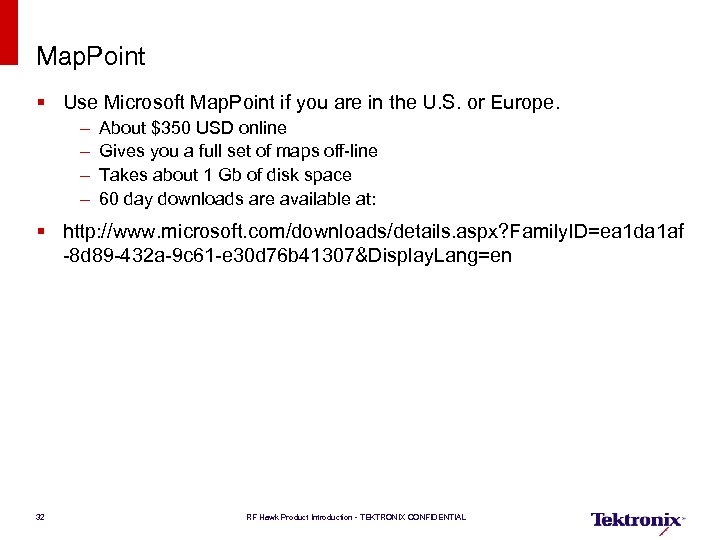 Map. Point § Use Microsoft Map. Point if you are in the U. S. or Europe. – – About $350 USD online Gives you a full set of maps off-line Takes about 1 Gb of disk space 60 day downloads are available at: § http: //www. microsoft. com/downloads/details. aspx? Family. ID=ea 1 da 1 af -8 d 89 -432 a-9 c 61 -e 30 d 76 b 41307&Display. Lang=en 32 RF Hawk Product Introduction - TEKTRONIX CONFIDENTIAL
 Google Earth Pro § About $400 USD per year per user. § Requires you to be on-line when getting maps § Google Earth Pro 7 day trial is at 33 RF Hawk Product Introduction - TEKTRONIX CONFIDENTIAL
 i. Map Converter § Run Setup i. Map Converter. exe. It is in the “Mapping Tools/Setup Files” directory. 34 RF Hawk Product Introduction - TEKTRONIX CONFIDENTIAL
 Using Google Earth – Grabbing and Converting Maps § Open it and position it to show an area of interest, at the desired resolution. – A 10 mile by 10 mile area (16 km by 16 km) is about right. – Make sure the window is as big as possible and your PC is at a high resolution. § Turn roads on, and other layers off. § Run earth 2 bmp. exe. It’s in the “Mapping Tools/Google Earth Grabber” directory. § The tool will create earth. bmp and earth. bpw in the same directory where you put earth 2 bmp. exe. § You can rename these to anything you want, as long as the. bmp and . bpw files share the same name. 35 RF Hawk Product Introduction - TEKTRONIX CONFIDENTIAL
 Using Map. Point – Grabbing and Converting Maps § Open it and position it to show an area of interest at the desired resolution. – A 10 mile by 10 mile (16 km by 16 km) area is about right. – Make sure the window is as big as possible and your PC is at a high resolution. § Run mp 2 bmp. exe. It’s in the “Mapping Tools/Map. Point Grabber” directory. § The tool will create mappoint. bmp (256 colors) and mappoint. bpw in the same directory where you put mp 2 bmp. exe. You can rename these to anything you want, as long as the. bmp and. bpw files share the same name. § For Google Earth and Map. Point: Using i. Map Converter – Final Conversion § Open i. Map Converter – Start, Programs, Net. Tek, i. Map Converter § Open the. bmp file you saved in the last step from within i. Map Converter – It’s already color-converted – It’s already geo-referenced – It’s ready to go 36 RF Hawk Product Introduction - TEKTRONIX CONFIDENTIAL
 Mapping Lab 37 RF Hawk Product Introduction - TEKTRONIX CONFIDENTIAL
 Signal Hunting Fundamentals 38 RF Hawk Product Introduction - TEKTRONIX CONFIDENTIAL
 How to use the H 600 for Locating Signals § Locating signals is a multi-dimensional problem because – – – – 39 Environment: signal clutter, multipath, attenuation Signal: strong, weak Duration: continuous, pulsed, intermittent, hopping Distance: near, far Bandwidth: wide, narrow Visibility: Obvious, concealed Routine: Expected, unexpected RF Hawk Product Introduction - TEKTRONIX CONFIDENTIAL
 How to use the H 600 for Locating Signals § Directional antenna to vector towards source: – Signal Strength function updates quickly (bar graph, audio) – Mapping function allows vectoring (current position, direction, signal strength color coding) – Changing from map to the selected measurement using big button at the bottom of map, and return to the map using the map icon under the drawers § Directional antenna when near the source – Signal Strength function updates quickly for continuous or pulsed signals – Spectrum function with trace max hold is helpful for intermittent signals – Math trace (reference – active trace) helps highlight intermittent signals 40 RF Hawk Product Introduction - TEKTRONIX CONFIDENTIAL
 How to use the H 600 for Locating Signals § Omni-directional antenna – Good for survey before event – Monitor power changes while changing location to locate signal – Spectrum trace with max hold – Spectrum trace with marker readout – Math trace (reference – active trace) helps highlight intermittent signals – When very close to signal, Signal Strength function is useful because power changes rapidly with distance § Notes – – RBW setting is important when monitoring short duration signals Take headphones! A compass is helpful for antenna pointing There are two volume controls: – application control – Windows CE Control Panel 41 RF Hawk Product Introduction - TEKTRONIX CONFIDENTIAL
 Settings that affect capturing short signal pulses § Wide RBW settings spend less time acquiring RF signal data § Spans above 20 MHz are done using multiple acquisitions of 20 MHz § SPAN: RBW settings above 4000 use multiple acquisitions § Reducing RBW reduces noise floor, but signal power reduces when RBW is narrower than the occupied bandwidth of the signal § Enabling additional traces and markers may slow the update rate § Signal strength functions have 42 RF Hawk Product Introduction - TEKTRONIX CONFIDENTIAL
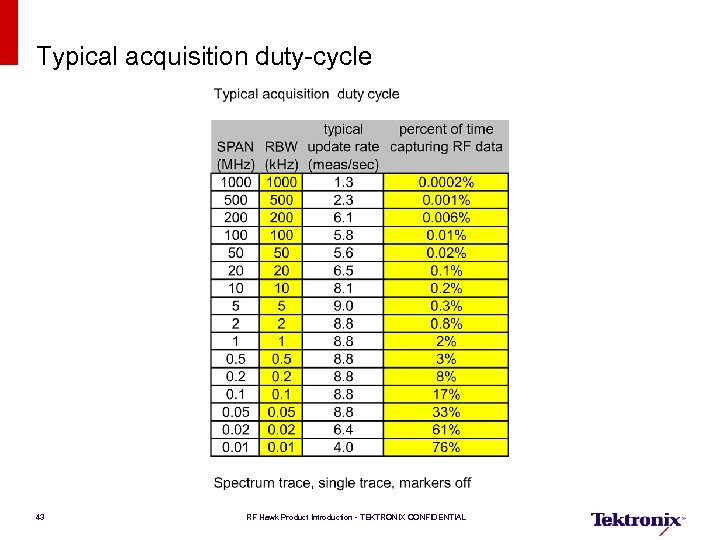 Typical acquisition duty-cycle 43 RF Hawk Product Introduction - TEKTRONIX CONFIDENTIAL
 Sensitivity § The spectrum analyzer input sees the entire spectrum – Strong signals from broadcast stations can prevent the analyzer from selecting a more sensitive attenuator setting – External filters can help – Directional antenna can help – Watch for the yellow banner with “Input Overrange” message 44 RF Hawk Product Introduction - TEKTRONIX CONFIDENTIAL
 Bug Hunting Lab 45 RF Hawk Product Introduction - TEKTRONIX CONFIDENTIAL
 Field Guide To Signals 46 RF Hawk Product Introduction - TEKTRONIX CONFIDENTIAL
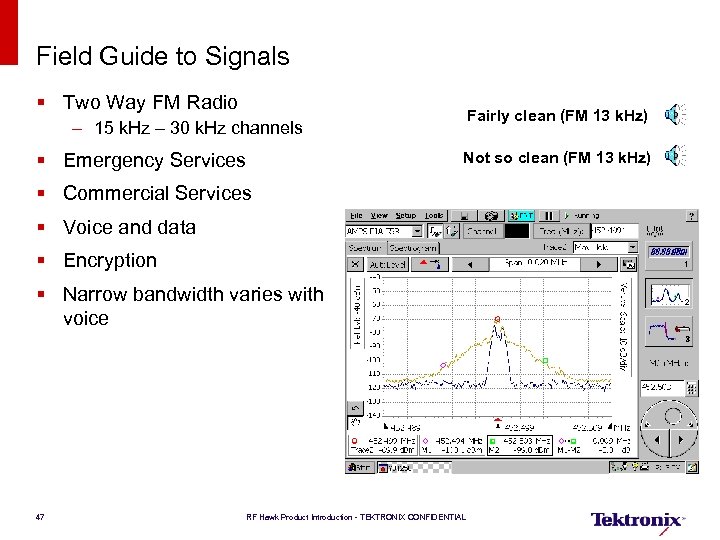 Field Guide to Signals § Two Way FM Radio Fairly clean (FM 13 k. Hz) – 15 k. Hz – 30 k. Hz channels § Emergency Services Not so clean (FM 13 k. Hz) § Commercial Services § Voice and data § Encryption § Narrow bandwidth varies with voice 47 RF Hawk Product Introduction - TEKTRONIX CONFIDENTIAL
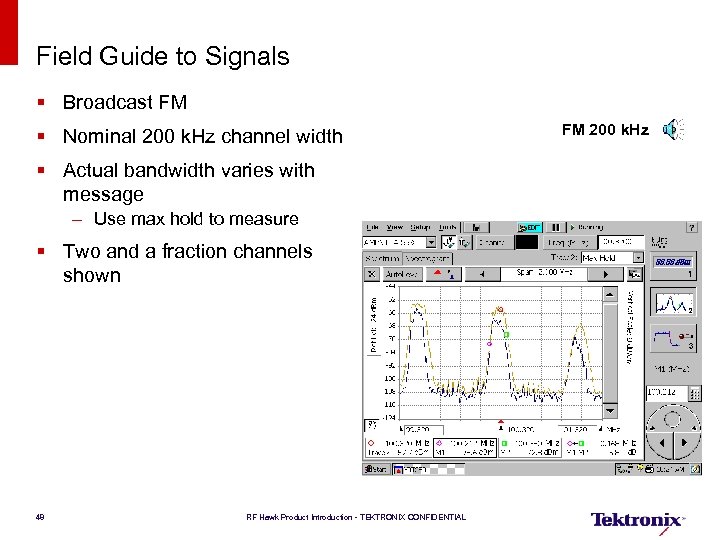 Field Guide to Signals § Broadcast FM § Nominal 200 k. Hz channel width § Actual bandwidth varies with message – Use max hold to measure § Two and a fraction channels shown 48 RF Hawk Product Introduction - TEKTRONIX CONFIDENTIAL FM 200 k. Hz
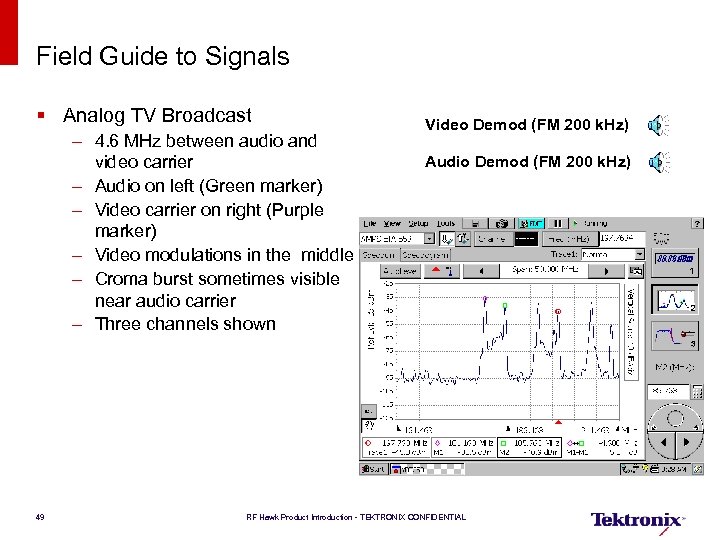 Field Guide to Signals § Analog TV Broadcast – 4. 6 MHz between audio and video carrier – Audio on left (Green marker) – Video carrier on right (Purple marker) – Video modulations in the middle – Croma burst sometimes visible near audio carrier – Three channels shown 49 Video Demod (FM 200 k. Hz) Audio Demod (FM 200 k. Hz) RF Hawk Product Introduction - TEKTRONIX CONFIDENTIAL
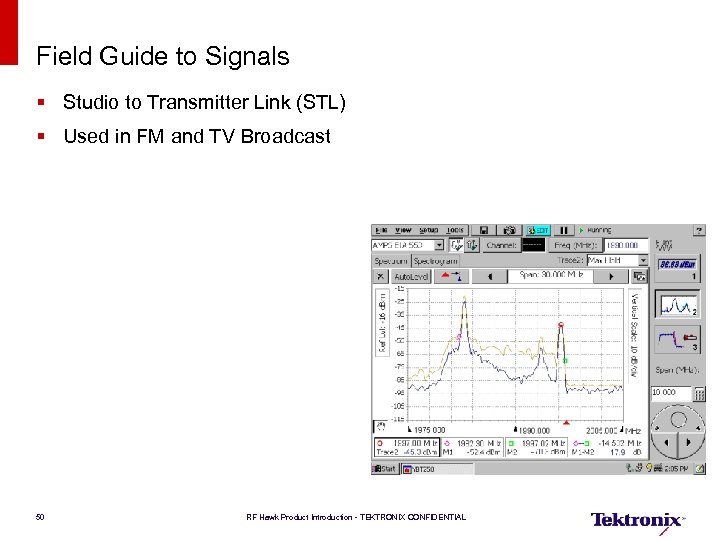 Field Guide to Signals § Studio to Transmitter Link (STL) § Used in FM and TV Broadcast 50 RF Hawk Product Introduction - TEKTRONIX CONFIDENTIAL
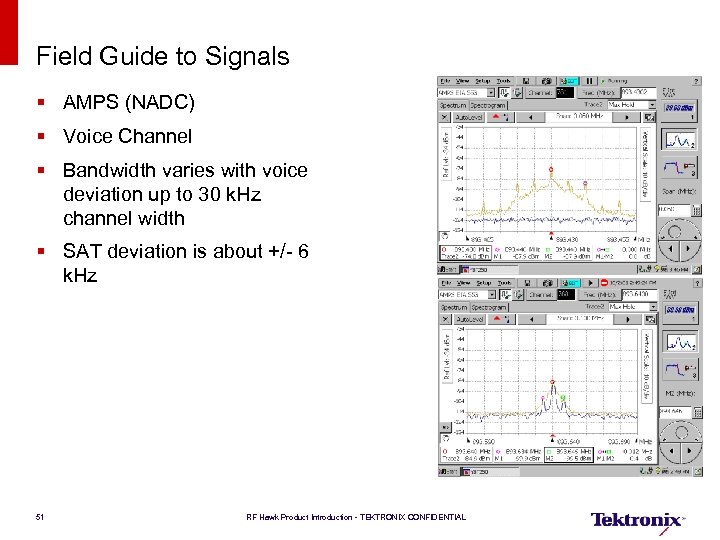 Field Guide to Signals § AMPS (NADC) § Voice Channel § Bandwidth varies with voice deviation up to 30 k. Hz channel width § SAT deviation is about +/- 6 k. Hz 51 RF Hawk Product Introduction - TEKTRONIX CONFIDENTIAL
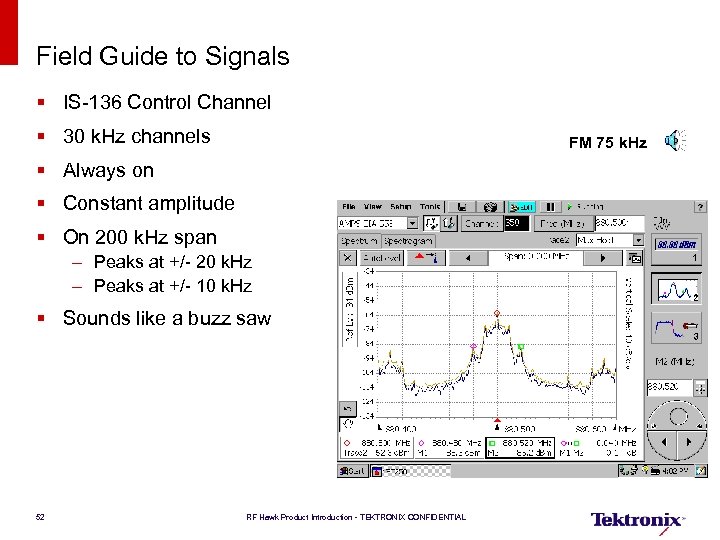 Field Guide to Signals § IS-136 Control Channel § 30 k. Hz channels FM 75 k. Hz § Always on § Constant amplitude § On 200 k. Hz span – Peaks at +/- 20 k. Hz – Peaks at +/- 10 k. Hz § Sounds like a buzz saw 52 RF Hawk Product Introduction - TEKTRONIX CONFIDENTIAL
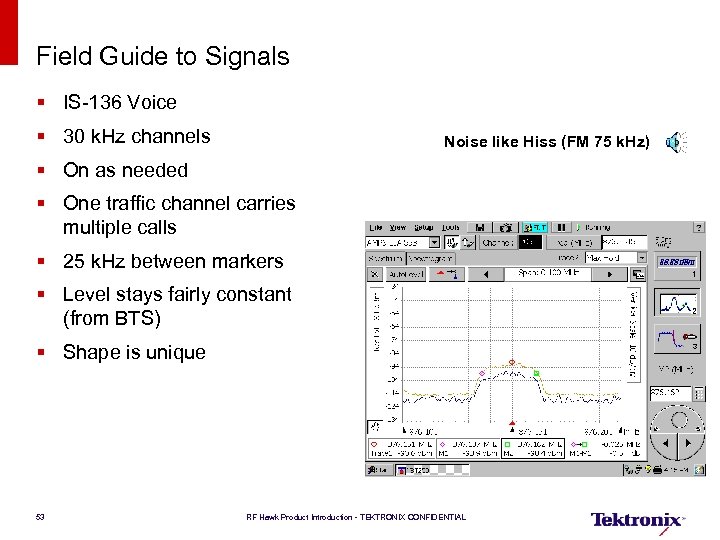 Field Guide to Signals § IS-136 Voice § 30 k. Hz channels Noise like Hiss (FM 75 k. Hz) § On as needed § One traffic channel carries multiple calls § 25 k. Hz between markers § Level stays fairly constant (from BTS) § Shape is unique 53 RF Hawk Product Introduction - TEKTRONIX CONFIDENTIAL
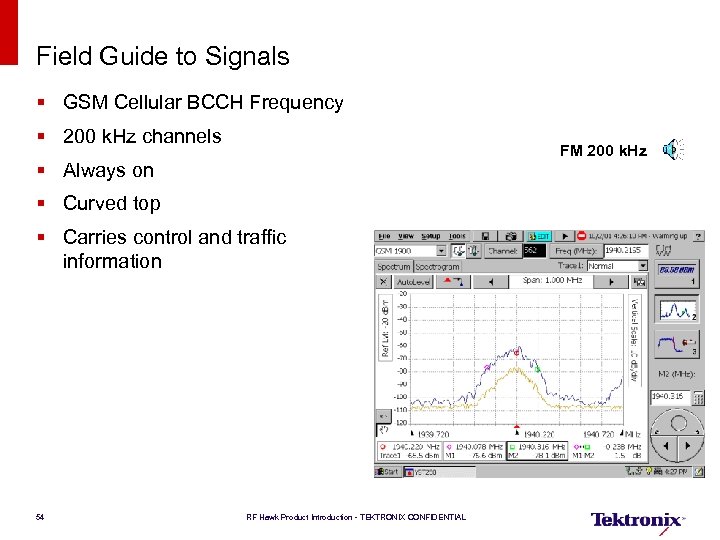 Field Guide to Signals § GSM Cellular BCCH Frequency § 200 k. Hz channels FM 200 k. Hz § Always on § Curved top § Carries control and traffic information 54 RF Hawk Product Introduction - TEKTRONIX CONFIDENTIAL
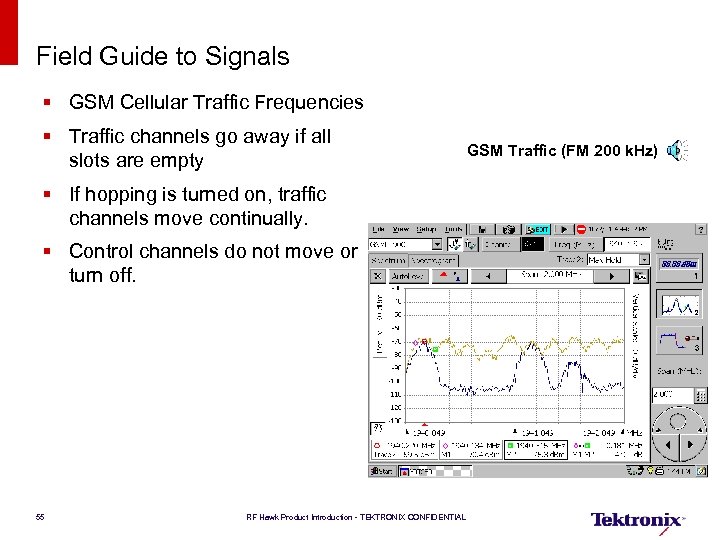 Field Guide to Signals § GSM Cellular Traffic Frequencies § Traffic channels go away if all slots are empty § If hopping is turned on, traffic channels move continually. § Control channels do not move or turn off. 55 RF Hawk Product Introduction - TEKTRONIX CONFIDENTIAL GSM Traffic (FM 200 k. Hz)
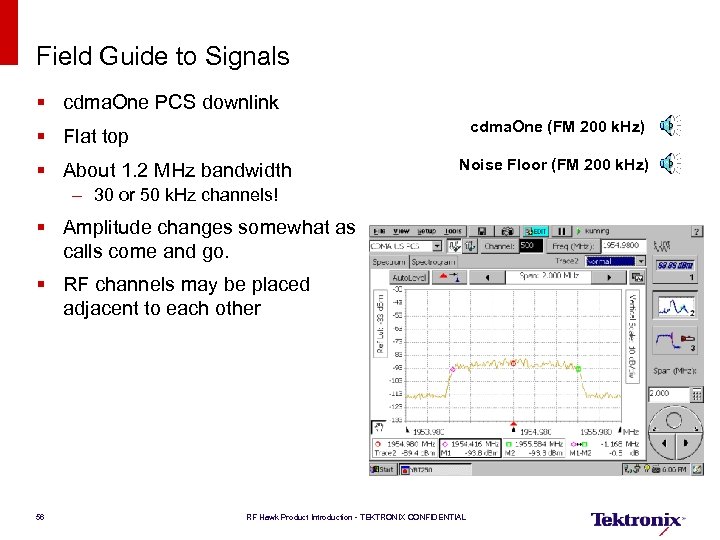 Field Guide to Signals § cdma. One PCS downlink cdma. One (FM 200 k. Hz) § Flat top § About 1. 2 MHz bandwidth Noise Floor (FM 200 k. Hz) – 30 or 50 k. Hz channels! § Amplitude changes somewhat as calls come and go. § RF channels may be placed adjacent to each other 56 RF Hawk Product Introduction - TEKTRONIX CONFIDENTIAL
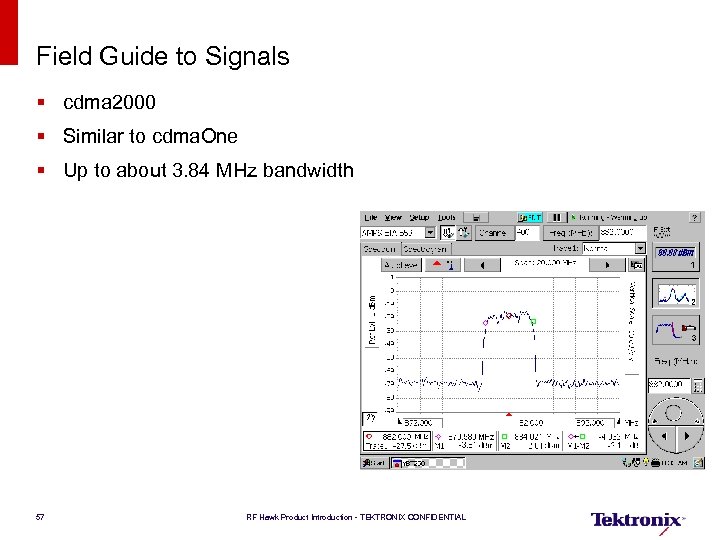 Field Guide to Signals § cdma 2000 § Similar to cdma. One § Up to about 3. 84 MHz bandwidth 57 RF Hawk Product Introduction - TEKTRONIX CONFIDENTIAL
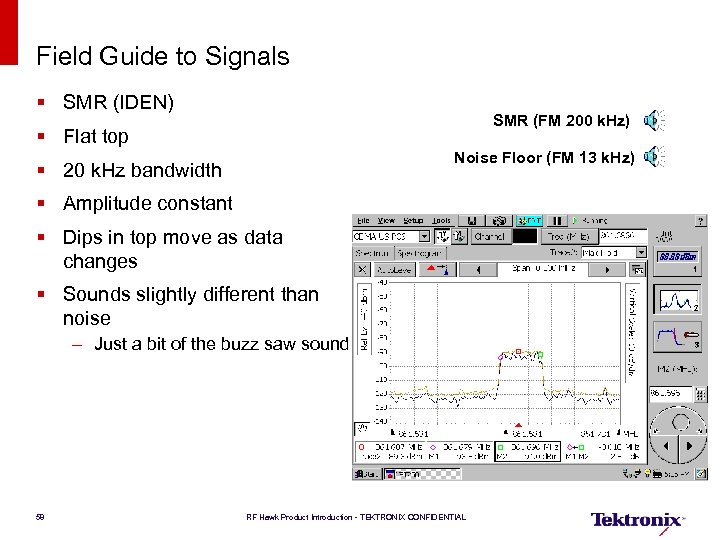 Field Guide to Signals § SMR (IDEN) SMR (FM 200 k. Hz) § Flat top Noise Floor (FM 13 k. Hz) § 20 k. Hz bandwidth § Amplitude constant § Dips in top move as data changes § Sounds slightly different than noise – Just a bit of the buzz saw sound 58 RF Hawk Product Introduction - TEKTRONIX CONFIDENTIAL
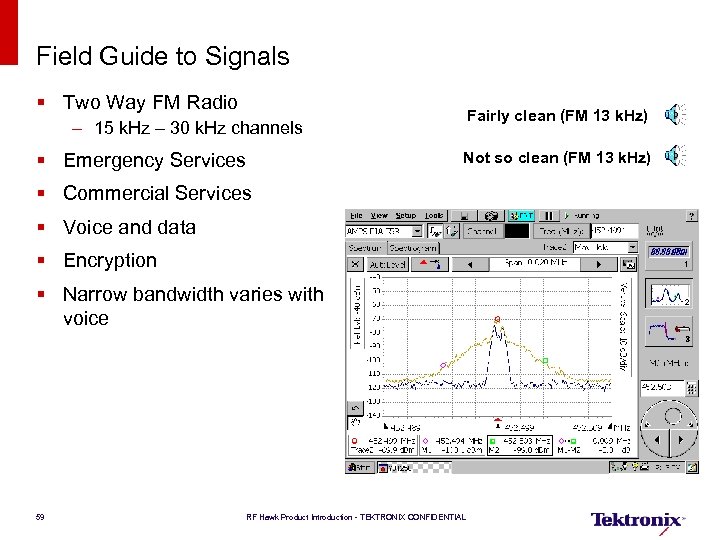 Field Guide to Signals § Two Way FM Radio Fairly clean (FM 13 k. Hz) – 15 k. Hz – 30 k. Hz channels § Emergency Services Not so clean (FM 13 k. Hz) § Commercial Services § Voice and data § Encryption § Narrow bandwidth varies with voice 59 RF Hawk Product Introduction - TEKTRONIX CONFIDENTIAL
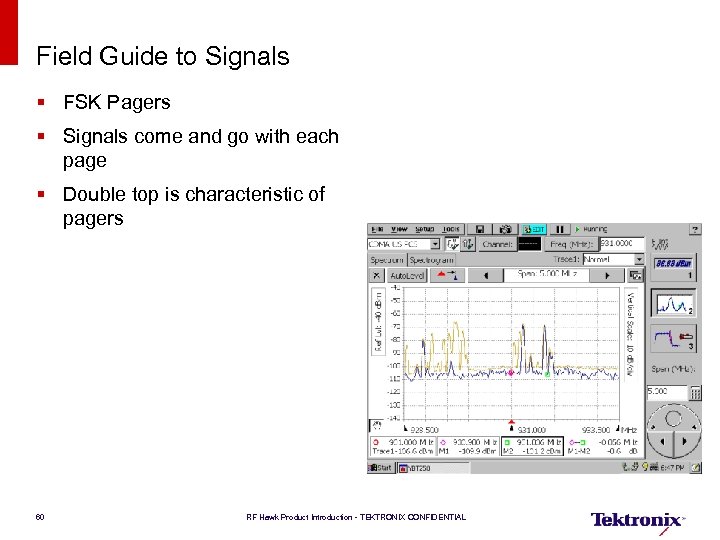 Field Guide to Signals § FSK Pagers § Signals come and go with each page § Double top is characteristic of pagers 60 RF Hawk Product Introduction - TEKTRONIX CONFIDENTIAL
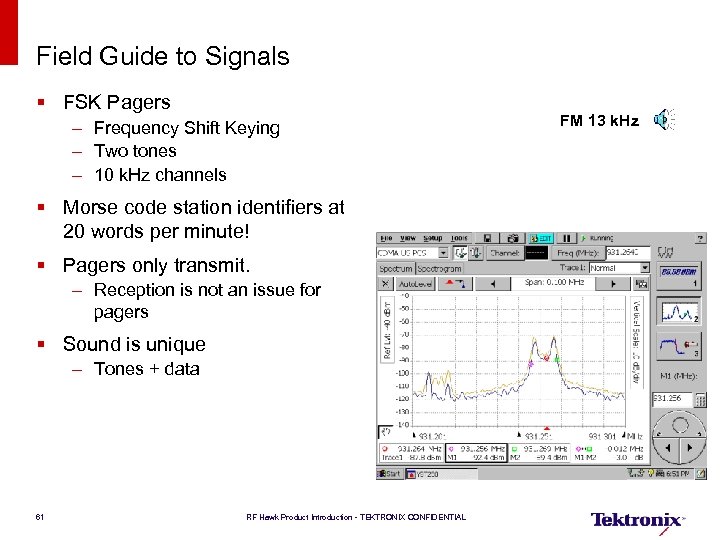 Field Guide to Signals § FSK Pagers – Frequency Shift Keying – Two tones – 10 k. Hz channels § Morse code station identifiers at 20 words per minute! § Pagers only transmit. – Reception is not an issue for pagers § Sound is unique – Tones + data 61 RF Hawk Product Introduction - TEKTRONIX CONFIDENTIAL FM 13 k. Hz
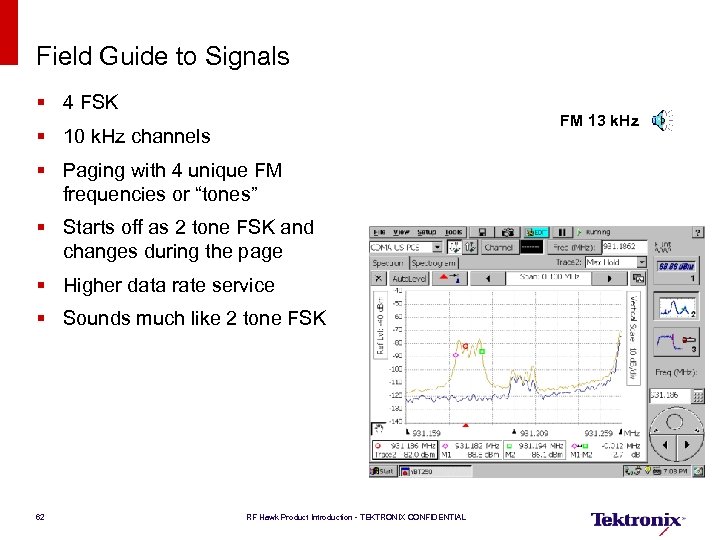 Field Guide to Signals § 4 FSK FM 13 k. Hz § 10 k. Hz channels § Paging with 4 unique FM frequencies or “tones” § Starts off as 2 tone FSK and changes during the page § Higher data rate service § Sounds much like 2 tone FSK 62 RF Hawk Product Introduction - TEKTRONIX CONFIDENTIAL
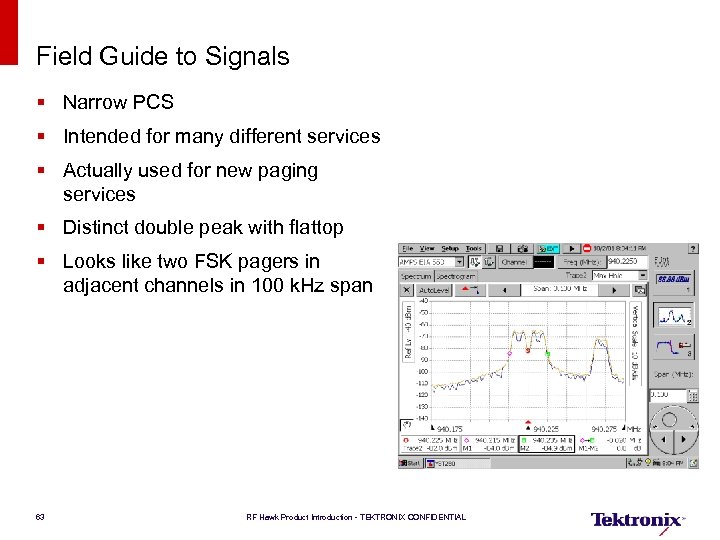 Field Guide to Signals § Narrow PCS § Intended for many different services § Actually used for new paging services § Distinct double peak with flattop § Looks like two FSK pagers in adjacent channels in 100 k. Hz span 63 RF Hawk Product Introduction - TEKTRONIX CONFIDENTIAL
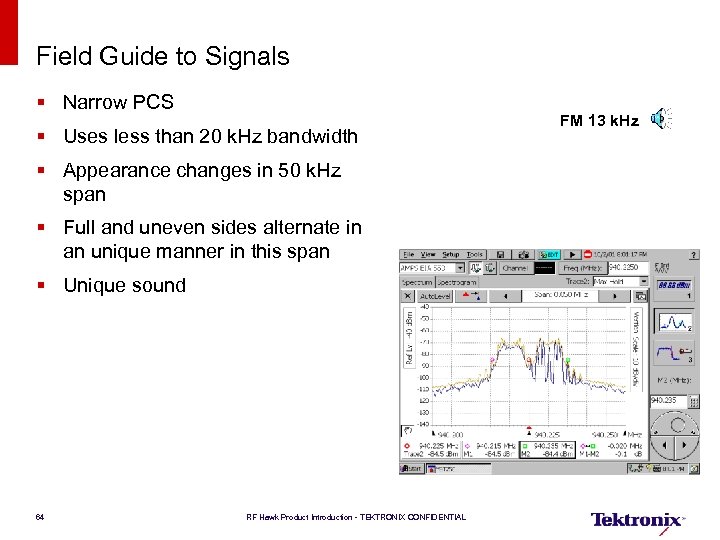 Field Guide to Signals § Narrow PCS § Uses less than 20 k. Hz bandwidth § Appearance changes in 50 k. Hz span § Full and uneven sides alternate in an unique manner in this span § Unique sound 64 RF Hawk Product Introduction - TEKTRONIX CONFIDENTIAL FM 13 k. Hz
 Signal Correlation Analysis 65 RF Hawk Product Introduction - TEKTRONIX CONFIDENTIAL
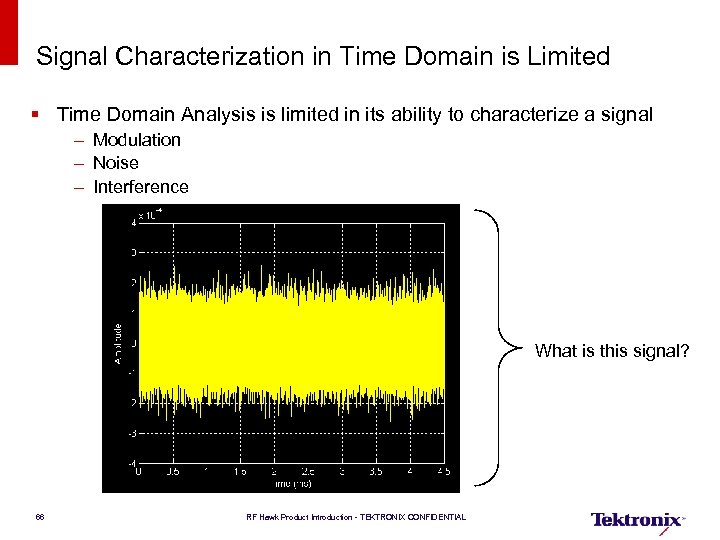 Signal Characterization in Time Domain is Limited § Time Domain Analysis is limited in its ability to characterize a signal – Modulation – Noise – Interference What is this signal? 66 RF Hawk Product Introduction - TEKTRONIX CONFIDENTIAL
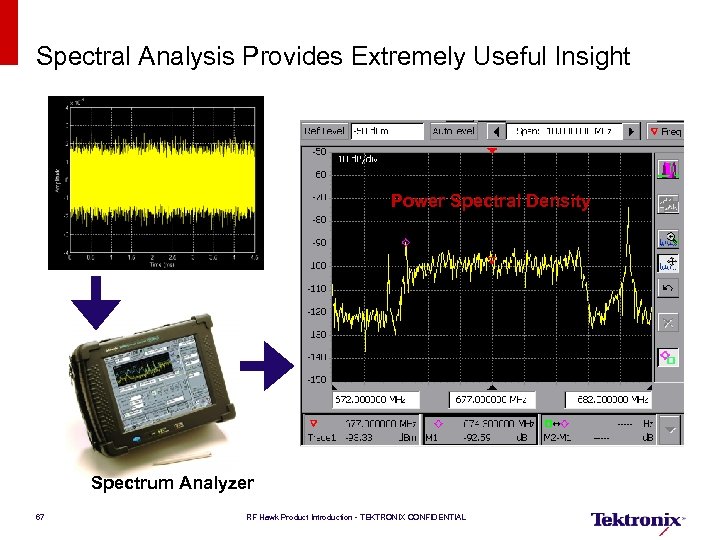 Spectral Analysis Provides Extremely Useful Insight Power Spectral Density Spectrum Analyzer 67 RF Hawk Product Introduction - TEKTRONIX CONFIDENTIAL
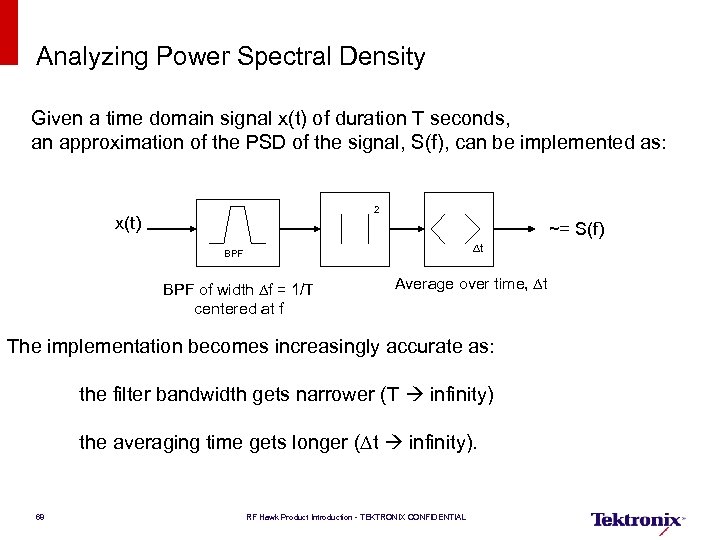 Analyzing Power Spectral Density Given a time domain signal x(t) of duration T seconds, an approximation of the PSD of the signal, S(f), can be implemented as: 2 x(t) ~= S(f) Dt BPF of width Df = 1/T centered at f Average over time, Dt The implementation becomes increasingly accurate as: the filter bandwidth gets narrower (T infinity) the averaging time gets longer (Dt infinity). 68 RF Hawk Product Introduction - TEKTRONIX CONFIDENTIAL
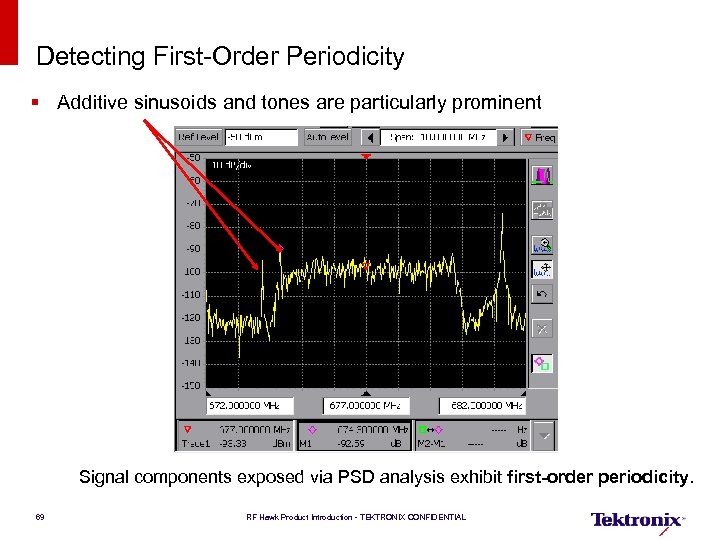 Detecting First-Order Periodicity § Additive sinusoids and tones are particularly prominent Signal components exposed via PSD analysis exhibit first-order periodicity. 69 RF Hawk Product Introduction - TEKTRONIX CONFIDENTIAL
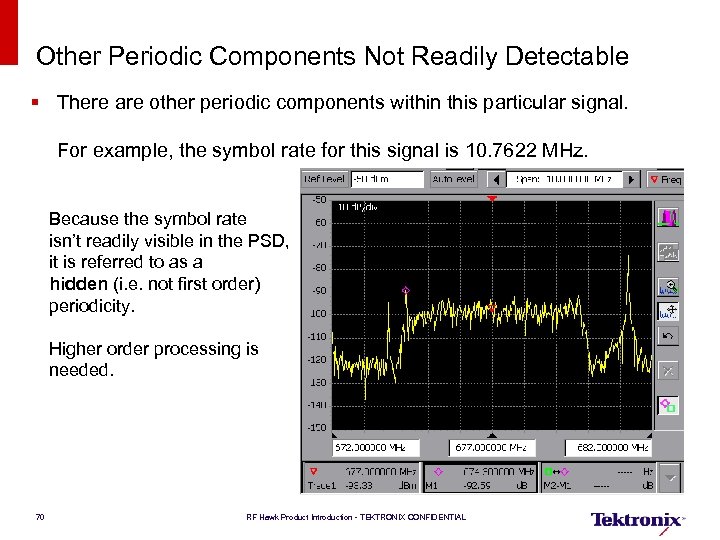 Other Periodic Components Not Readily Detectable § There are other periodic components within this particular signal. For example, the symbol rate for this signal is 10. 7622 MHz. Because the symbol rate isn’t readily visible in the PSD, it is referred to as a hidden (i. e. not first order) periodicity. Higher order processing is needed. 70 RF Hawk Product Introduction - TEKTRONIX CONFIDENTIAL
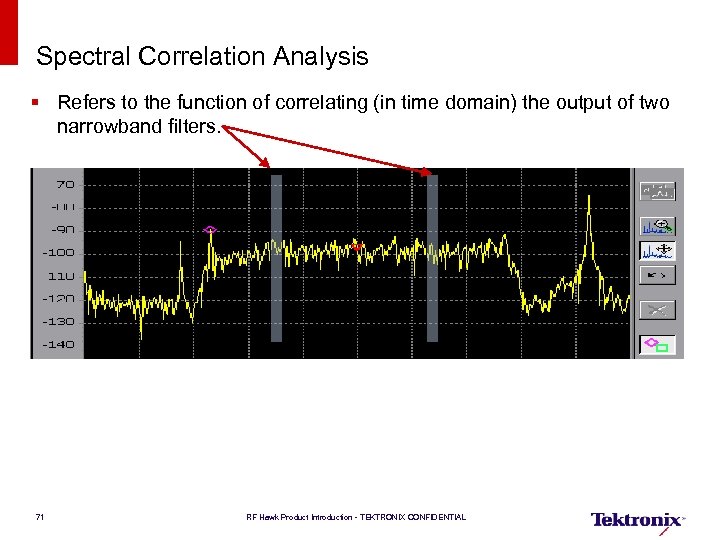 Spectral Correlation Analysis § Refers to the function of correlating (in time domain) the output of two narrowband filters. 71 RF Hawk Product Introduction - TEKTRONIX CONFIDENTIAL
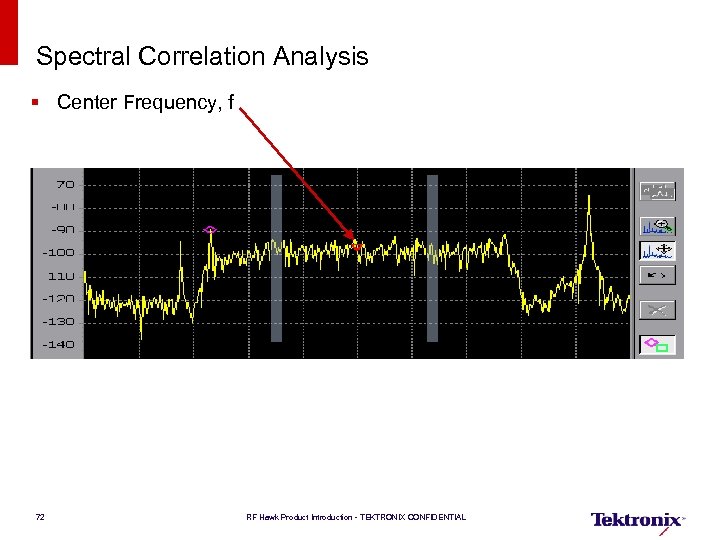 Spectral Correlation Analysis § Center Frequency, f 72 RF Hawk Product Introduction - TEKTRONIX CONFIDENTIAL
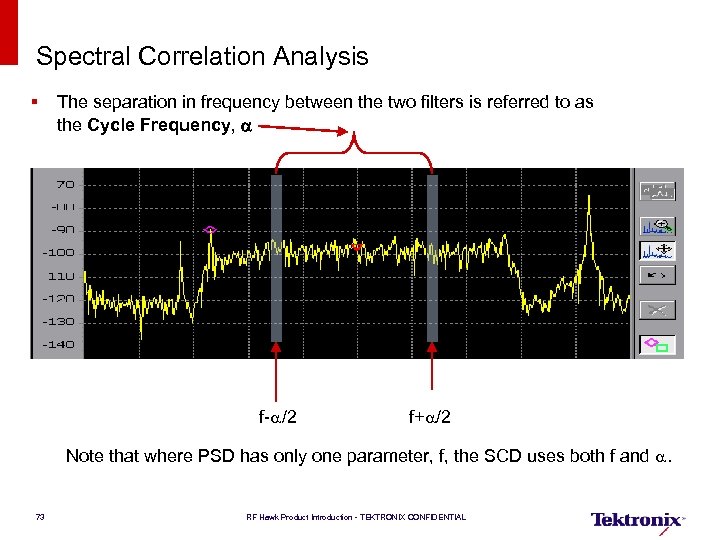 Spectral Correlation Analysis § The separation in frequency between the two filters is referred to as the Cycle Frequency, a f-a/2 f+a/2 Note that where PSD has only one parameter, f, the SCD uses both f and a. 73 RF Hawk Product Introduction - TEKTRONIX CONFIDENTIAL
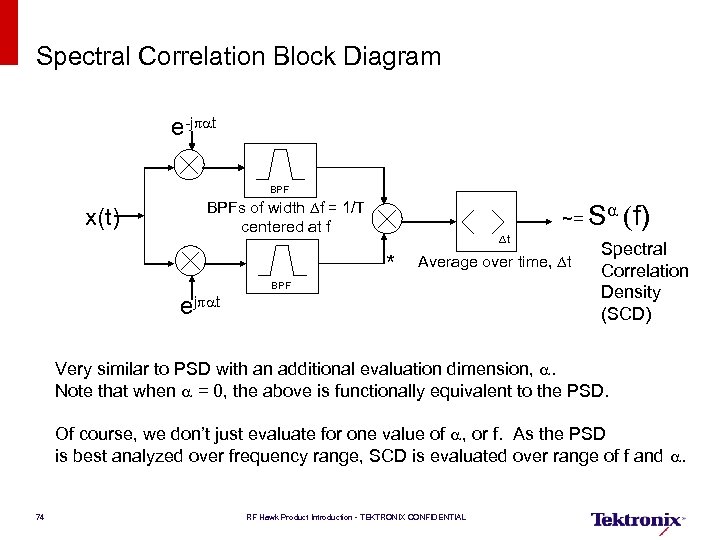 Spectral Correlation Block Diagram e-jpat BPF x(t) BPFs of width Df = 1/T centered at f Dt * ~= Sa (f) Average over time, Dt BPF ejpat Spectral Correlation Density (SCD) Very similar to PSD with an additional evaluation dimension, a. Note that when a = 0, the above is functionally equivalent to the PSD. Of course, we don’t just evaluate for one value of a, or f. As the PSD is best analyzed over frequency range, SCD is evaluated over range of f and a. 74 RF Hawk Product Introduction - TEKTRONIX CONFIDENTIAL
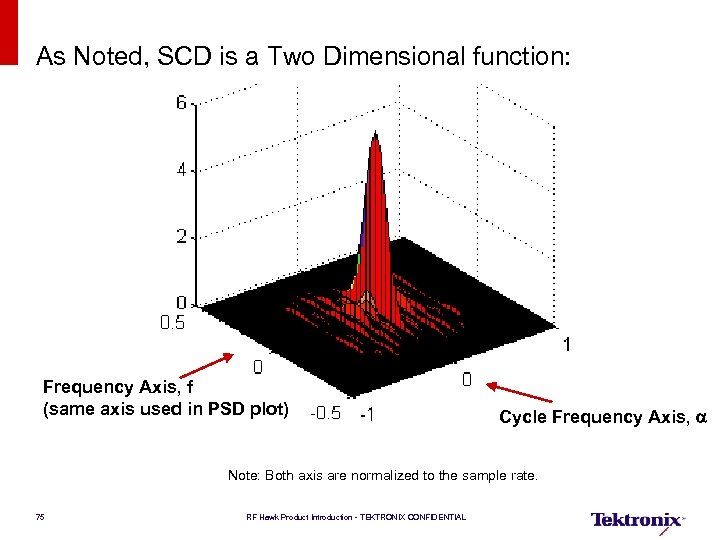 As Noted, SCD is a Two Dimensional function: Frequency Axis, f (same axis used in PSD plot) Cycle Frequency Axis, a Note: Both axis are normalized to the sample rate. 75 RF Hawk Product Introduction - TEKTRONIX CONFIDENTIAL
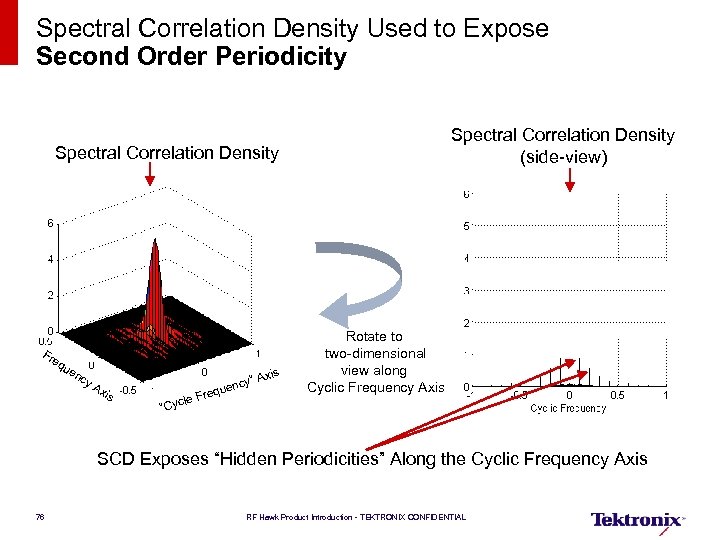 Spectral Correlation Density Used to Expose Second Order Periodicity Spectral Correlation Density (side-view) Spectral Correlation Density Fr eq ue xis nc y A xis cy” A quen e le Fr “Cyc Rotate to two-dimensional view along Cyclic Frequency Axis SCD Exposes “Hidden Periodicities” Along the Cyclic Frequency Axis 76 RF Hawk Product Introduction - TEKTRONIX CONFIDENTIAL
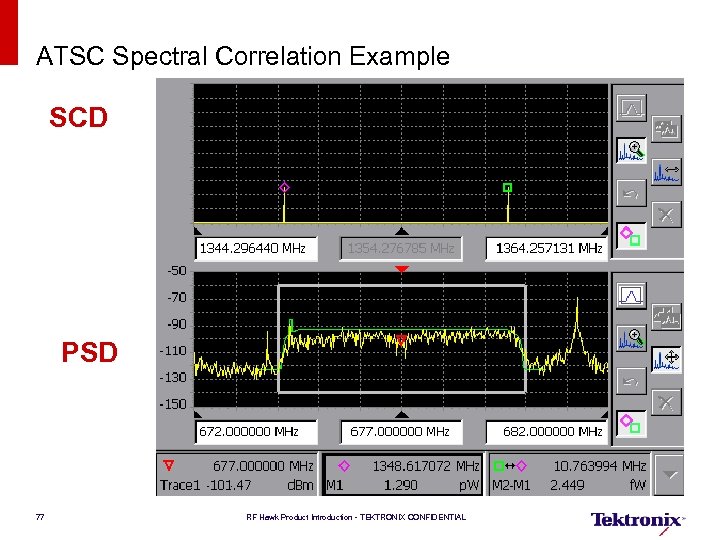 ATSC Spectral Correlation Example SCD PSD 77 RF Hawk Product Introduction - TEKTRONIX CONFIDENTIAL
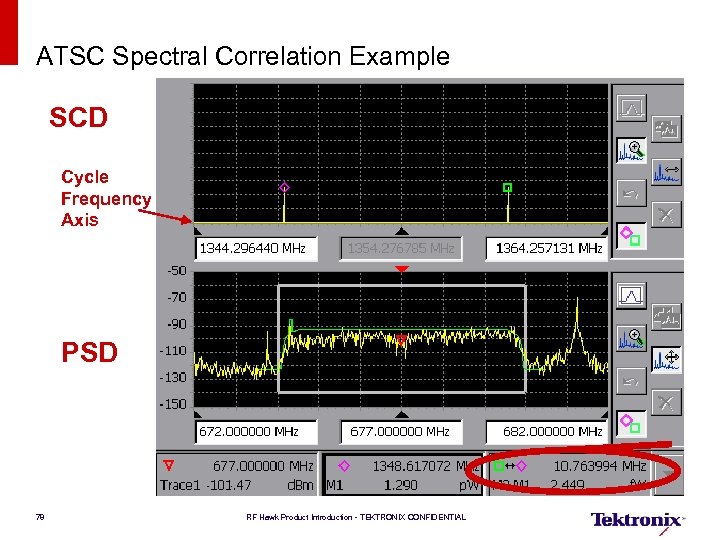 ATSC Spectral Correlation Example SCD Cycle Frequency Axis PSD 78 RF Hawk Product Introduction - TEKTRONIX CONFIDENTIAL
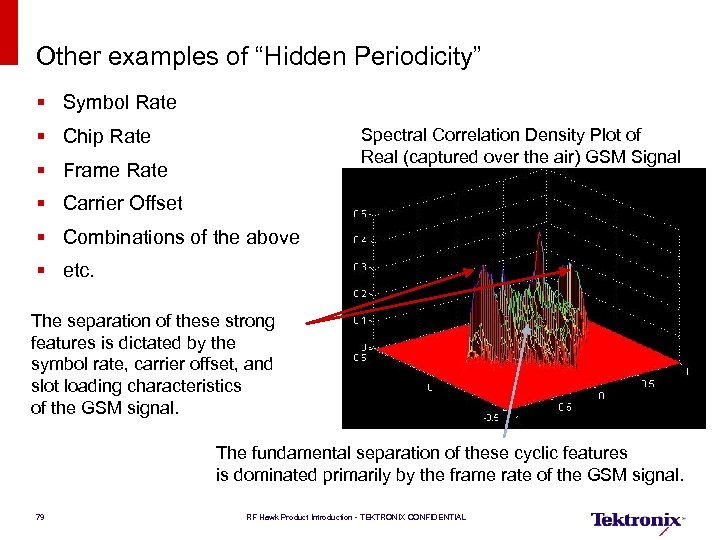 Other examples of “Hidden Periodicity” § Symbol Rate § Chip Rate Spectral Correlation Density Plot of Real (captured over the air) GSM Signal § Frame Rate § Carrier Offset § Combinations of the above § etc. The separation of these strong features is dictated by the symbol rate, carrier offset, and slot loading characteristics of the GSM signal. The fundamental separation of these cyclic features is dominated primarily by the frame rate of the GSM signal. 79 RF Hawk Product Introduction - TEKTRONIX CONFIDENTIAL
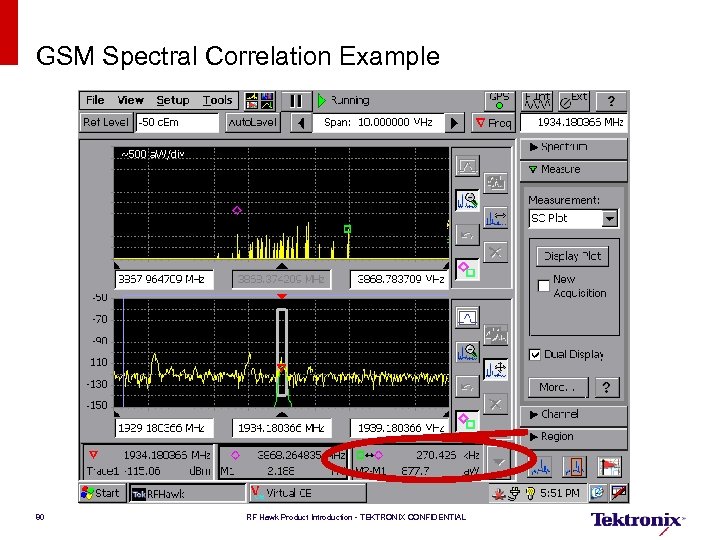 GSM Spectral Correlation Example 80 RF Hawk Product Introduction - TEKTRONIX CONFIDENTIAL
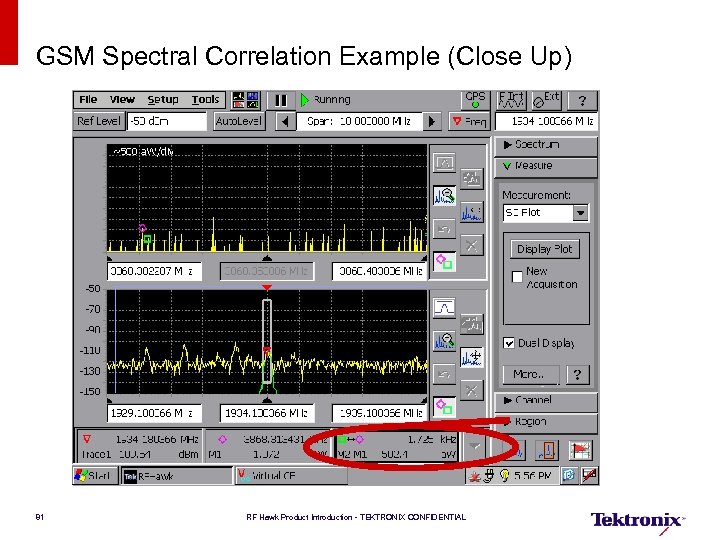 GSM Spectral Correlation Example (Close Up) 81 RF Hawk Product Introduction - TEKTRONIX CONFIDENTIAL
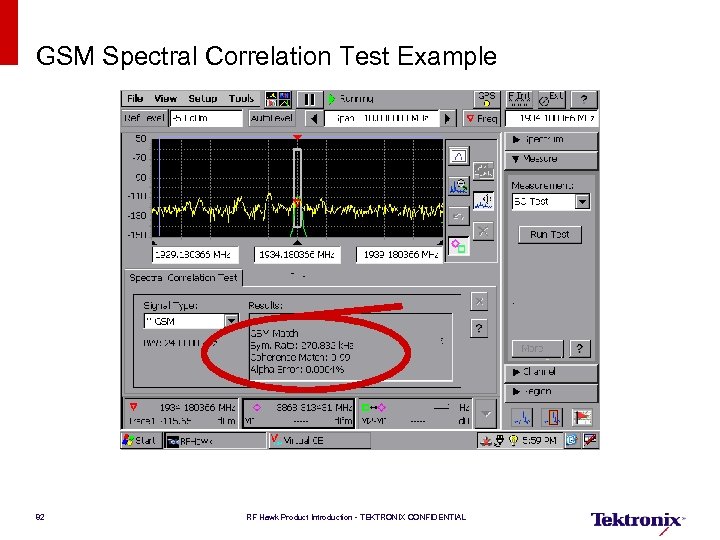 GSM Spectral Correlation Test Example 82 RF Hawk Product Introduction - TEKTRONIX CONFIDENTIAL
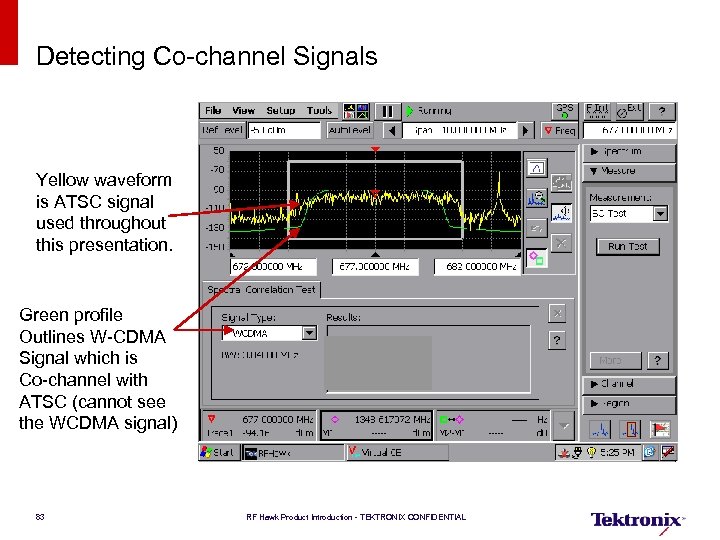 Detecting Co-channel Signals Yellow waveform is ATSC signal used throughout this presentation. Green profile Outlines W-CDMA Signal which is Co-channel with ATSC (cannot see the WCDMA signal) 83 RF Hawk Product Introduction - TEKTRONIX CONFIDENTIAL
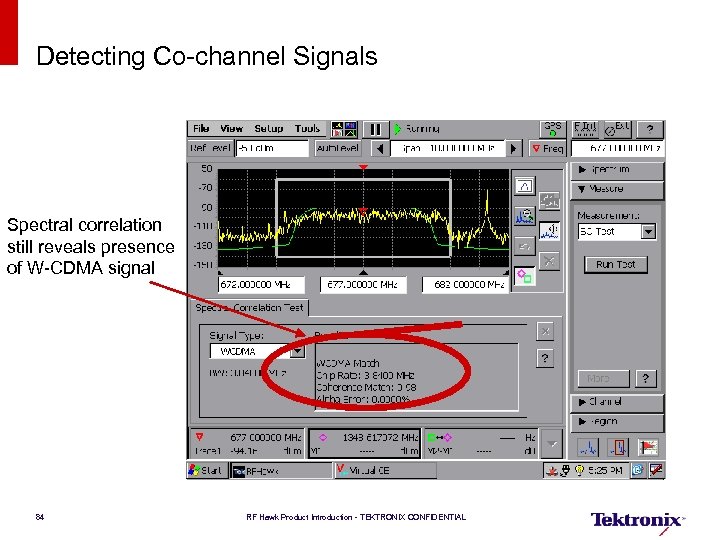 Detecting Co-channel Signals Spectral correlation still reveals presence of W-CDMA signal 84 RF Hawk Product Introduction - TEKTRONIX CONFIDENTIAL
 Backup 85 RF Hawk Product Introduction - TEKTRONIX CONFIDENTIAL
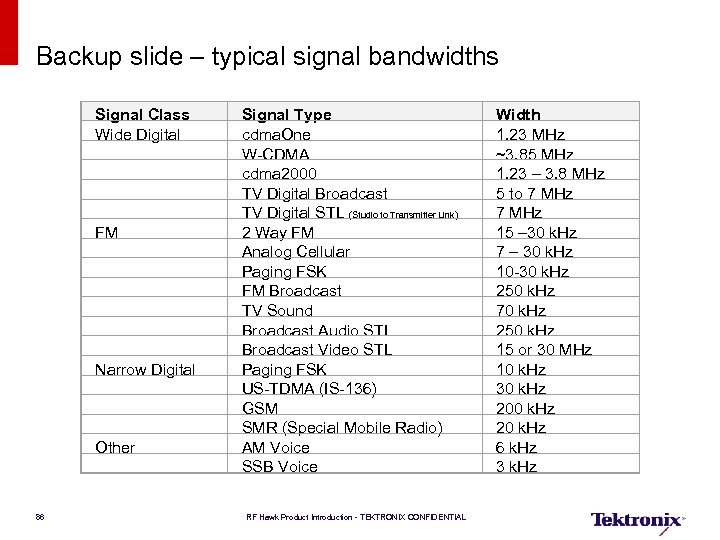 Backup slide – typical signal bandwidths Signal Class Wide Digital FM Narrow Digital Other 86 Signal Type cdma. One W-CDMA cdma 2000 TV Digital Broadcast TV Digital STL (Studio to Transmitter Link) 2 Way FM Analog Cellular Paging FSK FM Broadcast TV Sound Broadcast Audio STL Broadcast Video STL Paging FSK US-TDMA (IS-136) GSM SMR (Special Mobile Radio) AM Voice SSB Voice RF Hawk Product Introduction - TEKTRONIX CONFIDENTIAL Width 1. 23 MHz ~3. 85 MHz 1. 23 – 3. 8 MHz 5 to 7 MHz 15 – 30 k. Hz 7 – 30 k. Hz 10 -30 k. Hz 250 k. Hz 70 k. Hz 250 k. Hz 15 or 30 MHz 10 k. Hz 30 k. Hz 20 k. Hz 6 k. Hz 3 k. Hz
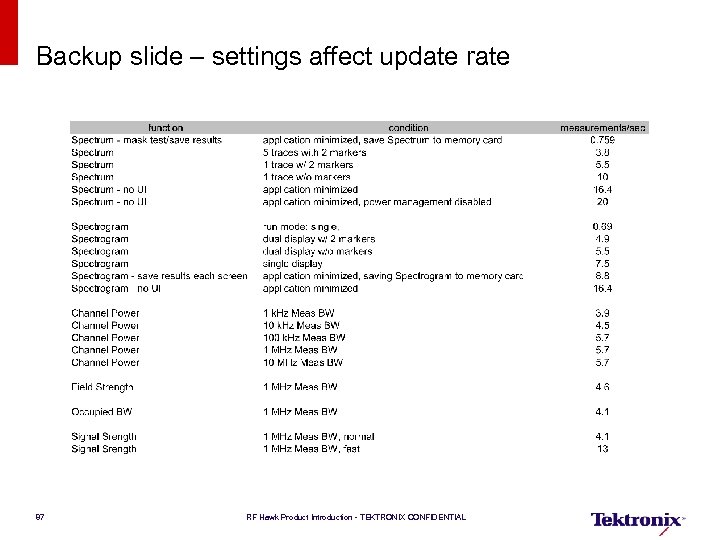 Backup slide – settings affect update rate 87 RF Hawk Product Introduction - TEKTRONIX CONFIDENTIAL
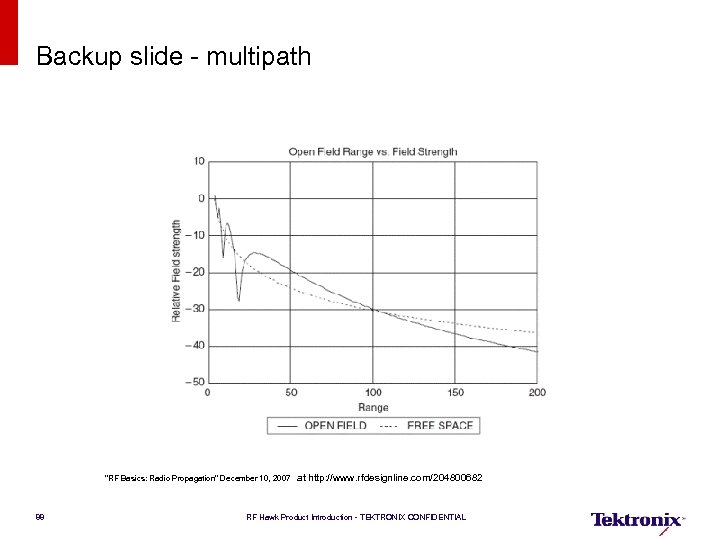 Backup slide - multipath "RF Basics: Radio Propagation" December 10, 2007 88 at http: //www. rfdesignline. com/204800682 RF Hawk Product Introduction - TEKTRONIX CONFIDENTIAL