


 Скачать презентацию Guide to Computer Forensics and Investigations Fifth Edition
74a1e251b8eed9f1d83eabb9f4e6c6a5.ppt
- Количество слайдов: 88
 Guide to Computer Forensics and Investigations Fifth Edition Chapter 5 Working with Windows and CLI Systems Instructor: Francisco R. Ortega, Ph. D
 Understanding File Systems • File system – Gives OS a road map to data on a disk • Type of file system an OS uses determines how data is stored on the disk • When you need to access a suspect’s computer to acquire or inspect data – You should be familiar with both the computer’s OS and file systems Guide to Computer Forensics and Investigations, Fifth Edition 2
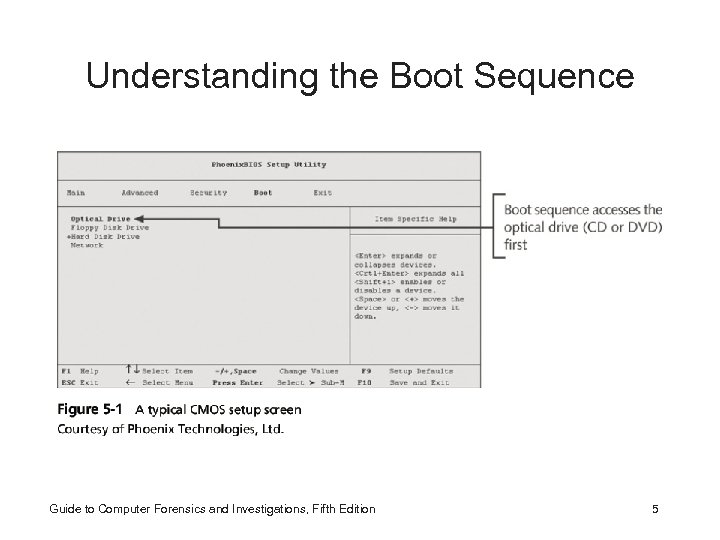
 Understanding the Boot Sequence • Complementary Metal Oxide Semiconductor (CMOS) – Computer stores system configuration and date and time information in the CMOS • When power to the system is off • Basic Input/Output System (BIOS) or Extensible Firmware Interface (EFI) – Contains programs that perform input and output at the hardware level Guide to Computer Forensics and Investigations, Fifth Edition 3
 Understanding the Boot Sequence • Bootstrap process – Contained in ROM, tells the computer how to proceed – Displays the key or keys you press to open the CMOS setup screen • CMOS should be modified to boot from a forensic floppy disk or CD Guide to Computer Forensics and Investigations, Fifth Edition 4
 Understanding the Boot Sequence Guide to Computer Forensics and Investigations, Fifth Edition 5
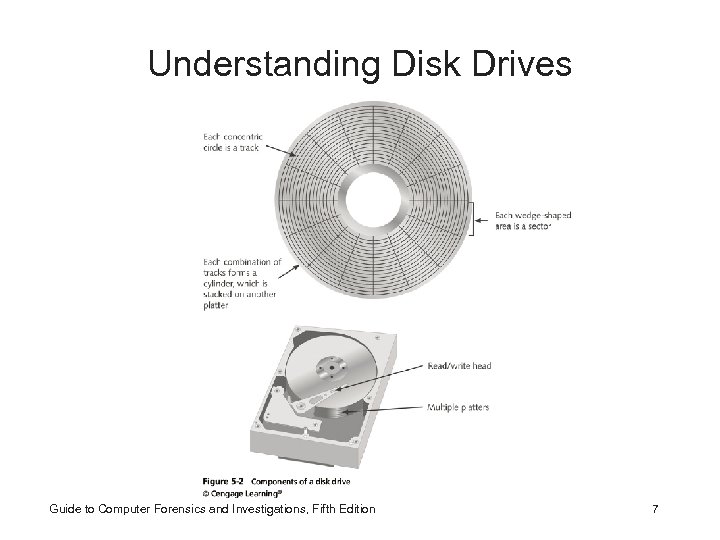
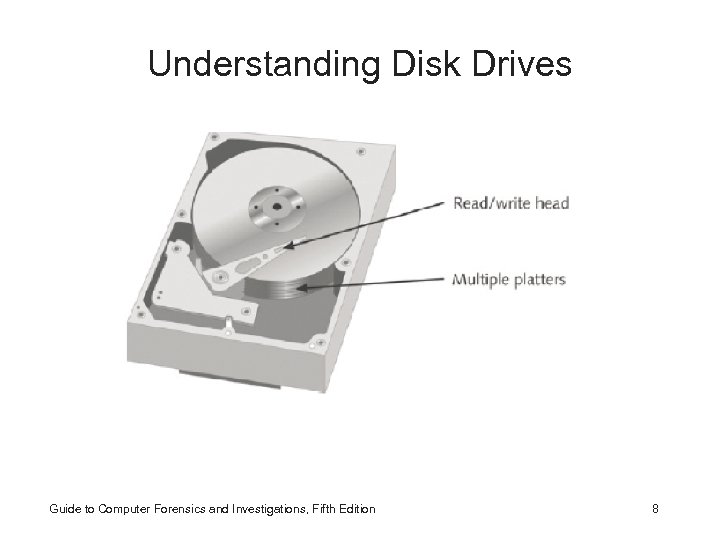
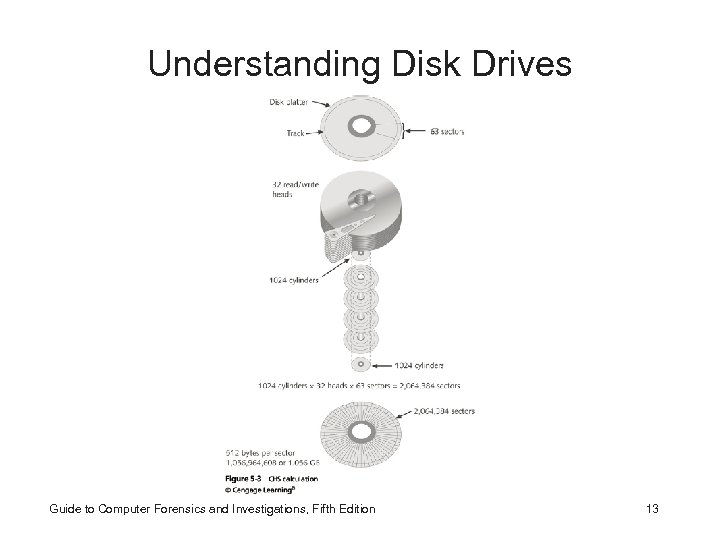
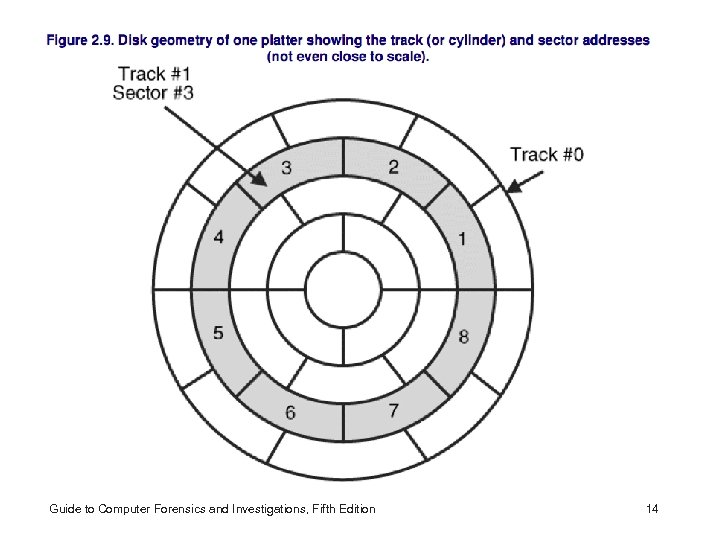
 Understanding Disk Drives • Disk drives are made up of one or more platters coated with magnetic material • Disk drive components – – – Geometry Head Tracks Cylinders Sectors Guide to Computer Forensics and Investigations, Fifth Edition 6
 Understanding Disk Drives Guide to Computer Forensics and Investigations, Fifth Edition 7
 Understanding Disk Drives Guide to Computer Forensics and Investigations, Fifth Edition 8
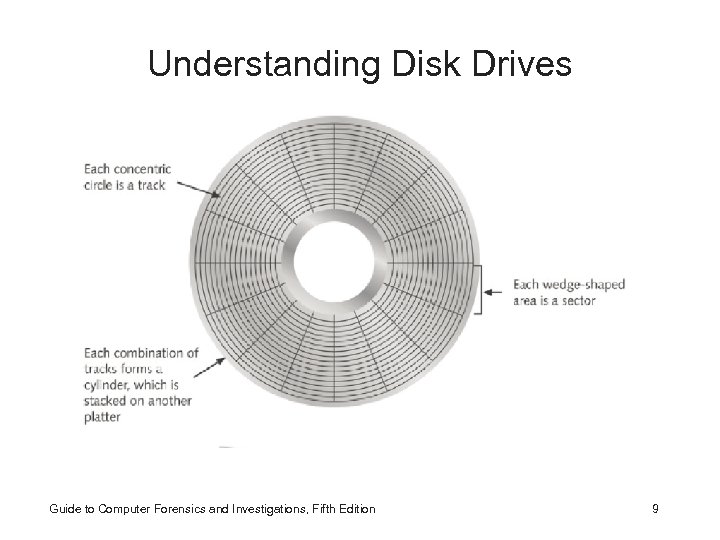 Understanding Disk Drives Guide to Computer Forensics and Investigations, Fifth Edition 9
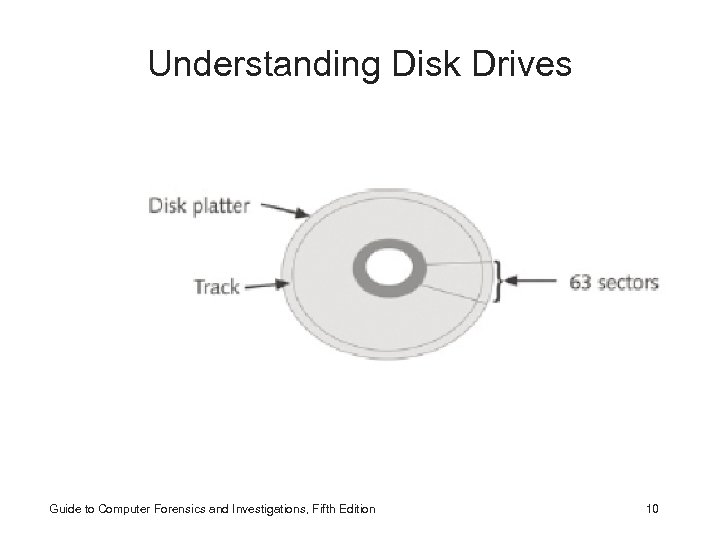 Understanding Disk Drives Guide to Computer Forensics and Investigations, Fifth Edition 10
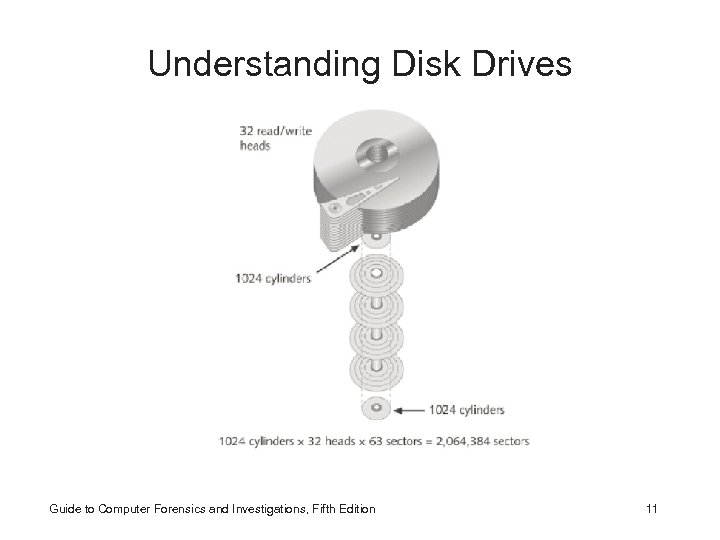 Understanding Disk Drives Guide to Computer Forensics and Investigations, Fifth Edition 11
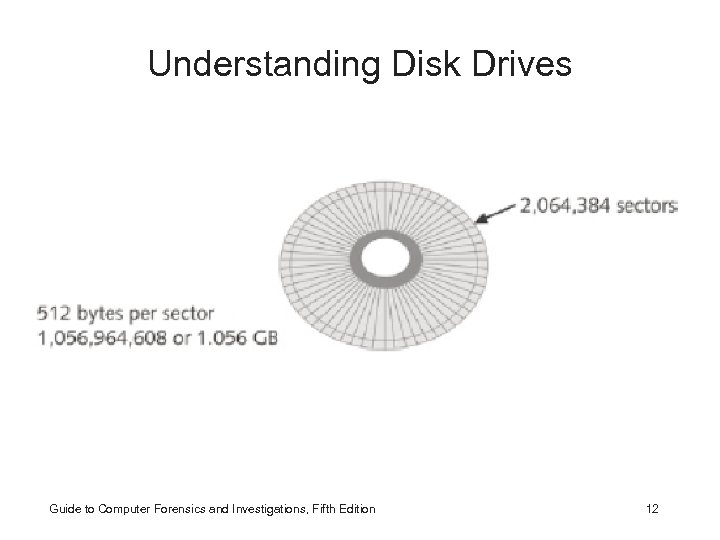 Understanding Disk Drives Guide to Computer Forensics and Investigations, Fifth Edition 12
 Understanding Disk Drives Guide to Computer Forensics and Investigations, Fifth Edition 13
 Guide to Computer Forensics and Investigations, Fifth Edition 14
 Dec, Bin, and Hex ! Guide to Computer Forensics and Investigations, Fifth Edition 15
 16
16
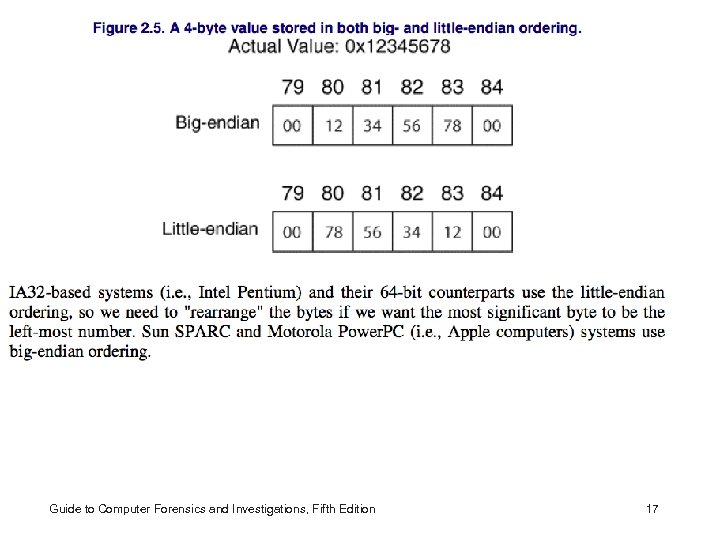 Guide to Computer Forensics and Investigations, Fifth Edition 17
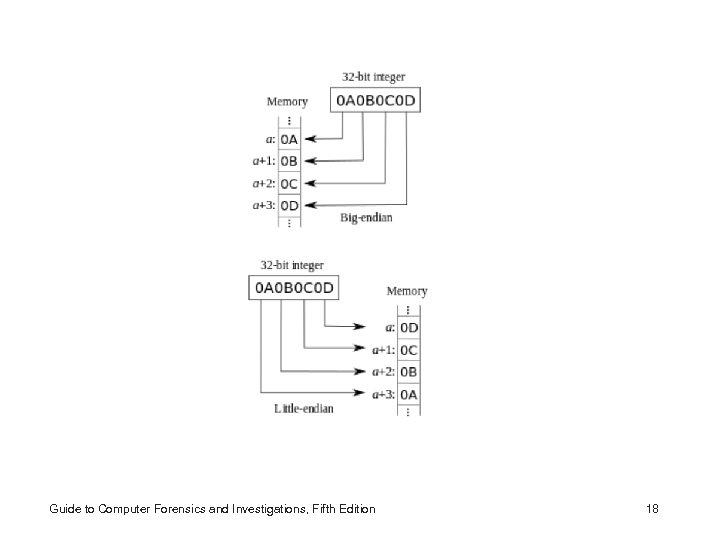 Guide to Computer Forensics and Investigations, Fifth Edition 18
 Understand Basic Data Types • 1 Byte holds 8 bits (holds a characther) – 8 bits holds up to 256. – Signed value takes one bit, so now the value is 2 n-1 to 2 n • Boolean type is used to represent a bit (0 or 1). – Useful for flags • Strings is an “array” of characters with an extra character for null-termination (c style strings) • Other type exists: int, long, double, float… Guide to Computer Forensics and Investigations, Fifth Edition 19
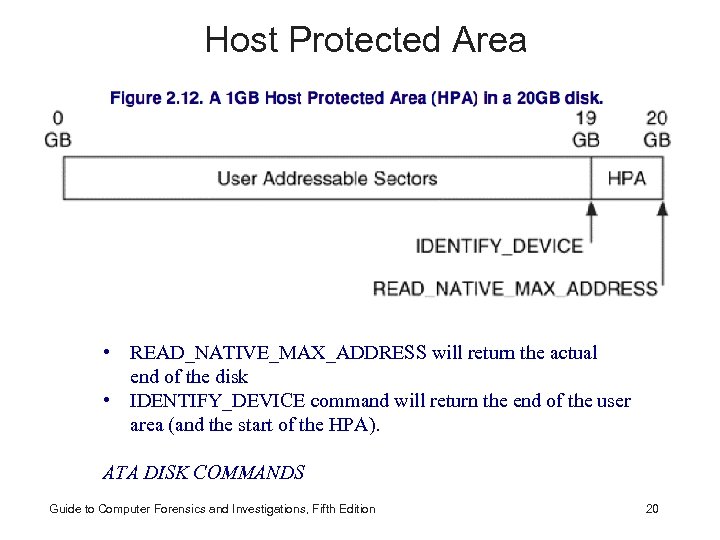 Host Protected Area • READ_NATIVE_MAX_ADDRESS will return the actual end of the disk • IDENTIFY_DEVICE command will return the end of the user area (and the start of the HPA). ser are ATA DISK COMMANDSa (and the start of the HPA). Guide to Computer Forensics and Investigations, Fifth Edition 20
 Addressing the Disk • Old disks used CHS – Cylinder, Head, and Sector – 504 MB limit – new BIOSes translates the • For example, if the application requested data from cylinder 8, head 4, and sector 32, • the BIOS might translate that and request cylinder 26, head 2, sector 32 from the disk. • For translation to work, the BIOS will report a hard disk geometry that is different from what actually existed on the disk. • The translation process does not work for disks that are larger than 8. 1 GB. Guide to Computer Forensics and Investigations, Fifth Edition 21
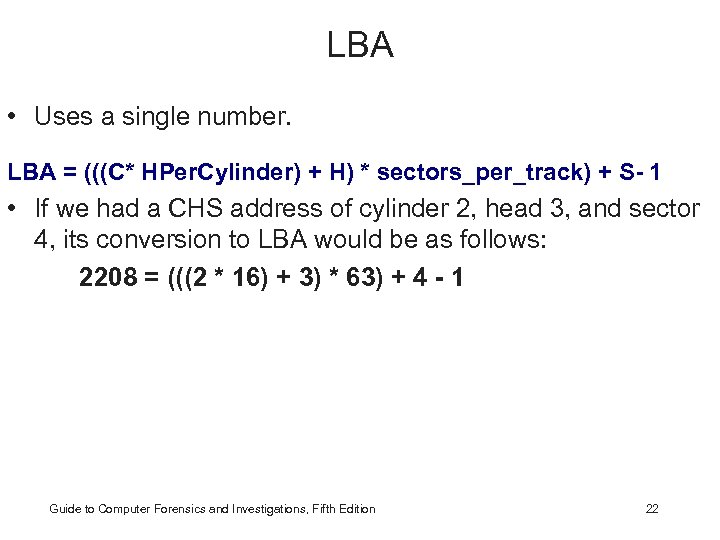 LBA • Uses a single number. LBA = (((C* HPer. Cylinder) + H) * sectors_per_track) + S- 1 • If we had a CHS address of cylinder 2, head 3, and sector 4, its conversion to LBA would be as follows: 2208 = (((2 * 16) + 3) * 63) + 4 - 1 Guide to Computer Forensics and Investigations, Fifth Edition 22
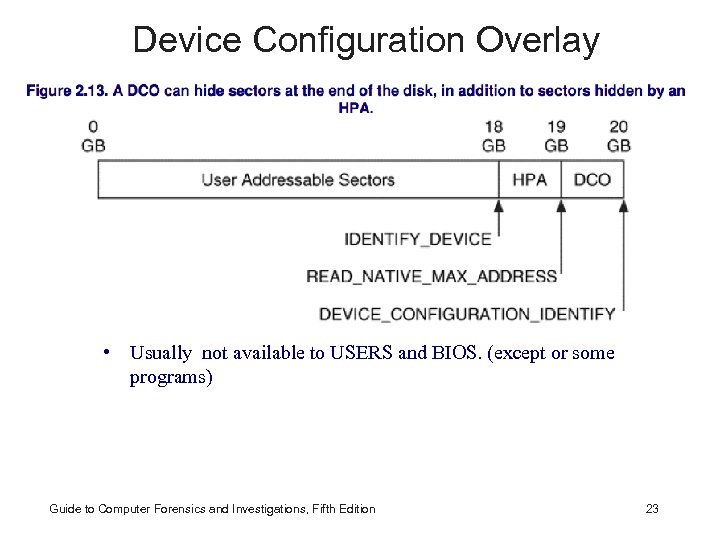 Device Configuration Overlay • Usually not available to USERS and BIOS. (except or some programs)nd the start of the HPA). Guide to Computer Forensics and Investigations, Fifth Edition 23
 Understanding Disk Drives • Properties handled at the drive’s hardware or firmware level – Zone bit recording (ZBR) • help with inner tracking smaller circurnferences – Track density • space between tracks – Areal density • Numbers of bits in one square inch – Head and cylinder skew • Improved disk performance Guide to Computer Forensics and Investigations, Fifth Edition 24
 Solid-State Storage Devices • All flash memory devices have a feature called wear-leveling – An internal firmware feature used in solid-state drives that ensures even wear of read/writes for all memory cells • When dealing with solid-state devices, making a full forensic copy as soon as possible is crucial – In case you need to recover data from unallocated disk space The book does not contain much information about Solid-State Guide to Computer Forensics and Investigations, Fifth Edition 25
 Exploring Microsoft File Structures • In Microsoft file structures, sectors are grouped to form clusters – Storage allocation units of one or more sectors • Clusters range from 512 bytes up to 32, 000 bytes each • Combining sectors minimizes the overhead of writing or reading files to a disk Guide to Computer Forensics and Investigations, Fifth Edition 26
 Exploring Microsoft File Structures • Clusters are numbered sequentially starting at 0 in NTFS and 2 in FAT – First sector of all disks contains a system area, the boot record, and a file structure database • OS assigns these cluster numbers, called logical addresses • Sector numbers are called physical addresses • Clusters and their addresses are specific to a logical disk drive, which is a disk partition Guide to Computer Forensics and Investigations, Fifth Edition 27
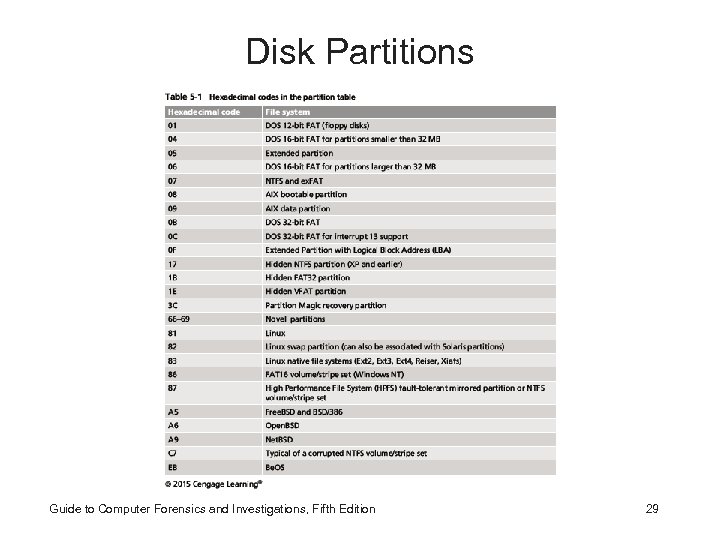
 Disk Partitions • A partition is a logical drive • Windows OSs can have three primary partitions followed by an extended partition that can contain one or more logical drives • Hidden partitions or voids – Large unused gaps between partitions on a disk • Partition gap – Unused space between partitions Guide to Computer Forensics and Investigations, Fifth Edition 28
 Disk Partitions Guide to Computer Forensics and Investigations, Fifth Edition 29
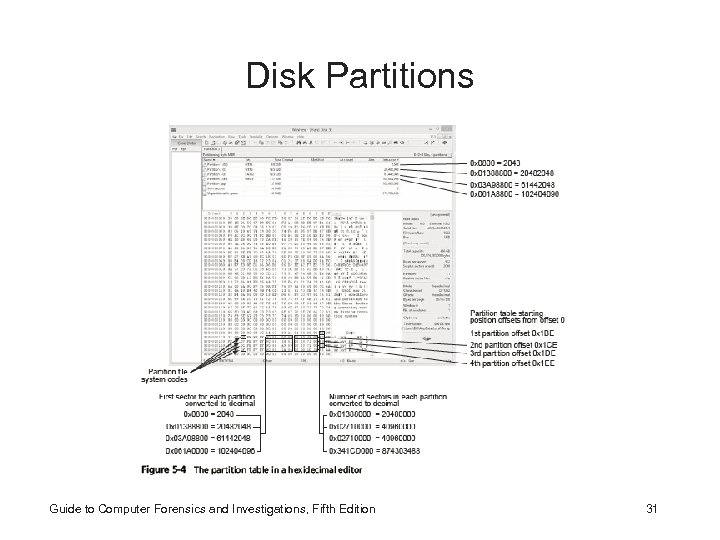
 Disk Partitions • The partition table is in the Master Boot Record (MBR) – Located at sector 0 of the disk drive • MBR stores information about partitions on a disk and their locations, size, and other important items • In a hexadecimal editor, such as Win. Hex, you can find the first partition at offset 0 x 1 BE – The file system’s hexadecimal code is offset 3 bytes from 0 x 1 BE for the first partition Guide to Computer Forensics and Investigations, Fifth Edition 30
 Disk Partitions Guide to Computer Forensics and Investigations, Fifth Edition 31
 Master Boot Record • • Located at sector 0 of the disk drive First partition at 0 x 1 BE Second partition at 0 x 1 EE From 0 x 1 BE – File System’s code is offset by 3 Bytes – Partition starts offset by 8 bytes – The numbers of sectors assigned offset by 12 bytes • Other partition follow the same concept. Guide to Computer Forensics and Investigations, Fifth Edition 32
 Examining FAT Disks • File Allocation Table (FAT) – File structure database that Microsoft originally designed for floppy disks • FAT database is typically written to a disk’s outermost track and contains: – Filenames, directory names, date and time stamps, the starting cluster number, and file attributes • Three current FAT versions – FAT 16, FAT 32, and ex. FAT (used by Xbox game systems) Guide to Computer Forensics and Investigations, Fifth Edition 33
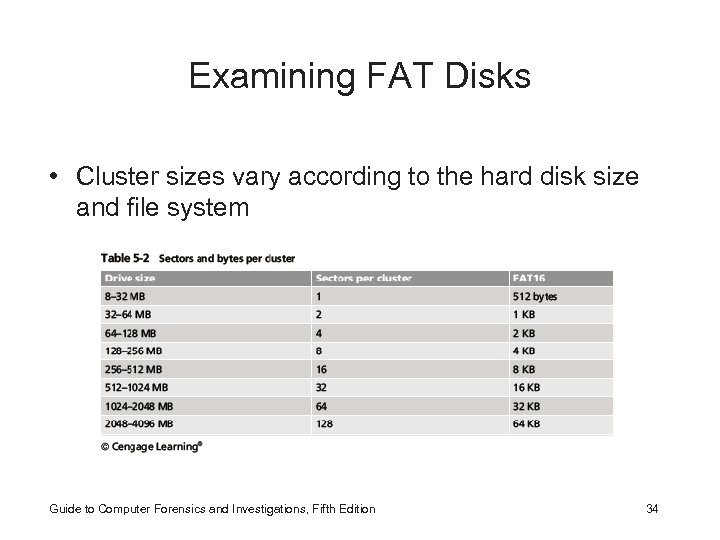 Examining FAT Disks • Cluster sizes vary according to the hard disk size and file system Guide to Computer Forensics and Investigations, Fifth Edition 34
 Examining FAT Disks • Microsoft OSs allocate disk space for files by clusters – Results in drive slack • Unused space in a cluster between the end of an active file and the end of the cluster • Drive slack includes: – RAM slack and file slack • An unintentional side effect of FAT 16 having large clusters was that it reduced fragmentation – As cluster size increased Guide to Computer Forensics and Investigations, Fifth Edition 35
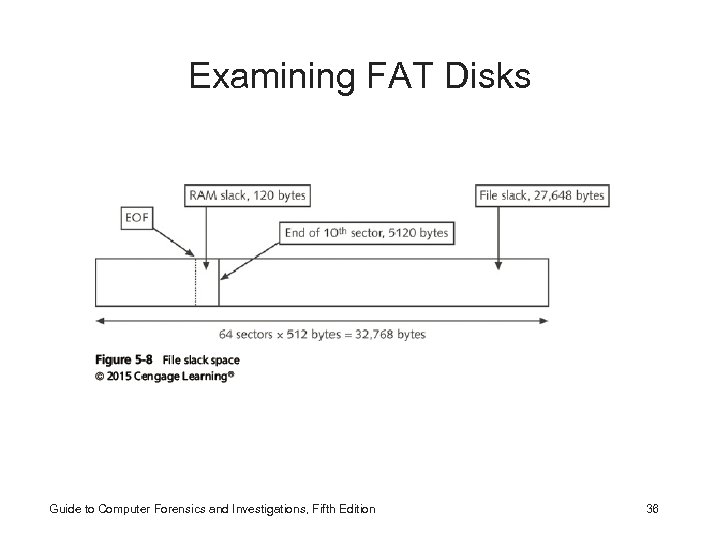 Examining FAT Disks Guide to Computer Forensics and Investigations, Fifth Edition 36
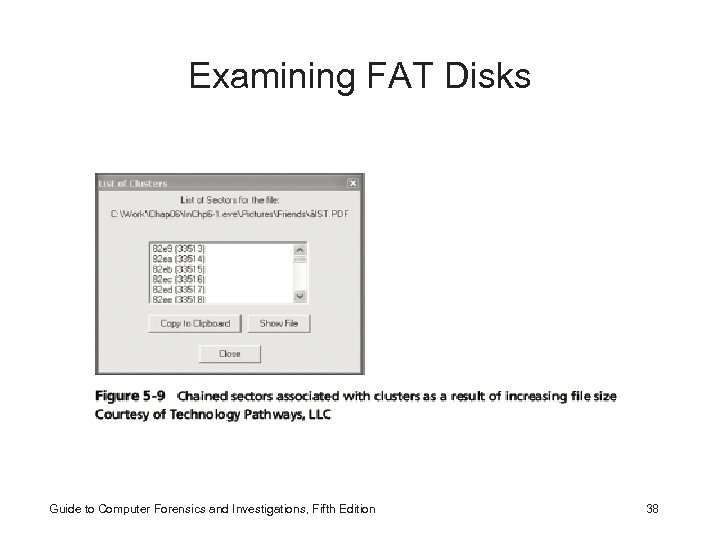
 Examining FAT Disks • When you run out of room for an allocated cluster – OS allocates another cluster for your file, which creates more slack space on the disk • As files grow and require more disk space, assigned clusters are chained together – The chain can be broken or fragmented • When the OS stores data in a FAT file system, it assigns a starting cluster position to a file – Data for the file is written to the first sector of the first assigned cluster Guide to Computer Forensics and Investigations, Fifth Edition 37
 Examining FAT Disks Guide to Computer Forensics and Investigations, Fifth Edition 38
 Examining FAT Disks • When this first assigned cluster is filled and runs out of room – FAT assigns the next available cluster to the file • If the next available cluster isn’t contiguous to the current cluster – File becomes fragmented Guide to Computer Forensics and Investigations, Fifth Edition 39
 Deleting FAT Files • In Microsoft OSs, when a file is deleted – Directory entry is marked as a deleted file • With the HEX E 5 character replacing the first letter of the filename • FAT chain for that file is set to 0 • Data in the file remains on the disk drive • Area of the disk where the deleted file resides becomes unallocated disk space – Available to receive new data from newly created files or other files needing more space Guide to Computer Forensics and Investigations, Fifth Edition 40
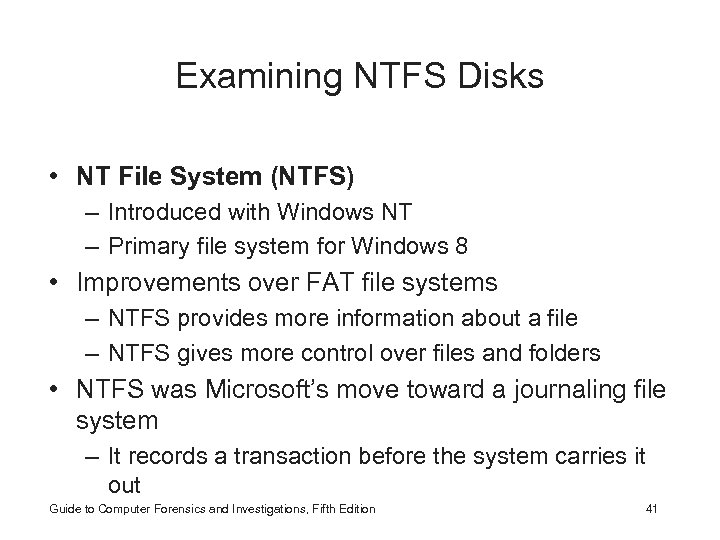 Examining NTFS Disks • NT File System (NTFS) – Introduced with Windows NT – Primary file system for Windows 8 • Improvements over FAT file systems – NTFS provides more information about a file – NTFS gives more control over files and folders • NTFS was Microsoft’s move toward a journaling file system – It records a transaction before the system carries it out Guide to Computer Forensics and Investigations, Fifth Edition 41
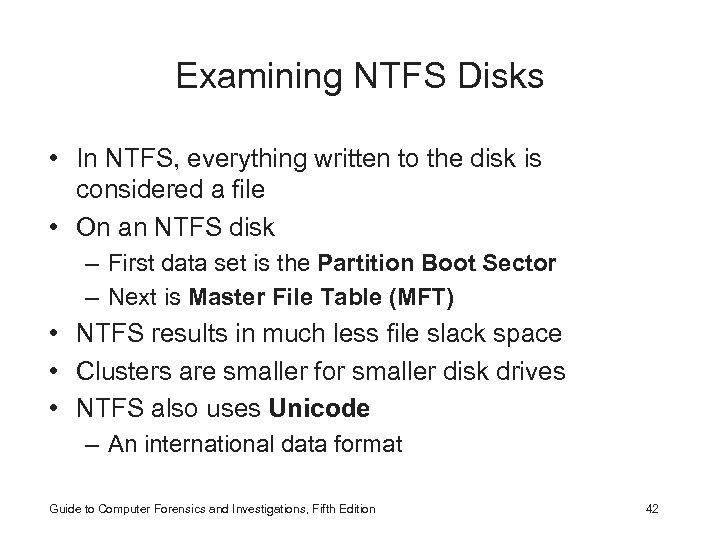 Examining NTFS Disks • In NTFS, everything written to the disk is considered a file • On an NTFS disk – First data set is the Partition Boot Sector – Next is Master File Table (MFT) • NTFS results in much less file slack space • Clusters are smaller for smaller disk drives • NTFS also uses Unicode – An international data format Guide to Computer Forensics and Investigations, Fifth Edition 42
 Examining NTFS Disks • For more information go to – ntfs. com/ntfs_basic. com Guide to Computer Forensics and Investigations, Fifth Edition 43
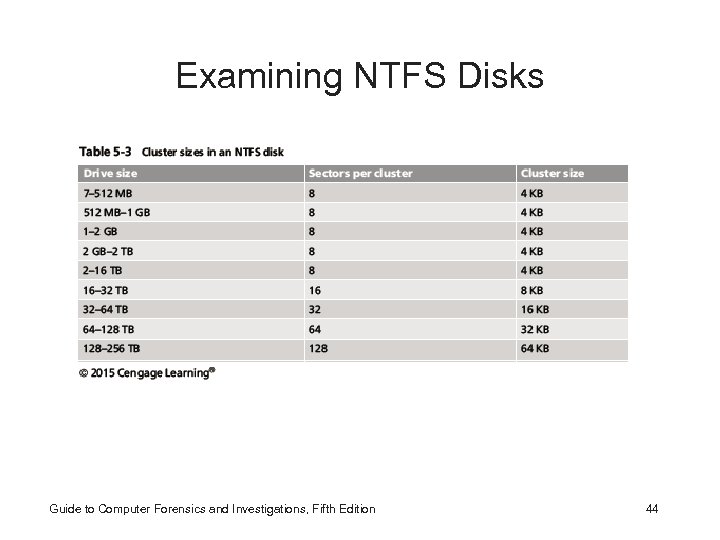 Examining NTFS Disks Guide to Computer Forensics and Investigations, Fifth Edition 44
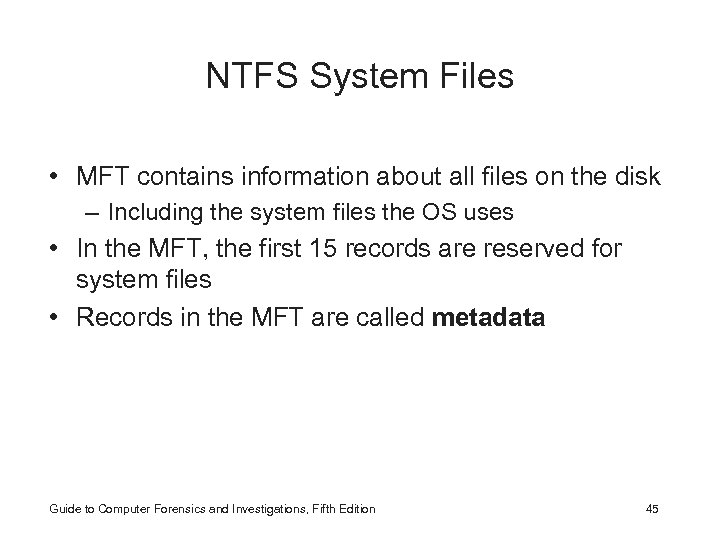 NTFS System Files • MFT contains information about all files on the disk – Including the system files the OS uses • In the MFT, the first 15 records are reserved for system files • Records in the MFT are called metadata Guide to Computer Forensics and Investigations, Fifth Edition 45
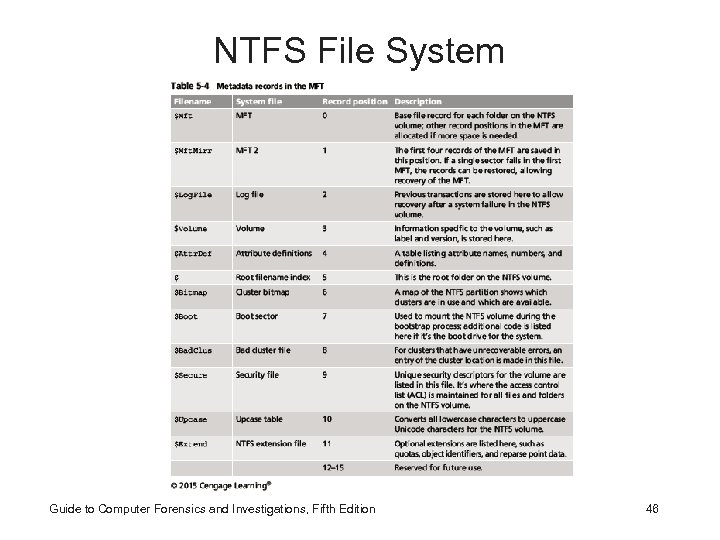 NTFS File System Guide to Computer Forensics and Investigations, Fifth Edition 46
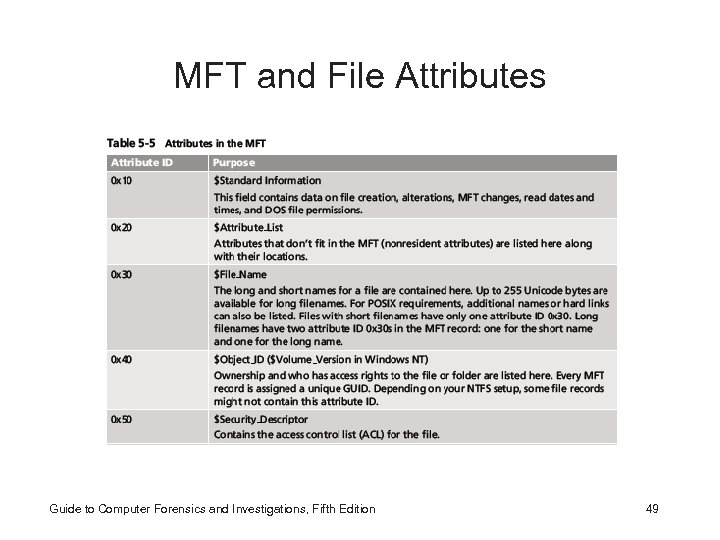
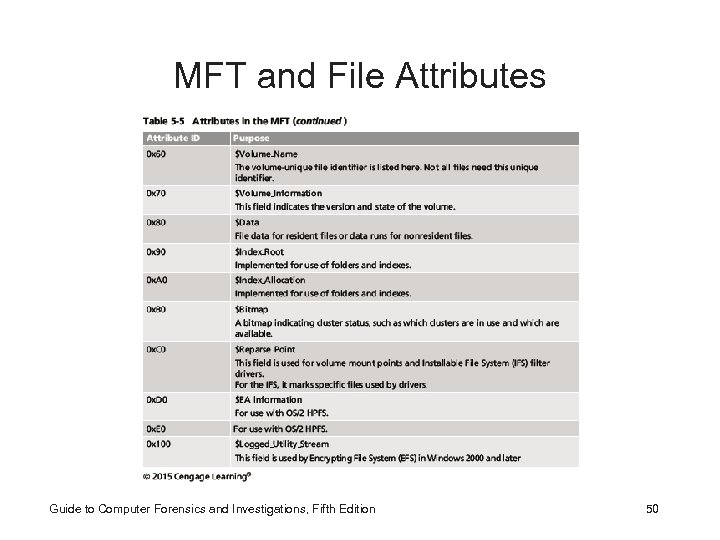
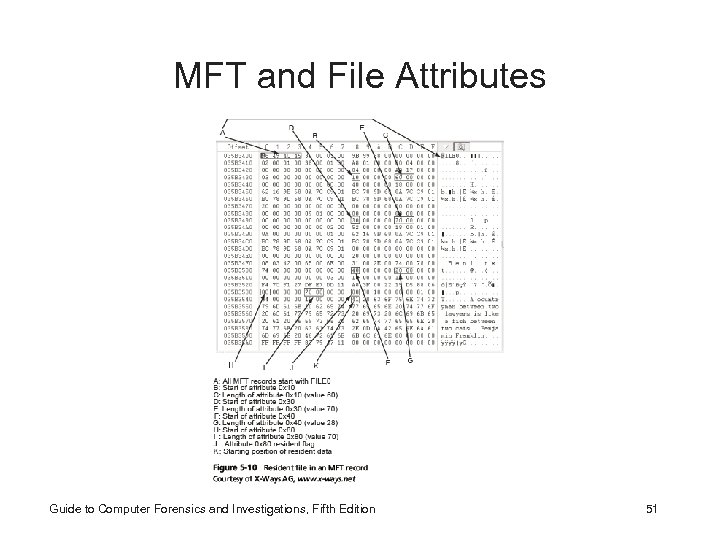
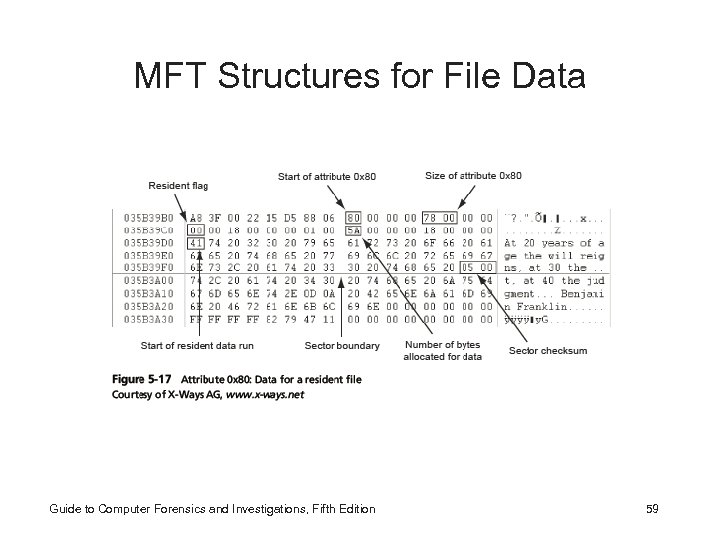
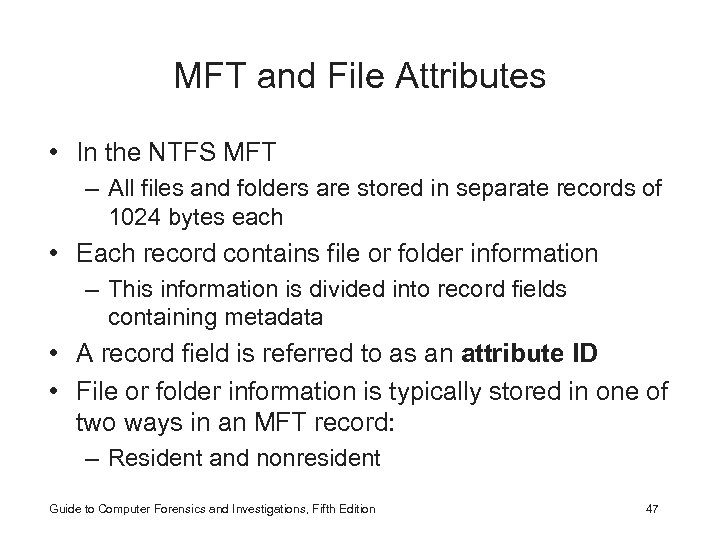 MFT and File Attributes • In the NTFS MFT – All files and folders are stored in separate records of 1024 bytes each • Each record contains file or folder information – This information is divided into record fields containing metadata • A record field is referred to as an attribute ID • File or folder information is typically stored in one of two ways in an MFT record: – Resident and nonresident Guide to Computer Forensics and Investigations, Fifth Edition 47
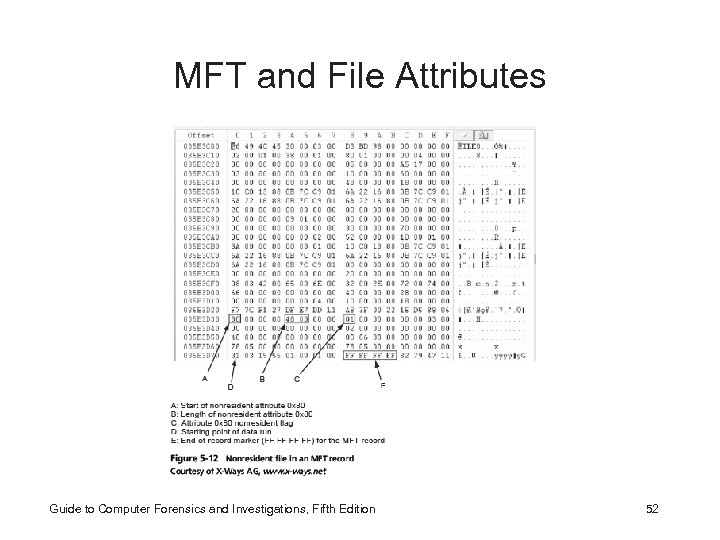
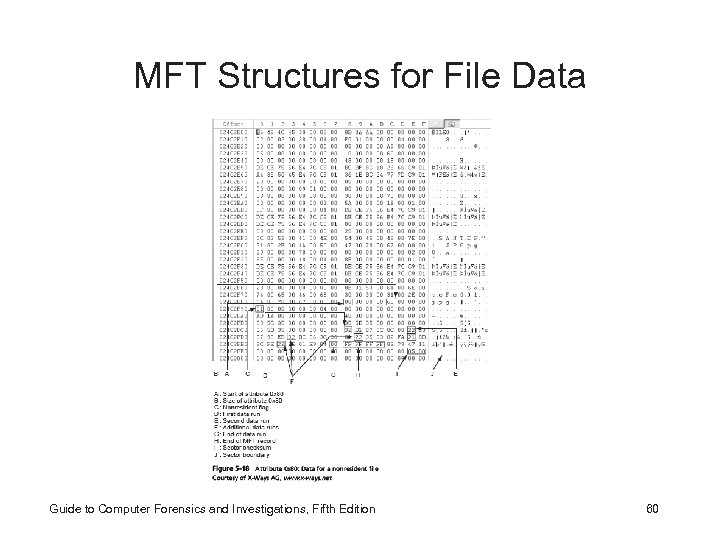
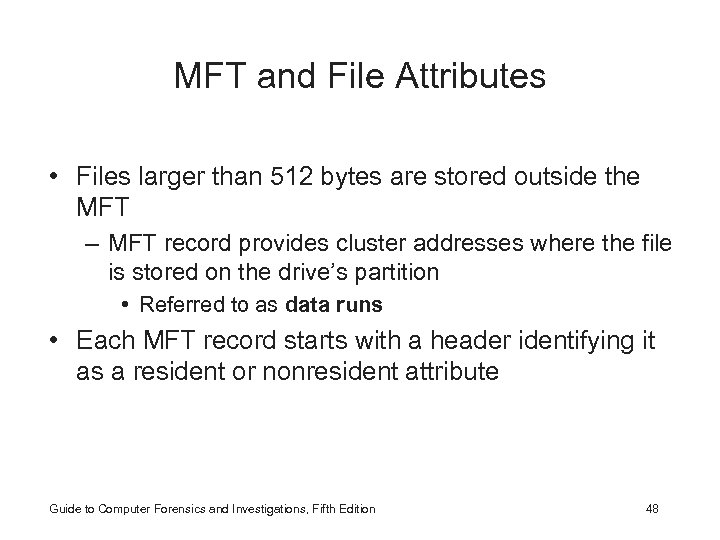 MFT and File Attributes • Files larger than 512 bytes are stored outside the MFT – MFT record provides cluster addresses where the file is stored on the drive’s partition • Referred to as data runs • Each MFT record starts with a header identifying it as a resident or nonresident attribute Guide to Computer Forensics and Investigations, Fifth Edition 48
 MFT and File Attributes Guide to Computer Forensics and Investigations, Fifth Edition 49
 MFT and File Attributes Guide to Computer Forensics and Investigations, Fifth Edition 50
 MFT and File Attributes Guide to Computer Forensics and Investigations, Fifth Edition 51
 MFT and File Attributes Guide to Computer Forensics and Investigations, Fifth Edition 52
 MFT and File Attributes • When a disk is created as an NTFS file structure – OS assigns logical clusters to the entire disk partition • These assigned clusters are called logical cluster numbers (LCNs) – Become the addresses that allow the MFT to link to nonresident files on the disk’s partition • When data is first written to nonresident files, an LCN address is assigned to the file – This LCN becomes the file’s virtual cluster number (VCN) Guide to Computer Forensics and Investigations, Fifth Edition 53
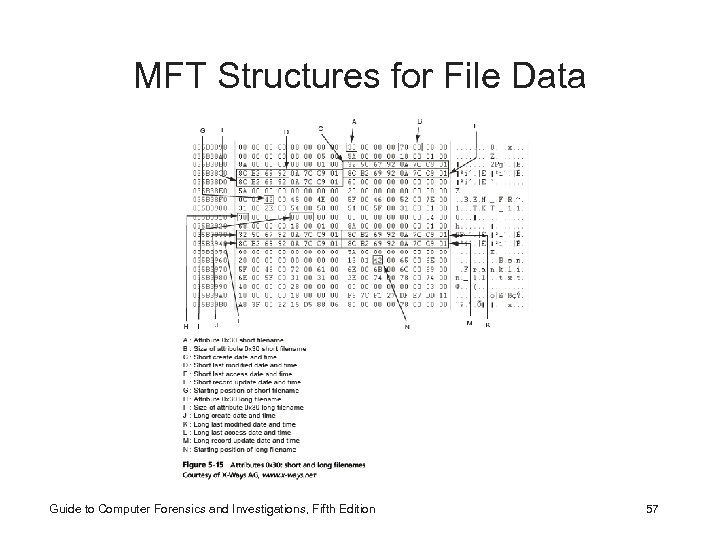
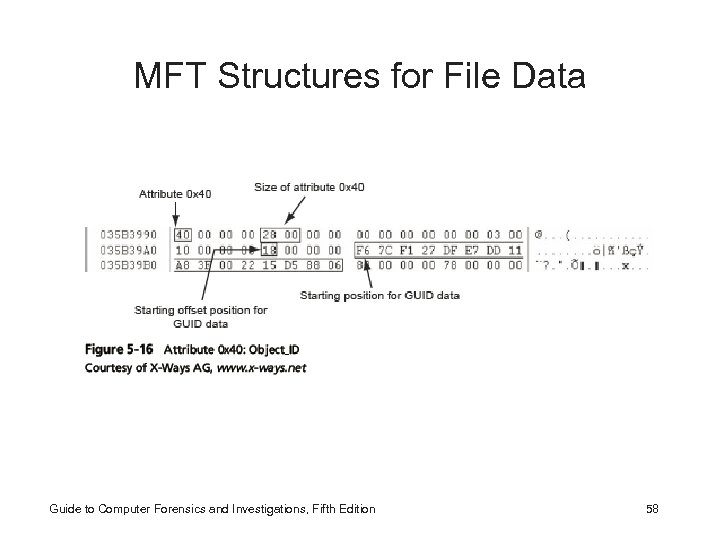
 MFT Structures for File Data • For the header of all MFT records, the record fields of interest are as follows: – At offset 0 x 00 - the MFT record identifier FILE – At offset 0 x 1 C to 0 x 1 F - size of the MFT record – At offset 0 x 14 - length of the header (indicates where the next attribute starts) – At offset 0 x 32 and 0 x 33 - the update sequence array, which stores the last 2 bytes of the first sector of the MFT record Guide to Computer Forensics and Investigations, Fifth Edition 54
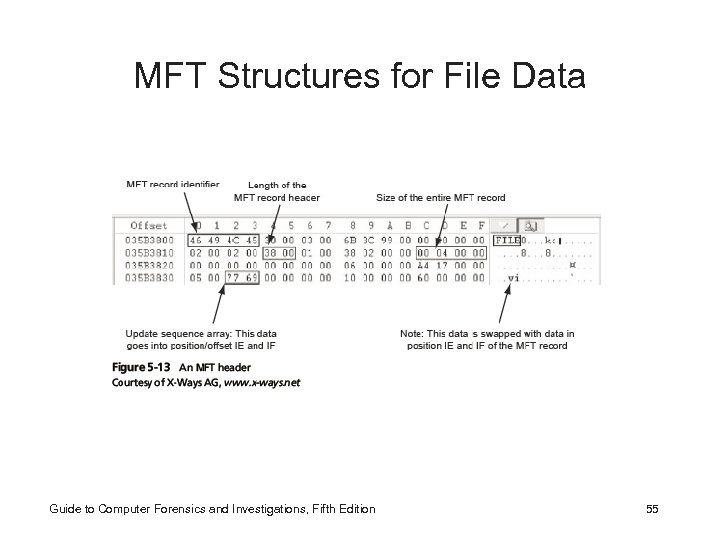 MFT Structures for File Data Guide to Computer Forensics and Investigations, Fifth Edition 55
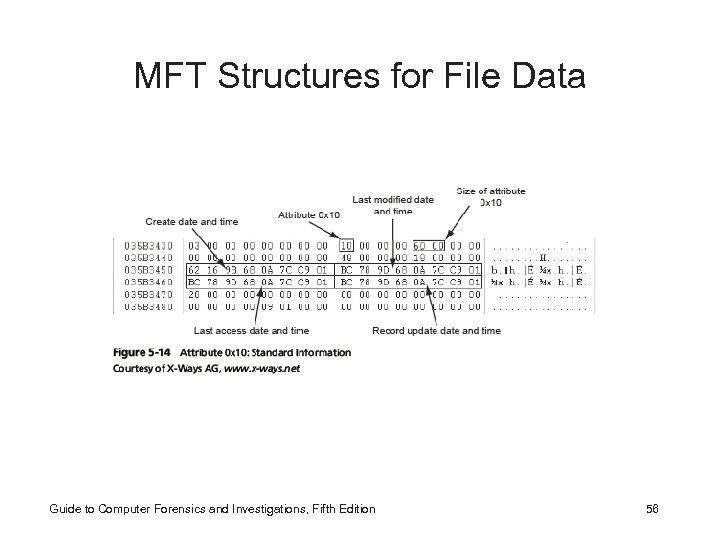 MFT Structures for File Data Guide to Computer Forensics and Investigations, Fifth Edition 56
 MFT Structures for File Data Guide to Computer Forensics and Investigations, Fifth Edition 57
 MFT Structures for File Data Guide to Computer Forensics and Investigations, Fifth Edition 58
 MFT Structures for File Data Guide to Computer Forensics and Investigations, Fifth Edition 59
 MFT Structures for File Data Guide to Computer Forensics and Investigations, Fifth Edition 60
 NTFS Alternate Data Streams • Alternate data streams – Ways data can be appended to existing files – Can obscure valuable evidentiary data, intentionally or by coincidence • In NTFS, an alternate data stream becomes an additional file attribute – Allows the file to be associated with different applications • You can only tell whether a file has a data stream attached by examining that file’s MFT entry Guide to Computer Forensics and Investigations, Fifth Edition 61
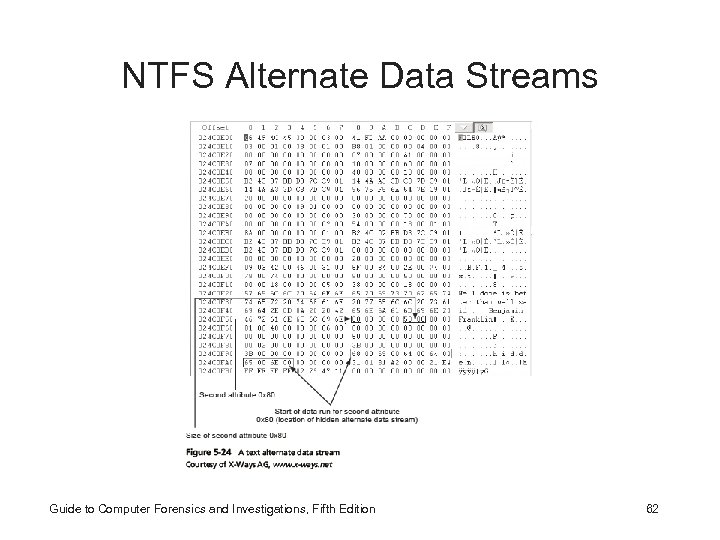 NTFS Alternate Data Streams Guide to Computer Forensics and Investigations, Fifth Edition 62
 NTFS Compressed Files • NTFS provides compression similar to FAT Drive. Space 3 (a Windows 98 compression utility) • Under NTFS, files, folders, or entire volumes can be compressed • Most computer forensics tools can uncompress and analyze compressed Windows data Guide to Computer Forensics and Investigations, Fifth Edition 63
 NTFS Encrypting File System (EFS) • Encrypting File System (EFS) – Introduced with Windows 2000 – Implements a public key and private key method of encrypting files, folders, or disk volumes • When EFS is used in Windows 2000 and later – A recovery certificate is generated and sent to the local Windows administrator account • Users can apply EFS to files stored on their local workstations or a remote server Guide to Computer Forensics and Investigations, Fifth Edition 64
 EFS Recovery Key Agent • Recovery Key Agent implements the recovery certificate – Which is in the Windows administrator account • Windows administrators can recover a key in two ways: through Windows or from an MSDOS command prompt • MS-DOS commands – cipher – copy – efsrecvr (used to decrypt EFS files) Guide to Computer Forensics and Investigations, Fifth Edition 65
 Deleting NTFS Files • When a file is deleted in Windows NT and later – The OS renames it and moves it to the Recycle Bin • Can use the Del (delete) MS-DOS command – Eliminates the file from the MFT listing in the same way FAT does Guide to Computer Forensics and Investigations, Fifth Edition 66
 Resilient File System • Resilient File System (Re. FS) - designed to address very large data storage needs – Such as the cloud • Features incorporated into Re. FS’s design: – Maximized data availability – Improved data integrity – Designed for scalability • Re. FS uses disk structures similar to the MFT in NTFS Guide to Computer Forensics and Investigations, Fifth Edition 67
 Understanding Whole Disk Encryption • In recent years, there has been more concern about loss of – Personal identity information (PII) and trade secrets caused by computer theft • Of particular concern is theft of laptop computers and other handheld devices • To help prevent loss of information, software vendors now provide whole disk encryption Guide to Computer Forensics and Investigations, Fifth Edition 68
 Understanding Whole Disk Encryption • Current whole disk encryption tools offer the following features: – – Preboot authentication Full or partial disk encryption with secure hibernation Advanced encryption algorithms Key management function Guide to Computer Forensics and Investigations, Fifth Edition 69
 Understanding Whole Disk Encryption • Whole disk encryption tools encrypt each sector of a drive separately • Many of these tools encrypt the drive’s boot sector – To prevent any efforts to bypass the secured drive’s partition • To examine an encrypted drive, decrypt it first – Run a vendor-specific program to decrypt the drive – Many vendors use a bootable CD or USB drive that prompts for a one-time passphrase Guide to Computer Forensics and Investigations, Fifth Edition 70
 Examining Microsoft Bit. Locker • Available Vista Enterprise/Ultimate, Windows 7 and 8 Professional/Enterprise, and Server 08 and 12 • Hardware and software requirements – A computer capable of running Windows Vista or later – The TPM microchip, version 1. 2 or newer – A computer BIOS compliant with Trusted Computing Group (TCG) – Two NTFS partitions – The BIOS configured so that the hard drive boots first before checking other bootable peripherals Guide to Computer Forensics and Investigations, Fifth Edition 71
 Examining Third-Party Disk Encryption Tools • Some available third-party WDE utilities: – – – PGP Full Disk Encryption Voltage Secure. File Utimaco Safe. Guard Easy Jetico Best. Crypt Volume Encryption True. Crypt Guide to Computer Forensics and Investigations, Fifth Edition 72
 Understanding the Windows Registry • Registry – A database that stores hardware and software configuration information, network connections, user preferences, and setup information • To view the Registry, you can use: – Regedit (Registry Editor) program for Windows 9 x systems – Regedt 32 for Windows 2000, XP, and Vista – Both utilities can be used for Windows 7 and 8 Guide to Computer Forensics and Investigations, Fifth Edition 73
 Exploring the Organization of the Windows Registry • Registry terminology: – – – – – Registry Editor HKEY Key Subkey Branch Value Default value Hives Guide to Computer Forensics and Investigations, Fifth Edition 74
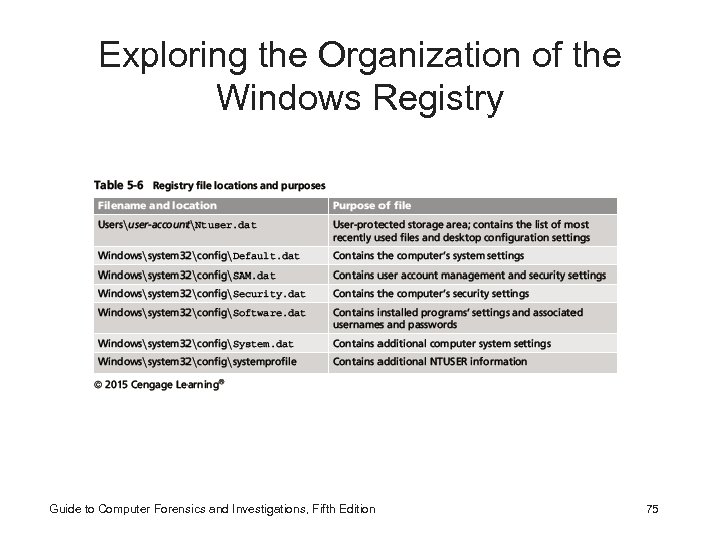 Exploring the Organization of the Windows Registry Guide to Computer Forensics and Investigations, Fifth Edition 75
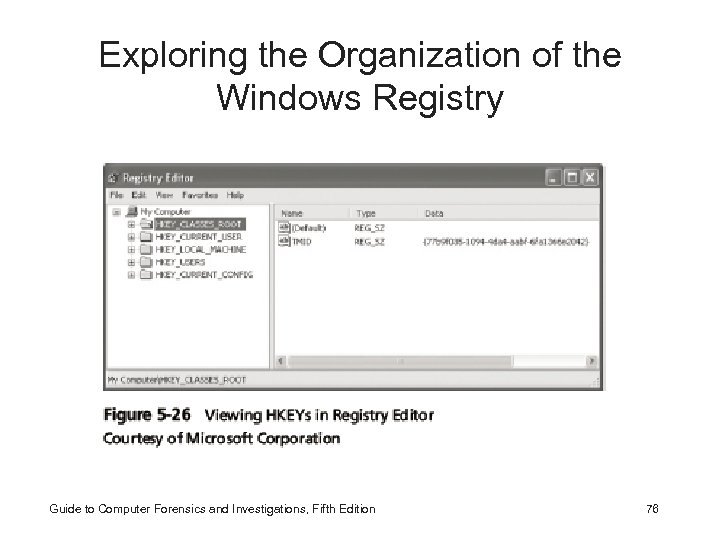 Exploring the Organization of the Windows Registry Guide to Computer Forensics and Investigations, Fifth Edition 76
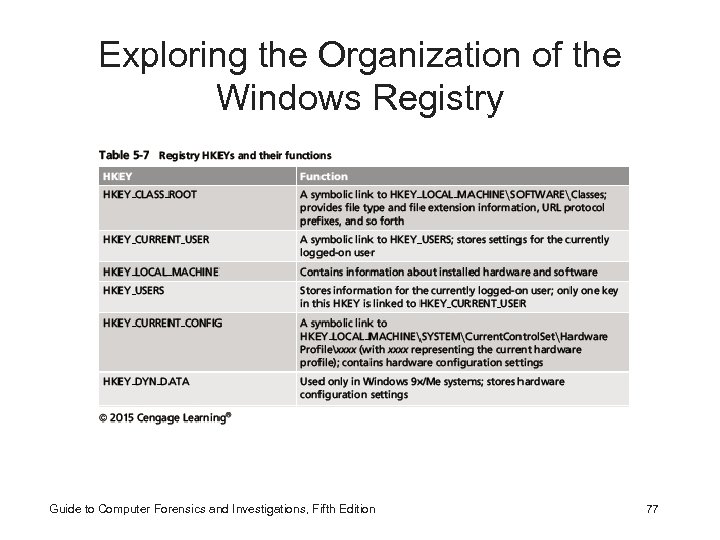 Exploring the Organization of the Windows Registry Guide to Computer Forensics and Investigations, Fifth Edition 77
 Understanding Microsoft Startup Tasks • Learn what files are accessed when Windows starts • This information helps you determine when a suspect’s computer was last accessed – Important with computers that might have been used after an incident was reported Guide to Computer Forensics and Investigations, Fifth Edition 78
 Startup in Windows 7 and Windows 8 • Windows 8 is a multiplatform OS – Can run on desktops, laptops, tablets, and smartphones • The boot process uses a boot configuration data (BCD) store • The BCD contains the boot loader that initiates the system’s bootstrap process – Press F 8 or F 12 when the system starts to access the Advanced Boot Options Guide to Computer Forensics and Investigations, Fifth Edition 79
 Startup in Windows NT and Later • All NTFS computers perform the following steps when the computer is turned on: – – – Power-on self test (POST) Initial startup Boot loader Hardware detection and configuration Kernel loading User logon Guide to Computer Forensics and Investigations, Fifth Edition 80
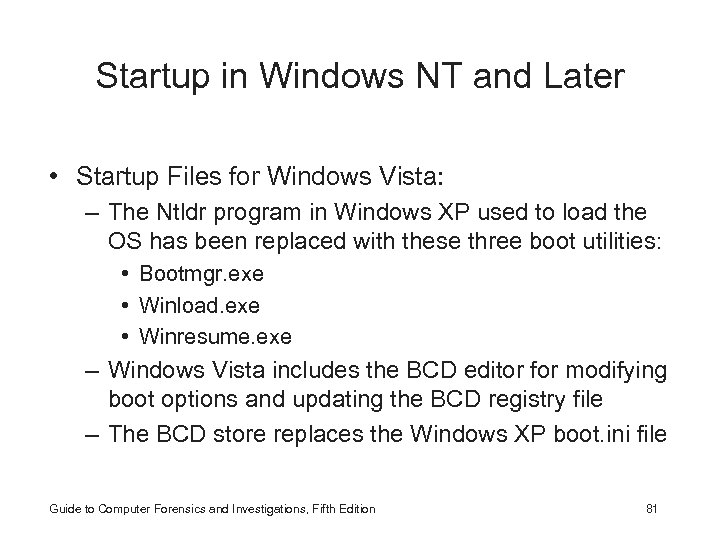 Startup in Windows NT and Later • Startup Files for Windows Vista: – The Ntldr program in Windows XP used to load the OS has been replaced with these three boot utilities: • Bootmgr. exe • Winload. exe • Winresume. exe – Windows Vista includes the BCD editor for modifying boot options and updating the BCD registry file – The BCD store replaces the Windows XP boot. ini file Guide to Computer Forensics and Investigations, Fifth Edition 81
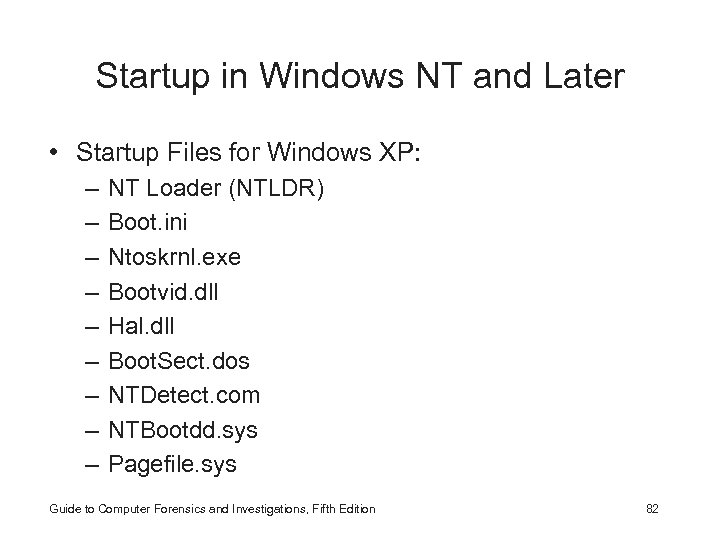 Startup in Windows NT and Later • Startup Files for Windows XP: – – – – – NT Loader (NTLDR) Boot. ini Ntoskrnl. exe Bootvid. dll Hal. dll Boot. Sect. dos NTDetect. com NTBootdd. sys Pagefile. sys Guide to Computer Forensics and Investigations, Fifth Edition 82
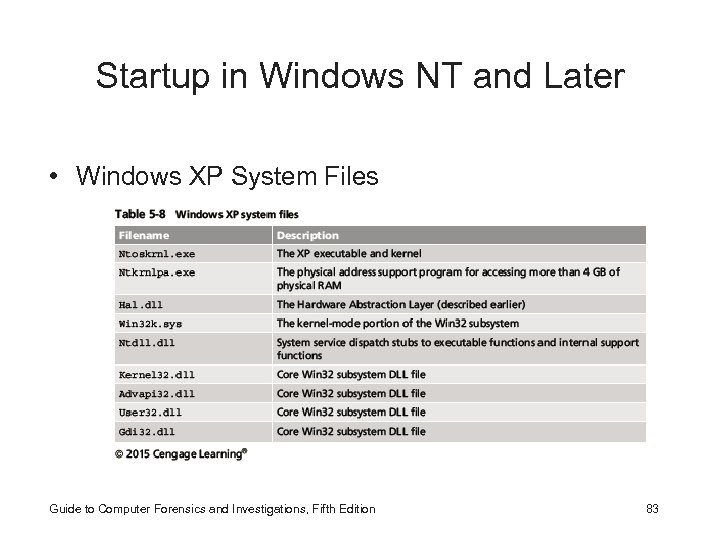 Startup in Windows NT and Later • Windows XP System Files Guide to Computer Forensics and Investigations, Fifth Edition 83
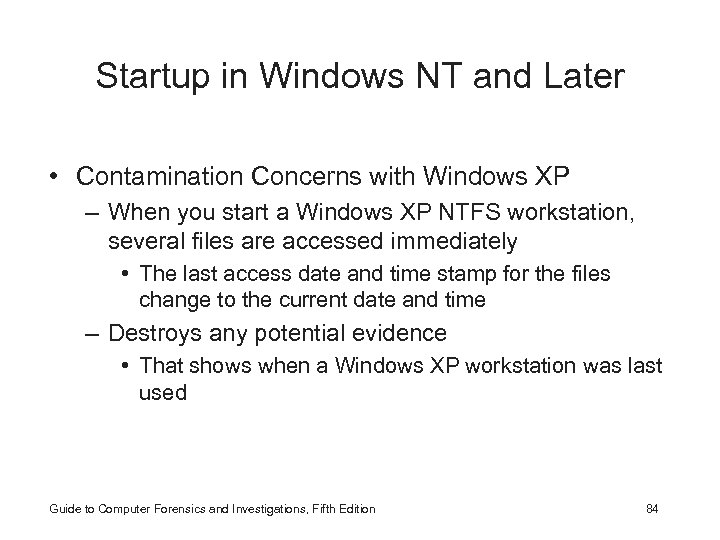 Startup in Windows NT and Later • Contamination Concerns with Windows XP – When you start a Windows XP NTFS workstation, several files are accessed immediately • The last access date and time stamp for the files change to the current date and time – Destroys any potential evidence • That shows when a Windows XP workstation was last used Guide to Computer Forensics and Investigations, Fifth Edition 84
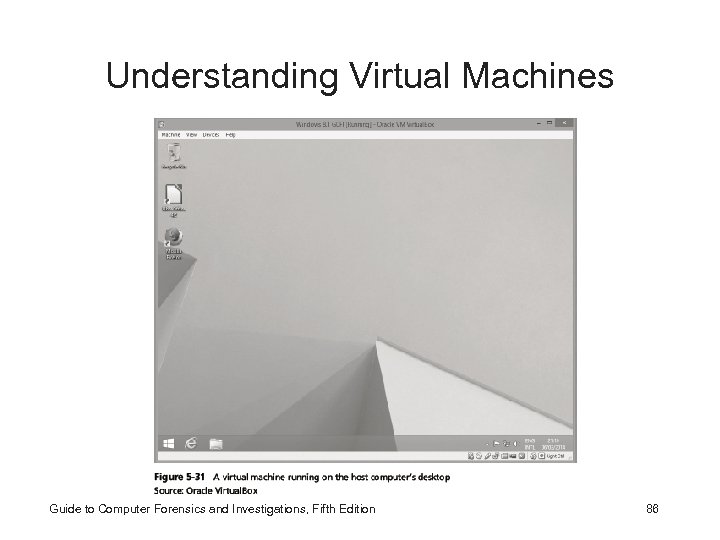
 Understanding Virtual Machines • Virtual machine – Allows you to create a representation of another computer on an existing physical computer • A virtual machine is just a few files on your hard drive – Must allocate space to it (NOT ALWAYS) • A virtual machine recognizes components of the physical machine it’s loaded on – Virtual OS is limited by the physical machine’s OS Guide to Computer Forensics and Investigations, Fifth Edition 85
 Understanding Virtual Machines Guide to Computer Forensics and Investigations, Fifth Edition 86
 Understanding Virtual Machines • In digital forensics – Virtual machines make it possible to restore a suspect drive on your virtual machine • And run nonstandard software the suspect might have loaded • From a network forensics standpoint, you need to be aware of some potential issues, such as: – A virtual machine used to attack another system or network Guide to Computer Forensics and Investigations, Fifth Edition 87
 Creating a Virtual Machine • Popular applications for creating virtual machines – VMware Server, VMware Player and VMware Workstation, Oracle VM Virtual. Box, Microsoft Virtual PC, and Hyper-V • Using Virtual. Box – An open-source program that can be downloaded at www. virtualbox. org/wiki/Downloads • Consult with your instructor before doing the activities using Virtual. Box Guide to Computer Forensics and Investigations, Fifth Edition 88