 Скачать презентацию From Adaptive Learning to Ubiquitous Learning Speaker
f604ee21699b2ded0437942a972024a7.ppt
- Количество слайдов: 96



From Adaptive Learning to Ubiquitous Learning Speaker : Judy C. R. Tseng Department of Computer Science and Information Engineering Chung Hua University
Agenda A Survey of Adaptive Learning n Related Reseaches n Introduction to Ubiquitous Computing n Introduction to U-Learning n
A Survey of Adaptive Learning
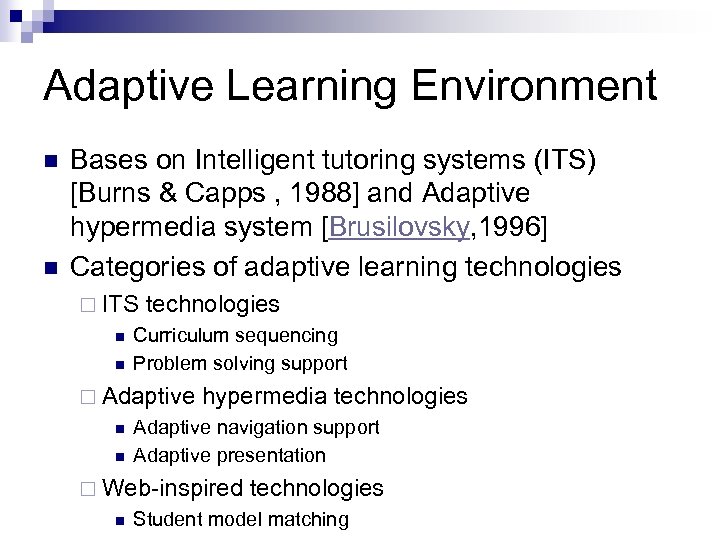
Adaptive Learning Environment n n Bases on Intelligent tutoring systems (ITS) [Burns & Capps , 1988] and Adaptive hypermedia system [Brusilovsky, 1996] Categories of adaptive learning technologies ¨ ITS n n technologies Curriculum sequencing Problem solving support ¨ Adaptive n n hypermedia technologies Adaptive navigation support Adaptive presentation ¨ Web-inspired n technologies Student model matching
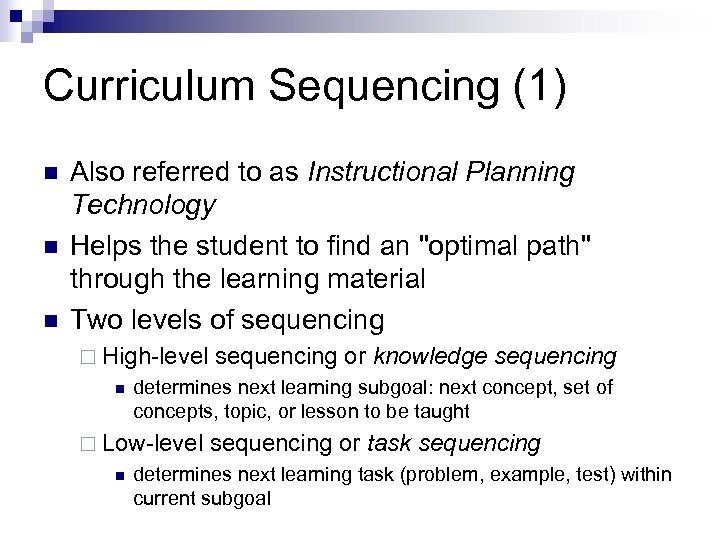
Curriculum Sequencing (1) n n n Also referred to as Instructional Planning Technology Helps the student to find an "optimal path" through the learning material Two levels of sequencing ¨ High-level n determines next learning subgoal: next concept, set of concepts, topic, or lesson to be taught ¨ Low-level n sequencing or knowledge sequencing or task sequencing determines next learning task (problem, example, test) within current subgoal
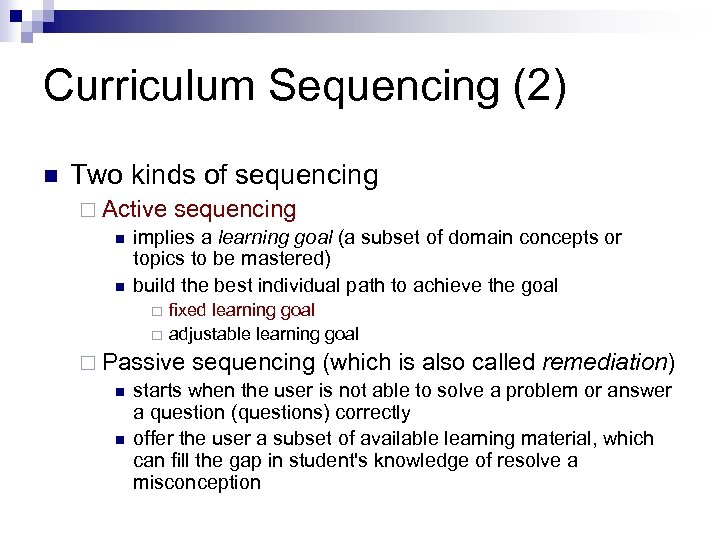
Curriculum Sequencing (2) n Two kinds of sequencing ¨ Active sequencing n implies a learning goal (a subset of domain concepts or topics to be mastered) n build the best individual path to achieve the goal ¨ ¨ fixed learning goal adjustable learning goal ¨ Passive sequencing (which is also called remediation) n starts when the user is not able to solve a problem or answer a question (questions) correctly n offer the user a subset of available learning material, which can fill the gap in student's knowledge of resolve a misconception
Problem Solving Support (1) Main duty and main value of ITS technology n Three technologies n ¨ Intelligent analysis of student solutions ¨ Interactive problem solving support ¨ Example-based problem solving support
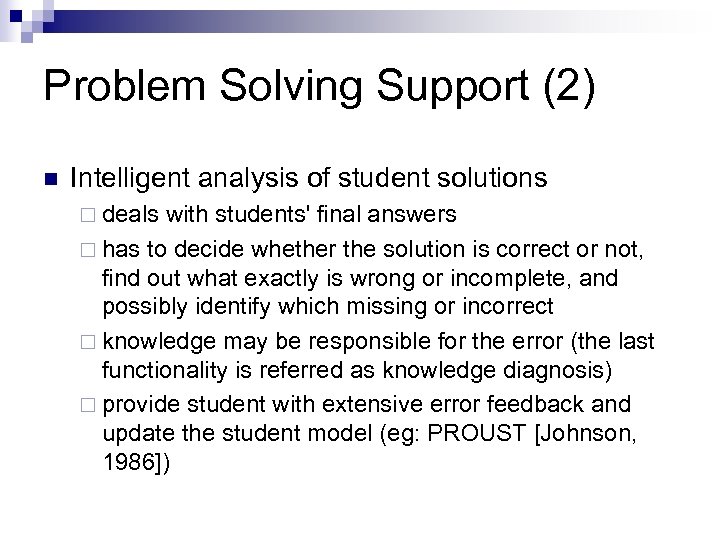
Problem Solving Support (2) n Intelligent analysis of student solutions ¨ deals with students' final answers ¨ has to decide whether the solution is correct or not, find out what exactly is wrong or incomplete, and possibly identify which missing or incorrect ¨ knowledge may be responsible for the error (the last functionality is referred as knowledge diagnosis) ¨ provide student with extensive error feedback and update the student model (eg: PROUST [Johnson, 1986])
Problem Solving Support (3) n Interactive problem solving support ¨ more powerful technology ¨ provide intelligent help on each step of problem solving Instead of waiting for the final solution ¨ The level of help vary: from signaling about a wrong step, to giving a hint, to executing the next step for the student ¨ The systems which implement this technology (often referred to as interactive tutors) can watch the actions of the student, understand them, and use this understanding to provide help and to update the student model. (eg: LISP-TUTOR [Anderson, 1985])
Problem Solving Support (4) n Example-based problem solving support ¨ helping students to solve new problems by suggesting them relevant successful problem solving cases from their earlier experience (eg: ELM-PE [Weber, 1996], ELM-ART [Brusilovsky, 1996] and ELM-ART-II [Weber, 1999])
Adaptive Navigation Support (1) n n Support the student in hyperspace orientation and navigation by changing the appearance of visible links Generalization of curriculum sequencing technology in a hypermedia context Has more options than traditional sequencing: it can guide the students both directly and indirectly Three most popular ways ¨ direct guidance ¨ adaptive link annotation ¨ adaptive link hiding
Adaptive Navigation Support (2) n Direct guidance ¨ Informs the student the links that will drive him or her to the "best" page ¨ Almost equivalent to curriculum sequencing technology with some differences n n existing page v. s. generated presentation one level sequencing v. s. two-level sequencing ¨ the difference between these two technologies starts to disappear in the Web context
Adaptive Navigation Support (3) n Adaptive link annotation ¨ The most popular form of ANS on the Web ¨ used first in ELM-ART [Brusilovsky, 1996] and applied in all descendants (eg: Inter. Book, AST, ADI, ACE, and ART-Web) and WEST-KBNS and KBS Hyper. Book. n Adaptive link hiding/disabling ¨ make the link completely non-functional (eg: the Remedial Multimedia System [Anjaneyulu, 1997] ), or ¨ show the user a list of pages to be read before the goal page as done in Albatros [Lai, 1995].
Adaptive Presentation (1) n n n Adapt the content of a hypermedia page to the user's goals, knowledge and other information stored in the user model Pages are not static, but adaptively generated or assembled from pieces for each user For example, expert users receive more detailed and deep information, while novices receive more additional explanation
![Adaptive Presentation (2) n n n Conditional text: PT [Kay, 1997] and AHA [De](https://present5.com/presentation/f604ee21699b2ded0437942a972024a7/image-15.jpg "Adaptive Presentation (2) n n n Conditional text: PT [Kay, 1997] and AHA [De")
Adaptive Presentation (2) n n n Conditional text: PT [Kay, 1997] and AHA [De Bra, 1998] Adaptive summary: Medtec [Eliot, 1997] Adaptive preface depending on where the student came from: Meta. Links Adaptive insertable warnings about the educational status of a page: ELM-ART, AST, Inter. Book and other descendants of ELM-ART Performed individualized presentation by a lifelike agent : Web. Persona project [André, 1997]
Student Model Matching n n n ability to analyze and match student models of many students at the same time Naturally happens in WBE because student records are usually stored centrally on a server two examples of student model matching ¨ adaptive collaboration support n use system's knowledge about different students to form a matching group for different kinds of collaboration ¨ intelligent class monitoring n identify the students who have learning records essentially different from those of their peers n to find students who need special attention

Related Researches
Related Research Projects n 智慧型個人化網路學習、測驗與診斷服務平台 之研究 - 個人化學習資訊蒐集、分析與推薦模 組 ¨ 國科會三年期整合性計畫 (NSC-90 -2520 -S-216 -001, NSC-91 -2520 -S-216 -002, NSC -92 -2520 -S-216 -001) n 智慧型適性化網路學習、測驗與評量服務平台 ¨ 階梯數位學習公司贊助數位內容產學合作計畫 (NSC 93 -2524 -S-009 -004 -EC 3) n 支援合作與適性學習之智慧型網路虛擬助教 系統 ¨ 國科會數位學習國家型科技計畫三年補助 (NSC 93 -
![Related Research Papers ¨ ¨ ¨ ¨ [1] Judy C. R. Tseng, Gwo-Jen Hwang](https://present5.com/presentation/f604ee21699b2ded0437942a972024a7/image-19.jpg "Related Research Papers ¨ ¨ ¨ ¨ [1] Judy C. R. Tseng, Gwo-Jen Hwang")
Related Research Papers ¨ ¨ ¨ ¨ [1] Judy C. R. Tseng, Gwo-Jen Hwang (2005), “Development of an Intelligent Internet Shopping Agent based on a Novel Personalization Approach”, Journal of Internet Technology, Vol. 6, No. 4 , October 2005. (EI) [2] Judy C. R. Tseng and Gwo-Jen Hwang (2004/11), “A Novel Approach to Diagnosing Student Learning Problems in E-Learning Environments”, WSEAS Transactions on Information Science and Applications, Vol. 1, No. 5, November 2004, pp. 1295 -1300. (EI) [3] Gwo-Jen Hwang, Tong C. K. Huang and Judy C. R. Tseng (2004), “A Group-Decision Approach for Evaluating Educational Web Sites”, Computers & Education, Vol. 42, No. 1, pp. 65 -86. (SSCI) [4] Gwo-Jen Hwang, Jia-Lin Hsiao and Judy C. R. Tseng (2003), “A Computer-Assisted Approach for Diagnosing Student Learning Problems in Science Courses”, Journal of Information Science and Engineering, Vol. 19, No. 2, pp. 229 -248. (SCI Expanded, EI) [5] Gwo-Jen Hwang, Judy C. R. Tseng, Carol Chu and Jing-Wu Shiau (2002), “Analysis and Improvement of Test Items for a Network-based Intelligent Testing System”, Journal of Science Education, Vol. 10, No. 4, pp. 423 -439 [6] Judy C. R. Tseng and Gwo-Jen Hwang (2006), “Development of an Automatic Customer Service System on the Internet”, accepted by Electronic Commerce Research and Applications. (EI) [7] Judy C. R. Tseng, Wen-Ling Tsai and Gwo-Jen Hwang (2005), “A Novel Approach to Facilitating the Design of On-Line Engineering Courseware”, WSEAS Transactions on Advances in Engineering Education, Vol. 4, No. 2, pp. 309 - 314. (EI) [8] Judy C. R. Tseng and Gwo-Jen Hwang (2005/1), “Development of an Efficient Question. Answering System on the Internet”, Chung Hua Journal of Science and Engineering Special Issue on Information Systems and Applications for Next Generation, Vol. 3, No. 1 , January 2005, pp. 161 -168.
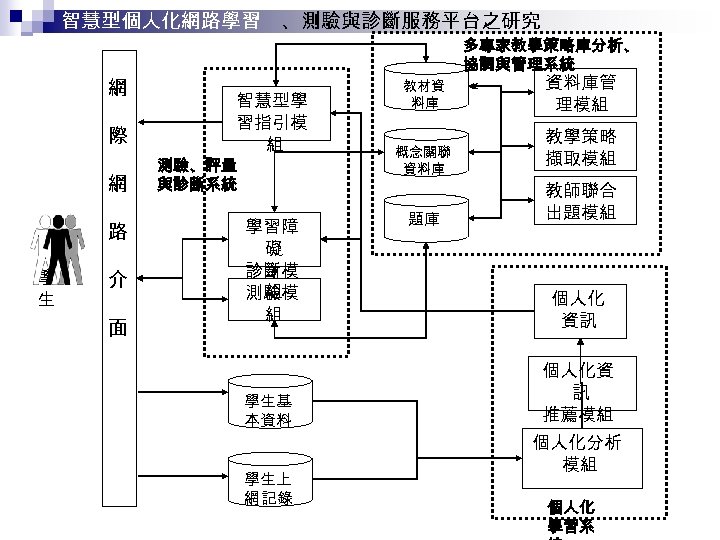
智慧型個人化網路學習 網 際 網 路 學 生 介 面 、測驗與診斷服務平台之研究 多專家教學策略庫分析、 協調與管理系統 智慧型學 習指引模 組 測驗、評量 與診斷系統 學習障 礙 診斷模 組 測驗模 組 學生基 本資料 學生上 網 記錄 教材資 料庫 概念關聯 資料庫 題庫 資料庫管 理模組 教學策略 擷取模組 教師聯合 出題模組 個人化 資訊 個人化資 訊 推薦模組 個人化分析 模組 個人化 學習系
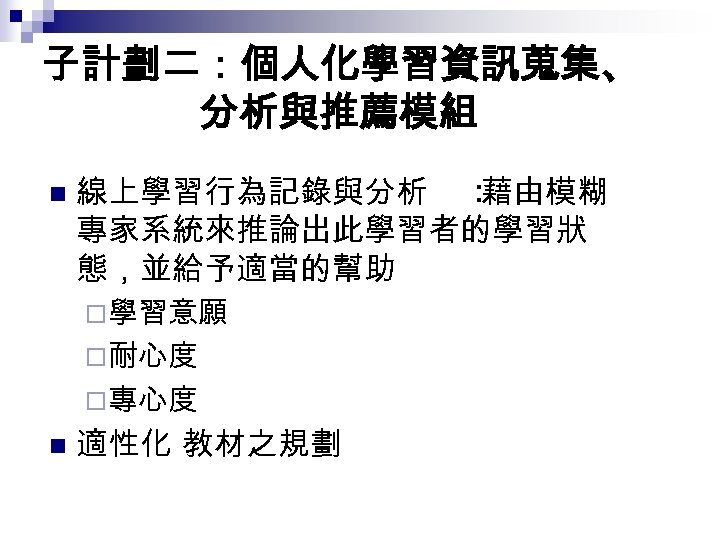
子計劃二:個人化學習資訊蒐集、 分析與推薦模組 n 線上學習行為記錄與分析 : 藉由模糊 專家系統來推論出此學習者的學習狀 態,並給予適當的幫助 ¨學習意願 ¨耐心度 ¨專心度 n 適性化 教材之規劃
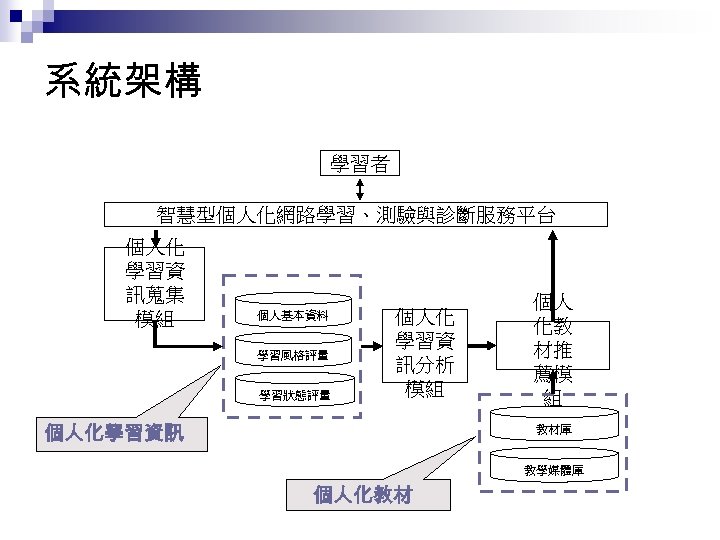
系統架構 學習者 智慧型個人化網路學習、測驗與診斷服務平台 個人化 學習資 訊蒐集 模組 個人基本資料 學習風格評量 學習狀態評量 個人化 學習資 訊分析 模組 個人化學習資訊 個人 化教 材推 薦模 組 教材庫 教學媒體庫 個人化教材
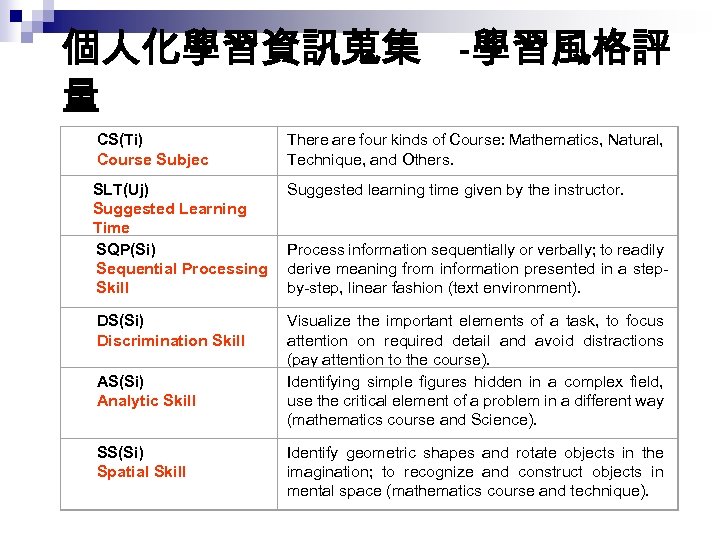
個人化學習資訊蒐集 -學習風格評 量 CS(Ti) Course Subjec There are four kinds of Course: Mathematics, Natural, Technique, and Others. SLT(Uj) Suggested Learning Time SQP(Si) Sequential Processing Skill Suggested learning time given by the instructor. DS(Si) Discrimination Skill Visualize the important elements of a task, to focus attention on required detail and avoid distractions (pay attention to the course). Identifying simple figures hidden in a complex field, use the critical element of a problem in a different way (mathematics course and Science). AS(Si) Analytic Skill SS(Si) Spatial Skill Process information sequentially or verbally; to readily derive meaning from information presented in a stepby-step, linear fashion (text environment). Identify geometric shapes and rotate objects in the imagination; to recognize and construct objects in mental space (mathematics course and technique).
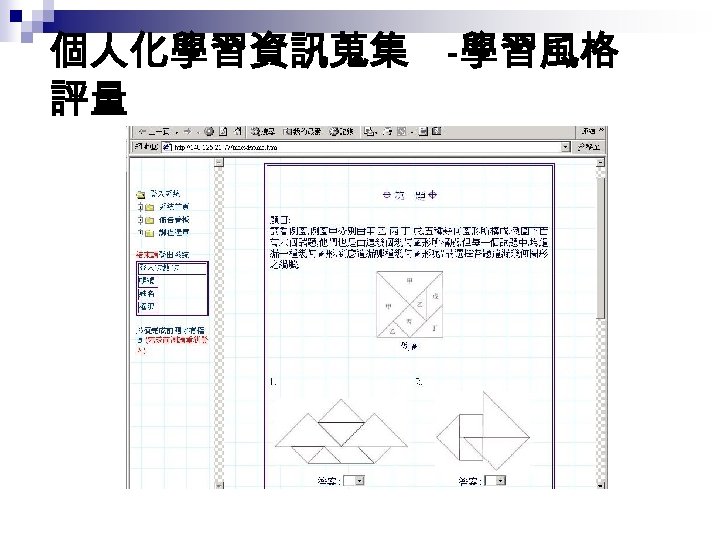
個人化學習資訊蒐集 -學習風格 評量
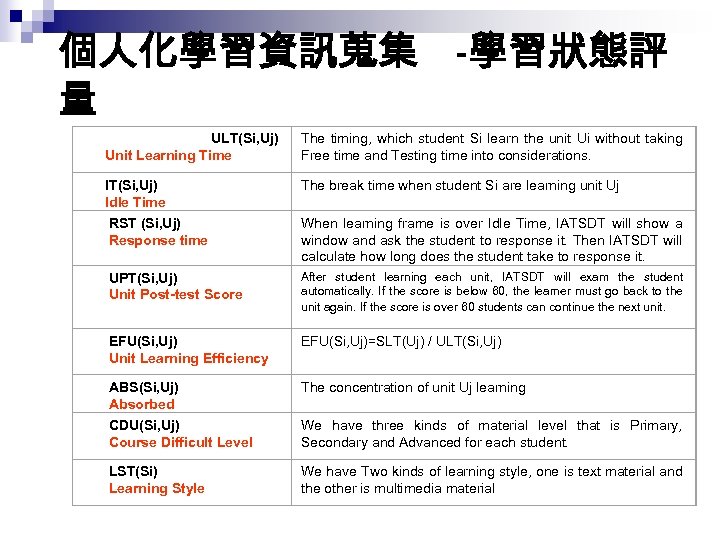
個人化學習資訊蒐集 -學習狀態評 量 ULT(Si, Uj) Unit Learning Time The timing, which student Si learn the unit Ui without taking Free time and Testing time into considerations. IT(Si, Uj) Idle Time The break time when student Si are learning unit Uj RST (Si, Uj) Response time When learning frame is over Idle Time, IATSDT will show a window and ask the student to response it. Then IATSDT will calculate how long does the student take to response it. UPT(Si, Uj) Unit Post-test Score After student learning each unit, IATSDT will exam the student automatically. If the score is below 60, the learner must go back to the unit again. If the score is over 60 students can continue the next unit. EFU(Si, Uj) Unit Learning Efficiency EFU(Si, Uj)=SLT(Uj) / ULT(Si, Uj) ABS(Si, Uj) Absorbed The concentration of unit Uj learning CDU(Si, Uj) Course Difficult Level We have three kinds of material level that is Primary, Secondary and Advanced for each student. LST(Si) Learning Style We have Two kinds of learning style, one is text material and the other is multimedia material
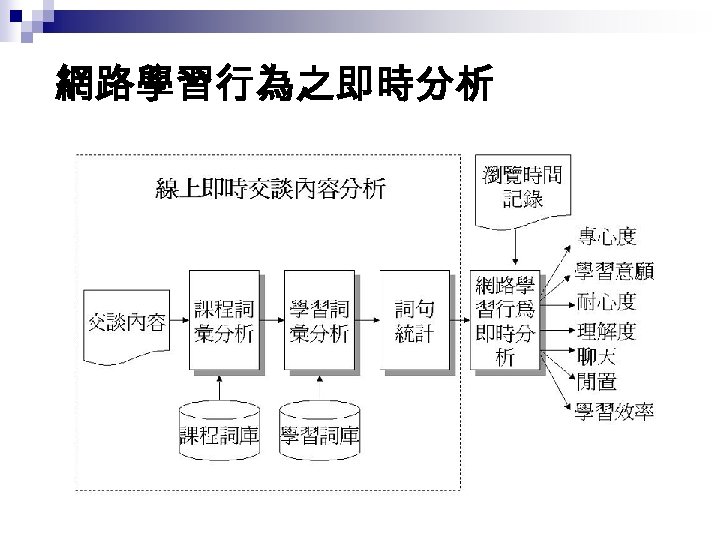
網路學習行為之即時分析
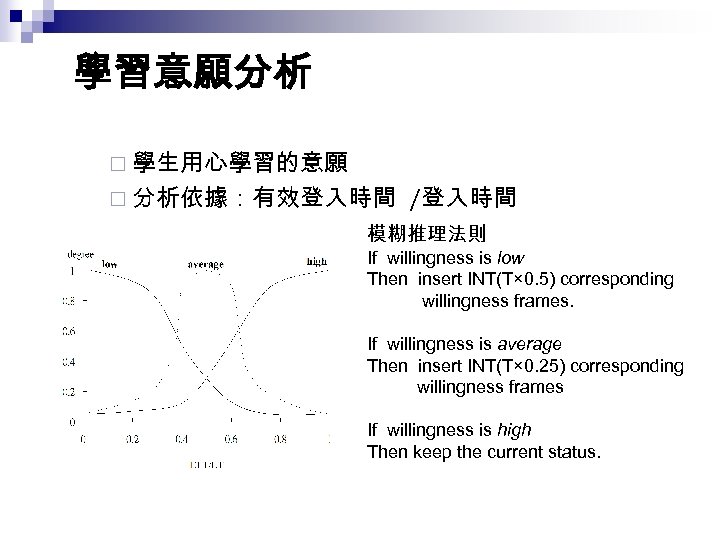
學習意願分析 ¨ 學生用心學習的意願 ¨ 分析依據:有效登入時間 /登入時間 模糊推理法則 If willingness is low Then insert INT(T× 0. 5) corresponding willingness frames. If willingness is average Then insert INT(T× 0. 25) corresponding willingness frames If willingness is high Then keep the current status.
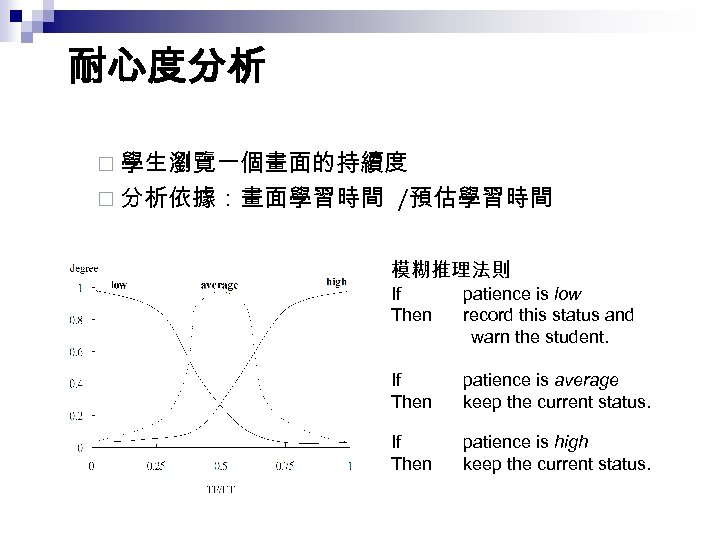
耐心度分析 ¨ 學生瀏覽一個畫面的持續度 ¨ 分析依據:畫面學習時間 /預估學習時間 模糊推理法則 If Then patience is low record this status and warn the student. If Then patience is average keep the current status. If Then patience is high keep the current status.
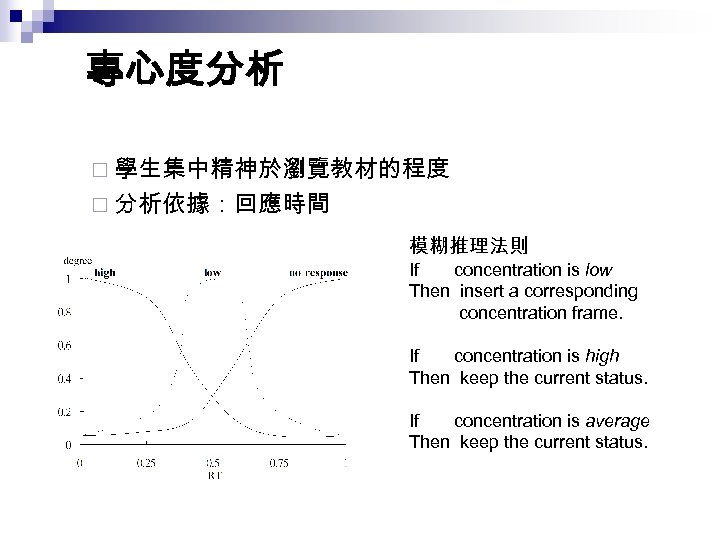
專心度分析 ¨ 學生集中精神於瀏覽教材的程度 ¨ 分析依據:回應時間 模糊推理法則 If concentration is low Then insert a corresponding concentration frame. If concentration is high Then keep the current status. If concentration is average Then keep the current status.
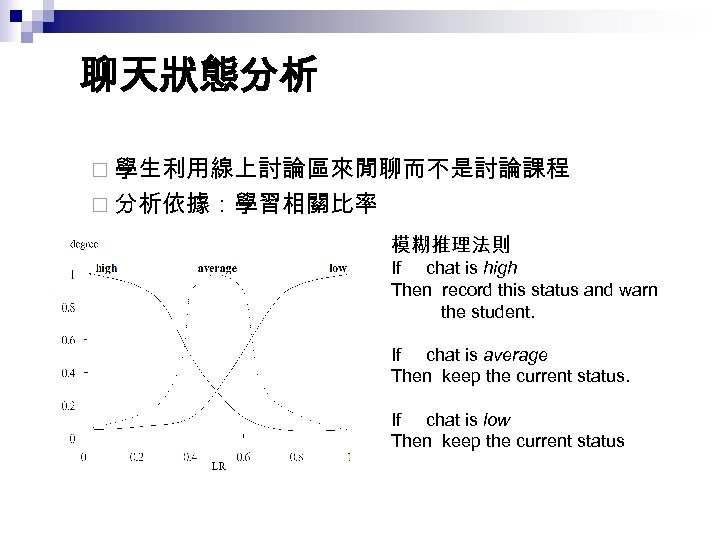
聊天狀態分析 ¨ 學生利用線上討論區來閒聊而不是討論課程 ¨ 分析依據:學習相關比率 模糊推理法則 If chat is high Then record this status and warn the student. If chat is average Then keep the current status. If chat is low Then keep the current status
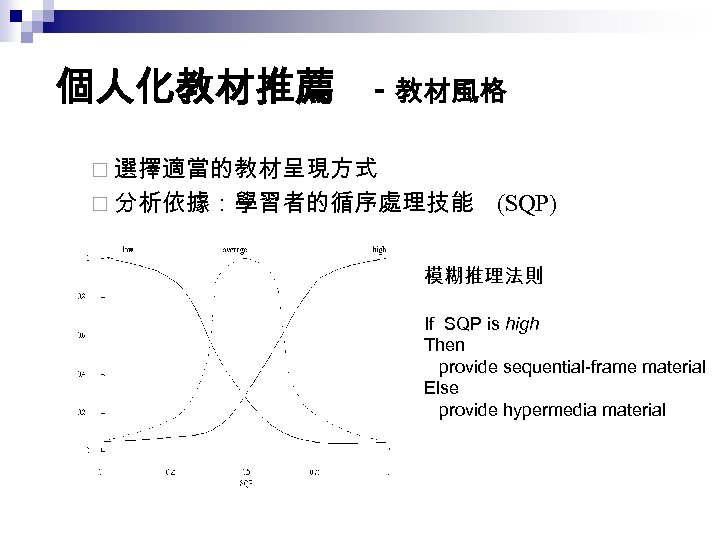
個人化教材推薦 - 教材風格 ¨ 選擇適當的教材呈現方式 ¨ 分析依據:學習者的循序處理技能 (SQP) 模糊推理法則 If SQP is high Then provide sequential-frame material Else provide hypermedia material
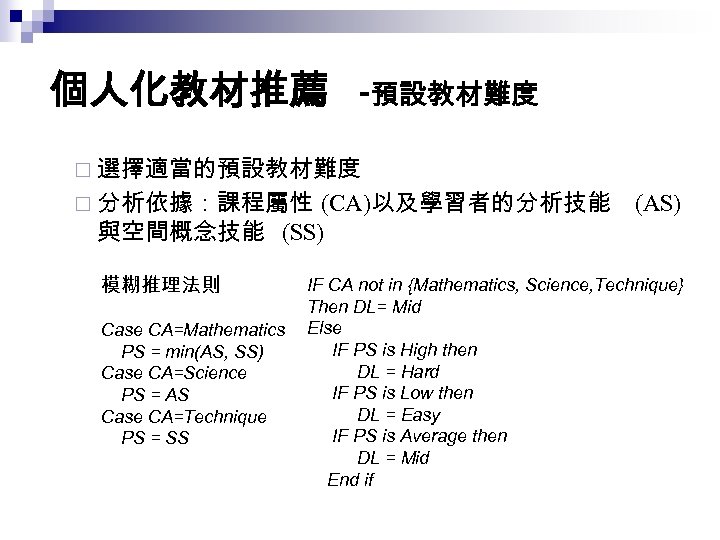
個人化教材推薦 -預設教材難度 ¨ 選擇適當的預設教材難度 ¨ 分析依據:課程屬性 (CA)以及學習者的分析技能 與空間概念技能 (SS) 模糊推理法則 Case CA=Mathematics PS = min(AS, SS) Case CA=Science PS = AS Case CA=Technique PS = SS (AS) IF CA not in {Mathematics, Science, Technique} Then DL= Mid Else IF PS is High then DL = Hard IF PS is Low then DL = Easy IF PS is Average then DL = Mid End if
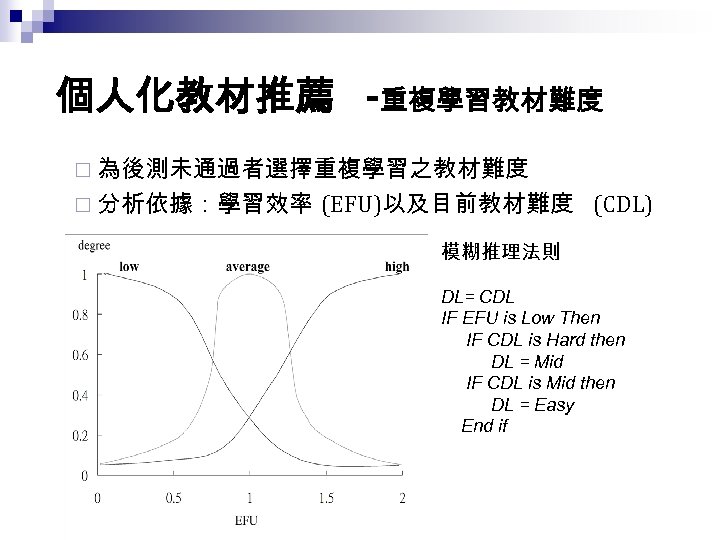
個人化教材推薦 -重複學習教材難度 ¨ 為後測未通過者選擇重複學習之教材難度 ¨ 分析依據:學習效率 (EFU)以及目前教材難度 (CDL) 模糊推理法則 DL= CDL IF EFU is Low Then IF CDL is Hard then DL = Mid IF CDL is Mid then DL = Easy End if
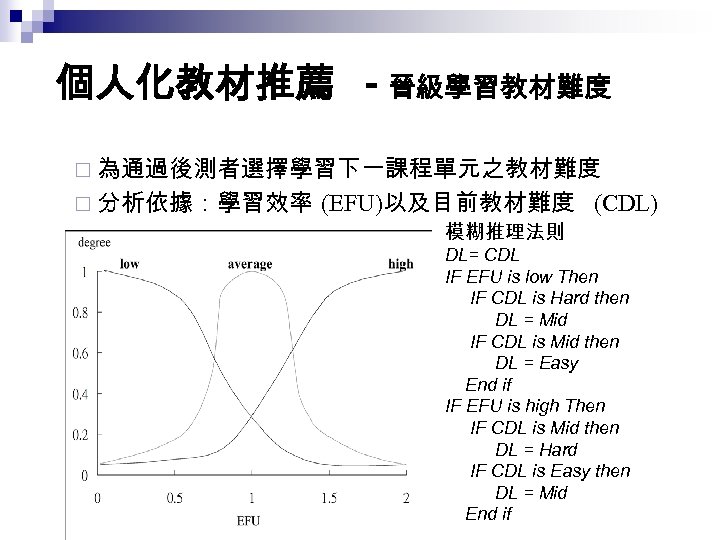
個人化教材推薦 - 晉級學習教材難度 ¨ 為通過後測者選擇學習下一課程單元之教材難度 ¨ 分析依據:學習效率 (EFU)以及目前教材難度 (CDL) 模糊推理法則 DL= CDL IF EFU is low Then IF CDL is Hard then DL = Mid IF CDL is Mid then DL = Easy End if IF EFU is high Then IF CDL is Mid then DL = Hard IF CDL is Easy then DL = Mid End if
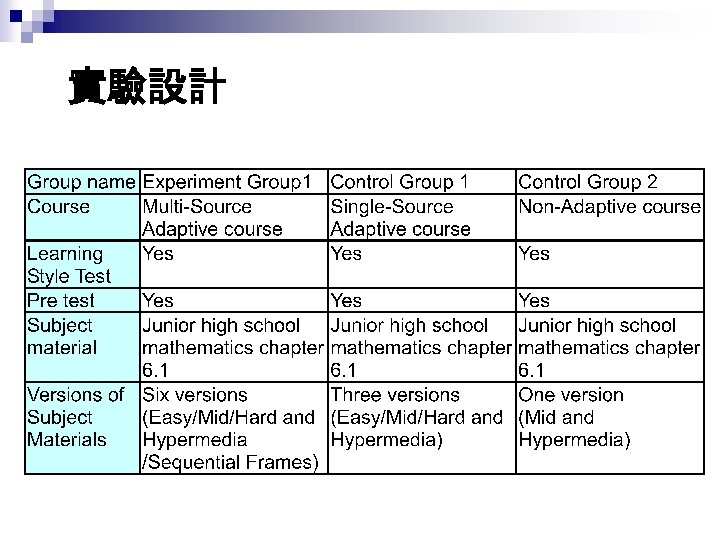
實驗設計
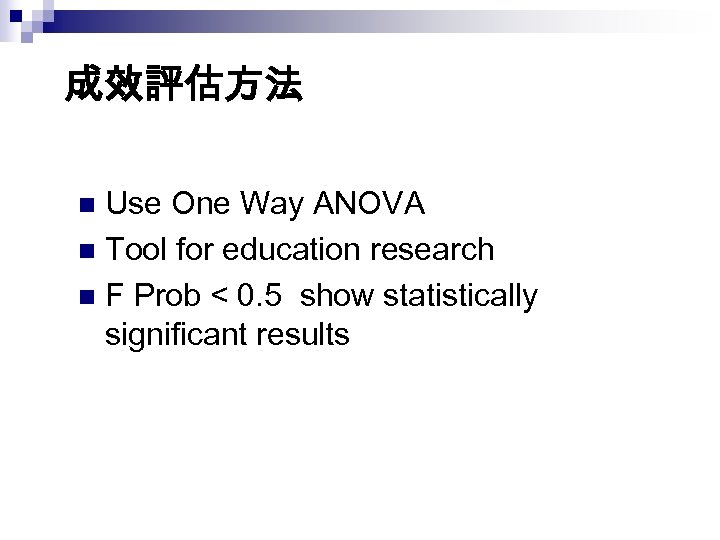
成效評估方法 Use One Way ANOVA n Tool for education research n F Prob < 0. 5 show statistically significant results n
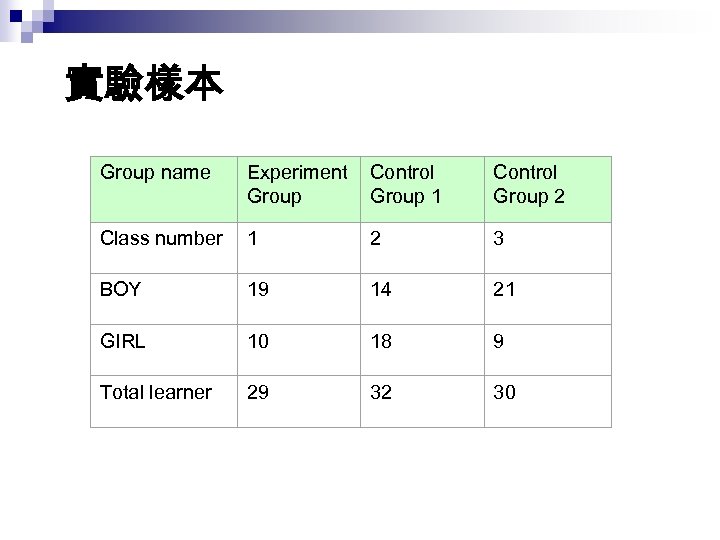
實驗樣本 Group name Experiment Group Control Group 1 Control Group 2 Class number 1 2 3 BOY 19 14 21 GIRL 10 18 9 Total learner 29 32 30
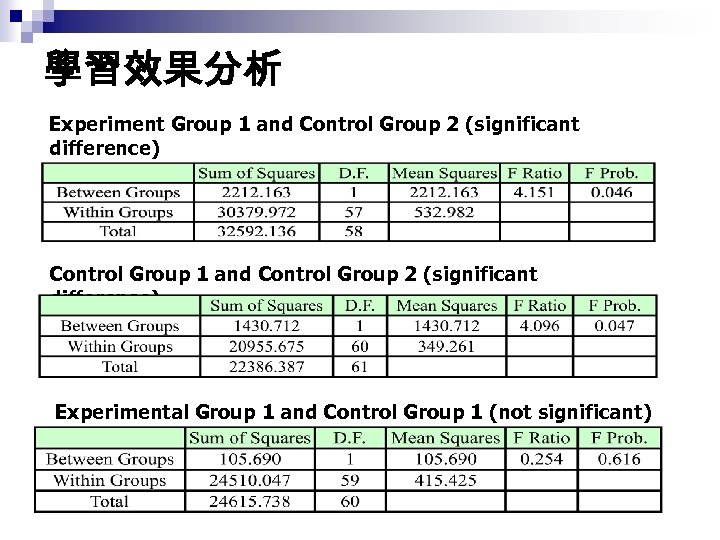
學習效果分析 Experiment Group 1 and Control Group 2 (significant difference) Control Group 1 and Control Group 2 (significant difference) Experimental Group 1 and Control Group 1 (not significant)
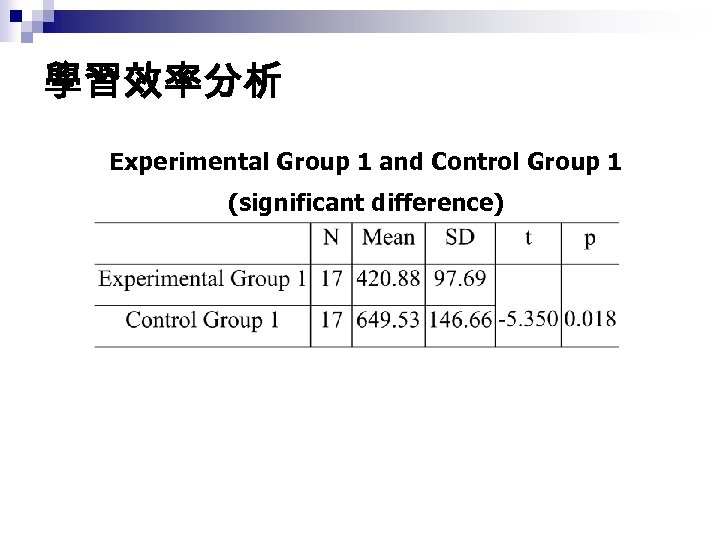
學習效率分析 Experimental Group 1 and Control Group 1 (significant difference)
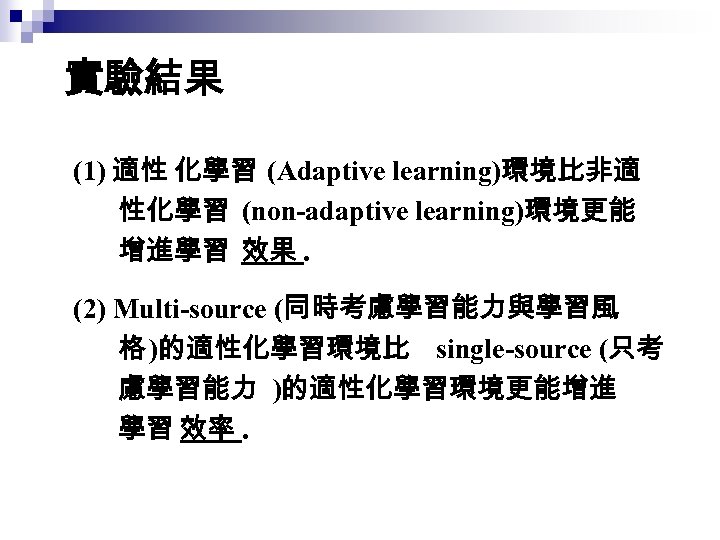
實驗結果 (1) 適性 化學習 (Adaptive learning)環境比非適 性化學習 (non-adaptive learning)環境更能 增進學習 效果. (2) Multi-source (同時考慮學習能力與學習風 格 )的適性化學習環境比 single-source (只考 慮學習能力 )的適性化學習環境更能增進 學習 效率.
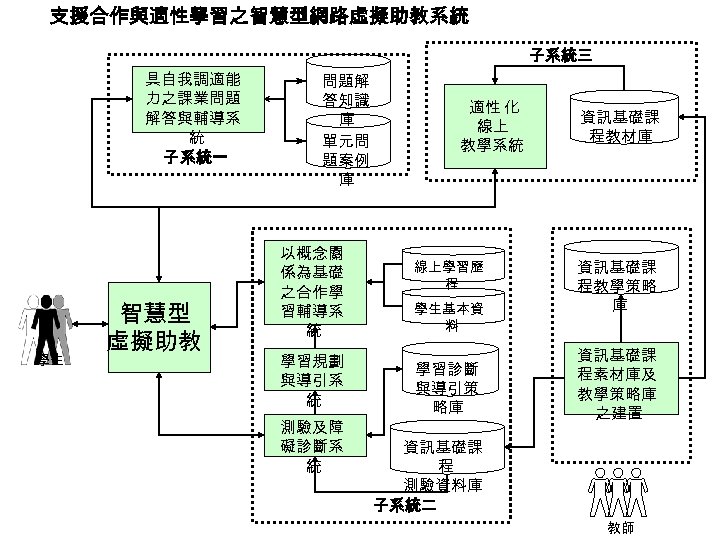
支援合作與適性學習之智慧型網路虛擬助教系統 子系統三 具自我調適能 力之課業問題 解答與輔導系 統 子 系統一 學生 智慧型 虛擬助教 問題解 答知識 庫 單元問 題案例 庫 以概念關 係為基礎 之合作學 習輔導系 統 學習規劃 與導引系 統 測驗及障 礙診斷系 統 適性 化 線上 教學系統 線上學習歷 程 學生基本資 料 學習診斷 與導引策 略庫 資訊基礎課 程教材庫 資訊基礎課 程教學策略 庫 資訊基礎課 程素材庫及 教學策略庫 之建置 資訊基礎課 程 測驗資料庫 子系統二 教師
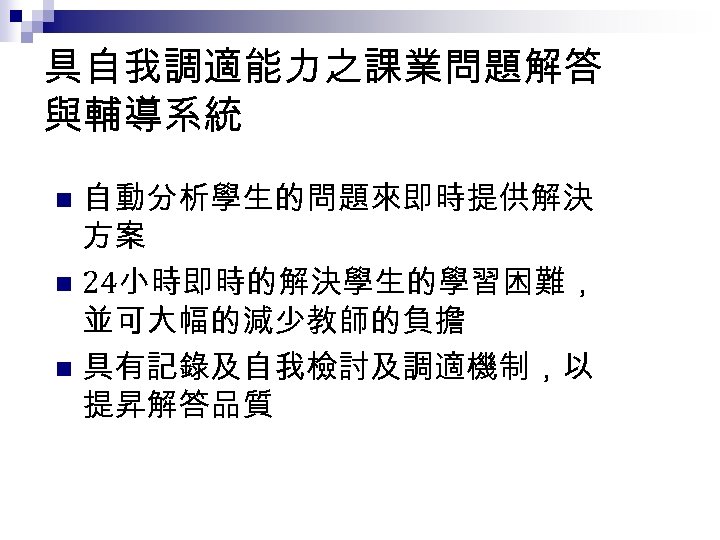
具自我調適能力之課業問題解答 與輔導系統 自動分析學生的問題來即時提供解決 方案 n 24小時即時的解決學生的學習困難, 並可大幅的減少教師的負擔 n 具有記錄及自我檢討及調適機制,以 提昇解答品質 n
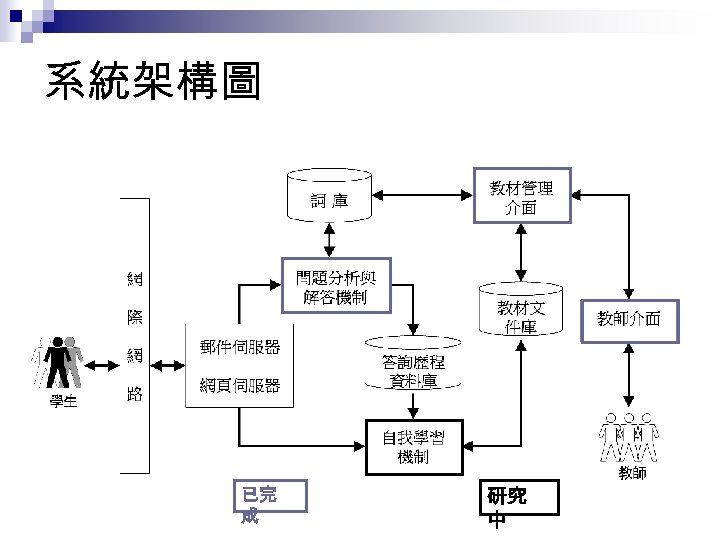
系統架構圖 已完 成 研究 中
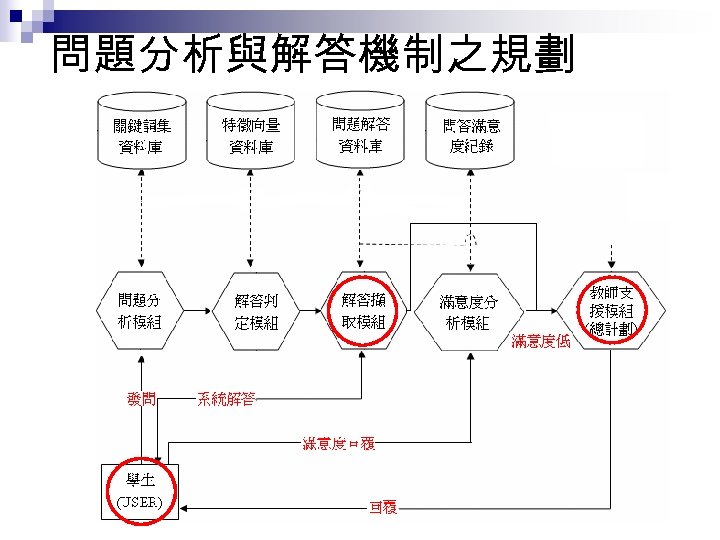
問題分析與解答機制之規劃
主要系統模組 n 問題分析機制 ¨ 可接受學生透過網頁或 e-mail發問,且提 供即時回覆解答或提供指導,會經由斷 詞、擷取關鍵詞、權重初始化、關鍵詞比 對等對問題做出分析 n 解答判定機制 ¨ 使用相似度比對等步驟取出適切的解答 自動回覆給學生
![範例:假設有一字詞為 『 資料 探勘 』 ,共有4個字,所以 W 1~W 4分別為資、料、探、勘, 與詞庫進行比對,發現某一詞 開頭與 [資 ]相同,將W 1擴充為](https://present5.com/presentation/f604ee21699b2ded0437942a972024a7/image-46.jpg "範例:假設有一字詞為 『 資料 探勘 』 ,共有4個字,所以 W 1~W 4分別為資、料、探、勘, 與詞庫進行比對,發現某一詞 開頭與 [資 ]相同,將W 1擴充為")
範例:假設有一字詞為 『 資料 探勘 』 ,共有4個字,所以 W 1~W 4分別為資、料、探、勘, 與詞庫進行比對,發現某一詞 開頭與 [資 ]相同,將W 1擴充為 W 1 W 2;發現某一詞開頭與 [資 料 ]相同,則繼續擴充 W 1 W 2 W 3; n 斷詞演算法 最後即為 [資料探勘 ],字詞比 對結束 ¨ 斷詞 : 假設欲進行斷詞的句子共有 n個字,令此 問題分析機制 句子為 w 1 w 2 w 3…wn ,其中w 1、 2、 wn代表句 w …、 子中的各個字元 n n n Step 1:將 1與詞庫進行比對,若詞庫存在某一詞,使得 w w 1與該詞的第一個字元相同,將 w 1擴充為 w 1 w 2 Step 2:與詞厙進行比對,若詞庫中仍然存在某一詞,該 詞的第一、第二字元與 w 1 w 2相同,則再進行擴充 Step 3:反覆進行此過程,直到 w 1 w 2 …wi無法在詞庫中 找到相同的字串
問題分析機制 n 關鍵詞擷取 ¨ 在系統的資料庫中,事先由教師定義了一組與該 課程相關的關鍵詞 ¨ 透過這些關鍵詞和其所佔有的權值組合來描述不 同的問題類型 ¨ 每個問題類型可能與一個或多個關鍵詞有關,而 這些關鍵詞在全部問題類型中分別佔有不同的出 現比率
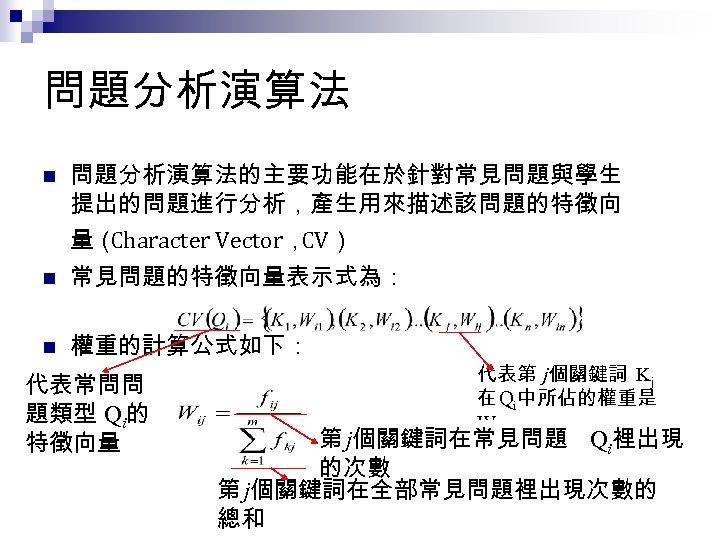
問題分析演算法 n 問題分析演算法的主要功能在於針對常見問題與學生 提出的問題進行分析,產生用來描述該問題的特徵向 量( Character Vector, CV) n 常見問題的特徵向量表示式為: n 權重的計算公式如下: 代表常問問 題類型 Qi的 特徵向量 代表第 j個關鍵詞 Kj 在 Qi中所佔的權重是 Wij 第 j個關鍵詞在常見問題 Qi裡出現 的次數 第 j個關鍵詞在全部常見問題裡出現次數的 總和
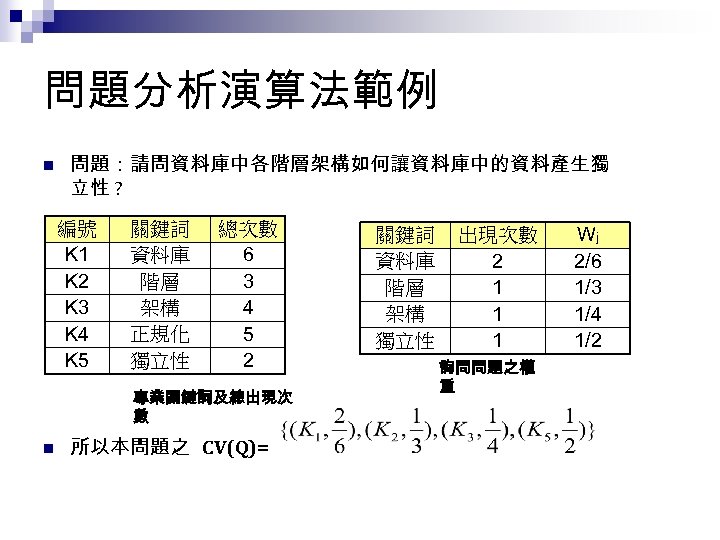
問題分析演算法範例 n 問題:請問資料庫中各階層架構如何讓資料庫中的資料產生獨 立性 ? 編號 K 1 K 2 K 3 K 4 K 5 關鍵詞 資料庫 階層 架構 正規化 獨立性 總次數 6 3 4 5 2 專業關鍵詞及總出現次 數 n 所以本問題之 CV(Q)= 關鍵詞 資料庫 階層 架構 獨立性 出現次數 2 1 1 1 詢問問題之權 重 Wj 2/6 1/3 1/4 1/2
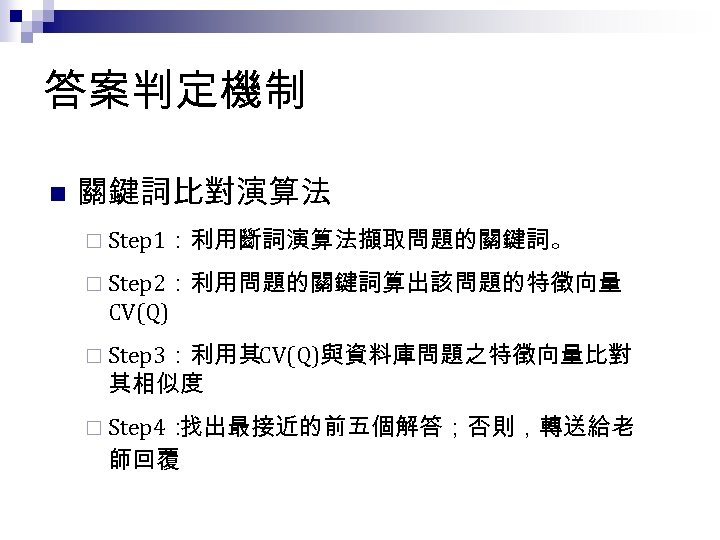
答案判定機制 n 關鍵詞比對演算法 ¨ Step 1:利用斷詞演算法擷取問題的關鍵詞。 ¨ Step 2:利用問題的關鍵詞算出該問題的特徵向量 CV(Q) ¨ Step 3:利用其CV(Q)與資料庫問題之特徵向量比對 其相似度 ¨ Step 4: 找出最接近的前五個解答;否則,轉送給老 師回覆
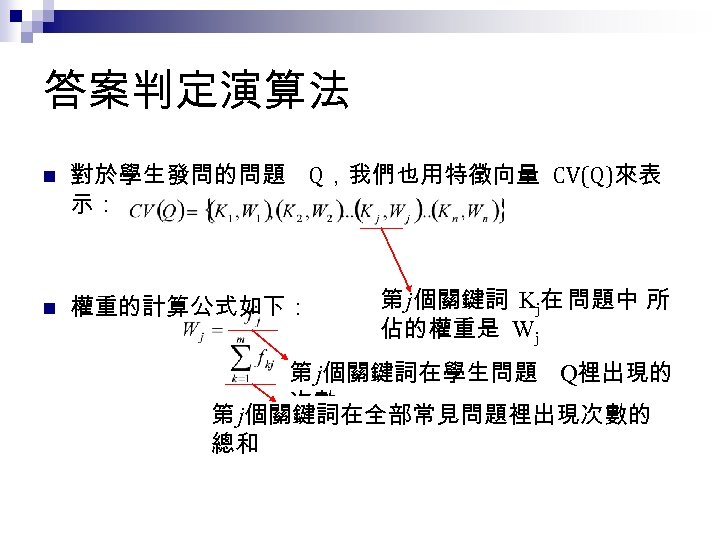
答案判定演算法 n 對於學生發問的問題 Q,我們也用特徵向量 CV(Q)來表 示: n 權重的計算公式如下: 第 j個關鍵詞 Kj在 問題中 所 佔的權重是 Wj 第 j個關鍵詞在學生問題 Q裡出現的 次數 第 j個關鍵詞在全部常見問題裡出現次數的 總和
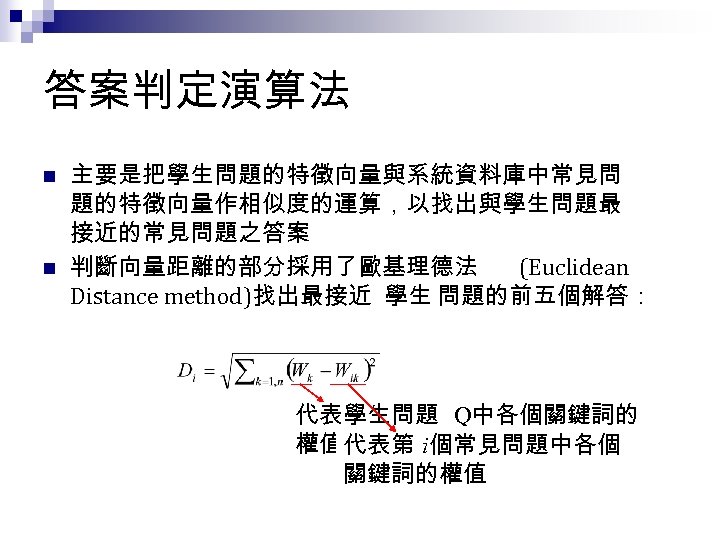
答案判定演算法 n n 主要是把學生問題的特徵向量與系統資料庫中常見問 題的特徵向量作相似度的運算,以找出與學生問題最 接近的常見問題之答案 判斷向量距離的部分採用了歐基理德法 (Euclidean Distance method)找出最接近 學生 問題的前五個解答: 代表學生問題 Q中各個關鍵詞的 權值代表第 i個常見問題中各個 關鍵詞的權值
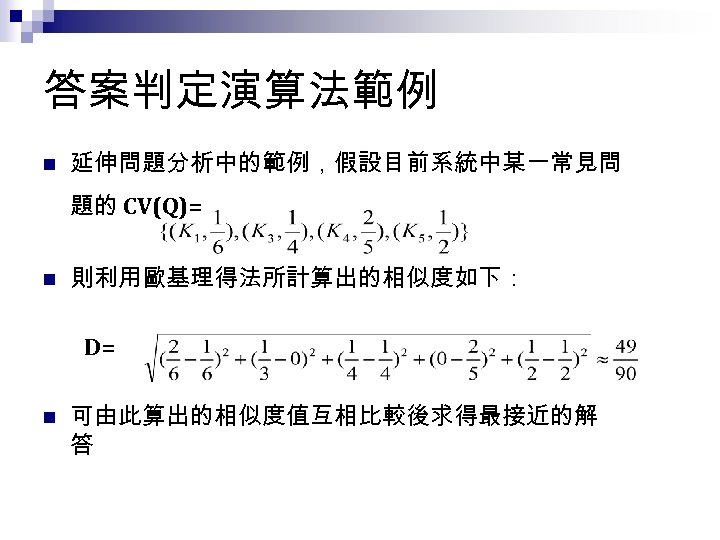
答案判定演算法範例 n 延伸問題分析中的範例,假設目前系統中某一常見問 題的 CV(Q)= n 則利用歐基理得法所計算出的相似度如下: D= n 可由此算出的相似度值互相比較後求得最接近的解 答
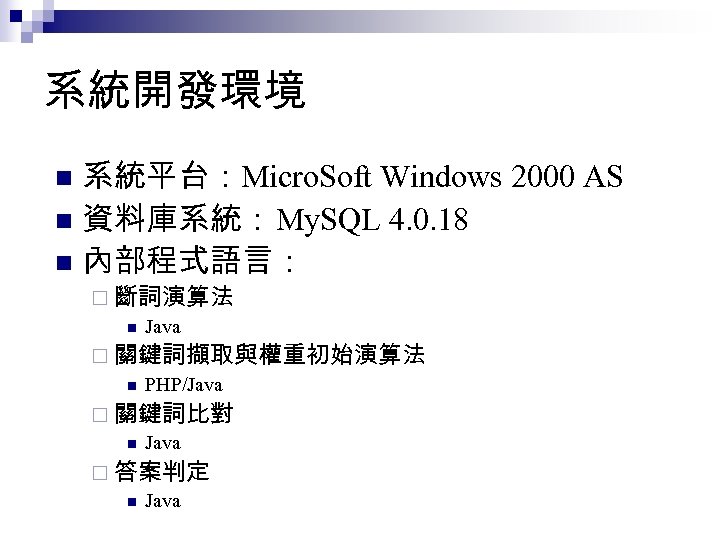
系統開發環境 系統平台:Micro. Soft Windows 2000 AS n 資料庫系統:My. SQL 4. 0. 18 n 內部程式語言: n ¨ 斷詞演算法 n Java ¨ 關鍵詞擷取與權重初始演算法 n PHP/Java ¨ 關鍵詞比對 n Java ¨ 答案判定 n Java
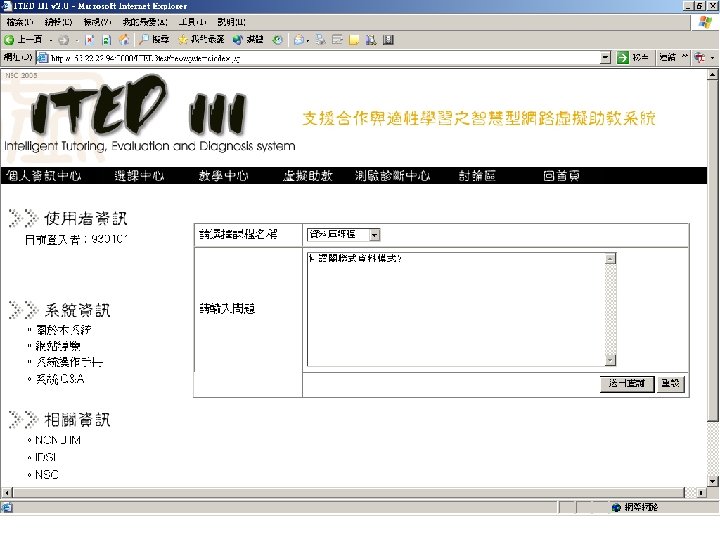
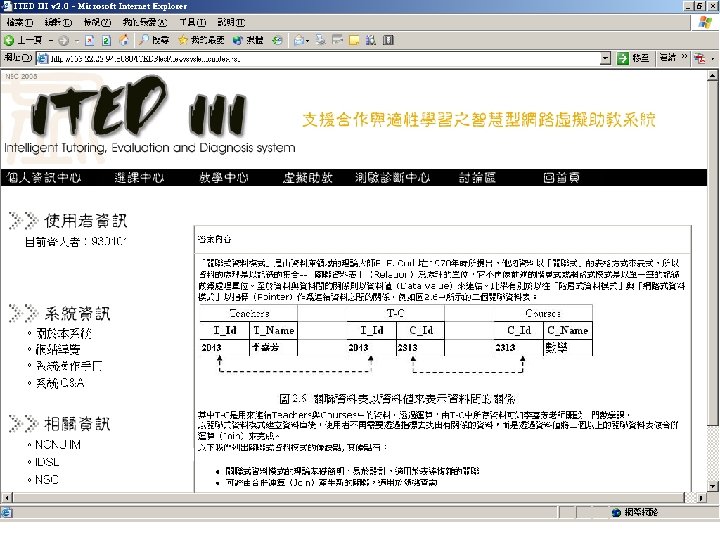
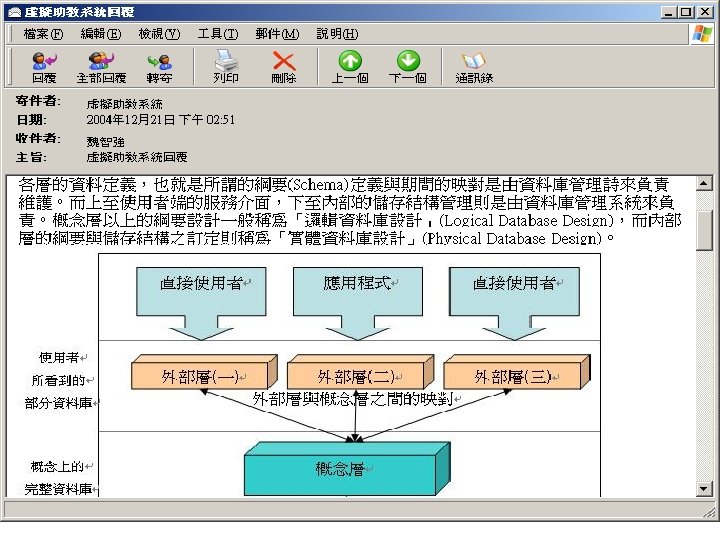
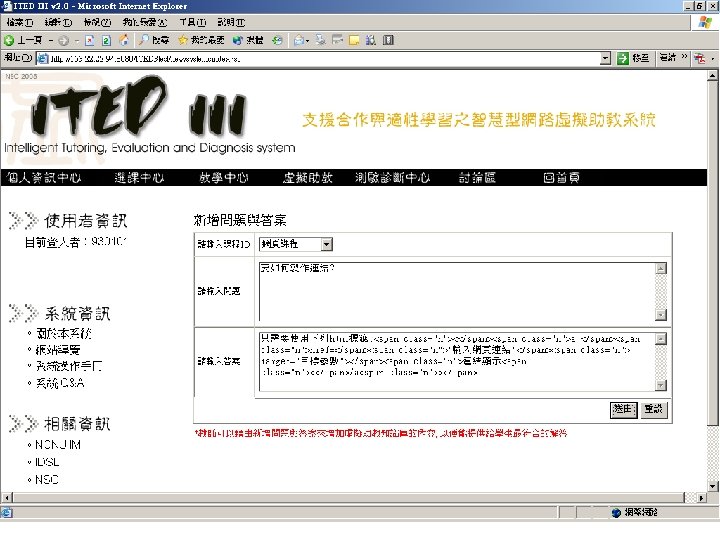
結論 n n 本系統使用特徵向量與歐基理得法來對問題作分 析,並判斷出適當的解答,不但可正確的解答學生 的疑問,也可以進一步累積知識來提升回答的準 確率 本系統可由網頁以及電子郵件自動回覆學生問題, 提供全天候即時的解答服務,有效減輕教師的負 擔
未來研究方向 n n n 目前關鍵詞的擷取方式乃是由教師設定,除了正 確性與適當性不容易控制之外,也需要耗費相當 的人力與時間;如何自動化擷取關鍵詞值得繼續探 討。 目前採用關鍵詞出現比率作為問題特徵,考慮因 素稍嫌單純。未來將嚐試以 tfidf之改良方法擷取問 題特徵,期藉由特徵表達的豐富性改進解答的品質。 目前滿意度分析僅供紀錄,尚未依據學生對解答 的滿意度自動進行問題特徵向量之調整。未來將 引進類神經網路以及基因演算法進行自我調適, 使解答的準確度得以進一步提升。
Introduction to Ubiquitous Computing
From Designer View n Physical integration ¨a ubiquitous computing system involves some integration between computing nodes and the physical world. n Spontaneous interoperation ¨ if a component interacts with a set of communicating components that can change both identity and functionality over time as its circumstances change, it interoperates spontaneously. ¨ it changes partners without needing new software or parameters
From User View n n n Computing with Natural Interfaces Context Aware Computing Automated Capture and Access to Live Experience Everyday Computing Social Implication and Evaluation
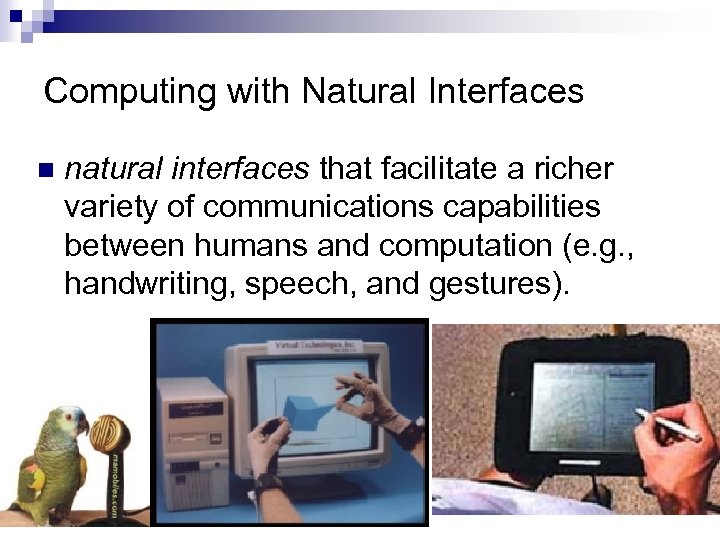
Computing with Natural Interfaces n natural interfaces that facilitate a richer variety of communications capabilities between humans and computation (e. g. , handwriting, speech, and gestures).
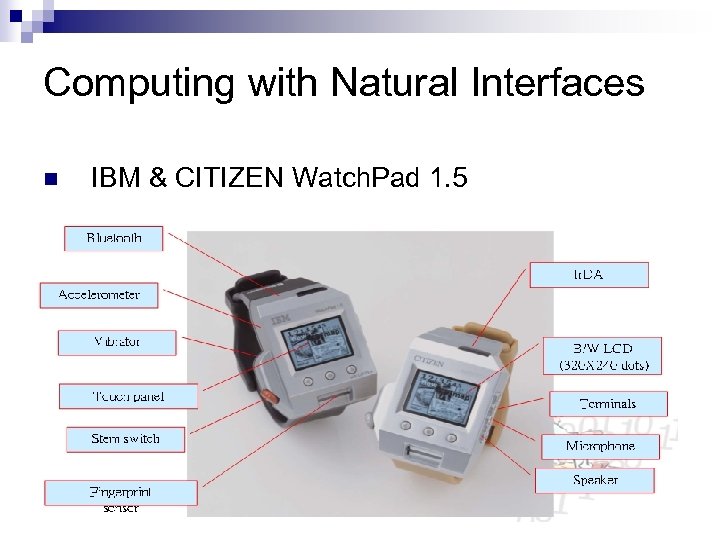
Computing with Natural Interfaces n IBM & CITIZEN Watch. Pad 1. 5
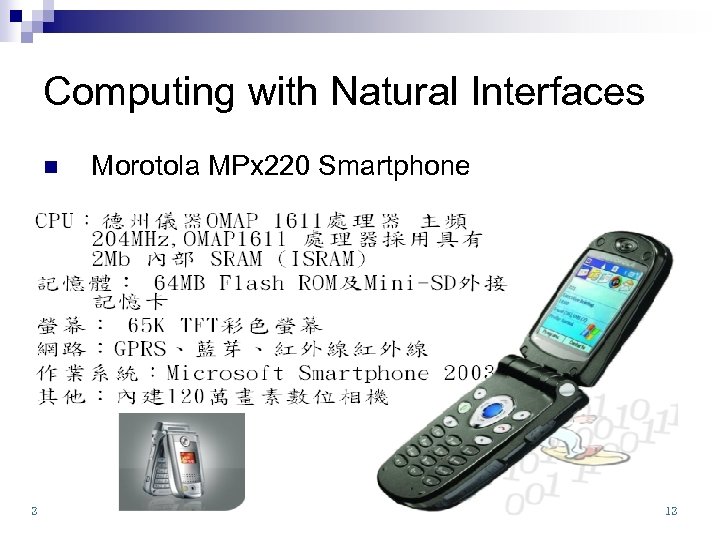
Computing with Natural Interfaces n Morotola MPx 220 Smartphone
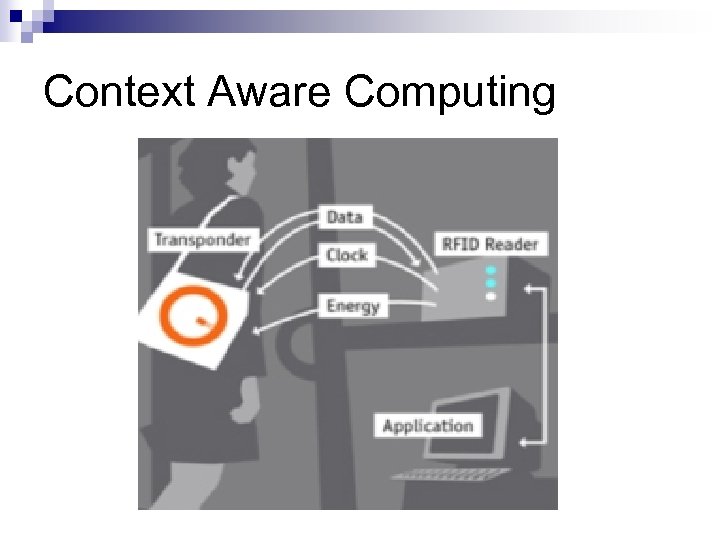
Context Aware Computing
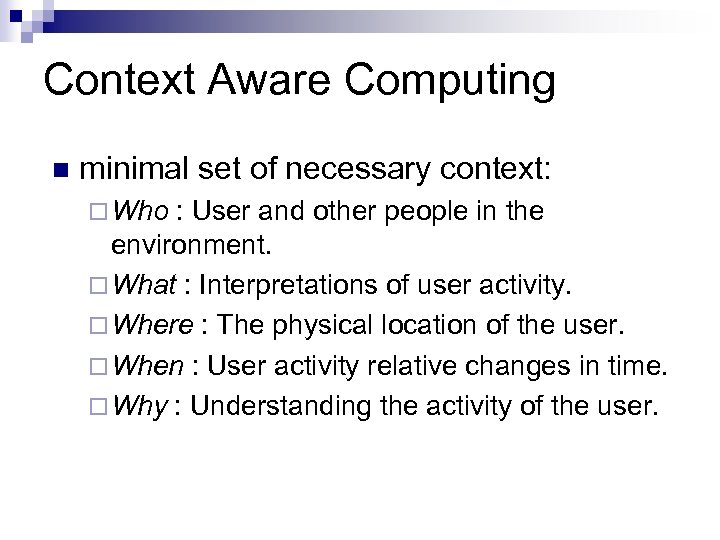
Context Aware Computing n minimal set of necessary context: ¨ Who : User and other people in the environment. ¨ What : Interpretations of user activity. ¨ Where : The physical location of the user. ¨ When : User activity relative changes in time. ¨ Why : Understanding the activity of the user.
Automated Capture and Access to Live Experience n n Much of our life in business and academia is spent listening to and recording, and then trying to remember the important pieces of information Tools to support automated capture of and access to live experiences can remove the burden of doing something humans are not good at (i. e. , recording) so that they can focus attention on activities they are good at (i. e. , indicating relationships, summarizing, and interpreting).
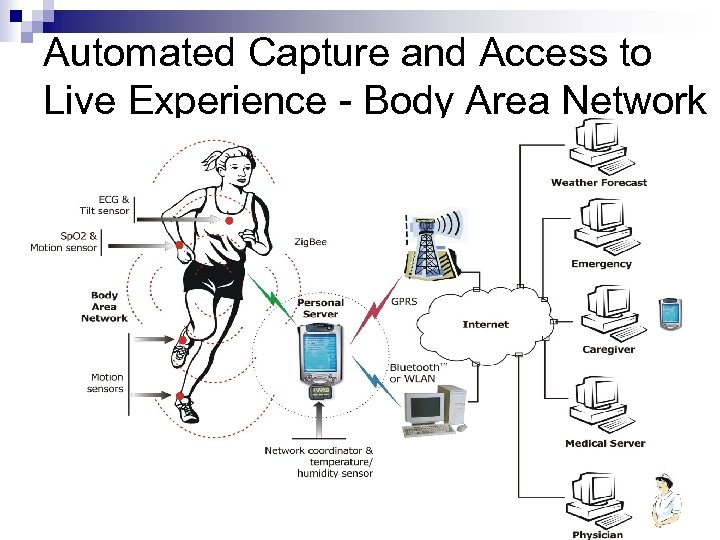
Automated Capture and Access to Live Experience - Body Area Network
Everyday Computing n n Support the informal and unstructured activities typical of much of our everyday lives. Providing continuous interaction moves computing from a localized tool to a constant presence. ¨ Required researches ¨ Design a continuously present computer ¨ Presenting information at different levels interface of the periphery of human attention ¨ Connecting events in the physical and virtual worlds ¨ Modifying traditional HCI methods to support designing for informal, peripheral, and opportunistic behavior
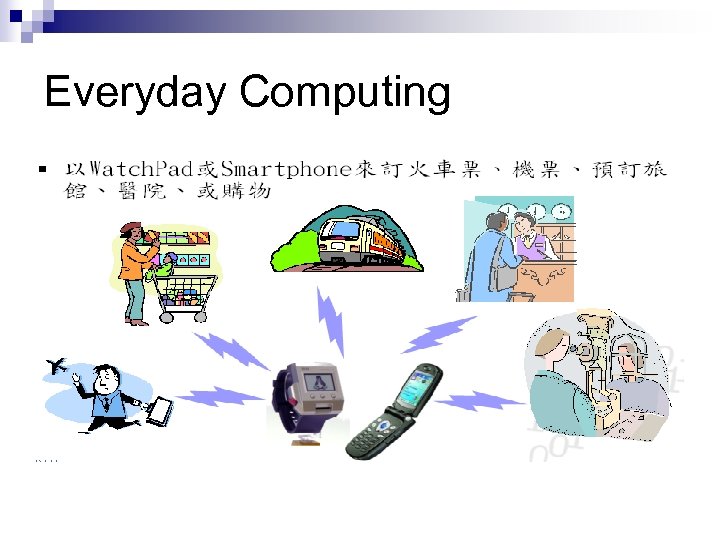
Everyday Computing
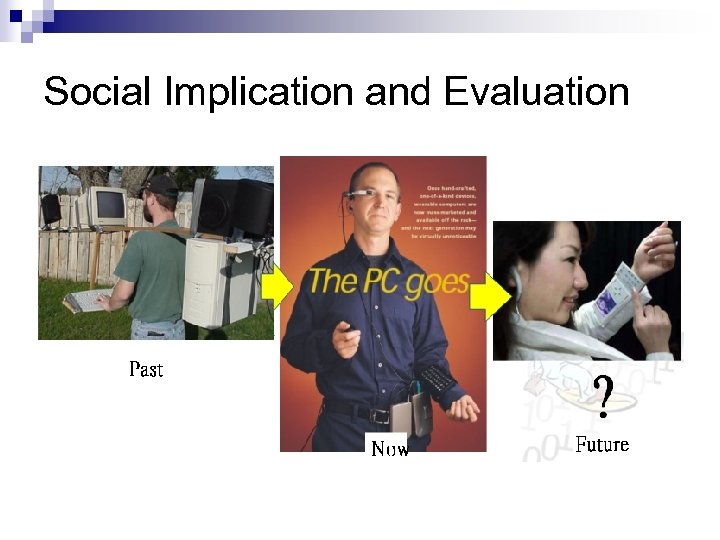
Social Implication and Evaluation
Introduction to Ubiquitous Learning
Ubiquitous Learning Ubiquitous Computing + Adaptive Learning n able to sense the situation of the learners n able to provide more adaptive supports n
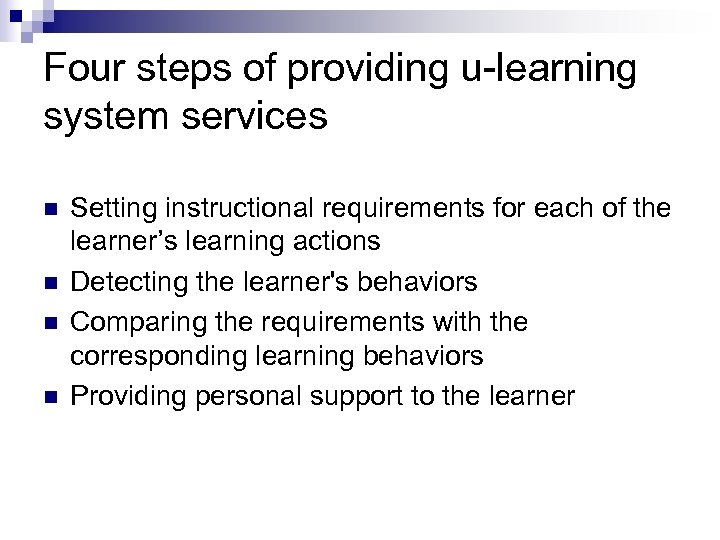
Four steps of providing u-learning system services n n Setting instructional requirements for each of the learner’s learning actions Detecting the learner's behaviors Comparing the requirements with the corresponding learning behaviors Providing personal support to the learner
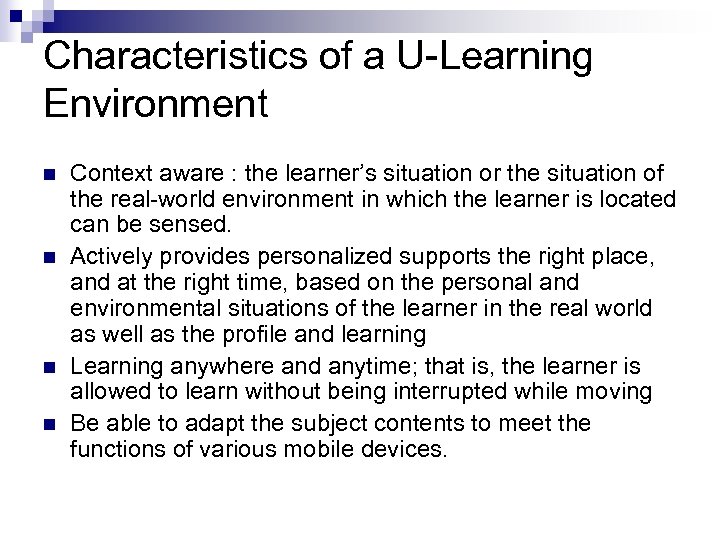
Characteristics of a U-Learning Environment n n Context aware : the learner’s situation or the situation of the real-world environment in which the learner is located can be sensed. Actively provides personalized supports the right place, and at the right time, based on the personal and environmental situations of the learner in the real world as well as the profile and learning Learning anywhere and anytime; that is, the learner is allowed to learn without being interrupted while moving Be able to adapt the subject contents to meet the functions of various mobile devices.
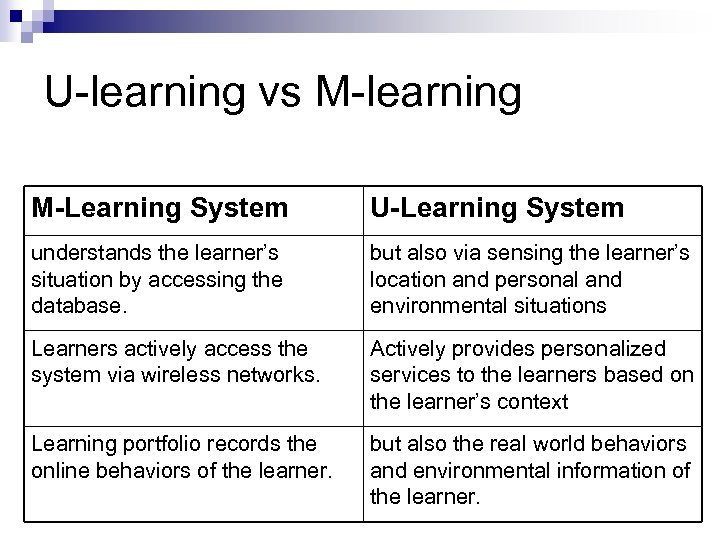
U-learning vs M-learning M-Learning System U-Learning System understands the learner’s situation by accessing the database. but also via sensing the learner’s location and personal and environmental situations Learners actively access the system via wireless networks. Actively provides personalized services to the learners based on the learner’s context Learning portfolio records the online behaviors of the learner. but also the real world behaviors and environmental information of the learner.
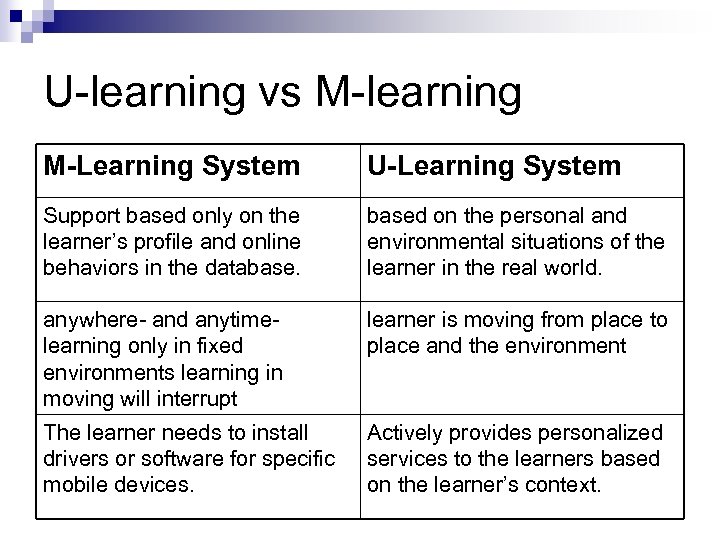
U-learning vs M-learning M-Learning System U-Learning System Support based only on the learner’s profile and online behaviors in the database. based on the personal and environmental situations of the learner in the real world. anywhere- and anytimelearning only in fixed environments learning in moving will interrupt learner is moving from place to place and the environment The learner needs to install drivers or software for specific mobile devices. Actively provides personalized services to the learners based on the learner’s context.
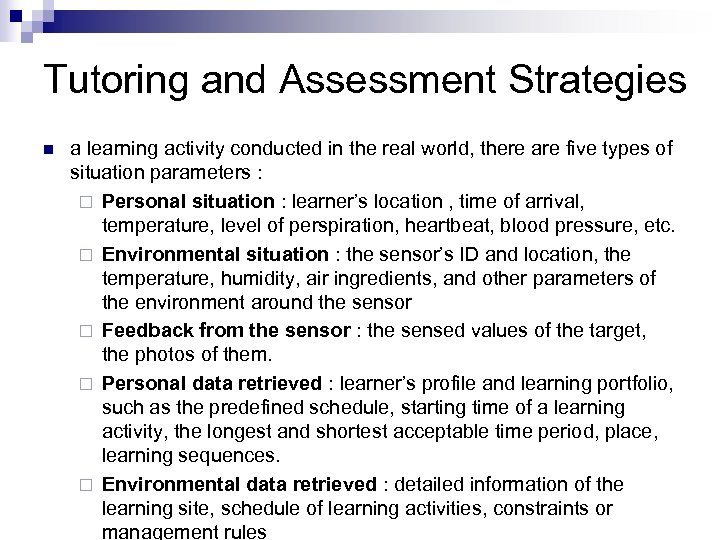
Tutoring and Assessment Strategies n a learning activity conducted in the real world, there are five types of situation parameters : ¨ Personal situation : learner’s location , time of arrival, temperature, level of perspiration, heartbeat, blood pressure, etc. ¨ Environmental situation : the sensor’s ID and location, the temperature, humidity, air ingredients, and other parameters of the environment around the sensor ¨ Feedback from the sensor : the sensed values of the target, the photos of them. ¨ Personal data retrieved : learner’s profile and learning portfolio, such as the predefined schedule, starting time of a learning activity, the longest and shortest acceptable time period, place, learning sequences. ¨ Environmental data retrieved : detailed information of the learning site, schedule of learning activities, constraints or management rules
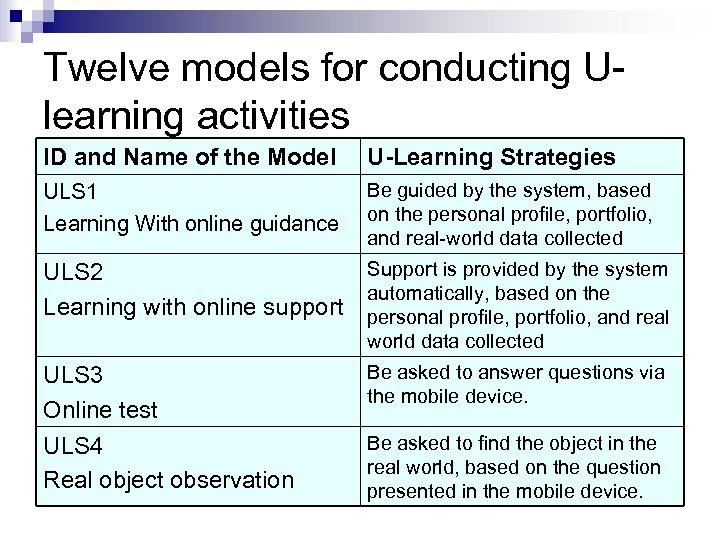
Twelve models for conducting Ulearning activities ID and Name of the Model U-Learning Strategies ULS 1 Learning With online guidance Be guided by the system, based on the personal profile, portfolio, and real-world data collected Support is provided by the system ULS 2 automatically, based on the Learning with online support personal profile, portfolio, and real world data collected ULS 3 Online test ULS 4 Real object observation Be asked to answer questions via the mobile device. Be asked to find the object in the real world, based on the question presented in the mobile device.
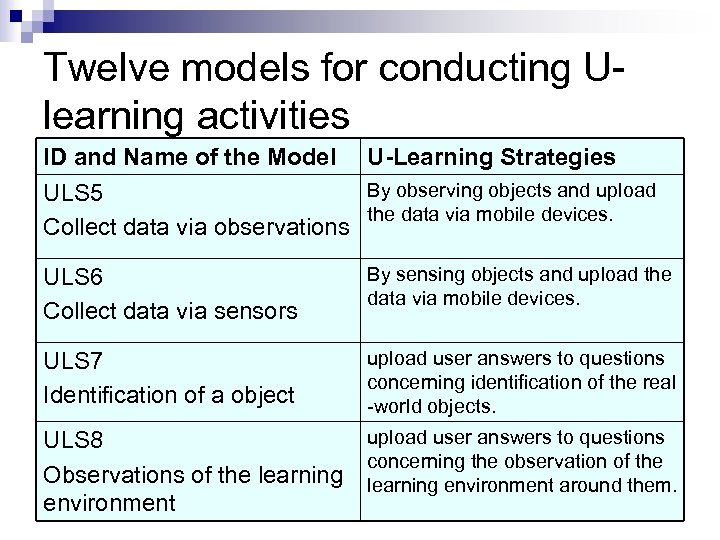
Twelve models for conducting Ulearning activities ID and Name of the Model U-Learning Strategies By observing objects and upload ULS 5 the data via mobile devices. Collect data via observations ULS 6 Collect data via sensors By sensing objects and upload the data via mobile devices. ULS 7 Identification of a object upload user answers to questions concerning identification of the real -world objects. ULS 8 Observations of the learning environment upload user answers to questions concerning the observation of the learning environment around them.
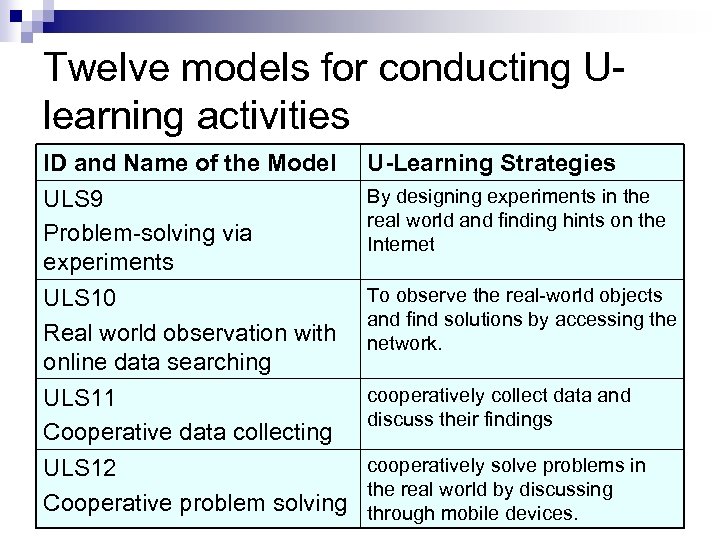
Twelve models for conducting Ulearning activities ID and Name of the Model ULS 9 Problem-solving via experiments U-Learning Strategies ULS 10 Real world observation with online data searching ULS 11 Cooperative data collecting ULS 12 Cooperative problem solving To observe the real-world objects and find solutions by accessing the network. By designing experiments in the real world and finding hints on the Internet cooperatively collect data and discuss their findings cooperatively solve problems in the real world by discussing through mobile devices.
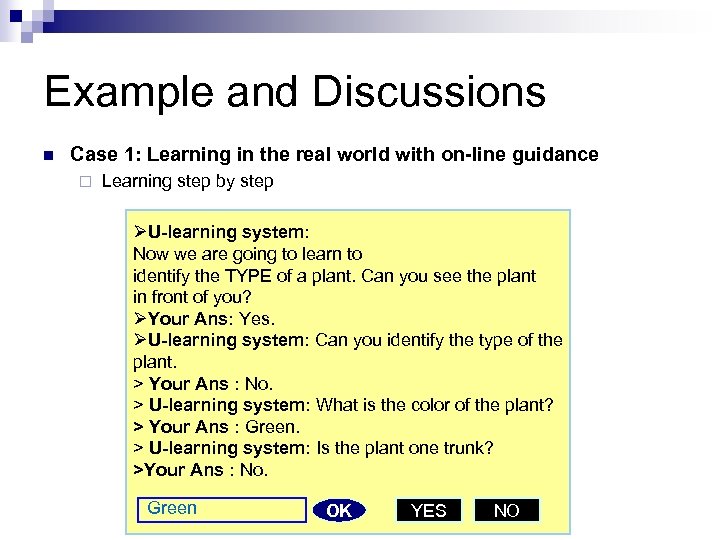
Example and Discussions n Case 1: Learning in the real world with on-line guidance ¨ Learning step by step ØU-learning system: Now we are going to learn to identify the TYPE of a plant. Can you see the plant in front of you? ØYour Ans: Yes. ØU-learning system: Can you identify the type of the plant. > Your Ans : No. > U-learning system: What is the color of the plant? > Your Ans : Green. > U-learning system: Is the plant one trunk? >Your Ans : No. Green OK YES NO
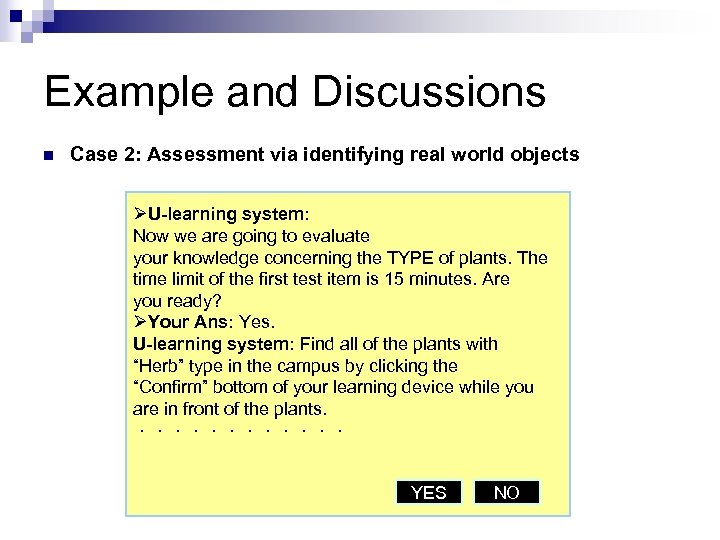
Example and Discussions n Case 2: Assessment via identifying real world objects ØU-learning system: Now we are going to evaluate your knowledge concerning the TYPE of plants. The time limit of the first test item is 15 minutes. Are you ready? ØYour Ans: Yes. U-learning system: Find all of the plants with “Herb” type in the campus by clicking the “Confirm” bottom of your learning device while you are in front of the plants. ...... YES NO
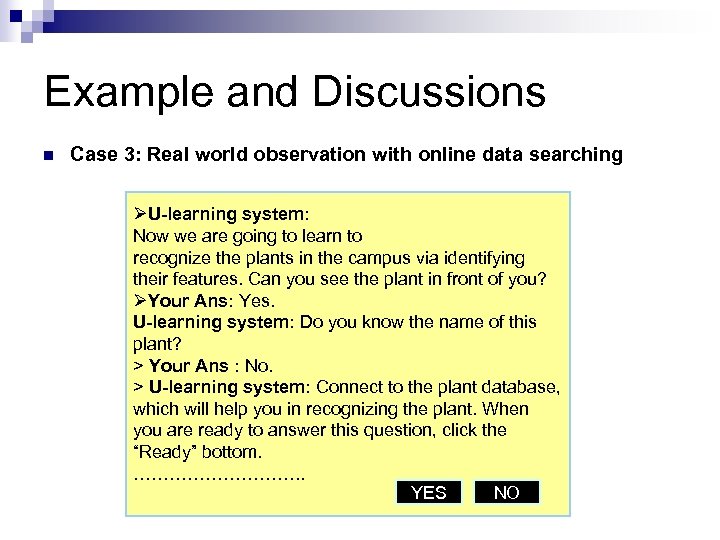
Example and Discussions n Case 3: Real world observation with online data searching ØU-learning system: Now we are going to learn to recognize the plants in the campus via identifying their features. Can you see the plant in front of you? ØYour Ans: Yes. U-learning system: Do you know the name of this plant? > Your Ans : No. > U-learning system: Connect to the plant database, which will help you in recognizing the plant. When you are ready to answer this question, click the “Ready” bottom. ……………. . YES NO
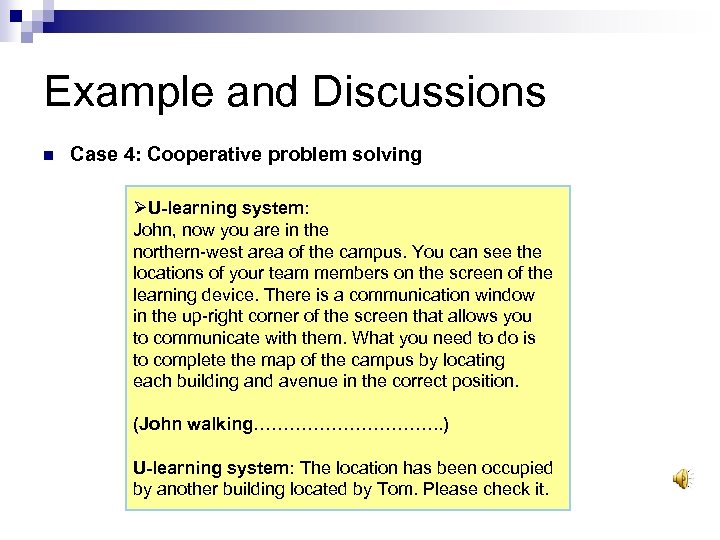
Example and Discussions n Case 4: Cooperative problem solving ØU-learning system: John, now you are in the northern-west area of the campus. You can see the locations of your team members on the screen of the learning device. There is a communication window in the up-right corner of the screen that allows you to communicate with them. What you need to do is to complete the map of the campus by locating each building and avenue in the correct position. (John walking……………. . ) U-learning system: The location has been occupied by another building located by Tom. Please check it.
Example and Discussions n n The location of the student and the environmental parameters of that location can be sensed. It can be seen that the system is able to provide personalized guidance for each student. The student is trained to identify different types of plants in the real world with the guide of the ulearning system. When moving , the u-learning system can provide continuous guidance without being interrupted.
Conclusions n n The criteria of establishing a fully functional ulearning environment is still unclear. More adaptive support can be provided by the system accordingly. The real-world observation and problem-solving abilities of the learner can be trained and evaluated in such a context-aware environment. Trying to establish a u-learning environment in an elementary school;
Final Conclusion
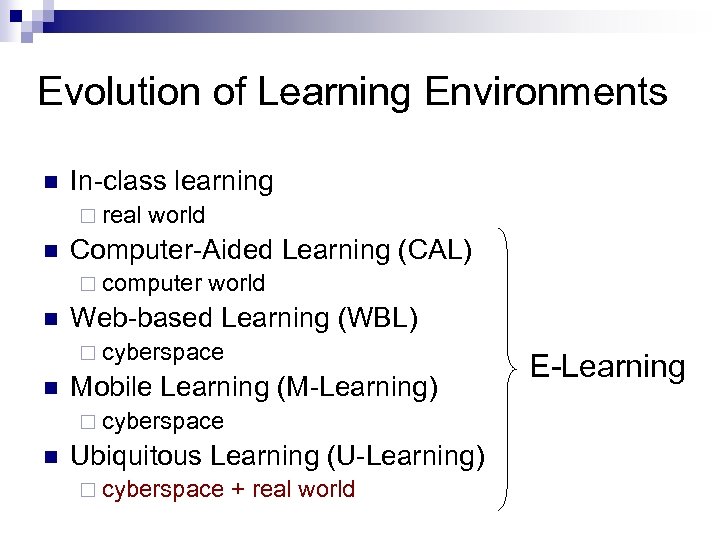
Evolution of Learning Environments n In-class learning ¨ real n world Computer-Aided Learning (CAL) ¨ computer n world Web-based Learning (WBL) ¨ cyberspace n Mobile Learning (M-Learning) ¨ cyberspace n Ubiquitous Learning (U-Learning) ¨ cyberspace + real world E-Learning
References n n n n Brusilovsky, P. (1996). Methods and techniques of adaptive hypermedia. User Modeling and User-Adapted Interaction, 6 (2 -3), 87 -129 Brusilovsky, P. , Eklund, J. , & Schwarz, E. (1998). Web-based education for all: A tool for developing adaptive courseware. Computer Networks and ISDN Systems, 30 (1 -7), 291 -300 Brusilovsky, P. : Adaptive educational systems on the World Wide Web. In: Ayala, G. (ed. ) Proc. of Workshop "Current Trends and Applications of Artificial Intelligence in Education" at the 4 th World Congress on Expert Systems, Mexico City, Mexico, ITESM (1998) 9 -16 Brusilovsky, P (1999). Adaptive and Intelligent Technologies for Web-based Education. Künstliche Intelligenz, Special Issue on Intelligent Systems and Teleteaching, 1999, 4, 19 -25. H. L. Burns, & C. G. Capps, Foundations of intelligent tutoring systems: an introduction, M. C. Poison, J. J. Richardson (Ed. ) Foundations of intelligent tutoring systems. (Lawrence Eribaum, London, 1988), 1 -19. Weber, G. : Individual selection of examples in an intelligent learning environment. Journal of Artificial Intelligence in Education 7, 1 (1996) 3 -31 Weber, G. and Specht, M. : User modeling and adaptive navigation support in WWW-based tutoring systems. In: Jameson, A. , Paris, C. and Tasso, C. (eds. ) User Modeling. Springer-Verlag, Wien (1997) 289 -300
n n n n T. Kindberg and A. Fox, “System Software for Ubiquitous Computing”, PERVASIVE computing, JANUARY–MARCH 2002, pp. 70 -81. M. Beigl, H. -W. Gellersen, and A. Schmidt, “Media. Cups: Experience with Design and Use of Computer-Augmented Everyday Objects, ” Computer Networks, vol. 35, no. 4, Mar. 2001, pp. 401– 409. G. D. Abowd, “Classroom 2000: An Experiment with the Instrumentation of a Living Educational Environment, ” IBM Systems J. , vol. 38, no. 4, Oct. 1999, pp. 508– 530. S. R. Ponnekanti et al. , “ICrafter: A Service Framework for Ubiquitous Computing Environments, ” Ubiquitous computing 2001: Ubiquitous Computing, Lecture Notes in Computer Science, vol. 2201, Springer. Verlag, Berlin, 2001, pp. 56– 75. L. Cardelli and A. D. Gordon, “Mobile Ambients, ” Foundations of Software Science and Computation Structures, Lecture Notes in Computer Science, vol. 1378, Springer-Verlag, Berlin, 1998, pp. 140– 155. C. E. Perkins, ed. , Ad Hoc Networking, Addison-Wesley, Reading, Mass. , 2001. L. Feeney, B. Ahlgren, and A. Westerlund, “Spontaneous Networking: An Application-Oriented Approach to Ad Hoc Networking, ” IEEE Comm. Magazine, vol. 39, no. 6, June 2001, pp. 176– 181. L. Cheng and I. Marsic, “Piecewise Network Awareness Service for. Wireless/Mobile Pervasive Computing, ” Mobile Networks and Applications (MONET), Vol. 7, No. 4, pp. 269 -278 (Aug. 2002).
n n n T. Uemukai, T. Hara and S. Nishio, “A Method for Selecting Output Data from Ubiquitous Terminals in a Ubiquitous Computing Environment”, Proceedings of the 24 th International Conference on Distributed Computing Systems Workshops (ICDCSW’ 04). Z. Cheng, S. Sun, M. Kansen, T. Huang and A. He, “A personalized ubiquitous education support environment by comparing learning instructional requirement with learner's behavior”, 19 th International Conference on Advanced Information Networking and Applications, 28 -30 March 2005, pp. 567 - 573. Y. Kawahara, M. Minami and H. Morikawa, “Aoyama: A Real-world Oriented Networking for Ubiquitous Computing Environment”, IPSJ SIG Technical Reports, Vol. 2003, No. 39, pp. 1 -6. M. Minami, H. Morikawa and T. Aoyama, “The design of naming-based service composition system for ubiquitous computing applications”, 2004 International Symposium on Applications and the Internet Workshops, 26 -30 Jan. 2004, pp. 304 - 312. Kwon, K. Yoo and E. Suh, “ubi. ES: An Intelligent Expert System for Proactive Services Deploying Ubiquitous Computing Technologies”, the 38 th Hawaii International Conference on System Sciences, 3 -6 Jan. 2005. G. J. Hwang, “Characters, Characteristics and Strategies of Ubiquitous Learning”, IEEE International Conference on Sensor Networks, Ubiquitous, and Trustworthy Computing (SUTC 2006), June 5 -7, 2006, Taichung, Taiwan.

Thank You!!
Скачать презентацию From Adaptive Learning to Ubiquitous Learning Speaker
f604ee21699b2ded0437942a972024a7.ppt