


 Скачать презентацию Formative Assessment for Driving Instruction Summer Ed Camp
542674b0040a6dde8a9d9284506e4b87.ppt
- Количество слайдов: 30
 Formative Assessment for Driving Instruction Summer Ed. Camp KHS 2016 Rebecca Swan
 Canvas Access This presentation is available in Canvas Courses Summer Professional Development Modules Formative Assessment for Driving Instruction Power Point Presentation Please log on to Canvas and find the Summer PD under courses. (I can add you as a students if needed) • Find the discussion board Walk-Ins: Pick up PGP certificate and complete for me to sign
 What is Formative Assessment? Refers to a wide variety of methods used to conduct in-process evaluations comprehension, learning needs, and academic progress during a lesson, unit, or course. • Administered during a unit of study • Provide a check of student knowledge, understanding and skill as result of specific learning experiences • Inform instruction and provide insight into ways to adjust plans to meet existing and emerging needs • May or may not be graded
 Formative Assessment Make a List What formative assessments do you currently use in your instruction? (try to come up with about 5, work with a partner if you like)
 Formative Assessment Example List: • Choose from a daily dozen • Kahoot • Jeopardy (w/dry erase boards) • Thumbs up/thumbs down • Exit Tickets Keep your list handy
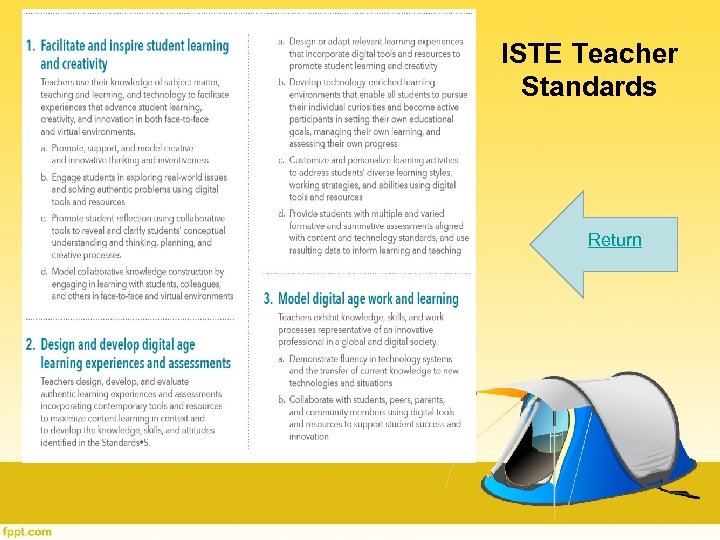
 ISTE Standards Teacher Standards from the International Society for Technology in Education 1. Facilitate and inspire student learning and creativity 2. Design and develop digital age learning experiences and assessments 3. Model digital age work and learning Follow link above for more info
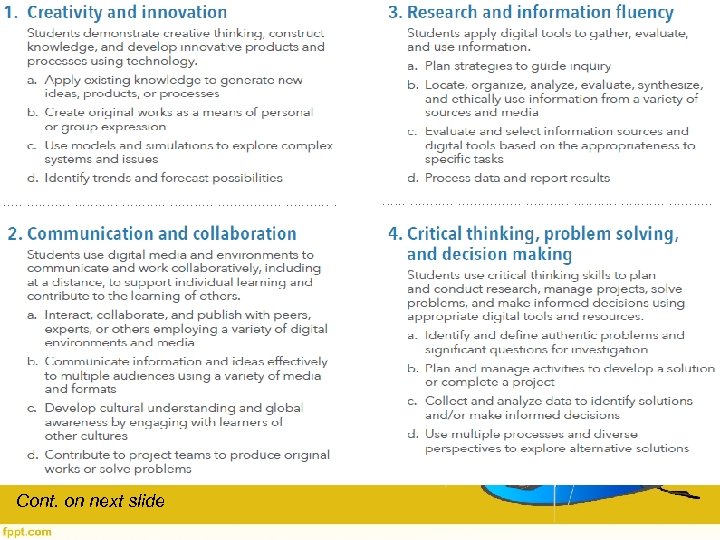
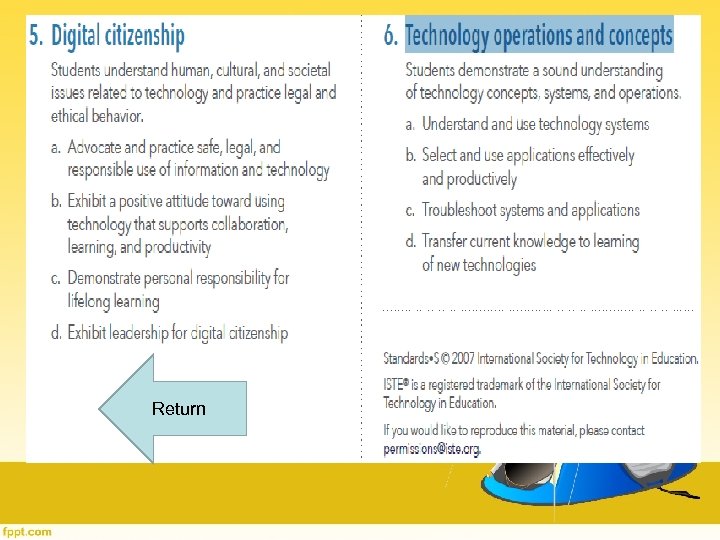
 ISTE Standards Student Standards from the International Society for Technology in Education 1. 2. 3. 4. 5. 6. Creativity and innovation Communication and collaboration Research and information fluency Critical thinking, problem solving, and decision making Digital citizenship Technology operations and concepts
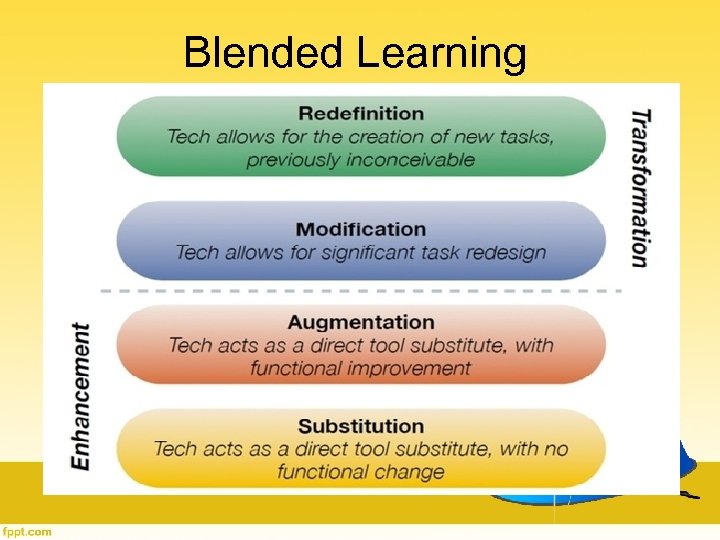
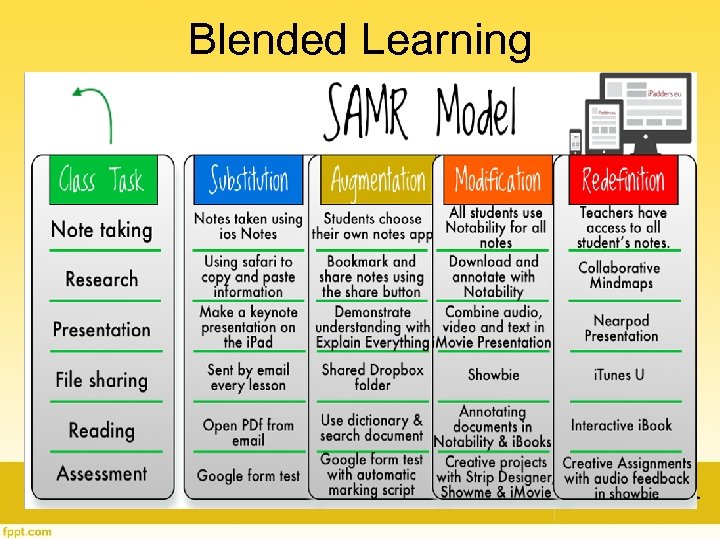
 Blended Learning Really good instruction…infused with technology. Blended learning is considered about 25% of time online The SAMR Model is helpful
 Blended Learning
 Blended Learning
 Formative Assessments and the SAMR model Example List: • Choose from a daily dozen • Kahoot quiz • Jeopardy (w/dry erase boards) • Thumbs up/thumbs down • Exit Tickets
 Work on Formative Assessments 1. Label your assessments with appropriate SAMR level 2. Pick 2 assessments and move it up the continuum
 Data and Instruction Why use data to inform instruction? • Identify strengths & weaknesses of entire classes and individuals • Students self-evaluation – See progress – Accountability • Pivot – Required on teacher rubric
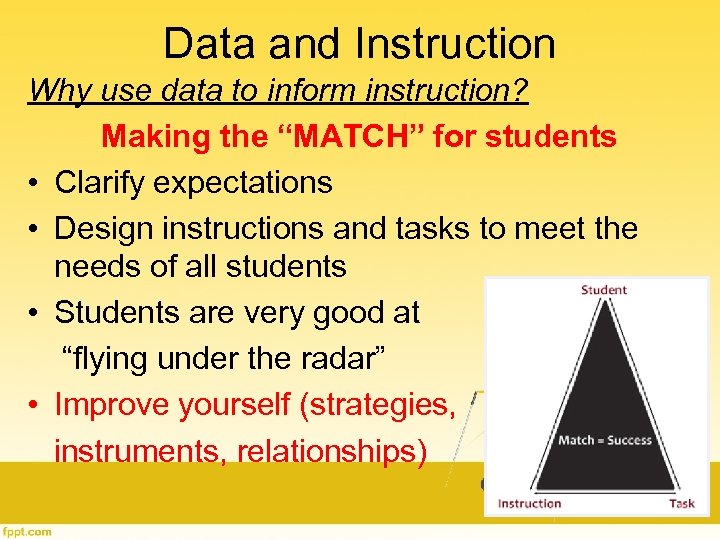 Data and Instruction Why use data to inform instruction? Making the “MATCH” for students • Clarify expectations • Design instructions and tasks to meet the needs of all students • Students are very good at “flying under the radar” • Improve yourself (strategies, instruments, relationships)
 Data and Instruction How do I use data to inform instruction? TECHNOLOGY!!!! • Make it a systematic part of instruction • Don’t be afraid to change what you have always done • Make time to talk with kids about data • Find a tool or two that work for you!
 Data and Instruction How do I use data to inform instruction? Ask yourself… What should students know, and how should they be able to use what they know? ? ? Some answers to this question will be content related, and some won’t.
 Data and Instruction How do I use data to inform instruction? Ask yourself… Does this assessment help prepare them for their summative assessment? Is it practice for them? Is it informative for you?
 Data Collection Tools available (including, but not limited to…) Canvas Pivot Power. School Problem Attic Spreadsheets (Google) Kahoot
 Data Collection Canvas • Great for entry/exit tickets – Speed. Grader makes grading easy, feedback instant, and tracking scores easy in gradebook • Quizzes – Questions can be imported from problem attic – scores are tracked in gradebook – Diagnostics available Please go to Canvas and complete the quiz: Summer PD Modules Formative Instruction for Driving Instruction
 Data Collection Pivot • View history for any student enrolled in your classes Finding information about a student’s history no longer means a trip to the office to search through filing cabinets full of records! • See trends in scores for your test(s) Find strengths and weaknesses in your instruction
 Data Collection Power. School • Keep it current – automatically upload scores from Canvas • Use summaries and reports to analyze data • Print reports for students
 Data Collection Spreadsheets (Excel/Google) • Keep scores for specific assessment in one place • Manipulate to help analysis • Easily submit data into Pivot as evidence
 Data Collection Problem Attic • Data base of subject-specific questions aligned with state standards to create assessments (traditional) – Questions can be uploaded directly into a Canvas quiz Kahoot • Game-style quizzes, discussions, etc. – Pre-made or make your own – Tracks student performance
 Feedback Timely feedback is key!!! • Get grades entered ASAP • Discuss data and what it means (whole group, small group) • Conference with students • Celebrate successes!
 Work Time • Work on moving a current assessment up the SAMR ladder • Create formative assessments for a specific unit • Play around with any of the tools discussed today – I will help you as much as I can
 Evaluation Please complete the evaluation for this session before you leave today. • Canvas Summer Professional Development Scroll down to 2016 Ed. Camp Select “end of course evaluation” • OR: https: //docs. google. com/forms/d/1 A 9 r. ALEd. QR 3 s. DHmq. Ra. E-x. ABYmk. Zr. Yfl. MLl. HZb. Dfor. QE/viewform • Don’t leave without your signed PGP Certificate THANKS FOR COMING!!!
 References Formative Assessment (2014, April 29 th). In S. Abbott (Ed. ), The glossary of education reform. Retrieved from http: //edglossary. org/formative-assessment Essential Conditions (2016). International Society for Technology in Education. Retrieved from http: //www. iste. org/standards/essential-conditions
 ISTE Teacher Standards Return
 Cont. on next slide
 Return