


 Скачать презентацию FIREWALLS NETWORK SECURITY with Intrusion Detection and
4dd001e000e97a113d7fb68629b80e58.ppt
- Количество слайдов: 44
 FIREWALLS & NETWORK SECURITY with Intrusion Detection and VPNs, 2 nd ed. 10 Authenticating Users By Whitman, Mattord, & Austin © 2008 Course Technology
 Learning Objectives ¨ Explain why authentication is a critical aspect of network security ¨ Explain why firewalls authenticate and how they identify users ¨ Describe user, client, and session authentication ¨ List the advantages and disadvantages of popular centralized authentication systems ¨ Discuss the potential weaknesses of password security systems ¨ Discuss the use of password security tools ¨ Describe common authentication protocols used by firewalls Firewalls & Network Security, 2 nd ed. - Chapter 10 Slide 2
 The Authentication Process in General ¨ The act of identifying users and providing network services to them based on their identity ¨ Two forms – Local authentication – Centralized authentication service (often uses two-factor authentication) Firewalls & Network Security, 2 nd ed. - Chapter 10 Slide 3
 How Firewalls Implement the Authentication Process 1. Client makes request to access a resource 2. Firewall intercepts the request and prompts the user for name and password 3. User submits information to firewall 4. User is authenticated 5. Request is checked against firewall’s rule base 6. If request matches existing allow rule, user is granted access 7. User accesses desired resources Firewalls & Network Security, 2 nd ed. - Chapter 10 Slide 4
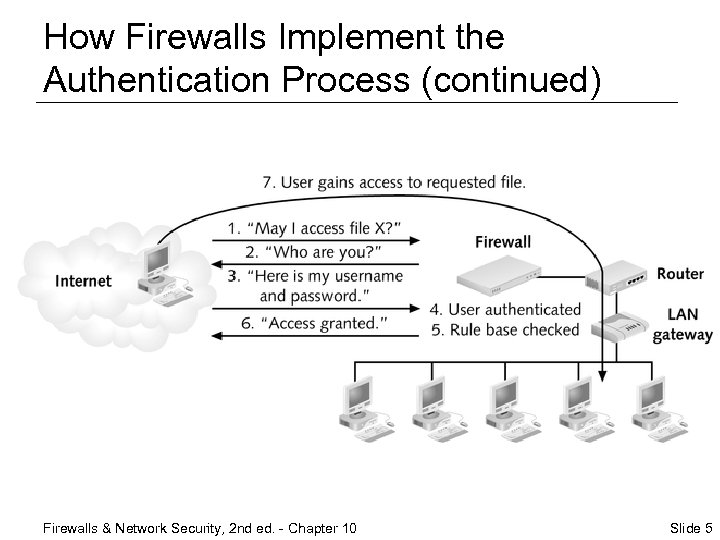 How Firewalls Implement the Authentication Process (continued) Firewalls & Network Security, 2 nd ed. - Chapter 10 Slide 5
 Firewall Authentication Methods ¨ User authentication ¨ Client authentication ¨ Session authentication Firewalls & Network Security, 2 nd ed. - Chapter 10 Slide 6
 User Authentication ¨ Basic authentication; user supplies username and password to access networked resources ¨ Users who need to legitimately access your internal servers must be added to your access control lists (ACLs) Firewalls & Network Security, 2 nd ed. - Chapter 10 Slide 7
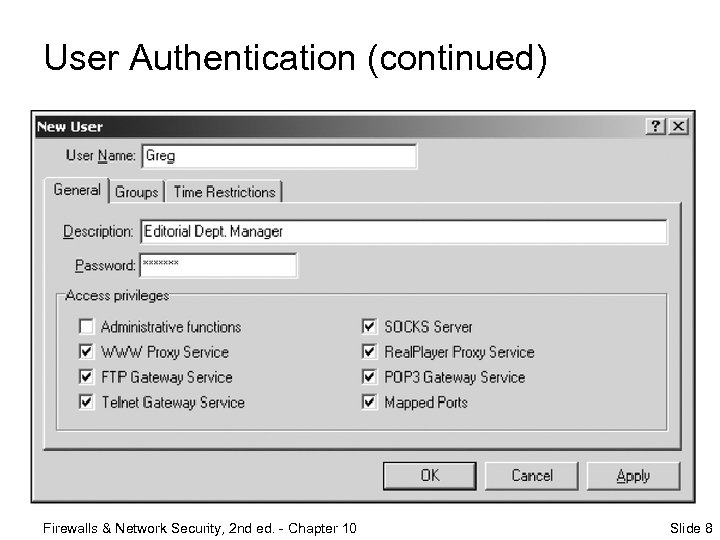 User Authentication (continued) Firewalls & Network Security, 2 nd ed. - Chapter 10 Slide 8
 Client Authentication ¨ Same as user authentication but with additional time limit or usage limit restrictions ¨ When configuring, set up one of two types of authentication systems – Standard sign-on system – Specific sign-on system Firewalls & Network Security, 2 nd ed. - Chapter 10 Slide 9
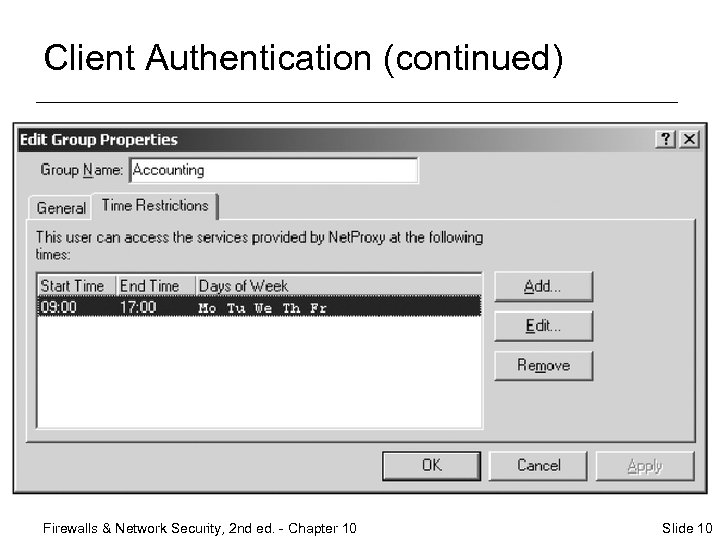 Client Authentication (continued) Firewalls & Network Security, 2 nd ed. - Chapter 10 Slide 10
 Session Authentication ¨ Required any time the client establishes a session with a server of other networked resource Firewalls & Network Security, 2 nd ed. - Chapter 10 Slide 11
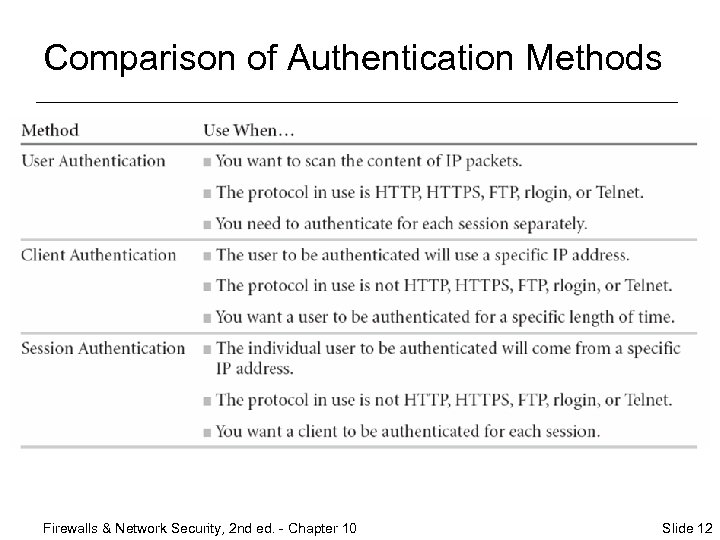 Comparison of Authentication Methods Firewalls & Network Security, 2 nd ed. - Chapter 10 Slide 12
 Centralized Authentication ¨ Centralized server maintains all authorizations for users regardless of where user is located and how user connects to network ¨ Most common methods – Kerberos – TACACS+ (Terminal Access Controller Access Control System) – RADIUS (Remote Authentication Dial-In User Service) Firewalls & Network Security, 2 nd ed. - Chapter 10 Slide 13
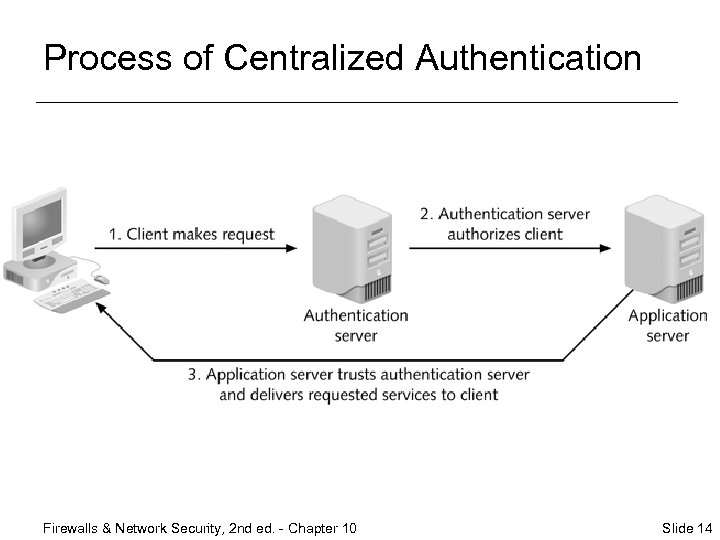 Process of Centralized Authentication Firewalls & Network Security, 2 nd ed. - Chapter 10 Slide 14
 Kerberos ¨ Provides authentication and encryption through standard clients and servers ¨ Uses a Key Distribution Center (KDC) to issue tickets to those who want access to resources ¨ Used internally on Windows 2000/XP ¨ Advantages – Passwords are not stored on the system – Widely used in UNIX environment; enables authentication across operating systems Firewalls & Network Security, 2 nd ed. - Chapter 10 Slide 15
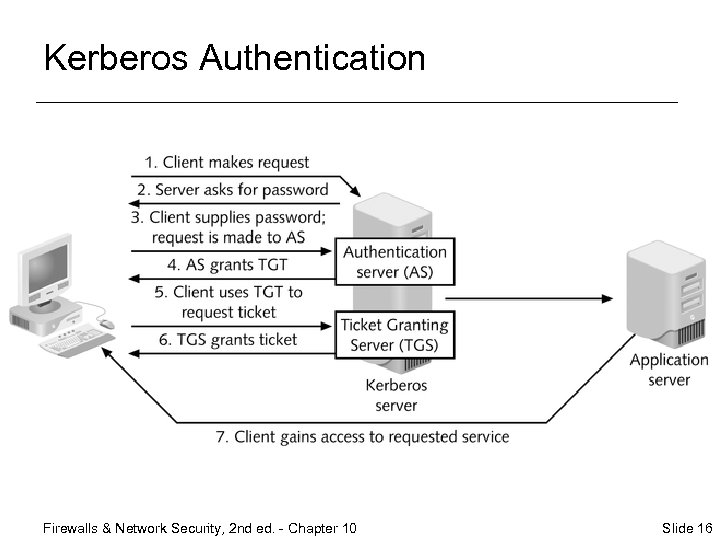 Kerberos Authentication Firewalls & Network Security, 2 nd ed. - Chapter 10 Slide 16
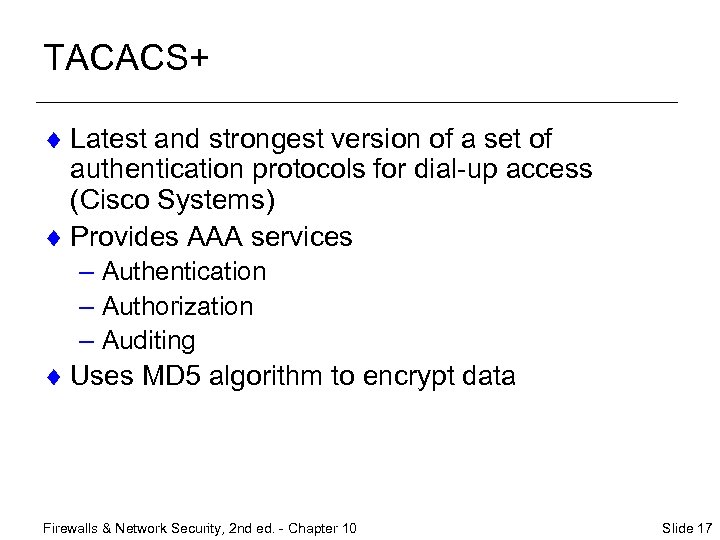 TACACS+ ¨ Latest and strongest version of a set of authentication protocols for dial-up access (Cisco Systems) ¨ Provides AAA services – Authentication – Authorization – Auditing ¨ Uses MD 5 algorithm to encrypt data Firewalls & Network Security, 2 nd ed. - Chapter 10 Slide 17
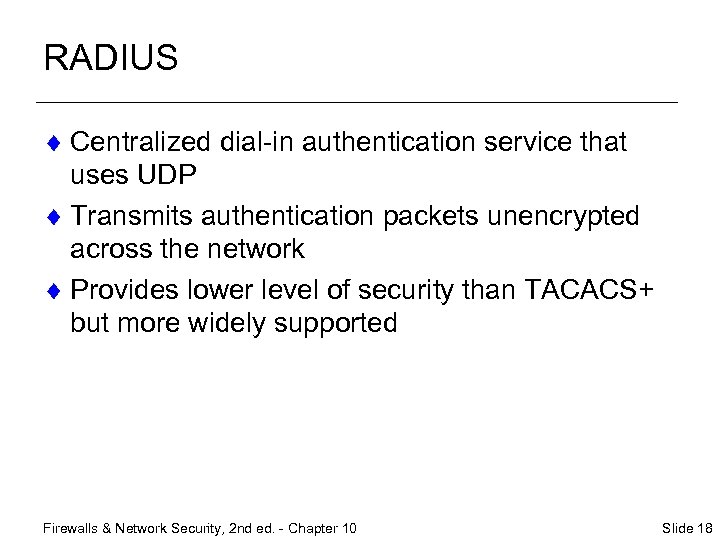 RADIUS ¨ Centralized dial-in authentication service that uses UDP ¨ Transmits authentication packets unencrypted across the network ¨ Provides lower level of security than TACACS+ but more widely supported Firewalls & Network Security, 2 nd ed. - Chapter 10 Slide 18
 TACACS+ and RADIUS Compared ¨ Strength of security ¨ Filtering characteristics ¨ Proxy characteristics ¨ NAT characteristics Firewalls & Network Security, 2 nd ed. - Chapter 10 Slide 19
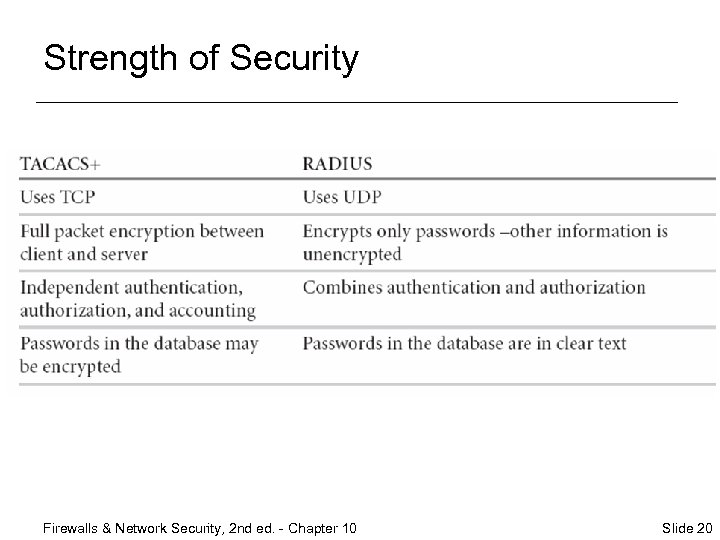 Strength of Security Firewalls & Network Security, 2 nd ed. - Chapter 10 Slide 20
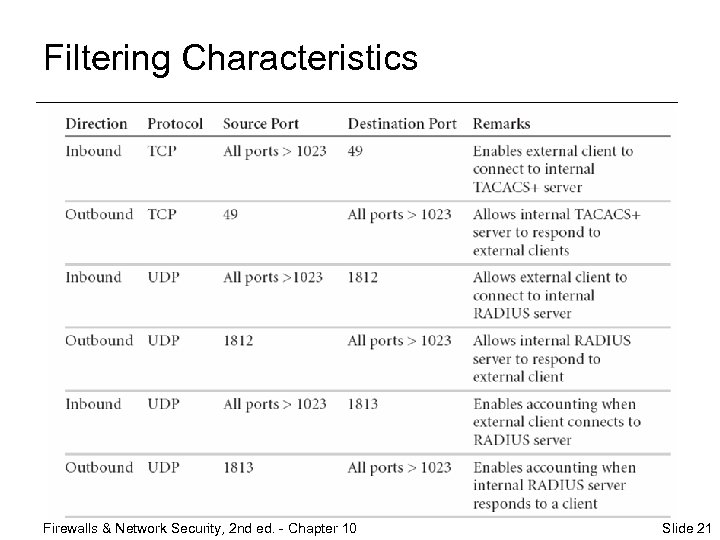 Filtering Characteristics Firewalls & Network Security, 2 nd ed. - Chapter 10 Slide 21
 Proxy Characteristics ¨ RADIUS – Doesn’t work with generic proxy systems, but a RADIUS server can function as a proxy server ¨ TACACS+ – Works with generic proxy systems Firewalls & Network Security, 2 nd ed. - Chapter 10 Slide 22
 NAT Characteristics ¨ RADIUS – Doesn’t work with NAT ¨ TACACS+ – Should work through NAT systems Firewalls & Network Security, 2 nd ed. - Chapter 10 Slide 23
 Password Security Issues ¨ Passwords that can be cracked (accessed by an unauthorized user) ¨ Password vulnerabilities ¨ Lax security habits Firewalls & Network Security, 2 nd ed. - Chapter 10 Slide 24
 Passwords That Can Be Cracked ¨ Ways to crack passwords – Find a way to authenticate without knowing the password – Uncover password from system that holds it – Guess the password ¨ To avoid the issue – Protect passwords effectively – Observe security habits Firewalls & Network Security, 2 nd ed. - Chapter 10 Slide 25
 Password Vulnerabilities ¨ Built-in vulnerabilities – Often easy to guess – Often stored visibly – Social engineering ¨ To avoid the issues – Choose complicated passwords – Memorize passwords – Never give passwords out to anyone Firewalls & Network Security, 2 nd ed. - Chapter 10 Slide 26
 Lax Security Habits ¨ To maintain some level of integrity, draw up a formal Memorandum of Understanding (MOU) Firewalls & Network Security, 2 nd ed. - Chapter 10 Slide 27
 Password Security Tools ¨ One-time password software ¨ Shadow password system Firewalls & Network Security, 2 nd ed. - Chapter 10 Slide 28
 One-Time Password Software ¨ Password is generated using a secret key ¨ Password is used only once, when the user authenticates ¨ Different passwords are used for each authentication session ¨ Types – Challenge-response passwords – Password list passwords Firewalls & Network Security, 2 nd ed. - Chapter 10 Slide 29
 Shadow Password System ¨ A feature of Linux that stores passwords in another file that has restricted access ¨ Passwords are stored only after being encrypted by a randomly generated value and an encoding formula Firewalls & Network Security, 2 nd ed. - Chapter 10 Slide 30
 Other Authentication Systems ¨ Single-password systems ¨ One-time password systems ¨ Certificate-based authentication ¨ 802. 1 x Wi-Fi authentication Firewalls & Network Security, 2 nd ed. - Chapter 10 Slide 31
 Single-Password Systems ¨ Operating system password ¨ Internal firewall password Firewalls & Network Security, 2 nd ed. - Chapter 10 Slide 32
 One-Time Password Systems ¨ Single Key (S/Key) ¨ Secur. ID ¨ Axent Pathways Defender Firewalls & Network Security, 2 nd ed. - Chapter 10 Slide 33
 Single Key (S/Key) ¨ Uses multiple-word rather than single word passwords – User specifies single-word password and the number of times it is to be encrypted – Password is processed by a hash function n times; resulting encrypted passwords are stored on the server ¨ Never stores original password on the server Firewalls & Network Security, 2 nd ed. - Chapter 10 Slide 34
 Secur. ID ¨ Uses two-factor authentication – Physical object – Piece of knowledge ¨ Most frequently used one-time password solution with Fire. Wall-1 Firewalls & Network Security, 2 nd ed. - Chapter 10 Slide 35
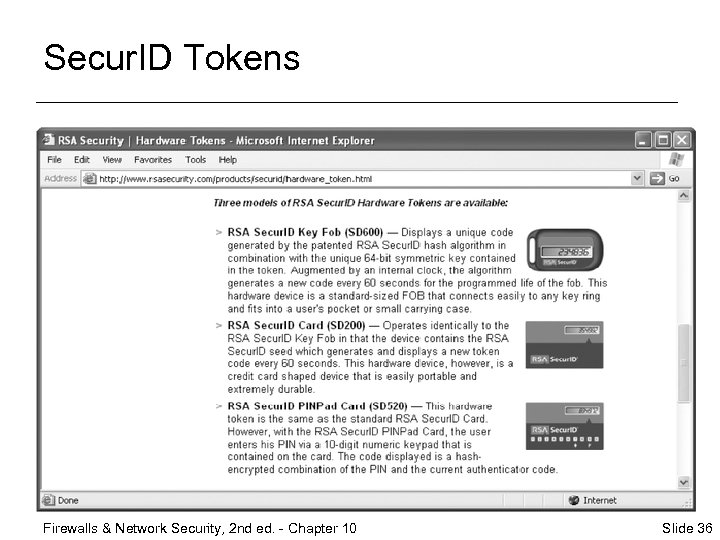 Secur. ID Tokens Firewalls & Network Security, 2 nd ed. - Chapter 10 Slide 36
 Axent Pathways Defender ¨ Uses two-factor authentication and a challengeresponse system Firewalls & Network Security, 2 nd ed. - Chapter 10 Slide 37
 Certificate-Based Authentication ¨ Fire. Wall-1 supports the use of digital certificates to authenticate users ¨ Organization sets up a public key infrastructure (PKI) that generates keys to users – User receives a code (public key) that is generated using the server’s private key and uses the public key to send encrypted information to the server – Server receives the public key and can decrypt the information using its private key Firewalls & Network Security, 2 nd ed. - Chapter 10 Slide 38
 802. 1 x Wi-Fi Authentication ¨ Supports wireless Ethernet connections ¨ Not supported by Fire. Wall-1 ¨ 802. 1 x protocol provides for authentication of users on wireless networks ¨ Wi-Fi uses Extensible Authentication Protocol (EAP) Firewalls & Network Security, 2 nd ed. - Chapter 10 Slide 39
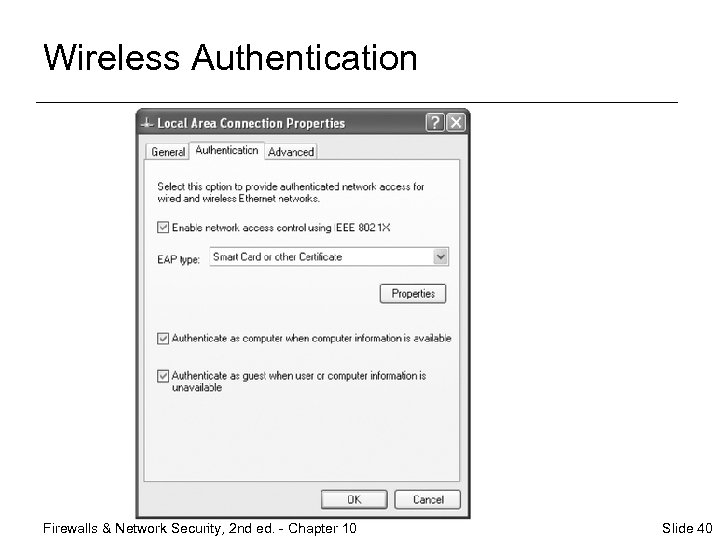 Wireless Authentication Firewalls & Network Security, 2 nd ed. - Chapter 10 Slide 40
 Chapter Summary ¨ Overview of authentication and its importance to network security ¨ How and why firewalls perform authentication services ¨ Types of authentication performed by firewalls – User – Client – Session Firewalls & Network Security, 2 nd ed. - Chapter 10 Slide 41
 Chapter Summary (continued) ¨ Generally, users supply: – Something they have (such as a smart card) or – Something they know (such as a password) or – Both ¨ Latest authentication systems measure or evaluate a physical attribute, such as a fingerprint or voiceprint Firewalls & Network Security, 2 nd ed. - Chapter 10 Slide 42
 Chapter Summary (continued) ¨ In a centralized authentication system: – Firewall works with an authentication server – Authentication server handles • Username and password maintenance/generation • Login requests • Auditing ¨ Examples of centralized authentication systems: – Kerberos – TACACS+ – RADIUS Firewalls & Network Security, 2 nd ed. - Chapter 10 Slide 43
 Chapter Summary (continued) ¨ Passwords – Important part of virtually every authentication system – Take one of two general forms: • Single-word – User password compared against database of passwords; access granted if match is made – Vulnerable to ability of hackers to determine passwords, to user error, and to bad security habits • One-time passwords – Generated dynamically each time user attempts to log on to network – Secret key used to generate single- or multipleword password Firewalls & Network Security, 2 nd ed. - Chapter 10 Slide 44