


 Скачать презентацию Financial Management in Online Course Design and Implementation
6ac6e6e2336e33c9889a88becd73d076.ppt
- Количество слайдов: 18
 Financial Management in Online Course Design and Implementation Group Project IA July 2, 2005 Blackboard Academic Suite vs Self-developed System
 Group D Matt Carbone Tushar Mehta Ann Powers Jessica Strahl
 Agenda Ü Scenarios Ü Pros and Cons Ü Evaluation Criteria Ü Methodology Ü Needs Overview Ü Examples of Application Ü Cost Considerations Ü Purchasing and Maintenance Ü Recommendations
 Community. U Ü Two-year liberal arts college Staten island, NY Ü 3, 000 students with 45% attending part-time Ü 25% of all classes currently being offered online Ü Plans to upgrade LMS due to growth foreseen in the online segment Ü LMS Implementation planned for fall 2006 Ü Small but highly-sophisticated and effective technology support staff
 Zippity. Z Corporation Ü Worldwide supplier of zippers with headquarters in NYC Ü Manufacturing plants in Europe and Asia Ü Manufacturing simulation and English language courses Ü Course for compliance with the Sarbanes. Oxley Ü Implementation required ASAP
 Out of the Box Ü Ü Ü Pros Open Standards compliant (SCORM, AICC, IEEE, IMS) No development costs Professionally developed helpdesk and support systems Training available for purchase Multiple people with varying levels of expertise Cons Ü Inaccessible source code Ü Dependant on vendor and technology Ü Installation and implementation fees Ü Customization costs extra
 Self-developed System Ü Ü Pros Accessible source code Flexibility in choosing desired technologies Customization can be done in-house Easy implementation and integration – if developed correctly Ü Ü Ü Cons Unlikely to be openstandards compliant Development costs are high Under-developed helpdesk and support Must develop necessary training from scratch Expertise reside in small number of people -risky
 Evaluating an Online Platform Functional Ü Ease of use Ü Diverse educational tools Ü Implement-ability Ü Supportability Ü Foreign language capabilities Technical Ü High availability Ü Scalability Ü Interoperability Ü Use of industry learning standards Ü Security
 Methodology Considerations and their definitions are agreed upon Ü “Need” factor calculated: functional and technical consideration ranked 1: low/no need 10: essential need Ü Quality ratings assigned to blackboard and in-house developed LMS 1: very poor, undeveloped 10: outstanding, robust Ü Weighted score = need factor[1 -10] x quality rating[110] Ü
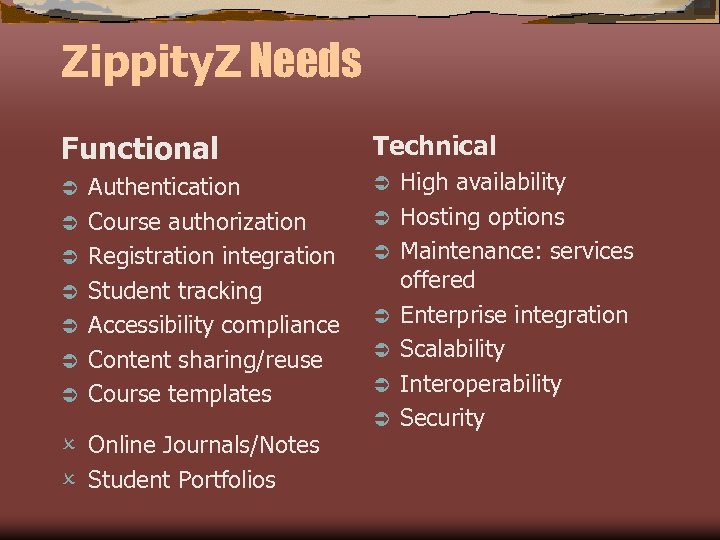 Zippity. Z Needs Functional Ü Ü Ü Ü Authentication Course authorization Registration integration Student tracking Accessibility compliance Content sharing/reuse Course templates O Online Journals/Notes O Student Portfolios Technical Ü Ü Ü Ü High availability Hosting options Maintenance: services offered Enterprise integration Scalability Interoperability Security
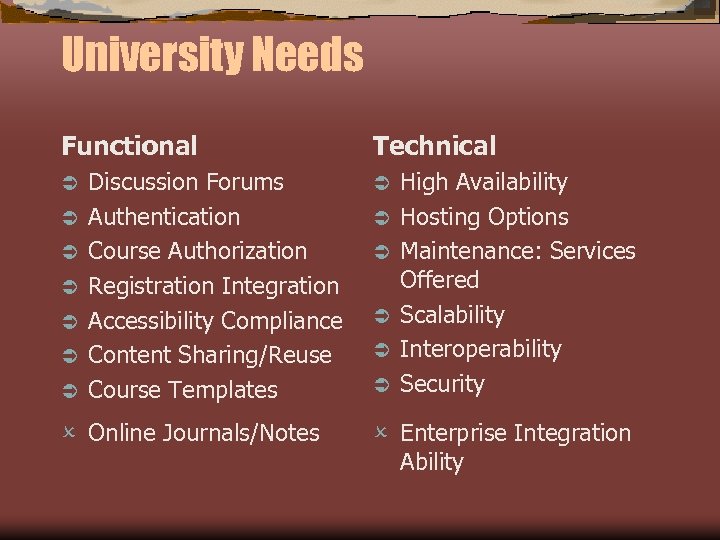 University Needs Functional Ü Ü Ü Ü Discussion Forums Authentication Course Authorization Registration Integration Accessibility Compliance Content Sharing/Reuse Course Templates O Online Journals/Notes Technical Ü Ü Ü High Availability Hosting Options Maintenance: Services Offered Scalability Interoperability Security O Enterprise Integration Ability
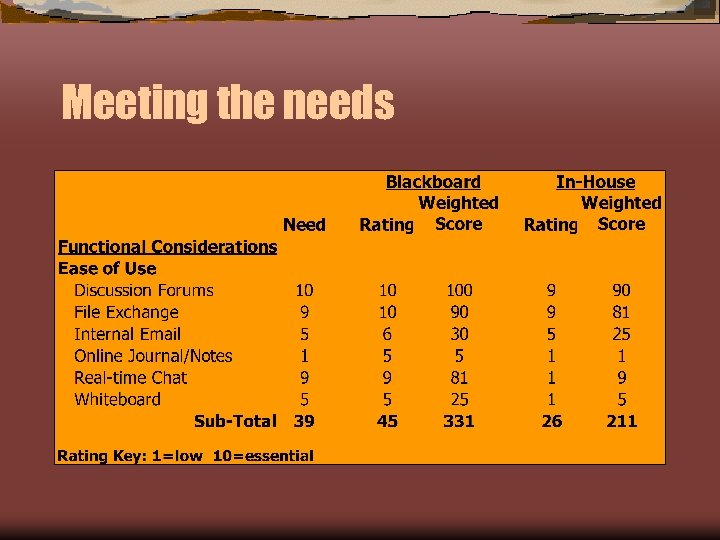 Meeting the needs
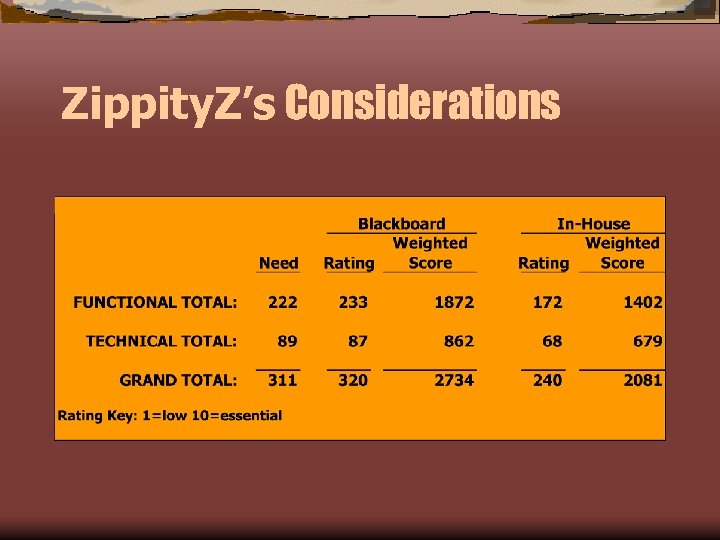 Zippity. Z’s Considerations
 Blackboard "BB" Cost Considerations
 In-House Built "IB” Cost Considerations
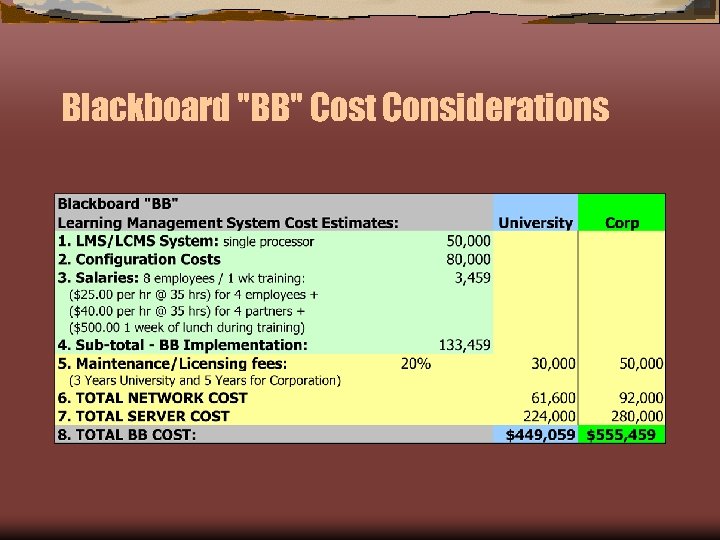
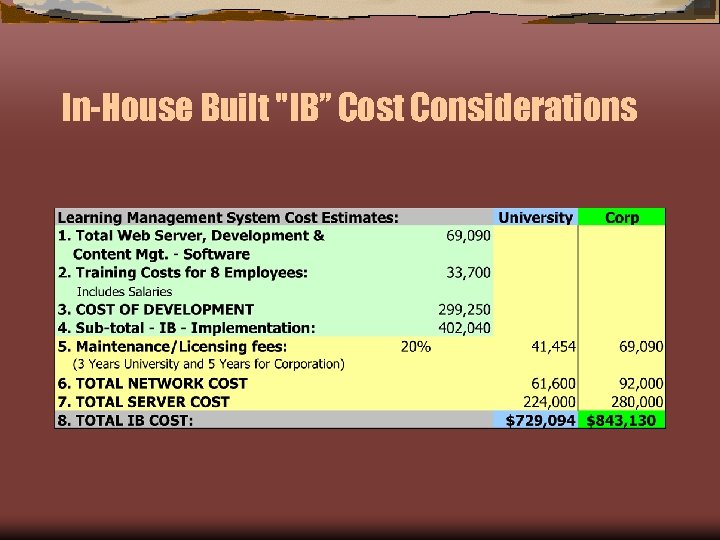
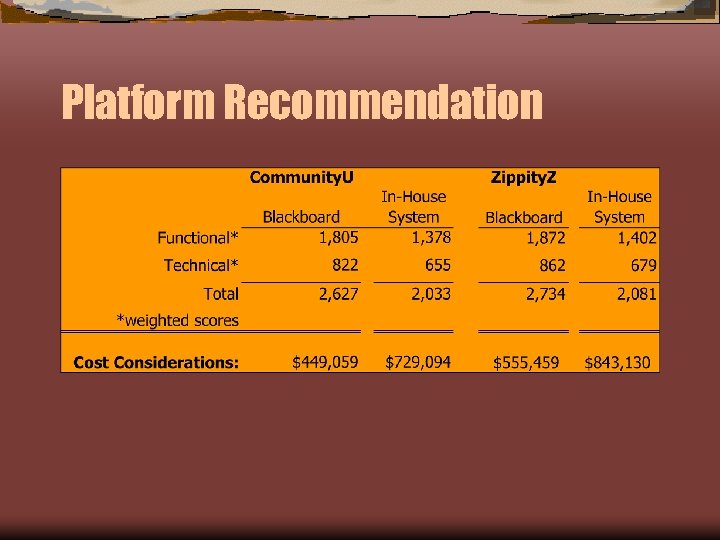
 Analysis of Purchasing and Maintaining Purchasing Blackboard System: Ü The estimated cost for Community. U to purchase Blackboard is $449, 059 and $555, 459 for the Zippity. Z Corporation In-House Built System: Ü The estimated Community. U, the cost to build an LMS/CLMS comes to $729, 094 a difference of $291, 489 from the Blackboard total purchase. The total difference for the Zippity. Z Corporation was $306, 761 both in favor of Blackboard Maintenance is 3 years for the University and 5 Years for the Corporation regardless of the system - costs differ accordingly Both of the above systems include network, server and maintenance costs among other costs
 Platform Recommendation Ü
 Any Questions? ? References Macromedia - http: //www. macromedia. com/ Flex – web development platform Flash for simulations and streaming (video FLV format) Flex. Builder/Dreamweaver MX - with Coursebuilder extension to build SCORM compatible courses Captivate - screen captures for simulations. Contribute - Easily to create content from Dreamweaver Templates Ü Articulate: http: //www. articulate. com/index. html Presenter creates Flash files from Power. Point - supports SCORM and allows for voice narration Articulate Quiz. Maker - creates Flash format SCORM compliant Quizzes for self-assessment Articulate Knowledge Portal - the glue to hold it together Ü