


 Скачать презентацию Fall Fling Me F 1040 Working Group Internal
99a0eb19a1f143bc3fd9aa8b3c1dce0d.ppt
- Количество слайдов: 84
 Fall Fling Me. F 1040 Working Group Internal Revenue Service September 5, 2007
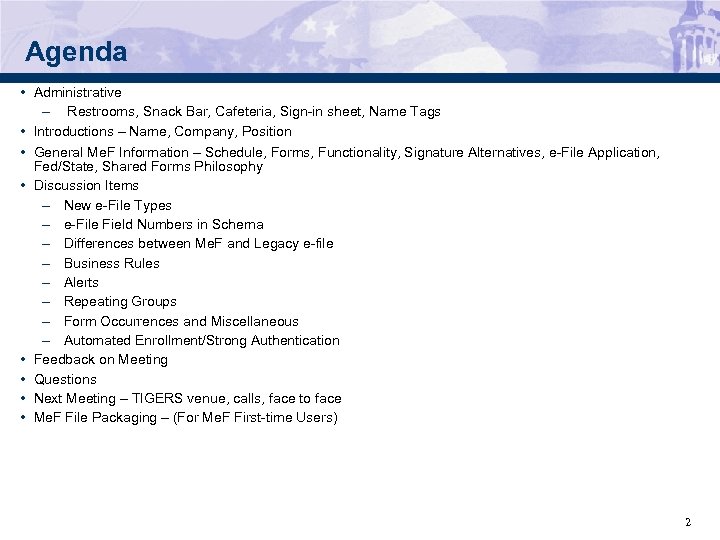 Agenda • Administrative – Restrooms, Snack Bar, Cafeteria, Sign-in sheet, Name Tags • Introductions – Name, Company, Position • General Me. F Information – Schedule, Forms, Functionality, Signature Alternatives, e-File Application, Fed/State, Shared Forms Philosophy • Discussion Items – New e-File Types – e-File Field Numbers in Schema – Differences between Me. F and Legacy e-file – Business Rules – Alerts – Repeating Groups – Form Occurrences and Miscellaneous – Automated Enrollment/Strong Authentication • Feedback on Meeting • Questions • Next Meeting – TIGERS venue, calls, face to face • Me. F File Packaging – (For Me. F First-time Users) 2
 Approach 3
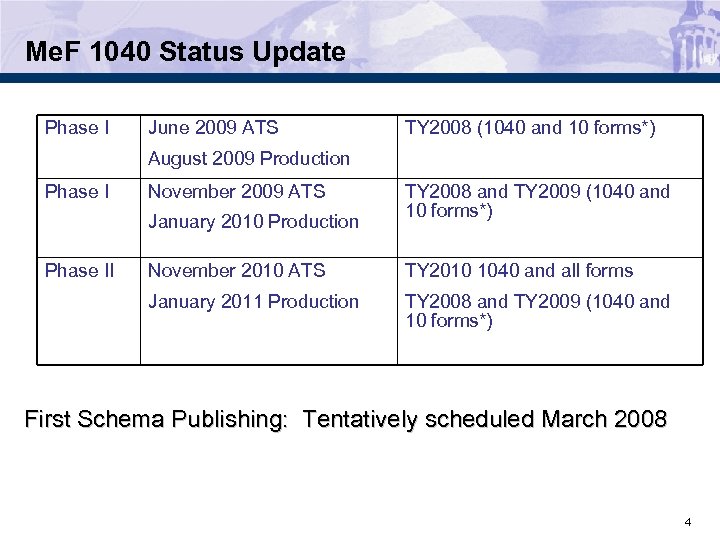 Me. F 1040 Status Update Phase I June 2009 ATS TY 2008 (1040 and 10 forms*) August 2009 Production Phase I November 2009 ATS January 2010 Production Phase II TY 2008 and TY 2009 (1040 and 10 forms*) November 2010 ATS TY 2010 1040 and all forms January 2011 Production TY 2008 and TY 2009 (1040 and 10 forms*) First Schema Publishing: Tentatively scheduled March 2008 4
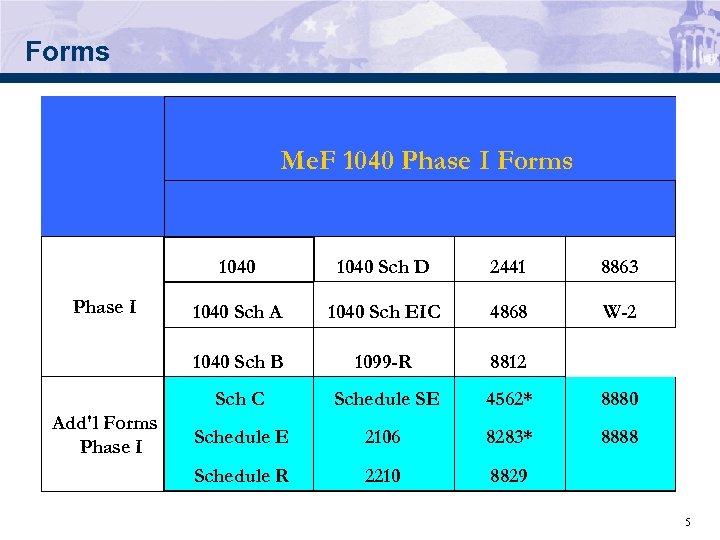 Forms Me. F 1040 Phase I Forms 1040 8863 1040 Sch A 1040 Sch EIC 4868 W-2 1099 -R 8812 Sch C Add'l Forms Phase I 2441 1040 Sch B Phase I 1040 Sch D Schedule SE 4562* 8880 Schedule E 2106 8283* 8888 Schedule R 2210 8829 5
 Functionality • Functionality – Amended Returns implemented in January 2010 – Fiscal Year Returns • Implemented in January 2010 • Feedback on need for fiscal year returns functionality 6
 Signature Alternatives • Me. F 1040 Program will have 2 signature alternatives starting in August of 2009. – Practitioner PIN – Self-Select PIN • Note: No scanned or paper Form 8453 or Form 8453 -OL will be allowed. • Issue: The Form 1040 jurats and legacy authentication record have only one taxpayer signature date, but the Form 1040 for a joint return has a place for both taxpayers to sign and date. Should Me. F allow for 2 taxpayer signature dates or should we remain consistent with 1040 legacy and allow for only 1 taxpayer signature date? 7
 IRS e-file Application • Me. F will have 2 transmission channels IFA and A 2 A for the Me. F 1040 Program. (Starting in January of 2008, EMS will no longer be used for Me. F transmissions. ) • For Me. F, Transmitter will select 1040 and the transmission method of Me. F Internet XML. • You must delegate a person or persons within your firm who will transmit for your company. • Their authorities on the IRS e-file Application must show Me. F Internet Transmitter (IFA) or Me. F System Enroller (A 2 A). • Those delegated individuals must complete the e-Services Registration process to choose the Username and Password that they will use to transmit returns through the Internet (RUP) or access the Automated System Enrollment application. 8
 Me. F Fed/State Program • Taxpayer submits federal and state returns as separate submissions. • A taxpayer submits a separate state return for each state they have a filing requirement • Each state return has state data and taxpayer provided federal portion • The federal data to be included in a state return is governed by each state (some states require certain pages of the federal 1040 while others may require a copy of the entire federal return) • Me. F only makes available to the states, what the taxpayer includes in the state return package! 9
 What is linked and unlinked? • State returns may be formatted as: – Fed/State returns (state return is linked to the federal return) – Stand-Alone (unlinked – there is no association to the federal return) • Linkage is determined by the state and taxpayer. • The state decides whether they will support linked or unlinked or both. If they support both, then taxpayer has choice of which they want to send. • If the state requires linkage (linked), the federal return Submission ID must be in the state manifest. • If the state allows stand-alone (unlinked), the federal return Submission ID will not be provided in the state manifest. 10
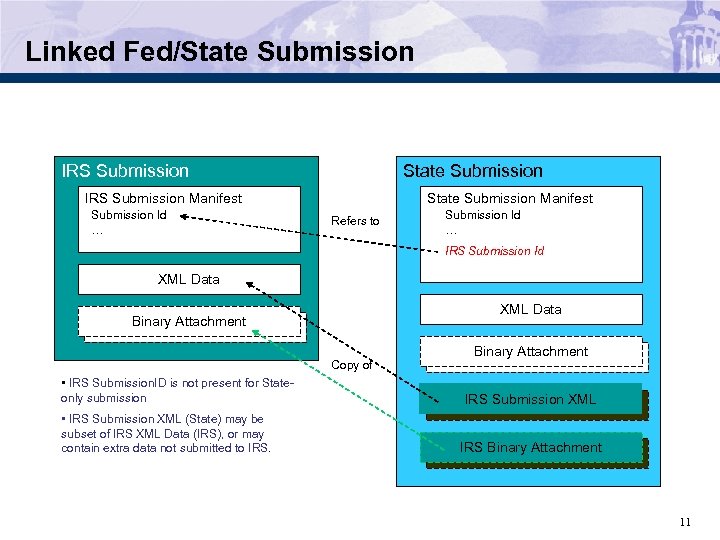 Linked Fed/State Submission IRS Submission Manifest Submission Id … State Submission Manifest Refers to Submission Id … IRS Submission Id XML Data Binary Attachment Copy of • IRS Submission. ID is not present for Stateonly submission • IRS Submission XML (State) may be subset of IRS XML Data (IRS), or may contain extra data not submitted to IRS. Binary Attachment IRS Submission XML IRS Submission Info IRS Binary Attachment 11
 Processing State Returns on Me. F • Linked returns – If the state return is a linked return, the federal return must be accepted or Me. F will deny the state return (reject the return without forwarding it to the state). – When federal and state submissions are contained in the same transmission, Me. F is designed to process the federal return prior to processing the state return. • State Stand-Alone returns (unlinked) – If submitted as state stand-alone return, Me. F will not look for a federal return associated with the state return. – If state return passes validation criteria and the State allows Stand-Alone (unlinked) returns, the state return is made available to the state. 12
 Status of state returns • Transmitter sends state return to IRS • IRS validates state return – If linked return, check IRS Submission. Id and State Participation – If unlinked, check State Participation • If valid, Me. F makes state return available to state • State retrieves state returns from Me. F • State sends receipt for state return to Me. F • State processes state return and sends state acknowledgement to Me. F • Transmitter retrieves state acknowledgement from Me. F 13
 Shared Form Philosophy • A shared form must be consistent between form families (e. g. , 4562 on 1120 needs to be the same as 4562 on 1040) • IRS acknowledges there were problems with shared forms in some of the previous schema versions • IRS is improving the process to eliminate these problems • We definitely want input from software developers – Input on form versioning – Suggestions on other ideas to keep shared forms in sync 14
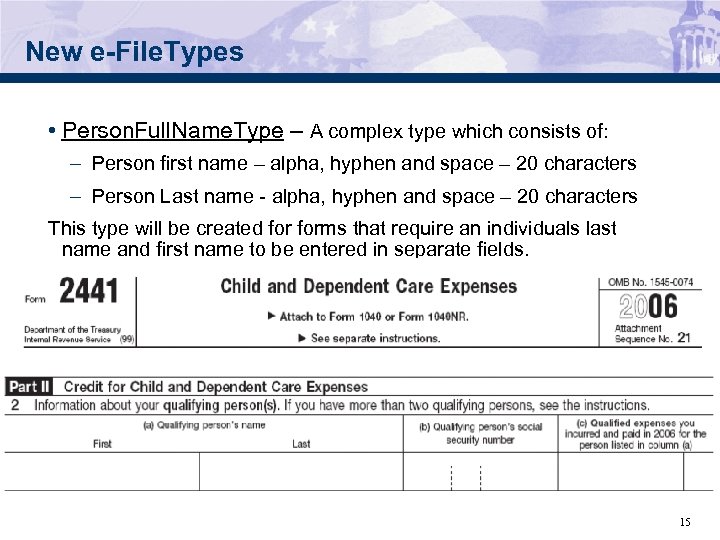 New e-File. Types • Person. Full. Name. Type – A complex type which consists of: – Person first name – alpha, hyphen and space – 20 characters – Person Last name - alpha, hyphen and space – 20 characters This type will be created forms that require an individuals last name and first name to be entered in separate fields. 15
 New e-File. Types (continued) • Name. Line 1 Type – This e-File. Type will be created to accept the Primary or Primary and Spouse name combined and is 35 characters in length. – No leading or consecutive embedded spaces. The only characters allowed are alpha, ampersand (&), hyphen (-), less -than sign (<) and space. • Person. Name. Control. Type – This e-File. Type will be created to accept the first four significant characters of the primary taxpayer's last name and is 4 characters in length. - No leading or embedded spaces are allowed. The first leftmost position must contain an alpha character. Only alpha, hyphen, and space are allowed. Omit punctuation marks, titles and suffixes. 16
 New e-File. Types (continued) • 1099 RDistribution. Code. Type – This e-File. Type will be created for the distribution code required in box 7, of the form 1099 -R. – The legal characters are: 1 -9, A, B, D, E, F, G, J, L, N, P, Q, R, S, and T. • State. IDNumber. Type – This e-File. Type will be created for the state ID number required on the Forms 1099 -R and W 2. It is alphanumeric and 16 characters in length. • Form. Condition. Ind. Type – This e-File. Type will be created to identify whether the text on the Forms 1099 -R and W-2 is altered, typed or handwritten. The field is 1 character in length. The following values are allowed: N = Non-standard (altered, typed or handwritten) S = Standard 17
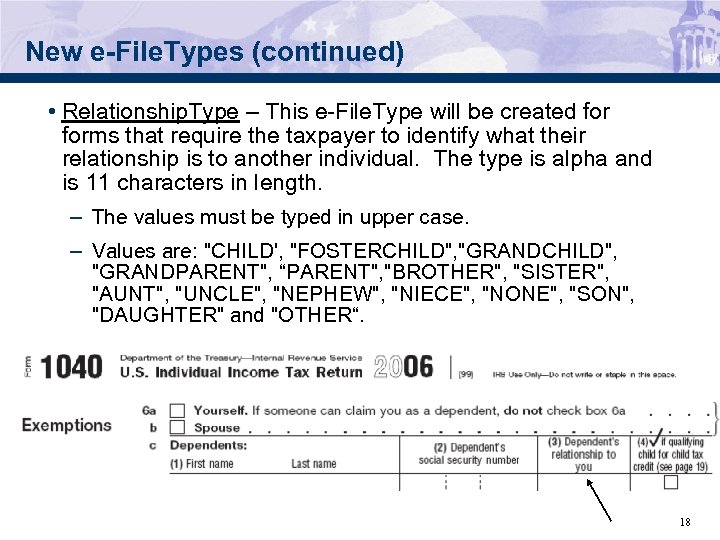 New e-File. Types (continued) • Relationship. Type – This e-File. Type will be created forms that require the taxpayer to identify what their relationship is to another individual. The type is alpha and is 11 characters in length. – The values must be typed in upper case. – Values are: "CHILD', "FOSTERCHILD", "GRANDCHILD", "GRANDPARENT", “PARENT", "BROTHER", "SISTER", "AUNT", "UNCLE", "NEPHEW", "NIECE", "NONE", "SON", "DAUGHTER" and "OTHER“. 18
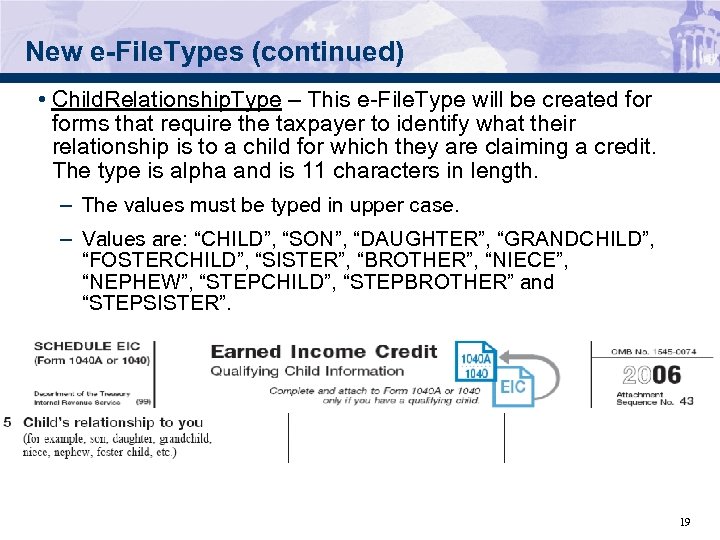 New e-File. Types (continued) • Child. Relationship. Type – This e-File. Type will be created forms that require the taxpayer to identify what their relationship is to a child for which they are claiming a credit. The type is alpha and is 11 characters in length. – The values must be typed in upper case. – Values are: “CHILD”, “SON”, “DAUGHTER”, “GRANDCHILD”, “FOSTERCHILD”, “SISTER”, “BROTHER”, “NIECE”, “NEPHEW”, “STEPCHILD”, “STEPBROTHER” and “STEPSISTER”. 19
 New e-File. Types (continued) • Number. Of. Days. Type – In the past this e-File. Type has only been used by the Form 2220 and was only present in the schema for the Form 2220. It will now be shared with the Form 2210 and will be moved to the efiletype. xsd schema package. This type is an integer type with a length of 3. • USItemized. Entry. Total. Type - A complex type which consists of: – Line. Explanation. Type – open text – 100 characters – USAmount. Type - integer – 15 characters – Total of amounts This type will be created to allow for a total of the USAmount. Types. 20
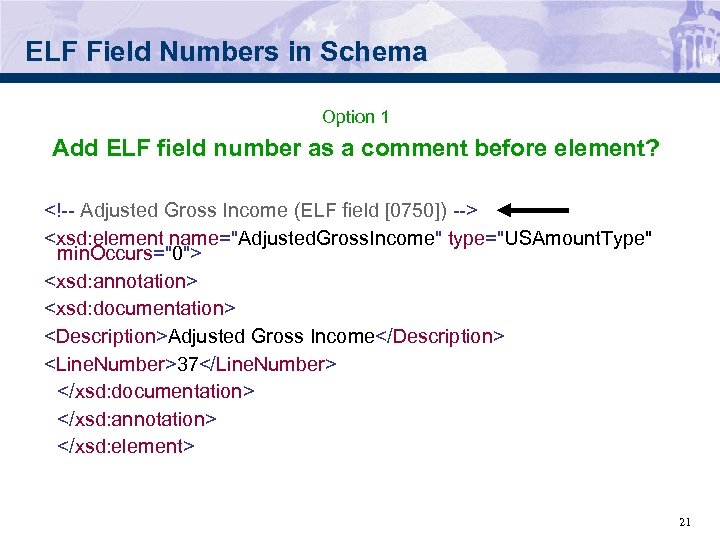 ELF Field Numbers in Schema Option 1 Add ELF field number as a comment before element?
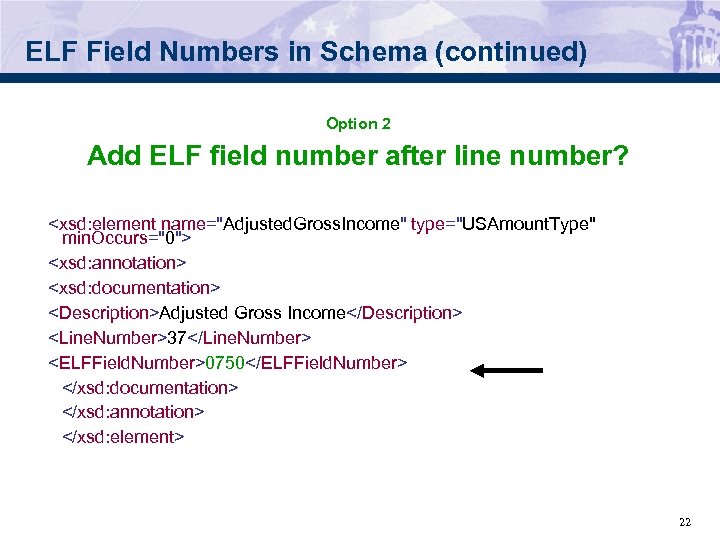 ELF Field Numbers in Schema (continued) Option 2 Add ELF field number after line number?
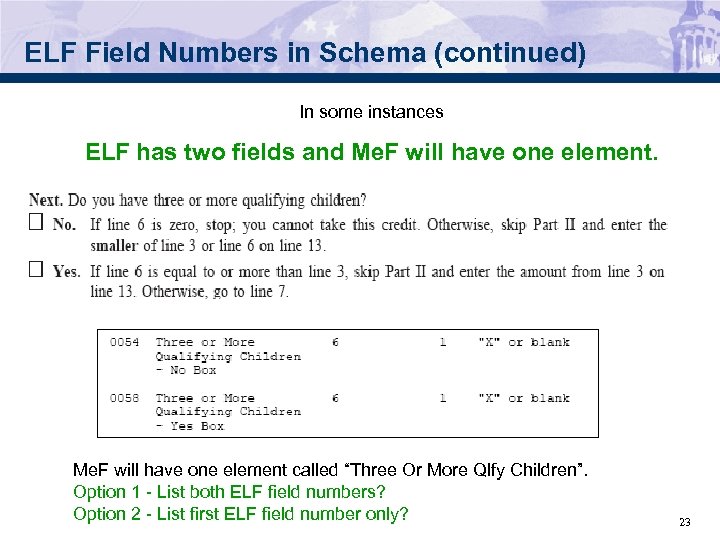 ELF Field Numbers in Schema (continued) In some instances ELF has two fields and Me. F will have one element called “Three Or More Qlfy Children”. Option 1 - List both ELF field numbers? Option 2 - List first ELF field number only? 23
 ELF Field Numbers in Schema (continued) In some instances Items may appear in a different record in Me. F than they did in ELF For example: • Certain items found in ELF Summary will appear in Return Header. – Software ID Number – Software Version Identifier – Consortium Return Code • Certain items found in ELF Authentication Record will appear in Return Header. – Jurat Disclosure Code – PIN Type Code – Taxpayer DOB, Prior Year AGI, etc. Option 1 – Leave ELF Field numbers blank? Option 2 – Other? 24
 ELF Field Numbers in Schema (continued) In some instances Me. F may include items not found in ELF For example: Submission ID Addition of new form lines In these instances, there will be no ELF field references 25
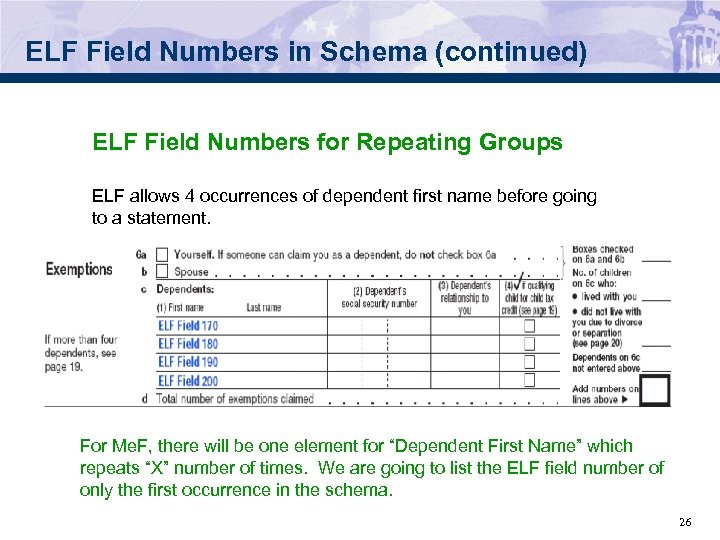 ELF Field Numbers in Schema (continued) ELF Field Numbers for Repeating Groups ELF allows 4 occurrences of dependent first name before going to a statement. For Me. F, there will be one element for “Dependent First Name” which repeats “X” number of times. We are going to list the ELF field number of only the first occurrence in the schema. 26
 Me. F versus ELF Legacy Differences 1040 Me. F does not use the same “Record types” as 1040 Legacy: • Me. F does not use a “TRANA”, “TRANB” or “RECAP” Record. The IRS uses XML (Extensible Markup Language) that specifies the structure and content of an XML document. For information on how to structure a transmission file and a submission, please refer to the Me. F Submission Composition Guide posted to irs. gov at: http: //www. irs. gov/efile/article/0, , id=171946, 00. html • Me. F does not use an “Authentication” Record. The same information can generally be found in the 1040 or the 4868 Return Header. • Me. F does not use “Preparer Notes”, “Election Explanation”, or “Regulatory Explanations”. The same information that would go into these records will now go in “named attachments” if it needs to be attached to a specific form or line on the return, or a “General Dependency” schema. 27
 Me. F versus ELF Legacy Differences (continued) • Me. F does not use a “Summary” Record. The same information can be found elsewhere within the return. • Me. F uses the concept of “Redundant Data”. If data is already entered on another line of the same tax return, form or schedule, instead of entering the data a second time on a different line of the same tax return, form or schedule, Me. F will pull the data from the other reference point and display it. For example: Form 1040, Line 37 displays the “AGI” amount. Rather than entering the “AGI” amount again on Line 38, the XML schema will have a comment "Use value from line 37". 28
 Me. F versus ELF Legacy Differences (continued) • ELF returns a RECAP Acknowledgement where they report the number of duplicates in the transmission. Me. F acknowledges by return not transmission. • ELF has an Acceptance Code of "D" - Me. F does not. We need your feedback on whether Me. F needs to add an Acceptance Code of "D" or is the reject code sufficient? • Money amount fields in ELF Legacy allows for 12 positions (11 numerics and a sign). Me. F allows for 15 positions. In most cases, Me. F will be using the USAmount. Type which allows positive and negative numbers. 29
 Business Rules • Within Me. F the terminology “Error Reject Code” has been replaced with “Business Rules” • In legacy what was Error Reject Code validation is now done thru either – Schema Validation, or – Business Rules 30
 Business Rules • Business rules versus error reject codes – Business Rule numbers are longer than Error Reject Codes and contain dashes – The left side of the Rule number specifies the form or schedule • Form 1040 is shown as “F 1040 -” • Form 2441 is shown as “F 2441 -” • Schedule EIC is shown as “SEIC-F 1040 -” • Rules that are shared between forms are shown as “R 0000 -” 31
 Business Rules – The right side of the rule number is a numeric number with a length of three. It starts with 001 for each form and is incremented by one • Examples would be shown as “F 1040 -001” “F 1040 -002” “F 2441 -001”, “SEIC-F 1040 -001” “R 0000 -001” – Since the business rules specify the form or schedule that the rule is associated with, three numerics are sufficient 32
 Business Rules • Converting Error Reject Codes into Business Rules – Some ERCs were eliminated because Me. F performs the check differently • ERC 0005 is dealing with statement records which are handled differently in Me. F. – Some ERCs were eliminated because Me. F performs these types of checks in the schema validation • ERC 0010 states that each field can contain only the type of data specified in its field description on the record layout. Me. F performs these checks in the schema validation because each field is defined by either an efile type or a specified value. – Some ERCs were converted to Me. F Business rules with only minor changes • ERC 0073 – When Filing Status (SEQ 0130) equals “ 5”; number of children who Lived with You (SEQ 0240) must be significant. • F 1040 -017 – If Form 1040 Box 5 (FS Qualifying Widow) is checked, then Line 6 c (Num Of Child Who Lived With You) must be greater than zero. 33
 Business Rules • Converting Error Reject Codes into Business Rules (continued) – Some ERCs were converted to multiple Me. F Business rules • ERC 0071 – When Secondary SSN (SEQ 0030) is significant, it must be within the valid ranges of SSN/ITIN’s, cannot equal an ATIN and cannot equal Primary SSN (SEQ 0010). It must be all numeric characters and cannot equal all zeros or all nines • F 1040 -013 – If the Spouse SSN of the tax return is present, then it must be within the valid range of SSN/ITIN and cannot equal an ATIN • F 1040 -014 – If the Spouse SSN of the tax return is present, then it cannot equal the Primary SSN on the tax return • The numeric, all zeroes and all nines checks are done in the schema validation 34
 Business Rules • Converting Error Reject Codes into Business Rules (continued) – The 500 series ERCs were numbered with the same number • ERC 501 was converted to SEIC-F 1040 -501 • ERC 503 was converted to F 1040 -503 – Some ERCs were converted to shared Business rules • Part of ERC 0019 which checks that the RTN is present on the Financial Organization Master File was converted into R 0000 -906. This is an existing rule which is shared with the corporate and partnership returns • ERC 502 which checks that the Identification number on Forms W -2 and 1099 R matches the IRS Master File was converted to R 0000 -502 because both forms share this rule 35
 Adding Alerts to Acknowledgements Alerts will report conditions that do not cause the return to reject but may require special handling, and the Alert also can contain account information that the IRS thinks would be beneficial for the taxpayer to know. Possible examples include: • Notifying the ERO/taxpayer of a math error on the return. • When a taxpayer uses the Self-Select PIN signature option, they must enter their Date of Birth (DOB). Although Me. F doesn’t reject the return for a DOB mismatch, the alert can recommend that the taxpayer contact the Social Security Administration to correct their records. • Instead of rejecting a return for an erroneous payment year (if that is the only thing wrong with the return), the return may be accepted but the acknowledgement will include an alert stating that the return was accepted, however the payment year was invalid but it was corrected in order to process the payment request. 36
 Adding Alerts (continued) Me. F will use the following guidance: • Reject severity error should have higher priority than Alert severity - e. g. if we have 200 rejects and 30 alerts, Me. F should show the first 100 rejects (agreed upon number to return in an ACK) and no alerts. But Me. F will use “Contains. Alert” to indicate the return does contain alerts. • Since rejects have a higher priority, the ACK will show the reject list first then the alert list. • If Me. F has 80 rejects and 40 alerts, then the ACK will show 80 rejects and the first 20 alerts. • Accepted ACKs will only attach the first 100 alerts. 37
 Adding Alerts (continued) The Me. F Acknowledgement has been updated to add a field "Contained. Alerts" to advise you if there alerts in the ACK. On the next few slides, we will show you three examples that highlight different formats (Error. List and Alert. List) – Note: Me. F has not defined the language in any alerts yet, so we used existing reject codes information to populate the Alert. List. Examples: 1) An Accepted return ACK with no alerts 2) An Accepted return ACK with 2 alerts 3) A Rejected return ACK with 3 errors and 2 alerts 38
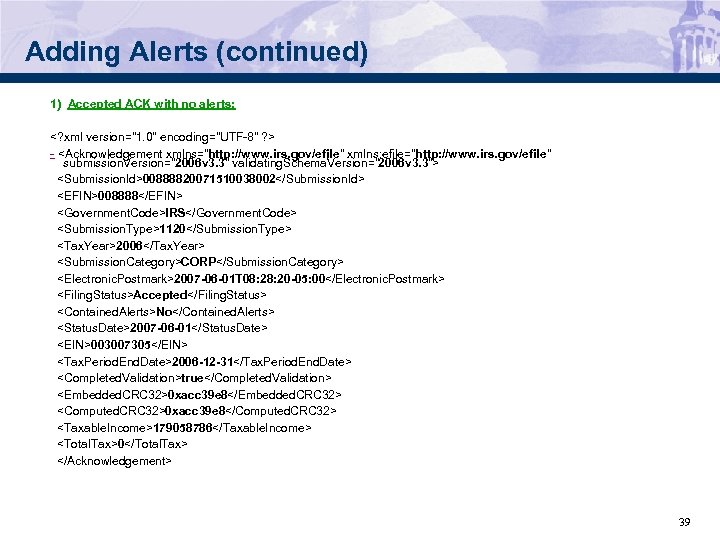 Adding Alerts (continued) 1) Accepted ACK with no alerts: -
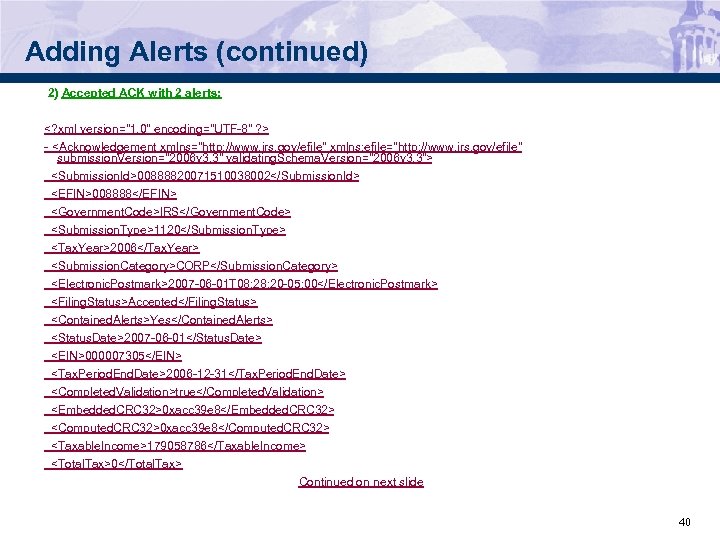 Adding Alerts (continued) 2) Accepted ACK with 2 alerts: -
-
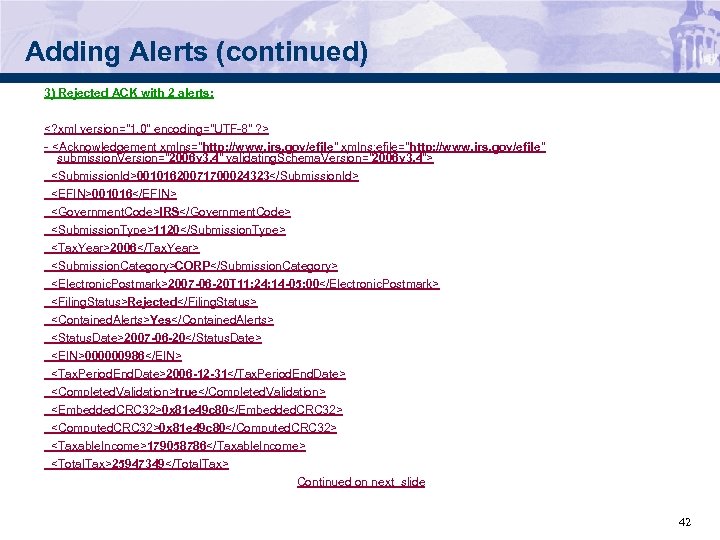 Adding Alerts (continued) 3) Rejected ACK with 2 alerts: -
-
-
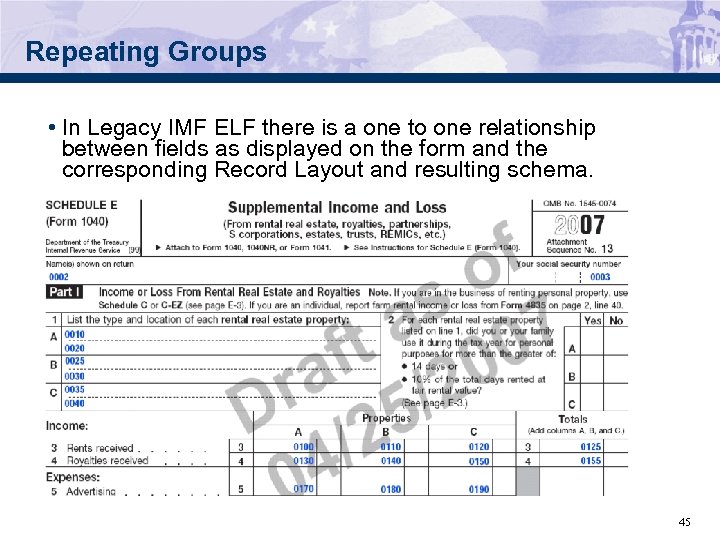 Repeating Groups • In Legacy IMF ELF there is a one to one relationship between fields as displayed on the form and the corresponding Record Layout and resulting schema. 45
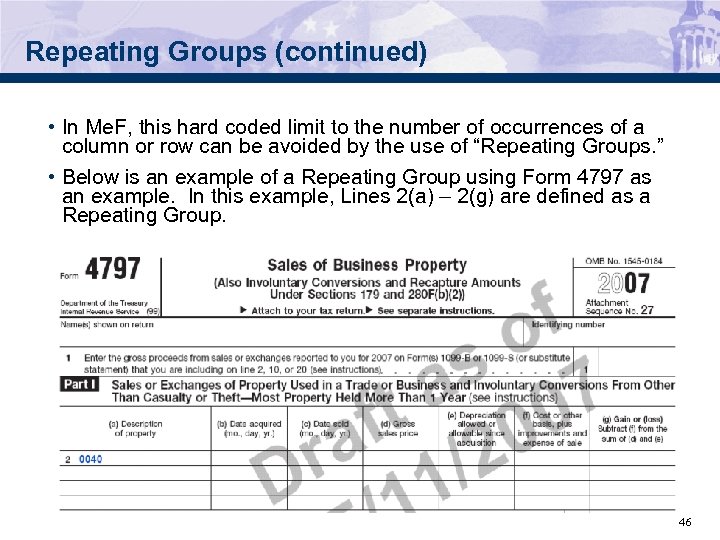 Repeating Groups (continued) • In Me. F, this hard coded limit to the number of occurrences of a column or row can be avoided by the use of “Repeating Groups. ” • Below is an example of a Repeating Group using Form 4797 as an example. In this example, Lines 2(a) – 2(g) are defined as a Repeating Group. 46
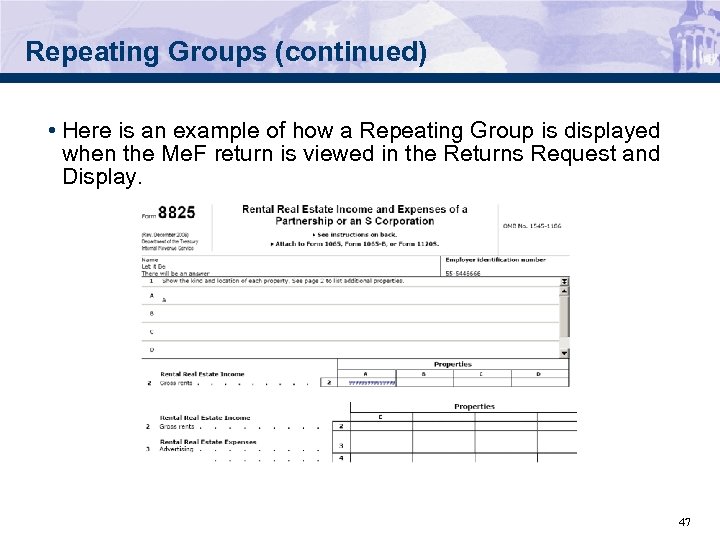 Repeating Groups (continued) • Here is an example of how a Repeating Group is displayed when the Me. F return is viewed in the Returns Request and Display. 47
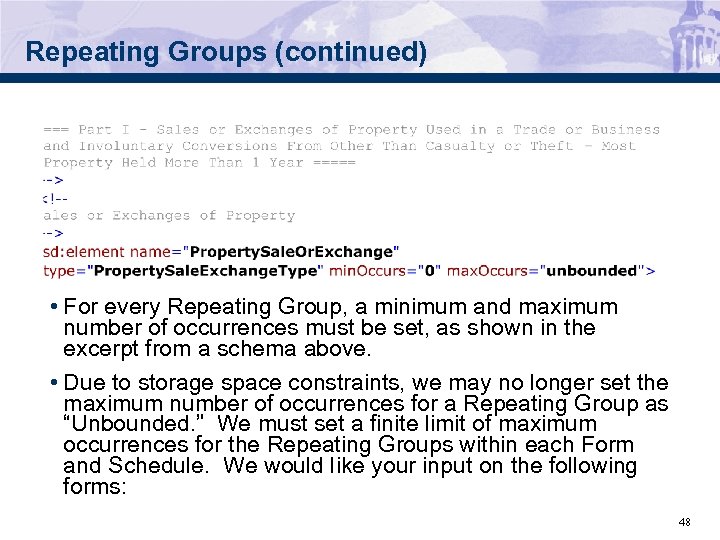 Repeating Groups (continued) • For every Repeating Group, a minimum and maximum number of occurrences must be set, as shown in the excerpt from a schema above. • Due to storage space constraints, we may no longer set the maximum number of occurrences for a Repeating Group as “Unbounded. ” We must set a finite limit of maximum occurrences for the Repeating Groups within each Form and Schedule. We would like your input on the following forms: 48
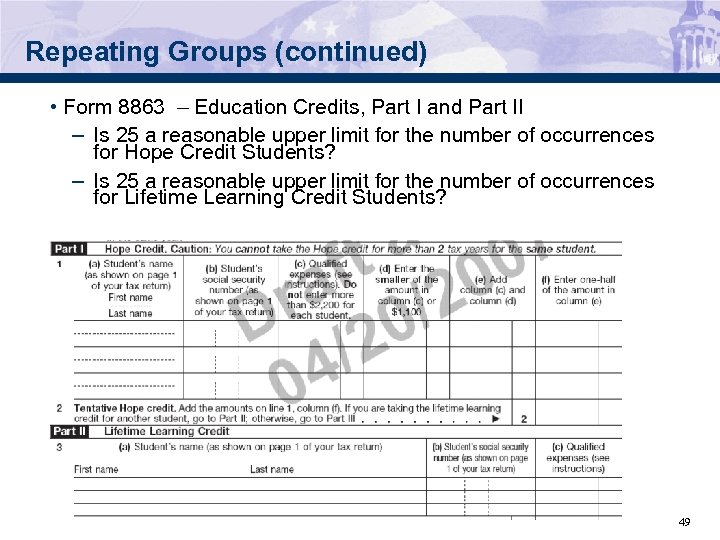 Repeating Groups (continued) • Form 8863 – Education Credits, Part I and Part II – Is 25 a reasonable upper limit for the number of occurrences for Hope Credit Students? – Is 25 a reasonable upper limit for the number of occurrences for Lifetime Learning Credit Students? 49
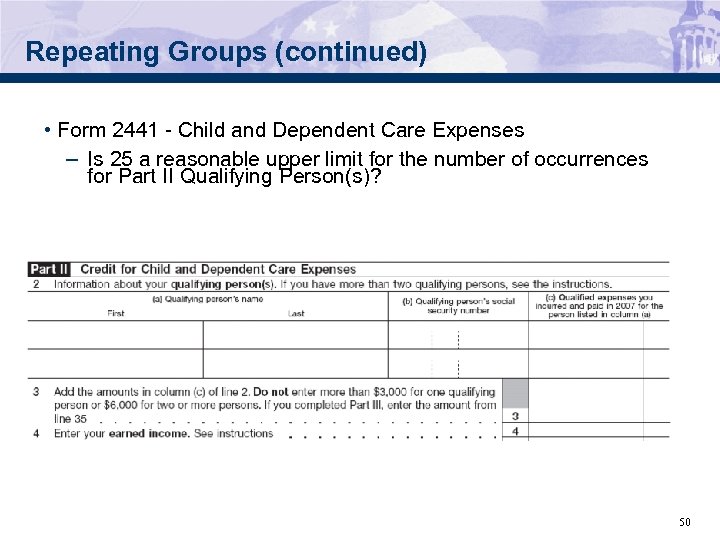 Repeating Groups (continued) • Form 2441 - Child and Dependent Care Expenses – Is 25 a reasonable upper limit for the number of occurrences for Part II Qualifying Person(s)? 50
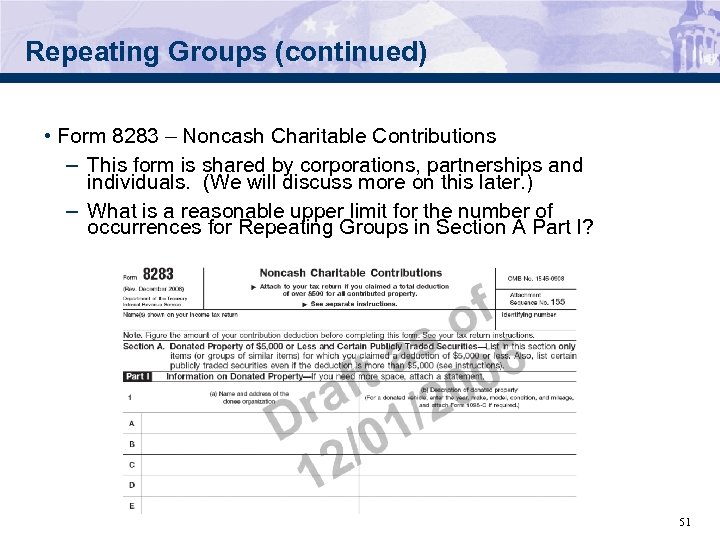 Repeating Groups (continued) • Form 8283 – Noncash Charitable Contributions – This form is shared by corporations, partnerships and individuals. (We will discuss more on this later. ) – What is a reasonable upper limit for the number of occurrences for Repeating Groups in Section A Part I? 51
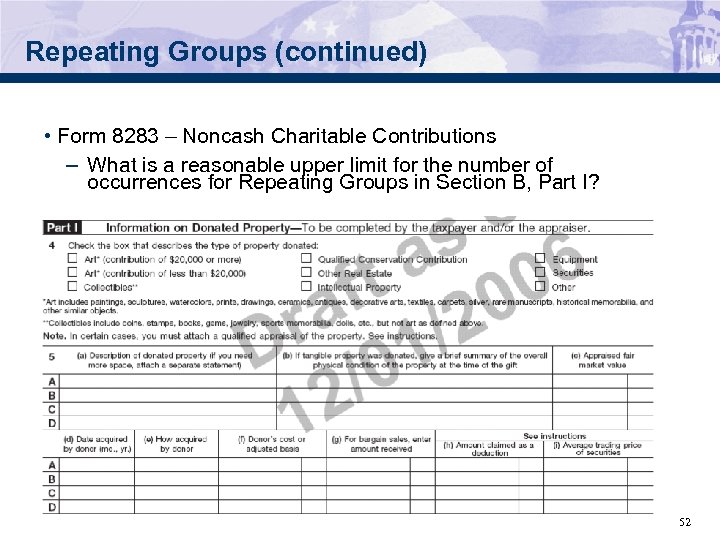 Repeating Groups (continued) • Form 8283 – Noncash Charitable Contributions – What is a reasonable upper limit for the number of occurrences for Repeating Groups in Section B, Part I? 52
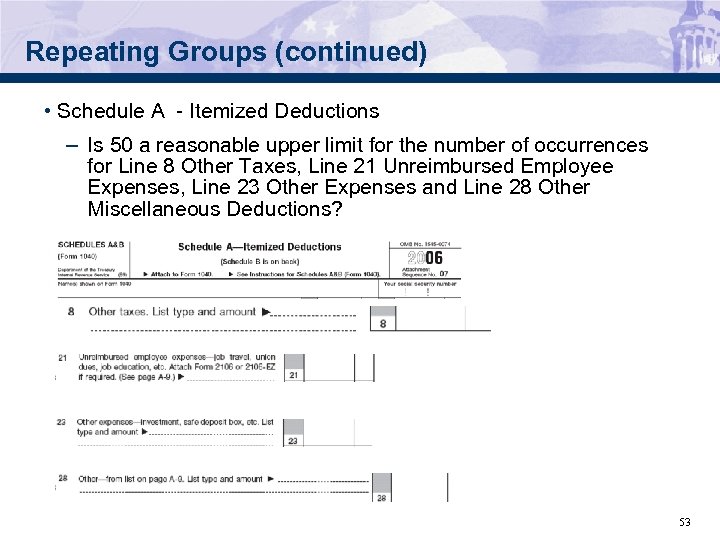 Repeating Groups (continued) • Schedule A - Itemized Deductions – Is 50 a reasonable upper limit for the number of occurrences for Line 8 Other Taxes, Line 21 Unreimbursed Employee Expenses, Line 23 Other Expenses and Line 28 Other Miscellaneous Deductions? 53
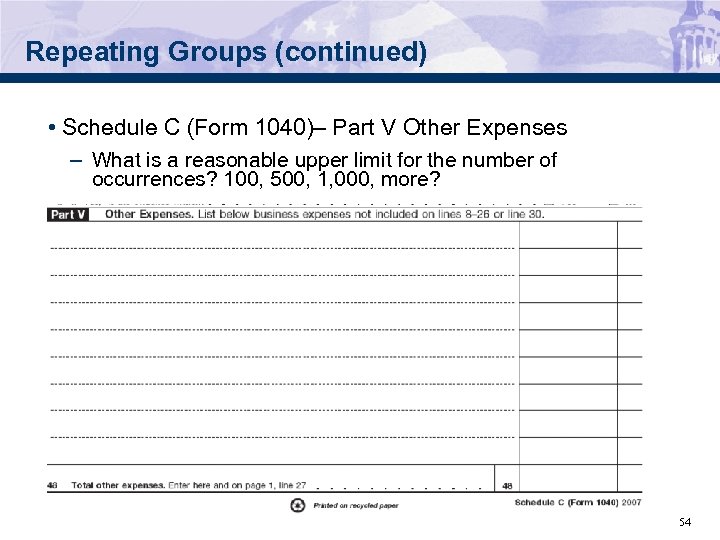 Repeating Groups (continued) • Schedule C (Form 1040)– Part V Other Expenses – What is a reasonable upper limit for the number of occurrences? 100, 500, 1, 000, more? 54
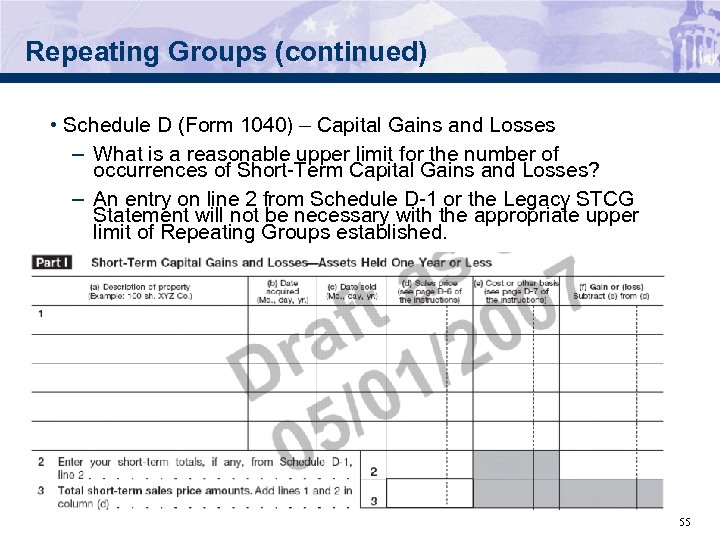 Repeating Groups (continued) • Schedule D (Form 1040) – Capital Gains and Losses – What is a reasonable upper limit for the number of occurrences of Short-Term Capital Gains and Losses? – An entry on line 2 from Schedule D-1 or the Legacy STCG Statement will not be necessary with the appropriate upper limit of Repeating Groups established. 55
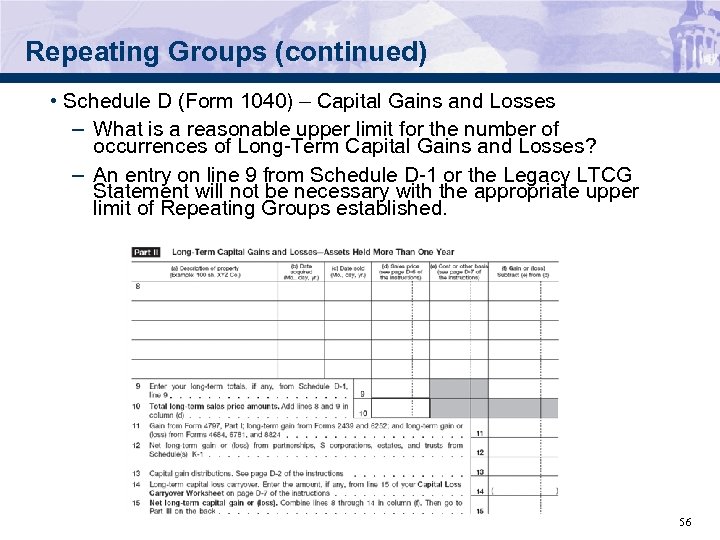 Repeating Groups (continued) • Schedule D (Form 1040) – Capital Gains and Losses – What is a reasonable upper limit for the number of occurrences of Long-Term Capital Gains and Losses? – An entry on line 9 from Schedule D-1 or the Legacy LTCG Statement will not be necessary with the appropriate upper limit of Repeating Groups established. 56
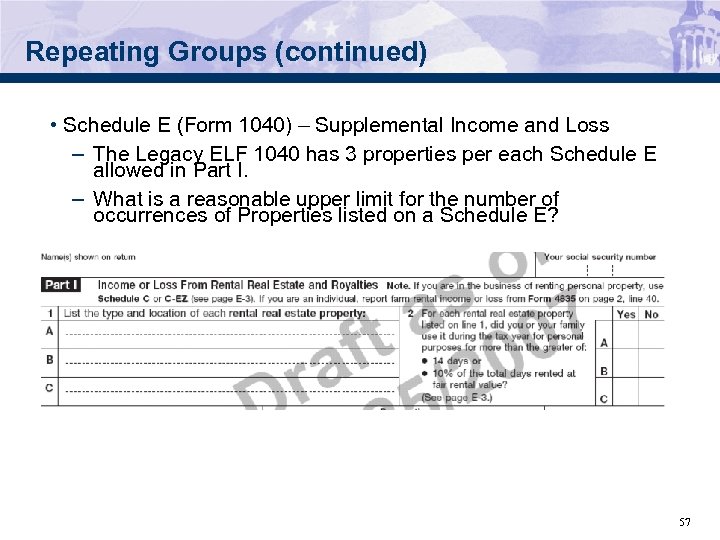 Repeating Groups (continued) • Schedule E (Form 1040) – Supplemental Income and Loss – The Legacy ELF 1040 has 3 properties per each Schedule E allowed in Part I. – What is a reasonable upper limit for the number of occurrences of Properties listed on a Schedule E? 57
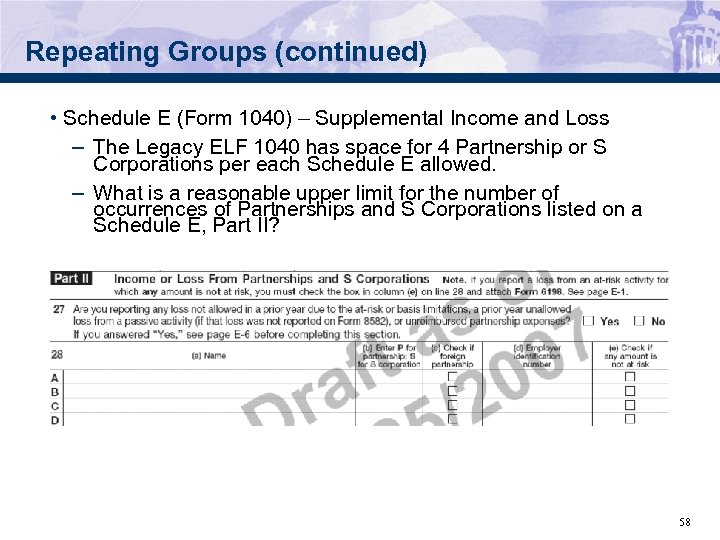 Repeating Groups (continued) • Schedule E (Form 1040) – Supplemental Income and Loss – The Legacy ELF 1040 has space for 4 Partnership or S Corporations per each Schedule E allowed. – What is a reasonable upper limit for the number of occurrences of Partnerships and S Corporations listed on a Schedule E, Part II? 58
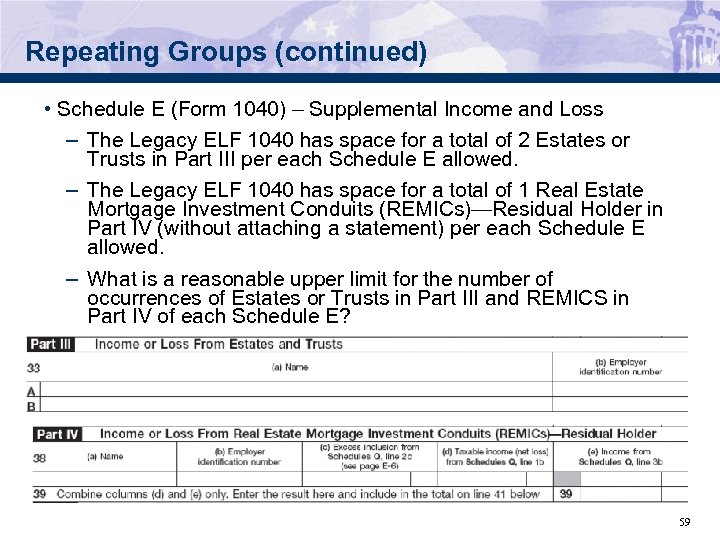 Repeating Groups (continued) • Schedule E (Form 1040) – Supplemental Income and Loss – The Legacy ELF 1040 has space for a total of 2 Estates or Trusts in Part III per each Schedule E allowed. – The Legacy ELF 1040 has space for a total of 1 Real Estate Mortgage Investment Conduits (REMICs)—Residual Holder in Part IV (without attaching a statement) per each Schedule E allowed. – What is a reasonable upper limit for the number of occurrences of Estates or Trusts in Part III and REMICS in Part IV of each Schedule E? 59
 Form Occurrences • In addition to setting the maximum number of occurrences for Repeating Groups, we must now also set the maximum number of occurrences for Forms and Schedules. • Some examples of high occurrence Forms that have come in with Me. F BMF returns are: – Form 8858 – Form 8594 – Form 8865 • Some high occurrence Forms are shared between Corporate, Partnership and Individual returns. The maximum occurrence allowed must be set high enough to not cause problems for all three categories. • We will be sending out a list of Forms that will be implemented in Phase II that will need to have a maximum number of occurrences. We will look forward to your recommendations regarding these Forms. 60
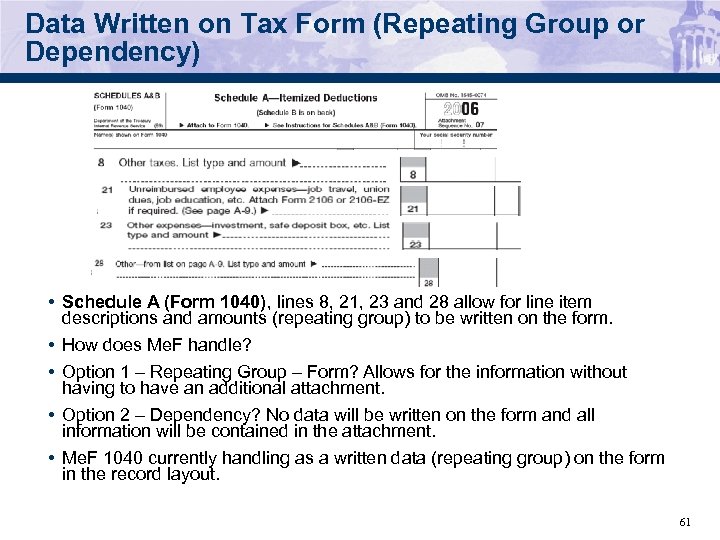 Data Written on Tax Form (Repeating Group or Dependency) • Schedule A (Form 1040), lines 8, 21, 23 and 28 allow for line item descriptions and amounts (repeating group) to be written on the form. • How does Me. F handle? • Option 1 – Repeating Group – Form? Allows for the information without having to have an additional attachment. • Option 2 – Dependency? No data will be written on the form and all information will be contained in the attachment. • Me. F 1040 currently handling as a written data (repeating group) on the form in the record layout. 61
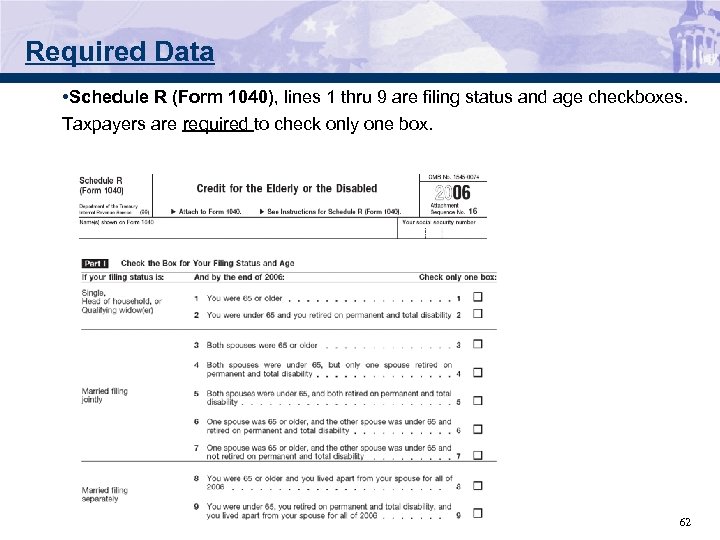 Required Data • Schedule R (Form 1040), lines 1 thru 9 are filing status and age checkboxes. Taxpayers are required to check only one box. 62
 Required Data – Schedule R (continued) • How does Me. F 1040 handle to ensure one and only one box is checked? • Option 1 – Business Rule? Receive a business rule reject that identifies the specific error • Option 2 – Schema Validation? Receive a generic business rule reject (X 0000 -005) but the location (xpath) points to the incorrect/invalid field(s). • Me. F 1040 currently handling through schema validation. 63
 Restricted Data or Unrestricted Data • Form 2106, line 33 says “Enter depreciation method and percentage (see instructions”). Depreciation Method and Percentage Chart—Line 33 Date Placed in Service (a)1 (b)1 (c) – – – Oct. 1 – Dec. 31, 2006 200 DB 5. 0 % 150 DB 3. 75% SL 2. 5% Jan. 1 – Sept. 30, 2006 200 DB 20. 0 150 DB 15. 0 SL 10. 0 Oct. 1 – Dec. 31, 2005 200 DB 38. 0 150 DB 28. 88 SL 20. 0 Jan. 1 – Sept. 30, 2005 200 DB 32. 0 150 DB 25. 5 SL 20. 0 Oct. 1 – Dec. 31, 2004 200 DB 22. 8 150 DB 20. 21 SL 20. 0 Jan. 1 – Sept. 30, 2004 200 DB 19. 2 150 DB 17. 85 SL 20. 0 Oct. 1 – Dec. 31, 2003 200 DB 13. 68 150 DB 16. 4 SL 20. 0 Jan. 1 – Sept. 30, 2003 200 DB 11. 52 150 DB 16. 66 SL 20. 0 Oct. 1 – Dec. 31, 2002 200 DB 10. 94 150 DB 16. 41 SL 20. 0 Jan. 1 – Sept. 30, 2002 200 DB 11. 52 150 DB 16. 66 SL 20. 0 Oct. 1 – Dec. 31, 20012 200 DB 9. 58 150 DB 14. 35 SL 17. 5 Jan. 1 – Sept. 30, 2001 200 DB 5. 76 150 DB 8. 33 SL 10. 0 • How does Me. F 1040 handle? • Option 1 – Text. Type? Allow a value up to 35 characters to provide the applicable method and percentage. • Option 2 – Restricted? Provide each method and percentage as stated in the chart in the schema. Will these value change form year to year? • Me. F 1040 currently handling as a Text. Type of 35 in the record layout. 64
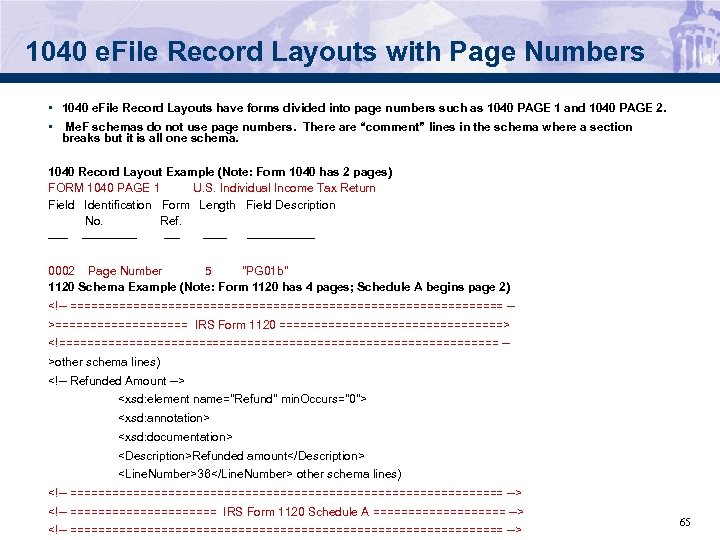 1040 e. File Record Layouts with Page Numbers • 1040 e. File Record Layouts have forms divided into page numbers such as 1040 PAGE 1 and 1040 PAGE 2. • Me. F schemas do not use page numbers. There are “comment” lines in the schema where a section breaks but it is all one schema. 1040 Record Layout Example (Note: Form 1040 has 2 pages) FORM 1040 PAGE 1 U. S. Individual Income Tax Return Field Identification Form Length Field Description No. Ref. ------- --------0002 Page Number 5 "PG 01 b" 1120 Schema Example (Note: Form 1120 has 4 pages; Schedule A begins page 2)
 Attachments to Forms or Schedules • Me. F 1040 will allow attachments to forms and schedules as done now for Me. F corporate and partnership returns. • XML documents can be “attached” to either a line, or a form/schedule or return. • When a document is attached to an (XML) element then there is a reference (pointer) from the element to the attached document. • Two attributes indicate the attachment of a supporting document to an XML element. – The attribute named “reference. Document. Name”, wherever it appears, is used to enumerate the document(s) that can be attached to the element. – The attribute named “reference. Document. Id” establishes a reference from the element where it appears, to the attached document(s). • When the business rule is looking for supporting XML document attached to a line, form/schedule or return, and the supporting XML document is not attached there, the return would be rejected. 66
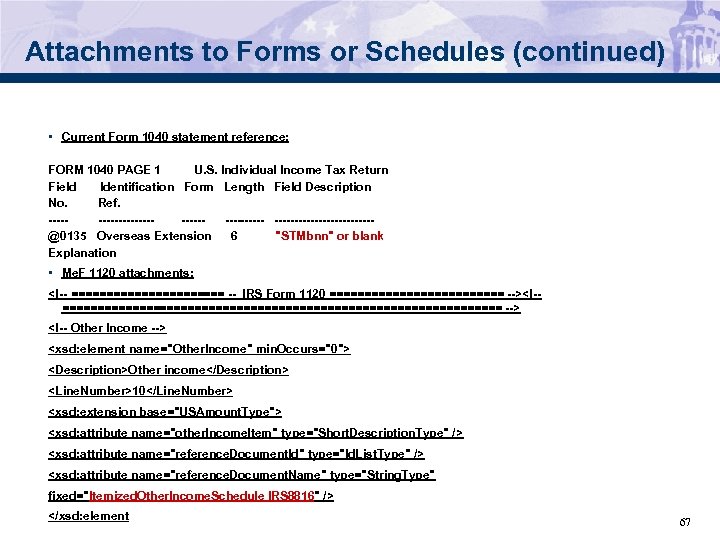 Attachments to Forms or Schedules (continued) • Current Form 1040 statement reference: FORM 1040 PAGE 1 U. S. Individual Income Tax Return Field Identification Form Length Field Description No. Ref. ----- ---------- ------------@0135 Overseas Extension 6 "STMbnn" or blank Explanation • Me. F 1120 attachments:
 Me. F Discussion Items • 100 Submissions • Paper Indicator – 8453 Transmittal • Allow multiple form types to be transmitted together? (Ability for prioritization) • Legacy e-File uses Address Indicators. Me. F controls through the schema USAddress. Type and Foreign. Address. Type. Any problems? • Electronic postmark is in three fields for e-file and just one field for Me. F • e-File has a Direct deposit indicator as well as the Direct Deposit data. Do we need both? 68
 Automated Enrollment • Enrolling System. IDs for A 2 A transmission is currently a manual process. • Automated Enrollment gives the transmitter/state (who has been given the authority as Me. F System Enroller) the ability to enroll or update their System. IDs • The System Enroller can perform the following tasks – Add, update or delete a System. ID – Change the option from user name/password to certificate – Upload certificates for System. IDs – Change the Services that System. ID can perform – Add or delete the ETINs that are associated with the System. ID • Scheduled to be rolled out with ATS (Nov 2007) 69
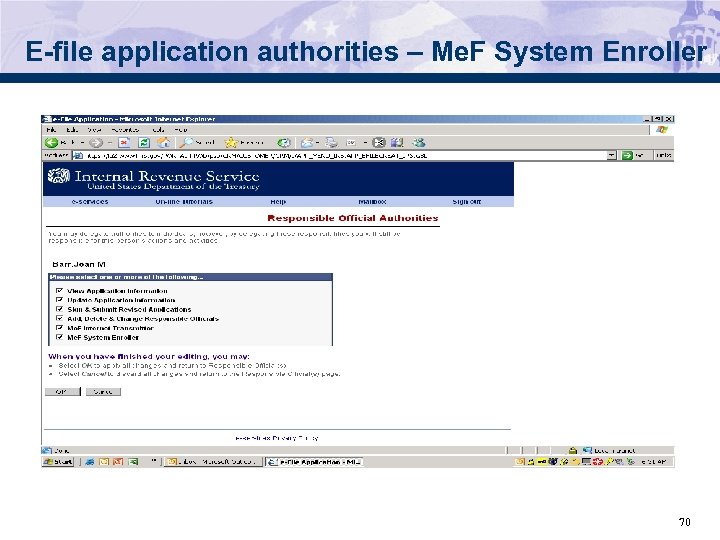 E-file application authorities – Me. F System Enroller 70
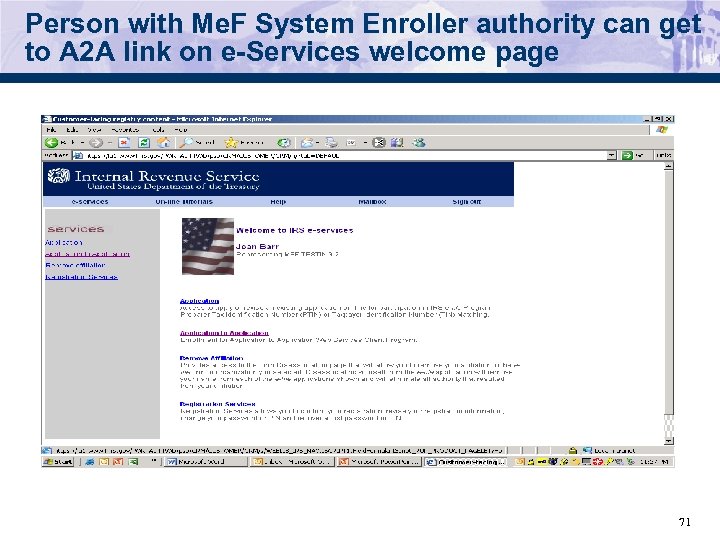 Person with Me. F System Enroller authority can get to A 2 A link on e-Services welcome page 71
 Strong Authentication • In order to meet security requirements from HSPD 12, IRS will require external partners to get X. 509 certificates from one of several public Certificate Authorities (CAs). – Iden. Trust; http: //www. identrust. com/certificates/buy_aces. html – Or En. Trust; http: //www. entrust. net/index. htm – Or Verisign; http: //www. verisign. com/ssl/buy-sslcertificates/index. html – Or ORC; http: //aces. orc. com/ 72
 Strong Authentication, cont. • Enroll a new System. ID for testing with certificates. The System. ID may use either user name/password or certificates but not both • Partners will upload a certificate with IRS and associate it with one or more System. IDs. • User Guide will be distributed in the fall. 73
 Transmission and Submission Packaging • A 2 A Message Send. Submissions • The Send. Submission service request is used to transmit submissions. It can have one and only one attachment. This attachment must be an uncompressed zip file called the container zip file. The container zip file can contain one or more compressed zip files. Each of these zip files contain one federal or state submission. 74
 Application to Application (A 2 A) • Packaging and file structure 75
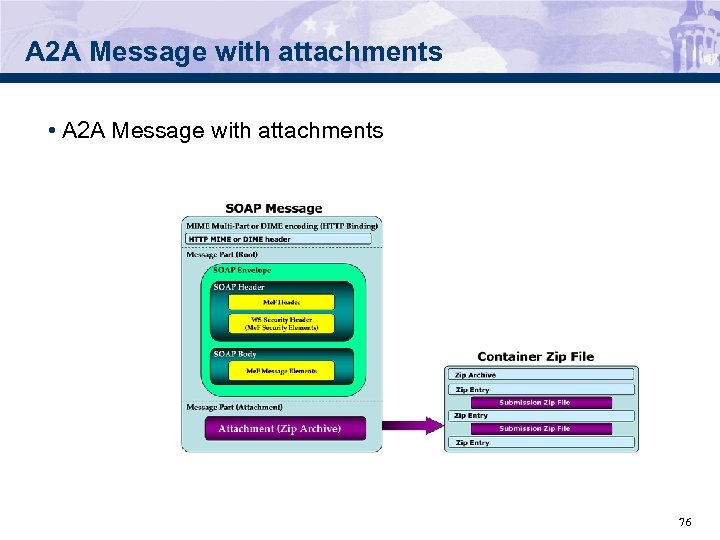 A 2 A Message with attachments • A 2 A Message with attachments 76
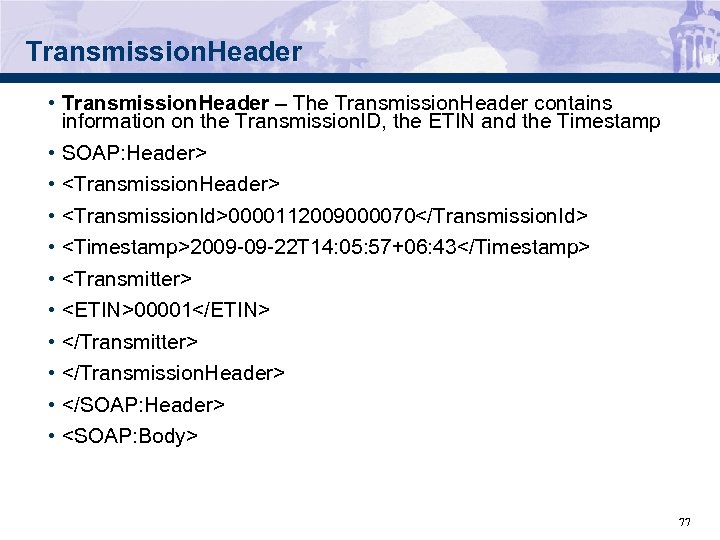 Transmission. Header • Transmission. Header – The Transmission. Header contains information on the Transmission. ID, the ETIN and the Timestamp • SOAP: Header> •
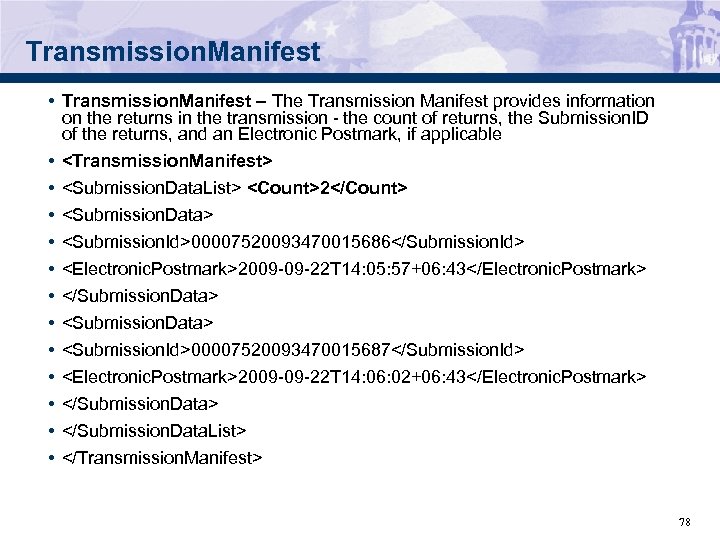 Transmission. Manifest • Transmission. Manifest – The Transmission Manifest provides information on the returns in the transmission - the count of returns, the Submission. ID of the returns, and an Electronic Postmark, if applicable •
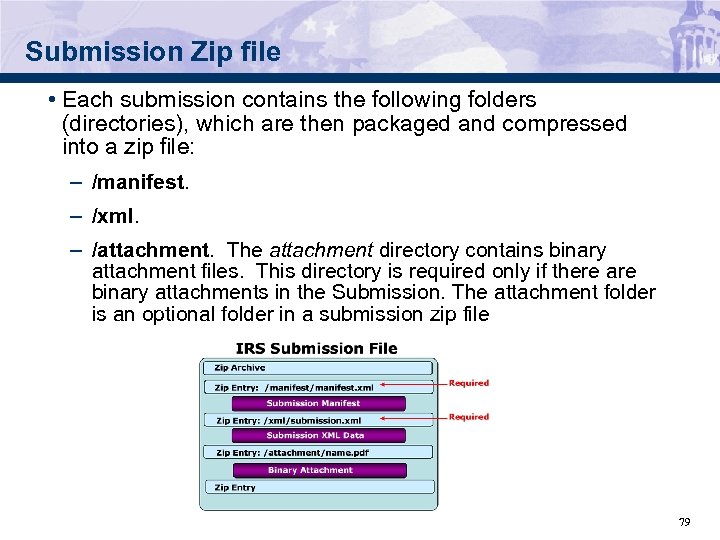 Submission Zip file • Each submission contains the following folders (directories), which are then packaged and compressed into a zip file: – /manifest. – /xml. – /attachment. The attachment directory contains binary attachment files. This directory is required only if there are binary attachments in the Submission. The attachment folder is an optional folder in a submission zip file 79
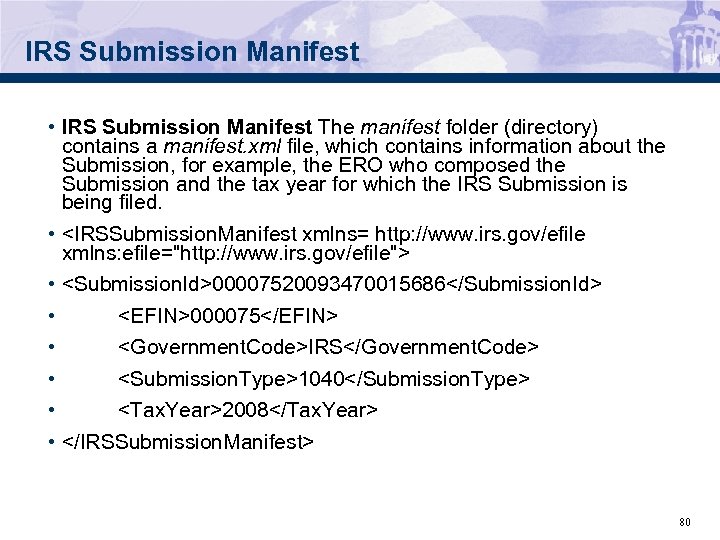 IRS Submission Manifest • IRS Submission Manifest The manifest folder (directory) contains a manifest. xml file, which contains information about the Submission, for example, the ERO who composed the Submission and the tax year for which the IRS Submission is being filed. •
 IRS XML Data • XML Directory - The xml directory contains the submission. xml file with the submission data in XML format. • The XML data is made up of the – Return. Header and – Return. Data. 81
 IRS Return. Header • The IRS Return. Header contains high level return information including the following: – Submission. ID – EFIN – Signature. Option – Filer SSN(s) and Name Control(s) – Taxpayer Name Line 1 – Preparer Information – And more…. . 82
 IRSReturn. Data • The IRS Return Data contains the Form 1040, attached forms and schedules and XML attachments. – Count of documents in the return – 1040 data – Attached forms and schedules – Payment information, if applicable – XML Attachments and General Dependencies – XML Binary Attachment documents 83
 IRS Attachment Directory • The Attachment Directory contains the PDF files that are attached to the return. • One Binary Attachment XML document must be created for each binary attachment. There is one-to-one relationship between the PDF file and the Binary Attachment XML document that describes it. • The Binary files are in the Attachment Directory • The Attachment XML document is in the XML Data. 84