


 Скачать презентацию FALCON Management and Monitoring Introduction Rudi
f370e8c6624edb69ae02d16a184dc563.ppt
- Количество слайдов: 121
 FALCON Management and Monitoring
 Introduction § Rudi Schlösser, CTO § Email: schloesser@atecom. com § Customer Support § Email: support@atecom. com § Additional Information § WWW: www. atecom. com § FTP: ftp. atecom. com/pub
 Agenda § Technolgies § PDH, SDH, and ATM § MPEG and DVB-ASI § FALCON § System Architecture § General Aspects § Components § Management § Boot Monitor § Firmware § Configuration § Monitoring § Troubleshooting
 Please. . . § Cry and stop me, if there any questions and more details are needed. § There are no stupid questions, but only stupid answers § Let‘s skip over parts already known, there‘s never enough time
 Technologies Network
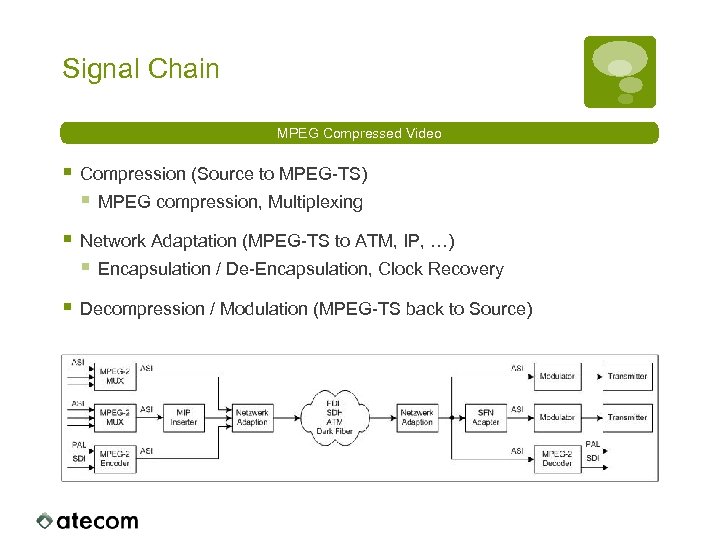 Signal Chain MPEG Compressed Video § Compression (Source to MPEG-TS) § MPEG compression, Multiplexing § Network Adaptation (MPEG-TS to ATM, IP, …) § Encapsulation / De-Encapsulation, Clock Recovery § Decompression / Modulation (MPEG-TS back to Source)
 Network Technologies § PDH (Plesiochronous Digital Hierarchy) § SDH / SONET (Synchronous Digital Hierarchy / Optical Networks) § ATM (Asynchronous Transfer Mode) § SONET NG (SONET Next Generation) § RPR (Residual Packet Ring) § GFP (Generic Framing Procedure) § MPLS § Ethernet § IP, UDP, RTP, …
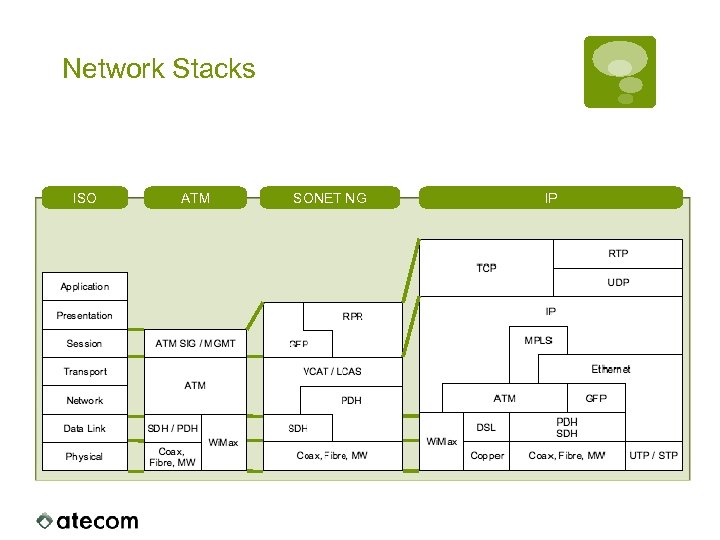 Network Stacks ISO ATM SONET NG IP
 Network PDH
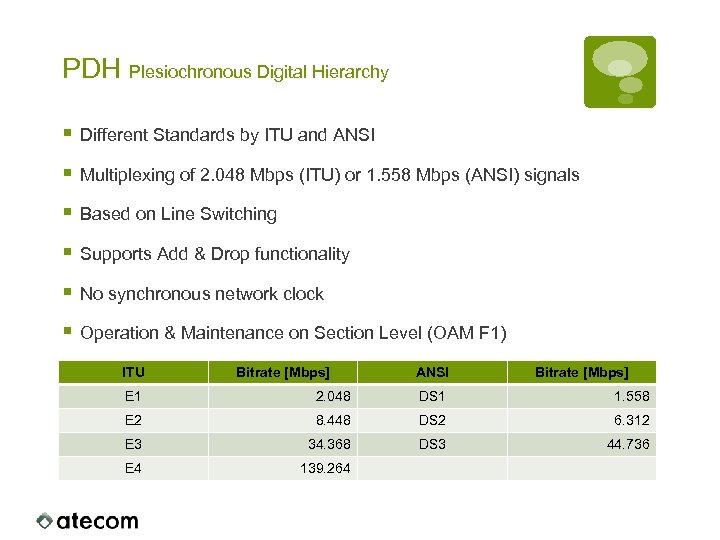 PDH Plesiochronous Digital Hierarchy § Different Standards by ITU and ANSI § Multiplexing of 2. 048 Mbps (ITU) or 1. 558 Mbps (ANSI) signals § Based on Line Switching § Supports Add & Drop functionality § No synchronous network clock § Operation & Maintenance on Section Level (OAM F 1) ITU Bitrate [Mbps] ANSI Bitrate [Mbps] E 1 2. 048 DS 1 1. 558 E 2 8. 448 DS 2 6. 312 E 3 34. 368 DS 3 44. 736 E 4 139. 264
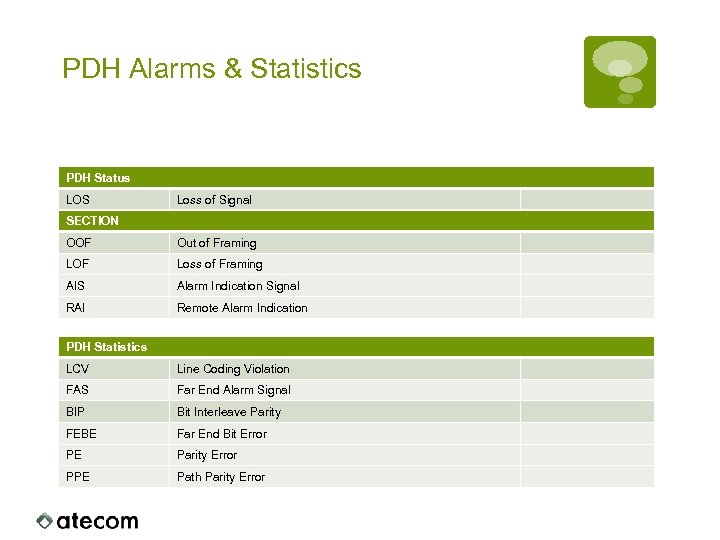 PDH Alarms & Statistics PDH Status LOS Loss of Signal SECTION OOF Out of Framing LOF Loss of Framing AIS Alarm Indication Signal RAI Remote Alarm Indication PDH Statistics LCV Line Coding Violation FAS Far End Alarm Signal BIP Bit Interleave Parity FEBE Far End Bit Error PE Parity Error PPE Path Parity Error
 Network SDH
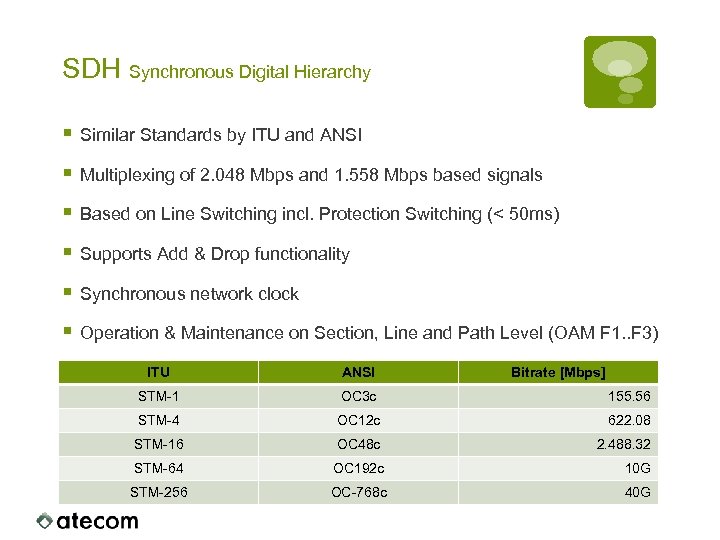 SDH Synchronous Digital Hierarchy § Similar Standards by ITU and ANSI § Multiplexing of 2. 048 Mbps and 1. 558 Mbps based signals § Based on Line Switching incl. Protection Switching (< 50 ms) § Supports Add & Drop functionality § Synchronous network clock § Operation & Maintenance on Section, Line and Path Level (OAM F 1. . F 3) ITU ANSI Bitrate [Mbps] STM-1 OC 3 c 155. 56 STM-4 OC 12 c 622. 08 STM-16 OC 48 c 2. 488. 32 STM-64 OC 192 c 10 G STM-256 OC-768 c 40 G
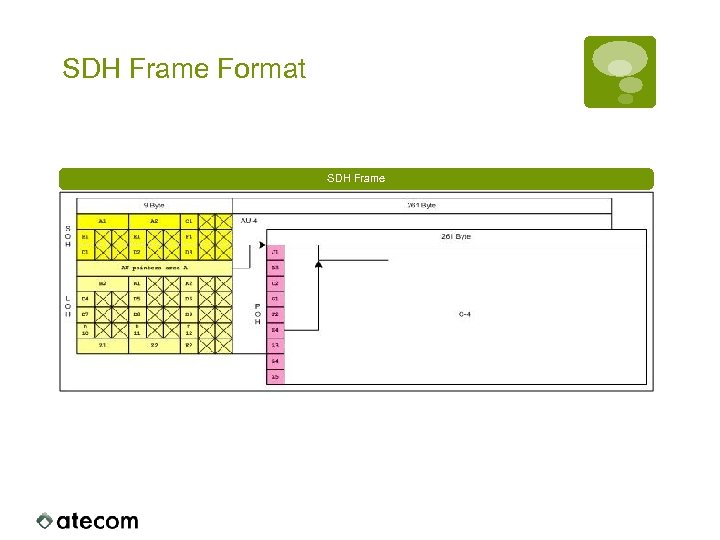 SDH Frame Format SDH Frame
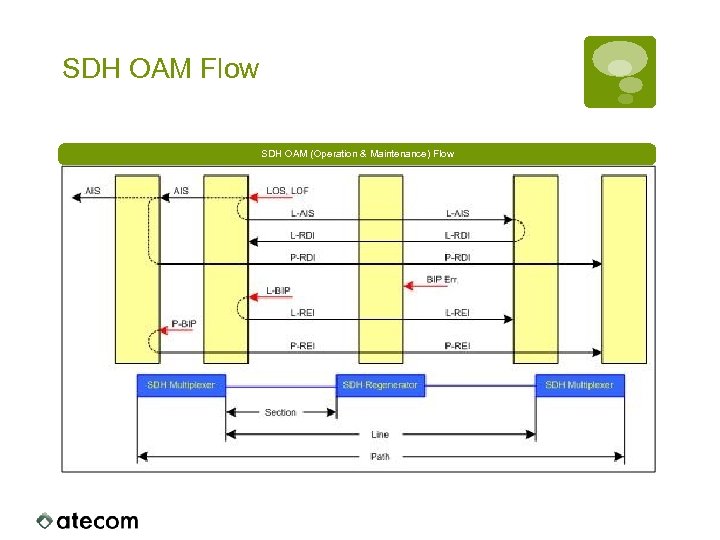 SDH OAM Flow SDH OAM (Operation & Maintenance) Flow
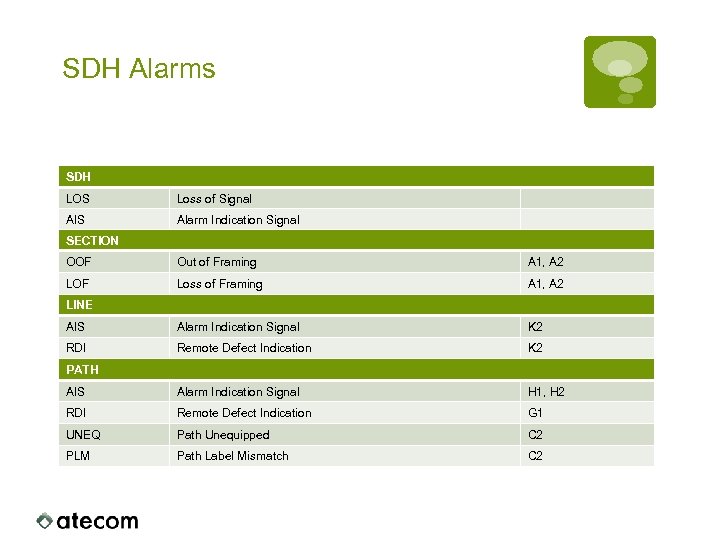 SDH Alarms SDH LOS Loss of Signal AIS Alarm Indication Signal SECTION OOF Out of Framing A 1, A 2 LOF Loss of Framing A 1, A 2 AIS Alarm Indication Signal K 2 RDI Remote Defect Indication K 2 AIS Alarm Indication Signal H 1, H 2 RDI Remote Defect Indication G 1 UNEQ Path Unequipped C 2 PLM Path Label Mismatch C 2 LINE PATH
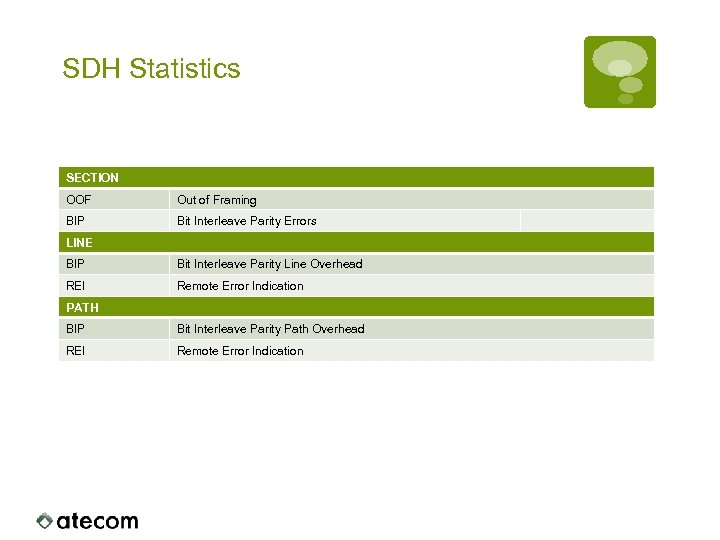 SDH Statistics SECTION OOF Out of Framing BIP Bit Interleave Parity Errors LINE BIP Bit Interleave Parity Line Overhead REI Remote Error Indication PATH BIP Bit Interleave Parity Path Overhead REI Remote Error Indication
 Network ATM
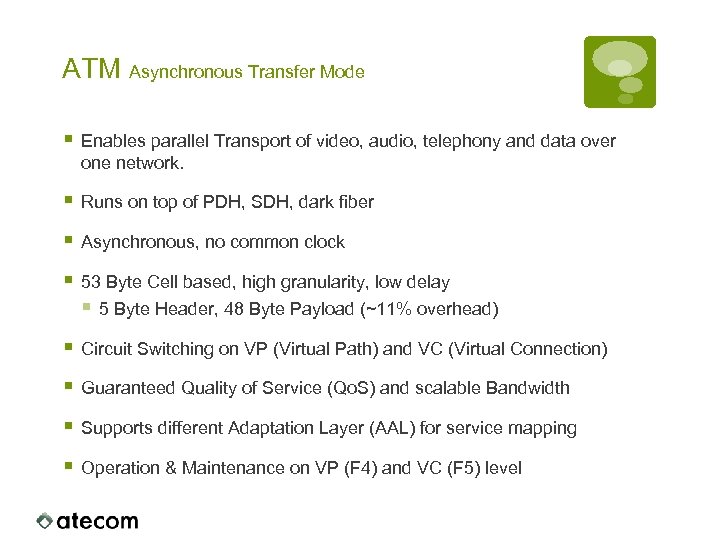 ATM Asynchronous Transfer Mode § Enables parallel Transport of video, audio, telephony and data over one network. § Runs on top of PDH, SDH, dark fiber § Asynchronous, no common clock § 53 Byte Cell based, high granularity, low delay § 5 Byte Header, 48 Byte Payload (~11% overhead) § Circuit Switching on VP (Virtual Path) and VC (Virtual Connection) § Guaranteed Quality of Service (Qo. S) and scalable Bandwidth § Supports different Adaptation Layer (AAL) for service mapping § Operation & Maintenance on VP (F 4) and VC (F 5) level
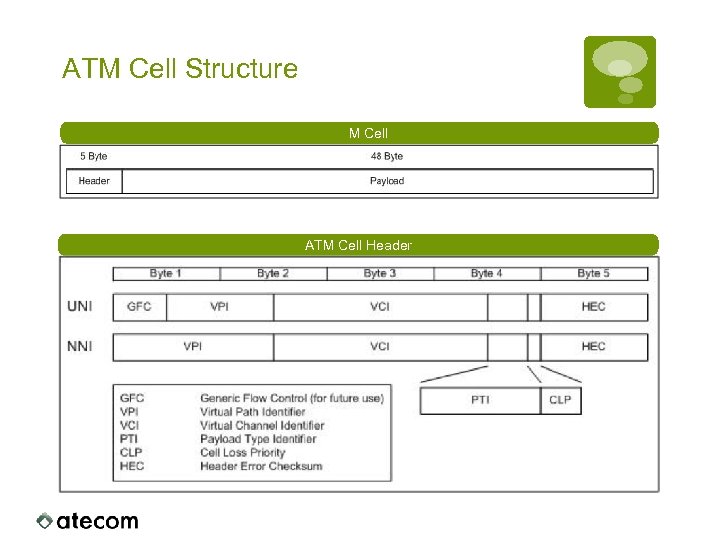 ATM Cell Structure ATM Cell Header
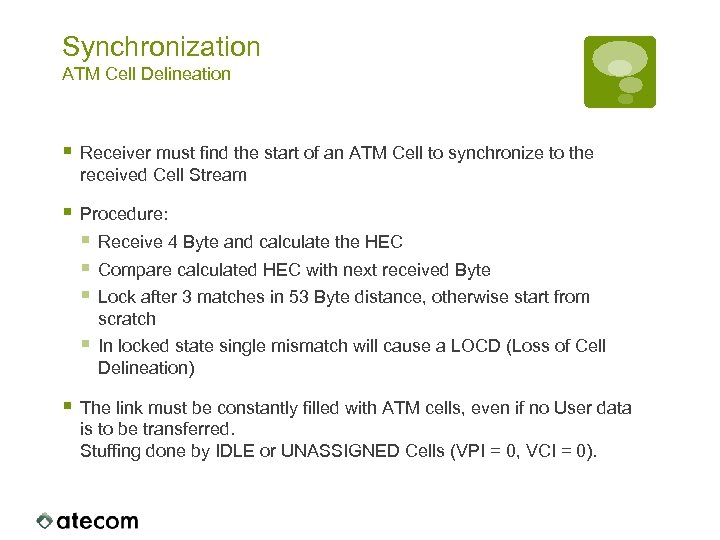 Synchronization ATM Cell Delineation § Receiver must find the start of an ATM Cell to synchronize to the received Cell Stream § Procedure: § Receive 4 Byte and calculate the HEC § Compare calculated HEC with next received Byte § Lock after 3 matches in 53 Byte distance, otherwise start from scratch § In locked state single mismatch will cause a LOCD (Loss of Cell Delineation) § The link must be constantly filled with ATM cells, even if no User data is to be transferred. Stuffing done by IDLE or UNASSIGNED Cells (VPI = 0, VCI = 0).
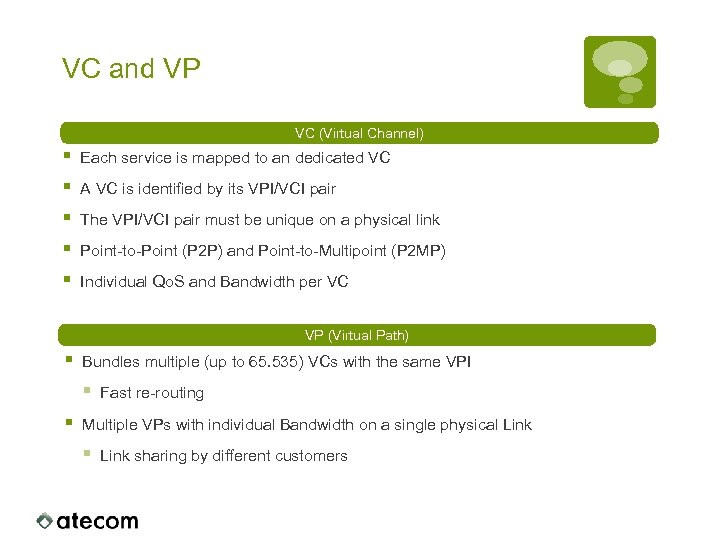 VC and VP VC (Virtual Channel) § § § Each service is mapped to an dedicated VC A VC is identified by its VPI/VCI pair The VPI/VCI pair must be unique on a physical link Point-to-Point (P 2 P) and Point-to-Multipoint (P 2 MP) Individual Qo. S and Bandwidth per VC VP (Virtual Path) § Bundles multiple (up to 65. 535) VCs with the same VPI § § Fast re-routing Multiple VPs with individual Bandwidth on a single physical Link § Link sharing by different customers
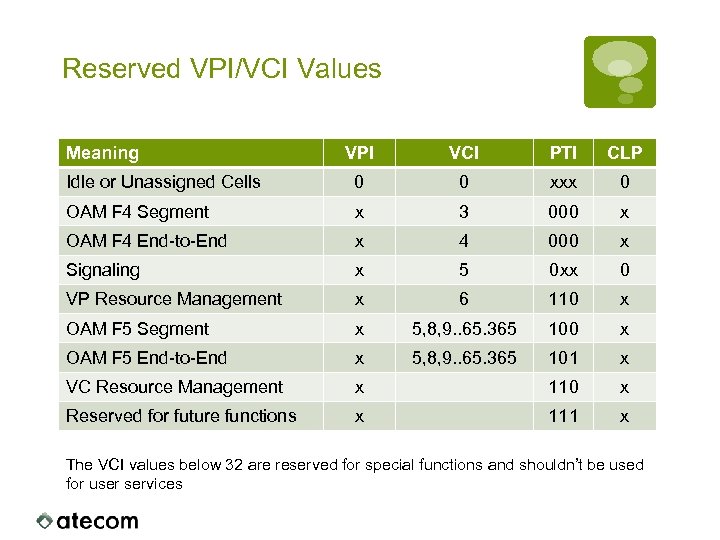 Reserved VPI/VCI Values Meaning VPI VCI PTI CLP Idle or Unassigned Cells 0 0 xxx 0 OAM F 4 Segment x 3 000 x OAM F 4 End-to-End x 4 000 x Signaling x 5 0 xx 0 VP Resource Management x 6 110 x OAM F 5 Segment x 5, 8, 9. . 65. 365 100 x OAM F 5 End-to-End x 5, 8, 9. . 65. 365 101 x VC Resource Management x 110 x Reserved for future functions x 111 x The VCI values below 32 are reserved for special functions and shouldn’t be used for user services
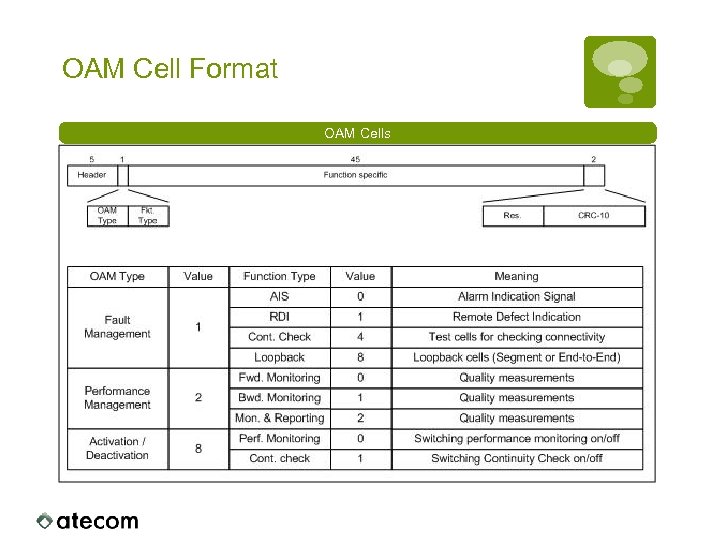 OAM Cell Format OAM Cells
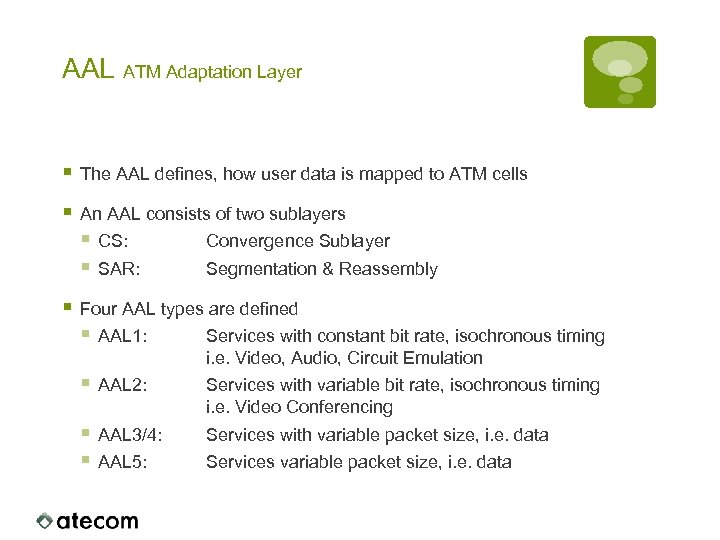 AAL ATM Adaptation Layer § The AAL defines, how user data is mapped to ATM cells § An AAL consists of two sublayers § CS: Convergence Sublayer § SAR: Segmentation & Reassembly § Four AAL types are defined § AAL 1: Services with constant bit rate, isochronous timing i. e. Video, Audio, Circuit Emulation § AAL 2: Services with variable bit rate, isochronous timing i. e. Video Conferencing § AAL 3/4: § AAL 5: Services with variable packet size, i. e. data Services variable packet size, i. e. data
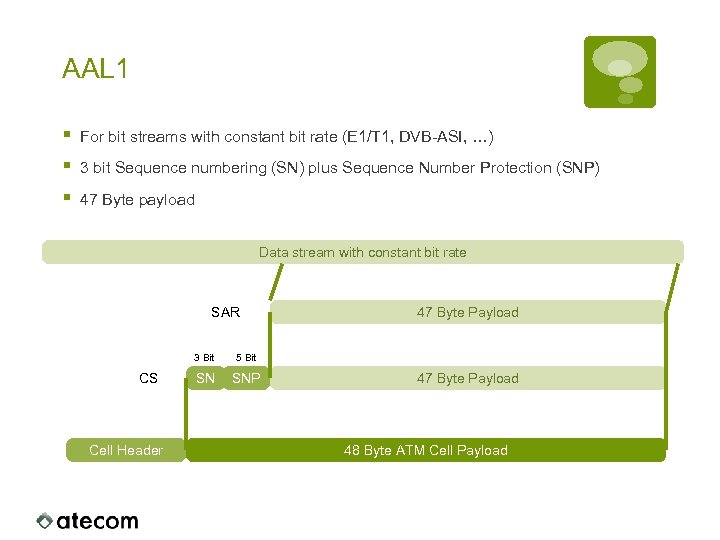 AAL 1 § § § For bit streams with constant bit rate (E 1/T 1, DVB-ASI, …) 3 bit Sequence numbering (SN) plus Sequence Number Protection (SNP) 47 Byte payload Data stream with constant bit rate SAR 3 Bit CS Cell Header 5 Bit SN SNP 47 Byte Payload 48 Byte ATM Cell Payload
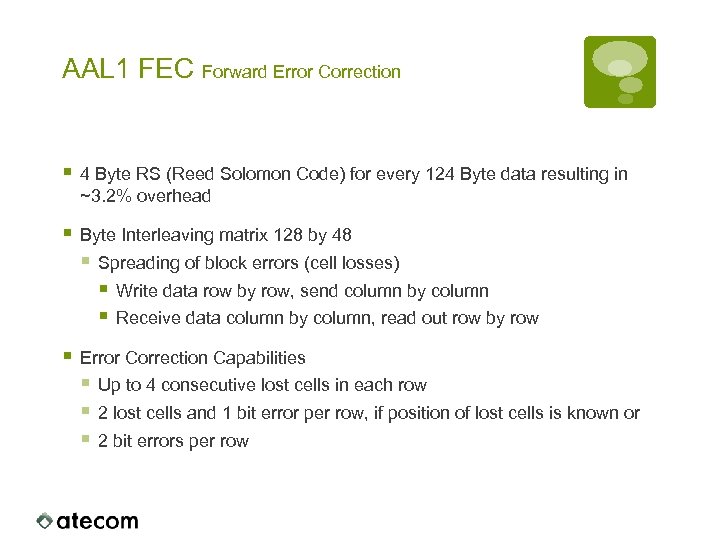 AAL 1 FEC Forward Error Correction § 4 Byte RS (Reed Solomon Code) for every 124 Byte data resulting in ~3. 2% overhead § Byte Interleaving matrix 128 by 48 § Spreading of block errors (cell losses) § Write data row by row, send column by column § Receive data column by column, read out row by row § Error Correction Capabilities § Up to 4 consecutive lost cells in each row § 2 lost cells and 1 bit error per row, if position of lost cells is known or § 2 bit errors per row
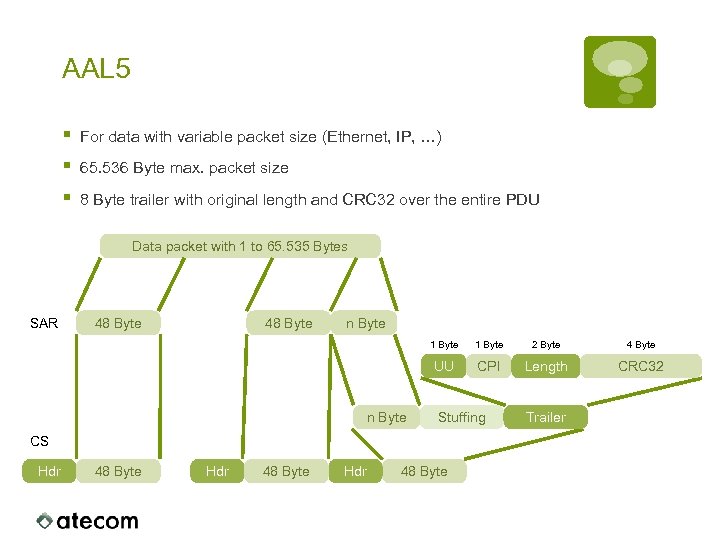 AAL 5 § § § For data with variable packet size (Ethernet, IP, …) 65. 536 Byte max. packet size 8 Byte trailer with original length and CRC 32 over the entire PDU Data packet with 1 to 65. 535 Bytes SAR 48 Byte n Byte 1 Byte 2 Byte 4 Byte UU n Byte 1 Byte CPI Length CRC 32 Stuffing CS Hdr 48 Byte Trailer
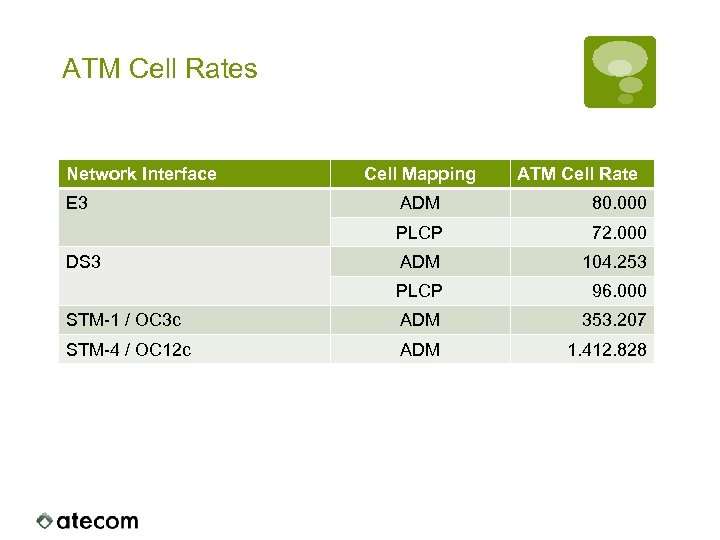 ATM Cell Rates Network Interface E 3 Cell Mapping ATM Cell Rate ADM 80. 000 PLCP 72. 000 ADM 104. 253 PLCP 96. 000 STM-1 / OC 3 c ADM 353. 207 STM-4 / OC 12 c ADM 1. 412. 828 DS 3
 Technologies MPEG
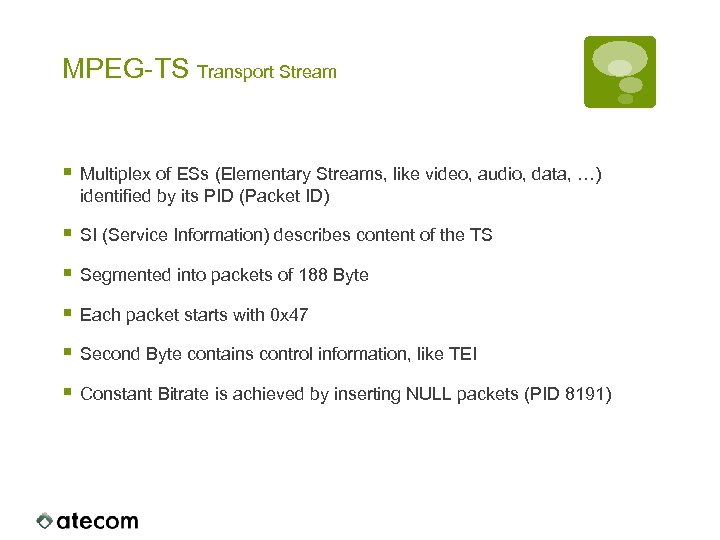 MPEG-TS Transport Stream § Multiplex of ESs (Elementary Streams, like video, audio, data, …) identified by its PID (Packet ID) § SI (Service Information) describes content of the TS § Segmented into packets of 188 Byte § Each packet starts with 0 x 47 § Second Byte contains control information, like TEI § Constant Bitrate is achieved by inserting NULL packets (PID 8191)
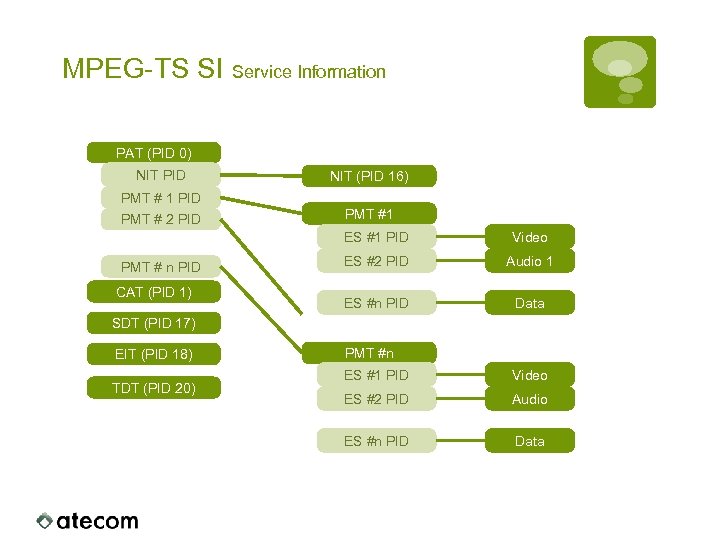 MPEG-TS SI Service Information PAT (PID 0) NIT PID NIT (PID 16) PMT # 1 PID PMT # 2 PID PMT #1 ES #1 PID PMT # n PID CAT (PID 1) Video ES #2 PID Audio 1 ES #n PID Data SDT (PID 17) EIT (PID 18) TDT (PID 20) PMT #n ES #1 PID Video ES #2 PID Audio ES #n PID Data
 Technologies DVB-ASI
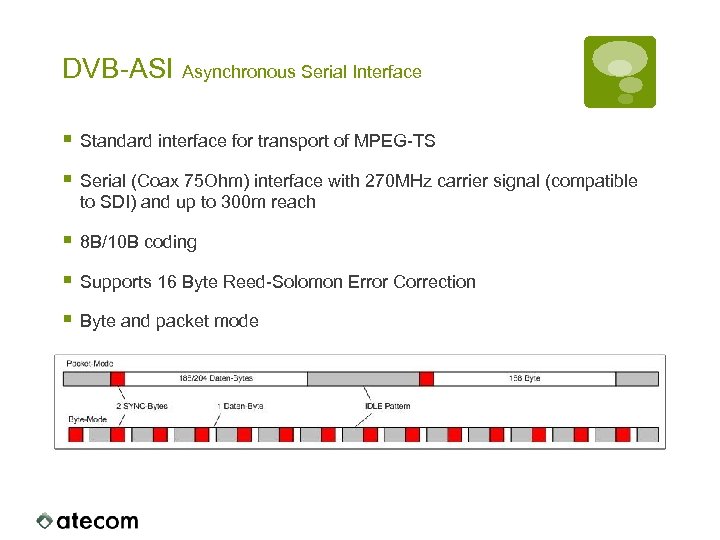 DVB-ASI Asynchronous Serial Interface § Standard interface for transport of MPEG-TS § Serial (Coax 75 Ohm) interface with 270 MHz carrier signal (compatible to SDI) and up to 300 m reach § 8 B/10 B coding § Supports 16 Byte Reed-Solomon Error Correction § Byte and packet mode
 MPEG-TS over ATM AAL 1 § TS packet size is adopted to ATM AAL 1 § 188 Byte TS-Packets fit exactly into 4 ATM Cells § Divide TS packet into 4 blocks of 47 Byte as AAL 1 payload § 31 TS packets fit exactly into the AAL 1 FEC matrix § FEC matrix must start with 0 x 47 (TS sync Byte) § 204 Byte TS packet size not supported § Strip off MPEG-RS before mapping § Receiver must perform adaptive clock recovery (ACR) § Accuracy: 0. 2 ppm § Max. Drift: 0. 0027 ppm/s
 MPEG over ATM AAL 5 § Previously recommended by ANSI § No specialized SAR required § New traffic type VBRrt (Variable bit rate, real-time) § Recommendation changed to AAL 1 for professional services § 2 TS packets plus 8 Byte trailer are mapped to 8 ATM cells § No stuffing required § Same overhead as with AAL 1 without FEC § No error correction scheme § Single ATM cell loss causes loss of min. 2 TS packets
 System Architecture
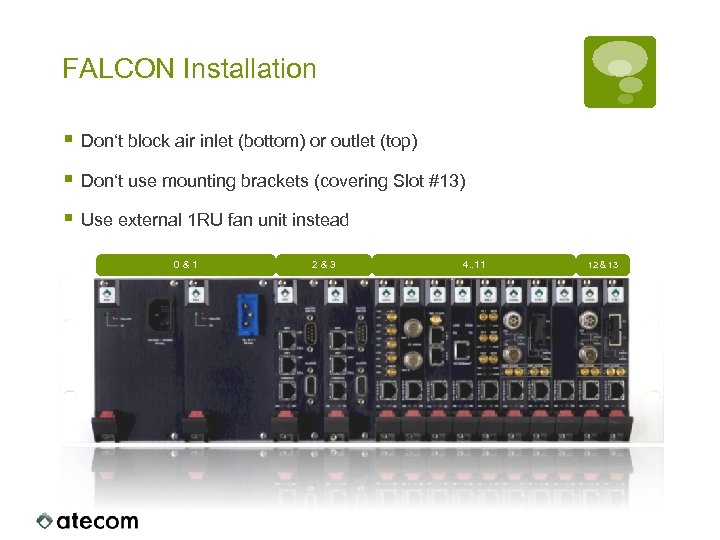 FALCON Installation § Don‘t block air inlet (bottom) or outlet (top) § Don‘t use mounting brackets (covering Slot #13) § Use external 1 RU fan unit instead 0&1 2&3 4. . 11 12 & 13
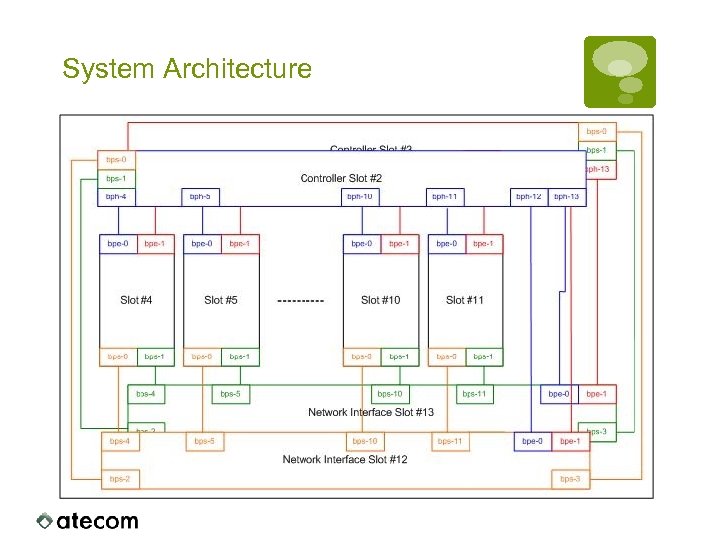 System Architecture
 Internal Data Distribution § ATM Cells received by the Network Interfaces are broadcasted to § both Controller Cards § all service cards § ATM cells from Controller- and Service-Cards are always send to a Network interface (bps-0 to Slot #12, bps-1 to Slot #13) § VCCs on Service- and Controller Cards must be unique per network interface § No traffic relation between service cards and/or controller cards:
 User Configuration § The configuration reflects the SNMP MIB tree § The configuration stays valid after a firmware upgrade § Full SNMP support is easy to achieve § Central database runs on the Controller. Databases on the individual cards are mapped to the central database dynamically. § The configuration is always stored on the particular card § Pre-configuration of a card is possible. § The card boots up with it‘s local stored configuration. § No controller card is required
 System Components
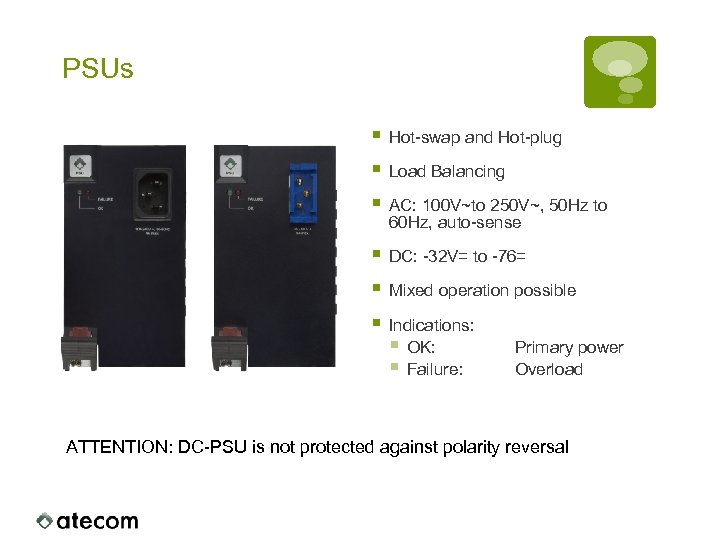 PSUs § Hot-swap and Hot-plug § Load Balancing § AC: 100 V~to 250 V~, 50 Hz to 60 Hz, auto-sense § DC: -32 V= to -76= § Mixed operation possible § Indications: § OK: § Failure: Primary power Overload ATTENTION: DC-PSU is not protected against polarity reversal
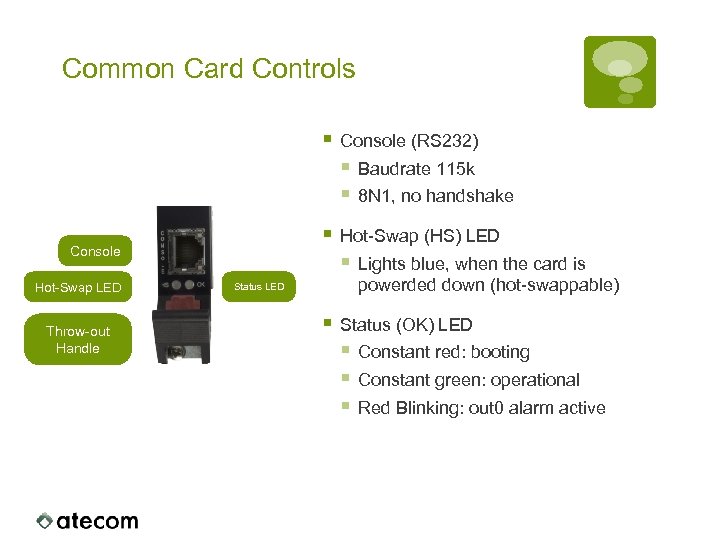 Common Card Controls § Console (RS 232) § Baudrate 115 k § 8 N 1, no handshake § Hot-Swap (HS) LED § Lights blue, when the card is Console Hot-Swap LED Throw-out Handle Status LED powerded down (hot-swappable) § Status (OK) LED § Constant red: booting § Constant green: operational § Red Blinking: out 0 alarm active
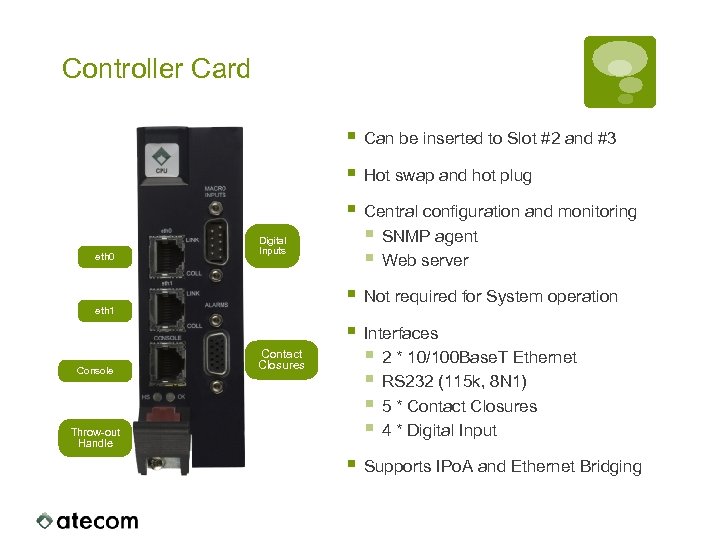 Controller Card § § Central configuration and monitoring § SNMP agent § Web server § Not required for System operation § Interfaces § 2 * 10/100 Base. T Ethernet § RS 232 (115 k, 8 N 1) § 5 * Contact Closures § 4 * Digital Input § Supports IPo. A and Ethernet Bridging Digital Inputs eth 1 Console Hot swap and hot plug § eth 0 Can be inserted to Slot #2 and #3 Contact Closures Throw-out Handle
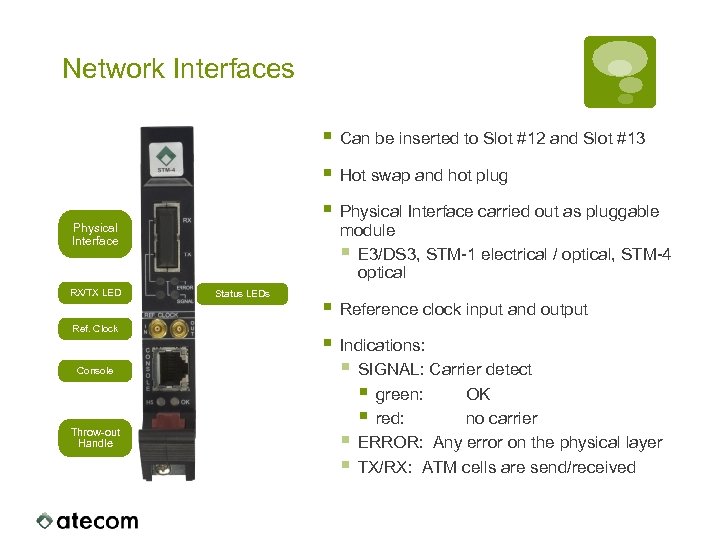 Network Interfaces § § RX/TX LED Ref. Clock Console Throw-out Handle Status LEDs Hot swap and hot plug § Physical Interface Can be inserted to Slot #12 and Slot #13 Physical Interface carried out as pluggable module § E 3/DS 3, STM-1 electrical / optical, STM-4 optical § Reference clock input and output § Indications: § SIGNAL: Carrier detect § green: OK § red: no carrier § ERROR: Any error on the physical layer § TX/RX: ATM cells are send/received
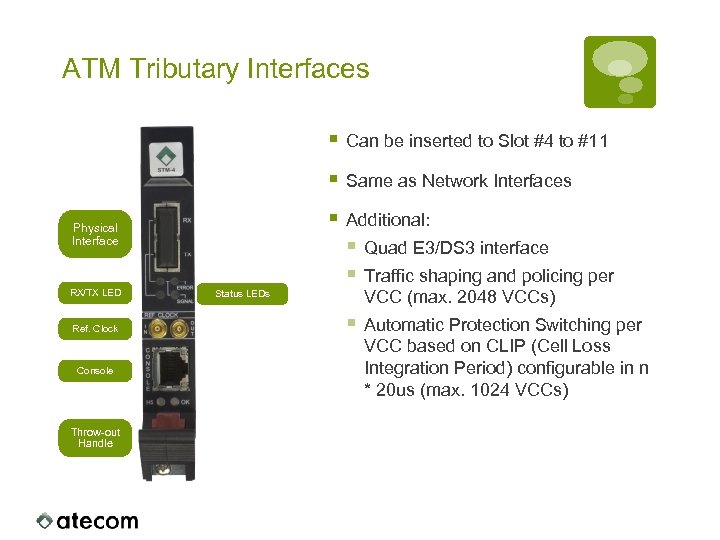 ATM Tributary Interfaces § Can be inserted to Slot #4 to #11 § Same as Network Interfaces § Additional: § Quad E 3/DS 3 interface § Traffic shaping and policing per Physical Interface RX/TX LED Ref. Clock Console Throw-out Handle Status LEDs VCC (max. 2048 VCCs) § Automatic Protection Switching per VCC based on CLIP (Cell Loss Integration Period) configurable in n * 20 us (max. 1024 VCCs)
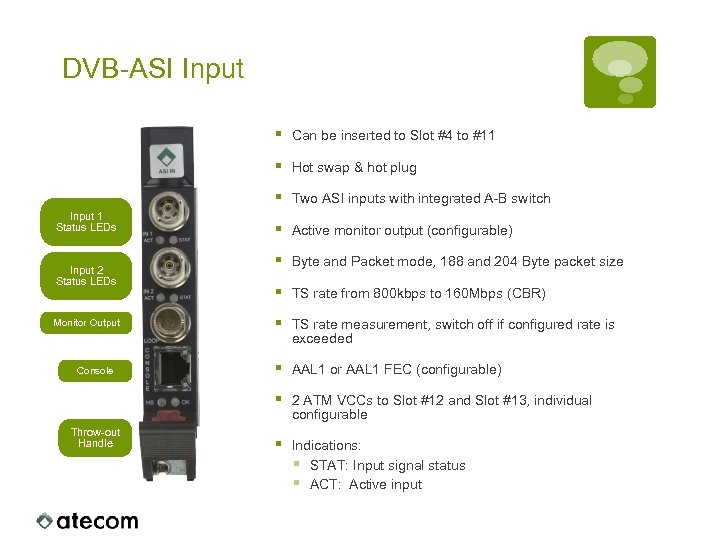 DVB-ASI Input § § Monitor Output Console Throw-out Handle Two ASI inputs with integrated A-B switch § Active monitor output (configurable) § Byte and Packet mode, 188 and 204 Byte packet size § TS rate from 800 kbps to 160 Mbps (CBR) § TS rate measurement, switch off if configured rate is exceeded § AAL 1 or AAL 1 FEC (configurable) § Input 2 Status LEDs Hot swap & hot plug § Input 1 Status LEDs Can be inserted to Slot #4 to #11 2 ATM VCCs to Slot #12 and Slot #13, individual configurable § Indications: § STAT: Input signal status § ACT: Active input
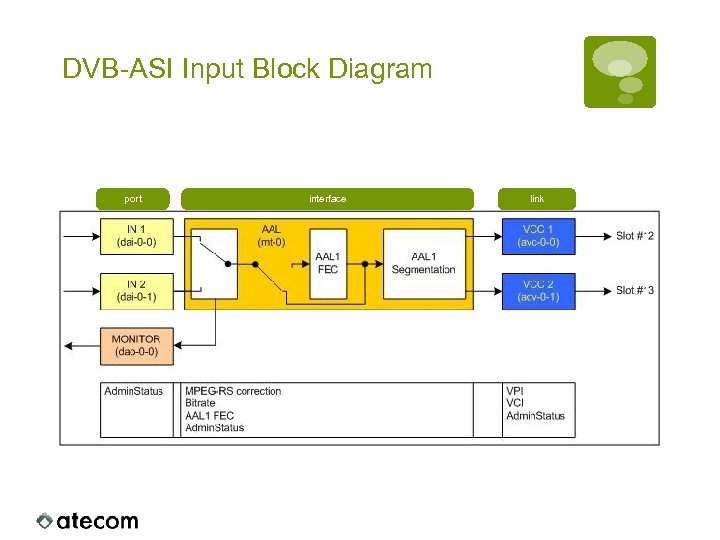 DVB-ASI Input Block Diagram port interface link
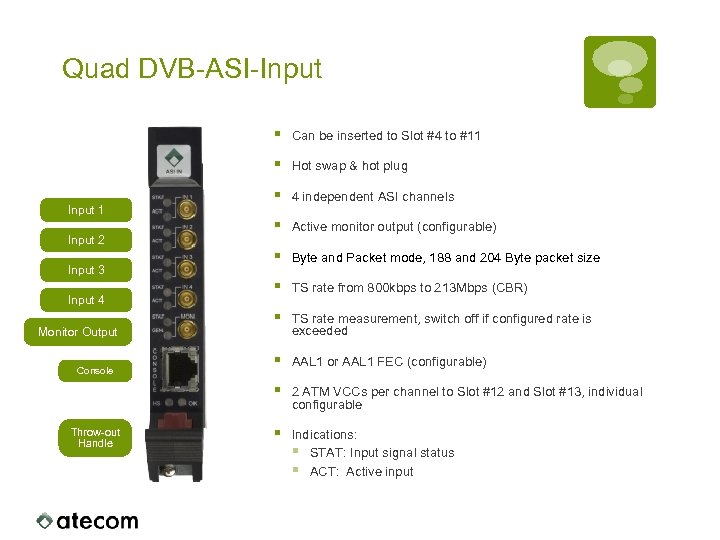 Quad DVB-ASI-Input § § Input 2 Input 3 Input 4 Monitor Output Console Throw-out Handle Hot swap & hot plug § 4 independent ASI channels § Active monitor output (configurable) § Byte and Packet mode, 188 and 204 Byte packet size § TS rate from 800 kbps to 213 Mbps (CBR) § TS rate measurement, switch off if configured rate is exceeded § AAL 1 or AAL 1 FEC (configurable) § Input 1 Can be inserted to Slot #4 to #11 2 ATM VCCs per channel to Slot #12 and Slot #13, individual configurable § Indications: § STAT: Input signal status § ACT: Active input
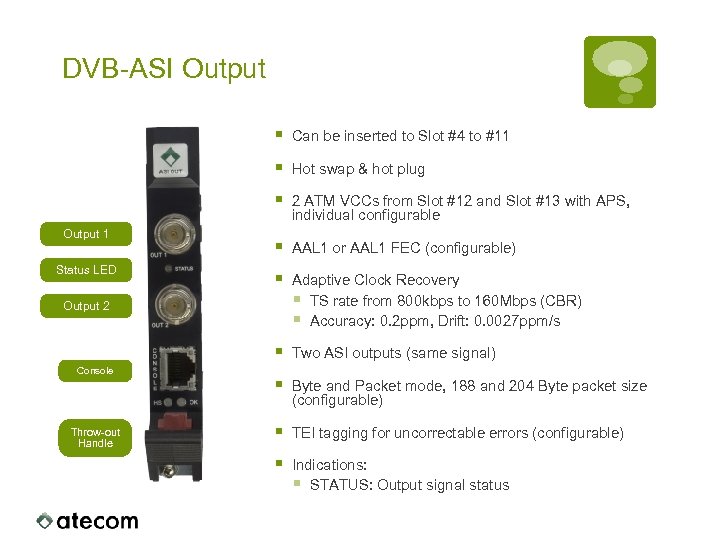 DVB-ASI Output § § 2 ATM VCCs from Slot #12 and Slot #13 with APS, individual configurable § AAL 1 or AAL 1 FEC (configurable) § Adaptive Clock Recovery § TS rate from 800 kbps to 160 Mbps (CBR) § Accuracy: 0. 2 ppm, Drift: 0. 0027 ppm/s § Status LED Hot swap & hot plug § Output 1 Can be inserted to Slot #4 to #11 Two ASI outputs (same signal) § Byte and Packet mode, 188 and 204 Byte packet size (configurable) § TEI tagging for uncorrectable errors (configurable) § Indications: § STATUS: Output signal status Output 2 Console Throw-out Handle
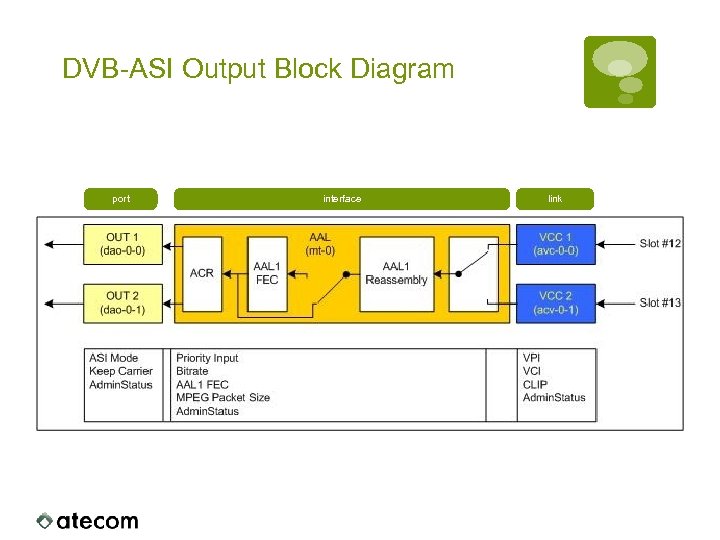 DVB-ASI Output Block Diagram port interface link
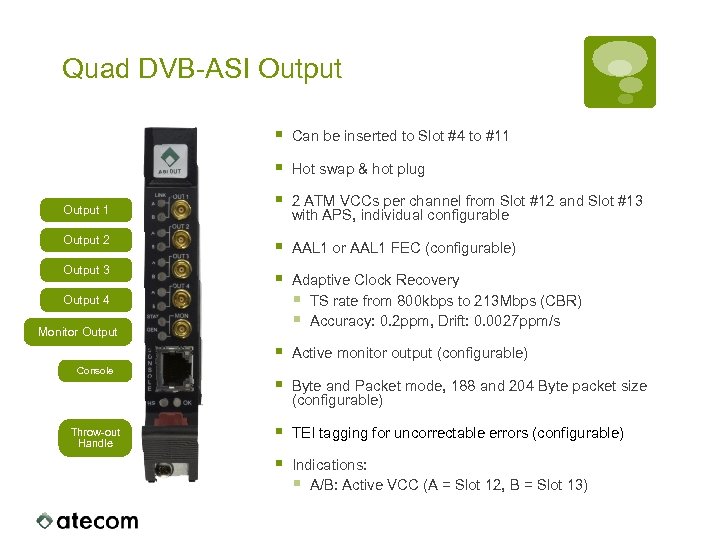 Quad DVB-ASI Output § Can be inserted to Slot #4 to #11 § Hot swap & hot plug § 2 ATM VCCs per channel from Slot #12 and Slot #13 with APS, individual configurable Output 2 § AAL 1 or AAL 1 FEC (configurable) Output 3 § Adaptive Clock Recovery § TS rate from 800 kbps to 213 Mbps (CBR) § Accuracy: 0. 2 ppm, Drift: 0. 0027 ppm/s § Active monitor output (configurable) § Byte and Packet mode, 188 and 204 Byte packet size (configurable) § TEI tagging for uncorrectable errors (configurable) § Indications: § A/B: Active VCC (A = Slot 12, B = Slot 13) Output 1 Output 4 Monitor Output Console Throw-out Handle
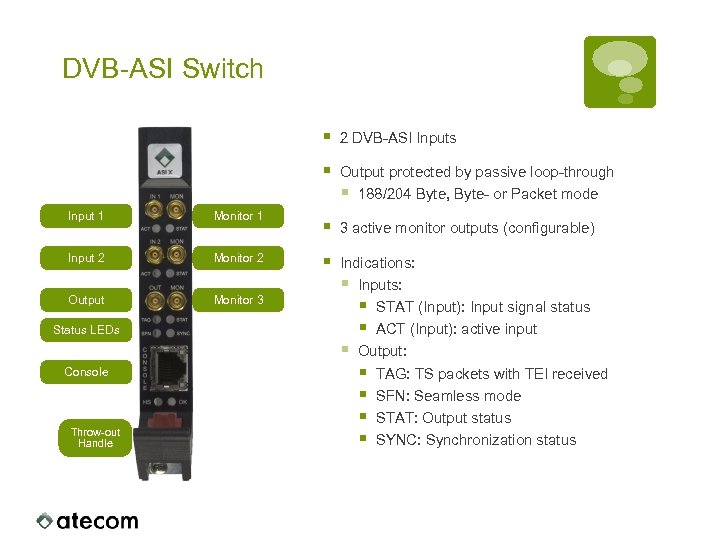 DVB-ASI Switch § § Input 1 Monitor 1 Input 2 Monitor 2 Output Monitor 3 Status LEDs Console Throw-out Handle 2 DVB-ASI Inputs Output protected by passive loop-through § 188/204 Byte, Byte- or Packet mode § 3 active monitor outputs (configurable) § Indications: § Inputs: § STAT (Input): Input signal status § ACT (Input): active input § Output: § TAG: TS packets with TEI received § SFN: Seamless mode § STAT: Output status § SYNC: Synchronization status
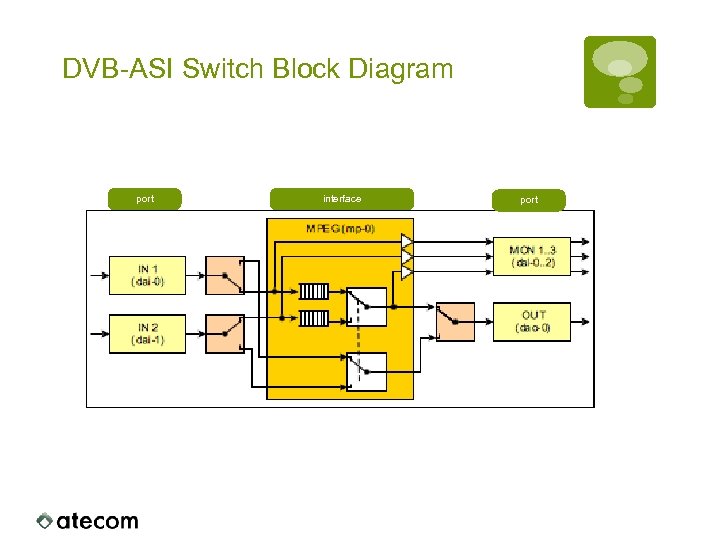 DVB-ASI Switch Block Diagram port interface port
 DVB-ASI Switch § Input signals from different sources (i. e. redundant MUX): § Non-seamless switching on § LOS and LOF § Missing ES (Elementary Stream, PID repetition rate) § Input signals are identical (copies of the same source): § Seamless switching after synchronization of the input signals § Packet exchange of corrupted TS packets identified by § TEI (Transport Error Indicator) § MPEG-RS-Errors (204 Byte packets only)
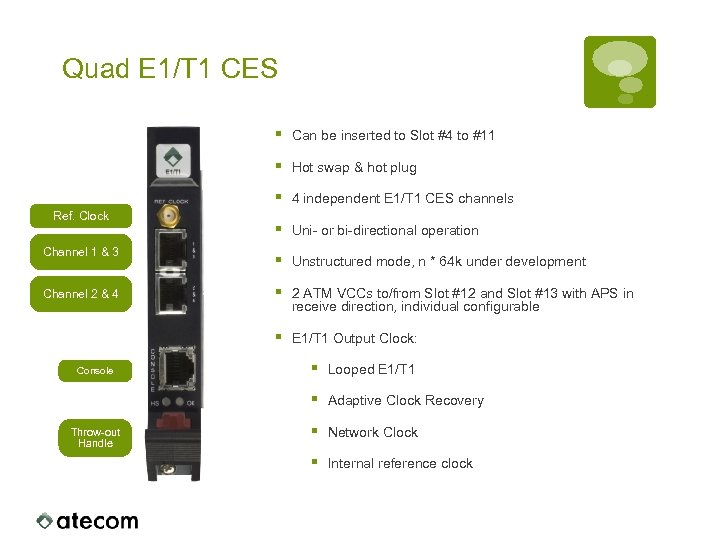 Quad E 1/T 1 CES § § Channel 2 & 4 4 independent E 1/T 1 CES channels § Uni- or bi-directional operation § Unstructured mode, n * 64 k under development § 2 ATM VCCs to/from Slot #12 and Slot #13 with APS in receive direction, individual configurable § Channel 1 & 3 Hot swap & hot plug § Ref. Clock Can be inserted to Slot #4 to #11 E 1/T 1 Output Clock: Throw-out Handle § Looped E 1/T 1 § Console Adaptive Clock Recovery § Network Clock § Internal reference clock
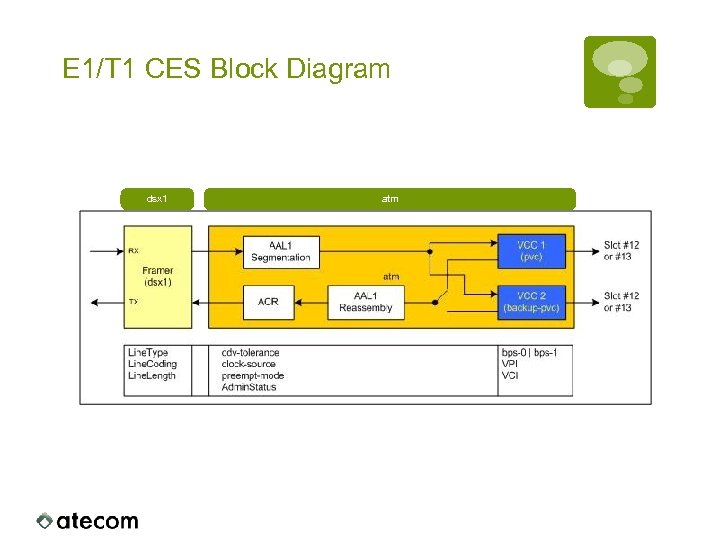 E 1/T 1 CES Block Diagram dsx 1 atm
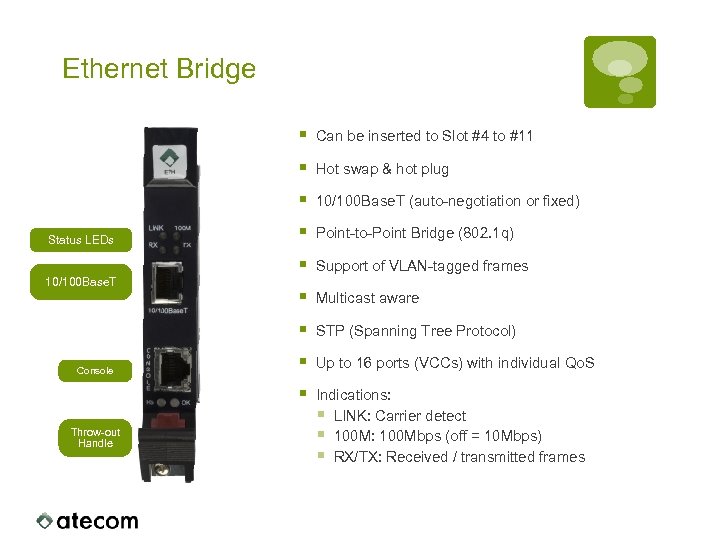 Ethernet Bridge § § Point-to-Point Bridge (802. 1 q) Support of VLAN-tagged frames § Multicast aware STP (Spanning Tree Protocol) § Up to 16 ports (VCCs) with individual Qo. S § Throw-out Handle § § Console 10/100 Base. T (auto-negotiation or fixed) § 10/100 Base. T Hot swap & hot plug § Status LEDs Can be inserted to Slot #4 to #11 Indications: § LINK: Carrier detect § 100 M: 100 Mbps (off = 10 Mbps) § RX/TX: Received / transmitted frames
 Boot Monitor
 Boot Process § Three stage boot § First stage Boot-Loader: § Fixed stored in ROM § Memory test, etc. § Second stage Boot-Loader § Hardware probing § Boot Monitor § Boot process will be interrupted here in case of a hardware problem § Third stage: UNIX § You can stop the boot process after the second stage boot, entering the boot monitor.
 Boot Monitor § Only accessible on the Console § Stop boot process by pressing any key § Prompt „ok“ § Main Functions § Firmware Image Management § Firmware Download § Deletion of Firmware Images § Configuration Management § Save / Load § Delete (Factory Defaults)
 Boot Monitor TFTP Configuration § Display of Configuration: printenv § Changing Configuration: setenv
 User Configuration § Command „cfgclear“ § Factory Defaults § Reverts all settings to default (incl. Password) § Command „cfgsave
![Firmware Images § Command „li [-d boot]“ § Listing of installed firmware images §](https://present5.com/presentation/f370e8c6624edb69ae02d16a184dc563/image-65.jpg "Firmware Images § Command „li [-d boot]“ § Listing of installed firmware images §") Firmware Images § Command „li [-d boot]“ § Listing of installed firmware images § Command „ai [-d boot]“ § Append a new firmware image § Command „ii [–d boot] [Number]“ § Deletes the specified number of firmware images (starting with the latest installed image ATTENTION: When deleting the last firmware image, installation of a new firmware image can be installed from the boot-monitor only.
Firmware Images § Command „li [-d boot]“ § Listing of installed firmware images § Command „ai [-d boot]“ § Append a new firmware image § Command „ii [–d boot] [Number]“ § Deletes the specified number of firmware images (starting with the latest installed image ATTENTION: When deleting the last firmware image, installation of a new firmware image can be installed from the boot-monitor only.
 Configuration
 Management Interfaces § CLI (Command Line Interface) § opsh (Operator Shell) § Telnet or Console (RS 232, 115 k, 8 N 1) § HTTP § Any browser with XML, XSLT and CSS support i. e. IE, Firefox, Safari, etc. § SNMPv 1, SNMPv 2 c and SNMPv 3 § Access to an individual card by using the associated CONTEXT (SNMPv 3) or user-configured COMMUNITY (SNMPv 1/SNMPv 2).
![CLI „opsh“ § Access to configuration, status information and statistics § [TAB] expansion of](https://present5.com/presentation/f370e8c6624edb69ae02d16a184dc563/image-68.jpg "CLI „opsh“ § Access to configuration, status information and statistics § [TAB] expansion of") CLI „opsh“ § Access to configuration, status information and statistics § [TAB] expansion of command § Command history (up/down keys) § Commands can be passed as command line parameter opsh –c “
CLI „opsh“ § Access to configuration, status information and statistics § [TAB] expansion of command § Command history (up/down keys) § Commands can be passed as command line parameter opsh –c “
 CLI „cmdsh“ § Access to all information as via SNMP § Walk, Get, Set, … § Access to values not accessible within “opsh” § Usefull for debugging § Tool for integration of the system into SNMP based management systems
 Initial Configuration
 Initial Network Setup § Access via SNMP and Web-Interface require valid network configuration § bootp § Manual configuration over Console (opsh) § Required Parameter § IP-Address and Netmask § Default Gateway / static routes § Syntax: > net interface eth 0 addr x. x/z up > net gateway y. y
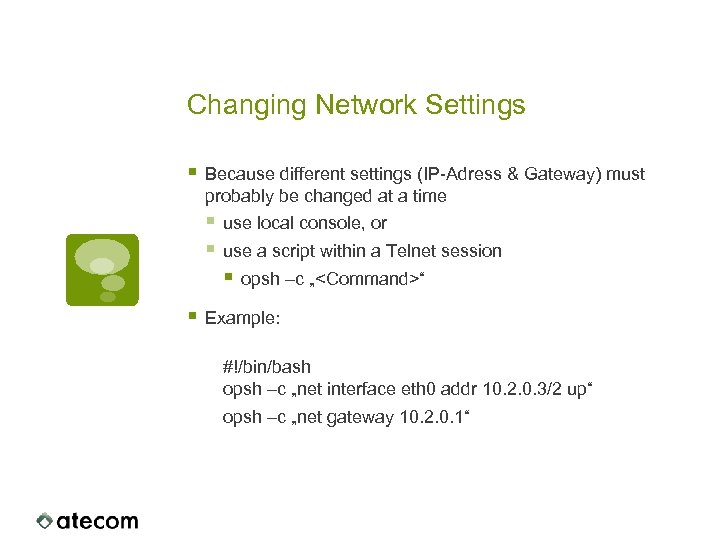 Changing Network Settings § Because different settings (IP-Adress & Gateway) must probably be changed at a time § use local console, or § use a script within a Telnet session § opsh –c „
 Firmware
 Firmware Management § Each card has it’s own store for installed firmware images § Different versions can be used within a system § To ease troubleshooting one firmware version within a system is recommended § Multiple Images can be installed (Number depends on card type) § It‘s always possible to switch back to an old version § Controller Cards have seperate boot- and a system images § Both, boot- and system image must have the same version § Always the latest installed image will become active after a reboot § Switching to an older firmware image by downloading and activating it § A newly installed image must be activated § Activation will cause a reboot of the particular card § Scheduled activation possible
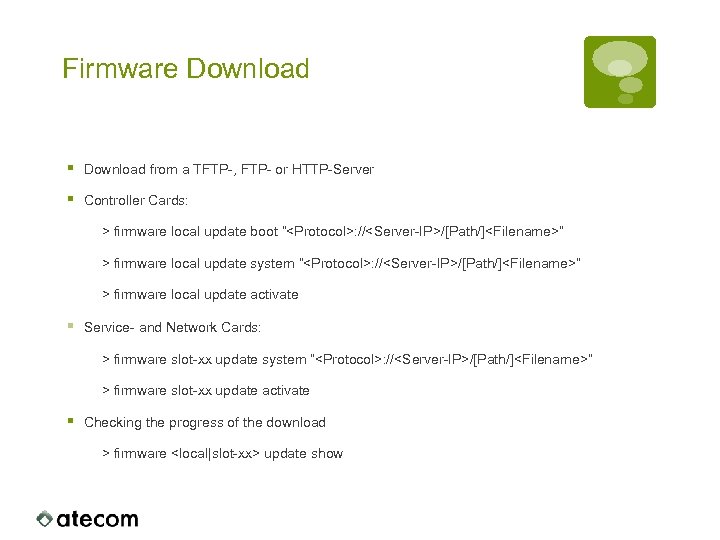 Firmware Download § Download from a TFTP-, FTP- or HTTP-Server § Controller Cards: > firmware local update boot “
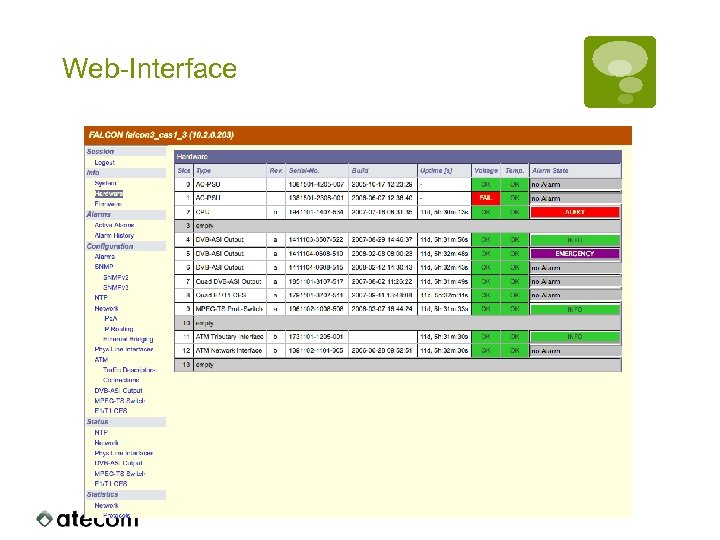 Web-Interface
 Monitoring
 SNMP-Traps § Each Interface generates up/down Traps on changes of the operational status § up – The Interface up and running § down – The Interface isn‘t work correctly § Each change in the alarm status generates a SNMP Trap § One event can cause multiple traps § Trap generation user-configurable per alarm § Filtering by severity § User-defined alarms in combination with alarm filtering can be used for alarm correlation
 Alarms § User-configurable severity § DEBUG (=off), INFO, NOTICE, WARNING, ERROR, CRITICAL, EMERGENCY, ALERT § Default = INFO § User-configurable alarm message § Set-Delay to suppress short events § Clear-Delay to suppress fast repeating events § Trap generation can be activated/deactivated for each alarm individually
 User-defined Alarms § Combination of other alarms by the logical operations „and“, „or“, „xor“ and „not“ § Example: „Two Input Signals in 1 and in 2“: § Loss of one input only: Result: The service is still available, loss of redundancy Condition: in 1 xor in 2, Severity: WARNING § Loss of both Inputs: Result: Service failure Condition: in 1 and in 2, Severity: CRITICAL
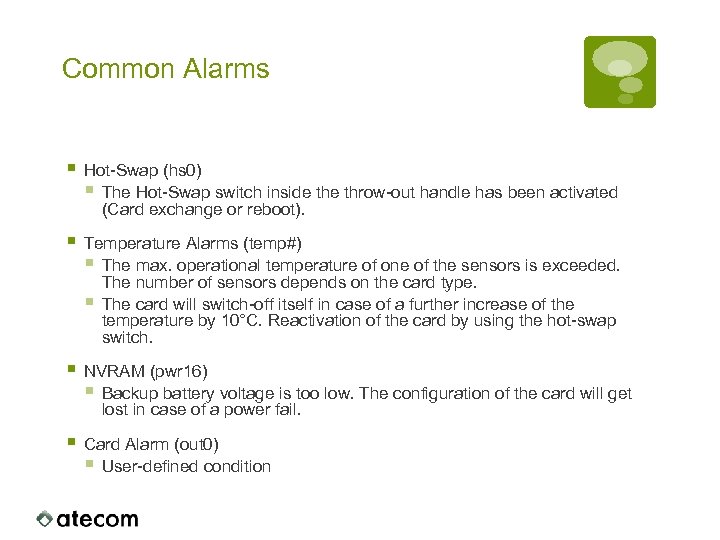 Common Alarms § Hot-Swap (hs 0) § The Hot-Swap switch inside throw-out handle has been activated (Card exchange or reboot). § Temperature Alarms (temp#) § The max. operational temperature of one of the sensors is exceeded. The number of sensors depends on the card type. § The card will switch-off itself in case of a further increase of the temperature by 10°C. Reactivation of the card by using the hot-swap switch. § NVRAM (pwr 16) § Backup battery voltage is too low. The configuration of the card will get lost in case of a power fail. § Card Alarm (out 0) § User-defined condition
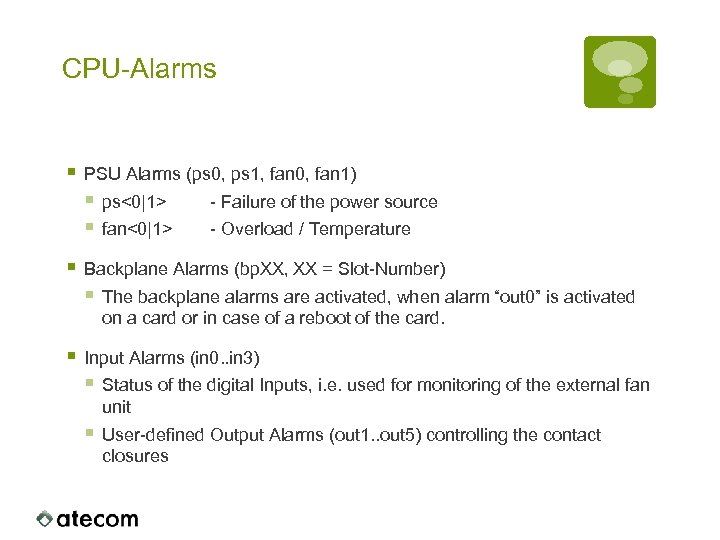 CPU-Alarms § PSU Alarms (ps 0, ps 1, fan 0, fan 1) § ps<0|1> - Failure of the power source § fan<0|1> - Overload / Temperature § Backplane Alarms (bp. XX, XX = Slot-Number) § The backplane alarms are activated, when alarm “out 0” is activated on a card or in case of a reboot of the card. § Input Alarms (in 0. . in 3) § Status of the digital Inputs, i. e. used for monitoring of the external fan unit § User-defined Output Alarms (out 1. . out 5) controlling the contact closures
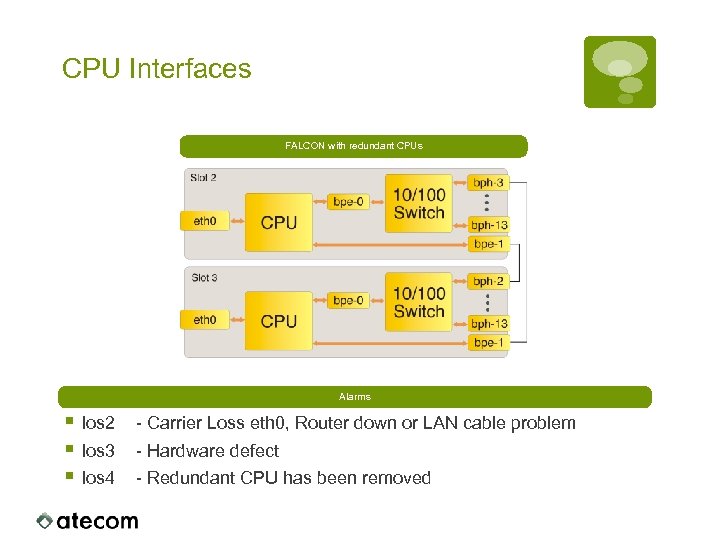 CPU Interfaces FALCON with redundant CPUs Alarms § los 2 § los 3 § los 4 - Carrier Loss eth 0, Router down or LAN cable problem - Hardware defect - Redundant CPU has been removed
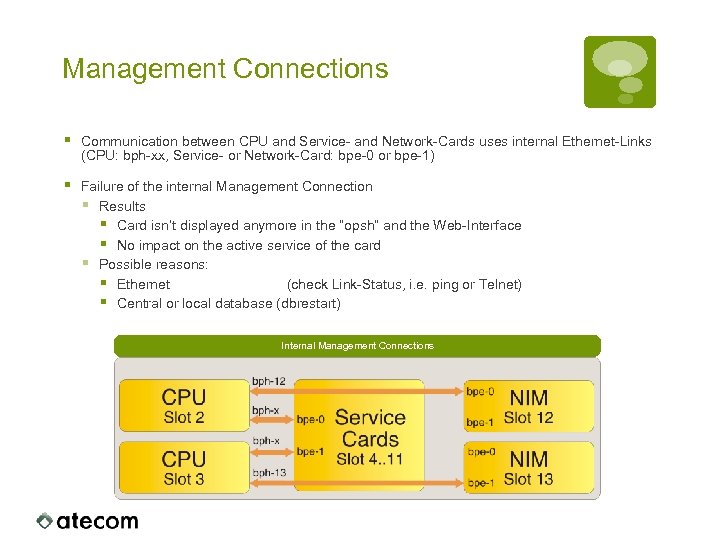 Management Connections § Communication between CPU and Service- and Network-Cards uses internal Ethernet-Links (CPU: bph-xx, Service- or Network-Card: bpe-0 or bpe-1) § Failure of the internal Management Connection § Results § Card isn’t displayed anymore in the “opsh” and the Web-Interface § No impact on the active service of the card § Possible reasons: § Ethernet (check Link-Status, i. e. ping or Telnet) § Central or local database (dbrestart) Internal Management Connections
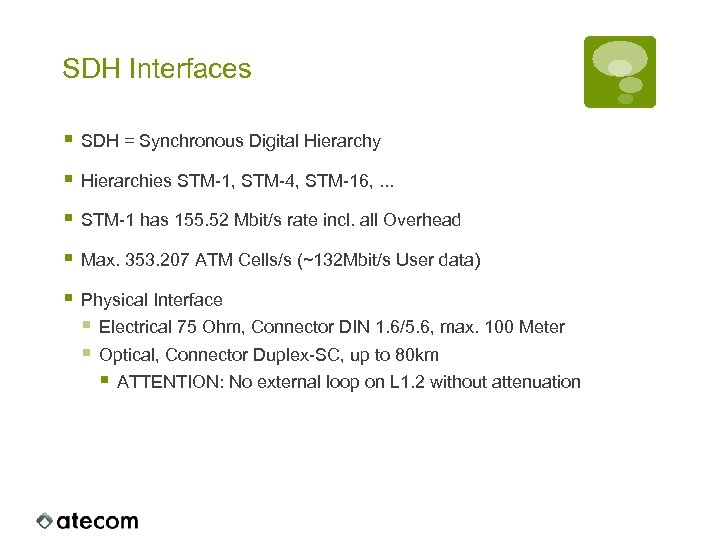 SDH Interfaces § SDH = Synchronous Digital Hierarchy § Hierarchies STM-1, STM-4, STM-16, . . . § STM-1 has 155. 52 Mbit/s rate incl. all Overhead § Max. 353. 207 ATM Cells/s (~132 Mbit/s User data) § Physical Interface § Electrical 75 Ohm, Connector DIN 1. 6/5. 6, max. 100 Meter § Optical, Connector Duplex-SC, up to 80 km § ATTENTION: No external loop on L 1. 2 without attenuation
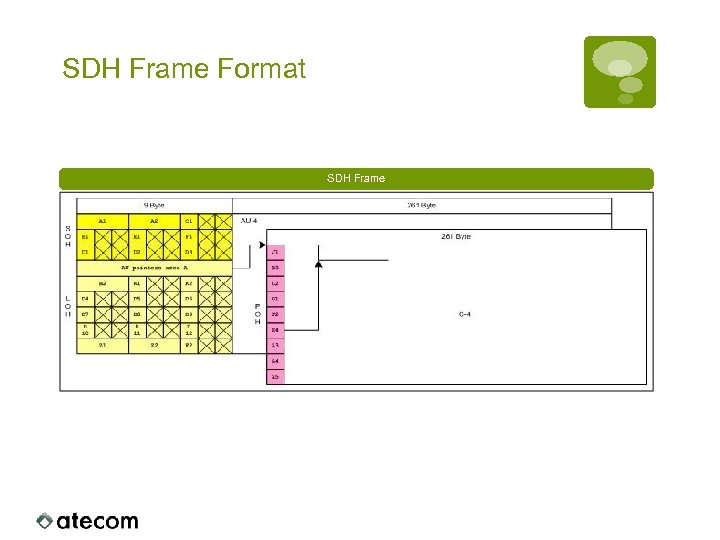 SDH Frame Format SDH Frame
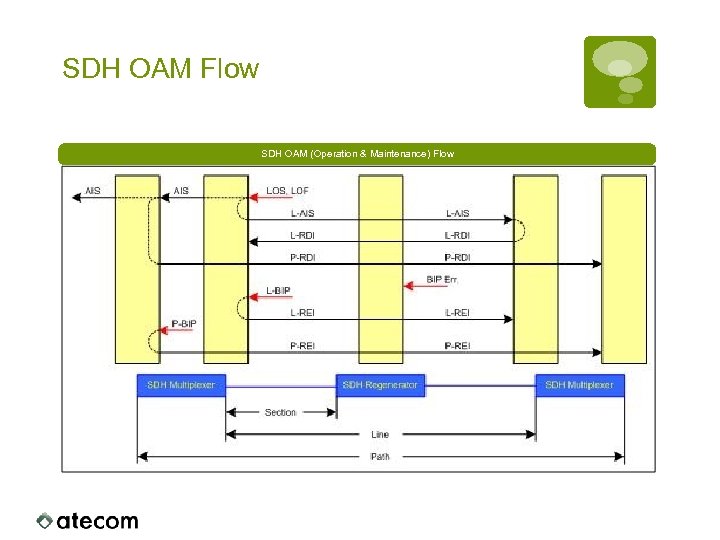 SDH OAM Flow SDH OAM (Operation & Maintenance) Flow
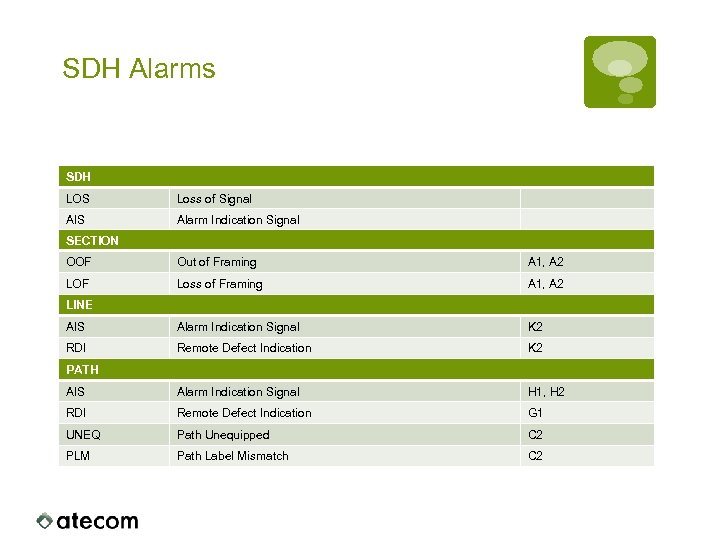 SDH Alarms SDH LOS Loss of Signal AIS Alarm Indication Signal SECTION OOF Out of Framing A 1, A 2 LOF Loss of Framing A 1, A 2 AIS Alarm Indication Signal K 2 RDI Remote Defect Indication K 2 AIS Alarm Indication Signal H 1, H 2 RDI Remote Defect Indication G 1 UNEQ Path Unequipped C 2 PLM Path Label Mismatch C 2 LINE PATH
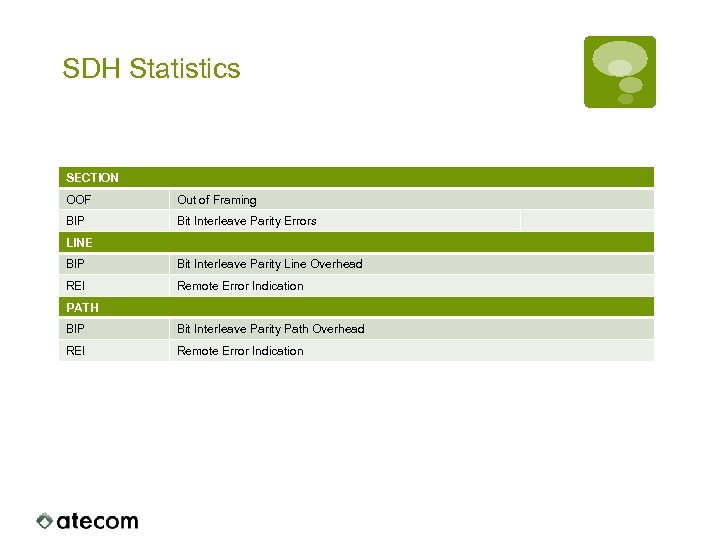 SDH Statistics SECTION OOF Out of Framing BIP Bit Interleave Parity Errors LINE BIP Bit Interleave Parity Line Overhead REI Remote Error Indication PATH BIP Bit Interleave Parity Path Overhead REI Remote Error Indication
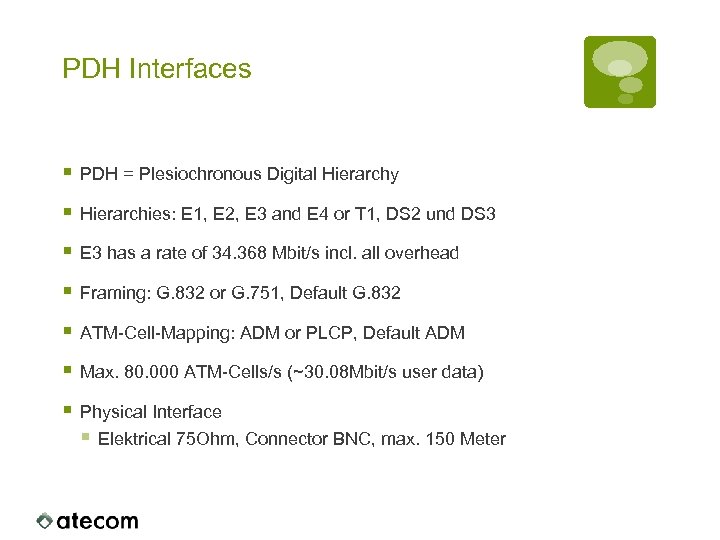 PDH Interfaces § PDH = Plesiochronous Digital Hierarchy § Hierarchies: E 1, E 2, E 3 and E 4 or T 1, DS 2 und DS 3 § E 3 has a rate of 34. 368 Mbit/s incl. all overhead § Framing: G. 832 or G. 751, Default G. 832 § ATM-Cell-Mapping: ADM or PLCP, Default ADM § Max. 80. 000 ATM-Cells/s (~30. 08 Mbit/s user data) § Physical Interface § Elektrical 75 Ohm, Connector BNC, max. 150 Meter
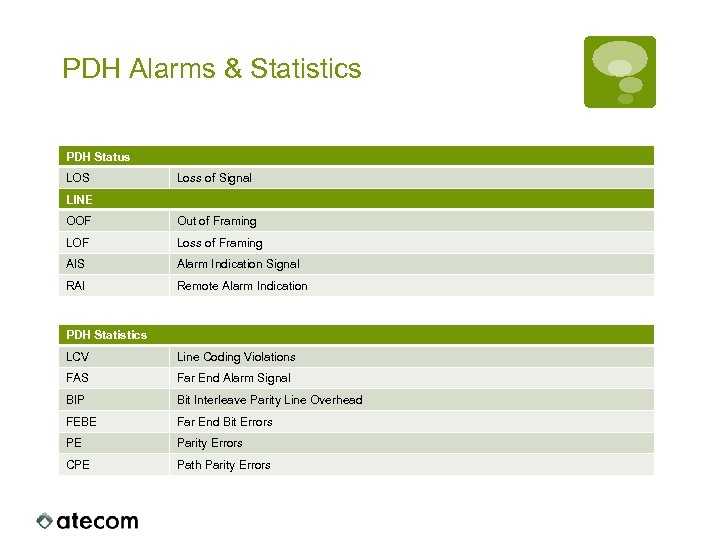 PDH Alarms & Statistics PDH Status LOS Loss of Signal LINE OOF Out of Framing LOF Loss of Framing AIS Alarm Indication Signal RAI Remote Alarm Indication PDH Statistics LCV Line Coding Violations FAS Far End Alarm Signal BIP Bit Interleave Parity Line Overhead FEBE Far End Bit Errors PE Parity Errors CPE Path Parity Errors
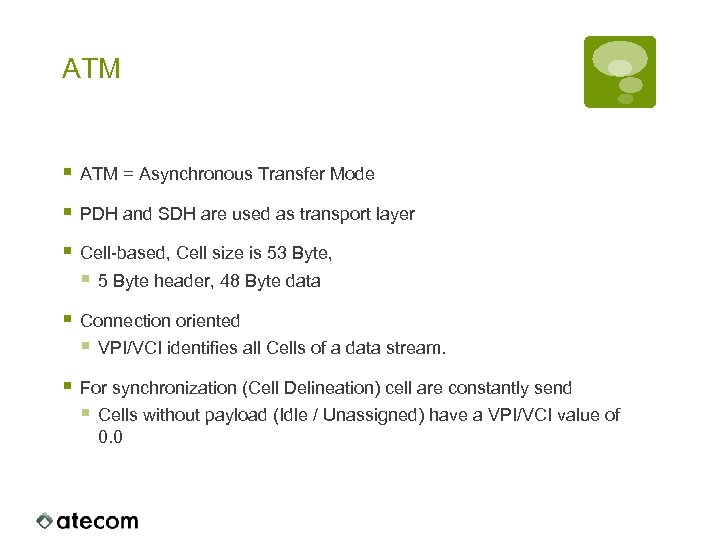 ATM § ATM = Asynchronous Transfer Mode § PDH and SDH are used as transport layer § Cell-based, Cell size is 53 Byte, § 5 Byte header, 48 Byte data § Connection oriented § VPI/VCI identifies all Cells of a data stream. § For synchronization (Cell Delineation) cell are constantly send § Cells without payload (Idle / Unassigned) have a VPI/VCI value of 0. 0
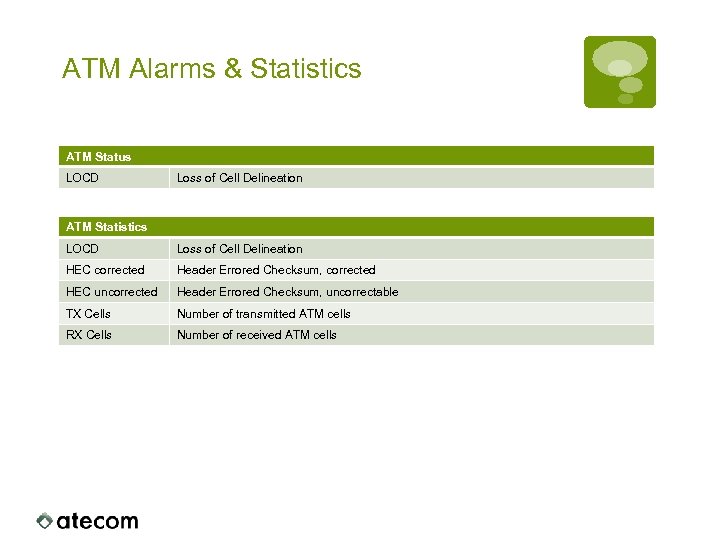 ATM Alarms & Statistics ATM Status LOCD Loss of Cell Delineation ATM Statistics LOCD Loss of Cell Delineation HEC corrected Header Errored Checksum, corrected HEC uncorrected Header Errored Checksum, uncorrectable TX Cells Number of transmitted ATM cells RX Cells Number of received ATM cells
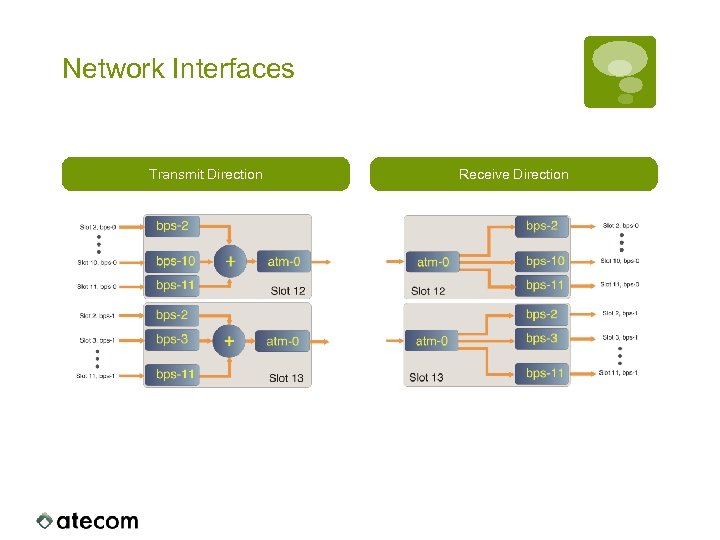 Network Interfaces Transmit Direction Receive Direction
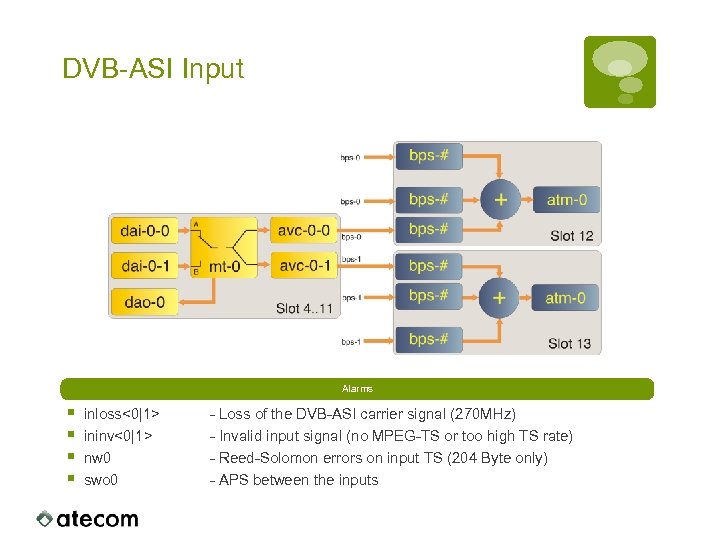 DVB-ASI Input Alarms § § inloss<0|1> ininv<0|1> nw 0 swo 0 - Loss of the DVB-ASI carrier signal (270 MHz) - Invalid input signal (no MPEG-TS or too high TS rate) - Reed-Solomon errors on input TS (204 Byte only) - APS between the inputs
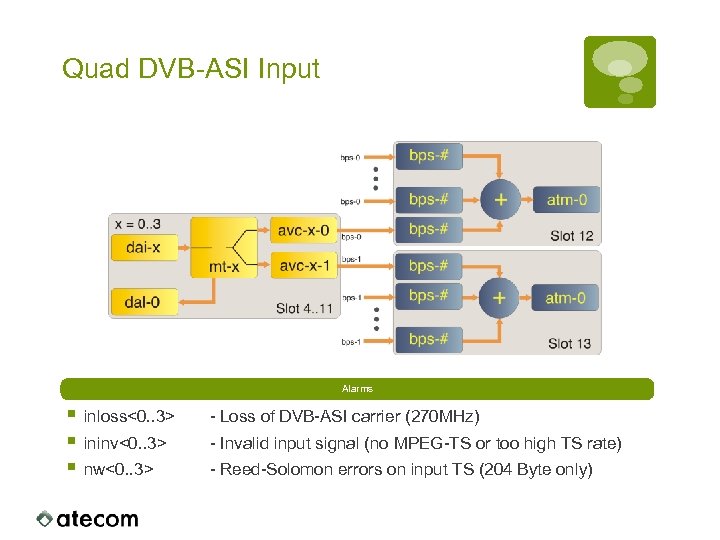 Quad DVB-ASI Input Alarms § § § inloss<0. . 3> - Loss of DVB-ASI carrier (270 MHz) ininv<0. . 3> - Invalid input signal (no MPEG-TS or too high TS rate) nw<0. . 3> - Reed-Solomon errors on input TS (204 Byte only)
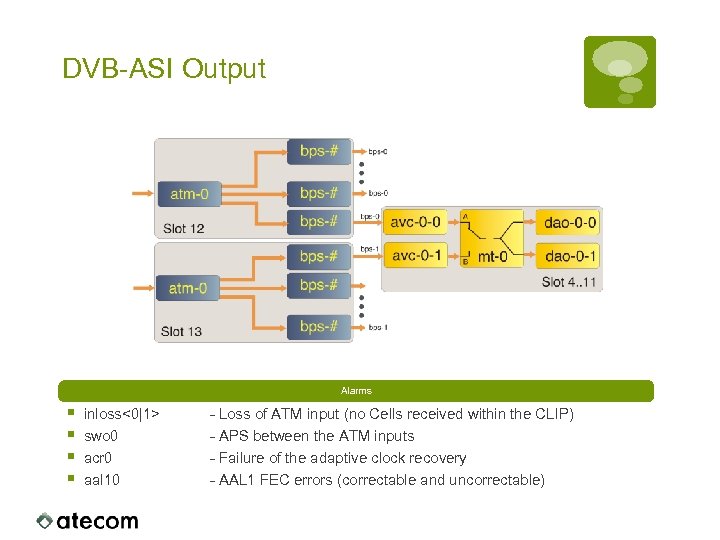 DVB-ASI Output Alarms § § inloss<0|1> swo 0 acr 0 aal 10 - Loss of ATM input (no Cells received within the CLIP) - APS between the ATM inputs - Failure of the adaptive clock recovery - AAL 1 FEC errors (correctable and uncorrectable)
 Troubleshooting
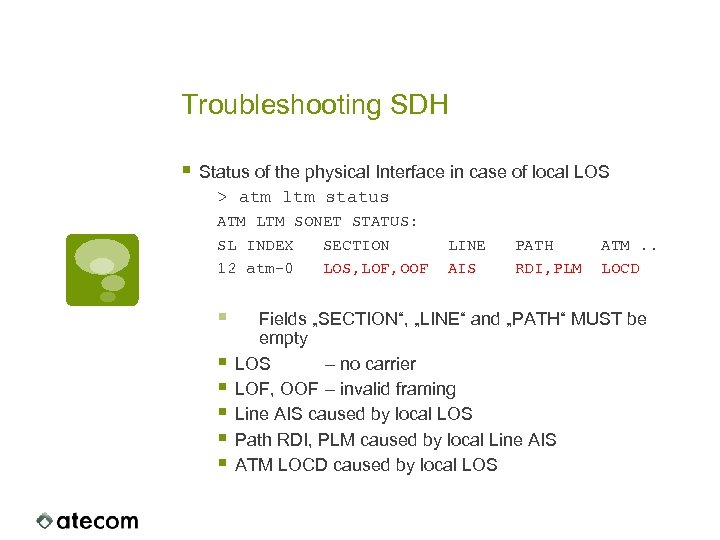 Troubleshooting SDH § Status of the physical Interface in case of local LOS > atm ltm status ATM LTM SONET STATUS: SL INDEX SECTION 12 atm-0 LOS, LOF, OOF § § § LINE AIS PATH RDI, PLM ATM. . LOCD Fields „SECTION“, „LINE“ and „PATH“ MUST be empty LOS – no carrier LOF, OOF – invalid framing Line AIS caused by local LOS Path RDI, PLM caused by local Line AIS ATM LOCD caused by local LOS
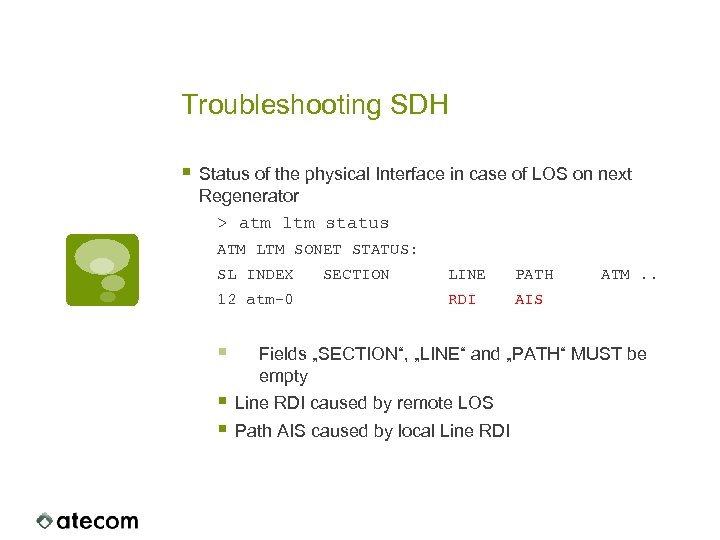 Troubleshooting SDH § Status of the physical Interface in case of LOS on next Regenerator > atm ltm status ATM LTM SONET STATUS: SL INDEX 12 atm-0 § SECTION LINE PATH RDI ATM. . AIS Fields „SECTION“, „LINE“ and „PATH“ MUST be empty § Line RDI caused by remote LOS § Path AIS caused by local Line RDI
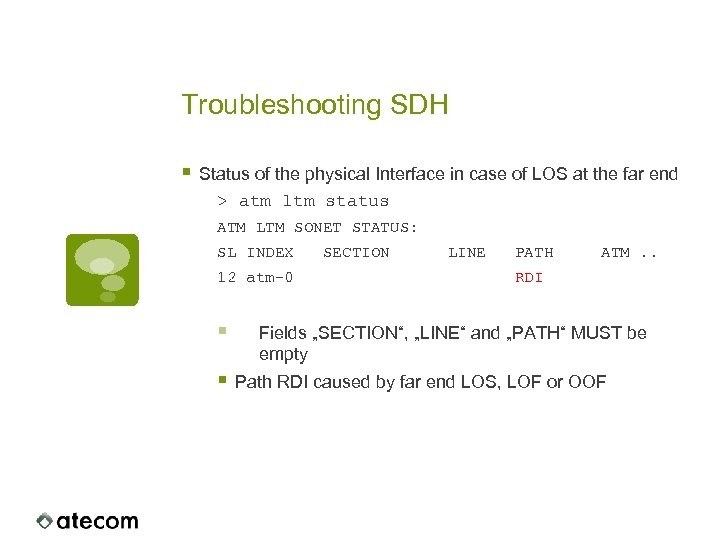 Troubleshooting SDH § Status of the physical Interface in case of LOS at the far end > atm ltm status ATM LTM SONET STATUS: SL INDEX 12 atm-0 § SECTION LINE PATH ATM. . RDI Fields „SECTION“, „LINE“ and „PATH“ MUST be empty § Path RDI caused by far end LOS, LOF or OOF
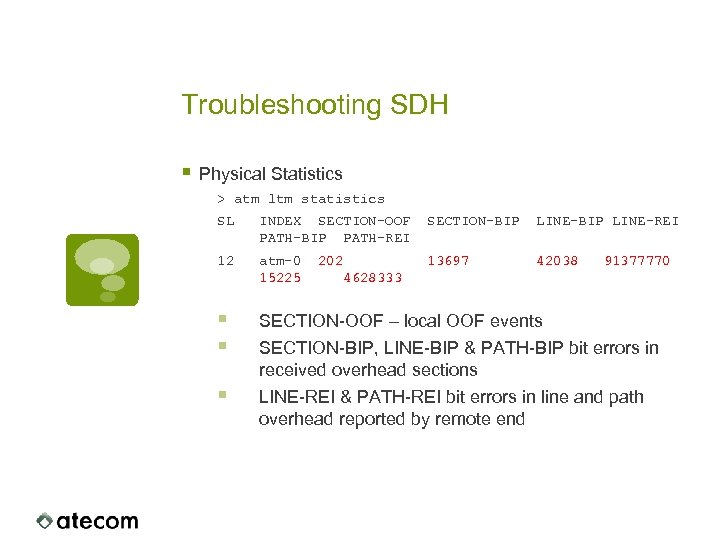 Troubleshooting SDH § Physical Statistics > atm ltm statistics SL INDEX SECTION-OOF PATH-BIP PATH-REI SECTION-BIP LINE-REI 12 atm-0 15225 13697 42038 § § SECTION-OOF – local OOF events § LINE-REI & PATH-REI bit errors in line and path overhead reported by remote end 202 4628333 91377770 SECTION-BIP, LINE-BIP & PATH-BIP bit errors in received overhead sections
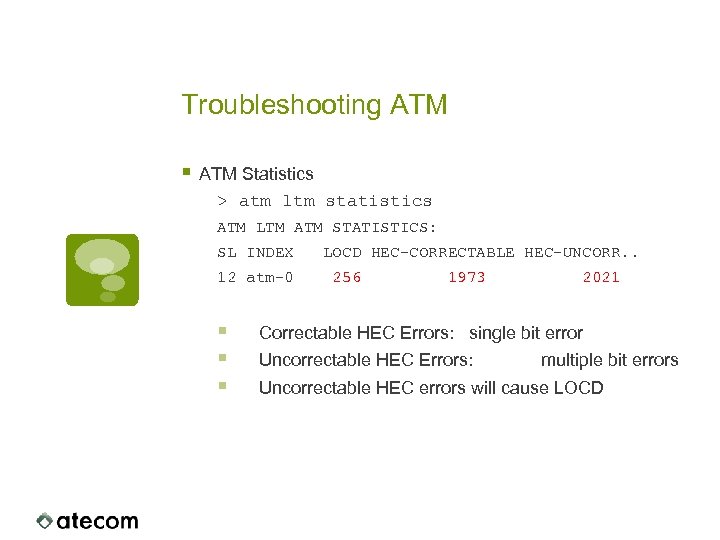 Troubleshooting ATM § ATM Statistics > atm ltm statistics ATM LTM ATM STATISTICS: SL INDEX 12 atm-0 § § § LOCD HEC-CORRECTABLE HEC-UNCORR. . 256 1973 2021 Correctable HEC Errors: single bit error Uncorrectable HEC Errors: multiple bit errors Uncorrectable HEC errors will cause LOCD
 Troubleshooting ATM § Bit error ratios on the physical layer of up to 10 -4 can be corrected by AAL 1 FEC (DVB-ASI only). § If only one direction is failing, only bi-directional services will fail. Uni-directional service (ASI, E 1/T 1) are probably not affected. § No errors in the statistics of the network interface does not guarantee error free transmission, because user data isn‘t checked.
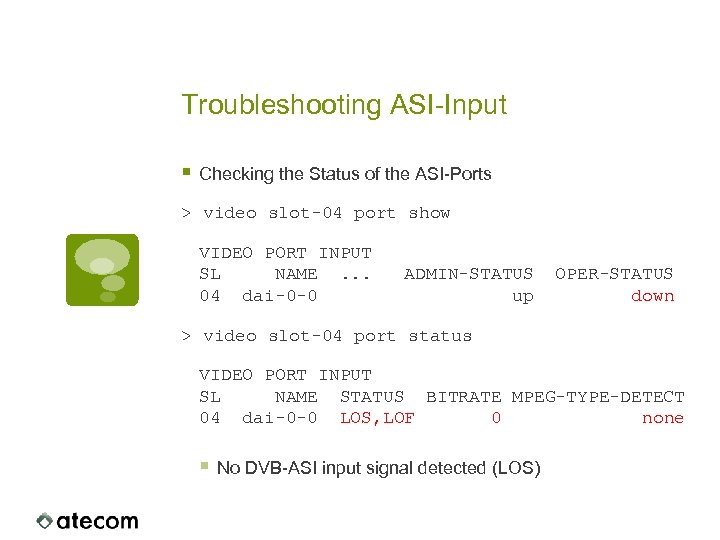 Troubleshooting ASI-Input § Checking the Status of the ASI-Ports > video slot-04 port show VIDEO PORT INPUT SL NAME. . . 04 dai-0 -0 ADMIN-STATUS up OPER-STATUS down > video slot-04 port status VIDEO PORT INPUT SL NAME STATUS BITRATE MPEG-TYPE-DETECT 04 dai-0 -0 LOS, LOF 0 none § No DVB-ASI input signal detected (LOS)
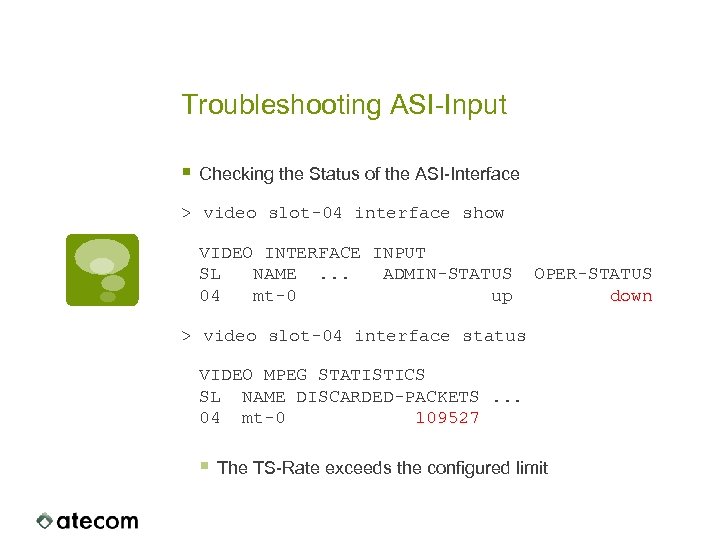 Troubleshooting ASI-Input § Checking the Status of the ASI-Interface > video slot-04 interface show VIDEO INTERFACE INPUT SL NAME. . . ADMIN-STATUS 04 mt-0 up OPER-STATUS down > video slot-04 interface status VIDEO MPEG STATISTICS SL NAME DISCARDED-PACKETS. . . 04 mt-0 109527 § The TS-Rate exceeds the configured limit
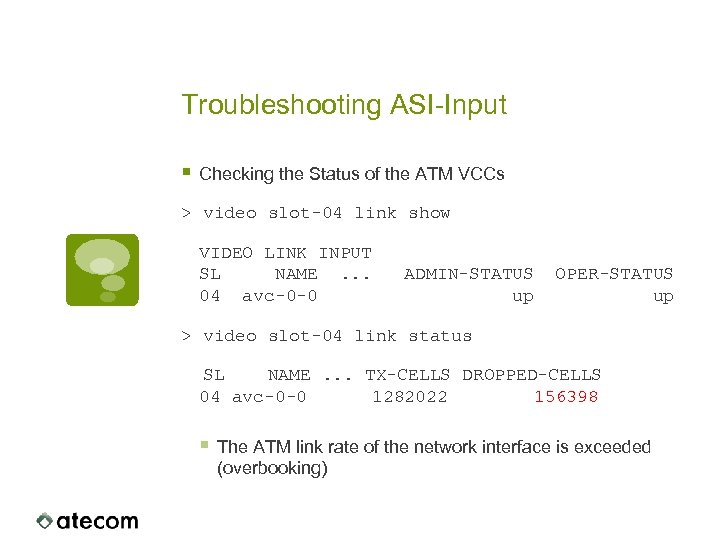 Troubleshooting ASI-Input § Checking the Status of the ATM VCCs > video slot-04 link show VIDEO LINK INPUT SL NAME. . . 04 avc-0 -0 ADMIN-STATUS up OPER-STATUS up > video slot-04 link status SL NAME. . . TX-CELLS DROPPED-CELLS 04 avc-0 -0 1282022 156398 § The ATM link rate of the network interface is exceeded (overbooking)
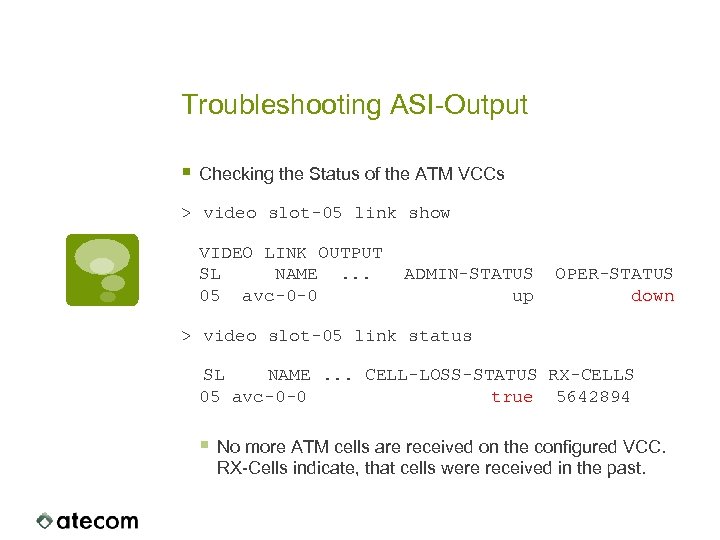 Troubleshooting ASI-Output § Checking the Status of the ATM VCCs > video slot-05 link show VIDEO LINK OUTPUT SL NAME. . . 05 avc-0 -0 ADMIN-STATUS up OPER-STATUS down > video slot-05 link status SL NAME. . . CELL-LOSS-STATUS RX-CELLS 05 avc-0 -0 true 5642894 § No more ATM cells are received on the configured VCC. RX-Cells indicate, that cells were received in the past.
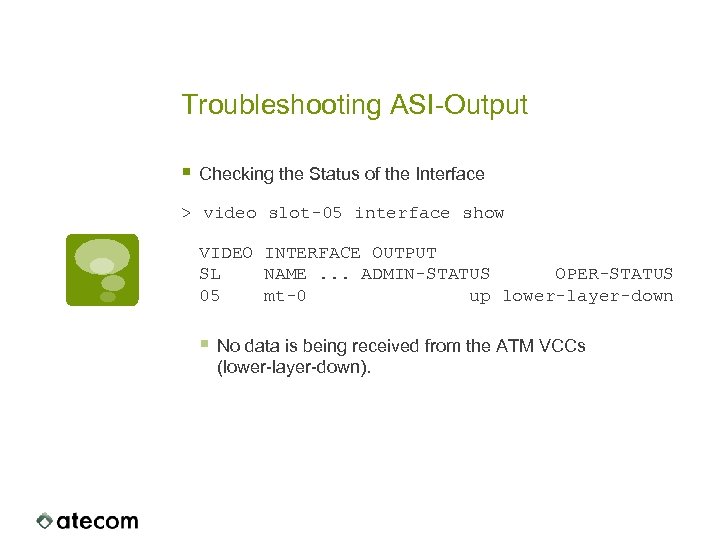 Troubleshooting ASI-Output § Checking the Status of the Interface > video slot-05 interface show VIDEO INTERFACE OUTPUT SL NAME. . . ADMIN-STATUS OPER-STATUS 05 mt-0 up lower-layer-down § No data is being received from the ATM VCCs (lower-layer-down).
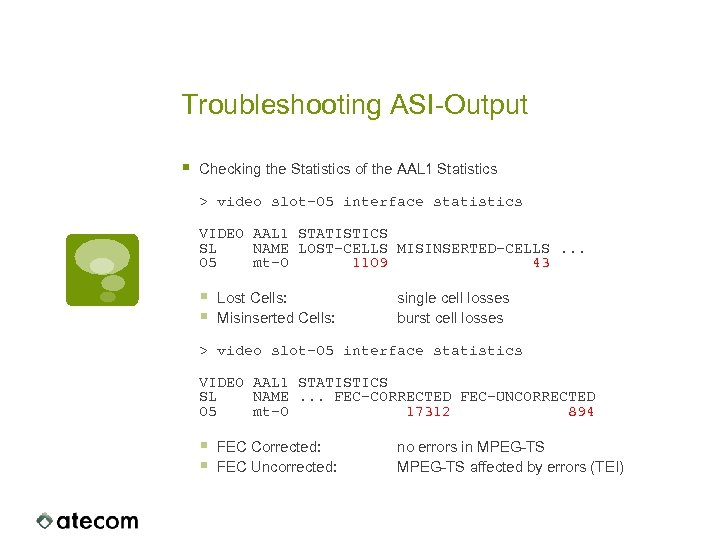 Troubleshooting ASI-Output § Checking the Statistics of the AAL 1 Statistics > video slot-05 interface statistics VIDEO AAL 1 STATISTICS SL NAME LOST-CELLS MISINSERTED-CELLS. . . 05 mt-0 1109 43 § § Lost Cells: Misinserted Cells: single cell losses burst cell losses > video slot-05 interface statistics VIDEO AAL 1 STATISTICS SL NAME. . . FEC-CORRECTED FEC-UNCORRECTED 05 mt-0 17312 894 § § FEC Corrected: FEC Uncorrected: no errors in MPEG-TS affected by errors (TEI)
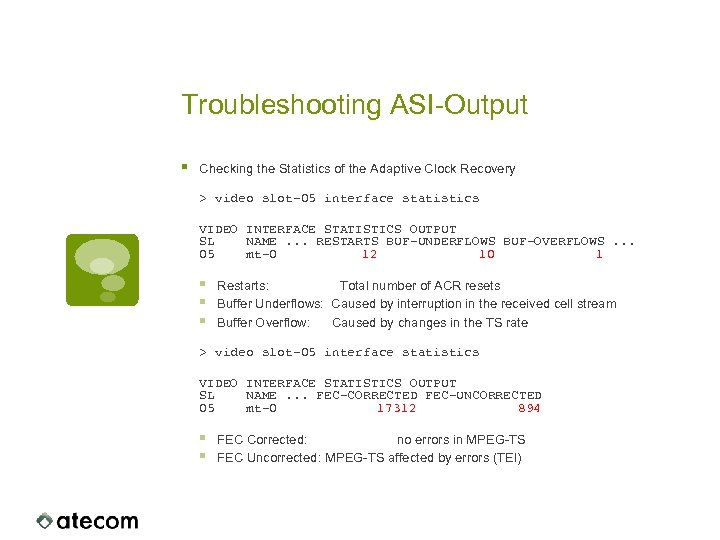 Troubleshooting ASI-Output § Checking the Statistics of the Adaptive Clock Recovery > video slot-05 interface statistics VIDEO INTERFACE STATISTICS OUTPUT SL NAME. . . RESTARTS BUF-UNDERFLOWS BUF-OVERFLOWS. . . 05 mt-0 12 10 1 § § § Restarts: Total number of ACR resets Buffer Underflows: Caused by interruption in the received cell stream Buffer Overflow: Caused by changes in the TS rate > video slot-05 interface statistics VIDEO INTERFACE STATISTICS OUTPUT SL NAME. . . FEC-CORRECTED FEC-UNCORRECTED 05 mt-0 17312 894 § § FEC Corrected: no errors in MPEG-TS FEC Uncorrected: MPEG-TS affected by errors (TEI)
 UNI Signaling
 General Requirements § UNI signaling is only supported by AF-SYS-IB controller cards § On the controller card(s), the network interface(s) and the DVB-ASI service cards firmware version 2. 9. x must be used § The FALCON must be connected to an ATM Switch supporting UNI 4. 0 and ILMI
 Redundancy § Redundant network interfaces § Each network interface gets its own ATM address § When both interfaces are connected to the same switch the ESI of the network interfaces MUST differ. § Redundant controller cards § Network interface in Slot #12 is served by Slot #2 § Network interface in Slot #13 is served by Slot #3 § Controller monitor each other. In case of a failure of one controller the remaing takes over control of ILMI and SVCs for Service Cards
 ATM Address Formats § The FALCON supports NSAP and E. 164 numbering plans. The NSAP address format is prefered. § The selector Byte is used to select a particular service: § Upper Nibble: Slot § Lower Nibble: Channel § Alternatively an ATM Subaddress can be used: § 1 st Byte: Slot § 2 nd Byte: Channel § 3 rd Byte: Subchannel (structured E 1/T 1 only)
 ILMI § ILMI = Integrated Local Management Interface § SNMP based protocol between ATM switch and Enddevice § Main functionality is the Automatic Address Registration § Net. Prefix of the ATM switch + ESI of the Enddevice build the ATM Endsystem Address (NSAP) § Changes of the ESI result in a new Endsystem Address for a device. § ESI is preconfigured to a unique value § In case of hardware exchange the ESI must be reconfigured
 ILMI Implementation § The ILMI daemon (ilmid) is running on the controller card § Single Controller Card § Controller serves both network interfaces § Redundant Controller Cards § Slot #2 is serving Slot #12 § Slot #3 is serving Slot #13 § The controllers are monitoring the state of each other. § In case of a failure the remaining controller takes over control § For accessibility by both controller cards the ESI is stored on the network interfaces.
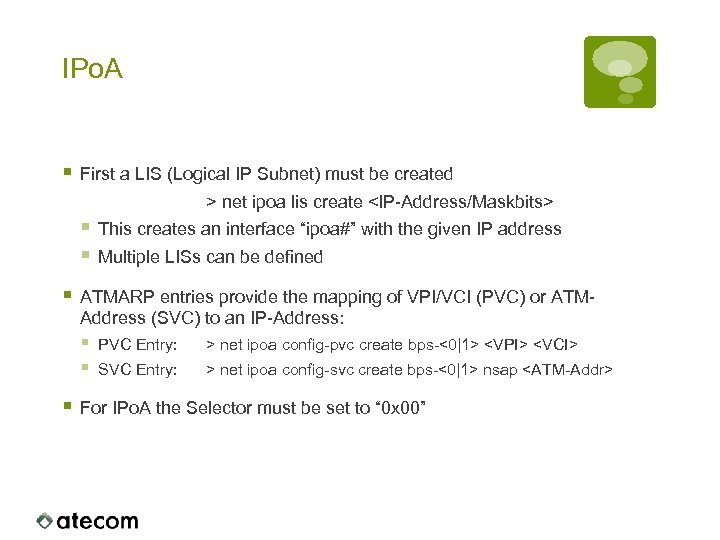 IPo. A § First a LIS (Logical IP Subnet) must be created > net ipoa lis create
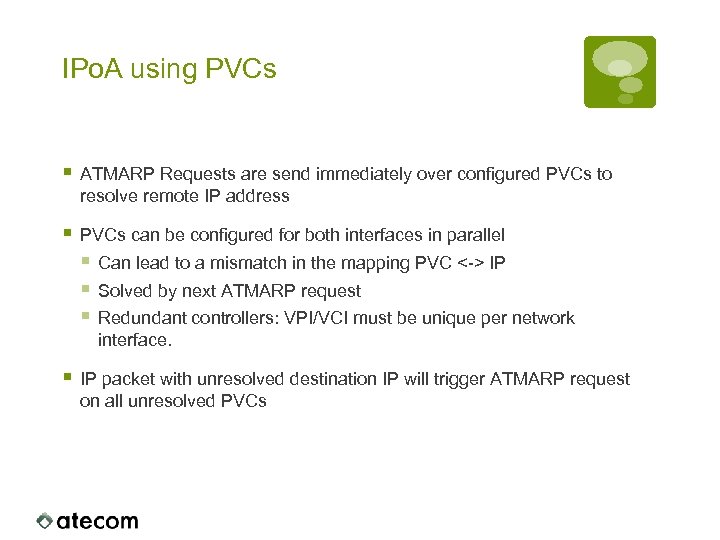 IPo. A using PVCs § ATMARP Requests are send immediately over configured PVCs to resolve remote IP address § PVCs can be configured for both interfaces in parallel § Can lead to a mismatch in the mapping PVC <-> IP § Solved by next ATMARP request § Redundant controllers: VPI/VCI must be unique per network interface. § IP packet with unresolved destination IP will trigger ATMARP request on all unresolved PVCs
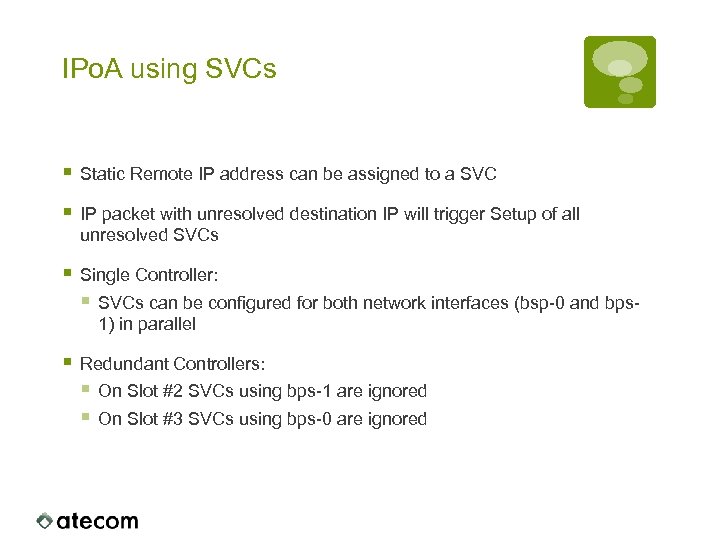 IPo. A using SVCs § Static Remote IP address can be assigned to a SVC § IP packet with unresolved destination IP will trigger Setup of all unresolved SVCs § Single Controller: § SVCs can be configured for both network interfaces (bsp-0 and bps 1) in parallel § Redundant Controllers: § On Slot #2 SVCs using bps-1 are ignored § On Slot #3 SVCs using bps-0 are ignored
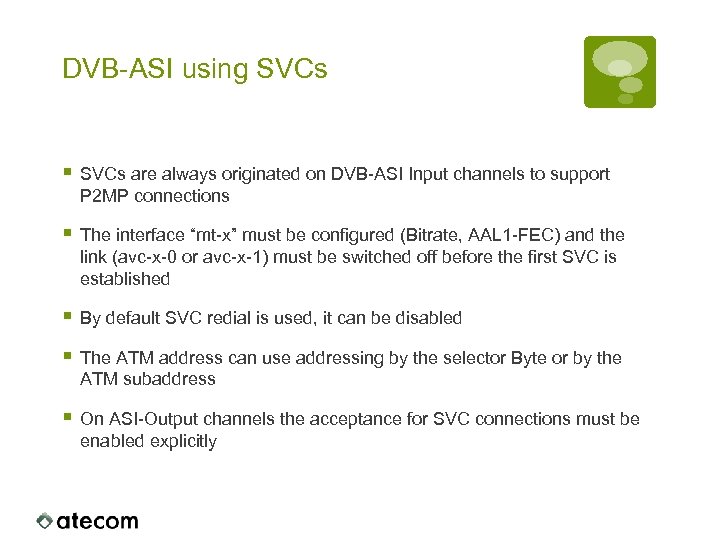 DVB-ASI using SVCs § SVCs are always originated on DVB-ASI Input channels to support P 2 MP connections § The interface “mt-x” must be configured (Bitrate, AAL 1 -FEC) and the link (avc-x-0 or avc-x-1) must be switched off before the first SVC is established § By default SVC redial is used, it can be disabled § The ATM address can use addressing by the selector Byte or by the ATM subaddress § On ASI-Output channels the acceptance for SVC connections must be enabled explicitly