 Скачать презентацию Fabric Management Massimo Biasotto Enrico Ferro INFN
b0598664644e51f7f696d8a6299b8e2b.ppt
- Количество слайдов: 28



Fabric Management Massimo Biasotto, Enrico Ferro – INFN LNL M. Biasotto, CERN, 5 november 2001 1
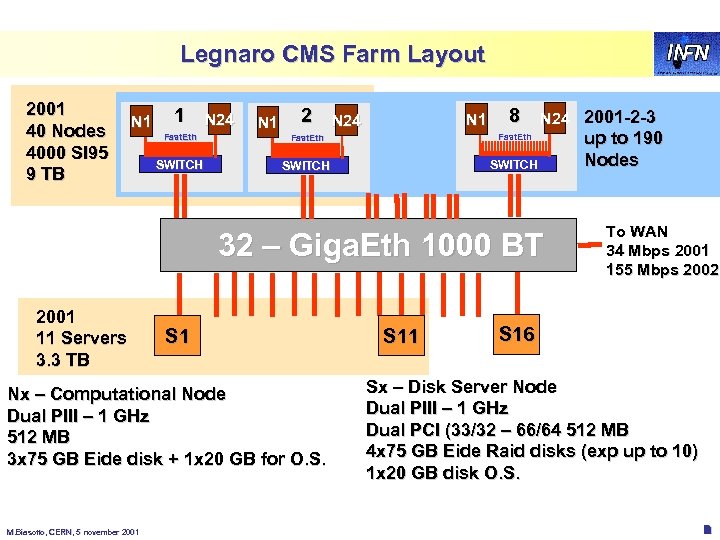
Legnaro CMS Farm Layout 2001 40 Nodes 4000 SI 95 9 TB N 1 1 N 24 N 1 2 N 1 N 24 8 Fast. Eth ast. E SWITCH N 24 2001 -2 -3 SWITCH 32 – Giga. Eth 1000 BT 2001 11 Servers 3. 3 TB S 1 Nx – Computational Node Dual PIII – 1 GHz 512 MB 3 x 75 GB Eide disk + 1 x 20 GB for O. S. M. Biasotto, CERN, 5 november 2001 S 11 up to 190 Nodes To WAN 34 Mbps 2001 155 Mbps 2002 S 16 Sx – Disk Server Node Dual PIII – 1 GHz Dual PCI (33/32 – 66/64 512 MB 4 x 75 GB Eide Raid disks (exp up to 10) 1 x 20 GB disk O. S. 2
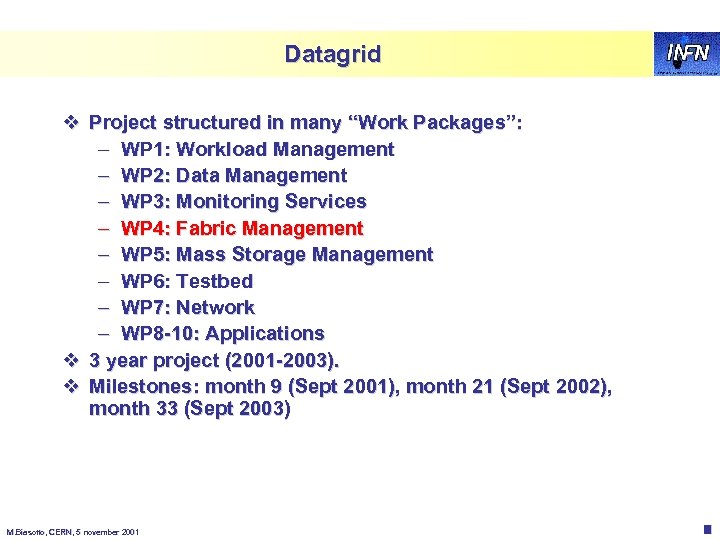
Datagrid v Project structured in many “Work Packages”: – WP 1: Workload Management – WP 2: Data Management – WP 3: Monitoring Services – WP 4: Fabric Management – WP 5: Mass Storage Management – WP 6: Testbed – WP 7: Network – WP 8 -10: Applications v 3 year project (2001 -2003). v Milestones: month 9 (Sept 2001), month 21 (Sept 2002), month 33 (Sept 2003) M. Biasotto, CERN, 5 november 2001 3
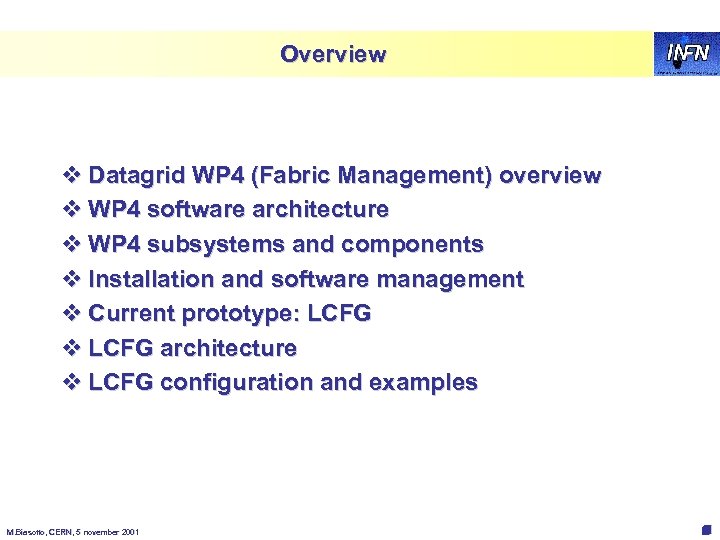
Overview v Datagrid WP 4 (Fabric Management) overview v WP 4 software architecture v WP 4 subsystems and components v Installation and software management v Current prototype: LCFG v LCFG architecture v LCFG configuration and examples M. Biasotto, CERN, 5 november 2001 4
WP 4 overview v Partners: CERN, INFN (Italy), KIP (Germany), NIKHEF (Holland), PPARC (UK), ZIB (Germany) v WP 4 website: http: //hep-proj-grid-fabric. web. cern. ch/hep-projgrid-fabric/ v Aims to deliver a computing fabric comprised of all the necessary tools to manage a centre providing Grid services on clusters of thousands of nodes M. Biasotto, CERN, 5 november 2001 5
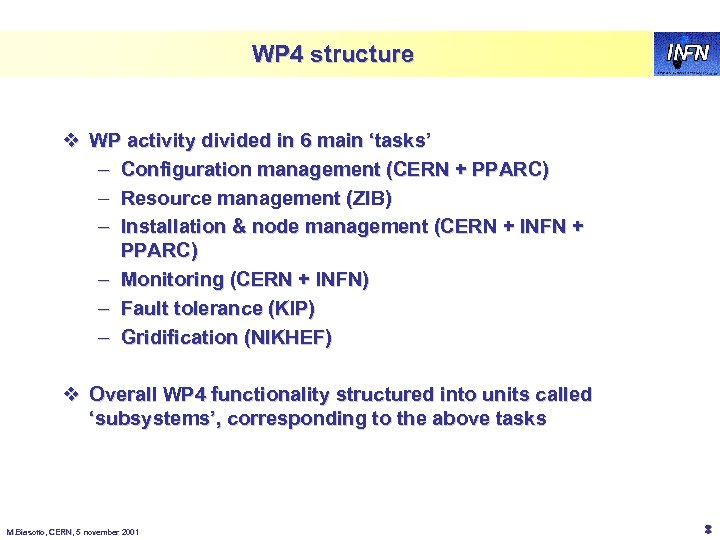
WP 4 structure v WP activity divided in 6 main ‘tasks’ – Configuration management (CERN + PPARC) – Resource management (ZIB) – Installation & node management (CERN + INFN + PPARC) – Monitoring (CERN + INFN) – Fault tolerance (KIP) – Gridification (NIKHEF) v Overall WP 4 functionality structured into units called ‘subsystems’, corresponding to the above tasks M. Biasotto, CERN, 5 november 2001 6
Architecture overview v WP 4 architectural design document (draft): – http: //hep-proj-grid-fabric. web. cern. ch/hep-proj-gridfabric/architecture/eu/default. htm v Still work in progress: open issues that need further investigation v Functionalities classified into two main categories: – User job control and management § handled by Gridification and Resource Management subsystems – Automated system administration § handled by Configuration Mgmt, Installation Mgmt, Fabric Monitoring and Fault Tolerance subsystems M. Biasotto, CERN, 5 november 2001 7
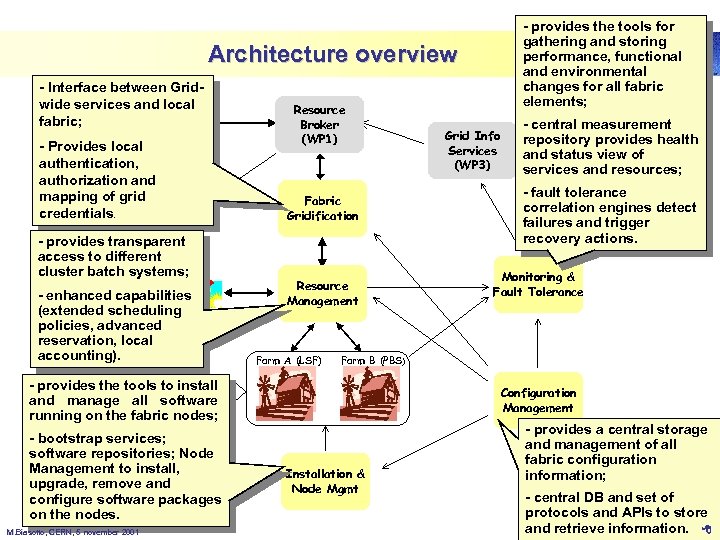
- provides the tools for gathering and storing performance, functional and environmental changes for all fabric elements; WP 4 subsystems Architecture overview - Interface between Gridwide services and local fabric; - Provides local Grid User authentication, authorization and mapping of grid credentials. Data Mgmt - provides transparent (WP 2) access to different cluster batch systems; - enhanced capabilities (extended scheduling policies, advanced Local User reservation, local accounting). Resource Broker (WP 1) Fabric Gridification Resource Management Farm A (LSF) M. Biasotto, CERN, 5 november 2001 - central measurement repository provides health Other Wps and status view of services and resources; - fault tolerance correlation engines detect failures and trigger recovery actions. Monitoring & Fault Tolerance Farm B (PBS) Grid Data - provides the tools to install and manage Storage all software (WP 5) running on the fabric nodes; (Mass storage, - bootstrap services; Disk pools) software repositories; Node Management to install, upgrade, remove and configure software packages on the nodes. Grid Info Services (WP 3) Configuration Management Installation & Node Mgmt - provides a central storage and management of all fabric configuration information; - central DB and set of protocols and APIs to store and retrieve information. 8
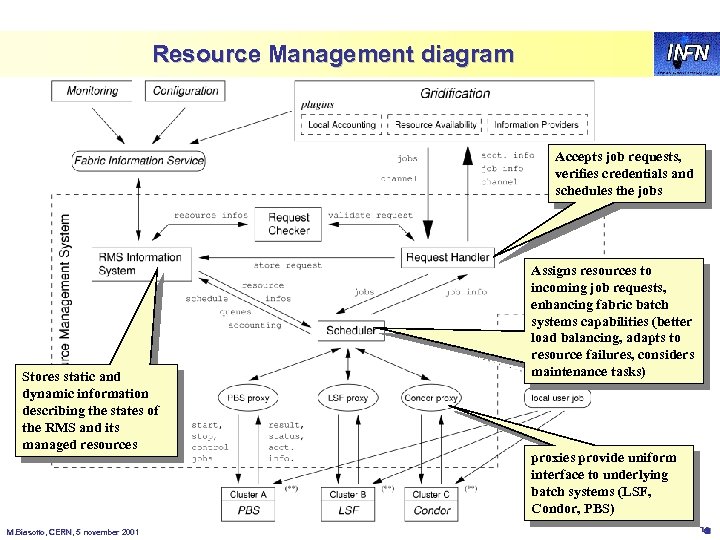
Resource Management diagram Accepts job requests, verifies credentials and schedules the jobs Stores static and dynamic information describing the states of the RMS and its managed resources M. Biasotto, CERN, 5 november 2001 Assigns resources to incoming job requests, enhancing fabric batch systems capabilities (better load balancing, adapts to resource failures, considers maintenance tasks) proxies provide uniform interface to underlying batch systems (LSF, Condor, PBS) 9
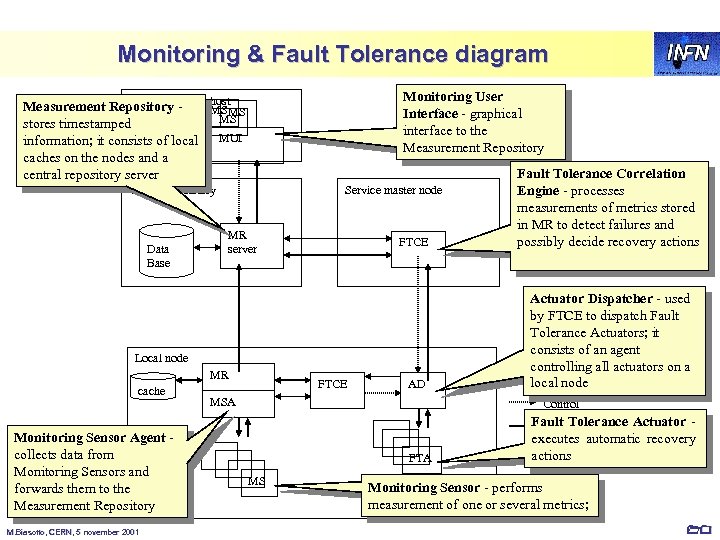
Monitoring & Fault Tolerance diagram Human operator host Measurement Repository - MS MS stores timestamped MS information; it consists of local MUI Monitoring User Interface - graphical interface to the Measurement Repository caches on the nodes and a central repository server Central repository Service master node Data Base Local node cache Monitoring Sensor Agent - collects data from Monitoring Sensors and forwards them to the Measurement Repository M. Biasotto, CERN, 5 november 2001 MR server MR FTCE AD MSA MS Fault Tolerance Correlation Engine - processes measurements of metrics stored in MR to detect failures and possibly decide recovery actions Actuator Dispatcher - used by FTCE to dispatch Fault Tolerance Actuators; it consists of an agent controlling all actuators on a local node Control flow Fault Tolerance Actuator - Data flow FTA executes automatic recovery actions Monitoring Sensor - performs measurement of one or several metrics; 10
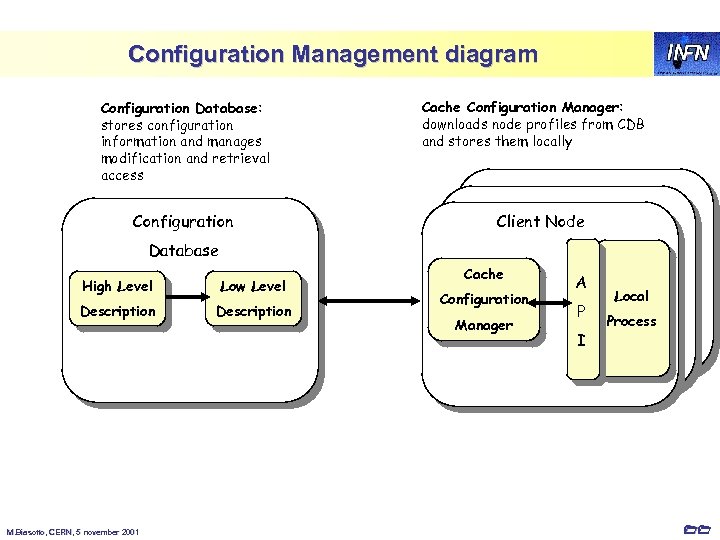
Configuration Management diagram Configuration Database: stores configuration information and manages modification and retrieval access Configuration Cache Configuration Manager: downloads node profiles from CDB and stores them locally Client Node Database High Level Low Level Description M. Biasotto, CERN, 5 november 2001 Cache Configuration Manager A P I Local Process 11
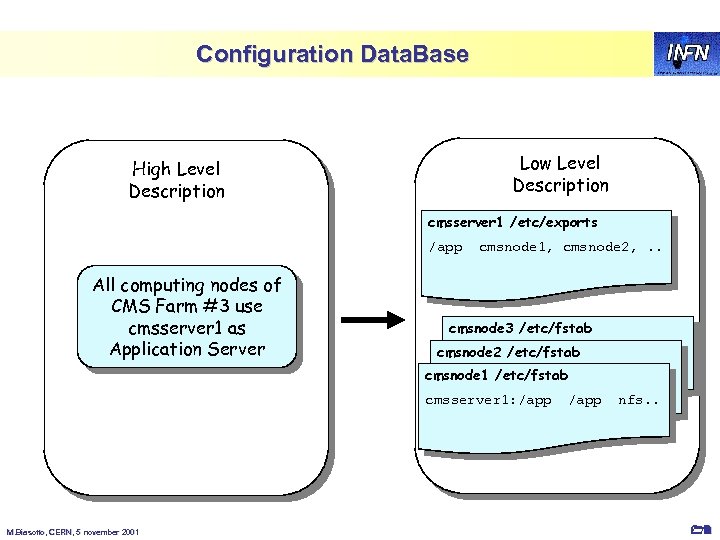
Configuration Data. Base Low Level Description High Level Description cmsserver 1 /etc/exports /app All computing nodes of CMS Farm #3 use cmsserver 1 as Application Server cmsnode 1, cmsnode 2, . . cmsnode 3 /etc/fstab cmsnode 2 /etc/fstab /app cmsserver 1: /app cmsnode 1 /etc/fstab /app cmsserver 1: /app M. Biasotto, CERN, 5 november 2001 /app nfs. . 12
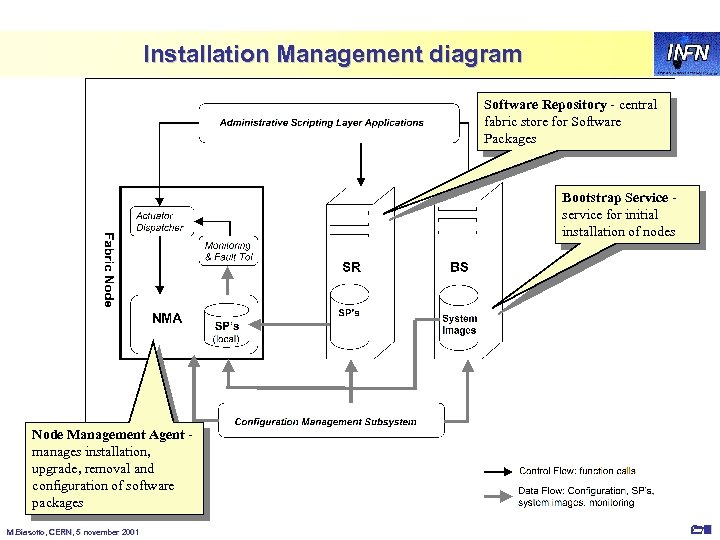
Installation Management diagram Software Repository - central fabric store for Software Packages Bootstrap Service - service for initial installation of nodes Node Management Agent - manages installation, upgrade, removal and configuration of software packages M. Biasotto, CERN, 5 november 2001 13
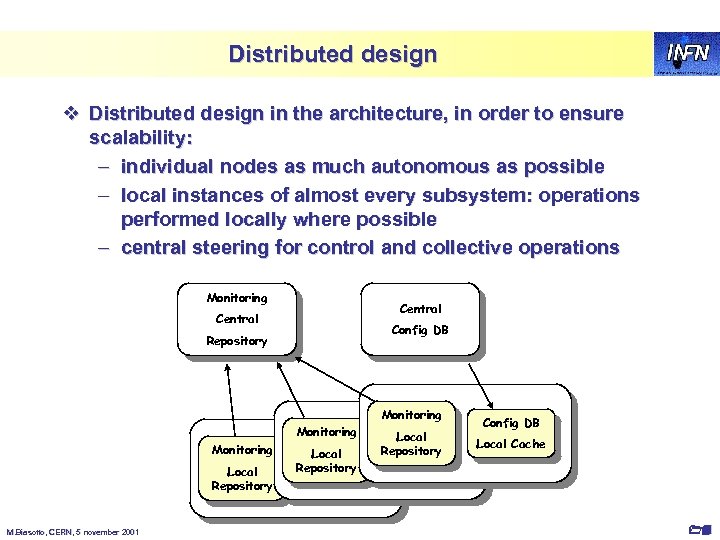
Distributed design v Distributed design in the architecture, in order to ensure scalability: – individual nodes as much autonomous as possible – local instances of almost every subsystem: operations performed locally where possible – central steering for control and collective operations Monitoring Central Config DB Repository Monitoring Local Repository M. Biasotto, CERN, 5 november 2001 Local DB Config Repository Local DB Config Local Cache Repository Local Cache Config DB Local Cache 14
Scripting layer v All subsystems are tied together using a high level ‘scripting layer’: – allows administrators to code and automate complex fabric-wide management operations – coordination in execution of user jobs and administrative task on the nodes – scripts can be executed by Fault Tolerance subsystem to automate corrective actions v All subsystems provide APIs to control their components v Subsystems keep their independence and internal coherence: the scripting layer only aims at connecting them for building high-level operations M. Biasotto, CERN, 5 november 2001 15
Maintenance tasks v Control function calls to NMA are known as ‘maintenance tasks’ – non intrusive: can be executed without interfering with user jobs (e. g. cleanup of log files) – intrusive: for example kernel upgrades or node reboots v Two basic node states from the administration point of view – production: node is running user jobs or user services (e. g. NFS server). Only non intrusive tasks can be executed – maintenance: no user jobs or services. Both intrusive and non intrusive tasks can be executed v Usually a node is put into maintenance status only when it is idle, after draining the job queues or switching the services to another node. But there can be exceptions to immediately force the status change. M. Biasotto, CERN, 5 november 2001 16
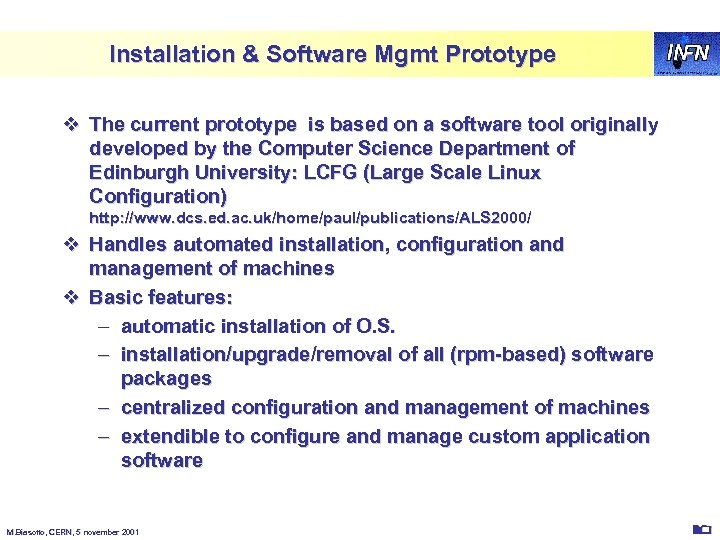
Installation & Software Mgmt Prototype v The current prototype is based on a software tool originally developed by the Computer Science Department of Edinburgh University: LCFG (Large Scale Linux Configuration) http: //www. dcs. ed. ac. uk/home/paul/publications/ALS 2000/ v Handles automated installation, configuration and management of machines v Basic features: – automatic installation of O. S. – installation/upgrade/removal of all (rpm-based) software packages – centralized configuration and management of machines – extendible to configure and manage custom application software M. Biasotto, CERN, 5 november 2001 20
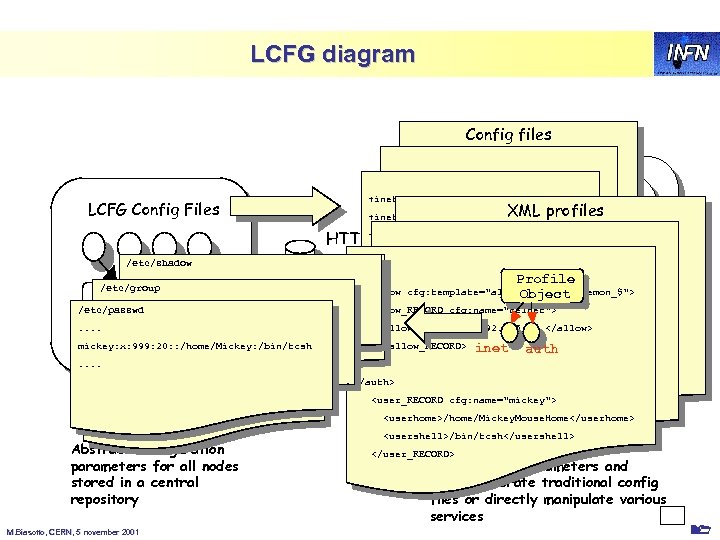
LCFG diagram Config files LCFG Config Files /etc/shadow /etc/services +inet. services XML profiles +inet. allow Read telnet login ftp sshd Load +inet. allow_telnet ALLOWED_NETWORKS rdxprof ldxprof Profile HTTP +inet. allow_login +inet. allow_ftp <inet> /etc/group /etc/inetd. conf Make XML Profile telnet login ftp ALLOWED_NETWORKS Profile Generic +inet. allow_sshd ALL <allow cfg: template="allow_$ tag_$ daemon_$"> Object Component /etc/passwd /etc/hosts. allow +inet. daemon_sshd yes <allow_RECORD cfg: name="telnet"> . . in. telnetd : 192. 168. , 192. 135. 30. . . <allow>192. 168. , 192. 135. 30. </allow> Local cache myckey +auth. users </allow_RECORD> Web Server XML mickey: x: 999: 20: : /home/Mickey: /bin/tcsh. Profile in. rlogind : 192. 168. , 192. 135. 30. . . in. ftpd : 192. 168. , 192. 135. 30. sshd : ALL Server Abstract configuration parameters for all nodes stored in a central repository M. Biasotto, CERN, 5 november 2001 inet +auth. userhome_mickey. . . +auth. usershell_mickey </auth> auth /home/mickey LCFG Objects /bin/tcsh Client nodes <user_RECORD cfg: name="mickey"> <userhome>/home/Mickey. Mouse. Home</userhome> <usershell>/bin/tcsh</usershell> A collection </user_RECORD> of agents read configuration parameters and either generate traditional config files or directly manipulate various services 21
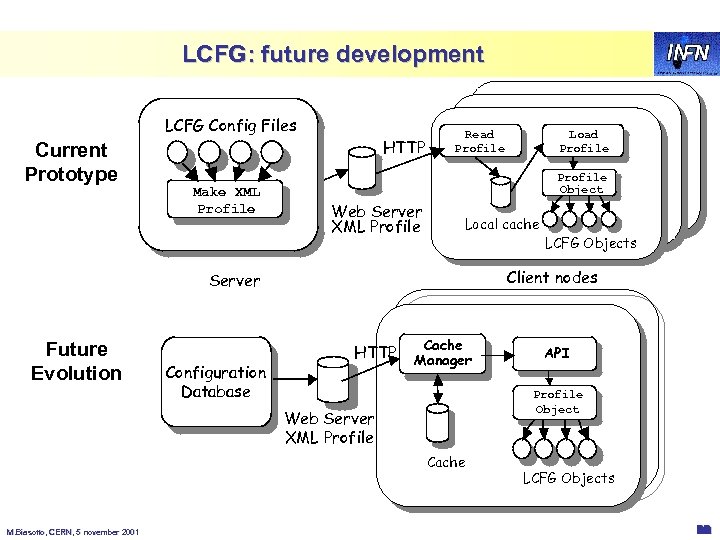
LCFG: future development LCFG Config Files Current Prototype HTTP Make XML Profile Read rdxprof Profile Generic Object Component Web Server XML Profile Local cache Configuration Database HTTP Cache Manager API Profile Generic Object Component Web Server XML Profile Cache M. Biasotto, CERN, 5 november 2001 LCFG Objects Client nodes Server Future Evolution Load ldxprof Profile LCFG Objects 22
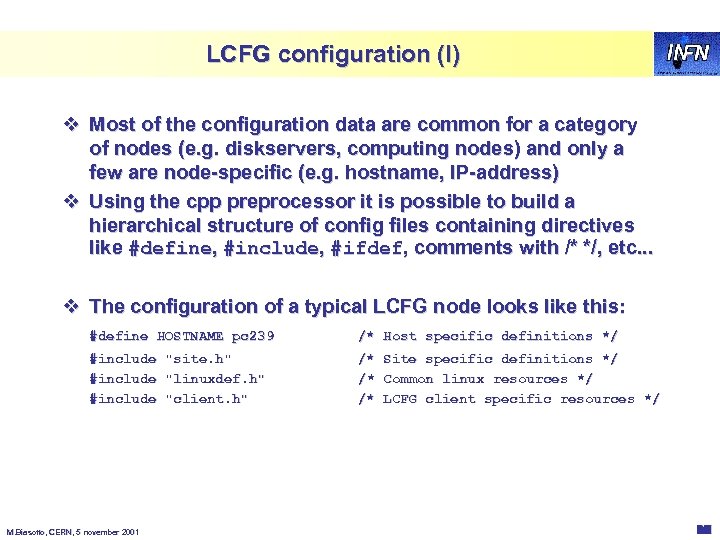
LCFG configuration (I) v Most of the configuration data are common for a category of nodes (e. g. diskservers, computing nodes) and only a few are node-specific (e. g. hostname, IP-address) v Using the cpp preprocessor it is possible to build a hierarchical structure of config files containing directives like #define, #include, #ifdef, comments with /* */, etc. . . v The configuration of a typical LCFG node looks like this: #define HOSTNAME pc 239 /* Host specific definitions */ #include "site. h" #include "linuxdef. h" #include "client. h" /* Site specific definitions */ /* Common linux resources */ /* LCFG client specific resources */ M. Biasotto, CERN, 5 november 2001 23
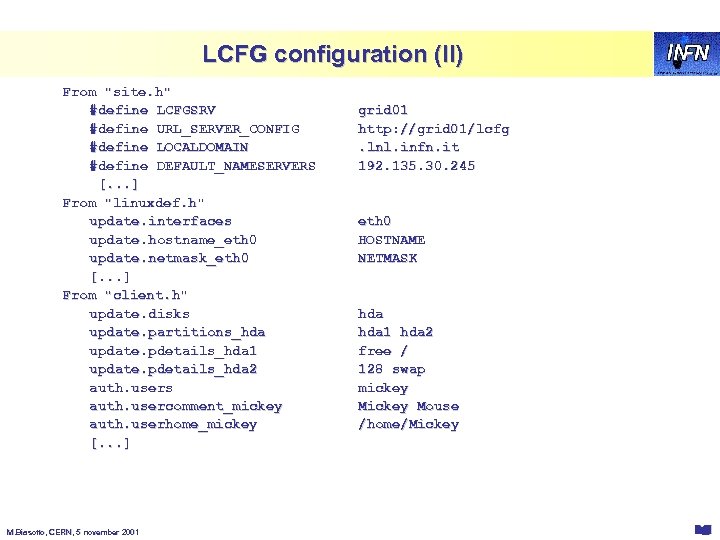
LCFG configuration (II) From "site. h" #define LCFGSRV #define URL_SERVER_CONFIG #define LOCALDOMAIN #define DEFAULT_NAMESERVERS [. . . ] From "linuxdef. h" update. interfaces update. hostname_eth 0 update. netmask_eth 0 [. . . ] From "client. h" update. disks update. partitions_hda update. pdetails_hda 1 update. pdetails_hda 2 auth. users auth. usercomment_mickey auth. userhome_mickey [. . . ] M. Biasotto, CERN, 5 november 2001 grid 01 http: //grid 01/lcfg. lnl. infn. it 192. 135. 30. 245 eth 0 HOSTNAME NETMASK hda 1 hda 2 free / 128 swap mickey Mouse /home/Mickey 24
LCFG: configuration changes v Server-side: when the config files are modified, a tool (mkxprof) recreates the new xml profile for all the nodes affected by the changes – this can be done manually or with a daemon periodically checking for config changes and calling mkxprof – mkxprof can notify via UDP the nodes affected by the changes v Client-side: another tool (rdxprof) downloads the new profile from the server – usually activated by an LCFG object at boot – can be configured to work as § daemon periodically polling the server § daemon waiting for notifications § started by cron at predefined times M. Biasotto, CERN, 5 november 2001 25
LCFG: what’s an object? v It's a simple shell script (but in future it will probably be a perl script) v Each object provides a number of “methods” (start, stop, reconfig, query, . . . ) which are invoked at appropriate times v A simple and typical object behaviour: – Started by profile object when notified of a configuration change – Loads its configuration from the cache – Configures the appropriate services, either translating config parameters into a traditional config file or directly controlling the service (e. g. starting a daemon with command-line parameters derived from configuration). M. Biasotto, CERN, 5 november 2001 26
LCFG: custom objects v LCFG provides the objects to manage all the standard services of a machine: inet, syslog, auth, nfs, cron, . . . v Admins can build new custom objects to configure and manage their own applications: – define your custom “resources” (configuration parameters) to be added to the node profile – include in your script the object “generic”, which contains the definition of common function used by all objects (config loading, log, output, . . . ) – overwrite the standard methods (start, stop, reconfig, . . . ) with your custom code – for simple objects usually just a few lines of code M. Biasotto, CERN, 5 november 2001 27
LCFG: Software Packages Management v Currently it is Red. Hat-specific: heavily dependent on the RPM tool v The software to install is defined in a file on the server containing a list of RPM packages (currently not yet merged in the XML profile) v Whenever the list is modified, the required RPM packages are automatically installed/upgraded/removed by a specific LCFG object (updaterpms), which is started at boot or when the node is notified of the change M. Biasotto, CERN, 5 november 2001 28
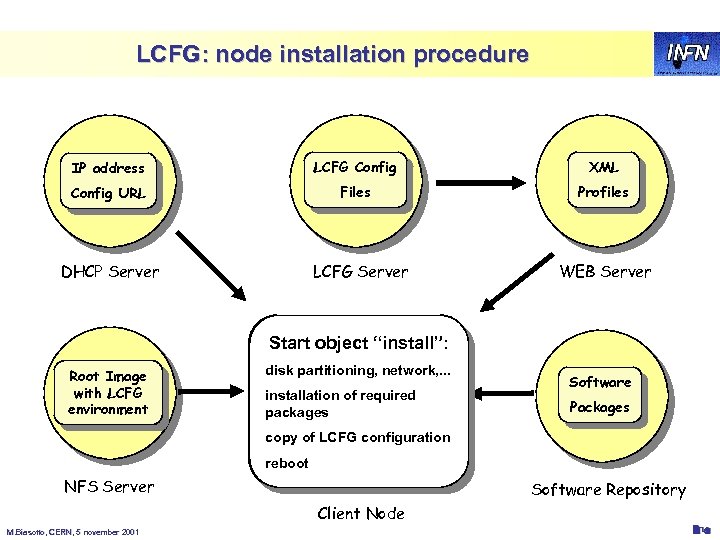
LCFG: node installation procedure IP address LCFG Config XML Config URL Files Profiles DHCP Server Root Image with LCFG environment LCFG Server Start object “install”: First boot via floppy Load minimal config Root Image complete Load complete disk partitioning, network, . . . or via network data via DHCP: with LCFG After reboot LCFG configuration via installation of required environment Initialization script objects complete the IP Address, Gateway, packages HTTP mounted via NFS node configuration starts LCFG Config URL WEB Server Software Packages copy of LCFG configuration reboot NFS Server Software Repository Client Node M. Biasotto, CERN, 5 november 2001 29
LCFG: summary v Pros: – In Edinburgh it has been used for years in a complex environment, managing hundreds of nodes – Supports the complete installation and management of all the software (both O. S. and applications) – Extremely flexible and easy to customize v Cons: – Complex: steep learning curve – Prototype: the evolution of this tool is not clear yet – Lack of user-friendly tools for the creation and management of configuration files: errors can be very dangerous! M. Biasotto, CERN, 5 november 2001 30
Future plans v Future evolution not clearly defined: it will depend also on results of forthcoming tests (1 st Datagrid milestone) v Integration of current prototype with Configuration Management components – Config Cache Manager and API released ad prototypes but not yet integrated with LCFG v Configuration Data. Base – complete definition of node profiles – user-friendly tools to access and modify config information v Development of still missing objects – system services (AFS, PAM, . . . ) – fabric software (grid sw, globus, batch systems, . . . ) – application software (CMS, Atlas, . . . ) in collaboration with people from experiments M. Biasotto, CERN, 5 november 2001 31
Скачать презентацию Fabric Management Massimo Biasotto Enrico Ferro INFN
b0598664644e51f7f696d8a6299b8e2b.ppt