Скачать презентацию F 5 Data Solutions Tech DEMO
fb533e9ef3e3cfd57e182a90ebfeacb4.ppt
- Количество слайдов: 34
 F 5 Data Solutions Tech & DEMO • • Łukasz Formas Field System Engineer Eastern Europe l. formas@f 5. com
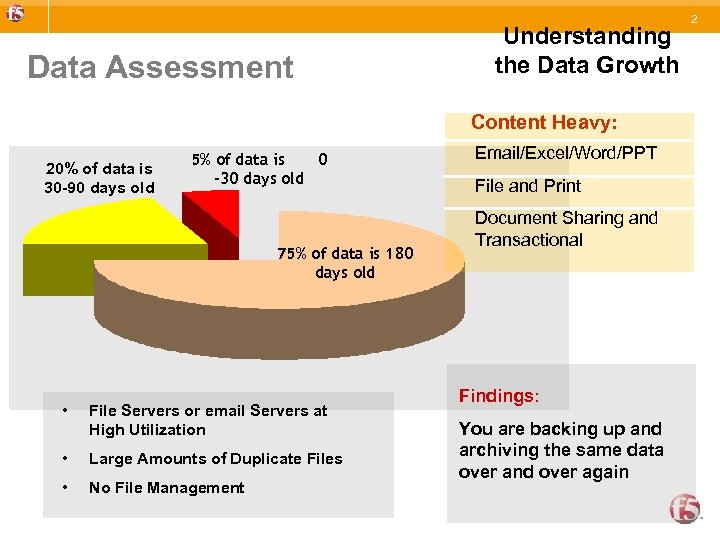 Data Assessment Understanding the Data Growth Content Heavy: 20% of data is 30 -90 days old 5% of data is 0 -30 days old 75% of data is 180 days old • File Servers or email Servers at High Utilization • Large Amounts of Duplicate Files • No File Management Email/Excel/Word/PPT File and Print Document Sharing and Transactional Findings: You are backing up and archiving the same data over and over again 2
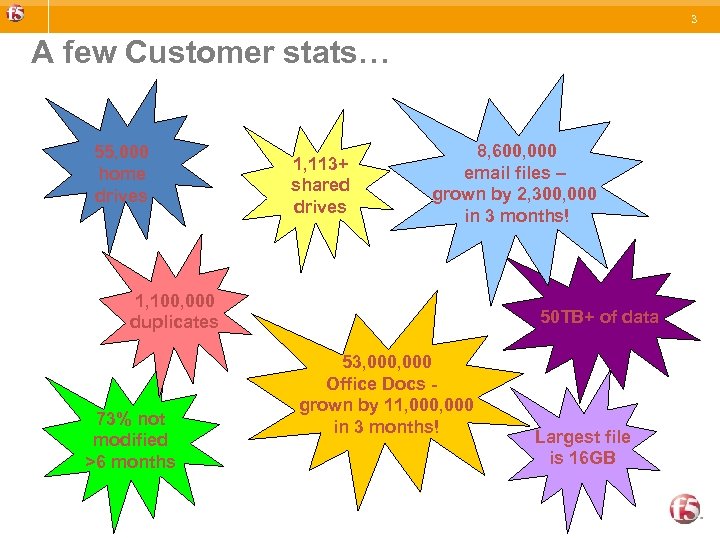 3 A few Customer stats… 55, 000 home drives 1, 113+ shared drives 8, 600, 000 email files – grown by 2, 300, 000 in 3 months! 1, 100, 000 duplicates 73% not modified >6 months 50 TB+ of data 53, 000 Office Docs grown by 11, 000 in 3 months! Largest file is 16 GB
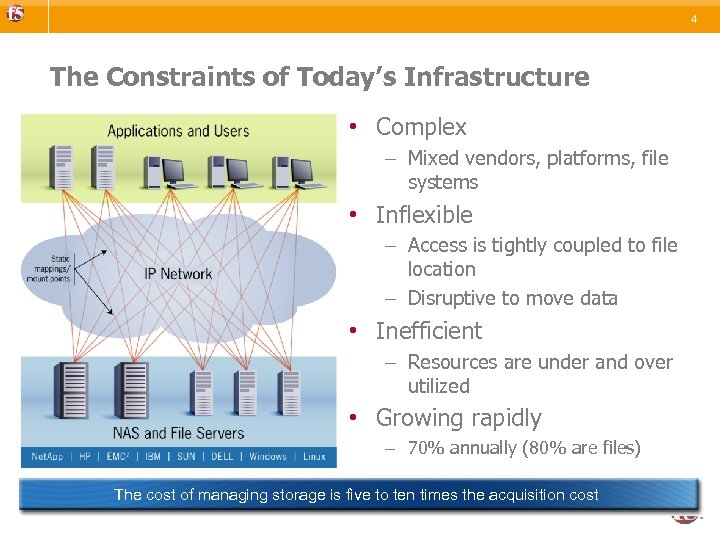 4 The Constraints of Today’s Infrastructure • Complex – Mixed vendors, platforms, file systems • Inflexible – Access is tightly coupled to file location – Disruptive to move data • Inefficient – Resources are under and over utilized • Growing rapidly – 70% annually (80% are files) The cost of managing storage is five to ten times the acquisition cost
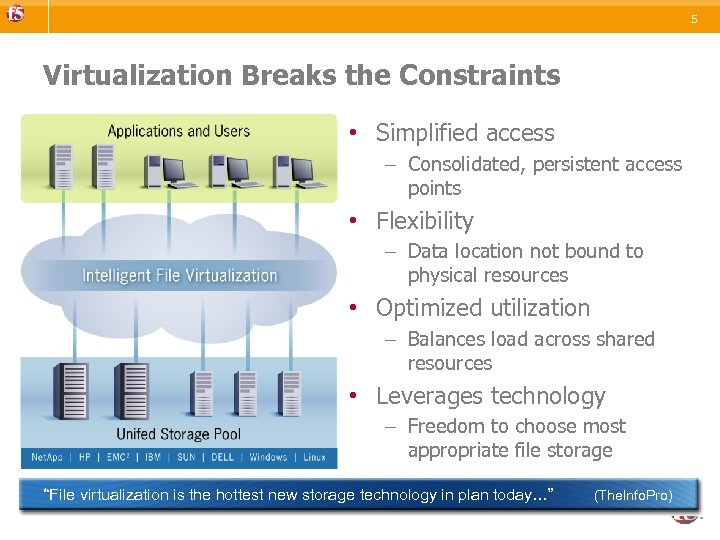 5 Virtualization Breaks the Constraints • Simplified access – Consolidated, persistent access points • Flexibility – Data location not bound to physical resources • Optimized utilization – Balances load across shared resources • Leverages technology – Freedom to choose most appropriate file storage “File virtualization is the hottest new storage technology in plan today…” (The. Info. Pro)
 6 How will ARX work? • ARX acts as a proxy for all file servers / NAS devices – The ARX resides logically in-line – Uses virtual IP addresses to proxy backend devices • Proxies NFS and CIFS traffic • Provides virtual to physical mapping of the file systems – Managed Volumes are configured & imported – Presentation volumes are configured
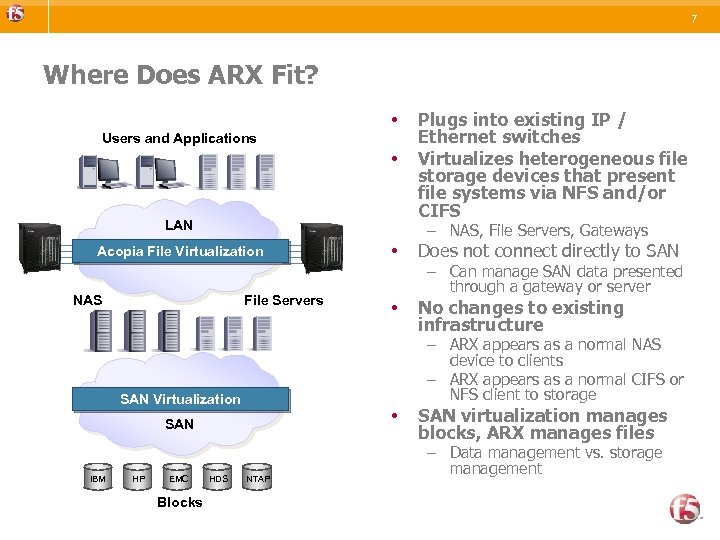 7 Where Does ARX Fit? • Users and Applications • LAN – NAS, File Servers, Gateways Acopia File Virtualization NAS File Servers EMC Blocks HDS Does not connect directly to SAN • No changes to existing infrastructure • SAN HP • – Can manage SAN data presented through a gateway or server – ARX appears as a normal NAS device to clients – ARX appears as a normal CIFS or NFS client to storage SAN Virtualization SAN IBM Plugs into existing IP / Ethernet switches Virtualizes heterogeneous file storage devices that present file systems via NFS and/or CIFS NTAP SAN virtualization manages blocks, ARX manages files – Data management vs. storage management
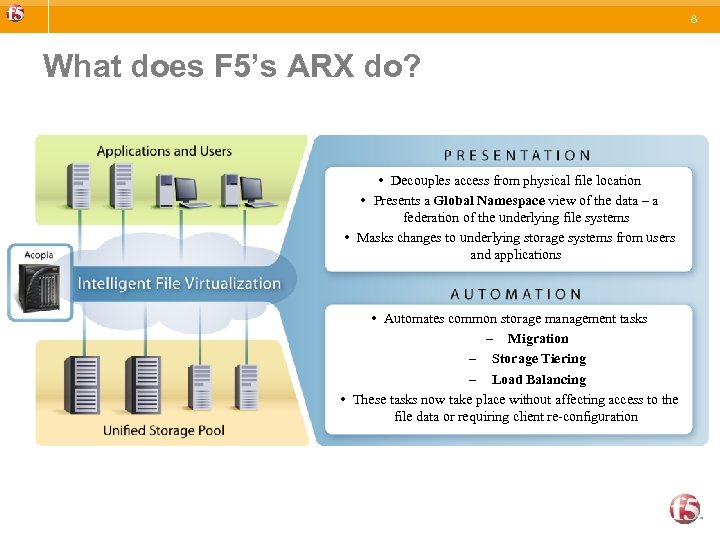 8 What does F 5’s ARX do? • Decouples access from physical file location • Presents a Global Namespace view of the data – a federation of the underlying file systems • Masks changes to underlying storage systems from users and applications • Automates common storage management tasks – Migration – Storage Tiering – Load Balancing • These tasks now take place without affecting access to the file data or requiring client re-configuration
 9 What are the F 5`s ARX differentiators ? • Purpose-built to meet challenges of global file management • Real-time management of live data • Superior reliability, availability and supportability • Proven in Fortune 1000 enterprises – Separate data (I/O) & control planes with dedicated resources – Enterprise scale: >2 B files, 24 Gbps in a single switch – Unique dynamic load balancing – Unique in-line file placement (files are not placed on the wrong share and then migrated after the fact) – No reliance on stubs or redirection – Integrity of in-flight operations ensured with redundant NVRAM – Enterprise server class redundancy – Comprehensive logging, reporting, SNMP, call-home, port mirroring – Merrill Lynch, Bear Stearns, Yahoo, Warner Music, Toshiba, United Rentals, Novartis, Raytheon, The Hartford, Dreamworks, etc.
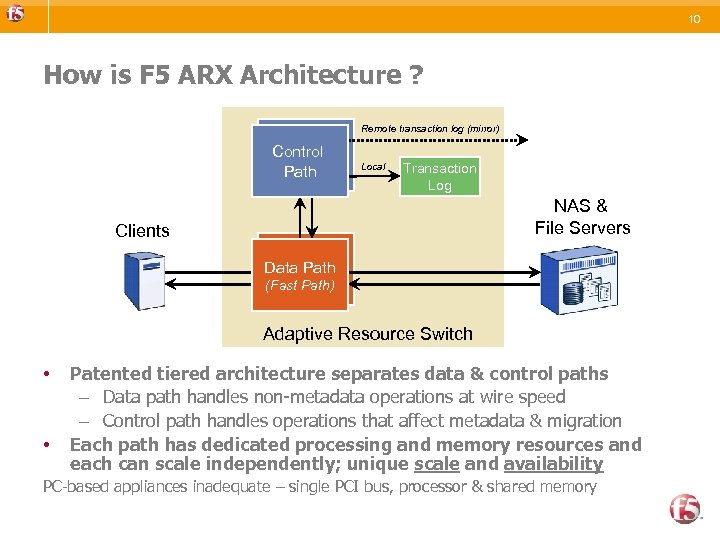 10 How is F 5 ARX Architecture ? Remote transaction log (mirror) Control Path Local Transaction Log NAS & File Servers Clients Data Path (Fast Path) Adaptive Resource Switch • • Patented tiered architecture separates data & control paths – Data path handles non-metadata operations at wire speed – Control path handles operations that affect metadata & migration Each path has dedicated processing and memory resources and each can scale independently; unique scale and availability PC-based appliances inadequate – single PCI bus, processor & shared memory
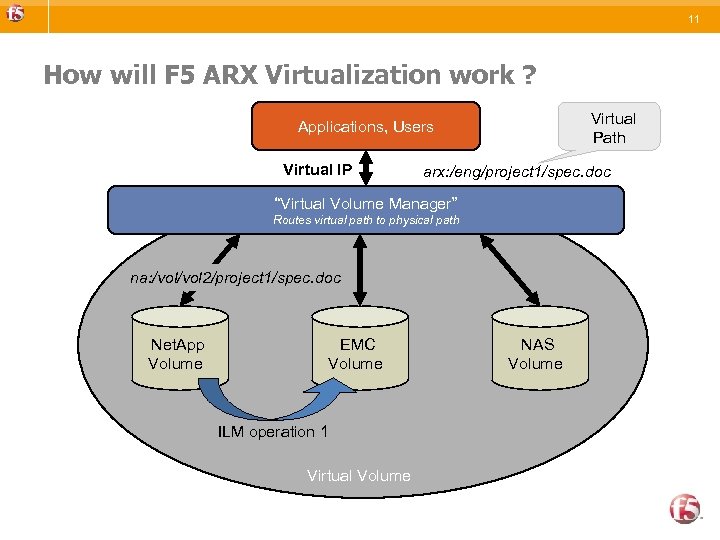 11 How will F 5 ARX Virtualization work ? Virtual Path Applications, Users Virtual IP arx: /eng/project 1/spec. doc “Virtual Volume Manager” Routes virtual path to physical path na: /vol 2/project 1/spec. doc Net. App Volume EMC Volume ILM operation 1 Virtual Volume NAS Volume
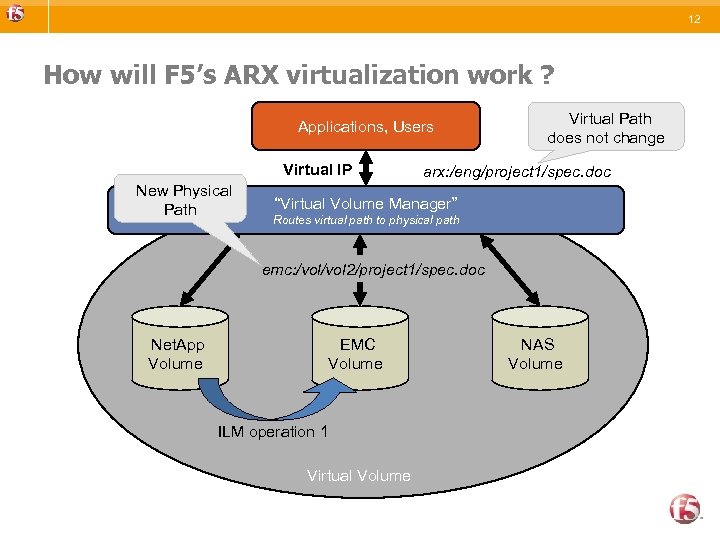 12 How will F 5’s ARX virtualization work ? Applications, Users Virtual IP New Physical Path Virtual Path does not change arx: /eng/project 1/spec. doc “Virtual Volume Manager” Routes virtual path to physical path emc: /vol 2/project 1/spec. doc Net. App Volume EMC Volume ILM operation 1 Virtual Volume NAS Volume
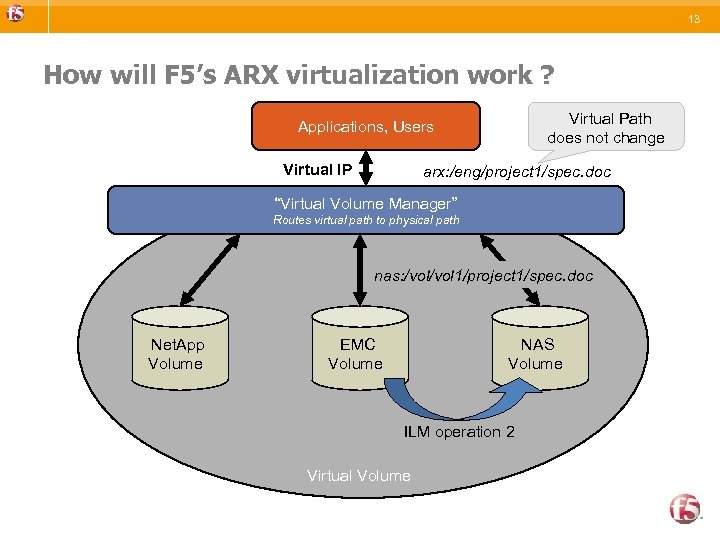 13 How will F 5’s ARX virtualization work ? Virtual Path does not change Applications, Users Virtual IP arx: /eng/project 1/spec. doc “Virtual Volume Manager” Routes virtual path to physical path nas: /vol 1/project 1/spec. doc Net. App Volume EMC Volume NAS Volume ILM operation 2 Virtual Volume
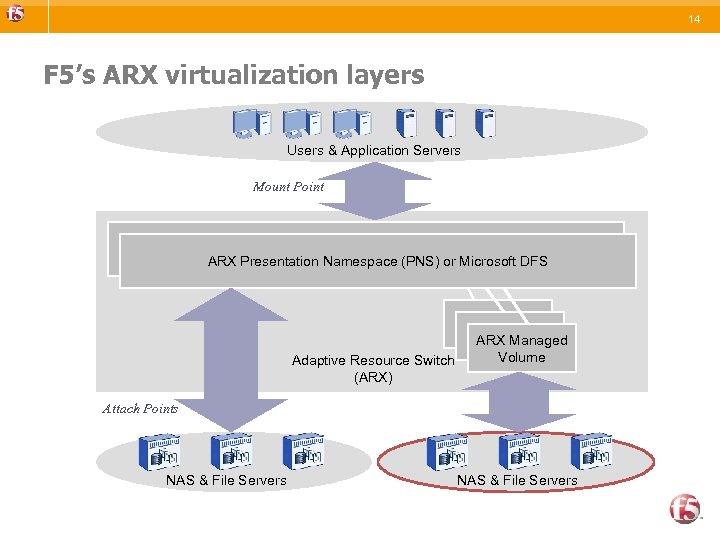 14 F 5’s ARX virtualization layers Users & Application Servers Mount Point Presentation Namespace ARX Presentation Namespace (PNS) or Microsoft DFS Adaptive Resource Switch (ARX) ARX Managed Volume Attach Points NAS & File Servers
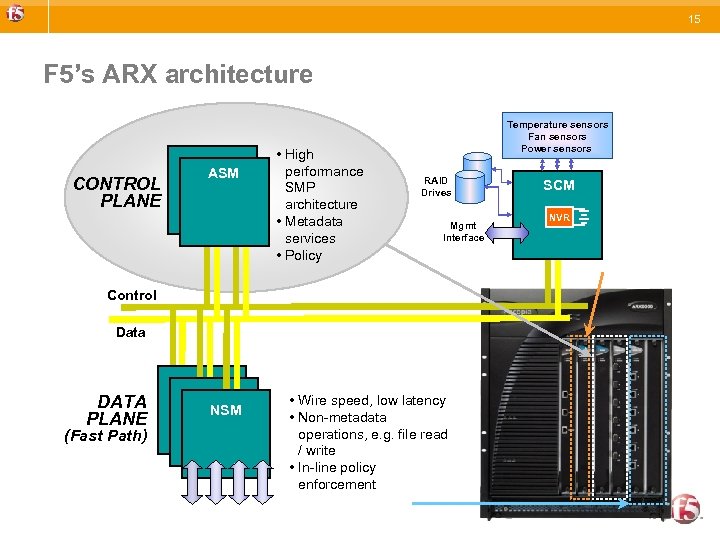 15 F 5’s ARX architecture CONTROL PLANE ASM • High performance SMP architecture • Metadata services • Policy Temperature sensors Fan sensors Power sensors RAID Drives Mgmt Interface Control Data DATA PLANE (Fast Path) NSM • Wire speed, low latency • Non-metadata operations, e. g. file read / write • In-line policy enforcement SCM NVR
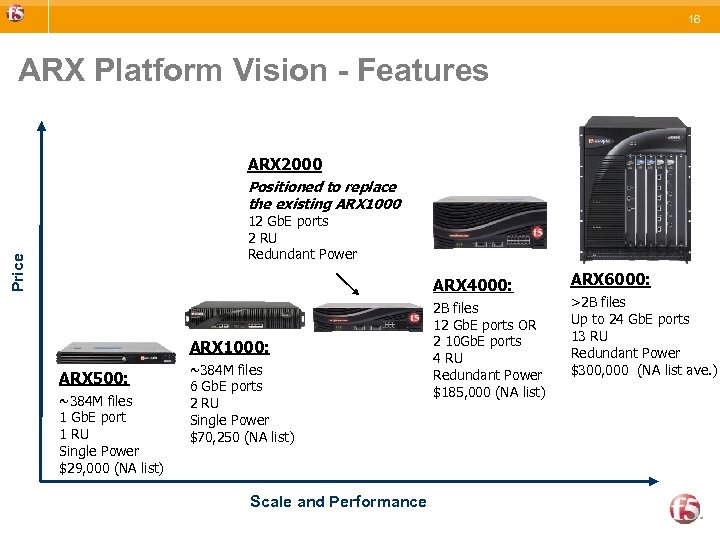 16 ARX Platform Vision - Features ARX 2000 Positioned to replace the existing ARX 1000 Price 12 Gb. E ports 2 RU Redundant Power ARX 4000: ARX 1000: ARX 500: ~384 M files 1 Gb. E port 1 RU Single Power $29, 000 (NA list) ~384 M files 6 Gb. E ports 2 RU Single Power $70, 250 (NA list) Scale and Performance 2 B files 12 Gb. E ports OR 2 10 Gb. E ports 4 RU Redundant Power $185, 000 (NA list) ARX 6000: >2 B files Up to 24 Gb. E ports 13 RU Redundant Power $300, 000 (NA list ave. )
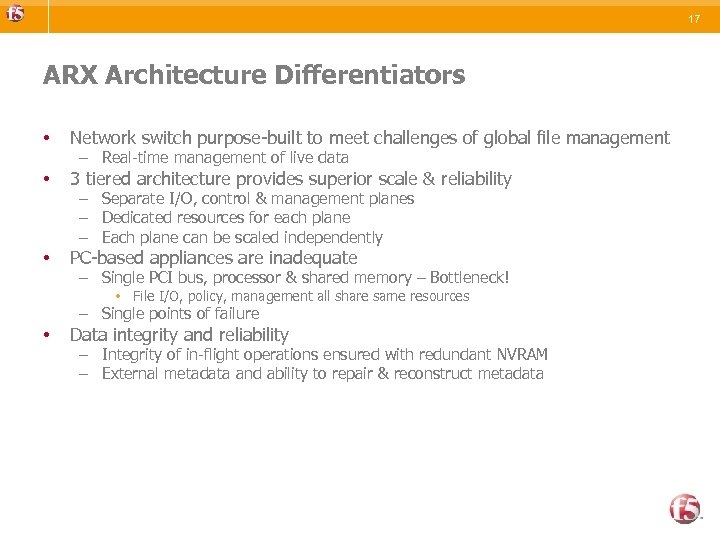 17 ARX Architecture Differentiators • Network switch purpose-built to meet challenges of global file management • 3 tiered architecture provides superior scale & reliability • PC-based appliances are inadequate – Real-time management of live data – Separate I/O, control & management planes – Dedicated resources for each plane – Each plane can be scaled independently – Single PCI bus, processor & shared memory – Bottleneck! • File I/O, policy, management all share same resources – Single points of failure • Data integrity and reliability – Integrity of in-flight operations ensured with redundant NVRAM – External metadata and ability to repair & reconstruct metadata
 19 What are ARX’s Policy Differentiators • Aggregation is unique to ARX – No other virtualization device is able to do in-line placement and real time load balancing • Multi-protocol, multi-vendor migration is unique to ARX • Ability to tier storage without requiring stubs is unique to ARX • In-line policy enforcement is unique to ARX – Competitive solutions require expensive “treewalks” to determine what to move / replicate • Flexibility and scale of migration / replication capability is unique to ARX – From individual file / fileset to an entire virtual volumes
 20 High Availability Overview • • ARX’s are typically deployed in a redundant pair The primary ARX keeps synchronized state with the secondary ARX – In-flight transactions (NVRAM), Global Configuration, Network Lock Manager Clients (NLM), Duplicate Request Cache (DRC) The ARX will monitor resources to determine failover criteria – The operator can optionally define certain resources to be “critical” and be considered for failover criteria, e. g. default gateway, critical share, etc. The ARX does not store any user data on the switches
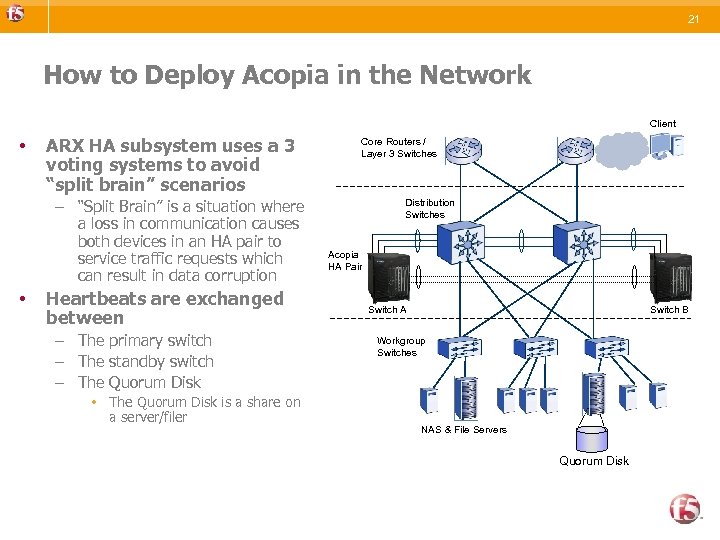 21 How to Deploy Acopia in the Network Client • ARX HA subsystem uses a 3 voting systems to avoid “split brain” scenarios – “Split Brain” is a situation where a loss in communication causes both devices in an HA pair to service traffic requests which can result in data corruption • Heartbeats are exchanged between – The primary switch – The standby switch – The Quorum Disk • The Quorum Disk is a share on a server/filer Core Routers / Layer 3 Switches Distribution Switches Acopia HA Pair Switch A Switch B Workgroup Switches NAS & File Servers Quorum Disk
 22 Data Mobility Transparent Migration
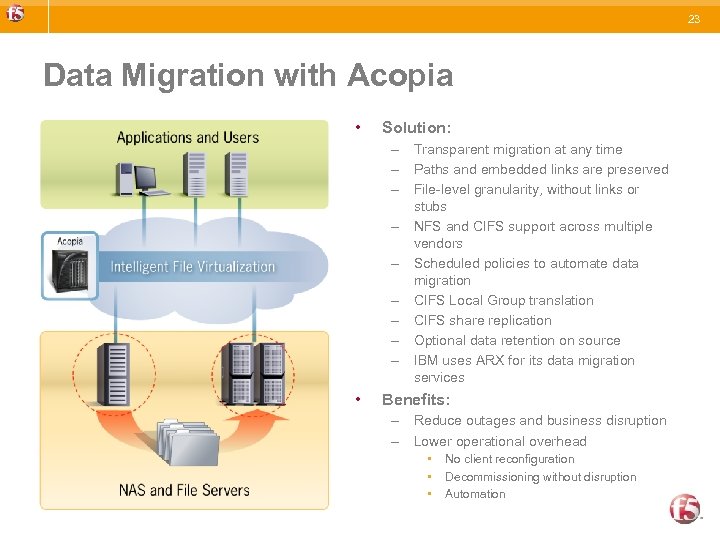 23 Data Migration with Acopia • Solution: – Transparent migration at any time – Paths and embedded links are preserved – File-level granularity, without links or stubs – NFS and CIFS support across multiple vendors – Scheduled policies to automate data migration – CIFS Local Group translation – CIFS share replication – Optional data retention on source – IBM uses ARX for its data migration services • Benefits: – Reduce outages and business disruption – Lower operational overhead • • • No client reconfiguration Decommissioning without disruption Automation
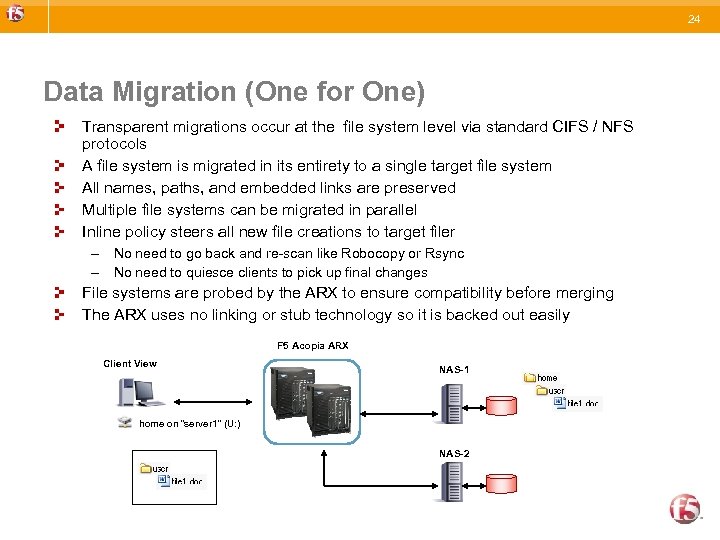 24 Data Migration (One for One) Transparent migrations occur at the file system level via standard CIFS / NFS protocols A file system is migrated in its entirety to a single target file system All names, paths, and embedded links are preserved Multiple file systems can be migrated in parallel Inline policy steers all new file creations to target filer – No need to go back and re-scan like Robocopy or Rsync – No need to quiesce clients to pick up final changes File systems are probed by the ARX to ensure compatibility before merging The ARX uses no linking or stub technology so it is backed out easily F 5 Acopia ARX Client View NAS-1 home on “server 1” (U: ) NAS-2
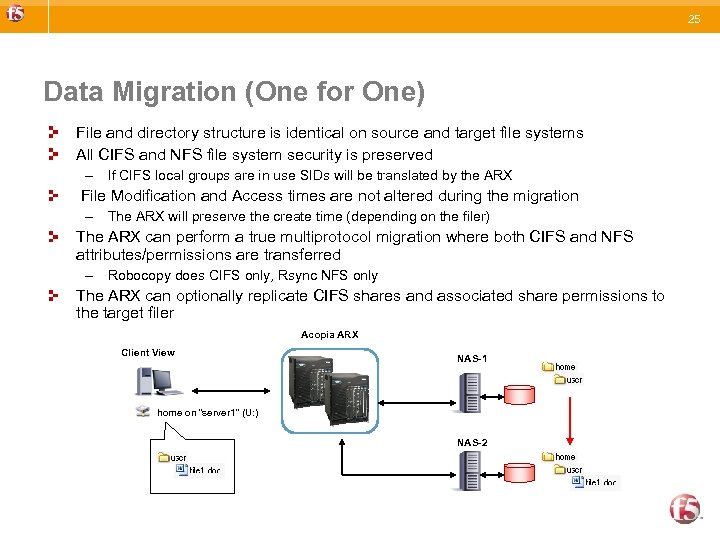 25 Data Migration (One for One) File and directory structure is identical on source and target file systems All CIFS and NFS file system security is preserved – If CIFS local groups are in use SIDs will be translated by the ARX File Modification and Access times are not altered during the migration – The ARX will preserve the create time (depending on the filer) The ARX can perform a true multiprotocol migration where both CIFS and NFS attributes/permissions are transferred – Robocopy does CIFS only, Rsync NFS only The ARX can optionally replicate CIFS shares and associated share permissions to the target filer Acopia ARX Client View NAS-1 home on “server 1” (U: ) NAS-2
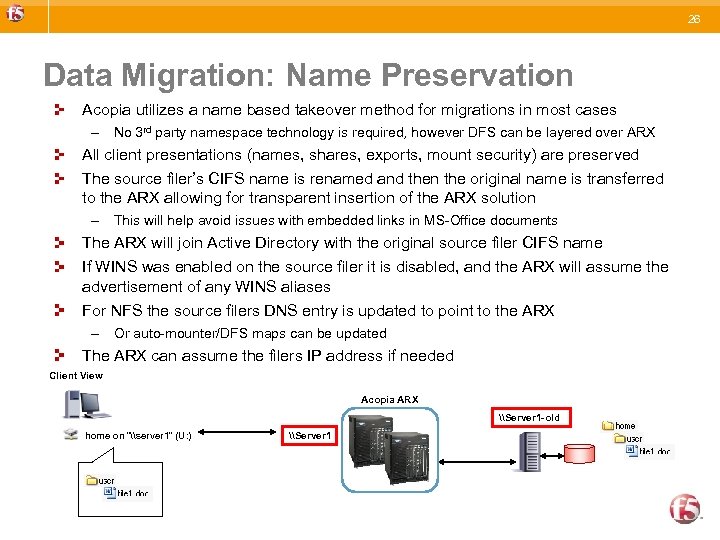 26 Data Migration: Name Preservation Acopia utilizes a name based takeover method for migrations in most cases – No 3 rd party namespace technology is required, however DFS can be layered over ARX All client presentations (names, shares, exports, mount security) are preserved The source filer’s CIFS name is renamed and then the original name is transferred to the ARX allowing for transparent insertion of the ARX solution – This will help avoid issues with embedded links in MS-Office documents The ARX will join Active Directory with the original source filer CIFS name If WINS was enabled on the source filer it is disabled, and the ARX will assume the advertisement of any WINS aliases For NFS the source filers DNS entry is updated to point to the ARX – Or auto-mounter/DFS maps can be updated The ARX can assume the filers IP address if needed Client View Acopia ARX \Server 1 -old home on “\server 1” (U: ) \Server 1
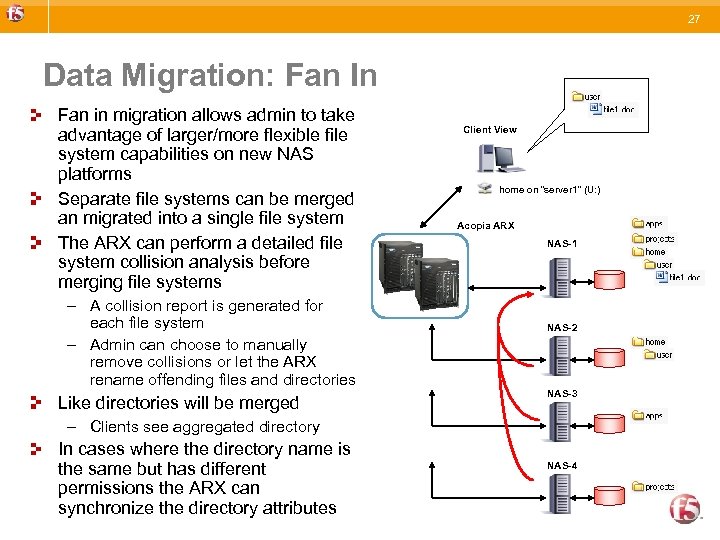 27 Data Migration: Fan In Fan in migration allows admin to take advantage of larger/more flexible file system capabilities on new NAS platforms Separate file systems can be merged an migrated into a single file system The ARX can perform a detailed file system collision analysis before merging file systems – A collision report is generated for each file system – Admin can choose to manually remove collisions or let the ARX rename offending files and directories Like directories will be merged Client View home on “server 1” (U: ) Acopia ARX NAS-1 NAS-2 NAS-3 – Clients see aggregated directory In cases where the directory name is the same but has different permissions the ARX can synchronize the directory attributes NAS-4
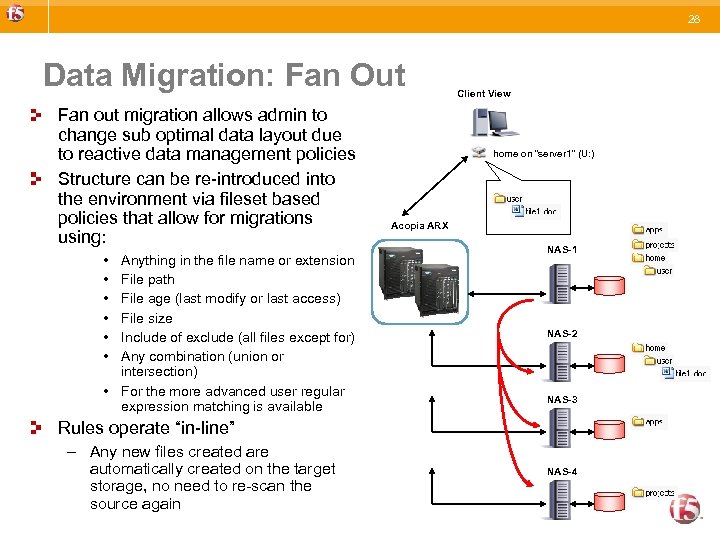 28 Data Migration: Fan Out Fan out migration allows admin to change sub optimal data layout due to reactive data management policies Structure can be re-introduced into the environment via fileset based policies that allow for migrations using: • • • Anything in the file name or extension File path File age (last modify or last access) File size Include of exclude (all files except for) Any combination (union or intersection) • For the more advanced user regular expression matching is available Client View home on “server 1” (U: ) Acopia ARX NAS-1 NAS-2 NAS-3 Rules operate “in-line” – Any new files created are automatically created on the target storage, no need to re-scan the source again NAS-4
 32 Storage Tiering Information Lifecycle Management
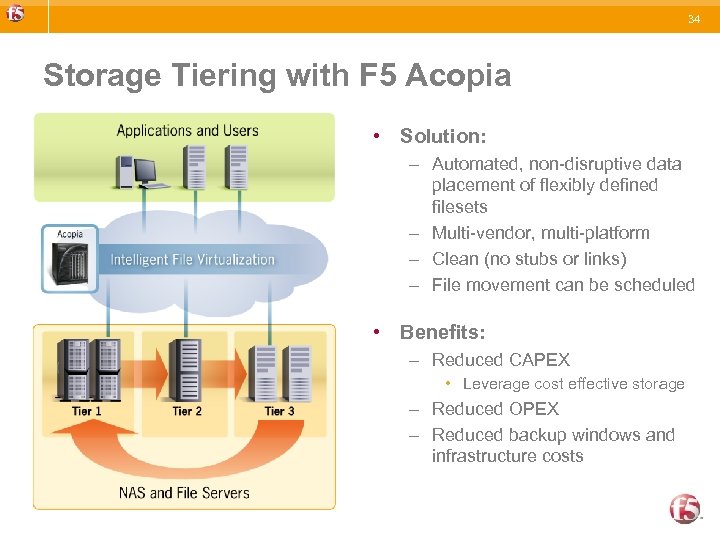 34 Storage Tiering with F 5 Acopia • Solution: – Automated, non-disruptive data placement of flexibly defined filesets – Multi-vendor, multi-platform – Clean (no stubs or links) – File movement can be scheduled • Benefits: – Reduced CAPEX • Leverage cost effective storage – Reduced OPEX – Reduced backup windows and infrastructure costs
 35 Storage Tiering with F 5 Acopia • Can be applied to all data or a subset via filesets • Operates on either last access or last modify time • The ARX can run tentative “what if” reports to allow for proper provisioning of lower tiers • Files accessed or modified on lower tiers can be brought up to tier 1 dynamically
 41 Aggregation
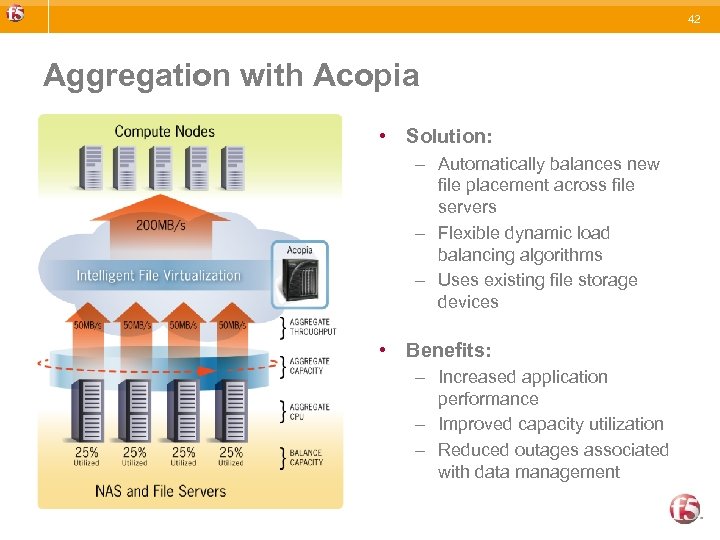 42 Aggregation with Acopia • Solution: – Automatically balances new file placement across file servers – Flexible dynamic load balancing algorithms – Uses existing file storage devices • Benefits: – Increased application performance – Improved capacity utilization – Reduced outages associated with data management
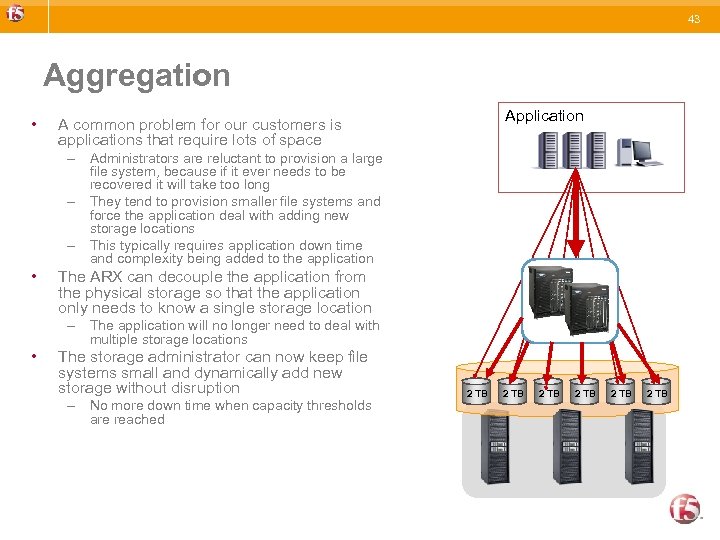 43 Aggregation • Application A common problem for our customers is applications that require lots of space – Administrators are reluctant to provision a large file system, because if it ever needs to be recovered it will take too long – They tend to provision smaller file systems and force the application deal with adding new storage locations – This typically requires application down time and complexity being added to the application • The ARX can decouple the application from the physical storage so that the application only needs to know a single storage location – The application will no longer need to deal with multiple storage locations • The storage administrator can now keep file systems small and dynamically add new storage without disruption – No more down time when capacity thresholds are reached 2 TB 2 TB