 Скачать презентацию Experiences from Introduction and Deployment of MBT at
9e61a039dc4f7bfb93fd10eb5e691a90.ppt
- Количество слайдов: 33



Experiences from Introduction and Deployment of MBT at Ericsson Håkan Fredriksson Ericsson AB hakan. fredriksson@ericsson. com
Contents 1. 2. 3. 4. Introduction Modeling Test Case Generation Conclusions © Ericsson AB 2011 | 2011 -09 -02 | Page 2 (33)
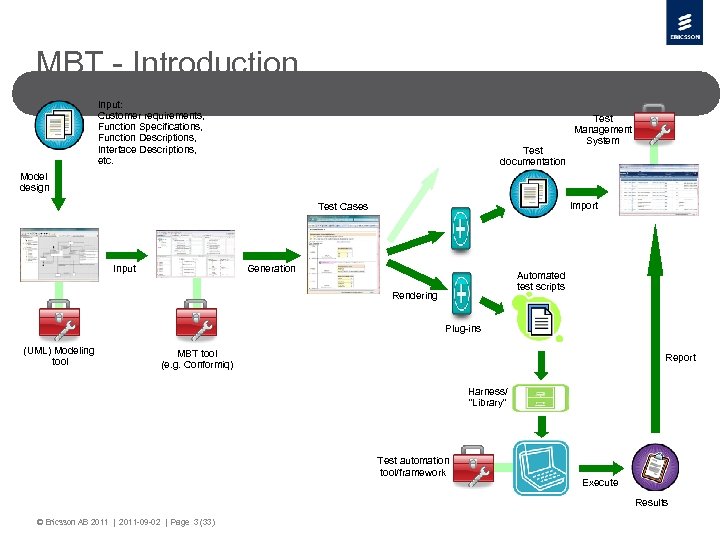
MBT - Introduction Input: Customer requirements, Function Specifications, Function Descriptions, Interface Descriptions, etc. Test documentation Test Management System Model design Import Test Cases Input Generation Automated test scripts Rendering Plug-ins (UML) Modeling tool MBT tool (e. g. Conformiq) Report Harness/ “Library” Test automation tool/framework Execute Results © Ericsson AB 2011 | 2011 -09 -02 | Page 3 (33)
MBT - Introduction Where we were before MBT ØA fairly stable test organization ØA fairly mature product to test ØFairly stable test environment and tools (partly self developed) ØMain part (90%) of the Test Cases automated ØA huge amount of Test Cases/scripts – which had started to become expensive to maintain The perfect background for trying out new tools and methods! © Ericsson AB 2011 | 2011 -09 -02 | Page 4 (33)
MBT - Introduction Why we tried it out ØStriving for Operational Excellence ØReduced costs and shortened lead-times, by - generation of test documentation - generation of Test Cases - generation of automated test scripts ØIncrease agility ØImprove test coverage Ø“Better” (more complex) Test Cases ØImprove Test Case and test script quality ØInspirational challenge for the testers ØHighlighting the tester’s role in the organization Ø…and so on © Ericsson AB 2011 | 2011 -09 -02 | Page 5 (33)
MBT - Introduction How we introduced MBT ØConformiq were invited to perform prototyping with an already verified function ØThe prototyping took less than two weeks – and we were really impressed by the outcome ØWe decided to use MBT and Conformiq for real in a “live” project ØA team was put together, and some training within modeling and the Conformiq tool took place ØA suitable new function was selected ØWe just did it… © Ericsson AB 2011 | 2011 -09 -02 | Page 6 (33)
MBT - Introduction Considerations when deploying MBT ØRequires stability and maturity - the SUT - the organization - methods used - tools and test framework ØSelect an object/function that is suitable for MBT Recommendation: Use MBT for Functional Testing first, avoid non-functional testing, such as performance test, in the beginning ØThe substantial gains will be received when: - You have a need for (or benefit of) automated test suites – for example: you run regression tests on a regular basis - All testing can be fully automated – and no manual intervention is needed to test your functionality © Ericsson AB 2011 | 2011 -09 -02 | Page 7 (33)
MBT - Modeling tools With Conformiq: - the Conformiq modeler - Rational’s tool kit - IBM/Telelogic Rhapsody Conformiq action language: “QML”/extended Java Other MBT tools provide other possibilities, for example Smartesting, that supports Borland’s Together as well as Rational’s tools, and has OCL as action language. © Ericsson AB 2011 | 2011 -09 -02 | Page 8 (33)
MBT - Modeling Recommendation: Do not use the same model to both generate code and generate Test Cases! Differ between the two different model types: Development Model ØMain purpose: generate code ØTechnical model ØOften contains implementation information Test Model ØMain purpose: generate Test Cases ØFunctional model – describing the system behavior of a certain system function (or part of a system function) ØContains no implementation information ØBlack box model © Ericsson AB 2011 | 2011 -09 -02 | Page 9 (33)
MBT - Modeling When designing your MBT model you can have two different approaches: ØDesign your model from scratch – independently from other existing models ØReuse and adapt other existing development models: - Customize the model to your needs - Simplify the model - Strip all irrelevant information from the model - Make sure that it is black box, and describes the system behavior in a proper way © Ericsson AB 2011 | 2011 -09 -02 | Page 10 (33)
MBT - Modeling One possible approach: High level system model Test Model Stripped model Model adaptations Black box Responsible: Test department Black box Responsible: System department Development Model Further model development Detailed model with implementation information “White box” Responsible: Design department © Ericsson AB 2011 | 2011 -09 -02 | Page 11 (33)
MBT - Modeling Conformiq Requirements/Modeling Requirements - a key concept, and a very useful concept to us A Modeling. Requirement is a requirement on the MBT tool, that a certain ”event” or “situation” must be covered in (at least) one Test Case. It does not necessarily refer to the functionality provided by the SUT. A Modeling. Requirement is introduced in the model as a text string, where the event/situation has been covered. Example: ”Synch ref type 1 is active / Register new type 2 synch ref / with lower priority than the active synch ref” The Modeling Requirements can also be used for traceability to the “real” (customer) requirements, e. g. with simple tagging. “Requirement coverage” was for us also the best indication of the quality of the outcome from the Test Case generation. We found it very beneficial to define all the Modeling Requirements early on - before you start designing the actual model. © Ericsson AB 2011 | 2011 -09 -02 | Page 12 (33)
MBT - Modeling Select Suitable Functionality Technical criteria to consider ØThere is a need for/benefit of having automated test suites ØIt is possible to fully automate the testing of the functionality covered by the model (and to do so in a practical way) ØNo manual interaction will be required during test execution ØA proper abstraction of the functionality should result in a fairly small model ØThe test scope should not be too small ØThe individual Model Requirements should not take too long time to verify (automatically) Other criteria must be considered as well, e. g. strategic, project wise and practical criteria. © Ericsson AB 2011 | 2011 -09 -02 | Page 13 (33)
MBT - Modeling Considerations regarding competence needed ØCompared to traditional test methods, MBT is a complete paradigm shift ØNew competences are required, and training must be taken care of ØNew roles must be established within the test organization, especially the model designer/”test architect” ØThe testers must learn to not think as testers. When designing the model, the tester shall not think in terms of Test Cases – the tester should, ultimately, only consider the system behavior ØThe tester must have a thorough understanding of the functionality, and be involved in (and contribute to!) the development project already in the early stages Working with MBT has increased the motivation among the testers. Most testers consider MBT as challenging, inspiring, and Fun. © Ericsson AB 2011 | 2011 -09 -02 | Page 14 (33)
MBT - Modeling Considerations regarding the MBT Way of Working ØMBT is well suited for pair modeling/programming ØIt is recommended that the model is designed in small increments ØExisting methods for reviews and inspections might not be suited for MBT – new, and hopefully more efficient, methods must then be invented ØKeep it simple Modeling is all about abstraction! © Ericsson AB 2011 | 2011 -09 -02 | Page 15 (33)
MBT – Test Case Generation So far, Conformiq is the only MBT tool we have been using. A thesis work to study other MBT tools was carried out, and a couple of possible alternatives to Conformiq were pointed out, for example Smartesting and Elvior MOTES. However, no detailed case studies were carried out, and evaluation licenses were hard to come by when we needed them. The first couple of years we only applied MBT for functional testing. Lately have seen possibilities to use MBT also for non-functional testing, such as performance tests. We have developed a method for doing this, that we have now started to deploy. © Ericsson AB 2011 | 2011 -09 -02 | Page 16 (33)
MBT – Test Case Generation Specifics for Conformiq ØRuns on either Linux or Windows (and we have tried out both – no major differences in Conformiq's performance have been observed) ØIntegrated with Eclipse, but also available as stand-alone product ØGeneral perception: Conformiq is easy to use, and the support from the provider has been very good © Ericsson AB 2011 | 2011 -09 -02 | Page 17 (33)
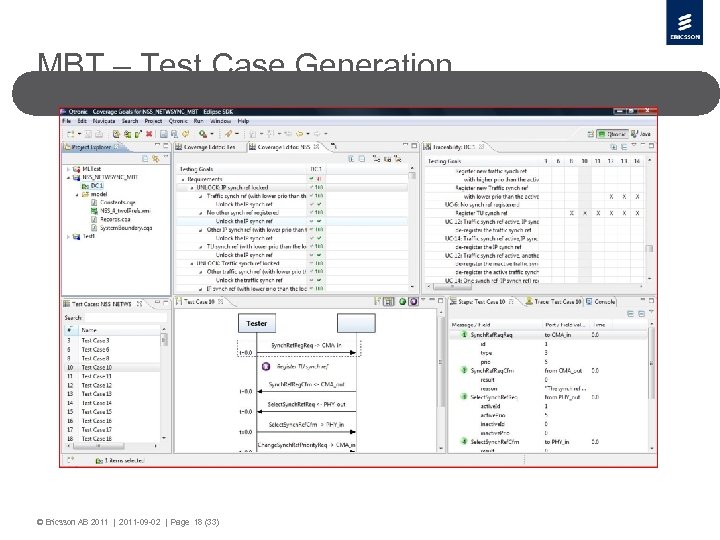
MBT – Test Case Generation © Ericsson AB 2011 | 2011 -09 -02 | Page 18 (33)
MBT – Test Case Generation First Experiences ØThe model must be good if the output shall be good! ØThe user documentation could be better, especially considering Design Rules and Best Practices ØAs an inexperienced modeler it is easy to introduce faults in your model – and the debugging support available in the Conformiq tool kit was not very extensive ØThe generation times can be long, and sometimes extremely long ØIt is very difficult to predict how your model will affect the generation times ØThere are clear benefits by optimizing the model from a generation time point of view © Ericsson AB 2011 | 2011 -09 -02 | Page 19 (33)
MBT – Test Case Generation Some hints on how to design your model to get the best possible output and shorter generation times ØDesign the model in small increments, and generate often ØLearn how the tool works by working with it, and by experimenting (e. g. with the settings) and share the knowledge you gain ØReview your model often, and pay close attention to logical faults as well as pure modeling faults, such as “leakage” and “model holes” ØAlso review the model by reviewing the generated Test Cases © Ericsson AB 2011 | 2011 -09 -02 | Page 20 (33)
MBT – Test Case Generation Some hints on how to design your model (continued) ØDo the tool settings carefully, especially the coverage criteria and the “look-ahead depth” ØAlways start generating with the lowest possible lookahead depth, and do not increase it to anything higher than absolutely necessary ØAvoid parameter combination explosion! ØAvoid extreme model depth! © Ericsson AB 2011 | 2011 -09 -02 | Page 21 (33)
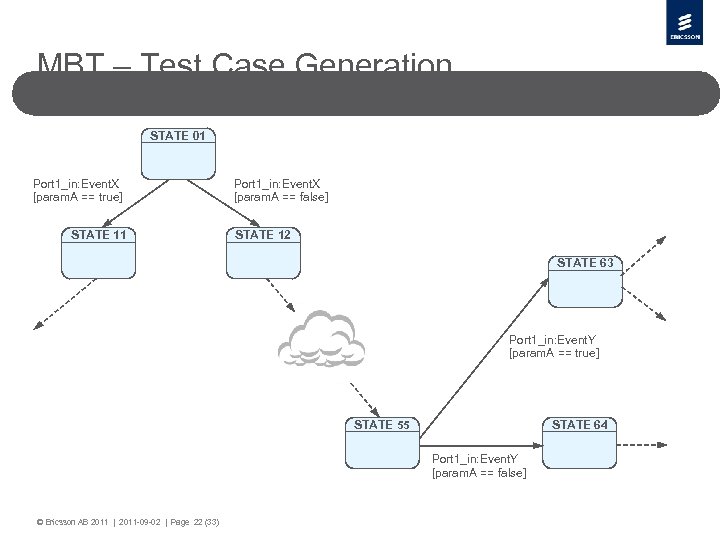
MBT – Test Case Generation STATE 01 Port 1_in: Event. X [param. A == true] STATE 11 Port 1_in: Event. X [param. A == false] STATE 12 STATE 63 Port 1_in: Event. Y [param. A == true] STATE 55 STATE 64 Port 1_in: Event. Y [param. A == false] © Ericsson AB 2011 | 2011 -09 -02 | Page 22 (33)
MBT – Test Case Generation Note! There are methods to improve the generation times (e. g. by decreasing the model depth or reducing the number of parameter combinations) but these are not properly documented. During the time that we have been using Conformiq, the tool in general, and the generation times in particular, have been constantly improved. Conformiq have given swift and professional support, and listened to our feed-back. With later versions of Conformiq we got the possibility to distribute the calculations over multiple CPUs and hosts, which will reduce the generation times considerably. The debugging support has also improved somewhat. © Ericsson AB 2011 | 2011 -09 -02 | Page 23 (33)
MBT – Test Case Generation The output from the Test Case generation ØThe generated test suite consists of a number of Test Cases, which in turn contain a number of test steps ØThe Test Cases are easy to read, follow and understand ØOne Test Case can cover more than one Modeling Requirement ØOne Modeling Requirement can be covered in several different Test Cases - this is sometimes a drawback, since even “not so important” requirements, or requirements that take long time to verify, can be included many times in one test suite A way to prioritize the Modeling Requirements would be very useful © Ericsson AB 2011 | 2011 -09 -02 | Page 24 (33)
MBT – Test Case Generation The output from the Test Case generation (continued) ØProgress reporting regarding how many Test Cases that have been passed, is no longer relevant - instead we have chosen progress reporting based on the number of verified Modeling Requirements, which works at least as well ØWe get “better” Test Cases, in terms of being longer and more complex ØWe have found several faults in the SUT that we would not have found using our traditional methods © Ericsson AB 2011 | 2011 -09 -02 | Page 25 (33)
MBT – Test Case Generation Rendering the output ØConformiq provides some plug-ins for rendering the generated Test Cases into, for example, automated test scripts, html documents and test specifications in word ØFor script generation Conformiq currently provides plug-ins for TCL, TTCN-3, Java (“JCAT”) and Perl You can also design your own plug-ins if you have other needs ØYou also need to design your own “test harness” (or “glue” or “library”) to be able to execute the generated scripts in your own test framework The size of this task can vary and depends partly on the model and the test framework For our first models the task to design this library grew much bigger than originally planned © Ericsson AB 2011 | 2011 -09 -02 | Page 26 (33)
MBT – Test Case Generation The generated test scripts ØThe generated test scripts have a good structure, and are also easy to read, follow and understand, and they are easy to edit, which is good for troubleshooting purposes ØFurthermore you can easily build your own Test Cases using the structure from the generated test suite © Ericsson AB 2011 | 2011 -09 -02 | Page 27 (33)
MBT – Conclusions MBT has been a Success Story for our organization and is now our main Way of Working! © Ericsson AB 2011 | 2011 -09 -02 | Page 28 (33)
MBT – Conclusions Why did we succeed? ØWe had a vision ØWe were willing to take the risk ØWe were committed © Ericsson AB 2011 | 2011 -09 -02 | Page 29 (33)
MBT – Conclusions Hard experiences ØCost Estimated gains of total test project lead time: 20 -30% when new model is created ØRe-usability Models, and parts of models, can be re-used to a much higher extent than originally anticipated When possible to re-use model parts, the gains can be much higher than 20 -30% ØCoverage Faults found that we would not have found with traditional test design methods © Ericsson AB 2011 | 2011 -09 -02 | Page 30 (33)
MBT – Conclusions Hard experiences (continued) ØQuality No decrease in the quality of the tested product has been observed Soft experiences ØMost testers think of MBT as a very interesting way of working, and are eager to learn ØHigh motivation among the testers that have been working with it – and everyone think is Fun (most of the time) ØNot all testers are suited for working with modeling © Ericsson AB 2011 | 2011 -09 -02 | Page 31 (33)
MBT – Conclusions Final recommendations If you are a test organization, and if you benefit from having automated test suites: Try out the MBT way of working! But ØDon’t go for full deployment from the start ØStart with a smaller, well defined, well encapsulated, area/functionality ØDo it yourself And ØIn the beginning: Stay away from functionality where you suspect you cannot avoid models with parameter explosion or great depth © Ericsson AB 2011 | 2011 -09 -02 | Page 32 (33)
 Скачать презентацию Experiences from Introduction and Deployment of MBT at
9e61a039dc4f7bfb93fd10eb5e691a90.ppt