


 Скачать презентацию Ethernet LANs Chapter 4 Figure 4 -1
14a5cf2a08be4450dfdf3309f23ddebc.ppt
- Количество слайдов: 48
 Ethernet LANs Chapter 4
 Figure 4 -1: A Short History of Ethernet Standards • Ethernet – The dominant wired LAN technology today – Only “competitor” is wireless LANs (which actually are supplementary) • The IEEE 802 Committee – LAN standards development is done primarily by the Institute for Electrical and Electronics Engineers (IEEE) – IEEE created the 802 LAN/MAN Standards Committee for LAN standards (the 802 Committee) 2
 Figure 4 -1: A Short History of Ethernet Standards • The 802 Committee creates working groups for specific types of standards – 802. 1 for general standards – 802. 3 for Ethernet standards • The terms 802. 3 and Ethernet are interchangeable – 802. 11 for wireless LAN standards – 802. 16 for Wi. Max wireless metropolitan area network standards 3
 Figure 4 -1: A Short History of Ethernet Standards • Ethernet Standards are OSI Standards – Single networks, including LANs, are governed by physical and data link layer standards – Layer 1 and Layer 2 standards are almost universally OSI standards – Ethernet is no exception – The IEEE makes 802. 3 standards; ISO ratifies them – In practice, when 802. 3 finishes standards, vendors begin building compliant products 4
 Ethernet Physical Layer Standards
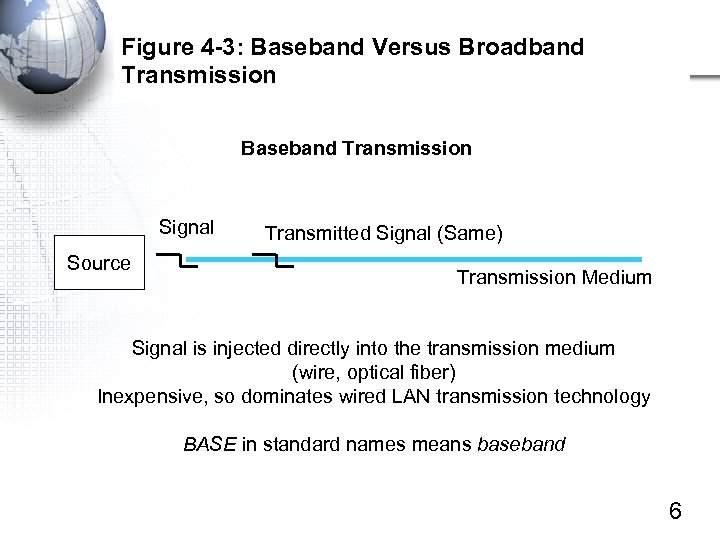 Figure 4 -3: Baseband Versus Broadband Transmission Baseband Transmission Signal Source Transmitted Signal (Same) Transmission Medium Signal is injected directly into the transmission medium (wire, optical fiber) Inexpensive, so dominates wired LAN transmission technology BASE in standard names means baseband 6
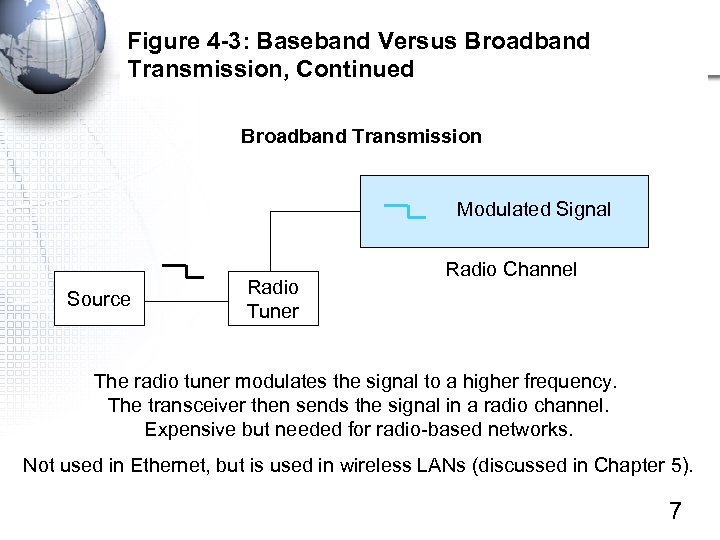 Figure 4 -3: Baseband Versus Broadband Transmission, Continued Broadband Transmission Modulated Signal Source Radio Tuner Radio Channel The radio tuner modulates the signal to a higher frequency. The transceiver then sends the signal in a radio channel. Expensive but needed for radio-based networks. Not used in Ethernet, but is used in wireless LANs (discussed in Chapter 5). 7
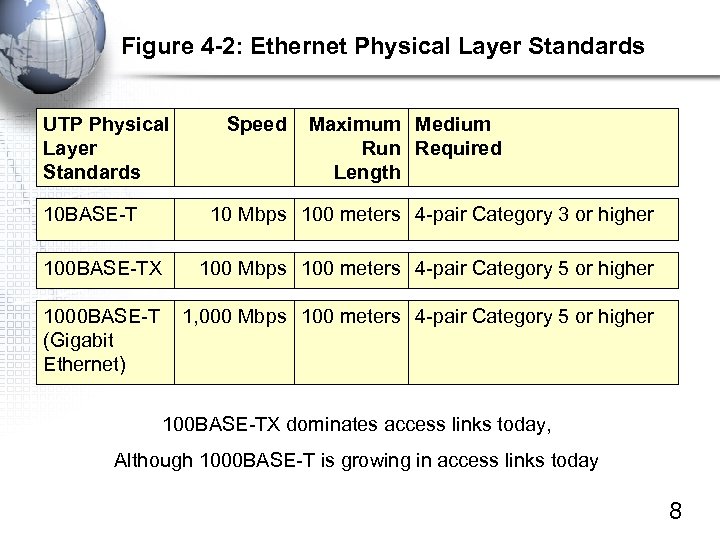 Figure 4 -2: Ethernet Physical Layer Standards UTP Physical Layer Standards 10 BASE-T Speed Maximum Medium Run Required Length 10 Mbps 100 meters 4 -pair Category 3 or higher 100 BASE-TX 100 Mbps 100 meters 4 -pair Category 5 or higher 1000 BASE-T (Gigabit Ethernet) 1, 000 Mbps 100 meters 4 -pair Category 5 or higher 100 BASE-TX dominates access links today, Although 1000 BASE-T is growing in access links today 8
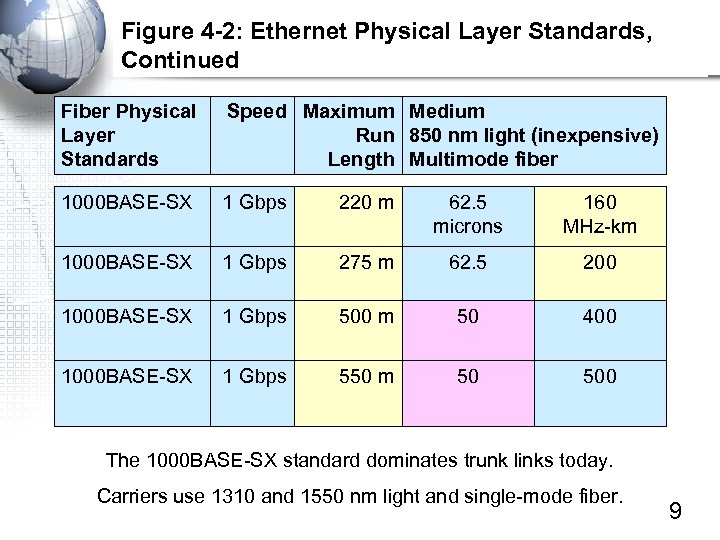 Figure 4 -2: Ethernet Physical Layer Standards, Continued Fiber Physical Layer Standards Speed Maximum Medium Run 850 nm light (inexpensive) Length Multimode fiber 1000 BASE-SX 1 Gbps 220 m 62. 5 microns 160 MHz-km 1000 BASE-SX 1 Gbps 275 m 62. 5 200 1000 BASE-SX 1 Gbps 500 m 50 400 1000 BASE-SX 1 Gbps 550 m 50 500 The 1000 BASE-SX standard dominates trunk links today. Carriers use 1310 and 1550 nm light and single-mode fiber. 9
 10 Gbps Ethernet Revised • 10 Gbps Ethernet usage is small but growing • Several 10 Gbps fiber standards are defined, but none is dominant 10
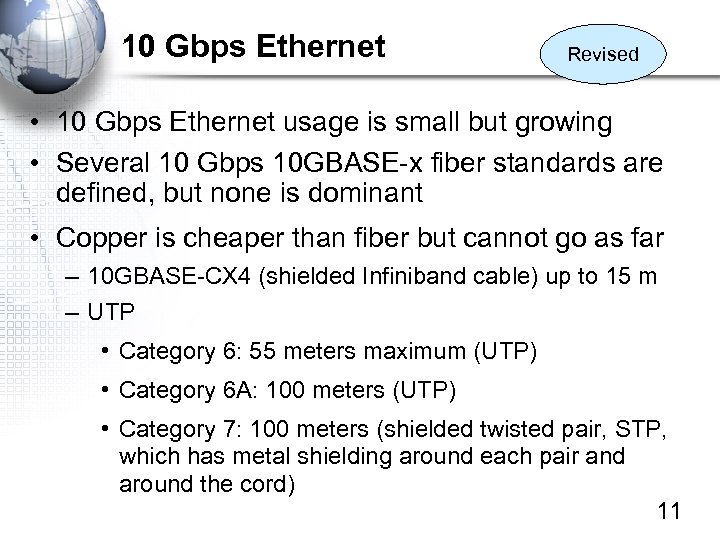 10 Gbps Ethernet Revised • 10 Gbps Ethernet usage is small but growing • Several 10 Gbps 10 GBASE-x fiber standards are defined, but none is dominant • Copper is cheaper than fiber but cannot go as far – 10 GBASE-CX 4 (shielded Infiniband cable) up to 15 m – UTP • Category 6: 55 meters maximum (UTP) • Category 6 A: 100 meters (UTP) • Category 7: 100 meters (shielded twisted pair, STP, which has metal shielding around each pair and around the cord) 11
 100 Gbps Ethernet New Information • 100 Gbps has been selected as the next Ethernet speed – Chosen over 40 Gbps • 100 Gbps Ethernet standards development is just getting underway 12
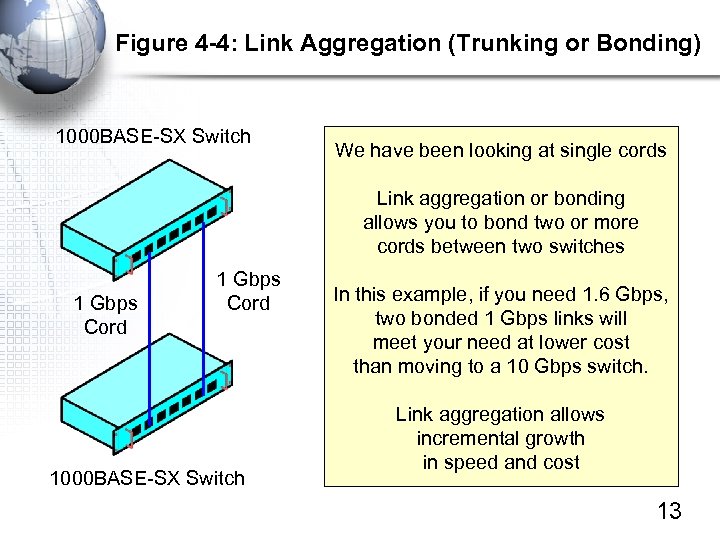 Figure 4 -4: Link Aggregation (Trunking or Bonding) 1000 BASE-SX Switch We have been looking at single cords Link aggregation or bonding allows you to bond two or more cords between two switches 1 Gbps Cord 1000 BASE-SX Switch In this example, if you need 1. 6 Gbps, two bonded 1 Gbps links will meet your need at lower cost than moving to a 10 Gbps switch. Link aggregation allows incremental growth in speed and cost 13
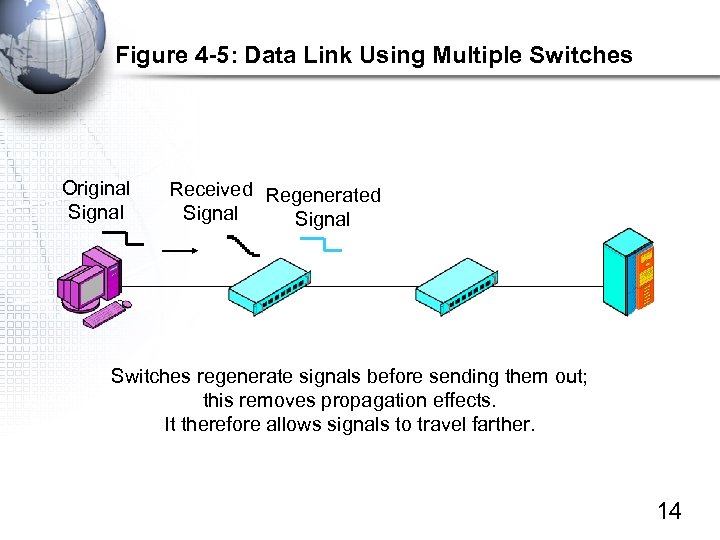 Figure 4 -5: Data Link Using Multiple Switches Original Signal Received Regenerated Signal Switches regenerate signals before sending them out; this removes propagation effects. It therefore allows signals to travel farther. 14
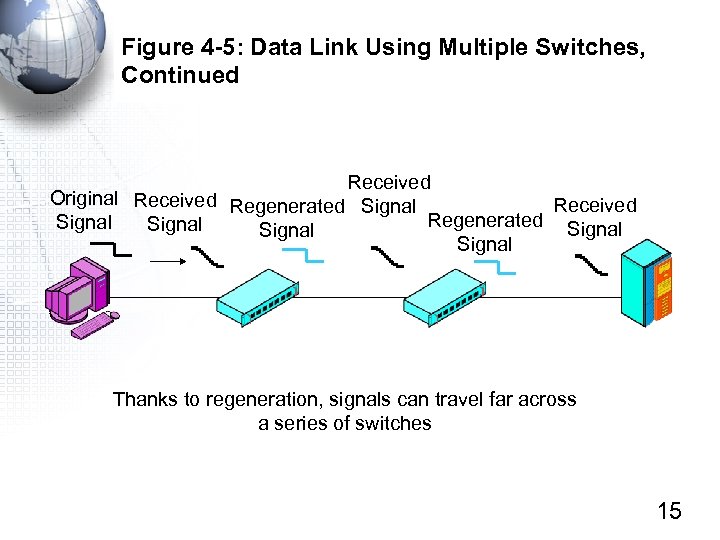 Figure 4 -5: Data Link Using Multiple Switches, Continued Received Original Received Regenerated Signal Signal Thanks to regeneration, signals can travel far across a series of switches 15
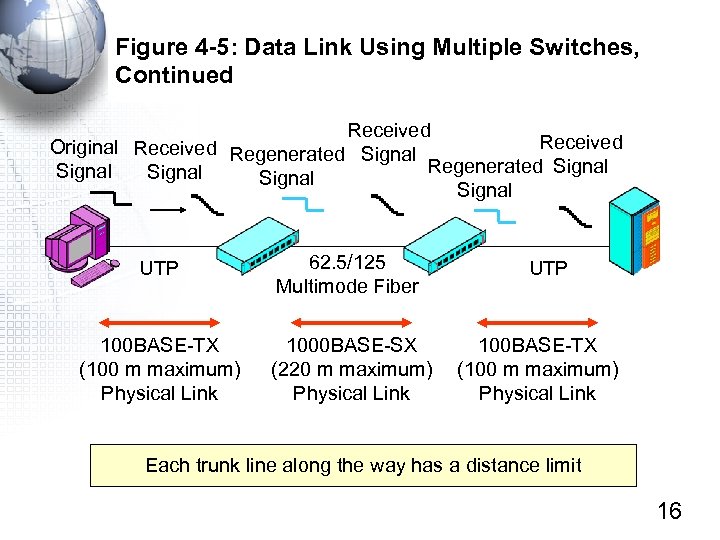 Figure 4 -5: Data Link Using Multiple Switches, Continued Received Original Received Regenerated Signal Signal UTP 62. 5/125 Multimode Fiber 100 BASE-TX (100 m maximum) Physical Link 1000 BASE-SX (220 m maximum) Physical Link UTP 100 BASE-TX (100 m maximum) Physical Link Each trunk line along the way has a distance limit 16
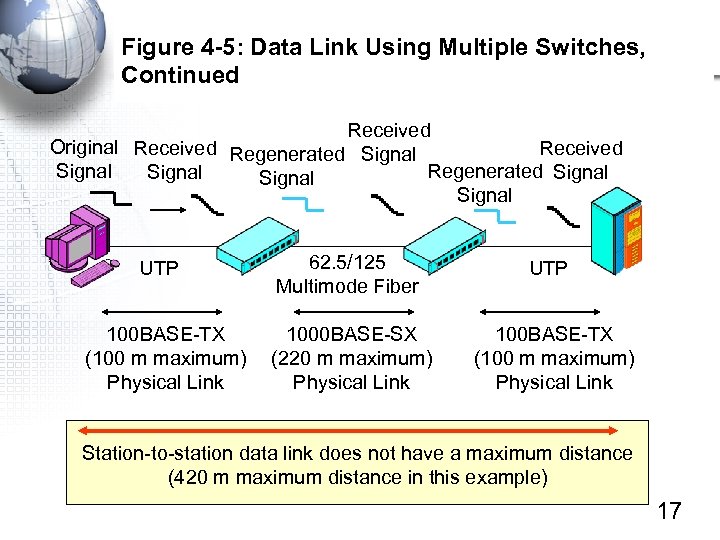 Figure 4 -5: Data Link Using Multiple Switches, Continued Received Original Received Regenerated Signal Received Signal Regenerated Signal UTP 100 BASE-TX (100 m maximum) Physical Link 62. 5/125 Multimode Fiber UTP 1000 BASE-SX (220 m maximum) Physical Link 100 BASE-TX (100 m maximum) Physical Link Station-to-station data link does not have a maximum distance (420 m maximum distance in this example) 17
 Ethernet Data Link (MAC) Layer Standards 802 Layering Frame Syntax Switch Operation
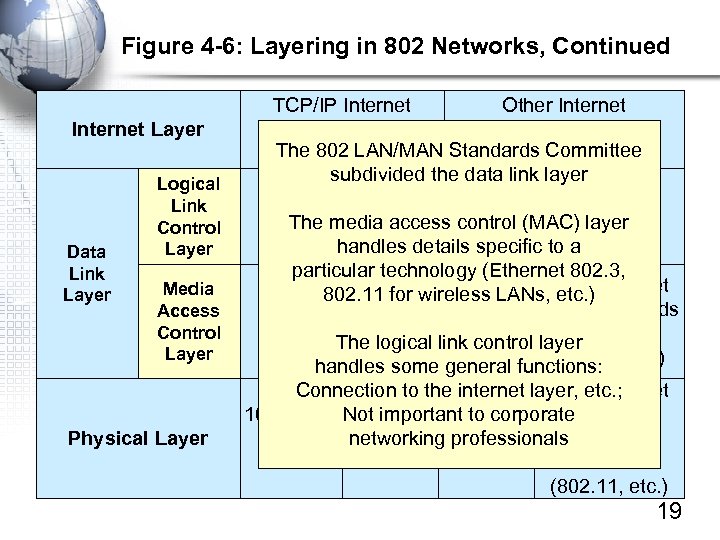 Figure 4 -6: Layering in 802 Networks, Continued Internet Layer Data Link Layer Logical Link Control Layer Media Access Control Layer Physical Layer TCP/IP Internet Other Internet Layer Standards The ARP, etc. ) (IP, 802 LAN/MAN Standards Committee (IPX, etc. ) subdivided the data link layer 802. 2 The media access control (MAC) layer handles details specific to a particular technology (Ethernet 802. 3, 802. 11 for wireless LANs, Non-Ethernet etc. ) Ethernet 802. 3 MAC Layer MAC Standards Standard (802. 5, The logical link control layer 802. 11, handles some general functions: etc. ) Connection to the internet layer, etc. ; Non-Ethernet important to corporate. Physical 100 BASE- Not 1000 networking professionals Layer TX Base… SX Standards (802. 11, etc. ) 19
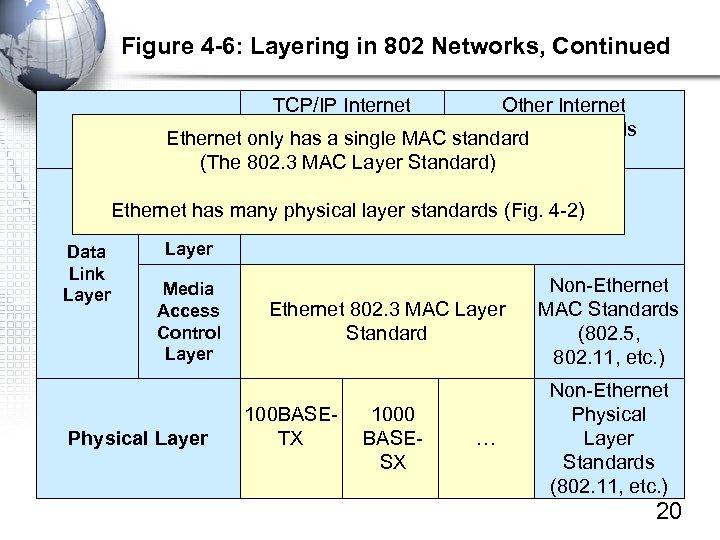 Figure 4 -6: Layering in 802 Networks, Continued TCP/IP Internet Other Internet Layer a single MAC standard Standards Layer Ethernet only has Standards (IP, ARP, etc. ) (The 802. 3 MAC Layer Standard) (IPX, etc. ) Logical Link Ethernet has many physical layer standards (Fig. 4 -2) 802. 2 Control Layer Data Link Non-Ethernet Media Layer Ethernet 802. 3 MAC Layer MAC Standards Access Control Standard (802. 5, Layer 802. 11, etc. ) Physical Layer 100 BASETX 1000 BASESX … Non-Ethernet Physical Layer Standards (802. 11, etc. ) 20
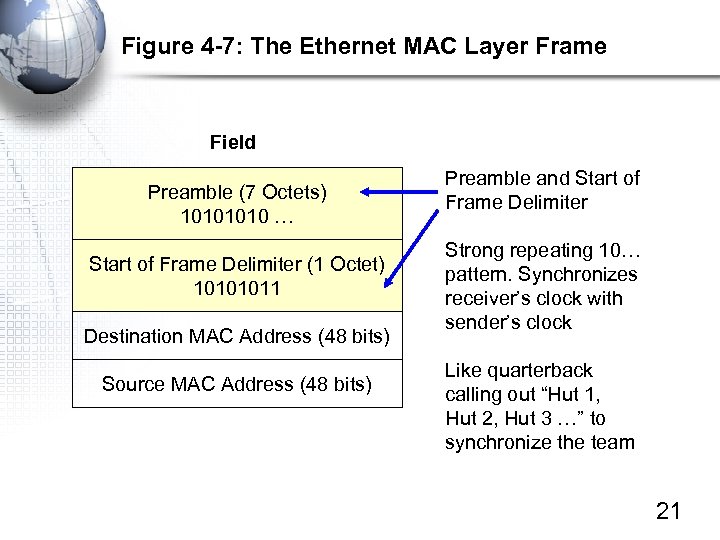 Figure 4 -7: The Ethernet MAC Layer Frame Field Preamble (7 Octets) 1010 … Start of Frame Delimiter (1 Octet) 10101011 Destination MAC Address (48 bits) Source MAC Address (48 bits) Preamble and Start of Frame Delimiter Strong repeating 10… pattern. Synchronizes receiver’s clock with sender’s clock Like quarterback calling out “Hut 1, Hut 2, Hut 3 …” to synchronize the team 21
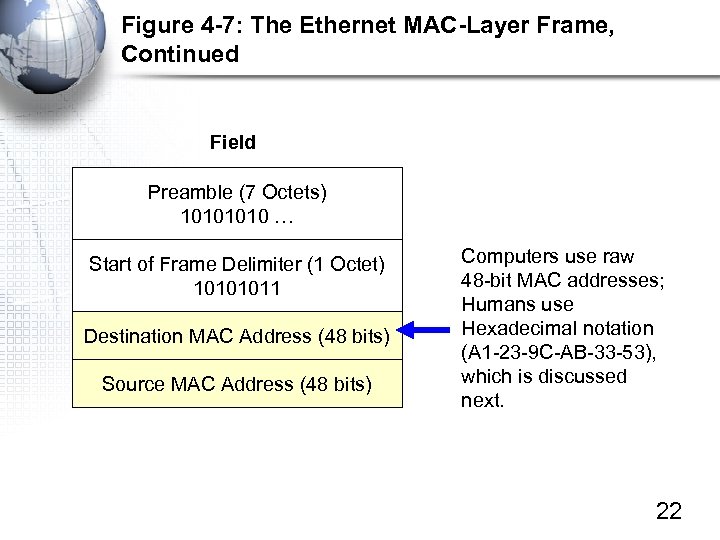 Figure 4 -7: The Ethernet MAC-Layer Frame, Continued Field Preamble (7 Octets) 1010 … Start of Frame Delimiter (1 Octet) 10101011 Destination MAC Address (48 bits) Source MAC Address (48 bits) Computers use raw 48 -bit MAC addresses; Humans use Hexadecimal notation (A 1 -23 -9 C-AB-33 -53), which is discussed next. 22
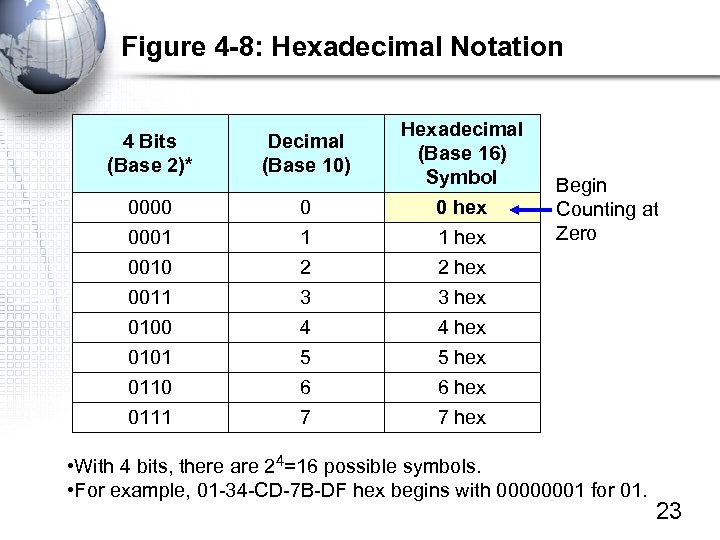 Figure 4 -8: Hexadecimal Notation 4 Bits (Base 2)* Decimal (Base 10) Hexadecimal (Base 16) Symbol 0000 0001 0010 0 1 2 0 hex 1 hex 2 hex 0011 0100 0101 0110 0111 3 4 5 6 7 3 hex 4 hex 5 hex 6 hex 7 hex Begin Counting at Zero • With 4 bits, there are 24=16 possible symbols. • For example, 01 -34 -CD-7 B-DF hex begins with 00000001 for 01. 23
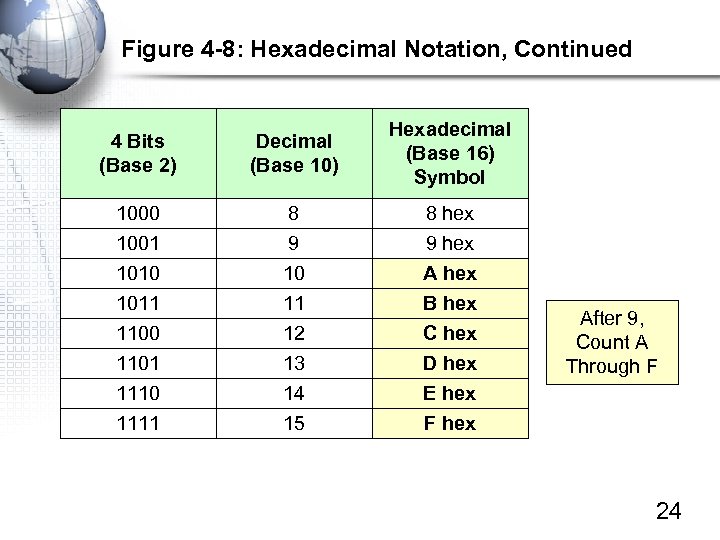 Figure 4 -8: Hexadecimal Notation, Continued 4 Bits (Base 2) Decimal (Base 10) Hexadecimal (Base 16) Symbol 1000 1001 8 9 8 hex 9 hex 1010 1011 1100 1101 1110 1111 10 11 12 13 14 15 A hex B hex C hex D hex E hex F hex After 9, Count A Through F 24
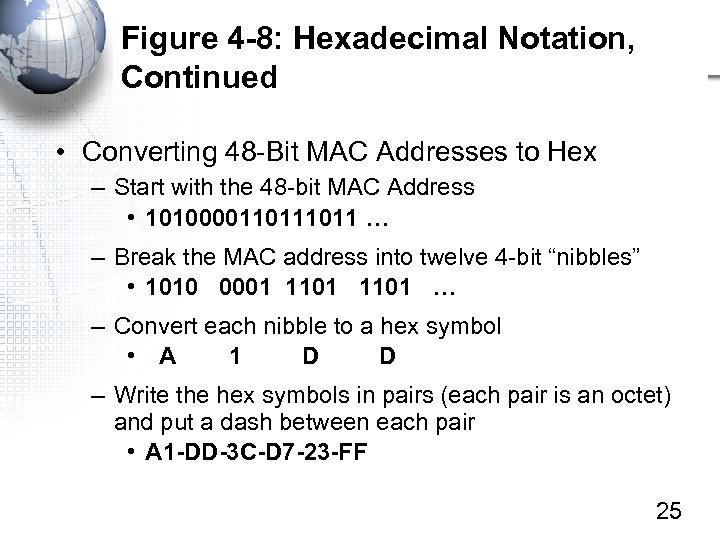 Figure 4 -8: Hexadecimal Notation, Continued • Converting 48 -Bit MAC Addresses to Hex – Start with the 48 -bit MAC Address • 101000011011 … – Break the MAC address into twelve 4 -bit “nibbles” • 1010 0001 1101 … – Convert each nibble to a hex symbol • A 1 D D – Write the hex symbols in pairs (each pair is an octet) and put a dash between each pair • A 1 -DD-3 C-D 7 -23 -FF 25
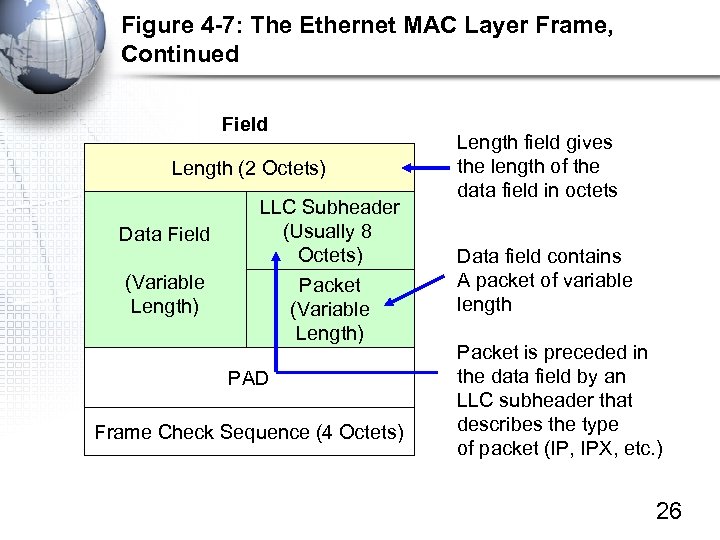 Figure 4 -7: The Ethernet MAC Layer Frame, Continued Field Length (2 Octets) Data Field (Variable Length) LLC Subheader (Usually 8 Octets) Packet (Variable Length) PAD Frame Check Sequence (4 Octets) Length field gives the length of the data field in octets Data field contains A packet of variable length Packet is preceded in the data field by an LLC subheader that describes the type of packet (IP, IPX, etc. ) 26
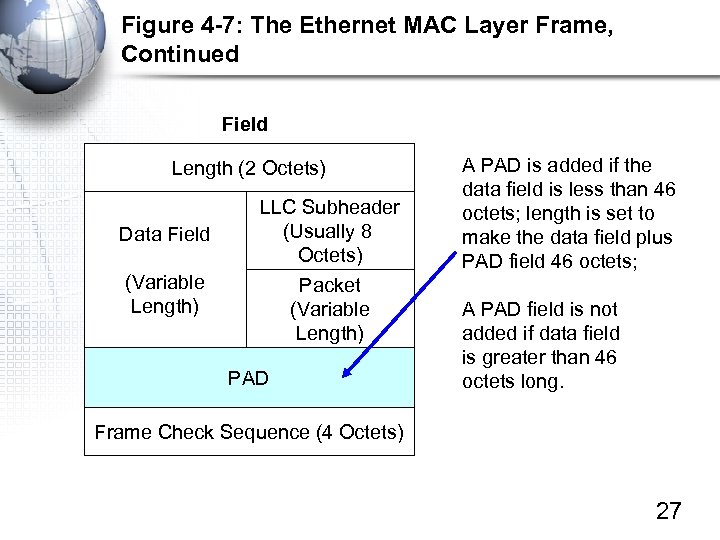 Figure 4 -7: The Ethernet MAC Layer Frame, Continued Field Length (2 Octets) Data Field (Variable Length) LLC Subheader (Usually 8 Octets) Packet (Variable Length) PAD A PAD is added if the data field is less than 46 octets; length is set to make the data field plus PAD field 46 octets; A PAD field is not added if data field is greater than 46 octets long. Frame Check Sequence (4 Octets) 27
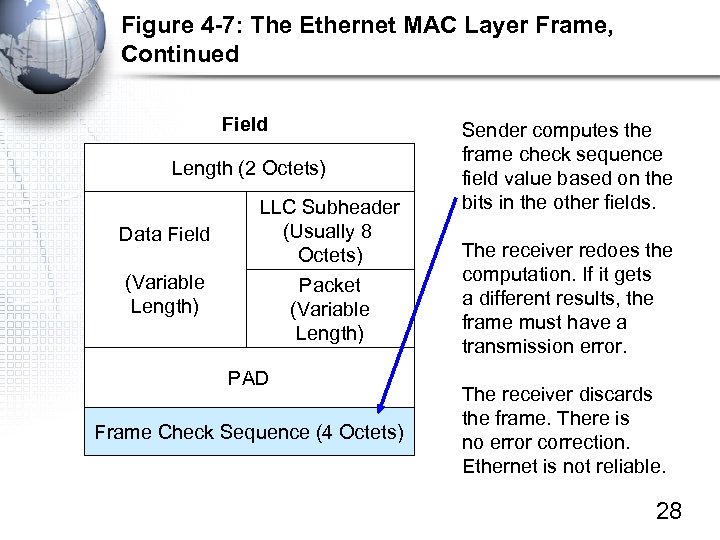 Figure 4 -7: The Ethernet MAC Layer Frame, Continued Field Length (2 Octets) Data Field (Variable Length) LLC Subheader (Usually 8 Octets) Packet (Variable Length) PAD Frame Check Sequence (4 Octets) Sender computes the frame check sequence field value based on the bits in the other fields. The receiver redoes the computation. If it gets a different results, the frame must have a transmission error. The receiver discards the frame. There is no error correction. Ethernet is not reliable. 28
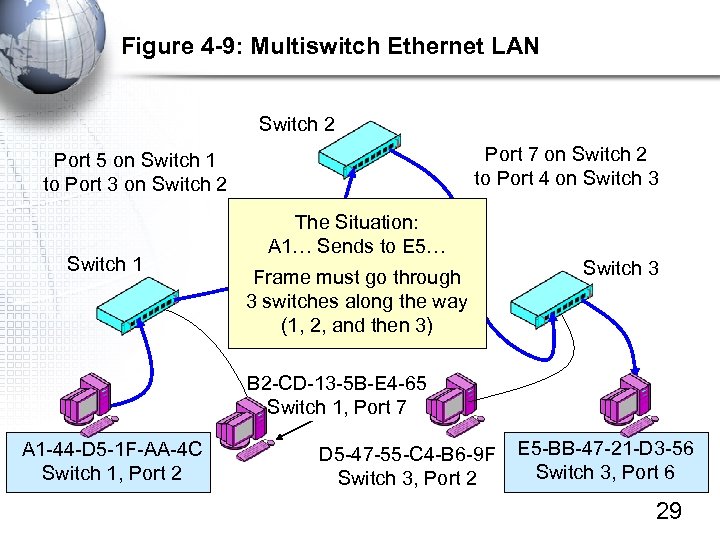 Figure 4 -9: Multiswitch Ethernet LAN Switch 2 Port 7 on Switch 2 to Port 4 on Switch 3 Port 5 on Switch 1 to Port 3 on Switch 2 Switch 1 The Situation: A 1… Sends to E 5… Frame must go through 3 switches along the way (1, 2, and then 3) Switch 3 B 2 -CD-13 -5 B-E 4 -65 Switch 1, Port 7 A 1 -44 -D 5 -1 F-AA-4 C Switch 1, Port 2 D 5 -47 -55 -C 4 -B 6 -9 F Switch 3, Port 2 E 5 -BB-47 -21 -D 3 -56 Switch 3, Port 6 29
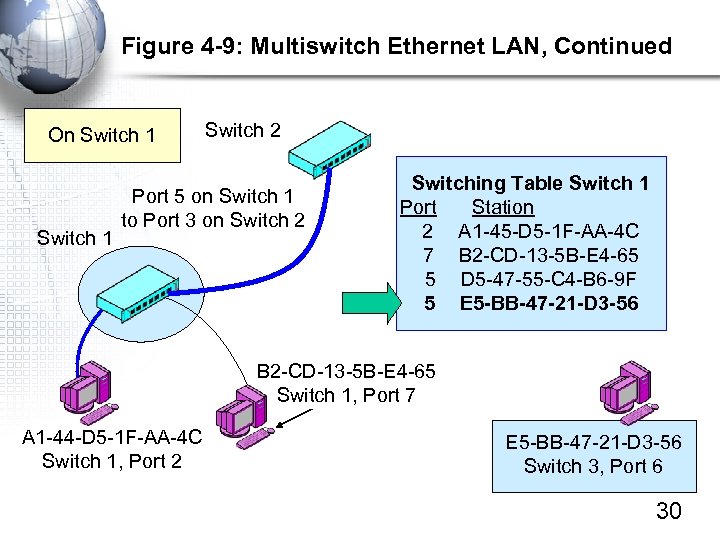 Figure 4 -9: Multiswitch Ethernet LAN, Continued On Switch 1 Switch 2 Port 5 on Switch 1 to Port 3 on Switch 2 Switching Table Switch 1 Port Station 2 A 1 -45 -D 5 -1 F-AA-4 C 7 B 2 -CD-13 -5 B-E 4 -65 5 D 5 -47 -55 -C 4 -B 6 -9 F 5 E 5 -BB-47 -21 -D 3 -56 B 2 -CD-13 -5 B-E 4 -65 Switch 1, Port 7 A 1 -44 -D 5 -1 F-AA-4 C Switch 1, Port 2 E 5 -BB-47 -21 -D 3 -56 Switch 3, Port 6 30
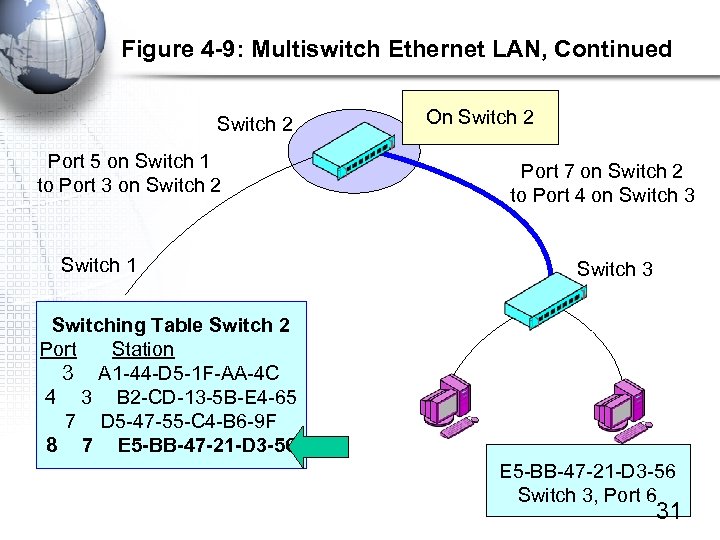 Figure 4 -9: Multiswitch Ethernet LAN, Continued Switch 2 Port 5 on Switch 1 to Port 3 on Switch 2 Switch 1 On Switch 2 Port 7 on Switch 2 to Port 4 on Switch 3 Switching Table Switch 2 Port Station 3 A 1 -44 -D 5 -1 F-AA-4 C 4 3 B 2 -CD-13 -5 B-E 4 -65 7 D 5 -47 -55 -C 4 -B 6 -9 F 8 7 E 5 -BB-47 -21 -D 3 -56 Switch 3, Port 6 31
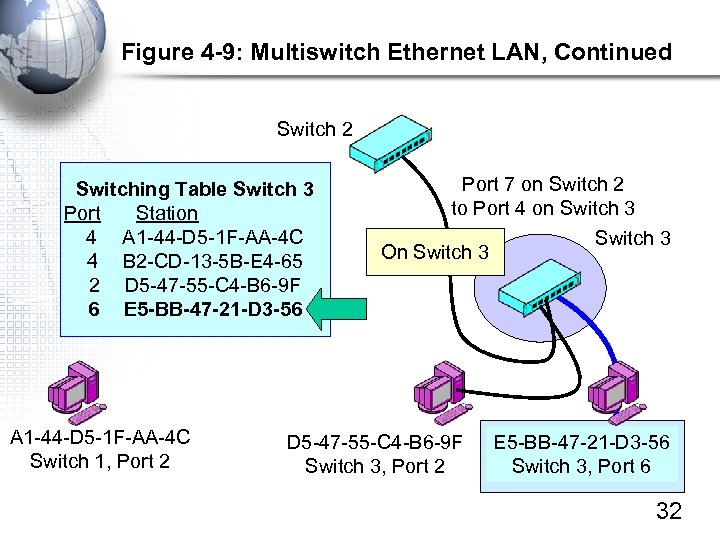 Figure 4 -9: Multiswitch Ethernet LAN, Continued Switch 2 Switching Table Switch 3 Port Station 4 A 1 -44 -D 5 -1 F-AA-4 C 4 B 2 -CD-13 -5 B-E 4 -65 2 D 5 -47 -55 -C 4 -B 6 -9 F 6 E 5 -BB-47 -21 -D 3 -56 A 1 -44 -D 5 -1 F-AA-4 C Switch 1, Port 2 Port 7 on Switch 2 to Port 4 on Switch 3 On Switch 3 D 5 -47 -55 -C 4 -B 6 -9 F Switch 3, Port 2 E 5 -BB-47 -21 -D 3 -56 Switch 3, Port 6 32
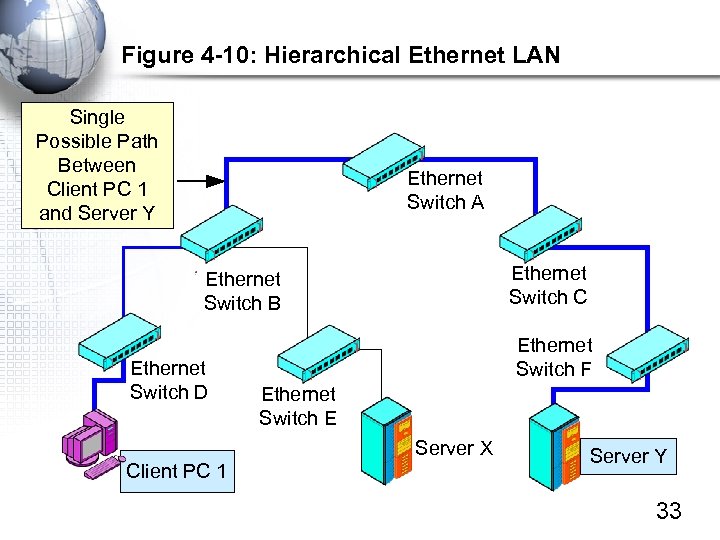 Figure 4 -10: Hierarchical Ethernet LAN Single Possible Path Between Client PC 1 and Server Y Ethernet Switch A Ethernet Switch C Ethernet Switch B Ethernet Switch D Ethernet Switch F Ethernet Switch E Server X Client PC 1 Server Y 33
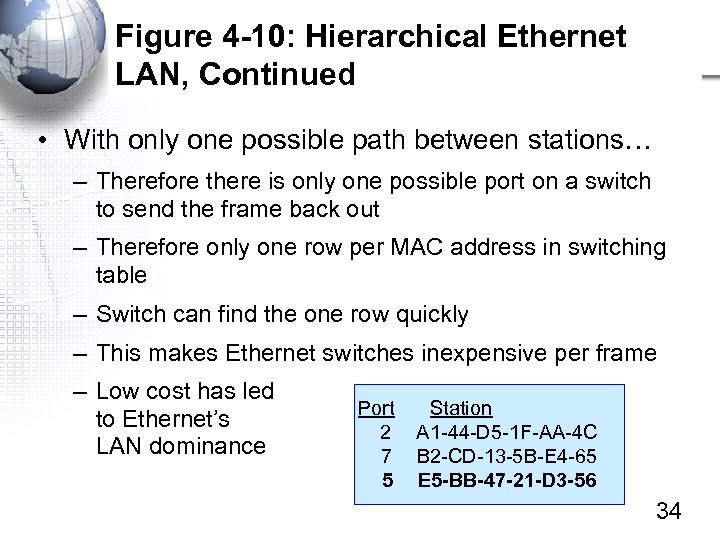 Figure 4 -10: Hierarchical Ethernet LAN, Continued • With only one possible path between stations… – Therefore there is only one possible port on a switch to send the frame back out – Therefore only one row per MAC address in switching table – Switch can find the one row quickly – This makes Ethernet switches inexpensive per frame – Low cost has led to Ethernet’s LAN dominance Port 2 7 5 Station A 1 -44 -D 5 -1 F-AA-4 C B 2 -CD-13 -5 B-E 4 -65 E 5 -BB-47 -21 -D 3 -56 34
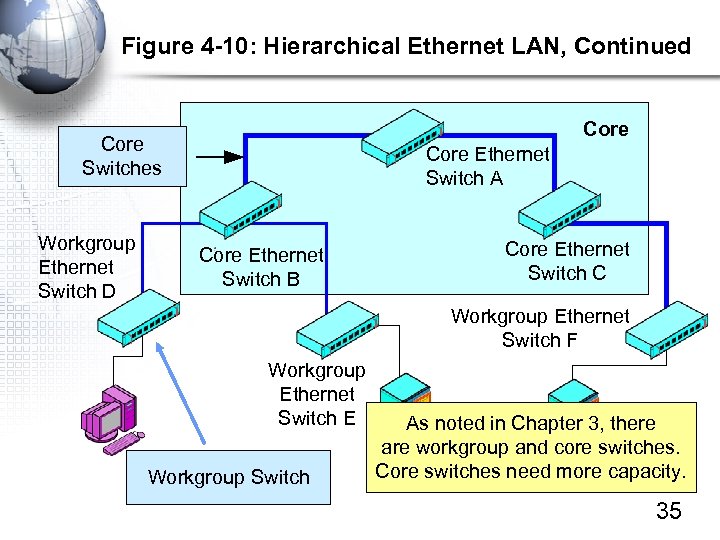 Figure 4 -10: Hierarchical Ethernet LAN, Continued Core Switches Workgroup Ethernet Switch D Core Ethernet Switch A Core Ethernet Switch B Core Ethernet Switch C Workgroup Ethernet Switch F Workgroup Ethernet Switch E Workgroup Switch As noted in Chapter 3, there are workgroup and core switches. Core switches need more capacity. 35
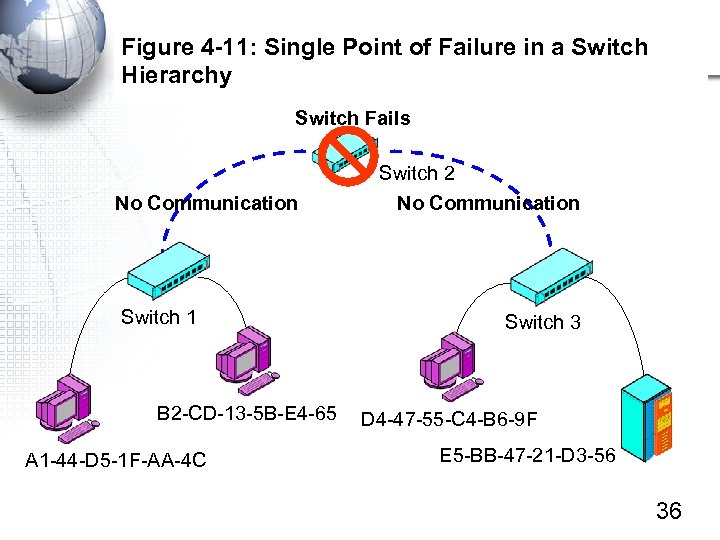 Figure 4 -11: Single Point of Failure in a Switch Hierarchy Switch Fails No Communication Switch 1 B 2 -CD-13 -5 B-E 4 -65 A 1 -44 -D 5 -1 F-AA-4 C Switch 2 No Communication Switch 3 D 4 -47 -55 -C 4 -B 6 -9 F E 5 -BB-47 -21 -D 3 -56 36
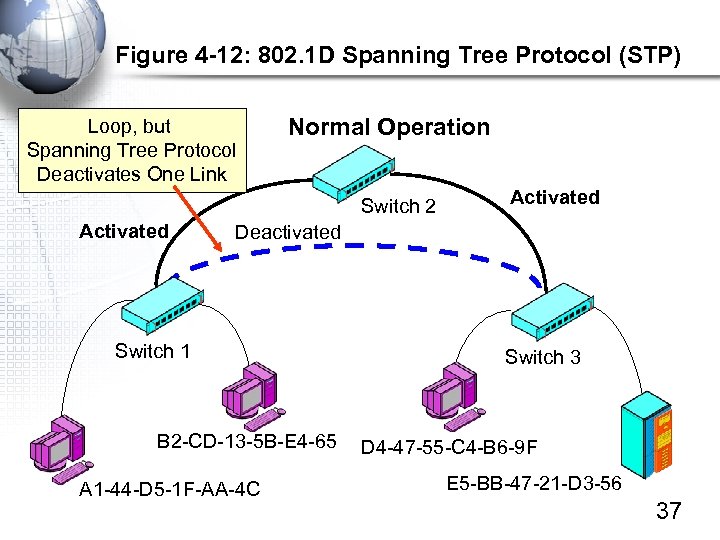 Figure 4 -12: 802. 1 D Spanning Tree Protocol (STP) Loop, but Spanning Tree Protocol Deactivates One Link Normal Operation Switch 2 Activated Deactivated Switch 1 B 2 -CD-13 -5 B-E 4 -65 A 1 -44 -D 5 -1 F-AA-4 C Switch 3 D 4 -47 -55 -C 4 -B 6 -9 F E 5 -BB-47 -21 -D 3 -56 37
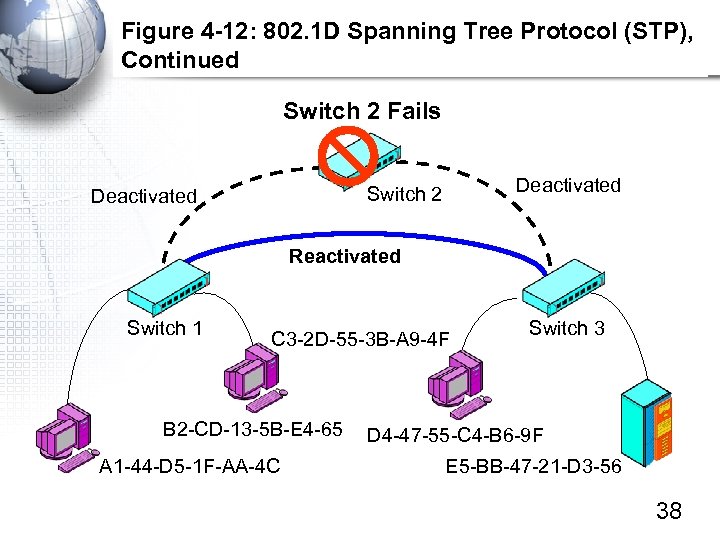 Figure 4 -12: 802. 1 D Spanning Tree Protocol (STP), Continued Switch 2 Fails Deactivated Switch 2 Deactivated Reactivated Switch 1 C 3 -2 D-55 -3 B-A 9 -4 F B 2 -CD-13 -5 B-E 4 -65 A 1 -44 -D 5 -1 F-AA-4 C Switch 3 D 4 -47 -55 -C 4 -B 6 -9 F E 5 -BB-47 -21 -D 3 -56 38
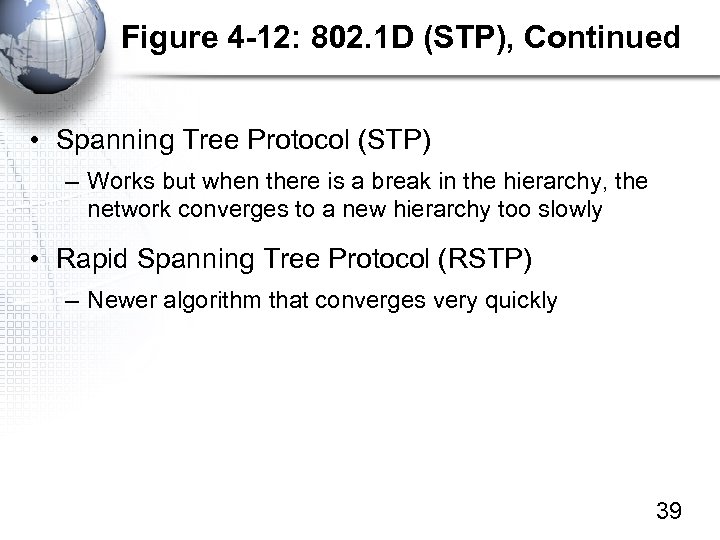 Figure 4 -12: 802. 1 D (STP), Continued • Spanning Tree Protocol (STP) – Works but when there is a break in the hierarchy, the network converges to a new hierarchy too slowly • Rapid Spanning Tree Protocol (RSTP) – Newer algorithm that converges very quickly 39
 Virtual LANs (VLANs)
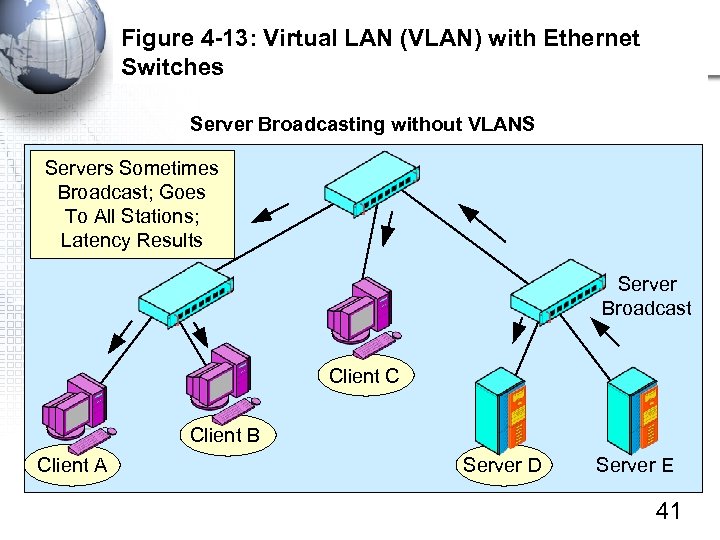 Figure 4 -13: Virtual LAN (VLAN) with Ethernet Switches Server Broadcasting without VLANS Servers Sometimes Broadcast; Goes To All Stations; Latency Results Server Broadcast Client C Client B Client A Server D Server E 41
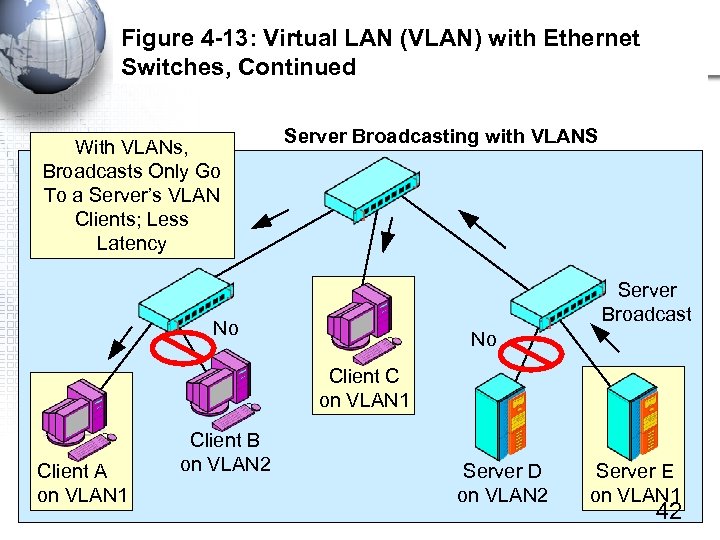 Figure 4 -13: Virtual LAN (VLAN) with Ethernet Switches, Continued With VLANs, Broadcasts Only Go To a Server’s VLAN Clients; Less Latency Server Broadcasting with VLANS Server Broadcast No No Client C on VLAN 1 Client A on VLAN 1 Client B on VLAN 2 Server D on VLAN 2 Server E on VLAN 1 42
 Figure 4 -13: Virtual LAN (VLAN) with Ethernet Switches, Continued • VLANs primarily reduce congestion due to latency – They can also be used for security • Only people on a server’s VLAN can reach it – This provides some degree of security – Not sufficient by itself, but it can help • Wireless LANs – In wireless LANs, wireless clients may be initially placed in a VLAN that only has a single server—a server that authenticates the clients – After authentication, clients are allowed beyond the initial VLAN 43
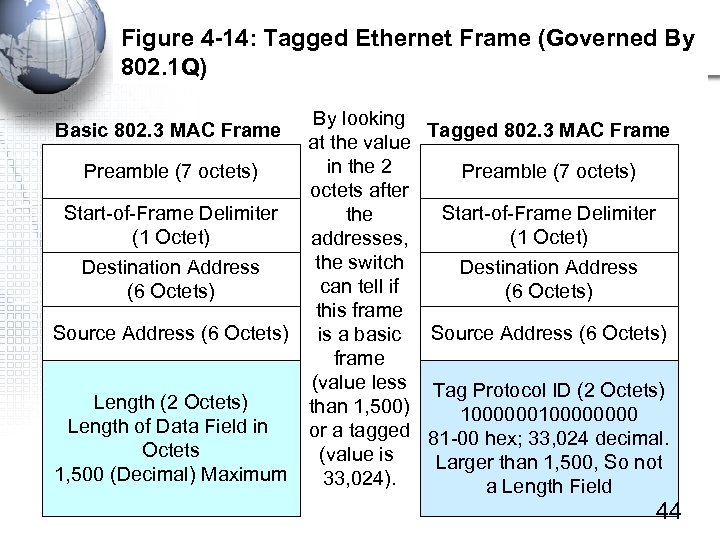 Figure 4 -14: Tagged Ethernet Frame (Governed By 802. 1 Q) By looking Tagged 802. 3 MAC Frame at the value in the 2 Preamble (7 octets) octets after Start-of-Frame Delimiter the (1 Octet) addresses, the switch Destination Address can tell if (6 Octets) this frame Source Address (6 Octets) is a basic Source Address (6 Octets) frame (value less Tag Protocol ID (2 Octets) Length (2 Octets) than 1, 500) 100000000 Length of Data Field in or a tagged 81 -00 hex; 33, 024 decimal. Octets (value is Larger than 1, 500, So not 1, 500 (Decimal) Maximum 33, 024). a Length Field Basic 802. 3 MAC Frame 44
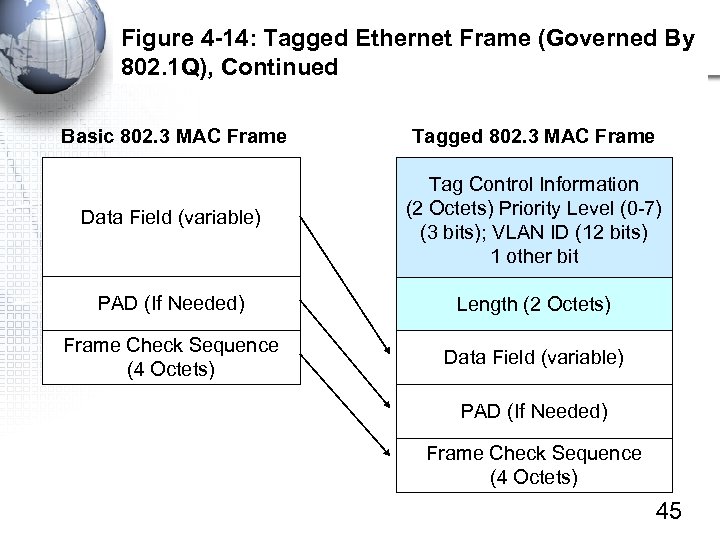 Figure 4 -14: Tagged Ethernet Frame (Governed By 802. 1 Q), Continued Basic 802. 3 MAC Frame Tagged 802. 3 MAC Frame Data Field (variable) Tag Control Information (2 Octets) Priority Level (0 -7) (3 bits); VLAN ID (12 bits) 1 other bit PAD (If Needed) Length (2 Octets) Frame Check Sequence (4 Octets) Data Field (variable) PAD (If Needed) Frame Check Sequence (4 Octets) 45
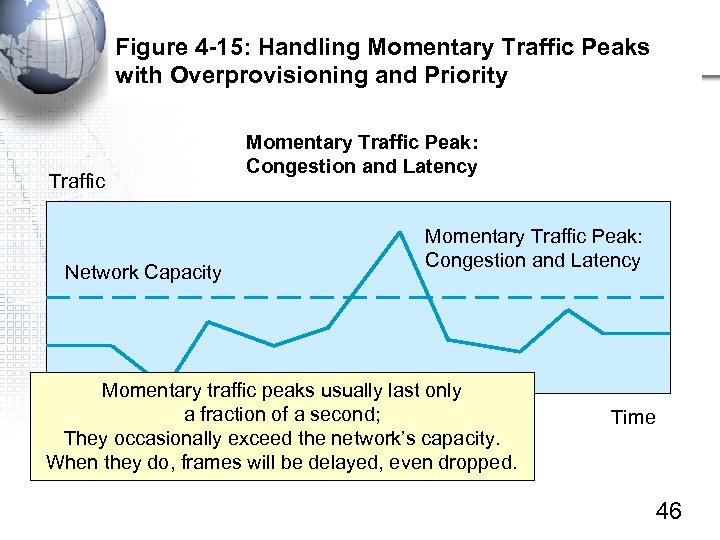 Figure 4 -15: Handling Momentary Traffic Peaks with Overprovisioning and Priority Traffic Network Capacity Momentary Traffic Peak: Congestion and Latency Momentary traffic peaks usually last only a fraction of a second; They occasionally exceed the network’s capacity. When they do, frames will be delayed, even dropped. Time 46
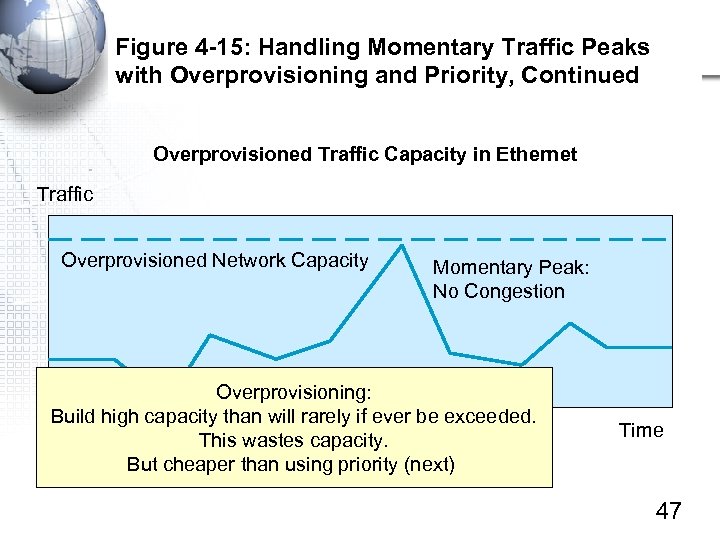 Figure 4 -15: Handling Momentary Traffic Peaks with Overprovisioning and Priority, Continued Overprovisioned Traffic Capacity in Ethernet Traffic Overprovisioned Network Capacity Momentary Peak: No Congestion Overprovisioning: Build high capacity than will rarely if ever be exceeded. This wastes capacity. But cheaper than using priority (next) Time 47
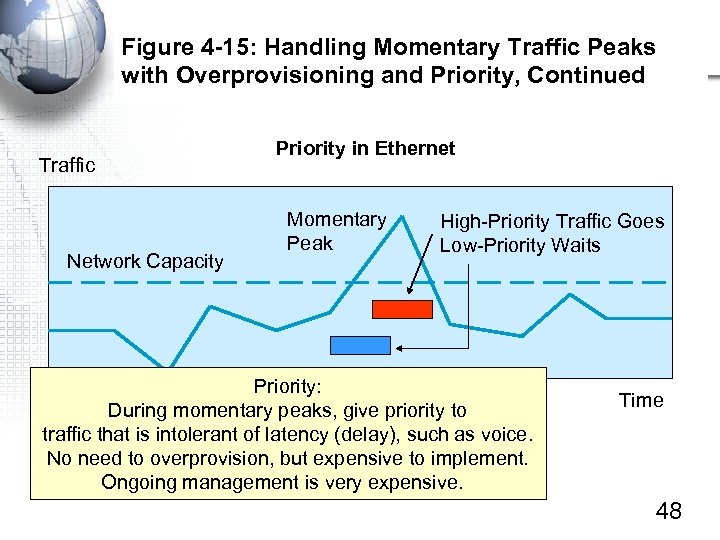 Figure 4 -15: Handling Momentary Traffic Peaks with Overprovisioning and Priority, Continued Traffic Network Capacity Priority in Ethernet Momentary Peak High-Priority Traffic Goes Low-Priority Waits Priority: During momentary peaks, give priority to traffic that is intolerant of latency (delay), such as voice. No need to overprovision, but expensive to implement. Ongoing management is very expensive. Time 48