


 Скачать презентацию Essential Rhapsody in C Part Two Case Study
d814f2debd5cd302eaf74a83a9d99a0c.ppt
- Количество слайдов: 164
 Essential Rhapsody in C++ Part Two Case Study 1 Rhapsody in C++ Tool Training "Essential" © I-Logix 1999 -2003 v 4. 1 01/01/2003
 Case Study : Cash Register 2 Rhapsody in C++ Tool Training "Essential" © I-Logix 1999 -2003 v 4. 1 01/01/2003
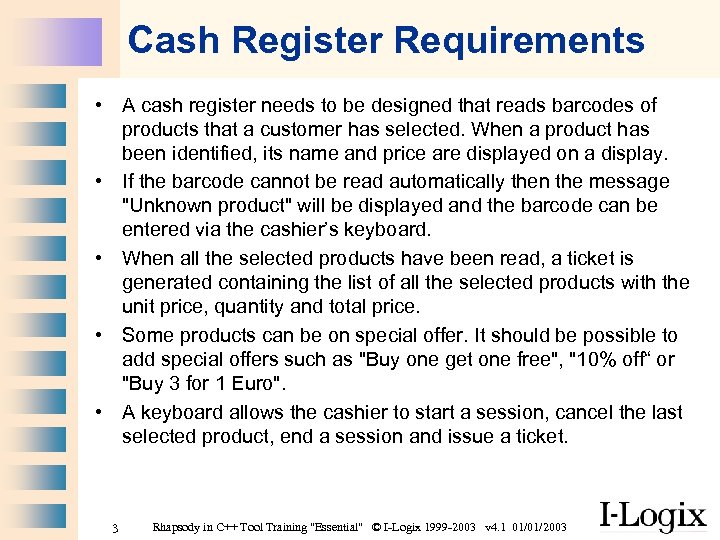 Cash Register Requirements • A cash register needs to be designed that reads barcodes of products that a customer has selected. When a product has been identified, its name and price are displayed on a display. • If the barcode cannot be read automatically then the message "Unknown product" will be displayed and the barcode can be entered via the cashier’s keyboard. • When all the selected products have been read, a ticket is generated containing the list of all the selected products with the unit price, quantity and total price. • Some products can be on special offer. It should be possible to add special offers such as "Buy one get one free", "10% off“ or "Buy 3 for 1 Euro". • A keyboard allows the cashier to start a session, cancel the last selected product, end a session and issue a ticket. 3 Rhapsody in C++ Tool Training "Essential" © I-Logix 1999 -2003 v 4. 1 01/01/2003
 Part Two Case Study Use Case Analysis 4 Rhapsody in C++ Tool Training "Essential" © I-Logix 1999 -2003 v 4. 1 01/01/2003
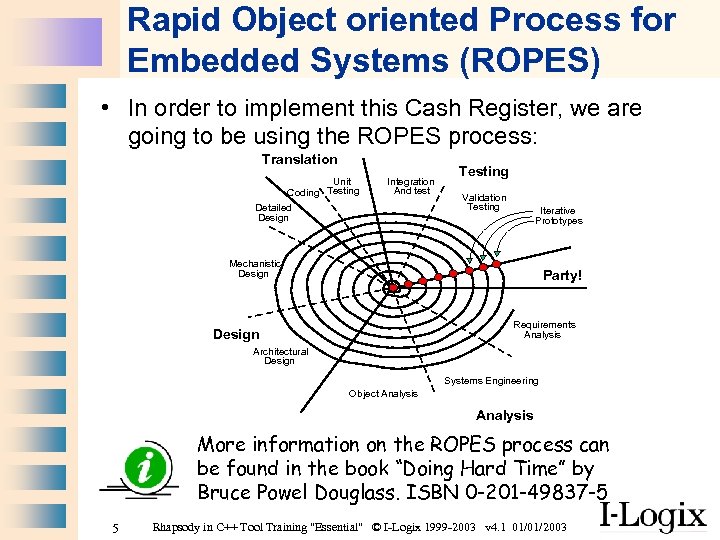 Rapid Object oriented Process for Embedded Systems (ROPES) • In order to implement this Cash Register, we are going to be using the ROPES process: Translation Unit Coding Testing Integration And test Detailed Design Testing Validation Testing Iterative Prototypes Mechanistic Design Party! Requirements Analysis Design Architectural Design Systems Engineering Object Analysis More information on the ROPES process can be found in the book “Doing Hard Time” by Bruce Powel Douglass. ISBN 0 -201 -49837 -5 5 Rhapsody in C++ Tool Training "Essential" © I-Logix 1999 -2003 v 4. 1 01/01/2003
 Before we start • During this case study, there will be times where we need to enter several non-trivial descriptions and operation implementations. • In order to reduce the typing, a report of the final model “Cash. Register” can be supplied so that descriptions and implementations can be cut and pasted from this file. • During the course in order to optimize the allocated time, it is not necessary to enter descriptions, but in a real project it is very important to enter them. If no descriptions are entered then the final documentation will be a lot less useful! 6 Rhapsody in C++ Tool Training "Essential" © I-Logix 1999 -2003 v 4. 1 01/01/2003
 Use cases and actors • From the requirements find use cases and actors. Group Exercise! 7 Rhapsody in C++ Tool Training "Essential" © I-Logix 1999 -2003 v 4. 1 01/01/2003
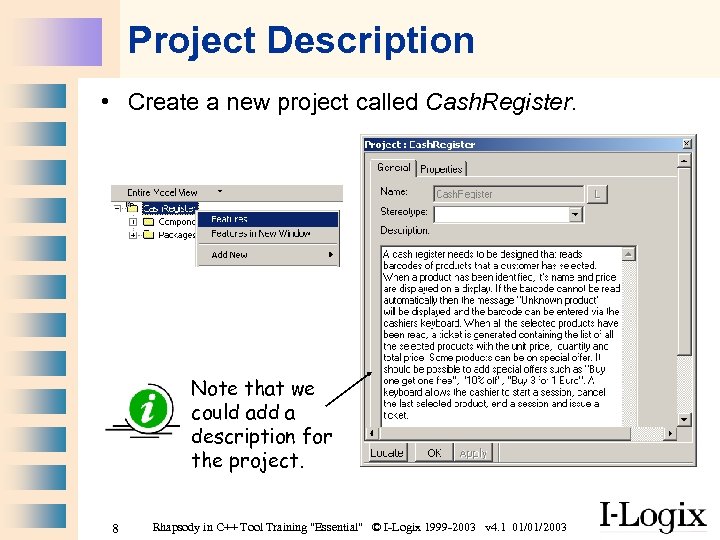 Project Description • Create a new project called Cash. Register. Note that we could add a description for the project. 8 Rhapsody in C++ Tool Training "Essential" © I-Logix 1999 -2003 v 4. 1 01/01/2003
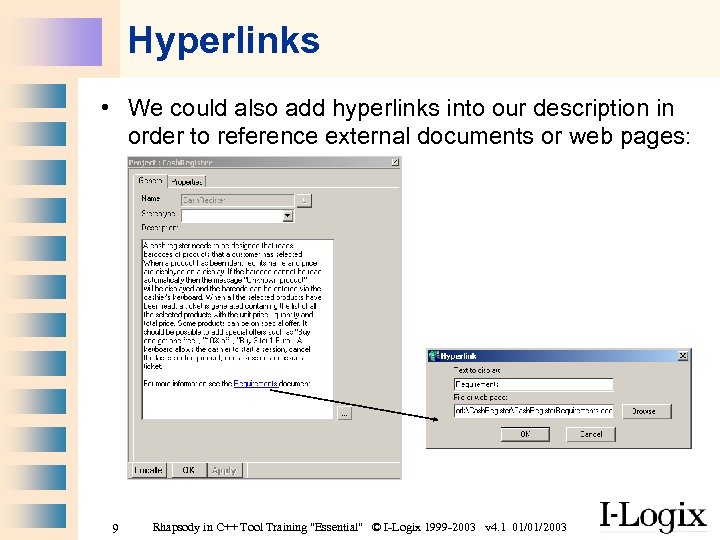 Hyperlinks • We could also add hyperlinks into our description in order to reference external documents or web pages: 9 Rhapsody in C++ Tool Training "Essential" © I-Logix 1999 -2003 v 4. 1 01/01/2003
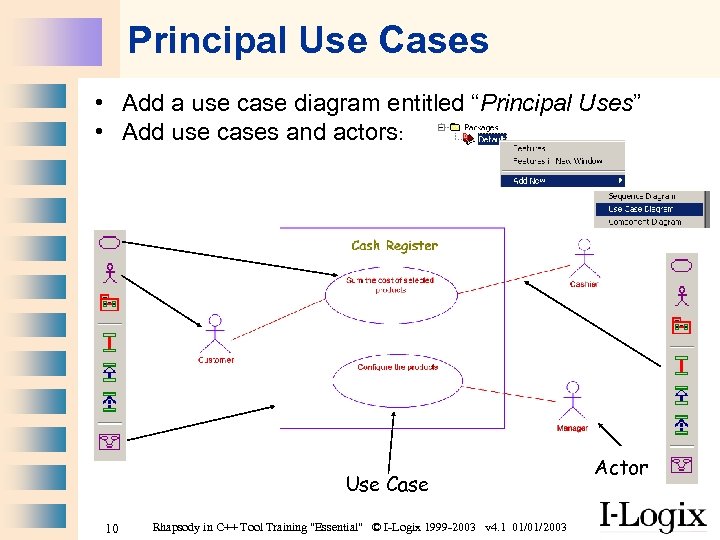 Principal Use Cases • Add a use case diagram entitled “Principal Uses” • Add use cases and actors: Use Case 10 Rhapsody in C++ Tool Training "Essential" © I-Logix 1999 -2003 v 4. 1 01/01/2003 Actor
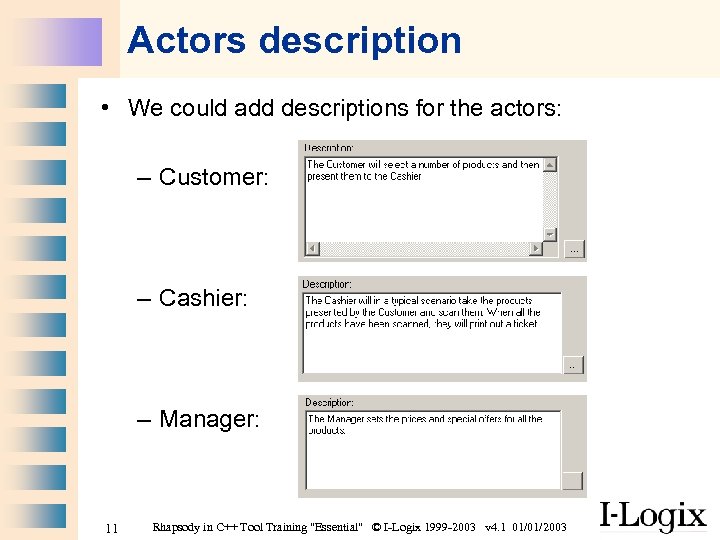 Actors description • We could add descriptions for the actors: – Customer: – Cashier: – Manager: 11 Rhapsody in C++ Tool Training "Essential" © I-Logix 1999 -2003 v 4. 1 01/01/2003
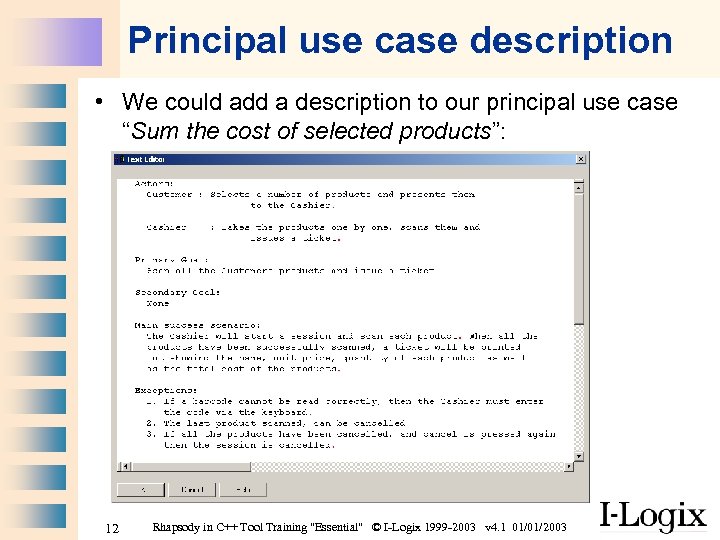 Principal use case description • We could add a description to our principal use case “Sum the cost of selected products”: 12 Rhapsody in C++ Tool Training "Essential" © I-Logix 1999 -2003 v 4. 1 01/01/2003
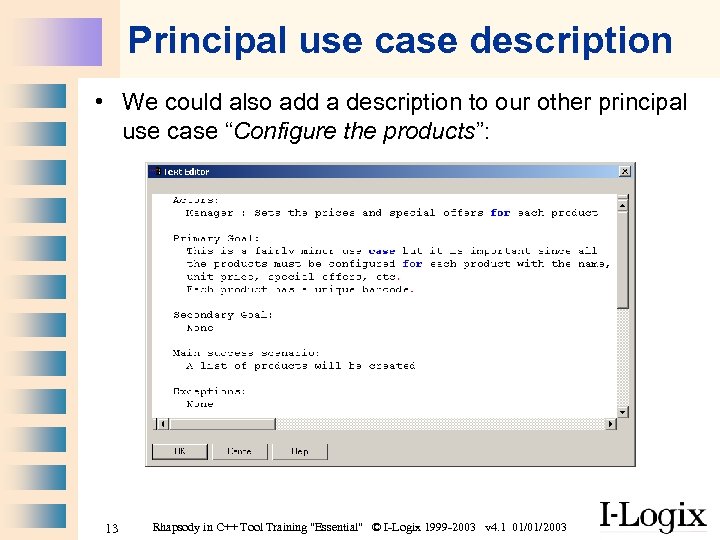 Principal use case description • We could also add a description to our other principal use case “Configure the products”: 13 Rhapsody in C++ Tool Training "Essential" © I-Logix 1999 -2003 v 4. 1 01/01/2003
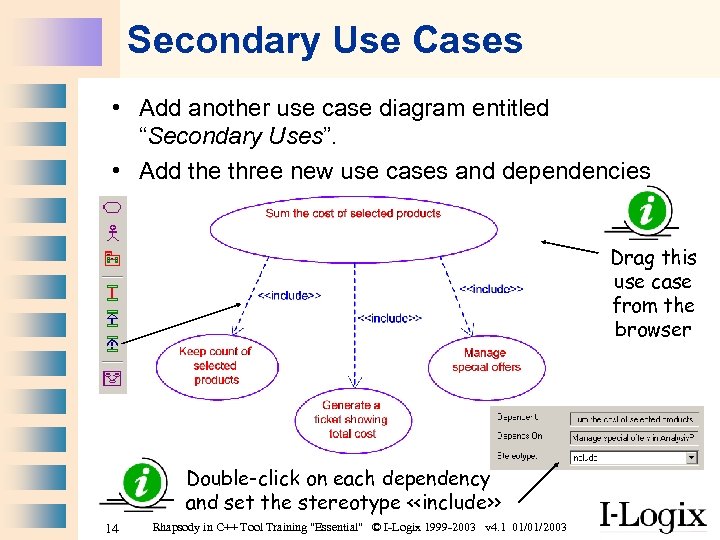 Secondary Use Cases • Add another use case diagram entitled “Secondary Uses”. • Add the three new use cases and dependencies Drag this use case from the browser Double-click on each dependency and set the stereotype <
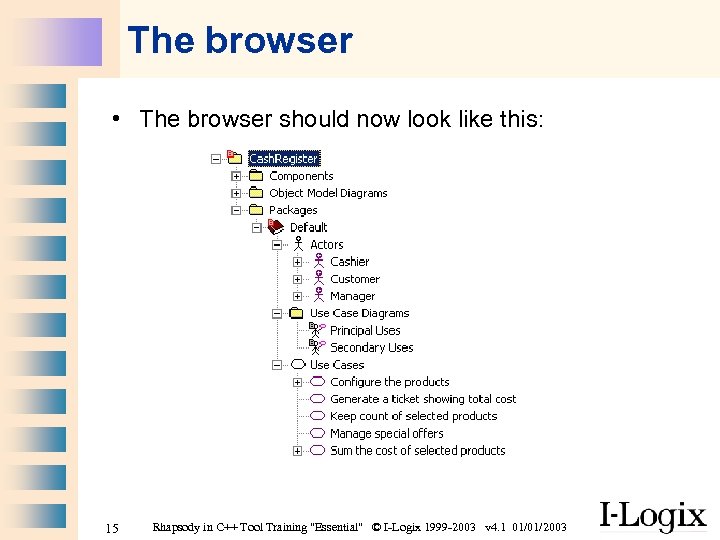 The browser • The browser should now look like this: 15 Rhapsody in C++ Tool Training "Essential" © I-Logix 1999 -2003 v 4. 1 01/01/2003
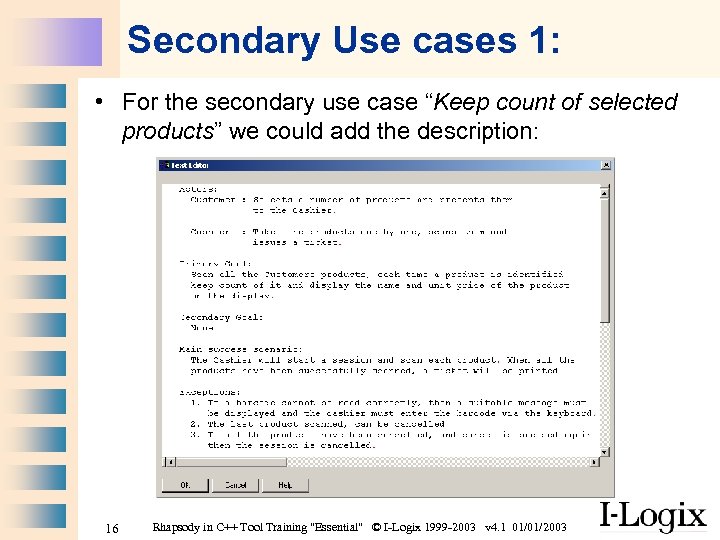 Secondary Use cases 1: • For the secondary use case “Keep count of selected products” we could add the description: 16 Rhapsody in C++ Tool Training "Essential" © I-Logix 1999 -2003 v 4. 1 01/01/2003
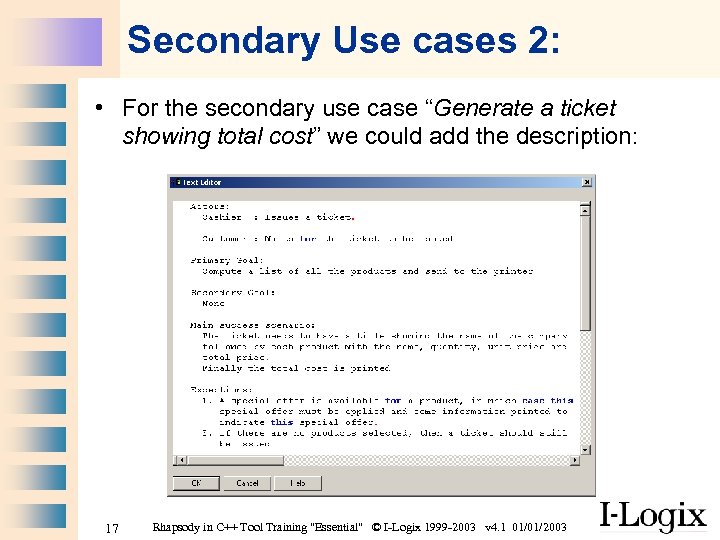 Secondary Use cases 2: • For the secondary use case “Generate a ticket showing total cost” we could add the description: 17 Rhapsody in C++ Tool Training "Essential" © I-Logix 1999 -2003 v 4. 1 01/01/2003
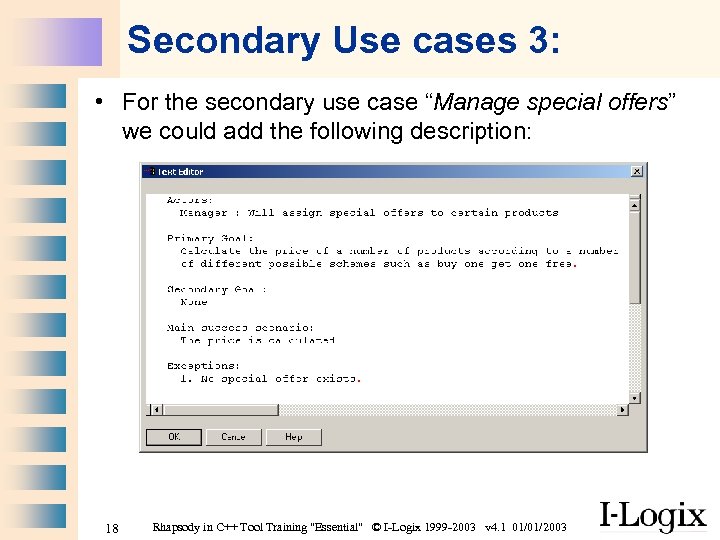 Secondary Use cases 3: • For the secondary use case “Manage special offers” we could add the following description: 18 Rhapsody in C++ Tool Training "Essential" © I-Logix 1999 -2003 v 4. 1 01/01/2003
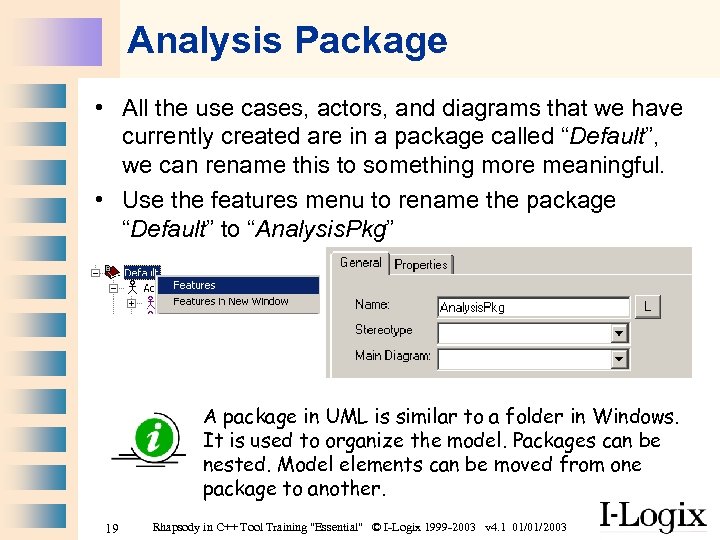 Analysis Package • All the use cases, actors, and diagrams that we have currently created are in a package called “Default”, we can rename this to something more meaningful. • Use the features menu to rename the package “Default” to “Analysis. Pkg” A package in UML is similar to a folder in Windows. It is used to organize the model. Packages can be nested. Model elements can be moved from one package to another. 19 Rhapsody in C++ Tool Training "Essential" © I-Logix 1999 -2003 v 4. 1 01/01/2003
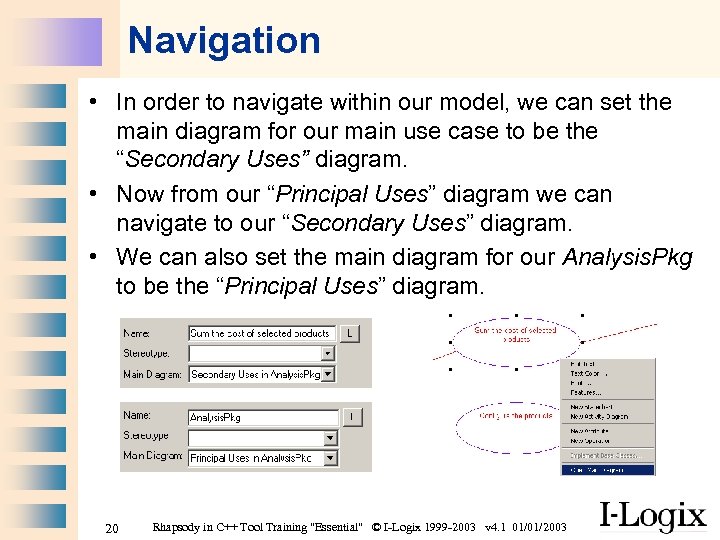 Navigation • In order to navigate within our model, we can set the main diagram for our main use case to be the “Secondary Uses” diagram. • Now from our “Principal Uses” diagram we can navigate to our “Secondary Uses” diagram. • We can also set the main diagram for our Analysis. Pkg to be the “Principal Uses” diagram. 20 Rhapsody in C++ Tool Training "Essential" © I-Logix 1999 -2003 v 4. 1 01/01/2003
 Part Two Case Study Finding Objects 21 Rhapsody in C++ Tool Training "Essential" © I-Logix 1999 -2003 v 4. 1 01/01/2003
 Brainstorming to find objects • Spend a few minutes and come up with a list of possible objects: • Find some classes and a short description for each one about their responsibility • Think about possible relations between these classes • Should we use generalization? • Are any classes reactive? • Are any classes active? Group Exercise! 22 Rhapsody in C++ Tool Training "Essential" © I-Logix 1999 -2003 v 4. 1 01/01/2003
 Use case driven approach • • We’ll attack this problem one use case at a time. Doing the use cases in this order: 1. 2. 3. 4. Configure the products Keep count of selected products Generate a ticket showing total cost Manage special offers When doing this case study, each student should progress at their own speed and in the allocated time should be able to complete at least the first two use cases. The last two use cases are really extended exercises for the faster students. 23 Rhapsody in C++ Tool Training "Essential" © I-Logix 1999 -2003 v 4. 1 01/01/2003
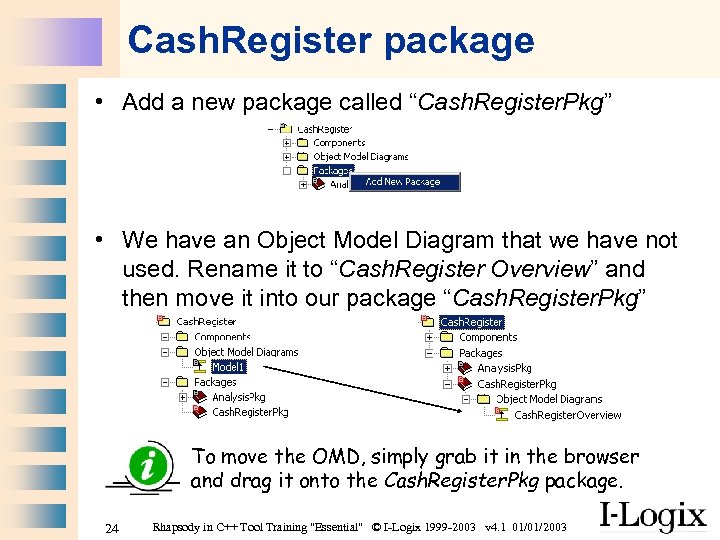 Cash. Register package • Add a new package called “Cash. Register. Pkg” • We have an Object Model Diagram that we have not used. Rename it to “Cash. Register Overview” and then move it into our package “Cash. Register. Pkg” To move the OMD, simply grab it in the browser and drag it onto the Cash. Register. Pkg package. 24 Rhapsody in C++ Tool Training "Essential" © I-Logix 1999 -2003 v 4. 1 01/01/2003
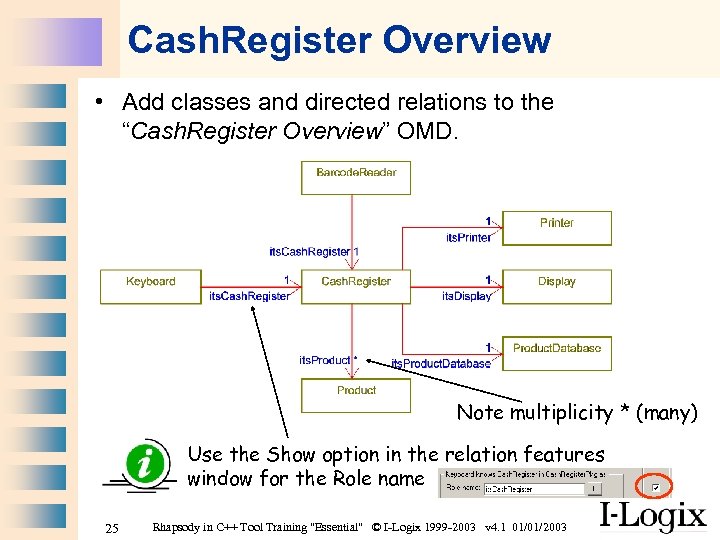 Cash. Register Overview • Add classes and directed relations to the “Cash. Register Overview” OMD. Note multiplicity * (many) Use the Show option in the relation features window for the Role name 25 Rhapsody in C++ Tool Training "Essential" © I-Logix 1999 -2003 v 4. 1 01/01/2003
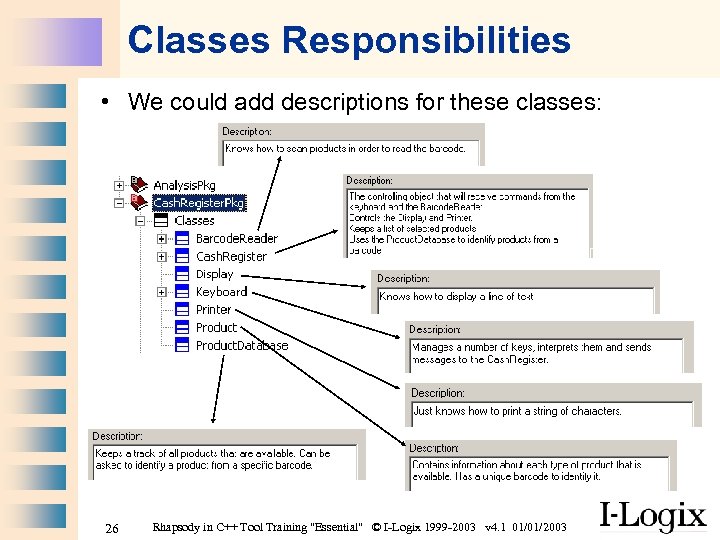 Classes Responsibilities • We could add descriptions for these classes: 26 Rhapsody in C++ Tool Training "Essential" © I-Logix 1999 -2003 v 4. 1 01/01/2003
 Part Two Use Case 1 “Configure the products” 27 Rhapsody in C++ Tool Training "Essential" © I-Logix 1999 -2003 v 4. 1 01/01/2003
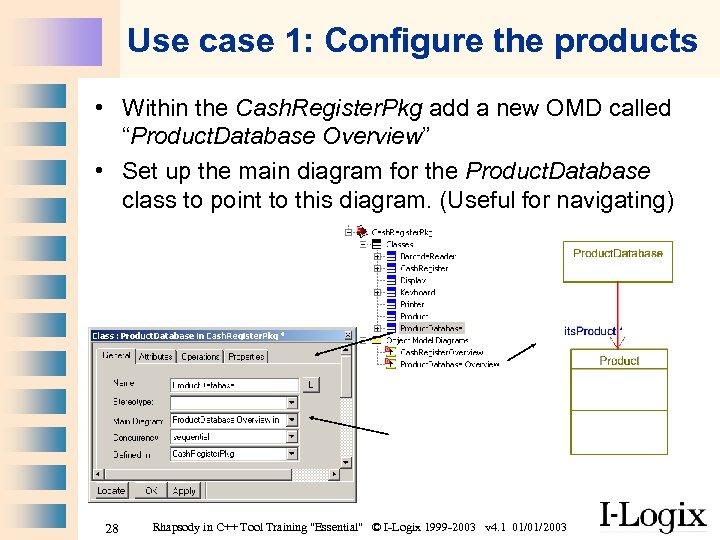 Use case 1: Configure the products • Within the Cash. Register. Pkg add a new OMD called “Product. Database Overview” • Set up the main diagram for the Product. Database class to point to this diagram. (Useful for navigating) 28 Rhapsody in C++ Tool Training "Essential" © I-Logix 1999 -2003 v 4. 1 01/01/2003
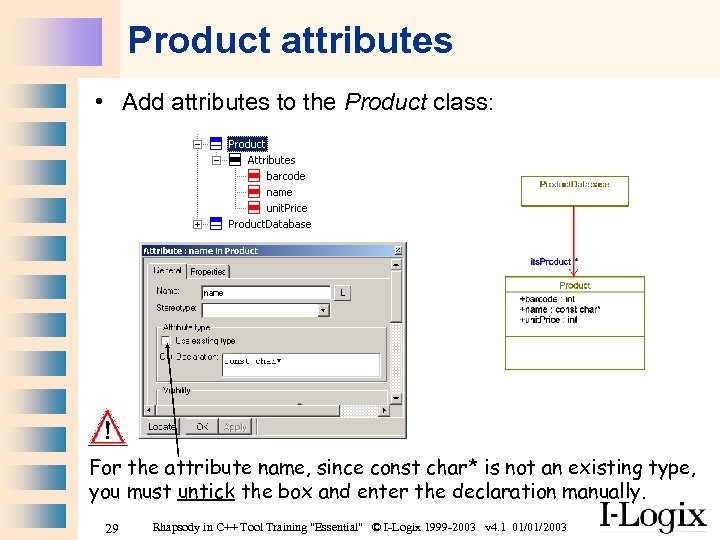 Product attributes • Add attributes to the Product class: For the attribute name, since const char* is not an existing type, you must untick the box and enter the declaration manually. 29 Rhapsody in C++ Tool Training "Essential" © I-Logix 1999 -2003 v 4. 1 01/01/2003
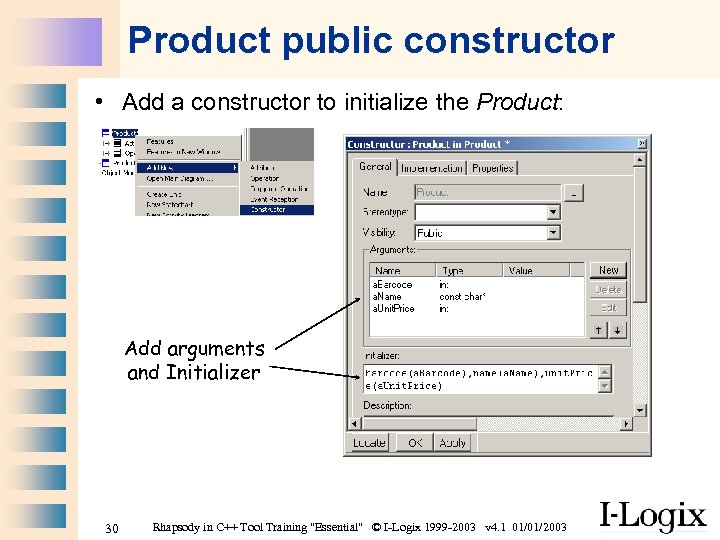 Product public constructor • Add a constructor to initialize the Product: Add arguments and Initializer 30 Rhapsody in C++ Tool Training "Essential" © I-Logix 1999 -2003 v 4. 1 01/01/2003
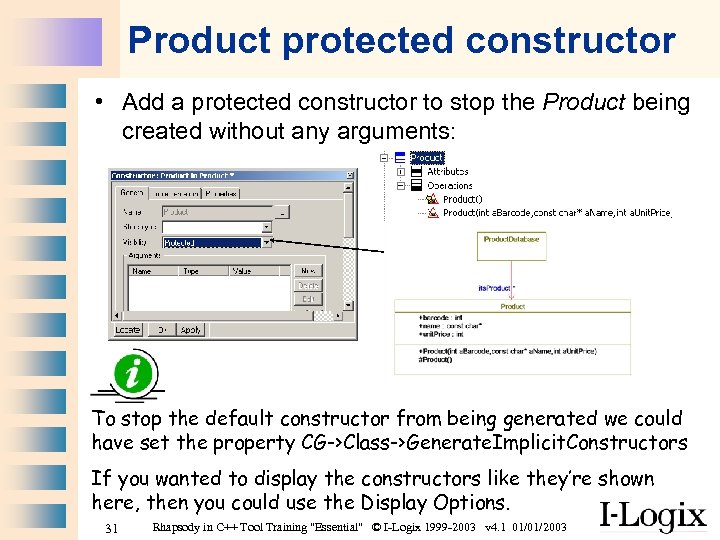 Product protected constructor • Add a protected constructor to stop the Product being created without any arguments: To stop the default constructor from being generated we could have set the property CG->Class->Generate. Implicit. Constructors If you wanted to display the constructors like they’re shown here, then you could use the Display Options. 31 Rhapsody in C++ Tool Training "Essential" © I-Logix 1999 -2003 v 4. 1 01/01/2003
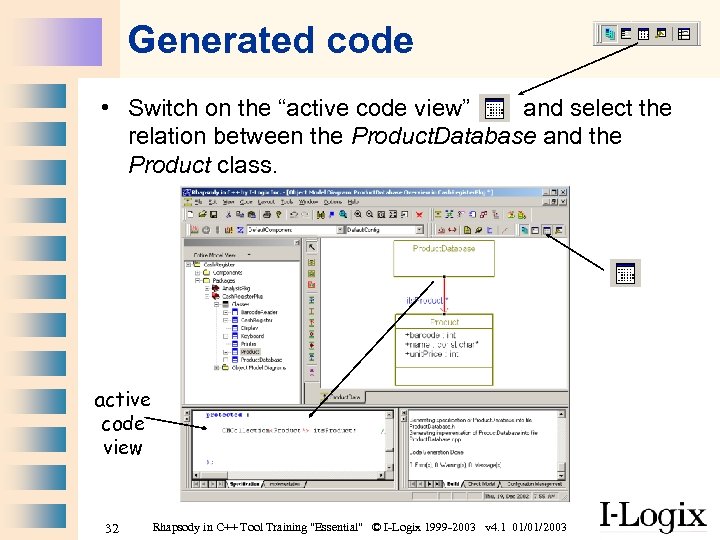 Generated code • Switch on the “active code view” and select the relation between the Product. Database and the Product class. active code view 32 Rhapsody in C++ Tool Training "Essential" © I-Logix 1999 -2003 v 4. 1 01/01/2003
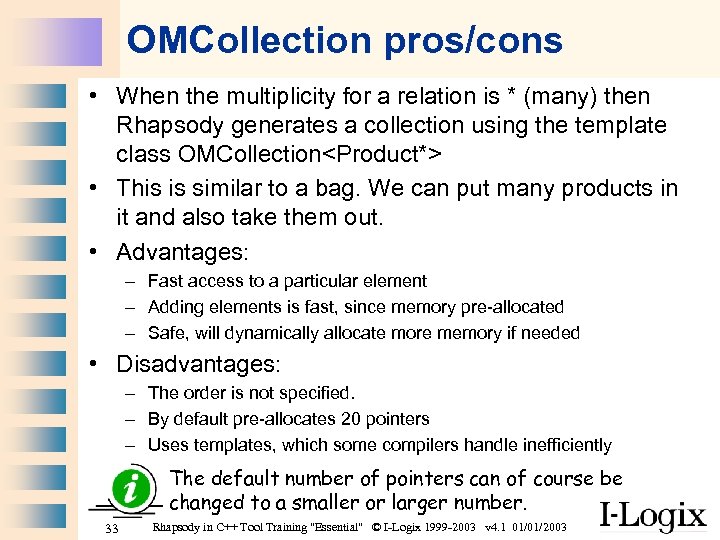 OMCollection pros/cons • When the multiplicity for a relation is * (many) then Rhapsody generates a collection using the template class OMCollection
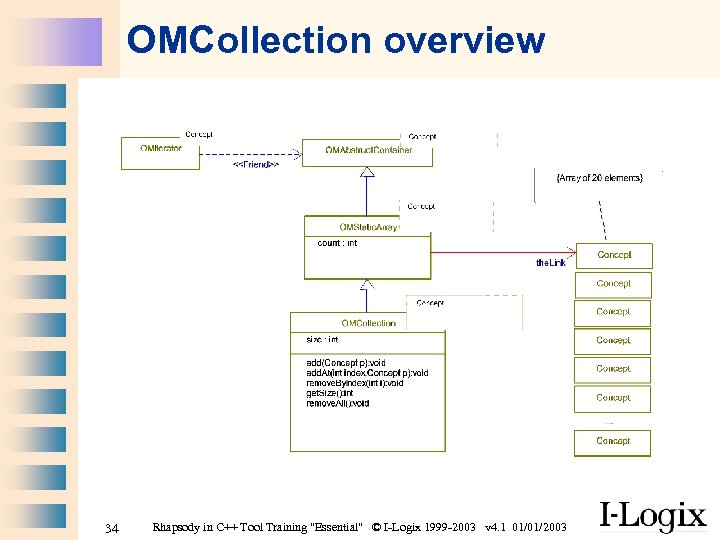 OMCollection overview 34 Rhapsody in C++ Tool Training "Essential" © I-Logix 1999 -2003 v 4. 1 01/01/2003
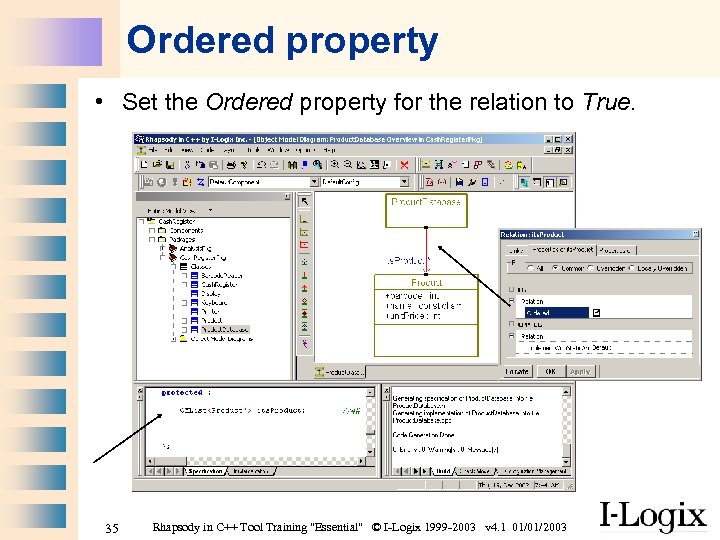 Ordered property • Set the Ordered property for the relation to True. 35 Rhapsody in C++ Tool Training "Essential" © I-Logix 1999 -2003 v 4. 1 01/01/2003
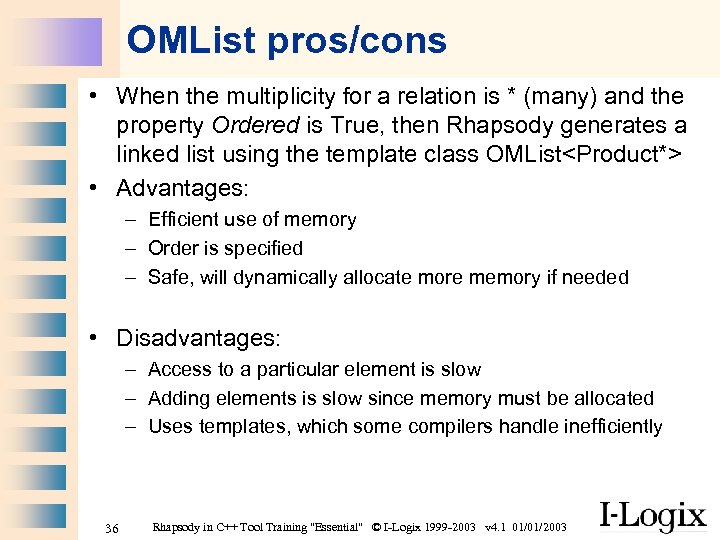 OMList pros/cons • When the multiplicity for a relation is * (many) and the property Ordered is True, then Rhapsody generates a linked list using the template class OMList
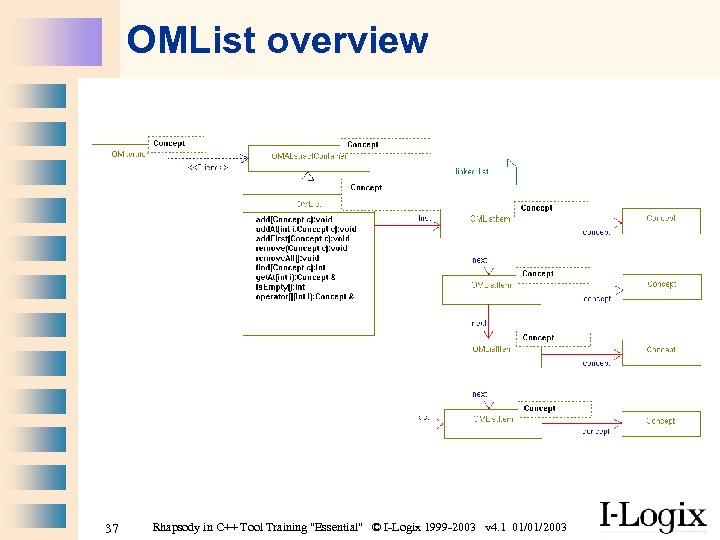 OMList overview 37 Rhapsody in C++ Tool Training "Essential" © I-Logix 1999 -2003 v 4. 1 01/01/2003
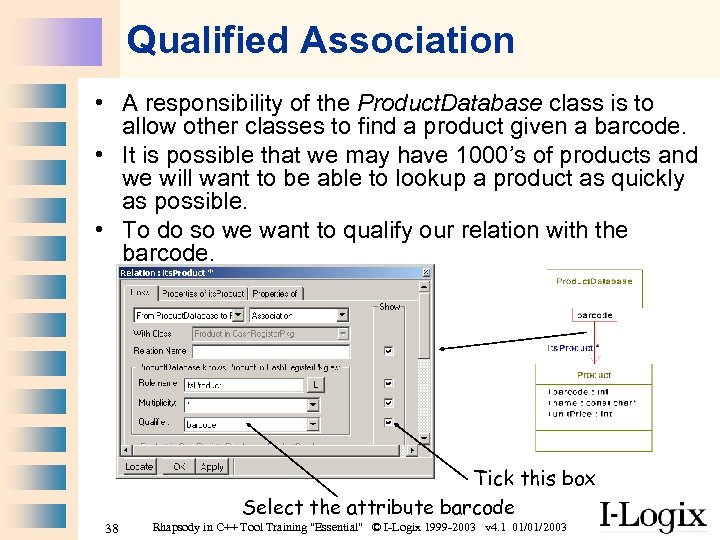 Qualified Association • A responsibility of the Product. Database class is to allow other classes to find a product given a barcode. • It is possible that we may have 1000’s of products and we will want to be able to lookup a product as quickly as possible. • To do so we want to qualify our relation with the barcode. Tick this box Select the attribute barcode 38 Rhapsody in C++ Tool Training "Essential" © I-Logix 1999 -2003 v 4. 1 01/01/2003
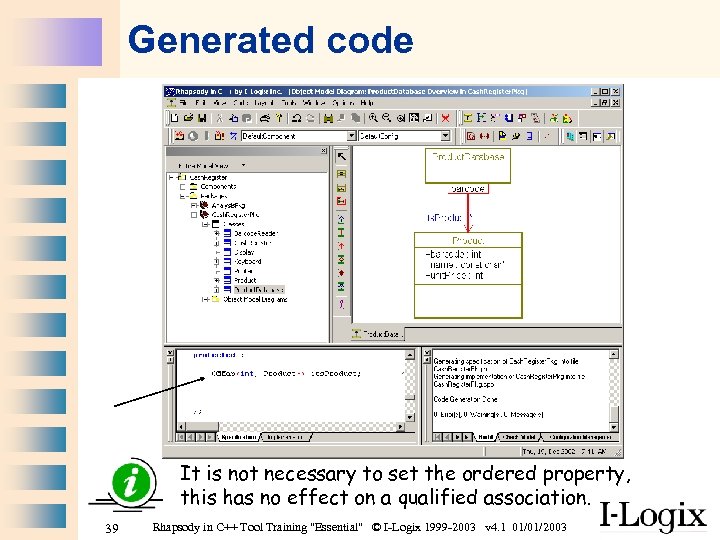 Generated code It is not necessary to set the ordered property, this has no effect on a qualified association. 39 Rhapsody in C++ Tool Training "Essential" © I-Logix 1999 -2003 v 4. 1 01/01/2003
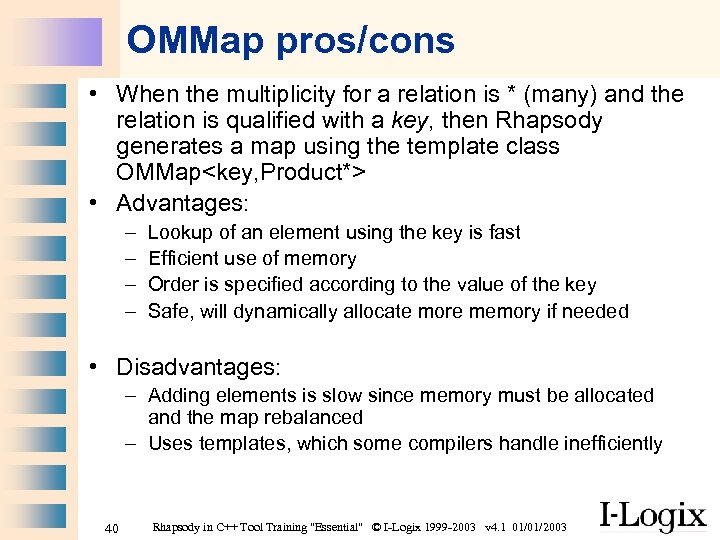 OMMap pros/cons • When the multiplicity for a relation is * (many) and the relation is qualified with a key, then Rhapsody generates a map using the template class OMMap
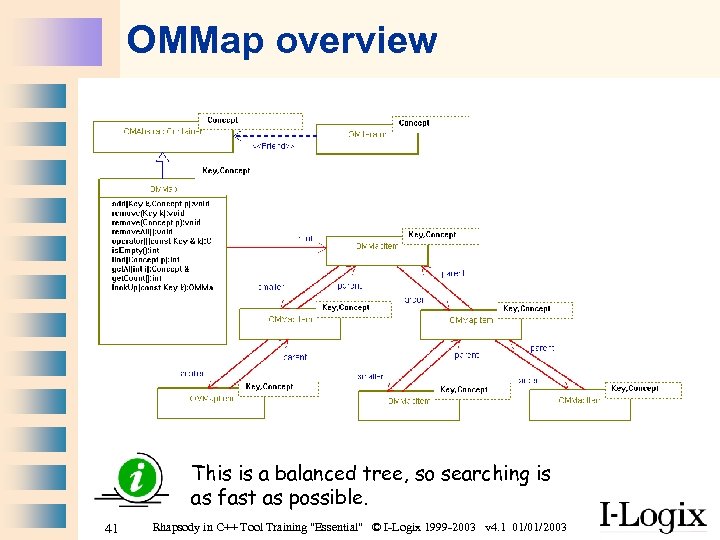 OMMap overview This is a balanced tree, so searching is as fast as possible. 41 Rhapsody in C++ Tool Training "Essential" © I-Logix 1999 -2003 v 4. 1 01/01/2003
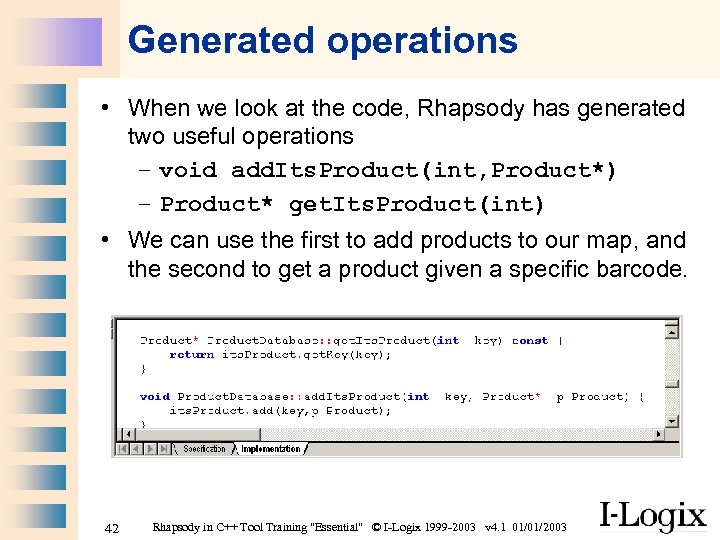 Generated operations • When we look at the code, Rhapsody has generated two useful operations – void add. Its. Product(int, Product*) – Product* get. Its. Product(int) • We can use the first to add products to our map, and the second to get a product given a specific barcode. 42 Rhapsody in C++ Tool Training "Essential" © I-Logix 1999 -2003 v 4. 1 01/01/2003
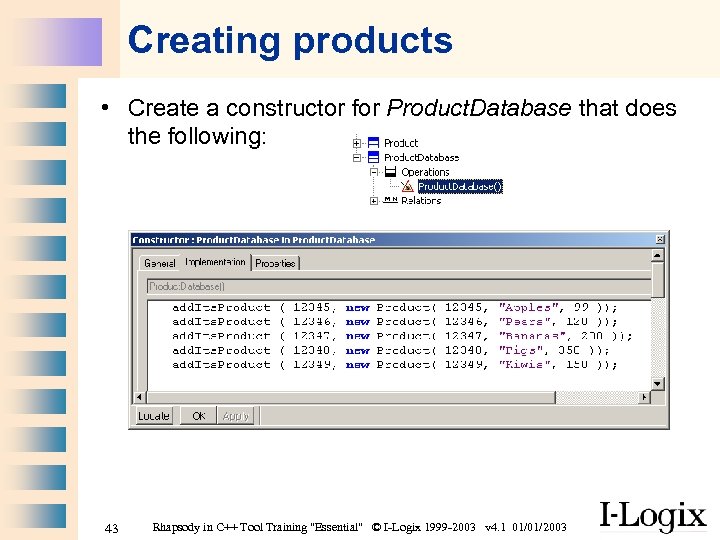 Creating products • Create a constructor for Product. Database that does the following: 43 Rhapsody in C++ Tool Training "Essential" © I-Logix 1999 -2003 v 4. 1 01/01/2003
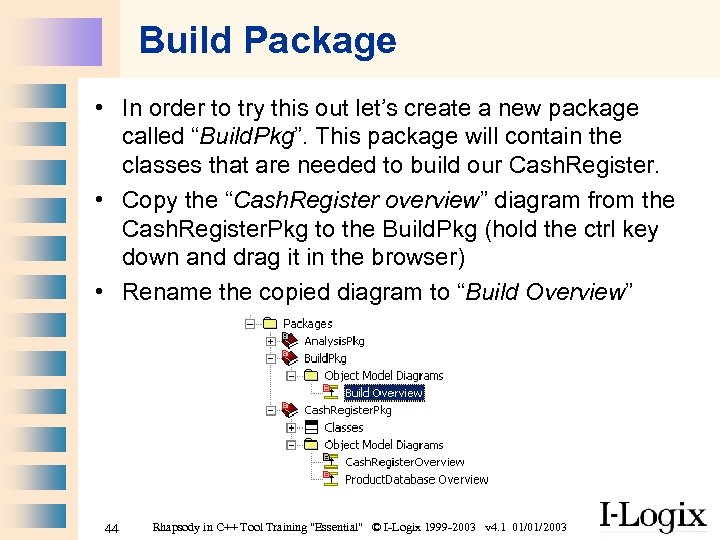 Build Package • In order to try this out let’s create a new package called “Build. Pkg”. This package will contain the classes that are needed to build our Cash. Register. • Copy the “Cash. Register overview” diagram from the Cash. Register. Pkg to the Build. Pkg (hold the ctrl key down and drag it in the browser) • Rename the copied diagram to “Build Overview” 44 Rhapsody in C++ Tool Training "Essential" © I-Logix 1999 -2003 v 4. 1 01/01/2003
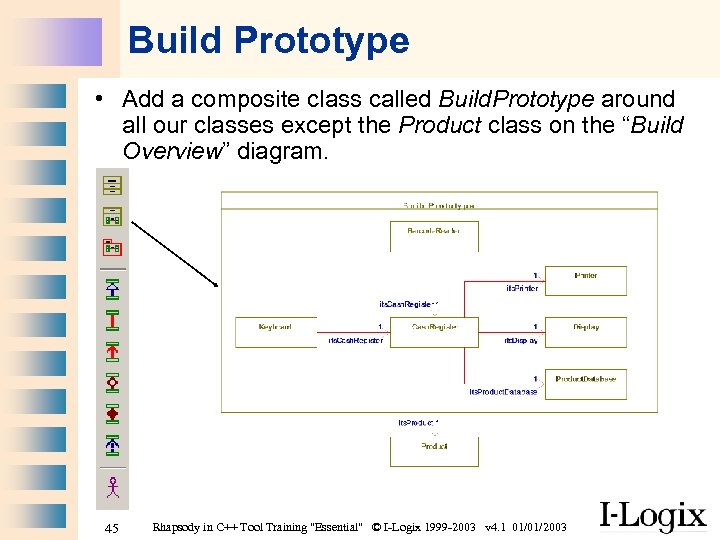 Build Prototype • Add a composite class called Build. Prototype around all our classes except the Product class on the “Build Overview” diagram. 45 Rhapsody in C++ Tool Training "Essential" © I-Logix 1999 -2003 v 4. 1 01/01/2003
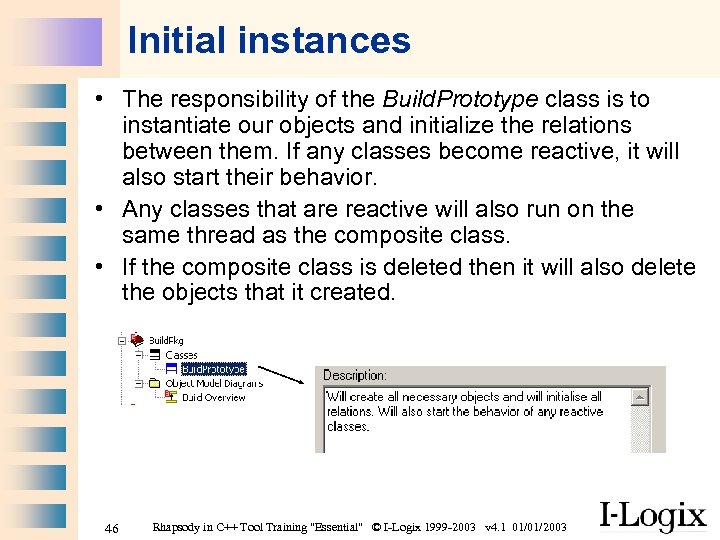 Initial instances • The responsibility of the Build. Prototype class is to instantiate our objects and initialize the relations between them. If any classes become reactive, it will also start their behavior. • Any classes that are reactive will also run on the same thread as the composite class. • If the composite class is deleted then it will also delete the objects that it created. 46 Rhapsody in C++ Tool Training "Essential" © I-Logix 1999 -2003 v 4. 1 01/01/2003
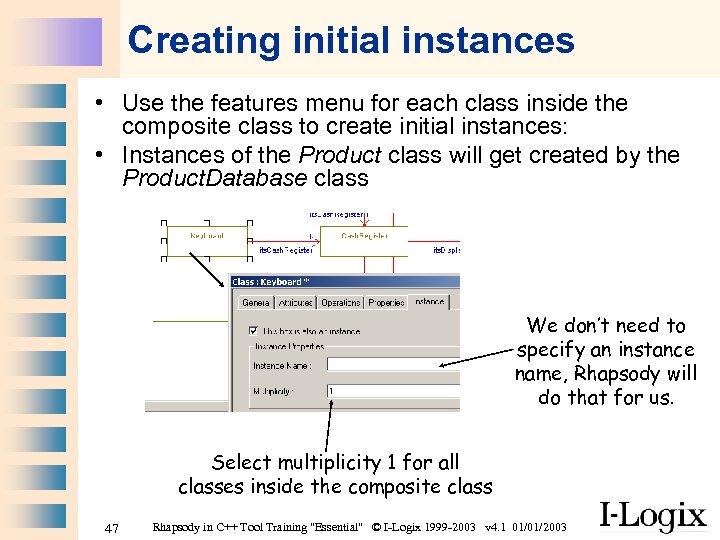 Creating initial instances • Use the features menu for each class inside the composite class to create initial instances: • Instances of the Product class will get created by the Product. Database class We don’t need to specify an instance name, Rhapsody will do that for us. Select multiplicity 1 for all classes inside the composite class 47 Rhapsody in C++ Tool Training "Essential" © I-Logix 1999 -2003 v 4. 1 01/01/2003
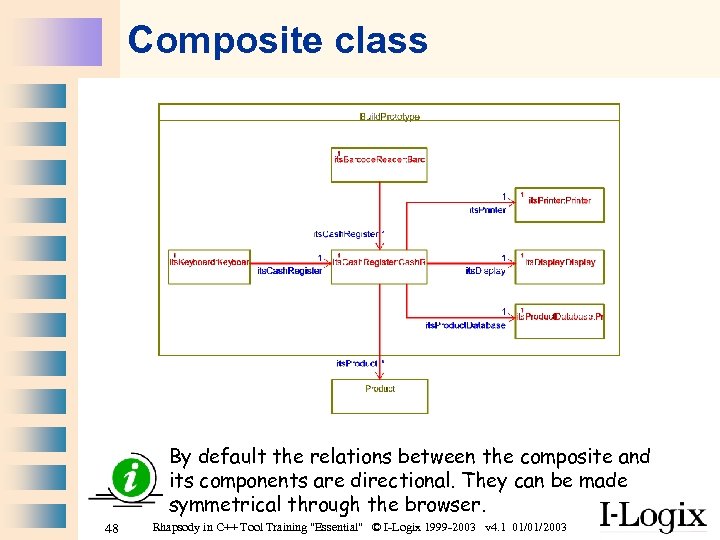 Composite class By default the relations between the composite and its components are directional. They can be made symmetrical through the browser. 48 Rhapsody in C++ Tool Training "Essential" © I-Logix 1999 -2003 v 4. 1 01/01/2003
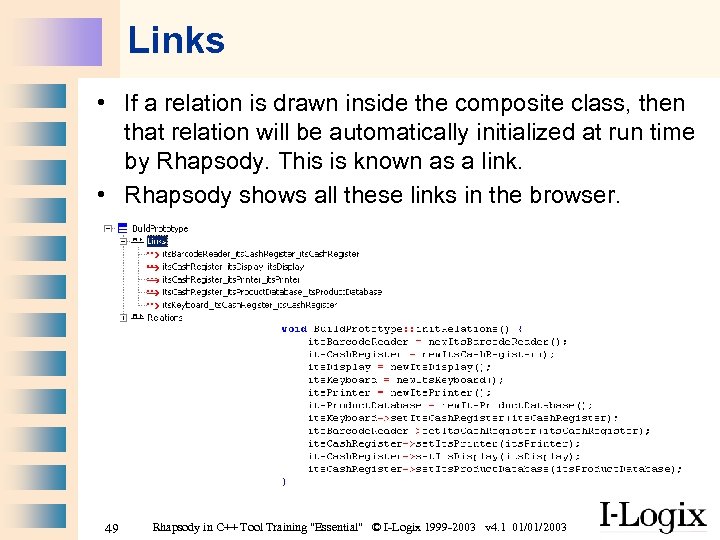 Links • If a relation is drawn inside the composite class, then that relation will be automatically initialized at run time by Rhapsody. This is known as a link. • Rhapsody shows all these links in the browser. 49 Rhapsody in C++ Tool Training "Essential" © I-Logix 1999 -2003 v 4. 1 01/01/2003
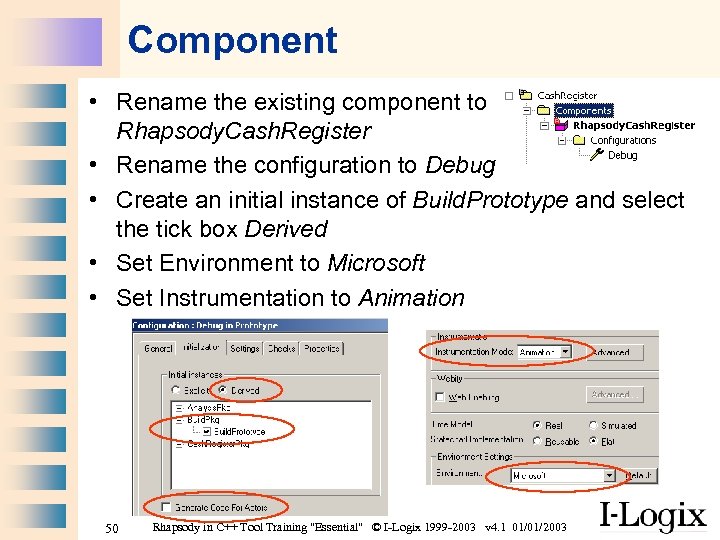 Component • Rename the existing component to Rhapsody. Cash. Register • Rename the configuration to Debug • Create an initial instance of Build. Prototype and select the tick box Derived • Set Environment to Microsoft • Set Instrumentation to Animation 50 Rhapsody in C++ Tool Training "Essential" © I-Logix 1999 -2003 v 4. 1 01/01/2003
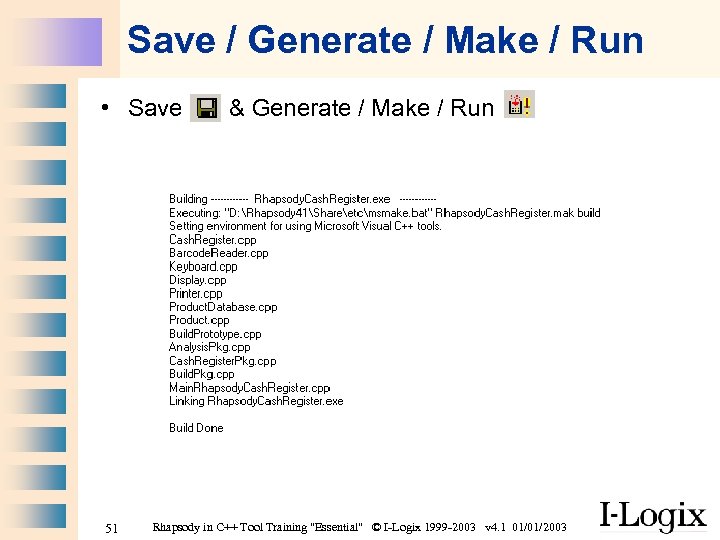 Save / Generate / Make / Run • Save 51 & Generate / Make / Run Rhapsody in C++ Tool Training "Essential" © I-Logix 1999 -2003 v 4. 1 01/01/2003
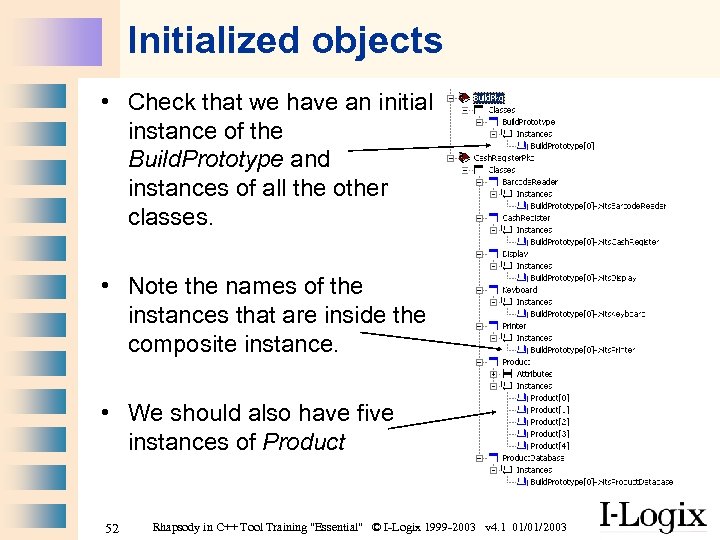 Initialized objects • Check that we have an initial instance of the Build. Prototype and instances of all the other classes. • Note the names of the instances that are inside the composite instance. • We should also have five instances of Product 52 Rhapsody in C++ Tool Training "Essential" © I-Logix 1999 -2003 v 4. 1 01/01/2003
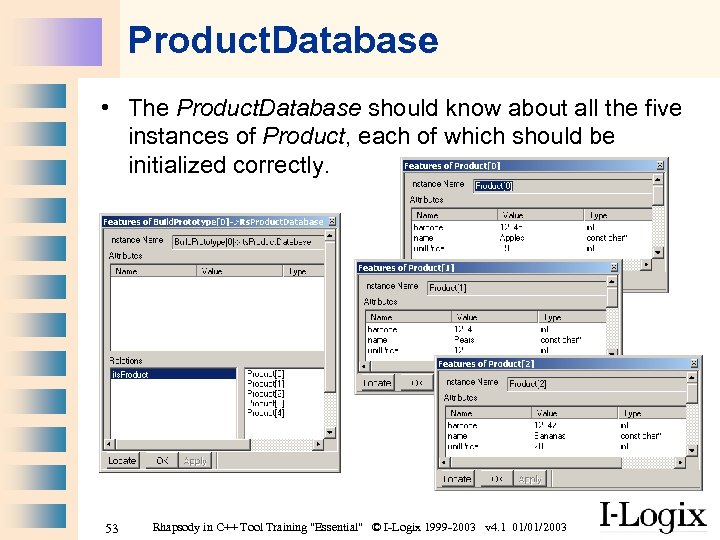 Product. Database • The Product. Database should know about all the five instances of Product, each of which should be initialized correctly. 53 Rhapsody in C++ Tool Training "Essential" © I-Logix 1999 -2003 v 4. 1 01/01/2003
 Part Two Use Case 2 “Keep count of selected products” 54 Rhapsody in C++ Tool Training "Essential" © I-Logix 1999 -2003 v 4. 1 01/01/2003
 Scenarios • • For this use case we can create some sequence diagrams which will help us understand how the Cash Register works: For example we’ll look at the following scenarios: 1. Selecting products 2. Cancelling products 3. Manually entering a barcode 55 Rhapsody in C++ Tool Training "Essential" © I-Logix 1999 -2003 v 4. 1 01/01/2003
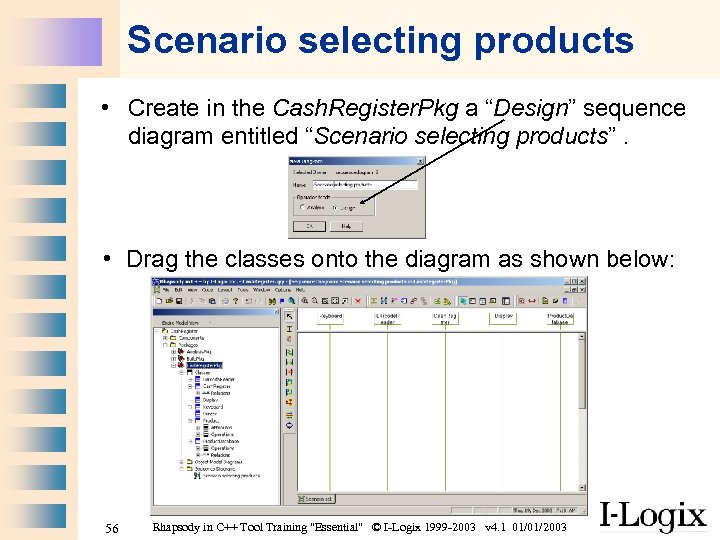 Scenario selecting products • Create in the Cash. Register. Pkg a “Design” sequence diagram entitled “Scenario selecting products”. • Drag the classes onto the diagram as shown below: 56 Rhapsody in C++ Tool Training "Essential" © I-Logix 1999 -2003 v 4. 1 01/01/2003
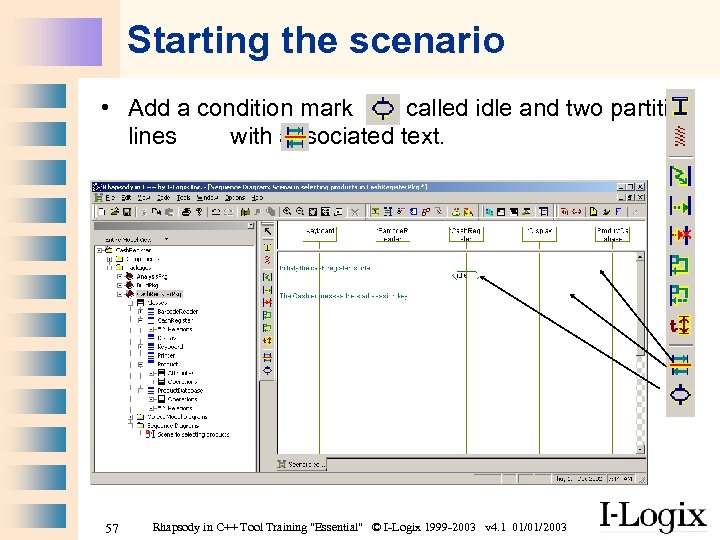 Starting the scenario • Add a condition mark called idle and two partition lines with associated text. 57 Rhapsody in C++ Tool Training "Essential" © I-Logix 1999 -2003 v 4. 1 01/01/2003
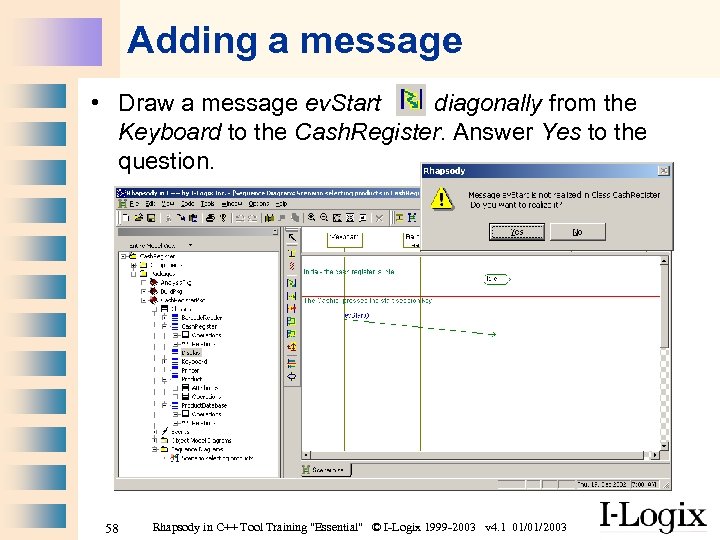 Adding a message • Draw a message ev. Start diagonally from the Keyboard to the Cash. Register. Answer Yes to the question. 58 Rhapsody in C++ Tool Training "Essential" © I-Logix 1999 -2003 v 4. 1 01/01/2003
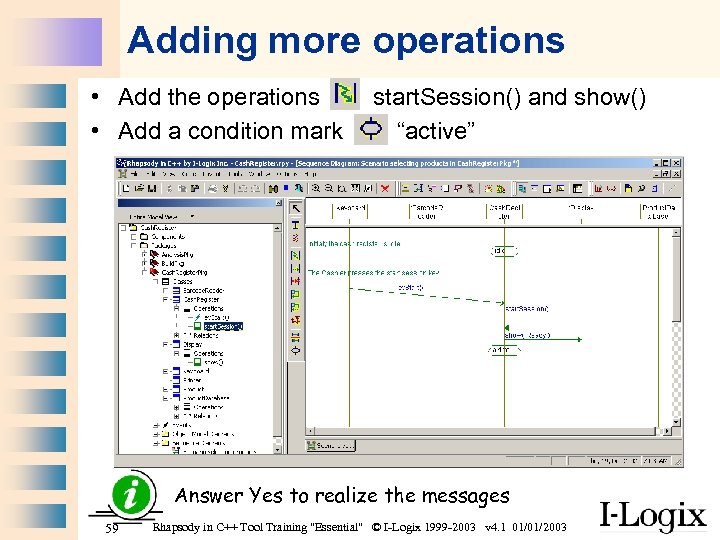 Adding more operations • Add the operations • Add a condition mark start. Session() and show() “active” Answer Yes to realize the messages 59 Rhapsody in C++ Tool Training "Essential" © I-Logix 1999 -2003 v 4. 1 01/01/2003
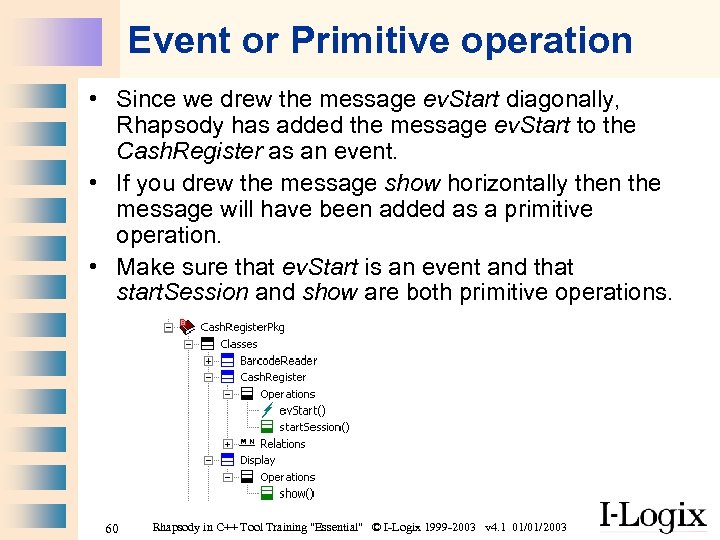 Event or Primitive operation • Since we drew the message ev. Start diagonally, Rhapsody has added the message ev. Start to the Cash. Register as an event. • If you drew the message show horizontally then the message will have been added as a primitive operation. • Make sure that ev. Start is an event and that start. Session and show are both primitive operations. 60 Rhapsody in C++ Tool Training "Essential" © I-Logix 1999 -2003 v 4. 1 01/01/2003
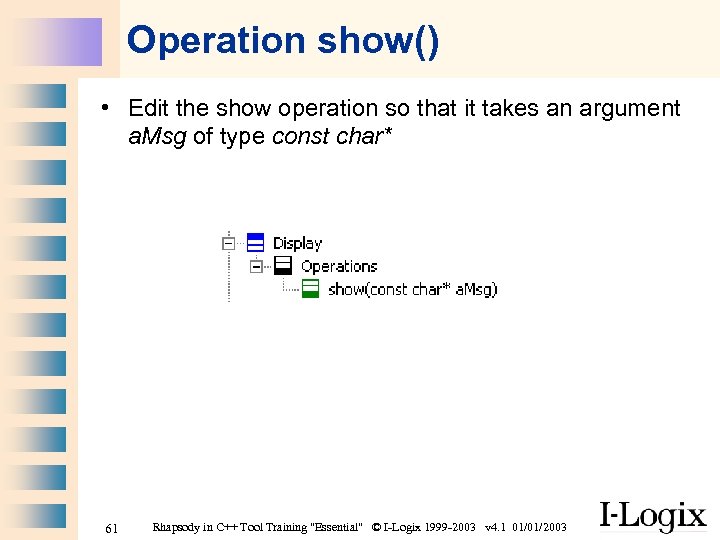 Operation show() • Edit the show operation so that it takes an argument a. Msg of type const char* 61 Rhapsody in C++ Tool Training "Essential" © I-Logix 1999 -2003 v 4. 1 01/01/2003
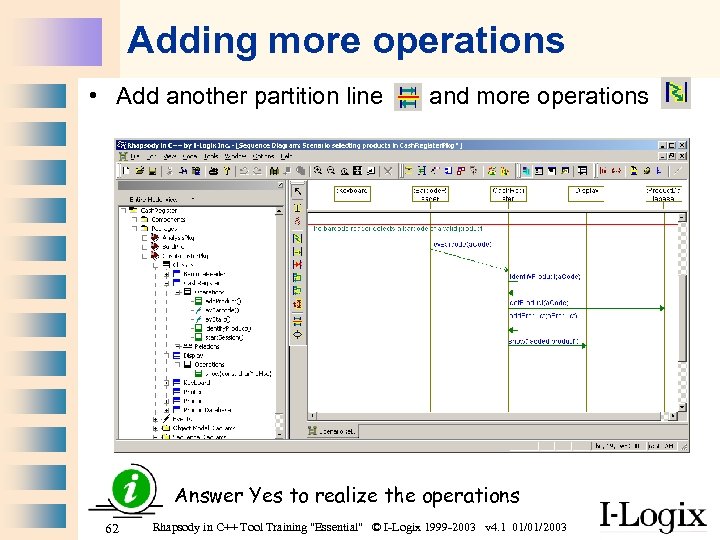 Adding more operations • Add another partition line and more operations Answer Yes to realize the operations 62 Rhapsody in C++ Tool Training "Essential" © I-Logix 1999 -2003 v 4. 1 01/01/2003
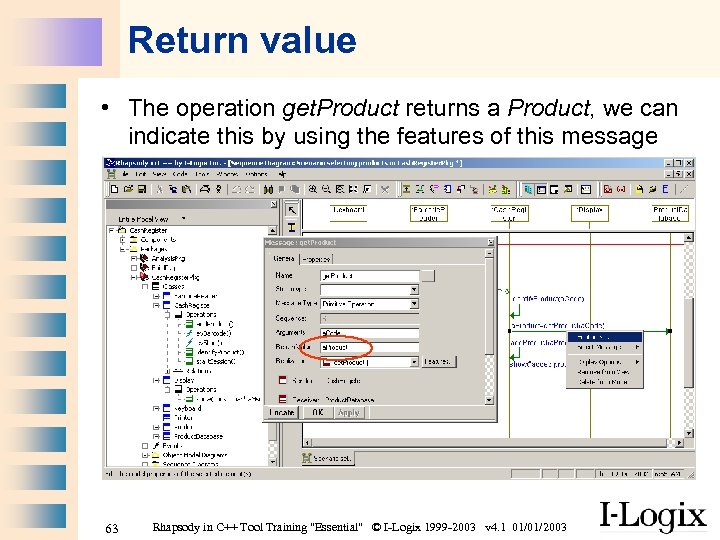 Return value • The operation get. Product returns a Product, we can indicate this by using the features of this message 63 Rhapsody in C++ Tool Training "Essential" © I-Logix 1999 -2003 v 4. 1 01/01/2003
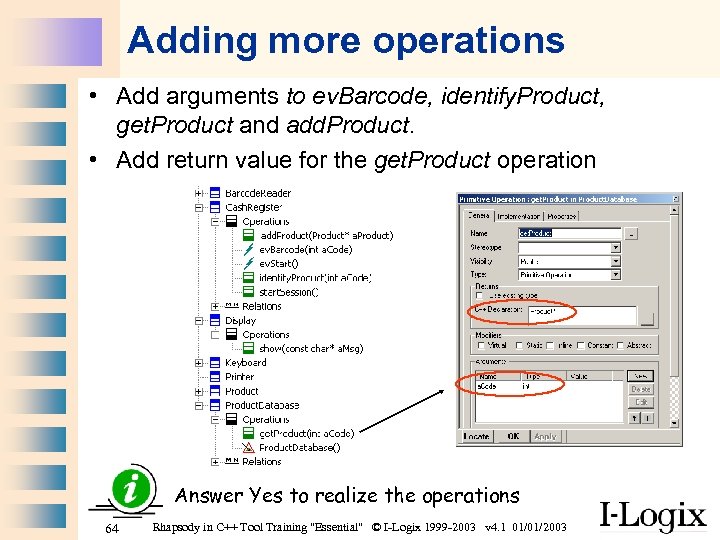 Adding more operations • Add arguments to ev. Barcode, identify. Product, get. Product and add. Product. • Add return value for the get. Product operation Answer Yes to realize the operations 64 Rhapsody in C++ Tool Training "Essential" © I-Logix 1999 -2003 v 4. 1 01/01/2003
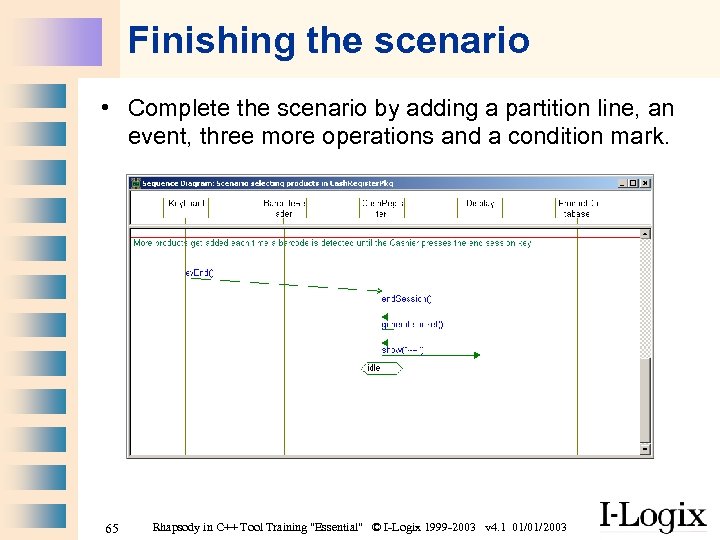 Finishing the scenario • Complete the scenario by adding a partition line, an event, three more operations and a condition mark. 65 Rhapsody in C++ Tool Training "Essential" © I-Logix 1999 -2003 v 4. 1 01/01/2003
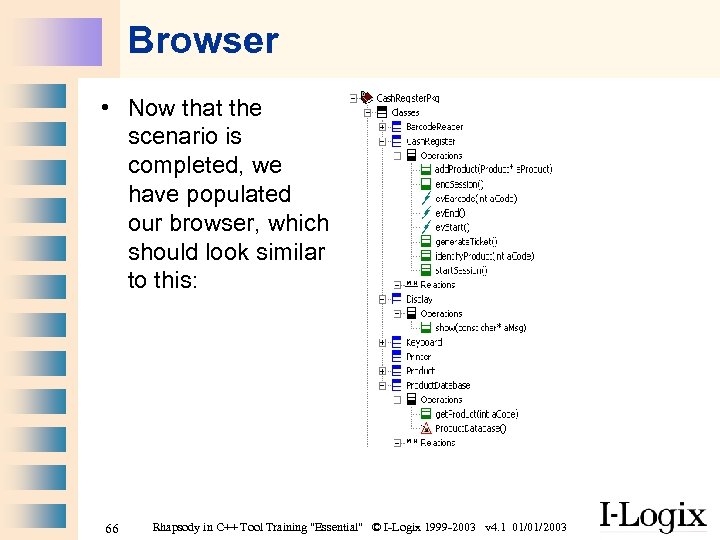 Browser • Now that the scenario is completed, we have populated our browser, which should look similar to this: 66 Rhapsody in C++ Tool Training "Essential" © I-Logix 1999 -2003 v 4. 1 01/01/2003
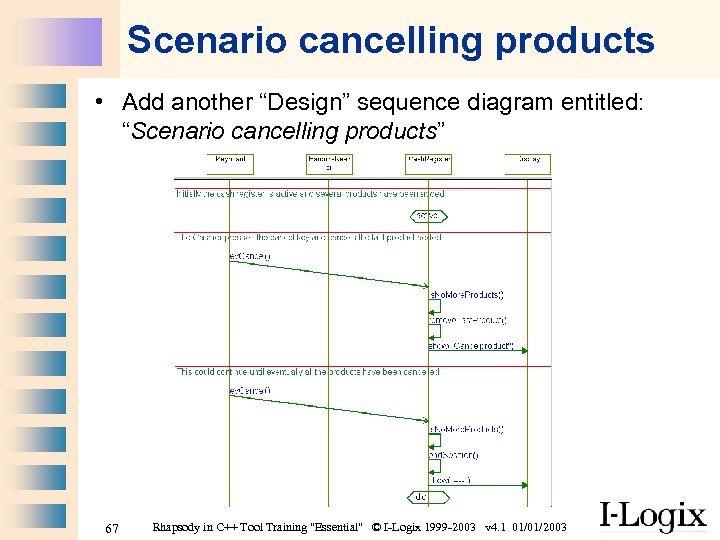 Scenario cancelling products • Add another “Design” sequence diagram entitled: “Scenario cancelling products” 67 Rhapsody in C++ Tool Training "Essential" © I-Logix 1999 -2003 v 4. 1 01/01/2003
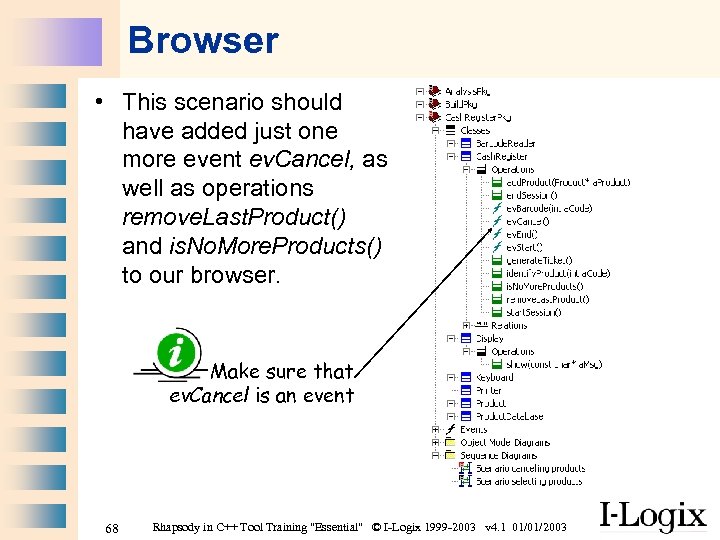 Browser • This scenario should have added just one more event ev. Cancel, as well as operations remove. Last. Product() and is. No. More. Products() to our browser. Make sure that ev. Cancel is an event 68 Rhapsody in C++ Tool Training "Essential" © I-Logix 1999 -2003 v 4. 1 01/01/2003
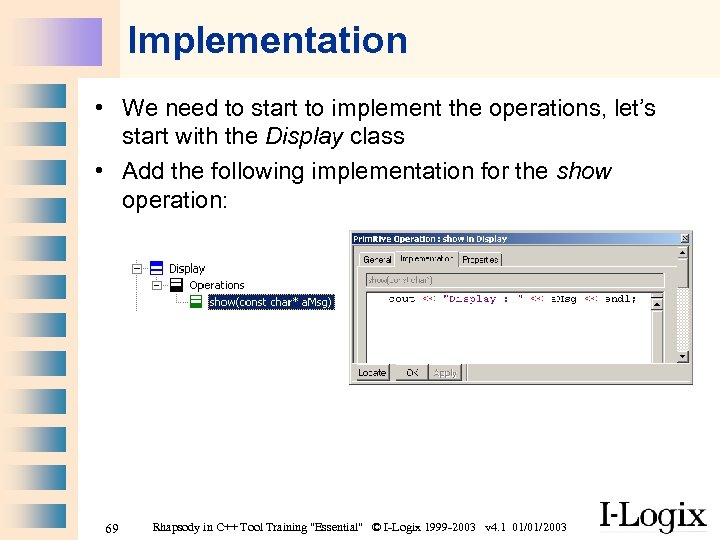 Implementation • We need to start to implement the operations, let’s start with the Display class • Add the following implementation for the show operation: 69 Rhapsody in C++ Tool Training "Essential" © I-Logix 1999 -2003 v 4. 1 01/01/2003
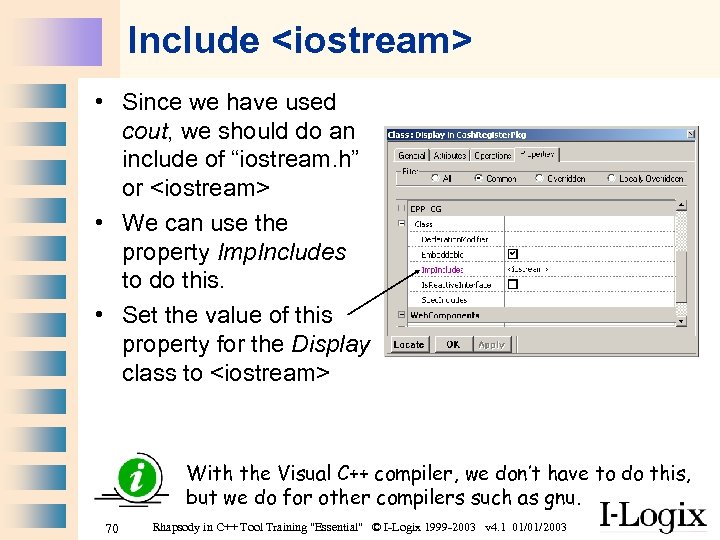 Include
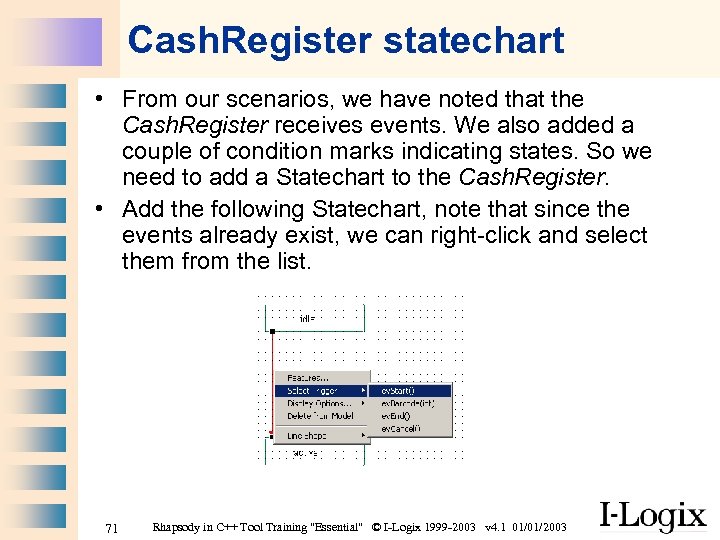 Cash. Register statechart • From our scenarios, we have noted that the Cash. Register receives events. We also added a couple of condition marks indicating states. So we need to add a Statechart to the Cash. Register. • Add the following Statechart, note that since the events already exist, we can right-click and select them from the list. 71 Rhapsody in C++ Tool Training "Essential" © I-Logix 1999 -2003 v 4. 1 01/01/2003
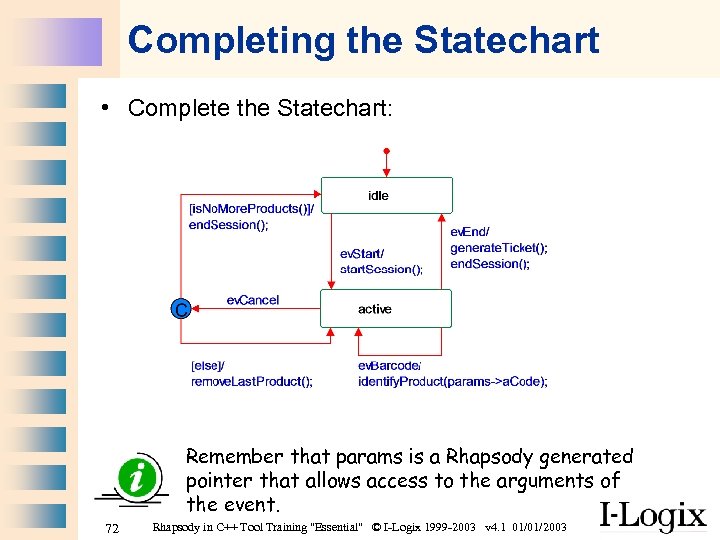 Completing the Statechart • Complete the Statechart: Remember that params is a Rhapsody generated pointer that allows access to the arguments of the event. 72 Rhapsody in C++ Tool Training "Essential" © I-Logix 1999 -2003 v 4. 1 01/01/2003
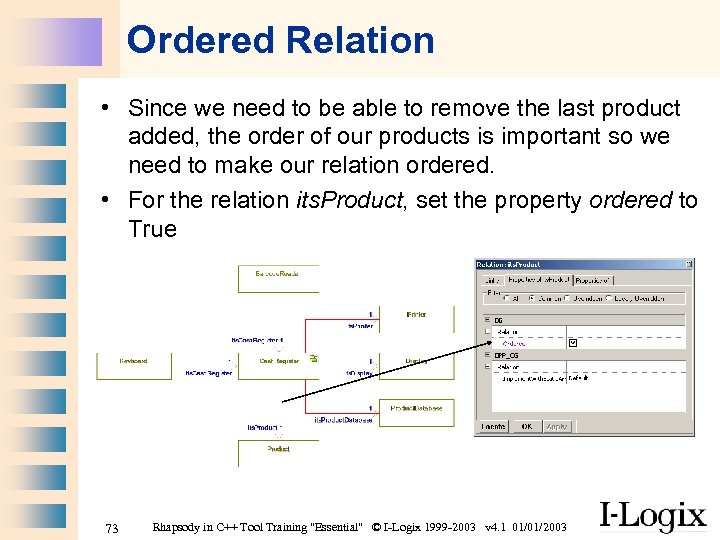 Ordered Relation • Since we need to be able to remove the last product added, the order of our products is important so we need to make our relation ordered. • For the relation its. Product, set the property ordered to True 73 Rhapsody in C++ Tool Training "Essential" © I-Logix 1999 -2003 v 4. 1 01/01/2003
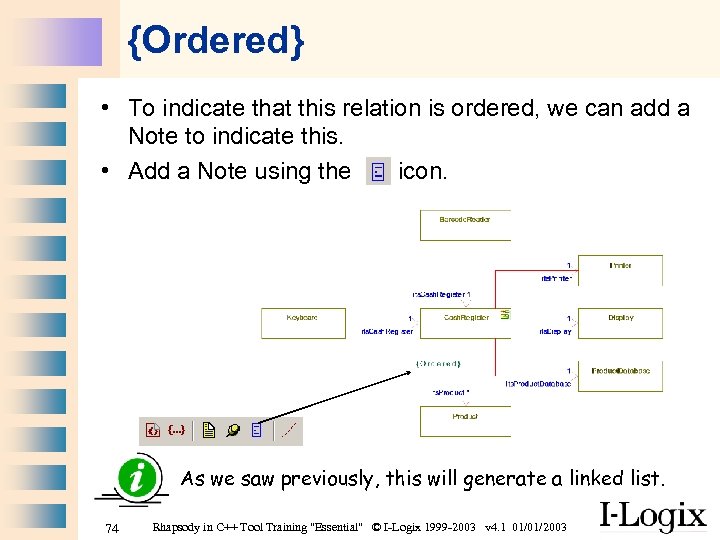 {Ordered} • To indicate that this relation is ordered, we can add a Note to indicate this. • Add a Note using the icon. As we saw previously, this will generate a linked list. 74 Rhapsody in C++ Tool Training "Essential" © I-Logix 1999 -2003 v 4. 1 01/01/2003
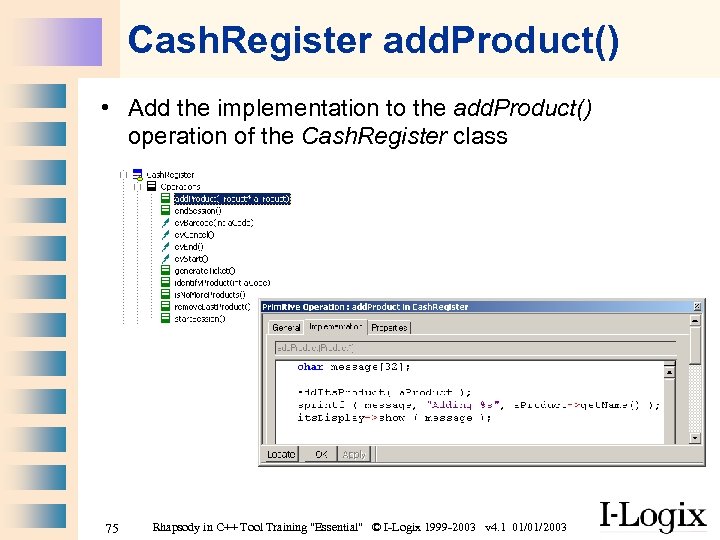 Cash. Register add. Product() • Add the implementation to the add. Product() operation of the Cash. Register class 75 Rhapsody in C++ Tool Training "Essential" © I-Logix 1999 -2003 v 4. 1 01/01/2003
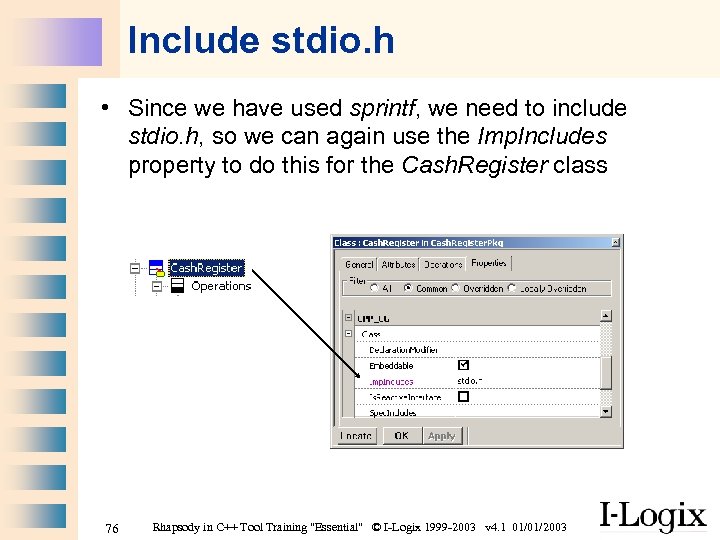 Include stdio. h • Since we have used sprintf, we need to include stdio. h, so we can again use the Imp. Includes property to do this for the Cash. Register class 76 Rhapsody in C++ Tool Training "Essential" © I-Logix 1999 -2003 v 4. 1 01/01/2003
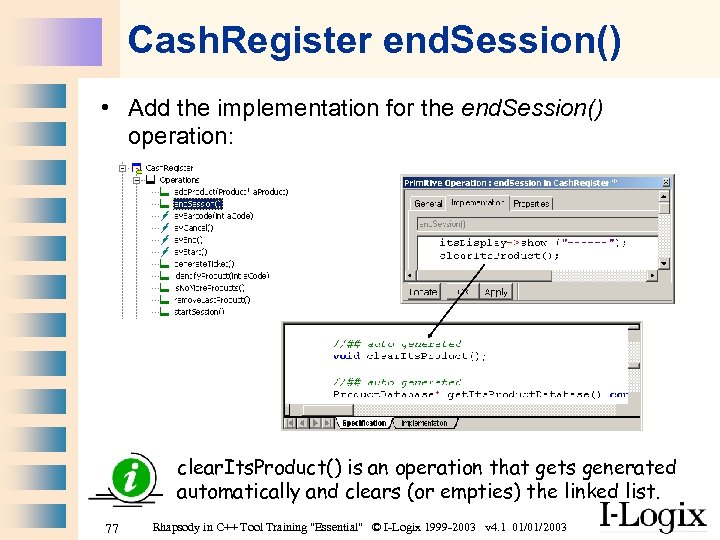 Cash. Register end. Session() • Add the implementation for the end. Session() operation: clear. Its. Product() is an operation that gets generated automatically and clears (or empties) the linked list. 77 Rhapsody in C++ Tool Training "Essential" © I-Logix 1999 -2003 v 4. 1 01/01/2003
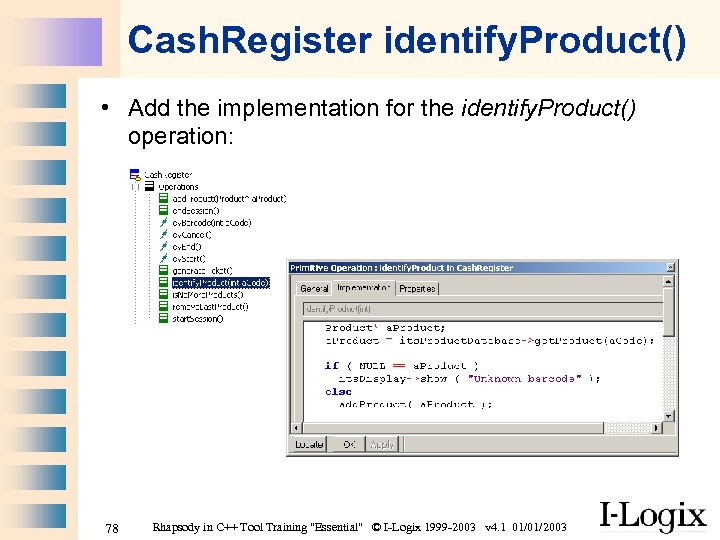 Cash. Register identify. Product() • Add the implementation for the identify. Product() operation: 78 Rhapsody in C++ Tool Training "Essential" © I-Logix 1999 -2003 v 4. 1 01/01/2003
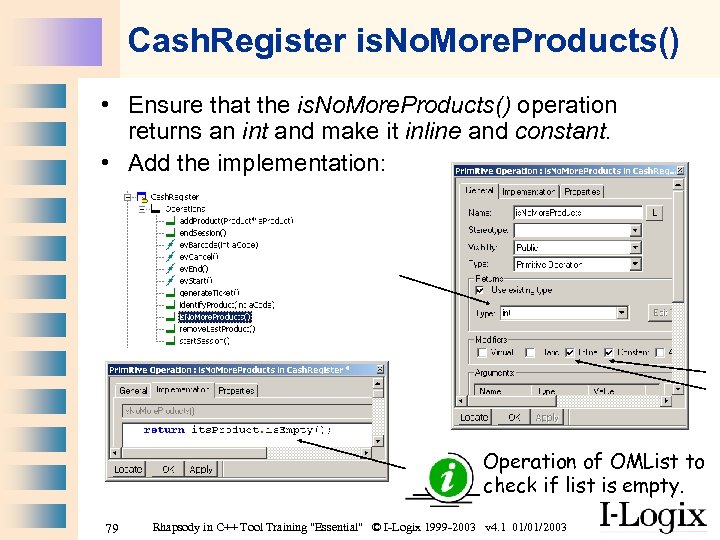 Cash. Register is. No. More. Products() • Ensure that the is. No. More. Products() operation returns an int and make it inline and constant. • Add the implementation: Operation of OMList to check if list is empty. 79 Rhapsody in C++ Tool Training "Essential" © I-Logix 1999 -2003 v 4. 1 01/01/2003
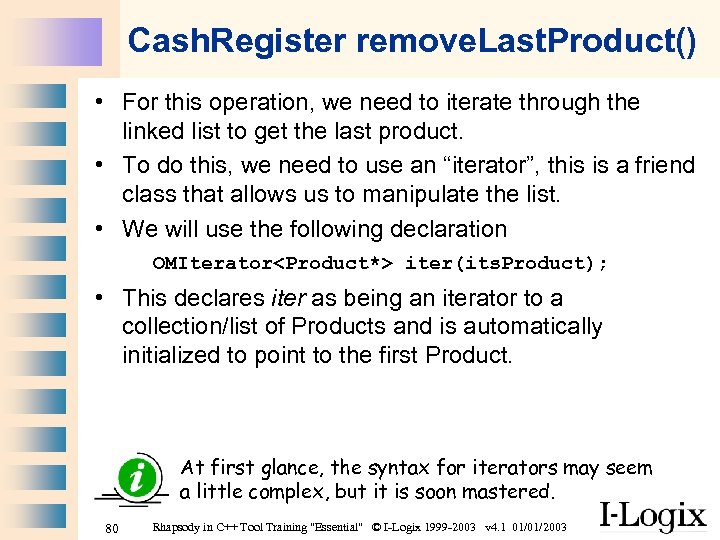 Cash. Register remove. Last. Product() • For this operation, we need to iterate through the linked list to get the last product. • To do this, we need to use an “iterator”, this is a friend class that allows us to manipulate the list. • We will use the following declaration OMIterator
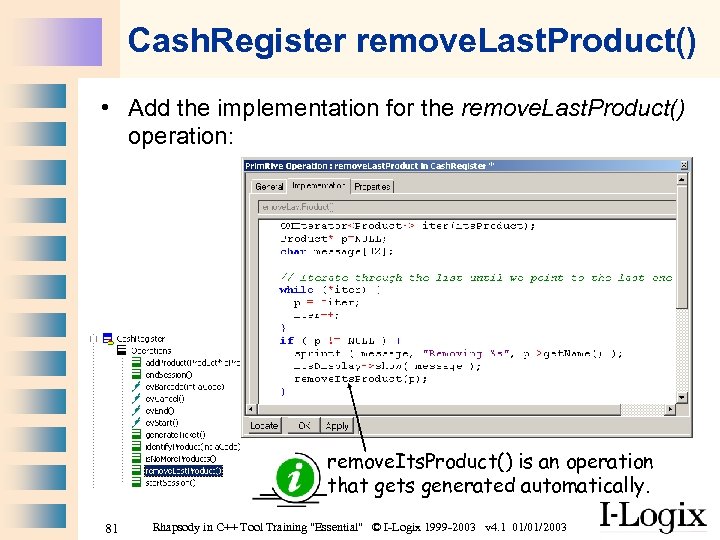 Cash. Register remove. Last. Product() • Add the implementation for the remove. Last. Product() operation: remove. Its. Product() is an operation that gets generated automatically. 81 Rhapsody in C++ Tool Training "Essential" © I-Logix 1999 -2003 v 4. 1 01/01/2003
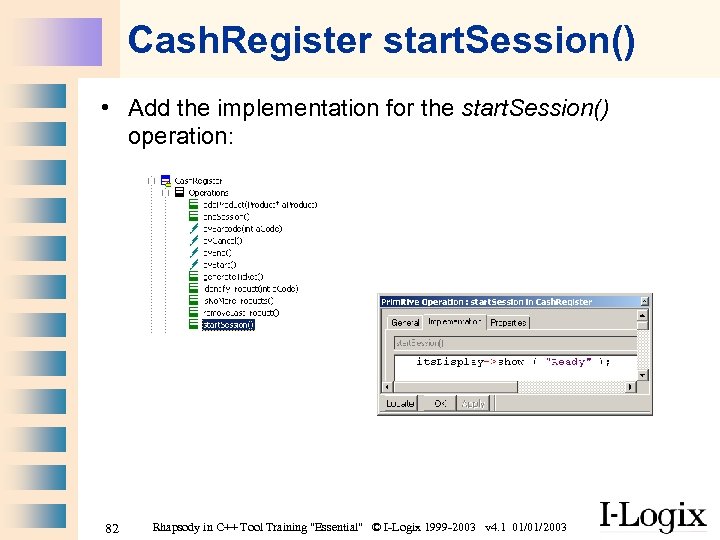 Cash. Register start. Session() • Add the implementation for the start. Session() operation: 82 Rhapsody in C++ Tool Training "Essential" © I-Logix 1999 -2003 v 4. 1 01/01/2003
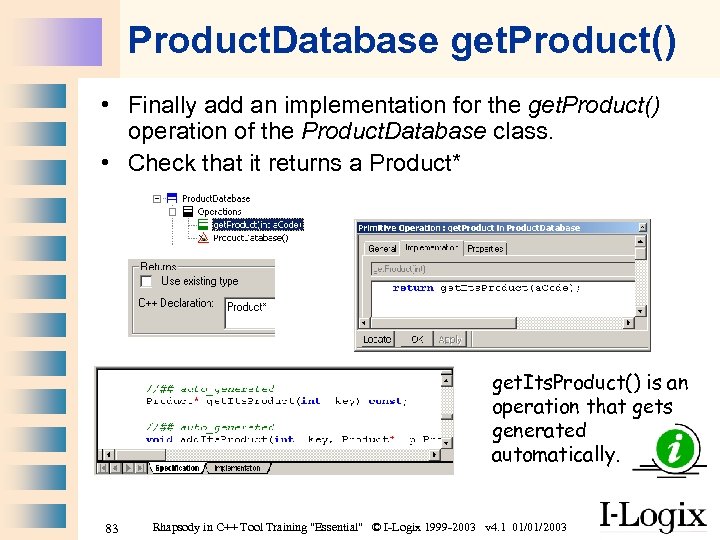 Product. Database get. Product() • Finally add an implementation for the get. Product() operation of the Product. Database class. • Check that it returns a Product* get. Its. Product() is an operation that gets generated automatically. 83 Rhapsody in C++ Tool Training "Essential" © I-Logix 1999 -2003 v 4. 1 01/01/2003
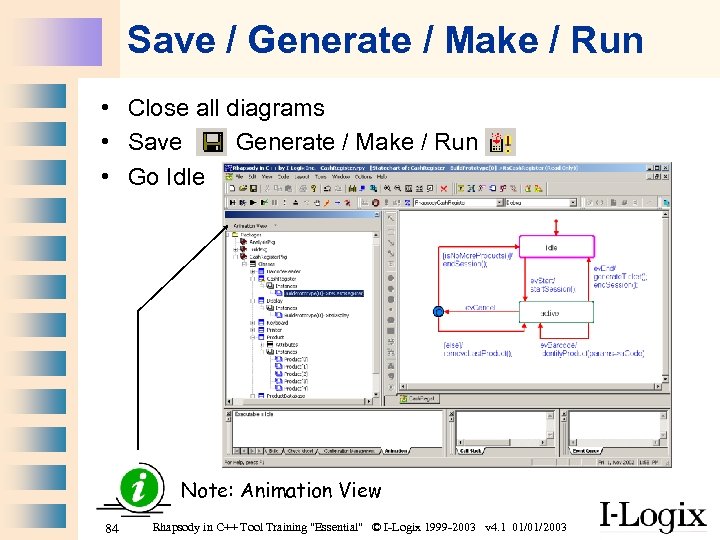 Save / Generate / Make / Run • Close all diagrams • Save Generate / Make / Run • Go Idle Note: Animation View 84 Rhapsody in C++ Tool Training "Essential" © I-Logix 1999 -2003 v 4. 1 01/01/2003
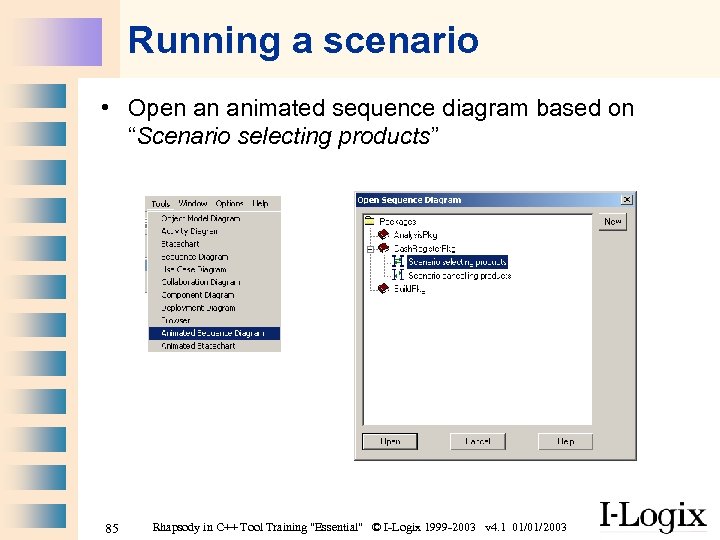 Running a scenario • Open an animated sequence diagram based on “Scenario selecting products” 85 Rhapsody in C++ Tool Training "Essential" © I-Logix 1999 -2003 v 4. 1 01/01/2003
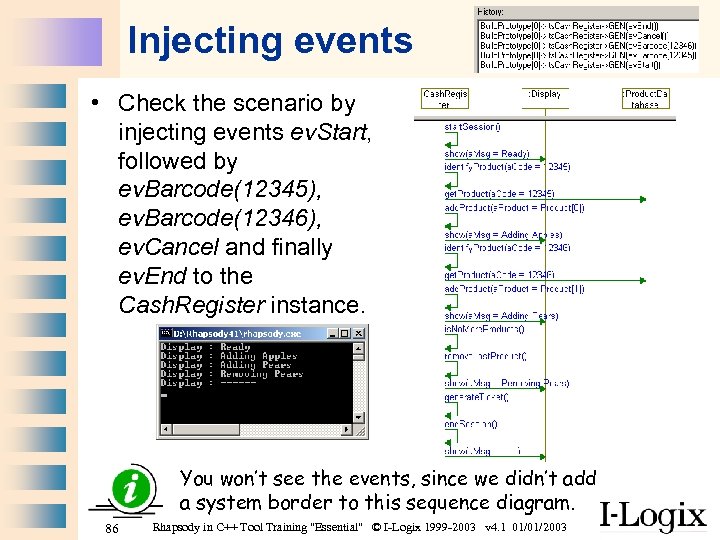 Injecting events • Check the scenario by injecting events ev. Start, followed by ev. Barcode(12345), ev. Barcode(12346), ev. Cancel and finally ev. End to the Cash. Register instance. You won’t see the events, since we didn’t add a system border to this sequence diagram. 86 Rhapsody in C++ Tool Training "Essential" © I-Logix 1999 -2003 v 4. 1 01/01/2003
 Automating the tests • We can check that our model is correct by manually injecting events and observing the animated diagrams. • Ideally we’d like to automate these tests, this can be done ideally by using the Test Conductor (an add-on product to Rhapsody) • Another way to automate these tests is to use an actor to drive our model. • We will use our actor “Cashier” to execute several scenarios. 87 Rhapsody in C++ Tool Training "Essential" © I-Logix 1999 -2003 v 4. 1 01/01/2003
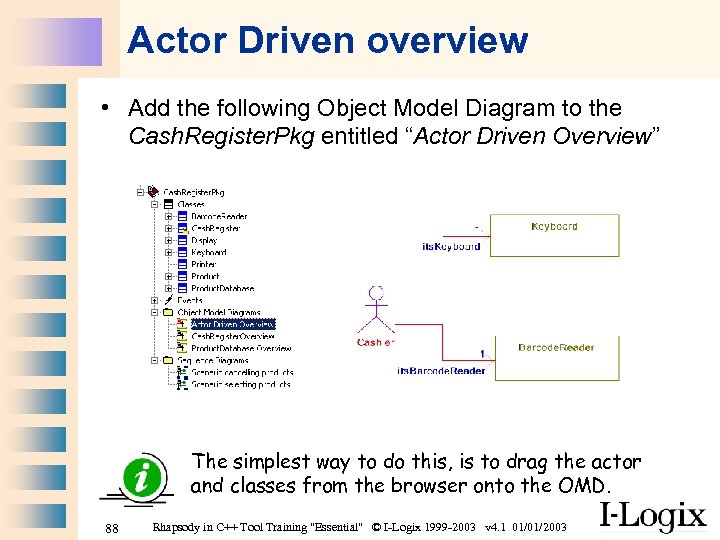 Actor Driven overview • Add the following Object Model Diagram to the Cash. Register. Pkg entitled “Actor Driven Overview” The simplest way to do this, is to drag the actor and classes from the browser onto the OMD. 88 Rhapsody in C++ Tool Training "Essential" © I-Logix 1999 -2003 v 4. 1 01/01/2003
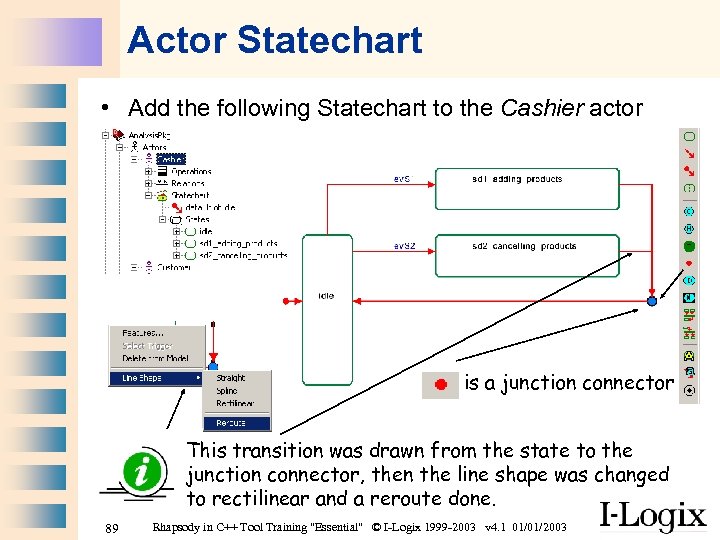 Actor Statechart • Add the following Statechart to the Cashier actor is a junction connector This transition was drawn from the state to the junction connector, then the line shape was changed to rectilinear and a reroute done. 89 Rhapsody in C++ Tool Training "Essential" © I-Logix 1999 -2003 v 4. 1 01/01/2003
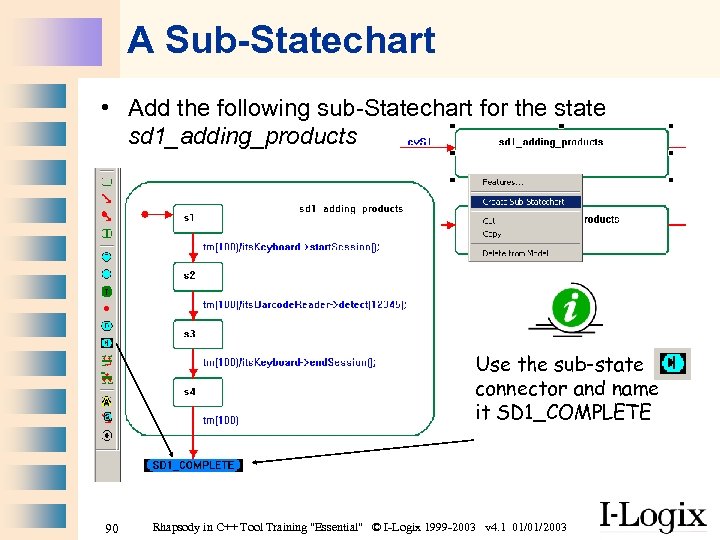 A Sub-Statechart • Add the following sub-Statechart for the state sd 1_adding_products Use the sub-state connector and name it SD 1_COMPLETE 90 Rhapsody in C++ Tool Training "Essential" © I-Logix 1999 -2003 v 4. 1 01/01/2003
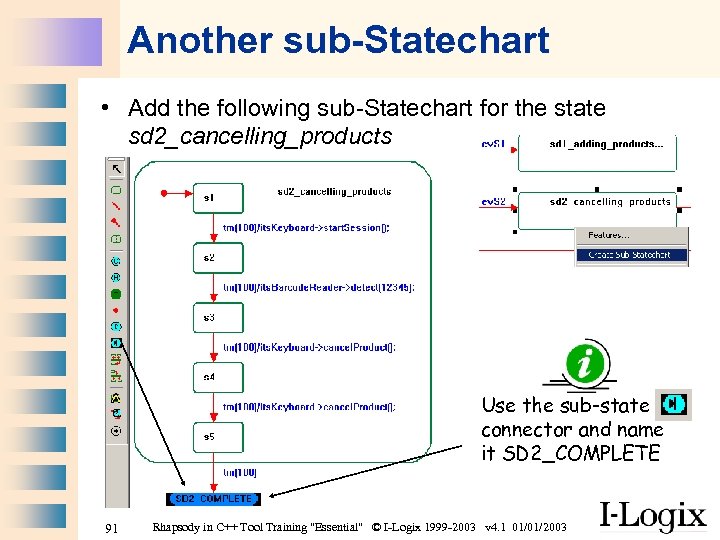 Another sub-Statechart • Add the following sub-Statechart for the state sd 2_cancelling_products Use the sub-state connector and name it SD 2_COMPLETE 91 Rhapsody in C++ Tool Training "Essential" © I-Logix 1999 -2003 v 4. 1 01/01/2003
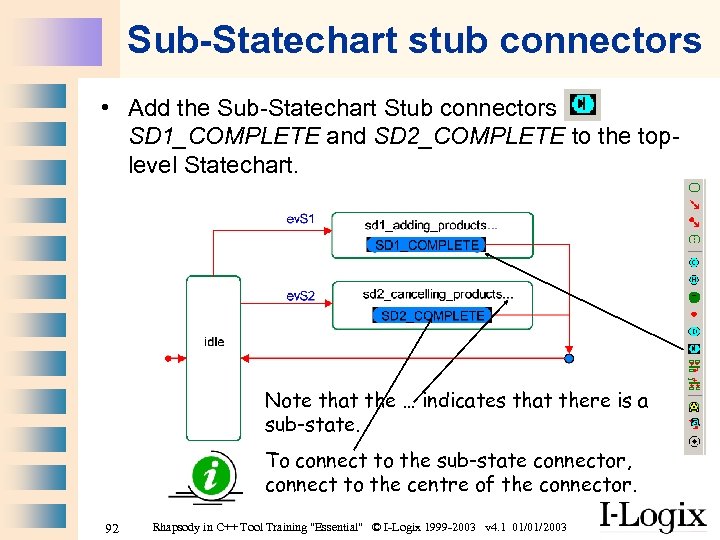 Sub-Statechart stub connectors • Add the Sub-Statechart Stub connectors SD 1_COMPLETE and SD 2_COMPLETE to the toplevel Statechart. Note that the … indicates that there is a sub-state. To connect to the sub-state connector, connect to the centre of the connector. 92 Rhapsody in C++ Tool Training "Essential" © I-Logix 1999 -2003 v 4. 1 01/01/2003
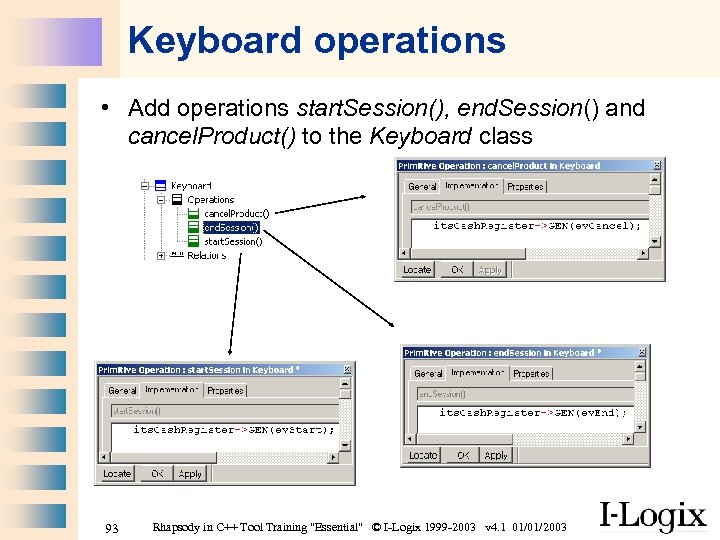 Keyboard operations • Add operations start. Session(), end. Session() and cancel. Product() to the Keyboard class 93 Rhapsody in C++ Tool Training "Essential" © I-Logix 1999 -2003 v 4. 1 01/01/2003
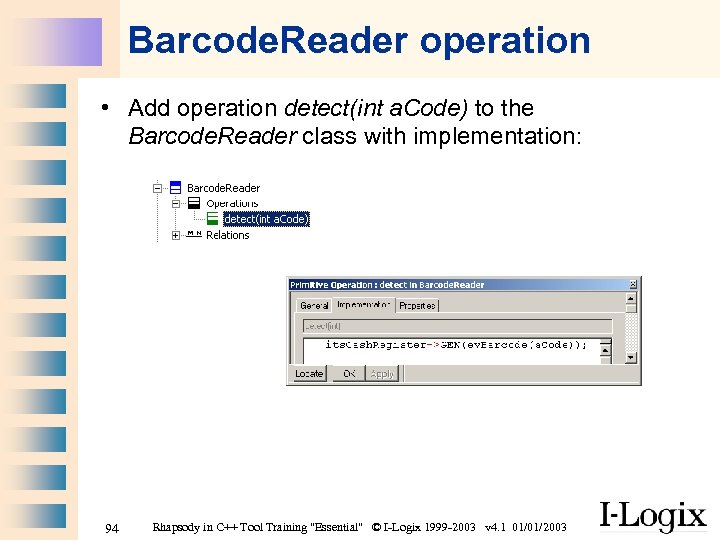 Barcode. Reader operation • Add operation detect(int a. Code) to the Barcode. Reader class with implementation: 94 Rhapsody in C++ Tool Training "Essential" © I-Logix 1999 -2003 v 4. 1 01/01/2003
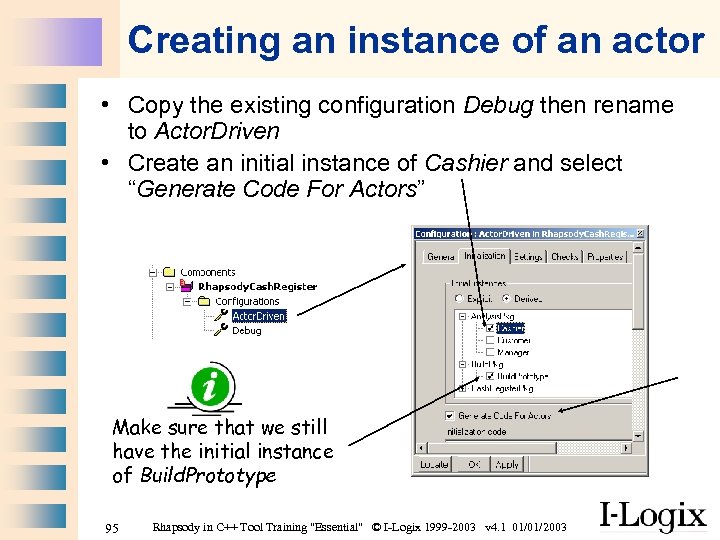 Creating an instance of an actor • Copy the existing configuration Debug then rename to Actor. Driven • Create an initial instance of Cashier and select “Generate Code For Actors” Make sure that we still have the initial instance of Build. Prototype 95 Rhapsody in C++ Tool Training "Essential" © I-Logix 1999 -2003 v 4. 1 01/01/2003
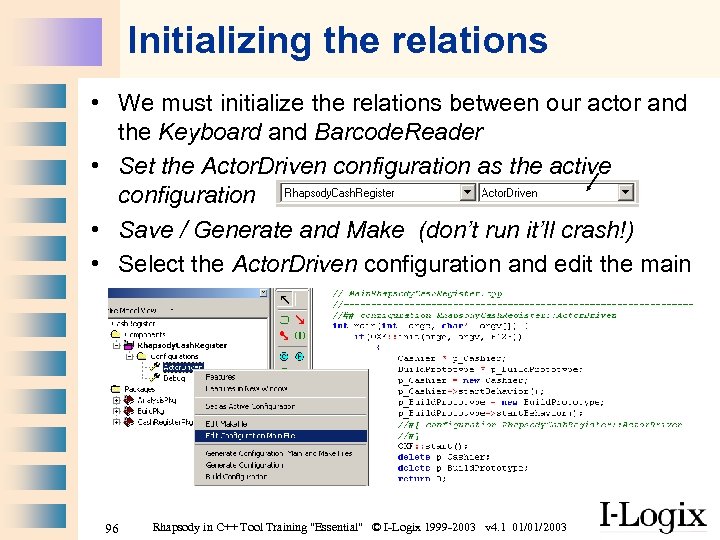 Initializing the relations • We must initialize the relations between our actor and the Keyboard and Barcode. Reader • Set the Actor. Driven configuration as the active configuration • Save / Generate and Make (don’t run it’ll crash!) • Select the Actor. Driven configuration and edit the main 96 Rhapsody in C++ Tool Training "Essential" © I-Logix 1999 -2003 v 4. 1 01/01/2003
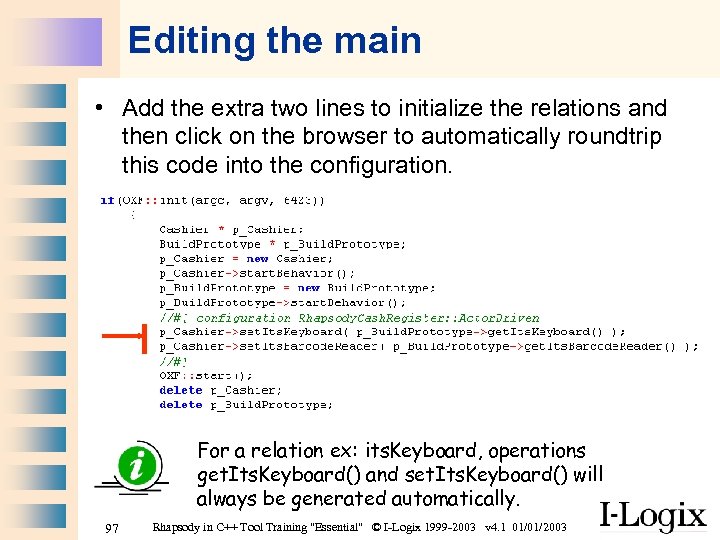 Editing the main • Add the extra two lines to initialize the relations and then click on the browser to automatically roundtrip this code into the configuration. For a relation ex: its. Keyboard, operations get. Its. Keyboard() and set. Its. Keyboard() will always be generated automatically. 97 Rhapsody in C++ Tool Training "Essential" © I-Logix 1999 -2003 v 4. 1 01/01/2003
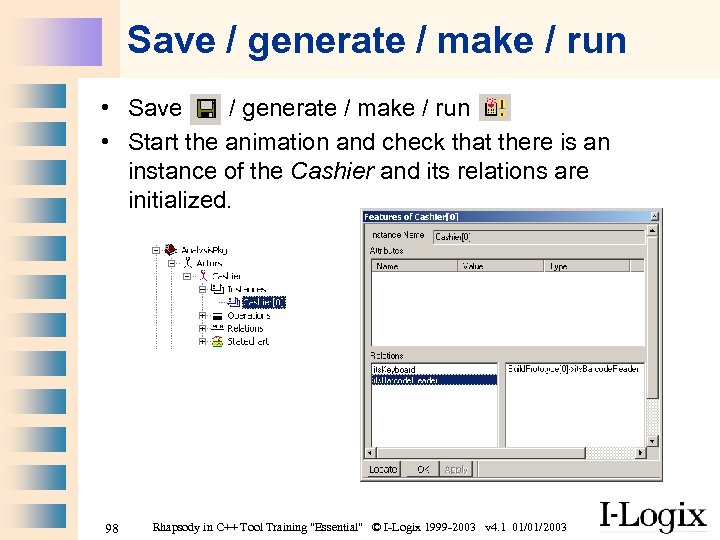 Save / generate / make / run • Start the animation and check that there is an instance of the Cashier and its relations are initialized. 98 Rhapsody in C++ Tool Training "Essential" © I-Logix 1999 -2003 v 4. 1 01/01/2003
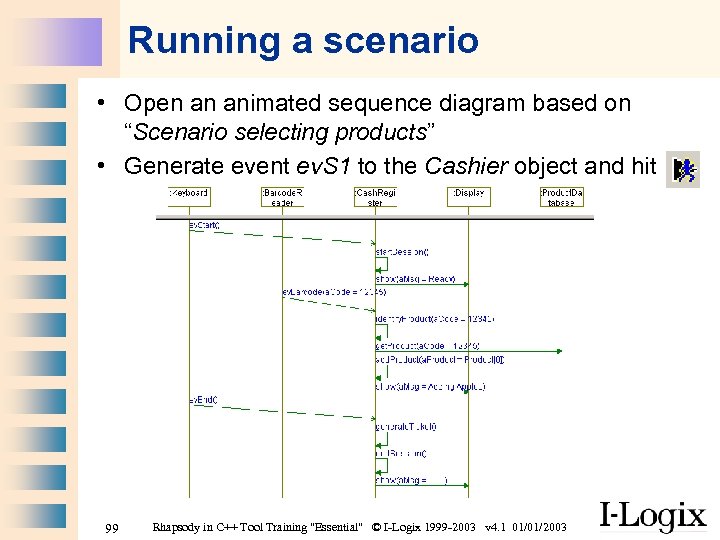 Running a scenario • Open an animated sequence diagram based on “Scenario selecting products” • Generate event ev. S 1 to the Cashier object and hit 99 Rhapsody in C++ Tool Training "Essential" © I-Logix 1999 -2003 v 4. 1 01/01/2003
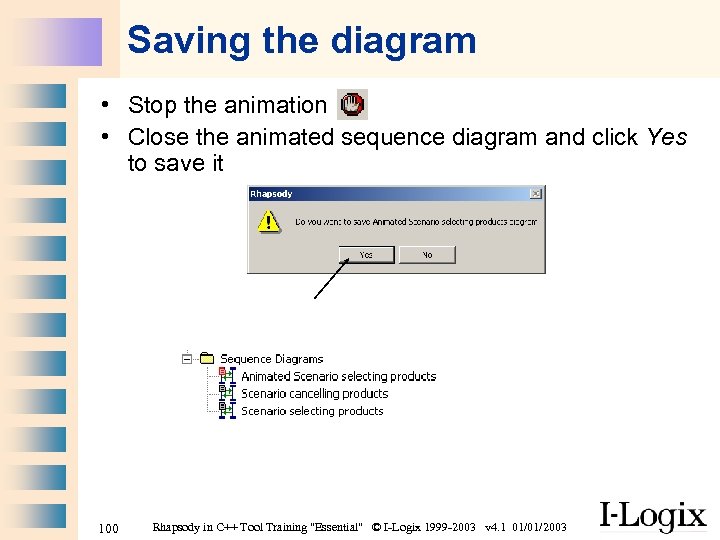 Saving the diagram • Stop the animation • Close the animated sequence diagram and click Yes to save it 100 Rhapsody in C++ Tool Training "Essential" © I-Logix 1999 -2003 v 4. 1 01/01/2003
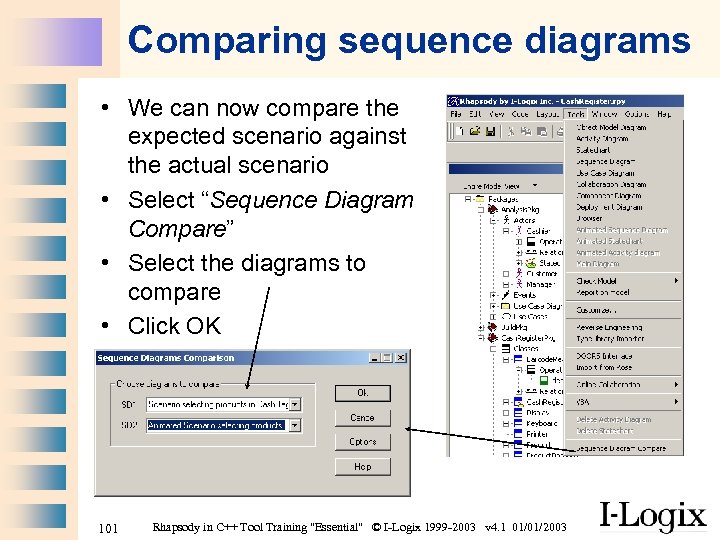 Comparing sequence diagrams • We can now compare the expected scenario against the actual scenario • Select “Sequence Diagram Compare” • Select the diagrams to compare • Click OK 101 Rhapsody in C++ Tool Training "Essential" © I-Logix 1999 -2003 v 4. 1 01/01/2003
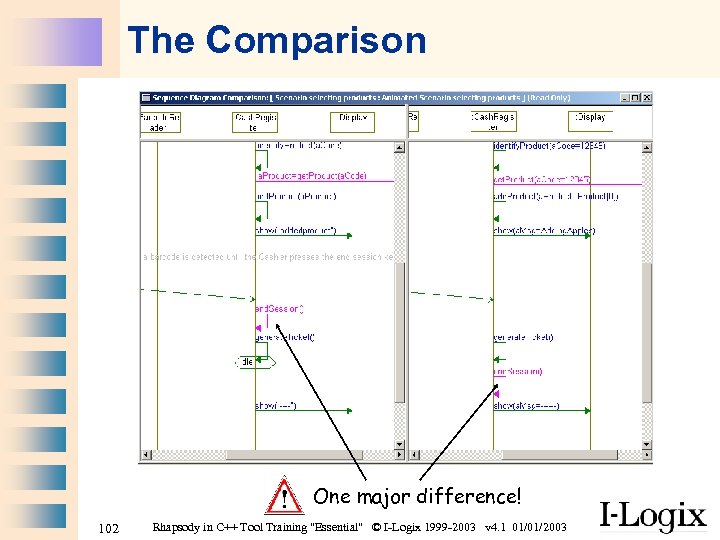 The Comparison One major difference! 102 Rhapsody in C++ Tool Training "Essential" © I-Logix 1999 -2003 v 4. 1 01/01/2003
 Correcting the problem • Which diagram is wrong? • Correct the error and try another comparison • Check out the other Actor driven scenario • Does our model conform to both scenarios? 103 Rhapsody in C++ Tool Training "Essential" © I-Logix 1999 -2003 v 4. 1 01/01/2003
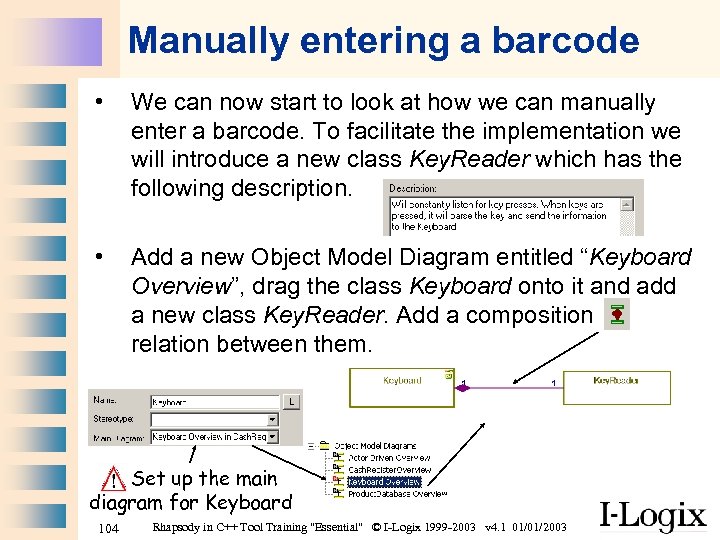 Manually entering a barcode • We can now start to look at how we can manually enter a barcode. To facilitate the implementation we will introduce a new class Key. Reader which has the following description. • Add a new Object Model Diagram entitled “Keyboard Overview”, drag the class Keyboard onto it and add a new class Key. Reader. Add a composition relation between them. Set up the main diagram for Keyboard 104 Rhapsody in C++ Tool Training "Essential" © I-Logix 1999 -2003 v 4. 1 01/01/2003
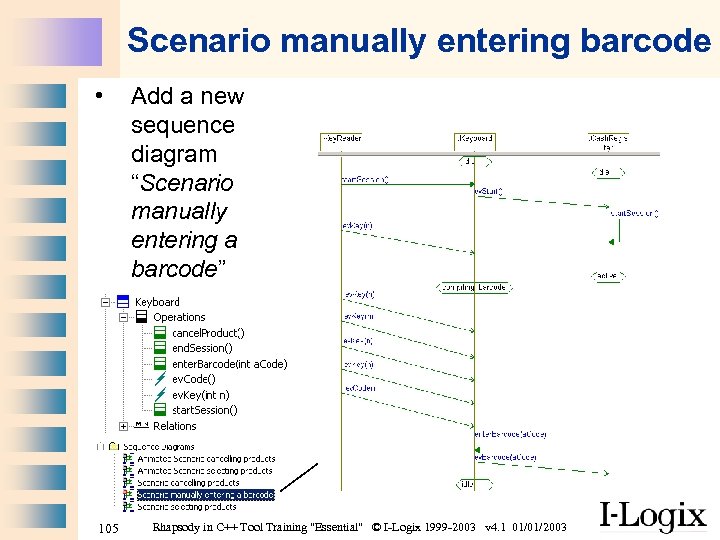 Scenario manually entering barcode • 105 Add a new sequence diagram “Scenario manually entering a barcode” Rhapsody in C++ Tool Training "Essential" © I-Logix 1999 -2003 v 4. 1 01/01/2003
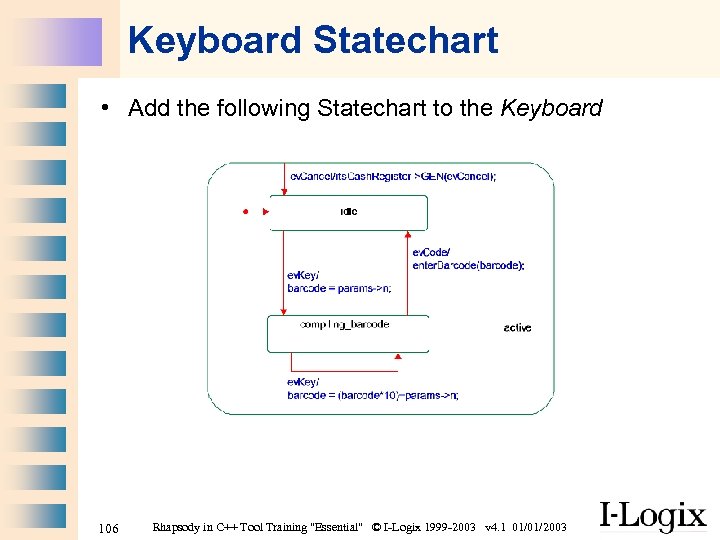 Keyboard Statechart • Add the following Statechart to the Keyboard 106 Rhapsody in C++ Tool Training "Essential" © I-Logix 1999 -2003 v 4. 1 01/01/2003
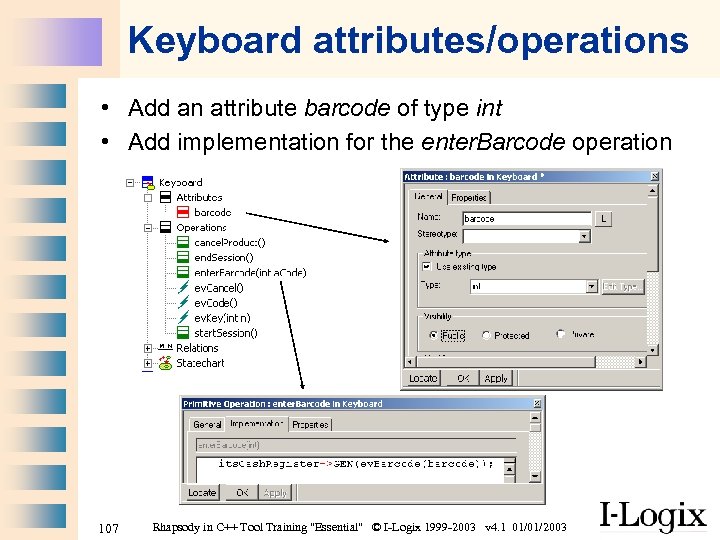 Keyboard attributes/operations • Add an attribute barcode of type int • Add implementation for the enter. Barcode operation 107 Rhapsody in C++ Tool Training "Essential" © I-Logix 1999 -2003 v 4. 1 01/01/2003
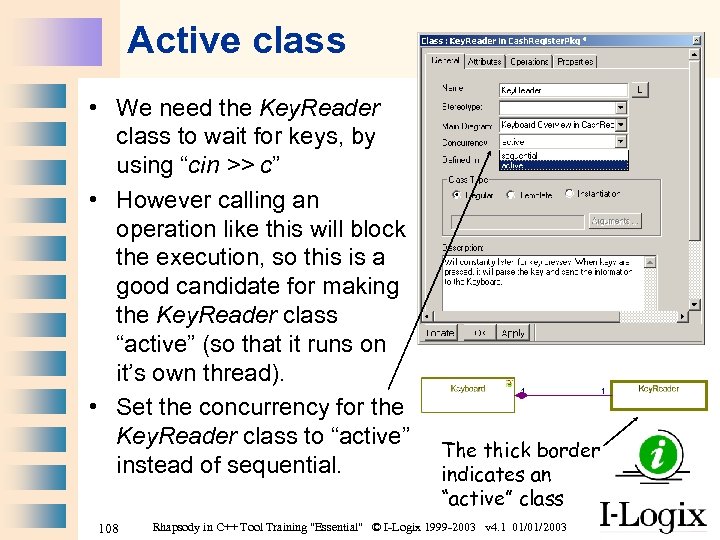 Active class • We need the Key. Reader class to wait for keys, by using “cin >> c” • However calling an operation like this will block the execution, so this is a good candidate for making the Key. Reader class “active” (so that it runs on it’s own thread). • Set the concurrency for the Key. Reader class to “active” instead of sequential. 108 The thick border indicates an “active” class Rhapsody in C++ Tool Training "Essential" © I-Logix 1999 -2003 v 4. 1 01/01/2003
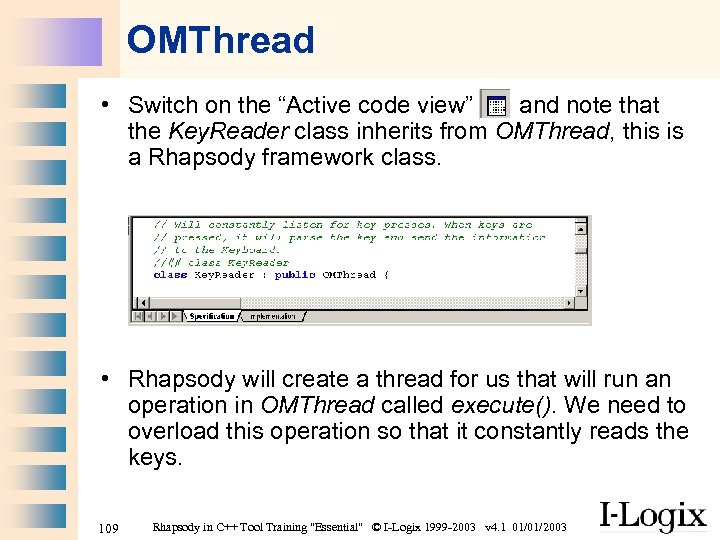 OMThread • Switch on the “Active code view” and note that the Key. Reader class inherits from OMThread, this is a Rhapsody framework class. • Rhapsody will create a thread for us that will run an operation in OMThread called execute(). We need to overload this operation so that it constantly reads the keys. 109 Rhapsody in C++ Tool Training "Essential" © I-Logix 1999 -2003 v 4. 1 01/01/2003
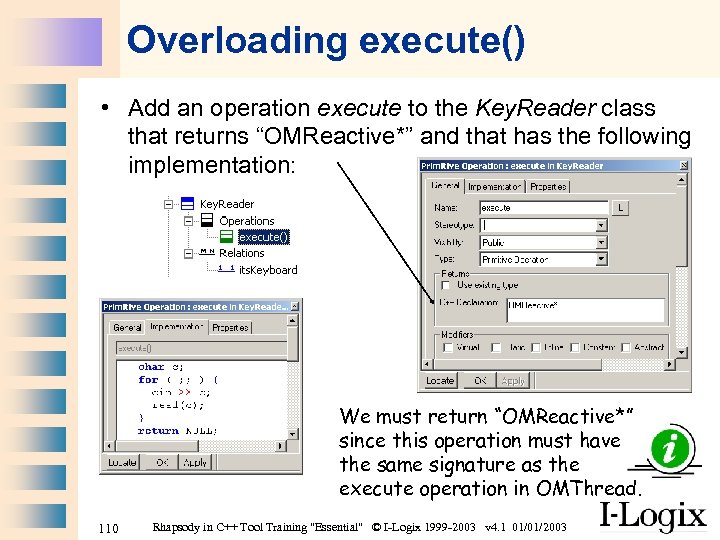 Overloading execute() • Add an operation execute to the Key. Reader class that returns “OMReactive*” and that has the following implementation: We must return “OMReactive*” since this operation must have the same signature as the execute operation in OMThread. 110 Rhapsody in C++ Tool Training "Essential" © I-Logix 1999 -2003 v 4. 1 01/01/2003
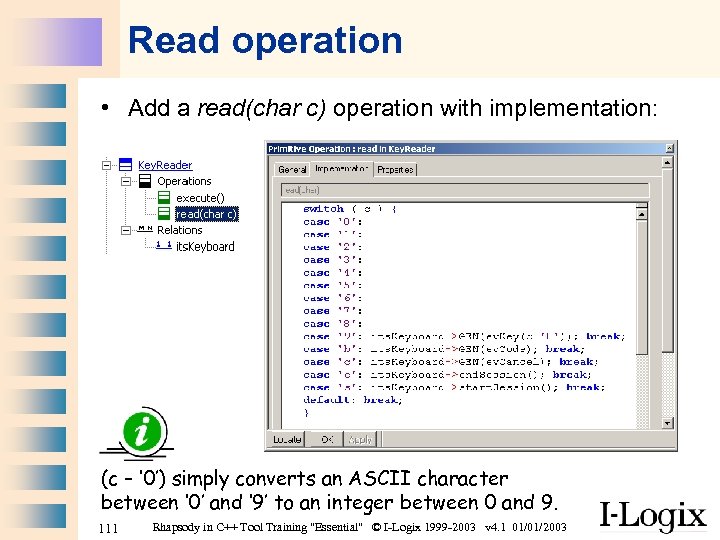 Read operation • Add a read(char c) operation with implementation: (c – ‘ 0’) simply converts an ASCII character between ‘ 0’ and ‘ 9’ to an integer between 0 and 9. 111 Rhapsody in C++ Tool Training "Essential" © I-Logix 1999 -2003 v 4. 1 01/01/2003
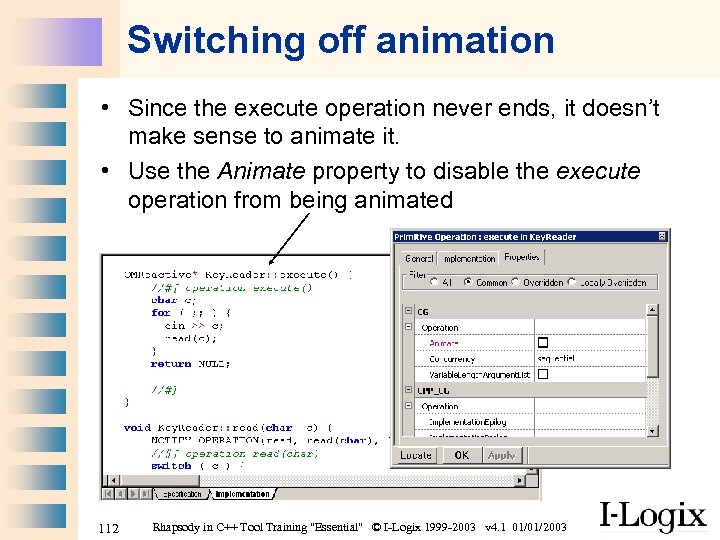 Switching off animation • Since the execute operation never ends, it doesn’t make sense to animate it. • Use the Animate property to disable the execute operation from being animated 112 Rhapsody in C++ Tool Training "Essential" © I-Logix 1999 -2003 v 4. 1 01/01/2003
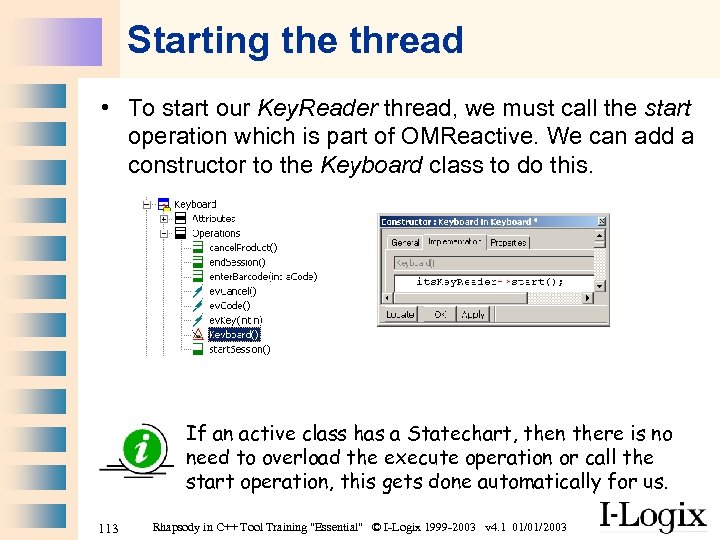 Starting the thread • To start our Key. Reader thread, we must call the start operation which is part of OMReactive. We can add a constructor to the Keyboard class to do this. If an active class has a Statechart, then there is no need to overload the execute operation or call the start operation, this gets done automatically for us. 113 Rhapsody in C++ Tool Training "Essential" © I-Logix 1999 -2003 v 4. 1 01/01/2003
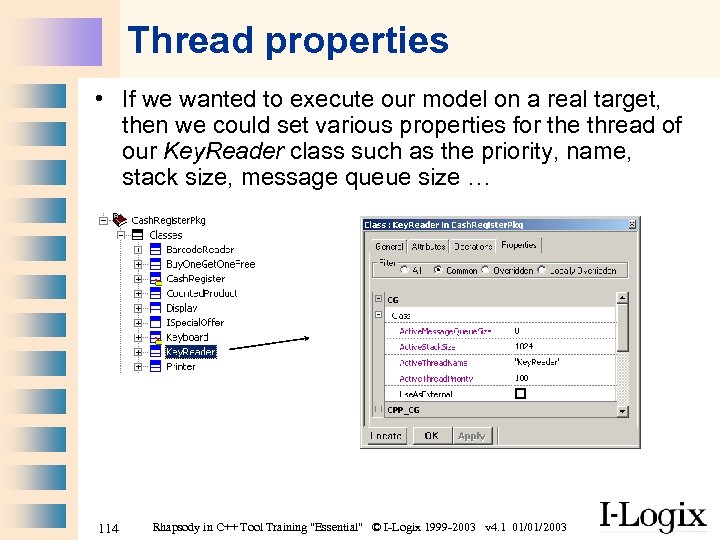 Thread properties • If we wanted to execute our model on a real target, then we could set various properties for the thread of our Key. Reader class such as the priority, name, stack size, message queue size … 114 Rhapsody in C++ Tool Training "Essential" © I-Logix 1999 -2003 v 4. 1 01/01/2003
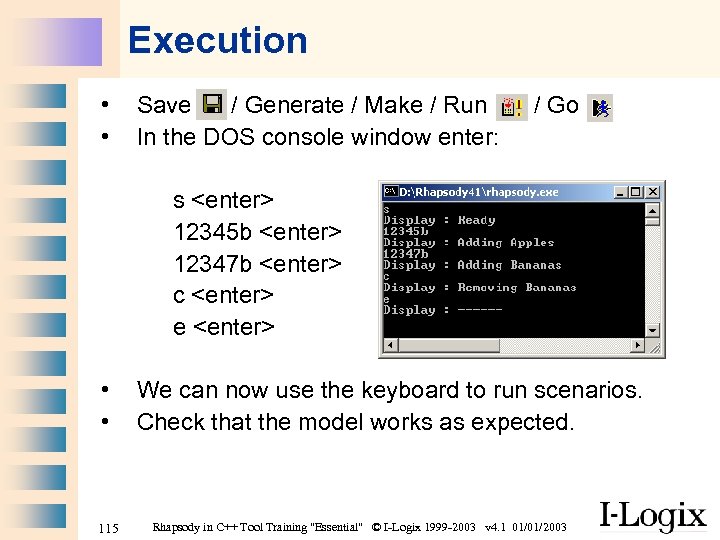 Execution • • Save / Generate / Make / Run In the DOS console window enter: / Go s
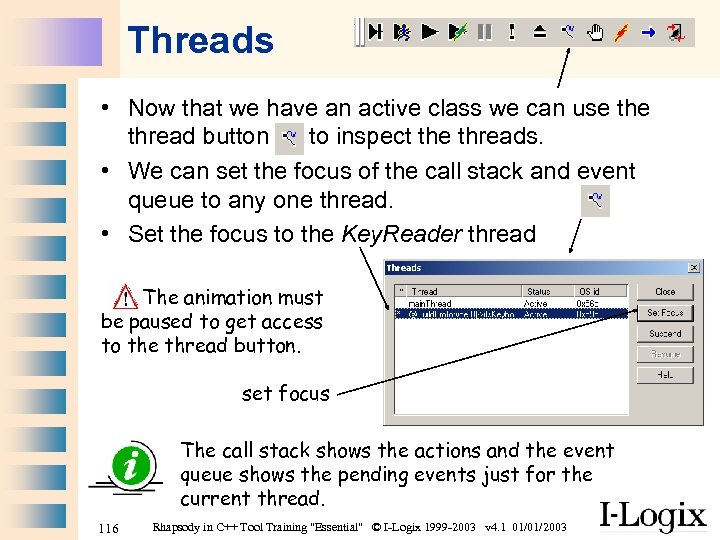 Threads • Now that we have an active class we can use thread button to inspect the threads. • We can set the focus of the call stack and event queue to any one thread. • Set the focus to the Key. Reader thread The animation must be paused to get access to the thread button. set focus The call stack shows the actions and the event queue shows the pending events just for the current thread. 116 Rhapsody in C++ Tool Training "Essential" © I-Logix 1999 -2003 v 4. 1 01/01/2003
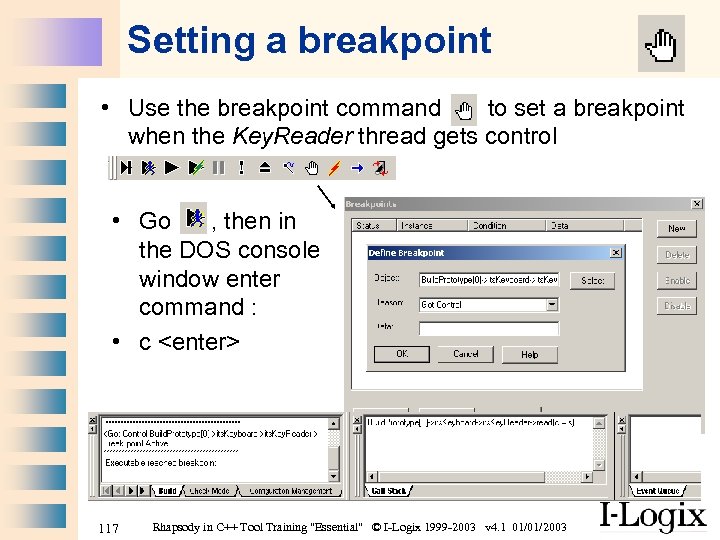 Setting a breakpoint • Use the breakpoint command to set a breakpoint when the Key. Reader thread gets control • Go , then in the DOS console window enter command : • c
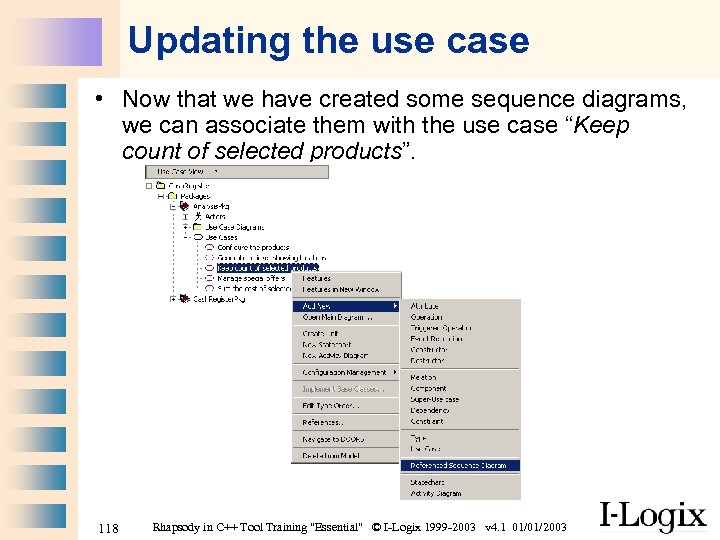 Updating the use case • Now that we have created some sequence diagrams, we can associate them with the use case “Keep count of selected products”. 118 Rhapsody in C++ Tool Training "Essential" © I-Logix 1999 -2003 v 4. 1 01/01/2003
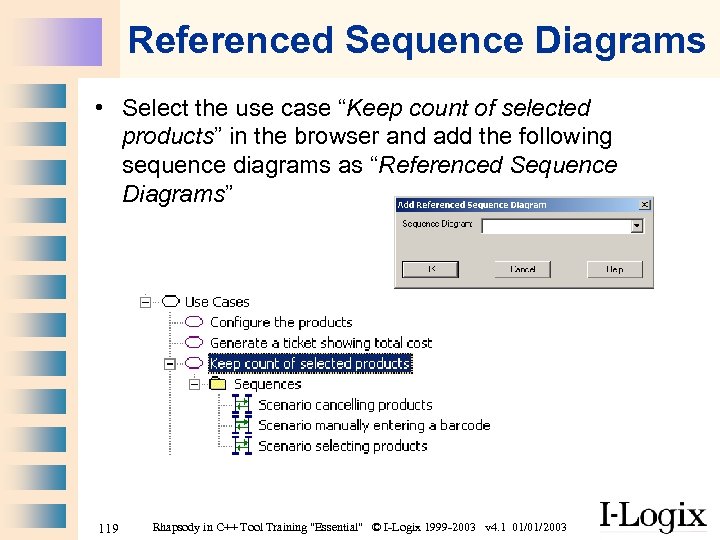 Referenced Sequence Diagrams • Select the use case “Keep count of selected products” in the browser and add the following sequence diagrams as “Referenced Sequence Diagrams” 119 Rhapsody in C++ Tool Training "Essential" © I-Logix 1999 -2003 v 4. 1 01/01/2003
 Part Two Use Case 3 “Generate a ticket showing total cost” 120 Rhapsody in C++ Tool Training "Essential" © I-Logix 1999 -2003 v 4. 1 01/01/2003
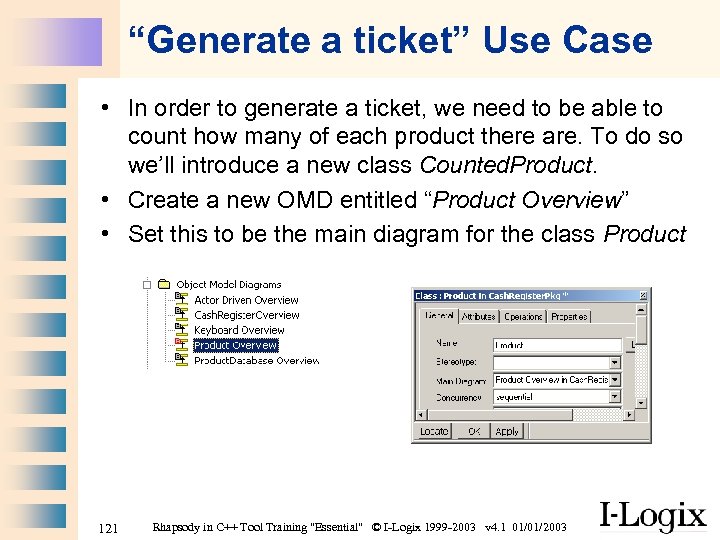 “Generate a ticket” Use Case • In order to generate a ticket, we need to be able to count how many of each product there are. To do so we’ll introduce a new class Counted. Product. • Create a new OMD entitled “Product Overview” • Set this to be the main diagram for the class Product 121 Rhapsody in C++ Tool Training "Essential" © I-Logix 1999 -2003 v 4. 1 01/01/2003
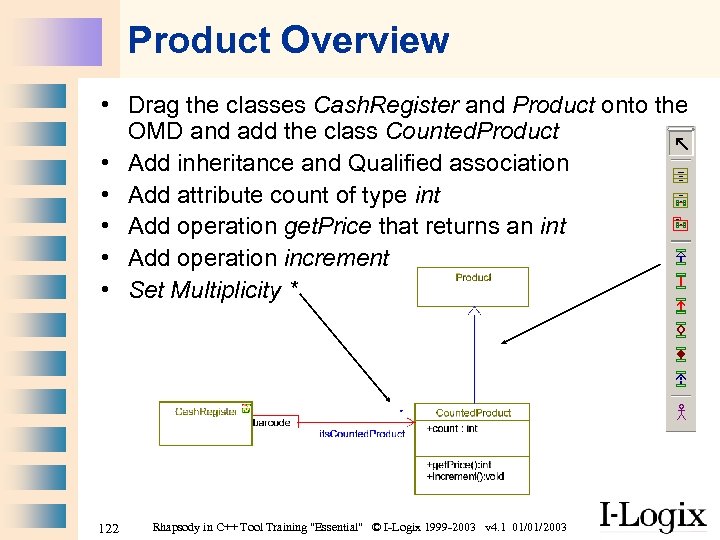 Product Overview • Drag the classes Cash. Register and Product onto the OMD and add the class Counted. Product • Add inheritance and Qualified association • Add attribute count of type int • Add operation get. Price that returns an int • Add operation increment • Set Multiplicity * 122 Rhapsody in C++ Tool Training "Essential" © I-Logix 1999 -2003 v 4. 1 01/01/2003
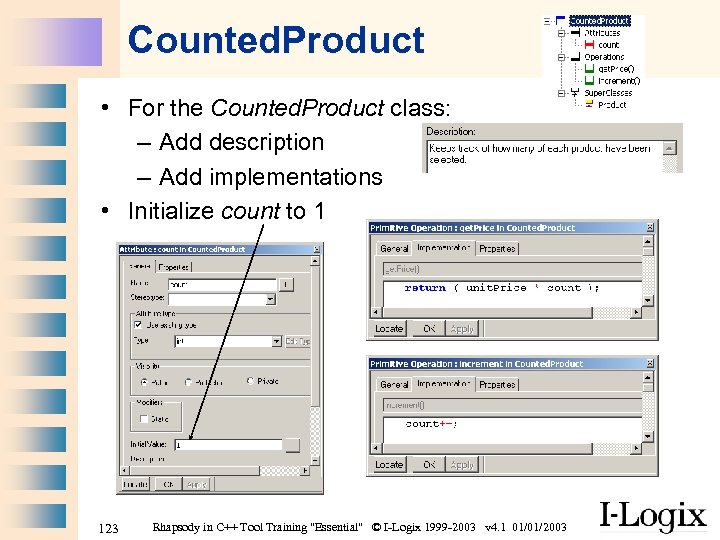 Counted. Product • For the Counted. Product class: – Add description – Add implementations • Initialize count to 1 123 Rhapsody in C++ Tool Training "Essential" © I-Logix 1999 -2003 v 4. 1 01/01/2003
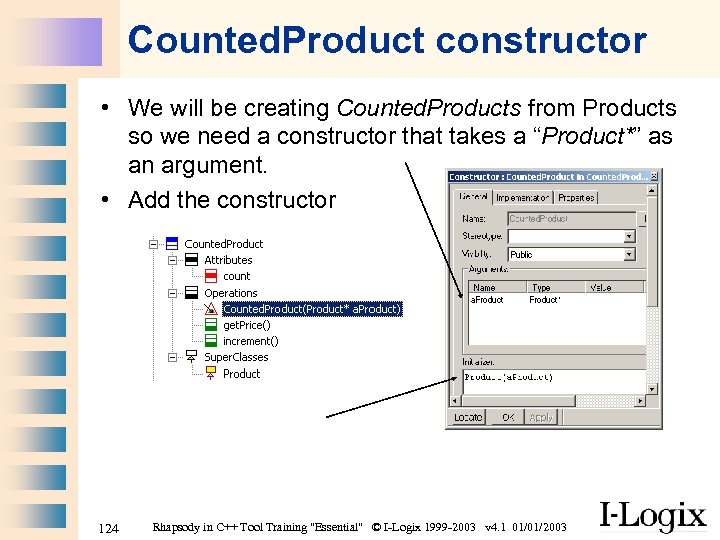 Counted. Product constructor • We will be creating Counted. Products from Products so we need a constructor that takes a “Product*” as an argument. • Add the constructor 124 Rhapsody in C++ Tool Training "Essential" © I-Logix 1999 -2003 v 4. 1 01/01/2003
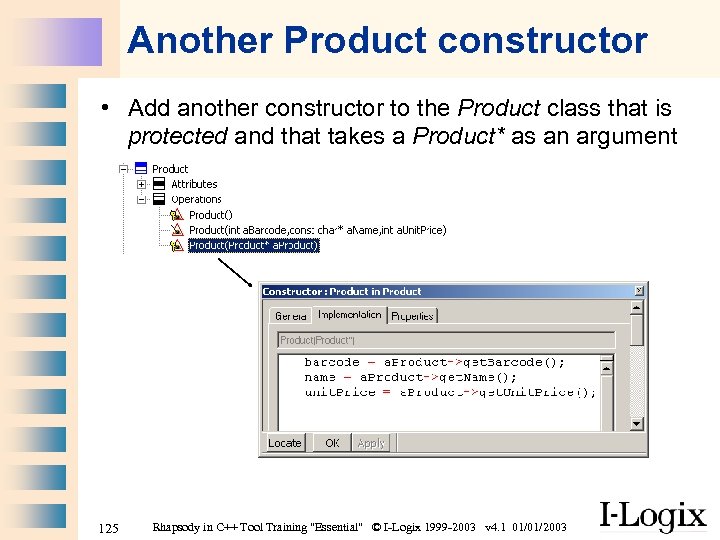 Another Product constructor • Add another constructor to the Product class that is protected and that takes a Product* as an argument 125 Rhapsody in C++ Tool Training "Essential" © I-Logix 1999 -2003 v 4. 1 01/01/2003
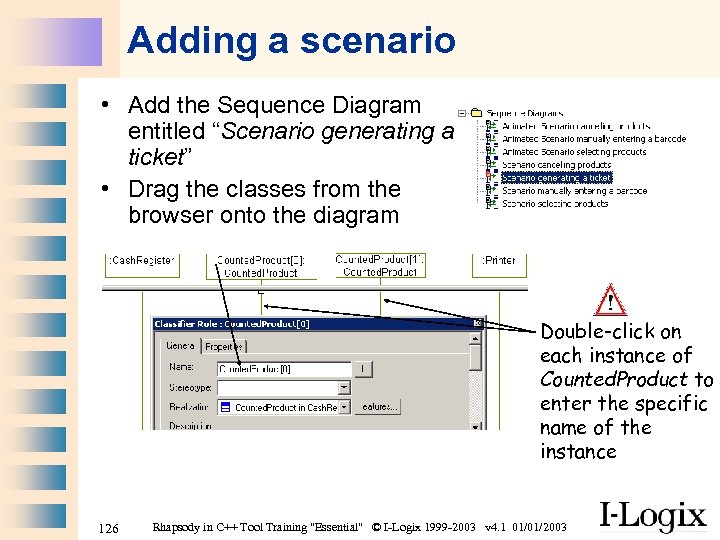 Adding a scenario • Add the Sequence Diagram entitled “Scenario generating a ticket” • Drag the classes from the browser onto the diagram Double-click on each instance of Counted. Product to enter the specific name of the instance 126 Rhapsody in C++ Tool Training "Essential" © I-Logix 1999 -2003 v 4. 1 01/01/2003
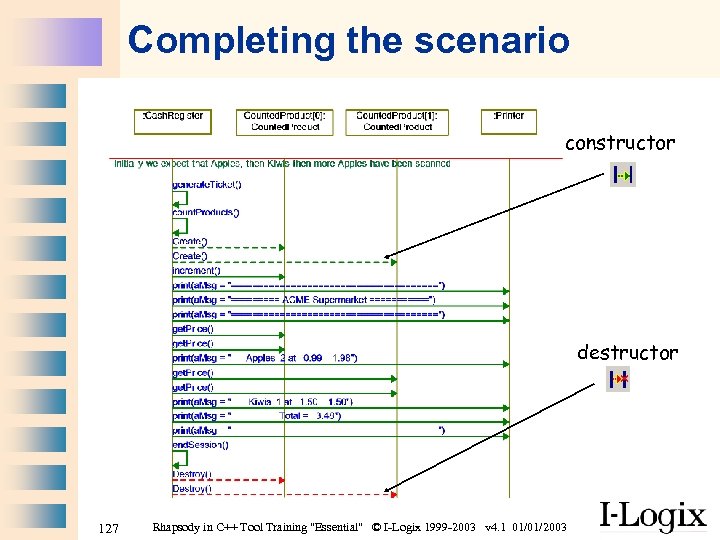 Completing the scenario constructor destructor 127 Rhapsody in C++ Tool Training "Essential" © I-Logix 1999 -2003 v 4. 1 01/01/2003
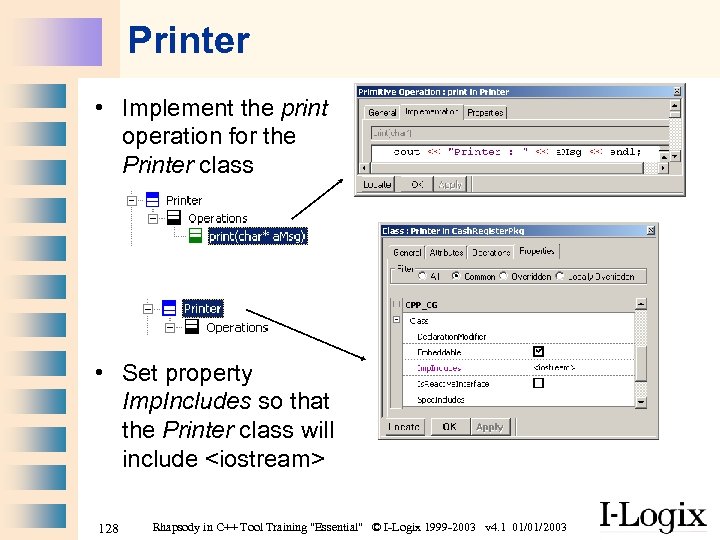 Printer • Implement the print operation for the Printer class • Set property Imp. Includes so that the Printer class will include
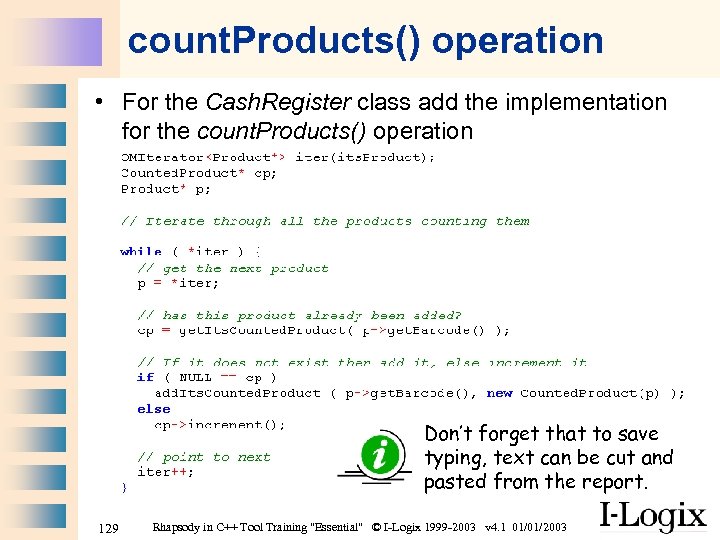 count. Products() operation • For the Cash. Register class add the implementation for the count. Products() operation Don’t forget that to save typing, text can be cut and pasted from the report. 129 Rhapsody in C++ Tool Training "Essential" © I-Logix 1999 -2003 v 4. 1 01/01/2003
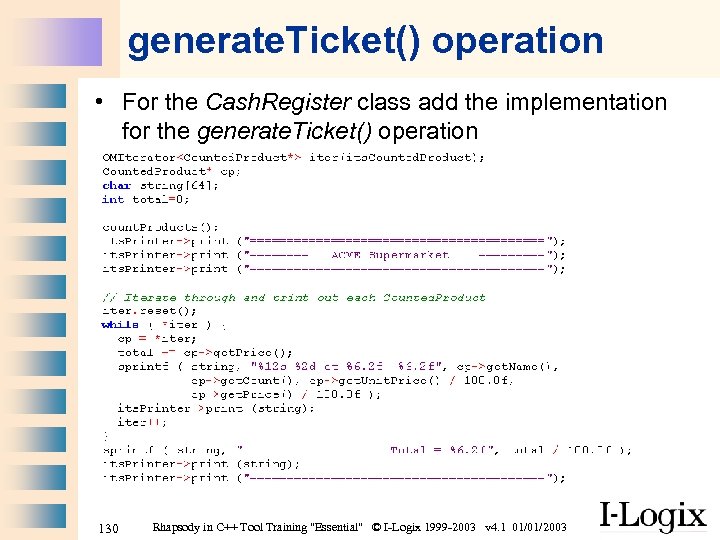 generate. Ticket() operation • For the Cash. Register class add the implementation for the generate. Ticket() operation 130 Rhapsody in C++ Tool Training "Essential" © I-Logix 1999 -2003 v 4. 1 01/01/2003
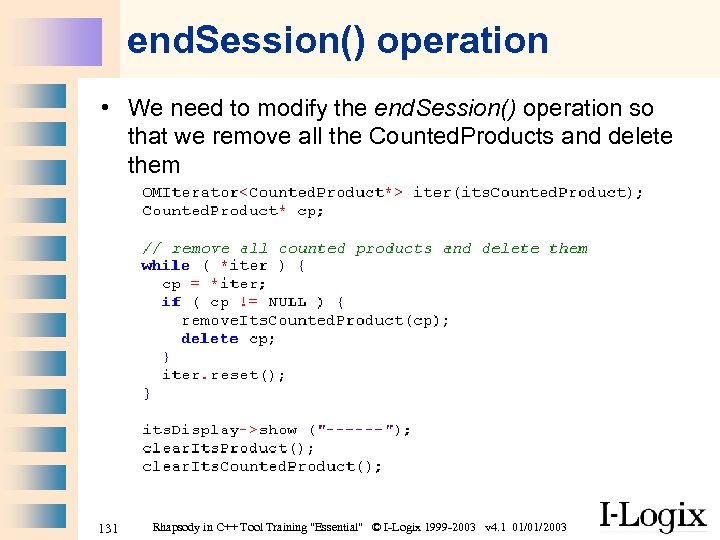 end. Session() operation • We need to modify the end. Session() operation so that we remove all the Counted. Products and delete them 131 Rhapsody in C++ Tool Training "Essential" © I-Logix 1999 -2003 v 4. 1 01/01/2003
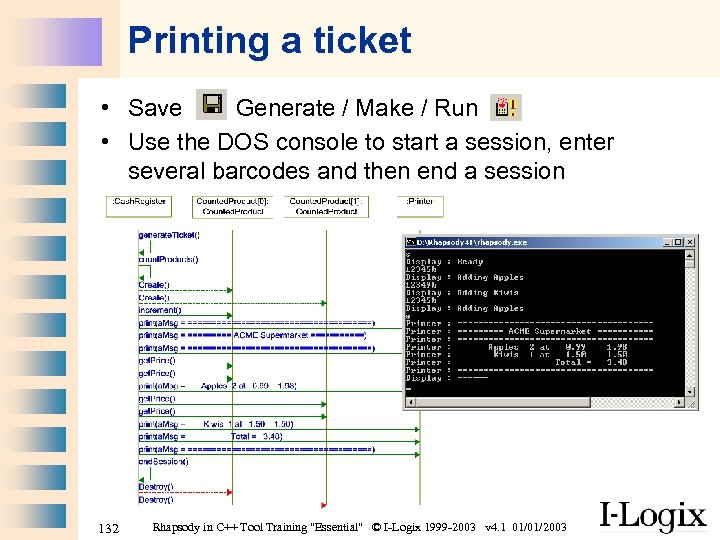 Printing a ticket • Save Generate / Make / Run • Use the DOS console to start a session, enter several barcodes and then end a session 132 Rhapsody in C++ Tool Training "Essential" © I-Logix 1999 -2003 v 4. 1 01/01/2003
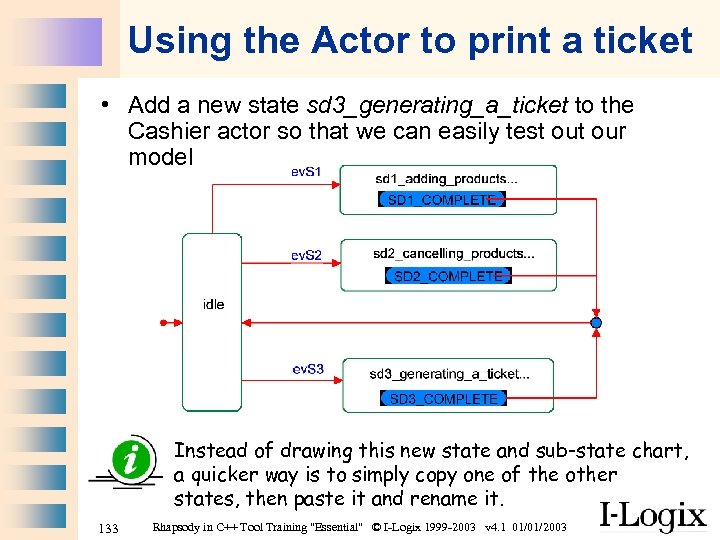 Using the Actor to print a ticket • Add a new state sd 3_generating_a_ticket to the Cashier actor so that we can easily test our model Instead of drawing this new state and sub-state chart, a quicker way is to simply copy one of the other states, then paste it and rename it. 133 Rhapsody in C++ Tool Training "Essential" © I-Logix 1999 -2003 v 4. 1 01/01/2003
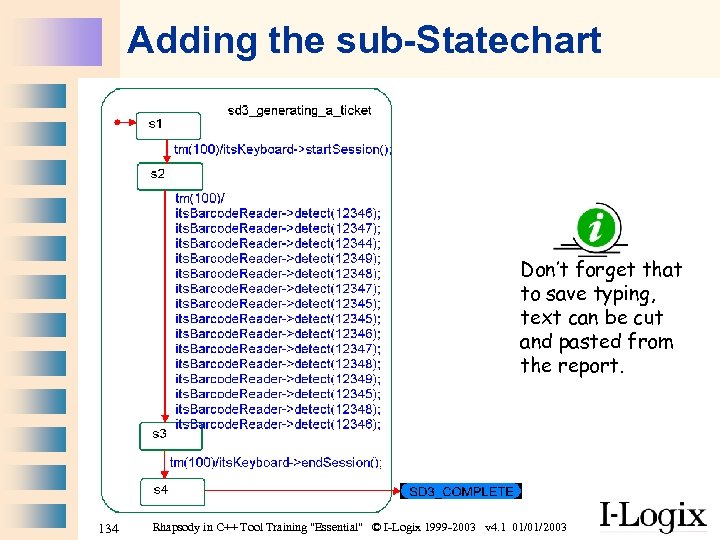 Adding the sub-Statechart Don’t forget that to save typing, text can be cut and pasted from the report. 134 Rhapsody in C++ Tool Training "Essential" © I-Logix 1999 -2003 v 4. 1 01/01/2003
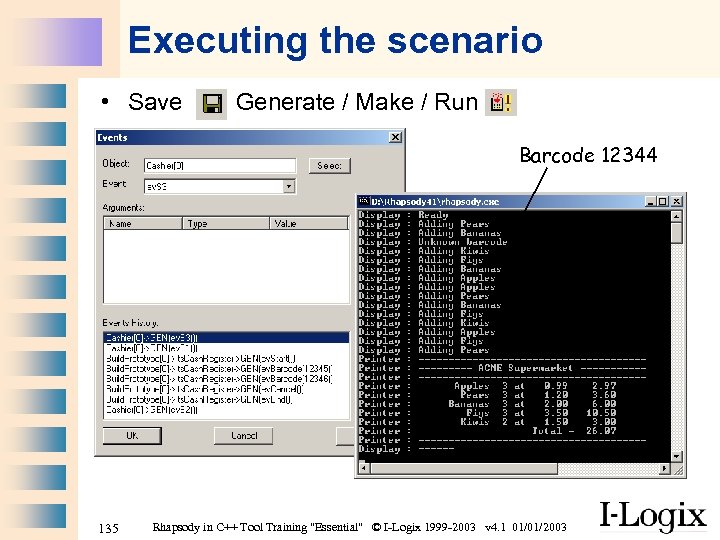 Executing the scenario • Save Generate / Make / Run Barcode 12344 135 Rhapsody in C++ Tool Training "Essential" © I-Logix 1999 -2003 v 4. 1 01/01/2003
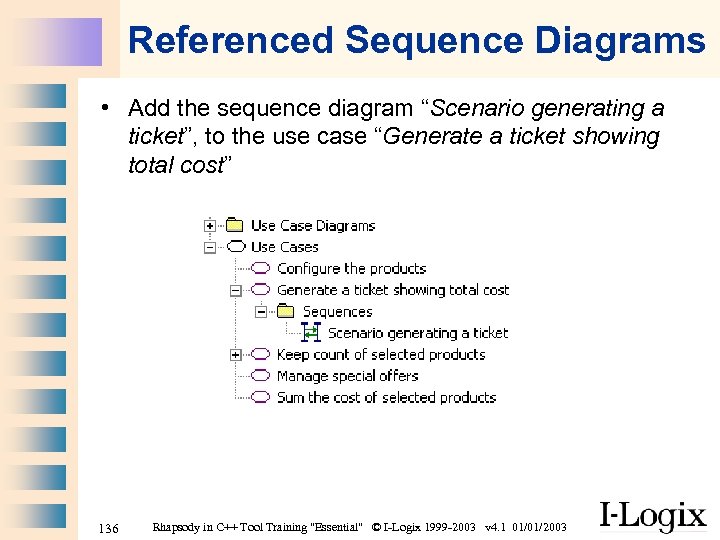 Referenced Sequence Diagrams • Add the sequence diagram “Scenario generating a ticket”, to the use case “Generate a ticket showing total cost” 136 Rhapsody in C++ Tool Training "Essential" © I-Logix 1999 -2003 v 4. 1 01/01/2003
 Part Two Use Case 4 “Manage special offers” 137 Rhapsody in C++ Tool Training "Essential" © I-Logix 1999 -2003 v 4. 1 01/01/2003
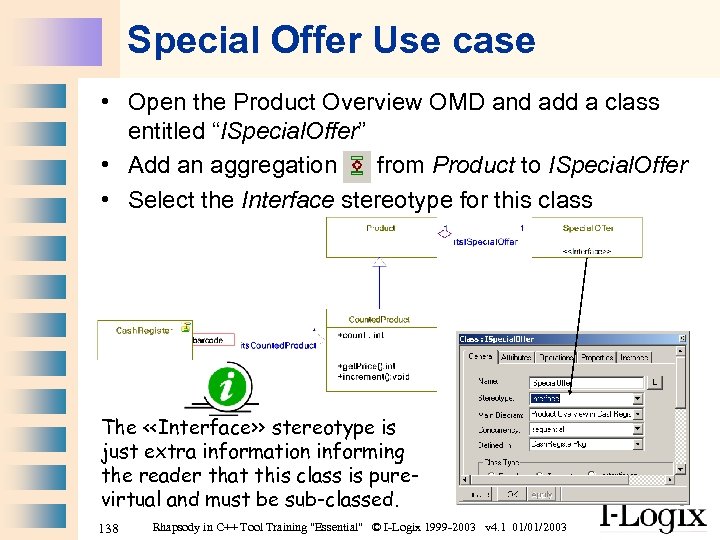 Special Offer Use case • Open the Product Overview OMD and add a class entitled “ISpecial. Offer” • Add an aggregation from Product to ISpecial. Offer • Select the Interface stereotype for this class The <
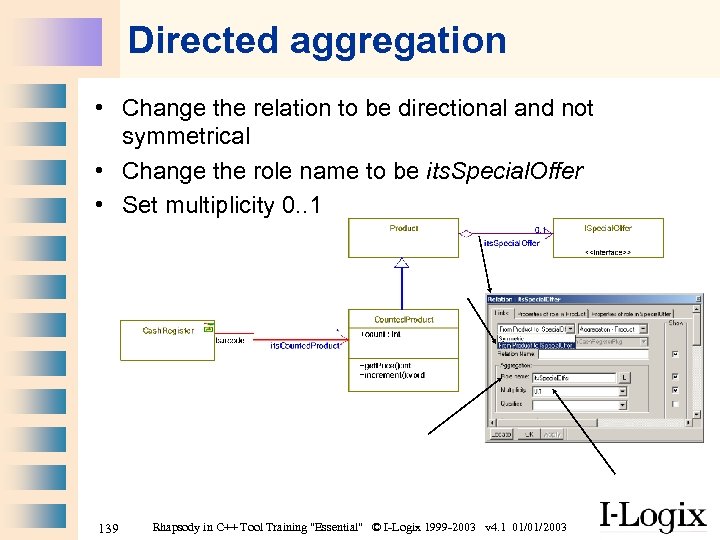 Directed aggregation • Change the relation to be directional and not symmetrical • Change the role name to be its. Special. Offer • Set multiplicity 0. . 1 139 Rhapsody in C++ Tool Training "Essential" © I-Logix 1999 -2003 v 4. 1 01/01/2003
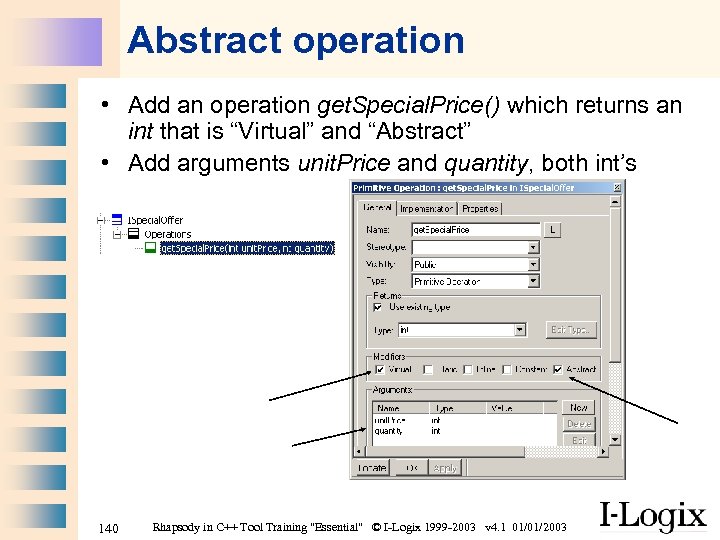 Abstract operation • Add an operation get. Special. Price() which returns an int that is “Virtual” and “Abstract” • Add arguments unit. Price and quantity, both int’s 140 Rhapsody in C++ Tool Training "Essential" © I-Logix 1999 -2003 v 4. 1 01/01/2003
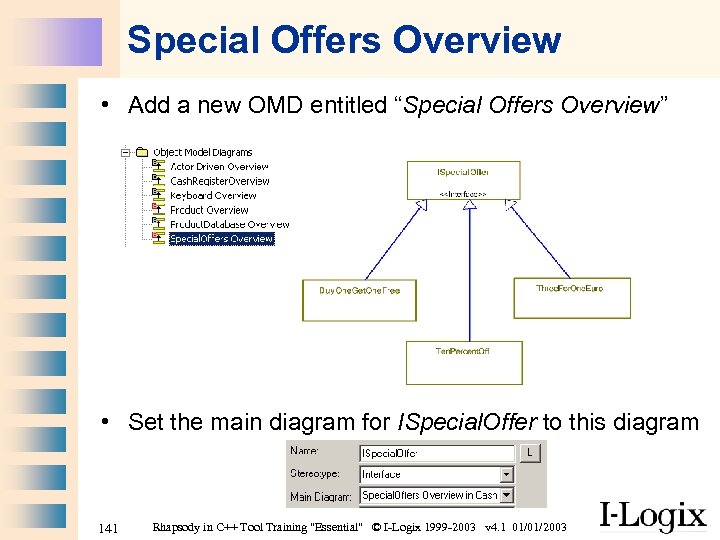 Special Offers Overview • Add a new OMD entitled “Special Offers Overview” • Set the main diagram for ISpecial. Offer to this diagram 141 Rhapsody in C++ Tool Training "Essential" © I-Logix 1999 -2003 v 4. 1 01/01/2003
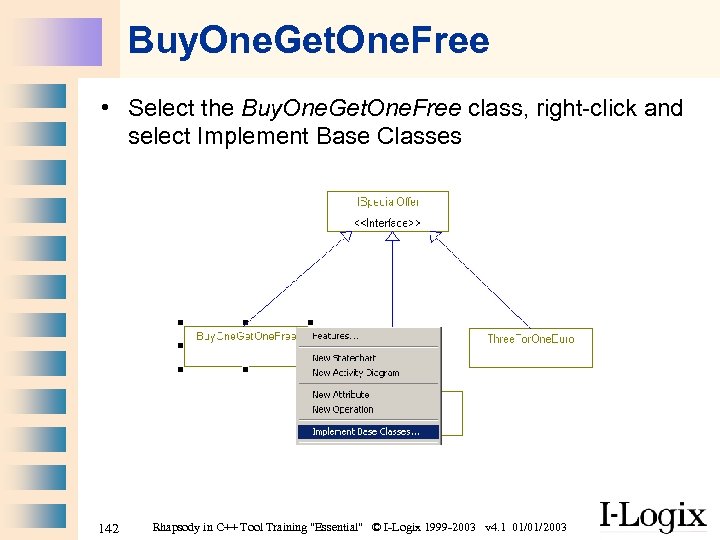 Buy. One. Get. One. Free • Select the Buy. One. Get. One. Free class, right-click and select Implement Base Classes 142 Rhapsody in C++ Tool Training "Essential" © I-Logix 1999 -2003 v 4. 1 01/01/2003
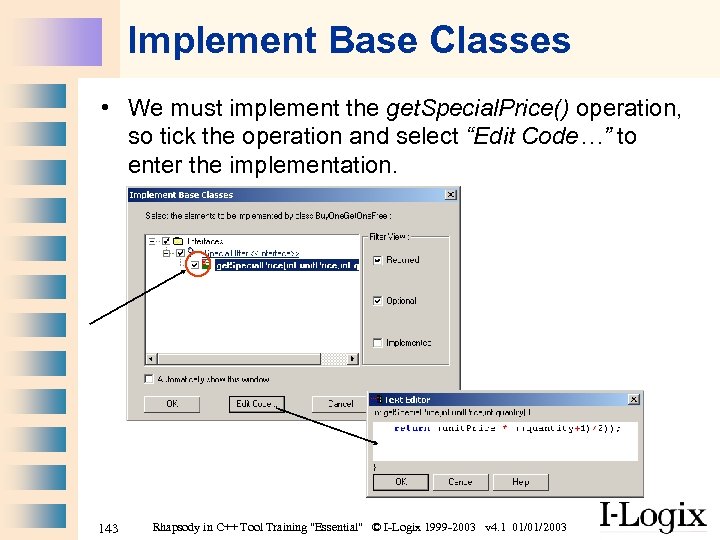 Implement Base Classes • We must implement the get. Special. Price() operation, so tick the operation and select “Edit Code…” to enter the implementation. 143 Rhapsody in C++ Tool Training "Essential" © I-Logix 1999 -2003 v 4. 1 01/01/2003
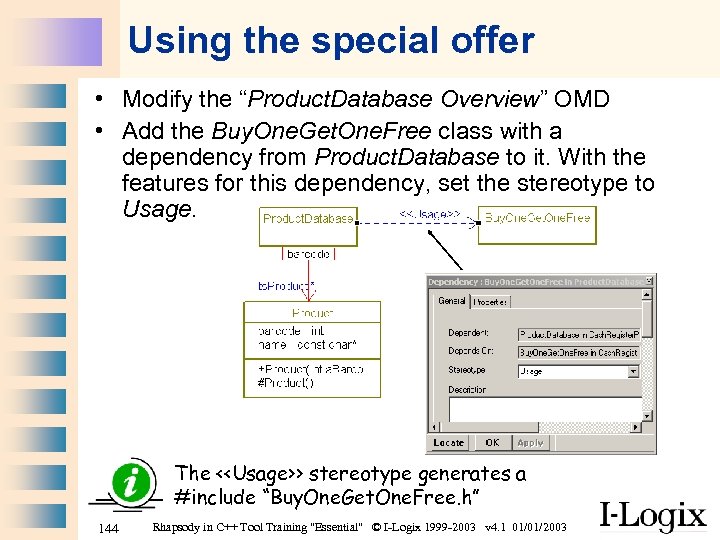 Using the special offer • Modify the “Product. Database Overview” OMD • Add the Buy. One. Get. One. Free class with a dependency from Product. Database to it. With the features for this dependency, set the stereotype to Usage. The <
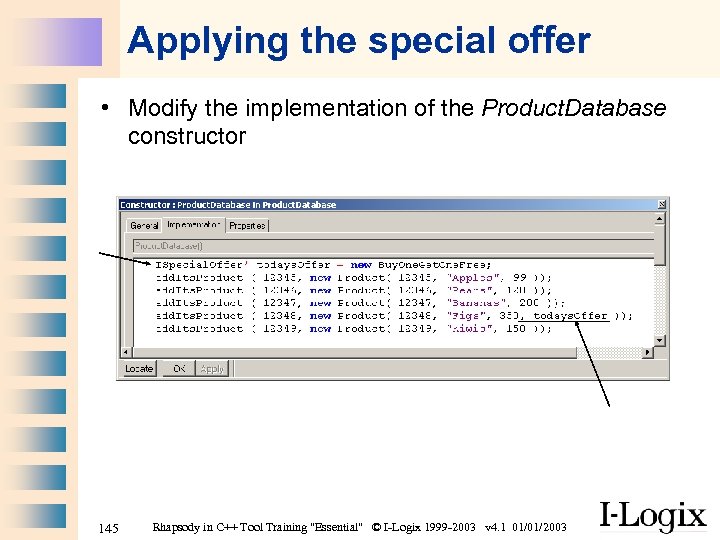 Applying the special offer • Modify the implementation of the Product. Database constructor 145 Rhapsody in C++ Tool Training "Essential" © I-Logix 1999 -2003 v 4. 1 01/01/2003
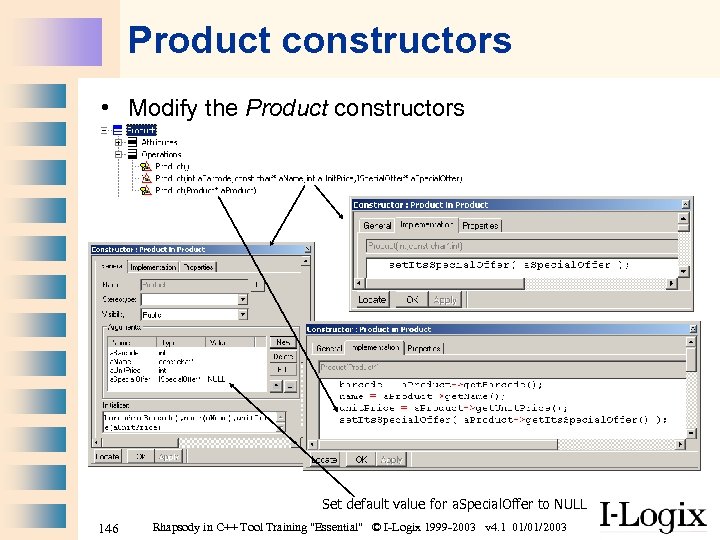 Product constructors • Modify the Product constructors Set default value for a. Special. Offer to NULL 146 Rhapsody in C++ Tool Training "Essential" © I-Logix 1999 -2003 v 4. 1 01/01/2003
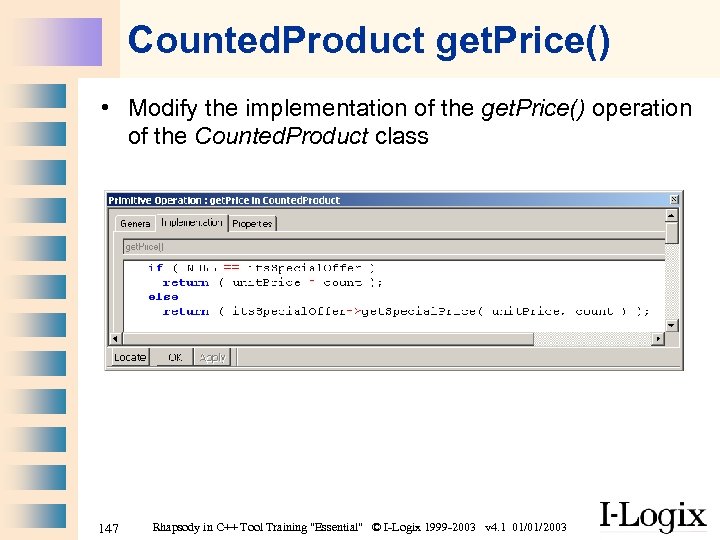 Counted. Product get. Price() • Modify the implementation of the get. Price() operation of the Counted. Product class 147 Rhapsody in C++ Tool Training "Essential" © I-Logix 1999 -2003 v 4. 1 01/01/2003
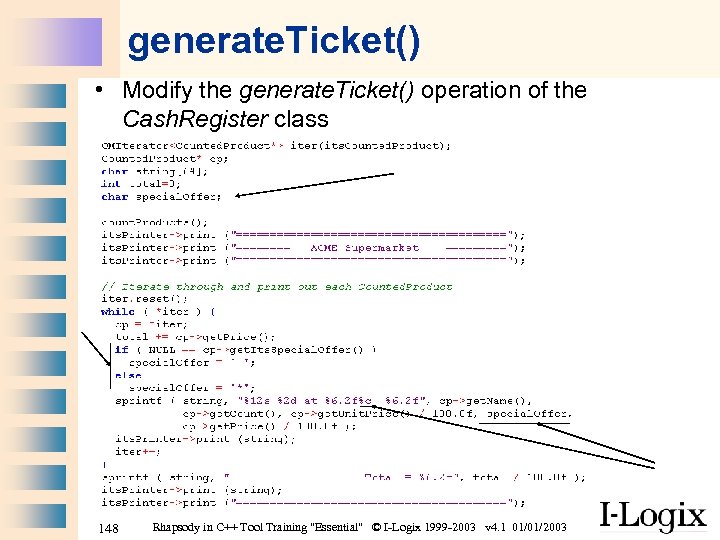 generate. Ticket() • Modify the generate. Ticket() operation of the Cash. Register class 148 Rhapsody in C++ Tool Training "Essential" © I-Logix 1999 -2003 v 4. 1 01/01/2003
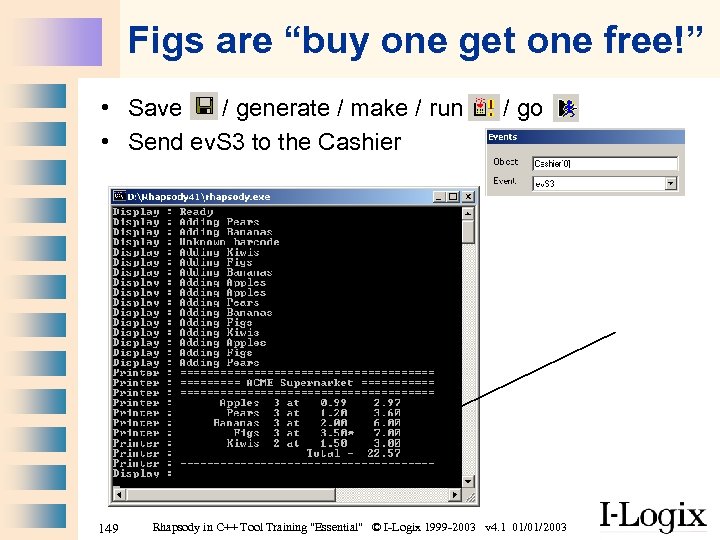 Figs are “buy one get one free!” • Save / generate / make / run • Send ev. S 3 to the Cashier 149 / go Rhapsody in C++ Tool Training "Essential" © I-Logix 1999 -2003 v 4. 1 01/01/2003
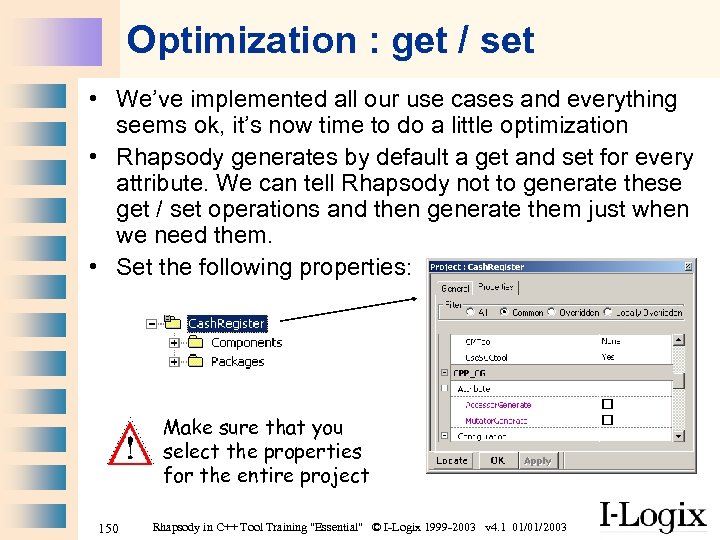 Optimization : get / set • We’ve implemented all our use cases and everything seems ok, it’s now time to do a little optimization • Rhapsody generates by default a get and set for every attribute. We can tell Rhapsody not to generate these get / set operations and then generate them just when we need them. • Set the following properties: Make sure that you select the properties for the entire project 150 Rhapsody in C++ Tool Training "Essential" © I-Logix 1999 -2003 v 4. 1 01/01/2003
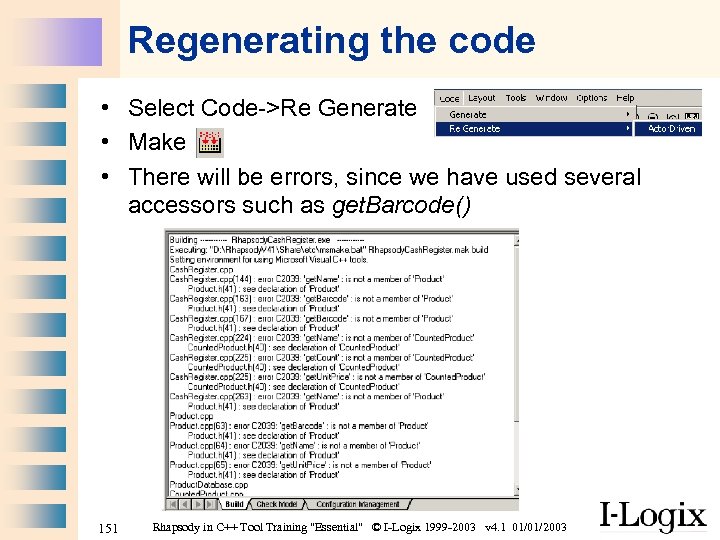 Regenerating the code • Select Code->Re Generate • Make • There will be errors, since we have used several accessors such as get. Barcode() 151 Rhapsody in C++ Tool Training "Essential" © I-Logix 1999 -2003 v 4. 1 01/01/2003
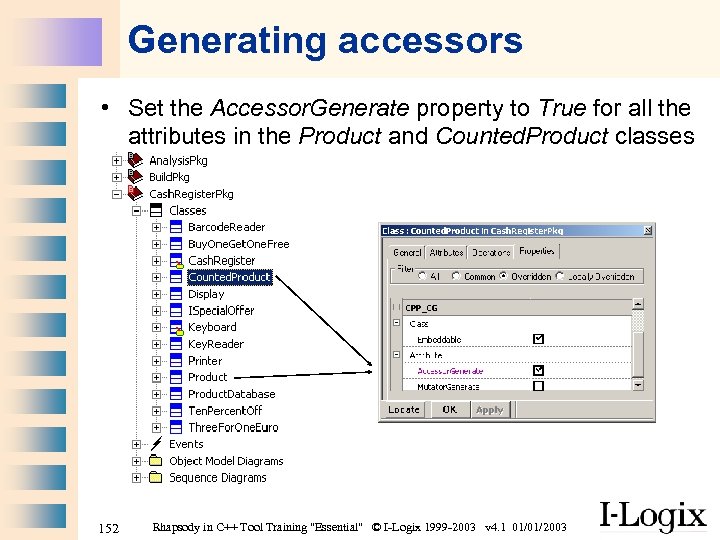 Generating accessors • Set the Accessor. Generate property to True for all the attributes in the Product and Counted. Product classes 152 Rhapsody in C++ Tool Training "Essential" © I-Logix 1999 -2003 v 4. 1 01/01/2003
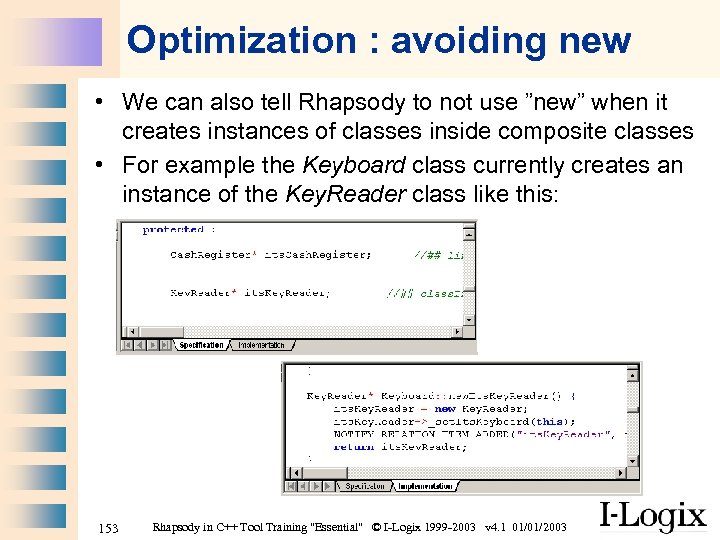 Optimization : avoiding new • We can also tell Rhapsody to not use ”new” when it creates instances of classes inside composite classes • For example the Keyboard class currently creates an instance of the Key. Reader class like this: 153 Rhapsody in C++ Tool Training "Essential" © I-Logix 1999 -2003 v 4. 1 01/01/2003
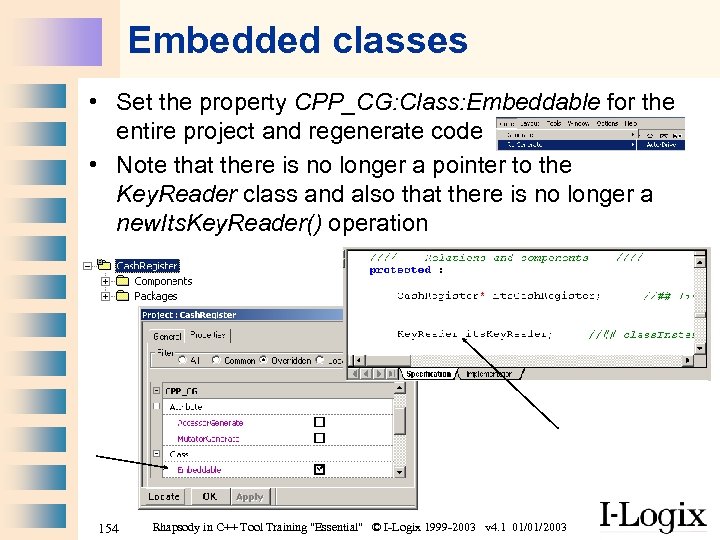 Embedded classes • Set the property CPP_CG: Class: Embeddable for the entire project and regenerate code • Note that there is no longer a pointer to the Key. Reader class and also that there is no longer a new. Its. Key. Reader() operation 154 Rhapsody in C++ Tool Training "Essential" © I-Logix 1999 -2003 v 4. 1 01/01/2003
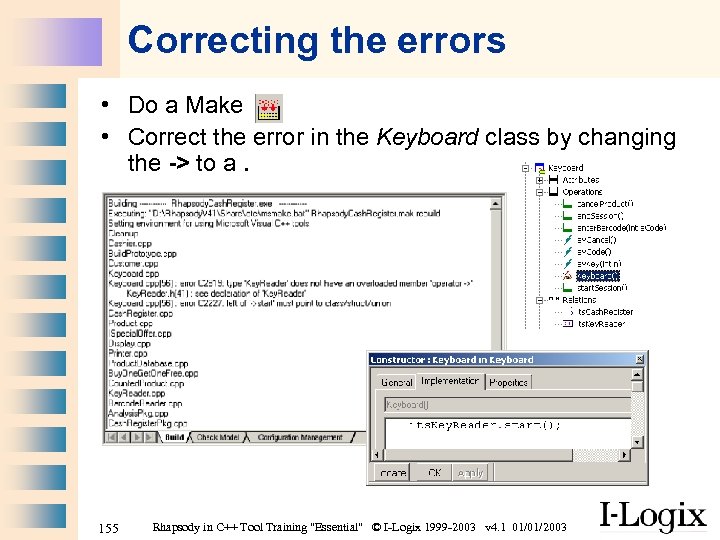 Correcting the errors • Do a Make • Correct the error in the Keyboard class by changing the -> to a. 155 Rhapsody in C++ Tool Training "Essential" © I-Logix 1999 -2003 v 4. 1 01/01/2003
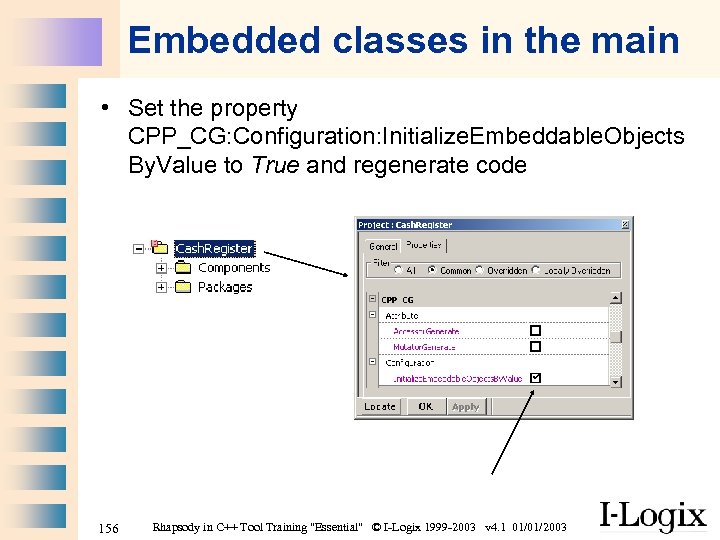 Embedded classes in the main • Set the property CPP_CG: Configuration: Initialize. Embeddable. Objects By. Value to True and regenerate code 156 Rhapsody in C++ Tool Training "Essential" © I-Logix 1999 -2003 v 4. 1 01/01/2003
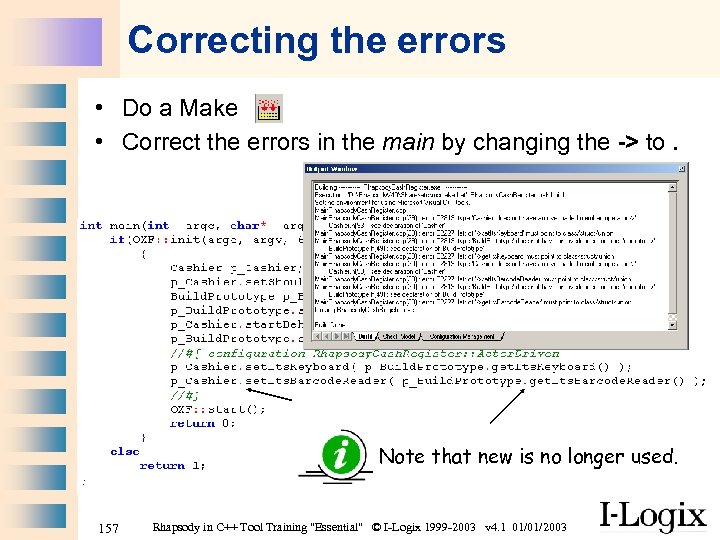 Correcting the errors • Do a Make • Correct the errors in the main by changing the -> to. Note that new is no longer used. 157 Rhapsody in C++ Tool Training "Essential" © I-Logix 1999 -2003 v 4. 1 01/01/2003
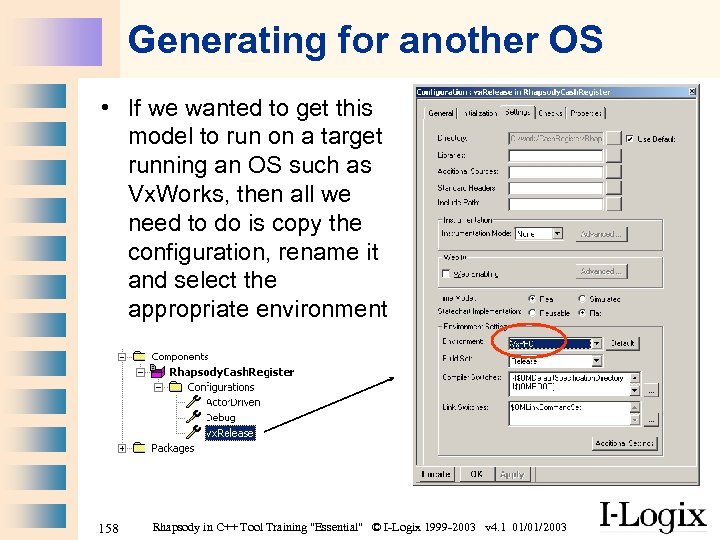 Generating for another OS • If we wanted to get this model to run on a target running an OS such as Vx. Works, then all we need to do is copy the configuration, rename it and select the appropriate environment 158 Rhapsody in C++ Tool Training "Essential" © I-Logix 1999 -2003 v 4. 1 01/01/2003
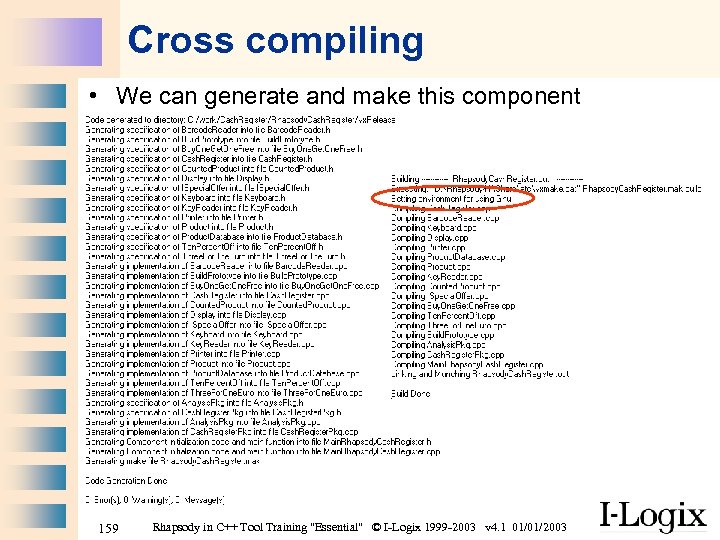 Cross compiling • We can generate and make this component 159 Rhapsody in C++ Tool Training "Essential" © I-Logix 1999 -2003 v 4. 1 01/01/2003
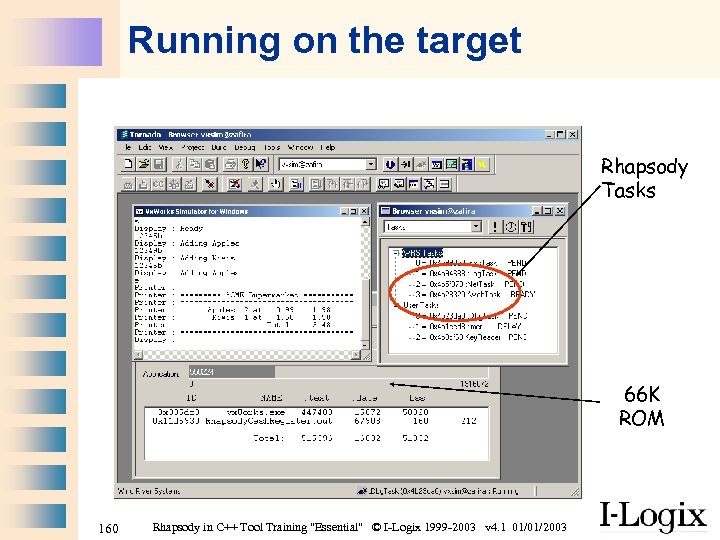 Running on the target Rhapsody Tasks 66 K ROM 160 Rhapsody in C++ Tool Training "Essential" © I-Logix 1999 -2003 v 4. 1 01/01/2003
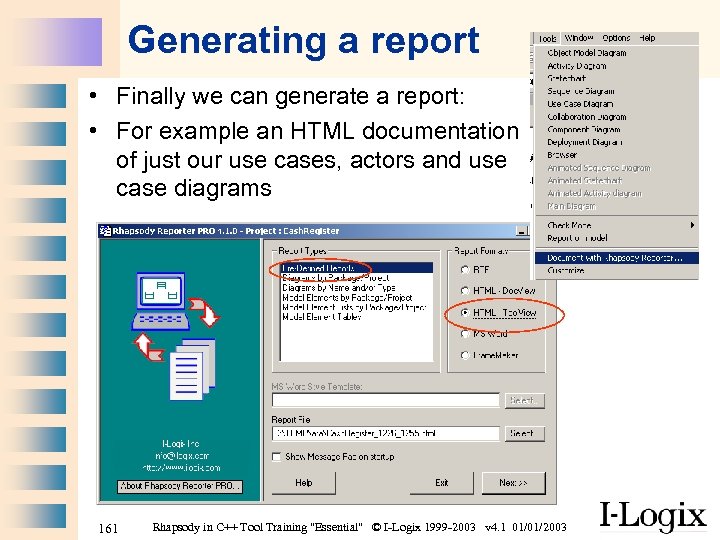 Generating a report • Finally we can generate a report: • For example an HTML documentation of just our use cases, actors and use case diagrams 161 Rhapsody in C++ Tool Training "Essential" © I-Logix 1999 -2003 v 4. 1 01/01/2003
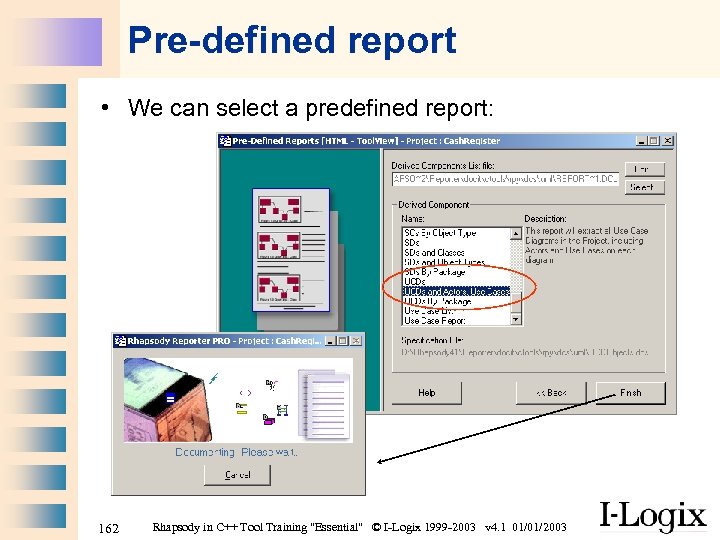 Pre-defined report • We can select a predefined report: 162 Rhapsody in C++ Tool Training "Essential" © I-Logix 1999 -2003 v 4. 1 01/01/2003
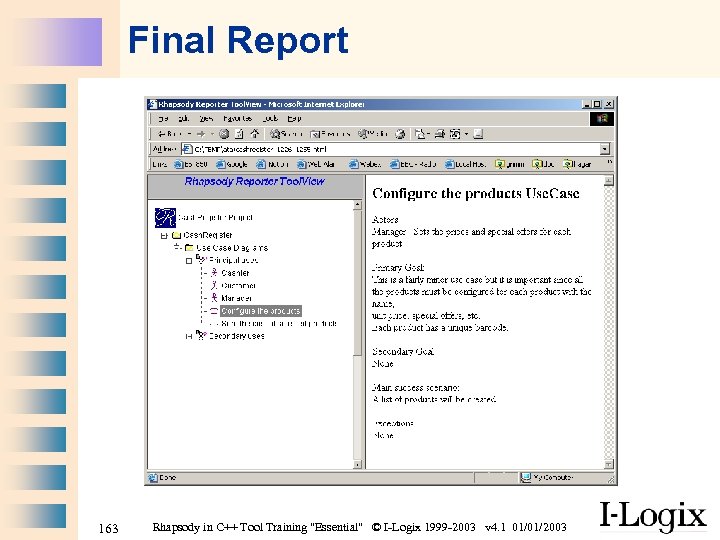 Final Report 163 Rhapsody in C++ Tool Training "Essential" © I-Logix 1999 -2003 v 4. 1 01/01/2003
 164 Rhapsody in C++ Tool Training "Essential" © I-Logix 1999 -2003 v 4. 1 01/01/2003