


 Скачать презентацию Enterprise IP Solutions Office Serv 7400 Quick Install
99f30b9113ae4c0b11672adc8dad5ba5.ppt
- Количество слайдов: 100
 Enterprise IP Solutions Office. Serv 7400 Quick Install Guide - Data Server – VPN Mar, 2006 Office. Serv Lab. Samsung Electronics Co. , Ltd. 7400 -1/100 - Samsung Confidential & Proprietary Information Copyright 2006, All Rights Reserved.
 Contents > VPN Overview > IPSec Settings 1. IPSec Connection Between OS 7400 s ◆ RSA key ◆ Pre-shared key ◆ X. 509 Cert 2. IPSec Connection Between OS 7400 and PC (Remote User) ◆ Pre-shared key ◆ X. 509 Cert 3. IPSec Connection Between OS 7400 and Cisco Router ◆ Pre-shared key > PPTP/L 2 TP Settings 4. PPTP/L 2 TP Configuration on OS 7400 System 5. PPTP/L 2 TP Configuration on PC (Windows 2000/XP) > Application Cases 6. IP Networking (QSIG) Application Cases 7. H. 323/SIP Application Cases 7400 -2/100 - Samsung Confidential & Proprietary Information Copyright 2006, All Rights Reserved.
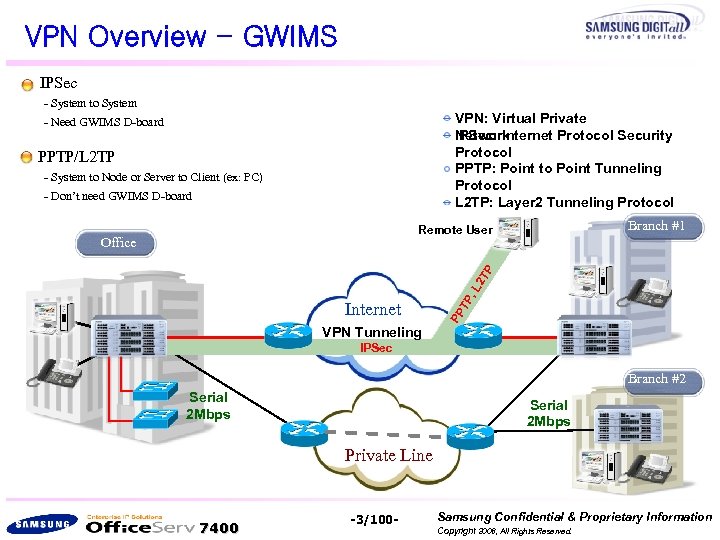 VPN Overview - GWIMS IPSec - System to System VPN: Virtual Private Network IPSec: Internet Protocol Security Protocol PPTP: Point to Point Tunneling Protocol L 2 TP: Layer 2 Tunneling Protocol - Need GWIMS D-board PPTP/L 2 TP - System to Node or Server to Client (ex: PC) - Don’t need GWIMS D-board Branch #1 Remote User Office Internet VPN Tunneling PP TP , L 2 T P 본사 IPSec Branch #2 Serial 2 Mbps Private Line 7400 -3/100 - Samsung Confidential & Proprietary Information Copyright 2006, All Rights Reserved.
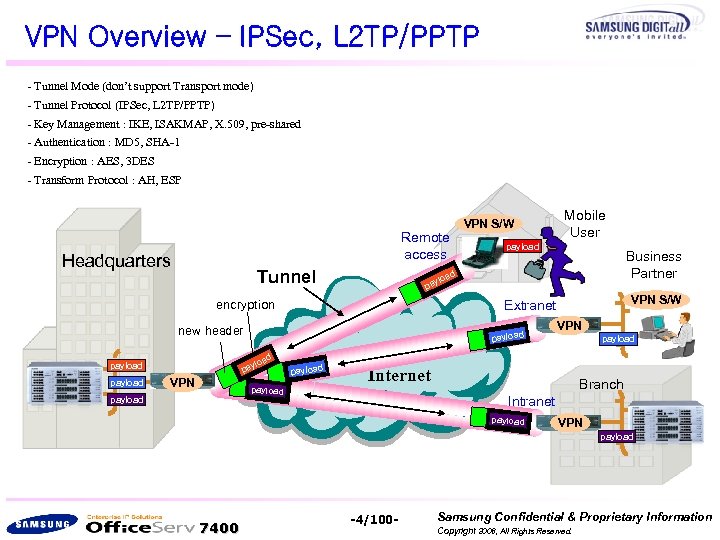 VPN Overview – IPSec, L 2 TP/PPTP - Tunnel Mode (don’t support Transport mode) - Tunnel Protocol (IPSec, L 2 TP/PPTP) - Key Management : IKE, ISAKMAP, X. 509, pre-shared - Authentication : MD 5, SHA-1 - Encryption : AES, 3 DES - Transform Protocol : AH, ESP Remote access Headquarters Tunnel ad ylo payload Business Partner d VPN S/W Extranet payload pa VPN payload a ylo new header payload Mobile User pa encryption payload VPN S/W payload VPN payload Internet Branch Intranet payload VPN payload 7400 -4/100 - Samsung Confidential & Proprietary Information Copyright 2006, All Rights Reserved.
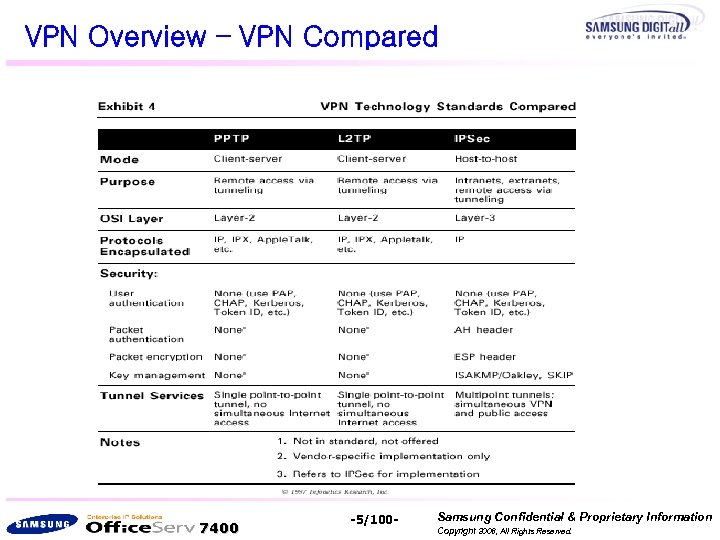 VPN Overview – VPN Compared 7400 -5/100 - Samsung Confidential & Proprietary Information Copyright 2006, All Rights Reserved.
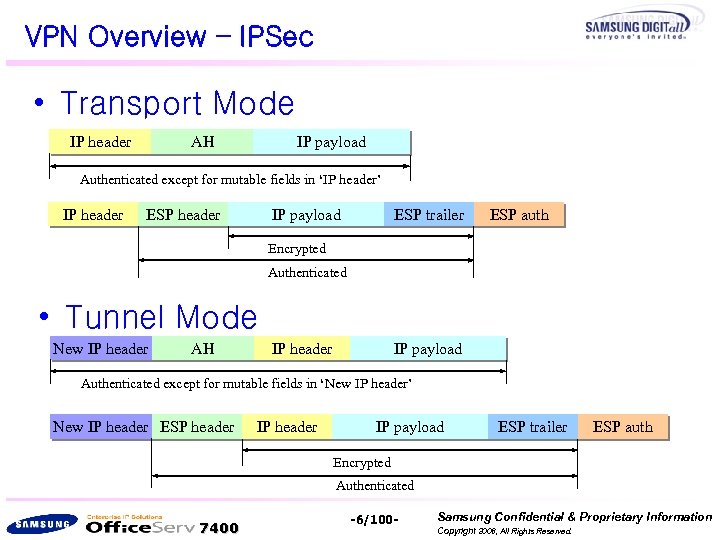 VPN Overview – IPSec • Transport Mode IP header AH IP payload Authenticated except for mutable fields in ‘IP header’ IP header ESP header IP payload ESP trailer ESP auth Encrypted Authenticated • Tunnel Mode New IP header AH IP header IP payload Authenticated except for mutable fields in ‘New IP header’ New IP header ESP header IP payload ESP trailer ESP auth Encrypted Authenticated 7400 -6/100 - Samsung Confidential & Proprietary Information Copyright 2006, All Rights Reserved.
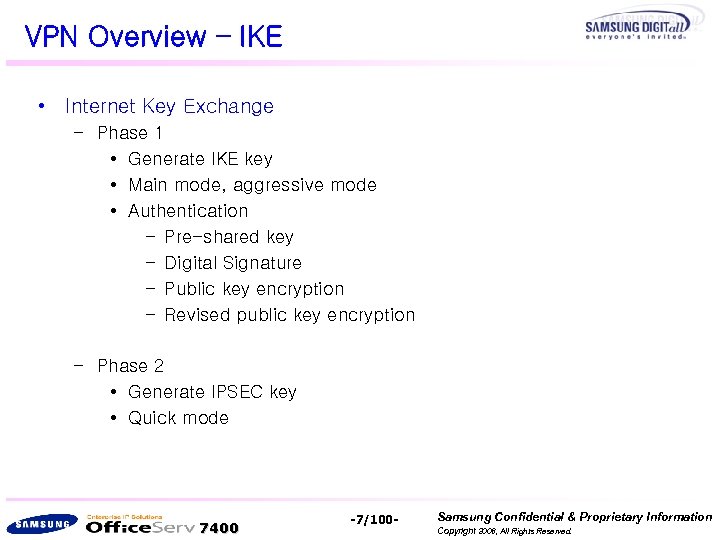 VPN Overview – IKE • Internet Key Exchange – Phase 1 • Generate IKE key • Main mode, aggressive mode • Authentication – Pre-shared key – Digital Signature – Public key encryption – Revised public key encryption – Phase 2 • Generate IPSEC key • Quick mode 7400 -7/100 - Samsung Confidential & Proprietary Information Copyright 2006, All Rights Reserved.
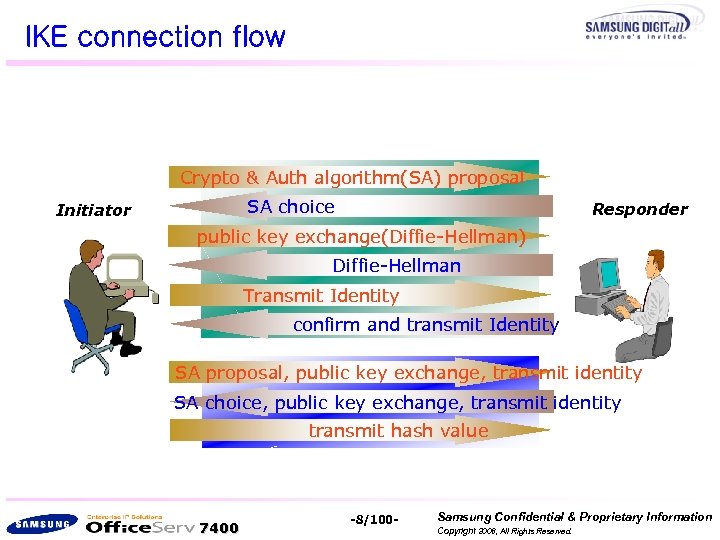 IKE connection flow Crypto & Auth algorithm(SA) proposal SA choice Initiator Responder public key exchange(Diffie-Hellman) Diffie-Hellman Transmit Identity confirm and transmit Identity SA proposal, public key exchange, transmit identity SA choice, public key exchange, transmit identity transmit hash value 7400 -8/100 - Samsung Confidential & Proprietary Information Copyright 2006, All Rights Reserved.
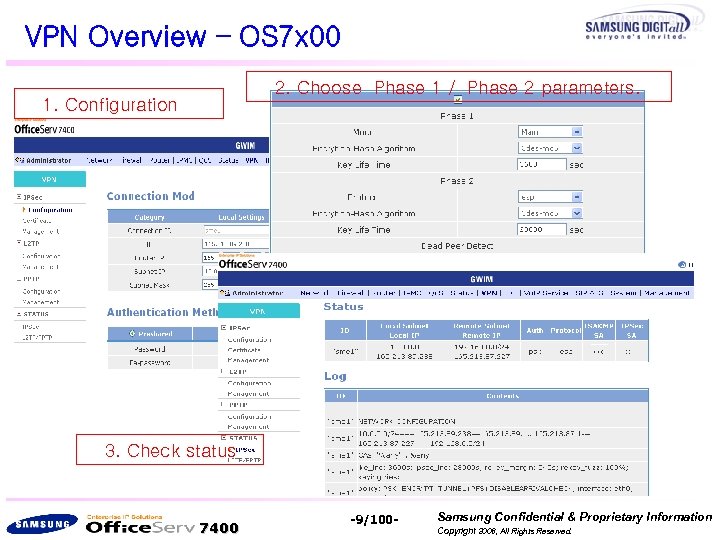 VPN Overview – OS 7 x 00 2. Choose Phase 1 / Phase 2 parameters. 1. Configuration 3. Check status 7400 -9/100 - Samsung Confidential & Proprietary Information Copyright 2006, All Rights Reserved.
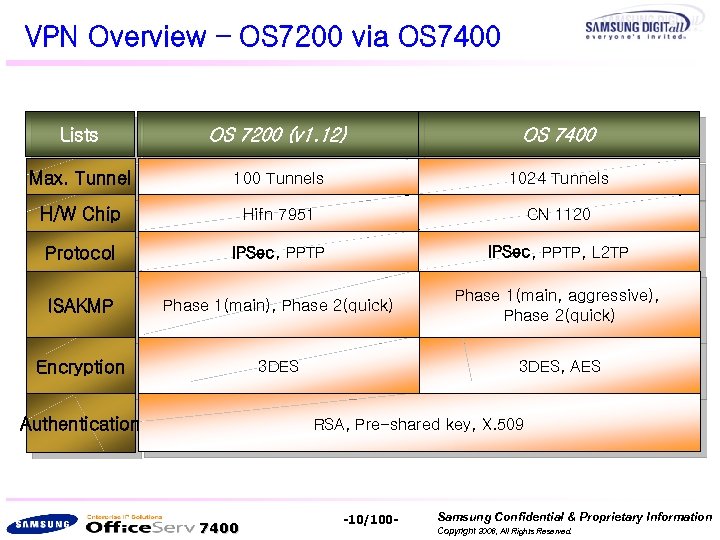 VPN Overview – OS 7200 via OS 7400 Lists OS 7200 (v 1. 12) OS 7400 Max. Tunnel 100 Tunnels 1024 Tunnels H/W Chip Hifn 7951 CN 1120 Protocol IPSec, PPTP, L 2 TP ISAKMP Phase 1(main), Phase 2(quick) Phase 1(main, aggressive), Phase 2(quick) Encryption 3 DES, AES Authentication RSA, Pre-shared key, X. 509 7400 -10/100 - Samsung Confidential & Proprietary Information Copyright 2006, All Rights Reserved.
 IPSec Configuration 7400 -11/100 - Samsung Confidential & Proprietary Information Copyright 2006, All Rights Reserved.
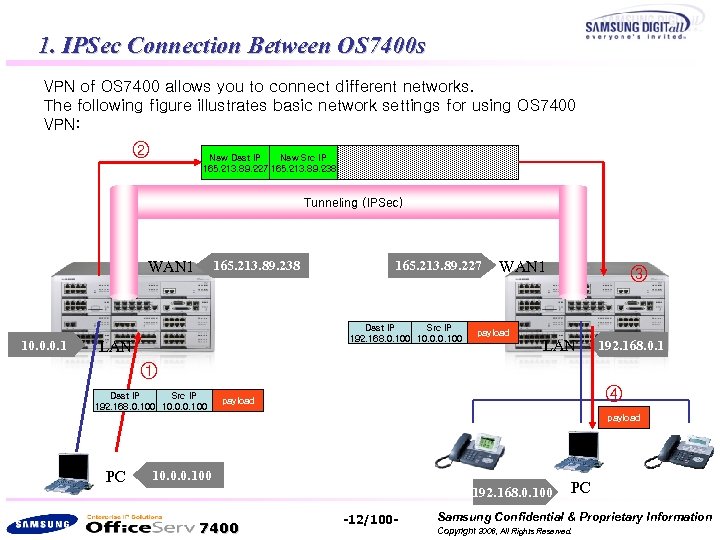 1. IPSec Connection Between OS 7400 s VPN of OS 7400 allows you to connect different networks. The following figure illustrates basic network settings for using OS 7400 VPN: ② Dest IP Src IP New Dest IP New Src IP 165. 213. 89. 227 165. 213. 89. 238 192. 168. 0. 100 10. 0. 0. 100 payload Tunneling (IPSec) WAN 1 10. 0. 0. 1 165. 213. 89. 238 165. 213. 89. 227 Dest IP Src IP 192. 168. 0. 100 10. 0. 0. 100 LAN WAN 1 payload ③ LAN 192. 168. 0. 1 ① Dest IP Src IP 192. 168. 0. 100 10. 0. 0. 100 ④ payload PC 10. 0. 0. 100 192. 168. 0. 100 7400 -12/100 - PC Samsung Confidential & Proprietary Information Copyright 2006, All Rights Reserved.
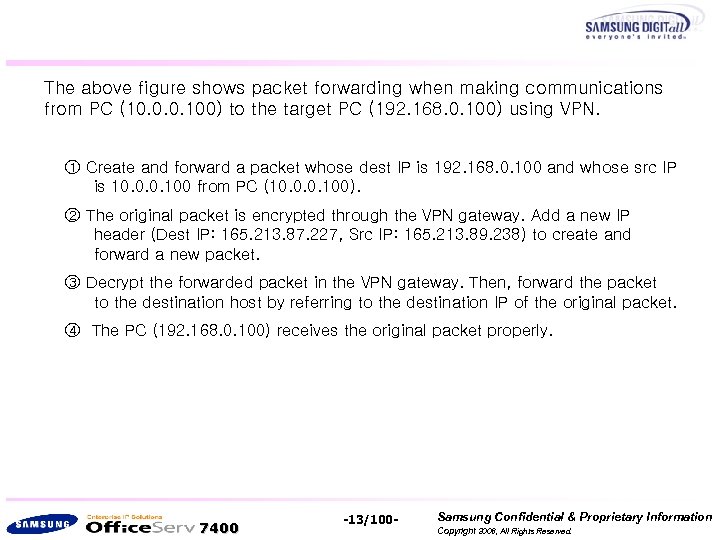 The above figure shows packet forwarding when making communications from PC (10. 0. 0. 100) to the target PC (192. 168. 0. 100) using VPN. ① Create and forward a packet whose dest IP is 192. 168. 0. 100 and whose src IP is 10. 0. 0. 100 from PC (10. 0. 0. 100). ② The original packet is encrypted through the VPN gateway. Add a new IP header (Dest IP: 165. 213. 87. 227, Src IP: 165. 213. 89. 238) to create and forward a new packet. ③ Decrypt the forwarded packet in the VPN gateway. Then, forward the packet to the destination host by referring to the destination IP of the original packet. ④ The PC (192. 168. 0. 100) receives the original packet properly. 7400 -13/100 - Samsung Confidential & Proprietary Information Copyright 2006, All Rights Reserved.
![RSA key (1) If you click [VPN] from the main menu, the following window](https://present5.com/presentation/99f30b9113ae4c0b11672adc8dad5ba5/image-14.jpg "RSA key (1) If you click [VPN] from the main menu, the following window") RSA key (1) If you click [VPN] from the main menu, the following window will appear. Click the [Add] button to select a VPN gateway and to determine an authorization method. 7400 -14/100 - Samsung Confidential & Proprietary Information Copyright 2006, All Rights Reserved.
RSA key (1) If you click [VPN] from the main menu, the following window will appear. Click the [Add] button to select a VPN gateway and to determine an authorization method. 7400 -14/100 - Samsung Confidential & Proprietary Information Copyright 2006, All Rights Reserved.
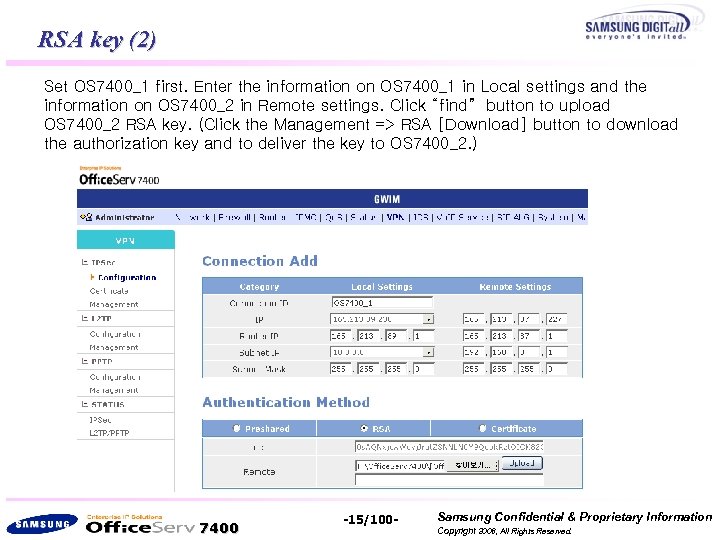 RSA key (2) Set OS 7400_1 first. Enter the information on OS 7400_1 in Local settings and the information on OS 7400_2 in Remote settings. Click “find” button to upload OS 7400_2 RSA key. (Click the Management => RSA [Download] button to download the authorization key and to deliver the key to OS 7400_2. ) 7400 -15/100 - Samsung Confidential & Proprietary Information Copyright 2006, All Rights Reserved.
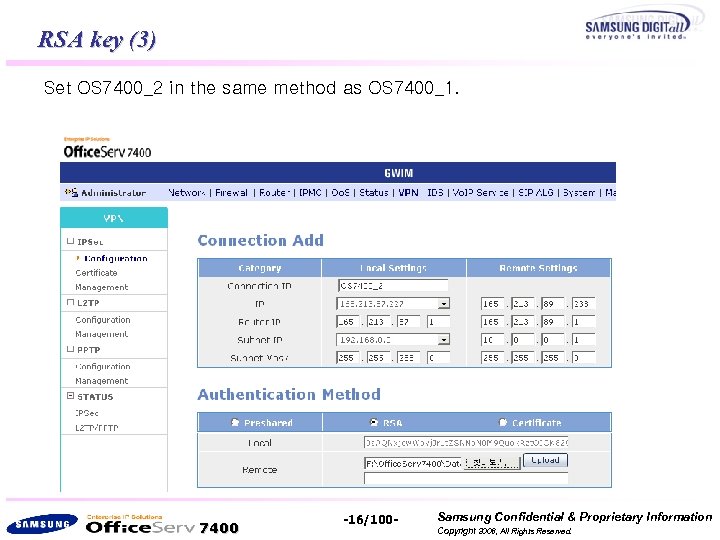 RSA key (3) Set OS 7400_2 in the same method as OS 7400_1. OS 7400_2 7400 -16/100 - Samsung Confidential & Proprietary Information Copyright 2006, All Rights Reserved.
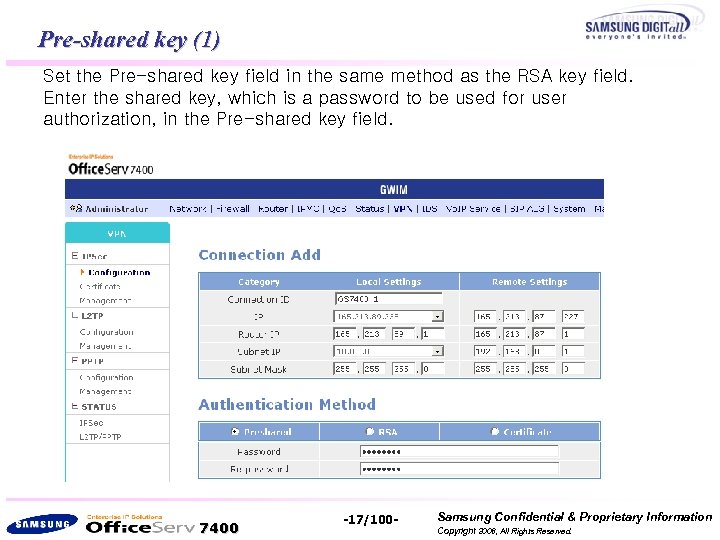 Pre-shared key (1) Set the Pre-shared key field in the same method as the RSA key field. Enter the shared key, which is a password to be used for user authorization, in the Pre-shared key field. 7400 -17/100 - Samsung Confidential & Proprietary Information Copyright 2006, All Rights Reserved.
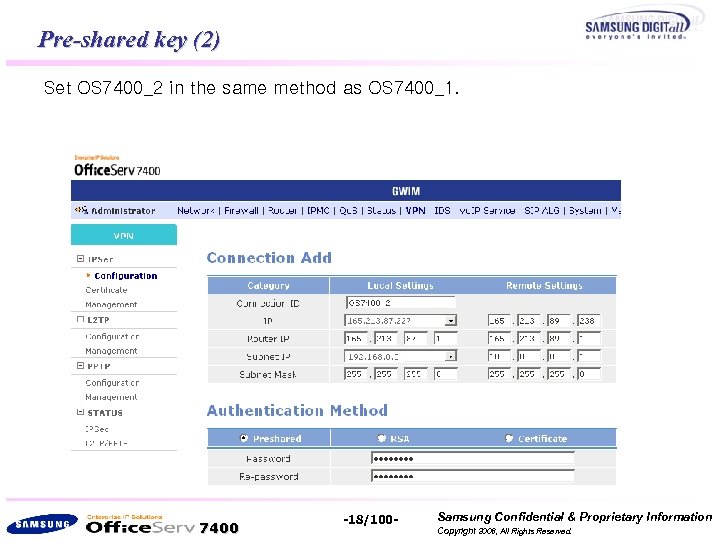 Pre-shared key (2) Set OS 7400_2 in the same method as OS 7400_1. 7400 -18/100 - Samsung Confidential & Proprietary Information Copyright 2006, All Rights Reserved.
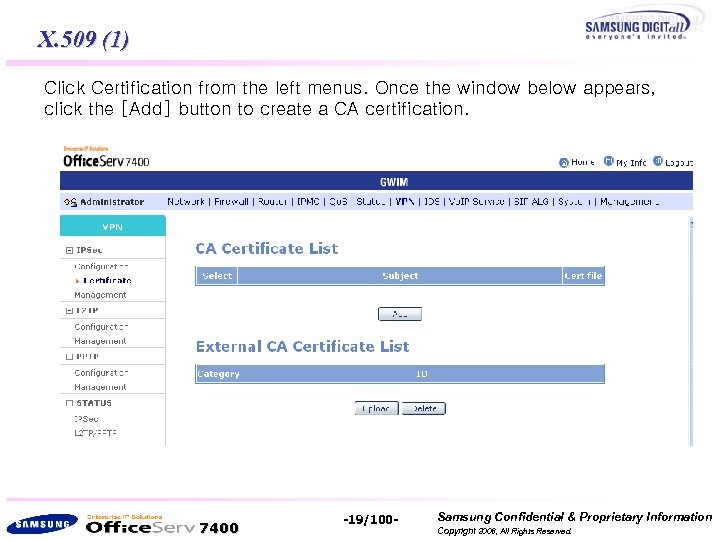 X. 509 (1) Click Certification from the left menus. Once the window below appears, click the [Add] button to create a CA certification. 7400 -19/100 - Samsung Confidential & Proprietary Information Copyright 2006, All Rights Reserved.
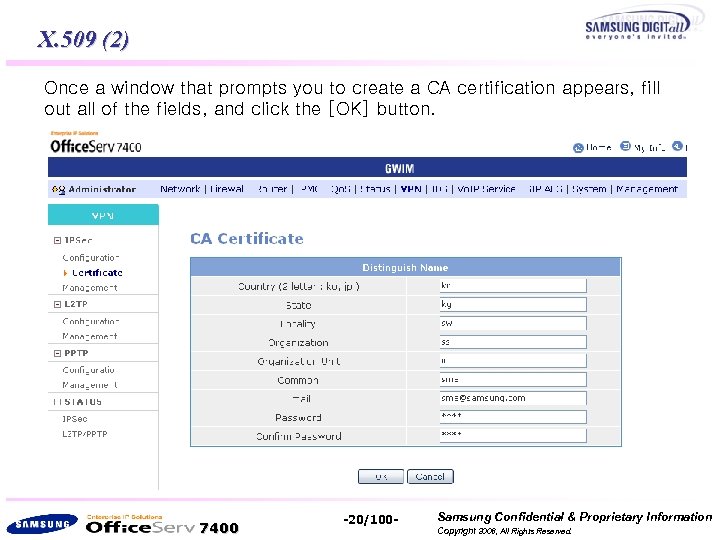 X. 509 (2) Once a window that prompts you to create a CA certification appears, fill out all of the fields, and click the [OK] button. 7400 -20/100 - Samsung Confidential & Proprietary Information Copyright 2006, All Rights Reserved.
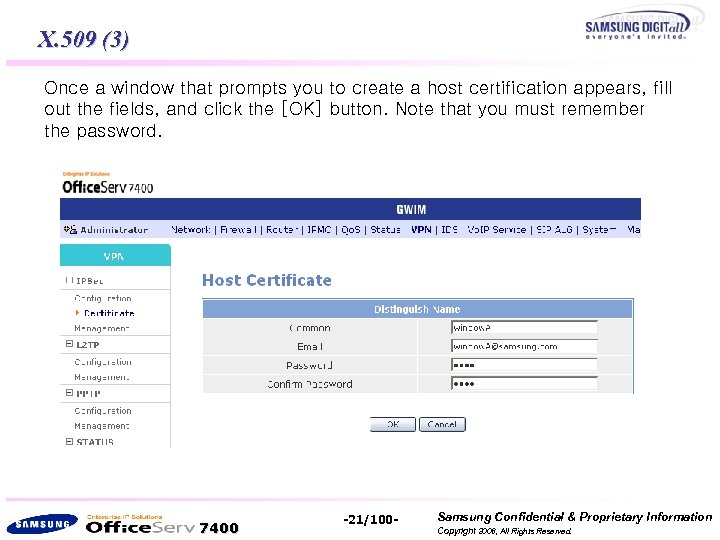 X. 509 (3) Once a window that prompts you to create a host certification appears, fill out the fields, and click the [OK] button. Note that you must remember the password. 7400 -21/100 - Samsung Confidential & Proprietary Information Copyright 2006, All Rights Reserved.
![X. 509 (4) Click the [Download] button from the window below to download a](https://present5.com/presentation/99f30b9113ae4c0b11672adc8dad5ba5/image-22.jpg "X. 509 (4) Click the [Download] button from the window below to download a") X. 509 (4) Click the [Download] button from the window below to download a certification. 7400 -22/100 - Samsung Confidential & Proprietary Information Copyright 2006, All Rights Reserved.
X. 509 (4) Click the [Download] button from the window below to download a certification. 7400 -22/100 - Samsung Confidential & Proprietary Information Copyright 2006, All Rights Reserved.
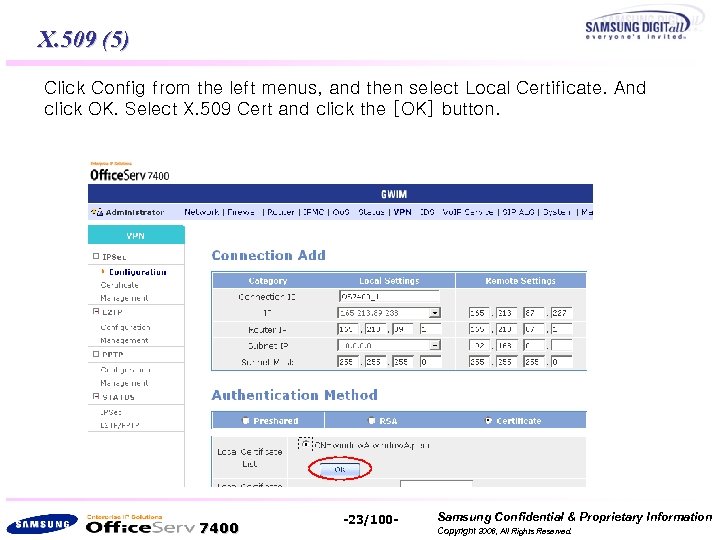 X. 509 (5) Click Config from the left menus, and then select Local Certificate. And click OK. Select X. 509 Cert and click the [OK] button. 7400 -23/100 - Samsung Confidential & Proprietary Information Copyright 2006, All Rights Reserved.
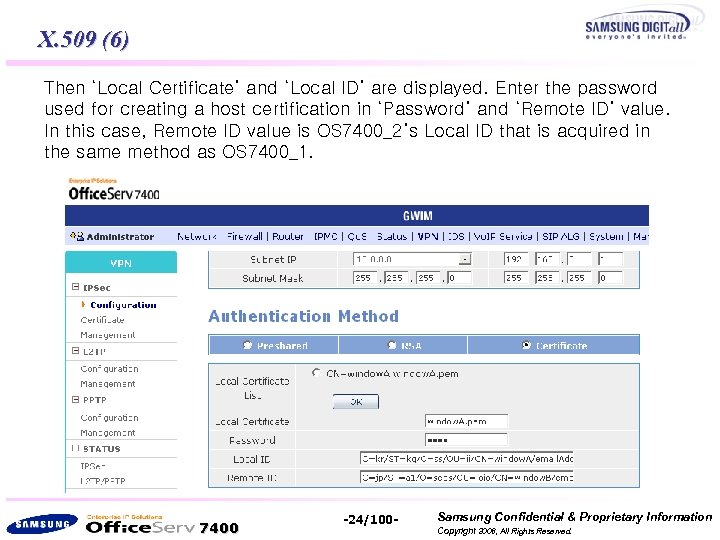 X. 509 (6) Then ‘Local Certificate’ and ‘Local ID’ are displayed. Enter the password used for creating a host certification in ‘Password’ and ‘Remote ID’ value. In this case, Remote ID value is OS 7400_2’s Local ID that is acquired in the same method as OS 7400_1. 7400 -24/100 - Samsung Confidential & Proprietary Information Copyright 2006, All Rights Reserved.
![X. 509 (7) In [Management] from the left menu, select external device and click](https://present5.com/presentation/99f30b9113ae4c0b11672adc8dad5ba5/image-25.jpg "X. 509 (7) In [Management] from the left menu, select external device and click") X. 509 (7) In [Management] from the left menu, select external device and click [ok] button. If Activity is set to Stopped, click the [Run] button. (If Activity is set to Running, click the [Stop] button, and then click the [Run] button again. ) 7400 -25/100 - Samsung Confidential & Proprietary Information Copyright 2006, All Rights Reserved.
X. 509 (7) In [Management] from the left menu, select external device and click [ok] button. If Activity is set to Stopped, click the [Run] button. (If Activity is set to Running, click the [Stop] button, and then click the [Run] button again. ) 7400 -25/100 - Samsung Confidential & Proprietary Information Copyright 2006, All Rights Reserved.
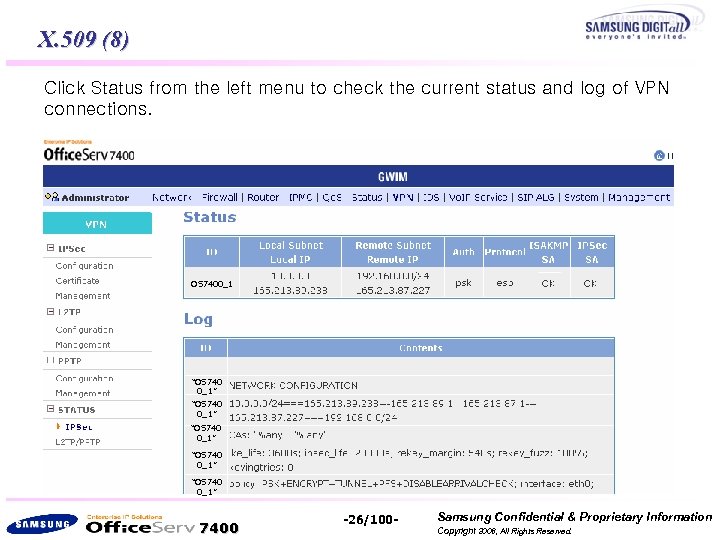 X. 509 (8) Click Status from the left menu to check the current status and log of VPN connections. OS 7400_1 “OS 740 0_1” “OS 740 0_1” 7400 -26/100 - Samsung Confidential & Proprietary Information Copyright 2006, All Rights Reserved.
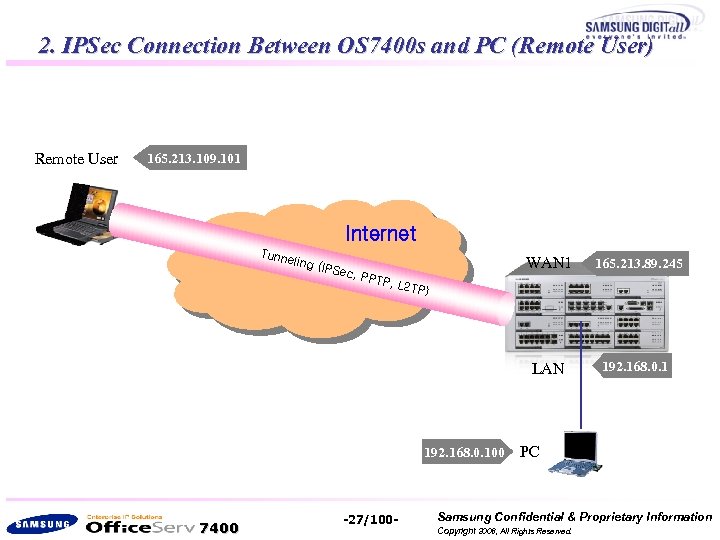 2. IPSec Connection Between OS 7400 s and PC (Remote User) Remote User 165. 213. 109. 101 Internet Tunn eling WAN 1 c, PP TP 192. 168. 0. 1 , L 2 T P) 192. 168. 0. 100 7400 165. 213. 89. 245 LAN (IPSe -27/100 - PC Samsung Confidential & Proprietary Information Copyright 2006, All Rights Reserved.
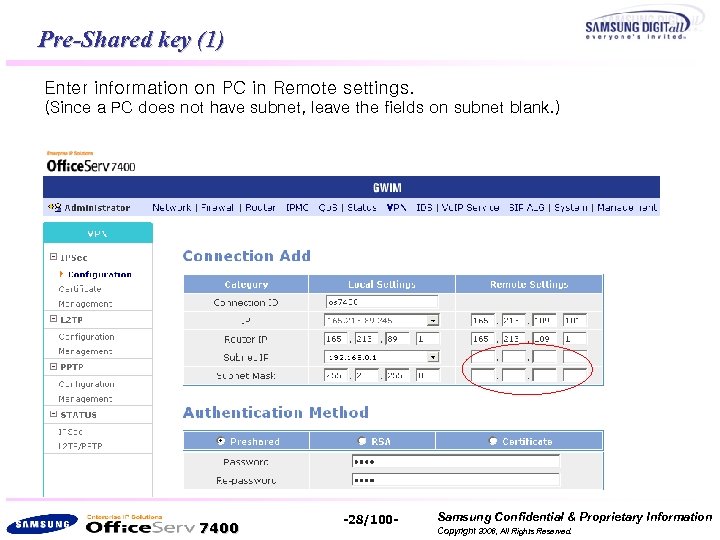 Pre-Shared key (1) Enter information on PC in Remote settings. (Since a PC does not have subnet, leave the fields on subnet blank. ) 7400 -28/100 - Samsung Confidential & Proprietary Information Copyright 2006, All Rights Reserved.
![Pre-Shared key - VPN Client (1) If you select [Start] -> [Run], and run](https://present5.com/presentation/99f30b9113ae4c0b11672adc8dad5ba5/image-29.jpg "Pre-Shared key - VPN Client (1) If you select [Start] -> [Run], and run") Pre-Shared key - VPN Client (1) If you select [Start] -> [Run], and run ‘mmc’, the window below will appear. Select [File] -> [Add/Remove Snap-In] from the Console window. 7400 -29/100 - Samsung Confidential & Proprietary Information Copyright 2006, All Rights Reserved.
Pre-Shared key - VPN Client (1) If you select [Start] -> [Run], and run ‘mmc’, the window below will appear. Select [File] -> [Add/Remove Snap-In] from the Console window. 7400 -29/100 - Samsung Confidential & Proprietary Information Copyright 2006, All Rights Reserved.
![Pre-Shared key - VPN Client (2) If you click the [Add] button from the](https://present5.com/presentation/99f30b9113ae4c0b11672adc8dad5ba5/image-30.jpg "Pre-Shared key - VPN Client (2) If you click the [Add] button from the") Pre-Shared key - VPN Client (2) If you click the [Add] button from the
Pre-Shared key - VPN Client (2) If you click the [Add] button from the
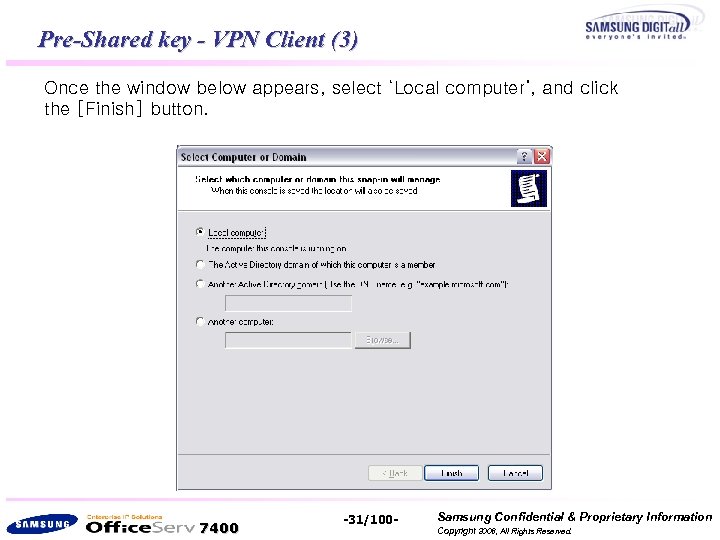 Pre-Shared key - VPN Client (3) Once the window below appears, select ‘Local computer’, and click the [Finish] button. 7400 -31/100 - Samsung Confidential & Proprietary Information Copyright 2006, All Rights Reserved.
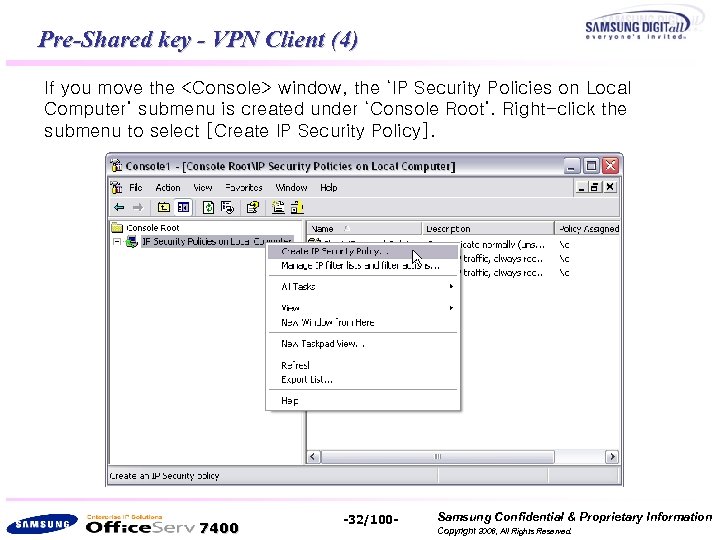 Pre-Shared key - VPN Client (4) If you move the
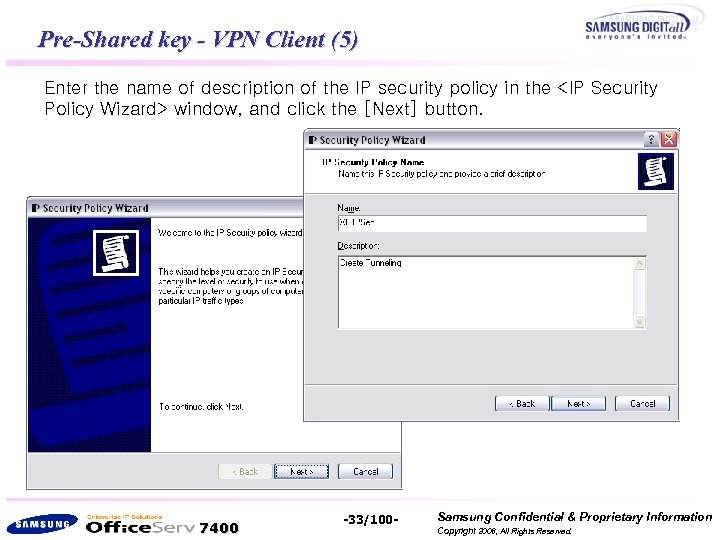 Pre-Shared key - VPN Client (5) Enter the name of description of the IP security policy in the
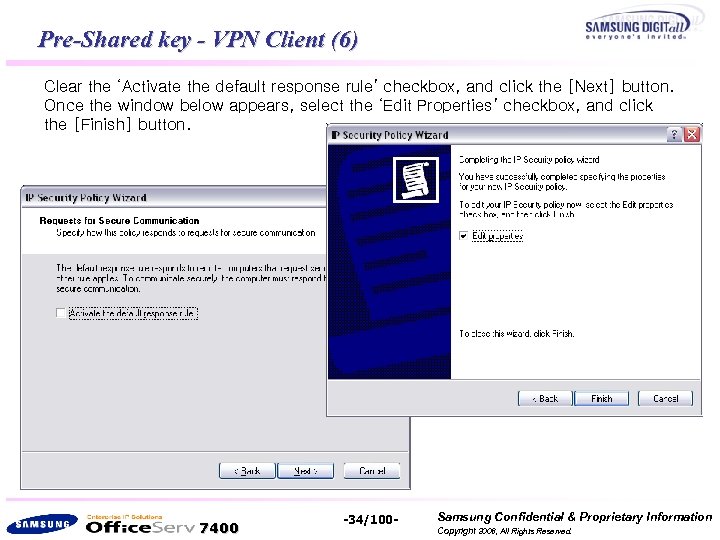 Pre-Shared key - VPN Client (6) Clear the ‘Activate the default response rule’ checkbox, and click the [Next] button. Once the window below appears, select the ‘Edit Properties’ checkbox, and click the [Finish] button. 7400 -34/100 - Samsung Confidential & Proprietary Information Copyright 2006, All Rights Reserved.
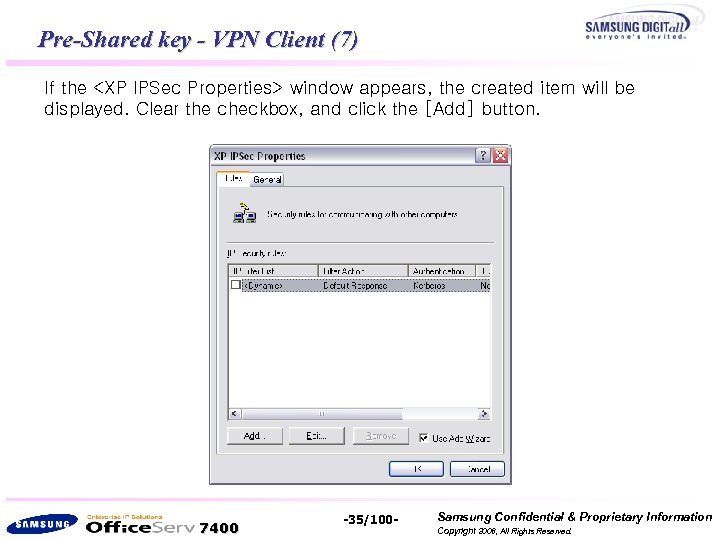 Pre-Shared key - VPN Client (7) If the
![Pre-Shared key - VPN Client (8) Once <Security Rule Wizard> starts, click the [Next]](https://present5.com/presentation/99f30b9113ae4c0b11672adc8dad5ba5/image-36.jpg "Pre-Shared key - VPN Client (8) Once <Security Rule Wizard> starts, click the [Next]") Pre-Shared key - VPN Client (8) Once
Pre-Shared key - VPN Client (8) Once
![Pre-Shared key - VPN Client (9) If you select ‘ Local Area Network[lan]’ from](https://present5.com/presentation/99f30b9113ae4c0b11672adc8dad5ba5/image-37.jpg "Pre-Shared key - VPN Client (9) If you select ‘ Local Area Network[lan]’ from") Pre-Shared key - VPN Client (9) If you select ‘ Local Area Network[lan]’ from the
Pre-Shared key - VPN Client (9) If you select ‘ Local Area Network[lan]’ from the
![Pre-Shared key - VPN Client (10) If you click the [Add] button from the](https://present5.com/presentation/99f30b9113ae4c0b11672adc8dad5ba5/image-38.jpg "Pre-Shared key - VPN Client (10) If you click the [Add] button from the") Pre-Shared key - VPN Client (10) If you click the [Add] button from the
Pre-Shared key - VPN Client (10) If you click the [Add] button from the
![Pre-Shared key - VPN Client (11) If you click the [Next] button from the](https://present5.com/presentation/99f30b9113ae4c0b11672adc8dad5ba5/image-39.jpg "Pre-Shared key - VPN Client (11) If you click the [Next] button from the") Pre-Shared key - VPN Client (11) If you click the [Next] button from the
Pre-Shared key - VPN Client (11) If you click the [Next] button from the
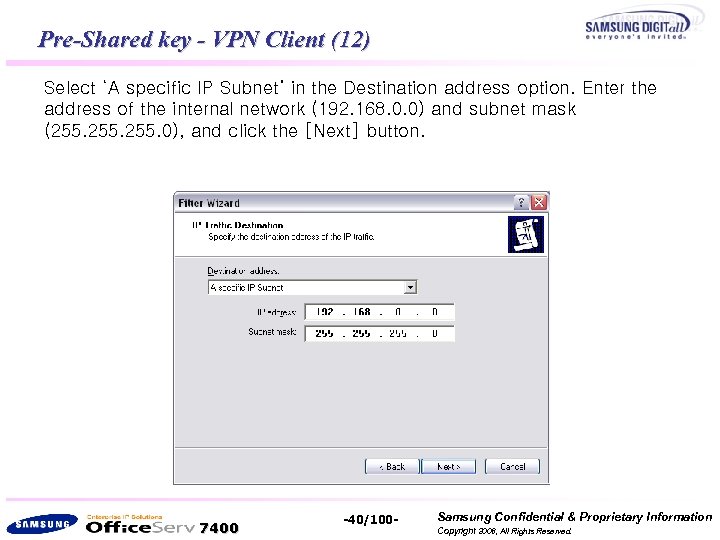 Pre-Shared key - VPN Client (12) Select ‘A specific IP Subnet’ in the Destination address option. Enter the address of the internal network (192. 168. 0. 0) and subnet mask (255. 0), and click the [Next] button. 7400 -40/100 - Samsung Confidential & Proprietary Information Copyright 2006, All Rights Reserved.
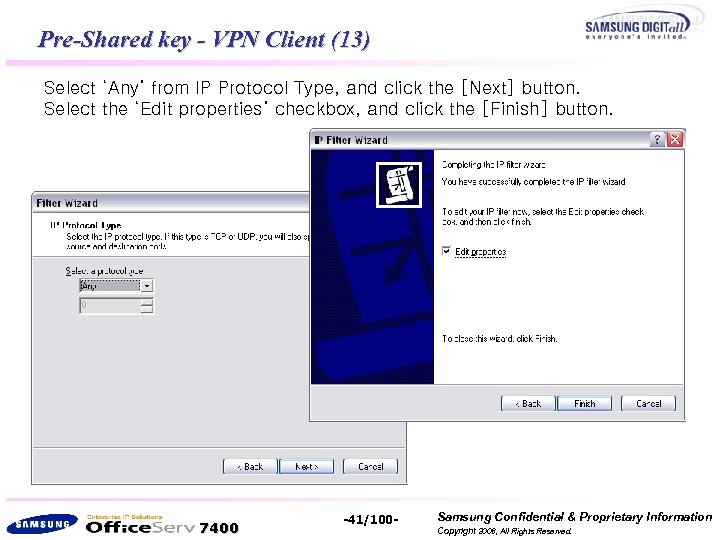 Pre-Shared key - VPN Client (13) Select ‘Any’ from IP Protocol Type, and click the [Next] button. Select the ‘Edit properties’ checkbox, and click the [Finish] button. 7400 -41/100 - Samsung Confidential & Proprietary Information Copyright 2006, All Rights Reserved.
![Pre-Shared key - VPN Client (14) If you click the [OK] button, the outbound](https://present5.com/presentation/99f30b9113ae4c0b11672adc8dad5ba5/image-42.jpg "Pre-Shared key - VPN Client (14) If you click the [OK] button, the outbound") Pre-Shared key - VPN Client (14) If you click the [OK] button, the outbound option will be created as shown in the figure below. Click the [Add] button to create the ‘inbound’ option. Enter 192. 168. 0. 0 and 255. 0 in ‘A specific IP Subnet’ of Source Address. Select ‘My IP Address’ from Destination Address. The next settings are the same as the previous ones. 7400 -42/100 - Samsung Confidential & Proprietary Information Copyright 2006, All Rights Reserved.
Pre-Shared key - VPN Client (14) If you click the [OK] button, the outbound option will be created as shown in the figure below. Click the [Add] button to create the ‘inbound’ option. Enter 192. 168. 0. 0 and 255. 0 in ‘A specific IP Subnet’ of Source Address. Select ‘My IP Address’ from Destination Address. The next settings are the same as the previous ones. 7400 -42/100 - Samsung Confidential & Proprietary Information Copyright 2006, All Rights Reserved.
![Pre-Shared key - VPN Client (15) If you click the [OK] button, the window](https://present5.com/presentation/99f30b9113ae4c0b11672adc8dad5ba5/image-43.jpg "Pre-Shared key - VPN Client (15) If you click the [OK] button, the window") Pre-Shared key - VPN Client (15) If you click the [OK] button, the window below will appear. Select the ‘outbound’ option, and click the [Next] button. 7400 -43/100 - Samsung Confidential & Proprietary Information Copyright 2006, All Rights Reserved.
Pre-Shared key - VPN Client (15) If you click the [OK] button, the window below will appear. Select the ‘outbound’ option, and click the [Next] button. 7400 -43/100 - Samsung Confidential & Proprietary Information Copyright 2006, All Rights Reserved.
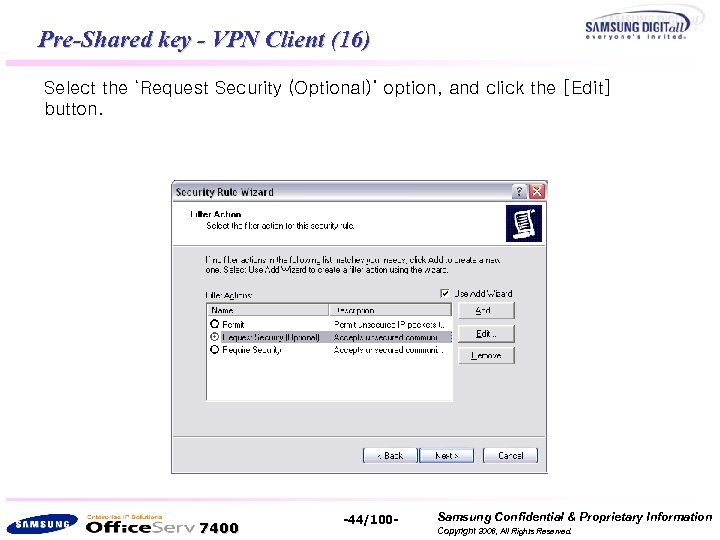 Pre-Shared key - VPN Client (16) Select the ‘Request Security (Optional)’ option, and click the [Edit] button. 7400 -44/100 - Samsung Confidential & Proprietary Information Copyright 2006, All Rights Reserved.
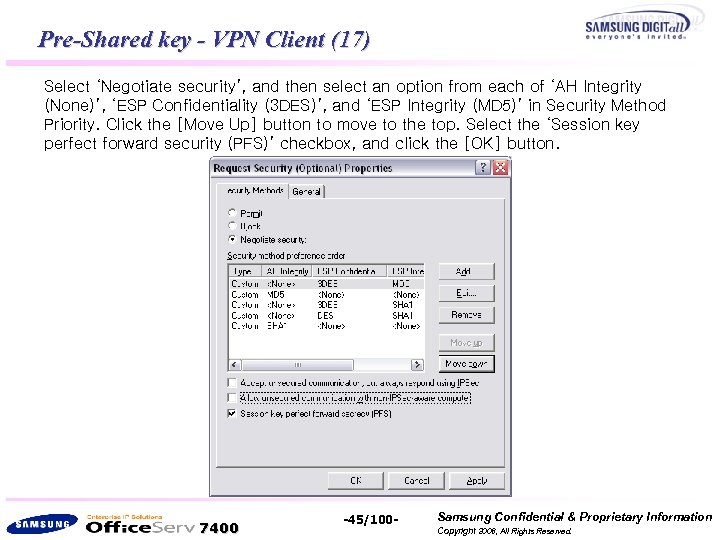 Pre-Shared key - VPN Client (17) Select ‘Negotiate security’, and then select an option from each of ‘AH Integrity (None)’, ‘ESP Confidentiality (3 DES)’, and ‘ESP Integrity (MD 5)’ in Security Method Priority. Click the [Move Up] button to move to the top. Select the ‘Session key perfect forward security (PFS)’ checkbox, and click the [OK] button. 7400 -45/100 - Samsung Confidential & Proprietary Information Copyright 2006, All Rights Reserved.
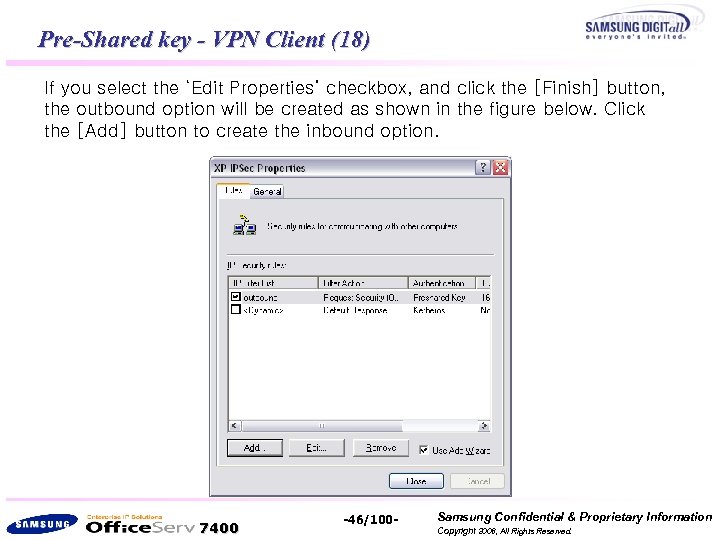 Pre-Shared key - VPN Client (18) If you select the ‘Edit Properties’ checkbox, and click the [Finish] button, the outbound option will be created as shown in the figure below. Click the [Add] button to create the inbound option. 7400 -46/100 - Samsung Confidential & Proprietary Information Copyright 2006, All Rights Reserved.
![Pre-Shared key - VPN Client (19) Once <Security Rule Wizard> starts, click the [Next]](https://present5.com/presentation/99f30b9113ae4c0b11672adc8dad5ba5/image-47.jpg "Pre-Shared key - VPN Client (19) Once <Security Rule Wizard> starts, click the [Next]") Pre-Shared key - VPN Client (19) Once
Pre-Shared key - VPN Client (19) Once
![Pre-Shared key - VPN Client (20) If you select ‘Local area network[LAN]’ from the](https://present5.com/presentation/99f30b9113ae4c0b11672adc8dad5ba5/image-48.jpg "Pre-Shared key - VPN Client (20) If you select ‘Local area network[LAN]’ from the") Pre-Shared key - VPN Client (20) If you select ‘Local area network[LAN]’ from the
Pre-Shared key - VPN Client (20) If you select ‘Local area network[LAN]’ from the
![Pre-Shared key - VPN Client (21) If you click the [OK] button, the <IP](https://present5.com/presentation/99f30b9113ae4c0b11672adc8dad5ba5/image-49.jpg "Pre-Shared key - VPN Client (21) If you click the [OK] button, the <IP") Pre-Shared key - VPN Client (21) If you click the [OK] button, the
Pre-Shared key - VPN Client (21) If you click the [OK] button, the
![Pre-Shared key - VPN Client (22) Select the [General] tab from the <XP IPSec](https://present5.com/presentation/99f30b9113ae4c0b11672adc8dad5ba5/image-50.jpg "Pre-Shared key - VPN Client (22) Select the [General] tab from the <XP IPSec") Pre-Shared key - VPN Client (22) Select the [General] tab from the
Pre-Shared key - VPN Client (22) Select the [General] tab from the
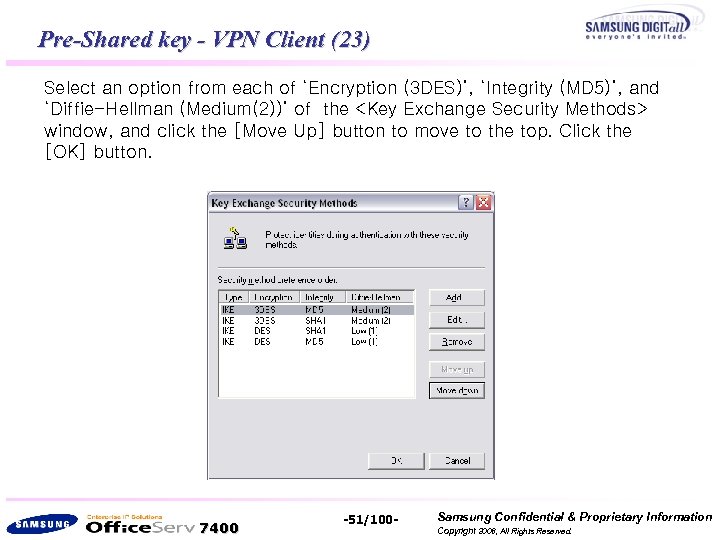 Pre-Shared key - VPN Client (23) Select an option from each of ‘Encryption (3 DES)’, ‘Integrity (MD 5)’, and ‘Diffie-Hellman (Medium(2))’ of the
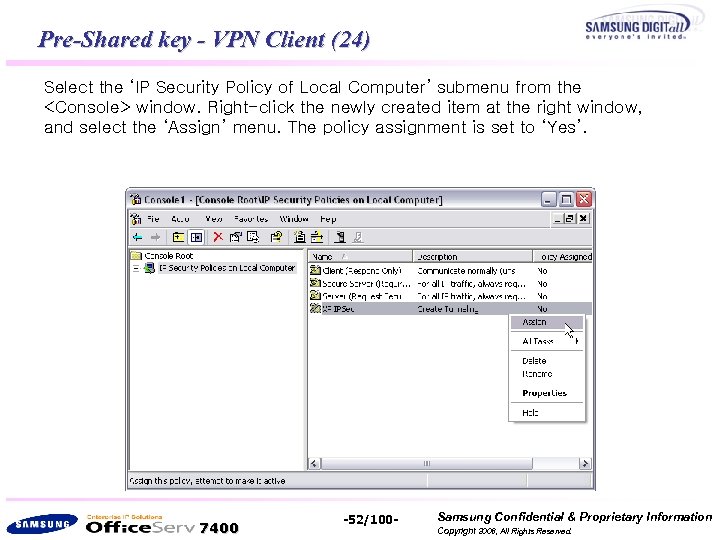 Pre-Shared key - VPN Client (24) Select the ‘IP Security Policy of Local Computer’ submenu from the
![Pre-Shared key - VPN Client (25) Select [Start]->[Programs]->[Administrative Tools]->[Services] from the Windows taskbar. Right-click](https://present5.com/presentation/99f30b9113ae4c0b11672adc8dad5ba5/image-53.jpg "Pre-Shared key - VPN Client (25) Select [Start]->[Programs]->[Administrative Tools]->[Services] from the Windows taskbar. Right-click") Pre-Shared key - VPN Client (25) Select [Start]->[Programs]->[Administrative Tools]->[Services] from the Windows taskbar. Right-click ‘IPSEC Services’, and click ‘Restart’. 7400 -53/100 - Samsung Confidential & Proprietary Information Copyright 2006, All Rights Reserved.
Pre-Shared key - VPN Client (25) Select [Start]->[Programs]->[Administrative Tools]->[Services] from the Windows taskbar. Right-click ‘IPSEC Services’, and click ‘Restart’. 7400 -53/100 - Samsung Confidential & Proprietary Information Copyright 2006, All Rights Reserved.
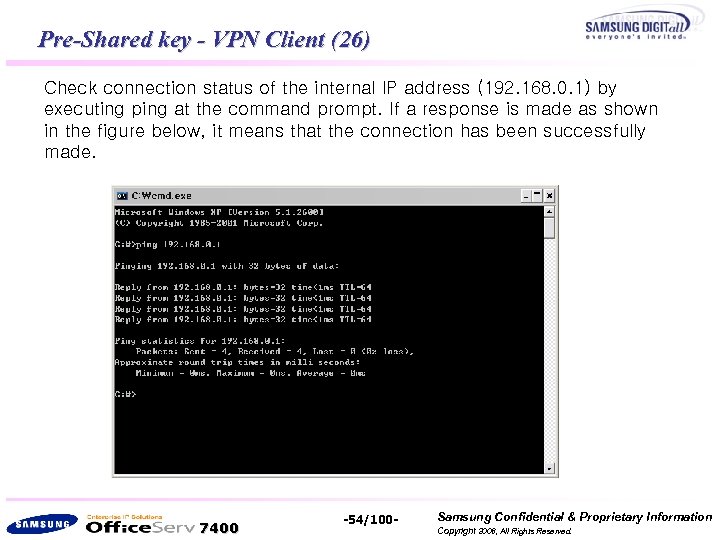 Pre-Shared key - VPN Client (26) Check connection status of the internal IP address (192. 168. 0. 1) by executing ping at the command prompt. If a response is made as shown in the figure below, it means that the connection has been successfully made. 7400 -54/100 - Samsung Confidential & Proprietary Information Copyright 2006, All Rights Reserved.
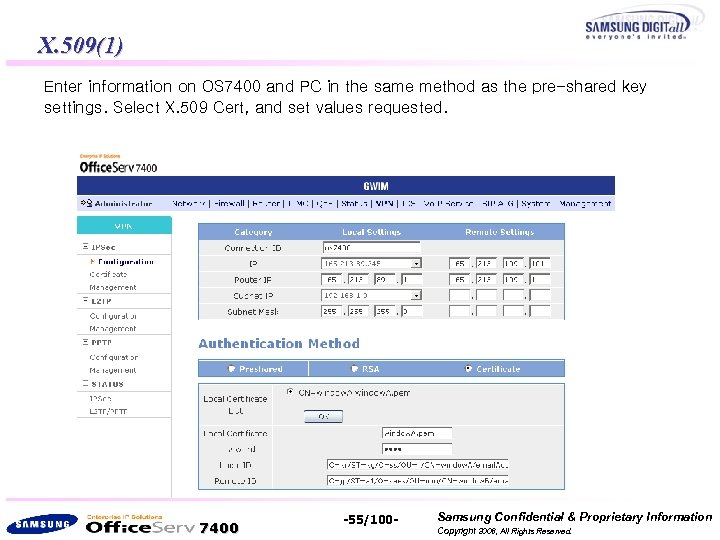 X. 509(1) Enter information on OS 7400 and PC in the same method as the pre-shared key settings. Select X. 509 Cert, and set values requested. 7400 -55/100 - Samsung Confidential & Proprietary Information Copyright 2006, All Rights Reserved.
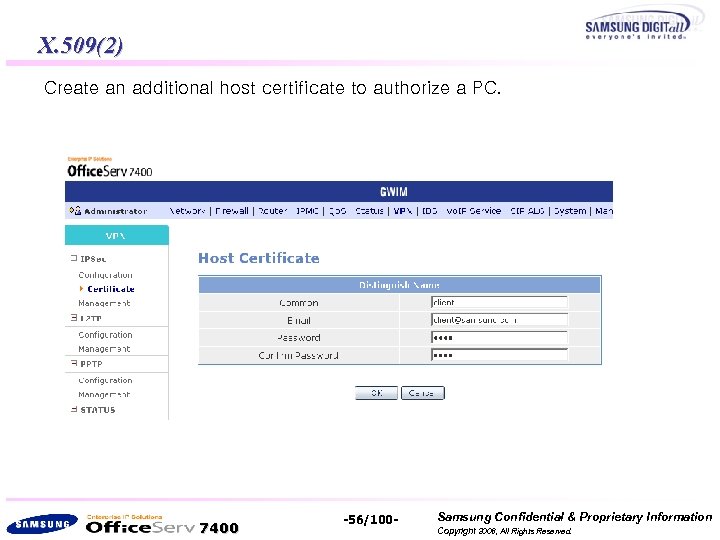 X. 509(2) Create an additional host certificate to authorize a PC. 7400 -56/100 - Samsung Confidential & Proprietary Information Copyright 2006, All Rights Reserved.
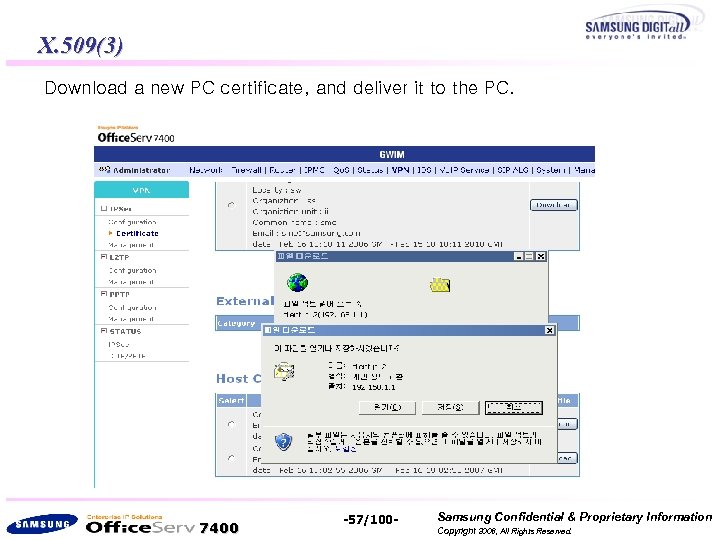 X. 509(3) Download a new PC certificate, and deliver it to the PC. 7400 -57/100 - Samsung Confidential & Proprietary Information Copyright 2006, All Rights Reserved.
![X. 509 - VPN Client (1) If you select [Start]-> [Run] from the Windows](https://present5.com/presentation/99f30b9113ae4c0b11672adc8dad5ba5/image-58.jpg "X. 509 - VPN Client (1) If you select [Start]-> [Run] from the Windows") X. 509 - VPN Client (1) If you select [Start]-> [Run] from the Windows taskbar and run ‘mmc’, the window below will appear. Select [File]->[Add/Remove Snap-in] from the Console window. 7400 -58/100 - Samsung Confidential & Proprietary Information Copyright 2006, All Rights Reserved.
X. 509 - VPN Client (1) If you select [Start]-> [Run] from the Windows taskbar and run ‘mmc’, the window below will appear. Select [File]->[Add/Remove Snap-in] from the Console window. 7400 -58/100 - Samsung Confidential & Proprietary Information Copyright 2006, All Rights Reserved.
![X. 509 - VPN Client (2) If you click the [Add] button from the](https://present5.com/presentation/99f30b9113ae4c0b11672adc8dad5ba5/image-59.jpg "X. 509 - VPN Client (2) If you click the [Add] button from the") X. 509 - VPN Client (2) If you click the [Add] button from the
X. 509 - VPN Client (2) If you click the [Add] button from the
![X. 509 - VPN Client(3) Select ‘Computer account’, and click the [Next] button. 7400](https://present5.com/presentation/99f30b9113ae4c0b11672adc8dad5ba5/image-60.jpg "X. 509 - VPN Client(3) Select ‘Computer account’, and click the [Next] button. 7400") X. 509 - VPN Client(3) Select ‘Computer account’, and click the [Next] button. 7400 -60/100 - Samsung Confidential & Proprietary Information Copyright 2006, All Rights Reserved.
X. 509 - VPN Client(3) Select ‘Computer account’, and click the [Next] button. 7400 -60/100 - Samsung Confidential & Proprietary Information Copyright 2006, All Rights Reserved.
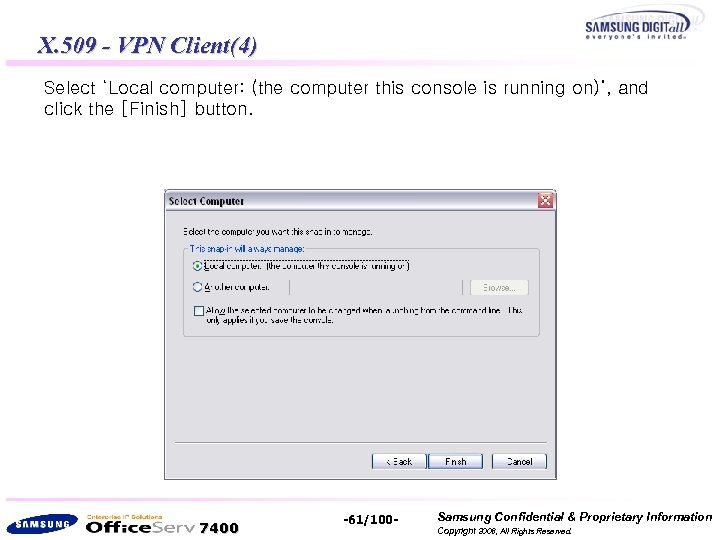 X. 509 - VPN Client(4) Select ‘Local computer: (the computer this console is running on)’, and click the [Finish] button. 7400 -61/100 - Samsung Confidential & Proprietary Information Copyright 2006, All Rights Reserved.
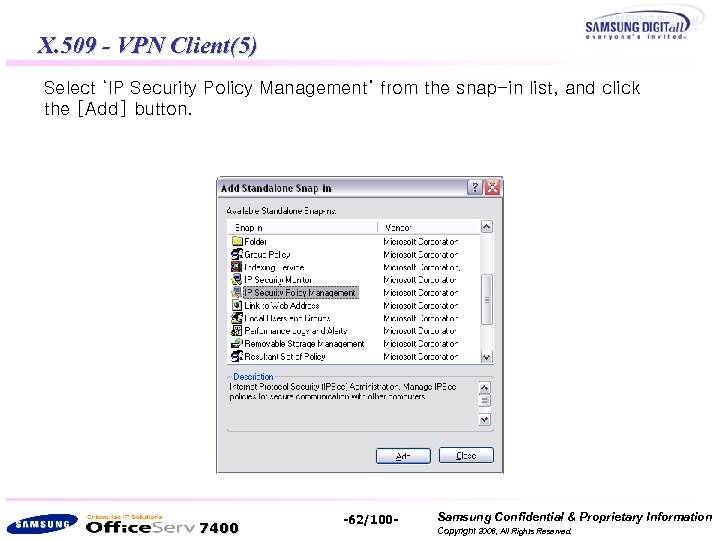 X. 509 - VPN Client(5) Select ‘IP Security Policy Management’ from the snap-in list, and click the [Add] button. 7400 -62/100 - Samsung Confidential & Proprietary Information Copyright 2006, All Rights Reserved.
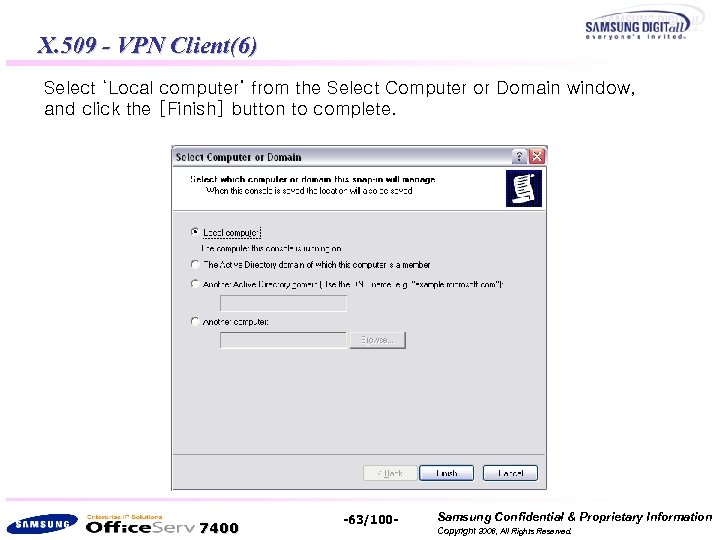 X. 509 - VPN Client(6) Select ‘Local computer’ from the Select Computer or Domain window, and click the [Finish] button to complete. 7400 -63/100 - Samsung Confidential & Proprietary Information Copyright 2006, All Rights Reserved.
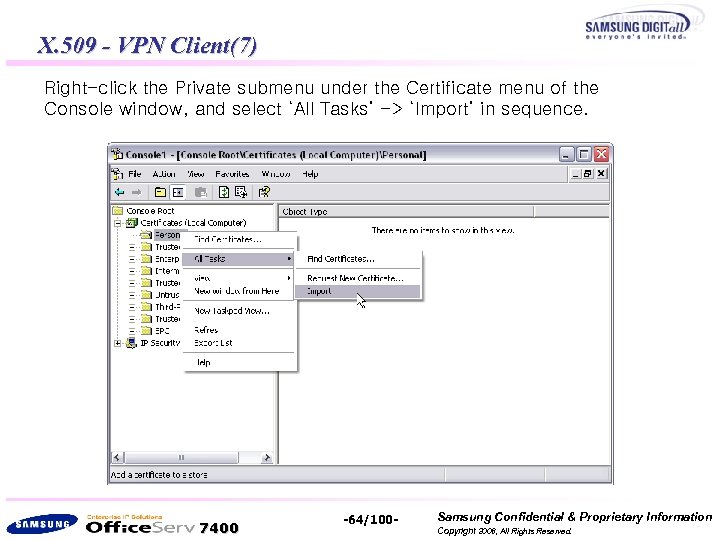 X. 509 - VPN Client(7) Right-click the Private submenu under the Certificate menu of the Console window, and select ‘All Tasks’ -> ‘Import’ in sequence. 7400 -64/100 - Samsung Confidential & Proprietary Information Copyright 2006, All Rights Reserved.
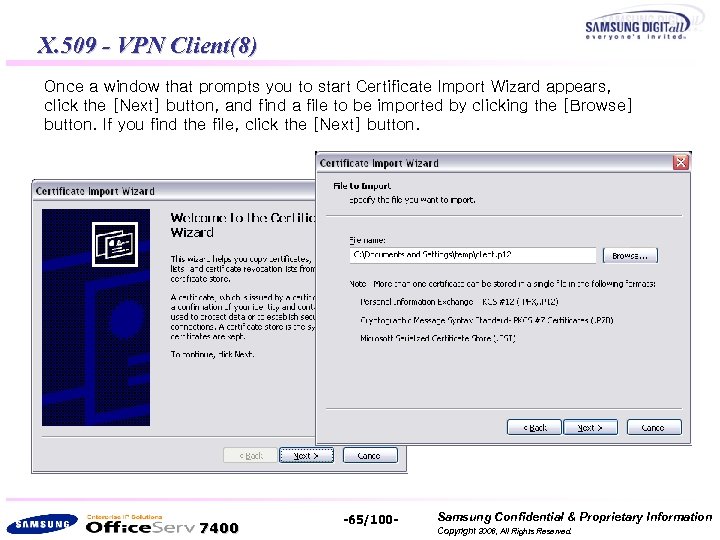 X. 509 - VPN Client(8) Once a window that prompts you to start Certificate Import Wizard appears, click the [Next] button, and find a file to be imported by clicking the [Browse] button. If you find the file, click the [Next] button. 7400 -65/100 - Samsung Confidential & Proprietary Information Copyright 2006, All Rights Reserved.
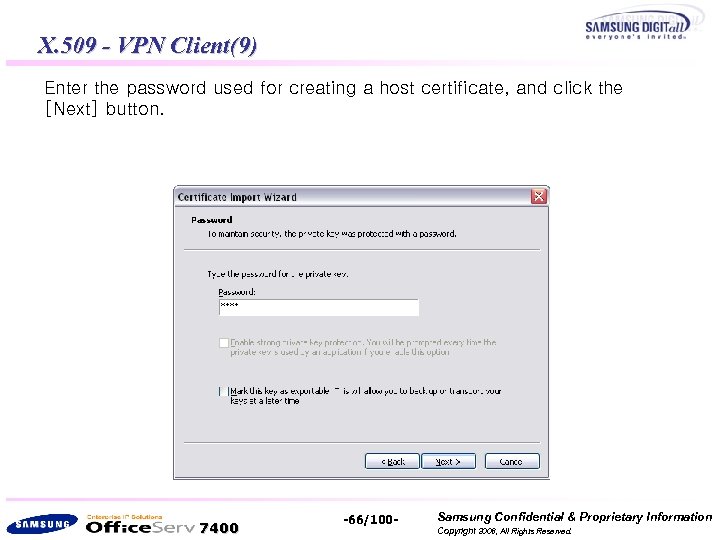 X. 509 - VPN Client(9) Enter the password used for creating a host certificate, and click the [Next] button. 7400 -66/100 - Samsung Confidential & Proprietary Information Copyright 2006, All Rights Reserved.
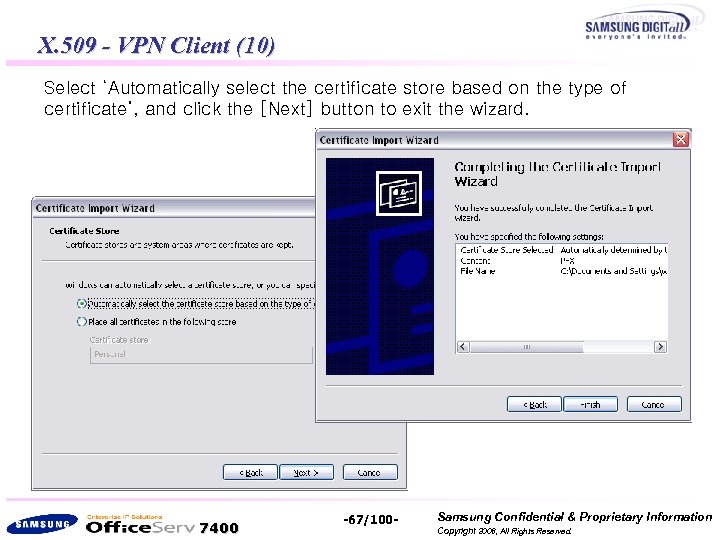 X. 509 - VPN Client (10) Select ‘Automatically select the certificate store based on the type of certificate’, and click the [Next] button to exit the wizard. 7400 -67/100 - Samsung Confidential & Proprietary Information Copyright 2006, All Rights Reserved.
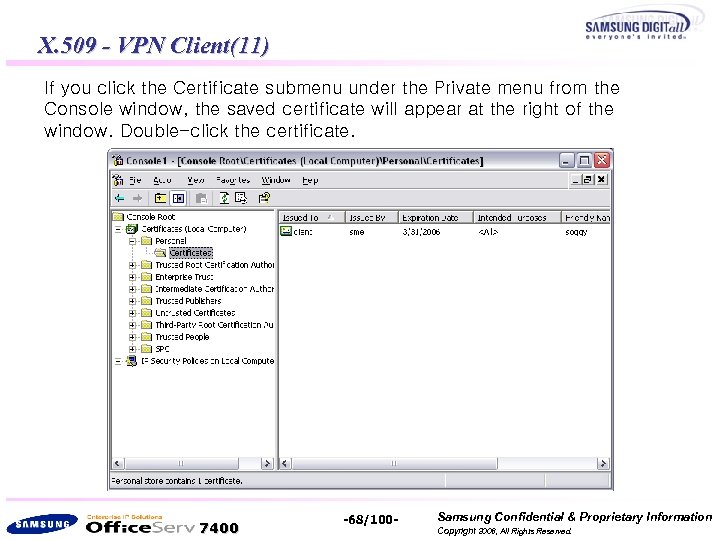 X. 509 - VPN Client(11) If you click the Certificate submenu under the Private menu from the Console window, the saved certificate will appear at the right of the window. Double-click the certificate. 7400 -68/100 - Samsung Confidential & Proprietary Information Copyright 2006, All Rights Reserved.
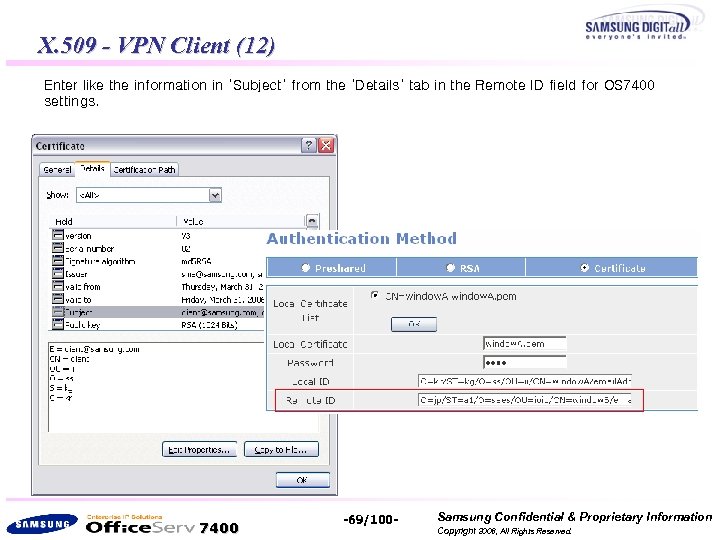 X. 509 - VPN Client (12) Enter like the information in ‘Subject’ from the ‘Details’ tab in the Remote ID field for OS 7400 settings. 7400 -69/100 - Samsung Confidential & Proprietary Information Copyright 2006, All Rights Reserved.
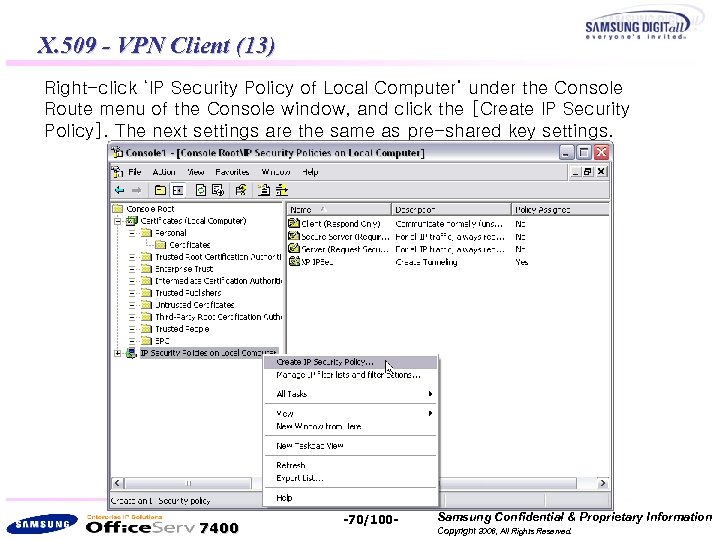 X. 509 - VPN Client (13) Right-click ‘IP Security Policy of Local Computer’ under the Console Route menu of the Console window, and click the [Create IP Security Policy]. The next settings are the same as pre-shared key settings. 7400 -70/100 - Samsung Confidential & Proprietary Information Copyright 2006, All Rights Reserved.
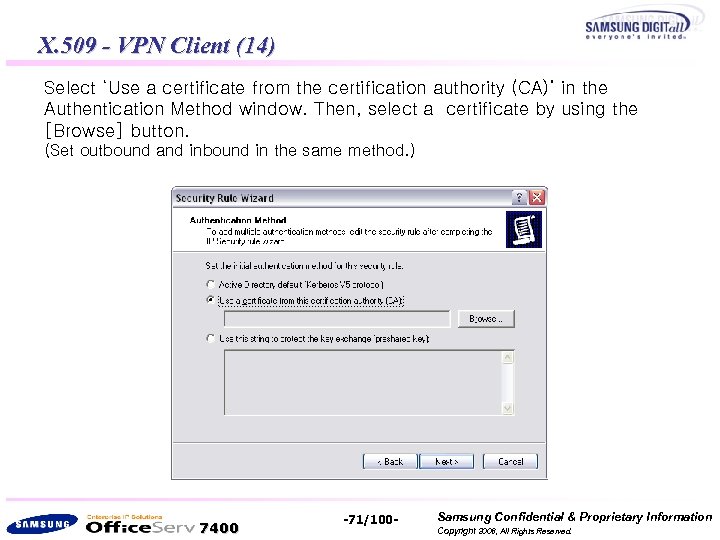 X. 509 - VPN Client (14) Select ‘Use a certificate from the certification authority (CA)’ in the Authentication Method window. Then, select a certificate by using the [Browse] button. (Set outbound and inbound in the same method. ) 7400 -71/100 - Samsung Confidential & Proprietary Information Copyright 2006, All Rights Reserved.
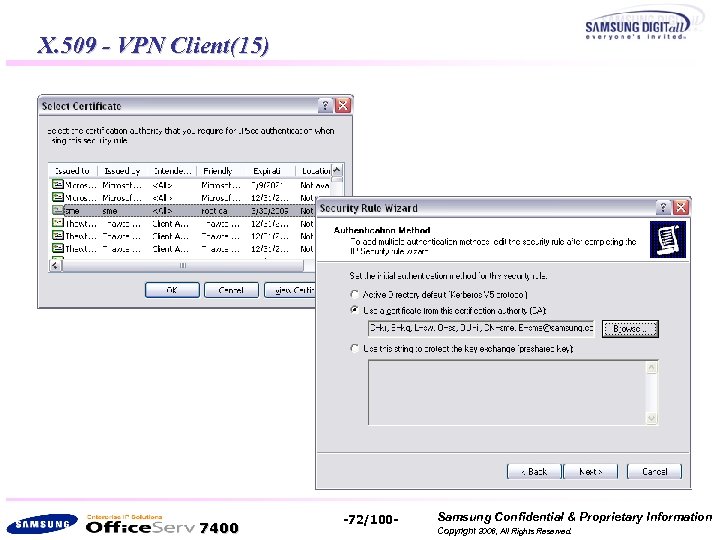 X. 509 - VPN Client(15) 7400 -72/100 - Samsung Confidential & Proprietary Information Copyright 2006, All Rights Reserved.
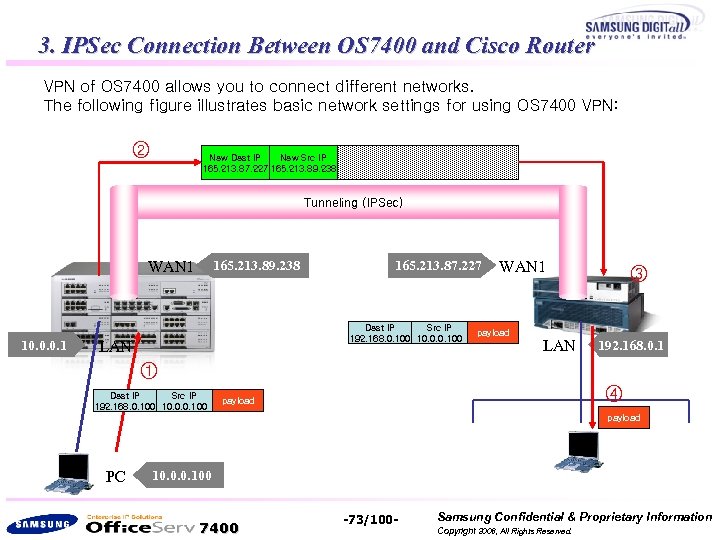 3. IPSec Connection Between OS 7400 and Cisco Router VPN of OS 7400 allows you to connect different networks. The following figure illustrates basic network settings for using OS 7400 VPN: ② Dest IP Src IP New Dest IP New Src IP 165. 213. 87. 227 165. 213. 89. 238 192. 168. 0. 100 10. 0. 0. 100 payload Tunneling (IPSec) WAN 1 10. 0. 0. 1 165. 213. 89. 238 165. 213. 87. 227 Dest IP Src IP 192. 168. 0. 100 10. 0. 0. 100 LAN WAN 1 payload LAN ③ 192. 168. 0. 1 ① Dest IP Src IP 192. 168. 0. 100 10. 0. 0. 100 ④ payload PC 10. 0. 0. 100 7400 -73/100 - Samsung Confidential & Proprietary Information Copyright 2006, All Rights Reserved.
 The above figure shows packet forwarding when making communications from PC (10. 0. 0. 100) to the target PC (192. 168. 0. 100) using VPN. 1. Cisco Router configuration 2. 1) NAT configure, create Access Rule for NAT, and add routing table 3. 2) Create Keys for IKE and IPSec, and create site-to-site VPN 4. 2. OS 7400 configuration 5. 1) Create connection Mod. 6. 2) Select Pre-Shared Authentication Method. 7. 3) Choose Phase 1 / Phase 2 parameters. 8. 4) running vpn and check status. 7400 -74/100 - Samsung Confidential & Proprietary Information Copyright 2006, All Rights Reserved.
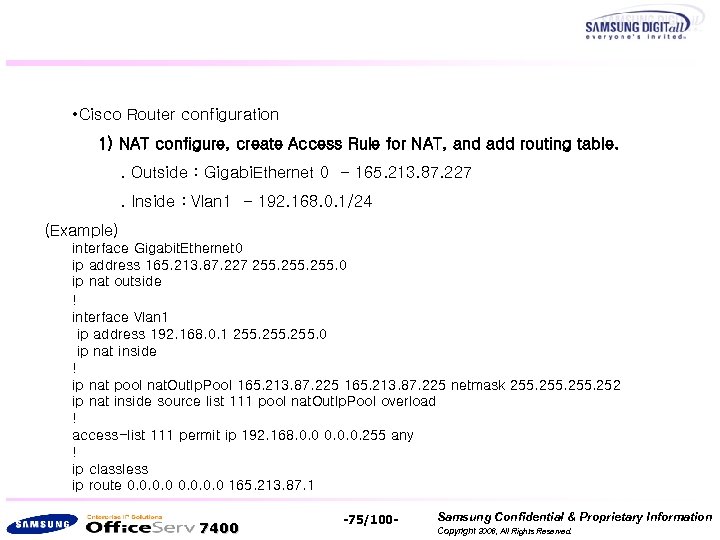 • Cisco Router configuration 1) NAT configure, create Access Rule for NAT, and add routing table. . Outside : Gigabi. Ethernet 0 - 165. 213. 87. 227. Inside : Vlan 1 - 192. 168. 0. 1/24 (Example) interface Gigabit. Ethernet 0 ip address 165. 213. 87. 227 255. 0 ip nat outside ! interface Vlan 1 ip address 192. 168. 0. 1 255. 0 ip nat inside ! ip nat pool nat. Out. Ip. Pool 165. 213. 87. 225 netmask 255. 252 ip nat inside source list 111 pool nat. Out. Ip. Pool overload ! access-list 111 permit ip 192. 168. 0. 0. 0. 255 any ! ip classless ip route 0. 0 165. 213. 87. 1 7400 -75/100 - Samsung Confidential & Proprietary Information Copyright 2006, All Rights Reserved.
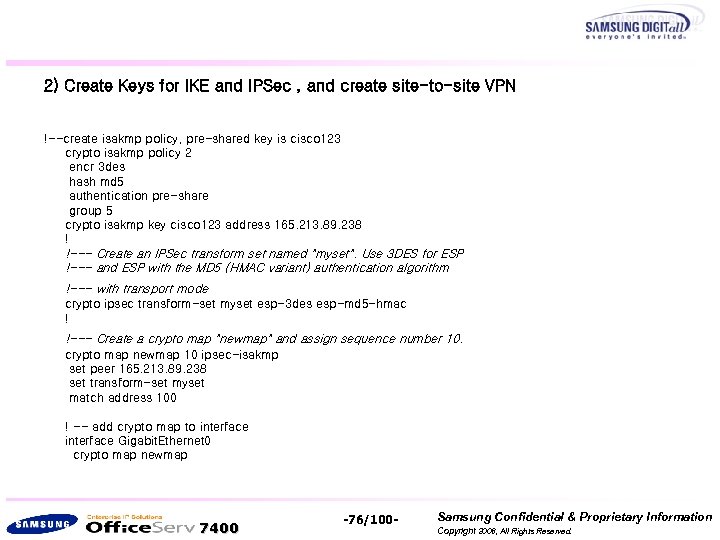 2) Create Keys for IKE and IPSec , and create site-to-site VPN !--create isakmp policy, pre-shared key is cisco 123 crypto isakmp policy 2 encr 3 des hash md 5 authentication pre-share group 5 crypto isakmp key cisco 123 address 165. 213. 89. 238 ! !--- Create an IPSec transform set named "myset". Use 3 DES for ESP !--- and ESP with the MD 5 (HMAC variant) authentication algorithm !--- with transport mode crypto ipsec transform-set myset esp-3 des esp-md 5 -hmac ! !--- Create a crypto map "newmap" and assign sequence number 10. crypto map newmap 10 ipsec-isakmp set peer 165. 213. 89. 238 set transform-set myset match address 100 ! -- add crypto map to interface Gigabit. Ethernet 0 crypto map newmap 7400 -76/100 - Samsung Confidential & Proprietary Information Copyright 2006, All Rights Reserved.
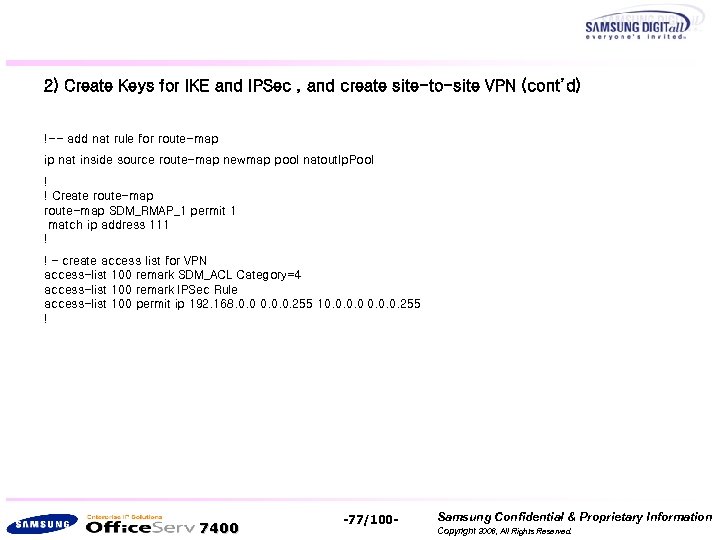 2) Create Keys for IKE and IPSec , and create site-to-site VPN (cont’d) !-- add nat rule for route-map ip nat inside source route-map newmap pool natout. Ip. Pool ! ! Create route-map SDM_RMAP_1 permit 1 match ip address 111 ! ! – create access list for VPN access-list 100 remark SDM_ACL Category=4 access-list 100 remark IPSec Rule access-list 100 permit ip 192. 168. 0. 0. 0. 255 10. 0. 255 ! 7400 -77/100 - Samsung Confidential & Proprietary Information Copyright 2006, All Rights Reserved.
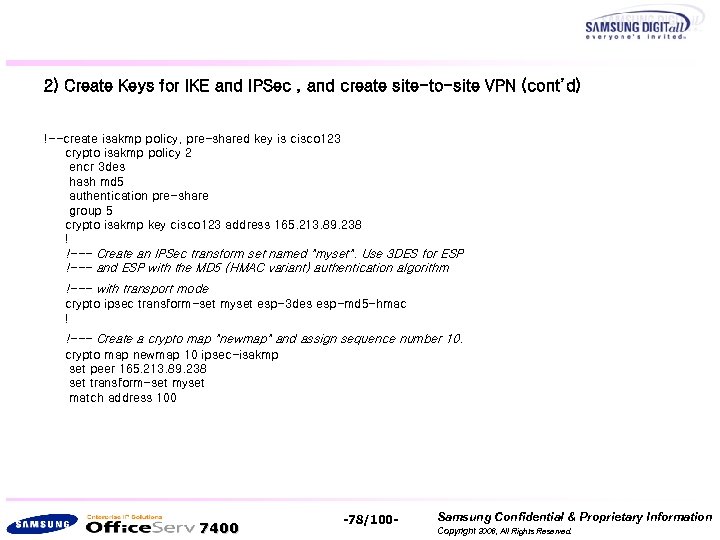 2) Create Keys for IKE and IPSec , and create site-to-site VPN (cont’d) !--create isakmp policy, pre-shared key is cisco 123 crypto isakmp policy 2 encr 3 des hash md 5 authentication pre-share group 5 crypto isakmp key cisco 123 address 165. 213. 89. 238 ! !--- Create an IPSec transform set named "myset". Use 3 DES for ESP !--- and ESP with the MD 5 (HMAC variant) authentication algorithm !--- with transport mode crypto ipsec transform-set myset esp-3 des esp-md 5 -hmac ! !--- Create a crypto map "newmap" and assign sequence number 10. crypto map newmap 10 ipsec-isakmp set peer 165. 213. 89. 238 set transform-set myset match address 100 7400 -78/100 - Samsung Confidential & Proprietary Information Copyright 2006, All Rights Reserved.
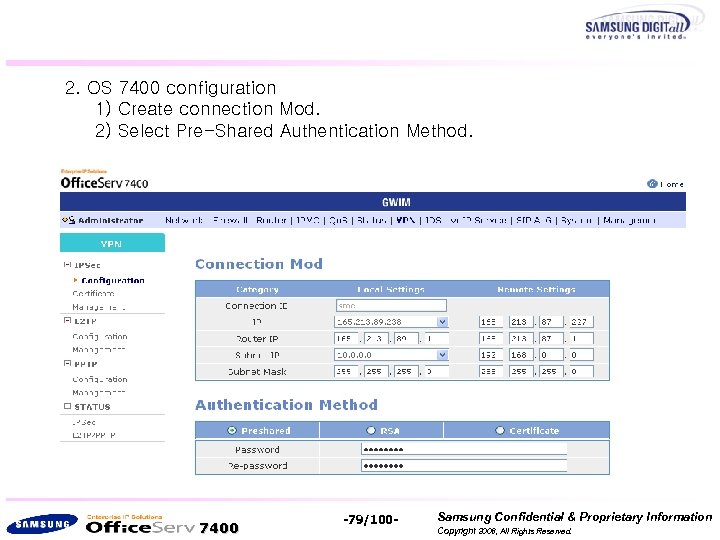 2. OS 7400 configuration 1) Create connection Mod. 2) Select Pre-Shared Authentication Method. 7400 -79/100 - Samsung Confidential & Proprietary Information Copyright 2006, All Rights Reserved.
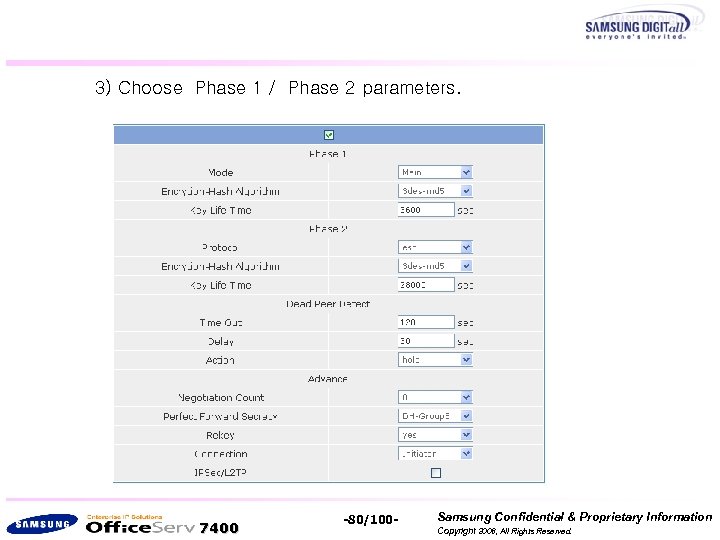 3) Choose Phase 1 / Phase 2 parameters. 7400 -80/100 - Samsung Confidential & Proprietary Information Copyright 2006, All Rights Reserved.
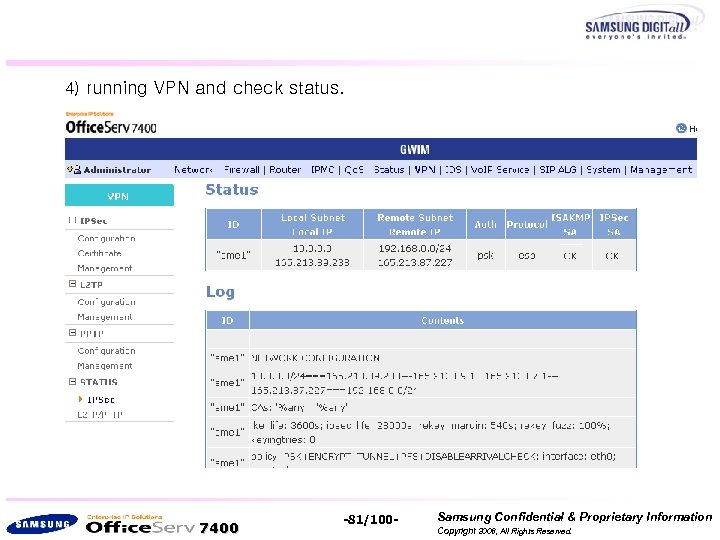 4) running VPN and check status. 7400 -81/100 - Samsung Confidential & Proprietary Information Copyright 2006, All Rights Reserved.
 PPTP Configuration 7400 -82/100 - Samsung Confidential & Proprietary Information Copyright 2006, All Rights Reserved.
![4. PPTP Configuration at OS 7400 System 1. Click [PPTP]->[Config] from the left menu.](https://present5.com/presentation/99f30b9113ae4c0b11672adc8dad5ba5/image-83.jpg "4. PPTP Configuration at OS 7400 System 1. Click [PPTP]->[Config] from the left menu.") 4. PPTP Configuration at OS 7400 System 1. Click [PPTP]->[Config] from the left menu. If you click the [Add] button to add a PPTP user, the window below will appear. Enter the user ID and password, and select a method of assigning a user IP (Auto/static). 7400 -83/100 - Samsung Confidential & Proprietary Information Copyright 2006, All Rights Reserved.
4. PPTP Configuration at OS 7400 System 1. Click [PPTP]->[Config] from the left menu. If you click the [Add] button to add a PPTP user, the window below will appear. Enter the user ID and password, and select a method of assigning a user IP (Auto/static). 7400 -83/100 - Samsung Confidential & Proprietary Information Copyright 2006, All Rights Reserved.
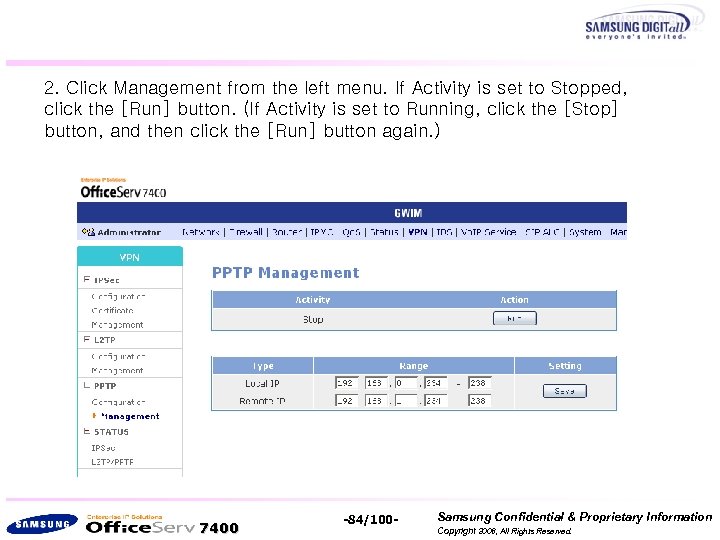 2. Click Management from the left menu. If Activity is set to Stopped, click the [Run] button. (If Activity is set to Running, click the [Stop] button, and then click the [Run] button again. ) 7400 -84/100 - Samsung Confidential & Proprietary Information Copyright 2006, All Rights Reserved.
![5. PPTP Configuration on PC (Windows 2000/XP) 1. Run [Start]->[Settings]->[Control Panel]->[Network Connections]-> [Create a](https://present5.com/presentation/99f30b9113ae4c0b11672adc8dad5ba5/image-85.jpg "5. PPTP Configuration on PC (Windows 2000/XP) 1. Run [Start]->[Settings]->[Control Panel]->[Network Connections]-> [Create a") 5. PPTP Configuration on PC (Windows 2000/XP) 1. Run [Start]->[Settings]->[Control Panel]->[Network Connections]-> [Create a new connection] on the Windows taskbar. Once the New Connection Wizard starts, click the [Next] button. 7400 -85/100 - Samsung Confidential & Proprietary Information Copyright 2006, All Rights Reserved.
5. PPTP Configuration on PC (Windows 2000/XP) 1. Run [Start]->[Settings]->[Control Panel]->[Network Connections]-> [Create a new connection] on the Windows taskbar. Once the New Connection Wizard starts, click the [Next] button. 7400 -85/100 - Samsung Confidential & Proprietary Information Copyright 2006, All Rights Reserved.
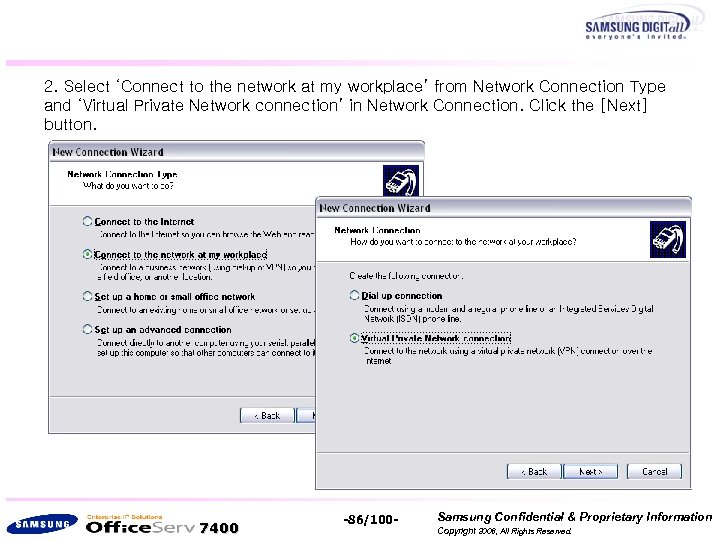 2. Select ‘Connect to the network at my workplace’ from Network Connection Type and ‘Virtual Private Network connection’ in Network Connection. Click the [Next] button. 7400 -86/100 - Samsung Confidential & Proprietary Information Copyright 2006, All Rights Reserved.
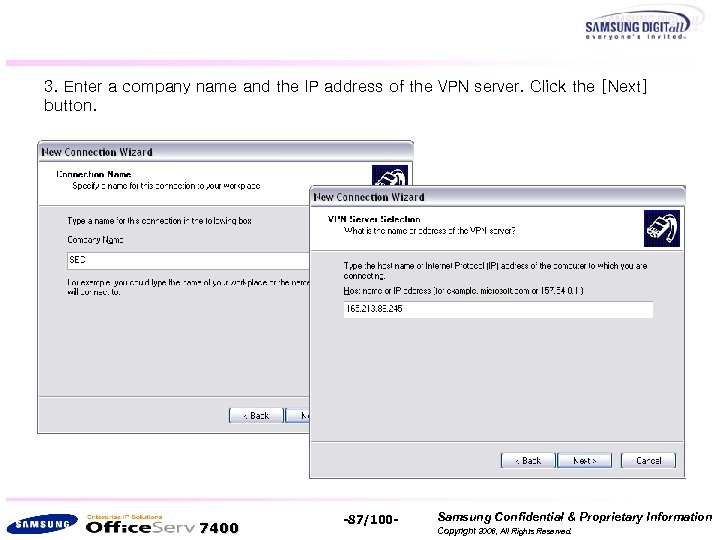 3. Enter a company name and the IP address of the VPN server. Click the [Next] button. 7400 -87/100 - Samsung Confidential & Proprietary Information Copyright 2006, All Rights Reserved.
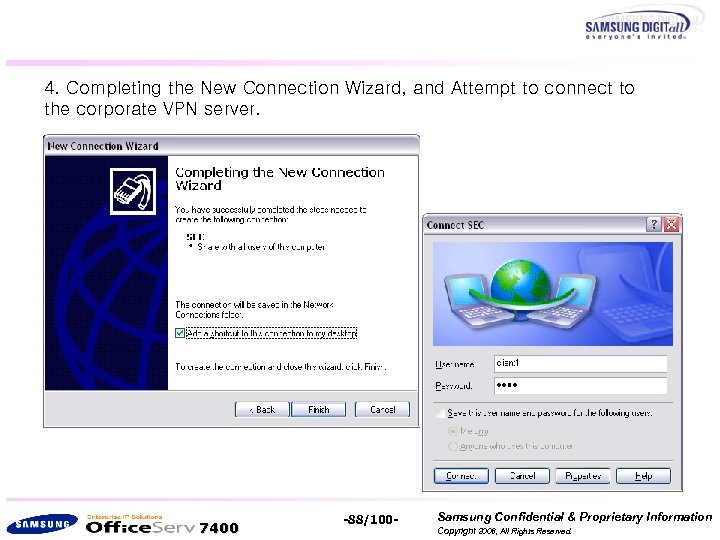 4. Completing the New Connection Wizard, and Attempt to connect to the corporate VPN server. 7400 -88/100 - Samsung Confidential & Proprietary Information Copyright 2006, All Rights Reserved.
 - Example (Vo. IP Service Using VPN) 7400 -89/100 - Samsung Confidential & Proprietary Information Copyright 2006, All Rights Reserved.
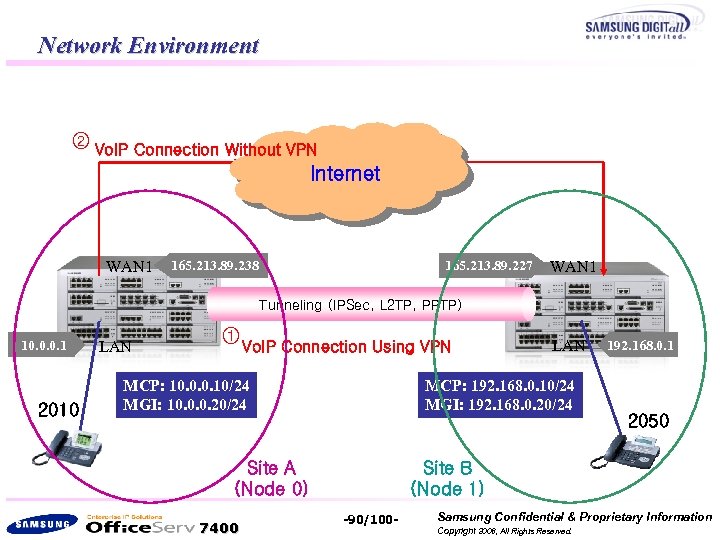 Network Environment ② Vo. IP Connection Without VPN Internet WAN 1 165. 213. 89. 238 165. 213. 89. 227 WAN 1 Tunneling (IPSec, L 2 TP, PPTP) 10. 0. 0. 1 2010 LAN ① Vo. IP Connection Using VPN MCP: 10. 0. 0. 10/24 MGI: 10. 0. 0. 20/24 MCP: 192. 168. 0. 10/24 MGI: 192. 168. 0. 20/24 Site A (Node 0) 7400 LAN 192. 168. 0. 1 2050 Site B (Node 1) -90/100 - Samsung Confidential & Proprietary Information Copyright 2006, All Rights Reserved.
![Conditions 1. Set NAT from [Firewall/Network] of GWIM. Then, set network information as shown](https://present5.com/presentation/99f30b9113ae4c0b11672adc8dad5ba5/image-91.jpg "Conditions 1. Set NAT from [Firewall/Network] of GWIM. Then, set network information as shown") Conditions 1. Set NAT from [Firewall/Network] of GWIM. Then, set network information as shown in the figure below. 2. Set the external port of MGI to No. 20000. 3. Pre-set static NAPT on MCP and MGI. 4. Set IPSec between Site A and Site B. E. g. ) Refer to the [Office. Serv 7400]Quick Install Guide(Vo. IP Service) file. 7400 -91/100 - Samsung Confidential & Proprietary Information Copyright 2006, All Rights Reserved.
Conditions 1. Set NAT from [Firewall/Network] of GWIM. Then, set network information as shown in the figure below. 2. Set the external port of MGI to No. 20000. 3. Pre-set static NAPT on MCP and MGI. 4. Set IPSec between Site A and Site B. E. g. ) Refer to the [Office. Serv 7400]Quick Install Guide(Vo. IP Service) file. 7400 -91/100 - Samsung Confidential & Proprietary Information Copyright 2006, All Rights Reserved.
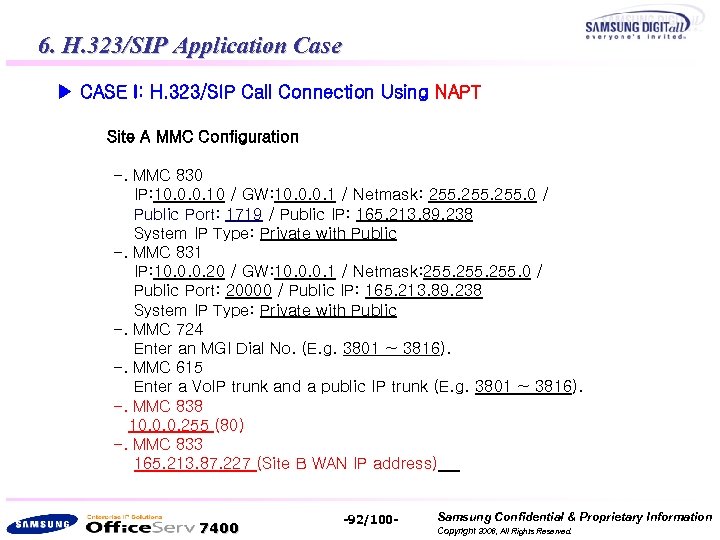 6. H. 323/SIP Application Case ▶ CASE I: H. 323/SIP Call Connection Using NAPT Site A MMC Configuration -. MMC 830 IP: 10. 0. 0. 10 / GW: 10. 0. 0. 1 / Netmask: 255. 0 / Public Port: 1719 / Public IP: 165. 213. 89. 238 System IP Type: Private with Public -. MMC 831 IP: 10. 0. 0. 20 / GW: 10. 0. 0. 1 / Netmask: 255. 0 / Public Port: 20000 / Public IP: 165. 213. 89. 238 System IP Type: Private with Public -. MMC 724 Enter an MGI Dial No. (E. g. 3801 ~ 3816). -. MMC 615 Enter a Vo. IP trunk and a public IP trunk (E. g. 3801 ~ 3816). -. MMC 838 10. 0. 0. 255 (80) -. MMC 833 165. 213. 87. 227 (Site B WAN IP address) 7400 -92/100 - Samsung Confidential & Proprietary Information Copyright 2006, All Rights Reserved.
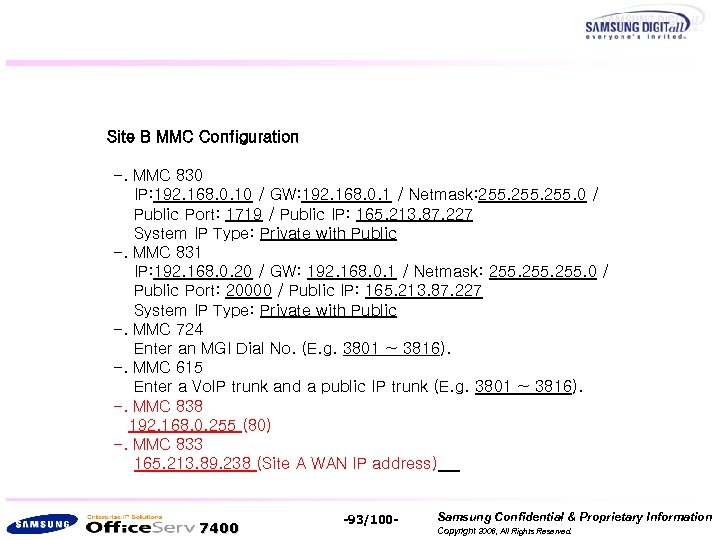 Site B MMC Configuration -. MMC 830 IP: 192. 168. 0. 10 / GW: 192. 168. 0. 1 / Netmask: 255. 0 / Public Port: 1719 / Public IP: 165. 213. 87. 227 System IP Type: Private with Public -. MMC 831 IP: 192. 168. 0. 20 / GW: 192. 168. 0. 1 / Netmask: 255. 0 / Public Port: 20000 / Public IP: 165. 213. 87. 227 System IP Type: Private with Public -. MMC 724 Enter an MGI Dial No. (E. g. 3801 ~ 3816). -. MMC 615 Enter a Vo. IP trunk and a public IP trunk (E. g. 3801 ~ 3816). -. MMC 838 192. 168. 0. 255 (80) -. MMC 833 165. 213. 89. 238 (Site A WAN IP address) 7400 -93/100 - Samsung Confidential & Proprietary Information Copyright 2006, All Rights Reserved.
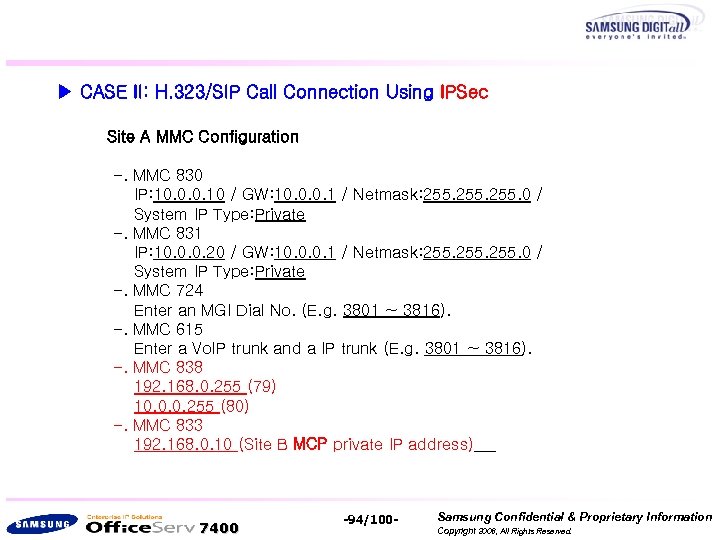 ▶ CASE II: H. 323/SIP Call Connection Using IPSec Site A MMC Configuration -. MMC 830 IP: 10. 0. 0. 10 / GW: 10. 0. 0. 1 / Netmask: 255. 0 / System IP Type: Private -. MMC 831 IP: 10. 0. 0. 20 / GW: 10. 0. 0. 1 / Netmask: 255. 0 / System IP Type: Private -. MMC 724 Enter an MGI Dial No. (E. g. 3801 ~ 3816). -. MMC 615 Enter a Vo. IP trunk and a IP trunk (E. g. 3801 ~ 3816). -. MMC 838 192. 168. 0. 255 (79) 10. 0. 0. 255 (80) -. MMC 833 192. 168. 0. 10 (Site B MCP private IP address) 7400 -94/100 - Samsung Confidential & Proprietary Information Copyright 2006, All Rights Reserved.
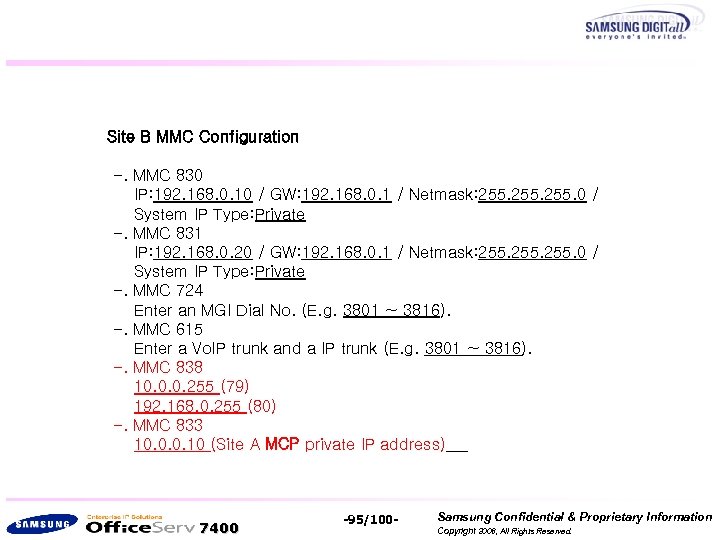 Site B MMC Configuration -. MMC 830 IP: 192. 168. 0. 10 / GW: 192. 168. 0. 1 / Netmask: 255. 0 / System IP Type: Private -. MMC 831 IP: 192. 168. 0. 20 / GW: 192. 168. 0. 1 / Netmask: 255. 0 / System IP Type: Private -. MMC 724 Enter an MGI Dial No. (E. g. 3801 ~ 3816). -. MMC 615 Enter a Vo. IP trunk and a IP trunk (E. g. 3801 ~ 3816). -. MMC 838 10. 0. 0. 255 (79) 192. 168. 0. 255 (80) -. MMC 833 10. 0. 0. 10 (Site A MCP private IP address) 7400 -95/100 - Samsung Confidential & Proprietary Information Copyright 2006, All Rights Reserved.
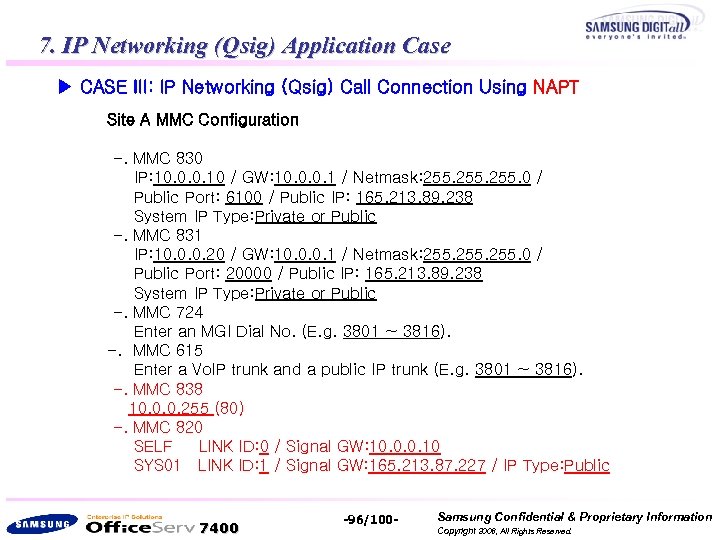 7. IP Networking (Qsig) Application Case ▶ CASE III: IP Networking (Qsig) Call Connection Using NAPT Site A MMC Configuration -. MMC 830 IP: 10. 0. 0. 10 / GW: 10. 0. 0. 1 / Netmask: 255. 0 / Public Port: 6100 / Public IP: 165. 213. 89. 238 System IP Type: Private or Public -. MMC 831 IP: 10. 0. 0. 20 / GW: 10. 0. 0. 1 / Netmask: 255. 0 / Public Port: 20000 / Public IP: 165. 213. 89. 238 System IP Type: Private or Public -. MMC 724 Enter an MGI Dial No. (E. g. 3801 ~ 3816). -. MMC 615 Enter a Vo. IP trunk and a public IP trunk (E. g. 3801 ~ 3816). -. MMC 838 10. 0. 0. 255 (80) -. MMC 820 SELF LINK ID: 0 / Signal GW: 10. 0. 0. 10 SYS 01 LINK ID: 1 / Signal GW: 165. 213. 87. 227 / IP Type: Public 7400 -96/100 - Samsung Confidential & Proprietary Information Copyright 2006, All Rights Reserved.
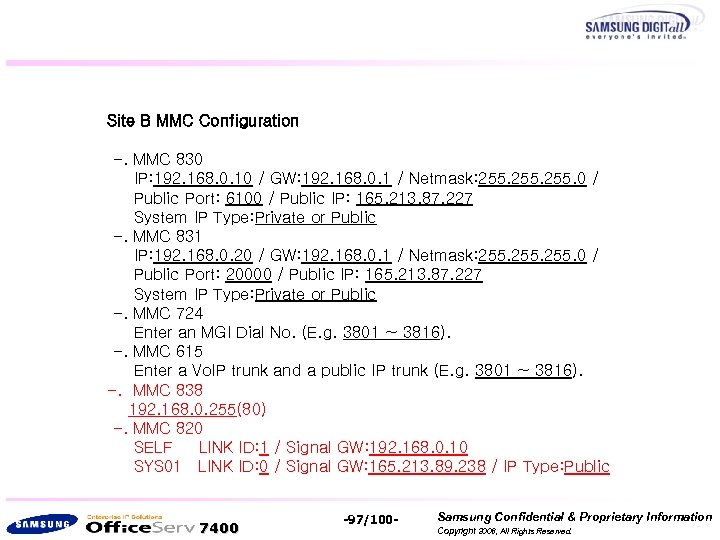 Site B MMC Configuration -. MMC 830 IP: 192. 168. 0. 10 / GW: 192. 168. 0. 1 / Netmask: 255. 0 / Public Port: 6100 / Public IP: 165. 213. 87. 227 System IP Type: Private or Public -. MMC 831 IP: 192. 168. 0. 20 / GW: 192. 168. 0. 1 / Netmask: 255. 0 / Public Port: 20000 / Public IP: 165. 213. 87. 227 System IP Type: Private or Public -. MMC 724 Enter an MGI Dial No. (E. g. 3801 ~ 3816). -. MMC 615 Enter a Vo. IP trunk and a public IP trunk (E. g. 3801 ~ 3816). -. MMC 838 192. 168. 0. 255(80) -. MMC 820 SELF LINK ID: 1 / Signal GW: 192. 168. 0. 10 SYS 01 LINK ID: 0 / Signal GW: 165. 213. 89. 238 / IP Type: Public 7400 -97/100 - Samsung Confidential & Proprietary Information Copyright 2006, All Rights Reserved.
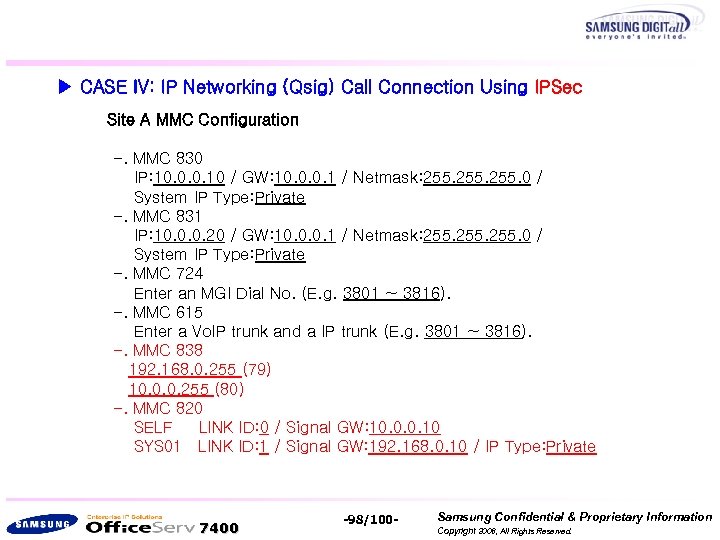 ▶ CASE IV: IP Networking (Qsig) Call Connection Using IPSec Site A MMC Configuration -. MMC 830 IP: 10. 0. 0. 10 / GW: 10. 0. 0. 1 / Netmask: 255. 0 / System IP Type: Private -. MMC 831 IP: 10. 0. 0. 20 / GW: 10. 0. 0. 1 / Netmask: 255. 0 / System IP Type: Private -. MMC 724 Enter an MGI Dial No. (E. g. 3801 ~ 3816). -. MMC 615 Enter a Vo. IP trunk and a IP trunk (E. g. 3801 ~ 3816). -. MMC 838 192. 168. 0. 255 (79) 10. 0. 0. 255 (80) -. MMC 820 SELF LINK ID: 0 / Signal GW: 10. 0. 0. 10 SYS 01 LINK ID: 1 / Signal GW: 192. 168. 0. 10 / IP Type: Private 7400 -98/100 - Samsung Confidential & Proprietary Information Copyright 2006, All Rights Reserved.
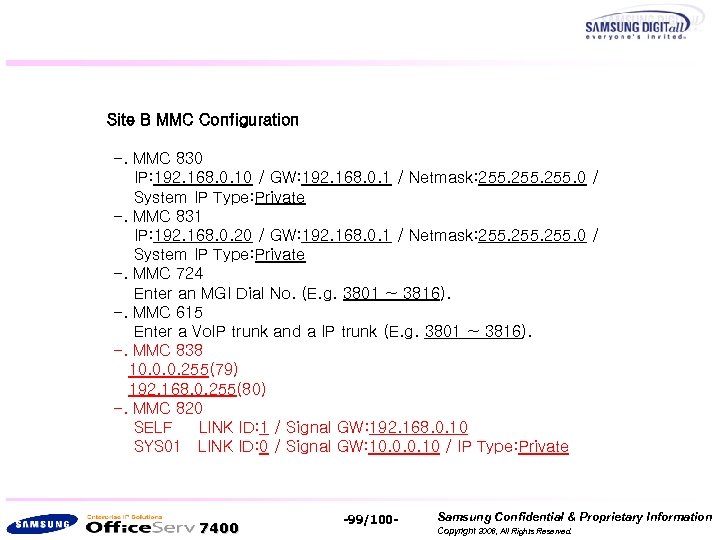 Site B MMC Configuration -. MMC 830 IP: 192. 168. 0. 10 / GW: 192. 168. 0. 1 / Netmask: 255. 0 / System IP Type: Private -. MMC 831 IP: 192. 168. 0. 20 / GW: 192. 168. 0. 1 / Netmask: 255. 0 / System IP Type: Private -. MMC 724 Enter an MGI Dial No. (E. g. 3801 ~ 3816). -. MMC 615 Enter a Vo. IP trunk and a IP trunk (E. g. 3801 ~ 3816). -. MMC 838 10. 0. 0. 255(79) 192. 168. 0. 255(80) -. MMC 820 SELF LINK ID: 1 / Signal GW: 192. 168. 0. 10 SYS 01 LINK ID: 0 / Signal GW: 10. 0. 0. 10 / IP Type: Private 7400 -99/100 - Samsung Confidential & Proprietary Information Copyright 2006, All Rights Reserved.
 Thank you ! 7400 -100/100 - Samsung Confidential & Proprietary Information Copyright 2006, All Rights Reserved.